#👽︱game-support
1 messages · Page 56 of 1
 autumn agate
yeah idk ive been trying all day today cuz ive been wanting to play with my friends
yeah
have you had any apps open in the background that you didnt have open before?
if not then fuck idk
no atleast i dont think so
hm
well im not gonna fan the flames any further, sorry i cant help you much
i bet you anything briar or yamza can help you out tho
oh ok
thanks
np
best of luck
 waxen pine
honestly everyone coming here about RLCraft seems to have the same issue and i have yet to see response as to a solution
😐
autumn agate
probably just an issue with the pack itself then
@autumn agate try updating the pack to an older version
ive tried that already doesnt seem to work either
like what you mean by that is like an older version of the modpack, right?
yeah
yeah i already tried that
hm
i've seen this before
with valhelsia 3
early on curseforge and valhelsia 3 didnt work together for some reason
you had to use gd launcher
maybe the same issue could be happening with rl craft but i can't imagine why
im trying to use gd launcher right now to see if it works
 tardy wyvern
hi
why overwolf library section dont open?
this been show up, but nothing else happen
and i have wait a lot
tardy wyvern
pls someone help me
 tardy anvil
So put this in #🥑-off-topic-chat to see if I wasn't the only one that had this problem because someone else seem to be dealing with the same issue. but just to cover my bases I'm posting it here.
I will run a modded instance through the launcher and it will come up with error code = 0 and in the logs it will say this:
"java.lang.RuntimeException: java.lang.RuntimeException: Patcher expecting non-empty class data file for net.minecraft.entity.passive.EntityOcelot, but received empty, your vanilla jar may be corrupt."
(This only happens on instances that run minecraft after the jungle update btw because it ran fine on 1.7.10)
I have restarted my computer, uninstall and reinstall minecraft, I even got the old roming file out of my old pc and replaced the new one nothing seems to work.
 quartz knot
hello. I wanted to make a modpack with curse forge i threw a bunch of mods into my profile then tried to run Minecraft and got an error. Thought it would be simple ig
so uhh help?
and this The game crashed whilst exception in server tick loop
Error: java.util.zip.ZipError: zip END header not found
Exit Code: -1
 golden muskBOT
- Click on the
 icon in the bottom left.
 - Click the

MinecraftTab. - Click
Changenext to theMinecraft Modding FolderOption. - Select the folder named
Install. - Delete it.
- Restart CurseForge App.
- It will ask to install MC again, do so.
- Play game.
NOTE: You will not lose any modpacks or worlds, These are saved in the Instances folder. DO NOT TOUCH THIS FOLDER OR YOU WILL LOSE EVERYTHING
 last pendant
tardy anvil
So put this in <#778026154677239824> to see if I wasn't the only one that had t...
last pendant
tardy anvil
So put this in <#778026154677239824> to see if I wasn't the only one that had t...
!mc-installfix
i believe that's what you want to do
last pendant
quartz knot
hello. I wanted to make a modpack with curse forge i threw a bunch of mods into ...
sounds like one of the files is corrupt, problem is without a full log there's no way to tell which (and still may not be able to with the log, buuuuuut....)
last pendant
quartz knot
hello. I wanted to make a modpack with curse forge i threw a bunch of mods into ...
?mc-logs
golden muskBOT
How to get a Minecraft log file.
Where to find the log on the CurseForge Client.
Right-click the modpack profile icon OR click the  button in the modpack profile.
Click 
Open Folder.
Open the logs folder.
Find the file called latest.log and drag it into discord.
quartz knot
🙂@last pendant
 frozen cloak
how to solve this message ?
 wild jewel
How did you get that message?
frozen cloak
by starting the rlcraft modpack
wild jewel
How did you try to start it?
frozen cloak
i download it and i press play
golden muskBOT
Known Issues with solutions or status of the issue.
Overwolf maintains a known list of issues here, some with solutions, others without.
http://support.curseforge.com/en/support/solutions/articles/9000196615-known-issues
frozen cloak
I'll look
last pendant
quartz knot
hello. I wanted to make a modpack with curse forge i threw a bunch of mods into ...
how did you install the mods?
 mint seal
so im just trying to make a modpack and yesterday i fixed an error with extreme reactors but now this https://pastebin.pl/view/492a66c6
Pastebin.pl is a website where you can store code/text online for a set period of time and share to anybody on earth
what does invalid id 4096 mean?
last pendant
mint seal
so im just trying to make a modpack and yesterday i fixed an error with extreme ...
first response for a google search: https://github.com/McJtyMods/XNet/issues/270#issuecomment-388649388

GitHub
Issue description: Game crashes after pre-initialization with a stack trace that shows it originated in XNet while registering ids in McJtyLib. Steps to reproduce: Run with current versions of McJt...
quartz knot
@last pendant with curseforge. could it be a minecraft launcher problem?
 woven viper
How do I get a mod in the Curseforge Launcher?
last pendant
quartz knot
<@330231092605091845> with curseforge. could it be a minecraft launcher problem?
no, it's definitely one of your mods installed.. it might have failed downloading or writing to disk? I'm not sure, google around and see what you find... Best I found was someone was using pirated mods and it was possibly infected or fake, or someone put a .zip file in their mods folder when it should have been the .jar file within
quartz knot
Alright ill check around :) thanks for your help !
 sage pier
woven viper
How do I get a mod in the Curseforge Launcher?
sage pier
woven viper
How do I get a mod in the Curseforge Launcher?
You have to create a custom profile, and then you can add mods to it. ^^
wild jewel
woven viper
How do I get a mod in the Curseforge Launcher?
!mc-installmods
golden muskBOT
How to install mods in CurseForge App.
- Click
+ Create Custom Profile - Name it, select the required Minecraft version, select the Forge version (usually the highest number), click
Create. - Click the profile icon.
- Click
Add New Content - Search and install the desired mods.
- Start the game!
How to install mods not on CurseForge.
- Right click the profile picture or Open the profile and click the Icon next to the play button.
- Click
Open Folder. - Drag the mod(s) into the
modsfolder. (Note: Some mods will require others, to run. Make sure to read the instructions for the mod!) - Start the game!
 woven viper
Can't you do that so that others can also play my mod?
wild jewel
Mod or modpack?
woven viper
mod
wild jewel
Everybody needs to do it with that, or their needs to be a modpack using the mod
woven viper
And how can I make my own mod into a modpack?
wild jewel
!mc-packshare
golden muskBOT
There are two ways to share a modpack you've made with others...
Export and Share - For Friends to Small Groups.
- Click the Icon for the modpack.
- Click the button next to play.
- Click

Export. - Select the files that should be included.
- Send the zip to the people that want it! They can follow the instructions in
!mc-installpackto install the pack!
Upload to Curseforge - For Public Release to Everyone.
This options will make your pack public to EVERYONE, it comes with extra requirements and will take some effort to set up.
- Go to here: https://www.curseforge.com/project/432/4471/create
- Fill out the information with a proper description of the pack. This should allow anyone to understand what the pack is.
- Click the Icon for the modpack in the CurseForge app.
- Click the button next to play.
- Click
Export. - Select the files that should be included.
- Open your Project you made on the CurseForge site and Upload the file you just made.
- Wait for Moderation & Sync so it can show up in the client! (See
!syncfor limitations)
last pendant
I think they're asking how to add a mod to curseforge for others to use in their modpacks?
last pendant
mmm... Maybe we're seeing it from a different perspective... I meant curseforge site, not app
@woven viper if I understand correctly, go here and click Create Project near the cover: https://www.curseforge.com/minecraft/mc-mods
 atomic fjord
Would support be the right place to ask for missing files?
wild jewel
atomic fjord
Would support be the right place to ask for missing files?
What kind of missing files?
atomic fjord
coz i tried to boot up skyfactory and i've gotten this
this was after a fresh reinstall from Curseforge
wild jewel
Try installing skyfactory again?
atomic fjord
If i just delete it from the folder entirely that should be fine right?
or is that what caused the issue in the first place, rather than using an uninstall tool
wild jewel
Right click the profile, hit delete?
atomic fjord
🤦♂️ why didn't i think of trying to right click rather than looking for a button
Sometimes I AM the End User.
sage pier
We all are at some point.
atomic fjord
well now it's installing properly again
Turning it on and off again, or some derivative thereoff works way too well
sage pier
Yup.
wild jewel
Welcome to IT
sage pier
Basics of troubleshooting x)
You just made me remember the entire IT Crowd series in the blink of an eye
Hello IT, have you tried turning it off and on again
atomic fjord
r/talesfromtechsupport
last pendant
hehe i watch that series at least 4 times a year 😄
atomic fjord
right, so here I am trying to install a skyfactory 4 server for me and one other friend, My PC should be capable enough of running it, but, what do i do from here? That warning has me a lil' spooked
wild jewel
Don't put the server in your minecraft directory
atomic fjord
aight, i made a folder on my desktop and put it there
now do i just run minecraft_server.1.12.2?
wild jewel
atomic fjord
now do i just run minecraft_server.1.12.2?
I don't know what else is in that folder
atomic fjord
i'm just gonna open a yt video and follow that
shoulda done that in the first place
wild jewel
Take a look at the "Server packs" that skyfactory 4 has, even contains a readme
 lusty otter
hey so I've been having this problem when trying to create mod packs, importing or installing from curse forge. I had this same problem on my PC but i fixed it with no idea how, when trying to recreate this on my mac and I cannot avoid the error, is there a way to fix this without installing java? I'm just worried to because of Javas bad security record...
wild jewel
lusty otter
hey so I've been having this problem when trying to create mod packs, importing ...
Game requires java though 🤷♂️
lusty otter
how could i have gotten it to work without it the first time tho? its just confusing to me :?
wild jewel
Check the settings, what launcher does it use?
lusty otter
native
wild jewel
Tried a full restart?
lusty otter
of the device?
wild jewel
atomic fjord
my friend just suggested hamachi
Still need a server for that, just removes the port-forwarding step
wild jewel
lusty otter
of the device?
Computer yes
wild jewel
!ticket-app
golden muskBOT
:bug: Reporting via the CurseForge App :bug:
-
Click the
 icon in the bottom left.
 -
Select

Open a Ticket. -
Fill out the form with accurate detailed information, "It doesn't work" isn't helpful! What exactly doesn't work and why doesn't it work should be easy to answer!
-
Make sure to upload your Overwolf logs with the
Upload Fileoption on the ticket, information on how to get these logs can be found here https://support.overwolf.com/en/support/solutions/articles/9000176827-how-to-get-your-overwolf-logs -
Submit!
 lusty otter
yeah cheers for the help mate @wild jewel , ive got one open already guess i am in for a bit of a wait
quartz knot
@last pendant I GOT IT WORKING THANKS FOR YOUR HELP
 ionic magnet
thaumcraft 6
does anyone knows how can i do that?: things that need to discovered
let The The Flux build
ionic magnet
atomic fjord
hamachi works fine
hamachi?
atomic fjord
it's a lan hosting system
wild jewel
What are you stuck on? What are you trying to get to?
ionic magnet
im stuck on The let The The Flux build. I cant do it. Does i need zu discover Something?
wild jewel
What is "The The Flux build"
That a quest or something?
wild jewel
 north geyser
I am having a problem where Minecraft is crashing before the mods even start to load does anyone know a possible fix?
When I try to create a new modpack curseforge says that “object reference not set to an instance of an object” does anyone know what this means?
wild jewel
north geyser
When I try to create a new modpack curseforge says that “object reference not se...
!ticket-app Means that you need to make a ticket
golden muskBOT
:bug: Reporting via the CurseForge App :bug:
-
Click the
icon in the bottom left. -
Select
Open a Ticket. -
Fill out the form with accurate detailed information, "It doesn't work" isn't helpful! What exactly doesn't work and why doesn't it work should be easy to answer!
-
Make sure to upload your Overwolf logs with the
Upload Fileoption on the ticket, information on how to get these logs can be found here https://support.overwolf.com/en/support/solutions/articles/9000176827-how-to-get-your-overwolf-logs -
Submit!
ionic magnet
atomic fjord
apparently not with the server
but someone does a Flux Rift on The Server where i playing
 wispy anchor
Is there a way to enable Ore spawns from the mod Alltheores in the Jamd (mining dim.) mod ? For some reason I have only vanilla ores in there
 whole kite
Anyone having problem with having a error message pop up when starting a(selfmade) Minecraft 1.12.2(forge) modpack, basically saying "Minecraft crashed Exit Code: 0"?
 summer grove
hello somone can help me about the mode All the Magic 1.12.2 when i try to open it Craftpresence shut down handler i tried to keep craftpresence out of ATM but it make it worth end the error code is "Process exited with code -1."
 fair frigate
I cant play Minecraft with the mod ice and fire and chisel me!!!
north geyser
wild jewel
!ticket-app Means that you need to make a ticket
Thank you
 scarlet belfry
doe someone is able tu run minecraft with forge on any mod?
played 6 hours ago but i kept having an error
 mystic tulip
Just opened app to update some addons for WOW and after refresh there were 4 items whit updates. Selecting update all or the individual update buttons gave me an error that said disconnected, check your connection status or something like that. After entering each item directly I was able to update there.
scarlet belfry
so now it will work?
 simple spindle
hi everyone, im new to the server, i do need some help. im trying to ad Stardew Valley to the curseforge Beta app. but it says its an invalid directory or unsupported game. got any idea how to fix that??
the app added WoW for me automaticly and i was able to add minecraft for some reason, didnt even know it was installed. but it doesnt work with stardew
mystic tulip
I think that might be one of the newly added games not ready for prime-time. They mentioned in the new update (announcements feed) "New games have been added to the supported list of games! They aren't quite ready for use yet as the whole process is being looked at, read more about in the E-Mail News Letter!"
simple spindle
well that sucks...
whole kite
scarlet belfry
doe someone is able tu run minecraft with forge on any mod?
jep, 1.12.2 works for me ^^
 smoky karma
My curseforge 'browse modpack' page is stuck on loading and doesn't ever actually load - also modpacks installed via the website don't load - what do i do?
autumn agate
When I try to download a mod I get the error: the specified path, file name, or both are too long
How do I fix this
 zealous tulip
I cant run stardew valley mods is it because its on steam
 sly geode
this is my wow profile when i click add ons in the client. the other picture is my curseforge. where are my add ons? i also cannot add any other add ons
 coral bluff
i've created my server but when i write "localhost" in server adress, it does that to me :
 scarlet shoal
oh so basically im online but it says it cant verify minecraft version and won load the mods i havent installed
 gaunt shard
zealous tulip
gaunt shard
zealous tulip
I cant run stardew valley mods is it because its on steam?
tardy anvil
last pendant
!mc-installfix
Thanks you, dude
 final kettle
I finally got curseforge to not hang up when trying to launch the launcher on my modpack, had to move the default curseforge directory to get it to work. but now I get crashes after the launcher switches to the game. Can anyone take a look at this and have an idea? https://pastebin.com/Zb7V0ux5
Pastebin
Pastebin.com is the number one paste tool since 2002. Pastebin is a website where you can store text online for a set period of time.
 fiery stream
hey i have a modded server and im on a modded dimension and every time i log on i crash, can anyone help?
 gaunt kestrel
For some reason I can’t seem to open RLCraft and I’ve been trying since last night. I’ve tried restarting the whole pc snd nothing works, can someone help?
 night hare
with what
wild jewel
 coarse bone
says cant verify my minecraft version
coarse bone
says cant verify my minecraft version
! mc-installfix
golden muskBOT
- Click on the icon in the bottom left.
- Click the
MinecraftTab. - Click
Changenext to theMinecraft Modding FolderOption. - Select the folder named
Install. - Delete it.
- Restart CurseForge App.
- It will ask to install MC again, do so.
- Play game.
NOTE: You will not lose any modpacks or worlds, These are saved in the Instances folder. DO NOT TOUCH THIS FOLDER OR YOU WILL LOSE EVERYTHING
scarlet shoal
ive done this and it doesnt work
wild jewel
scarlet shoal
ive done this and it doesnt work
What is your current path?
wild jewel
What is in front of that?
scarlet shoal
Users\FiercePC\
wild jewel
! ticket-app
golden muskBOT
:bug: Reporting via the CurseForge App :bug:
-
Click the
icon in the bottom left. -
Select
Open a Ticket. -
Fill out the form with accurate detailed information, "It doesn't work" isn't helpful! What exactly doesn't work and why doesn't it work should be easy to answer!
-
Make sure to upload your Overwolf logs with the
Upload Fileoption on the ticket, information on how to get these logs can be found here https://support.overwolf.com/en/support/solutions/articles/9000176827-how-to-get-your-overwolf-logs -
Submit!
coarse bone
how do i delete it? it just says select
nvm
it doesnt work
still cant play any modpacks even my own ones, or download something
scarlet shoal
i have the same issue bud
scarlet shoal
im waiting for a response, when i do ill make sure to dm u
coarse bone
suddenly it just poop cant find your version
scarlet shoal
same
scarlet shoal
after a whil they might like pop up but say no mods installed
wild jewel
scarlet shoal
ive been waiting a response for like almost 2 days
In their weekend yes
scarlet shoal
i asked thurday but ye thats fair i understand that its the weekend
scarlet shoal
i died on my mates server and it crashes and ended up like this
coarse bone
damn
i was just chilling making some modpacks and playing them then had to restart my computer and boom nothing works
scarlet shoal
so my death chest is floating underneath my fucking volcano base
coarse bone
oof
scarlet shoal
bc i was in an underwater cave and i crashed on one half and then boom
coarse bone
sucks
it sucks i was planing to play rlcraft with my gf and downloaded everything got it ready and now im just sitting like ._. ok
nothing works
 next terrace
Claycorp
scarlet shoal
rip my guy
wild jewel
@next terrace Doesn't help to poke a single person
next terrace
wtf
wild jewel
!status
golden muskBOT
It is 07:09PM on Saturday for CurseForge my dudes.
Project Moderation Time
Project/File moderation is done on Sunday - Thursday from 10am - 6pm GMT+2
This process is First in, First out. Thus files submitted late in the work day may not be checked until the next work day.
next terrace
ooooooooh
next terrace
it has been a day and nobody answered
scarlet shoal
chill
wild jewel
Because it is their weekend
scarlet shoal
its the weekend
next terrace
pf im an admin and i play or be online every damn day
even if its a lesson im still playing
wild jewel
next terrace
pf im an admin and i play or be online every damn day
And they are payed employees, you some kid
scarlet shoal
^
next terrace
so what
 iron flint
Sounds a bit obnoxious
wild jewel
next terrace
so what
You wait
scarlet shoal
have some patience
next terrace
i regret publishing my mod or beeing in this server or even talking to a mean guy
iron flint
Trolling?
wild jewel
Stop it all
 timber coyote
i have the same problem as Eerie ans Laundry Man with my modpacks for minecraft
scarlet shoal
a lot of people have that
next terrace
imagine beeing a mod
scarlet shoal
so we re waiting for the weekend to end so we can see if they can do anything ab it
scarlet shoal
they arent on
scarlet shoal
ye no one cares
next terrace
shut up gacha life fan
next terrace
i sayd nothin
wild jewel
next terrace
can somebody help
We can't approve your stuff, just wait till your file gets handled
scarlet shoal
jesus christ
timber coyote
me too
wild jewel
Stop complaining or get out
coarse bone
listen, my guy... you have to be patient, these people work hard anyway, for this community the least you can do is be patient and polite
scarlet shoal
and the curseforge people wanna relax on their weekend too
iron flint
He’s actually serious
coarse bone
the only thing you're getting now is people mad
next terrace
and publish
wild jewel
You guys aren't helping either
next terrace
eerie you arent helping me and neither you are helping anyone
scarlet shoal
how can i
next terrace
you are not helping timmy
scarlet shoal
?
next terrace
timmy did you eat the cookie..
iron flint
Suggestion, maybe talk in general?
wild jewel
next terrace
eerie you arent helping me and neither you are helping anyone
Goes first in, first out, nothing to do against that.
So stop asking
 raw echo
I need help
Curse forger had a update the most recent one and it dose not recognize that I had sky factory 4 installed. I don't want to have to start over
 slow bobcat
everytime i try to launch RLCraft is says code: 0 how do i fix this?
autumn agate
i keep getting this when i try to download valhelsia 3
 mystic thunder
I can't even install several MC modpacks as they say the same thing as rancid.
timber coyote
i have the same message when i want to create a modpacks for minecraft
and my modpacks were removing
mystic thunder
been this way for a couple days now
timber coyote
this morning for me
raw echo
My mod packs were removed as well. It says install install instead of play
 drowsy aspen
anyone got any idea how to fix this
wild jewel
!mc-path
golden muskBOT
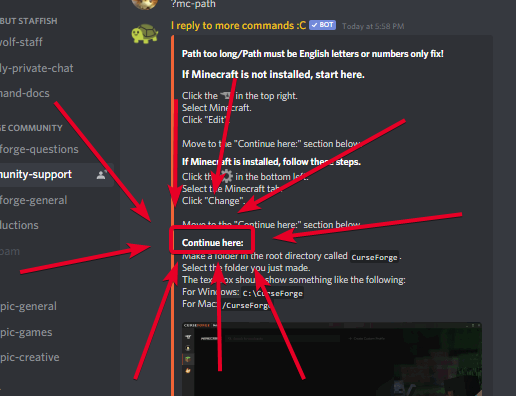
Path too long/Path must be English letters or numbers only fix!
If Minecraft is not installed, start here.
Click the  in the top right.
Select Minecraft.
Click "Edit".
Move to the "Continue here:" section below.
If Minecraft is installed, follow these steps.
Click the in the bottom left.
Select the Minecraft tab.
Click "Change".
Move to the "Continue here:" section below.
Continue here:
Make a folder in the root directory called CurseForge.
Select the folder you just made.
The text box should show something like the following:
For Windows: C:\CurseForge
For Mac: /CurseForge
 drowsy aspen
thanks
mystic thunder
tbh it looks to affect the 1.16.5 version modpacks for the "Object reference not set to an instance of an object" issue that i have seen
autumn agate
my friend just installed it no problem i just dont know why mine is different
coarse bone
same goes for me
it just doesn't find my mc version or path to download and nothing helped i did everything
 tacit yacht
A friend of mine is having the same problem, he does the same steps but it doesnt seem to work
coarse bone
everything got deleted for me aswell
autumn agate
nevermind my curse forge was just out of date
coarse bone
how do i update curseforge?
raw echo
The curse forge update deleted my sky factory 4 mod pack I had installed. That was 3 months of work. If I reinstall the modpack I'm going to have to start over. I really don't want to do that especially if this is going to be a problem every time curse forger updates. My curseforge updated automatically
 last parcel
check the backup folder
raw echo
How do I access that?
last parcel
go to where you installed curseforge
raw echo
Im in my minecraft folder through curse forge and it had a folder called instances and it had skyfactory 4
last parcel
backup folder would be next to instances
raw echo
I see downloads, Install, and instances
last parcel
nope, its one folder back
raw echo
wait never mind I find the wolrd in my backups
if I just click the file would that launch the world?
tacit yacht
Is the client version 0.162.0.13 having the directory issue?
 fallen nova
what mods are good
last parcel
no clicking a world file doesnt launch a world...
fallen nova
for mc
last parcel
you need to put it back in the proper location
raw echo
which would be curse forge folder or minecraft?
last parcel
instance folder, where the saves go
tacit yacht
a friend of mine that is having the directory issue has the client ersion 0.162.0.13 version and I have 0.162.0.8
raw echo
so then If i re install the modpack on curse forge the world would be there?
last parcel
no, you need to copy it into the correct location
first off, you should copy it somewhere else so the backup doesnt get deleted by whatever you are doing
then reinstall the pack and put the save folder where it belongs
raw echo
okay I will do that. Thank u in advance for the help I appreciate it
 humble gate
Can somebody help? Every time I open the curseforge overwolf launcher thing this error happens. I've reinstalled it, but once I restart my computer the error starts happening again.
Well, apparently opening curseforge from the overwolf app store itself doesn't give this error
Help would still be helpful though lol
wild jewel
!ticket-app
golden muskBOT
:bug: Reporting via the CurseForge App :bug:
-
Click the
icon in the bottom left. -
Select
Open a Ticket. -
Fill out the form with accurate detailed information, "It doesn't work" isn't helpful! What exactly doesn't work and why doesn't it work should be easy to answer!
-
Make sure to upload your Overwolf logs with the
Upload Fileoption on the ticket, information on how to get these logs can be found here https://support.overwolf.com/en/support/solutions/articles/9000176827-how-to-get-your-overwolf-logs -
Submit!
humble gate
Alright then
tacit yacht
A friend of mine is having the directory issue and he did all the steps but it doesnt seem to work for him
is there any other solution to this problem
tardy wyvern
pls someone help me curseforge still dont open
 subtle mesa
Does someone know how to fix "an exception occurred during a webclient request" when downloading mods?
it cancels when its halfway through the mods
@everyone
last parcel
when you think your problem is worth pinging 16 thousand people 🤔
subtle mesa
I think its fine lol
tardy wyvern
subtle mesa
@everyone
how dare you
tardy wyvern
last parcel
when you think your problem is worth pinging 16 thousand people 🤔
my problem is worth to pinging 16 thousand people but i dont do that because i dont want any trouble
tardy wyvern
pls im trying for like 4 days for open curseforge but nothing seem work
(I NOT PING BECAUSE IM NOT STUPID)
tardy wyvern
subtle mesa
chill
wut
last parcel
well for one it says in the rules not to, and also people are much less willing to help you if you choose to ignore the rules
subtle mesa
oh well my fault
 thin lark
!help
golden muskBOT
╰( ͡° ͜ʖ ͡° )つ──☆*:・゚ *˜”*°•.˜”*°• Many Help •°*”˜.•°*”˜* <:curselit:796985620550385705>
Please provide a description of your issue with as much detail as possible. If you have an issue with a mod or modpack, tell us the name. Explain what you can see happening. Be specific!
 Tell us what is happening, we already know it "doesn't work".
Avoid using words like "it", tell us exactly what "it" is.
Don't assume anyone knows what you are talking about, be specific.
Tell us what you expected to happen.
Provide screenshots or video if possible.
Provide a log if possible. ?mc-log
subtle mesa
Here ill show you what mine does really quick just incase anyone else has this problem later
autumn agate
cant download it in the launcher
the version dont show up
hi, im using cursegorfe and install in "valhelsia 2" and click play but doesn't joining
or does the latest version never show up and will get downloaded when you hit download and only the older versions are listed in versions?
doesn't creating ticket ?
subtle mesa
Ok I tried uninstalling cursefore and overwolf and then i tried downloading it back and well it wont let me
 jade zodiac
Just passing along that the point generation has stopped again. I know it "misses" days and that it's stated it will distribute the missed days but damn, I don't remember Twitch never missing this many days in such a small time frame.
 winter fossil
 twin pollen
what mod is doing this? If needed I can list the mods I'm using in a .txt file ||(I'm new here so if I'm saying this in the wrong chat please redirect me)||
 jagged nimbus
Hey, what does this button exactly do?
twin pollen
if for some reason your pack won't launch, that will most likely fix it
jagged nimbus
okay so I got a crash when joining a Terraforged world, do I go to the discord for that in order to get help?
waxen pine
is that a glob of dropped items? is there a tooltip?
waxen pine
i'm assuming the repair profile isn't a glob of items
twin pollen
oh
well I have no clue what it is
if I go into it it does nothing
the particles there are also permanent unless if I do F3 + T
and it just keeps generating more particles
waxen pine
all that pic looks like is a poorly implemented bush
what modpack? custom? what mods?
twin pollen
custom
this is what it's doing right now
I have 38 mods
I put all the mods I use in here
I also can't replicate this glitch in another world
 frozen flame
Hi, I'd like some help for a friend who can't manage to install curseforg. When he starts to install it it marks extraction of the files but it doesn't finish. How can I do this?
waxen pine
it's possible it's the 'clumps' mod - try deleting it and reloading
twin pollen
ok
nope
also
the other really strange thing
it moves each time I reload the world
just a bit
twin pollen
I've done that before to no avail
thin lark
If in 1.12.
twin pollen
1.16.4
 cold verge
how do you switch over to a different graphics card in any curseforge modpack
im getting 12fps bc llvmpipe is being utilized instead of my nvidia gpu
and going to nvidias control panel to get java to use my graphics card isnt working
twin pollen
minecraft just prefers cpu's and stuff over gpu's
also I created a duplicate of my world to try removing mods one by one to find out what the problem is
cold verge
nope its defiantly curseforge
i went to the minecraft launcher whilst in curse forge and it shows that im not using the gpu
llvmpipe
also its not the cpu that im having problems with my cpu shows in the menu
waxen pine
allocate at least 4-6GB or ram in curseforge launch settings
cold verge
no its not that issue either
ive had this issue for years and still couldnt find what the issue was
im allocating 8gigs wouldnt matter if i decreased it
 sonic burrow
Hey guys
When I searched for Sky Factory 4 it said that I can download it from curseforge, but I can't find it
 green fable
Curseforge wont open anymods for me in minecraft?
waxen pine
modpack installations won't load?
green fable
yes it did work a couple monfths ago, but now whenever I open any modpacks that i have downloaded wont open and just bring to the minecraft luancher with the last verison I had open.
waxen pine
@sonic burrow can't find it where? because it's on curseforge.com and in the 'browse modpacks' section of curseforge app
sonic burrow
Is it called Sky Factory 4 then? Because I can't find it
sonic burrow
waxen pine
one. word.
waxen pine
yw
twin pollen
I was doing some testing and opon loading minecraft it gave me a creepy splash message "xEobard_Thawne is you"
oh well
back to testing
green fable
I reinstalled cursedforge no luck onto re down loading the luancher.
autumn agate
hey can I have some help with curseforge/overwolf launcher please?
It keeps saying "object reference not found or something like that" when I try to create a custom profile?!
I would really appreciate it thank you
green fable
still no luck
waxen pine
@cold verge launched my own modpack via curseforge launcher and GD launcher - both utilize graphics card. don't know what to tell ya
 violet ibex
So a question to the minecraft part: I can't seem to be able to create a new profile. Even after a reinstall. I always get this error. I've been trying to figure out how to fix this for a while now..
cold verge
i know it works for everyone else
twin pollen
maybe just look it up on google
cold verge
like this is a very rare issue
waxen pine
check your driver for updates?
cold verge
its not that either
i checked earlier today
the issue is that its not using my rtx 3080 card
its using llvmpipe
waxen pine
tried updating java 64 bit to latest versin?
cold verge
if i wasnt using curseforge as a modpack loader and i just used vanilla launcher or any other launcher even for modpacks it all works
twin pollen
just look up "why is minecraft using llvmpipe" and see what pops up
twin pollen
oh
cold verge
there is actually almost no forums that say how to fix it
twin pollen
try to re download the modpack
cold verge
i had someone direct me to my nvidia control panel to switch my graphics card for java that didnt work
and so the issue is soemthing with curseforge
twin pollen
twin pollen
try to re download the modpack
^
waxen pine
cursory searches on google indicate it's becuase an nvidia driver may not be installed 'correctly'
cold verge
ive tried all of these issues, i had a 2years to figure this one out still couldnt
either because i didnt have the motivation to try again or i switched over to a different modloader and even that worked better than curseforge
if my nvidia graphics card wasnt installed correctly than nothing would work functionally
im only having issues with the program
waxen pine
if you have nothing to lose i'd suggest uninstalling and reinstalling the latest nvidia driver set
twin pollen
welp
I just found the mod continuously generating particles
it's
Immersive portals
I would have not thought that mod was causing the problem
welp time to make a report on their github
cold verge
@waxen pine it has nothing to do with my gpu and as proof it didnt work on my last graphics card because it wasnt utilizing my graphics cards
waxen pine
[SOLVED] Hi everyone, I bought an Nvidia graphics card from last week (GT 1030). But when I open Minecraft 1.16.2, the pc works with Gallium 0.4 on llvmpipe ...
fwiw
golden muskBOT
- Click on the icon in the bottom left.
- Click the
MinecraftTab. - Click
Changenext to theMinecraft Modding FolderOption. - Select the folder named
Install. - Delete it.
- Restart CurseForge App.
- It will ask to install MC again, do so.
- Play game.
NOTE: You will not lose any modpacks or worlds, These are saved in the Instances folder. DO NOT TOUCH THIS FOLDER OR YOU WILL LOSE EVERYTHING
green fable
Im confused about this, sorry
waxen pine
it instructs you to delete the minecraft core files that the launcher uses and have them auto-reinstall next time you press play
it purges bad info and cures alot of the problems baked into the launcher right now
green fable
ok ty
cold verge
it would display that option above settings
last pendant
jagged nimbus
Hey, what does this button exactly do?
Been curious myself, anyone with underlying knowledge know?
raw echo
I need help
curse forge recent update made it so that I had to reinstall my mod pack. when I did my world was not there. where do I put the back up file of that world so I can play it again?
its mine craft skyfactory 4
thin lark
It probably fully removed the world file.
raw echo
I have the back up of the world I just dont know what folder to put it in to get it to show up when i launch skyfactory
thin lark
Saves folder.
raw echo
would that be the instances one?
thin lark
Instances -> SkyFactory -> Saves.
raw echo
I got it in there. is there anything else I need to do to get it to work?
 tidal lagoon
Hey guys, I have this problem when I try to launch a minecraft modpack I have previously played - it keeps saying "This app cant run on your pc". Ive tried to follow some instructions from a previous thread, but it still doesnt work, anyone who knows how to fix this? 🙂
raw echo
do I need to delete and re install it? or can just close out of everything and re launch it?
thin lark
tidal lagoon
Hey guys, I have this problem when I try to launch a minecraft modpack I have pr...
Rightclick the Installation file then hit Run as Admin.
thin lark
raw echo
do I need to delete and re install it? or can just close out of everything and r...
No. Just play like normal.
raw echo
I will see if that works. thank u!!!
thin lark
raw echo
do I need to delete and re install it? or can just close out of everything and r...
Also, if you deleted it then this would be for nothing, since the world would be gone.
tidal lagoon
thin lark
Rightclick the Installation file then hit Run as Admin.
Might be me, but I cant seem to find the "Installation file" 😅
raw echo
I did not delete the world lol
thin lark
Ik.
thin lark
tidal lagoon
Might be me, but I cant seem to find the "Installation file" 😅
The file that you get when you download the app from the website.
tidal lagoon
thin lark
The file that you get when you download the app from the website.
Thanks I found it now, thought you meant some of the modpack files - I've just done it but it seems to have the same problem
thin lark
Well then your parents must've put some parentale control junk on your PC to prevent .exe files from running.
tidal lagoon
thin lark
Well then your parents must've put some parentale control junk on your PC to pre...
I sure as hell hope not, I would be a bit freaked to have them come into my apartment to do that
thin lark
I'm just taking a guess...
tidal lagoon
thin lark
I'm just taking a guess...
No offense taken 😛
thin lark
Idefk at this point tbh. Sorry.
tidal lagoon
No problem, thanks for the help though 🙂
thin lark
Trying to help at least, np.
tidal lagoon
Ill bump i ever figure out how to fix it 😄
raw echo
magma that unfortunate did not work
 exotic mountain
does curseforge not support long names?
i keep getting "the file name must be 260 in length"
last parcel
?mc-path
golden muskBOT
Path too long/Path must be English letters or numbers only fix!
If Minecraft is not installed, start here.
Click the in the top right.
Select Minecraft.
Click "Edit".
Move to the "Continue here:" section below.
If Minecraft is installed, follow these steps.
Click the in the bottom left.
Select the Minecraft tab.
Click "Change".
Move to the "Continue here:" section below.
Continue here:
Make a folder in the root directory called CurseForge.
Select the folder you just made.
The text box should show something like the following:
For Windows: C:\CurseForge
For Mac: /CurseForge
raw echo
I had that issue.I dont think it supports long names. If you shorten the file name you should be good. thats what i did
 solemn matrix
I need help
i get error code 363180 when installing rl craft
it says missing addon
how do i fix?
?363180
?help
golden muskBOT
╰( ͡° ͜ʖ ͡° )つ──☆*:・゚ *˜”*°•.˜”*°• Many Help •°*”˜.•°*”˜* <:curselit:796985620550385705>
Please provide a description of your issue with as much detail as possible. If you have an issue with a mod or modpack, tell us the name. Explain what you can see happening. Be specific!
Tell us what is happening, we already know it "doesn't work".
Avoid using words like "it", tell us exactly what "it" is.
Don't assume anyone knows what you are talking about, be specific.
Tell us what you expected to happen.
Provide screenshots or video if possible.
Provide a log if possible. ?mc-log
exotic mountain
last parcel
?mc-path
ty
solemn matrix
?mc-log
golden muskBOT
How to get a Minecraft log file.
Where to find the log on the CurseForge Client.
Right-click the modpack profile icon OR click the button in the modpack profile.
Click Open Folder.
Open the logs folder.
Find the file called latest.log and drag it into discord.
last parcel
try restarting your pc
subtle mesa
does anyone know how to fix curseforge client It pulls up and error saying "an exception occurred during a webclient request"
 sudden wharf
So did something change or am I just dumb? Trying to create my own modpack to play singleplayer. But all of a sudden the search function is telling me those mods dont exsist and removed some from my folder? These are big ones to like Tinkers Construct and Thaumcraft 6. Trying to download these files independently then put them into the pack I am given the prompt of manifest file not found and it stops. Did I change versions or something by accident? No idea what is going on.
 blazing ether
hi
solemn matrix
I need help i was installing rl craft and when it was supposed to lunch mc it said missing dependency that was no longer avaible addon id: 363180
solemn matrix
which addon i need
 past oracle
its stuck at 42%
 potent tartan
@past oracle your internet is too slow to download it in the time curseforge allows to download a mod
gonna have to wait for them to increase the time before it stops downloading a mod
 errant kettle
I need help
in the curseforge launcher
when i write the name of the mod that i want it doesnt show up
thin lark
It's all the high detail models n' such in it I think.
subtle mesa
It keeps showing this error at the bottom help
subtle mesa
last parcel
<https://support.overwolf.com/en/support/solutions/articles/9000196615-curseforg...
I had no other tabs or anything open how could it still say that?
golden muskBOT
:bug: Reporting via the CurseForge App :bug:
-
Click the
icon in the bottom left. -
Select
Open a Ticket. -
Fill out the form with accurate detailed information, "It doesn't work" isn't helpful! What exactly doesn't work and why doesn't it work should be easy to answer!
-
Make sure to upload your Overwolf logs with the
Upload Fileoption on the ticket, information on how to get these logs can be found here https://support.overwolf.com/en/support/solutions/articles/9000176827-how-to-get-your-overwolf-logs -
Submit!
last parcel
same issue really
subtle mesa
ok ill try again and let you know
Bruh I did it again and it pulled the "an exception occurred during a webclient request" again idk why
i have curse forge up only
nothing else
I even closed discord
subtle mesa
last parcel
same issue really
and deleted it with task manager.
 pliant oar
curse forge is mega buggeddddddddddddddd rn
autumn agate
I'm not able to open "one billion emc challenge" it crashes before it starts to load
pliant oar
at least your mods don't delete themselves assimilate into the launcher and also you have ghosts mods that are not in the folder
my entire pack has been deleted
last parcel
did you check the folder for it?
pliant oar
they were gone yes lol
 empty oyster
hi when i try to play the mods on curse forge they wont open
 manic burrow
why cant i import a custom made pack]
last parcel
manic burrow
why cant i import a custom made pack]
should i try to guess, or would you like to explain what's happening?
manic burrow
i press import click the pack and nothing happens after that
 humble anchor
I have many dozens of modpacks installed. I've been one of the lucky few to transition from Twitch. Now, every time I launch, I have to wait for the hours long "forging your library" every time, even if I've added nothing new. Is there a way to prevent this or skip it? For instance, can it simply remember the library once it closes? If I have just a couple hours to play, I don't want to spend it all forging a library.
last parcel
manic burrow
i press import click the pack and nothing happens after that
then the pack was not made correctly. how was it made?
last parcel
with the export feature
manic burrow
its a flans based pack
last parcel
humble anchor
I have many dozens of modpacks installed. I've been one of the lucky few to tra...
this was supposed to be improved in the latest client update. i suggest sending a ticket & logs on it
golden muskBOT
:bug: Reporting via the CurseForge App :bug:
-
Click the
icon in the bottom left. -
Select
Open a Ticket. -
Fill out the form with accurate detailed information, "It doesn't work" isn't helpful! What exactly doesn't work and why doesn't it work should be easy to answer!
-
Make sure to upload your Overwolf logs with the
Upload Fileoption on the ticket, information on how to get these logs can be found here https://support.overwolf.com/en/support/solutions/articles/9000176827-how-to-get-your-overwolf-logs -
Submit!
last parcel
?ticket-app
manic burrow
heres what inside the whole pack when its imported to another launcher
and when loaded no mods
 hexed nova
awww man, again the issue with the daily points on the Reward store 🙁
last parcel
manic burrow
open the zip and show that
last parcel
that is not compatible with curseforge
manic burrow
can you sugggest a different way this can be done
last parcel
other than manually, no
 glad sparrow
how do i use forage abilty on pixelmon
manic burrow
how do i do it manually
last parcel
no idea
 mossy ivy
someone please help me, i m trying to run any mod on curse forge and it just says. "writing launch profiles" for a second and then it goes blank?
glad sparrow
?ticket-app
golden muskBOT
:bug: Reporting via the CurseForge App :bug:
-
Click the
icon in the bottom left. -
Select
Open a Ticket. -
Fill out the form with accurate detailed information, "It doesn't work" isn't helpful! What exactly doesn't work and why doesn't it work should be easy to answer!
-
Make sure to upload your Overwolf logs with the
Upload Fileoption on the ticket, information on how to get these logs can be found here https://support.overwolf.com/en/support/solutions/articles/9000176827-how-to-get-your-overwolf-logs -
Submit!
manic burrow
do you know the correct way to do it
last parcel
mossy ivy
someone please help me, i m trying to run any mod on curse forge and it just say...
?mc-installfix
golden muskBOT
- Click on the icon in the bottom left.
- Click the
MinecraftTab. - Click
Changenext to theMinecraft Modding FolderOption. - Select the folder named
Install. - Delete it.
- Restart CurseForge App.
- It will ask to install MC again, do so.
- Play game.
NOTE: You will not lose any modpacks or worlds, These are saved in the Instances folder. DO NOT TOUCH THIS FOLDER OR YOU WILL LOSE EVERYTHING
humble anchor
How do I update Cursforge?
last parcel
manic burrow
do you know the correct way to do it
i have no idea how to do anything with it. look for instructions where ever you got it from.
humble anchor
Or is 0.166.1.4 the current version?
last parcel
dont ping me. i have no clue what you're asking
mossy ivy
last parcel
?mc-installfix
it still doesnt work
it just says the same thing after i did that
what can i do
last parcel
?mc-path
golden muskBOT
Path too long/Path must be English letters or numbers only fix!
If Minecraft is not installed, start here.
Click the in the top right.
Select Minecraft.
Click "Edit".
Move to the "Continue here:" section below.
If Minecraft is installed, follow these steps.
Click the in the bottom left.
Select the Minecraft tab.
Click "Change".
Move to the "Continue here:" section below.
Continue here:
Make a folder in the root directory called CurseForge.
Select the folder you just made.
The text box should show something like the following:
For Windows: C:\CurseForge
For Mac: /CurseForge
last parcel
the next step
last parcel
read
last parcel
..why do i still bother
mossy ivy
?
last parcel
 balmy mesa
Hi I have a question
Sorry I've tried everything that I know to fix this problem so when I am loading a custom modpack for Minecraft, Minecraft runs it loads up and then crashes almost immediately
mossy ivy
what does this mean
@last parcel
it still doesnt work i think
what can i do am i screwed
last parcel
cant help with that one. try restarting your pc. if that doesnt work make a ticket
mossy ivy
btw i was running mods fine before
last parcel
?ticket-app
golden muskBOT
:bug: Reporting via the CurseForge App :bug:
-
Click the
icon in the bottom left. -
Select
Open a Ticket. -
Fill out the form with accurate detailed information, "It doesn't work" isn't helpful! What exactly doesn't work and why doesn't it work should be easy to answer!
-
Make sure to upload your Overwolf logs with the
Upload Fileoption on the ticket, information on how to get these logs can be found here https://support.overwolf.com/en/support/solutions/articles/9000176827-how-to-get-your-overwolf-logs -
Submit!
mossy ivy
then i tried downloading another one
and then everyting stopped workng
for the ticket it says minecraft isnt a game option
humble anchor
I forced the whole overwolf and curseforge to uninstall. Then reinstalled both. The "forging your library" issue is resolved, and now the version reads 0.167.1.5, instead of the older version. Thank you very much for letting me know it was a version issue. I still don't know how to force Curseforge update by normal means, but that seemed to work.
last parcel
just restarting it forces the update
jagged nimbus
can't help with my issue? :/
last parcel
no idea, you need to send the log
jagged nimbus
golden muskBOT
How to get a Minecraft log file.
Where to find the log on the CurseForge Client.
Right-click the modpack profile icon OR click the button in the modpack profile.
Click Open Folder.
Open the logs folder.
Find the file called latest.log and drag it into discord.
last parcel
send the crash report too
jagged nimbus
should be it?
jagged nimbus
Okay, I'll look into it, thanks :o
 glad sky
I've been having an issue that when I open Stoneblock 2 or any modpack, it doesn't open the Minecraft launcher. When I click play it loads then doesn't bring up anything
 obtuse elm
why is is that when i download overwolf it deletes itself
 silent jacinth
can anyone explain why i cant run any of my old or new mods from the forge? this keeps popping up saying it crashes but doesnt say how or where
obtuse elm
your lucky i cant even open mine it just delets itself
silent jacinth
idk if id call it lucky
obtuse elm
yeah i just wish mine would load
silent jacinth
seeing if sending this will help with someone understanding why my games arent loading past the starting screen
 oblique monolith
Quick q, there are mods that show up on the curseforge website (such as electroblob's wizardry, but many others as well) but do not show up when I search for them on the curseforge desktop app. Is this an intended function? Or am I doing something wrong?
 bold gale
i own a skyblock server and everything was fine but today it started not letting my friends join but i can join on my internal and not my external
oblique monolith
Twilight forest is another example. Is it a licensing issue? A personal choice of hte modmakers? Or is something messed up with my settings?
autumn agate
CF is really slow atm, anything wrong?
 ember dagger
i downloaded rlcraft, i also have the normal launcher but after trying to go back to normal minecraft the launcher wouldnt open, nor would rlcraft
is tehre a fix for htis
i click play and it says writing launnch profile and then stops
and the play button appears again
 near jolt
 placid rock
Whats wrong? I tried to play Pixelmon with friends and I got denied
waxen pine
@oblique monolith you know mods will only show in search if there is an version for an exact minecraft version? Although once and awhile mod authors haven't clicked the right association boxes
 amber mason
Mo'Creatures mobs are invisible, any solutions?
ive tried file renaming, downloading off curseforge, downloading off the mo'creatures site
waxen pine
Any shader programs being used like optifine?
amber mason
I do have optifine, is that it?
waxen pine
Try taking it off
amber mason
alright
waxen pine
Optifine breaks a LOT of things.
 compact merlin
hello, can we set up servers using curseforge mods?
amber mason
waxen pine
Optifine breaks a LOT of things.
yea, didnt work
waxen pine
?mc-installfix
golden muskBOT
- Click on the icon in the bottom left.
- Click the
MinecraftTab. - Click
Changenext to theMinecraft Modding FolderOption. - Select the folder named
Install. - Delete it.
- Restart CurseForge App.
- It will ask to install MC again, do so.
- Play game.
NOTE: You will not lose any modpacks or worlds, These are saved in the Instances folder. DO NOT TOUCH THIS FOLDER OR YOU WILL LOSE EVERYTHING
waxen pine
@compact merlin yes on your own hardware or somewhere else hosted you pay to stick the server files
compact merlin
do you know any i could use?
i was going to use logmein hamachi but i decided not to
compact merlin
is forge a server hoster? i saw a video of people using that to put in mods to servers
 old kestrel
waxen pine
old kestrel
waxen pine
No Forge is the mod loader system/file
waxen pine
There are a few lesser used mod loader systems like Fabric and other brand x
compact merlin
oh ok i have fabric
waxen pine
I actually don't think fabric can do servers yet because it's in development lol
compact merlin
ohh ok
waxen pine
I may jjlust not be up to speed
compact merlin
if you don't mind could you help me with trying to make a modded server?
waxen pine
On personal pc you mean?
waxen pine
Eh like 4gb ram to spare is ok-ish
waxen pine
If interested you can download my own server pack and look at the readme file
compact merlin
16 gb of ram sorry
waxen pine
I wrote some instructions, better than most ship with imho. The only difficult thing is figuring out how your own router goes to do port forwarding
waxen pine
https://www.curseforge.com/minecraft/modpacks/the-briar-patch/files/3164824 basically unzip that, read the readme, edit the start script file
Or just look at as an example
compact merlin
do you mind vcing and explaining? sorry it's just pretty confusing i'm not sure what a lot of these terms mean
waxen pine
@old kestrel do the mc-installfix above
old kestrel
ok
waxen pine
Sorry cant in a busy place - but there are vids explaining. Also check out like I said my own pack zip's readme. I wrote it assuming low previous knowledge
compact merlin
wait so is the zip file like a server maker? idk what's going on
waxen pine
You don't use launcher programs - is entirely separate. Server packs are the whole lot of server files zipped up
compact merlin
ahh i'm so confused
 dark marten
waxen pine
dark marten
waxen pine
So if you were to want to run a server - download a server pack zip file, unzip it to a folder, and run it with the start script file
compact merlin
am i also able to use a server maker?
autumn agate
i was searching the command's format
compact merlin
or do i use both?
waxen pine
? A server is run on a computer. Yours, someone on the web you pay to host, whatever
compact merlin
oh ok sorry
 thorny inlet
Hey would someone be able to help me? I have the Curseforge app and am trying to run a Modpack and its just.. not working? I'm willing to share my screen to show the problem since im not 100% sure how to describe it but any help would be appreciated!
oblique monolith
waxen pine
<@340304642552627210> you know mods will only show in search if there is an vers...
I didn't know that, thank you! The only other way to find mods is just browsing? Cause I assume certain mods without updates would still work in newer versions as long as they don't interact with new mechanics?
 nova basalt
ok i have video evidence of the problem now
i havent been able to play for a couple days now cause of this
 red spruce
!mc-log
golden muskBOT
How to get a Minecraft log file.
Where to find the log on the CurseForge Client.
Right-click the modpack profile icon OR click the button in the modpack profile.
Click Open Folder.
Open the logs folder.
Find the file called latest.log and drag it into discord.
 vagrant leaf
Is skyfactory available to play?
nova basalt
red spruce
 errant canopy
i need help
errant canopy
i need help
your going to have to wait for people to get to you just also whats your problem its faster to respond then just i need help
red spruce
send the crash report
errant canopy
here?
red spruce
yes
errant canopy
this one
 uneven cloud
I need help with a custom modpack... It just keeps giving me Error Code 0
I have zero clue why it keeps crashing and if you say to make a new profile I already tried that.
last parcel
uneven cloud
I need help with a custom modpack... It just keeps giving me Error Code 0
?mc-log
golden muskBOT
How to get a Minecraft log file.
Where to find the log on the CurseForge Client.
Right-click the modpack profile icon OR click the button in the modpack profile.
Click Open Folder.
Open the logs folder.
Find the file called latest.log and drag it into discord.
uneven cloud
red spruce
errant canopy
any clue winrar
try allocating more ram to rl craft
errant canopy
hm
last parcel
uneven cloud
if you have vanillafix, remove it. if not i dont know. something is messing with mixins
errant canopy
red spruce
try allocating more ram to rl craft
how
do i have to download some stuff?
uneven cloud
last parcel
if you have vanillafix, remove it. if not i dont know. something is messing with...
I knew it had to be that I already deleted vanillafix and it still doesnt work? Is there anyway to fully remove a mod? also that's odd since I made a new profile and I never downloaded vanillafix
red spruce
errant canopy
do i have to download some stuff?
no
last parcel
uneven cloud
I knew it had to be that I already deleted vanillafix and it still doesnt work? ...
its something else then, doesnt specify.
errant canopy
red spruce
no
then?
uneven cloud
last parcel
its something else then, doesnt specify.
oh well uh
red spruce
on cruse forge click the settings gear in the bottom right
then click minecraft
scroll down to java setting then drag the slider to at least 4000Mb
keep in mind the amount of ram you have also matters when dragging the slider
 daring rock
can i ask general questions related to performance here?
daring rock
that's ur, this channel
so i guess i'll jsut get it out then
So i'm aware that RAM can be an issue on minecraft, i'm aware that there's a heap that needs to be dumped at a certain percentage, however im getting an annoying issue where mine seems to dump early i think, and then obviously lag spikes
waxen pine
@oblique monolith by searching curseforge.com
daring rock
oblique monolith
@waxen pine thank you so much. im slowly realizing my stupidity. i understand enough to figure the rest out now it hink
daring rock
I have the create 101 modpack and a few extra's but my RAM of which i have allocated 6G seems to dump at 81%
waxen pine
No problem
daring rock
it's usually meant to be somewhere around 90 and sometimes it will work but only on rare occasions
of course i don't want to keep upping the amount of assigned RAM
waxen pine
Some mods gobble ram
daring rock
yeah but sometimes it's fine
waxen pine
Depends how f that's the issue or entities
daring rock
yesterday it did the sme thing and it just randomly started working after a few restarts
 eager sand
I have a friend who doesn't have the "curseforge" folder
how in the world does that happen
autumn agate
Can anyone help me with an error I get on curseforge when trying to download a mod? It says: The specified path, file name, or both are too long.
eager sand
mcoste I had this issue as well, It resolved itself after I uninstalled and reinstalled curseforge
autumn agate
eager sand
mcoste I had this issue as well, It resolved itself after I uninstalled and rein...
I just tried this and it didnt work, thanks tho
daring rock
so like
is 85 mods a lot? i guess it depends on the mods being used but there's only like 4-6 really complex ones in there
oblique monolith
that is a great question, i didnt think there was a limit to the number of mods you could download
waxen pine
It's fine - my pack has appx 142 and runs fine on 6gb
oblique monolith
ok, nice! thank you
waxen pine
But yeah depends on how intense they are
I specifically make sure I don't include junk ones that give memory creep issues
Or let's say 1000s of extra textures
daring rock
hmm
journeymap and quark are two others that could be like that maybe?
i can't play with optifine because of the former
the other two numbers aren't important right?
nova basalt
so what about me?
its fine if i’m too late, i can just send a ticket but any help is appreciated
daring rock
so
apparently the default jvm arguments are shit
my friend recommended i put this in and it worked im fairly sure
-Dsun.rmi.dgc.server.gcInterval=2147483646
-XX:+UnlockExperimentalVMOptions
-XX:G1NewSizePercent=20
-XX:G1ReservePercent=20
-XX:MaxGCPauseMillis=50
-XX:G1HeapRegionSize=32M``` frail remnant
!status
golden muskBOT
It is 07:31AM on Sunday for CurseForge my dudes.
Project Moderation Time
Project/File moderation is done on Sunday - Thursday from 10am - 6pm GMT+2
This process is First in, First out. Thus files submitted late in the work day may not be checked until the next work day.
autumn agate
The game crashed whilst unexpected error
Error: java.lang.VerifyError: Bad type on operand stack
Exit Code: -1
PLS REPLY
external mod - optifine HD_UG6
waxen pine
Optifine = crashing software that sometimes shades things
 pure bramble
uhh my game crashed while playing 1.12.2
and gave me exit code 0
this is the latest log https://pastebin.pl/view/0c89b560
last pendant
that times out for me can you just drop the log here
 wary leaf
anyone know how to fix could not verify minecraft version error
golden muskBOT
- Click on the icon in the bottom left.
- Click the
MinecraftTab. - Click
Changenext to theMinecraft Modding FolderOption. - Select the folder named
Install. - Delete it.
- Restart CurseForge App.
- It will ask to install MC again, do so.
- Play game.
NOTE: You will not lose any modpacks or worlds, These are saved in the Instances folder. DO NOT TOUCH THIS FOLDER OR YOU WILL LOSE EVERYTHING
 pearl atlas
Does anyone know why my pixelmon is crashing everytime i try to load it from the curseforge launcher?
 errant nest
my friend is trying to open modpacks in the curseforge launcher but when he clicks "play" the mc launcher doesn't appear. it appears in task manager but never appears on the desktop. We've tried restarting everything, other modpacks nothing is working.
 wild prairie
i have lapitos galactic craft downloaded but when i press play the launcher does not open at all
 blazing quartz
Guys, the launcher refuses to install a modpack, the error says that the file must have less than 260 character, and the directory less than 248
 ocean falcon
Hi i when i play modspack sometimes it just frezes and crashes my game
 covert tree
give more ram
ocean falcon
on the curseforge app @covert tree ?
covert tree
ocean falcon
on the curseforge app <@!406753690276331533> ?
yes, settings > minecraft > allocated memory
covert tree
well maybe it's too much then
ocean falcon
now at 12288
covert tree
check the task manager of your OS
ocean falcon
OS?
covert tree
to see how much you can give without it affecting other programs
operating system, I don't know if you use windows, mac, linux
ocean falcon
Windows
covert tree
ctrl+shift+esc, then performance and look at memory section
give only as much as you can see "free" there
ocean falcon
Is there some way to see if that is to little
covert tree
depends on what the crash says
ocean falcon
It just feezes for some time then go with a white screen saying end the process
covert tree
okay, in that case
go to cf, pick the modpack, click play
in minecraft launcher, select settings and there "open output log on running minecraft" or something
then when it crashes, send the text that has red background
 keen jacinth
Whenever I try to play Stoneblock 2 it stops responding whenever its finalizing the game or whenever its trying to load the mods a second time (idk why it numbers it 2) I still havent been able to find a fix and even when I press repair profile it still fails to fix it please send help
LOGS
ocean falcon
Sometimes it takes like 15 minutes for it to crash
keen jacinth
NOW IT HAPPENED WITH PROJECT OZONE 3
 eager current
any surport on
i need some help
cause whenever i try and play a modpack it says couldnt load laucher core
timber coyote
me i just delete curseforge and download it again and now my modpacks works
eager current
i have tried that
timber coyote
and nothing happened
eager current
nope says the same
deleted my minecraft and tried it again and says the same aswell
autumn agate
Hello!
eager current
hi
autumn agate
Me and my friends are trying to host a FTB Revalation server and one of my friends is having problems with downloading the mod.
eager current
idk im having problems of my own
autumn agate
When he downloads it and presses play on the minecraft launcher using the mod settings it says "Error 0"
And that the game failed to launch.

 eager current
can somone help me pls
eager current
sure
i need some help
cause whenever i try and play a modpack it says couldnt load laucher core
 limber rover
protip: when you describe your problem consider using descriptive words instead of it
pure bramble
oh i dont know anything about it sorry
 timber imp
maybe u need more ram for mod
 elder vapor
This XML file does not appear to have any style information associated with it. The document tree is shown below. when i try to download windows verison
timber imp
u have og mc?
timber imp
do u have curse installed?
 long trench
how to morph
timber imp
button left of #
elder vapor
i got to the overwolf website and click the down link for windows and brings a window up saying that error.
long trench
morph mod cars and guns mod
elder vapor
i was using the twitch launcher until now
elder vapor
nvermind after my 6th attempt the link worked sorry for the inconvience
 blissful sage
im downloading on 1.6.4 and my mods are not showing up in the mods menu any ideas
plz
 subtle tinsel
Forestry crash
Can someone tell me the reason
I can keep playing
But something is wrong with forestry
 jovial lantern
Hello - maybe i can find some help here.
i'm trying to sync my wow addons via curseforge between notebook and desktop.
the problem is: i can't login to twitch from my laptop, because the window isn't loading 😦
wild jewel
jovial lantern
Hello - maybe i can find some help here.
i'm trying to sync my wow addons via cu...
Is sync there already then?
jovial lantern
wild jewel
Is sync there already then?
If i click "sync" the window with the twitch-login opens..... and nothing happens. i have to login to twitch to sync with my account.
autumn agate
https://www.curseforge.com/minecraft/modpacks/nebis-horror-pack <---my pack wont auto download
 wind quarry
Hello, I need some help with the CurseForge Launcher. It seems that the modpack SkyFactory 4 wasn't completed or something happened during the mods downloading because it's telling me in version 4.0.8 I require some extra mods, and when I want to change the modpack version to 4.2.2, it's telling that a certain doesn't exist or wasn't added.
wild jewel
jovial lantern
If i click "sync" the window with the twitch-login opens..... and nothing happen...
Not sure if that addon sync is active
wild jewel
autumn agate
https://www.curseforge.com/minecraft/modpacks/nebis-horror-pack <---my pack won...
!sync
golden muskBOT
Sync and your Project.
CurseForge REQUIRE a project to have one file marked Released on them for the projects to show up in search. Otherwise only Direct links to the project work.
Files can take a while to show up in the app. If your files still have not shown up either your project is new and you have yet to mark a file as Release or there is issues with the sync system making it slow.
golden muskBOT
- Click on the icon in the bottom left.
- Click the
MinecraftTab. - Click
Changenext to theMinecraft Modding FolderOption. - Select the folder named
Install. - Delete it.
- Restart CurseForge App.
- It will ask to install MC again, do so.
- Play game.
NOTE: You will not lose any modpacks or worlds, These are saved in the Instances folder. DO NOT TOUCH THIS FOLDER OR YOU WILL LOSE EVERYTHING
 regal notch
its still broke
wild jewel
! ticket-app
golden muskBOT
:bug: Reporting via the CurseForge App :bug:
-
Click the
icon in the bottom left. -
Select
Open a Ticket. -
Fill out the form with accurate detailed information, "It doesn't work" isn't helpful! What exactly doesn't work and why doesn't it work should be easy to answer!
-
Make sure to upload your Overwolf logs with the
Upload Fileoption on the ticket, information on how to get these logs can be found here https://support.overwolf.com/en/support/solutions/articles/9000176827-how-to-get-your-overwolf-logs -
Submit!
regal notch
]ok#
 open crag
loaded Stoneblock2 this morning and it loaded me into the basic starter room with all of my side rooms missing, my smeltery missing, all my trunks missing but inventory scattered in piles around the room.....Anyone else have this issue?
It also seemed to take an extra long time to load this morning....
subtle tinsel
subtle tinsel
Forestry crash
Im still waiting
open crag
And now all of my inventory has disappeared other than what I had in my personal inventory, as well as a Small crate which had been there earlier.....I am soooo not happy......
 brisk phoenix
When i try and download Curseforge and i agree to all the things i need nothing shows up and i dont know how to fix it
last parcel
subtle tinsel
Im still waiting
gunna be waiting a long time then since the dev for that mod isnt here to answer you
regal notch
?Mc-log
golden muskBOT
How to get a Minecraft log file.
Where to find the log on the CurseForge Client.
Right-click the modpack profile icon OR click the button in the modpack profile.
Click Open Folder.
Open the logs folder.
Find the file called latest.log and drag it into discord.
regal notch
error 0
subtle tinsel
last parcel
gunna be waiting a long time then since the dev for that mod isnt here to answer...
Maybe you can undersgand what happened
last parcel
nope
 maiden zenith
Is curseforge down for a bit? My mod seems to be stuck at under review status for more than a day now..it usually takes a few mins to approve
 wicked oasis
What does this error mean? I'm trying to import a custom modpack for Minecraft a friend made, but it stops downloading at about 22 out of 78 and gives me this error. Is there anything I can do to fix it?
regal notch
try again
wicked oasis
I have multiple times. I've even reinstalled CurseForge but it gives me the same thing. And when I try to download another modpack it just says I don't have enough storage despite having more than enough
regal notch
?ticket-app
golden muskBOT
:bug: Reporting via the CurseForge App :bug:
-
Click the
icon in the bottom left. -
Select
Open a Ticket. -
Fill out the form with accurate detailed information, "It doesn't work" isn't helpful! What exactly doesn't work and why doesn't it work should be easy to answer!
-
Make sure to upload your Overwolf logs with the
Upload Fileoption on the ticket, information on how to get these logs can be found here https://support.overwolf.com/en/support/solutions/articles/9000176827-how-to-get-your-overwolf-logs -
Submit!
regal notch
can a mod help me please