#👽︱game-support
1 messages · Page 55 of 1
 coarse elm
 paper vector
uhhh my modpack is already up on the app it has been like that for ages
coarse elm
link
paper vector
paper vector
coarse elm
It's not public.
wrong link soz
paper vector
ik but usally it goes on the app immeditaly after it's approved if i'm wrong sorry to have bothered you
paper vector
sorry but hey i just thought that it was immdiate i'm really sorry
 autumn agate
I'm trying to add pandora's box to my custom modpack but I can't find it
paper vector
autumn agate
I'm trying to add pandora's box to my custom modpack but I can't find it
what version?
autumn agate
1.12.2
paper vector
that's why it's only avaliable for 1.12
autumn agate
That's weird, if I look into already made packs that are 12.2 they have Pandora's Box
I guess you just can't add it to a custom
 waxen pine
mod hasn't been updated since 2017 - probably dead
paper vector
yeah maybe it's in the forms
waxen pine
if you know a modpack with it - load that modpack and look in the mods folder for the file name, then google search it
 prime spruce
does fabric mods work with cf?
paper vector
yes
waxen pine
yes if you also include the 'jumploader' mod which hijacks a forge install and treats it like fabric
prime spruce
ok
paper vector
np
waxen pine
@autumn agate how'd the packmenu go? feel free to DM me. I'd poke you but have dm's set to deny.
 muted kite
Does anyone know how to fix the error "incomplete tags" I am trying to host a server and my friends and I get this error. This is for All the Mods 6 '
paper vector
is it just the server pack?
muted kite
yeah
paper vector
have you enabled port fowarding?
muted kite
yeah, I have done other servers before fine but this one wont work
paper vector
ok so i'm guessing java is public as well so therefore how much ram?
muted kite
like how much ram am i allocating for the server? if so 8gb
waxen pine
where is that error? console after a crash?
paper vector
if you want to do 1.16 valheiser
waxen pine
8gb should be fine for a server
autumn agate
does modpack file size affect how long it takes to appear on curse?
paper vector
i was thinking one of the mods i googled
paper vector
autumn agate
does modpack file size affect how long it takes to appear on curse?
idk
i don't think so
muted kite
imma try one of the other mods
paper vector
autumn agate
anyway
sarcasim
muted kite
thanks nintenerd
paper vector
muted kite
thanks nintenerd
np
autumn agate
its approved but been nearly 4 hours and hasnt been on the app
i know it can be slow sometimes but normally its smooth sailing
waxen pine
what version of atm6 is it?
paper vector
autumn agate
its approved but been nearly 4 hours and hasnt been on the app
i asked it's 1-24 hours for it to go on it
i hope this helps
autumn agate
yeah ty
paper vector
autumn agate
yeah ty
np
 random oracle
My modpack has been aproved for 5 days and it still hasnt shown up yet
Is there something else I have to do after its approved?
 peak tree
For some reason when I load up Minecraft mods like Rlcraft and Valhelsia 2 the mods won’t load and it brings up vanilla Minecraft with forge loaded help plz
random oracle
I had uploaded a file but now its not there
And when I try to add another one it doesnt let me
waxen pine
it needs approval first. also it will not show up if your modpack page has no release versions ever submitted and approved
link your modpack url?
waxen pine
when you go to your 'files' tab do you see the modpack .zip file you submitted with it's status?
autumn agate
@random oracle this is a common mistake, but is optifine in your modpack's mods folder?
autumn agate
hm
paper vector
it says no files
autumn agate
then remove it
random oracle
so i took it out
autumn agate
ok
paper vector
did you delete it?
random oracle
yeah
autumn agate
you need to re-export the pack after deleting it
random oracle
wdym reexport
paper vector
export the file again
random oracle
i did
autumn agate
yep
paper vector
random oracle
is it there now?
yes just wait at least 3 hours
random oracle
thank you both so much
paper vector
np
autumn agate
with the way curseforge is being total shit rn it might as well take 12-24
autumn agate
4.5 hours
paper vector
who me?
autumn agate
no
me
i uploaded mine at 4:30pm
its 9pm now
Its around 1am in america
So people are probably sleeping
12am* but yeah
depends in which area you are
never heard of anything past est in the states
EST is 1am, 1 hour before brazil time
paper vector
mine was uploaded at 1 fourty something
paper vector
it's 4:05 pm here but i can wait
 paper vector
i live in australia...
autumn agate
i feel it
im gonna lose my shit if this update doesnt appear
est is meant to be 1 hours before brt
paper vector
it's like bruh
autumn agate
welp guess i'll re learn time zones
paper vector
Where is overwolf based?
autumn agate
Pretty sure america, dunno
paper vector
autumn agate
Pretty sure america, dunno
ik somewhere in america idk where
autumn agate
some mcdonalds with how slow it is most likely
paper vector
WA
autumn agate
5/8 of the overwolf guys here are on sleep mode
paper vector
autumn agate
5/8 of the overwolf guys here are on sleep mode
ik
i'm just waiting if it doesn't update by tommorow i would be annoyed
autumn agate
If you want quick response, upload it in the morning
paper vector
? i'm in australia so when they're awake i'm asleep
autumn agate
Plus im pretty sure its curseforge that does the modpack upload check thing
paper vector
curseforge is owned by overwolf...
peak tree
Can someone help I’ve been trying to play rlcraft but for some reason when I press play none of the mods load
paper vector
ik but they're still based in overwolf i aussume
paper vector
peak tree
Can someone help I’ve been trying to play rlcraft but for some reason when I pre...
crash report?
autumn agate
its 2am here cant help ya mate
peak tree
No it’s just vanilla Minecraft
paper vector
lol
paper vector
autumn agate
its 2am here cant help ya mate
it's all good...
autumn agate
:o a party
paper vector
what
peak tree
?
autumn agate
peak tree
Can someone help I’ve been trying to play rlcraft but for some reason when I pre...
make sure the filepath is correct
peak tree
What should it be?
autumn agate
!mc-path
 golden muskBOT
Path too long/Path must be English letters or numbers only fix!
If Minecraft is not installed, start here.
Click the  in the top right.
Select Minecraft.
Click "Edit".
Move to the "Continue here:" section below.
If Minecraft is installed, follow these steps.
Click the  in the bottom left.
Select the Minecraft tab.
Click "Change".
Move to the "Continue here:" section below.
Continue here:
Make a folder in the root directory called CurseForge.
Select the folder you just made.
The text box should show something like the following:
For Windows: C:\CurseForge
For Mac: /CurseForge
 autumn agate
yeah i just had this problem too
also, make sure the mods are loaded in the folder
go to the CurseForge folder and go to curseforge\minecraft\instances\RLCraft\mods
man i totally feel like a big boy
peak tree
None of the mods are in there
 maiden brook
My java environment is out of date but Idk what that means
autumn agate
try reinstalling it
maiden brook
ok
autumn agate
to both of you lmao
autumn agate
peak tree
None of the mods are in there
reinstall RLCraft
peak tree
Also I’m doing this on windows 7 lmao so that might be it
autumn agate
OH
yeah im on windows 10
is this your first time launching up RLCraft on CurseForge
 normal quarry
For some reason Minecraft will no longer open through curseforge or the Minecraft launcher
peak tree
I’ve tried multiple times but none of them have worked
autumn agate
dang
coarse elm
normal quarry
For some reason Minecraft will no longer open through curseforge or the Minecraf...
!mc-installfix
golden muskBOT
- Click on the icon in the bottom left.
- Click the

MinecraftTab. - Click
Changenext to theMinecraft Modding FolderOption. - Select the folder named
Install. - Delete it.
- Restart CurseForge App.
- It will ask to install MC again, do so.
- Play game.
NOTE: You will not lose any modpacks or worlds, These are saved in the Instances folder. DO NOT TOUCH THIS FOLDER OR YOU WILL LOSE EVERYTHING
autumn agate
normal quarry
For some reason Minecraft will no longer open through curseforge or the Minecraf...
there's a filepath that curseforge looks for i think that tries to detect the minecraft launcher application
coarse elm
maiden brook
My java environment is out of date but Idk what that means
!mc-java
golden muskBOT
Forge & Fabric currently only officially support Java 8 as this is what the game downloads, Download java 8 from here.
https://adoptopenjdk.net/?variant=openjdk8&jvmVariant=hotspot
autumn agate
:o
peak tree
Is there anyway to add that curse forge folder in windows 7
autumn agate
and birbian maybe install curseforge my first time installing it it totally did not function
coarse elm
peak tree
Is there anyway to add that curse forge folder in windows 7
What...?
autumn agate
coarse elm
What...?
doesn't curseforge look for a folder to install its.. functionalities or wtvr
like downloads export install and instances
 serene kiln
Alright so I understand the when making a new modpack it takes up to 24 hours for people to find it, how long does it take for people to be able to see an update to a modpack that has had multiple updates already>
?
normal quarry
autumn agate
there's a filepath that curseforge looks for i think that tries to detect the mi...
can i open minecraft from the launcher again while keeping the mods
 last pendant
serene kiln
Alright so I understand the when making a new modpack it takes up to 24 hours fo...
last pendant
serene kiln
Alright so I understand the when making a new modpack it takes up to 24 hours fo...
It can actually take up to 3 days for a new modpack, and i've seen 30min to 18ish hours for update rollout
autumn agate
normal quarry
can i open minecraft from the launcher again while keeping the mods
i think your best bet is to copy the mods folder of custom profiles to the desktop and reinstalling curseforge
and delete the curseforge folder before reinstalling
normal quarry
okay ill try that
autumn agate
and keep track of your installed modpacks too
i did that and it's functioning fine now
normal quarry
okay
coarse elm
autumn agate
doesn't curseforge look for a folder to install its.. functionalities or wtvr
Read the minecraft page and set it up
autumn agate
i cant see the message you're responding to :(
coarse elm
Then stop using 3rd party discord apps.
coarse elm
That's not my problem.
coarse elm
bye
peak tree
@autumn agate thanks it’s working now!
normal quarry
how do i reinstall copyed modpacks from the desktop back into curse forge
coarse elm
drop them back into the Instances folder.
normal quarry
where is that
coarse elm
the place you moved the path to
autumn agate
normal quarry
where is that
curseforge\minecraft\Instances
 faint ember
for some reason, the mc launcher keeps on crashing whenever I try to launch a modpack and its been like that for ever
and idk how to fix it
coarse elm
faint ember
for some reason, the mc launcher keeps on crashing whenever I try to launch a mo...
!mc-installfix
golden muskBOT
- Click on the icon in the bottom left.
- Click the
MinecraftTab. - Click
Changenext to theMinecraft Modding FolderOption. - Select the folder named
Install. - Delete it.
- Restart CurseForge App.
- It will ask to install MC again, do so.
- Play game.
NOTE: You will not lose any modpacks or worlds, These are saved in the Instances folder. DO NOT TOUCH THIS FOLDER OR YOU WILL LOSE EVERYTHING
faint ember
it says it is in use and try again so is it okay i just find it in the file explorer isntead of straight from curse?
autumn agate
i think that would be fine
autumn agate
:D
coarse elm
if it's in use it won;t fix the problem
you need to close everything but Curseforge. Restart the computer if needed
autumn agate
:o
 iron sun
having a problem opening curseforge. It says opening through overwolf then does nothing. when i try to install through the overwolf app it does not install and crashes to tell me to restart overwolf but that only takes me to home page
 grave moth
Everytime I try to run a modpack it says "Could not verify minecraft version"
autumn agate
iron sun
having a problem opening curseforge. It says opening through overwolf then does ...
did you try reinstalling overwolf
autumn agate
grave moth
Everytime I try to run a modpack it says "Could not verify minecraft version"
if its a custom profile, try setting the version to something else then back again. if its a downloaded one... shoot
coarse elm
iron sun
having a problem opening curseforge. It says opening through overwolf then does ...
!knownissues check the fixes here for it not installing if it doesn't work open a support ticket
golden muskBOT
Known Issues with solutions or status of the issue.
Overwolf maintains a known list of issues here, some with solutions, others without.
http://support.curseforge.com/en/support/solutions/articles/9000196615-known-issues
coarse elm
grave moth
Everytime I try to run a modpack it says "Could not verify minecraft version"
!mc-installfix
golden muskBOT
- Click on the icon in the bottom left.
- Click the
MinecraftTab. - Click
Changenext to theMinecraft Modding FolderOption. - Select the folder named
Install. - Delete it.
- Restart CurseForge App.
- It will ask to install MC again, do so.
- Play game.
NOTE: You will not lose any modpacks or worlds, These are saved in the Instances folder. DO NOT TOUCH THIS FOLDER OR YOU WILL LOSE EVERYTHING
iron sun
i wish could even get that far
autumn agate
?
normal quarry
i did what the bot sayed but the same thing is happening minecraft wont load
autumn agate
normal quarry
i did what the bot sayed but the same thing is happening minecraft wont load
hold up ima look for where the launcher application is stored by default
yeah its stored in install
iron sun
i get this every minute or so
coarse elm
iron sun
i wish could even get that far
I linked a website...?
coarse elm
normal quarry
i did what the bot sayed but the same thing is happening minecraft wont load
Go to the minecraft settings and take a picture of the path you are using.
coarse elm
iron sun
i get this every minute or so
That's something you will need to open a ticket for.
Include your overwolf logs and mention me
?bug-site
golden muskBOT
:bug: Reporting via Website :bug:
Can't open the app or would rather use the website? You can do so here: https://support.curseforge.com/en/support/tickets/new
Fill out the form with accurate detailed information, "It doesn't work" isn't helpful! What exactly doesn't work and why doesn't it work should be easy to answer!
Make sure to upload your Overwolf logs with the Upload File option on the ticket, information on how to get these logs can be found here https://support.overwolf.com/en/support/solutions/articles/9000176827-how-to-get-your-overwolf-logs
autumn agate
oop
grave moth
coarse elm
!mc-installfix
Thanks for the help
coarse elm
👍
autumn agate
i have problems with a minecraft mod
coarse elm
gotta post information if you want help
autumn agate
thats the problem, i have no information
coarse elm
then nobody can help you
autumn agate
otherwise i could help myself
i mean ould someone look it up?
it says ;Exit code: 0
its astroblock
coarse elm
!mc-logs
golden muskBOT
How to get a Minecraft log file.
Where to find the log on the CurseForge Client.
Right-click the modpack profile icon OR click the  button in the modpack profile.
Click 
Open Folder.
Open the logs folder.
Find the file called latest.log and drag it into discord.
coarse elm
Update malisiscore
autumn agate
what?
coarse elm
the modpack is broken.
autumn agate
ok
coarse elm
because of mods using different versions of the same thing but one requires a newer one than the other provides
coarse elm
that won't fix anything
coarse elm
it shouldn't
autumn agate
it did, apperently
 random jacinth
can anyone help me im trying to mod my server with a small custom modpack i made and i cant seem to get the server to run all the mods do feel free to dm me about it if you can help
coarse elm
 eager reef
it says "verify Minecraft version"
eager reef
it says "verify Minecraft version"
!mc-installfix
golden muskBOT
- Click on the icon in the bottom left.
- Click the
MinecraftTab. - Click
Changenext to theMinecraft Modding FolderOption. - Select the folder named
Install. - Delete it.
- Restart CurseForge App.
- It will ask to install MC again, do so.
- Play game.
NOTE: You will not lose any modpacks or worlds, These are saved in the Instances folder. DO NOT TOUCH THIS FOLDER OR YOU WILL LOSE EVERYTHING
 stone comet
Hey, guys. Where can I check if my ticket got any replies, because it got closed but I cant find the replies
 raven thistle
my mods doesn't work in forge 11.15.1
(it worked yesterday)
 wild jewel
stone comet
Hey, guys. Where can I check if my ticket got any replies, because it got closed...
wild jewel
stone comet
Hey, guys. Where can I check if my ticket got any replies, because it got closed...
!ticket-site
golden muskBOT
:bug: Reporting via Website :bug:
Can't open the app or would rather use the website? You can do so here: https://support.curseforge.com/en/support/tickets/new
Fill out the form with accurate detailed information, "It doesn't work" isn't helpful! What exactly doesn't work and why doesn't it work should be easy to answer!
Make sure to upload your Overwolf logs with the Upload File option on the ticket, information on how to get these logs can be found here https://support.overwolf.com/en/support/solutions/articles/9000176827-how-to-get-your-overwolf-logs
raven thistle
i tried reinstalling forge and mods
wild jewel
raven thistle
my mods doesn't work in forge 11.15.1
(it worked yesterday)
What error do you get?
raven thistle
no error
on first look
it is working
but for example i go on server
all mods aren`t working
stone comet
wild jewel
https://support.curseforge.com/en/support/tickets
https://support.overwolf.com/en/support/tickets/80345
I dont have a reply, but it was closed
wild jewel
stone comet
https://support.overwolf.com/en/support/tickets/80345
I dont have a reply, but i...
Need a screenshot, can't view that
raven thistle
wild jewel
raven thistle
but for example i go on server
Why is a mod calling the shutdown command? 🤨
!mc-logs
golden muskBOT
How to get a Minecraft log file.
Where to find the log on the CurseForge Client.
Right-click the modpack profile icon OR click the button in the modpack profile.
Click Open Folder.
Open the logs folder.
Find the file called latest.log and drag it into discord.
wild jewel
Yup
raven thistle
 bright gull
hi guys! I have the same problem than yesterday... I can't reinstall overwolf...
 wild jewel
stone comet
https://i.imgur.com/shLYzh2.png
wild jewel
stone comet
https://i.imgur.com/shLYzh2.png
Reply to it, will open again, put my name in it
wild jewel
raven thistle
What mods are you trying to use on a server?
raven thistle
wild jewel
And they do not work how?
random jacinth
not knowing how they arent working isnt really something they can help with unless you know whats going on
raven thistle
well i can show you video how they are not working
golden muskBOT
It is 11:47AM on Friday for CurseForge my dudes.
Project Moderation Time
Project/File moderation is done on Sunday - Thursday from 10am - 6pm GMT+2
This process is First in, First out. Thus files submitted late in the work day may not be checked until the next work day.
raven thistle
i will try contact skyblock addons moderation maybe they will know why it isn't working
but still thank you for trying to help me
stone comet
wild jewel
Reply to it, will open again, put my name in it
Done
raven thistle
ok i fixed everything
all mods was updated bcs of some bug that came out yesterday
golden muskBOT
╰( ͡° ͜ʖ ͡° )つ──☆*:・゚ *˜”*°•.˜”*°• Many Help •°*”˜.•°*”˜* <:curselit:796985620550385705>
Please provide a description of your issue with as much detail as possible. If you have an issue with a mod or modpack, tell us the name. Explain what you can see happening. Be specific!
 Tell us what is happening, we already know it "doesn't work".
Avoid using words like "it", tell us exactly what "it" is.
Don't assume anyone knows what you are talking about, be specific.
Tell us what you expected to happen.
Provide screenshots or video if possible.
Provide a log if possible. ?mc-log
autumn agate
my skyfactory 3 wont open ive tried uninstalling and reinstalling it and curseforge and it wont open my mc is fine tho
i press play it just does nothing
:c
ive also duplicated profile and still nothing
 keen totem
I'd just like to bump, maybe anyone would know what I can do to fix this issue <3
coarse elm
autumn agate
my skyfactory 3 wont open ive tried uninstalling and reinstalling it and cursefo...
!mc-installfix
golden muskBOT
- Click on the icon in the bottom left.
- Click the
MinecraftTab. - Click
Changenext to theMinecraft Modding FolderOption. - Select the folder named
Install. - Delete it.
- Restart CurseForge App.
- It will ask to install MC again, do so.
- Play game.
NOTE: You will not lose any modpacks or worlds, These are saved in the Instances folder. DO NOT TOUCH THIS FOLDER OR YOU WILL LOSE EVERYTHING
coarse elm
keen totem
I'd just like to bump, maybe anyone would know what I can do to fix this issue <...
Remove armour chroma from the server.
keen totem
I'll give it a try, thanks. Is that the only problem mod listed there?
coarse elm
You can only have one mod load and crash at once.
autumn agate
@coarse elm thank you very much babe
keen totem
[11:21:54] [Server thread/WARN] [net.minecraft.server.MinecraftServer]: Can't keep up! Did the system time change, or is the server overloaded? Running 3765ms behind, skipping 75 tick(s)
for past 3 minutes, it's been stuck at this point. Hasn't exactly crashed yet, but doesn't progress further
coarse elm
autumn agate
<@!117433042401886214> thank you very much babe
Any time hot stuff. 😘
coarse elm
keen totem
[11:21:54] [Server thread/WARN] [net.minecraft.server.MinecraftServer]: Can't ke...
Sounds like its running...?
 proven hearth
i want to play on a minecraft mod but they cant verify the minecraft version
coarse elm
keen totem
when I tried to log in, this message showed up
Logs for the server then.
coarse elm
proven hearth
i want to play on a minecraft mod but they cant verify the minecraft version
!mc-installfix
golden muskBOT
- Click on the icon in the bottom left.
- Click the
MinecraftTab. - Click
Changenext to theMinecraft Modding FolderOption. - Select the folder named
Install. - Delete it.
- Restart CurseForge App.
- It will ask to install MC again, do so.
- Play game.
NOTE: You will not lose any modpacks or worlds, These are saved in the Instances folder. DO NOT TOUCH THIS FOLDER OR YOU WILL LOSE EVERYTHING
keen totem
I think this should be it
coarse elm
Client log please
keen totem
here it is
proven hearth
bruh i lost everything and i didnt even touch instances folder
coarse elm
keen totem
here it is
I'm not sure what's causing it. For whatever reason something deep in forge isnt happy.
keen totem
I see... thanks anyways, server is running, so that's some progress 😅
coarse elm
Make sure the mods on the client and server match config wise.
What did that armor mod do that you removed?
keen totem
it rehauls vanilla armor bar, according to its description
I just got it in a pack from curseforge installer
looks to be purely visual though
coarse elm
Well balls.
keen totem
does it matter that it's visual?
coarse elm
No. That wont do anything to cause this issue.
keen totem
I see... for some reason server launched after I removed it from the modlist
so at least that's there
coarse elm
I'm not really sure what you say at this point.
I could be missing something also. My phone isnt the best log viewing experience.
keen totem
I see, still thanks for the progress you helped with 😅
coarse elm
I have a S8+ it's not a phablet for sure but it's still absolute dog shit for log reading
keen totem
I'll give the matching config things a try, in the meantime.
If anyone would be up for the challenge to find what's wrong with the log, I'd greatly appreciate it ❤️
coarse elm
I can work a log over so much faster on pc with sublime
keen totem
so I just realized that I had way fewer mods on the server than on client, seems like it didn't copypaste everything. after I moved them all, it crashes yet again
coarse elm
keen totem
so I just realized that I had way fewer mods on the server than on client, seems...
Delete the world and try again.
keen totem
will do
coarse elm
Welcome to setting up and running server. It fucking sucks, always. Something is always broken.
keen totem
here it is, from server logs
 ashen sorrel
Hello, I have a visual glitch that only happen when I start the minecraft launcher from the curse forge app (not happening when I start the launcher with the default minecraft shortcut standalone).
so this is happening:
the interaction with the buttons are at the right place only a visual bug
this bug happen with all pack (personally created and the downloaded one)
I'm on labtop with windows 10 64 bits, java build 1.8.0_271-b09, all drivers are up to date
coarse elm
keen totem
here it is, from server logs
Try adding random patches.
Close all java process (computer restart if needed)
And please god never run a server off your desktop.
keen totem
computer is freshly started just an hour ago, only thing that I could be running is minecraft itself
coarse elm
Yes but you have been starting and stopping servers.
keen totem
ah, got it, I'll restart then
coarse elm
Stray java processes arent unheard of.
keen totem
by "never run off your desktop" you mean my own machine, or desktop where icons are stored?
😅
coarse elm
ashen sorrel
Hello, I have a visual glitch that only happen when I start the minecraft launch...
!mc-instalfix
Ffs
!mc-installfix
golden muskBOT
- Click on the icon in the bottom left.
- Click the
MinecraftTab. - Click
Changenext to theMinecraft Modding FolderOption. - Select the folder named
Install. - Delete it.
- Restart CurseForge App.
- It will ask to install MC again, do so.
- Play game.
NOTE: You will not lose any modpacks or worlds, These are saved in the Instances folder. DO NOT TOUCH THIS FOLDER OR YOU WILL LOSE EVERYTHING
coarse elm
keen totem
by "never run off your desktop" you mean my own machine, or desktop where icons ...
Dont run servers from the desktop folder. Yes.
Personal computer is fine.
keen totem
atm my server is ran from a folder I have on my desktop, should I move it somewhere else?
where'd be a good place?
didn't know it would matter 😅
coarse elm
Yes, anywhere that isnt cloud storage or the desktop is a good place.
coarse elm
It's a mod
keen totem
ah, understood, I'll get it after I restart the pc then
Do I install random patches on server only, or client too?
ashen sorrel
I deleted the install file and restarted curse forge
keen totem
Alright
coarse elm
ashen sorrel
I deleted the install file and restarted curse forge
In the settings for curseforge, change the window sizes to 0, see if that changes anything.
keen totem
there's a lot of the random patches mod instances for 1.12.2, just grab latest one or sth more specific?
coarse elm
Latest 1.12.2
keen totem
👍
ashen sorrel
I set the width and height to 0 but nothing changed
coarse elm
ashen sorrel
I set the width and height to 0 but nothing changed
If you resize it does it fix it?
keen totem
if this matters, I moved the server folder to Program Files folder, if it's not the best place for it either, I'll find somewhere else
ashen sorrel
coarse elm
If you resize it does it fix it?
I tried with desktop resolution and a 1536*864 one and same result: nothing change
coarse elm
ashen sorrel
I tried with desktop resolution and a 1536*864 one and same result: nothing chan...
I mean like use the window buttons or drag it.
coarse elm
keen totem
if this matters, I moved the server folder to Program Files folder, if it's not ...
Other than the age old remove half the mods and adding back then restarting till it works I'm not sure what to point you to.
keen totem
I'll give it a shot, worth trying... is there any particular reason why a modpack would crash a server but work perfectly fine on singleplayer?
coarse elm
Shit code.
keen totem
😅
fair enough
thanks a bunch for the tips so far
I'll see what I can do with the half mod method thingy
 proven light
i need help
keen totem
just moving the files in and out of mods folder should be enough, right?
coarse elm
While the server and client are mostly the same as the singleplayer client runs in a local server they still arent exactly the same.
Yep.
ashen sorrel
coarse elm
I mean like use the window buttons or drag it.
It resize the buggy visual but not fixing the problem:
coarse elm
ashen sorrel
It resize the buggy visual but not fixing the problem:
Ok, that's wack.
ashen sorrel
yes I will take some time off so I can't reply soon
proven light
after i joined curse forge my minecraft launcher all of there servers i was in are all gone and my clients
coarse elm
proven light
after i joined curse forge my minecraft launcher all of there servers i was in a...
Curseforge installs it's own set of files to work with.
coarse elm
ashen sorrel
yes I will take some time off so I can't reply soon
I'm out of ideas to help anyway. A bug report would be next.
Just run !bug-app when you are ready, follow the instructions to attach your logs and mention me in the report.
 ivory beacon
proven hearth
ivory beacon
proven hearth
why dont the tms work
keen totem
so, I've experimented with my server for a bit, found that thaumcraft was causing the server crashes...
Now that I try to enter the server with my client, the server runs until I join the game
the moment I join, server crashes
not sure what can I possibly do about that
 last parcel
send the log
keen totem
last parcel
need to deal with this https://i.imgur.com/slakwYi.png
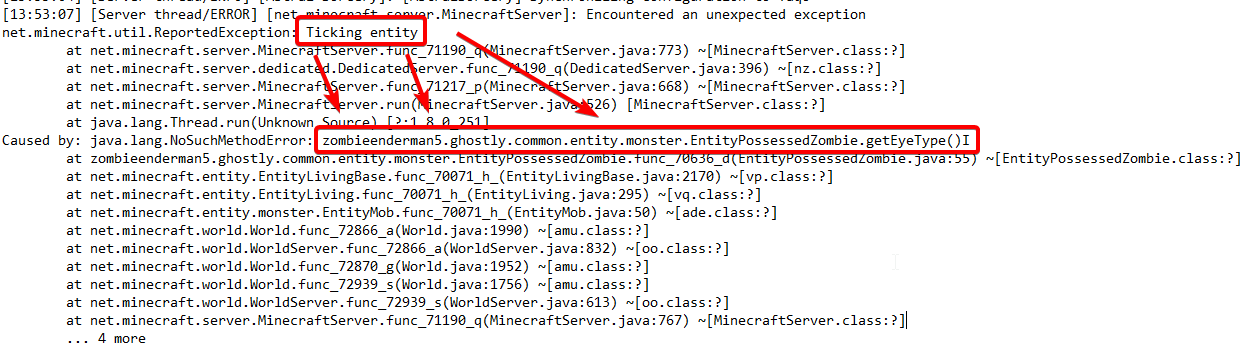 keen totem
so delete the ghostly mod should help?
last parcel
either remove the mod, look for a fix on the mod's issue tracker, or make a new world and see if it still happens
keen totem
I'll try, thanks
Seems like it worked to just delete the mod, finally managed to launch the server and join it 😄
thanks a bunch for all the help
 forest mauve
this comes up whenever i try to load a modpack, does anyone know how to fix
last parcel
log in to an account that owns minecraft java
last parcel
then you haven't
keen totem
if you bought minecraft after december 1st, you need to log in with your microsoft account
otherwise, with mojang account
forest mauve
i got it ages ago
the demo thing only comes up whenever i load a modpack on curseforge
last parcel
cuz you logged into an account that doesnt own java minecraft
there's no other answer, that is it
 sage pier
Does the launcher say "Play" or something else, when you launch the modpack?
forest mauve
no
 waxen cloud
I have a problem with minecraft
The game crashed whilst initializing game
Error: org.lwjgl.LWJGLException: Pixel format not accelerated
Код завершения: -1
 blissful wraith
Hi i want to mod stardew walley i have the steam version but when i scan it it does not locate it when i manually locate it says does not support. I have kst on steam too but i can modify that
last parcel
blissful wraith
Hi i want to mod stardew walley i have the steam version but when i scan it it d...
blissful wraith
thank you
 shut gust
im trying to play pixelmon rn but when i hit play on the modpack, nothing happens
ive tried a restart
i wasn't able to find any yt stuff to help
the launcher just don't start
 vernal elk
Hi, I have a problem with mc, whenever i want to play rlcraft it goes all the way to "writing launch profile" and then nothing
shut gust
it was happening yesterday too
i used task manager and it says that minecraft launcher is running in the background
autumn agate
"object reference not set to an instance on an object" when I am trying to open up a modpack or download a new one
vernal elk
@shut gust sry for the ping man but seeing as we have the same problem, this fixed it for me
- Click on the icon in the bottom left.
- Click the Minecraft Tab.
- Click Change next to the Minecraft Modding Folder Option.
- Select the folder named Install.
- Delete it.
- Restart CurseForge App.
- It will ask to install MC again, do so.
- Play game.
NOTE: You will not lose any modpacks or worlds, These are saved in the Instances folder. DO NOT TOUCH THIS FOLDER OR YOU WILL LOSE EVERYTHING
shut gust
@vernal elk ty i hope this works
last parcel
autumn agate
"object reference not set to an instance on an object" when I am trying to open ...
Need to make a ticket with logs for that.
?ticket-app
golden muskBOT
:bug: Reporting via the CurseForge App :bug:
-
Click the
 icon in the bottom left.
 -
Select

Open a Ticket. -
Fill out the form with accurate detailed information, "It doesn't work" isn't helpful! What exactly doesn't work and why doesn't it work should be easy to answer!
-
Make sure to upload your Overwolf logs with the
Upload Fileoption on the ticket, information on how to get these logs can be found here https://support.overwolf.com/en/support/solutions/articles/9000176827-how-to-get-your-overwolf-logs -
Submit!
 shut gust
@vernal elk i did everything you said and i restarted cursforge and it wants me to choose modding folder what do I do?
last parcel
press install or continue or w/e
vernal elk
np mate
wild jewel
vernal elk
np mate
Can also use the command next time :p
 lucid oxide
so im making a modpack for me and my friends but i dont see a way to uplaod a logo to my pack?
last parcel
only way to have a logo is to get it uploaded to the website
might change someday, but that's it for now
last parcel
what worked?
 timber pelican
Could i get abit of help please?
Ive been playing modded minecraft for years now but never ran into a problem like this, so i try run minecraft it crashes, and just keeps crashing... ive tried everything
last parcel
?mc-log
golden muskBOT
How to get a Minecraft log file.
Where to find the log on the CurseForge Client.
Right-click the modpack profile icon OR click the button in the modpack profile.
Click Open Folder.
Open the logs folder.
Find the file called latest.log and drag it into discord.
shut gust
wait, when i hit play in the launcher it says "game crashed exit code 0 does any1 know what to do
last parcel
same thing. close curseforge and overwolf first
lucid oxide
last parcel
only way to have a logo is to get it uploaded to the website
how do i go about getting that done?
timber pelican
@shut gust im getting the same thing
last parcel
lucid oxide
how do i go about getting that done?
?mc-packshare
golden muskBOT
There are two ways to share a modpack you've made with others...
Export and Share - For Friends to Small Groups.
- Click the Icon for the modpack.
- Click the button next to play.
- Click

Export. - Select the files that should be included.
- Send the zip to the people that want it! They can follow the instructions in
!mc-installpackto install the pack!
Upload to Curseforge - For Public Release to Everyone.
This options will make your pack public to EVERYONE, it comes with extra requirements and will take some effort to set up.
- Go to here: https://www.curseforge.com/project/432/4471/create
- Fill out the information with a proper description of the pack. This should allow anyone to understand what the pack is.
- Click the Icon for the modpack in the CurseForge app.
- Click the button next to play.
- Click
Export. - Select the files that should be included.
- Open your Project you made on the CurseForge site and Upload the file you just made.
- Wait for Moderation & Sync so it can show up in the client! (See
!syncfor limitations)
 placid parrot
Does anyone have any discord servers specific to SevTech: Ages of the Sky?
shut gust
my launcher keeps crashing even when i restart curseforge again @vernal elk did this happen to you?
vernal elk
no, it updated my game and then had me login, worked fine after that
shut gust
weird
it says preparing at the bottom of the launcher but then quickly crashes
it must be the launcher because the same thing happens when i try to play another mod @vernal elk
last parcel
did you try restarting the app and deleting the install folder again?
 woven sedge
How do I log in with a microsoft account in the Curseforge app?
last parcel
you dont login on the app, you log in on the minecraft launcher
shut gust
@last parcel i restarted curseforge already but i will try deleting the install folder again
woven sedge
I meant when I tried to play RLcraft with the launcher, it asked for the email and password after it loaded. I put it in but it didn't work.
last parcel
screenshot the launcher
woven sedge
Uh... the forge app crashed before I got in.
Upload of screenshot failed
Couldn't upload screenshot from computer, this is the best I can do.
 inland umbra
Hello I need help I have curseforge and everything and when i try to download Rl craft it jut doesnt work
wild jewel
woven sedge
Couldn't upload screenshot from computer, this is the best I can do.
Go to settings, Minecraft, switch to native
last parcel
woven sedge
 "Old" Minecraft launcher 1.6.89 opens
What to do: On the Curseforge app, go to
woven sedge
K
 quasi kindle
Hi does anyone know how to fix the Internal Server Error thing
last parcel
the what thing?
quasi kindle
My friend has been trying to join a server both modded and vanilla, but everytim he does it says that it runs into an Internal Sever error
inland umbra
Hello I need help I have curseforge and everything and when i try to download Rl craft it jut doesnt work
woven sedge
It was already on Native
last parcel
quasi kindle
My friend has been trying to join a server both modded and vanilla, but everytim...
certainly cant know if you dont say the error.
quasi kindle
one sec ill get a ss
last parcel
woven sedge
It was already on Native
screenshot shows otherwise. might need to reinstall curseforge.
last parcel
inland umbra
Hello I need help I have curseforge and everything and when i try to download Rl...
?help
woven sedge
K, if it matters, i'm on a macbook.
golden muskBOT
╰( ͡° ͜ʖ ͡° )つ──☆*:・゚ *˜”*°•.˜”*°• Many Help •°*”˜.•°*”˜* <:curselit:796985620550385705>
Please provide a description of your issue with as much detail as possible. If you have an issue with a mod or modpack, tell us the name. Explain what you can see happening. Be specific!
Tell us what is happening, we already know it "doesn't work".
Avoid using words like "it", tell us exactly what "it" is.
Don't assume anyone knows what you are talking about, be specific.
Tell us what you expected to happen.
Provide screenshots or video if possible.
Provide a log if possible. ?mc-log
last parcel
woven sedge
K, if it matters, i'm on a macbook.
it may or may not matter. it shouldnt in any case. mac should be using the native launcher by default. it's a bug that you didn't get that.
woven sedge
Sadly reinstalling it still doesn't work. (Made sure native was on).
last parcel
?mc-installfix
golden muskBOT
- Click on the icon in the bottom left.
- Click the
MinecraftTab. - Click
Changenext to theMinecraft Modding FolderOption. - Select the folder named
Install. - Delete it.
- Restart CurseForge App.
- It will ask to install MC again, do so.
- Play game.
NOTE: You will not lose any modpacks or worlds, These are saved in the Instances folder. DO NOT TOUCH THIS FOLDER OR YOU WILL LOSE EVERYTHING
keen totem
when choosing a forge installer, do I pick windows, univeral, or just "installer"?
inland umbra
when i click play on cursforge for Rlcraft it says could not verify minecraft version what do i do
autumn agate
last parcel
inland umbra
when i click play on cursforge for Rlcraft it says could not verify minecraft ve...
autumn agate
help?
last parcel
internet issue, nothing we can do to help
someone got around it by downloading the pack from the site and importing it, but i have doubts that actually changes anything
inland umbra
now my Rlcraft says Failed to launch what do I do now
last parcel
restart curseforge
inland umbra
i already did
last parcel
show the error
inland umbra
It ligit just says in red Failed to luanch
faint ember
when i try to download a modpack like valhalsia 3, it says "the system could not find the supported file" or something like that
how do I fix this
last parcel
faint ember
when i try to download a modpack like valhalsia 3, it says "the system could not...
last parcel
inland umbra
It ligit just says in red Failed to luanch
pc restart then
inland umbra
ok
 vapid cloak
Curse Forge can not verify my minecraft version
wild jewel
vapid cloak
Curse Forge can not verify my minecraft version
!mc-installfix
golden muskBOT
- Click on the icon in the bottom left.
- Click the
MinecraftTab. - Click
Changenext to theMinecraft Modding FolderOption. - Select the folder named
Install. - Delete it.
- Restart CurseForge App.
- It will ask to install MC again, do so.
- Play game.
NOTE: You will not lose any modpacks or worlds, These are saved in the Instances folder. DO NOT TOUCH THIS FOLDER OR YOU WILL LOSE EVERYTHING
 maiden lance
where is it recommended to store my modpacks
wild jewel
maiden lance
where is it recommended to store my modpacks
!mc-path
golden muskBOT
Path too long/Path must be English letters or numbers only fix!
If Minecraft is not installed, start here.
Click the in the top right.
Select Minecraft.
Click "Edit".
Move to the "Continue here:" section below.
If Minecraft is installed, follow these steps.
Click the in the bottom left.
Select the Minecraft tab.
Click "Change".
Move to the "Continue here:" section below.
Continue here:
Make a folder in the root directory called CurseForge.
Select the folder you just made.
The text box should show something like the following:
For Windows: C:\CurseForge
For Mac: /CurseForge
 novel bridge
how do i download plugins ?
 lime copper
i tried to install rlcraft and this error showed up https://cdn.discordapp.com/attachments/662892516651302913/802227790019559484/unknown.png
 last parcel
restart the app and try again
wild jewel
novel bridge
how do i download plugins ?
Plugins are on the site only
novel bridge
so how do i add them to my game? im sorry im very new at adding mods and plug ins
wild jewel
novel bridge
so how do i add them to my game? im sorry im very new at adding mods and plug in...
Plugins are server side only, you don't install them on a client
lime copper
it didnt work again
last parcel
?mc-installfix
golden muskBOT
- Click on the icon in the bottom left.
- Click the
MinecraftTab. - Click
Changenext to theMinecraft Modding FolderOption. - Select the folder named
Install. - Delete it.
- Restart CurseForge App.
- It will ask to install MC again, do so.
- Play game.
NOTE: You will not lose any modpacks or worlds, These are saved in the Instances folder. DO NOT TOUCH THIS FOLDER OR YOU WILL LOSE EVERYTHING
 alpine lion
hello i have been trying to start rlcraft for minecraft and it just doesnt load any1 got a way to fix this problem?
 zenith tinsel
I'm really confused rn, how do I upload a modpack to curseforge???
last parcel
?mc-packshare
golden muskBOT
There are two ways to share a modpack you've made with others...
Export and Share - For Friends to Small Groups.
- Click the Icon for the modpack.
- Click the button next to play.
- Click
Export. - Select the files that should be included.
- Send the zip to the people that want it! They can follow the instructions in
!mc-installpackto install the pack!
Upload to Curseforge - For Public Release to Everyone.
This options will make your pack public to EVERYONE, it comes with extra requirements and will take some effort to set up.
- Go to here: https://www.curseforge.com/project/432/4471/create
- Fill out the information with a proper description of the pack. This should allow anyone to understand what the pack is.
- Click the Icon for the modpack in the CurseForge app.
- Click the button next to play.
- Click
Export. - Select the files that should be included.
- Open your Project you made on the CurseForge site and Upload the file you just made.
- Wait for Moderation & Sync so it can show up in the client! (See
!syncfor limitations)
 analog geode
Guys when i click play in curseforge it just says updating minecraft and then nothing happens
 dreamy thistle
that is just sad
 ocean falcon
Hi, i cant play with mods using CurseForge my minecraft launcher starts and i press play and then it crashes
with exit code 0
wild jewel
!mc-installfix
golden muskBOT
- Click on the icon in the bottom left.
- Click the
MinecraftTab. - Click
Changenext to theMinecraft Modding FolderOption. - Select the folder named
Install. - Delete it.
- Restart CurseForge App.
- It will ask to install MC again, do so.
- Play game.
NOTE: You will not lose any modpacks or worlds, These are saved in the Instances folder. DO NOT TOUCH THIS FOLDER OR YOU WILL LOSE EVERYTHING
ocean falcon
i cant delete the whole file
it keeps assets, bin, config, crashreport, game, libraries, logs, runtime, saves, tools, versions, webcache
wild jewel
Then try again?
ocean falcon
it says an unexpected error is keeping you from deleting the folder
wild jewel
Then find the folder by hand, close overwolf, try again
ocean falcon
didnt work
last parcel
restart your pc
ocean falcon
and then try agian?
last parcel
yeah
 warm sundial
my mc crashs every time i try to start ftb infinity evolved idk what i have to do
 nova haven
how do i install on ubuntu server
ocean falcon
@last parcel it didnt work i still cant delet the whole file
golden muskBOT
Path too long/Path must be English letters or numbers only fix!
If Minecraft is not installed, start here.
Click the in the top right.
Select Minecraft.
Click "Edit".
Move to the "Continue here:" section below.
If Minecraft is installed, follow these steps.
Click the in the bottom left.
Select the Minecraft tab.
Click "Change".
Move to the "Continue here:" section below.
Continue here:
Make a folder in the root directory called CurseForge.
Select the folder you just made.
The text box should show something like the following:
For Windows: C:\CurseForge
For Mac: /CurseForge
last parcel
do that
last parcel
yes
warm sundial
why does my mc crash when i try to start ftb infinity evolved
ocean falcon
well how do i change it from being there
last parcel
read the instructions
last parcel
if you followed the instructions yes
nova haven
trying to install enigmatica 6 on ubuntu server but im running into an issue to that i dont know where the eula file is
it tries to generate but i dont see it
 red epoch
is it normal that when my pc is offline, the mod list on custom profiles say no mods installed
nova haven
check the mod folder
warm sundial
my mc is always crashing
last parcel
dont send that stuff in chat. either send the log file or upload the error to pastebin
warm sundial
how did i do that
last parcel
well i gave two options, need to know which one you need to know how to do
nova haven
'k guess im not gonna know
 balmy saffron
my curse forge says oops that not suppose to happen try again it been like this for two days today and yesterday
last parcel
balmy saffron
my curse forge says oops that not suppose to happen try again it been like this ...
think you're gunna need to make a ticket
?ticket-app
golden muskBOT
:bug: Reporting via the CurseForge App :bug:
-
Click the
icon in the bottom left. -
Select
Open a Ticket. -
Fill out the form with accurate detailed information, "It doesn't work" isn't helpful! What exactly doesn't work and why doesn't it work should be easy to answer!
-
Make sure to upload your Overwolf logs with the
Upload Fileoption on the ticket, information on how to get these logs can be found here https://support.overwolf.com/en/support/solutions/articles/9000176827-how-to-get-your-overwolf-logs -
Submit!
 brittle stump
Do you guys know what mod should I install to have the discord rich presence for my modpack ?
last parcel
there are a few
 smoky merlin
Is there ANY way to get overwolf installer with 32 bit pc?
balmy saffron
i cant load into curse forge
smoky merlin
I had a problem where i couldnt download any mod bc the download wouldnt start.
brittle stump
last parcel
there are a few
If I do some config on the mod, will the config be in my modpack on curseforge ?
last parcel
dont know how it works, you'll need to look into that
normal quarry
Minecraft is no longer loading through overwolf and the minecraft launcher, how can i fix this
smoky merlin
Can somebody tell me how to fix the problem where i cant download mods from the site? I tried reopening, restarting, spam clicking but nothing.
last parcel
sounds like a browser issue
last parcel
well that isnt very nice
 thin lark
They left.
thin lark
Ugh.
 abstract barn
Hello to everyone. I have a problem, I hope you can help. First of all, it enters CurseForfe without any errors. But the problem is that when I install and run a minecraft survival mod, it keeps getting errors, I would be glad if you could help.
last parcel
?mc-log
golden muskBOT
How to get a Minecraft log file.
Where to find the log on the CurseForge Client.
Right-click the modpack profile icon OR click the button in the modpack profile.
Click Open Folder.
Open the logs folder.
Find the file called latest.log and drag it into discord.
last parcel
send a log
thin lark
!help
golden muskBOT
╰( ͡° ͜ʖ ͡° )つ──☆*:・゚ *˜”*°•.˜”*°• Many Help •°*”˜.•°*”˜* <:curselit:796985620550385705>
Please provide a description of your issue with as much detail as possible. If you have an issue with a mod or modpack, tell us the name. Explain what you can see happening. Be specific!
Tell us what is happening, we already know it "doesn't work".
Avoid using words like "it", tell us exactly what "it" is.
Don't assume anyone knows what you are talking about, be specific.
Tell us what you expected to happen.
Provide screenshots or video if possible.
Provide a log if possible. ?mc-log
thin lark
@abstract barn ^
abstract barn
yes
thin lark
Read the bot's message. ^
abstract barn
ok
autumn agate
is there a mod for minecraft to use a controller
abstract barn
no
No folder called Logs or anything else
I can throw the errors from dm if you want
last parcel
abstract barn
I can throw the errors from dm if you want
screenshot?
coarse elm
That's just useless launcher log.
ocean falcon
How do i fix if i download a modpack it says The system cannot find the file specfied
nova haven
Unrecognized option: -d64
Error: Could not create the Java Virtual Machine.
Error: A fatal exception has occurred. Program will exit.
Server will restart in ~10 seconds. No input needed...```ubuntu server
coarse elm
How are you starting the server
coarse elm
Did you make the script?
coarse elm
Open cmd and do java -version
How about we dont just start randomly doing things while I'm trying to help you as that defeats the purpose of you asking for help.
nova haven
OpenJDK Runtime Environment (build 11.0.9.1+1-Ubuntu-0ubuntu1.20.04)
OpenJDK 64-Bit Server VM (build 11.0.9.1+1-Ubuntu-0ubuntu1.20.04, mixed mode, sharing)```Ok, seems like it's just a designator to use 64bit java but only works in some cases.
Modpack dev is bad and shouldn't be including that option in the arguments.
red epoch
help me
`# There is insufficient memory for the Java Runtime Environment to continue.
Native memory allocation (malloc) failed to allocate 1687936 bytes for Chunk::new
Possible reasons:
The system is out of physical RAM or swap space
In 32 bit mode, the process size limit was hit
Possible solutions:
Reduce memory load on the system
Increase physical memory or swap space
Check if swap backing store is full
Use 64 bit Java on a 64 bit OS
Decrease Java heap size (-Xmx/-Xms)
Decrease number of Java threads
Decrease Java thread stack sizes (-Xss)
Set larger code cache with -XX:ReservedCodeCacheSize=
This output file may be truncated or incomplete.
Out of Memory Error (allocation.cpp:390), pid=20828, tid=9500
JRE version: Java(TM) SE Runtime Environment (8.0_51-b16) (build 1.8.0_51-b16)
Java VM: Java HotSpot(TM) 64-Bit Server VM (25.51-b03 mixed mode windows-amd64 compressed oops)
Failed to write core dump. Minidumps are not enabled by default on client versions of Windows`
coarse elm
You need to edit the start script to remove it.
nova haven
well its enigmatica 6
 sudden shadow
hey... i have a problem with the curseforge mod launcher
when i try to play this minecraft modpack called "Artcticraft" it starts up on vanilla, and is stuck on unzipping until i restart the launcher.
when the launcehr is restarted it's downloaded and says i can play it normally.
Any other modpack works and Arcticraft works for other people.
help pls
coarse elm
Just because its xyz doesn't mean they know what they are doing
coarse elm
red epoch
`# There is insufficient memory for the Java Runtime Environment to continue.
# ...
!mc-ram
golden muskBOT
How to set Global Minecraft RAM value.
- Click the icon in the bottom left to open settings.
- Click the Minecraft tab.
- Scroll down.
- Slide slider to recommended ram range as seen below.
 nova haven
lol its funny how the dev also put this here " Make sure users aren't trying to run script via sh directly (won't work)"
coarse elm
This is why I dont use or trust any scripts from packdevs.
I'll start my own dammed server via command line thank you very much.
sudden shadow
sudden shadow
hey... i have a problem with the curseforge mod launcher
when i try to play this...
pls help
coarse elm
sudden shadow
hey... i have a problem with the curseforge mod launcher
when i try to play this...
I dont understand the problem and if you are just going to spam your issue I'll just kick you instead.
 clever raptor
What do i have to do if my Download keeps being stuck?
coarse elm
What does "run directly" mean?
coarse elm
clever raptor
What do i have to do if my Download keeps being stuck?
You explain the full issue.
coarse elm
nova haven
Kill all java processes you have a ghost server running.
clever raptor
So i want to download Minecraft Pixelmon but the download is stuck the whole time at 42%
I restarted the Download twice but nothing changed
nova haven
well i have bungeecord running (think it might be not running in offline mode)
coarse elm
Then you need to change the port for this server as you cant have two servers on the same port.
nova haven
double checked
coarse elm
And why are you running servers in offlinemode...
nova haven
because of bungeecord
coarse elm
That doesn't seem right but aight. Never used it because I'd rather not hate my life more with issues.
clever raptor
clever raptor
So i want to download Minecraft Pixelmon but the download is stuck the whole tim...
?
coarse elm
Pixelmon is a 430mb mod. If you have slow I internet its gonna take awhile
nova haven
aight just closed any open screens gonna now quickly just get the files changed so i instantly join it instead of not joining it
 tardy wyvern
why i am being ignored
coarse elm
tardy wyvern
why i am being ignored
Because what am I going to say? You said something doesn't work with zero information.
nova haven
i just send the basics lmao
coarse elm
clever raptor
bro i litterly download with 10-30 mbs
Use fast.com to test your internet speed and tell me the download


 night hare
why does it say it cant verify minecraft version?
clever raptor
still isnt Downloading
coarse elm
Then idk what to tell you. Open a ticket
tardy wyvern
i try to open curseforge, this appear, i wait, this disappear but curseforge dont boot
 fickle kestrel
Does somebody has been integrating GitHub with CurseForge? (Minecraft Modpack)
night hare
night hare
why does it say it cant verify minecraft version?
ayo?
coarse elm
clever raptor
still isnt Downloading
!bug-app make sure to include the logs and to mention my name.
golden muskBOT
:bug: Reporting via the CurseForge App :bug:
-
Click the
icon in the bottom left. -
Select
Open a Ticket. -
Fill out the form with accurate detailed information, "It doesn't work" isn't helpful! What exactly doesn't work and why doesn't it work should be easy to answer!
-
Make sure to upload your Overwolf logs with the
Upload Fileoption on the ticket, information on how to get these logs can be found here https://support.overwolf.com/en/support/solutions/articles/9000176827-how-to-get-your-overwolf-logs -
Submit!
coarse elm
tardy wyvern
i try to open curseforge, this appear, i wait, this disappear but curseforge don...
Open just overwolf first.
tardy wyvern
k
night hare
why does it say it cant verify minecraft version?
coarse elm
If you bump your issue one more time I'm going to ban you.
night hare
alr sorry
coarse elm
I cant reply to all of you at the same time.
tardy wyvern
coarse elm
Open just overwolf first.
i have tried, but happen the same thing
coarse elm
night hare
why does it say it cant verify minecraft version?
!mc-installfix
golden muskBOT
- Click on the icon in the bottom left.
- Click the
MinecraftTab. - Click
Changenext to theMinecraft Modding FolderOption. - Select the folder named
Install. - Delete it.
- Restart CurseForge App.
- It will ask to install MC again, do so.
- Play game.
NOTE: You will not lose any modpacks or worlds, These are saved in the Instances folder. DO NOT TOUCH THIS FOLDER OR YOU WILL LOSE EVERYTHING
coarse elm
tardy wyvern
i have tried, but happen the same thing
Then uninstall all of it. Install just overwolf and get curseforge from the app store in overwilf.
tardy wyvern
coarse elm
Then uninstall all of it. Install just overwolf and get curseforge from the app ...
k
wow is really slow (at download)
it is normal if i click on it appear install even if im installing it?
coarse elm
I have no clue what you just said.
tardy wyvern
coarse elm
Click install
tardy wyvern
i have to keep this window?
golden muskBOT
Known Issues with solutions or status of the issue.
Overwolf maintains a known list of issues here, some with solutions, others without.
http://support.curseforge.com/en/support/solutions/articles/9000196615-known-issues
tardy wyvern
oof i cant believe this
coarse elm
?
tardy wyvern
.net Framework 3.5 was not active
coarse elm
Is it working now?
 long mist
when i open curse forge it immediately goes to a blank green screen and never changes from that, anyone else having that problem?
tardy wyvern
coarse elm
Is it working now?
let me try
autumn agate
hey i am having issues with my game it keeps crashing for no reason can you help?
 simple rune
Everytime i try and open a forge installer file it briefly (a fourth of a second) shows console then closes out. i have java in and everything so whats going on?
autumn agate
@coarse elm sorry to ping you like this but i need you help i am having issues with my game it keeps crashing for no reason can you help?
faint ember
whenever i try to launch a modpack it says it cannot find the minecraft version
 short coral
ikr yes
 wide whale
can someone please help me with this? id really appreciate it
simple rune
simple rune
Everytime i try and open a forge installer file it briefly (a fourth of a second...
please someone help
 flat swallow
it keeps saying this and idk why is was working this morning anyone able to help?
tardy wyvern
coarse elm
Is it working now?
no
faint ember
wait if you add mods to a modpack u download, doe sit make it crash?
flat swallow
faint ember
wait if you add mods to a modpack u download, doe sit make it crash?
depends on the mod
faint ember
oh'
cuz i added mods to a few packs and now they wont load
:I
wait how do i restore the System32 folder
cuz i cant find the cmd.exe anywhere in my folder
because my modpacks dont download when I try to download them
 coral raven
(I was redireced from the overwolf server)
Im on a windows laptop and have curseforge and overwolf installed. I tried pressing play on a minecraft modpack (happens for any of them) and nothing happened. The launcher won't start up. I tried reinstalling the overwolf launcher and it still won't work. I don't know whatelse to do.
 scarlet shoal
like this guy i cant browse modpacks, its blank and in general it was being really buggy so i uninstalled the modpack i was using and it wouldnt let me re install it and now, like i said, its gone blank? whats happening
 copper gorge
i keep getting this error
faint ember
my game keeps on crashing even after i did the delete the install folder. And i still dont know hwo to revert the cmd.exe file to make it so I can download modpakcs becasue I cant do ant of these
thin lark
faint ember
my game keeps on crashing even after i did the delete the install folder. And i ...
Reinstall the whole launcher.
faint ember
ok
ocean falcon
How do i fix if it says The system cannot find the file specified when i download mods
thin lark
faint ember
ok
If it still doesn't work, then Idk.
faint ember
thin lark
Reinstall the whole launcher.
does that include overworl as well or just curseforge
thin lark
Overwolf as well.
faint ember
ok
ocean falcon
Hi, How do i fix if it says The system cannot find the file specified when i download mods
 potent tartan
copper gorge
i keep getting this error
potent tartan
copper gorge
i keep getting this error
?mc-path
golden muskBOT
Path too long/Path must be English letters or numbers only fix!
If Minecraft is not installed, start here.
Click the in the top right.
Select Minecraft.
Click "Edit".
Move to the "Continue here:" section below.
If Minecraft is installed, follow these steps.
Click the in the bottom left.
Select the Minecraft tab.
Click "Change".
Move to the "Continue here:" section below.
Continue here:
Make a folder in the root directory called CurseForge.
Select the folder you just made.
The text box should show something like the following:
For Windows: C:\CurseForge
For Mac: /CurseForge
 strong shard
1.12.2 mods don' t work what can i do?
last parcel
telling us why is a good start
last parcel
ocean falcon
Hi, How do i fix if it says The system cannot find the file specified when i dow...
ocean falcon
Thank you Yamza
scarlet shoal
ive re downloaded overwolf and forge about 3 times and this problem still occurs where i can not see any non downloaded mods
and i cant log in to twitch
ocean falcon
@scarlet shoal make a Ticket
scarlet shoal
a what
ocean falcon
?ticket
golden muskBOT
Issue Reporting with Overwolf tickets!
Issues can be reported two ways!
Via the website, or in app. Instructions for both are below!
Make sure to include logs when reporting a problem!
Upload your Overwolf logs with the Upload File option on the ticket, information on how to get these logs can be found here https://support.overwolf.com/en/support/solutions/articles/9000176827-how-to-get-your-overwolf-logs
:bug: Reporting via Website :bug:
Can't open the app or would rather use the website? You can do so here: https://support.curseforge.com/en/support/tickets/new
Fill out the form with accurate detailed information, "It doesn't work" isn't helpful! What exactly doesn't work and why doesn't it work should be easy to answer!
:question: Ticket Status :question:
Tickets you have made can be looked at, replied to and closed if you make/login to an account. If you submit a ticket with a specific Email make sure to use that when you make your account so you can see your past tickets!
https://support.curseforge.com/en/support/tickets
Otherwise you will only get email replies at the email you used to open the ticket.
:bug: Reporting via the CurseForge App :bug:
- Click the icon in the bottom left.
- Select
Open a Ticket. - Fill out the form with accurate detailed information, "It doesn't work" isn't helpful! What exactly doesn't work and why doesn't it work should be easy to answer!!
- Upload your Overwolf logs with the
Upload Filesection. (see the top of this message for details) - Submit!
ocean falcon
do the steps at the bottom
scarlet shoal
ty
ocean falcon
@last parcel sorry for @ you but i cant find a sulotion
last parcel
what
ocean falcon
When i try to download some mods it doesnt work
it says something about the file specified canot be found
last parcel
did you click the link?
last parcel
so follow the tutorial but do it for curseforge
 viscid hawk
hello ! ive been having some trouble with my modpacks - none of my mods will show up in the pack but they show up in the mod folder. when i try to play the pack it says cannot verify the minecraft version, and it won't let me install any new mods. my partner had the same issue and it ended up corrupting all of their modpacks. can i do anything about it?
last parcel
?mc-installfix
golden muskBOT
- Click on the icon in the bottom left.
- Click the
MinecraftTab. - Click
Changenext to theMinecraft Modding FolderOption. - Select the folder named
Install. - Delete it.
- Restart CurseForge App.
- It will ask to install MC again, do so.
- Play game.
NOTE: You will not lose any modpacks or worlds, These are saved in the Instances folder. DO NOT TOUCH THIS FOLDER OR YOU WILL LOSE EVERYTHING
last parcel
that should fix the version error, to fix the mod issue you need to make a new instance and copy the mods over
viscid hawk
instance as in a new pack?
last parcel
yes
viscid hawk
alright. thank you !
last parcel
?ticket-app
golden muskBOT
:bug: Reporting via the CurseForge App :bug:
-
Click the
icon in the bottom left. -
Select
Open a Ticket. -
Fill out the form with accurate detailed information, "It doesn't work" isn't helpful! What exactly doesn't work and why doesn't it work should be easy to answer!
-
Make sure to upload your Overwolf logs with the
Upload Fileoption on the ticket, information on how to get these logs can be found here https://support.overwolf.com/en/support/solutions/articles/9000176827-how-to-get-your-overwolf-logs -
Submit!
last parcel
all i got
faint ember
how do i revert the cmd.exe file
cuz i still cnat find that file
so i cant download modpacks
and my things keep on crashing even after i tried to unistall and then re-instal the launcher
:(
 mint seal
im just trying to put some mods together in a modpack and it crashes
Pastebin.pl is a website where you can store code/text online for a set period of time and share to anybody on earth
i cant figure out why it happens
last parcel
issue between zerocore and bigreactors
mint seal
but isnt zerocore the core mod for extreme reacors?
last parcel
no idea, just telling you what's involved
 warm abyss
Hey, I was having problems opening up stoneblock 2 again for minecraft. It was working fine earlier today and now it won't open. It just sits with the JAR launcher on "already started"
Heres the game output if that helps
normal quarry
I cant play minecraft at al
 compact yacht
hi i am unable to download pixelmon but all the other mods are fine to download
does anyone have a solution?
 timber imp
honestly i have smth but i think im not allowed to say
warm abyss
say it
timber imp
well for you
i would suggest downloading forge 1.12.2 and copying mods from curse folder into minecraft mods folder
thats what i did so i could play offline
warm abyss
okay
timber imp
anyone here to help me?
 grim coral
how do i make a multiplayer server in sky factory 4
compact yacht
dont know why this happens but this is the only mod pack that this happens on
 lime pendant
Whenever I try to launch a modpack from the curseforge app on the minecraft launcher l get an exit code 0 crash.
last pendant
compact yacht
dont know why this happens but this is the only mod pack that this happens on
Yeah i think it has to do with the size and your internet speed? I could be wrong about that... but I do believe it's a known issue that they're going to fix... Maybe just keep trying to see if it works out
golden muskBOT
- Click on the icon in the bottom left.
- Click the
MinecraftTab. - Click
Changenext to theMinecraft Modding FolderOption. - Select the folder named
Install. - Delete it.
- Restart CurseForge App.
- It will ask to install MC again, do so.
- Play game.
NOTE: You will not lose any modpacks or worlds, These are saved in the Instances folder. DO NOT TOUCH THIS FOLDER OR YOU WILL LOSE EVERYTHING
last pendant
lime pendant
Whenever I try to launch a modpack from the curseforge app on the minecraft laun...
?mc-installfix
errr
!mc-installfix
golden muskBOT
- Click on the icon in the bottom left.
- Click the
MinecraftTab. - Click
Changenext to theMinecraft Modding FolderOption. - Select the folder named
Install. - Delete it.
- Restart CurseForge App.
- It will ask to install MC again, do so.
- Play game.
NOTE: You will not lose any modpacks or worlds, These are saved in the Instances folder. DO NOT TOUCH THIS FOLDER OR YOU WILL LOSE EVERYTHING
compact yacht
last pendant
Yeah i think it has to do with the size and your internet speed? I could be wron...
awesome thank you for your help
lime pendant
Thank you.
autumn agate
How do i add stuff to the crazy craft, i wanna add the legends mod
or what version has it
and orespawn?
last pendant
autumn agate
How do i add stuff to the crazy craft, i wanna add the legends mod
or what versi...
!mc-modifymodpack
golden muskBOT
How to add/remove mods in a modpack.
- Click on the picture of the modpack.
- Click the

Add More Contentbutton, IF this button is not there, see below before continuing. - Find the Mods, Resource Packs or Maps you wish to Install and click
Installon them. - Wait for all the required mods to be downloaded.
- Start the modpack.
How to Enable/Disable content management for modpacks.
- Click on the picture of the modpack.
- Click on the button next to the
Playbutton. - Click on

Profile Options. - Check the
Allow content management for this profileoption if you want to edit the content of the modpack, uncheck it to disable.
NOTE: The Allow content management for this profile option is what allows you to Delete, Disable, Update or Install any Mods, Resource Packs or Maps managed by CurseForge. It must be on to modify any of them! (Currently)
lime pendant
Ok, so I deleted install, reset curseforge, and tried to play mc again but it still gives me an exit code 0 crash.
last pendant
?mc-logs
golden muskBOT
How to get a Minecraft log file.
Where to find the log on the CurseForge Client.
Right-click the modpack profile icon OR click the button in the modpack profile.
Click Open Folder.
Open the logs folder.
Find the file called latest.log and drag it into discord.
 amber girder
Is there a way to fix this?
lime pendant
Crash log for sevtech ages of the sky
 old knoll
so everything i had saved on curse forge got deleted, my modpack, all my worlds, everything. it said there was a problem with the launcher or something, but i restarted my computer and then it looked fine, but i load into curse and everything is gone. i dont know what to do and i was really proud of my worlds i had built. can someone help me please. ive only been on pc for about 2 weeks now so i dont know that much when it comes to the files and stuff but i really dont wanna lose all my progress
 terse rover
It says that i need to choose a folder for minecraft modding files, and when i press contunie it says Path can only include english letters and numbers how do i fix? 
potent tartan
amber girder
Is there a way to fix this?
?mc-path
golden muskBOT
Path too long/Path must be English letters or numbers only fix!
If Minecraft is not installed, start here.
Click the in the top right.
Select Minecraft.
Click "Edit".
Move to the "Continue here:" section below.
If Minecraft is installed, follow these steps.
Click the in the bottom left.
Select the Minecraft tab.
Click "Change".
Move to the "Continue here:" section below.
Continue here:
Make a folder in the root directory called CurseForge.
Select the folder you just made.
The text box should show something like the following:
For Windows: C:\CurseForge
For Mac: /CurseForge
thin lark
Make sure the folder has no special characters in it.
potent tartan
also for @terse rover
terse rover
thanks
 prime fox
I've been trying to download pixelmon litterly for the past month or so and i wont stop getting this error i have yet to screen shot it but this is the file thats been stopping it.... https://edge.forgecdn.net/files/3072/298/pixelmon-1.12.1-8.1.2-universal.jar .....
 cunning marsh
oofs
 pale fractal
Hello everyone. I was wondering if someone could help me regarding the curseforge app. I am able to load the app but when I download a modpack and click play it acts like it has launched but doesnt actually launch the modpack. I was wondering if someone might have a solution to this. Thank you.
cunning marsh
quick someone who knows what theyre doing help
this happened to me too
i reinstalled my original MC launcher and cursforge
then it workd
 silver shoal
it says missing install path
plz if anyone knows how to fix this dm me and ill fix it
prime fox
im not an expert or nows what im doing but check your setting and go into game specific and click minecraft, then change/select minecraft modding folder, maybe?
silver shoal
ok ill try
grim coral
Anyone know why whenever i make a server in SkyFactory 4 it makes a regular world instead of the one tree in the sky
cunning marsh
no lol
silver shoal
well got it to work thanks
coarse elm
silver shoal
it says missing install path
!mc-installfix
golden muskBOT
- Click on the icon in the bottom left.
- Click the
MinecraftTab. - Click
Changenext to theMinecraft Modding FolderOption. - Select the folder named
Install. - Delete it.
- Restart CurseForge App.
- It will ask to install MC again, do so.
- Play game.
NOTE: You will not lose any modpacks or worlds, These are saved in the Instances folder. DO NOT TOUCH THIS FOLDER OR YOU WILL LOSE EVERYTHING
wide whale
i need help! i just reinstalled and it fixed my mods and stuff but now whenever i enter a world my game crashes almost immediately. i'm going to try fixing it on my own i'll update yall but if it doesnt work i'll need help
augh. i need help
 stiff pilot
Sorry if this isn't where I'm meant to ask for help but when i scan my computer to look for Stardew Valley it can't be found even though I have it installed on Steam. And when I try to manually locate the folder there's only empty folders. What should I do?
 distant sundial
hi i am trying to play skyfactory 2.5.6 but i keep getting a jni error
 errant widget
so i uploaded a file to curseforge that got approved (an update for my minecraft modpack) and on the website it says the latest version of the pack is 1.3.0 but on the client version 1.2.0 is still the only option. is there anything i can do?
coarse elm
stiff pilot
Sorry if this isn't where I'm meant to ask for help but when i scan my computer ...
!knownissues bottom of the page
golden muskBOT
Known Issues with solutions or status of the issue.
Overwolf maintains a known list of issues here, some with solutions, others without.
http://support.curseforge.com/en/support/solutions/articles/9000196615-known-issues
coarse elm
errant widget
so i uploaded a file to curseforge that got approved (an update for my minecraft...
It takes 1-24 hours to sync.
stiff pilot
Oh, Alright thank you
errant widget
coarse elm
It takes 1-24 hours to sync.
ty
normal quarry
i cant play minecraft at all an i dont know if curse forge is the problem
 night oasis
When I try to create a custom profile I get this error,
coarse elm
🤔
coarse elm
night oasis
When I try to create a custom profile I get this error,
!mc-installfix
golden muskBOT
- Click on the icon in the bottom left.
- Click the
MinecraftTab. - Click
Changenext to theMinecraft Modding FolderOption. - Select the folder named
Install. - Delete it.
- Restart CurseForge App.
- It will ask to install MC again, do so.
- Play game.
NOTE: You will not lose any modpacks or worlds, These are saved in the Instances folder. DO NOT TOUCH THIS FOLDER OR YOU WILL LOSE EVERYTHING
night oasis
ty
So I tried it and it didn't fix it
I tried reinstall curseforge as well and it didn't solvei t
coarse elm
Open a support ticket, with the picture and your overwolf logs, make sure to mention me
!bug-app
golden muskBOT
:bug: Reporting via the CurseForge App :bug:
-
Click the
icon in the bottom left. -
Select
Open a Ticket. -
Fill out the form with accurate detailed information, "It doesn't work" isn't helpful! What exactly doesn't work and why doesn't it work should be easy to answer!
-
Make sure to upload your Overwolf logs with the
Upload Fileoption on the ticket, information on how to get these logs can be found here https://support.overwolf.com/en/support/solutions/articles/9000176827-how-to-get-your-overwolf-logs -
Submit!
 neon topaz
app not loading mods for me even though i can still click and it works ? know any fix
coarse elm
known issue Only fix is to remake the profile. Not copy it
 twin snow
I am trying to make a server pack from a custom modpack my friend made but all the guides i've used haven't worked can anyone explain how to do to me?
coarse elm
you copy the mods/configs/whatever else is important.
Put it in a zip.
twin snow
okay what do i do with that, like im using Shockbyte as a hoster for the server but they have you manually upload the files onto the server and im just confused.
coarse elm
then upload the mods/scripts and configs folder. Install forge to the server if you have a decent host they will have a web UI for this if they suck you will need to do it by hand.
twin snow
So if i understand correctly, put the mods and configs folder in a zip file and then put that on the server?
coarse elm
well if you are uploading to a server no zip
I thought you were wanting to make a project on cf
twin snow
So i have a custom modpack i made and the host told me to put either the server pack on the server or upload it but isn't really giving me anymore information so i thought asking you guys because im so unsure
coarse elm
That's kinda shit on there end...
twin snow
i know, but i already paid the month...
cunning marsh
wut???
twin snow
not a 1.16 forge installation
coarse elm
lawrd
so you need to download a forger installer and install the server copy setup and upload that too
twin snow
okay i can do that
so like
on the left is RAD's server pack and the right is the custom one i have what do i need to upload to the server?
coarse elm
Install the forge version you need in a empty folder, copy paste mods and configs
Upload all of that
neon topaz
thank you that worked got my old save back
coarse elm
done
 wild sandal
got a question i was playing sky factory 4 and the nether glitched so i restarted the world and now my would wont show up in single player but it does show up in the world folder
cunning marsh
No
twin snow
Well dang that didn't work sadly
 trim sluice
when i try to open crazy craft it gets stuck on "Loading - 1/7 Constructing Mods" then my app stops responding can anyone help with this?
 frail remnant
Does anyone know how long it takes to get a modpack approved? Its been nearly 3 days since I posted the jar and its still under review T_T
!status
golden muskBOT
It is 07:25AM on Saturday for CurseForge my dudes.
Project Moderation Time
Project/File moderation is done on Sunday - Thursday from 10am - 6pm GMT+2
This process is First in, First out. Thus files submitted late in the work day may not be checked until the next work day.
 gloomy quartz
Can someone help me here
potent tartan
gloomy quartz
Can someone help me here
?mc-installfix
golden muskBOT
- Click on the icon in the bottom left.
- Click the
MinecraftTab. - Click
Changenext to theMinecraft Modding FolderOption. - Select the folder named
Install. - Delete it.
- Restart CurseForge App.
- It will ask to install MC again, do so.
- Play game.
NOTE: You will not lose any modpacks or worlds, These are saved in the Instances folder. DO NOT TOUCH THIS FOLDER OR YOU WILL LOSE EVERYTHING
 fiery mortar
Can someone help. So im trying to add Minecraft and Stardew Valley to the games to mod. I try scaning my PC and it brings up nothing for Stardew Valley and it want's me to use the twitch version of my minecraft game. i can't find the games at all in all of my files and it's frustrating.
autumn agate
curseforge being slow again today?
autumn agate
I'm trying to play RL Craft, it installs perfectly fine but once I try to play it it doesn't launch Minecraft. It worked perfectly before, like a couple weeks ago it was running fine. I click play on the mod and nothing happens it just loads for like a second and that's it. I don't know what's happening and I tried almost everything including reinstalling Overwolf, reinstalling Minecraft, changing Minecraft to 1.12.2, making Minecraft run as an administrator, updating my drivers to the latest version, and reinstalling Java. I don't know what the problem is so I'm wondering if someone could help me out.
autumn agate
autumn agate
I'm trying to play RL Craft, it installs perfectly fine but once I try to play i...
this is gonna sound really stupid but i dont see it on this list. have u tried deleting and reinstalling rlcraft on curseforge
take out any worlds you have in ur saves folder beforehand
sometimes the solution is hidden in plain sight yknow
yeah ive tried that already but it doesnt seem to work
intriguing
i click play on the mod and it doesnt lauch minecraft
do you have any crash logs?
or a latest.log?
im not sure
how do i check?
you know how to get to ur modpack folder?
no
alright, go to the modpack on curseforge, click on the 3 dots, click "open folder" and then it should be in crash-reports
if there arent any crash reports after the date and time this issue arose, go to the logs folder and find a file called latest.log
and drag it into discord
i dont see anything named crash reports.
alright, what about logs?
yea
alright go into there
see a latest.log?
no