#👽︱game-support
1 messages · Page 52 of 1
 last parcel
doesnt look like a log is being made, try the steps in the pinned messages
 fluid flame
last parcel
doesnt look like a log is being made, try the steps in the pinned messages
fluid flame
last parcel
doesnt look like a log is being made, try the steps in the pinned messages
How to get a Minecraft log file.
Where to find the log on the CurseForge Client.
Right-click the modpack profile icon OR click the  button in the modpack profile.
Click  Open Folder.
Open the logs folder.
Find the file called latest.log and drag it into discord.
this is what I am doing
last parcel
well i assumed so when you put the log here
 rocky prism
There is an issue with WoW addons and GitHub tags
If I push the retail tag after the classic tag, the retail file is not processed.
I name my tags as follows :
<version> for retail (ie 1.7.1)
<version>-classic for Classic ( ie 1.7.1-classic)
if I push the classic tag after it works fine.
Seems that CurseForge understands the -classic tag to be a more recent version or something
fluid flame
last parcel
well i assumed so when you put the log here
So what should I do to get the full log
last parcel
you should try the steps in the pin like i said
last parcel
no.. that's a bot reply
last parcel
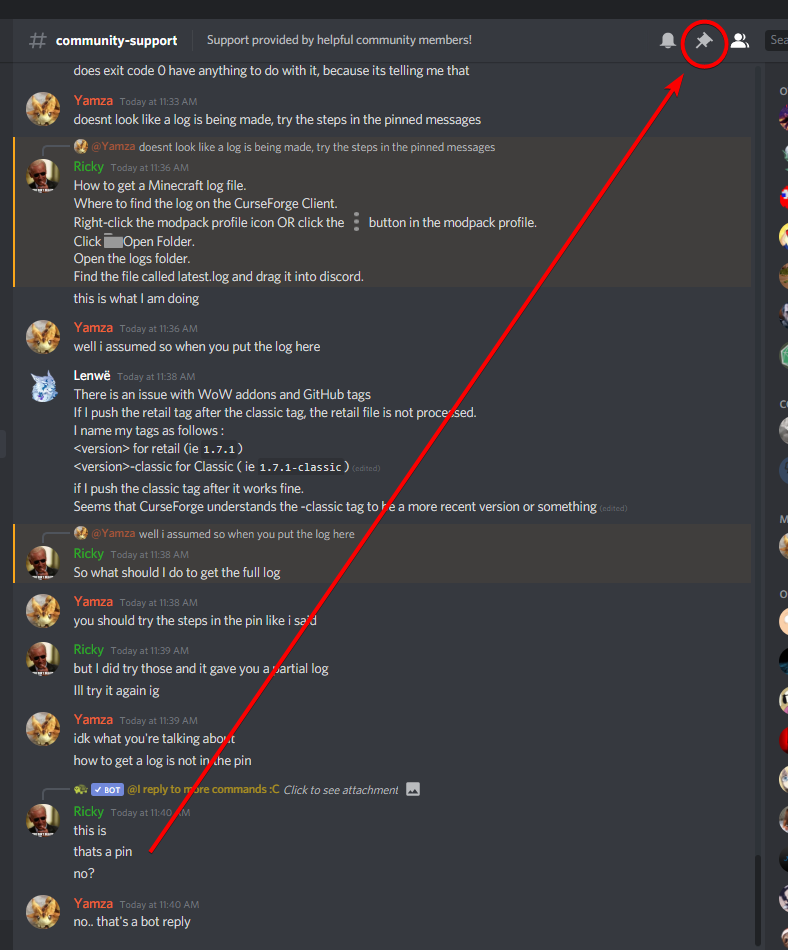 fluid flame
ohh
ok
sorry im new to discord
Error Code: 0
Means the game failed to load. Typically caused by a corrupted vanilla install.
What to do: Provide a log here and someone may help. ?mc-log
Potential Fix: If the log says "Your jar may be corrupted"
?mc-installfix or ?mc-path
If you do not get a reply that helps make a ticket. ?ticket-app
ok
So I got the log, does it say that my jar is corrupted
last parcel
it says nothing, so next step!
fluid flame
make a ticket?
 golden muskBOT
- Click on the
 icon in the bottom left.
 - Click the

MinecraftTab. - Click
Changenext to theMinecraft Modding FolderOption. - Select the folder named
Install. - Delete it.
- Restart CurseForge App.
- It will ask to install MC again, do so.
- Play game.
NOTE: You will not lose any modpacks or worlds, These are saved in the Instances folder. DO NOT TOUCH THIS FOLDER OR YOU WILL LOSE EVERYTHING
fluid flame
no no im doing it i was just a little confused
ok I reinstalled and everything and it still crashed
last parcel
?mc-path
golden muskBOT
Path too long/Path must be English letters or numbers only fix!
If Minecraft is not installed, start here.
Click the  in the top right.
Select Minecraft.
Click "Edit".
Move to the "Continue here:" section below.
If Minecraft is installed, follow these steps.
Click the in the bottom left.
Select the Minecraft tab.
Click "Change".
Move to the "Continue here:" section below.
Continue here:
Make a folder in the root directory called CurseForge.
Select the folder you just made.
The text box should show something like the following:
For Windows: C:\CurseForge
For Mac: /CurseForge
 fluid flame
ok ill try that
last parcel
time for a ticket
fluid flame
ok
last parcel
?ticket-app
golden muskBOT
:bug: Reporting via the CurseForge App :bug:
-
Click the
 icon in the bottom left.
 -
Select

Open a Ticket. -
Fill out the form with accurate detailed information, "It doesn't work" isn't helpful! What exactly doesn't work and why doesn't it work should be easy to answer!
-
Make sure to upload your Overwolf logs with the
Upload Fileoption on the ticket, information on how to get these logs can be found here https://support.overwolf.com/en/support/solutions/articles/9000176827-how-to-get-your-overwolf-logs -
Submit!

 oak pewter
Is this the right place to ask why is my world crashing with a modpack?
golden muskBOT
How to get a Minecraft log file.
Where to find the log on the CurseForge Client.
Right-click the modpack profile icon OR click the button in the modpack profile.
Click Open Folder.
Open the logs folder.
Find the file called latest.log and drag it into discord.
 sweet finch
hi where do i place the mod files for java
last parcel
do you have forge installed?
sweet finch
nope lol
golden muskBOT
Looking to install the CurseForge app?
Todo: Place system requirements here.
<:windows:798410728188936222> Windows
<:mac:798410654418862130> Mac
Linux
:person_shrugging:
last parcel
?mc-installmods
golden muskBOT
How to install mods in CurseForge App.
- Click
+ Create Custom Profile - Name it, select the required Minecraft version, select the Forge version (usually the highest number), click
Create. - Click the profile icon.
- Click
Add New Content - Search and install the desired mods.
- Start the game!
How to install mods not on CurseForge.
- Right click the profile picture or Open the profile and click the Icon next to the play button.
- Click
Open Folder. - Drag the mod(s) into the
modsfolder. (Note: Some mods will require others, to run. Make sure to read the instructions for the mod!) - Start the game!
 sweet finch
thank you
last parcel
?mc-installfix maybe
golden muskBOT
- Click on the icon in the bottom left.
- Click the
MinecraftTab. - Click
Changenext to theMinecraft Modding FolderOption. - Select the folder named
Install. - Delete it.
- Restart CurseForge App.
- It will ask to install MC again, do so.
- Play game.
NOTE: You will not lose any modpacks or worlds, These are saved in the Instances folder. DO NOT TOUCH THIS FOLDER OR YOU WILL LOSE EVERYTHING
 zinc mural
Does anybody know why my ram allocation wont work. I changed it in curseforge and in the mod itslelf but it wont transfer over to the Jar laucner. Instead it just gets stuck at 1 gb and i cant run anything. Ive used this before and i was able to allocate my ram jsut fine but now it wont work
last parcel
screenshot?
zinc mural
yep just gimme a sec, btw i am also running it on mac
 signal pier
you saw nothing (wrong server)
last parcel
got anything in the additional arguments box?
zinc mural
yes but the launcher auto did that for me
last parcel
on the cf app
zinc mural
yeah
last parcel
what's there?
zinc mural
/library/Internet Plug-Ins/JavaAppletPlugin.plugin/Contents/Home/Bin/Java
last parcel
k and where are you seeing 1gb?
zinc mural
I reinstalled my java so i dont know if this still works
its stuck at 1011mb
sorry not gb
zinc mural
before it ran at around 3500mb
last parcel
?mc-log
golden muskBOT
How to get a Minecraft log file.
Where to find the log on the CurseForge Client.
Right-click the modpack profile icon OR click the button in the modpack profile.
Click Open Folder.
Open the logs folder.
Find the file called latest.log and drag it into discord.
last parcel
JVM Flags: 5 total; -Xmx1G -XX:+UseConcMarkSweepGC -XX:+CMSIncrementalMode -XX:-UseAdaptiveSizePolicy -Xmn128M
no idea where it could be picking this up from but this is why -Xmx1G
zinc mural
intresting
 past magnet
what is new engine and how do i get it?
zinc mural
how do i change that
past magnet
not nex engine?
 karmic vector
I do not know how to fix that for my server
past magnet
what is nex engine???????????????????????!!!!!!!!!!!!
last parcel
past magnet
what is nex engine???????????????????????!!!!!!!!!!!!
wtf are you talking about
karmic vector
https://gyazo.com/1cc732238c2a053697df63800a1eff44
I am setting up a modded 1.16.4 server and this popped up when I tried joining it with all the correct mods loaded
 last parcel
zinc mural
how do i change that
last parcel
zinc mural
how do i change that
need to know where it came from. if it's not in the additional arguments box i have no idea since minecraft wasnt showing that either
last parcel
well i dont know what that thing is that is in the box now. could try removing it
i assume its a mac thing but 🤷♀️
 coarse elm
They are set to jar
Should be on native.
That settings screenshot and the jar option being selected shoulda been a red flag yamza
😛
last parcel
zinc mural
yeah I hate this thing
 "Old" Minecraft launcher 1.6.73 opens
What to do: On the Curseforge app, go to
last parcel
coarse elm
That settings screenshot and the jar option being selected shoulda been a red fl...
yea that's what i went to check. i literally never opened the launcher settings, wasnt even sure where to find it on native
 hasty hollow
when i press play on the launcher nothing happens
on normal minecraft and modded ive been trying to fix it but nothing works
 autumn agate
im doing the xray ultimate download but it is giving me a new tab that is winzip register
idk how to do the winzip register
last parcel
hasty hollow
on normal minecraft and modded ive been trying to fix it but nothing works
if you did install fix, and path change then you'll need to make a ticket.
hasty hollow
i have
 tawdry cobalt
is this support for the website as well as the app?
 wild jewel
tawdry cobalt
is this support for the website as well as the app?
wild jewel
tawdry cobalt
is this support for the website as well as the app?
Depends on the issue
tawdry cobalt
Modpack upload
wild jewel
Yes
last parcel
hasty hollow
this doesnt come up it used to tho so i dont know why
you'll need to wait for the ticket. there is nothing else to try.
hasty hollow
ok
tawdry cobalt
I uploaded a mod pack it was rejected due to me forgetting to remove optifine. I reuploaded now and removed optifine
last parcel
so what's the question?
hasty hollow
ive already received the ticket they said to download/update java and i already have the latest version
wild jewel
hasty hollow
ive already received the ticket they said to download/update java and i already ...
Then respond to the ticket
last parcel
then reply that it didnt work
hasty hollow
k
zinc mural
last parcel
<:missingblock:796992980811644939> **"Old" Minecraft launcher 1.6.73 opens**
> *...
Ive used the native launcher before and it gives an error but i will try again to see if what i did changed anythign
hm now it wont even launch in native laucnher
last parcel
?mc-path
golden muskBOT
Path too long/Path must be English letters or numbers only fix!
If Minecraft is not installed, start here.
Click the in the top right.
Select Minecraft.
Click "Edit".
Move to the "Continue here:" section below.
If Minecraft is installed, follow these steps.
Click the in the bottom left.
Select the Minecraft tab.
Click "Change".
Move to the "Continue here:" section below.
Continue here:
Make a folder in the root directory called CurseForge.
Select the folder you just made.
The text box should show something like the following:
For Windows: C:\CurseForge
For Mac: /CurseForge
last parcel
try changing that
 bronze linden
hello,
can someone tell me why my stardew valley version of steam is not found with the curseforge?
last parcel
bronze linden
ok thx
 versed pollen
(Minecraft) The update button for installed mods in one of my custom profiles isn't doing anything, and it has worked previously. Curseforge just had a fresh bootup, so another restart wouldn't help.
Any ideas?
last parcel
click on browse modpacks, hit refresh
that always happens on a fresh start. need to install something or hit that refresh button. should be getting fixed soon
versed pollen
Yep that worked
Is there a way to see which mods in a profile a certain dependency is needed for, beyond just checking every individual mod?
Because https://www.curseforge.com/minecraft/mc-mods/architectury-forge was added to my profile but I don't know why
hasty hollow
is it suppose to say this
last parcel
it says a lot of things there?
last parcel
versed pollen
Is there a way to see which mods in a profile a certain dependency is needed for...
can check the page of the dependency to see what is dependant on it
hasty hollow
is it suppose to say the game is already running
 minor umbra
On the Curseforge desktop app am i able to download singular mods?
last parcel
hasty hollow
is it suppose to say the game is already running
it says what it says. i dont get the issue?
hasty hollow
its not running tho
last parcel
minor umbra
On the Curseforge desktop app am i able to download singular mods?
you can, or you can download modpacks
minor umbra
last parcel
you can, or you can download modpacks
where do i see the singular mods? i only see my modpacks and browse modpacks?
last parcel
?mc-installmods
golden muskBOT
How to install mods in CurseForge App.
- Click
+ Create Custom Profile - Name it, select the required Minecraft version, select the Forge version (usually the highest number), click
Create. - Click the profile icon.
- Click
Add New Content - Search and install the desired mods.
- Start the game!
How to install mods not on CurseForge.
- Right click the profile picture or Open the profile and click the Icon next to the play button.
- Click
Open Folder. - Drag the mod(s) into the
modsfolder. (Note: Some mods will require others, to run. Make sure to read the instructions for the mod!) - Start the game!
last parcel
hasty hollow
its not running tho
??????
minor umbra
last parcel
?mc-installmods
thanks!
last parcel
if what you're reading isnt relevent then it's not directed at you
last parcel
can you show a whole screen or actually explain what your problem is
 granite heart
i got a question, its not necessarily with the app itself but everytime im trying to launch FTB infinity evolved for mc, i keep getting this message after a few seconds
would that error be pc side?
last parcel
restart your pc, then try again
granite heart
i already did that
hasty hollow
i have loads its just that it says its running but this isnt showing
before it did and this is the first time ive run curse forge this month before it worked fine
last parcel
granite heart
?mc-installfix try this
golden muskBOT
- Click on the icon in the bottom left.
- Click the
MinecraftTab. - Click
Changenext to theMinecraft Modding FolderOption. - Select the folder named
Install. - Delete it.
- Restart CurseForge App.
- It will ask to install MC again, do so.
- Play game.
NOTE: You will not lose any modpacks or worlds, These are saved in the Instances folder. DO NOT TOUCH THIS FOLDER OR YOU WILL LOSE EVERYTHING
last parcel
hasty hollow
i have loads its just that it says its running but this isnt showing
so are you saying it still says you're logged in after restarting your pc?
 graceful tusk
Yamza turkmusun
hasty hollow
logged into minecraft yes, but logged onto the game no
graceful tusk
Hm
last parcel
graceful tusk
Yamza turkmusun
english please
last parcel
hasty hollow
logged into minecraft yes, but logged onto the game no
so then restarting fixes that problem
graceful tusk
Can you assign system properties?
I thought you were Turkish, that's why your name is Turkish sorry
hasty hollow
last parcel
so then restarting fixes that problem
yes but i cant play it just says that minecraft is running
last parcel
graceful tusk
Can you assign system properties?
dont know what you mean
graceful tusk
last parcel
dont know what you mean
English
last parcel
hasty hollow
yes but i cant play it just says that minecraft is running
after a restart?
hasty hollow
yes
graceful tusk
hasty hollow
yes but i cant play it just says that minecraft is running
Can you assign system propertie
hasty hollow
last parcel
after a restart?
on twitch it worked fine and when i first used curseforge it worked but for some reason it doesnt work any more
last parcel
fantastic, but completely useless information
graceful tusk
last parcel
fantastic, but completely useless information
Sorry i pinging u
last parcel
graceful tusk
Sorry i pinging u
Do you have an actual question?
graceful tusk
No thanks
graceful tusk
last parcel
Do you have an actual question?
How do I get the Minecraft role?
last parcel
hasty hollow
on twitch it worked fine and when i first used curseforge it worked but for some...
restart your pc, then step by step describe everything you do until you have an issue. send a screenshot at that point as well.
graceful tusk
Thanks
hasty hollow
ill send a recording
last parcel
k
zinc mural
so i think i found my problem
i think its my java istself
I checked the files and put it into additional files and when i booted up the launcher is auto went to 1gb
 spring shard
can somebody please tell me what is causing this? Im unable to use modmenu, when i go to it it crashes my game...
do i post a link to the log or the log directly?
 rotund lance
can someone tell me why my mc launcher wont respond? i can run mc normally but when i try to run the modpacks from curseforge it just goes gray
and says mc not responding
i updated my drivers and reinstalled mc and updated the java
last parcel
zinc mural
i think its my java istself
on native now?
zinc mural
no native still didnt work for some reason but I put my java config file into the Jar launcher but all i need to do is get my JVM Argument to work now becuase that lets me change my Ram
spring shard
https://pastebin.com/V0wT3GE4 I dont know whats causing modmenu to crash my game
Pastebin
Pastebin.com is the number one paste tool since 2002. Pastebin is a website where you can store text online for a set period of time.
last parcel
zinc mural
no native still didnt work for some reason but I put my java config file into th...
dont use jar, cant help you with that at all
hasty hollow
last parcel
k
ive sent the recording
zinc mural
cuase it worked 2 hours ago which is weird
last parcel
did you change the path like suggested?
zinc mural
yeah
last parcel
hasty hollow
ive sent the recording
can you play vanilla minecraft?
hasty hollow
no
last parcel
if you'd have said that from the beginning i'd have known right away. gunna have to wait a bit though cuz i gotta find the link
hasty hollow
k
spring shard
any help plz?
plz, I don't have many mods so there shouoldnt be any reason its crashing
hasty hollow
have u allocated enough RAM maybe idk
spring shard
yes i have...
minor umbra
can, and if i can how do i install Optifine on Curseforge to play a modpack with optifine
 gleaming swan
and its too long or something
hasty hollow
spring shard
plz, I don't have many mods so there shouoldnt be any reason its crashing
are all the mods the right versions
spring shard
yes they are.
hasty hollow
wait for a moderator to reply then
spring shard
every mod works fine and i added mod menu and when i try to go into mod menu it crashes
hasty hollow
wait for a moderator to reply then
hasty hollow
minor umbra
can, and if i can how do i install Optifine on Curseforge to play a modpack with...
yes u can ill send a video
minor umbra
hasty hollow
yes u can ill send a video
thank you
spring shard
Why is my message red
hasty hollow
failed to upload
spring shard
every mod works fine and i added mod menu and when i try to go into mod menu it crashes
minor umbra
can you dm the link to me if i turn on my dms?
spring shard
cat stop asking, youve gotta wait just like i do
gleaming swan
no
spring shard
well theyre not gonna help if you keep pestering them
wild jewel
gleaming swan
they will its there job
No it isn't
spring shard
No its not. Stop
gleaming swan
bruh the mod came thanks nowhelp
wild jewel
Never is, we just moderate.
gleaming swan
oh
wild jewel
!mc-path
golden muskBOT
Path too long/Path must be English letters or numbers only fix!
If Minecraft is not installed, start here.
Click the in the top right.
Select Minecraft.
Click "Edit".
Move to the "Continue here:" section below.
If Minecraft is installed, follow these steps.
Click the in the bottom left.
Select the Minecraft tab.
Click "Change".
Move to the "Continue here:" section below.
Continue here:
Make a folder in the root directory called CurseForge.
Select the folder you just made.
The text box should show something like the following:
For Windows: C:\CurseForge
For Mac: /CurseForge
versed pollen
wild jewel
No it isn't
lmao, love it
gleaming swan
@wild jewel i was just playing lmao
 idle quartz
I have a question. If my friend made a modpack how would I go about using it??
gleaming swan
ik its not your job
wild jewel
idle quartz
I have a question. If my friend made a modpack how would I go about using it??
!mc-packshare
golden muskBOT
There are two ways to share a modpack you've made with others...
Export and Share - For Friends to Small Groups.
- Click the Icon for the modpack.
- Click the button next to play.
- Click

Export. - Select the files that should be included.
- Send the zip to the people that want it! They can follow the instructions in
!mc-installpackto install the pack!
Upload to Curseforge - For Public Release to Everyone.
This options will make your pack public to EVERYONE, it comes with extra requirements and will take some effort to set up.
- Go to here: https://www.curseforge.com/project/432/4471/create
- Fill out the information with a proper description of the pack. This should allow anyone to understand what the pack is.
- Click the Icon for the modpack in the CurseForge app.
- Click the button next to play.
- Click
Export. - Select the files that should be included.
- Open your Project you made on the CurseForge site and Upload the file you just made.
- Wait for Moderation & Sync so it can show up in the client! (See
!syncfor limitations)
minor umbra
idle quartz
I have a question. If my friend made a modpack how would I go about using it??
i have no clue but maybe if your friend could name it a certain name you could search it up
or that maybe
gleaming swan
but thx bb
hasty hollow
minor umbra
can you dm the link to me if i turn on my dms?
u can either download it of a website and add it the modpack
minor umbra
ok thanks, ive already downloaded it many times so i should be able to manage
hasty hollow
wild jewel
hasty hollow
And that is?
minor umbra
thats not optifine
hasty hollow
wild jewel
And that is?
a video recording
minor umbra
oh
so i have optifine downloaded and the file is on my desktop, how to i put it into my modpack?
wild jewel
hasty hollow
a video recording
Of what?
wild jewel
minor umbra
so i have optifine downloaded and the file is on my desktop, how to i put it int...
Drop it in the mods folder
minor umbra
ok just making sure thanks
minor umbra
wild jewel
Of what?
of how to install optifine into a modpack i think
idle quartz
My friend said they uploaded it but it needs to wait for approval, any clue how long that coudl take?
wild jewel
idle quartz
My friend said they uploaded it but it needs to wait for approval, any clue how ...
Days
last parcel
hasty hollow
k
second post in this thread, use the adware cleaner https://www.minecraftforum.net/forums/support/java-edition-support/3026374-only-loads-in-vista-compatibility-mode
versed pollen
Here's an approval related question: My last modpack version was rejected because chiselsandbits was in the overrides folder of the exported profile I uploaded.
Today when I tried to export my current profile, it didn't end up in there, but ftb-gui-library did, and I don't know why?
I don't want to submit again, because it'll probably get rejected again, but I don't know why certain mods seemingly randomly end up in override and not in the modlist/manifest.
last parcel
versed pollen
Here's an approval related question: My last modpack version was rejected becaus...
cuz the app is still pretty buggy. redownload any mods that end up there. should fix it eventually.
autumn agate
on sky factory 3 when i join my friends world hosted by scalacube it either says internal server error or something about an established connection aborted. whats weird is this only started happening yesterday and used to always work
hasty hollow
last parcel
second post in this thread, use the adware cleaner <https://www.minecraftforum.n...
thanks
versed pollen
last parcel
cuz the app is still pretty buggy. redownload any mods that end up there. should...
I'm going to try and sidestep the auto-gen. Do you know where I can find the mod-id to put in the manifest?
last parcel
mod page on the website
versed pollen
I should've guessed that
 somber radish
Hello! I'm trying to find the jar file for a custom curseforge profile I made as I'm looking to apply it to a server.I can't find the file when I go to export it (and neither in the original). Am I blind here or?
versed pollen
last parcel
mod page on the website
Is there any sort of ordering I have to follow or can I just stick in the reference at the end of the list?
There also appears to be a 7 digit File ID that the manifest requires, presumably to tell the app which version of the mod to download, but I can't find the file id on the website, even when clicking on the specific file version.
zinc mural
@last parcel got the nativ luncher to work ill let you know if it launches the mod
uhhhhh
 fierce otter
i am trying to play this mod https://www.curseforge.com/minecraft/mc-mods/loot-slash-conquer
but it will not show up on the app
 rigid wing
Im trying to hit the launch button on curseforge but nothing happens when I do
rotund lance
rotund lance
can someone tell me why my mc launcher wont respond? i can run mc normally but w...
^
 still frigate
fierce otter
i am trying to play this mod https://www.curseforge.com/minecraft/mc-mods/loot-s...
still frigate
fierce otter
i am trying to play this mod https://www.curseforge.com/minecraft/mc-mods/loot-s...
Okay then just download the mod, navigate to your mods folder for the profile you are editing, and put the mod file into the mods folder.
fierce otter
ok thank you
 clever grove
is there a why to fix the long loading for minecraft after you press play on the modpack verison?
 lapis sierra
people to play Gdlaucher with the curseforge?
 tranquil agate
wanting to recreate my modpack for 1.16.5 but i get the error object reference not set to an instance of an object .. help
versed pollen
clever grove
is there a why to fix the long loading for minecraft after you press play on the...
How many mods are in this modpack you're trying to play?
golden muskBOT
- Click on the icon in the bottom left.
- Click the
MinecraftTab. - Click
Changenext to theMinecraft Modding FolderOption. - Select the folder named
Install. - Delete it.
- Restart CurseForge App.
- It will ask to install MC again, do so.
- Play game.
NOTE: You will not lose any modpacks or worlds, These are saved in the Instances folder. DO NOT TOUCH THIS FOLDER OR YOU WILL LOSE EVERYTHING
last parcel
versed pollen
There also appears to be a 7 digit File ID that the manifest requires, presumabl...
no order, file id you can see if you mouse over the file link
lapis sierra
!help
golden muskBOT
╰( ͡° ͜ʖ ͡° )つ──☆*:・゚ *˜”*°•.˜”*°• Many Help •°*”˜.•°*”˜*
If you wish to get any real help you need to post logs, provide more information like what client you are doing or exact steps you are taking. Otherwise we need to guess to what the issue is and can't help at all.
last parcel
lapis sierra
people to play Gdlaucher with the curseforge?
?getcf
golden muskBOT
Looking to install the CurseForge app?
Todo: Place system requirements here.
<:windows:798410728188936222> Windows
<:mac:798410654418862130> Mac
Linux
:person_shrugging:
last parcel
fierce otter
i am trying to play this mod https://www.curseforge.com/minecraft/mc-mods/loot-s...
?mc-installmods
golden muskBOT
How to install mods in CurseForge App.
- Click
+ Create Custom Profile - Name it, select the required Minecraft version, select the Forge version (usually the highest number), click
Create. - Click the profile icon.
- Click
Add New Content - Search and install the desired mods.
- Start the game!
How to install mods not on CurseForge.
- Right click the profile picture or Open the profile and click the Icon next to the play button.
- Click
Open Folder. - Drag the mod(s) into the
modsfolder. (Note: Some mods will require others, to run. Make sure to read the instructions for the mod!) - Start the game!
tranquil agate
versed pollen
How many mods are in this modpack you're trying to play?
70
lapis sierra
last parcel
?mc-installmods
Yamza, in curseforge I cant play my modpack, but in Gd I can
last parcel
if you tell the issue we can try to fix it
tranquil agate
just trying to make a 1.16.5 modpack
lapis sierra
I try open modpack and nothing happens I mac
last parcel
more specific
tranquil agate
its object reference not set to an instance of an object\
versed pollen
tranquil agate
70
Well, you can't really "fix" longer load times. You're adding more things to the game that need to be loaded, of course it's going to take longer than normal.
lapis sierra
I try to open the modapck says it is opening, but after saying that it is opening nothing happens
zinc mural
last parcel
try removing the install folder
got it to work be reseting something but now when i lunch the mod and try to join my friends modded server it says i dont have the mod installed which doesnt make sense
last parcel
lapis sierra
I try to open the modapck says it is opening, but after saying that it is openin...
so no minecraft launcher appears?
tranquil agate
happens when i try to start the pack making, works fine with 1.16.4 just not 1.16.5
zinc mural
this is what it shows me
last parcel
zinc mural
got it to work be reseting something but now when i lunch the mod and try to joi...
show a pic or send your log
looks like you loaded vanilla
lapis sierra
last parcel
so no minecraft launcher appears?
no
zinc mural
but that doesnt make sense
last parcel
zinc mural
but that doesnt make sense
show me your minecraft launcher screen
last parcel
lapis sierra
no
?mc-installfix try this ⤵️
golden muskBOT
- Click on the icon in the bottom left.
- Click the
MinecraftTab. - Click
Changenext to theMinecraft Modding FolderOption. - Select the folder named
Install. - Delete it.
- Restart CurseForge App.
- It will ask to install MC again, do so.
- Play game.
NOTE: You will not lose any modpacks or worlds, These are saved in the Instances folder. DO NOT TOUCH THIS FOLDER OR YOU WILL LOSE EVERYTHING
zinc mural
tranquil agate
im not sure im getting help here lol may have mistaken who you where talking to
last parcel
thought you were talking to someone, try the install fix above as well
golden muskBOT
How to get a Minecraft log file.
Where to find the log on the CurseForge Client.
Right-click the modpack profile icon OR click the button in the modpack profile.
Click Open Folder.
Open the logs folder.
Find the file called latest.log and drag it into discord.
versed pollen
I'm confused who's talking to who as well, lol. Ah I'm sure it'll get figured out
last parcel
isnt it fun 🙂
versed pollen
Here i'll make it even worse by referring to an older conversation
versed pollen
last parcel
isnt it fun 🙂
Ironically, the new version of ftb-gui that wasn't showing up in the manifest normally, makes a dedicated server crash on load! Already been reported on github too xD. Could be why it wasn't showing up in the app.
last parcel
just dont put it on the server. it shouldnt need to be there anyway
tranquil agate
Are you referring to the minecraft launcher because I referring to Create Custom Profile for a 1.16.5 version which i have
I'm*
last parcel
tranquil agate
Are you referring to the minecraft launcher because I referring to Create Custom...
i know what you're talking about
versed pollen
last parcel
just dont put it on the server. it shouldnt need to be there anyway
Ah, but it's required by FTB Quests, which I want to have on the server for my... "mentally impaired" friends to have something to follow
last parcel
oh.. lol. rip. at least lat is quick with fixing things
autumn agate
Why does it say the I dont have minecraft installed?
tranquil agate
still getting the error message
last parcel
definitely vanila 🤔
autumn agate
on curseforge
last parcel
tranquil agate
still getting the error message
?mc-path try this
golden muskBOT
Path too long/Path must be English letters or numbers only fix!
If Minecraft is not installed, start here.
Click the in the top right.
Select Minecraft.
Click "Edit".
Move to the "Continue here:" section below.
If Minecraft is installed, follow these steps.
Click the in the bottom left.
Select the Minecraft tab.
Click "Change".
Move to the "Continue here:" section below.
Continue here:
Make a folder in the root directory called CurseForge.
Select the folder you just made.
The text box should show something like the following:
For Windows: C:\CurseForge
For Mac: /CurseForge
autumn agate
thank you
zinc mural
yeah i dont know why its putting me in vanilla even though in lunching it through the mod
last parcel
zinc mural
yeah i dont know why its putting me in vanilla even though in lunching it throug...
have you tried redownloading the pack?
versed pollen
last parcel
no order, file id you can see if you mouse over the file link
Oh yeah, I did do this and it did work, though I wish there was a better place to find it. Time for another suggestion ticket xD
last parcel
what would you suggest for that?
tranquil agate
Got it to work cheers
autumn agate
on curseforge games it says i dont have minecraft
versed pollen
Just to put it next to the filename or something. Anywhere really, that isn't "me looking at the url"
autumn agate
on choose a game
last parcel
autumn agate
on curseforge games it says i dont have minecraft
the app is not meant to look for your minecraft install. it makes its own install to mess with. do not try to put it in the default minecraft folder.
last parcel
yeah
 grand thicket
golden muskBOT
grand thicket
golden muskBOT
Path too long/Path must be English letters or numbers only fix!
If Minecraft is not installed, start here.
Click the in the top right.
Select Minecraft.
Click "Edit".
Move to the "Continue here:" section below.
If Minecraft is installed, follow these steps.
Click the in the bottom left.
Select the Minecraft tab.
Click "Change".
Move to the "Continue here:" section below.
Continue here:
Make a folder in the root directory called CurseForge.
Select the folder you just made.
The text box should show something like the following:
For Windows: C:\CurseForge
For Mac: /CurseForge
coarse elm
versed pollen
Just to put it next to the filename or something. Anywhere really, that isn't "m...
Theres no reason to even surface file ids.
Before you say "you need them to fix exports" no, no you dont. You shouldn't be editing manifest files at all by hand ever.
zinc mural
last parcel
have you tried redownloading the pack?
while im redownloading the mod pack do you think using a different version of curseforge might fix this issue because I know alot of updated things dont tend to work properly on mac
last parcel
not-updated things work even less, if at all.
 zinc mural
alright, its just sometimes older programs work better on my mac thats why i was thinking an older version of curseforge might work
last parcel
is that really a thing for macs?
why do people get mac again?
zinc mural
yep ive done it acouple times. Cant wait to upgrade from this torture
 sand kite
i downloaded the mod pack off the internet curse forge, and it is now a file on my computer, but how do I import it to the desktop app or something
golden muskBOT
Looking to install the CurseForge app?
Todo: Place system requirements here.
<:windows:798410728188936222> Windows
<:mac:798410654418862130> Mac
Linux
:person_shrugging:
clever grove
versed pollen
How many mods are in this modpack you're trying to play?
how do i get that info
sand kite
yea but the app does not have some of the modpacks i want
and the web curse forge does
 river iron
I'm having issues with my pack files being rejected saying that there are mods in there that are not on curseforge. All the files are directly downloaded from overwolf launcher, have been exported from there, and are all in the manifest. So I don't understand why they are being rejected
last parcel
the app has everything the site has..
clever grove
sand kite
yea but the app does not have some of the modpacks i want
is there is an install button?
if so click it
clever grove
it will send the info to the app
last parcel
!!=
golden muskBOT
Wording is important!
Forge = Minecraft Forge, This is a modloader often just called "Forge".
CurseForge = A Website/App that has content for games.
Mods = Individual mod files.
Modpacks = Multiple mods put into the mods folder or downloaded from CurseForge.
These are not Interchangeable! Please use the correct terms as it allows us to help you faster!
last parcel
twilight forest and pams are mods, you have to find them using the mod search
?mc-installmods
golden muskBOT
How to install mods in CurseForge App.
- Click
+ Create Custom Profile - Name it, select the required Minecraft version, select the Forge version (usually the highest number), click
Create. - Click the profile icon.
- Click
Add New Content - Search and install the desired mods.
- Start the game!
How to install mods not on CurseForge.
- Right click the profile picture or Open the profile and click the Icon next to the play button.
- Click
Open Folder. - Drag the mod(s) into the
modsfolder. (Note: Some mods will require others, to run. Make sure to read the instructions for the mod!) - Start the game!
sand kite
I will try this
when i try to create a custom profile it tells me it is missing or out of date
clever grove
hold up could it be because i have dropbox on my computer which makes everything go to it?
last parcel
sand kite
when i try to create a custom profile it tells me it is missing or out of date
sand kite
I tried to copy paste the mod file into the custom profile folder
but it does not pop up in the installed mods part
is that fine?
last parcel
installing it with the app works better, but it will load yes
sand kite
💋
autumn agate
on sky factory 3 when i join my friends world hosted by scalacube it either says internal server error or something about an established connection aborted. whats weird is this only started happening yesterday and used to always work
river iron
I'm having issues with my pack files being rejected saying that there are mods in there that are not on curseforge. All the files are directly downloaded from overwolf launcher, have been exported from there, and are all in the manifest. So I don't understand why they are being rejected
last parcel
show the message
coarse elm
Delete and reinstall those files.
river iron
The status of the file Thy Simple Life-0.12.zip (Thy Simple Life) has been changed to Rejected
Notes: Mods which are not on CurseForge are not allowed to be included in modpack files unless they are on the list of Open Use Mods. Please remove the mods from the pack and re-upload.
Files available on CurseForge should be installed through the manifest.json, not included in the Overrides folder. Even if a project is on CurseForge, the file included in your modpack must be as well; development or forked copies are not allowed.
More information about modpack creation and how to submit open use mods can be found at: http://authors.curseforge.com/knowledge-base/120-minecraft-modpack-submission
If you have any questions please contact our support team https://support.curseforge.com.
I'll try to reinstall all the mods
coarse elm
That's not what I said at all...
river iron
well, what did you mean delete and reinstall the files, if that's what you didn't mean?
coarse elm
Only reinstall through the app the ones that are listed as being on curseforge.
 bold jetty
hi when every i try opeing the file to install with the java an it keeps on coming up with a error
coarse elm
bold jetty
You cant install the MDK. What are you trying to do?
 manic owl
Hi uh I cant install any pixelmon modpack but I can install everything else
coarse elm
Does it time out?
manic owl
it just says error and then a bunch of numbers when it gets to the downloading pixelmon mod part
coarse elm
What's your download speed?
manic owl
?
 balmy badge
1mbps
manic owl
wdym?
balmy badge
Bruh
 ocean kindle
whenever i make a new profile, no matter what mods i put it always crashes
for minecraft
coarse elm
ocean kindle
whenever i make a new profile, no matter what mods i put it always crashes
!mc-installfix
ocean kindle
whats that?
coarse elm
manic owl
wdym?
Do a speed test. Tell me the download number.
ocean kindle
its only for curseforge i can play modded on normal minecraft just fine
minor umbra
i was just loading up curseforge minecraft and i hit play on the launcher and it loaded for a second and then crashed and said exit code 0.
any fixes?
 vital coyote
Roguelike Adventures and Dungeons wont download no matter what i do,
manic owl
coarse elm
Do a speed test. Tell me the download number.
sorry i was afk for a sec my download speed is: 7.23
ocean kindle
minor umbra
i was just loading up curseforge minecraft and i hit play on the launcher and it...
i have the same problem
minor umbra
ocean kindle
i have the same problem
when did it start?
ocean kindle
today
minor umbra
mine started a lil bit ago
ocean kindle
i have not tried any of my old modpacks from when twitch had curseforge
coarse elm
manic owl
sorry i was afk for a sec my download speed is: 7.23
That should be fast enough to download it within the timeout.
manic owl
coarse elm
That should be fast enough to download it within the timeout.
yes but everytime I download it it gets stuck on downloading the pixelmon mod and then an error pops up I have tried many times
this is the error i get
coarse elm
manic owl
this is the error i get
Then your internet is being too slow.
Open a support ticket and mention me in it and that you need a longer timeout.
manic owl
coarse elm
Then your internet is being too slow.
Then why can I download other packs when that happens?
manic owl
Ok
coarse elm
vital coyote
Roguelike Adventures and Dungeons wont download no matter what i do,
!mc-path
minor umbra
ocean kindle
i have not tried any of my old modpacks from when twitch had curseforge
i have roguelike dungeons downloaded, and was trying it out for the first time and thats when the error occured
minor umbra
ocean kindle
i have not tried any of my old modpacks from when twitch had curseforge
didnt work
ocean kindle
today i made a new modpack to play and it gave me the error
minor umbra
same
minor umbra
probably
ocean kindle
overwolf bought curseforge recently so maybe the transition is hindering it
vital coyote
coarse elm
!mc-path
What is that?
coarse elm
vital coyote
What is that?
Our bot being down.
vital coyote
last parcel
 torn rune
Can anyone help with this?https://gyazo.com/bf0a1771f64c6dd8e2a13a37cdf644b7

Im trying to download Rlcraft but this keeps popping up, I've tried deleting the file and reinstalling it but that doesnt help
last parcel
torn rune
Can anyone help with this?https://gyazo.com/bf0a1771f64c6dd8e2a13a37cdf644b7
make a ticket for that, put my name in the ticket as well
sand kite
so i downloaded a mod, but it is not 1.12.2 native, i have to change it into that version, is there any way to drag it into my 1.12.2 profile
because i cant search it
last parcel
does it even exist for 1.12.2
last parcel
that's not a mod
last parcel
mod packs are only for the version they are for. there is no switching versions
sand kite
on curseforge, it allowed me to switch versions\
last parcel
Okay? What does that have to do with anything?
golden muskBOT
How to install mods in CurseForge App.
- Click
+ Create Custom Profile - Name it, select the required Minecraft version, select the Forge version (usually the highest number), click
Create. - Click the profile icon.
- Click
Add New Content - Search and install the desired mods.
- Start the game!
How to install mods not on CurseForge.
- Right click the profile picture or Open the profile and click the Icon next to the play button.
- Click
Open Folder. - Drag the mod(s) into the
modsfolder. (Note: Some mods will require others, to run. Make sure to read the instructions for the mod!) - Start the game!
sand kite
for example, i am trying to make gilby's voice chat in FTB revelations
coarse elm
!mc-modifymodpack
golden muskBOT
How to add/remove mods in a modpack.
- Click on the picture of the modpack.
- Click the

Add More Contentbutton, IF this button is not there, see below before continuing. - Find the Mods, Resource Packs or Maps you wish to Install and click
Installon them. - Wait for all the required mods to be downloaded.
- Start the modpack.
How to Enable/Disable content management for modpacks.
- Click on the picture of the modpack.
- Click on the button next to the
Playbutton. - Click on

Profile Options. - Check the
Allow content management for this profileoption if you want to edit the content of the modpack, uncheck it to disable.
NOTE: The Allow content management for this profile option is what allows you to Delete, Disable, Update or Install any Mods, Resource Packs or Maps managed by CurseForge. It must be on to modify any of them! (Currently)
sand kite
can't download more content on the modpack and when i go into my profile for the correct version, does not pop up in the search bar
ive seen it done before on a server though
 serene kiln
Idk if this is the right place to ask, but Im trying to launch a forge server which has been working all day until now. Its not giving any logs but I had the console pause after closing so if anyone can look at this and tell me why the server wont launch. As of right now I have no mods in the server file and I'm using a batch file to launch the forge file.
coarse elm
it takes up to 24 hrs
 thick kettle
even when it says approved?
coarse elm
approved only means it was accepted to the site
 gaunt terrace
yo uhh it keeps timing out when i get to the between lands is there a way to fix that
 stark oar
First time using Curse, how do I manage mods downloaded from the site on the client?
golden muskBOT
How to install mods in CurseForge App.
- Click
+ Create Custom Profile - Name it, select the required Minecraft version, select the Forge version (usually the highest number), click
Create. - Click the profile icon.
- Click
Add New Content - Search and install the desired mods.
- Start the game!
How to install mods not on CurseForge.
- Right click the profile picture or Open the profile and click the Icon next to the play button.
- Click
Open Folder. - Drag the mod(s) into the
modsfolder. (Note: Some mods will require others, to run. Make sure to read the instructions for the mod!) - Start the game!
stark oar
The mod I want can't be found on the app.
last parcel
what mod
stark oar
Nevermind, apparently I was misspelling it the whole time.
minor umbra
how do i put more ram on minecraft?
coarse elm
!MC-RAM
golden muskBOT
How to set Global Minecraft RAM value.
- Click the icon in the bottom left to open settings.
- Click the Minecraft tab.
- Scroll down.
- Slide slider to recommended ram range as seen below.
 minor umbra
thanks
thick kettle
the launcher is not updating my pack still not even the downloads
any way i could get someone to look into that?
 quaint trellis
Ok so I downloaded dungeon dragons and space shuttles and then launched it up perfectly fine, then I quit it and went to go add optifine. I added optifine to the mod folder and launched up the modpack but it gave me a small poppup saying it couldnt load or find it or something what do I do
...
When I went to the open folder thing it wouldnt actually load up the modpack it would load up documents
 pseudo ginkgo
someone help me pls
 waxen pine
@quaint trellis assuming the modpack is Forge mod loader system you need to get OptiForge mod also i believe. also Optifine breaks alot of things and often
quaint trellis
k ill try that but all of my modpacks are doing it
ok now my modpacks arent loading minecraft launcher
couldnt load launcher core from
users/yada/onedrive/documents/curseforge/minecraft/install/game/launcher.dll: loaderrornotpresent
coarse elm
!mc-path
golden muskBOT
Path too long/Path must be English letters or numbers only fix!
If Minecraft is not installed, start here.
Click the in the top right.
Select Minecraft.
Click "Edit".
Move to the "Continue here:" section below.
If Minecraft is installed, follow these steps.
Click the in the bottom left.
Select the Minecraft tab.
Click "Change".
Move to the "Continue here:" section below.
Continue here:
Make a folder in the root directory called CurseForge.
Select the folder you just made.
The text box should show something like the following:
For Windows: C:\CurseForge
For Mac: /CurseForge
quaint trellis
ya I know they are backing up random crud that no one on planet earth cares about
coarse elm
then turn it off?
quaint trellis
IT REFUSESSSS
waxen pine
do what clay linked and create a new folder to point to that is not in one drive, but instead right in your root hard drive location
coarse elm
can't run if it's not installed mate.
coarse elm
 foggy willow
and i tried reinstalling minecraft
foggy willow
and i tried reinstalling minecraft
!mc-installfix
golden muskBOT
- Click on the icon in the bottom left.
- Click the
MinecraftTab. - Click
Changenext to theMinecraft Modding FolderOption. - Select the folder named
Install. - Delete it.
- Restart CurseForge App.
- It will ask to install MC again, do so.
- Play game.
NOTE: You will not lose any modpacks or worlds, These are saved in the Instances folder. DO NOT TOUCH THIS FOLDER OR YOU WILL LOSE EVERYTHING
 thorn cipher
when i open any modpack without optefine its opening but when when i but optefine it not responding forever
coarse elm
then don't add optfine.
thorn cipher
i need it bc my pc is kinda weak
thorn cipher
Dire wolf / project ozone
autumn agate
Project ozone is fairly heavy
foggy willow
thx
thorn cipher
You really are a completely useless administration, and I think that had it not been for our downloads of your software, you would have gone bankrupt, so we must take into account what we want to make the application rise, not degrade you like this and very easily insult my desires and say that I have to buy a higher computer, but Twitch was much better and your path Decay and bankruptcy
coarse elm
yes, clearly because a file hosting site has anything to do with your game running or not when using 3rd party modifications... 🙄
waxen pine
@thorn cipher optifine breaks alot of mods and forge versions it's not specifically made to work with. Additionally you need to get the mod optiforge to make optifine work with 1.16 I believe. They have their own Discord server.
coarse elm
takes up to 24 hrs for it to show up
 grim elm
Wait, it takes 24 hours for any uploaded and then approved files to become visible in the client?
golden muskBOT
Sync and your Project.
CurseForge REQUIRE a project to have one file marked Released on them for the projects to show up in search. Otherwise only Direct links to the project work.
Files can take a while to show up in the app. If your files still have not shown up either your project is new and you have yet to mark a file as Release or there is issues with the sync system making it slow.
grim elm
😢 I was working on trying to figure out why for the past 2 hours thinking it was something the client didn't like about the file
I'm glad I got to learn now and this helps for the future but ~ow~
 sage pier
I mean, I could also be wrong. My answer was only based on the cumulative knowledge from reading all channels for a while. Could be a whole other issue though. ^^
Better to listen to people like Timtower or Claycorp ^^
.. and Yamza
grim elm
I'm assuming it's true, I just kept thinking "wait is it because I have a period in the filename? that would be weird 'cause the period is PUT there... maybe I have to do this instead or that or..." and trying to re-upload or change stuff and... it's just the simple option of "computer takes time yo~"
sage pier
Quite understandable, we all get paranoid of such things sometimes. ^^
gaunt terrace
yo uhh it keeps timing out when i get to the between lands is there a way to fix that
coarse elm
grim elm
Wait, it takes 24 hours for any uploaded and then approved files to become visib...
up to
grim elm
Yeah I was looking way too short thinking it was nearinstant update
 blazing quartz
That's the last log of my modded server, what could be the problem? (if you need crash report too, let me know)
 boreal drift
Hey! Why is this happening? I just installed curseforge
minor umbra
i was just trying to play a modpack i made and whenever i hit play, it loads for a second, then it crashes and says exit code:0
 hybrid blaze
Why does it say cannot verify minecraft version
hybrid blaze
minor umbra
i was just trying to play a modpack i made and whenever i hit play, it loads for...
not enough ram?
wild jewel
hybrid blaze
Why does it say cannot verify minecraft version
!mc-installfix
golden muskBOT
- Click on the icon in the bottom left.
- Click the
MinecraftTab. - Click
Changenext to theMinecraft Modding FolderOption. - Select the folder named
Install. - Delete it.
- Restart CurseForge App.
- It will ask to install MC again, do so.
- Play game.
NOTE: You will not lose any modpacks or worlds, These are saved in the Instances folder. DO NOT TOUCH THIS FOLDER OR YOU WILL LOSE EVERYTHING
 formal sinew
so when i updated sky factory 4 it basically deleted the game and my world with 2 days in total played got deleted what do i do?
last parcel
check the backup folder, see if its in there
formal sinew
yeah i see thanks alot man
blazing quartz
blazing quartz
That's the last log of my modded server, what could be the problem? (if you need...
can anyone help me?
 uncut quest
Im getting the error "Could not verify Minecraft version."
last parcel
blazing quartz
can anyone help me?
send the crash report
blazing quartz
@last parcel
last parcel
blazing quartz
<@!125588118538682368>
java.lang.NoClassDefFoundError: com/ibm/icu/impl/IllegalIcuArgumentException```@wild jewel ty
blazing quartz
last parcel
```An error occurred trying to load an EventBusSubscriber crimson_twilight.simpl...
so it's this skill's fault that causes the server crash or the entire mod?
last parcel
not qualified to answer that. that is what crashed it. you gotta find out why.
check with the mod dev, check the mods issue tracker.
blazing quartz
last parcel
check with the mod dev, check the mods issue tracker.
I checked on the issue tracker and the only issue updated was the same problem I have, but any response on that post, I think i'm going to replace it
is there a good mod for skills? as run faster or better mining, ecc.?
last parcel
¯_(ツ)_/¯
blazing quartz
nevermind, but thanks for the help, have a great day
 upper nacelle
if my project gets approved is there any way to make a free multiplayer server on it
wild jewel
upper nacelle
if my project gets approved is there any way to make a free multiplayer server o...
On your own PC yes
upper nacelle
but for more people like my cousin
last parcel
curseforge does not do servers. your options for making a server are to set one up on your pc or buy one.
wild jewel
Can portforward your own PC though so he can join
wild jewel
Port forwarding
last parcel

In computer networking, port forwarding or port mapping is an application of network address translation (NAT) that redirects a communication request from one address and port number combination to another while the packets are traversing a network gateway, such as a router or firewall. This technique is most commonly used to make services on a ...
upper nacelle
ooh so i just send my server to him
blazing quartz
upper nacelle
eehhm so i make it and run it but he can join
if i'm wrong correct me.
works like lan, have you ever played with someone online but in the same home?
something like hamachi does this work virtually
blazing quartz
upper nacelle
and does this work with mods
yes it does but you have to do it on your own, remember that you have to dedicate performance on the server that you are sharing and on your client as player
upper nacelle
eehehhm ok
last parcel
if you're doing hamachi you dont even need to run a server, you can just open to lan. could also just portforward the port that a lan game opens on instead of using hamachi, but it's a bit more annoying as it opens on a different port every time you do it.
blazing quartz
last parcel
if you're doing hamachi you dont even need to run a server, you can just open to...
ohh, I remember now, the ip remains the same but the port changes everytime the host joins that world
Am I Right?
last parcel
yep
blazing quartz
I don't know for what does he need a server, if it's on a light pack he could do without any problems on its computer, but if he needs a 24/7, he should buy a service that hosts its server
last parcel
depends on specs too
blazing quartz
last parcel
depends on specs too
yep
 nova rain
When i play modpacks, they are just laggy. And before i've played with an other gpu, it just didnt lag at all. (old = gtx 710 - new = xfx 570)
signal pier
I have many updates but I cant update anything, I think its because of 1.16.4 and 1.16.5, I dont know how to change to the new version
last parcel
go to browse modpacks, hit refresh. then go back and try to update
nova rain
nova rain
When i play modpacks, they are just laggy. And before i've played with an other ...
Minecraft
signal pier
last parcel
go to browse modpacks, hit refresh. then go back and try to update
Ill try that
it worked, thanks!
autumn agate
It wont let me join my friends sky factory 3 world that he hosts with scalacube even tho he has enough ram that it recommends and it keeps saying internal server error when i join!!! what do i do
 spice dove
So this is a bit strange. I reinstalled minecraft and uninstalled forge. Minecraft without forge works 100%. The absolute SECOND I download and try to run forge? Minecraft launcher doesn't load.
With that being said, is there any way at all to manually download and run curseforge mods without having to download forge?🤔
last parcel
no
spice dove
So I'm just stuck to a vanilla experience then? Fucking wonderful🙄
last parcel
that, or trying to solve the issue
spice dove
I've done everything under the sun
autumn agate
spice dove
So this is a bit strange. I reinstalled minecraft and uninstalled forge. Minecra...
are you running them from the cf launcher
spice dove
Yes. Is there an alternate way to run it?
autumn agate
install forge manually
copy the mods from the curseforge mods folder
and try them on normal forge
last parcel
instead of jumping to workarounds, how about finding out the problem first
autumn agate
autumn agate
install forge manually
i mean forge the mod loader
spice dove
Normal forge? Do you mean Minecraft Forge?
autumn agate
yes
spice dove
Oh ok
spice dove
last parcel
instead of jumping to workarounds, how about finding out the problem first
To your reply, I don't know what the problem is. I can't figure it out to save my life. If I had to guess, the problem is with the curseforge launcher itself.
last parcel
ok, then step by step install a modpack with it and explain what happens when you try to use it
spice dove
I did install one. RLCraft actually. I hit "Play", and it tries to load for a second or two, then stops and just shows the " Play" button. No launcher appears.
last parcel
?mc-installfix
golden muskBOT
- Click on the icon in the bottom left.
- Click the
MinecraftTab. - Click
Changenext to theMinecraft Modding FolderOption. - Select the folder named
Install. - Delete it.
- Restart CurseForge App.
- It will ask to install MC again, do so.
- Play game.
NOTE: You will not lose any modpacks or worlds, These are saved in the Instances folder. DO NOT TOUCH THIS FOLDER OR YOU WILL LOSE EVERYTHING
spice dove
I did that. It didn't work.
last parcel
?mc-path
golden muskBOT
Path too long/Path must be English letters or numbers only fix!
If Minecraft is not installed, start here.
Click the in the top right.
Select Minecraft.
Click "Edit".
Move to the "Continue here:" section below.
If Minecraft is installed, follow these steps.
Click the in the bottom left.
Select the Minecraft tab.
Click "Change".
Move to the "Continue here:" section below.
Continue here:
Make a folder in the root directory called CurseForge.
Select the folder you just made.
The text box should show something like the following:
For Windows: C:\CurseForge
For Mac: /CurseForge
spice dove
last parcel
?mc-path
So make this new folder then try to run the pack again?
last parcel
yup
spice dove
And for the off-chance it doesn't work?🤔
last parcel
say so
spice dove
Lol I'm at work rn but I'll try it later once I'm home. I pray to whatever good is left in the world that this shit works. Takes way too long to mod just for it NOT to work
 restive bridge
do you guys know what this is about, this is happening with MC eternal modpack, also the modpack is taking so long to load even having the double of the necessary memory
last parcel
you try anything yet?
spice dove
restive bridge
do you guys know what this is about, this is happening with MC eternal modpack, ...
Gotta be a dependencies issue or you have multiple mods with the same name, or a mod is dependent on something else to work properly and you don't have it installed.
spice dove
last parcel
you try anything yet?
I'm in AZ and right now it's 9:21. I don't get off work till 1:30😂
last parcel
wasnt asking you, was asking the person who's post was above mine.
 vital marsh
Hello
I downloaded cursedforge like right now to install a modpack but it gives a "Mod requires a dependency", any idea what this means? Looked it up and its people having the same issue with no solution. Any help would be great!
spice dove
restive bridge
do you guys know what this is about, this is happening with MC eternal modpack, ...
The other thing is those mods might require a different (older) version of minecraft to work properly
 tawny schooner
Hello,
im using CurseForge with addon Sync for my WOW Shadowlands. I had two profiles "Classic" (For wow classic) and "Shadowlands" (For wow Shadowlands). Today i loged into the game and all my addons where fcked. I started CF and found out that it switched for my retail install to the Profile Classic and that my Shadowlands Profile is gone completely.... I used Sync and Backup but i have no clue where i can recover my Shadowlands Profile from that backups i always created?! Plz help me....
 untold ridge
i added some mods to tekkit and now it wont load. it signs me out of my mojang account and i put the right password in but it still said it was wrong. when i reset my password then sign in tekkit wont load
restive bridge
spice dove
Gotta be a dependencies issue or you have multiple mods with the same name, or a...
thank you sir
 hard rivet
I am trying to start up a modpack and I allocated more ram to it 6gigs but whenever I launch the modpack my minecraft launcher only uses 3gigs of the 6 allocated to it. Does anyone know what I can do?
spice dove
restive bridge
thank you sir
Let me know if it works
restive bridge
spice dove
Let me know if it works
i will
untold ridge
pats try upping the ram in the minecraft settings on curseforge itself
the allocated startup ram or something like that
vital marsh
vital marsh
I downloaded cursedforge like right now to install a modpack but it gives a "Mod...
Found the fix! Run the app as an administrator!!
hard rivet
I did that in the curseforge app already
untold ridge
then i do not know :/
hard rivet
it says it can go up to 6gigs but it never goes past 3 and its taking forever to load
restive bridge
spice dove
Let me know if it works
ahh man, do you have more tips?
spice dove
restive bridge
ahh man, do you have more tips?
You just gotta look through the list and look for dependecies (mods that other mods REQUIRE to work properly). If the issue is version, then you have to go to the launcher and fix it by creating a new installation and selecting the version of minecraft the mod requires to run
restive bridge
spice dove
You just gotta look through the list and look for dependecies (mods that other m...
ok
restive bridge
spice dove
You just gotta look through the list and look for dependecies (mods that other m...
there are... a lot of ENDER CORES, is that normal?
last parcel
 deep fjord
does it always say that?
spice dove
restive bridge
there are... a lot of ENDER CORES, is that normal?
I would imagine THAT is why your game's having an issue. To me that looks like a lot of duplicates. Quick question though, did you ever install extras or did you run as-is?
restive bridge
spice dove
I would imagine THAT is why your game's having an issue. To me that looks like a...
"did you ever install extras" no, that come naturaly with the modpack, for some reason
restive bridge
spice dove
I would imagine THAT is why your game's having an issue. To me that looks like a...
do you know wich one of those i have to delet?
last parcel
stop spamming
 terse wyvern
it says could not verify minecraft version
restive bridge
terse wyvern
it says could not verify minecraft version
take a print of your problem, you have to be more specific for than to help you
last parcel
?mc-installfix
golden muskBOT
- Click on the icon in the bottom left.
- Click the
MinecraftTab. - Click
Changenext to theMinecraft Modding FolderOption. - Select the folder named
Install. - Delete it.
- Restart CurseForge App.
- It will ask to install MC again, do so.
- Play game.
NOTE: You will not lose any modpacks or worlds, These are saved in the Instances folder. DO NOT TOUCH THIS FOLDER OR YOU WILL LOSE EVERYTHING
spice dove
restive bridge
do you know wich one of those i have to delet?
Not really. Here's a good idea though. For each mod that isn't a duplicate, go to it's mod page and look at the Mod Version. Do the same for End Core. Then delete the other duplicate folders (because I would imagine the author is storing all the different versions together)
restive bridge
spice dove
Not really. Here's a good idea though. For each mod that isn't a duplicate, go t...
Do you think that i should remove more or let it like that?
restive bridge
spice dove
Not really. Here's a good idea though. For each mod that isn't a duplicate, go t...
This is how it was before
spice dove
Run it and see if you get the same error
 lyric crater
when i scrool to modded items in JEI or look at them in the creative inventory the game crashes
last parcel
vicmatskiv.weaponlib is the cause
lyric crater
last parcel
`vicmatskiv.weaponlib` is the cause
thx
lyric crater
last parcel
`vicmatskiv.weaponlib` is the cause
is there a way to fix it?
last parcel
Mod Issues
Any issues related to mods not working properly or crashing need to be addressed by the developers. What you should do:
- If using a modpack, report the issue to the modpack developer. Check the pack page on the Curseforge website for contact info or use the issue tracker.
- Report the issue to the mod developer. Check the mod page on the Curseforge website for contact info or use the issue tracker.
- If the mod is no longer actively developed then you may need to remove the mod if you do not find any other solution.
last parcel
try deleting your jei config
lyric crater
but thats not only in the jei its also in thecreative inventory
and i am not playing a modpack
last parcel
then we circle back to reporting this to the mod dev
lyric crater
ok
 fathom steppe
Hello, if someone could help me with this problem that would be nice. Everytime I try to import my newly exported modpack it seems to work at the start, but after a little bit gives me this error message:
'Curse.Radium.InstallManagement.InstallTaskFailedException' was thrown.
Does anyone know how to fix this problem?
deep fjord
this one specific mod (dungeons, dragons, and space ships) is asking me for credentials to play on servers?
wild jewel
Screenshot
deep fjord
it's not a blur
last parcel
isnt that reauth?
last parcel
does the pack have reauth?
deep fjord
wait
it's dungeons, dragons and spaceships
i think it does
wait
i gotta look through the mods
it doesn't have reauth
*in the modpack
 odd thunder
Im currently trying to run a smaller mod pack but its lagging a lot, any suggestions on how to improve frame-rate?
deep fjord
optifine, or better frame rate (mod)
odd thunder
Wait, by smaller I mean it doesnt have a lot of downloads
odd thunder
yeah, I can barely navigate
deep fjord
mm, it might be a hardware issue, what's your gpu?
last parcel
press f3 ingame and get a screenshot
 proud spoke
You can also try allocating more ram
odd thunder
Im sorry Im not very good at computer things, Ill try
autumn agate
hello men got a problem with mods when i downloding mods packs it says that my mods need to be installed
last parcel
pic
autumn agate
someone know how to fix it
deep fjord
ok, moshu
go into windows settings..
system..
and at the bottom
it says "about'
last parcel
why are we telling this person to do random things without getting info first?
autumn agate
last day it s was ok and now i don t understand why
last parcel
autumn agate
last day it s was ok and now i don t understand why
send a pic of the error
autumn agate
ok
coarse elm
last parcel
why are we telling this person to do random things without getting info first?
I could say something, but I think you already know 🤣
odd thunder
ok so what do you want from the about page
last parcel
say it
last parcel
odd thunder
ok so what do you want from the about page
go to minecraft, press f3, send a screenshot of the window
odd thunder
heres the screenshot
coarse elm
people just start spewing things when they ain't got no clue what they are talking bout
last parcel
odd thunder
heres the screenshot
right so two things here. ram allocation might be a bit low (depending on what pack this is), but the more likely issue is the amd gpu.
Install optifine. once that is installed disable connected terrain animation. see if that helps any.
odd thunder
Ok time to google how to install optifine cause it hasnt worked when Ive tried before
last parcel
Get the latest version for your mc version. https://optifine.net/downloads
coarse elm
Uncap fps and turn off Vsync if you dont need it.
coarse elm
autumn agate
this message
That doesn't look like curseforge. Are you not using it?
coarse elm
Then why are you changing settings for the profile in the minecraft launcher?
odd thunder
I- when I click on the Optifine file it doesnt download like the tutorial says it should? Now Im just very confused
golden muskBOT
How to install mods in CurseForge App.
- Click
+ Create Custom Profile - Name it, select the required Minecraft version, select the Forge version (usually the highest number), click
Create. - Click the profile icon.
- Click
Add New Content - Search and install the desired mods.
- Start the game!
How to install mods not on CurseForge.
- Right click the profile picture or Open the profile and click the Icon next to the play button.
- Click
Open Folder. - Drag the mod(s) into the
modsfolder. (Note: Some mods will require others, to run. Make sure to read the instructions for the mod!) - Start the game!
autumn agate
and go to configuration
last parcel
odd thunder
I- when I click on the Optifine file it doesnt download like the tutorial says i...
put the jar into the mods folder
coarse elm
autumn agate
and go to configuration
why are you changing anything in the minecraft profile to start with
odd thunder
ok but how do I do that on a mod that I didnt put together?
im sorry if my questions are dumb Im just very confused
autumn agate
fro my ram
last parcel
odd thunder
ok but how do I do that on a mod that I didnt put together?
read the instructions #👽︱game-support message
coarse elm
autumn agate
fro my ram
!MC-ram
golden muskBOT
How to set Global Minecraft RAM value.
- Click the icon in the bottom left to open settings.
- Click the Minecraft tab.
- Scroll down.
- Slide slider to recommended ram range as seen below.
autumn agate
ok just saw the short extract i will try again
 untold crystal
Hey, i need some help with downloading the installer. I have tried downloading overwolf AND curseforge isntaller, but when i double click it after download, nothing comes up
autumn agate
coarse elm
!MC-ram
yes
coarse elm
Follow the instructions
Stop touching settings in the client for profiles as they arent saved.
odd thunder
I followed the instructions but I still dont get how to put it in a mod pack that I didnt make
odd thunder
it shows how to add a mod to a mod pack yes? but I cant add mods to modpacks I didnt make
last parcel
read the second part
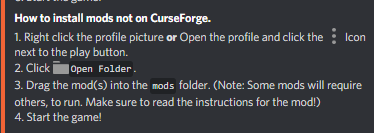
 vague tendon
hello, do you know how to publish a modpack that I made personally, can you show me the steps ?? thanks
wild jewel
!mc-packshare
golden muskBOT
There are two ways to share a modpack you've made with others...
Export and Share - For Friends to Small Groups.
- Click the Icon for the modpack.
- Click the button next to play.
- Click
Export. - Select the files that should be included.
- Send the zip to the people that want it! They can follow the instructions in
!mc-installpackto install the pack!
Upload to Curseforge - For Public Release to Everyone.
This options will make your pack public to EVERYONE, it comes with extra requirements and will take some effort to set up.
- Go to here: https://www.curseforge.com/project/432/4471/create
- Fill out the information with a proper description of the pack. This should allow anyone to understand what the pack is.
- Click the Icon for the modpack in the CurseForge app.
- Click the button next to play.
- Click
Export. - Select the files that should be included.
- Open your Project you made on the CurseForge site and Upload the file you just made.
- Wait for Moderation & Sync so it can show up in the client! (See
!syncfor limitations)
last parcel
deep fjord
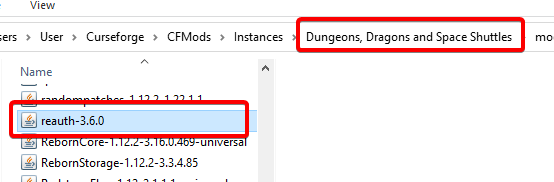 golden muskBOT
Wording is important!
Forge = Minecraft Forge, This is a modloader often just called "Forge".
CurseForge = A Website/App that has content for games.
Mods = Individual mod files.
Modpacks = Multiple mods put into the mods folder or downloaded from CurseForge.
These are not Interchangeable! Please use the correct terms as it allows us to help you faster!
autumn agate
im having trouble downloading modpacks when its downloading it stops and says the request was aborted could not create ssl/tls secure channel
last parcel
autumn agate
im having trouble downloading modpacks when its downloading it stops and says th...
see the reply to the last time you posted that #💬︱general-chat message
autumn agate
How do i add my downloaded mods to curseforge?
wild jewel
autumn agate
How do i add my downloaded mods to curseforge?
Why not install them via curseforge?
autumn agate
cause they arnt there
i just wanted to add realistic mods to minecraft
and im using cureforge
wild jewel
Then drop them in the mods folder
wild jewel
What mods folder did you drop them in then?
autumn agate
in mods
wild jewel
Where is that folder?
wild jewel
Did you restart the pack? Did you make that pack yourself?
autumn agate
wait a minute
i think i got it
so running optifine in a 1.16.4 modpack crashes the game unless i close all other programs with task manager. is there any way to fix this?
optiforge deemed itself useless in this scenario
last parcel
autumn agate
so running optifine in a 1.16.4 modpack crashes the game unless i close all othe...
optifine has a discord somewhere
 glad atlas
need more info bud
autumn agate
everytime i open my minecraft with mods it crashes
glad atlas
crashlog?
autumn agate
you want me to give screenshot?
glad atlas
i need a crashlog
go to the .minecraft folder, insdie that, there a folder named crashlog or something
send the newest txt file
golden muskBOT
How to get a Minecraft log file.
Where to find the log on the CurseForge Client.
Right-click the modpack profile icon OR click the button in the modpack profile.
Click Open Folder.
Open the logs folder.
Find the file called latest.log and drag it into discord.
last parcel
that isnt latest.log, and you didnt send it
golden muskBOT
Path too long/Path must be English letters or numbers only fix!
If Minecraft is not installed, start here.
Click the in the top right.
Select Minecraft.
Click "Edit".
Move to the "Continue here:" section below.
If Minecraft is installed, follow these steps.
Click the in the bottom left.
Select the Minecraft tab.
Click "Change".
Move to the "Continue here:" section below.
Continue here:
Make a folder in the root directory called CurseForge.
Select the folder you just made.
The text box should show something like the following:
For Windows: C:\CurseForge
For Mac: /CurseForge
last parcel
 autumn agate
im sorry im not smart
last parcel
read the instructions, doesn't require being smart
coarse elm


 last parcel
someone hasnt called comcast lately 🙄
wild jewel
autumn agate
worst support ever
Because you can't follow a couple steps with video?
autumn agate
no cause you guys are bad mods
wild jewel
Ok
autumn agate
when i dont understand something i ask for helpp you guys just laugh
last parcel
no i cried
coarse elm
I'm laughing at yamz and tim.
 steady hedge
hey, i need some help, im building a custom modpack. but when i try to launch it instantly returns with error code 0. i have the latest debug and log on the sight mclo.gs
1865 lines
126 lines
any help?
 brazen parrot
so im trying to launch valhelsia 3, but everytime i try to run it, it stops after like 5 seconds into the loading and doesnt start, then just says its not responding, any suggestions?
steady hedge
^ when that usually happens, its because your pc can't keep up, so it freezes to continue loading, just leave it for 10 mins, if it still doesnt respond. then you dont have the pc specs to run it. (that is what happens to me, i leave it and it loads)
 sacred grove
my minecraft wont open when i try to run mods
last parcel
steady hedge
^ when that usually happens, its because your pc can't keep up, so it freezes to...
unlikely.
do you have vanillafix in your pack?
last parcel
brazen parrot
so im trying to launch valhelsia 3, but everytime i try to run it, it stops afte...
?mc-log ⤵️
golden muskBOT
How to get a Minecraft log file.
Where to find the log on the CurseForge Client.
Right-click the modpack profile icon OR click the button in the modpack profile.
Click Open Folder.
Open the logs folder.
Find the file called latest.log and drag it into discord.
 deft grotto
Good evening everyone. I want to start a small server with some friends, but i've problems at loading the mods. Pam's Mods search for a 'ServerProxy' file in the jar, but there is not such a file and that causes a ClassNotFoundException. How could I get it?
sacred grove
@last parcel can you help me
last parcel
not unless you explain better
coarse elm
deft grotto
Good evening everyone. I want to start a small server with some friends, but i'v...
The mod is made incorrectly. You can't fix it.
deft grotto
@coarse elm is there maybe a difference between client and server mod or is that a known problem? ._.
sacred grove
im trying to run valhelsia 1 and it starts to load then stops before minecraft opens i check task manager and its "running" and i cant open the launcher untill i close it
coarse elm
deft grotto
<@!117433042401886214> is there maybe a difference between client and server mod...
Post the full log
sacred grove
last parcel
not unless you explain better
im trying to run valhelsia 1 and it starts to load then stops before minecraft opens i check task manager and its "running" and i cant open the launcher untill i close it
last parcel
need a bit of patience. i read it the first time
deft grotto
@coarse elm https://pastebin.com/x4pSMY9n here you have
Pastebin
Pastebin.com is the number one paste tool since 2002. Pastebin is a website where you can store text online for a set period of time.
sacred grove
sorry im trying to stream today
last parcel
restart your pc, try again
sacred grove
i have twice
last parcel
do you have the same issue with vanilla?
coarse elm
deft grotto
<@!117433042401886214> https://pastebin.com/x4pSMY9n here you have
did you correctly install forge?
sacred grove
no
last parcel
sacred grove
no
?mc-log
golden muskBOT
How to get a Minecraft log file.
Where to find the log on the CurseForge Client.
Right-click the modpack profile icon OR click the button in the modpack profile.
Click Open Folder.
Open the logs folder.
Find the file called latest.log and drag it into discord.
sacred grove
nvm now i am
deft grotto
@coarse elm i'm not sure - i executed a forge.jar and putted all the files in the server folder
sacred grove
nvm
last parcel
sacred grove
nvm now i am
well you will now since java is still running, restart first
last parcel
?mc-installfix start here
golden muskBOT
- Click on the icon in the bottom left.
- Click the
MinecraftTab. - Click
Changenext to theMinecraft Modding FolderOption. - Select the folder named
Install. - Delete it.
- Restart CurseForge App.
- It will ask to install MC again, do so.
- Play game.
NOTE: You will not lose any modpacks or worlds, These are saved in the Instances folder. DO NOT TOUCH THIS FOLDER OR YOU WILL LOSE EVERYTHING
coarse elm
deft grotto
<@!117433042401886214> i'm not sure - i executed a forge.jar and putted all the ...
Did you run the server installer?
deft grotto
yes
sacred grove
last parcel
?mc-installfix start here
trying now
steady hedge
did they accept the eula?
 distant belfry
Anyone know a fix to this?
io.netty.handler.codec.DecoderException: Badly compressed packet - size of 2543584 is larger than protocol maximum of 2097152
coarse elm
deft grotto
yes
Try again
deft grotto
@coarse elm okay
coarse elm
distant belfry
Anyone know a fix to this?
`io.netty.handler.codec.DecoderException: Badly compr...
you can't really fix it.
last parcel
make a new world?
brazen parrot
last parcel
?mc-log ⤵️
sacred grove
@last parcel what do i set it to put the modpacks in??
distant belfry
We tried genning three world's.. then tried making one in single player and moving the world files to the server and nada.
sacred grove
its asking me to chose a folder for my mc modding files
deft grotto
@coarse elm Btw: Are there problems with Curseforge at the moment? Created my own modpack with the old twitch launcher service and only 3 out of 53 mods i installed landed in the exported folder by exporting my modpack
golden muskBOT
Path too long/Path must be English letters or numbers only fix!
If Minecraft is not installed, start here.
Click the in the top right.
Select Minecraft.
Click "Edit".
Move to the "Continue here:" section below.
If Minecraft is installed, follow these steps.
Click the in the bottom left.
Select the Minecraft tab.
Click "Change".
Move to the "Continue here:" section below.
Continue here:
Make a folder in the root directory called CurseForge.
Select the folder you just made.
The text box should show something like the following:
For Windows: C:\CurseForge
For Mac: /CurseForge
last parcel
sacred grove
its asking me to chose a folder for my mc modding files
7. It will ask to install MC again, do so.
coarse elm
deft grotto
<@!117433042401886214> Btw: Are there problems with Curseforge at the moment? Cr...
rebuild the back in a new profile. Just download the mods and then copy over anything else important.
some old profiles are just broken
sacred grove
last parcel
`7. It will ask to install MC again, do so.`
its asking me to chose a folder for the mc modding files though
last parcel
so press install
sacred grove
it says continue or edit
last parcel
continue
deft grotto
ok thank you
 frail citrus
hello i need help
 sleek adder
Hi, i have a problem, I'm playing the "project ozone 2" on curseforge when i use the Wand of animation it crashes with the "Ticking memory connection" crash report, so I searched on the launcher, and when I clicked on the "version" button, it recharged the modpack, and I lost the world, what can I do? I dont want to restart like 30 hours of playing
sacred grove
it worked thank you
sleek adder
What can I do?
deft grotto
@coarse elm with a new profile, the same happend - only the marked ones with a download icon were created .. https://prnt.sc/x8htjp
 coarse elm
deft grotto
<@!117433042401886214> with a new profile, the same happend - only the marked on...
coarse elm
deft grotto
<@!117433042401886214> with a new profile, the same happend - only the marked on...
You didn't follow the directions.
You need to use the app to download the mods, not copy the folder over.