#👽︱game-support
1 messages · Page 51 of 1
 golden muskBOT
How to install mods in CurseForge App.
- Click
+ Create Custom Profile - Name it, select the required Minecraft version, select the Forge version (usually the highest number), click
Create. - Click the profile icon.
- Click
Add New Content - Search and install the desired mods.
- Start the game!
How to install mods not on CurseForge.
- Right click the profile picture or Open the profile and click the
 Icon next to the play button.
 - Click

Open Folder. - Drag the mod(s) into the
modsfolder. (Note: Some mods will require others, to run. Make sure to read the instructions for the mod!) - Start the game!

 blazing sinew
i know how to do it i meant to uplad it to curseforge that my friends could install it
 last parcel
?mc-packshare
golden muskBOT
There are two ways to share a modpack you've made with others...
Export and Share - For Friends to Small Groups.
- Click the Icon for the modpack.
- Click the button next to play.
- Click

Export. - Select the files that should be included.
- Send the zip to the people that want it! They can follow the instructions in
!mc-installpackto install the pack!
Upload to Curseforge - For Public Release to Everyone.
This options will make your pack public to EVERYONE, it comes with extra requirements and will take some effort to set up.
- Go to here: https://www.curseforge.com/project/432/4471/create
- Fill out the information with a proper description of the pack. This should allow anyone to understand what the pack is.
- Click the Icon for the modpack in the CurseForge app.
- Click the button next to play.
- Click
Export. - Select the files that should be included.
- Open your Project you made on the CurseForge site and Upload the file you just made.
- Wait for Moderation & Sync so it can show up in the client! (See
!syncfor limitations)
blazing sinew
two more questions
how long does it takes for mods to verify the modpack
and can galacticraft can be in modpack like this
last parcel
can be up to 7 days for a new project
yes, as long as it's on the list of approved 3rd party mods.
 random plover
hey can someone help with this issue
i keep seeing this every time i try to download decimation minecraft modapck
can someone please help
 sharp herald
When I try to launch Minecraft it crashes with Exit code 0
random plover
i was asking someone who can help with the issue
blazing sinew
last parcel
can be up to 7 days for a new project
yes, as long as it's on the list of approv...
fuck i have mc server and friends want to play with mods and its long time
 tacit scaffold
just make a mega of the modpack and send it to them
and use something like multimc
random plover
can someone help with my issue please
sharp herald
 wild fern
Hello, how to start the server normally?
 spice dove
So I was about to hop into rlcraft modpack earlier today and I ran into a problem (New here btw, so Hi). So I hit play like I would normally and it loaded for a second, showed that it was loading, but the minecraft launcher never loaded. It literally just basically, thought about opening it, then stopped. Any ideas?
 little ivy
Heyyo so I tried uploading a Modpack on Minecraft and all I get is "Invalid Archive". The modpack is pretty dope so it'd be a shame if I couldn't upload it!
I uploaded the modpackname.zip
Inside the modpack.zip I had 3 folders. Config, mods and bin.
Not sure how they want me to upload my stuff...
 humble pelican
what is the best file to put my minecraft mods in
 young rivet
spice dove
little ivy
Not sure how they want me to upload my stuff...
young rivet
spice dove
little ivy
Not sure how they want me to upload my stuff...
Sometimes with modpacks or shaders, you have to first extract the zip to a folder of the same name
young rivet
young rivet
does anyone know how to help?
little ivy
Same name as the zip?
spice dove
young rivet
Based on that, if that specific dependency is required to run the modpack, but not available, I think the pack is broken.
little ivy
Should that matter tho?
spice dove
little ivy
Same name as the zip?
If you right-click hover over the zip folder, you should have an option called extract. Then just hit okay
little ivy
And then I re-upload?
blazing sinew
last parcel
can be up to 7 days for a new project
yes, as long as it's on the list of approv...
how to put it on that list or is it automaticaly there
sharp herald
When I try to launch Minecraft it crashes with Exit code 0
 wild jewel
blazing sinew
how to put it on that list or is it automaticaly there
wild jewel
blazing sinew
how to put it on that list or is it automaticaly there
!mc-3rdparty
golden muskBOT
Minecraft Modpack 3rd party
Mods not on CurseForge must be on the 3rd-party list to be included in modpacks uploaded to CurseForge. If a mod is not on this list it can't be included in the export of a modpack and must be removed before uploading. If you upload with a mod that isn't on this list the file will be rejected.
List of approved 3rd party mods:
https://docs.google.com/spreadsheets/d/176Wv-PZUo9hFxy6oC6N8tWdquBLPRtSuLbNK-r0_byM
blazing sinew
uh
blazing sinew
wild jewel
!mc-3rdparty
to add galacticraft to 3rd list i need to put link to license
i cand find it or i just did not understand it correctly
wild jewel
blazing sinew
to add galacticraft to 3rd list i need to put link to license
i cand find it or ...
It is on the list already
blazing sinew
wild jewel
It is on the list already
so i dont have to?
so if i have modpack with it i can just post it to curse?
wild jewel
Yes, and else it will just get rejected 🤷♂️
blazing sinew
oh
 vital willow
Hey, so everytime I try to create a world in minecraft with my custom modpack/profile, the game just crashes once it hits 100%
im on mac
 errant geyser
How do I sync my addons from the old Twitch App and the CurseForge app? It worked without doing anything for my friend, but they won't show up for me
game is WoW
wild jewel
@errant geyser No need to post in multiple channels
errant geyser
didn't know which one it belongs in
wild jewel
Then you pick one and stick to it
 ocean falcon
@wild jewel My game keeps crashing when i use forge do you know a fix to it
last parcel
usually need a log to know what the issue is
wild jewel
ocean falcon
<@!525950791710801921> My game keeps crashing when i use forge do you know a fix...
Don't randomly ping people
blazing sinew
wild jewel
Yes, and else it will just get rejected 🤷♂️
Thank you for help!
ocean falcon
wild jewel
Don't randomly ping people
Ye sorry about that i pinged since it seemed like you could help
My bad
 rancid mica
@last parcel Hey, I think I got the server thing to work :O
Is there any issue on the log? I checked it and removed client side mods and armor chroma.
In the ending, it sounded like it worked :o
There was another guy here who also talked about it, forgot his name,
spice dove
So I've been messing around with my issues with minecraft and curseforge. Well I reinstalled minecraft, then I did the same for the modpack. VANILLA minecraft works fine. Loads easily. But when I try to load an instance for a modpack, it tries to load it, then stops and doesn't even load the launcher? Is it curseforge itself???
golden muskBOT
- Click on the
 icon in the bottom left.
 - Click the

MinecraftTab. - Click
Changenext to theMinecraft Modding FolderOption. - Select the folder named
Install. - Delete it.
- Restart CurseForge App.
- It will ask to install MC again, do so.
- Play game.
NOTE: You will not lose any modpacks or worlds, These are saved in the Instances folder. DO NOT TOUCH THIS FOLDER OR YOU WILL LOSE EVERYTHING
 celest geyser
just did what it says but says it still cant verify
spice dove
Thanks bot
last parcel
celest geyser
just did what it says but says it still cant verify
added that to the pin
rancid mica
Hey, Yamza, is my server working properly as per the log? I want to know cause then I can upload it :D
 uncut meadow
Hi, I was wondering why my mod wasn't working. I tried launching it in eclipse a thousand times, it opens Minecraft just fine then the minecraft just exits. I have Minecraft, Forge, and I followed all the steps to be able to test the mod. Even pressing the debug button doesn't work because it launches the game and the game doesn't respond. I even tried to refresh the gradle and eclipse projects, doesn't work. If you have a solution to this- please please please dm me or ping.
Thanks
last parcel
rancid mica
Hey, Yamza, is my server working properly as per the log? I want to know cause t...
can you connect?
rancid mica
Uhm, hopefully I have enough ram to also launch minecraft
Wait, I launch the server and the launch Minecraft through CurseForge App modpack I had?
last parcel
not sure what you're asking
 subtle zinc
i keep getting the an exception to a webclient error
last parcel
yeah, saw that in the other chat
subtle zinc
?
 rough jackal
hello
so I updated the version in the modpack and lost my whole world
any way to get a backup or something ?
last parcel
only if you made one
rancid mica
How do I connect to my own server?
last parcel
localhost should work
rancid mica
Alright
rough jackal
last parcel
only if you made one
I remember seeing backup success in the chat
is there some folder with it ?
last parcel
check here Curseforge\Backups
havent seen anything get saved there so no idea if it works
subtle zinc
@last parcel yo how i fix an exception has happend due to a webcleint
last parcel
i answered you in the first place you asked
last parcel
subtle zinc
last parcel
https://discord.com/channels/428228256236306434/782027635252920322/8001451301986...
I've done that still not working and I've requested a thing but they haven't responded
last parcel
there are no other options. wait for a reply
rancid mica
@last parcel I was able to connect to the server and everything worked, server shutdown itself thankfully, computer was dying cause I have nowhere enough ram to host both the server and have the game open lol
I got just enough for the game to work at 60fps with very small dips. Server on the side is overkill on my ram and even cpu
last parcel
if you connected then it should be good. there are issues that may only appear while playing on a server, but that requires having a server you can play on to test
rancid mica
Yeah, I suppose I can upload it now or whatever I have to do?
Remind me what I shoud do next, I forgot pretty much all
 lucid cave
I'm having some trouble making a multiplayer server for a mod on CurseForge. I've made plenty of vanilla servers but whenever I open the world, its just a vanilla world. The mods are installed but the terrain isn't what it is supposed to be. Any advice?
 rustic orbit
what exit code -1
last parcel
rancid mica
Yeah, I suppose I can upload it now or whatever I have to do?
Remind me what I s...
delete the world that was created. zip that folder, upload it as an additional file to your pack
 coarse elm
lucid cave
I'm having some trouble making a multiplayer server for a mod on CurseForge. I'v...
coarse elm
lucid cave
I'm having some trouble making a multiplayer server for a mod on CurseForge. I'v...
Did you run the forge jar and do you have the mods in the mods folder?
coarse elm
Lol
last parcel
rustic orbit
what exit code -1
?mc-log ⤵️
golden muskBOT
How to get a Minecraft log file.
Where to find the log on the CurseForge Client.
Right-click the modpack profile icon OR click the button in the modpack profile.
Click Open Folder.
Open the logs folder.
Find the file called latest.log and drag it into discord.
rustic orbit
rustic orbit
yes
rancid mica
last parcel
delete the world that was created. zip that folder, upload it as an additional f...
Lastly, any of the folders here I should delete? I want to make it tiddy and nice.
last parcel
 rancid mica
Nice thanks!
last parcel
rustic orbit
yes
try removing fps reducer
rustic orbit
it crashed again
rancid mica
last parcel
delete https://i.imgur.com/vbkUyQG.png
Almost forgot, ZIP all the folders into 1 ZIP
Or ZIP the folder these folders are inside?
coarse elm
Zip the files in the folder, not the folder itself as it will get rejected.
 cyan imp
when i try to download the mod, it stops on 33%, it just refuses to download.
coarse elm
What mod
cyan imp
MC Ultimato
 remote jasper
I am unable to launch curseforge as an application and the only way to launch it is through curseforge installer.
coarse elm
cyan imp
MC Ultimato
Link?
remote jasper
and evey time i launch it asks for permissions i have already given it
golden muskBOT
:bug: Reporting via Website :bug:
Can't open the app or would rather use the website? You can do so here: https://support.curseforge.com/en/support/tickets/new
Fill out the form with accurate detailed information, "It doesn't work" isn't helpful! What exactly doesn't work and why doesn't it work should be easy to answer!
Make sure to upload your Overwolf logs with the Upload File option on the ticket, information on how to get these logs can be found here https://support.overwolf.com/en/support/solutions/articles/9000176827-how-to-get-your-overwolf-logs
remote jasper
but is there any way to get a method to launch curseforge without usijg the installer
like a direct way to use the installed program?
coarse elm
remote jasper
but is there any way to get a method to launch curseforge without usijg the inst...
You use the shortcut or open overwolf and start it.
coarse elm
cyan imp
https://www.curseforge.com/minecraft/modpacks/minecraft-ultimato
That's not a mod.
 turbid hedge
coarse elm
That's not a mod.
turbid hedge
coarse elm
That's not a mod.
how do we get that link?(i am his friend and i am trying to help him)
rancid mica
It keeps asking for more Description, I have absolutely no idea what MORE I have to add to it.
coarse elm
turbid hedge
how do we get that link?(i am his friend and i am trying to help him)
It's a modpack not a mod. They arent interchangeable. I cant help if you tell me the wrong thing.
coarse elm
cyan imp
https://www.curseforge.com/minecraft/modpacks/minecraft-ultimato
Do a speedtest for your internet please.
 thin lark
My friend keeps getting this error when launching anything.
Unable to locate the Java runtime.
Error details: The operation completed successfully.
Filename on disk: javaw.exe
Path: C:\Users\19703\AppData\Roaming\CurseForge\Install\runtime\jre-x64\bin\javaw.exe
Exists: Nonexistent
coarse elm
rancid mica
It keeps asking for more Description, I have absolutely no idea what MORE I have...
What do you have currently.
coarse elm
thin lark
My friend keeps getting this error when launching anything.
Unable to locate th...
Dete the install folder.
thin lark
He reinstalled it already.
coarse elm
thin lark
He reinstalled it already.
Move the folder and try again
rancid mica
coarse elm
What do you have currently.
How do I even show you? Can't DM you
coarse elm
By posting the description here?
rancid mica
Just a wall of text then? Alright
For some reason it really hates formatting it properly, despite when I go edit it looking correctly so I dunno what's with that.
rancid mica
coarse elm
By posting the description here?
This is my first modpack made mainly for the users of the VMC Discord channel but anyone else comming upon this is more than welcome to give it a try and tell me if you liked it.
The pack is lightweight as far as my computer goes, but that is subjective. The pack contains a mix of these:
1- Combat
2- Adventure
3- Building
4- Tech & Magic
It contains Lycanites Mobs so it may be a tad harder than normal if you're looking for a Tech focused modpack.
If you're looking for a Mixed Modpack with a little bit of everything without too much clutter, then you may like this, come come and giver it a try, it can fun around here!
I honestly have absolutely NO idea what else am I suppose to type
Do I have to write a whole lore about it? I saw the message about what it needs, I changed it, it still says the description is lacking but I have no clue what to write.
Im afraid of changing it, and still not being good enough and then just get my mod sent to Mod Oblivion cause I keep resubmitting when I think its fine.
remote jasper
coarse elm
You use the shortcut or open overwolf and start it.
there is not shortcut made...
rancid mica
Well, sure hope I don't get locked away from getting my modpack on cause I don't have a Top Notch description :p
 flat veldt
I've tried to play with two different minecraft mods, fullscreen or just expanding the window does not work right, i get red or blue bars the games shifts around on the window so my cursor is off in game, it just breaks
coarse elm
rancid mica
This is my first modpack made mainly for the users of the VMC Discord channel bu...
You can cut the first paragraph, Cause it doesn't add anything about the modpack itself.
The second part doesn't do much more than explain minecraft with mods in general.
The last two are the only ones that actually explain anything in the pack.
 indigo seal
how do I get curseforge plugins to work
coarse elm
remote jasper
there is not shortcut made...
The installer asks if you want one.
coarse elm
flat veldt
I've tried to play with two different minecraft mods, fullscreen or just expandi...
Sounds like mods breaking it. Gotta just start trying stuff.
coarse elm
indigo seal
how do I get curseforge plugins to work
Plugins are for bukkit and bukkit supporting servers.
indigo seal
buh like i got em from curseforge
last parcel
rancid mica
Well, sure hope I don't get locked away from getting my modpack on cause I don't...
The idea is to explain what your pack is about, and what makes it different from the thousands of other packs.
rancid mica
I mean, the first time I got the message it was very straigh foward, as I made it for the members of a certain Discord group to have a Mixed modpack with a bit of everything for everyone. I made it clear.
If every single modpack HAS to try and find a way to be super unique, then its kinda bad, not everyone is super creative with their writting, I myself am sitting here for hours now trying to expand the description lol
This is taking more time than it took to figure out the server stuff haha
last parcel
if your pack is just for a few people then it isnt suitable to be on there
curseforge hosted packs are public use
if you still want it to be on there anyway then you need to make it fit just like all the others do
flat veldt
coarse elm
Sounds like mods breaking it. Gotta just start trying stuff.
Just downloaded a third modpack, happened again, i cant fullscreen. What should I try?
rancid mica
What does WYSIWYG and Markdown mean? It shows down at the bottom when I write the description
last parcel
text formatting
rancid mica
Ah I see. Should put a little text there saying what it is, cause for me its like giving me this option:
1 or 2 without any context (Unless you know well about what it means)
 frigid gust
when i click 'play' on the RLCraft pack in curseforge it says its loading but it dont pull anything up. Is this a problem with MacOs
last parcel
?mc-path try this
golden muskBOT
Path too long/Path must be English letters or numbers only fix!
If Minecraft is not installed, start here.
Click the  in the top right.
Select Minecraft.
Click "Edit".
Move to the "Continue here:" section below.
If Minecraft is installed, follow these steps.
Click the in the bottom left.
Select the Minecraft tab.
Click "Change".
Move to the "Continue here:" section below.
Continue here:
Make a folder in the root directory called CurseForge.
Select the folder you just made.
The text box should show something like the following:
For Windows: C:\CurseForge
For Mac: /CurseForge

 wet hare
hey guys newbie here
can anyone help me out?
looking to download questie for WoW classic
but i cant find it in the app
and when i dl it from the webpage i cant see, to find it anywhere in the app
 naive sonnet
idk how to install the mods can someone help
 last cedar
whenever i press play it acts like it launches then it doesnt lauch
last parcel
check the pin
last cedar
whenever i press play it acts like it launches then it doesnt lauch i did everything in the pins and it didnt help
frigid gust
Same
last parcel
I assume you made a ticket like the pin said
 autumn agate
Im confused on how to make a profile
for 1.12.2 because it says that there is no mod loader
coarse elm
autumn agate
for 1.12.2 because it says that there is no mod loader
picture?
autumn agate
I got it to work now It was bc I did 1.2.2 instead of 1.12.2 but thanks anyways
 elfin gale
I launch curseforge from overwolf, go to browse modpacks, and when I click on install for the modpack an error comes up saying "failed to create modpack: insert modpack name and it doesn't install the modpack I want
Any ideas what to do?
 hot quartz
autumn agate
hot quartz
autumn agate
I'm trying to launch curse from the overwolf launcher and it crashes before opening
coarse elm
do you get an error?
coarse elm
!ticket-site
golden muskBOT
:bug: Reporting via Website :bug:
Can't open the app or would rather use the website? You can do so here: https://support.curseforge.com/en/support/tickets/new
Fill out the form with accurate detailed information, "It doesn't work" isn't helpful! What exactly doesn't work and why doesn't it work should be easy to answer!
Make sure to upload your Overwolf logs with the Upload File option on the ticket, information on how to get these logs can be found here https://support.overwolf.com/en/support/solutions/articles/9000176827-how-to-get-your-overwolf-logs
coarse elm
please report that, thanks.
autumn agate
is there any other way to play rlcraft for now?
coarse elm
use another launcher that supports curseforge modpaks
autumn agate
do you have any reccomendations?
coarse elm
nope, any of em will do
 thick lantern
I'm sure there's a fairly simple solution to this, but when I install a minecraft modpack from the browse section then press play in my modpack section, it takes me to the regular minecraft launcher without any hint of it being modded. Can someone guide me in the right direction to fix this?
wild jewel
Did you have any Minecraft related programs open at that time?
thick lantern
I don't believe so, but I'll try it again
Alrighty there was a weird background version of minecraft that only showed up in task manager that was barely running, hopefully it works now
Closing that fixed it when I booted it up again, thanks!
 cloud burrow
any idea why CurseForge app is marking the GTFO addon version 4.59 as modified if i press the "refresh" button? i did a recursive checksum to compare the folder contents with what's in the ZIP file... all files are a match. I tried a reinstall but it still shows as modified after i press the refresh button.
coarse elm
🤷
blazing sinew
soo i making a modpack and when i install a mod random mod gets uninstalled i dont know if it works like that or just sometimes mods get randomly uninstaled
uninstaled*
little ivy
Heyyo guys whenever I try adding plugins to the server using FTP, the plugins don't take effect, they don't work. I am using a modded version of 1.12.2.
wild jewel
You combining plugins and mods?
 merry pond
Hey, whenever I try to download "Roguelike adventures and dungeons" it keeps saying this
wild jewel
!mc-path
golden muskBOT
Path too long/Path must be English letters or numbers only fix!
If Minecraft is not installed, start here.
Click the in the top right.
Select Minecraft.
Click "Edit".
Move to the "Continue here:" section below.
If Minecraft is installed, follow these steps.
Click the in the bottom left.
Select the Minecraft tab.
Click "Change".
Move to the "Continue here:" section below.
Continue here:
Make a folder in the root directory called CurseForge.
Select the folder you just made.
The text box should show something like the following:
For Windows: C:\CurseForge
For Mac: /CurseForge
blazing sinew
blazing sinew
soo i making a modpack and when i install a mod random mod gets uninstalled i do...
?
 dire sable
Can anyone help me i need to find minecraft comes alive on the curseforge app
my java will not run after being installed
blazing sinew
dire sable
Can anyone help me i need to find minecraft comes alive on the curseforge app
its a mod?
dire sable
yea
and my son wants it
but i can't get java to work
i install it and it won't run
java should install on window with no problems i don't get it
 azure smelt
dire sable
i install it and it won't run
azure smelt
dire sable
i install it and it won't run
I had the same problem did you check ur space???
azure smelt
oh then i dont know sorry!
azure smelt
minecraft is not on curseforge java is on the mc webiste if thats what u mean
wild jewel
dire sable
do you know how to find the app on the program
!mc-installmods
golden muskBOT
How to install mods in CurseForge App.
- Click
+ Create Custom Profile - Name it, select the required Minecraft version, select the Forge version (usually the highest number), click
Create. - Click the profile icon.
- Click
Add New Content - Search and install the desired mods.
- Start the game!
How to install mods not on CurseForge.
- Right click the profile picture or Open the profile and click the Icon next to the play button.
- Click
Open Folder. - Drag the mod(s) into the
modsfolder. (Note: Some mods will require others, to run. Make sure to read the instructions for the mod!) - Start the game!
 full musk
how do i fix this error message?
dire sable
also exit code -1 when trying to run rlcraft
wild jewel
dire sable
also exit code -1 when trying to run rlcraft
Check the pinned messages
blazing sinew
I'm making a modpack and when i install a mod random mod gets uninstalled i dont know if it works like that or just sometimes mods get randomly uninstaled
can sb help?
wild jewel
Does the mod still exist in the mods folder?
 twin flame
how do i fix the object reference is not set to an instance of an object it shows up when i try to download a new mod
wild jewel
twin flame
how do i fix the object reference is not set to an instance of an object it show...
! ticket-app
golden muskBOT
:bug: Reporting via the CurseForge App :bug:
-
Click the
 icon in the bottom left.
 -
Select

Open a Ticket. -
Fill out the form with accurate detailed information, "It doesn't work" isn't helpful! What exactly doesn't work and why doesn't it work should be easy to answer!
-
Make sure to upload your Overwolf logs with the
Upload Fileoption on the ticket, information on how to get these logs can be found here https://support.overwolf.com/en/support/solutions/articles/9000176827-how-to-get-your-overwolf-logs -
Submit!
 blazing sinew
wild jewel
Does the mod still exist in the mods folder?
blazing sinew
wild jewel
Does the mod still exist in the mods folder?
no
its uninstaled
i installed buildcraft botania, chisel
yesterday
and today when i checked they were here byt when i installed another mod they dissapired
 high rover
can anyone help i just downloaded a modpack for minecraft and when i try to launvh it just crashes all the time
blazing sinew
wild jewel
It is on the list already
is there a way to see that list
 quaint socket
Any idea on this error?
blazing sinew
quaint socket
Any idea on this error?
I think that
this mod needs liblary that is no longer on curseforge
autumn agate
I have the same problem
 abstract parcel
?mc-log
golden muskBOT
How to get a Minecraft log file.
Where to find the log on the CurseForge Client.
Right-click the modpack profile icon OR click the button in the modpack profile.
Click Open Folder.
Open the logs folder.
Find the file called latest.log and drag it into discord.
abstract parcel
?mc-installfix
golden muskBOT
- Click on the icon in the bottom left.
- Click the
MinecraftTab. - Click
Changenext to theMinecraft Modding FolderOption. - Select the folder named
Install. - Delete it.
- Restart CurseForge App.
- It will ask to install MC again, do so.
- Play game.
NOTE: You will not lose any modpacks or worlds, These are saved in the Instances folder. DO NOT TOUCH THIS FOLDER OR YOU WILL LOSE EVERYTHING
 barren valve
wild jewel
barren valve
wild jewel
!mc-ftb
golden muskBOT
We do not provide support for FTB Modpacks or the FTB App.
If you are looking to play FTB modpacks use the FTB launcher.
https://www.feed-the-beast.com/
Any Overwolf FTB launcher issues you have should be directed here:
https://github.com/FTBTeam/FTB-App-Overwolf/issues
blazing sinew
soo i have problem is says that there is a wrong file called immersive core
on the website
but when i search for it in mod folder its not there
wild jewel
Screenshot of message please
blazing sinew
wild jewel
Did you have it installed before?
blazing sinew
soo
blazing sinew
i sarched for it in diles
but
its not there
when i turn on modpack
it is there
wild jewel
Open up the export and look for it there
wild jewel
Did you have it installed before?
blazing sinew
i did not install it
wild jewel
Never in that pack?
blazing sinew
no
its not even on curse
searh
search
it installs with immersive enginering
or addon
and i dont know wich
wild jewel
So you do have immersive engineering installed? Or parts of it at least?
wild jewel
So those all depends on the core one
wild jewel
Remove the file from the export
wild jewel
You have more info that my terrible google skills gave me?
blazing sinew
me?
wild jewel
All parts?
last parcel
delete immersive core from the mods folder
last parcel
screenshot?
blazing sinew
blazing sinew
.
last parcel
screenshot from now after you delete it
blazing sinew
and they re-apirred
wild jewel
Don't search, just show the content of the mods folder
wild jewel
Check your pack on the website btw, somebody changed things there
blazing sinew
when i tur on the game it re appears
last parcel
ok turn on the game and show it in the mods folder
blazing sinew
wild jewel
Check your pack on the website btw, somebody changed things there
what
wild jewel
blazing sinew
what
Open up the website, go to your modpack, look at your latest upload
blazing sinew
last parcel
ok turn on the game and show it in the mods folder
its in memory rep
last parcel
in what?
blazing sinew
last parcel
should be fine, export your pack again
blazing sinew
ok
thanks for help
now i can finaly start server:)
oh and is there a way to make that the app will not freaze everytime i switch to other window?
wild jewel
!ticket-app
golden muskBOT
:bug: Reporting via the CurseForge App :bug:
-
Click the
icon in the bottom left. -
Select
Open a Ticket. -
Fill out the form with accurate detailed information, "It doesn't work" isn't helpful! What exactly doesn't work and why doesn't it work should be easy to answer!
-
Make sure to upload your Overwolf logs with the
Upload Fileoption on the ticket, information on how to get these logs can be found here https://support.overwolf.com/en/support/solutions/articles/9000176827-how-to-get-your-overwolf-logs -
Submit!
 sacred sleet
how can i use modpacks its bugy af
blazing sinew
blazing sinew
sacred sleet
how can i use modpacks its bugy af
?
blazing sinew
sacred sleet
how can i use modpacks its bugy af
download in the app and click play
 void wagon
Hello, I have a problem with the update of my modpack. Each time I post an update, it is rejected with the reason "error processing your file"
I posted another update 4 days ago and this one was accepted without worries, I use exactly the same method for this one and I get this error :/
Screenshot for the error :
last parcel
contact support
void wagon
Ok, thanks
 last parcel
that may happen for up to a day, something that really needs to be fixed
if you download the pack from the website you should be able to import it that way i believe
might want to make a ticket on that tbh
?ticket-app
golden muskBOT
:bug: Reporting via the CurseForge App :bug:
-
Click the
icon in the bottom left. -
Select
Open a Ticket. -
Fill out the form with accurate detailed information, "It doesn't work" isn't helpful! What exactly doesn't work and why doesn't it work should be easy to answer!
-
Make sure to upload your Overwolf logs with the
Upload Fileoption on the ticket, information on how to get these logs can be found here https://support.overwolf.com/en/support/solutions/articles/9000176827-how-to-get-your-overwolf-logs -
Submit!
last parcel
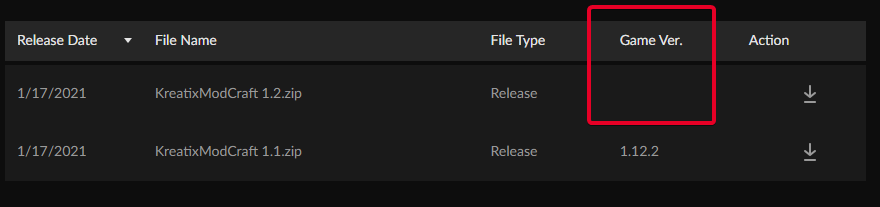
looks like you didnt tag your upload version https://i.imgur.com/10j6dKJ.png
 blazing sinew
WTF
blazing sinew
last parcel
looks like you didnt tag your upload version https://i.imgur.com/10j6dKJ.png
WTF
is happening
wild jewel
Sync is happening, try again in a couple hours
last parcel
yea, the two are probably related
 dapper quest
i'm trying to play a modpack on 1.15.2 but when I open it it opens a window called FML early loading progress which loads for a bit before vanilla opens and the FML early loading progress window seems to be doing nothing
 empty viper
seems to be doing nothing?
dapper quest
just does this with the ram heap increasing at like 1 meg a second
last parcel
?mc-log send a log
golden muskBOT
How to get a Minecraft log file.
Where to find the log on the CurseForge Client.
Right-click the modpack profile icon OR click the button in the modpack profile.
Click Open Folder.
Open the logs folder.
Find the file called latest.log and drag it into discord.
dapper quest
last parcel
dapper quest
try removing performant
dapper quest
?
last parcel
actually, try reinstalling this pack first
if you still have the issue you'll need to report to the modpack developer.
autumn agate
Hey can someone help me? every time i try to launch a Modpack it Minecraft crashes after launching and it gives me error code 0
in minecraft btw
dapper quest
uninstalled and reinstalled, same issue
autumn agate
cursed forge or the pack?
golden muskBOT
Hey there, it is Curseforge, not "Cursed forge"
autumn agate
HAHAHA
autumn agate
golden musk
Whoever made this, you have the funny
dapper quest
the pack
autumn agate
k ill try
wild jewel
autumn agate
Whoever made this, you have the funny
I thank you😋
 wild jewel
At least I still have this hammer 🔨
 i have a shotgun
autumn agate
dapper quest
the pack
i have a shotgun
autumn agate
dapper quest
the pack
it didnt work :/
dapper quest
any more suggestions?
last parcel
pretty sure i told you what the next step would be
dapper quest
it's done this foor a bunch of other packs in the past
last parcel
?mc-installfix
golden muskBOT
- Click on the icon in the bottom left.
- Click the
MinecraftTab. - Click
Changenext to theMinecraft Modding FolderOption. - Select the folder named
Install. - Delete it.
- Restart CurseForge App.
- It will ask to install MC again, do so.
- Play game.
NOTE: You will not lose any modpacks or worlds, These are saved in the Instances folder. DO NOT TOUCH THIS FOLDER OR YOU WILL LOSE EVERYTHING
 twilit cipher
Hi anyone knows how i can start a modded server for me and my friends?
autumn agate
does anyone know why enigmatica 2 expert crashes?
wild jewel
twilit cipher
Hi anyone knows how i can start a modded server for me and my friends?
! mc-installserver
golden muskBOT
How to **manually** install a server - **On your own PC**
- Go to the Forge website http://files.minecraftforge.net/ and download the Installer for the forge version the pack is using.
- Run the installer and choose
Install server. Do not install to your desktop. Also do not install inside a OneDrive folder. - Run the server using the forge.jar. A file called
eula.txtwill be generated. Open it and changeeula=falsetoeula=true - From the Client; Copy the
modsfolder,configfolder, and any other folders needed for the pack to work into the server folder. If the modpack has a server pack, use this instead! - Run the server again.
sharp herald
every time I try to start Minecraft it crashes with Exit cose 0
last parcel
?mc-installfix @sharp herald ⤵️
golden muskBOT
- Click on the icon in the bottom left.
- Click the
MinecraftTab. - Click
Changenext to theMinecraft Modding FolderOption. - Select the folder named
Install. - Delete it.
- Restart CurseForge App.
- It will ask to install MC again, do so.
- Play game.
NOTE: You will not lose any modpacks or worlds, These are saved in the Instances folder. DO NOT TOUCH THIS FOLDER OR YOU WILL LOSE EVERYTHING
sharp herald
last parcel
?mc-installfix <@!764203705322045450> ⤵️
still the same
last parcel
sharp herald
still the same
?mc-path
golden muskBOT
Path too long/Path must be English letters or numbers only fix!
If Minecraft is not installed, start here.
Click the in the top right.
Select Minecraft.
Click "Edit".
Move to the "Continue here:" section below.
If Minecraft is installed, follow these steps.
Click the in the bottom left.
Select the Minecraft tab.
Click "Change".
Move to the "Continue here:" section below.
Continue here:
Make a folder in the root directory called CurseForge.
Select the folder you just made.
The text box should show something like the following:
For Windows: C:\CurseForge
For Mac: /CurseForge
last parcel
 lean seal
every time i click play it does this, im on mac OS
lean seal
every time i click play it does this, im on mac OS
also try that
 left crown
it says failed to create modpack: Rlcraft what do i do
 spice condor
Whenever I click on the installer for the launcher, it never actually launches
sharp herald
last parcel
?mc-path
still doesnt work
last parcel
sharp herald
still doesnt work
?ticket-app
golden muskBOT
:bug: Reporting via the CurseForge App :bug:
-
Click the
icon in the bottom left. -
Select
Open a Ticket. -
Fill out the form with accurate detailed information, "It doesn't work" isn't helpful! What exactly doesn't work and why doesn't it work should be easy to answer!
-
Make sure to upload your Overwolf logs with the
Upload Fileoption on the ticket, information on how to get these logs can be found here https://support.overwolf.com/en/support/solutions/articles/9000176827-how-to-get-your-overwolf-logs -
Submit!
 plucky violet
In every modpack when i click on play i got crash code 0 and I am not getting a report from the folder
spice condor
Error: java.lang.IllegalAccessError: tried to access class org.spongepowered.asm.mixin.transformer.MixinTransformer from class net.minecraftforge.fml.common.Loader
help
autumn agate
is there a mod called "spongepowered" or something in thr modpack?
spice condor
no
autumn agate
Which modpack are you running
spice condor
just testing my own, I believe i fixed it
autumn agate
oh ok
 jolly forum
when i start mc with any modpack my mc crash and schows up the error 0 what can i do can somone help me?
wild jewel
jolly forum
when i start mc with any modpack my mc crash and schows up the error 0 what can ...
Check the pinned messages
jolly forum
can somone help with taht?
 wild jewel
jolly forum
https://cdn.discordapp.com/attachments/747085093188927550/800440891860844574/Min...
wild jewel
jolly forum
https://cdn.discordapp.com/attachments/747085093188927550/800440891860844574/Min...
Told you to check the pinned messages
jolly forum
i dont understand the massage
wild jewel
📌 That icon at the top of discord, click it
jolly forum
i know but i dont under stand this massage
wild jewel
!mc-installfix
golden muskBOT
- Click on the icon in the bottom left.
- Click the
MinecraftTab. - Click
Changenext to theMinecraft Modding FolderOption. - Select the folder named
Install. - Delete it.
- Restart CurseForge App.
- It will ask to install MC again, do so.
- Play game.
NOTE: You will not lose any modpacks or worlds, These are saved in the Instances folder. DO NOT TOUCH THIS FOLDER OR YOU WILL LOSE EVERYTHING
jolly forum
that dosent work
wild jewel
!ticket-app
golden muskBOT
:bug: Reporting via the CurseForge App :bug:
-
Click the
icon in the bottom left. -
Select
Open a Ticket. -
Fill out the form with accurate detailed information, "It doesn't work" isn't helpful! What exactly doesn't work and why doesn't it work should be easy to answer!
-
Make sure to upload your Overwolf logs with the
Upload Fileoption on the ticket, information on how to get these logs can be found here https://support.overwolf.com/en/support/solutions/articles/9000176827-how-to-get-your-overwolf-logs -
Submit!
jolly forum
i done one no one answered
wild jewel
How long did you wait?
jolly forum
like a week
wild jewel
Did you check the ticket status?
jolly forum
yes
wild jewel
Which is at the moment?
jolly forum
it got deleded
wild jewel
Doubt it, they don't delete tickets.
Closing them I get, but not delete
 pseudo wraith
Hello, I installed 3 mod packs for Minecraft on curse forge for some odd reason would loading up the game half way through it stops and says that the tab is not responding is it something like a setting or a bug?
 last pendant
Anyone else had issues with mods just falling off a modpack? I've re-added 2 mods every time I go to update, and I've had rejections for the modpack because it's included but not listed in the manifest (which is how I added it in the first place, soooooooo what gives)
 tame sky
I have a problem where every time I download mods, then close the app and open it again, all the mods that I downloaded doesn't appear in installed mods
@ me if you know the problem
last parcel
problem is the app
last parcel
last pendant
Anyone else had issues with mods just falling off a modpack? I've re-added 2 mod...
yup, had that happen too
tame sky
are they going to fix it?
wild jewel
When they get around to it
last pendant
Ok so I'm not crazy lol, that's all that matters right now 🤣
rancid mica
I'm starting to think I rather just upload my modpack somewhere else, TOO much hassle and little things to deal with. :/
I'm lacking a manifest.json or whatever the hell that is that nobody told me about... Need to be made on the Twitch Launcher, meaning I DO have to install that bloatware... (Wasn't that thing like, not used anymore for Minecraft modpacks?)
@last parcel I'm back btw
rancid mica
Oh God, welp, time to install bloatware, sure hope the unninstaller for twitch thing does a Complete Wipe
Once I finish that
last parcel
not twitch, curseforge
last parcel
did you extract the zip?
rancid mica
Extract the zip? No, I compacted the folders as a zip file the way you said.
Unless you talking about something else
last parcel
the way i said??
rancid mica
Wait, wasn't you?
rancid mica
Yes, I did and I uploaded it. Description I made it alot better and all.
It was approved and then immediately rejected
Also it deleted the OTHER file that I don't remember what it even was so I have absolutely no clue what I lost lol
last parcel
you need to upload a pack export first, then you add server files to that
rancid mica
Can you do me a step-by-step for the PACK itself since I guess the server files are correct or at least post the generic how-to thing?
last parcel
?mc-packshare
golden muskBOT
There are two ways to share a modpack you've made with others...
Export and Share - For Friends to Small Groups.
- Click the Icon for the modpack.
- Click the button next to play.
- Click
Export. - Select the files that should be included.
- Send the zip to the people that want it! They can follow the instructions in
!mc-installpackto install the pack!
Upload to Curseforge - For Public Release to Everyone.
This options will make your pack public to EVERYONE, it comes with extra requirements and will take some effort to set up.
- Go to here: https://www.curseforge.com/project/432/4471/create
- Fill out the information with a proper description of the pack. This should allow anyone to understand what the pack is.
- Click the Icon for the modpack in the CurseForge app.
- Click the button next to play.
- Click
Export. - Select the files that should be included.
- Open your Project you made on the CurseForge site and Upload the file you just made.
- Wait for Moderation & Sync so it can show up in the client! (See
!syncfor limitations)
rancid mica
"Select the files that should be included"
Default ones that come selected? Like "Mods" "Configs" or missing something?
last parcel
mods would be the minimum. include anything else you're edited and need to send with the mods.
if you edited configs then include configs, if not then dont.
rancid mica
manifest.json is not on this part yet, right?
last parcel
this is what will make it, it'll be in the zip
rancid mica
Oh, real quick thing. How do I deal with licenses, as I just read that it was Reject Twice, one cause of a license of a mod I added since its included in almost every other modpack for the "Tech bois".
 fallen bridge
when i Try to open a modpack it says could not verify minecraft version
last parcel
what mod
rancid mica
I think I need to figure out how to get a permission I suppose? Never dealt with such a thing in my life.
ImmersiveEngineering-core
autumn agate
when i download a mod it doesnt download and it says that it would download right awa
y
rancid mica
The way you typed that makes me feel either I done something terribly bad or dealing with that is terribly annoying :p
Export is done, just asked cause I figure I had to deal stuff before.
last parcel
they are doing something weird with their files so it keeps being rejected
open the zip, go to overrides/mods and there should be a folder called memory or something, delete that
rancid mica
That is the only folder I got there, since I didn't change configs or anything.
last parcel
cool, yeet
rancid mica
Well, deleted it
autumn agate
when i download a mod it doesnt download
rancid mica
What should I do next?
 potent echo
Hi, i have a Problem starting modpacks, I just reinstalled my PC, Installed Forge as usuall and now if i try to start a modpack it only shows up newest version 1.16.5 as installed and not the chosen modpack
rancid mica
Hang on, how am I supposed to test it? The thing I have is just like empty?
last parcel
should have a manifest and modlist. use the import feature
 vagrant mountain
Does anyone know why everytime i try and launch a modpack, my minecraft launcher keeps going gray?
rancid mica
Ah yeah, forgot about those. Downloading know and will test in a sec
 tropic kraken
Hi i’m very new to mods and am trying to install poetica with the forge app thingy, I installed it and clicked play and it immediately went back to being able to click play and mc didnt run at all, it does this every time i click play, anyone know what the issue is?
 fiery iris
hi im new to useing curse forge and i tried to instal rlcraft but its not instaling it saying something about missing addon id :275361
rancid mica
@last parcel It works fine
 astral crescent
Hey, I was wondering if anyone here could help me set up a modded minecraft server? My friend has the files from an old server that they wanted to reuse, and I'd be setting it up on an unbuntu desktop.
autumn agate
does anyone know what to do when the modpack is installed, and it says "Launching game" and then wont open ?
 glass igloo
I can't even get to my launcher atm, I press play on my modpack and the launcher will just freeze up and stop responding
 shut sonnet
hi i new to cursedforge i tryed to download ship for kerbal space program but it turning up any were in game
golden muskBOT
Hey there, it is Curseforge, not "Cursed forge"
rancid mica
last parcel
should have a manifest and modlist. use the import feature
Should I uhm, upload that one now? Suppose the ImmersiveEngie one is done now?
golden muskBOT
Hey there, it is Curseforge, not "Cursed forge"
 clever frost
cursed forge is saying it cant verify minecraft version how do i fix this
okay
cursed forge
golden muskBOT
Hey there, it is Curseforge, not "Cursed forge"
shut sonnet
one word
shut sonnet
i think this chat is dead
cloud burrow
- snorrr *
 low mural
Hello! I am trying to play this modpack through the new curseforge launcher. I have run into the issue where I can not launch the game,. Whenever I click on the play button nothing happens. I have the modpack linked to it's correct folder so it should have access to those files. Anyone else run into this?
 wooden ledge
can anyone help me with the "An exception occurred during a WebClient request" error?
everytime try to download a minecraft modpack it starts downloading the mods and then gives me that error
last parcel
shut sonnet
hi i new to cursedforge i tryed to download ship for kerbal space program but i...
KSP isnt really supported currently.
?mc-installfix @clever frost @autumn agate try this ⤵️
golden muskBOT
- Click on the icon in the bottom left.
- Click the
MinecraftTab. - Click
Changenext to theMinecraft Modding FolderOption. - Select the folder named
Install. - Delete it.
- Restart CurseForge App.
- It will ask to install MC again, do so.
- Play game.
NOTE: You will not lose any modpacks or worlds, These are saved in the Instances folder. DO NOT TOUCH THIS FOLDER OR YOU WILL LOSE EVERYTHING
autumn agate
okay thanks I will try it out
last parcel
wooden ledge
everytime try to download a minecraft modpack it starts downloading the mods and...
you can try the fix above but not sure if it'll help. if not make a ticket
autumn agate
k
last parcel
?ticket-app
golden muskBOT
:bug: Reporting via the CurseForge App :bug:
-
Click the
icon in the bottom left. -
Select
Open a Ticket. -
Fill out the form with accurate detailed information, "It doesn't work" isn't helpful! What exactly doesn't work and why doesn't it work should be easy to answer!
-
Make sure to upload your Overwolf logs with the
Upload Fileoption on the ticket, information on how to get these logs can be found here https://support.overwolf.com/en/support/solutions/articles/9000176827-how-to-get-your-overwolf-logs -
Submit!
wooden ledge
okay will do thanks
autumn agate
it didnt worm sadly yamz
*yamza
now it is a different issue
now this happens
It says internal server error
 grim matrix
hey im trying to play minecraft splitscreen and am looking for help on how i would go about that
 lilac briar
my friend and I are trying to download mods for Stardew but it keeps saying that its not installed even though I scanned and gave it a directory for it
rancid mica
@last parcel Hey man, the thing work, so now I just upload the that one ZIP there? What about the License stuff?
coarse elm
grim matrix
hey im trying to play minecraft splitscreen and am looking for help on how i wou...
Minecraft doesn't have split screen and isnt made for it.
coarse elm
lilac briar
my friend and I are trying to download mods for Stardew but it keeps saying that...
!knownissues
golden muskBOT
Known Issues with solutions or status of the issue.
Overwolf maintains a known list of issues here, some with solutions, others without.
http://support.curseforge.com/en/support/solutions/articles/9000196615-known-issues
coarse elm
All the way at the bottom.
lilac briar
Thank you
autumn agate
cursed forge
golden muskBOT
Hey there, it is Curseforge, not "Cursed forge"
rough jackal
So 2 days ago I updated my Minecraft modpack from the Twitch launcher to the CurseForge launcher and I played that night and everything was fine but yesterday I updated the modpack version to the newest one ( as in the screenshot ) and my word was gone when I lauched this newer version and I dont know why.
The version I had was the 1.2.32 and the version I updated to was the 1.2.33.
coarse elm
Sounds like a bug.
autumn agate
my game works for like 2 minutes then crashes
The game crashed whilst updating screen events
Error: java.lang.ClassCastException: net.minecraft.inventory.Slot cannot be cast to net.minecraft.client.gui.inventory.GuiContainerCreative$CreativeSlot
Exit Code: -1
coarse elm
Please open a ticket with your overwolf logs.
coarse elm
autumn agate
The game crashed whilst updating screen events
Error: java.lang.ClassCastExcepti...
You have a broken mod.
coarse elm
rough jackal
So 2 days ago I updated my Minecraft modpack from the Twitch launcher to the Cur...
!bug-app please make sure to include logs and mention me in the description.
golden muskBOT
:bug: Reporting via the CurseForge App :bug:
-
Click the
icon in the bottom left. -
Select
Open a Ticket. -
Fill out the form with accurate detailed information, "It doesn't work" isn't helpful! What exactly doesn't work and why doesn't it work should be easy to answer!
-
Make sure to upload your Overwolf logs with the
Upload Fileoption on the ticket, information on how to get these logs can be found here https://support.overwolf.com/en/support/solutions/articles/9000176827-how-to-get-your-overwolf-logs -
Submit!
autumn agate
k
coarse elm
autumn agate
how do i fix it
You dont fix it. The mod is broken.
autumn agate
wait what
coarse elm
Pick a diffrent version.
rough jackal
coarse elm
!bug-app please make sure to include logs and mention me in the description.
ok thanks but do I have to mention you for some reason ?
coarse elm
autumn agate
k i made a ticket
Why did you make a ticket.... I didn't tell you to make one...
autumn agate
am i just done
o
i thot i was the other dude
sry he he
well i did it anyway i guess
coarse elm
Do you not see the reply?
autumn agate
but when my friend joins its perfectly fine for him
coarse elm
Pay attention next time please.
That's because as I said 5 minutes ago you have a broken mod.
It has a bug
autumn agate
Oh I thot the version was screwed
is there a way to fix it like at all I dont mind losing my player data or save
coarse elm
rough jackal
ok thanks but do I have to mention you for some reason ?
If you mention me and they have questions regarding the issue they will know I saw the issue and sent you there.
coarse elm
autumn agate
is there a way to fix it like at all I dont mind losing my player data or save
!mc-logs
golden muskBOT
How to get a Minecraft log file.
Where to find the log on the CurseForge Client.
Right-click the modpack profile icon OR click the button in the modpack profile.
Click Open Folder.
Open the logs folder.
Find the file called latest.log and drag it into discord.
autumn agate
Heya! My friend is currently having issues with Curseforge not opening the installation upon finishing download. is there any way to force open it or anything?
coarse elm
autumn agate
this doesn't even contain the crash.
coarse elm
autumn agate
Heya! My friend is currently having issues with Curseforge not opening the insta...
Does overwolf show up?
autumn agate
I restarted my computer and I think it works
We bypassed it now by downloading addons manually into folders. I dont know why it wont open up the installer for him. Thank you for the response tho!
I loaded it up with the version before it and it works
Is there a mod to update mixin version, 1.16.4
 subtle pecan
hey sorry for the hassle but does anyone now how to fix invalid payload register when joining a server
coarse elm
sounds like one of the mods have a packet problem. Thus you would need to include logs for any help with that.
 orchid cliff
whenever i start this modpack rebirth of the night with optifine in the mod files it doesent open ive tried the game with and without optifine it says dont launch without optifine im just wondering what to do
coarse elm
well if it doesn't work with optifine then don't use it?
subtle pecan
is this what u need
 solar osprey
Anyone know how to fix this?
Happens when I try to open a mod pack
also this shows up when I try to install new mod pack
please help
last parcel
?mc-installfix
golden muskBOT
- Click on the icon in the bottom left.
- Click the
MinecraftTab. - Click
Changenext to theMinecraft Modding FolderOption. - Select the folder named
Install. - Delete it.
- Restart CurseForge App.
- It will ask to install MC again, do so.
- Play game.
NOTE: You will not lose any modpacks or worlds, These are saved in the Instances folder. DO NOT TOUCH THIS FOLDER OR YOU WILL LOSE EVERYTHING
subtle pecan
is this for me or heather
last parcel
not you
subtle pecan
ok thank you
last parcel
subtle pecan
ok thank you
you're using atm6?
subtle pecan
yeah
last parcel
reinstall. if you still have issues ask the atm devs
 frozen vortex
Why does curseforge need admin permissions?
autumn agate
Ive downloaded a mod from the website but I cant get it to load in the Curse Forge launcher. How can I run it?
frozen vortex
autumn agate
Ive downloaded a mod from the website but I cant get it to load in the Curse For...
Use forge instead
solar osprey
last parcel
reinstall. if you still have issues ask the atm devs
was that for me?
last parcel
the message after yours was for you...
solar osprey
oh sorry
coarse elm
subtle pecan
is this what u need
looks like an issue with eidolon.
subtle pecan
what should i do
coarse elm
report it to the dev is all you can do
subtle pecan
ok thank you for all your help
solar osprey
last parcel
?mc-installfix
It didn't work??
 patent gull
hey im trying to download a shader does this mean i have to extract it first? sorry if this is basic information im new to modding
last parcel
solar osprey
It didn't work??
?mc-path
golden muskBOT
Path too long/Path must be English letters or numbers only fix!
If Minecraft is not installed, start here.
Click the in the top right.
Select Minecraft.
Click "Edit".
Move to the "Continue here:" section below.
If Minecraft is installed, follow these steps.
Click the in the bottom left.
Select the Minecraft tab.
Click "Change".
Move to the "Continue here:" section below.
Continue here:
Make a folder in the root directory called CurseForge.
Select the folder you just made.
The text box should show something like the following:
For Windows: C:\CurseForge
For Mac: /CurseForge
solar osprey
still not working
last parcel
?ticket-app
golden muskBOT
:bug: Reporting via the CurseForge App :bug:
-
Click the
icon in the bottom left. -
Select
Open a Ticket. -
Fill out the form with accurate detailed information, "It doesn't work" isn't helpful! What exactly doesn't work and why doesn't it work should be easy to answer!
-
Make sure to upload your Overwolf logs with the
Upload Fileoption on the ticket, information on how to get these logs can be found here https://support.overwolf.com/en/support/solutions/articles/9000176827-how-to-get-your-overwolf-logs -
Submit!
solar osprey
doesn't show the same end result and still has the same error
oh okay
what does it mean by cf project name?
coarse elm
if it doesn't apply don't fill it out
solar osprey
alright, thanks
 old kestrel
what does this mean: net.minecraftforge.fml.common.LoaderExceptionModCrash: Caught exception from Industrial Foregoing (industrialforegoing)
coarse elm
No idea as you decided to only pick what you felt was important.
Post the whole log file if you want help with problems.
golden muskBOT
- Click on the icon in the bottom left.
- Click the
MinecraftTab. - Click
Changenext to theMinecraft Modding FolderOption. - Select the folder named
Install. - Delete it.
- Restart CurseForge App.
- It will ask to install MC again, do so.
- Play game.
NOTE: You will not lose any modpacks or worlds, These are saved in the Instances folder. DO NOT TOUCH THIS FOLDER OR YOU WILL LOSE EVERYTHING
coarse elm
have fun
 amber ruin
I cant play my mod pack and so i was told to put this into dicord
 dark nest
I've been getting this error on trying to open any mod, and I don't know what it means? or what it alerts to
Also when i try to redownload the mod it gives me this
 distant belfry
@amber ruin What exactly is it doing? Is it crashing?
amber ruin
ya the client will stop responding
 real basin
So, I've been having nothing but problems since switching from Twitch to the new curseforge app. At first, I couldn't get Minecraft modpacks to load at all. I fixed this problem by replacing my jar launcher with a more up-to-date version. Now, however, I am not getting any sound in-game. As I recall, this was an issue on Twitch as well, as the app couldn't access Mojang's servers to download the sound assets. The only way I was able to fix this previously was by creating an entirely new profile in Minecraft's native launcher, independent from Twitch, and playing from there. This obviously defeats the entire purpose of using a tool like curseforge for downloading modpacks, as I have to do everything twice. Does anyone know of another way to fix this, or am I just hosed?
coarse elm
real basin
So, I've been having nothing but problems since switching from Twitch to the new...
You shouldn't even be using the jar launcher anymore as it will be phased out soon.
There's been no reports of sound issues for months so this sounds like a network problem on your end.
real basin
Well, I'd be more than happy to use the native launcher, but it just plain doesn't open. I asked for support on the forums and nobody responded.
Huh, scratch that, it works now. I guess I needed to reinstall curseforge, which I just did a few minutes ago.
Thanks for the help anyway. At least I got a response here.
coarse elm
the curseforge forums have been dead for years
 glass spruce
Hi! I'm trying to run Valhelsia 3 (and this happened to other modpacks on CurseForge by the way) but when I click 'Play' then I play it through the Minecraft client that comes up, the game immediately crashes
coarse elm
glass spruce
Hi! I'm trying to run Valhelsia 3 (and this happened to other modpacks on CurseF...
!mc-logs
golden muskBOT
How to get a Minecraft log file.
Where to find the log on the CurseForge Client.
Right-click the modpack profile icon OR click the button in the modpack profile.
Click Open Folder.
Open the logs folder.
Find the file called latest.log and drag it into discord.
 valid vector
The Native launcher that Curseforge is using seems to keep downloading and using older java version, is there a way to change that?
coarse elm
glass spruce
i cant see the logs folder
!mc-installfix
golden muskBOT
- Click on the icon in the bottom left.
- Click the
MinecraftTab. - Click
Changenext to theMinecraft Modding FolderOption. - Select the folder named
Install. - Delete it.
- Restart CurseForge App.
- It will ask to install MC again, do so.
- Play game.
NOTE: You will not lose any modpacks or worlds, These are saved in the Instances folder. DO NOT TOUCH THIS FOLDER OR YOU WILL LOSE EVERYTHING
coarse elm
valid vector
The Native launcher that Curseforge is using seems to keep downloading and using...
No.
glass spruce
thank you so much Claycorp
 rocky oak
How do i delete mods from the CurseForge beta app
 sage pier
(from a modpack)
coarse elm
click the trashcahn
sage pier
Question originated in the Overwolf Discord, asking how to remove mods from a modpack.
rocky oak
Ya but i cant find a trash can or anything to delete
coarse elm
Then you need to enable modification management for the modpack
click the button by play then click 
Profile Options and check the box
coarse elm
click the modpack icon first
sage pier
 rocky oak
Ok i got is now thank you. Sorry about the hassle. Have a good day/night
sage pier
You too! Good luck!
 loud berry
anyone know how to fix, it will install to like 9% and then reset itself making me have to click install again. Does this repeatedly
coarse elm
do you get an error?
coarse elm
what's your internet speed?
loud berry
not good, but all the other mods I downlaoded worked no problem
loud berry
So your saying I just can't download it on curse
coarse elm
Not without opening a support ticket
loud berry
If I download the mod from the website is there a way I can put it in forge? I want to put in custom profile with my other mods
coarse elm
!mc-installmods
golden muskBOT
How to install mods in CurseForge App.
- Click
+ Create Custom Profile - Name it, select the required Minecraft version, select the Forge version (usually the highest number), click
Create. - Click the profile icon.
- Click
Add New Content - Search and install the desired mods.
- Start the game!
How to install mods not on CurseForge.
- Right click the profile picture or Open the profile and click the Icon next to the play button.
- Click
Open Folder. - Drag the mod(s) into the
modsfolder. (Note: Some mods will require others, to run. Make sure to read the instructions for the mod!) - Start the game!
coarse elm
use part 2 of that
loud berry
👍 thanks
loud berry
@coarse elm I downloaded the mod from the website and put it in the folder, and now my minecraft crashes on launch. Any ideas?
golden muskBOT
How to get a Minecraft log file.
Where to find the log on the CurseForge Client.
Right-click the modpack profile icon OR click the button in the modpack profile.
Click Open Folder.
Open the logs folder.
Find the file called latest.log and drag it into discord.
loud berry
coarse elm
that's not the file from the instructions.
golden muskBOT
- Click on the icon in the bottom left.
- Click the
MinecraftTab. - Click
Changenext to theMinecraft Modding FolderOption. - Select the folder named
Install. - Delete it.
- Restart CurseForge App.
- It will ask to install MC again, do so.
- Play game.
NOTE: You will not lose any modpacks or worlds, These are saved in the Instances folder. DO NOT TOUCH THIS FOLDER OR YOU WILL LOSE EVERYTHING
 wild dust
I need some help
My loading is stuck at fml early loading progress
The memory heap thing
wild jewel
 final plume
where it syas it cant verify my minecraft
final plume
where it syas it cant verify my minecraft
!mc-installfix
golden muskBOT
- Click on the icon in the bottom left.
- Click the
MinecraftTab. - Click
Changenext to theMinecraft Modding FolderOption. - Select the folder named
Install. - Delete it.
- Restart CurseForge App.
- It will ask to install MC again, do so.
- Play game.
NOTE: You will not lose any modpacks or worlds, These are saved in the Instances folder. DO NOT TOUCH THIS FOLDER OR YOU WILL LOSE EVERYTHING
wild jewel
How much ram do you have?
wild jewel
And which mod would that be?
wild dust
Mystical agriculture with cucumber
wild jewel
Not sure how bad that one is, but 4 is most of the time not enough
wild jewel
wild dust
<@525950791710801921> Erm 1.8 works fine
1.8 is old
wild dust
Interesting
wild jewel
Unless you are not talking about minecraft 1.8
wild dust
I am don't worry
wild jewel
Try something without mods installed, see if that works
Do have forge loaded into it though
 sick mulch
Ok, why is it that a project that uploaded my mod without my perms whoms page isn't even up anymore preventing me from uploading my mod? https://www.curseforge.com/minecraft/mc-mods/mlp-mythical-creatures-updated-to-1-7-10 this is the illegal upload and this is mine https://www.curseforge.com/minecraft/mc-mods/mlp-mythical-creatures
wild jewel
sick mulch
Ok, why is it that a project that uploaded my mod without my perms whoms page is...
What message do you get then?
autumn agate
can i have help
when i open my modpack that i wanna play it says error code 0
i think its cuz its opening as 1.14 and the mods are 1.12
also
when i try to play it says Play demo
 slender quartz
how can i access the tinkers toys quest in ag2?
autumn agate
instead of normal
coarse elm
sick mulch
Ok, why is it that a project that uploaded my mod without my perms whoms page is...
You have been told multiple times to use the support tickets for dealing with this issue as there's nothing anyone here can do.
coarse elm
autumn agate
when i try to play it says Play demo
then buy the game or log into the correct account
slender quartz
@coarse elm how do i access the tinkers toys quest
slender quartz
sorry
sick mulch
wild jewel
What message do you get then?
I get this, I have used the report system once before overwolf took over and after neither one helped me
autumn agate
coarse elm
then buy the game or log into the correct account
I have an account.... i was signed in it kept saying playing in the top right
wild jewel
sick mulch
I get this, I have used the report system once before overwolf took over and aft...
Those tickets from before have been dropped -.-
Did you make a ticket in the new system?
coarse elm
They weren't.
sick mulch
wild jewel
Those tickets from before have been dropped -.-
Did you make a ticket in the new...
Yes, they told me they were still going through the old systems tickets and asked if I had a response from them on the old ticket, and I hadn't
coarse elm
Then just open a new one at this point.
sick mulch
Ok, ig a 3rd ticket, you know what they say 3rd times a charm
wild jewel
Why didn't you just change the file?
coarse elm
 noble steeple
forge is not working it is stuck at the pink screen
noble steeple
forge is not working it is stuck at the pink screen
!knownissues
golden muskBOT
Known Issues with solutions or status of the issue.
Overwolf maintains a known list of issues here, some with solutions, others without.
http://support.curseforge.com/en/support/solutions/articles/9000196615-known-issues
sick mulch
wild jewel
Why didn't you just change the file?
That would require either adding something or removing something and, no thanks I'd rather this illegal one get taken down and me be able to upload my work
coarse elm
King, there's a fix in there to try.
noble steeple
ok what it is claycrop
noble steeple
what is a log
coarse elm
sick mulch
That would require either adding something or removing something and, no thanks ...
it would be as simple as editing a single character. And as mentioned every time before. There's no way for anyone to get the file, it's hash and everything is still there for exactly this reason. To prevent people from continuing to upload it.
coarse elm
noble steeple
what is a log
!mc-log
golden muskBOT
How to get a Minecraft log file.
Where to find the log on the CurseForge Client.
Right-click the modpack profile icon OR click the button in the modpack profile.
Click Open Folder.
Open the logs folder.
Find the file called latest.log and drag it into discord.
sick mulch
coarse elm
it would be as simple as editing a single character. And as mentioned ***every**...
It's a public file on the Minecraft Forums, so all they had to do was download and reupload like every other reuploading site does
coarse elm
noble steeple
is this the log
!mc-installfix try this.,
golden muskBOT
- Click on the icon in the bottom left.
- Click the
MinecraftTab. - Click
Changenext to theMinecraft Modding FolderOption. - Select the folder named
Install. - Delete it.
- Restart CurseForge App.
- It will ask to install MC again, do so.
- Play game.
NOTE: You will not lose any modpacks or worlds, These are saved in the Instances folder. DO NOT TOUCH THIS FOLDER OR YOU WILL LOSE EVERYTHING
slender quartz
is there a way to chop down trees in ag2 like you would vein miner
noble steeple
coarse elm
!mc-installfix try this.,
what is a !mc-installfix
coarse elm
Read the instructions posted below it....
noble steeple
ok
wild jewel
slender quartz
is there a way to chop down trees in ag2 like you would vein miner
https://discord.gg/bkyMbv2
Agrarian skies discord
noble steeple
coarse elm
Read the instructions posted below it....
i did them but it didnt ask me to install MC
noble steeple
coarse elm
then you didn't do it correctly.
do i redo them
noble steeple
coarse elm
restart your computer and try again.
ok
wild jewel
Which modpack?
coarse elm
who sent you here for help is my question. 😛
 still briar
my bad XD just realized i was in the wrong server lmao
im just going to delete those posts lol
wild jewel
Lol
noble steeple
coarse elm
restart your computer and try again.
i restarted my computer
and it didnt tell me to download MC
wild jewel
Did you just try to start?
noble steeple
wild jewel
Did you just try to start?
what do you mean
wild jewel
Just try to play it
noble steeple
wild jewel
Just try to play it
ok
it is now downloading v1.16.4 when i pressed the play bottun
 bold jetty
hi i been having trouble downloading the clien for forge when every i download it. it takes me to this tab were i have to select a app
wild jewel
Screenshot please
bold jetty
now it is just making copy of the file
sage pier
Do you have java installed?
bold jetty
yes
wild jewel
Seems like your antivirus is agressive
bold jetty
so how do i make it less agressive
coarse elm
Nawh, they don't have the file associations set correctly.
Shouldn't have a chrome logo for a jar file.
open your downloads folder, then right click the forge jar and select open with, pick the java option if one exists otherwise use the choose another app option. Find java, then check the "Always use this" option.
https://i.imgur.com/CAwT828.png
With that, I'm going to bed.
bold jetty
thanks
 smoky aspen
ive litteraly just set my pc up 3days ago and trying to play modpacks but it doesnt seem to be working its having me sign back in to the game but sayin log in info is wrong when its not...any ideas?
wild jewel
smoky aspen
ive litteraly just set my pc up 3days ago and trying to play modpacks but it doe...
Mojang or microsoft account
Did you remove all mods?
smoky aspen
mojang
wild jewel
Please check the directory itself as well
wild jewel
smoky aspen
mojang
Can you login on vanilla?
Are any of the fields filled in already?
KSP has its gamedata directory where the mods are, see if the mods that you had previously are still there.
smoky aspen
i can log in nornally, but when i go to add a mod it wants me to relog in
wild jewel
smoky aspen
i can log in nornally, but when i go to add a mod it wants me to relog in
Because it is a different instance, that is normal
smoky aspen
ok, but what shoulf i do? or what do u recommend?
wild jewel
Just login
smoky aspen
i have tried but telling that password or email is wrong when its not?
wild jewel
Logout of the vanilla launcher, log back in, that works?
Then you are not in the correct folder
smoky aspen
wild jewel
Logout of the vanilla launcher, log back in, that works?
ill try that
wild jewel
Go to the place where ksp is installed
You go to the actual folder where it is installed
Screenshot of the folder please
smoky aspen
i tried again and now i get in at all but ive contacted support thru minecraft so hopefully hear something
i cant**
wild jewel
Now open the GameData folder
That are a lot of mods
Remove the folder and revalidate the game files
How did you install mods in the past?
Remove the folder and revalidate the game files
last parcel
wouldnt the common sense thing be to delete it all and reinstall the game?
wild jewel
What part? Revalidate the files is from steam
"What part"
"idk"
So you don't know what part you don't understand?
The entire GameData folder
Revalidate, not the same thing
You go to steam, right click KSP, then find "validate game files" or something like that
That one
My apologies that I am doing this from my head and not from my PC with steam installed
Now it is fixing your GameData folder
Till it is done yes
Have fun 😉
:D
I do
 wild pendant
did someone know how to repair a solo map wich charge infinitely ? ( I'm with the FTB Beyond modpack btw)


 last parcel
dont ping
 deep arrow
sry
last parcel
?mc-installfix try this
golden muskBOT
- Click on the icon in the bottom left.
- Click the
MinecraftTab. - Click
Changenext to theMinecraft Modding FolderOption. - Select the folder named
Install. - Delete it.
- Restart CurseForge App.
- It will ask to install MC again, do so.
- Play game.
NOTE: You will not lose any modpacks or worlds, These are saved in the Instances folder. DO NOT TOUCH THIS FOLDER OR YOU WILL LOSE EVERYTHING
deep arrow
looking positive
 wind estuary
why does it keep saying time out or sum after i finish installing a mod pack
last parcel
wind estuary
why does it keep saying time out or sum after i finish installing a mod pack
wind estuary
oh
last parcel
close minecraft and curseforge, then try again
 hasty hollow
nothing happened still the same
last parcel
click settings, minecraft. send a pic of that page
hasty hollow
on curseforge or folder
last parcel
curseforge
hasty hollow
last parcel
?mc-installfix
golden muskBOT
- Click on the icon in the bottom left.
- Click the
MinecraftTab. - Click
Changenext to theMinecraft Modding FolderOption. - Select the folder named
Install. - Delete it.
- Restart CurseForge App.
- It will ask to install MC again, do so.
- Play game.
NOTE: You will not lose any modpacks or worlds, These are saved in the Instances folder. DO NOT TOUCH THIS FOLDER OR YOU WILL LOSE EVERYTHING
hasty hollow
last parcel
restart your computer and try again
 scarlet pivot
what should i do if need to make a safe ssl/tls channel
wild jewel
scarlet pivot
what should i do if need to make a safe ssl/tls channel
You asking that because of which error?
Screenshot please
wild jewel
!knownissues
golden muskBOT
Known Issues with solutions or status of the issue.
Overwolf maintains a known list of issues here, some with solutions, others without.
http://support.curseforge.com/en/support/solutions/articles/9000196615-known-issues
last parcel
its not in there
wild jewel
Damn
 warped cave
I have a problem where I'm installing a mod from the curseforge launcher into a modpack and it keeps disappearing
last parcel
that one is in there
last parcel
same issue tho
last parcel
install the mod with the app
last parcel
?ticket-app
golden muskBOT
:bug: Reporting via the CurseForge App :bug:
-
Click the
icon in the bottom left. -
Select
Open a Ticket. -
Fill out the form with accurate detailed information, "It doesn't work" isn't helpful! What exactly doesn't work and why doesn't it work should be easy to answer!
-
Make sure to upload your Overwolf logs with the
Upload Fileoption on the ticket, information on how to get these logs can be found here https://support.overwolf.com/en/support/solutions/articles/9000176827-how-to-get-your-overwolf-logs -
Submit!
warped cave
ah thanks
last parcel
scarlet pivot
its in swedish
im fairly certain this is a connection issue. can start with the usual stuff then make a ticket if nothing works
?mc-installfix
golden muskBOT
- Click on the icon in the bottom left.
- Click the
MinecraftTab. - Click
Changenext to theMinecraft Modding FolderOption. - Select the folder named
Install. - Delete it.
- Restart CurseForge App.
- It will ask to install MC again, do so.
- Play game.
NOTE: You will not lose any modpacks or worlds, These are saved in the Instances folder. DO NOT TOUCH THIS FOLDER OR YOU WILL LOSE EVERYTHING
hasty hollow
when i press play nothing happens on the minecraft launcher
last parcel
do the thing above your message
hasty hollow
i did
last parcel
?mc-path
golden muskBOT
Path too long/Path must be English letters or numbers only fix!
If Minecraft is not installed, start here.
Click the in the top right.
Select Minecraft.
Click "Edit".
Move to the "Continue here:" section below.
If Minecraft is installed, follow these steps.
Click the in the bottom left.
Select the Minecraft tab.
Click "Change".
Move to the "Continue here:" section below.
Continue here:
Make a folder in the root directory called CurseForge.
Select the folder you just made.
The text box should show something like the following:
For Windows: C:\CurseForge
For Mac: /CurseForge
last parcel
This usually indicated a slow internet connection. Try closing other network draining applications, or another time when the bandwidth is not under heavy load.
scarlet pivot
it stil dosent work
last parcel
try the path change 4 messages up
scarlet pivot
what?
last parcel
what what?
scarlet pivot
whats that path
wind estuary
my internet is fine tho
 acoustic zephyr
Good day everyone! so i just made my first modpack how do i locate it on the Curseforge App? i had a look and could not find it. also if i want to make changes to the modpack like add more mods how would i go about doing that?
golden muskBOT
:bug: Reporting via the CurseForge App :bug:
-
Click the
icon in the bottom left. -
Select
Open a Ticket. -
Fill out the form with accurate detailed information, "It doesn't work" isn't helpful! What exactly doesn't work and why doesn't it work should be easy to answer!
-
Make sure to upload your Overwolf logs with the
Upload Fileoption on the ticket, information on how to get these logs can be found here https://support.overwolf.com/en/support/solutions/articles/9000176827-how-to-get-your-overwolf-logs -
Submit!
last parcel
wind estuary
my internet is fine tho
?ticket-app make a ticket then
wind estuary
oh
scarlet pivot
still dosent work
last parcel
make a ticket as well
scarlet pivot
ok
last parcel
acoustic zephyr
Good day everyone! so i just made my first modpack how do i locate it on the Cur...
link the project
you would upload a new file
@acoustic zephyr why are you asking again in another channel when i answered you here
acoustic zephyr
oh sorry i thought i asked the question in the wrong channel
do i link the project in the dashboard?
last parcel
mhm
hasty hollow
my minecraft still isnt launching
last parcel
make a ticket
acoustic zephyr
humm im unable to find where i would link my project
hasty hollow
when i first played the modpacks it was on the twitch then i moved to this the first time i launched it, it worked but now it doesnt
last parcel
link it from the website
 past plover
Help me out, I don’t know what to do.
golden muskBOT
Path too long/Path must be English letters or numbers only fix!
If Minecraft is not installed, start here.
Click the in the top right.
Select Minecraft.
Click "Edit".
Move to the "Continue here:" section below.
If Minecraft is installed, follow these steps.
Click the in the bottom left.
Select the Minecraft tab.
Click "Change".
Move to the "Continue here:" section below.
Continue here:
Make a folder in the root directory called CurseForge.
Select the folder you just made.
The text box should show something like the following:
For Windows: C:\CurseForge
For Mac: /CurseForge
past plover
Alright.
last pendant
i wonder how much confusion could be avoided if the app was smarter... like NOT allowing you to install there... or pre-checking for invalid characters in the path... you know, simple things.... or the auto-approve/reject process (hell or even maintaining) could be checked while exporting locally to some degree, like "hey you're adding optifine, and shouldn't because of licensing" (you know, since we are supplying licensing per modpack)...
but right now i'd be happy if my damn mods would stop being removed without me removing them 🤣
last parcel
we've been bugging them for the first stuff
including unapprovable mods is on you tho
you can open the zip and check yourself
 fluid flame
Hello, for about the past week I have been having this issue where the game will fail to load and crash with exit code 0. But sometimes it does end up loading. I am not sure what I can do to help make it consistently launch. Any and all help is appreciated. Thanks.
last parcel
?mc-log
golden muskBOT
How to get a Minecraft log file.
Where to find the log on the CurseForge Client.
Right-click the modpack profile icon OR click the button in the modpack profile.
Click Open Folder.
Open the logs folder.
Find the file called latest.log and drag it into discord.
fluid flame
The latest one just worked for me
should I get the next oldest one
it just launched
last parcel
send one when it errors
fluid flame
fluid flame
this one has errors
last parcel
dont see any issue here
fluid flame
uh
it crashed when loading though
hm, when it crashes again I will send it in here
This just crashed
last pendant
last parcel
including unapprovable mods is on you tho
yeah but it's so easy to forget between modpack upgrades to remove a single mod from the checklist in the export.. it's super easy to add a feature for users to auto check licensing that's already supplied
last parcel
for CF mods, yes. for 3rd party mods probably not
last pendant
how so? it already auto rejects when uploaded, so clearly it is
last parcel
if you tried to upload any packs with 3rd party mods you'd know it takes days for each approval instead of the typical minutes
last pendant
i have, and it took minutes
fluid flame
can you guys take it to dms plz, Im trying to get help
last pendant
in fact, it erroneously removed the json entry for a CF hosted mod and barfed on that instantly as well
last parcel
well if you're going to be rude about it you'll be trying for a while..
last parcel
last pendant
in fact, it erroneously removed the json entry for a CF hosted mod and barfed on...
add that as a suggestion, maybe they can
!feedback
golden muskBOT
<:CFidea:798388634972717066> Have an idea on how to improve CurseForge? <:CFidea:798388634972717066>
CurseForge is looking for great ideas and user feedback! Get into the CurseForge Community by providing some feedback and voting on what's important to you!
Think some game should be supported? Post an idea and explain why!
Got a to die for feature idea? Let's hear it!
Location In-app
- Click the button on the bottom left of the app.
- Click on

Suggest a Featureoption!