#👽︱game-support
1 messages · Page 30 of 1
 split pewter
I'm using all mod 8 ATM8
Minecraft
It takes hours to load
Decades to run
And centuries in order to join a server
I am exaggerating a little bit. But, I am talking after experiencing pain with it.
I am sure it's not optimized
I have all reasons to believe so.
I want to communicate with the developer.
He should fix it as soon as possible. Otherwise, me and my friends will uninstall his mod, and also uninstall curseforge
 iron breach
So why are you writing this here instead of going to ATM's discord? :]
iron breach
I just wrote All the Mods 8 discord on google and it's first result
didn't copy tho, but you can do the same :]
split pewter
Thank you. But, it's inconvenient.
iron breach
Looking up things on Google is inconvenient?
You wish to get help with a certain mod and talk to its dev, you should go to their Discord, not here, not sure what you expect
split pewter
I expect the developer to make things as convenient as it should be.
iron breach
They don't owe anything, and again, you're in the wrong place making demands
split pewter
If things were convenient, you would not see me here.
split pewter
I totally agree with you.
But, he this is exactly what he missed. He seems to not know that users are also humans. And, players want to have fun instead of waiting hours and hours just to lunch the mod.
iron breach
You don't even know if there's an issue with the mod, you are experiencing an issue with it. So you should go to their discord, ask (politely, not in this demanding way you used so far) for assistance and report what you're experiencing, and patiently wait for someone to help (coz I'm not sure about their timezone). ATM8 is one of the biggest modpacks out there, threatening you and your friends will uninstall if something is not fixed means nothing. You think developers don't care about their mods? They would appreciate if someone comes and helps them find an issue they can fix. I really recommend to change your attitude.
Anyway, again, this is not the place for this. Good luck
iron breach
That would be best :]
 unreal oasis
https://imgur.com/a/wn7DZXq
We have create in my modded server and a train that someone was trying to create became an issue... its going up and down really fast.. and its crashing the server regularly... tried destroying it in creative but no luck... any ideas??
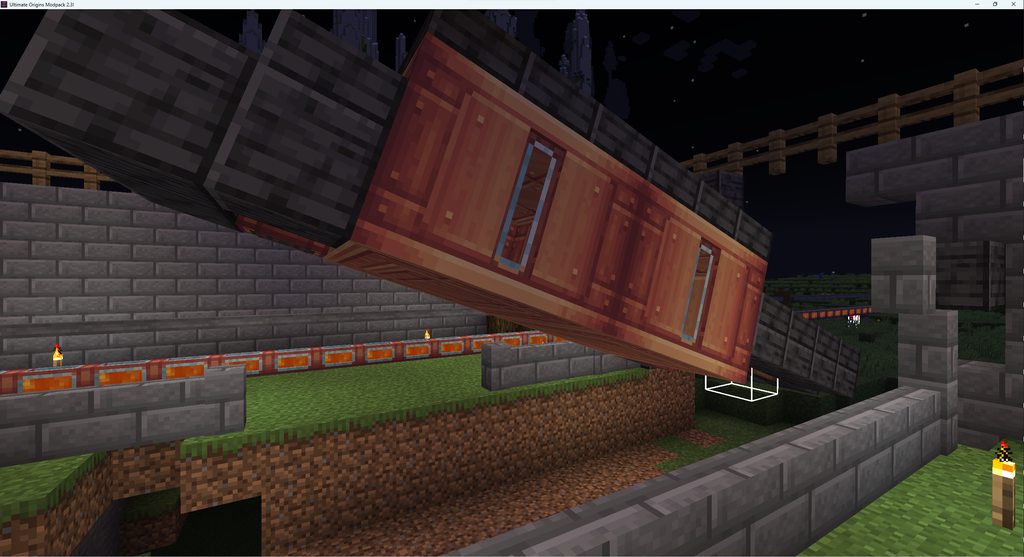 unreal oasis
this message comes up: [11:31:55] [Server thread/WARN]: Lithium Class Analysis Error: Class com.simibubi.create.content.logistics.trains.entity.CarriageContraptionEntity cannot be analysed, because getting declared methods crashes with NoClassDefFoundError: com/jozufozu/flywheel/api/instance/DynamicInstance. This is usually caused by modded entities declaring methods that have a return type or parameter type that is annotated with @Environment(value=EnvType.CLIENT). Loading the type is not possible, because it only exists in the CLIENT environment. The recommended fix is to annotate the method with this argument or return type with the same annotation. Lithium handles this error by assuming the class cannot be included in some optimizations.
 daring osprey
is there a thing for ksp 2
 fiery oak
Why are the chunks in my game taking so long to update ?
 queen saddleBOT
Paste created of latest.log, uploaded by Jabba the Great.
 acoustic idol
If you have a lot of mods that add: biomes, ores, mobs, and anything else that falls under world gen can take time for chunks to load/update
unreal oasis
Is there a way to kill an entity by entity id? if I have the identity number of the entity thats ticking?
 round oxide
what mod is causing my game to not load?
queen saddleBOT
Paste created of latest.log, uploaded by skullkid1104.
acoustic idol
round oxide
what mod is causing my game to not load?
The mod hobbit (hobbit) and another mod (not sure which) are both trying to use dimension id 3. This will not work. Would need to see if the hobbit mod has a config option to change the dim id to some other #. otherwise would likely need to do a binary search to figure out what other mod is using dim 3 and if its id can be changed
fiery oak
what does "Allocate new source: Invalid parameter parameter value." mean ?
 pine rapids
Going to need some context here
 mossy iris
Greetings, everyone. I'm having difficulty finding my WoW install on my Steamdeck through Curseforge to be able to start installing add-ons. I confirmed the location is navigable via the explorer, but in the same location on curseforge I only see the "start desktop mode" and "return to gaming mode options" (greyed out ofc). I installed the linux version of curseforge in case that's relevant.
Any help would be appreciated.
Edit: I wasn't able to find a solution for this, so I uninstalled battle.net and WoW completely and reinstalled via a different tutorial using Lutris to find battle.net and install it and subsequently WoW via battle.net. Then I ran the scan in curseforge and it found the game/data.
 chilly summit
question, in mods like tinkers construct or silent gear, do the weaposn you can make spawn in chests?
 quasi hinge
Afaik, no
 lavish ether
do you guys know where i can ask the owner a qustion?
 sage pier
What owner, for what?
 near lantern
My game keeps crashing when I enter the end in atm8.
does someone know what it might be.
queen saddleBOT
Paste created of latest.log, uploaded by Superspeedy0906.
quasi hinge
That’s Forge, not CurseForge
quasi hinge
?mc-wording
 golden muskBOT
Please use the correct terms - it allows us to understand and help you faster
Forge = Minecraft Forge, this is a modloader often just called "Forge".
Fabric = Fabric MC, this is a modloader, often just called "Fabric".
CurseForge = A Website/App that has content for games and serves as a mod manager.
Mods = Individual mod files.
Modpacks = Multiple mods put into the mods folder or downloaded from CurseForge.
quasi hinge
Do you have a profile made in the CF app
acoustic idol
!mc-updatemodloader
golden muskBOT
How to update your mod loader within the same game version in the CurseForge app
- Click on the modpack profile you are working with.
- Click on the
 button next to the play button.
 - Click on the
 Profile Options button.
 - Select the mod loader version you want from the dropdown.
- Play!
If you need to update to a new game version, a new profile is required.
 autumn agate
No mods installed, game is crashing please help
queen saddleBOT
Paste created of latest.log, uploaded by Swifty74.
 brittle tundra
queen saddleBOT
brittle tundra
queen saddleBOT
Paste created of latest.log, uploaded by _Lxcxs_.
queen saddleBOT
Paste created of latest.log, uploaded by _Lxcxs_.
brittle tundra
do u see it
acoustic idol
Dealt with in another room. -- Lxcxs issue
 static oracle
Anyone able to find out what going on or something?
queen saddleBOT
Paste created of latest.log, uploaded by randomm.
autumn agate
Anyone able to help?
queen saddleBOT
Paste created of latest.log, uploaded by Swifty74.
acoustic idol
try without 'Tissou's Zombie Pack 1.18_2.6 If it still doesnt work, delete this file after \config\carryon-client.toml
autumn agate
Okay I will do, ty
unreal oasis
does anyone know how to obtain Blazing Crystal in the powah mod?
static oracle
static oracle
Anyone able to find out what going on or something?
i was told to go to this channel for the type of help i needed but the bot only said go here so do i put the logs like i do before and if so what's wrong with it
 lost lantern
static oracle
Anyone able to find out what going on or something?
lost lantern
static oracle
Anyone able to find out what going on or something?
Mod mageflame uses the version v1.4.0 which isn't compatible with Loader's extended semantic version format (Could not parse version number component 'v1'!), SemVer is recommended for reliably evaluating dependencies and prioritizing newer version check if there are updates available if so install them and check again and consider updating your mod loader version
and try if removing spellbladenext fixes it if not send this logs
!mc-launcherlog
golden muskBOT
How to get your launcher log
- Click in the top right corner of CurseForge
- Click the

Open Modding folderbutton - Open the
Installfolder - Drag the
launcher_log.txtfile into discord
static oracle
there is not an install folder in my pack I checked and i even searched for the launcher log so ill post the latest i guess?
queen saddleBOT
Paste created of latest.log, uploaded by randomm.
static oracle
i did both things said i updated the fabric thing to the most recent version
quasi hinge
Reread the instructions, it’s not telling you to look in the pack folder
 wet mulch
hi im getting this, what mod am i supposed to add to the profile"?
 quasi hinge
?mc-logs
golden muskBOT
How to get your profile logs on CurseForge for support
- Right-click the modpack profile icon OR click the button in the modpack profile.
- Click
Open Folder. - Open the
logsfolder. - Drag and drop the FILE named
latestORdebuginto discord.
wet mulch
queen saddleBOT
Paste created of latest.log, uploaded by Krish_.
static oracle
queen saddleBOT
Paste created of launcher_log.txt, uploaded by randomm.
lost lantern
!mc-reversesearch is probably best to do as you get a lot of errors
golden muskBOT
The alternative way to binary search
Follow the steps below for an alternate method to binary search:
- Make a new profile, same versions as the last one
- Test the profile with no mods
- Add 1-5 mods to the profile (using the app)
- Test the profile, does it boot / can you make a world?
- If YES Repeat steps 3 & 4
- If NO Remove the mods you just added then test the pack again
- Repeat this process until the problematic mod(s)/plugin(s)/addon(s) have been found
static oracle
?
static oracle
i barley mod I just need to know what to do to get it working
 hushed thorn
Hey everyone, I need help with my minecraft crashing through curseforge. Do I just drag and drop the log into here?
queen saddleBOT
Paste created of 2023-03-30-6.log, uploaded by Linus.
hushed thorn
Any help would be greatly appreciated!
sage pier
Seems to be problems with either Strawgolen, and/or Gravestone, based on that error
hushed thorn
I'll try to delete them!
hushed thorn
sage pier
Seems to be problems with either Strawgolen, and/or Gravestone, based on that er...
it seems to work, thank you!

Now I get this instead
sage pier
Yeah, looks like you have the wrong Forge version for the mods you've added. Did you add the mods through the app, or dropped into the mods folder?
hushed thorn
I created a new profile and added the mods that way through curseforge
sage pier
Interesting, shouldn't be able to install mods for the wrong modloader version. But anyway..
!mc-updatemodloader
golden muskBOT
How to update your mod loader within the same game version in the CurseForge app
- Click on the modpack profile you are working with.
- Click on the button next to the play button.
- Click on the Profile Options button.
- Select the mod loader version you want from the dropdown.
- Play!
If you need to update to a new game version, a new profile is required.
sage pier
Need at least Forge 43
hushed thorn
Hmmm, so would that be 41.0.43?
hushed thorn
I can only se 41.somethings which is odd
hushed thorn
Game version 1.9
Ah I see
Since I can't find the other forge versions, is there previous versions for said mods I could download instead?
sage pier
Might be, I'm just curious on how you managed to install mods for the wrong game version, did you add the mods through the app, or through the website?
hushed thorn
Through the app
sage pier
Strange indeed then..
hushed thorn
Yeah that's what I thought was weird too since my other packs seem to work fine
sage pier
I'd suggest trying to remake the profile, and add the mods one by one again, and if that doesn't work. I'd open a ticket and send the logs to CurseForge.
 hallow anvil
hey so me and my friend are wanting to play modded mc but it keeps telling him The decryption operation failed, see inner exception and not working
quasi hinge
The right place is #🔥︱curseforge-support
static oracle
This keeps happening every time I try to load up the game
It never fully loads
And I’ve waited 10 minutes but the game crashed and didn’t even go past half loaded
 frosty magnet
is this the right support
My Minecraft world is fucked any other save file works I will get you the error message in a sec
quasi hinge
How much RAM do you have allocated to MC
frosty magnet
7k
but i have ot lanch the game to get another error code so give me a sec
not really a code but
this is only this save
The game crashed whilst colliding entity with block
Error: java.lang.NoClassDefFoundError: net/minecraft/world/World$2
i keep getting that on the one save
frosty magnet
quasi hinge
How much RAM do you have allocated to MC
and i dont feel like resting my save
so wtf do i do
pine rapids
?mc-logs
golden muskBOT
How to get your profile logs on CurseForge for support
- Right-click the modpack profile icon OR click the button in the modpack profile.
- Click
Open Folder. - Open the
logsfolder. - Drag and drop the FILE named
latestORdebuginto discord.
 sterile leaf
Hello! I have an issue with starting up a modded version of mc. Earlier I was using a mod pack I made and it was working just fine, but now it keeps crashing. My friends mod pack doesn’t crash when I play it, so I don’t know what to do
 quasi hinge
?mc-logs
golden muskBOT
How to get your profile logs on CurseForge for support
- Right-click the modpack profile icon OR click the button in the modpack profile.
- Click
Open Folder. - Open the
logsfolder. - Drag and drop the FILE named
latestORdebuginto discord.
sterile leaf
I drop it here?
quasi hinge
Yes, as the instructions say
sterile leaf
queen saddleBOT
Paste created of latest.log, uploaded by ~•<Angel>•~.
quasi hinge
Remove OptiFine
sterile leaf
Ok, I removed it. Should I try opening it again?
quasi hinge
Yes
You had OptiFine and Rubidium installed, they are not compatible with each other
sterile leaf
Ohhhh, alright! Thank you so much!
 simple hornet
ok so i am running a minecraft forge server from my own computer and i am trying to add a modpack but when i download the server pack but when i join my server it says my server doesnt have some of the mods i have when i am using the same modpack that the server has and when i just tried to copy the mods over from my mods folder it wont do slyblock like the modpack should be
queen saddleBOT
Paste created of latest.log, uploaded by They_Call_Me_Saul.
frosty magnet
i added a about 20 more mods
and my trees have trap doors for leavs
how do i unfuck my game
autumn agate
He's is there someone that knows the better Minecraft mod and can help me with the better villagers mod please ❤️
unreal oasis
I have Tech Reborn as a mod in this pack, does anyone know how I can obtain: Chromium and Titanium Plates? ive tried looking around and cant find anything.
frosty magnet
frosty magnet
yo
so any one going to help me fix my shit
acoustic idol
frosty magnet
and my trees have trap doors for leavs
Sounds like a block id shift, hopefully you made a world backup before adding the new mods?
fiery oak
Im confused what happened
queen saddleBOT
Paste created of crash-2023-04-02_18.52.34-server.txt, uploaded by King Baldwin IV.
autumn agate
im playin the lucky blocks 20+ pack, i got it to work but the blocks dont spawn naturally, is that normal?
 tacit spoke
hey yalls could i get somehelp checking my crashreport? two mods had the same errors
queen saddleBOT
Paste created of message.txt, uploaded by Harmonatic.

 brisk prawn
 quasi hinge
?mc-logs
golden muskBOT
How to get your profile logs on CurseForge for support
- Right-click the modpack profile icon OR click the button in the modpack profile.
- Click
Open Folder. - Open the
logsfolder. - Drag and drop the FILE named
latestORdebuginto discord.
 quasi hinge
?mc-launcherlog
golden muskBOT
How to get your launcher log
- Click in the top right corner of CurseForge
- Click the
Open Modding folderbutton - Open the
Installfolder - Drag the
launcher_log.txtfile into discord
 molten forum
queen saddleBOT
molten forum
queen saddleBOT
Paste created of launcher_cef_log.txt, uploaded by Thebossret.

 thorn tulip
I installed all the lucky blocks 20+ and I got this
 quasi hinge
Do you have the actual lucky blocks mod installed as well
thorn tulip
No
quasi hinge
Lucky Blocks isn’t on CF anymore and hasn’t been for a while
You need to go to their website to get it
thorn tulip
quasi hinge
Do you have the actual lucky blocks mod installed as well
As a file no in forge yes
thorn tulip
quasi hinge
You need to go to their website to get it
what is it?
quasi hinge
Just Google lucky blocks mod
quasi hinge
What you have is a mod pack
thorn tulip
oh right
thorn tulip
oh
Okay im downloading it
to see
How do I take a zip and put it in forge for it to run
quasi hinge
?mc-installmods
golden muskBOT
How to install mods in the CurseForge app
- Click
+ Create Custom Profile - Name it, select the required Minecraft version, select the modloader & modloader version (usually the highest number), click
Create. - Click the profile icon.
- Click

Add More Content - Search and install the desired mods.
- Start the game!
How to install mods that are not on the CurseForge app
- Right click the profile picture or Open the profile and click the Icon next to the play button.
- Click
Open Folder. - Drag the mod(s) into the
modsfolder. (Note: Some mods will require others, to run. Make sure to read the instructions for the mod!) - Start the game!
 quasi hinge
Second set of instructions
thorn tulip
quasi hinge
Second set of instructions
How do I do that using another launcher tho?
quasi hinge
What other launcher are you using
thorn tulip
tlauncher
golden muskBOT
tlauncher is a piracy supporting launcher, we do not provide support for it. Talking about or attempting to get support for it will result in a ban as per our rules. See: #📛︱rules #4
quasi hinge
It’s malware, go buy the game
thorn tulip
I have an antivirus and it didnt detect anything suspicious
And I would like to buy it but first if I could, + 24$+ per months is a lot
quasi hinge
Not every antivirus can detect that stuff
thorn tulip
quasi hinge
Not every antivirus can detect that stuff
Any other launcher you recommend me then?
quasi hinge
There’s also one time payment, what you’re describing is the Xbox game pass subscription
quasi hinge
Yes, that’s always been an option
quasi hinge
It gives you access to other games, not just MC
quasi hinge
I bought MC itself, delete tl, it’s bad and go buy Minecraft
thorn tulip
I had a good build world (took me around 4 hours)
thorn tulip
quasi hinge
I bought MC itself, delete tl, it’s bad and go buy Minecraft
say can you send me the link to buy the basic one?
quasi hinge
Just go to minecraft.net
thorn tulip
quasi hinge
Just go to minecraft.net
yeah but it feels like the further I move the further I get close to the Xbox gamepass one
quasi hinge
?noping
golden muskBOT
📛 Please do __**NOT**__ ping or DM unless asked (Rule #3.2)
Please take the time to read our #📛︱rules
Keep in mind that the reply feature pings the original message's sender by default, so please turn it OFF with every reply (you can hold down shift when replying to do the same), or don’t use the reply feature and simply write your response in the channel.
The Moderators & Helpers volunteer their time and knowledge to help, you might not get your answers instantly. Describe what you need help with in detail and please patiently wait for someone to check and reply.
Do NOT DM staff members without being asked to do so.
Breaking this rule will result in being timed out / banned according to moderation judgment.
thorn tulip
sorry.
quasi hinge
If you get the subscription, you’ll have whatever other games they have available on it, but you’ll lose it when you’re not able to provide enough money for it afaik (I’ve never used game pass), the one time payment means you have it forever
$30 and you have java edition and bedrock edition, as they bundled the two together
 quick orchid
have a question. im trying to work on a server of mine. and im looking for a second opinion. whenever i start my server (running java 8 on 1.12.2, i think they are compatable) i allways get this respocne from the server
 acoustic idol
Server shows its trying to start forge 1.18.2, which requires java 17
quick orchid
sorry. correction.
 acoustic idol
Where is this server running?
May be that the libraries folder used by forge isnt in the servers main folder OR is corrupted/not installed properly, try reinstalling Forge
 sacred anvil
not sure if anyone can help me or not but trying to see if someone maybe can
my game is not loading
pine rapids
quick orchid
sorry. correction.
Whatever docker image ptero is using there only works for MC 1.17 and higher
 white flame
why my ship on valkyrien skies and eureka aircraft is invisible?


 gilded gull
molten forum
gilded gull
molten forum
!mc-logs
golden muskBOT
How to get your profile logs on CurseForge for support
- Right-click the modpack profile icon OR click the button in the modpack profile.
- Click
Open Folder. - Open the
logsfolder. - Drag and drop the FILE named
latestORdebuginto discord.
 vital acorn
in industrial revolution mod (fabric) does anyone know why i can't put anything in the data encoder? i search for #indrev:mining_rig_allowed in rei and nothing comes up. any ideas what's wrong?
 sleek aurora
Hello, I was quietly on my server when suddenly, a crash appeared. I thought there was a problem, so I look in the crash reports, there is nothing, the problem is stored in a file named 'hs_err_pid_11016' (I've never seen that). If someone can explain me the error here is the contents of the file.
https://pastebin.com/RRK7y9Bv
Pastebin
Pastebin.com is the number one paste tool since 2002. Pastebin is a website where you can store text online for a set period of time.
fiery oak
How do I fix this
queen saddleBOT
Paste created of crash-2023-04-06_17.58.47-client.txt, uploaded by King Baldwin IV.
gilded gull
fiery oak
How do I fix this
try remove phosphor-lighting
 waxen pine
fiery oak
How do I fix this
waxen pine
fiery oak
How do I fix this
things to try:
1- remove the mod performant
2- add the mod 0.7-0.8 mixin compatibility
 signal wasp
So I need some help with Pneumaticraft: Repressurized for MC 1.18.2
So currently trying to use the Aerial Interface. Says you can pump liquid xp into it. Set it to CoFH Core Essence of Knowledge, but it’s currently not connecting fluiducts to the interface. Anyone know how to make it work?
 coarse nest
Are you connecting the fluidducts to the side of the interface set to xp fluid mode?
signal wasp
I didn’t see a tab that let me set a side to fluids, when the dispenser upgrade goes in, sides tab gets replaced by food and xp interfaces
molten forum
gilded gull
!mc-logs
queen saddleBOT
Paste created of latest.log, uploaded by Thebossret.
coarse nest
?mc-installfix
golden muskBOT
How to repair your Minecraft installation on CurseForge - **NOT** the same as `Repair Profile` - please follow these exact steps
- Click on the Minecraft Tab on the left side of the CurseForge App.
- Click button next to the
Create Custom Profileoption. - Click

Repair Installationoption.
NOTE: Although this might seem similar to the instructions of repairing profile, it's different and required. No worries, you will not lose any modpacks or worlds.

 timber spire
sleek aurora
Hello, I was quietly on my server when suddenly, a crash appeared. I thought the...
timber spire
sleek aurora
Hello, I was quietly on my server when suddenly, a crash appeared. I thought the...
that just looks like a memory leak
 reef dirge
hi, im new i dont know if this is the right channel or not. but i need help download mods for minecraft they are not working its saying "The request was aborted: Could not create SSL/TLS secure channel. does anyone know how to fix or what it is.
acoustic idol
reef dirge
hi, im new i dont know if this is the right channel or not. but i need help dow...
!copyspam
golden muskBOT
Please avoid copying your message across multiple channels
Please do not copy and paste into multiple channels.
It won't help with getting assistance any faster and just spams the channels.
This is part of #📛︱rules 
acoustic idol
Then post in 1 and wait patiently.
reef dirge
ok
acoustic idol
Pick 1 channel to post in. if your in the wrong room someone would say.
 flat current
The game crashes when I make a world
queen saddleBOT
Paste created of crash-2023-04-09_11.11.22-client.txt, uploaded by Bread Boi.
flat current
what do I look for in the file to find what caused the crash
I switched betterend reforged for reforked and it stopped crashing
vital acorn
hey does anyone know how to change the gui scale of just the rei menu on fabric?
lost lantern
flat current
The game crashes when I make a world
try removing betterendforge
 silver matrix
i have a problem when someone joins than i get this error and they disconect
[22:31:57] [Netty Server IO #7/ERROR] [FML]: NetworkDispatcher exception
java.io.IOException: De externe host heeft een verbinding verbroken
at sun.nio.ch.SocketDispatcher.read0(Native Method) ~[?:1.8.0_361]
at sun.nio.ch.SocketDispatcher.read(Unknown Source) ~[?:1.8.0_361]
at sun.nio.ch.IOUtil.readIntoNativeBuffer(Unknown Source) ~[?:1.8.0_361]
at sun.nio.ch.IOUtil.read(Unknown Source) ~[?:1.8.0_361]
at sun.nio.ch.SocketChannelImpl.read(Unknown Source) ~[?:1.8.0_361]
at io.netty.buffer.PooledUnsafeDirectByteBuf.setBytes(PooledUnsafeDirectByteBuf.java:288) ~[PooledUnsafeDirectByteBuf.class:?]
at io.netty.buffer.AbstractByteBuf.writeBytes(AbstractByteBuf.java:1100) ~[AbstractByteBuf.class:?]
at io.netty.channel.socket.nio.NioSocketChannel.doReadBytes(NioSocketChannel.java:372) ~[NioSocketChannel.class:?]
at io.netty.channel.nio.AbstractNioByteChannel$NioByteUnsafe.read(AbstractNioByteChannel.java:123) [AbstractNioByteChannel$NioByteUnsafe.class:?]
at io.netty.channel.nio.NioEventLoop.processSelectedKey(NioEventLoop.java:624) [NioEventLoop.class:?]
at io.netty.channel.nio.NioEventLoop.processSelectedKeysOptimized(NioEventLoop.java:559) [NioEventLoop.class:?]
at io.netty.channel.nio.NioEventLoop.processSelectedKeys(NioEventLoop.java:476) [NioEventLoop.class:?]
at io.netty.channel.nio.NioEventLoop.run(NioEventLoop.java:438) [NioEventLoop.class:?]
at io.netty.util.concurrent.SingleThreadEventExecutor$5.run(SingleThreadEventExecutor.java:858) [SingleThreadEventExecutor$5.class:?]
at java.lang.Thread.run(Unknown Source) [?:1.8.0_361]
acoustic idol
silver matrix
i have a problem when someone joins than i get this error and they disconect
[2...
Send the actual log file, snippets are useless.
 spiral flint
Does anyone know a fix for this error code, I bought a server through G portal put my mod pack on there via FileZilla everything seems fine but no idea why this is happening. Internal Exception: io.netty.handler.codec.DecorderException: java.land.IndexOutOfBoundsException: readerIndex(26983) + length(4) exceeds writerIndex(26983): UnpolledHeapByteBuf(ridx: 26983, widx: 26983, cap: 26983/26983)
coarse nest
!mc-logs
golden muskBOT
How to get your profile logs on CurseForge for support
- Right-click the modpack profile icon OR click the button in the modpack profile.
- Click
Open Folder. - Open the
logsfolder. - Drag and drop the FILE named
latestORdebuginto discord.
coarse nest
unless the error is happening on the server, in which case send the servers logs
spiral flint
thanks
queen saddleBOT
Paste created of server.txt, uploaded by kCharlie.
coarse nest
thats the kubejs server script log, which isnt whats needed
the latest.log file from the logs file
spiral flint
this is the only other one i can find but that doesn't seem right
queen saddleBOT
Paste created of crafttweaker.log, uploaded by kCharlie.
spiral flint
I went into my modpacks folder > logs folder and thats it
coarse nest
is the error happening on the server (in its console) or on the client
spiral flint
on the client, it loads for maybe 2 seconds then the error shows
coarse nest
!mc-logs
golden muskBOT
How to get your profile logs on CurseForge for support
- Right-click the modpack profile icon OR click the button in the modpack profile.
- Click
Open Folder. - Open the
logsfolder. - Drag and drop the FILE named
latestORdebuginto discord.
coarse nest
so there isnt a file if you follow these instructions?
spiral flint
yea it just Logs > craftweaker.log + kubejs folder > client.txt - server.txt - startup.txt
coarse nest
can you send a screenshot of the contents of the logs folder??
spiral flint
 golden muskBOT
How to get your launcher log
- Click in the top right corner of CurseForge
- Click the
Open Modding folderbutton - Open the
Installfolder - Drag the
launcher_log.txtfile into discord
coarse nest
the one without a number
spiral flint
queen saddleBOT
Paste created of launcher_log.txt, uploaded by kCharlie.
coarse nest
there doesnt seem to be much of a game in that log
try launch and cause the error again, then send the same log
spiral flint
Sure thing ty, might take a little bit, I had removed the mods from the server before hand and I'm still uploading them back onto the server now
spiral flint
Ah sry didn't think it would take this long and still not be done, is it fine if I ping / message you after I've woken up tomorrow?
coarse nest
no, just ask here
if someone is around to help they will
spiral flint
sure thing, thanks for helping : ) gnight
spiral flint
queen saddleBOT
Paste created of launcher_log.txt, uploaded by kCharlie.
queen saddleBOT
Paste created of crash-2023-04-11_17.41.32-client.txt, uploaded by King Baldwin IV.
Paste created of latest.log, uploaded by King Baldwin IV.
acoustic idol
Mod ID: 'biomesoplenty', Requested by: 'mobcompack', Expected range: '[17.1.1.150,)', Actual version: '[MISSING]'```
vital acorn
can someone help me with getting that off of my screen? im playing a pack that doesnt use emc

 earnest tiger
Can someone help me, Im new to modding and Im having a issue with singleplayer
 ruby drum
hey i've got a question pertaining to a minecraft server
and not the actual site
so i'm trying to make a modded server using forge

and this is the main problem that's been stopping me from opening it up
using a vanilla server jar works fine but for some reason this doesnt
acoustic idol
What mc version?
ruby drum
1.12.2
acoustic idol
Open a command prompt and type: java -version
ruby drum
 golden muskBOT
Specific Java versions required for running Minecraft
Minecraft requires specific Java versions to run, pick the correct one for the version of Minecraft you are playing!
Java for Minecraft versions 1.16.X and below
Java for Minecraft 1.17.X
Java for Minecraft 1.18.X and 1.19.X
Java for other operating systems
ruby drum
any

fix for this?
uinstalled java 17 and all its other things
installed java 8
boom this pops up now
ruby drum
didnt copy enough files over?
anyway how would i fix the install
i thought it nt being java 8 was my only problem
coarse nest
ruby drum
didnt copy enough files over?
sometimes people install the server on their own computer then copy it across to the server
try reinstall it
ruby drum
i'd do that but i cant find the file path for the actual file on the vm
so i guess i will just reinstall
flat current
I keep on getting a crash where my game essentially freezes, allowing me to walk around freely. I no longer take damage, animals don't move, and I can't use any ars nouveau spells
queen saddleBOT
Paste created of latest.log, uploaded by Bread Boi.
flat current
and if I try leaving the game, it just says saving world indefinitely
chunks no longer load in past my render distance
by that I mean that the game no longer loads in new chunks
but I can still stand on non-loaded chunks
they are just invisible
coarse nest
sounds like the internal server crashing
hold f3 + c to generate a crash report and see what the threads are stuck on
 restive tapir
i need some seirous help
i have a skyfactory server, and some guy placed down a bunch of statues to the point where it doesnt even allow anyone into the game
i have crash reports if theres anyone that knows how to deal with things like this
-- Block Entity Details --
Details:
Name: minecraft:statues_playertileentity // com.shynieke.statues.tileentity.PlayerStatueTileEntity
Block type: ID #1173 (tile.playerstatue // com.shynieke.statues.blocks.Statues.BlockPlayer_Statue // statues:blockplayerstatue)
Block data value: 0 / 0x0 / 0b0000
Block location: World: (38,62,5), Chunk: (at 6,3,5 in 2,0; contains blocks 32,0,0 to 47,255,15), Region: (0,0; contains chunks 0,0 to 31,31, blocks 0,0,0 to 511,255,511)
Actual block type: ID #1173 (tile.playerstatue // com.shynieke.statues.blocks.Statues.BlockPlayer_Statue // statues:blockplayerstatue)
Actual block data value: 0 / 0x0 / 0b0000
please someone i need some help
flat current
coarse nest
hold f3 + c to generate a crash report and see what the threads are stuck on
I made a log, I did what you said to do
 idle salmon
Can someone help me troubleshoot? My modpack is crashing everytime I open.
Crashlog:
queen saddleBOT
Paste created of message.txt, uploaded by Orange Juice and Cake.
flat current
I'm no expert but the log says you have duplicate mods
It also says that fmlcore, javafmllanguage, lowcodelanguage, and mclanguage are missing their toml files
idle salmon
welp
 hazy bay
hi i am having an issue with starting a 1.12.2 server. this is the wall i keep hitting

this is my current library
 acoustic idol
open a command prompt and type: java -version
 golden muskBOT
Specific Java versions required for running Minecraft
Minecraft requires specific Java versions to run, pick the correct one for the version of Minecraft you are playing!
Java for Minecraft versions 1.16.X and below
Java for Minecraft 1.17.X
Java for Minecraft 1.18.X and 1.19.X
Java for other operating systems
hazy bay
 acoustic idol
Also put a # in front of the 4GB Server: , as a comment, as those are not batch recognized commands. OR just remove the first line
hazy bay
can i have 8 & 17 running at once?
acoustic idol
Yep, just need to tell the server which java version to use
hazy bay
oh ok. i am use to making paper servers. So this is really new to me lol
oh and 1 more thing, it says 4g but that seems super low. Can i push more into the server?
acoustic idol
All you need to do is once you have java 8 installed, find where its saved, then copy the full file path to the j8s bin folder, replace the word java in the run.bat with the full path in quotes, add \java.exe to the end.
ex: "C:\Program Files\Java\jre1.8.0_281\bin\java.exe" -Xmx## -Xms## -jar FullForgeFileName.jar nogui
acoustic idol
hazy bay
oh and 1 more thing, it says 4g but that seems super low. Can i push more into t...
You can put what ever you want for the -Xmx###M
4096 == 4G. The math is 1024 x #ingb you want == Amount in MB
Tho generally between 4-8gb is more then enough for a server / modded mc. Max 10gb
hazy bay


so it now just flickers when i hit run
I added the ex: to the run.bat and still doesnt work
acoustic idol
Screen shot the full window for your run.bat file
hazy bay
 acoustic idol
oh...
Remove the EX: at the start, thats just short for example. Then add a " before the file path
hazy bay
it still just flickers

it might be my 1.12.2.json
i had to copy it from a github cause it wouldnt install when i did the server install
acoustic idol
add the word pause on a new line
hazy bay
 acoustic idol
You installed the j8 version from the bot yes?
 acoustic idol
Are any other servers running on this pc?
hazy bay
not right now no. I shut down all others
acoustic idol
OH I see why now
Need to put an M at the end of the -Xmx####M and -Xms####M
Otherwise its reading in bytes not Mega bytes
acoustic idol
Technically yeah
hazy bay

acoustic idol
Start low, add ram as needed
hazy bay
HAHAHA i have a forge server now muhahahahaha
now to clone the server so i have a rough draft cause this was a pain to start up
forge server set up looks just like paper but it says mobs instead of plugins
acoustic idol
Plugins and modded servers or hybrid servers dont usually work all that well together, just something to keep in mind
hazy bay
well good to know, i was going to look that up but i will stick with modded.
acoustic idol
If possible/available look for the forge mod versions of the plugins you want.
queen saddleBOT
Paste created of latest.log, uploaded by King Baldwin IV.
 scenic zinc
Hi guys, not sure if this is the right place to ask but I'm stumped and figured ill take this as wide as i can - running a modded 1.18.2 server and 2 players have started having issues with the block textures all of a sudden - blocks will be shown as waterlogged trapdoors and etc when it's just bricks or other blocls, reloading textures and resetting game and configs does nothing and it doesn't affect all the players either.
Has anyone seen anything like this

The perplexing bit is that the majority of players doesn't have this issue and everyone is running same forge and I'm the one providing the mod folder so it should be the same setup. Has anyone seen this issue before and have an idea how this could be resolved
waxen pine
scenic zinc
Hi guys, not sure if this is the right place to ask but I'm stumped and figured ...
You have a mod shifting block IDs. Once you figure out which mod you can remove it from client and server and all will be ok again. If you have 'Dramatic Doors' it's likely that
scenic zinc
waxen pine
You have a mod shifting block IDs. Once you figure out which mod you can remove...
ooh i do and i recently updated it to a new version! its just odd how 6 players sees it fine and 2 doesnt
waxen pine
Welcome to the spaghetti code that is modded 😉
scenic zinc
honestly im just happy to find a solution, i had actually just updated that mod but wrote it off as its been there forever and never caused issues
will try to backroll it or delete it and see if that was the issue. might have more mods that swap out the block ID's abit but will try doors first 🙂
vital acorn
hey does anyone konw why this is happening when i try to join my server?

 hardy silo
hello guys i've been trying to join a server
in sky factory 3
everytime i try to play
i crash
here is the log
 spice raft
I'm trying this channel, as I have been directed here from #🔥︱curseforge-support
Hello, I have recently been trying to settle a local minecraft server with a custom CurseForge modpack to play with friends.
the modpack is built from Curseforge website, where I installed the main mods I wanted for 1.18.2, and forge -40.2.1-. The CurseForge app doesn't reveal any issues, and I can run my client just fine with the mods.
I linked all the mods I would like to run in a screenshot.
I assume I managed to sort all the client-based out before putting these mods ins the server (removed Xaeros_Minimap, preview_OptiFine, EnchantmentDescriptions).
However the server won't start, and crashes with an long error log
To upload them on the server, I tried using the export option from CurseForge, along with copy/paste them in the mods file, or pasting them without the extracted export file...
BTW : I use MC Server Soft as GUI, whatever it's worth
I hope you'll be able to help me, i don't quite know chat i'm doing wrong or if I'm missing something.
Best regards,
AgRi0n
 queen saddleBOT
Paste created of message.txt, uploaded by AgRi0n.
coarse nest
!mc-java
golden muskBOT
Specific Java versions required for running Minecraft
Minecraft requires specific Java versions to run, pick the correct one for the version of Minecraft you are playing!
Java for Minecraft versions 1.16.X and below
Java for Minecraft 1.17.X
Java for Minecraft 1.18.X and 1.19.X
Java for other operating systems
 sage pier
Silly Discord.
spice raft
coarse nest
!mc-java
wow thank you ! Had java jdk-20 installed, so it's a weird fix, but it worked ! However I feel JAVA_HOME was fully replaced by java17, Is there a way to get those two version to cohabit ?
coarse nest
replace the java in the start script with a direct reference the java/javaw exe file location
spice raft
coarse nest
replace the `java` in the start script with a direct reference the java/javaw ex...
okay, will to thank you again !
scenic zinc
waxen pine
You have a mod shifting block IDs. Once you figure out which mod you can remove...
Sorry to ping you again, but we tried removing dramatic doors and no change to the issue - do you happen to know of any other potential mods that could cause this? I gave the player a world download of our server world and in singleplayer enviroment its completely fine, its only when joining the server this corruption occurts
waxen pine
Hard to say - you'll probably need to start removing mods on a test setup to find it
scenic zinc
yeah i cant repro this issue myself, super perplexing. was hoping the solution was the SP world to test
spice raft
Hey, is there anyone here who could explain to me why some more recent versions of Java doesn't seem to compile older files or deal with classes ? I downloaded java17 thanks to your help, and for a while the server worked fine, but then I updated java and encountered this error : can't find or load main class @ user_jvm_args.txt (my own translation from french) which is requested by my starting .bat file
coarse nest
java is designed to be backwards compatible, but sometimes (quite often with mc) it just doesnt work
spice raft
Okay, I discovered there is a java path override option on my GUI, related to a command line in the .bat file, which helped me specify the exact version i wanted for my server. I'm hoping from now on the various java versions will live together just fine
Thanks for the help !
 grave edge
my mod pack keeps crashing when i try to enter in my world, i installed some new mods but i don't know which is responsable.
 queen saddleBOT
Paste created of message.txt, uploaded by RUNFISH.
 silver otter
how can i fix failed to download minecraft launcher due to network issue?
 hallow pier
is there like a faster way to figure out which mod is causing your minecraft to crash?
 fallow fog
hallow pier
is there like a faster way to figure out which mod is causing your minecraft to ...
fallow fog
hallow pier
is there like a faster way to figure out which mod is causing your minecraft to ...
what way are u using right now ?
 feral lynx
So i want to use KubeJS to ship my datapack for Hostile Neural Network that i made and it says
"The data folder is loaded identically to the data folder in a datapack. If you already have a datapack just copy the folder(s) from inside the datapacks data folder to KubeJS' data folder."
Do i just copy my Datpack folder that contains the data and the .mcmeta files to KubeJS data folder am i understanding right?
feral lynx
coarse nest
Copy everything frmo inside your datapacks `data` folder to kubejs' `data` folde...
Okay but what about .mcmeta file?
Will KubeJS substitute that?
coarse nest
kubejs generates that through code
feral lynx
I see that's pretty handy
queen saddleBOT
Paste created of latest.log, uploaded by King Baldwin IV.
acoustic idol
Mod ID: 'biomesoplenty', Requested by: 'mobcompack', Expected range: '[17.1.1.150,)', Actual version: '[MISSING]'```Paste created of latest.log, uploaded by King Baldwin IV.
golden muskBOT
How to get your launcher log
- Click in the top right corner of CurseForge
- Click the
Open Modding folderbutton - Open the
Installfolder - Drag the
launcher_log.txtfile into discord
queen saddleBOT
Paste created of 2023-04-22-6.log, uploaded by King Baldwin IV.
acoustic idol
Nope, follow the bot instructions
autumn agate
hello. im wanting to start modding stardew but i dont know how to start really. thanks for the elp
help*
like getting the file stuff.. and where to put everything
quasi hinge

Stardew Valley Wiki
Do you want to play Stardew Valley with mods? This guide is for you!
autumn agate
thank you. now im trying to get my game instance away from my base to the actual modded thing but its not letting me, its only dropping a menu

i have the modding api and it works. just trying to get it through curseforge
autumn agate
turns out i did it all for nothing becuase steam remote play doesnt like the modding api
queen saddleBOT
Paste created of latest.log, uploaded by King Baldwin IV.
golden muskBOT
How to get your launcher log
- Click in the top right corner of CurseForge
- Click the
Open Modding folderbutton - Open the
Installfolder - Drag the
launcher_log.txtfile into discord
fiery oak
failed to create player model?
queen saddleBOT
Paste created of latest.log, uploaded by King Baldwin IV.
coarse nest
sprout is erroring, remove it
feral lynx
Anybody have experience with KubeJS costume recipe making with create Mechanical Crafting pleas DM me
gilded gull
feral lynx
Anybody have experience with KubeJS costume recipe making with create Mechanical...
which version/modloader?
You can also always ask on the Kubejs Discord for more help: https://discord.gg/latviandev
 rugged torrent
Hi i was installing forge 1.19.2
And this error appeared

Can anyone help me solving this?
coarse nest
!hosts
golden muskBOT
How to get your hosts-file
On Windows
- Press
 +
+Ron your keyboard, and paste:notepad %windir%\system32\drivers\etc\hosts - Screenshot/Copy the contents and paste it into the chat.
On Mac/Linux
- Open a terminal window, paste:
cat /etc/hosts - Screenshot/Copy the contents and paste it into the chat.
acoustic idol
They posted this in another room... was for a client / pointed to the cf app.
feral lynx
Anybody have an idea of what mod could add the "Have Fun" line in the left bottom corner?

 astral sail
how do i download mods to bedrock?
waxen pine
You can't - mods are for java edition. For bedrock they're called 'addons' to avoid more confusion
quasi hinge
Plus you have to pay for them
 acoustic idol
Oculus is a client side mod. Remove it from the server
 acoustic idol
If the pack has a server pack use that.
ruby drum
op
acoustic idol
Otherwise the 3 mods listed that have dedicated_server errors are all client side as well
ruby drum
im having trouble putting the mods in manually through filezilla do you know any command thatll make it simpler through the command prompts
acoustic idol
Not really, unless the 2 pcs have ssh connection enabled.
ruby drum
anyway the thing does have a server pack so i guess i'll copy those mods in manually instead
 cedar reef
do you guys know how I can export the xaeros data from one curseforge profile and import them to another?
and will it be compatible if one profile is forge and the other fabric?
quasi hinge
You’d copy it from one profile and move it to the other
cedar reef
Just copy all the Xaeros Folders from one to the other?
quasi hinge
Yes
 barren basin
hi i have a question i put together a modpack on curseforge but everytime i start my game my codechickencore/codechickenlib gives some issues error code: cpw.mods.fml.common.LoaderException: java.lang.NoClassDefFoundError: com/github/vfyjxf/nee/block/BlockPatternInterface
does anyone know how i can fix this?

 rigid copper
i have a similar issue, however my exit code is 1, not -1
acoustic idol
!mc-logs
golden muskBOT
How to get your profile logs on CurseForge for support
- Right-click the modpack profile icon OR click the button in the modpack profile.
- Click
Open Folder. - Open the
logsfolder. - Drag and drop the FILE named
latestORdebuginto discord.
acoustic idol
Codes 1, 0 and -1 all just mean "the game has crashed" nothing more nothing less. Which has some 100+ different reasons
rigid copper
thanks for the info, any idea what i/we could do?
quasi hinge
You post the logs, so help can be given
rigid copper
queen saddleBOT
Paste created of latest.log, uploaded by geez.
acoustic idol
!mc-launcherlog
golden muskBOT
How to get your launcher log
- Click in the top right corner of CurseForge
- Click the
Open Modding folderbutton - Open the
Installfolder - Drag the
launcher_log.txtfile into discord
rigid copper
this one?
queen saddleBOT
Paste created of launcher_log.txt, uploaded by geez.
acoustic idol
In your packs main folder, are there by any chance logs named hs_err_pid### from today around the time of the crash?
acoustic idol
golden musk
Steps 1-2 of this
rigid copper
acoustic idol
In your packs main folder, are there by any chance logs named `hs_err_pid###` fr...
nope
this is what were talking about right?
 quasi hinge
The hs_err_pid files are not found in the logs folder
rigid copper
so basically i gotta pray to the minecraft god it works tommorow?
acoustic idol
Go back a folder then screen shot
rigid copper
 acoustic idol
hmmm
rigid copper
dont know if its needed but i did put optifine into the installations in the launcher, but ive removed it since, and it still doesnt work
acoustic idol
This is a brand new profile yes? no mods or anything added to it?
rigid copper
do you mean my account or what do you mean?
acoustic idol
The custom profile in the CF app
rigid copper
well the modpack has 20 mods inside if thats what you mean
acoustic idol
Make a new custom profile, same settings as the current one > dont add any mods to it just play it.
rigid copper
started with no problems
acoustic idol
All the mods you downloaded, did they all come from the cf apps add more content section ?
rigid copper
yup
acoustic idol
!mc-reversesearch
golden muskBOT
The alternative way to binary search
Follow the steps below for an alternate method to binary search:
- Make a new profile, same versions as the last one
- Test the profile with no mods
- Add 1-5 mods to the profile (using the app)
- Test the profile, does it boot / can you make a world?
- If YES Repeat steps 3 & 4
- If NO Remove the mods you just added then test the pack again
- Repeat this process until the problematic mod(s)/plugin(s)/addon(s) have been found
rigid copper
thanks for helping, didnt find the problem yet, but ill keep trying tommorow. thx everyone
barren basin
@acoustic idol when i go to where you say there are no logs anywhere
acoustic idol
!noping
golden muskBOT
📛 Please do __**NOT**__ ping or DM unless asked (Rule #3.2)
Please take the time to read our #📛︱rules
Keep in mind that the reply feature pings the original message's sender by default, so please turn it OFF with every reply (you can hold down shift when replying to do the same), or don’t use the reply feature and simply write your response in the channel.
The Moderators & Helpers volunteer their time and knowledge to help, you might not get your answers instantly. Describe what you need help with in detail and please patiently wait for someone to check and reply.
Do NOT DM staff members without being asked to do so.
Breaking this rule will result in being timed out / banned according to moderation judgment.
 acoustic idol
 barren basin
queen saddleBOT
barren basin
queen saddleBOT
Paste created of launcher_log.txt, uploaded by Sheesh....
acoustic idol
Modpack you made OR downloaded?
barren basin
i made putting mods together from curseforge
acoustic idol
Has the pack ever worked?
barren basin
nope
acoustic idol
!mc-reversesearch
golden muskBOT
The alternative way to binary search
Follow the steps below for an alternate method to binary search:
- Make a new profile, same versions as the last one
- Test the profile with no mods
- Add 1-5 mods to the profile (using the app)
- Test the profile, does it boot / can you make a world?
- If YES Repeat steps 3 & 4
- If NO Remove the mods you just added then test the pack again
- Repeat this process until the problematic mod(s)/plugin(s)/addon(s) have been found
barren basin
ok ty i will try that
 sudden heron
i cant load into minecraft
queen saddleBOT
Paste created of latest.log, uploaded by Jonny.
waxen pine
sudden heron
i cant load into minecraft
?mc-optifine
golden muskBOT
We do not provide support for Optifine
If you have issues with Optifine, please remove it. If you want further support try the discord found on their website.
https://www.optifine.net/home
Installing Optifine with modpacks on Curseforge:
- Right click the modpack icon, select
Open Folder. - Put the
Optifine.jarinto themodsfolder. - Now start the modpack.
waxen pine
most people use the mods 'rubidium' and 'oculus' together to do shaders in newer MC instead of opticrash
sudden heron
tthanks
 runic vault
Hey all, is there a way for me host a server for just me and my friend without having to buy a server? Ik how to do it in vanilla but not sure how to with curseforge modpacks
coarse nest
its a similar process, just using forges server stuff instead of vanillas
!mc-installserver
golden muskBOT
How to **manually** install a server - **On your own PC**
- Check if the modpack has a server pack, if it does: use that and skip below.
- Go to the Forge website http://files.minecraftforge.net/ and download the Installer for the forge version the pack is using.
- Run the installer and choose
Install server. Do not install to your desktop. Also do not install inside a OneDrive folder. - Run the server using the forge.jar. A file called
eula.txtwill be generated. Open it and changeeula=falsetoeula=true - From the Client; Copy the
modsfolder,configfolder, and any other folders needed for the pack to work into the server folder. If the modpack has a server pack, use this instead! - Run the server again.
- Port forward your machine if needed. (Google it)
You could also use this community made tool for installing packs! Instructions are provided on the site.
runic vault
Thank you
runic vault
Hello again, when I've installed the server I am unable to find it in my files
runic vault
That folder path doesn't exist on my pc, that's the problem I'm having
coarse nest
then give it one that does exist
runic vault
It's not letting me change the path either
coarse nest
??
screenshot of what you are seeing and where you are clicking to change it?
runic vault
Nvm it finally let me
It's downloaded some things but I'm not seeing forge.jar
Nvm, turns out its using my vanilla server loader and that's why I couldn't find forge.jar
coarse nest
modern versions of forge dont use forge.jar either, they provide a run script
the instructions are a bit out of date
 tame bobcat
queen saddleBOT
tame bobcat
queen saddleBOT
Paste created of latest.log, uploaded by Potatoes9411.
acoustic idol
Replied the first place you asked, posting in multiple channels wont get you help faster, will just add confusion.
 charred comet
i made a modpack on curseforge and i start the modpack fine and get into a world and its really lagged i go from 100 fps to 1 non stop without moving what do i do
autumn agate
i need help
when i start the modpack from the cousre forge app
i went into the minecraft launcher but i have to give my account datas
the problem is
the account is given me and i dint know the password
dont
quasi hinge
Then you need to talk to the person the account belongs to
 violet axle
 waxen pine
you have mods that are for the wrong forge version. forge 40 is minecraft 1.18.2 based
javafml (forge) 45 is 1.19.4
violet axle
Thank you
 ancient warren
hey idk if anyone can help but im trying to enter the leap game contest for the pc thing and im trying to get to the modded servers and i cant find anything
acoustic idol
Have a look through #🥳-take-the-leap
ancient warren
acoustic idol
Have a look through <#1100019747334131762>
thanks!
 hard lotus
hello! i was wondering if someone could help me with minecraft mod conflicts, i made a custom modpack and the game wont run after i hit play on the launcher
quasi hinge
?mc-logs
golden muskBOT
How to get your profile logs on CurseForge for support
- Right-click the modpack profile icon OR click the button in the modpack profile.
- Click
Open Folder. - Open the
logsfolder. - Drag and drop the FILE named
latestORdebuginto discord.
hard lotus
queen saddleBOT
Paste created of latest.log, uploaded by pinklopbunny.
hard lotus
it wasnt working even without optifine btw
quasi hinge
Send a new log without OptiFine
queen saddleBOT
Paste created of latest.log, uploaded by pinklopbunny.
quasi hinge
A mixin is failing for tax free levels, report it to them
hard lotus
okay, thank you
autumn agate
Okay, so I am trying to run an NGrok server, in this instance I have a custom mad pack with no way to download the "Server Pack"
 silver jacinth
someone help with that
queen saddleBOT
Paste created of latest.log, uploaded by 𝑀𝑎𝑢𝑟𝑜𝑠.
silver jacinth
my singleplayer world crash when i try to join but any other world running well
 slender flame
I downloaded a mod for KSP but when i go into the game it dosen't have andy of the mod content, why?
waxen pine
slender flame
I downloaded a mod for KSP but when i go into the game it dosen't have andy of t...
KSP 1 or 2
waxen pine
autumn agate
Okay, so I am trying to run an NGrok server, in this instance I have a custom ma...
Windows PC?
autumn agate
waxen pine
Windows PC?
mhm, we went with Apex it's simpler
waxen pine
If ever interested in windows PC server setup this can set you up fast with any random mods folder
https://github.com/nanonestor/universalator/wiki
slender flame
waxen pine
KSP 1 or 2
1
waxen pine
Use CKAN for using KSP 1 mods
 vocal frigate
so i keep getting an exit code 1 when trying to launch version 1.19.2 of minecraft with mods or no mods. im lost because i was playing in a previous server maybe a week ago with the same edition and no issues. but for some reason now i get this issue
have tried reinstalling curseforge minecraft and java but cant seem to get it to work
coarse nest
!mc-launcherlog send this
golden muskBOT
How to get your launcher log
- Click in the top right corner of CurseForge
- Click the
Open Modding folderbutton - Open the
Installfolder - Drag the
launcher_log.txtfile into discord
vocal frigate
queen saddleBOT
Paste created of launcher_log.txt, uploaded by Rinceoir.
coarse nest
what graphics card do you have?
vocal frigate
radeon rx 480 i have run it before with no issues less than a week ago and multiple times before this issue started today
itll launch vanilla versions no issue but the moment i try to launch it from curseforge itll give me the exit code 1 crash error if that helps
coarse nest
!graphicsdrivers
golden muskBOT
vocal frigate
this helped thank you
 vast current
help, please
I'll show the report

does anybody know how to fix?
it's minecraft btw
on forge
 toxic parcel
queen saddleBOT
toxic parcel
queen saddleBOT
Paste created of latest.log, uploaded by kstryker.
gilded gull
Search for duplicated mods, there is one idk which one exactly
waxen pine
JEI and REI - is also the most common one people do
autumn agate
anyone know a mod similar to litematica? i cant get the printer in 1.16.5 on forge and i need a printer like thing for what im doing
quasi hinge
You’re kinda out of luck there, Schematica is really old and the Forge port of Litematica is the only one around
autumn agate
im trying to put a structure i found in a 1.19.2 world into a 1.16.5 world
i cant load up the world with worldedit
so i cant copy it
idk what to do
is there a way for me to get the litematica printer for forge 1.16.5?
quasi hinge
You would need to talk to the dev
 autumn cedar
I keep on getting this error when i try to launch any ideas what mod is causing the issue
queen saddleBOT
Paste created of crash-2023-05-06_14.31.37-client.txt, uploaded by Sung Jin-Woo.
sage pier
Might be rubidium extras
queen saddleBOT
Paste created of crash-2023-05-06_14.49.45-client.txt, uploaded by Sung Jin-Woo.
coarse nest
something wants curios installed
feral lynx
The creative flight broke on the server
So I am running a modded server with my own modpack (A Nameless Pack https://legacy.curseforge.com/minecraft/modpacks/a-nameless-pack) there was a crash when i accidentally used a Spatial Cell to store my Fission Reactor from Mekanism and ever since the server started back up all kinds of creative flight been broken
Option for Creative Flight: Draconic Evolution (Flight Module)
Mekanism (Mek suit)
Mystical Agriculture (Supremium Armor and Flight Core)
/fly command from FTB Library (kind of works but need to spam space for it)
but none of those works and in the Server Properties the "allow_flight" is set to true
I don't know what to do we even created a new world and when I transferred the world to a single player still the same and I cant fly!
Is it stuck like that or is there a way to fix it?
I even made sure that noting else is on SPACE other then jumping
quasi hinge
Fortunately, we have usage of the here ping disabled and blocked, so don’t try it
coarse nest
(ive removed your timeout, don't try it again or the timeout will be left)
 iron root

 graceful cove
Hello! I'm not sure how to go about posting here or if I should be posting here but the issue I'm having with loading a modpack is escalating and I don't know why.
feral lynx
coarse nest
(ive removed your timeout, don't try it again or the timeout will be left)
Much appreciated and I'm really sorry
 umbral solar
My game keeps crashing when trying to load in a modded minecraft world. I copied the error message and looked it up and followed the suggested fixes, but it keeps crashing. Anyone who might have a solution?
 solid knoll
guys I need help this is urgent my free trial is about to run out
 stiff imp
Hey, i'm tyring to play a modpack from the curseforge app and it keeps crashing on the mc launcher screen

this is the crash report
 acoustic idol
Open the program device manager > Click the drop down for display adaptors > screen shot
stiff imp
where is the program device manager
stiff imp
no, do you just want me to take a screenshot of this, or am i missing something?
acoustic idol
In your windows task bar search: device manager > open the app > then click the drop down for Display Adapter
acoustic idol
send screen shot
stiff imp
 acoustic idol
!graphicsdrivers try updating your amd drivers from the link below
golden muskBOT
stiff imp
so any of these will work?
quasi hinge
You have to use the AMD link
 acoustic idol
Would likely need to contact amd support for that one.
stiff imp
okay
 cosmic hawk
i keep getting this msg, ive updated my graphics drivers, uninstalled curseforge and reinstalled it, uninstalled all the files for the modpack and reinstalled those too, even uninstalled my graphics drivers and reinstalled the latest ones, and ive repaired the launcher, anyone know what to do?
 waxen pine
cosmic hawk
i keep getting this msg, ive updated my graphics drivers, uninstalled curseforge...
waxen pine
cosmic hawk
i keep getting this msg, ive updated my graphics drivers, uninstalled curseforge...
?mc-installfix
golden muskBOT
How to repair your Minecraft installation on CurseForge - **NOT** the same as `Repair Profile` - please follow these exact steps
- Click on the Minecraft Tab on the left side of the CurseForge App.
- Click button next to the
Create Custom Profileoption. - Click
Repair Installationoption.
NOTE: Although this might seem similar to the instructions of repairing profile, it's different and required. No worries, you will not lose any modpacks or worlds.
waxen pine
tried that?
pine rapids
cosmic hawk
i keep getting this msg, ive updated my graphics drivers, uninstalled curseforge...
?nospam
golden muskBOT
📛 Please do __**NOT**__ spam (Rule #3)
Please take the time to read our #📛︱rules
- Keep channels on topic
- Use the proper support/chat channels (learn about our channel in #👋︱welcome)
- Do NOT Copy paste into multiple channels
- Do NOT Ping or DM unless requested
- Do NOT Report projects on Discord ➡ Use the website report feature
Breaking these rules will result in being timed out / banned according to moderation judgment.
cosmic hawk
waxen pine
?mc-installfix
Yes I have
cosmic hawk
pine rapids
?nospam
I didn’t spam
pine rapids
You posted the exact same thing in 3 different channels
autumn agate
someone help pls im in crazy craft updated and i cant find chaos awakens aluminum, ive searched every damn place in the stupid red ant dimension and cant find a single one
 real ether
Aye boys! I have a problem running a fabric modpack in minecraft. Can anybody help me?
queen saddleBOT
Paste created of message.txt, uploaded by Kund.
real ether
Please ping me if you can help!
ruby drum
ive done before 1.16.5 for my modpacks so now im confused since i dont see the server file

so how am i supposed to start the server
acoustic idol
Forge changed how their servers work 1.17+. Now they give the run.x file
 mortal rampart
hello? is anyone on i kinda need help
my minecraft keeps crashing
please help me
acoustic idol
!mc-logs
golden muskBOT
How to get your profile logs on CurseForge for support
- Right-click the modpack profile icon OR click the button in the modpack profile.
- Click
Open Folder. - Open the
logsfolder. - Drag and drop the FILE named
latestORdebuginto discord.
mortal rampart
queen saddleBOT
Paste created of latest.log, uploaded by ๏ ʀᴀɪɴʙᴇʀʀʏˣᴰ ๏.
mortal rampart
i think it might be a version error but if it isn't i can pass up the mod downloading. dont wanna download all the mods again
acoustic idol
PAck you made? OR pre-made you downloaded?
acoustic idol
Has the pack ever worked?
acoustic idol
Any changes between then and now?
acoustic idol
No mod updates, modloader updates
acoustic idol
Try undoing those updates
mortal rampart
i ran it once before the mod updates too
stil crashed but ill try
theres this thing called missing file mods.toml
should i try updating forge?
acoustic idol
Is it crashing and closing on its own? OR does it freeze and say it stopped responding and you close it?
mortal rampart
it freezes and it says stopped responding so i close it
i even tried waiting but it still crashed
acoustic idol
How long have you waited?
mortal rampart
about 3minutes
mortal rampart
may i try updating forge first?i saw a line in debug saying forge wasnt upto date
acoustic idol
if you want.
queen saddleBOT
Paste created of latest.log, uploaded by ๏ ʀᴀɪɴʙᴇʀʀʏˣᴰ ๏.
mortal rampart
this time it didnt freeze it just closed on its own
acoustic idol
!mc-launcherlog
golden muskBOT
How to get your launcher log
How to get your launcher log
- Click in the top right corner of CurseForge
- Click the
Open Modding folderbutton - Open the Install folder
- Drag the
launcher_log.txtfile into discord. If there are multiple only send the one without a number in its name
mortal rampart
i dont use the curseforge app i just download file is there anyway i can send it that way?
acoustic idol
What are you using?
mortal rampart
i dont use the app i just downlaod files from the site
acoustic idol
What aare you using to launch the game.
mortal rampart
the normal mc launcher
acoustic idol
Should be named the same but will be in your .minecraft folder
mortal rampart
queen saddleBOT
Paste created of launcher_log.txt, uploaded by ๏ ʀᴀɪɴʙᴇʀʀʏˣᴰ ๏.
acoustic idol
Try without the valhelsia_structures mod
mortal rampart
now it freezes
acoustic idol
Leave it for 10-20min, then send the new launcher log
mortal rampart
i have to sleep im terribly sorry for wasting your time i hope i can still get help tomorrow
it getting very late sorry
acoustic idol
Dont worry about it. When your back post your issue again, as I may not be around.
ruby drum
anyone know how to make it so the server auto starts back up after a crash?
waxen pine
ruby drum
anyone know how to make it so the server auto starts back up after a crash?
sure if you want guidance on that let me know
ruby drum

ive got a um
different problem
after the game crashed i started it back up and its just been saying this over and over again
nothing should be connecting so idk whats goin on
server wont even fully start up
waxen pine
would need to look at the whole latest.log file to see if there are any clues
ruby drum
interesting.. where would i find that 🤔
queen saddleBOT
Paste created of latest.log, uploaded by ๏ ʀᴀɪɴʙᴇʀʀʏˣᴰ ๏.
mortal rampart
queen saddleBOT
Paste created of latest.log, uploaded by ๏ ʀᴀɪɴʙᴇʀʀʏˣᴰ ๏.
mortal rampart
hello?
mortal rampart
@acoustic idol?
sage pier
!noping
golden muskBOT
📛 Please do __**NOT**__ ping or DM unless asked (Rule #3.2)
Please take the time to read our #📛︱rules
Keep in mind that the reply feature pings the original message's sender by default, so please turn it OFF with every reply (you can hold down shift when replying to do the same), or don’t use the reply feature and simply write your response in the channel.
The Moderators & Helpers volunteer their time and knowledge to help, you might not get your answers instantly. Describe what you need help with in detail and please patiently wait for someone to check and reply.
Do NOT DM staff members without being asked to do so.
Breaking this rule will result in being timed out / banned according to moderation judgment.
mortal rampart
sorry i will refrain pinging people
sage pier
Looks like something with.. Solarflux/AE2, from what I can see in that log
mortal rampart
okay
whats AE2?
also it didnt work when i removed solar flux and added rubidium
quasi hinge
AE2 = Applied Energistics 2
mortal rampart
i dont have ae2 on my mod list
i have mekanism
Any idea on how i can play with rubidium (mainly cause my pc goes slideshow mode on mc without any performance mods on)
acoustic idol
Do you have solar flux reborn?
ruby drum
does anyone know of a way to forcibly close a screen so this server startup stops

its just doing this
all the time
acoustic idol
Like a linux screen?
acoustic idol
Exit the screen, and look up its process id, can kill the screen that way
ruby drum
how would i go about finding the process id
acoustic idol
Could also try screen -XS <session-id> quit
ruby drum
i see
acoustic idol
screen -ls to get the session id
ruby drum
o awesome
it didnt give any confirmation so i didnt know if it worked but it did
thank you
acoustic idol
Np
 ruby drum
nvm i fixed it
 mortal rampart
hellooo
Yoko no i dont have Solar flux reborn i used to have it when "Nolifeking" told me it was solar flux reborn or AE2 i removed and tried it
acoustic idol
ruby drum
thanks in advance
Likely still a process running.
https://www.linuxfoundation.org/blog/blog/classic-sysadmin-how-to-kill-a-process-from-the-command-line
ruby drum
alright got it up
thanks man
now another thing i wanna tackle was making it so the server gets back up after a crash without me starting it up again
could any of you help me out with that?
coarse nest
not without a crash report/log
 stable kayak
queen saddleBOT
stable kayak
queen saddleBOT
Paste created of latest.log, uploaded by o9o9.
autumn agate
I'm wondering if anyone might be able to help with my headless server. I just installed Forge to my Debian headless server and I want logs going to /var/log/minecraft/forge.log rather than /var/log/syslog. Where do I direct java to put log entries to a custom file?
 agile zodiac
Is 1.19.2 compatible with 1.19.3?
coarse nest
about 90% no
any mod that adds items breaks
and a lot of mods that do/change rendering also breakk
agile zodiac
ah i see thanks
also do you know how to solve the problem of being stuck in a world loading screen at random percentages?
its really frustrating
coarse nest
remove the mod that is causing you to get stuck
figuring out that mod could be complicated. You could have a look into the log, read a thread dump (if you know how to do one of those) or do a binary search (which involves removing mods till it works basically, so could mess up your world)
coarse nest
agile zodiac
ah its caused by a mod
there is a small chance its caused by vanilla, but that is very low as mojang is a lot better at fixing bugs than mods
coarse nest
agile zodiac
if a sent the log, would you be able to tell?
possibly
agile zodiac
queen saddleBOT
Paste created of latest.log, uploaded by ChaoticArtist.
coarse nest
could be crimson_steves_mobs
agile zodiac
coarse nest
there is a small chance its caused by vanilla, but that is very low as mojang is...
Oh that's great then
agile zodiac
coarse nest
could be `crimson_steves_mobs`
ah that's a shame
thanks for your help, I appreciate it!
vital acorn
does anyone know if modular routers work through glass blocks?
and if so would they work with tiered bee hives?
flat current
It crashes when I try to launch the game
queen saddleBOT
Paste created of latest.log, uploaded by Bread Boi.
quasi hinge
Mod ID: 'yungsapi', Requested by: 'betterfortresses', Expected range: '[1.19.2-Forge-3.8.8,)', Actual version: '1.19.2-Forge-3.8.6'
And valhelsia structures is having a mixin failure
flat current
How do I fix that?
quasi hinge
You install the version of yungsapi that better fortresses wants and report the issue with valhelsia structures to the developer
flat current
should I uninstall valhelsia?
quasi hinge
You can
flat current
Okay, thank you bro
quasi hinge
Should still report the problem to them though
flat current
This isn't a crash or anything but some mod removed all of my recipes for tools like stone swords or wooden swords
never mind, my fault I forgot I had no tree punching
 candid breach
 sage pier
Part of the issues described in #🆘︱current-issues🆘
 low berry
Has anyone had this screen? i updated my mods and this is all i get now, is my world screwed is it possible to fix it?

 odd trench
queen saddleBOT
odd trench
queen saddleBOT
Paste created of crash-2023-05-16_18.14.23-client.txt, uploaded by Redvelvet.
 oblique stag
anyone know what i need to do to get stoneblock2 1.16.0 server pack to launch because nothing i try is working i have been working at this for way to long and dont have the buttons im aparently supposed to
DM if u can help
acoustic idol
Do you get any errors? not doing dms.
oblique stag
just says this

and thats my first of 2 issues
2 maybe related and its adding mods
acoustic idol
!mc-java
golden muskBOT
Specific Java versions required for running Minecraft
Minecraft requires specific Java versions to run, pick the correct one for the version of Minecraft you are playing!
Java for Minecraft versions 1.16.X and below
Java for Minecraft 1.17.X
Java for Minecraft 1.18.X and 1.19.X
Java for other operating systems
oblique stag
what is that more
 acoustic idol
its safe, we wouldnt put it in our bot commands if it wasnt safe
oblique stag
ok so javas installed
acoustic idol
Do another java -version in cmd
oblique stag
java -version where
acoustic idol
In command prompt


 acoustic idol
How are you starting the server?
acoustic idol
What file?
oblique stag
 acoustic idol
Screen shot the full folder
oblique stag
 acoustic idol
Have you ran the ftb install bat file?
oblique stag
dont have any bat files thats the problem everyone says do that but this is the official curseforge server files
acoustic idol
You do have bat or batch files. You just have file extensions off
oblique stag
?
acoustic idol
Windows Batch Files are bat files
oblique stag
ok
acoustic idol
On windows 11 in a folder click View > Show tab > file name extensions.
oblique stag
i have win 10
acoustic idol
Same steps more or less
oblique stag
acoustic idol
On windows 11 in a folder click `View` > Show tab > file name extensions.
im so confused got a screenshot
?
acoustic idol
All this will do is allow you to see the .bat and other file extensions. It wont fix the server issue.
golden muskBOT
Support for FTB modpacks or the FTB app
If you are looking to play FTB modpacks, please use the FTB launcher.
https://www.feed-the-beast.com/
Any Overwolf FTB launcher issues you have should be directed here:
https://github.com/FTBTeam/FTB-App/issues/426
FTB's Discord server:
https://go.ftb.team/discord
acoustic idol
put them in the mods folder, but it is not recommended for packs you didn tmake
oblique stag
ye but im new to this and idk how to make configs for that last time i through the same mods together without config it took me 3 weeks to get it stable and then 2 weeks of frustraition when crafttweaker didnt work this works