#ror2-tech-support
1 messages · Page 53 of 1
 sand marlin
 plush treeBOT
@sand marlin, We have two known solutions for the topic 'no gamepad binding'. Would you like to view them? (Y/N)
sand marlin
Y
plush treeBOT
@sand marlin,
This issue occurs when Windows is reporting a gamepad, joystick, or other input device providing a non-neutral input. This is usually caused by:
- Having a gamepad, flight stick, HOTAS, pedal, racing wheel, or any other kind of non-keyboard/non-mouse input device plugged in. Simply unplug the device from your computer.
- Having vjoy installed. If you've ever tried to use a GameCube controller with your PC, you probably have it installed. Opening your computer's Device Manager window should allow you to disable or uninstall it.
sand marlin
fuckin vjoy
its always vjoy
 stark flax
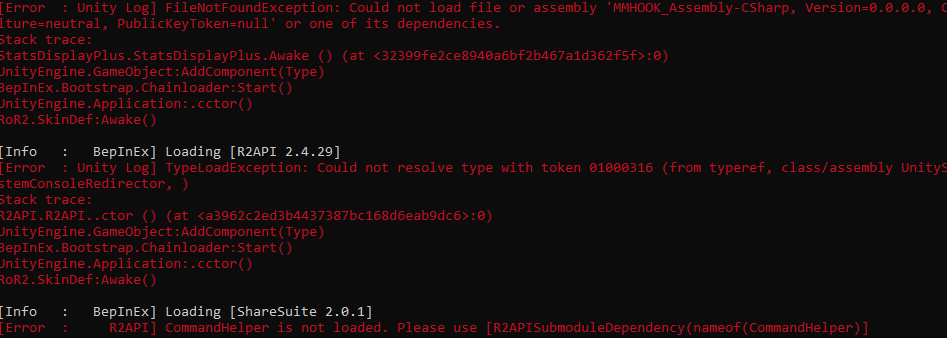
do i just ignore these errors? https://i.imgur.com/dPJKDbx.png
 violet whale
Probably not the first to ask this, but the multiplayer search game is broken right? i cant play a single game
 merry merlin
Did someone found a way to force spawning Mithrix when he bugs?
 short holly
For some reason I can't interact with any of the artifact portal code things
Can you not go into the ambry in eclipse runs?
 near gust
@stark flax you update r2api to 2.5.0
stark flax
i just installed the mod, wasn't expecting an update lol
 silent remnant
Hi guys, I just fought Mithrix and my buddy said he has a health bar at the top of the screen which isn't there for me, any advice?
 granite chasm
Ok so we are trying to play multiplayer. Our friend can't join, well he joins the lobby, we start the game and he can't see anyone on the screen and we can't see him. We tried: Reinstalling the game 3 times, restarting computer, game steam, reinstalled steam and game, forwarded ports, verified files, switch internet connection, checking firewall, no mods alosNOTHING has worked... 😦 can we get some help please?
 white lake
Hey had the same problem Dreamstatex ihad my vpn on thats what made it not work
granite chasm
He doesn't have a VPN
 drowsy nacelle
Ok so we are trying to play multiplayer. Our friend can't join, well he joins the lobby, we start the game and he can't see anyone on the screen and we can't see him. We tried: Reinstalling the game 3 times, restarting computer, game steam, reinstalled steam and game, forwarded ports, verified files, switch internet connection, checking firewall, no mods alosNOTHING has worked... 😦 can we get some help please?
@granite chasm
its... still a vague description? can you give more info? OS? any logs..?
granite chasm
Windows
drowsy nacelle
...
drowsy nacelle
honestly any recent log whatsoever, because there needs to be more clarification
granite chasm
Windows 10 Pro 18362build
All the steam logs
I hope this helps
this is the logs generated when he tries
[2020-08-16 04:22:49] Log session started
[2020-08-16 04:22:49] [0,0] SetSteamID( [U:1:0] )
[2020-08-16 04:22:49] CCMInterface::OnNetworkDeviceStateChange -- Saw device up, connecting to Steam
[2020-08-16 04:22:49] CCMInterface::OnNetworkDeviceStateChange -- Saw device up, connecting to Steam
[2020-08-16 04:22:49] CCMInterface::OnNetworkDeviceStateChange -- Saw device up, connecting to Steam
[2020-08-16 04:22:49] [0,0] SetSteamID( [U:1:72645382] )
[2020-08-16 04:22:51] IPv6 HTTP connectivity test (ipv6check-http.steamcontent.com / 0.0.0.0:80 (0.0.0.0:80)) - FAILURE (Invalid)
[2020-08-16 04:22:51] IPv6 UDP connectivity test (ipv6check-udp.steamcontent.com) - FAILED, no addresses resolved
[2020-08-16 04:22:51] [0,0] SetSteamID( [U:1:72645382] )
[2020-08-16 04:22:51] [0,0] Server says 50% of connections should be websockets, we rolled 82 - using UDP as default.
[2020-08-16 04:22:51] [1,2] Connect() starting connection (eNetQOSLevelHigh, 155.133.250.139:27023, UDP)
[2020-08-16 04:22:51] [1,2] ConnectionCompleted() (155.133.250.146:27027, UDP)
[2020-08-16 04:22:52] [1,2] RecvMsgClientLogOnResponse() : [U:1:72645382] 'OK'
In game console
 stray rune
Oh joy of joys! I heard this is THE PLACE to get issues resolved. I can't wait!! 😄 ❤️ Here we go!
I haven't been able to get this game to run in over a year. Now that we're at v1, I thought it was time to give it another try.
I can see the Hapoo Games screen, and then the opening cutsceen rolls. When that ends or get skipped, I get to the blue foresty-looking screen that I assume is a title screen, then the game freezes and then closes after a few seconds. There is no error message. This is the same issue I had before during EA. I'm on a fairly new Razer laptop running Windows 10 and all my drivers are up to date.
I have done every troubleshooting method I have found in various combinations with no success, including:
Turning off V-Sync in Nvidia
Running Steam in admin mode
Running RoR2 in various compatibility modes
Reinstalling the game (hurr)
Disabling antivirus (how is this a thing?)
Verifying that RoR2 is not being blocked by the firewall
Making sure I have the VSCode C++ or whatever distributable installed
Disabling the steam overlay in game
Running the game while disconnected from a network
Verifying the game files in Steam
And, of course, restarting my computer
Any other ideas? I've spend hours over the past YEAR trying to get this frickin game to run with no success.
I have my DxDiag on hand if that's needed. I also have an error from the Event Viewer that seems to indicate that the issue appears to be C:\WINDOWS\SYSTEM32\ntdll.dll
I've tried updating windows/reinstalling that dll but didn't have much success.
Here's this, too
 vernal jolt
cant invite friends on switch , browse session doesnt show up my friends , both connected to wifi and have switch online memebership
 silver kindle
@granite chasm if you do end up fixing it, let me know. I spent a good 4+ hours this morning attempting to fix it. Uninstalled/reboot/reinstall/reboot. fact reset pc. reinstalled gpu drivers. completely wiped steam. Changed DNS servers, changed MTU size. tested on 2.4hz network, as well as 5hz. win10 pro. i7-6700k, 32gb 3000mhz ram. 2080.
 north anchor
has anyone had the issue where when you open ror2 it is on a black screen and this ror2 unity thing pops up then closes along with the game?
I had this after updating to 1.0
silver kindle
sigh
north anchor
has anyone had the issue where when you open ror2 it is on a black screen and this ror2 unity thing pops up then closes along with the game?
I had this after updating to 1.0 the popup is called Risk of Rain 2 - Unity 2018.3.14f1_d0e9f15437b1
 fossil pier
Im getting this issue with the game - Unity 2018.3.14f1_d0e9f15437b1 if anyone could help
north anchor
you too bruh
fossil pier
yea my game keeps crashing
north anchor
has anyone had the issue where when you open ror2 it is on a black screen and this ror2 unity thing pops up then closes along with the game?
I had this after updating to 1.0 the popup is called Risk of Rain 2 - Unity 2018.3.14f1_d0e9f15437b1
 stoic cliff
I think Risk of Rain2 is crashing my PC. I can play Overwatch and Valorant for hours on end, but if I play RoR2, my entire pc reboots usually about 30minutes into a game. It's not constant and sometimes I can play RoR2 for hours, but unexpectedly my system will just reboot.
north anchor
has anyone had the issue where when you open ror2 it is on a black screen and this ror2 unity thing pops up then closes along with the game?
I had this after updating to 1.0 the popup is called Risk of Rain 2 - Unity 2018.3.14f1_d0e9f15437b1
stray rune
You've gotta stop spamming, @north anchor
north anchor
bro i've been asking since like 3 am and no one has tried to help, like atleast tell me you dont know or some shit
bc i'd love to be able to play the game before next update lmao
 rose thistle
uhm i have a quick question. Well, since Update 1.0 my game just completely overuses my GPU like its immediately 95% usage and sometimes it even reaches 80 ° C and its also in every graphics setting and i wanted to ask if this happened to other people or if its just a problem that only i have
fossil pier
has anyone had the issue where when you open ror2 it is on a black screen and this ror2 unity thing pops up then closes along with the game?
I had this after updating to 1.0 the popup is called Risk of Rain 2 - Unity 2018.3.14f1_d0e9f15437b1
north anchor
bruh no one got a fix for it?
 trim trench
Unless your a dev, probably not
north anchor
well I cant dm the devs so guess I just cant play the game till next update 😉
 sage igloo
@fossil pier / @north anchor I had this issue with my computer reporting an memory access violation in windows event logs. It ended up being an XMP profile that was being applied in my bios without me knowing. Disable it, or set your RAM speeds/timing to factory defaults for the RAM and not what the motherboard recommends. I have not had a crash since I've made this change. Good luck.
 tender flint
can someone help me with this..ive already downloaded and installed the files but it still doesnt work for me...not susre what to do
north anchor
omg thank you @sage igloo
 latent sphinx
https://media.discordapp.net/attachments/743989747088752831/744451081744154634/unknown.png anyone know how to fix this?

 scarlet plinth
Hey, Who can tell me how to play with more than 4 people. Me and the boys are struggling to find an answer. Plz help me ❤️
 unborn cliff
random crashes during the run/stage load, is anyone else experiencing this? Windows 10 Build 18363
latent sphinx
i got it to work with cutting out a bunch of the mods so technically idk
 marble sapphire
so theres no fix to the game refusing to launch?
 hard shadow
Hi, I just got the day yesterday on steam, but when I try to launch it, I got a black screen and it closes after a few seconds
How can I fix that ?
I tried :
- disabling firewall
- reinstalling
- launch game as an admin
- verify files' integrity
I searched on the internet but found nothing
marble sapphire
unfortunately not, i wish i did. i was able to play before the 1.0
 brave hearth
Hey @hard shadow you can send the log file into this channel C:\Users\USERNAME\AppData\LocalLow\Hopoo Games, LLC\Risk of Rain 2
marble sapphire
but now just won't launch
brave hearth
and then the output_log.txt
hard shadow
here you are
 amber nest
I play with a friend in multiplayer and since a few patches it's been unplayable : whether he hosts or I host, after a while (15 to 45 minutes) the non host gets a black screen and is sent back to the main menu. No error message or anything. Internet seems to be working fine as discord works normally at the moment of the crash. Has anyone experienced this and/or knows how to solve this issue?
brave hearth
@hard shadow try to check steamworks integrity check
hard shadow
It said the files where succesfully validated
but the game still crashes
 flat tide
I still can't join multiplayer games
The output log for starting the game, searching a game, joining. Blackscreen kicks me back to menu. Quitting.
brave hearth
@flat tide @amber nest Try to Network reset
flat tide
How?
brave hearth
Windows 10
-settings
-network
-at the bottom network reset
after that the pc restarts
flat tide
so lets see
@brave hearth The problem is still not fixed 😦
i can join the server at the bottom with ping easily. But every other server has N/A and ends in a blackscreen
brave hearth
Did you check your firewall ?
brave hearth
flat tide
My friends can join me though. I just can'T join anyone else
and any other game like terraria and SCP secret laboratory works in multiplayer no matter if i join or host
both use 7777 as port
marble sapphire
i love this discord, getting completely ignored by everyone, even the mods, when i paid for this game and it won't even load. utterly useless purchase
 sharp rover
it's not uterly useless
but i have also bene having issues with the game since the last update
my games frames keep going down out of nowhere
and i tried checking if it was just a problem on my end
but every other game i tried didn't have nearly the same problem
hard shadow
it worked for me the launching problem ! Now it's loading in the void :)
How I did :
I went to : https://partner.steamgames.com/doc/sdk/api and downloaded steamworks_sdk_149
then I put the two files located here "sdk\redistributable_bin\win64" in the steamworks thing you unzipped, into the files' game, replacing the old steamapi64.dll
and it works
beware : if you ask steam to verify your game's files
it'll replace the new .dll with the old and mess it up
 velvet beacon
I found a fix for mismatching mods, if you're just playing with friends, use a mod manager (i recommend r2modman) And literally uninstall everything, get a fresh game. Uninstall reinstall the entire game. Have your friend (or you) create the mod list that you want, have them edit the configs they want, and go to your settings in r2modman and have your friend export their file as a code. On your end, create a new profile and import that code, double check and make sure ALL MODS that you have are EXACTLY the same and all configs are also EXACTLY the same. This solved the issue for me
 long swallow
@steady topaz Sorry for bothering you again im kinda stuck in this stage to how to host a lobby with my friend can you help me out
 turbid pebble
i seem to have found a bug
amber nest
@brave hearth network reset did not work. In the log, just before disconnection I get a lof of "Did not find target for sync message for 7439" messages. Maybe that's related?
 pseudo seal
Can someone help me? For some reason game start in window_mode Window and resolution 144x1x60. No matter what I do, no action will fix it.
 steady topaz
@Honuel#7563 You already created a network, Its named Honuel.
Now you need your friend to join it. Give him the name and pass for this network.
He can join it with Network menu on top or with num+ key on keyboard.
Once he joins your network - he can copy your ip in this network 26.123.143.52
All is left to do - is to host a lan game from your game host 1 console command.
And to join in with connect 26.123.143.52:7777 from his game console.
@long swallow
long swallow
Thank you very much Goo!
steady topaz
@pseudo seal Check that config file:
C:\Program Files (x86)\Steam\steamapps\common\Risk of Rain 2\Risk of Rain 2_Data\Config have resolution set to your monitor resolution 1280x1024x75;
@tender flint Did you actually installed the files, or instalation of those files sayd that there is already same files installed?
pseudo seal
It worked. Thank you so much 
 sour snow
I know not if it's a bug, but as Captain, you can scrap the Microbots, and you'll have the Microbots in the next stage plus the red scrap item
steady topaz
@sour snow #ror2-bug-reports-pc Btw you can reconnect as a client to refresh your microbots and beacons as a cap. Free items.
This is a bug, not something that require techsupport.
 steel glade
Has anyone succesfully got this dedi server working?
flat tide
@amber nest i have the same message and can't connect to anyone too.
Let me guess, you can connect to those russian dedicated servers, but none else?
amber nest
@flat tide mhh no, I can connect to my friends private server and he can connect to mine, but i get disconnected midgame
 crude hawk
any idea why the latency is going up to 70 thousand?
went up to 100k now
and uh, reconnecting makes it go down to 1k
sharp rover
@crude hawk im having the same problem
sharp rover
enter the game and get bombarded by the mf lag
i cant even go on singleplayer for more than 3 stages
without it lagging hardcore
 cinder plume
how do you join someone that ahs a dedicated server open?
steel glade
Steam > View > Servers ?
crude hawk
Singleplayer is ok, but multiplayer latency is crazy laggy right now
cinder plume
yeah, but it says "Server is not responding" when I try to join
we're trying to play lan, but I don't see his server on lan either, I see it in the "Friends" tab tho
steel glade
Yeah i couldn't get it to load on the Servers tab
But it works on friends... Doesn't work in game either
steel glade
Does he have the 27015 port forwarded?
cinder plume
we're playing through phone internet sharing
cinder plume
I can't port forward on a phone
steel glade
No on the server firewall, ie windows firewall
cinder plume
The windows defender firewall? I'm on there, what next tho?
steel glade
Add a new inbound + outbound rule to the game server executable
cinder plume
well the game's already got a rule, saying anything outbound and inbound is authorized
I just made another one tho
okay, anyone has an updated tutorial on how to create a dedicated server?
 brazen hatch
Is anyone else having FPS drops on the game since 1.0 launch? I've noticed certain points where the game chugs a bit down to about 15 fps before returning to normal. I normally run the game around high-ultra settings but I've had this fps drop even when settings were set to all low
 jovial inlet
@brazen hatch the item you get from a magma worm is known to have quite a harsh effect on your frames but other than that its the same
 quiet gale
Anybody figure out a fix for the freezing multiplayer menu?
 jaunty geyser
Help please, since the last update I'm crashing almost every run, it's making the game unplayable for me
sharp rover
@jaunty geyser do you mean like fps drops, lag?
jaunty geyser
literally crash, with the little unity dialog appearing for a few seconds
 kindred holly
hey i just got this game but cant seem to be able to connect to my friends lobby to play together we just get black screened everytime
tender flint
@steady topaz at first it didn’t let me install them... so I found the ones currently installed and deleted them... then I installed the ones it asked for... still doesn’t work
 gritty egret
@brazen hatch You're not alone mate, plenty of others reporting the same, myself included. Clearly introduced by 1.0, devs yet to comment on it. No obvious reason as to why it's happening either.
 uneven geyser
Is the debug toolkit mod working yet
 solemn wedge
hey, guys, anyone know how to fix this? cant join a lobby with friends
granite chasm
I;'ve been trying to ask this yesterday as well
so far no fix afaik
it worked for my friend when he used his mobile internet and tethering @solemn wedge
solemn wedge
it's, like, i've played with friends today, but after i took a break i couldnt connect to them...
flat tide
So as far as i see MANY people have the multiplayer problem
 gleaming bridge
I'm having this issue where the game will randomly crash my pc. No other games does it. Either forces restart or BSOD. Using latest geforce gtx 1060 gameready drivers. Happens ingame and in the start menu. Nothing seems to stick out in the log aside from a few shaders that fail to load. Makes the game nigh unplayable. Anyone has an idea how to fix this?
flat tide
It's day 3 of no multiplayer games are joinable
 plucky imp
anyone getting desync with captain in multiplayer after getting gesture of the drowned? I know gorags causes it but in general gesture seems to for friends and I without gorags.
stray rune
@flat tide I'm at over a year of not being able to load the title screen. Get on my level. 😛
 long sapphire
Anyone know why my dedicated server wont show up on the server browser? I've forwarded the correct ports and I had it working before the 1.0 patch
steel glade
Looks like the 1.0 patch borked updating to the master server list
long sapphire
okay thanks, I've seen other servers on the browser. I guess ill wait until a walkthrough comes out.
 vale timber
Hi, I keep getting black screens in the game when playing with my friends on private lobby, its occurring after teleport event (when teleporting to the next stage), the screen become black for 2-3 min and then it exits the game to the main menu, didn't find any solution yet, anyone here have a solution for this issue?
quiet gale
Is there a way to permanently delete a profile? When I try doing it the game just says it's corrupted and keeps it on the profile list forever
 river sonnet
Unity crashes on start-up, multiple people have talked about the issue. My crash report matches his as far as I can tell: https://www.reddit.com/r/ror2/comments/fe5zxc/game_is_crashing_with_unity_error/?utm_medium=android_app&utm_source=share

 craggy mesa
Had to reinstall steam and pretty much all of my unlocks are gone (other than a few), anyone know how to get those back?
quiet gale
You might need to wait for someone to upload a profile with all unlocks and then manually remove the ones you didnt have yet :/
 minor portal
So I’ve been playing ror2 for a while and about a month or 2 ago my game started getting an error sign (I’ll show the photo in a sec) and now the game won’t startup at all and it didn’t get better after the 1.0 update and I was wondering if anybody has experienced this as well and hopefully found a solution
Here’s the error sign
 slow needle
has anyone had issues where their mouse now shows on top of gameplay
steady topaz
@tender flint sorry i kinda forget about your message. I see you're on 1hr run already so i assume its fixed now?
 raven delta
when we port forward the server, is it both TCP and UDP on 27015?
 hazy abyss
Been getting this same error screen for quite some time now, even before the 1.0 launch. Can't specify when it started but in my output log it says this. Is it just because of my GPU? I have a 1660Ti and from time to time the game works just fine, in fact I played it earlier today.
tender flint
@steady topaz yea just changed the location of the install of ror2 and it seemed to work
@steady topaz appreciate the help
steady topaz
Glad it work for you, but you solved it yourself. GJ
@hazy abyss This error is common for acces violation error.
The part of the log on pic means nothing. Drop the log itself.
hazy abyss
Tried moving it back and forth in between my C and D drive, reinstalling Steam and the game and nothing has worked so far
The only time it did work was when I launched it through the NVIDIA GeForce Experience app, which I find odd
steady topaz
@hazy abyss drop error file from here, should be some folders for each crash you had, pick recent one
C:/Users/Garre/AppData/Local/Temp/Hopoo Games, LLC/Risk of Rain 2/Crashes
hazy abyss
steady topaz
@hazy abyss AudioSes.dll caused an Access Violation (0xc0000005)
There is known issue with XMP memory profiles crashing this game engine version. Try to disable your XMP from bios.
minor portal
How do you do that? Sorry I’m having the same issue and am relatively new to computers
steady topaz
@minor portal Do you have similar crash?
minor portal
Yes
This is what I get when it crashes
It does this every time I try to launch the game
hazy abyss
@minor portal You open BIOS by mashing one of the function keys or DEL or ESCAPE on startup.
minor portal
Ok thanks
hazy abyss
Unfortunately for me I don't see anything doing with XMP values in my PCs BIOS
hazy abyss
For my GPU yes, but that's the built in ASUS software. I can't clock my CPU at all actually.
I own an ROG STRIX III. It's a laptop.
steady topaz
@hazy abyss you're getting crashes right away on startup of the game, or its random during gameplay?
hazy abyss
Startup of the game, no title screen or nothing. Just a black screen then an error.
steady topaz
@hazy abyss gpu drivers uptodate?
hazy abyss
Mhmm.
 amber hatch
After around 5 more runs, even reinstalling and verifying files multiple times, I can conclude that, for my specific device, the only interactable that can spawn for me is the teleporter. No chests, shrines, or otherwise. It may be luck, but it also seems as if the only boss that spawns, is the jellyfish.
I do not use mods, and I do not understand how to fix this particular bug, if at all possible
steady topaz
@amber hatch havent heard of this before. Verified game files? Used mods before? When this started?
amber hatch
From my very first game 2 days ago. This has been a problem from the very start
Never used mods, and as I said, I have verified many times
 fierce halo
Dex, did you happen to use someone else's player file to unlock things in the game?
amber hatch
I don't understand the question. I am using the steam version.
fierce halo
Yes. I know
There's a player file at c:/Program Files/Steam/userdata/<numbers>/632360/remote/UserProfiles
It's a way that people give themselves a bunch of lunar coins, or modify their game to have all content unlocked
If you used another player's file that had installed mods you don't have, maybe it would have caused issue. But seeing as you didn't know what i was talking about, i would assume you didn't do that
amber hatch
I only have one file in this directory
And I have not edited it or used a different one.
steady topaz
@amber hatch Can you make 2 screenshots from the game?
One from the screen where you pick your character, right before you press ready.
And other one from the highest place where you able to climb, so we could see what the stage looks for you.
amber hatch
It would require me to install the game again, (and I have wifi with the power of a potato) so this may take a while. But yes I can.
fierce halo
#sixthstimethecharm
amber hatch
If this takes a long time, do I have permission to dm you? @steady topaz
steady topaz
@amber hatch shure thing, i havent seen such case before tho, i am not shure i can help you at all. But ill try.
 cyan schooner
Does anyone have a guide on how to set up a Risk of Rain 2 Dedicated server?
 green girder
Does anyone have a guide on how to set up a Risk of Rain 2 Dedicated server?
@cyan schooner what he said
steady topaz
should be a guide on steam for that.
cyan schooner
yes, we did find one. But, its outdated it seems
Because it assumes we know the ip, but we dont.
Theres also people hosting dedicated servers in the server browser
 agile wind
So, this has been a problem for me for a while now. I don't have wifi at my house (yeah, yeah, my parents don't believe in getting it for some reason), so I use my mobile hotspot to access the internet at home. However, there is a secondary location I go to a lot which is sort of like a second home, and there's decent wifi there. Whenever I'm on my hotspot, I can never connect to multiplayer games with friends or with randos on ROR2, it just goes to a black screen and back to the menu or a halfway loaded lobby. If I'm connected to the wifi at the secondary location, tho, everything works completely fine. That's only a problem on this game, however, because I have no trouble playing even full Battlefield servers. Does anyone know why that is?
steady topaz
@agile wind games like battlefield have dedicated servers. No player is hosting a game for others in this case. This game however is based on p2p connection type with middle point of steam servers. Steam servers do no host a game, they only pass connection from host (The person who creates the lobby) to all clients (Those who connect to the host) Host needs to have good internet, not only on download, but on upload speeds too. And there is not so much about speed, but about the delay the data goes from host to client and back. This called the ping (delay, latency).
There is a ton of stuff why connection could be bad.
General ones are NAT, provider's setup, load, firewalls.
Hotspot or mobile internet is genneraly not sufficient to gaming, more so for hosting a game to someone else.
You need to check on your network for open ports (game uses 7777), for firewalls and from game console for ping. There is also an option for dedicated server. You might find some of those servers right now from multiplayer, they appear to be the only ones that actually return a ping reading instead of N/A at the moment.
Also there is a workaround, if you want to play with smeone specific and have troubles with your network setup.
https://discordapp.com/channels/417739215355510784/559902278018924557/724218038651453511
 half thunder
Is there a better guide for setting up a dedicated server? I feel like im missing something and trying to start the dedi server, tells me im missing all these config files that dont come with the standard steamcmd install
agile wind
Alrighty, thank you! I'll try some of the things you suggested, hopefully I can work something out. If not, it's not too long until I get out of here, so I may just buckle down for a bit.
 hasty oar
get rid of some of the mods?
 sick oyster
No mouse pointer
 heady tangle
I just linked this one because someone else had my problem but I used the same profile as osmoen I know
no matter what mods I had it'd never work with someone else
sick oyster
tried removing the save file with cloud saves turned off, didnt work
made new profile, now I have a new profile with no progress and mouse still doesnt work
 ebon lintel
howdy yall, I have the same issue as @agile wind. I've tried both direct connect and virtual network fixes like @steady topaz suggested, neither of which have worked. My next idea is to attempt starting a dedicated server for me and my friend, but the steam guide is outdated. Would appreciate any help or ideas anyone here may have ❤️
the direct connections and virtual network both gave me this error, by the way
 calm raven
anyone know why my game is running at 80 celsius?
back in my old pc build the game was running at a fine 49-57 Celsius
 severe wigeon
Anyone else having trouble getting DSR to work in the game after enabling it within the NVIDIA control panel?
 alpine raft
@calm raven set an fps limit to 60 or 144 that should fix it
calm raven
how do I do that
alpine raft
settings
severe wigeon
Second question: does Risk of Rain 2 support NVIDIA's "ultra low latency" mode when using g-sync and vsync simultaneously?
 compact pewter
My dedicated server says it can't open up the ports while the server is running
Anyone have a workaround?
the ports are forwarded 100% certain on this as I have other game servers for other games that work just fine and none of the ports are overlapping
please @ me if you answer in regards to this as I may not see it
calm raven
@alpine raft yeah still get the same temps
 odd wagon
Brand new players here. We can't click the "ready" button to start a multiplayer game. It just eventually times out and we go back to the main menu.
Any help here?
 grand plinth
What do I do if some of my achievements werent registered on steam?
latent sphinx
is there a way to stop the game from dropping scrap and microbots as items when i use classic items?
its a little annoying, ill open a chest and get a scrap
 hybrid marsh
please @ me if you answer in regards to this as I may not see it
@compact pewter well that screenshot it shows that u need to turn off the server before changing ports but... ive never ran a server for ror2 so uh what exactly is ur problem
compact pewter
the problem is I change the server ports in the config before I launch the server. So every time I've changed the ports the server has not been open, then after I change them I open the server and get that error
 fleet garnet
Hey can anyone help figure out why im crashing. I've already tried all of the normal fixes. Here is my most recent crash log.
compact pewter
@fleet garnet verify the integrity of your game files, if that don't work then reinstall, if that don't work uninstall graphics drivers with ddu program then manually reinstall the latest for your graphics card
fleet garnet
@compact pewter I tried all of that except manually uninstalling the graphics driver. I reinstalled using Nvidia Geforce, just not manually deleting and reinstalling. Also do you think modding the game years ago might be the issue?
compact pewter
you need to uninstall the game, then go to the game location and delete leftover files, did you do this?
fleet garnet
Yup
compact pewter
and just reinstalling won't help you should use DDU program
if you deleted all the files in all the locations then your old modding wouldn't matter
fleet garnet
I went in and deleted every single file in the risk of rain folder
compact pewter
what about the appdata folders?
fleet garnet
Probably missed that
compact pewter
check that out then, could be a problem
fleet garnet
@compact pewter Alright ive gone and deleted everything that had to do with Risk of Rain in both of my drives. Ill let you know if it works.
compact pewter
good, just don't delete them from recycling til you're sure that fixes it
fleet garnet
@compact pewter If I deleted all of my files why do I still see my Profile in the game?
compact pewter
either you didn't delete all of your files or steam cloud is enabled
could be something else but idk
 muted remnant
does anyone know how to host a dedicated server on 1.0? I cant find anything about it anywhere
fleet garnet
@compact pewter Steam Cloud was enabled. Should I delete everything again, or does that just save the profile info?
compact pewter
does anyone know how to host a dedicated server on 1.0? I cant find anything about it anywhere
@muted remnant check steam guides....
muted remnant
does ror2DS still work? i could have swore it doesnt
compact pewter
go to steam guides again
there is a hosting guide made by the devs
that is what you want
@compact pewter Steam Cloud was enabled. Should I delete everything again, or does that just save the profile info?
@fleet garnet you should backup your save, disable steam cloud synchronization for that game, then delete the appdata stuff/game install, then try again
@muted remnant https://steamcommunity.com/sharedfiles/filedetails/?id=1938378081 use the command line option not the silly app

How to Host, Join, and Configure a RoR2 Dedicated Server!...
muted remnant
So do the steamcmd option rather than the other one?
muted remnant
i was just worried about using the guide because comments (including yours) said that it doesnt work for 1.0
compact pewter
you can tell it works because of the many servers that are currently up 😄 and np
 clever perch
hey all a buddy of mine contstantly freezes around 34 minutes into the game anyone had this problem or found a solution?
crude hawk
Any news about the ridiculously high ping issue?
clever perch
@sick reef did you ever find a solution to your game freezing issue? got a buddy that has the same thing happening to him right about 34 minutes in on multiplayer
crude hawk
seems like the ping starts off normal, but then snowballs to 2000, continuing up to 100k
multiplayer is literally unplayable for me since everything is at a 100 second delay
 drifting rune
Anyone know what the cause/fix for constantly getting a black screen upon attempting to join a friend's multiplayer lobby?
His name shows up in my group but when he joins his character never appears and he just gets a black screen on his end and kicks him back to the title screen after 20 seconds or so.
Same thing happens to me when I try to join a game of his
 dark terrace
Assistance would be appreciated.
clever perch
@drifting rune has your friend verified the game files yet?
drifting rune
Did a fresh install just moments ago.
clever perch
have yall checked the logs?
drifting rune
Location of said logs?
clever perch
its pinned in bug reports pc
drifting rune
Thanks, checking it
When attempting to join his lobby, I get: Steamworks lobby join succeeded.
But then I get The prefab 'ArenaMissionController' has multiple NetworkIdentity components. There can only be one NetworkIdentity on a prefab, and it must be on the root object.
Then I get GameNetworkManager.OnClientP2PConnectionFailed steamId=76561197975767847 sessionError=Timeout
Same for him on his end
fleet garnet
@compact pewter Still crashed after deleting everything guess ill try the DDU
If anyone has any ideas here is the log again
 whole tulip
What does it mean when the crash log says:
Read from location 0000000000000069 caused an access violation.
whole tulip
What does it mean when the crash log says:
Read from location 0000000000000069 caused an access violation.
@whole tulip fyi
brave hearth
Check the game integrity? @whole tulip
 orchid flame
Ullo, anyone help me change the game to display on my secondary monitor?
whole tulip
@brave hearth did that a couple times and reinstalled my gfx drivers but still encounter the unity error at the loading screen.
Only started encountering this error after the 1.0 update.
 livid creek
Dedicated servers seem broken on my end?
Worked before the update, now it doesn't show up in steam's server browser or the in-game server browser.
Guide is outdated and doesn't mention the in-game server browser 😢
My friends and I can still join my server through the in-game console, but still annoying.
Also normal multiplayer seems to have like 6 seconds of ping, but I've seen that mentioned a few times, I'll just stick to my dedicated server for now
 real warren
is there a way to join normal lobbies even when you have the 16 player mod yourself? I don't want to keep uninstalling the mod just to play on non modded versions
livid creek
can you connect using the console?
I actually thought the large lobbies still worked normally
real warren
nah gave version mismatch
livid creek
Open the console and change
sv_maxplayers 16
Or if you use dedicated server you can just change the value
livid creek
damnn. I think it works on the dedicated servers haha
 warm notch
did you do anything else that isn't on the guide to create your dedicated server? I'm trying to make my own and I can't even connect to it through the console.
@livid creek
livid creek
Nah don't think so. Had a few issues as it seems it's pretty broken atm 😢
But works fine for me connecting via ip
Yeah sorry, not much help, I can get sv_maxplayers to work either :'(
there's also steam_lobby_max_members
but also doesn't seem to help
 vast oasis
seems like the ping starts off normal, but then snowballs to 2000, continuing up to 100k
@crude hawk Same here, been like that for ever. We need a fix for this asap.
crude hawk
yeah :(
 frosty sun
until yesterday or the day before yesterday mods that only works for me like "itemstatsmod" worked on the multiplayer even if the host was vanilla. But today it seems I can't play with vanilla players. Is something changed?\
 warped hawk
hey, since the big update i cant play the game, it says "no gamepad something" - then it overlaps and i cant read what it says. I never used a gamepad and it doesnt let me use the mouse, only tab works and it only lets me switch users. pls help i wanna play the game 😦
 thick cape
Anyone know why this is happening?
This just started happening today and I found it out when I tried playing duos with someone
I can only play single player as of right now
And I own the game too I didn't game share
brave hearth
@whole tulip is enough storage on your device ?
 empty tangle
does anyone know any ways to get the game to run better
i have all the settings low but is there any way to lower resoulution
 grave sage
I've been having an issue where if I walk forward it sometimes keeps walking forward after I've let W go, sometimes for a few seconds. @ Remi had the same problem it seems.
Does anyone know what could help with this?
orchid flame
Whenever I launch the game I cant skip or see anything during the new intro :(
I've tried reinstalling - verify nothin :(
steel glade
```CTRL + ALT + ` + intro_skip=1
To setup auto skip of login cutscene.
- goto your game install folder, then
Risk Of Rain 2_Data\Config
2)Create a file calledautoexec.cfg - Add
intro_skip=1;to theautoexec.cfg - Save the file
- Start Risk of Rain 2.
whole tulip
@whole tulip is enough storage on your device ?
@brave hearth yep, would imagine so. how much storage is needed?
 wary scaffold
i dont know if this counts as tech support, but:
my ingame name is "?? maxz"
i even went into my config file and looked if i could change it via that.
but no chance.
how do i manage to get rid of the "??" part?
my steam name is currently "✪︎ maxz" so that explains the "?" funny enough the 2nd "?" appeared after i changed my steam name.
Every time i change my name from "✪︎ maxz" to "maxz" and back to "✪︎ maxz" a new "?" is added....
can anyone help ?
steel glade
Dont use a star?
wary scaffold
Dont use a star?
@steel glade read my full message
especially the last paragrahp
steel glade
Every time i change my name from "✪︎ maxz" to "maxz" and back to "✪︎ maxz" a new "?" is added....
Stop using a star would be the best bit.
Find your user profile, it's under :\Steam install\userdata\x\632360\remote\UserProfiles\
Open the XML.
Find the tags <name>???maxz</name> and remove the ??
compact pewter
try using unicode characters
wary scaffold
Every time i change my name from "✪︎ maxz" to "maxz" and back to "✪︎ maxz" a new "?" is added....
Stop using a star would be the best bit.Find your user profile, it's under
:\Steam install\userdata\x\632360\remote\UserProfiles\
Open the XML.
Find the tags <name>???maxz</name> and remove the ??
@steel glade i already did all this.
when i now change it to "maxz" the "??" is still there.
and in the file i already removed the "?". but it only removes it from the profile selection part
steel glade
Remove it from your Steam name, fix the profile XML and then load it...
flat tide
Day 5 of not being able to play multiplayer :/
 proud swallow
Hi, people a question can not create 16 player servers? with mods? or someone knows and can explain to me?
orchid flame
no mod is lookin here right?
flat tide
noone is. For 5 days i am not able to join servers except for dedicated ones. Still no fix or anything
Each server is listed under "incompatible" game
gleaming bridge
I wish I could simply play the game. Crashes my whole pc. Either BSOD, flatout restart or freezes in an infinite loop that keeps incrementing volume. (prob spawning new sounds) Can't seem to find any support. might just give up and get it refunded.
compact pewter
put it into #ror2-bug-reports-pc before you refund
this game is amazing and def worth keeping, the new update just broke some stuff but it is the full release update so once it works it should generally be good forever
 ivory charm
Hey all, I was having some issues after 1.0 with FPS on my system. I was on the latest driver and was still seeing about half the FPS I used to get pre-1.0. This morning I saw there was an update for my gpu driver to v452.06 (released today I believe), once I installed that I was back up to the pre-1.0 framerate. Thought I'd mention it here in case anyone else is having this issue
compact pewter
Yeah reinstalling graphics drivers usually fixes things
gleaming bridge
Will try. Thought tech support was for that. XD
compact pewter
@gleaming bridge you should use DDU then reinstall your graphics drivers and np
empty tangle
does anyone know any ways to get the game to run better
i have all the settings low but is there any way to lower resoulution
gleaming bridge
I'd be enclined to beleive it would help if I had any issue with anything else on my pc, but it's brand new and I just freshly installed the drivers 2 weeks ago. Checked and there is no newer version.
When I get in the game and manage to play before it crashes, I get no issue with framerate or anything.
compact pewter
Everything can work perfectly fine but one game. It's actually very common for drivers to be improperly installed and only affect certain titles. DDU ensures a full clean slate to install a new set of drivers
old drivers can cause problems to new drivers even after being updated
gleaming bridge
I get that, but there was no old drivers, I installed it on a new ssd.
long swallow
Soo.. to run the game smootly we need an SSD
Wow the game requriments really look like an AAA game xD
gleaming bridge
drivers are on ssd, game is on hdd.*
long swallow
You should put it in SSD then theirs a diference
gleaming bridge
With crashing?
long swallow
Wait it Crashed when you put it in SSD?
gleaming bridge
No idea, only played with it on HDD.
I don't see how a HDD would make it crash and not an SSD.
long swallow
Then you should tottaly try to run it in SSD
gleaming bridge
Made no difference, crashed after 6 minutes
But the log did mention what happened just before it crashed
compact pewter
I get that, but there was no old drivers, I installed it on a new ssd.
@gleaming bridge even then they could have installed wrong the first time
 delicate arrow
my game is currently crashing on startup. it opens straight to the unity crash window and closes again. I tried validating my files, uninstalling everything, reinstalling on my other drive, deleting save file & disabling cloud sync. anyone able to give me an idea of what might be wrong?
gleaming bridge
`
Animator.GotoState: State could not be found
(Filename: Line: 1357)
Invalid Layer Index '-1'
(Filename: Line: 923)`
compact pewter
use ddu then reinstall drivers
probably your drivers not knowing how to handle the situation @gleaming bridge
 peak parcel
hey, I'm trying to play mp with a friend and there is a massive lag when doing everything, from the moment either one joins the other's lobby to the start of the game.. I'm talking seconds of wait and unplayable conditions, any ideas on how to fix it?
gleaming bridge
Let's try this. DDU'ed drivers and fresh reinstall.
Nope, crashed my pc before I could even start a run.
 keen knoll
Hello
I need some help joining games online
I seem only to be joining games in progress and can't play, even after a teleporter event.
Anyone having this problem?
 high vapor
I have a friend that has had their progress reset 3 times now and can't recover their data. We've tried deleting the old save and having them install a new profile and it doesnt work, how do we stop this from happening?
orchid flame
I've heard of this problem a lot and though it doesnt happen to me, maybe getting into this habit will help preserve your progress
Go to your steam/userdata/[your user id]/632360/remote/ and copy the UserProfiles/ folder to another part of your computer as a backup in case it gets broken
whenever it breaks you can paste your backup back into that folder
 dusty fern
so im playing for the first time in quite a while, and none of my survivors are there? i only have access to the first guy, when i had quite a few before. any idea why?
orchid flame
hey guys, quick question. risk of rain 2 is stuttering every 6 seconds or so, dropping anywhere from 5 to 15 frames. this is obviously only noticable on a 60 fps cap, but since i dont wanna melt my pc, i play on that. Is it maybe possible to set custom fps caps thru the console, or any fixes?
compact pewter
Take off the cap
having a cap takes more power than just letting the game run unlimited
it can in fact cause lag sometimes and you should only cap framerate if you're having graphical problems like screen tearing
 manic gazelle
Anyone having trouble joining a multiplayer game? I can connect but the lobby is all distorted
 tribal fiber
Bro what the heck is this, I can't connect to my friend.
manic gazelle
 tribal fiber
Same.
manic gazelle
Thing is busted for some reason?
 graceful sluice
hi i have some issues while trying to play with my friend, he change pc recently and now we can't play in coop anymore we try a lot of things and cannot find the problem on any forum if you could help ( we want to try the 1.0 )
left his screen right mine
tribal fiber
Oooh a Spanish lobby
Also same
Nothing is wrong with our connection to each other, we where playing just fine earlier and now the games multiplayer just caput it's self.
graceful sluice
but when he use his 4G it's working, and on a other computer aswell
anyone to help ?
brave hearth
@graceful sluice
-check game files
-Firewall ?
-Antivirus
-Reset Network
compact pewter
are you trying to connect on the same wifi?
graceful sluice
i don't think it's a network problem because he can do it on a other computer and it work
firewall is check
compact pewter
there's your problem
try using steam launch properties to run the instances on two separate ports
graceful sluice
can you explain in more details i'm not a engineer
compact pewter
open steam
graceful sluice
ye
graceful sluice
ye
compact pewter
for 1 pc put "+clientport 270xx" whatever number here, and on pc2 "+clientport 270xx" but a different number than the first one
then try again
you might need to forward these ports in your router, try open nat, and or upnp. If you use upnp (very quick and easy fix) turn it off when you're done using it
might
oh and don't use 27020
graceful sluice
ok i will try
compact pewter
https://support.steampowered.com/kb_article.php?ref=6370-QPHJ-3567 here's the steam guide if you need help
Article "Configuring a router for multiple clients"
 lucid lantern
why every lobby i join is already mid game
how am i supposed to play with others
steel glade
use the steam server browser
lucid lantern
wait is that a thing?
steel glade
In the steam client, goto View > Servers.
Filter by Game > Risk of Rain 2
It will show all servers, including Dedicated servers, which the Game currently doesnt list
lucid lantern
omg thats amazing
never knew about it thanks
not too many servers are available, in game there's much more, why's that?
steel glade
the ones in game are people using the console to host games using the listen server settings
compact pewter
servers are buggy rn
they broke a ton of shit in the latest update and it's hard to set up because they haven't updated the guide
steel glade
Nah you can figure it out 😄
compact pewter
you can but that doesn't help the tech illiterate
js they could have taken the time to update their guide for their big 1.0 release :p
steel glade
Aye, the main point is that Dedi servers don't show in the in-game server browser
steel glade
Not the latest build ones that are usable
The ones in that browser are Listen servers, with steam authentication. The dedicated servers don't register properly to the master
 tardy jolt
does anyone have the original skin files on hand for use with Ryan's SkinAPI? 1.0 broke the skin dump functionality so I can't get the original textures and junk now.
reposted because not sure if I was in the right channel
compact pewter
just roll back your risk of rain 2 install
tardy jolt
how would someone do that on steam?
compact pewter
use steamcmd
tardy jolt
yep, I have no idea how to navigate depot/manifest id's for installs so it's looking p bad on that front
tried three different manifestIDs from windows depot, gonna assume the older versions aren't being stored anywhere or I'm doing something wrong
 oblique oasis
so i have many bug with success i valide 2/3 success on steam but i dont have in game my reward can you help me ?
for exemple i have finish succès for ingenieur skill, i have success on steam but not in game, same prob for captain first time i win dont have reward i need 3 times for game send me rewards
someone to contact for help?
 novel terrace
A friend of mine seems to have the issue with the mouse not locking to the game window, neither full, borderless or windowed fixes it, no windows settings do and she unplugged controllers etc. Were there any fixes to this problem before?
compact pewter
you could just play with 1 moniter for a bit
but I believe you need to set up the moniters in the graphics card panel not the display settings
 rugged kite
Hey so Im having a weird problem where I have huge fps drops for a single moment whenever large hordes of enemies spawn. I assumed it was a hardware problem so I watched my task manager and had no spikes in anything whenever I began getting this fps drop. This happens in both single and multiplayer.
I am pretty sure it isn't a hardware issue because my friend is running the game flawlessly on his lower end pc.
My specs:
RTX 2070 ultra
i7 8700k
16GB ram
1TB SSD
Windows 10
I would really appreciate the help
silver kindle
@silver kindle sure thing
@granite chasm i factory reset my router, and it corrected the issue.
compact pewter
@rugged kite try using ddu then fresh install of display driver
even if literally everything else works
 subtle fossil
Hello, I'm trying to set up a dedicated 1.0 server to play with a group of 5 people, but I can't seem to get one running.
Is this currently possible right now in 1.0? Our main goal is to be able to go past the current 4 player limit. If there are any other ways to do this or if someone could help me out I'd greatly appreciate it. Or if this question has been answered before, if I could be referred to that it would be great.
rugged kite
ok I used DDU and cleaned out all of my nvidia drivers then redownloaded them. Im still getting the random freezes/fps drops
I've also tried verifying my files on steam, reinstalling ROR2, and lowering my settings but none of those helped either.
also thanks for trying Mythical, I appreciate it
 bronze shoal
So I have 2 monitors and when I move then mouse it keeps clicking into the 2nd monitor in full screen
compact pewter
not sure what else to do then report the bug and @bronze shoal just play with 1 moniter for that game or instead of using display settings from windows to set up your moniters use your graphics card panel instead
bronze shoal
I like using the other monitor to watch stuff when playing games, this is a pretty basic bug, its mouse lock issue.
Not seen this issue for at least 10 years
 gentle arrow
Hello, is the TooManyFriends mod outdated? I cannot seem to get it to work
subtle fossil
I’m also trying to find a way to increase the player cap
livid creek
@subtle fossil Having issues with dedicated server too. I've had success joining through the console
 sleek mason
So my friend found a way that could work, have one friend, make a profile, import from code, and then try joining one person
apparently he set one of the file of "is modded" to false
orchid flame
@compact pewter the graphics card panel thing doesn't work for me
mouse still isn't fixed on the window
compact pewter
then only use 1 screen and put a report in #ror2-bug-reports-pc
subtle fossil
Ok, I got to a point where all of us can connect to the dedicated server but we can't select any options/characters/etc. Earlier the dedicated server would open up to a screen without any players on it, but now it's just a blank screen. I don't know if that has anything to do with the issue.
Reinstalled the server now it works
Well we can select characters
 wind arch
I'm having trouble getting mods to work as far i know I've downloaded everything correctly, with the api's, but when i launch ror2 i don't get a console and there isn't any mods loaded. Can anybody give me some help?
subtle fossil
Ok this should be my final bigger post -
I'm trying to get a dedicated server up with a total of 5 players playing. I can get 4 of us to connect together, but when the 5th person tries to join, they get a "Not enough resources" error. I've raised the player count in the dedicated server to 16, and we also tried modded with TooManyFriends, but we don't get any different results.
Anyone have a solution?
Just got a response from the TooManyFriends mod devs, apparently the mod is bricked. The dev finished a fix, but it's not clean so they're releasing a clean version tomorrow.
 modern solar
When i start up risk of rain 2 the screen just goes black and flickers on and off is there anything i can do to fix it?
 uncut moat
any fix for the random freezes on Nvidia?
gleaming bridge
So for people having FPS drops, you might wanna try this:
Open up boot.config in c:\program Files (x86)\Steam\steamapps\common\Risk of Rain 2\Risk of Rain 2_Data\boot.config
find the line that says gfx-enable-native-gfx-jobs=
and add a 1 at the end.
So it looks like this: gfx-enable-native-gfx-jobs=1
Another option would be to try adding this at the line just before: gfx-enable-gfx-jobs=1
A lot of other games that use Unity have seen framerate drops wen those lines were removed from that file.
Afaik not, I tried -EVERYTHING- to fix it and I still can't play because of them.
 mossy spear
If you want to run a dedicated server right now you need to do two things. First, run a server software that will actually open the port correctly on your router, i used my plex port with plex running to do this. Second, have players in game use the console to join. Ctrl+alt+tilde=console in menu. Command is "Connect ip:port". Hopefully they fix the broken dedicated server software asap
 real mist
Not ror2 game related, but what is wrong with the role bot?
It's literally a dice roll for remove roles
 livid bane
I am getting lag when connecting to a friend hosting ror2, but when he hosts other p2p connection games i have almost no lag
 calm merlin
hey sorry if this isnt a good place to ask but is there a place/discord i could go to to ask some questions for trouble shooting mod issues?
 opal otter
i need help i just cant find any match in multiplayer since quick play is gone there is no lobbies or anything
 remote night
I'm having a problem after finishing the mithrix level where i reached the rescue ship and the screen just turned blank with the big drone gun firing at something. The game wont let me progress to the next stage.
granite chasm
@silver kindle will give that a try ! thanks
steady topaz
@unborn cliff
Your log have nothing immidiatly usefull.
With random crashes helps:
-updated gpu driver (or older one, if you're already on lattest).
-disabled XMP profile from bios.
-disabled overclocking software, reverted values for cpu speed and ram frequrency.
unborn cliff
@steady topaz thanks! I'll try to revert my gpu. It's been randomly crashing for the past few months and I wasn't able to solve it, so I don't really have a laat known working ver or anything
 marble escarp
when they gonna fix localizations? it causes errors in online multiplay and some of fonts are missing.
for example, in korean localization captain(캡틴) is being shown as ?tain(?틴) cause of missing fonts
steel glade
what fonts is it missing
 midnight berry
is the ping part of server browser working for most people
and also the "Show Started Games" filter
neither of those work for me
steel glade
No the pings don't really work
 main abyss
Hey Im having some pretty significant FPS problems, with performance being overall bad, it starts at over 200 frames but it ends up dropping into the 60s/70s as soon as stage 5/6, which afaik shouldn't be the case with my specs, people start seeing frame drops like this like 2h in, not less than an hour in. I play on ultra at 1080p
My setup is 1080Ti, 3700x and 16GB ram.
Tried reinstalling, verifying the files, moving the game over to an SSD, forcing true fullscreen through the launch options and propably a few other things. It's an issue that I had all the way since march 2019 when the game first came out and it seems it's not been fixed for the release (I do think the performance is a bit better, I remember dropping into the 60s as soon as stage 2/3, but it's still not satisfactory at all). Any ideas ? I absolutely love this game, but frame issues like this are really making it hard for me to keep playing...
livid creek
So for people having FPS drops, you might wanna try this:
Open up boot.config in c:\program Files (x86)\Steam\steamapps\common\Risk of Rain 2\Risk of Rain 2_Data\boot.config
find the line that says gfx-enable-native-gfx-jobs=
and add a 1 at the end.
So it looks like this: gfx-enable-native-gfx-jobs=1
Another option would be to try adding this at the line just before: gfx-enable-gfx-jobs=1A lot of other games that use Unity have seen framerate drops wen those lines were removed from that file.
Did ya see this message? Not sure if it will help.
 stable nexus
Hello, Can you please make RoR 2 compatible with Geforce Now(cloud gaming). I like playing the game but some of the later levels get pretty choppy. I have been told that it is a simple change to make it work with Geforce Now.
jovial inlet
@main abyss this makes quite a bit of sense if you have your graphics and whatnot all maxed because the game starts spawning a lot at that point. I have a very good computer myself and honestly the easiest solution is turning down a few settings
jovial inlet
do you have a crash dump?
 slim stratus
whassat?
jovial inlet
its pinned in #ror2-bug-reports-pc on where to find it, post it here so someone who knows how they work can find out whats wrong
i personally dont know so i cannot help you with it sadly
slim stratus
so there isnt a crash anything
in any of the folders
thats all i got
deleting and re installing again
still fucking crashing
guess ill try running in compatibility mode or whatever
didnt work either
kinda regret the fuckin update
welp im gonna go back to an older version of the game so i can have fun someone please @me if they can fix this mess
 wide forum
The game doesnt open when i start it instead it pops that tiny window up and nothing happens
main abyss
@main abyss this makes quite a bit of sense if you have your graphics and whatnot all maxed because the game starts spawning a lot at that point. I have a very good computer myself and honestly the easiest solution is turning down a few settings
@jovial inlet And which settings do you think I should lower first and foremost, if may I ask ?
main abyss
I tried turning off the corpses at some point, I don't think it helped a lot, but it was quite a while ago so I'll try again
@jovial inlet I've been playing with immediate Corpse Cleanup and 0 max corpses
As for shadows, I have them soft with medium resolution and 2 cascades.
Turns out someone already must've suggested this, and it didn't help a lot.
wide forum
The game doesnt open when i start it instead it pops that tiny window up and nothing happens
@wide forum please help i tried many fixes
 daring nimbus
Isnt Risk of Rain 2 suppose to have a price increase to $25? Cause I dont see it even after the sale has ended
https://store.steampowered.com/app/632360/Risk_of_Rain_2/

SURVIVE AN ALIEN PLANETOver a dozen handcrafted locales await, each packed with challenging monsters and enormous bosses that oppose your continued existence. Fight your way to the final boss and escape or continue your run indefinitely to see just how long you can survive. A ...
Price
$15.99
Recommendations
67885
Metacritic
86
jovial inlet
@daring nimbus i do see it so it is fixed, this window beneath your message is simply incorrect
 iron whale
hey was there anything changed to the online stuff? i used to play just fine before with my friend but now we're having some pretty bad lag issues
last played an update or two ago
like it just unironically took 13 seconds for it to register me clicking "ready up" in the lobby
 frosty axle
My friend and I just got this game, and we can't get multiplayer to work. Whenever I join a game I end up in the character selection, however it is very bugged (see screenshot). This has been happening to my friend as well. I tried joining other multiplayer games, but with the same problems.
https://cdn.discordapp.com/attachments/373185009193975810/745321598466130016/20200818124102_1.jpg

 teal canopy
my computer crashes every once in a while and I have no clue why (it only happens when the game is open)
gleaming bridge
^same. no news from devs about that and no one knows why this is happening.
compact pewter
kind crazy that for 1.0 they decided to change and subsequently break so much
sharp rover
Lately i've been having this problem where my graphics card( which is usually running at 56 % normally) while playing, jumps to 100% and completly laggs the game. I dont have te best pc but i think that a GTX 1060 6 Ram is more than enough for the game.
If anyone knows how to fix this please HELP
 thorny lion
My friends and I also had the issue where the multiplayer screen the blank lists
the solution ended up being related to having a VPN turned on, and turning off the VPN resolved the issue
frosty axle
thats strange
Don't have a VPN, made sure my drivers were up to date and Windows Firewall wasn't interfering. Verified game cache as well
gleaming bridge
Lately i've been having this problem where my graphics card( which is usually running at 56 % normally) while playing, jumps to 100% and completly laggs the game. I dont have te best pc but i think that a GTX 1060 6 Ram is more than enough for the game.
If anyone knows how to fix this please HELP
@sharp rover
Might wanna try this:
So for people having FPS drops, you might wanna try this:
Open up boot.config in c:\program Files (x86)\Steam\steamapps\common\Risk of Rain 2\Risk of Rain 2_Data\boot.config
find the line that says gfx-enable-native-gfx-jobs=
and add a 1 at the end.
So it looks like this: gfx-enable-native-gfx-jobs=1
Another option would be to try adding this at the line just before: gfx-enable-gfx-jobs=1
A lot of other games that use Unity have seen framerate drops wen those lines were removed from that file.
gleaming bridge
I mean, I hope it helps. XD
sharp rover
thanks xD
imma try it rn
@gleaming bridge i tried, i really did, it llooked like everything was ok
but as soon as i got to 4 mins and 3 items
everything went to sht xD
gleaming bridge
Ah sorry. 😦
sharp rover
nah, don't be
you're the FIRST person that tried to help
if anything, you're better than the mods
gleaming bridge
I mean, the mods are just here to make sure the discord works properly. and the devs are working on the game itself. I guess they just don't have tech support. XD
 spare dawn
Hi, i tried playing the game for the first time, but im getting 11 fps max just at the start screen, and apparently my gpu usage is 100%. my gpu is RX 560x. is it not good enough, or is there an issue with the game?
 rich zenith
My game seems to not to understand it's modded which causes compatibility issues with friends who want to play with mods (game thinks I'm playing unmodded), is there a fix to this?
compact pewter
Install mods the same exact way the people you're playing with did
compact pewter
if you're already doing that you probably just need to wait for the devs to fix something or the mod devs to update their mods and or apis
rich zenith
and we're using literally same mods
compact pewter
apis are a big one
rich zenith
using these https://thunderstore.io/package/bbepis/BepInExPack/ https://thunderstore.io/package/tristanmcpherson/R2API/ https://thunderstore.io/package/ontrigger/ItemStatsMod/ https://thunderstore.io/package/MagnusMagnuson/ScannerPlusOne/ https://thunderstore.io/package/TheRealElysium/EmptyChestsBeGone/

Thunderstore
Unified BepInEx all-in-one modding pack - plugin framework, detour library


Thunderstore
Calculates and shows stack bonuses in the item tooltip. Now with BepIn support!

Thunderstore
Radar Scanner replaces question marks with ping icons and info is posted into the chat.
 rich zenith
I didn't know that's a thing
rich zenith
I've been able to play multiplayer with all of these mods working
compact pewter
yeah but the r2modman does a lot of the fixing for you
ensures compatibility and mod dependencies and stuff are installed

 ocean hound
Is anyone else having desync issues?
compact pewter
try using v sync or limiting your framerate to your moniter
ocean hound
I have vsync on. It happens in multi
The timer slows down for me.
Like. My game time keeps falling further and further back and it cannot catch up with host's game time.
frosty axle
still havent been able to get multiplayer to work at all, tried everything i could think of
 heady copper
It required a computer reboot
compact pewter
yeah latest update is crap
broke so much shit and added so little
like I love new content
but I would've waited a few months if that's what it took
 gentle rampart
Has anyone had issues with RoR crashing after a manual RAM OC? Reading some older messages here it seems XMP profiles are causing unity to crash. I'm going to disable XMP but would hate to drop down from 3200mhz to 2133.
flat tide
@frosty axle this is a "known" problem. I asked for fixing this multiplayer bug for 6 days now. 
I guess i just have to get used to singleplayer
compact pewter
overclocking ram is just unneccesary, I would avoid it at all costs as it can cause a lot of problems hardware, software, and warranty wise
some companies will notice you overclocked your ram and void your motherboard warranty
 grim estuary
hi! is there a way to adjust how long it takes for a client to time out on a dedicated server? i was playing a game with 7 other friends yesterday and i found that occasionally i or someone else would time out even though our connection felt otherwise stable
any help would be appreciated
 weak coral
I'm running into an inconsistent stutter issue. There's no real pattern to it. The game just decides "I'm going to completely stop for a split second." Audio freezes, game freezes, then resumes a moment later. It's not every X seconds or anything of that sort. Sometimes it's fine for 30 seconds, a minute, or sometimes it happens 5 seconds apart. No major CPU/GPU/RAM usage that seems to be contributing to this. In fact CPU/GPU drop when this happens.
 heavy kettle
Hello, someone know if something exists for saving my progression when i play in split screen ? I already have the mods and it seems that doesnt work well.. The game runs fine ,but its like i play on a guest profile, even if i choose my profile
violet whale
I still cant play a single multiplayer fix because the server browser is bugged, is there any fix to this?
Doesnt show ping and all the games are already started
 warm hornet
Hello, I would like to know if there is any way of playing on LAN between two PC, and also if you can do the same lan connection with a switch
flat tide
@violet whale i asked exactly this 6 days ago. Don't hope for a fix.
lemme guess and when you connect to one of those N/A you only get a blackscreen?
 weak cosmos
Hello. I can adjust the graphics manually to accommodate my laptop, but it only starts on the closest screen resolution to my current settings, which pushes my computer to the limit. is there a way to adjust the game to keep the graphic resolution lowered indefinitely?
compact pewter
change your display setting resolution in your graphics card for the risk of rain 2 program to a lower resolution. Upon launching it will change your screen res to lowered res and the will sync to that resolution
violet whale
@flat tide usually those are started games
 cyan notch
Are there any known crashing issues in the current update? both of my most recent runs have crashed around the 5-6 stage mark
gleaming bridge
So I managed to fix my PC crashes in RoR2. I had to remove the FPS restriction and make it unlimited. Managed to do a few runs no issues afterward.
@compact pewter In case other people pop here with the same issue.
gleaming bridge
Yeah, FPS cap is being a mess rn.
cyan notch
ohhh, ok, ill try a couple runs without an fps cap, i have mine locked at 144 rn
gleaming bridge
The game probably is using both the uncapped main-loop and the capped main-loop at the same time and that leads to unpredictable behavior. Like crashes.
cyan notch
the only downside is that my pc will now sound like a jet engine while i play 😦
gleaming bridge
FixedTime and Time are 2 seperate things in unity and if you have the same system that depends on both, it crashes down the line.
cyan notch
thanks for the help though!
 smoky hare
jesus multiplayer with mods is really icky rn
@zinc sluice ? works fine for me
compact pewter
the likelihood of you having the same mods is low
so compatibility will be different
 indigo mist
Why do me and my friend keep getting kicked out of multiplayer lobby's
we go in and play for like 30 seconds til it kicks us instantly without warning
May i get some help please i really want to play
 river niche
@mild ridge Sorry for ping but idk what else to do, Me and my friend are trying to play multiplayer and it keeps booting us out not even a minute in. Would you know a fix?
@pallid ibex im really Sorry to disrespect the dev team by sending multiple pings but this has been an issue for a little while and i would really appreciate a fix.
pls help
indigo mist
Pleae help @river niche i have the same problem
river niche
so @carmine arrow you are the last resort, again super sorry for the pings
<@&559786374228738069> so, is there a support team?
 vestal berry
We are not tech support, sorry.
 mild ridge
@river niche Could you describe what is happening in a little more detail?
vestal berry
But looking at the output logs/crash dumps if you have any is a good start.
river niche
It kicks both of us out simultaneously within a minute of joining, it gives a error but i cant remember exactly what it says. I think its something like steam authentication error but im not sure
mild ridge
you may want to both try restarting steam. if you're playing via family sharing or have your account logged in on multiple devices that could be it too
river niche
ok, I will type back with the results in a second
river niche
just multiplayer
orchid flame
if you want i can help viva vc ( i do that rarely but sometime i want to help 😄 )
 quick vigil
Hello, I'm the Taiwan Formosa Server host in RoR2, currently there's a bug inside an assembly, it is not a proper way to share the files because it against the rules and showing non respect to those hard work RoR2 developers. I'd suggest to be patient and wait for the hotfix patch, good game worth waiting, it needs time.
stoic cliff
Hello, my pc gets up to 99 - 100 degrees Celsius while playing RoR2 within 15-20minutes of playing. RoR is the only game that does it. I've applied new thermal paste, cleaned my PC, verified my game, I'm not sure what's wrong or how to fix it.
quick vigil
@stoic cliff Which graphics card you currently use? Which graphics card driver version you currently installed?
 midnight nexus
Hey i cant continue my run because the enemy i need to kill is in the stratosphere can i do something to fix it without loosing my game?
i waited 5 min but he dont want to come down
quick vigil
@stoic cliff I think it would be better for devs to understand the game's environment in detail. Btw, maybe you could give it a try on the newest graphics card driver. It's on 452.06 WHQL now.
stoic cliff
I'm sorry, I'm not sure if that means yes or no to the DxDiag
quick vigil
Sure, but make sure to check the content if there's anything sensitive inside it. (I don't know if it would contain some privacy stuff, just let you know.)
 craggy grove
hey there, is it possible if anyone can help me with installing a mod or two? I heard that they're a bit spicy and I found one I'd like to try.
quick vigil
@craggy grove There's a software called ModManager RoR2.
@timber plinth There's a pin message in #ror2-tech-support . You can use this webpage to send the ticket. https://gearboxsoftware.zendesk.com/hc/en-us/categories/360001615171-Risk-of-Rain-2
craggy grove
Is it BepInExPack and/or R2API?
 carmine mesa
im sure this has been asked before but could i get a dm on why all my characters are lost after 1.0 update and how to get them back? :0 thanks
 abstract surge
https://thunderstore.io/package/ebkr/r2modman/ use r2modman @craggy grove
carmine mesa
any help for ya boi big C
abstract surge
No idea unfortunately
carmine mesa
😦
 tough granite
I play at a high resolution so my quickplay menu is like this and super small. The other menus are the proper scaling however. IS there a fix for this?
craggy grove
@abstract surge Yeah, I looked around a bit and I got recommended that.
It WORKS like a CHARM, 10/10 will try to get friends involved now
 timber cipher
hey, is there currently a bug that a Friend and I cant play modded multiplayer together? we both have the exact same mods and were playing on the modded version, but as soon as we create a game, the person whos not the host disconnects, is there anyone who has/had that same problem?
 hushed hare
hello hello, I am curious, is there a Setting/Console Command to Extend the Range of Interacting with Chests/Shrines?
orchid flame
Just bought the game and it’s been great except one issue. The game stutters briefly only when items are picked-up. Has anybody else experienced this?
 tepid wharf
i keep getting disconnected during the game with the game saying, "steamworks authentication failed or was revoked: AuthTicketInvalid"
 acoustic zealot
hey guys, something know if "too many friends" is working rn?
 echo fiber
@worn cipher would setting a password stop me ffrom getting back in?
 worn cipher
yeah, it's a bug I think, passwords are broke
 smoky gate
so I got disconnected from me and my friends game, and when I right clicked on his name in steam and clicked join lobby it said that the lobby ID was invalid, and then when he invited me and I tried to join through that way, it said the same thing, any help?
quick vigil
please use this command to get into your lock server
In Game, [Ctrl + Alt + `] open up a dev console and type:
cl_password "password" connect "ip:port"
 pliant parrot
Anyone have tips for fps drops in the new update? Anything past stage 6 chops fps in half, while prior to the update I could go multiple hours into a run. I don’t have my specs on my atm but they are pretty high end
heavy kettle
So nobody knows if a solution exist for saving in split screen ? :/
 mild turret
Hello, I just read the pinned message about the game running poorly on good spec computer and followed the instruction, but the game still is lagging. Is there any other setting that I have to change?
orchid flame
Does anyone know when the 1.0 update will come out for xbox?
1.0 Update comes out in fall for console
 strong gorge
so I have a question to ask, has anyone else not had their dedicated server not be visible to steam but still joinable is this normal behavior or can I fix the problem, I have broadcast to master server set to 1, do I need to have it set to 0?
tough granite
I play at a high resolution so y quickplay menu GUI is super small, but all other menus in my game have proper scaling. Any help?
orchid flame
I'd like to set up an RoR2 dedicated server. How do I do that?
 dreamy merlin
Hello sir I just purchased the game (PS4 ver) but I’m having problem to start the game as the control at DualShock 4 is bit strange, e.g. when I select “single player” , nothing happen when I pressed O and I need to press R2+O. Is it normal ?
 ancient osprey
anyone having issues setting up a deddicated server?
gleaming bridge
@pliant parrot @mild turret Try to remove the FPS limitation in the options. Set it to unlimited, it should help.
dark terrace
Has anyone found a fix for the black screen lobby when trying to join a friends multiplayer lobby? I've seen this pop up in #ror2-tech-support multiple times but it's almost like people ignore the issue.
tardy jolt
@ancient osprey I haven't been keeping up with it but last time I tried it just straight up didn't work, and I've done plenty servers for other games before so connection issues are out of the question. I think it's just that their mostly broken right now
someone correct me if I'm wrong
heavy kettle
When i create a new profile, it didnt show it in the menu , I only see one. But when i look in the save file, the save is here , someone know how i can fix that ?
 sullen storm
keep getting the unity 2018 crash after 30-45min, can someone please help me? i can't finish any run because of this
 modern magnet
 lyric geode
the life leach is not a problem, but the slow was quite infuriating
 median flint
i recently connected a joystick and now can't play RoR2 as it tries to use it and can't
is there anyway around it or do i have to disconnect it?
 bold furnace
@lyric geode I'm pretty sure that's intentional.
compact pewter
@median flint steam controller settings
 fossil sparrow
hey sorry to disturb, but has there been any FPS drop issues with any players? I'm getting 19 fps with 1660 super
 hushed plinth
@fossil sparrow My fps is horrible inconsistent as well
 teal vapor
anyone having the issue where your mouse doesnt stay tabbed into the game with 2 monitors?
i haven't changed any settings and all of a sudden its started doing this lol
compact pewter
yes, this is a known issue, solve this buy going into your graphics card panel and editing the risk of rain 2 program to only use one moniter
or you can just manually do so
there is no known fix and we have to wait on the devs to fix it
or you could duplicate both screens to be the same, but that's meh
teal vapor
thanks, it's just weird though cause i've played 300+ hrs with the same settings, nothings changed, i even played this morning and now for some reason that happened lol, i appreciate the help, thank you
compact pewter
The latest update has been causing a lot of issues for people
they're chipping away at it afaik
hushed plinth
Anyone have fixes for bad fps? The game ran fine a month ago but now it is hard to play
compact pewter
One fix could be setting your framerate to unlimited or back to your moniter's refresh rate
other than that we're waiting on the devs to fix all the bugs they introduced
 timber plinth
what to do if game freezes
violet whale
panic
compact pewter
what to do if game freezes
play risk of rain 1
teal canopy
so even the public beta version crashes my pc. Thanks risk of rain 2
 hidden lagoon
 glossy compass
having the no gamepad binding errors again, tried going into device manager and disabling VJoy Device and nothing happened?
plush treeBOT
@glossy compass, We have two known solutions for the topic 'no gamepad binding'. Would you like to view them? (Y/N)
glossy compass
y
plush treeBOT
@glossy compass,
This issue occurs when Windows is reporting a gamepad, joystick, or other input device providing a non-neutral input. This is usually caused by:
- Having a gamepad, flight stick, HOTAS, pedal, racing wheel, or any other kind of non-keyboard/non-mouse input device plugged in. Simply unplug the device from your computer.
- Having vjoy installed. If you've ever tried to use a GameCube controller with your PC, you probably have it installed. Opening your computer's Device Manager window should allow you to disable or uninstall it.
compact pewter
try opening steam controller support
enable whatever controller you have
plus generic and reload the game and try


 compact pewter
anytime
 rotund torrent
Aye fellas
I modded a little today
manually, then I realized there was a mod manager so I decided to download it but it had no mods within the manager so I assume it doesn't detect previously installed mods
so I wanted to restart and just use the manager
so I deleted what mod files I had, and the folders that they were contained in. I uninstalled the game and mod manager
I reinstalled
now when I launch the game, my cursor is doing the buffering thing and after a few seconds, the game goes into not responding and crashes.
any idea what I can do?
compact pewter
delete your game install manually and reinstall
rotund torrent
Can you elaborate on what you mean manually?
 halcyon pebble
I already put this in #ror2-bug-reports-pc , but I recently updated the game, and now the main menu doesn't have any UI, making the game unplayable... Google search has found no help, and I already repaired the game files and reinstalled the game from scratch, while wiping my save files.
compact pewter
steam won't delete leftover mod files unless they're from the workshop so you have to do so manually, they might not even remove workshop files depending
rotund torrent
Ok so I went to steamapps > common > RoR2 and deleted it
you think that will do it?
Also I verified the files as well, on steam, even after erasing the game's files
says no problem
halcyon pebble
@compact pewter thanks for the advice, i manually removed modded files and it works now
compact pewter
anytime 👍
and yeah that might help yup screamkiller 56
just reinstall and try again
rotund torrent
Ah
still having the same issue
oh well, ive reinstalled like 3 different ways 4 different times. Im just gonna go to bed. Thanks for your assistance
Maybe tomorrow will bring better results
ancient osprey
@ancient osprey I haven't been keeping up with it but last time I tried it just straight up didn't work, and I've done plenty servers for other games before so connection issues are out of the question. I think it's just that their mostly broken right now
@tardy jolt yeah that's been the general gist of it for alot of people at the moment .Its kind of a pain because i want to host an 8 player server
bronze shoal
Does anyone know how to fix the mouse lock issue when using 2 monitors? Seen alot of people asking online with no fix?
 mortal spruce
Hi, has anybody had issues with prismatic trials ending prematurely but the system recognizing that run as "complete" and registering the run-time as your best? I died with Mercenary during a run around 2:35 which has for some reason become my "best" score. My actual best is 3:25 as Loader.
Similarly, a friend of mine's best, listed run on the leaderboards is around 2:00 minutes as Mercenary, but he confirmed for a fact that his best completed run was actually around 15 minutes as Loader.
You know what, as I'm reading through, I'm beginning to wonder if this has something to do with Mercenary...
mild turret
Try to remove the FPS limitation in the options. Set it to unlimited, it should help.
@gleaming bridge I originally had it at unlimited, but its running at like <20fps
 empty jacinth
Anyone knows what's up with setting up a dedicated server? Can't get it to work.
RIP
uneven geyser
I’m using the debug mod and I can’t seem to access mithrix’ third form. Only a strange one called mithrixglassbody
I wanna hit shit and summon fire pillars damnit
 timber sleet
Hi , im getting "unity 2018" crash everytime i try to play , whyyy???
long swallow
Guys question what runs the game smoothly it is the amount of Ram, GPU , Graphics Card or the HHD/SSD
 clear falcon
Does anyone have a working fix for the unplayable multiplayer lag? As it is horrible at the moment. MP was working perfectly couple of patches ago, but now it is just constant lag for the connected players
long swallow
Im Preety sure MP is Broken RN
abstract surge
those are the recommended specs from the store page on steam
so not a ton
I'd assume cpu/gpu would be more important than having an SSD for games
compact pewter
recommended specs are never something to pay attention to
they're all over the place, no standard to be met
 last escarp
Merc need 7 Purity to have 0.5 CD on shift, but shift have 8 sec CD
compact pewter
plus do you really think they tested all of those configurations?
last escarp
It should need 5 Purity for 0.5 CD
rotund torrent
Oi mythical, The game works now for some reason
compact pewter
nice!
rotund torrent
Ya Im surprised
Maybe a computer restart would have done it but nonetheless wahoo!
long swallow
This is my Spec (Lenovo Legion Y530) And For some reason in very lowest setting im getting lag at Stage 4 Lava Lands (Heated Moments)
Like if i go in like 1 hr run im preety sure im getting 0 fps at that point
It even crash at MP Final Boss Figth
Everything is updated
last escarp
This is my Spec (Lenovo Legion Y530) And For some reason in very lowest setting im getting lag at Stage 4 Lava Lands (Heated Moments)
@long swallow Same systems,, but on Acer Nitro 5, and I have 16 GB RAM
Lags everywhere when take some items and some mobs spawn
long swallow
I wish developers could answer this
 civic geyser
Are there any files I accidentally deleted that won’t let the game work, it keeps saying that it can’t load mono. I was trying to install mods but it said that it wasn’t loading them so I just got rid of the bepinex folder because I thought it might be outdated and now the game won’t load
I removed the bepinex folder again after seeing the message in hope that would fix it
It was working fine when I removed it for 1.0 the first time
But im not sure if I accidentally got a rid of a important file this time
compact pewter
just delete the whole folder, reinstall, and use a mod manager
don't do it by hand if you're not going to read the mod documentation
civic geyser
So I have to reinstall the game?
But is there a file I deleted?
Kinda what I wanted to know
Don’t really care about using mods anymore, since I lack a basic iq
compact pewter
I don't know, these errors are caused by not following the mod and mod api documention. If you nuke that folder and reinstall you should be fine
then you can get ror2modman
which does most of the work for you once you tell it where your steam and ror2 game install is
and if you don't want mods just stop reinstalling after nuking
civic geyser
Ok thanks
 true dust
Does mods for risk of rain 2 still work on 1.0?
 chilly basin
yes
 short yoke
Hi, when im in game, when i try to find a multiplayer game, there are about 2 or 3 servers that have 0 players. is there anything extra i need to do see some more populated lobbys i can join.
 sonic thistle
Good afternoon! Does anyone know why my friend and I are unable to play multiplayer?
 river walrus
@sonic thistle we might need more info than this. Are you both online on Steam?
sonic thistle
@river walrus We are!
We keep getting a similar image to this
We've both verified the game, restarted computer, etc
 torn merlin
Me and my friend are having the exact same issue, been playing the game together for the last 2 months with no issue now today this. getting into games with each other one of us has like 10k ping (at least it feels like it) we've joined random multiplayer lobbies together and had no issue
empty jacinth
Hey @compact pewter, I read a bunch from this channel yesterday about dedicated servers. Saw you were familiar with it. Are they fucked right now?
empty jacinth
Figured as much
Besides the problem with them not displaying in the browser
Some have been able to connect to their server
but I just can't
Nothing else to do but portforward 27015, right?
compact pewter
no you must forward all 3 ports
you can set those in the server config
it explains how to pretty well
empty jacinth
Nah that wasn't it
Heads up for anyone else
You gotta portforward TCP AND UDP
At least on my router that's what made it work
Is there any example of the pregame config file somewhere?
compact pewter
you can just copy and paste the chunk from the other config
orchid flame
i have a problem on my main pc any water or the bazaar between time has a hot pink texture and when i switch to a laptop the textures are fine
i dont know if i need a newer video card or upgrade the whole pc
 spice dagger
i'm not sure why my game is running horribly, i have geforce experience optimized drivers and 7.85 usable GB of ram so i dont know why im running at 5 fps
 pulsar marsh
Keep getting kicked from games its says streamauthticketinvalid any fixes?
 dawn needle
Can't join a game with friends, I've verified game files and uninstalled/reinstalled. Any fix for this?
 west atlas
been absent for a couple months due to work, i come back and get the new patch and now the game is running at a consistent 3 fps for some reason regardless of what i do to it, any thoughts?
compact pewter
either then limited the framerate to your moniter hz or unlimiting (opposite of whatever you have rn) and reinstalling the game after manually deleting the game folder there's nothing to be done
game is in a pretty buggy state from the 1.0 patch
west atlas
darn, was at 98% or so completion too, there any indication of an eta on a patch that might fix this? or should i bite the bullet?
err, old 98%
 obtuse grove
just checking if anyone found a fix for the RTX cards and Unity crashes yet, would really like to play this game but it's totally unplayable right now, crashing constantly
 idle siren
I've been having issues with my mouse not locking on risk of rain after the 1.0 update. I have dual monitors and if I look to far to the left my cursor goes off screen. Any help is greatly appreciated!
spice dagger
i still have no idea what to do i cant fucking play the game it locks at 7-14 fps
i have the latest updated gfe drivers and 7.85 gb of ram available what's wrong with the game?
spice dagger
@west atlas do you have windows 10 cause i fixed my problem
west atlas
yea windows 10
spice dagger
what kind of graphics card you got?
ok so hit the windows key, search graphics settings, and then just keep classic app, then put the ROR2 executable file there and select options, then select "High Performance GPU"
west atlas
no change
compact pewter
lol
that change should be made for all programs in your graphics panel anyways
moniter support can be fixed by launching the game with 1 moniter for now (adjustable in the graphics card panel for most pc)
other than that it's probably one or more of the bugs that were introduced in the 1.0 patch
west atlas
also no change sadly
 void moat
A few minutes after the multiplayer starts, all the players stop and the monster is invisible. How do you solve this problem? Is it a firewall problem?
indigo mist
How do i reduce lag into multiplayer lobbies i lag all the time but my friend (the host) doesnt lag
 storm whale
@orchid flame Hey man, I'm not sure if somebody mentioned it but that's a texture issue. Try verifying your cache files on Steam if you can. It'll be under properties, just take a quick visit there and that should hopefully help.
orchid flame
Is anyone here playing RoR2 on linux? My game unity crashes instantly everytime I go to multiplayer menu. (btw, I use Artix)
 main nymph
Anyone know how to get the ROR2DS working properly? I ran it with a custom server.cfg and it didn't appear in the steam server list.
 rare gust
My RoR is constantly crashing when I start up and not responding it fixed once by opening up a different steam game but that's not working anymore
hushed hare
 velvet vortex
so im playing with my friend and the game is doing fine but i load in 3 minutes later and it takes a minute for my shots to register otherwise they bounce off of the enemies or dont hit. is this just a really poor connection or something else
 queen sequoia
Bad connection
 sturdy reef
i bought risk of rain 2 before and it was early access version, now steam release official version so do i have to buy it again?
timber plinth
no
sonic thistle
@dawn needle Getting the same error, have you fixed it?
dawn needle
No @sonic thistle, it seems like me being the host of the MP game might help? But then my friends see that lobby screen sometimes as well. It's very odd.
sonic thistle
RIP thanks anyway
indigo mist
How do i reduce lag into multiplayer lobbies i lag all the time but my friend (the host) doesnt lag
please this is really upsetting me
i want to play with my friend
indigo mist
Is there anything to reduce lag in multis me and my friend wanna play private matches with eachother but we cant seeing as i lag like crazy but he doesnt and hes the host. Im really really sorry for pinging but @pallid ibex again really sorry
 ornate swallow
whats the easiest way to increase lobby size?
compact pewter
mod or change in server config
ornate swallow
how do you change the server config
coz i tried to in the console
but nothing happened
I also tried the dedicated server through the steam client but i couldent find my port number and i didnt know how to actually start it
solemn wedge
Can't join a game with friends, I've verified game files and uninstalled/reinstalled. Any fix for this?
@dawn needle i've found a solution that worked for me
instal LogMeIn Hamachi and get onto a server with ur friends.
solemn wedge
yeah, well, hamachi is a good program in general. helped me a few years ago to play minecraft with friends xddd
but ok, u do u
compact pewter
Only need for programs like that are for poorly configured routers, pirated games, or games with lan only
bugged games also
 ivory cove
I have a local server that I've installed the dedicated client via steamcmd on. People outside my network can connect via console, however I will periodically receive this error when I connect. Additionally, I am completely unable to connect via my LAN IP and I can only connect over my public IP. Any ideas? Ip blacked out for security.
ivory cove
do you have more than 1 controller, and if you do have you tried testing the other controller?? Have you restarted the Ps4? Have you reinstalled the game?
 tender shoal
No i have only 1 controller
I did restart the ps4
Im now trying ro reinstall the game to see if it works
ivory cove
can you select any of the other options and enter the menus?
ivory cove
try the reinstall
ivory cove
part of me thinks it's your controller, not sure how else I would troubleshoot if you only have 1
 chilly pollen
Hi so i have got a problem i randomly crash midway through a game usually on the second teleporter
Unity also pops up
Has anyone else had this ussue or know how to fix it?
 misty sedge
Is there something known about rex crashing in the Bulwark's Ambry?
I've had three good runs in a row crash there and it's beyond frustrating because I'm not experiencing this on any other character
 vagrant sand
Anyone having an issue where the Artifact of Evolution wont spawn enemies late game?
 proud kite
Anyone having crashes with this game ever since the update?
Sometimes there is even no message, it just crashes. Where can I get logs to see whats the issue?
I found the logs
I'd be happy to share them
 mellow cobalt
Does anyone have any experience with installing a dedicated server via SteamCMD?
I am getting stuck on First-Time Profile Configuration
(Filename: C:\buildslave\unity\build\Runtime/Export/debug.bindings.h Line: 45)
 marsh nebula
Anyone have a problem where they can't find any multiplayer lobbys?
 mystic finch
I can't find one that hasn't already started.
 jagged nacelle
How do I make a dedicated server I followed this but it doesn't work: https://steamcommunity.com/sharedfiles/filedetails/?id=1938378081
How to Host, Join, and Configure a RoR2 Dedicated Server!...
 cerulean plaza
I start a modded game with my friend, and he never loads in for some reason, works fine on vanilla, and yes, we have all the same mods with the same updates.
 autumn axle
Hey can anyone help me with this problem I don't know how to fix it. so I start up a run and this also happens on the main menu screen but if I leave the game up for about 2 minutes it suddenly crashes and makes my computer freak out. Does anyone know how to fix this or at least give me some suggestions on what to do?
 mystic hedge
Update drivers, verify game cache is a place to start
 spare sapphire
I recall seeing that private dedicated servers (those not listed by steam) are still functional. I am able to connect to my own server, but I am unable to interact with any of the buttons and the Ready button gives a NullReferenceException when pressed (server constantly prints the same error; I only get a black screen and cursor when running without headless=). I have port forwarded both 27015 and 27016 (as listed in the server configuration). On the client, I am also seeing The prefab 'ArenaMissionController' has multiple NetworkIdentity components.. and A connection has already been set as ready. There can only be one.. Does it sound like I missed part of the setup or has there been a way to resolve this issue?
autumn axle
Thanks @mystic hedge
mystic hedge
@autumn axle did it work? (Other/unrelated- user reports hardware failure?)
 inland saffron
trying to get ror2 working on linux, the farthest ive gotten is here, in which the bar fills up, then ror2 closes. using the latest proton, and older versions worked even less, the oldest 2 not even getting the pictured box to show up, but still showing the games running according to steam
mystic hedge
What distro are you working with and what's your hardware look like?
inland saffron
distro is 18.04.5
checking hardware rn
any specific hardware your looking for? the lscpu command isnt very selective with its info giving
mystic hedge
Just what CPU you have, RAM amount, Graphics card make/model
sturdy reef
can someone help me pls ;-; i can't get into the game even i tried uninstalling and reinstalling it
 hollow cradle
Annoying bug makes the Swarm artifact stop doing it's effect of double enemy spawn while maintaining the enemy full HP. If the bug happens while also having the Sacrifice artifact, item drop rate is halved while the enemy spawn is still the same, please fix. Happened after one or more runs in multiplayer.
mystic hedge
@hollow cradle Please report to the appropriate bug-reports channel, either #ror2-bug-reports-pc or #ror2-bug-reports-console
 proper phoenix
hey, does anyone know if the mods work in multiplayer again or are they still broken? (mainly the goku and sniper mods) :/
mystic hedge
@sturdy reef ~~Sometimes reinstallation of the VC++ 2015 does the trick. ~~
~~ Steps here- https://www.microsoft.com/en-us/download/details.aspx?id=48145 ~~
Resolved/workaround; user installed ror2modman, suspect mods caused behavior
mellow cobalt
@jagged nacelle 1. Make sure you have visual C++ 2015 installed.
2. Are you installing from steam or steam CMD?
3. Have you port forwarded the IP of the server with both TCP and UDP traffic?
4. Have you port forwarded sv_port?