#Cant play online on Wii U because of p2p problem.
297 messages · Page 1 of 1 (latest)
 hexed skiff
 limber scaffold
Error code?
hexed skiff
118-0156
 storm grail
I've heard that you should check your router's DMZ settings.
hexed skiff
How do i do that?
storm grail
I do not know about your router. On my router, find DMZ settings and enter IP adress of wiiU allows p2p.
 slim lantern
You might have a bad NAT type
 dusty jolt
Wish the Wii u told you what NAT type you have
 pale hawk
dusty jolt
Wish the Wii u told you what NAT type you have
pale hawk
dusty jolt
Wish the Wii u told you what NAT type you have
It does
The 3DS does it too.
dusty jolt
Does it actually, I’ve never seen anything that tells you info about NAT type
pale hawk
dusty jolt
Does it actually, I’ve never seen anything that tells you info about NAT type
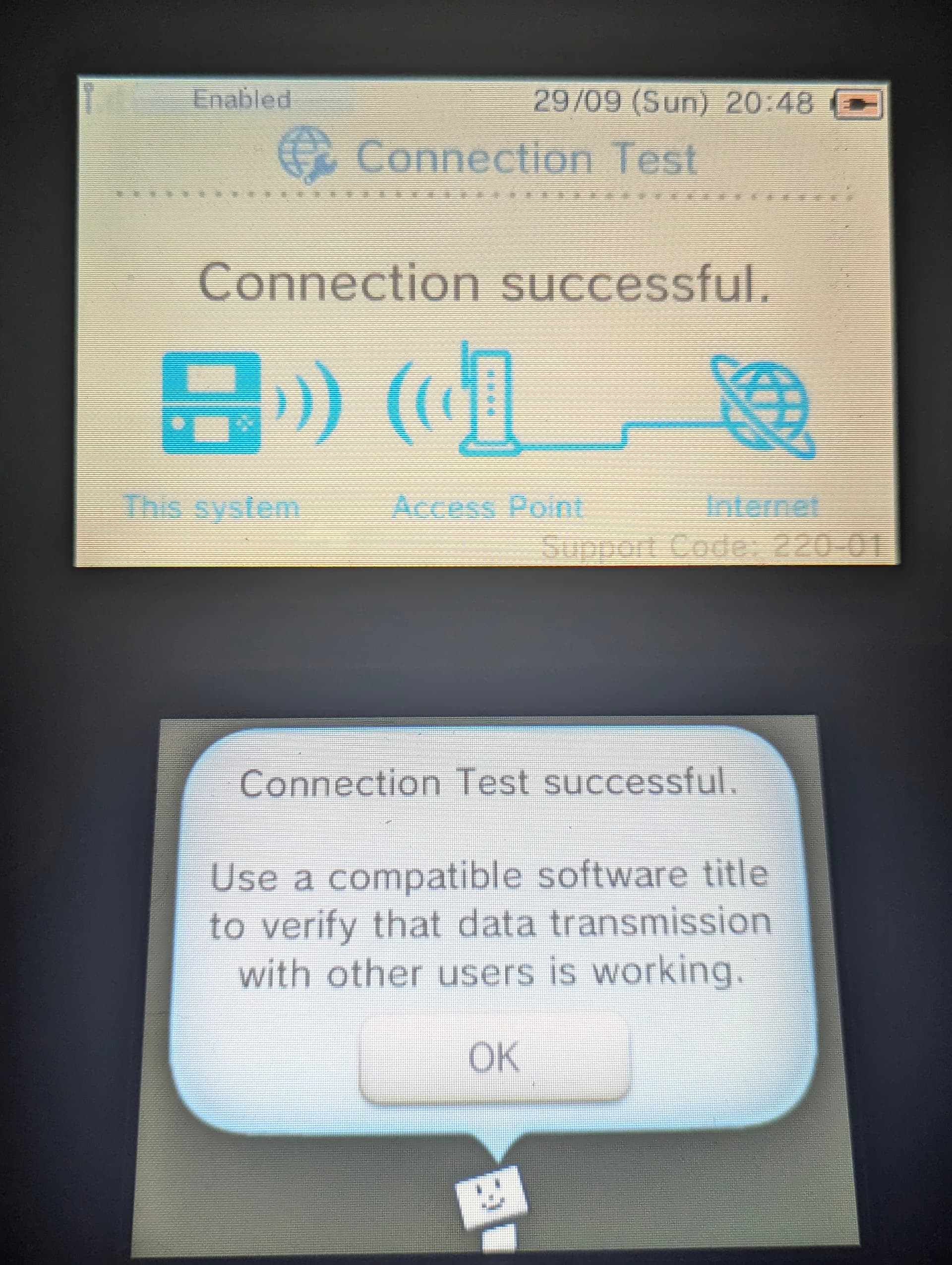
The Support Code reveals the NAT type

220 is strict,
120/122 is normal/moderate (122 DS-lite)
110 open.
pale hawk
In "Switch" NAT type language,
220: C, D, E, F
120/122: B
110: A
slim lantern
pale hawk
220 is strict,
120/122 is normal/moderate (122 DS-lite)
110 open.
did.. not know that
dusty jolt
Nether did I
pale hawk
Had to update. 110 was A, not 100.
slim lantern
@pale hawk by the way how do you know this
This appears to reflect my settings so it must be correct
pale hawk
slim lantern
<@456226577798135808> by the way how do you know this
Know what? The Support Code?
slim lantern
pale hawk
Know what? The Support Code?
Know that the support codes reflect NAT types
pale hawk
slim lantern
Know that the support codes reflect NAT types
I realized some time ago the 3DS/Wii U always showed 220 when the Switch said D. So I started making test environments inside my home network (I can give me every NAT type) and so was 220 always strict (D), 120 normal/moderate (B) and 110 open (A).
slim lantern
pale hawk
I realized some time ago the 3DS/Wii U always showed 220 when the Switch said D....
You figured this out yourself?
pale hawk
dusty jolt
do we know what the 2nd pair of numbers mean?
I personally don't know it. However I'm getting 00 in WiFi and 01 on Ethernet/LAN.
So probably interface specific.
slim lantern
pale hawk
I personally don't know it. However I'm getting 00 in WiFi and 01 on Ethernet/LA...
That’s probably what it’s for then
pale hawk
slim lantern
You figured this out yourself?
Yeah (I guess lol)
dusty jolt
pale hawk
I personally don't know it. However I'm getting 00 in WiFi and 01 on Ethernet/LA...
Ok that makes sense
guess on the topic of NAT types, wonder what port pretendo uses
slim lantern
pale hawk
Yeah (I guess lol)
Wow ok I shall use this information because this is extremely handy
pale hawk
slim lantern
Wow ok I shall use this information because this is extremely handy
Sure, feel free.
hexed skiff
Im really happy u guys found out so much, but for me technic noob could someone explain in short terms what i could try exactly to fix this Problem?😆
pale hawk
hexed skiff
Im really happy u guys found out so much, but for me technic noob could someone ...
Are you german?
I see the "Leck mich" lol
Either way, do a connection test and tell the support code.
pale hawk
hexed skiff
Yes i am du you speak german i think it could help
Ja, ich spreche deutsch.
dusty jolt
time to bust out the translate plug in so i can still watch from the side lines
hexed skiff
AHAHAHA
pale hawk
Ja. Weil da ist ein Support Code. Und der kann anzeigen, was nicht stimmt.
hexed skiff
Okay okay warte
Lets continue in english so FourHawk can follow
Support-Code 220-01 bottom Right
pale hawk
Yeah, Strict NAT
dusty jolt
Na na don't worry about it, speak german if it's easier
hexed skiff
So what does that mean
dusty jolt
pale hawk
A strict NAT interferes with the matchmaking protocol.
and could just flat out cause connections not to be made
pale hawk
Or these mobile routers like o2 Homespot/VF GigaCube?
hexed skiff
Exactly
pale hawk
o2 or VF?
hexed skiff
Vodafone Homebox or something
Vodafone
Its a temporary solution because we just moved in
And we need internet
pale hawk
VF Homebox? You mean the GigaCube right?
hexed skiff
Yes
pale hawk
Yeah, those are NATted. No possibility to fix that.
Or VF lets you use APN web.vodafone.de
hexed skiff
Echt? Nichts was man dagegen tun kann?
pale hawk
Nein. VF bietet bei GigaCubes - soweit ich informiert bin - keine Möglichkeit zum Ändern des NAT Typen bei der APN home.vodafone.de. Das können die nur bei web.vodafone.de und bei Handyverträgen.
hexed skiff
Sehr sehr schade ich habe mich echt auf Splatoon gefreut hahaha
pale hawk
Bei o2 wäre es gegangen. o2 hätte die Möglichkeit.
hexed skiff
Ich bin seit 7 Tagen dabei dieses problem irgendwie zu beheben immerhin hast du mir jz eine endgültige Antwort dafür gegeben.
pale hawk
Bekommst du VF Kabel oder DSL später?
hexed skiff
Keins von beiden wenn wir wieder einen festen Wohnsitz haben kriege ich meinen alten o2 wlan Router wieder
Wir sind in einer Übergangswohnung deswegen auch diese vf kiste
pale hawk
Du meintest dass der GigaCube nur temporär wäre. Also kommt noch ein Festnetz-Anschluss?
hexed skiff
Ganz genau
hexed skiff
Ne o2 voraussichtlich das haben wir all die Jahre benutzt
pale hawk
Das passt. o2 würde das fixen. Kann ich dir als o2 Kunde sagen ^^
hexed skiff
Haha ja trotzdem vielen lieben Dank dann brauche ich mir ja keine weiteren Mühen mehr machen.
pale hawk
Na ja, du könntest den GigaCube brücken.
hexed skiff
Ist halt schade das der ganze Aufwand umsonst war
pale hawk
Eine VPN würde das mit der NAT beim GigaCube fixen.
hexed skiff
Ahhh ja das habe ich auch als mögliche Lösung gesehen
Kosten vpns nicht meistens Geld?
pale hawk
Weiß aber nicht ob das Sinn macht. Weiß nicht wann o2 dich aufschaltet?
hexed skiff
Ach das dauert noch wie gesagt erst wenn wir in unserer neuen Wohnung sind
pale hawk
Ok. Und ja, VPNs kosten Geld. Und du musst ne Möglichkeit haben das zu brücken. Ka ob du das hast...
Also ich persönlich hätte auf den Anschluss von o2 gewartet.
pale hawk
Brauchst halt ein Zweitrouter der die VPN-Verbindung aufbaut. Sowas können in der Regel DD-WRT und OpenWRT router.
Oder gerootete Handys.
Ansonsten wird's schwer.
Weil ich gehe mal davon aus, dass du diesen Huawei VF Gigacube hast oder?
Hatte diese lange nicht mehr aber ich glaube, die konnten keine VPN herstellen.
hexed skiff
Ach das klingt ja tatsächlich ziemlich kompliziert hahaha
Ja ne dann lasse ich das ganze das einzige was ich jetzt noch versuchen könnte wäre das wlan vom Nachbarn anzuzapfen 🤣🤣
Die haben mir am Anfang auch mit Freude ausgeholfen 👍🏾
pale hawk
Und dann darf es nicht Vodafone DSL sein xD
Weil die NATten auch und dann haste wieder 220.
hexed skiff
Du scheinst dich ja ziemlich auszukennen
Woher hast du das ganze wissen bist du Informatiker
Oder etwas in der Art
pale hawk
hexed skiff
Woher hast du das ganze wissen bist du Informatiker
Bei der Bundeswehr 😛
Also IT-Admin bei der Bundeswehr
Befasse mich schon lang damit, ja xD
hexed skiff
Ach tatsächlich viele von meinen Freunden gehen zu Bundeswehr im Moment
Na das ist ja mal was
pale hawk
Ja gut, dann wird o2 wahrscheinlich dein Problem lösen mit der NAT. Kannst es aber nochmal testen mit der Wii U und schauen ob die 120 anzeigt.
Weil mit dem Support Code 120 kann man online spielen.
hexed skiff
Also ich habe mich jetzt mit dem wlan von den Nachbarn verbunden und es hat sofort geklappt ohne Probleme
Ist jetzt auch keine dauerhafte Lösung da die einen Stock unter mir sind aber das hat mir schon sehr weiter geholfen
pale hawk
Top, viel Spaß ^^ und hoffe, dass o2 dich schnell aufschaltet.
hexed skiff
Danke dir 🤩👍🏾
slim lantern
Rule 8 btw sorry
 sacred dock
slim lantern
Rule 8 btw sorry
sacred dock
slim lantern
Rule 8 btw sorry
It says please so it's just a friendly request /jk
slim lantern
No it’s a rule
slim lantern
Yes
sacred dock
Me when /jk
slim lantern
Extremely unfunny just saying
 steep light


 next nacelle
pale hawk
I realized some time ago the 3DS/Wii U always showed 220 when the Switch said D....
next nacelle
pale hawk
I realized some time ago the 3DS/Wii U always showed 220 when the Switch said D....
quick question! how are you able to reproduce the D/strict type, and are you able to get switch type C at all? I was able to get A and B fairly easily but not the others
like, what router settings did you use? I know they'll vary on manufacturer but it should at least give me a hint
 obsidian current
next nacelle
quick question! how are you able to reproduce the D/strict type, and are you abl...
obsidian current
next nacelle
quick question! how are you able to reproduce the D/strict type, and are you abl...
Have you tried a mobile data network?
I believe they left the server a week or so ago so you'd need to DM them about it
I'm able to actively reproduce D usually through O2, I don't know whether I'm likely to get C but I have an assortment of eSIMs I could try
 limber scaffold
I am DMing them rn
obsidian current
pale hawk
I personally don't know it. However I'm getting 00 in WiFi and 01 on Ethernet/LA...
I may as well copy this over, since I'm not entirely sure whether it's related to Ethernet/LAN or WiFi
Got -00 on a type B Virgin Media FTTP WiFi connection and -01 on a type D O2 - UK 4G B1+8 connection
https://forum.pretendo.network/t/off-topic-stuff/2281/1227?u=gamersinternatio
Pretendo Network
It can’t be my NAT type surely? I’m getting support code 220-01 which I assume is NAT type B? I genuinely can’t find anything regarding the support codes, I’m surprised nobody’s compiled a list of them. I’d be willing to do so in a separate thread on the forum (as it might help for troubleshooting) if I could get some help from people. Chec...
limber scaffold
next nacelle
quick question! how are you able to reproduce the D/strict type, and are you abl...
 obsidian current
limber scaffold
obsidian current
limber scaffold
You can get F???
limber scaffold
NAT F means strict NAT
obsidian current
limber scaffold
NAT F means strict NAT
Not sure how I'd actually reproduce that.
I do wonder whether I could use VMware and a USB WiFi adapter to potentially test some combinations too, I've never really messed around with the configurations but I believe you can set max speeds and delays but not sure about anything else.
next nacelle
obsidian current
Have you tried a mobile data network?
I believe they left the server a week or ...
I got B on both Optus and Telstra on iPhone hotspots
maybe iOS is doing some magic, idk, or it's because the australian networks are v6-only so are NAT64ing (which looks like a normal NAT to a v4 client)
obsidian current
next nacelle
I got B on both Optus and Telstra on iPhone hotspots
imagine Australian networks being good for once
O2 is completely IPv4 for me apart from IMS (essentially 4G or WiFi calling), same for Virgin Media
Host-only or LAN segment sounds interesting, will try passing through my USB WiFi adapter when I get chance in a Windows 10 VM
Might not give out any new information, but it doesn't hurt to experiment with different conditions
https://medium.com/@danielalmeidarj01/vmware-workstation-network-adapter-settings-86471397b8eb
Medium
I recently started studying Ethical hacking and while experimenting with NMap I noticed I couldn’t see any virtual machines I created. So I…
slim lantern
next nacelle
I got B on both Optus and Telstra on iPhone hotspots
Thought you said you use iiNet bruh
next nacelle
slim lantern
Thought you said you use iiNet bruh
LAN and mobile hotspots are different things ya silly
obsidian current
I'll see if I can grab some more information about NAT types anyways.
Going to see if I can get type C from 3 eSIMs: Seeek (3 AT host, currently have it set roaming to EE on probably B20+7+7 or B3+3), Firsty (KPN NL, set to roaming on EE on the same bands) and bneSIM (Play PL, set to roaming on Vodafone on B1+7+20) and I'm going to test a scenario with a local only connection
obsidian current
Can confirm 220-01 again on NAT type D
Wonder whether it's worth mentioning that it's open, I haven't tried putting a password on to see whether it would change what the second number says


Still 220-01 on WPA2, good to know
Changed SSID to NintendoSpotPass1 for testing but nothing different, time to try turning radios off
003-2002 if it can't connect to internet


Will mess with my eSIMs now
EE on Firsty seems to give my Switch nothing whatsoever but I'm wondering whether it's because it's 0.1mbps and it just can't do anything (although saying that, I can still use Discord fine on it)
Might have something blocking it from tethering
 limber scaffold
obsidian current
003-2002 if it can't connect to internet
limber scaffold
obsidian current
003-2002 if it can't connect to internet
Is this connection 3?
obsidian current
got type C
limber scaffold
okay, i am assuming 003-2001 for connection 1
 dawn bridgeBOT
limber scaffold
okay, i am assuming 003-2001 for connection 1
dawn bridgeBOT
limber scaffold
okay, i am assuming 003-2001 for connection 1
003-2001 (3DS/2DS)
Support code detected, press to expand information
limber scaffold
and 003-2003 for connection 3
you could try
Could be useful info for Bandwidth
obsidian current
Red Bull Mobile got me there, A1 AT


Will try with my other eSIMs, not convinced that 220-00 = type C yet but it doesn't hurt trying
I'm wondering whether the 2 at the start etc might depend on the connection number, I'm going to test that quickly
obsidian current
Tried on connection 3, still 220-00
dawn bridgeBOT
limber scaffold
003-2101
003-2101 (3DS/2DS)
Support code detected, press to expand information
obsidian current
limber scaffold
003-2102 should mean DNS fail?
Yeah, I think I got that on Firsty
obsidian current
limber scaffold
I got 000-99
Never seen that one before
120-00 on Seeek, guessing type B
limber scaffold
Let me try my Switch then
obsidian current
obsidian current
Never seen that one before
120-00 on Seeek, guessing type B
Yep, type B
man the speeds on EE are real slow lol, 161.8/19.5kbps according to my Switch
 obsidian current
limber scaffold
I got NAT F
obsidian current
limber scaffold
I got NAT F
Oh god, I'm guessing that's NAT type F then with that code
Got 220-01 on bneSIM, NAT type D on Switch
obsidian current
limber scaffold
When I play DS games
I assume DS is different?
I have no way to test type A but I can try
limber scaffold
When I try to matchmake to trade in Pokémon I get error code 86420 if I don't use my PC
For hotspot
86420 means strict NAT
obsidian current
obsidian current
Got 220-01 on bneSIM, NAT type D on Switch

I'm going to try hotspotting using Windscribe app on desktop and see if anything changes
Might need a few minutes to set it up
oh ermm it's on 5GHz
I'm not sure how to avoid that from happening, I can try the dongle I guess
i also just happened to find the drive i wanted to use for using dumpling which is nice lol
i lost it and didn't know where it went
and I can't see the dongle which I wanted to use
Not exactly sure how to get this to work, but going to mess with device manager to get it to 2.4GHz, seems to be WiFi Direct

lol it gave up as soon as I put my laptop on 802.11a (WiFi 1?)
finally on 2.4GHz, I've never seen something on -23dBm
120-00, same as normal WiFi, will try some of the restrict NAT and circumvent censorship options
apparently still on type B even with this option turned off but my 3DS failed the test (Switch worked)

tested with a proxy as well from a random website, code doesn't change, i reckon its just nat type
cant see anything else to try honestly, going to publish information
now i gotta remember to set to wifi 5 again instead of 3? (g)
I'm going to publish it right now until something else pops up since having information out there will help someone I'm sure
pale hawk
obsidian current
I'm going to publish it right now until something else pops up since having info...
So I see you all were experimenting with the support codes and NAT types? xD
limber scaffold
pale hawk
So I see you all were experimenting with the support codes and NAT types? xD
Welcome back
slim lantern
I already have this you know
220: C, D, E, F
120: B (Mobile Hotspot)
110: B (Residential Network)
100: A
XXX-00: Wireless
XXX-01: Wired
pale hawk
I have never seen 100- tho.
For me it's 110 or 112 Type A.
And idk why you separate B Mobile and fixed.
limber scaffold
slim lantern
220: C, D, E, F
120: B (Mobile Hotspot)
110: B (Residential Network)
100: A
XXX-...
My NAT F is 000-99
iliad mobile hotspot
slim lantern
pale hawk
And idk why you separate B Mobile and fixed.
quarky tested
slim lantern
limber scaffold
My NAT F is 000-99
ookay
pale hawk
slim lantern
quarky tested
iPhones are exposing their clients. It's equivalent to NAT Type A what you get on iPhone hotspots. That's what my Switch gets on a iPhone hotspot and public PDN.
I haven't tested it with a restricted PDN tho.
pale hawk
obsidian current
I'm going to publish it right now until something else pops up since having info...
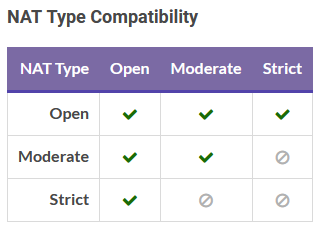
Maybe you can also that chart from Nintendo. To understand it, it shows for example that Strict NAT players can only play with Open NAT players (A).
 obsidian current
pale hawk
So I see you all were experimenting with the support codes and NAT types? xD
obsidian current
pale hawk
So I see you all were experimenting with the support codes and NAT types? xD
wb
obsidian current
slim lantern
220: C, D, E, F
120: B (Mobile Hotspot)
110: B (Residential Network)
100: A
XXX-...
110 isn't B on a residential network, I have 120-00 on Virgin Media
I don't think the numbers at the end indicate wireless or wired either, I was testing on a 3DS and as an example, type C was 220-00 and type D was 220-01
slim lantern
idek anymore
obsidian current
I don't think xx2-xx necessarily means it's using Ethernet either currently, I think @next nacelle tested it on a mobile hotspot and they were getting 122-00
Could it be NAT64 translation? #1279073049550782479 message
You didn't have to delete it lol, I just don't think it necessarily indicates Ethernet at the moment
obsidian current
ermmm i just got 120-02
i just enabled a oort triggering thing and that happened because i can only port forward on one device?


I'll check my Switch rq as I was messing with getting type A earlier
My Switch shows A, interesting. I disabled the port forwarding on my Switch
I'm confused now lol

hang on nvm, 3DS is getting 110-00 now
I wonder what 120-02 would actually mean?
It seems as if it's 110-00 if my Switch isn't online and 120-02 if it is online
I don't know how to test this in this case
My Switch seems to remain on A still, I'm not sure honestly
@pale hawk any ideas?
I'm not sure honestly why that happened and I don't know whether I can accurately reproduce

Got 110-02 now too? Don't have a clue

 midnight jackal
obsidian current
I'm not sure honestly why that happened and I don't know whether I can accuratel...
midnight jackal
obsidian current
I'm not sure honestly why that happened and I don't know whether I can accuratel...
What NAT are you trying to reproduce
obsidian current
midnight jackal
What NAT are you trying to reproduce
I was hoping for type A (which that screenshot was) but I have no idea what the -02 means. Tried enabling port filtering to get me to type A
midnight jackal
02 usually means that its limited to a certain amount of data. This usually happens on my mobile hotspot and to alot of otbers
I dont get how the wii u can detect it
obsidian current
A certain amount of data? That's odd considering it's on a Virgin Media Hub 3 and I don't think my phone can reproduce since it doesn't identify as a hotspot iirc
midnight jackal
Switch to Mobile Data and setup hotspot on an android device
obsidian current
I've done so already, 120-00 on my home broadband and it would be 220-01 on data
midnight jackal
Yes, it has to be non apple due to apple hotpots having OpenNAT
midnight jackal
obsidian current
I've done so already, 120-00 on my home broadband and it would be 220-01 on data
I could try force replicating it, Any thoughts on what it could be?
obsidian current
Not sure honestly, since port filtering and a custom IP reservation (to 192.168.0.211) was the only modifications I had on
midnight jackal
Try turning off one of those, like IP Reserve
obsidian current
@next nacelle also, do you have any idea what ports Pretendo happens to use for P2P? I'm planning on adding advice from the official Nintendo website to the FAQ to improve NAT type since I know 1024-65535 definitely works but I wonder if the range can be reduced?
 obsidian current
lol top result of Bing
 next nacelle
obsidian current
<@281708617437020161> also, do you have any idea what ports Pretendo happens to ...
next nacelle
obsidian current
<@281708617437020161> also, do you have any idea what ports Pretendo happens to ...
most nex games just choose at random unfortunately. I was investigating the possibility of fixing the port number but nothing is ready with that yet
obsidian current
next nacelle
most nex games just choose at random unfortunately. I was investigating the poss...
Yeah, thought that might be the case, thanks for clarifying 👍
 wild wolf
I have reported this issue tons of times here and on GitHub (mostly on this server) and the only response I got was Jon blaming my internet (kinda true sadly) but even if my NAT is strict, my mobile data network supports UPnP (checked by Wiimmfi's UPnP feature when you search a match online in Mario kart Wii), and I was able to perfectly play online Splatoon 2/3 on the Nintendo switch with this same connection. I hope they fix this issue in a future
It reached the point where if I miraculously join a room and the match starts, I get kicked mid game and then kicked again from the lobby with the "no internet connection" error code.
next nacelle
wild wolf
I have reported this issue tons of times here and on GitHub (mostly on this serv...
nex games on wiiu don't even attempt to use upnp or nat-pmp unfortunately.
it's kinda a hard problem
if you succesfully make it into a room then NAT is unlikely to be the issue
wild wolf
next nacelle
if you succesfully make it into a room then NAT is unlikely to be the issue
Maybe my NAT is just strict and in the times I was able to join a room, the host was NAT type A
obsidian current
wild wolf
Maybe my NAT is just strict and in the times I was able to join a room, the host...
Can you check your NAT type for me?
https://forum.pretendo.network/t/guide-detecting-your-nat-type-on-wii-u-and-3ds-consoles/6159/
Pretendo Network
Before I begin, I would like to thank @piplupness and @PN_quarky for helping me test this, as well as some initial information posted by @GlaceonRMCP01gct on Pretendo’s Discord server. I initially started working on this after information was very vague on how to decode a code that the Connection Test outputs, all I had to go from when I starte...
wild wolf
obsidian current
Can you check your NAT type for me?
https://forum.pretendo.network/t/guide-dete...
In some hours I can
I am at work rn
wild wolf
@obsidian current @next nacelle I made the NAT test
I will explain my setup 1st
I have a 4G router that is capable of doing port forwarding, DMZ and UPnP (it can also do VPN but its ancient and most modern VPNs doesn't support the router's protocols anymore
And my mobile carrier has two different kind of public IP addresses you can get which are different in terms of P2P
One type of public IP address I can get is 100.xxx.xxx.xxx which doesn't support UPnP neither can do p2p properly, but it can still do it with Nat type A ones
And the second one is 10.xxx.xxx.xxx which does support UPnP and can do p2p better
How do I know this?
I tested both IP addresses on Nintendo switch, the 100 one gave me NAT type C no matter if you enabled DMZ or port forwarding while the 10 one gave me NAT type B and type A with DMZ / PF enabled.
Now, I get this support code with the 100 IP address

On the 10 one I get this:

It seems that my support codes aren't on your forum guide which is interesting
obsidian current
wild wolf
It seems that my support codes aren't on your forum guide which is interesting
Interesting, possibly type C?
wild wolf
obsidian current
Interesting, possibly type C?
Its close so maybe yes?
I will re do connection test, maybe I can get different codes
I got 210-01 with the 10.xxx IP address, maybe both 10 and 100 are the same in this situation
Yup, no matter what IP address I'm on, I will always get both 210-00 and 210-01
 young sorrel
ye
 mortal berry
have u tried turning upnp on in ur router?
slim lantern
young sorrel
ye
?
 solar citrus
Sorry for coming in on a dead thread, but are we really sure that 000-99 means NAT type F? My Wii U has no problem playing online, but reports that code on the connection test. My 3DS and Switch indicate NAT type B on the exact same network, again, with no problems playing online. NAT type F may cause this code to appear, but this code clearly isn't exclusive to people with bad NAT either.
wild wolf
I can say that the NAT measuring method isn't much accurate
wild wolf
solar citrus
Sorry for coming in on a dead thread, but are we really sure that 000-99 means N...
Your NAT is fine
You can even open it (Type A) for better p2p room stability (specially when you become the host)
Now that pretendo only uses 1 port for matchmaking/gameplay, you just need to open that port specifically
next nacelle
wild wolf
Now that pretendo only uses 1 port for matchmaking/gameplay, you just need to op...
note this is only true for specific games
wild wolf
next nacelle
note this is only true for specific games
I know, the main games
wild wolf
Hey @next nacelle idk if its already possible to do it, but I would like to be able to specify which port pretendo will use to do matchmaking/gameplay (kinda like you can do on Wiimmfi for Mario kart Wii). So I can organize my port forwarding configs better
Is it possible to implement?
For example I want pretendo to use port 18352 for matchmaking
next nacelle
wild wolf
Hey <@281708617437020161> idk if its already possible to do it, but I would like...
yeah I guess this is possible. we figured it was more conveninent to Just Pick Something but if you want to override it
 crimson sinew
 waxen ferry
im trying to change it but its too impossible
waxen ferry
im trying to change it but its too impossible
True 😭
 peak veldt
My support code is 2200 - 01, idk how to change it so i can play online. Cause when i get to the lobby in splatoon and mk8 I always get the same error
118-0502
dawn bridgeBOT
peak veldt
118-0502
118-0502 (Wii U)
Support code detected, press to expand information
peak veldt
but i can play mario maker perfectly fine
obsidian current
peak veldt
My support code is 2200 - 01, idk how to change it so i can play online. Cause w...
What kind of connection are you playing on?
obsidian current
peak veldt
but i can play mario maker perfectly fine
Mario Maker does not rely on peer to peer networking
peak veldt
obsidian current
What kind of connection are you playing on?
Wireless
obsidian current
peak veldt
Wireless
sorry I could have clarified better, are you using something like Starlink, a fixed line ISP or mobile internet
peak veldt
No but a VPN
obsidian current
that VPN might not be helping you. is there a chance you can try playing online without the VPN?
 vale jackal
Hey I can’t play online and it’s says a error code so I checked my support code and it’s 220-00 what do I do
On my 3ds
 tight marsh
vale jackal
Hey I can’t play online and it’s says a error code so I checked my support code ...
tight marsh
vale jackal
Hey I can’t play online and it’s says a error code so I checked my support code ...
it's NAT type C