#gtfo-technical-support
1 messages · Page 29 of 1
 jovial cipher
so, i'm trying to play on a iMac 5K with Radeon 575 Pro. the game is crashing Windows randomly (sometimes 10 minutes in, sometimes 10 seconds). the game performs well otherwise.
other than drivers, wondering if there is anything i should try tuning?
 median kraken
Any idea why enemy animations are super buggy for me? They stutter around like crazy. I thought it was just an unstable early access thing, but after watching videos of other people play, enemy animations look perfectly smooth for them.
 wild urchin
usually its someones connection, either you to the host or vise versa
median kraken
Ah, yeah, I just found a Reddit thread about it. https://www.reddit.com/r/GTFO/comments/e956t5/enemy_lagging/
Hoping it won't be an issue with dedicated servers.
wild urchin
 doubt there will be servers tbh
median kraken
Yikes. Hope this gets worked out somehow regardless, then. Game may as well be unplayable in this state. :(
 knotty parrot
It's normally just an issue if host doesn't have the best connection or PC, right?
It reminds me of Payday 2 how enemy AI was somewhat tied to the host's computer...
median kraken
I can guarantee that my PC and connection are both fine... It's always been like this regardless of whether or not I'm hosting.
I suppose I'll try a solo run and see how that goes.
 queen cargo
yeah just make sure the person hosting has a good connection and generally you'll be fine
my internet is ass but even i rarely have issues with that because my one friend with good internet is always the host
median kraken
Same issue even running solo, although significantly less noticeable. Also have a persistent stutter every few seconds or so regardless of graphical settings. No clue what's up with that. Gonna assume it's just early access jank. Oh well. 🤷
 lusty niche
I'm in solo and I'm not having any problems
 unique blaze
@median kraken @knotty parrot The game briefly connects with steam and playfab, by the time you've finished the drop it's whom ever is the host that acts as the "server". Who ever has the best connection and latency should be whom you choose to host, unless you live far away from each other. Adjust accordingly.
As for the stutter, that's an issue being looked at, if you want to help it get fixed faster. Record video of it and make a bug report as explained in #bug-reporting
 round dock
@median kraken noticed the same thing
sometimes the enemies just seem to desync with their animations and just spaz around
makes it a proper bitch to hit anything
 wispy barn
@vital wagon curious if your lobby issue was resolved after everyone closed out of Discord
 vital wagon
yes it was @wispy barn . it fixed it
wispy barn
awesome
 south smelt
Hi, idk if i should ask this here, but is there a way to report a cheater please ?
wild urchin
Yep. PM @rose thicket
 nocturne dragon
Hey quick question, I cant initiate the cage drop? Im new to the game and trying to play with some friends and none of us can get it to work?
 agile bay
Have you tried to let the host drop, then join on him?
There's apparently also a rare discord issue that might not let you drop, you could try with discord closed.
nocturne dragon
I'm still trying to get the game to work, I tried closing discord and rebooting my PC even, neither of us can get it to let us join
I can't even join mid drop it just sends me to the lobby and nothing ever happens
 wispy yarrow
Me and my team are having lag issues lately. Is this just our problem?
lusty niche
Maybe the host has bad internet
 fickle owl
Will there be regional servers in the future?
wispy barn
@fickle owl the game is peer to peer, and uses steams relay servers. It basically already routed as best it can
 acoustic plinth
this game doesnt have any built in brightness settings right
 mighty cipher
It does not
 rigid yew
terminal glitch in r4b1, the reactor terminal is linked to the terminal on the outside of 220
any ideas?
 blazing quarry
 viscid grove
Same problem, worked fine earlier today, went to the store and now starting up the game gives me the same error.
viscid grove
Aaa... then it's fine i hope. Either servers are temporarily down for maintenance, updating or whatever.
 elder edge
Phew thank god, thought my game was fucked.
viscid grove
same xD
elder edge
No soloing for me today then I guess.
 junior rampart
yea all me friends be havin this issue too
elder edge
 god damn sleepers. It's their fault.
junior rampart
maybe the invis scouts
elder edge
0_0 mayb
viscid grove
No official word on this error yet?
 lethal talon
please help
 fading mason
M2
 rose vector
elder edge
rose vector
elder edge

 ornate jungle
rose vector
ornate jungle
rose vector
I having the same problem. Might be Steam
 stuck pike

fading mason

viscid grove
Seems fixed now. xD
 valid sail
confirming fixed
wispy barn
This'll be a steam issue
elder edge
yay
ornate jungle
Fixed now 😄
 earnest spade
Hey guys sometimes while playing GTFO with my friends I'll randomly slip through the floor. A lot of times I just teleport back to the level, but sometimes I fall down onto some platform under the level. For instance this is in R4C2.
This has happened sporadically this rundown. Last rundown I don't remember it being an issue.
 fathom vortex
That's... certainly a new and horrifying bug.
stuck pike
falling through the map has been a thing for a while
fathom vortex
New and horrifying to me, then.
earnest spade
I could normally ignore it because worst case I took some infection, but recently on r4c1 and r4c2 I've gotten stuck in platforms under the level.
 sacred bear
what was the fix for GTFO eating >90% GPU?
 burnt vortex
I don't know why but I had a lot of missing sounds in the game, making it almost unplayable. Checking cache didn't help, any clue on how to fix it?
 keen furnace
Usually a game or steam restart fixes it
 torn sphinx
Hello, I got about 26 hours now of gameplay and our last match today we noticed something weird, it happened about 2-3 times that the sleepers both small and big woke up instantly even tho we were all completetly still. It was on a B2 course on the rundown, we usually have no issues and find it pretty easy to take out sleepers, we know how they work so that it happend about 2-3 times that they just instantly woke up, a long distance away was very odd, seems like something might broken.
wispy barn
Was anyone killing anything? Do you have video?
torn sphinx
unfortunately not. we haven't encountered any issues except one at our first playthrough ever (which we resolved by ourselves). So there hasn't been a reason to record anything. I guess I'll make sure to record on our next time playing
Has there been any changes to how Sleepers react?
wispy barn
there has not
mighty cipher
I've restarted my pc 1 I verified it on steam and uninstalled 2 time plz help
mighty cipher
 rose thicketBOT
If you are having an issue with the game please perform the following steps. This will often times fix the issue. If that doesn't work try the steps in ?t fix2
Perform the following steps:
- Uninstall game on steam.
- Press the Windows Key and the R key at some time. This will open a "Run" dialog.
Inside put the following in:
%userprofile%\AppData\LocalLow\
%userprofile%\Appdata\Local\Temp\- Install the game
 bronze escarp
recently started using a 28" monitor. when I alt+tab from the game, I have to go black screen for a bit under full screen windowed or maximized window mode and happens for any resolution. That didn't use to happen on my old monitor of 22". Trying to change any video setting also causes it. What causes that? The delay is 4.2 seconds
settings
 hollow nest
Not sure if this is the correct channel but I am having severe stuttering and freezing issues with the game. The audio cuits out and the game freezes for a second every second or 2. I have no idea why as I have verified game files, updated everything and all. Any suggestions?
 fathom finch
Has anyone found a fix for not being able to join a friends lobby or drop with them when it actually does load in the characters and the guns?
wispy barn
fathom finch
Has anyone found a fix for not being able to join a friends lobby or drop with t...
Do any of you have discord overlay turned on?
A workaround I've heard work well is to exit out of discord, launch the game, group up, start the cage drop, then start Discord again.
 silent obsidian
I cant drop in when I play multiplayer. I can get into the lobby and everybody else drops but i just stay in the lobby.
 verbal holly
 rich stirrup
What's CPU Culling Workload
 tough valve
i have a RTX 2070 super and it doesn't do that with inf FPS soooo something is wrong with your CPU
props are its overheating
or GPU
 sonic totem
Why even? It likely means his framerate isn't capped. This gpu usage is normal in a non-bottlenecked scenario
 untold linden
capping your fps will lower the usage
did that with mine to around 120 fps and it took mine down to around 50% average
 supple orchid
^ and cools your pc down
untold linden
^ and reduces the odds of you cooking your breakfast on it
 vagrant sequoia
have u tried turning it off and on again ?
 fleet geyser
ninja
vagrant sequoia
does ninja need technical support?
fleet geyser
yes how to fix ninja purple nose
vagrant sequoia
have u tried erasing 10 CC folder in $appdata$ ?
 empty python
@fleet geyser please dont spam or send off topic images here
vagrant sequoia
whats a fortnite
fleet geyser
app store
vagrant sequoia
app store?
empty python
This is gtfo-technical support
vagrant sequoia
yeah please keep this for gtfo tech stuff
fleet geyser
yes hello tech support
empty python
Please just use this channel if youre having an issue with GTFO
fathom finch
wispy barn
Do any of you have discord overlay turned on?
A workaround I've heard work well ...
How do you turn off the discord overlay? But it's weird cause sometimes it'll work while others it won't
supple orchid
fathom finch
How do you turn off the discord overlay? But it's weird cause sometimes it'll wo...
User Settings > Overlay > Enable in-game overlay (turn off)
or
User Settings > Game Activity > Toggle Overlay (for gtfo only)
bronze escarp
bump...still haven't solved this.
recently started using a 28" monitor. when I alt+tab from the game, I have to go black screen for a bit under full screen windowed or maximized window mode and happens for any resolution. That didn't use to happen on my old monitor of 22". Trying to change any video setting also causes it or accessing audio also does it. What causes that? The delay is 4.2 seconds. Looking for advice. It seems to be tied to the "ESC" key in general.
agile bay
Is it only with GTFO? Google tells me you could try disabling "focus assist" (settings - system - focus assist)
bronze escarp
yes - i already have that disabled.
 magic grove
Will GTFO support Nvidia's DLSS ever?
fathom finch
supple orchid
User Settings > Overlay > Enable in-game overlay (turn off)
or
User Settings > G...
So even with that turned off and when we shut down discord as well it still isn't letting us connect. We tried joining one another once one of us fully dropped and it froze mid game.
bronze escarp
Well i solved my monitor issue. it seems to be a cable problem as I swapped from display port to HDMI. no issues now using hdmi ... figured i'd update to close my discussion.
 uncut ridge
I can't find seem to find any hard drives on this level.
fathom vortex
Have you tried using the terminals to locate them?
 lost tendon
Perhaps list zones
 robust wedge
I noticed that most videos on the game have a 3d looking hack that is white and orange, but mine is red and blue (also flat). On a side note, I try to boost the quality of the game, though nothing changes.
Any idea as to what might be doing this?
vagrant sequoia
oh , the orange white hacking game was before the optimization patch
robust wedge
Darn, I liked it.
vagrant sequoia
yeah it was amazing
but maybe it brought some optimization problem for them to change it
robust wedge
Makes sense
 sudden mountain
Yeah dusty I think Ludvig said it was to cpu intensive
 blazing yoke
Hi i try to play the game but it keep saying no network connection pls help
vagrant sequoia
does the game title says gtfo beta?
blazing yoke
What do i do?
vagrant sequoia
GTFO left the beta state which make it not work anymore u need to buy the early access game
vagrant sequoia
oh then its just steam being steam
robust wedge
When steam pulls a Tuesday on a Thursday
 lime yacht
Gtfo keeps repeatedly crashing despite having more than enough power to run the game. Does this game not fully support the RTX 3070?
wispy barn
There's likely something else going on. Try reinstalling the game, updating graphics drivers, etc.
I have the 3090 and no crashes, so I find it unlikely that a 3070 would have incompatibility.
sudden mountain
Wow doc has a 3090, what does gtfo look like running at 999999999fps
wispy barn
Of course! Ludvig and I are upping our "high end" rigs for QA/Testing.
it looks beautiful
 lilac wharf
I played this game when it launched. It was very cool on my PC, I could run it on the highest graphic settings. I'm giving a try now and I can't pass 15 fps in a fog room
 remote ermine
Have you updated drivers?
 ocean heart
im getting ton of stuttering in C2 when i do the alarms and people start shooting
could it be my CPU?
lilac wharf
remote ermine
Have you updated drivers?
Hm I don't think so
I noticed that I was playing with other game open too
When I log again I'll try everything
sonic totem
ocean heart
im getting ton of stuttering in C2 when i do the alarms and people start shootin...
check GPU and CPU usage when dips happen, also are your specs above recommended ?
sonic totem
I have been playing with a 4460 with no issues, so you should be clear, check temps and background apps
 true prism
I still can't play the game because everything is invisible in the lobbies
over half a year and I can't play this no matter what I do
 frigid wave
im trying to create a lobby with my friend but we havent been able to get in-game. either his guns are invisible, his entire player model is invisible, and when one of us readies up the other isnt able to start (either because it says the other player isnt ready, or when we try to drop it doesnt do so). all in all, we haven't been able to physically leave the lobby menu due to this. any suggestions?
true prism
I have had the same problem for half a year and nothing has been able to fix it. Hope you can somehow get it fixed soon.
 static prawn
so i have the game very new and i cant use the terminals. everytime i try it, i cant type letters. only when i press backspace it makes a square. furthermore i cant exit the terminal. i have to quit the entire game. after that the keyboard doesnt work anymore until i restart the entire pc
tough valve
is your keybord on english?
static prawn
german
tough valve
thats why
static prawn
even if it still uses arabic letters?
tough valve
you just need to download the english keybord and then type with that
static prawn
10
tough valve
if you download english keybord from the settings you can just hold alt and press shift to change to german or english keybord
tough valve
np
 marsh veldt
Hey anyone has some issue with the latest nvidia driver? 460.89, A friend of mine can't join any of our lobbies and he did install this last driver
 loud orbit
tough valve
if you download english keybord from the settings you can just hold alt and pres...
loud orbit
tough valve
if you download english keybord from the settings you can just hold alt and pres...
Windows Key + Space also works! Whichever combo is more comfy 🙂
tough valve
thanks didn't know that
loud orbit
Np! AFAIK Alt + Shift is a tiny bit slower (if you have 2+ keyboards) because the keyboard switches the moment you press the combo. Tiny bit of pause when cycling. Win + Space lets you cycle through the keyboard selection as much and as fast as you want until you lift your finger from the Win key.
But it really shouldn't matter unless you're in a rush. 😄
 storm crater
Hey I dont see any update available on steam
Is there any particular reason for this ?
wispy barn
storm crater
Hey I dont see any update available on steam
Try restarting steam. Sometimes it takes a bit for updates to propagate.
storm crater
Yeah I did it and it worked thanks !
 hybrid sparrow
Steam does not seem to have the patch note up to date (Updates page)
wispy barn
@hybrid sparrow We're working on getting them published soonTM
hybrid sparrow
Okay, because I've restarted Steam at least 10 times in order to get the latest patch and I don't have any patch window popping.
wispy barn
If your build in bottom right says "21974" then you're on the latest version. If steam isn't giving you the update, then not anything we can do, but you can keep trying to restart steam, verify game file integrity, etc. Whether the patch notes are published or not doesn't impact steam giving the update.
hybrid sparrow
@wispy barn Uninstall -> Reinstall GTFO worked for me when Steam restart did not. Just in case someone has the same issue.
 wheat surge
anyone else having issues with lobby creation
 slate estuary
We can't make a lobby.
 waxen wraith
aghhhh
my friend and i were in a1 and after finishing the security scan for Z36 i got booted back to the main menu, and I cant rejoin the lobby, when i do it puts me on this screen
tried relaunching
 meager flint
My friends and I have been getting issues with a bug where we suddenly drop into the 'abyss' out of nowhere, is this a known bug?
 blissful sandal
hi i just bought the game and it will crash during start up can anybody help?
 ivory shuttle
How do I fix the menu text sizes from being unreadable on the numbers, it being worse regarding sensitivity and field of view numbers.
Also that picture is zoomed in, and the numbers are blurry as fuck
mighty cipher
@frigid light thank you already known by devs.
 jaunty mulch
monster getting stuck on 38G B3
wispy barn
 frigid light
theres a death hole here at a3 lol
frigid light
theres a death hole here at a3 lol
This is planned to be fixed in an upcoming patch
wild urchin
So that confirmation on removal of the enemy collision that causes it?
wispy barn
I was quoting a reply to the stuck spot that Ninerniner123 posted, not talking about anything enemy collision wise
wild urchin
Damn
jaunty mulch
is it normal that I can't cancel my melee charging by pressing m2 after the update
wispy barn
ahh yeah I can replicate. That's not fun. Will see what we can do.
@jaunty mulch As a workaround you can press 7 to bring out the hack tool. We're prioritizing a proper fix.
jaunty mulch
yea I am doing weapon switch now
lusty niche
Bruh
 delicate chasm
when me and my friends start a game and initiate the drop one of us gitches through where we just keep dropping as the others begin the level
mighty cipher
Do you have it recorded?
wispy barn
Are both of you on the same version of the game?
bottom right, 21980
elder edge
@wispy barn New update causes a new bug where we can't cancel our HAMMER charging LOL
we have to switch weapons to cancel it
mighty cipher
It's known, you can use 7 to bring your hacking tool out to cancel the animation.
wild urchin
Also pressing lmb a few times seemed to work for me
lusty niche
Every time a new patch comes out
mighty cipher
lusty niche
It breaks something else
mighty cipher
That's the life of any dev. You fix a load of things, other things break.
wild urchin
Yep. It’s understandable
blissful sandal
the game still keep crashing during start up, someone help please
 clever swift
+1 for no melee cancels
mighty cipher
Melee cancel bug is in #known-issues and they're looking into it, hopefully they patch it soon
 hushed tinsel
The game keeps changing my keyboard layout. The keyboard shortcut to change layout is alt-shift, which I never hit in-game because alt is unused
this doesn't seem to be in known issues
mighty cipher
Does it change to default everytime you open the game?
 novel cedar
Were we ever able to start a melee charge mid-jump? I thought my mouse felt off the past few days but I just realized this is what I was unable to do.
novel cedar
Has it always been like that? I can't remember
I feel like I've done consecutive sprint and jumps to evade a mob before and charge anyway
Probably just in my head, thanks anyway.
 harsh jetty
- Me, my beother, and my friends were in A3. I was hosting when my brother and I got kicked from the game. Even though I got kicked while being host, my two friends were still in the level. This hasn’t ever happened in previous run downs. Does anyone know why this might be.
- When I logged back into GTFO A3 showed up as “the long journey to the center of the earth” instead of “Onwards”.
 rigid drift
I'm quite pleased how well this runs on Linux, but is there anything I should know to avoid crashes?
untold linden
anyone else not able to cancel charges?
mighty cipher
Its a known issue
wispy barn
 vocal fulcrum
is my rundown progress saved on steam cloud? i'm going to be swapping computers here very soon
 unreal storm
I'm sorry if this is a known issue
but when I press matchmaking
it says "waiting for prisoners" and then all the slots switch to "invite"
 royal pumice
Hello there
mighty cipher
@vocal fulcrum steam will save your progress.
@unreal storm could you do a recording and show us?
@mighty juniper did you post this in the wrong channel?
unreal storm
yes I could do that tomorrow
would I send it to an specific gmail? or unlist it to youtube?
mighty cipher
You can post it here
 torn echo
C3 stone structures have problems with light.
Is it okay to upload a video recorded by reproducing the problem?
mighty cipher
Oh yeah this bug, mind telling me what zone this is?
torn echo
This problem ||East of the first zone C3 (Zone_148a). The space where the C3's spitter comes out also has this problem.||
mighty cipher
Gotcha thanks
torn echo
This video too. When aimed, the light looks normal. There are variations depending on the lighting distance.
mighty cipher
Zone number again?
torn echo
C3 ZONE_148a
 mighty juniper
@mighty cipher I don't know..... I just posted it hahaha 😫
mighty cipher
Probably the wrong channel
 sacred ember
when attempting to join a lobby, don't see anything but 4 "+ invite friend" icons in the middle, a red "waiting for master" in the lower right corner of the screen and then get kicked back to rundown - what's up with that? connection issues?
sacred ember
the game heavily limits my mouse movement speed - I can still play just fine and got used to it, but is there a way to change that?
 muted dock
Is anyone else getting "stuck hammer/weapon" glitch? During a fight now weapon changing is glitchy......and it wasn't happening before the latest patch, so am often stuck with weapon trying to switch. When it happens switching from hammer takes so long it is boring....nearly impossible during a fight. I doesn't happen most of the times but when it does is so bad I am stopping any attempts of playing GTFO for now. My keyboard rollover is not the issue....this wasn't happening before at all.
mighty cipher
wispy barn
I think he's describing something else Kerse
Talking about on hammer trying to switch to another weapon but the game doesn't register the desire to switch weapon (not cancel a hammer swing).
mighty cipher
misunderstanding
muted dock
@wispy barn yup that is exactly what I was trying to explain. Hammer cancel by switching to weapon while not not in fight works as intended.
muted dock
yup this has funny enough only started happening after the hot fix. So when I started Rundown extension it was alright. Last time it happened about an hour ago.
mighty cipher
would you be able to record it happening?
muted dock
I can try but you won't see me pressing a keyboard button for a weapon switch.
mighty cipher
its better than nothing
muted dock
Let me try to record that and I come back to you.
mighty cipher
alright, please ping me
muted dock
sure
muted dock
@mighty cipher I managed to isolate the issue it goes as follows.
I don't have a recording but I think it won't be needed. 1. When holding left mouse button and charging the hammer i cannot cancel a charge in way used to but I can switch to any other item or weapon.(I know you know pointing it out so you know which patch am running) 2 When holding a hammer out and repeatedly pressing left mouse button for continuous melee hits, my simultaneous keyboard commands to switch to other weapon or item are ignored. 3 When holding other weapons out and repeatedly pressing left mouse button in the same way, my simultaneous keyboard weapon command are registered and I can switch between weapon and items. Please tell me in your own words if you understand what am trying to convey.
mighty cipher
I got your DM ye
mighty cipher
you can if you want to
 humble inlet
hey im not sure if this is a bug or not but ||E1 is saying i need one prisoner efficiency, ive got 3 but its still red|| am i misunderstanding how this system works orrrr have i broken it
sacred ember
afaik it should unlock anyways but sometimes stays red
mighty cipher
humble inlet
hey im not sure if this is a bug or not but ||E1 is saying i need one prisoner e...
Known bug no worries.
sacred ember
mighty cipher
Known bug no worries.
:D
humble inlet
ah ok my b
mighty cipher
I have problem with matchmaking, I tried matchmaking on two different account with same settings and one is significantly faster, the other account takes about 10-30 minutes to get matched and sometimes freeze
unreal storm
B3 Terminal Broke and command prompt to "use" did not appear, the Terminal was the one in blue lights in security, I think by many people spamming "use" it broke
 empty shore
It wont allow my friend and I to connect to a lobby either one of us is hosting. Both of us reset routers, computers, deleted and reinstalled game, and a couple other methods. Any other suggestions as how to correct this issue>
 cursive arch
How does the clipboard to join someone lobby work? because i'd copy it but it doesn't pop up the "join lobby" button at the top left like everyone says. I do it with my own and it pops up with in-game clipboard
tough valve
cursive arch
How does the clipboard to join someone lobby work? because i'd copy it but it do...
did you buy the game on steam :/
hm
cursive arch
tough valve
did you buy the game on steam :/
yeah i did
tough valve
dont know then
sacred ember
I've often had the copy accidentally having a space in front or after the code, which ruins it - otherwise I've only had that problem if the code changed (lobby restart or similar)
Also on Steam, so that should not be it
muted dock
Recently managed to isolate stairs clipping bug on D2, would you like me to post a video?
sacred ember
maybe message it to @rose thicket
muted dock
thanks
wispy barn
@umbral violet Please message @rose thicket to reach our team and we can assist better.
 umbral violet
thanks
 slender osprey
Hey guys can i get help for gtfo unity crash problem? if anyone knows?
 torpid haven
slender osprey
slender osprey
Hey guys can i get help for gtfo unity crash problem? if anyone knows?
torpid haven
slender osprey
slender osprey
Hey guys can i get help for gtfo unity crash problem? if anyone knows?
I tried the given method , to solve this issue,, but its not working
 cursive elk
What was the method?
cursive elk
50 fps on main menu?
cursive elk
So then the crash happened again after that and stopped working right?
slender osprey
but when the cage drop fall i get this unity error
and game crashe
i installed game 5 times
cursive elk
Could be it is too much for your pc try turning down the settings to mininum and if you cpu is better than your GPU turn up cpu workload culling
If that doesn't work I got nothing.
slender osprey
cursive elk
So then the crash happened again after that and stopped working right?
after applying method it works one time..then if i do that falling cage scene again , it will crash
slender osprey
cursive elk
If that doesn't work I got nothing.
i did that too
lusty niche
Dose your pc specs meet the minimum or recommended
slender osprey
cursive elk
Could be it is too much for your pc try turning down the settings to mininum and...
all settings are low
cursive elk
Also have you closed down background apps?
slender osprey
lusty niche
Dose your pc specs meet the minimum or recommended
it meets the requirement
minimum requirement
slender osprey
cursive elk
Also have you closed down background apps?
yep i closed all applications
jjust that falling scene,... after that game run smoothly
cursive elk
Changed the screen modes Try to turn off exclusive full screen maybe otherwise I really got nothing then
And resolution down too
Also are you using an SSD?
slender osprey
no ssd
cursive elk
Hmm I use an SSD for the game the loading is the falling bit.
Quite an intensive loading screen
slender osprey
yep
cursive elk
Well crap hopefully it'll work soon but it seems like it's your computer struggling to run the games loading screen.
slender osprey
cursive elk
Well crap hopefully it'll work soon but it seems like it's your computer struggl...
yep
cursive elk
Tried verifying the games files too actually?
slender osprey
i did
cursive elk
Goddamn
slender osprey
i played ark in my pc.. minimum requirement.its minimum requirement is higher than gtfo minimum.
 lone flare
do you crash at the beginning of the loading screen or as the fall animation happens?
slender osprey
without that loading scene game works fine
lone flare
if i remember correctly, you can skip the animation
slender osprey
lone flare
if i remember correctly, you can skip the animation
fall animation ,where it says You got a death wish
lusty niche
The animation you can skip is you being taken out of the HSU
slender osprey
lusty niche
The animation you can skip is you being taken out of the HSU
that part works smoothly
where i can skip
lone flare
ah, it doesn’t skip the entire thing? i haven’t skipped before, but just a thought
slender osprey
slender osprey
fall animation ,where it says You got a death wish
this part where the message popped up at left side
after this .game crash
 orchid basin
My team just completed C3 Prisoner Efficiency but I did not get the clear for it? and for E1 it shows red for 1 Prisoner Efficiency even though I completed a good number of them?
lone flare
you have 9 completions on high since the c3 completion didn’t go through
i think the overload being red is just a visual glitch
did you happen to disconnect and reconnect near the end on c3? my friend did that and didn’t get the completion when we were doing c2 pe because his game was still loading back in as we extracted
orchid basin
lone flare
did you happen to disconnect and reconnect near the end on c3? my friend did tha...
We had a player switch mid game when one person left but we didn't disconnect at at all through the whole match
lone flare
no idea then, sorry man
orchid basin
lone flare
no idea then, sorry man
 rose thicketBOT
Sorry, unable to find a tag named crash log.
lusty niche
Bug
 wheat cedar
it went away after i alt tabbed back thanks for the info
cursive elk
Did your friends quit out after the extract instead of returning to lobby @orchid basin
 surreal spade
Anyone having lag issues mid-game?
was doing a run with two guys on A3 and we started having lag issues mid-fight at the second high bulkhead, resulting in me and one other falling through the map
 grim star
GTFO is starting on my 2nd moniter instead of my main one
i dont see any options for it in video settings
mighty cipher
grim star
GTFO is starting on my 2nd moniter instead of my main one
Go into your windows display settings and make the other monitor your main one.
grim star
it already is
ive only ever had this problem with watchdogs 2 but it had a option for which moniter for it to be on
mighty cipher
Select a different resolution and move the game to your other screen for the time being im not sure why its opening on your other monitor
grim star
since it moved moniters it changed the resolution and i cant find 1920 x 1080 anymore
i restarted the game and it started on my main and its on 1920 1080
mighty cipher
grim star
i restarted the game and it started on my main and its on 1920 1080
Glad you sorted it
 atomic pine
Im trying to launch a1 with a group of friends but every time we ready up it wont let us launch. we all updated the game and verified integrity no luck
supple orchid
tbh get a separate microphone, built-in mics always suck
this is more suited for #pc-build-help-and-tech-talk though
 full lantern
Game says "Network Error: No connection" I'm not running the beta version, and my internet is perfectly fine. Am I doing something wrong?
full lantern
My friend is playing right now from Steam and they aren't getting that error.
cursive elk
It depends on how quick your internet connects up to it.
When I switched to ethernet it became instant
full lantern
I've been using ethernet, and I've been on the screen for 8 minutes.
cursive elk
Tried restarting the game?
full lantern
Everything else on my network is working too.
Multiple times, I've also restarted steam
cursive elk
Hmm that's weird then
Try validating your game files but that shouldn't be happening.
full lantern
Somehow that fixed it.
 worn nimbus
semi-regularly run into an issue with specifically GTFO where I'll be in the middle of a run and although I can still hear everything going on the game seems to freeze. i've lowered the graphics settings as i assumed it had to do with that, but it still happens at least once a day. any insight would be greatly appreciated.
 heady wing
hi bought this game ages ago and havent played because i was waiting for my friend to get a pc and he just did so we jumped on. we have exactly the same pc except graphics card and both pc's easily play the game except we are both controller players. so we go down the first lift both using controllers his works fine but whenever i try to look left or right whilst moving its like my character is stuck in the mud it awful and hard to explain, my game is running fine and i can use the mouse and everything is smooth but im a controller player and hate mnk and dont enjoy gaming like that, i was using an easy smx controller which is a wireless old 360 controller basicly because i hate the xbox one controlelrs and my friend was using xbox one controller, so i switched to my xbox one controller exactly the same bluetooth model(also tryed it wired) and still the same problem, i tryed changing a render que option down to 1 or something like that and it worked for one game but i was so tired i went to bed so we could play again the next day, but when we loaded up the next day the same problem regardless of the render que setting, i know thats a bit long winded but i dont know what to do and absolutely gutted i cant play this game, im hoping someone has had a similar problem here and can help
 brisk cypress
I need some help with a issue im having in GTFO. When i invited one of my friends to my lobby he wasnt appearing where you see the characters and the other peoples loadouts. even though he can ready up i am not able to launch the rundown.
We have both validated our games and steam says we have all the files.
brisk cypress
 mighty cipher
Is he on the same version as you? It should be v.21982
 candid helm
when i access the terminal i cant see the whole screen anyone knows why?
worn nimbus
does anyone have any insight into the visual freeze issue?
mighty cipher
candid helm
when i access the terminal i cant see the whole screen anyone knows why?
Do you have a video showing what your experiencing?
mighty cipher
worn nimbus
does anyone have any insight into the visual freeze issue?
Do you have a video?
candid helm
nvm i fixed it somehow my windows was at 1600 x 900 instead of 1920 x 1080 so i couldnt see
worn nimbus
@mighty cipher i am an idiot, so unfortunately not. i've lowered every graphics setting i can to the bare minimum assuming it was something to do with my graphics card, but even with that it relatively consistently will freeze the video around halfway through a run while audio continues to work. typically when it gets to that point it takes about a minute or so for the game to stop running and i can restart without issue for a bit. not sure what i'm doing wrong, but it makes me wary of joining lobbies since i dont want to leave my teammates high and dry.
hybrid sparrow
big charger triggered when the player was moving on map. Not sure if this is a confirmed bug R3B3
lusty niche
That guy has great hearing
 jolly beacon
@hybrid sparrow It is because when you tap to the map, your character will stop crouching. And that moves trigger the giant because it was already pulsing
 candid isle
I believe they has toggle crouch on tho
jolly beacon
Hmm
candid isle
so that wouldn't be the case
jolly beacon
I might test it out when Im back home
lusty niche
another guy said it could have been latency
jolly beacon
That is possible
 languid mulch
Hi. Me and my friends have discovered a bug that we have reported here: https://10chambers.atlassian.net/browse/GTFO1-4172
Is anyone else having this issues? We have not seen any update regarding this bug and it has affected us so we can no longer play until it get fixed 😦
wild urchin

Mines happen. The actual problem of them not killing is poor placement. The audio and visual is a bug regarding those
No effect on functionality
 rocky scaffold
I've been getting an error with the game where I'll start dropping into the level in the pod and about 10 seconds in I get a quick flash of "We're running out of resources" then game crashes and freezes my computer
I've tried loading in with minimum/ off on all graphics settings as well as verify game files and reinstall
wild urchin
Go to your %appdata%/locallow (iirc)/10 chambers
There will be a log report, most recent
languid mulch
@wild urchin I' m sorry but then something has changed with how the mines behaves as we have not seen this issue before. And We clearly see that it does not kill enemies sometime and sometimes it does using the exact same placement. Also when we stand in front of the mines in a line the first person might survive but the person behind is affected
wild urchin
That last part happens. That’s normal
And, same host I assume
Mines haven’t changed at all. So weird
 ornate socket
@languid mulch It seems like a desync issue to me.
languid mulch
@wild urchin Same thing between all us that play together (4 friends) when we each host
wild urchin
It’s probably something on y’all end. It hasent changed at all since alpha
rocky scaffold
is it the Player.log or Player-prev.log?
languid mulch
Whats strange is this is the first time we are seeing this issue. We never saw it before...
wild urchin
Or likely an issue that arose for y’all with an update
Uhm
Player.log
You should be able to scroll down a bit and see error codes if any
Typically if it’s crashing like that. A string of nullreferenceexceptions
A number of them
rocky scaffold
hmm Ctrl f only finds UnityEngine.Debug:LogError(Object) and no other errors
rocky scaffold
there's no errors in GTFO.2020.12.22.10.42.05_NICKNAME_NETSTATUS or GTFO.2020.12.22.10.02.46_Ghost_Recon131_CLIENT logs
rocky scaffold
Weirdest part is when it crashes, I can’t force shut down my pc
Only way to restart is turn off power
wild urchin
yeah, i actually got nothin on that then, thats really weird
rocky scaffold
Thx for the help anyway guess I’ll put in a bug report
wild urchin
 hopefully it gets fixed
worn nimbus
@wild urchin working with the log idea you floated as a solution to a separate issue, I took a look at my most recent log to see if anything seemed out of place. I don't exactly know what I'm looking for, but I didn't see any string of nullreferenceexceptions, I don't think I saw that anywhere in the log actually. I did see a couple of object errors sprinkled throughout the log, but that didn't seem major. I did notice that there is a massive wall of "d3d11: attempt to lock null buffer" and "d3d11: failed to create buffer (target 0x1 mode 0 size 48)". the failed to buffer line ends with size 32 and 12 as well. is this just useless/normal info? or does it have any potential bearing on my freezing issue?
wild urchin
Uhm. Seems like a directX issue @worn nimbus from what I know
That or corrupted files
 lime vessel
The game keeps crashing when I'm falling during a rundown loading
Been trying to start Malachite for an hour, keeps crashing after 10 seconds of falling, after a few freezes
worn nimbus
@wild urchin thanks for the insight, I'll take a look at my DirectX stuff and see if that fixes it
 edgy viper
They should really make it so people can have a party of friends/players in game and still use matchmaking.
wispy barn
That's something we're planning on adding
edgy viper
Cool
i hope it is high priority because using discord to invite people takes alot of time that can be used for actually playing the game.
I also wish you all a merry Christmas 🙂
fickle owl
Hello, just want to ask. What if 4 individual players used matchmaking, who will be the host? Is there any criteria for it? thanks
Or is it chosen randomly?
mighty cipher
Chosen randomly.
fickle owl
mighty cipher
Chosen randomly.
thanks
 valid iron
Trying to match my mouse sensitivity to other games.
Does anyone know what GTFO's internal YAW value is?
 vale jolt
Anyone know how to fix the problem that me and my friend can't see each other at the lobby and we cant start the cage drop
 maiden robin
^ same
 shadow jasper
did you try to restart the game?
 maiden granite
shadow jasper
maiden granite
shadow jasper
yeah i sometimes get that too for like 5 seconds
but if it happens longer, maybe restarting will work
 primal osprey
maiden granite
primal osprey
maiden granite
It's on Beta
maiden granite
I have to spend more time for it to work
primal osprey
the current version is not beta
shadow jasper
primal osprey
It's on Beta
even beta games should be playable
maiden granite
ok
maiden granite
they gave me the beta
primal osprey
it should be this
maiden granite
primal osprey
you bought it?
maiden granite
no
mighty cipher
You have to buy the Early Access version now
primal osprey
yes
maiden granite
ok
 golden wasp
question for the devs mainly but, is there a reason why there isn't a linux build of the game? is it something like development time directed elsewhere? Thanks if you get around to this devs
 opal sinew
i'm no dev but i have heard devs' side perspective and i think it's even on #faq - they want to focus on developing the game itself first and if the opportunity comes later they'd consider multiplatform
also i think i've heard of some people playing gtfo on linux
golden wasp
yeah it works through proton i just wanted to see what their view was
wispy barn
What storm said
 proper siren
I keep getting a graphical glitch. I'm not sure if anyone else gets this.
tough valve
how so?
proper siren
A small black box will appear on my screen, and it slowly expands until it covers my screen.
proper siren
It lasts for about 1 minute, then goes away (by receding slowly)
tough valve
hm
i know what it is
never happend to me
its like an black matter eating your screen
proper siren
It doesnt happen often, but when it does it causes me to wipe
proper siren
Normally there is a really small (maybe 2 inch by 2 inch) section that isn't black
Hmmmm
Idk. I did update my GPU recently. It's updated to the newest driver.
proper siren
Is it frowned upon to tag a mod or something for stuff like this?
tough valve
you can talk to them fully on by the mod contact but here you go <@&408548765599793173>
GL
proper siren
Is there a debugger that creates log files when it happens? Something I can run and turn in a file so the devs can examine it?
I've only known it to happen to one other person, so I don't think it's common. But it is troublesome when it does happen.
proper siren
I've recently updated to to Geforce 1660 from a Gforce 1060Ti.
It has been updated to the newest drivers. I wonder if rolling it back would help. Or maybe there is a graphics setting that could be changed.
tough valve
supple orchid
we aint tech support lolol
anyone you know?
proper siren
I guess I'll experiment to see if anything helps.
edgy viper
The thing the game needs the most right now is Party matchmaking so you don`t have to wait an hour every time you want to play with one friend and others at the same time. Also it is really annoying that the game stops working if you have bad internet connection and drop out for just a second (This really needs to be fixed soon) because i and many others will not be able to finish a level or enjoy the game very much since one short dropout in connection will ruin the whole run for everyone.
I hope it is high priority to make it so more people can enjoy the game soon 👍
mighty cipher
I'm sure MM is always going to be worked on.
 full aspen
sudden mountain
full aspen
sudden mountain
Lfg channels allow you to mm with friends
 brazen seal
@edgy viper Discord LFG...
I never use their matchmaking system because of how slow and buggy it is. Using their discord system, you'll get a match within 15 minutes max... Usually more like 5 minutes. You can always invite your friends to a channel before posting an invite to the LFG channel
 whole orchid
Hi guys, so I'm currently joining a friends lobby of 4 but whenever I join my charcter doesnt show up, only my guns. And when everyone is ready we cant iniatie for some reason
brazen seal
@whole orchid What have you currently tried to fix it?
mighty cipher
whole orchid
Hi guys, so I'm currently joining a friends lobby of 4 but whenever I join my ch...
is everyone on the same version?
whole orchid
i tried, ressting my routing, unstailll reinstating, reatrting pc
etherent too
how do u check
brazen seal
Does it only happen with those particular friends?
Are you able to matchmake or join other people?
brazen seal
If everyone uninstalls and reinstalls the game through steam, it automatically updates
But steam should let you update when it is available
Without needing to uninstall
mighty cipher
whole orchid
i tried, ressting my routing, unstailll reinstating, reatrting pc
everyone should be on v.21982
whole orchid
im on v.56
wispy barn
whole orchid
Hi guys, so I'm currently joining a friends lobby of 4 but whenever I join my ch...
Can you try having everyone close out of discord, launch the game, start the drop, then launch discord and see if that works
 oak coyote
Can anyone tell me why my game crashes when I try to start the game, and drop in my pod at the beginning. I freeze up during the drop, but I still hear the audio. Then my whole game crashes.
mighty cipher
mighty cipher
That is steam not the game.
yeah just, changed the steam server and it worked, thanks
 abstract scaffold
?t fix2
rose thicketBOT
If the steps in ?t fix didn't work, try the following:
- Make sure your computer has the latest Windows Updates.
- Make sure your Video Card drivers are up to date.
- Restart your Modem, Router, and PC.
- Make sure your computer is clear of dust, good airflow, and not overheating.
 warped lance
Okay so having issues with connecting to friends.
-
Before connecting with friends, I connected to a lobby with 3 randoms and when we dropped, the drop was infinite. Someone said they had a VPN, then disabled it. Infinite drop again. Left the lobby after that.
-
Now Im trying to join with friends, two of them will join, and a 3rd one will load in, but I cant see their icons/loadout/character. We can't get a game set up and have been trying for 30 minutes.
 torpid kindle
yo anybody has problems that is like this ?
game runs fine
but it suddenly freezes
but just screen
not a game
I can hear everything, and can hear myself moving and jumping
and right now, GTFO literally crashed my PC into reboot and it was completely fine 3 days back
and random crashes
torpid kindle
Oh and I should add that it's happening only with GTFO, other games run completely fine
 fair grail
Could be a driver problem. You got AMD? I have had some driver issues with CSGO and GTFO
With that exact problem
torpid kindle
Nvidia
 knotty python
anyone has an alt tab issue where if you alt tab or hit the window's key., the game crashes
 cobalt fable
is there a way to disable the click and hold for settings?
I'm making a good amount of changes and it's a bit annoying
wispy barn
if you know what you want to set it all to, you can directly edit the settings file in the app data folder, but otherwise, no
cobalt fable
oh! that's a great idea
cobalt fable
wispy barn
if you know what you want to set it all to, you can directly edit the settings f...
would you know where the settings config file is typically stored?
mostly changing video settings to benchmark my stuff
wispy barn
check #bug-reporting it lists the path in one of those messages
 true crescent
how can I show ping /network latency? I'm playing with local friends and the lag is insane, we don't have issues with any other p2p game.
 placid plume
you can't unless they provide their ip and you ping it yourself
true crescent
i mean i can ping their IP but that's outside the game
as I said in other p2p games our ping is fine, 30ms or so. only in GTFO is there bad latency, rubber banding enemies. taking damage without enemies having any animation, things dying 1s after you shoot their head
wispy barn
There's nothing built in - it also goes through steams relay servers, so pinging their ip direct wouldn't give the same result.
true crescent
hmm interesting
Other p2p games using steam's matchmaking (and i presume the same relay system or whatever), e.g. vermintide & DRG, doesn't give us issues.
untold linden
how do you switch GTFO to a different monitor? asking for a friend
nvm he fixed it
 unique eagle
Anyone have Network Erro now?
 west moss
Seems like it
Most likely steam side, seeing how i couldn't connect to steam a few minutes ago
unique eagle
=\
 edgy spruce
mighty cipher
west moss
Most likely steam side, seeing how i couldn't connect to steam a few minutes ago
edgy spruce
mighty cipher
west moss
Most likely steam side, seeing how i couldn't connect to steam a few minutes ago
Correct when you first open the game and come across a Network Error, this is steam unfortunately you just have to wait.
 azure kettle
same here
mighty cipher
All to do with steam.
 unborn solar
 quick scaffold
<@!193613021556375552> <@!552495299990519808>
quick scaffold
<@!193613021556375552> <@!552495299990519808>
explains why we had two blood doors on one door
quick scaffold
@hazy jolt
azure kettle
changing servers in Steam can resolve this, or it can only be changed for downloading?
 thick folio
mighty cipher
thick folio
mighty cipher
Its steam all together
unique eagle
13:24:59.686 - [163 - GetAuthSessionTicketResponse] - 2 -- k_EResultOK
13:25:05.503 - Something went wrong with your PlayFab API call. :(
13:25:05.503 - Here's some debug information:
13:25:05.503 - Failed to connect to Steam WebAPI GetUserInfo: Timeout
 spiral field
Hello I've been having issues when playing in a group where enemies have skipped frames on movement causing me to miss many shots. I've been told that's desync and wondering if there's a way to fix this issue yet?
I haven't really got an answer on how to make this not happen anymore.
Enemies basically look like they stop for a second while moving, but it seems their hitbox doesn't lag it just basically leaves a mirage if that makes sense? I'll shoot right at an enemy and won't get a hitbox even though the bullet went through them
mighty cipher
Hey, someone have the Network Error since the last patch?
 spiral jasper
Steam bein poop
spiral field
Doesn't ever happen when I play solo
mighty cipher
Damn
quick scaffold
@spiral field still have it after the latest patch
spiral field
I haven't played the latest patch I'll see the patch notes
It doesn't seem to have any sort of network related fixes...
mighty cipher
its steam, not the game.
spiral field
Is this problem common? Do some get it and some don't?
mighty cipher
It'll be a overhaul of users usually that's why people are having problems connecting to steam
spiral jasper
prolly steam winter sale buyers
spiral field
I had this very same problem back during open beta
mighty cipher
trust me it's not the game.
spiral field
could it just be a problem with the game handling players
mighty cipher
not really, its a steam problem sooooo you must wait that's all you can do.
 ornate prawn
is teecup not asking a different question compared to the connection issue u seem to be replying to kerse?
spiral field
I am asking a question about the connection issue causing enemy frame lag
Nobody has a fix for it apparently
mighty cipher
oh oh
yes i misunderstood
frame lag usually comes from an overhaul of enemies
when you got the problem, was there a lot of enemies?
spiral field
Happens with any number of enemies
It only happens to me though
I can go in solo and it won't happen
But when I go into a group with my buds
I'm the one that gets hit with the enemy lag
Couldn't be a performance issue
i've heard it's desync
ornate prawn
sounds like it
ornate prawn
it will, but then ure friends will get it instead 😛
spiral field
So it's an issue with everyone?
ornate prawn
ive seen it every now and then
spiral field
Well damn... I wish there was a fix for it
I really lose most of my enjoyment when I see a horde and all of them are busting michael jackson moves on me
ornate prawn
just listen to thriller when u play, then its thematic
 agile flame
 earnest scroll
i keep having network error today after the update
dflip
 forest snow
Same
earnest scroll
but many peeps are playing, dunno how
azure kettle
i got luck and i've been able to enter
as someone said, it ahs to be with steam
not sure how steam works
earnest scroll
flippin steam man
sacred ember
lots of online connectivity problems, some have log-in problems and some have buy-problems
yet for some it's just
working
🦀 steam is wonky 🦀
earnest scroll
steam dependency is so stupid
mighty cipher
Ok for the connection error since the last patch u can fix it this way : right click on the game on steam... then properities ..... then chek for file integrity. Thanks to @naive pelican
earnest scroll
dflip is that profile pic man @mighty cipher
 dusky geyser
mighty cipher
Ok for the connection error since the last patch u can fix it this way : right ...
dusky geyser
mighty cipher
Ok for the connection error since the last patch u can fix it this way : right ...
I still have Network error after doing file integrity and rebooting steam 😦
 noble ivy
i have buy the game and no can play 🤔
forest snow
noble ivy
i have buy the game and no can play 🤔
It's steams fault, not the games fault
noble ivy
forest snow
It's steams fault, not the games fault
Ahh ok thanks
west moss
Seems like joining lobbies via ID is not possible on Geforce NOW. Probably because the clipboard being read is the cloud pc and not the players pc. Love the ability to play on Geforce now tho as its the only way my toaster wont burn thank you for having it available on the service
 deep quartz
Hey all, just a wonderment i suppose. While standing, screen shots can be taken but while im in a crouched position i cannot. Now i havent tried 'toggling' crouch yet but my initial thought is a crouch/ss is 2 keys being pressed at the same time = no screenshot ability. If crouch is toggled will that 'release'a key to take a screenshot, yathink? Ill try it tonight i suppose.
 steel marsh
hi, i've had this problem ever since i bought the game (2 days ago) while loading in i get some frame drops that stay throughout the whole level, it stay around 20 - 30 frames and i've tried everything to get around it and nothing seemed to work, i've tried messing around with the settings, updated all my drivers, messed around with nvidia settings and sadly nothing worked, weird thing is, it seems random because i had a match today with no drops at all throughtout the whole match and i haven't touched a single setting and then the next game we did the same map and i had drops i'm running out of ideas, now i'm reinstalling (verifying said its all good)
 mild dew
im currently trying to play with my friends and were having issues joining and staying in the same lobby, like we cant see each other and when we do we cant start the drop either
 rose oracle
Hello, does the lobby host not switch when host gets DC'd anymore? Just lost 90 minutes of PE due to failure to switch host. Our run was going extremely well, this definitely feels bad.
tough valve
its just how host switchs the game trys to keep the game going but they cant do that for player per player games so they just switch the host and set you back like 90 or sometimes 20 min
rose oracle
Ah, it kicked everyone back to lobby and we lost all progress
steel marsh
@distant portal sry, didnt see the msg, im on win 10
acoustic plinth
any ideas what this may be?
placid plume
library error of some sort?
muted dock
I came here to say thank you for weapon switch fix 🙂
placid plume
acoustic plinth
any ideas what this may be?
try running a verify integrity on steam for gtfo
acoustic plinth
yup, that worked
 lapis badger
Has anyone experienced the game crashing at some point with friends ? ( During a sneak attack on a scout attack in Extreme mode, it crashed and well, you know what happens ) but crashed randomly once or twice happen to know why ?
 tiny stone
There’s an issue that when you got on the terminal straight away after a player had used it, you’re stuck on the terminal’s detecting personnel page and then after that you can’t exit out. The game won’t freeze but your HUD will and you have to force kill the game becoz there is no other way to exit out
placid plume
tiny stone
There’s an issue that when you got on the terminal straight away after a player ...
You type exit and hit enter on the terminal
tiny stone
placid plume
You type exit and hit enter on the terminal
dude i cant even type anything or exit out of the terminal by pressing escape xD
it was bugged
but the rest of the teammates can walk
 crisp marten
uh i have a question, does gtfo have voice chat?
placid plume
Have someone walk up to the terminal to change it from sleeping to awake
lusty niche
crisp marten
uh i have a question, does gtfo have voice chat?
yes
 wise vault
Tried looking for an answer already but is there still no fix for the blurry af options menu?
placid plume
Blurry?
Use reshade and apply a sharpening filter or use the one in the nvidia control panel if it's too soft for your tastes
wise vault
As in whatever makes the options look like this. seems like people bring it up every now and then but yet to get a good fix.
placid plume
Try disabling fxaa?
Inject smaa or use dsr
I agree that the gui has its issues, but I believe that's a lower priority compared to the gameplay itself
wise vault
Yeah I get that but when a menu gives you a headache at least add an option to turn off the funky overlay imo. ty for the advice either way
 molten whale
I have a question about my fps. Yesterday it was great (80-90), but today it is 10 fps. I haven't touched any setting nor updated anything.
I have an i9-10900k, 32 GB RAM, GeForce RTX 2070 Super. Any ideas?
wispy barn
Can you try resetting the settings file:
- Press the Windows Key and the R key at same time. This will open a "Run" dialog.
- Inside put the following in:
%userprofile%\AppData\LocalLow\10 Chambers Collective\GTFO - Press enter. A new file explorer window will open.
- Delete GTFO_Settings.txt
Restart the game a new file will be created, test on default settings and see how the FPS is, then adjust settings and measure results until back to normal configuration
wispy barn
anything overheating? driver updates? rebooted today?
molten whale
nope. I did a reboot after I played a match with 10 fps (right before I asked on here).
wispy barn
verified game files or reinstall yet?
wispy barn
ya
molten whale
ok reinstalling 🙂
after reinstalling, no change 10 fps. It drops to 10 when the cage drop starts and stays there.
changing the video settings does virtually nothing, i can get it to 12 fps or so by lowering everything.
wispy barn
so it drops to 10 during cage drop (that's normal as the game is loading stuff), but once you finish dropping it doesn't go back up?
wispy barn
do you have onboard graphics? if so can you remove the gfx card, use onboard and measure lobby vs post drop?
molten whale
I do, let me give it a shot
molten whale
366 fps in lobby, 187 post drop... my rtx 2070! it's like 5 months old...
 rugged elk
Is there a way to cap menu fps without capping in game fps? I really don't want my gpu whining while running at 1000 fps in a menu
wispy barn
there is not @rugged elk
 dusky orbit
I apologize if this has been asked before, but my friend and I are having some technical difficulties. When either of us host a lobby and try to play with each other, we are unable to actually initiate the drop. We've tried verifying our game files but that didn't seem to fix anything.
wispy barn
Can you try exiting discord and gtfo, launch the game, create the lobby (Such as via steam friend invite), then initiate the cage drop. Once you've dropped into the expedition then launch Discord again.
dusky orbit
That worked, thank you!
placid plume
rugged elk
Is there a way to cap menu fps without capping in game fps? I really don't want ...
use an external frame limiter like rtss and toggle it when you drop
 stone wren
Whenever I leave a game (game crashes or pc crashses) and rejoin, I hear an error alarm. This has happened multiple times and is pretty annoying. Please fix?
mighty cipher
stone wren
Whenever I leave a game (game crashes or pc crashses) and rejoin, I hear an erro...
The error alarm is a bug which is known.
stone wren
thx
 shut echo
So, i've been trying to play with a few mates today playing A1 and as soon as i get to the security door with the alarm my game will freeze. But i can still interact with the game, i just cant see anything. It does it without fail and i've verified my files on steam but that doesnt help the problem. Has anyone else had this problem?
 heady ledge
I was asked to post a bug issue here, so here you go. Every so often, about 5 or 10 minuets into playing, the screen will freeze up. The game is not frozen, I can tell because I can still hear background sounds and I can still hear my inputs (gun shots and jumping can still be heard), but the screen just stays frozen. This used to occur everytime I played, alone or with others, until I uninstalled and reinstalled the game. I thought the issue was resolved until tonight. I went to load into the game on my own (I know its co-op focused, sometimes I just like to try solo) and I'm getting the same issue. It might be fixable with the same method as last time, I'm not sure, but I would rather not have to uninstall and reinstall the game daily. I did report this bug (didn't know I could include logs though, sorry) but I thought I would mention it here as well. My PC is well beyond its requirements (2070S overclocked, Ryzen 3700, 16G RAM) and other players with lesser specs can run it fine without this issue. I've checked my video drivers for updates and there are none. I understand this is an early access game and is one produced by a very small team. Honestly I am very impressed with what is there so far, but if there are any tips to resolve my issue they would be appreciated, thank you.
Also I've noticed most of my crashes seem to be on A1 aswell
Usually after heading through the 1st security door, so I have kinda had a similar issue. Uninstalling and reinstalling fixed it temporarily for me
wispy barn
do you have onboard graphics? can you try removing your gfx card and see how things are?
wispy barn
yes
heady ledge
Oh, I haven't tried that no. Seems kinda weird that I would have to physically remove my card to play the game
I'm wondering if it isnt just A1 bc me and 3 others played through A2 without issue and most of A3
I've only really noticed the crashing on A1
Why would my graphics card be the issue?
wispy barn
the screen will freeze up
you just described right there - the graphics card is in charge of what is sent to the screen. If there's something wrong with something in the process that involves the graphics card then removing your 2070 Super will tell us if it's an issue with something with the card or something else.
this is a diagnostic step just to tell us if we need to go down that route or something else. It's super simple to do. Take out the card, connect to onboard graphics, start computer and test.
heady ledge
I don't think I have any other display ports besides my GPU, lemme check
wispy barn
most motherboards have something onboard, whether an hdmi, dvi, vga, something
heady ledge
True but I built my PC around the GPU with the idea that it would be the primary display port, but I'll give it a shot. Its also not a super consistent bug, since the replication time varies from 5-10 min and it seems to be isolated to A1
I don't know if my monitor has an HDMI port either, it uses a display port bc its 1440p but I can check that too
I just looked at the back of my pc and there is no display port on my motherboard. The GPU is the only piece with a display port as far as I can tell
Other ideas?
heady ledge
checked for driver updates, none to be had all up to date. I only have 2 friends with PC's, one has a 1060 in their prebuilt that I would have to dissassemble 90% of to get to. The other has a 2080 but I don't think he's willing to let me borrow it lol
Is there a particular driver GTFO likes more than others?
placid plume
Try ddu and reinstall the latest drivers?
heady ledge
ddu?
placid plume
Display driver uninstaller
heady ledge
I'm more of a hardware guy than a software guy. Can I do that through NVidia's app?
heady ledge
So, how exactly do I do that?
also, why is it uninstalling and reinstalling seemed to fix it for a while?
Or is it literally just A1 that's wonky?
placid plume
download display driver uninstaller
download the latest gpu drivers
boot into windows safe mode
run display driver uninstaller
select gpu on the right side
click clean and do not restart
close display driver uninstaller
install the gpu drivers
reboot
heady ledge
Just for fun, I tried A3 solo just to see if there were any issues. Got about halfway through, no crashes or issues or anything so I think its just A1 thats crashing for some reason
heady ledge
Whats your GPU?
placid plume
I have a GTX 780 and haven't had any issues running GTFO
shut echo
RTX 2070
heady ledge
If my 2070S can run VR GTFO shouldn't pose a problem
shut echo
thing is ive only had the problem with GTFO specifically
everything else is completely fine
heady ledge
I take it back, I just had it crash on A3. It doesn't typically crash on A1, the screen just freezes
placid plume
well, making sure you have a clean driver install and no issues with GTFO files would be the first couple steps to fixing the issue
shut echo
i tried changing it windowed with alt + enter to see if thatd work but it just crashed the game lol
placid plume
also using stock settings for GTFO
shut echo
i tried verifying the files through steam and it didnt do anything for me
placid plume
try deleting %userprofile%\appdata\LocalLow\10 Chambers Collective\GTFO\GTFO_Settings.txt
heady ledge
Also I'm sure you guys get 100,000 stupid ideas and suggestions but I've got a couple ideas. I'm sure they're terrible and there's probably a reason they're not in but just curious if you wanted ideas from a layman's perspective
One would be a pretty easy to implement single player mode. Basically just turn down enemy spawn count if there's only 1 player. I know its designed as co-op, but its more terrifying in single player, but certain sections are impossible if 2 sleepers spawn right next to each other in front of an objective. Lower spawns would be one way to make it manageable in single player without having to fuck around too much. I know silenced weapons aren't intended to be a thing, and I definitely agree silencers would be broken, but a crossbow as a secondary special with a max of like, 10 bolts that have a 20% chance of breaking or just not being recoverable after use would be interesting. Basically you get a silenced weapon, but its useless in firefights (slow to reload), very limited ammo and takes the place of the special secondary weapon. Idk, just a couple ideas. Probably not very good ones lol I'm no game dev, just some thoughts
 distant portal
put it in #gtfo-game-suggestions
if your trying to get an unfair priority, its not working. the bug hunters dont get priority either.
sadly lmao
heady ledge
Unfair priority?
I mean I'm cool with some bugs, it is early access and its really good
heady ledge
Well its crashing on A3 for me and 2 other people
It crashed so I loaded back in, spawned me in while downed, yet I had 100% health so I got revived and then went down to 20 health, only for it to crash a few minutes later
My friends have a 1060 and a 1050 so its definitely not my GPU
As far as what their drivers are idk but if 5 people are having crashing issues I think its the game lol not us
lone flare
100% hp coming back in is a visual bug
your health was still what it was at prior
i completed a3 pe earlier today with no one crashing and haven’t heard much of a complaint about a3 since it was released like a week and a half ago so it definitely seems client side
lapis badger
Has anyone tried hitting the scout but the scout didn't die and just kept on walking ?
 silver parrot
game crashs for me on every level right after I do the cage drop my display driver just stops working so gonna install a new driver see if thats the issue but idk what the issue is the game runs fine on the menu and Cage dropping but the second I get into a level the game crashs to the main menu
silver parrot
After a fresh install of a new driver I was able to load into the game finally and full screen windowed needed to be on in order to properly run
 cosmic ether
Hey i just got this huge droplet which appeared without reason and stayed on my screen like 3-4 minutes
Does this happens often or is it just me ?
 vast rock
@heady ledge I've been having the same issue since the latest Rundown (I guess since the update to the new Unity engine). Screen freezes, sounds and controls still work. Sometimes the game crashes completely. My Windows event logs pointed me to 'UnityPlayer.dll' from which the crash originated. After consulting the Unity-logs at "C:\Users<username>\AppData\LocalLow\10 Chambers Collective\GTFO\Player.log" i get an uncountable number of lines of the following:
d3d11: failed to create buffer (target 0x1 mode 1 size 16080) [0x887A0005]
:
d3d11: attempt to lock null buffer
:
I've tried several "fixes" for 0x887A0005 (DXGI_ERROR_DEVICE_REMOVED). What helped me so far is installing an older Nvidia driver (GTX 1080, btw) and reducing my resolution from 3440x1440 to 1980x1080. I tried to replicate the issue with other (Unity-)Games but as of now only GTFO crashes like this.
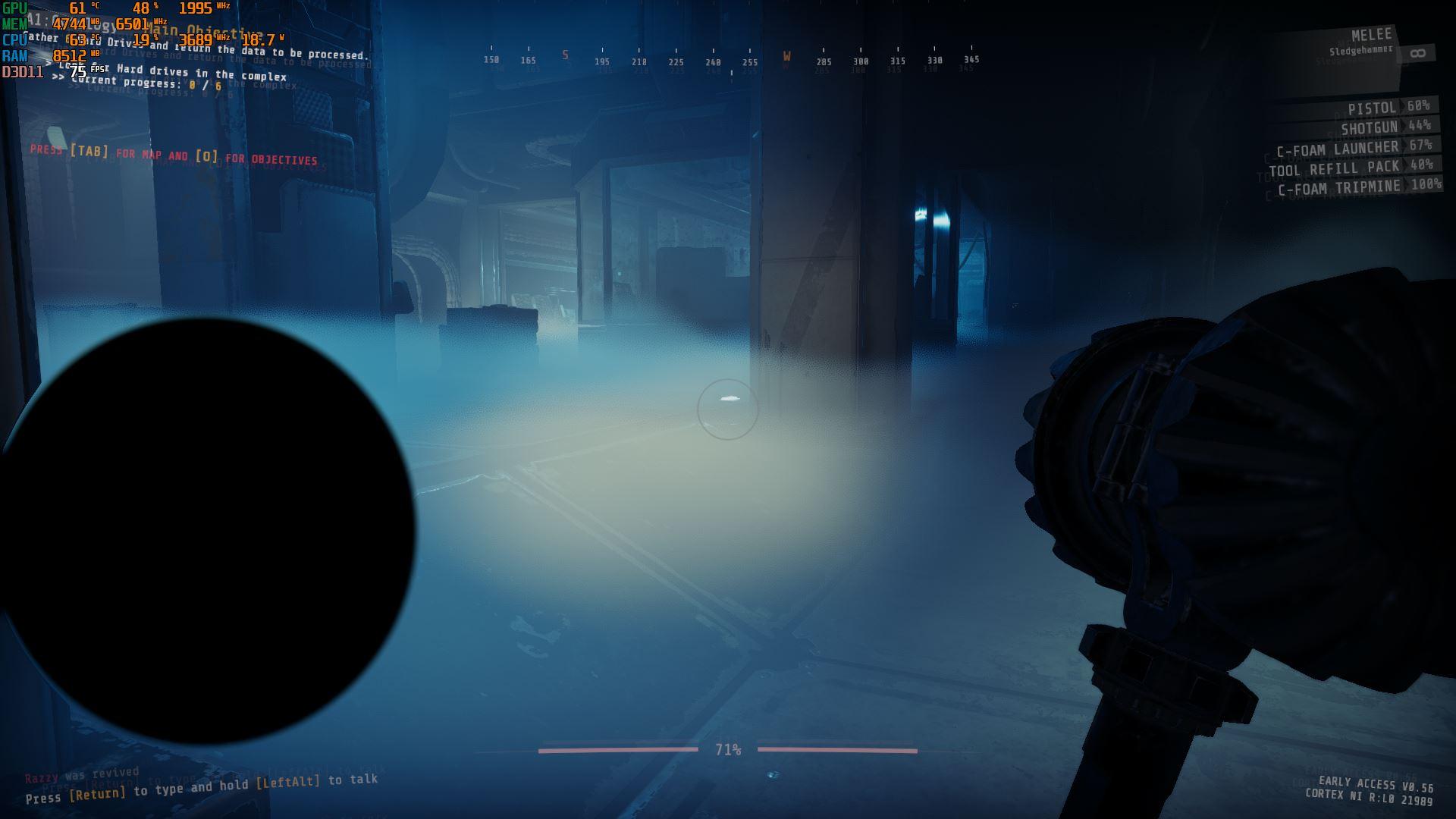 stuck pike
yep
mighty cipher

at least it went away eventaully
had a mini heart attack for a sec
thinking its a deadpixel
heady ledge
@mighty cipher Yeah I noticed whenever it would freeze if I tried to alt-tab out of the game, a new window labeled unity would pop up then disappear. How long before an update that can fix the crashing issue? Its happening to my entire team now
 nova swan
Anyone got a fix for the game constantly crashing to this screen only way to get past it is to restart game just trying to sort out my settings
https://gyazo.com/486cca4bda91fc208966493f62701e4b

can't change any keybindings because of it
 shrewd chasm
has anyone had a problem with starting the game, trying to play with two friends on the same wifi and it will not work
only one is able to actually get into a game at a time
wispy barn
Can you try exiting discord and gtfo, launch the game, create the lobby (Such as via steam friend invite), then initiate the cage drop. Once you've dropped into the expedition then launch Discord again.
 unique turtle
Hello, I'm trying to play with my friends but when they join my lobby I can't see their bodies or loadout and when they ready up and I click on initiate drop nothing happens, I tried reopening the game multiple times but no progress, also tried restarting. What should I do?
wispy barn
@unique turtle try what I just sent one message above yours
unique turtle
Okay
 jagged wyvern
Hi my friend just gifted me the game and it says GTFO Beta? Is this the full game or some older version?
mighty cipher
It's the GTFO beta, you need to buy the EA version now
unique turtle
@wispy barn it worked thank you but I have a questions, do I have to do this everytime?
wispy barn
It's something we're looking into. You can try reinstalling discord to see if that helps instead of having to have discord shutdown.
unique turtle
Thank you
unique turtle
@wispy barn I'm sorry but it seems it was too soon to celebrate b/c I tried initiating the cage drop, which dropped on my screen but my friends were still in the lobby screen. We tried your solution a couple of times but it just starts glicthing again
lapis badger
I'm playing solo A1-Crytology and this happened
Nevermind it seems to have gone away after a minute or so
 lethal kraken
tough valve
lethal kraken
lethal kraken
tough valve
lethal kraken
witch zone if you can say 🙂
lethal kraken
A1
tough valve
zone like zone 36 zone 35 or what zone was it?
 feral geyser
cfoam grenade seems to be missing a texture in coop, this was in A3
friend saw the texture as normal
vagrant sequoia
already known by the devs iirc
 obsidian ginkgo
hey guys,
when we play as 4 man squad, always one player is desync. Its like 10+ seconds.
Any Ideas how to fix this? (upload / download is not the problem)
vagrant sequoia
change host
is mostly the connection of the players to the host cuz its a peer to peer connection
obsidian ginkgo
it happens on all
mighty cipher
vagrant sequoia
already known by the devs iirc
correct.
obsidian ginkgo
is there a way to debug networking? like ingame stats or smthing?
mighty cipher
is there colorblind mod or some
 nova sinew
Ahoi everyone. I'm with a group that is very closely clustered (location wise) and has great internet. If we ping eachother we have ~40 MS, so pretty solid. All other games run lag free P2P, on steam and otherwise so port issues are probably not it. Unfortunately, GTFO is unplayable. Picking up an item can take up to two seconds and enemies just teleport around for everyone except the host
This happens irregardless of which one of us hosts. We all have about 20 mbit of upload and 50-100 mbit download.
We have also tried using ZeroTierOne to simulate a local network, but nothing changed unfortunately
stuck pike
maybe port forwarding issues, since the game is p2p
obsidian ginkgo
@nova sinew we have exact the same problem.
@stuck pike are these ports correct?
    TCP: 27015-27030,27036-27037
    UDP: 4380,27000-27031,27036
tbh i'm not the best tech guy, i'd just check if upnp is enabled
if it's disabled it can cause issues on most p2p games
nova sinew
@obsidian ginkgo if you guys figure out a solution, I'd appreciate you letting me know and I'll do the same : )
obsidian ginkgo
@nova sinew do you have the same problems with less players? Or only with 4?
nova sinew
We only tried as a full squad of 4
west moss
love when the game just says fuck you
 real shard
Hello, we have one constant problem with friends, only one of us has lags, doesn't matter whoever the host, but still only one (except host) has lags, and it is random one.
 vague forge
 mighty cipher
i just crash some how
 gleaming plinth
maintenance of server tonight?
because i trie one time to connect and failed. after i restard steam but tell me i need a connection to play but i have a connection
wispy barn
Looks like steam is having degraded performance on some of their Connection Managers: https://steamstat.us/
rose oracle
I got DCd right at the extraction on C1. Team was running in circles waiting for me to get back in but got the above message. Feels bad lol
 rare talon
mild dew
im currently trying to play with my friends and were having issues joining and s...
rare talon
mild dew
im currently trying to play with my friends and were having issues joining and s...
I have the same issue as @mild dew did you ever manage to get it to run ?
placid plume
is there any way to disable the chromatic aberration? it's pretty bad for oled displays
 errant nymph
gleaming plinth
same issue dude
errant nymph
gleaming plinth
same issue dude
I've got a solution, you can try
errant nymph
 junior escarp
i have internet and restarted 3 times but i still get this
junior escarp
i have internet and restarted 3 times but i still get this
Open your GTFO folder and create file named steam_appid.txt after that you must write down this numbers there 493520 then save and exit, after this error must disappear
lusty niche
It must
 slow jackal
errant nymph
Open your GTFO folder and create file named steam_appid.txt after that you must ...
slow jackal
errant nymph
Open your GTFO folder and create file named steam_appid.txt after that you must ...
did this work
lethal kraken
tough valve
zone like zone 36 zone 35 or what zone was it?
Entrance to the 2 bulkhead room
untold linden
moved my pc 5 feet and my internet speed doubled
rare talon
rare talon
I have the same issue as <@!355439950516191252> did you ever manage to get it to...
After reading waaaaaaaaay up, I tried having everyone close discord and we were able to launch the game easy peasy... that's pretty odd, I have to say.
sacred ember
weird bug, devs know about it and are trying to look into it
it's known that discord sometimes causes bugs when open, which is really really weird
fathom finch
Has there been a talk about an update or bug fix about the joining friends lobbies and the character doesn't load and/or all the slots say machine guns?
sacred ember
unsure
as long as you can join it's just a visual bug, so just confirm what they have/what you should take with them via voice or ingame chat
 quasi mantle
so we were playing E1 extreme... and theres still fog as if we didnt even place the cells in the generators
supple orchid
Is that for everyone or just you
quasi mantle
just me at the start
but when host migrating to try and fix we all got it
if you disconnect and rejoin after the cells are in the generators. that happens
now we cant beat extreme because of this :/
supple orchid
Yup if you reconnect or swap hosts it will happen
quasi mantle
welp :/
supple orchid
I almost did extreme with it, just take fog turbine for codes 2-4 and 6
quasi mantle
lmao we all have it now... so thisll be fun
supple orchid
Well at least the high stealth will be easy
quasi mantle
is it not exploiting?
supple orchid
I mean technically but it ain’t ur fault so
quasi mantle
feels like a disadvantage for EXTREME  .. as well as an advantage at HIGH
quasi mantle
yeah ;-;
best of luck for us
door is bugged
even after terminal code its still in 'LOCKDOWN'
supple orchid
Not surprised, host migration does not work ever
quasi mantle
but..
there are no enemies in the Shadow area and mother area
everything is CLEAR
supple orchid
Wow
quasi mantle
this door is closed even though we need to go through it for 3rd code
Proof there
: )
west moss
@quasi mantle If you had host migration happen that can happen.
untold linden
imagine having host migration
 granite dagger
Does anyone experiences desyncs between players since last patch?
We played as a 4 man team and two players fell out of sync. Doors did not open for these two players. Players did not see enemies but they were being hit by monsters, etc.
The other two player did not experience anything wrong at all.
tough valve
granite dagger
Does anyone experiences desyncs between players since last patch?
We played as a...
its been in the game from the start its just normal a bad day on internet.
if it keeps happening change host
 proven gyro
Hey there, a group of us have been running into random minor synchronization issues recently. It's usually little nuisances, like non-host players having their lights stay on after they turn a light off, or not dealing damage on a hit (though, often, also without alerting the target that was hit), or using a medpack and taking the charge, but without the target receiving the heal. We've tried rotating hosts a few times, but it just seems to change who has problems (IE: not the current host). There's always been some minor stuttering problems for non-host players as far back as rundown 2, but this seems quite a bit more severe. Anything we should look into debugging-wise to mitigate that a bit?
Thanks!
 shell niche
hi just wondering, and i know this has probably been addressed before but is there a way to reduce the double text
shell niche
thank you
 tender sage
Hey so I submit a ticket yesterday regarding my computer blue screening when trying to play with friends, and today I checked back and it was moved to "resolved" without any kind of change or comment on it, as well as I havent been contacted on discord. I just wanted to know if I was misunderstanding the category, thanks
 vivid wave
I'm getting an issue where as soon as I engage in combat, the game freezes/stutters for several moments before it catches back up. This happens in other instances, but most notably during opening combat/active combat situations.
Are there any known fixes for this, or maybe some in-game settings that can be adjusted to fix this issue? Thanks!
 vague silo
am i allowed to post a video in here? i think the tank is buggy xD
and maybe the mines xD
 somber bone
yes
vague silo
 quick heath
maybe arm time of tank pls let us known ...
mighty cipher
Lmao
mighty cipher
Restart
 umbral fog
its an f
 undone dock
Aw F
 vast niche
does anybody know why my friend cant join hes checked file integrity and everything.
 rustic spoke
I have had that issue as well but cant seem to fix it @vast niche
wispy barn
@vast niche @rustic spoke What exactly happens when your friend tries to join?
vast niche
@wispy barn so me and a couple buddies can play but as soon as one buddy joins he doesn’t show up but he can see us and it prevents us from starting the game.
rustic spoke
Yeah exactly
And even when they ready up I can't initiate the drop, it gets to 100% and nothing happens
wispy barn
can you send a screenshot of what it looks like
vast niche
@wispy barn one sec gonna get the screen shot for you
@wispy barn so we drop endlessly but he stays in the lobby as soon as he leaves we land.
mighty cipher
you guys play in different regions? Desync can get crazy sometimes
rustic spoke
I am not on but essentially I can see their gear selection but its blocked out and I dont see there names
their*
and I keep selecting Initiate the drop and it gets to 100% over and over again and nothing happens
@mighty cipher thats the weird thing so my other 3 buddies have no problem and one of the guy is living in germany (we are in NA)
and no issues
mighty cipher
So
mighty cipher
the full deal
wispy barn
rustic spoke
I am not on but essentially I can see their gear selection but its blocked out a...
for your issue can you try having everyone close discord, launch the game and create the lobby, and see if it lets you drop down. Once you land, then start discord.
wispy barn
vast niche
<@82942340309716992> so we drop endlessly but he stays in the lobby as soon as h...
what happens if you start without him, then he joins once you guys land?
rustic spoke
so we tried that and we he gets to the lobby so we back out to the lobby and restart it. We end up in the pod dropping screen, but it keeps us falling in pod indefinitely.
we waited 5 mins lol
then he alt+f4'd and we loaded in immediately lol
rustic spoke
@wispy barn