#gtfo-technical-support
1 messages · Page 21 of 1
 summer elk
 foggy siren
 wispy barn
Not everyone is able to or wants to open ports, and asking for someone's IP address to connect is a lot more difficult than using Steam to tell the game how to connect people together is a lot easier. You can complain to Steam that their service isn't as reliable as you'd like.
 jagged pilot
Have fun guys 🙂
 mighty cipher
Complain to steam? Why? I didn't "Buy" steam, I bought a game from a game developer (4 copies actually). If I am going to complain (which I am), I am going to do it to the game devs (which I was hoping doing here would accomplish, but maybe they don't monitor this at all).
jagged pilot
copy pasting this for the other guys who just checked up
GTFO runs on peer-to-peer connections, not servers
It has to be, yeah. We at 10 Chambers don't have servers, GTFO relies on Steam's relay servers to connect players with one a other
steam sided issue
mighty cipher
You not having servers != have to rely on steam.
Steam isn't hosting.
That's a false equivalency.
Steam is facilitating a connection.
The game devs simply didn't allow any other facilitation, simple as that.
wispy barn
but maybe they don't monitor this at all
I pass feedback along to the developers and I'll let them know you are disappointed in their choice of networking system used.
mighty cipher
Thanks.
wispy barn
Steam is facilitating a connection
Exactly! This is why you're having the issue because steam is down and not able to facilitate that peer to peer connection
I'll let the devs know you would like a way to directly connect to someone without using steam.
 glossy heron
hey gtfo is back up in north america
wispy barn
Is there anything else you'd like me to pass along to them?
jagged pilot
@glossy heron glad to hear 🙂 seems like most are able to get back in 🙂
mighty cipher
Again, fully understand that doc, I'm saying it's a bad design choice to 1- not allow users to facilitate their own connection and 2 - have the network check up front (at least let people get in and set settings, even if you never allow direct connection)
 brave isle
hey gtfo is back up in north america
@glossy heron I'm having luck as well
I'd rather have more content than additional connection options
mighty cipher
There's a reason that negative reviews on this game talk about this exact issue, I just ignored them thinking I could get in and set settings and maybe direct connect (nothing indicated that there was no option for direct connect).
wispy barn
I'll let them know that you are requesting that feature, you can also use the #gtfo-game-suggestions to put that feature request in yourself
In addition you can open the GTFO_Settings file from here and adjust
%userprofile%\appdata\LocalLow\10 Chambers Collective\GTFO
GTFO_Settings.txt
 trail jungle
has anyone had problems with the 3rd and 4th person not seeing each other and is there a way to fix it?
 true oasis
Having the players who can't see each other restart the game is the fix.
trail jungle
it hasnt fixed it
at all
we changed the party leader and it still hasnt fixed
It seems the issue is consistent with 1 person
who just got the game and is refunding
wispy barn
That's a bummer. could be their system or network connection causing a desync. I know the devs are working hard on fixing various desync issues
mighty cipher
Keeping getting error saying no connection. I’ve tried restarting Steam and my PC. Nothing is working
 stoic mortar
Steam has been having issues.
 mint blaze
If it's any consolation, at 4pm four of us got in and were able to beat 2 stages on the second level.
 worldly stag
Hi!
Does anyone know why the game wont load any of the images for guns in the lobby
or let me join my friends?
Shows the lobby but not me in the lobby
I've already reinstalled numerous times
Oof I cant even run a solo game..
 wispy barn
?t fix
 blissful pebbleBOT
If you are having an issue with the game please perform the following steps. This will often times fix the issue. If that doesn't work try the steps in ?t fix2
Perform the following steps:
- Uninstall game on steam.
- Press the Windows Key and the R key at some time. This will open a "Run" dialog.
Inside put the following in:
%userprofile%\AppData\LocalLow\
%userprofile%\Appdata\Local\Temp\- Install the game
wispy barn
@worldly stag can you try those steps please
blissful pebbleBOT
If the steps in ?t fix didn't work, try the following:
- Make sure your computer has the latest Windows Updates.
- Make sure your Video Card drivers are up to date.
- Restart your Modem, Router, and PC.
- Make sure your computer is clear of dust, good airflow, and not overheating.
wispy barn
yeah at list the first folder should always exist
worldly stag
re-installing now
 tranquil path
uhhh
so i can't seem
to be able to access the game. it says i need an online connection, which i clearly do.
wispy barn
@tranquil path that's going to be caused by a steam outage
tranquil path
hold up, i think i've got it figured out tbh
the games out of beta, right?
therefore beta keyers like myself get the clap?
 lusty niche
ya
 twilit leaf
Hi, sorry to bother you, hope all is well! Can you shed any light into one 'max render queue frames' and 'cpu culling workload' in options do? Or what settings may afford higher frame rate?
 white radish
render queue frames is about vsync and is a bit tricky to explain
basically, keep it at either 0 or 1
white radish
But culling, that’s easier
Basically, higher > more cpu work
Lowe > more GPU work
twilit leaf
Appreciate the effort at trying to answer but can you give a proper answer please?
GTFO devs seem to struggle quantifying anything.
white radish
generally revolves around the cpu “culling” more things around you meaning you get your GPU to only render parts of the frame that is necessary
CPU works out a lot more of the triangles in your view-frame meaning less for your GPU to render
twilit leaf
I see, im GPU limited. Why were the options left in the game for public release?
Why is there no ingame function to match-make ?
Forces all users to use discord to find games, right?
Wait a minute, you aren't even a dev xD
white radish
ok so first thing is that the options were left in because 9/10 times the more settings you can give to your players the better they can customize to their personal system spec
oh lmao
white radish
just some user who has spent a really long time on this server
twilit leaf
That doesn't give you any ground to answer these questions
and the devs approve of this?
white radish
lmfao why wouldn’t they
twilit leaf
Can you quantify exactly what - Hello there. As you reiterated, sending excessive messages is considered spam. We deemed your messages excessive due to how many of your copied/pasted messages we could see in each channel and without having to scroll up. We understand that you may be fine with playing with people across different regions, but we'd like to ask you to limit how many of these channels you opt to send invites in. Furthermore, not being automuted doesn't determine if you were spamming or not.
I need a quantitiive answer before I approach Steam
think carefully.
white radish
these questions aren’t even worthy of a dev having to answer them
a couple of game settings is neither here nor there
white radish
and they’ve very much communicated a lot of this stuff
white radish
lmfao this happens in every game discord server, what are you trying to get at
you asked one question about game settings and now you’re saying the games gunna be removed from steam?
twilit leaf
Im sorry that english isn't your first language
you seem to be struggling
perhaps you can find someone who is able to comment on the issues I am raising.
pewrhaps not?
white radish
Honestly, I would insist on the inverse.
I would like you to elaborate on why I should not be able to answer these questions, based on how common they are.
twilit leaf
Are you happy with this being sent as a screenshot to Steam staff?
white radish
fuck yeah go off king
twilit leaf
Thank you.
 proper grove
Hi! Let's keep this channel for Techincal Questions only please.
white radish
love trolls
white radish
one minute they ask a on topic question and the next they’re calling steam staff
 unique blaze
@white radish just don't even give them leway, ignore them or call mods
white radish
facts
proper grove
That is not the right place for such topics ^^
white radish
Also, an answer on the rendered queue size if anyone was interested:
The Max Pre-rendered Frames setting controls the size of the flip queue.
For each frame rendered, the CPU has to create a command buffer - which is then fed to the GPU. The Flip Queue is a queue of such command buffers.
Why a queue? Because sometimes the CPU might not be able to create a command buffer on time (maybe it got interrupted by some OS task ... etc.) the queue would give a buffer of sorts and the GPU can continue to knock out frames - the CPU can then try to "catch back up" to keep the Flip Queue full.
A large queue would buffer against frame rate inconsistencies due to the CPU not being on time but would add latency since the command buffers sent to the GPU process are "old" vs what is being simulated by the game.
A small queue would have low latency but if the CPU fails to keep up, the GPU won't have anything to process and will idle until the command buffer arrives (late) resulting in stutter.
You can use a lower queue if your CPU is good and the game isn't too demanding on the CPU - default is 3, lowest in DX is 1.
With a i7-7700 I can run with a Max Pre-rendered Frames of 1 in FFXIV and the Witcher 3. (I also cap the frame rate. Just thought I would mention it.)
twilit leaf
Thanks for the copy paste.
Shame you didnt know that before.
And instead tried to bullshit me xD
unique blaze
Crab, please be nice.
twilit leaf
Why is your 'help' chat staffed with volunteers?
I would like to know
I've paid for this game
proper grove
This is a open channel
Everyone can answer.
There is nothing like "Help-staff"
There are normal Discord mods.
unique blaze
because the team making the game is 9 people + D0c.
twilit leaf
you do realise you have to meet criteria to remain on steam?
are you serious?
Honestly going to try and tell me this is my fault?!
WHEN YOU ARE SELLING A GAME ON STEAM?
proper grove
Please refrain from calling people retards or anything like that.
unique blaze
<@&408548765599793173> can we get some help here please?
white radish
yeah lavars is too nice
twilit leaf
'Would you mind re-posting your message?
[7:03 AM]
fuck yeah go off king'
proper grove
i told you at least 5 times in dms to contact @rose thicket
twilit leaf
So your representatives are ok to swear?
please clarify?
this is all going to Steam btw so I suggest you answer carefully
proper grove
He is a normal user.
twilit leaf
I have already and am awaiting an answer
unique blaze
lavars is the closest one to a representative, posting so far Crab.
proper grove
just with a role everyone can get.
twilit leaf
I was advised by SimonViklund directly to contact this channel for tech advice
white radish
also there’s nothing against the rules in regards to swearing
twilit leaf
so far your representatives have sent abusive messages
proper grove
And there's a difference between swearing and offend someone
 covert perch
Ambassadors do not represent us, it is simply a title
twilit leaf
and i have been sworn at
mighty cipher
Crab, you need to chill out. If you have issues. I implore you to use the @rose thicket.
proper grove
And i say it the last time, this channel is no place for disscusions.
mighty cipher
Send any information, gripe, or complain there.
But, keep it out of this channel.
That's final.
twilit leaf
And the spots on various levels where you can stand and not be attacked.
covert perch
Well, there you go
unique blaze
Duping will probably be fixed in rundown 3. As for safe spots, there are a ton, most of them get caught. However, some are ok as long as the ranged infected can hit you.
fixed*
covert perch
Thanks ezzy
unique blaze
np
covert perch
We'd also prefer it if the methods for doing these bugs weren't publically discussed, a report to the Devs is more than enough
Talking about them is fine but not the exact methods
Also this is a tech support channel so...
 vagrant sequoia
you can also report the spots ( on #bug-reporting details how to better ) where you cant get hit so the devs can check whats the problem and fix them for the next rundown or the same rundown if they have some tweaks to make
 keen furnace
There's a bug sometimes where you enter a room and the music starts to play, but it sometimes cuts off and the only thing that can be heard are the sound effects? Is anyone familiar with this problem?
unique blaze
Yes this is known about, please make a bug report with your logs and any other evidence, like video. To help us isolate the cause 🙂 https://discordapp.com/channels/408196129470152705/633424549425184778/633438009311756288
 vapid venture
Are the steam server's back? Like can I start playing the game again
 wide zealot
that is totally region depended
 steady violet
Can someone help me with my game?
Its keeps crashing I've deleted it multiple times and reinstalled it but it still doesn't want to work
stoic mortar
Oh might want to also check #known-issues.
Try finding the crash log by following this route on your computer, but looking for this game's name instead. Assuming the routing works the same as another game I've played on Unity. But you'll probably want that log to be able to share for troubleshooting. Roughly.
C:\Users\username\AppData\LocalLow\ <InsertGameName>\output_log.txt
 crude solar
Doesnt do not disturb stop the admins from knowing when our messages come in.(could be wrong)
if thats the case how can we rely on admins in this discord?
stoic mortar
Mod Contact is a good resource for situations that require immediate attention
 smoky jasper
mod contact msg's them im pretty sure
stoic mortar
Or just for general contacting of the mods, even if it doesn't require immediate attention.
wispy barn
Doesnt do not disturb stop the admins from knowing when our messages come in.(could be wrong)
if thats the case how can we rely on admins in this discord?
@crude solar If you need to reach our mod team, please message @rose thicket which sends notifications to our entire mod and admin team.
DND prevents some ping sounds from going off, as well as popup notifications on mobile. I see unread message indicators and check every channel frequently, so does most of our admin team.
 raw pewter
Is there any small tips on how to make the game framerate faster? Video settings or something?
proper grove
What hardware do you have?
raw pewter
dell?
proper grove
ok, press 3 following keys at the same time:
Crtl
alt
del
and your screen changes.
it will say "taks manager"
click on it
raw pewter
yup.
raw pewter
..
proper grove
i need CPU and GPU
or send me a screenshot (press windows-key + shift +S) and select the area you wanna take as a screenshot, then you only need to paste it here (ctrl+v)
raw pewter
proper grove
ok awesome.
i already see one problem ^^
these are the minimun specs you should have :
Minimum:
OS: Windows 7 64-Bit or later
CPU: Intel Core i5 2500K or AMD equivalent
RAM: 8GB
HDD: 4 GB download, 10-15 GB unpacked
GPU: NVIDIA GeForce GTX 660 2 GB or AMD equivalent
DirectX: Version 11.0 compatible video card
Network: Broadband Internet connection
important are
CPU: Intel Core i5 2500K or AMD equivalent
GPU: NVIDIA GeForce GTX 660 2 GB or AMD equivalent
raw pewter
I know you are trying to help me, but what you just said is very... imformational..
raw pewter
Your cool, I love that your trying to help. But in a way I just need it dumbed down.
and yes I see it
proper grove
Yours is... "alright"
same with "Memory"
but it is weird that you have a UHD graphics 630.
You ahve a desktop pc or a laptop?
raw pewter
This one is a desktop
proper grove
Ok, i know this one sounds weird... but can you send me a picture of the backside of your pc?
raw pewter
the monitor or the actual base?
proper grove
your actuall pc ^^ where all the cables go out/in ^^
proper grove
ohhhhhhhh
raw pewter
?
proper grove
where did you got this one :D
raw pewter
What?
proper grove
Either is has a compact GPU integrated, and you accidently use the wrong output, or it has no included and it is just a weird build from the start.
We can check something.
you have windows 10, right?
raw pewter
Yes, I believe so.
proper grove
ok, search for "device manager" and open the following tab (it may or may not be there)
raw pewter
ive got network adapter?
proper grove
Display adapters.
raw pewter
ops i see it
proper grove
all good ^^
raw pewter
Intel(R) UHD Graphics 630
proper grove
ok. that was my fear xD
raw pewter
You typing long after saying that is mine..
proper grove
xD
ok
you said you conform it, did you, or someone else changed anything on the hardware (like opened the case and changed stuff)
raw pewter
Not really the system base was not messed with (that I know of) but the system itself was changed from a business and work network system onto my own system ware.
proper grove
Yeh.... that is the problem.
as it has a ok-ish cpu and enough memory.. but your gpu is basically only for games that use barely to no hardware.
basically if you try to go fast in a car but have no wheels xD
proper grove
When did you bought the system?
proper grove
and i would say you mainly play league of legends and minecraft?
raw pewter
minecraft yes, but not mainly
raw pewter
but how would it compare to something like Overwatch, or COD WW2?
proper grove
COD WW2 i don't know, but overwatch runs pretty good on a lot of pcs. same with games like minecraft, lol, cs:go etc. and the only thing you could try is to lower the Resolution (you probably have 1920x1080) you could try (1280x720).
raw pewter
ok, ill give that a try. Any other suggestions?
proper grove
Yeah, i mean it is not the worst GPU on the market. gaming is possible. But with these kind of GPUs they are depending on the CPU, it's almost like if you have to tow a car (and the cpu has to pull) which is never good for several reasons :D
How many FPS do you get i GTFO (they have a integrated FPS counter in the HUD options)
raw pewter
41 about
proper grove
i mean to be fair, the game is not optimized yet.
raw pewter
Is it that bad?
proper grove
yeah but no.
they are only 9 people that create this game. And as they are only in early access there is always air to improve optimization wise speaking.
raw pewter
Ya I get it, it’ll take time. And it’s a good game already so.. time
proper grove
I mean the game is playable with 40 FPS, i played worse x3
raw pewter
Lol
proper grove
Just for interest, what have you paid for this pc ^^
raw pewter
Around $250, it was slightly damaged on the exterior.
proper grove
that's kind of a lot, but at the same time it is ok.
raw pewter
I got a monitor with it tho. I’m not too picky.
I’m saving for later to build my own PC in later terms
raw pewter
Thanks! Also you are really nice, appreciate it! 👍
proper grove
if you want you can send me screenshots of your settings and maybe i find a setting that can be improved.
best is private message.
so i see it directly ^^
raw pewter
Sure👌
 sacred echo
I have a problem with my audio here in discord and I wish someone could help me.
So whenever I launch the game along with the discord app and join a room, the voice chat of the room I join often has low volume so I can't hear the other players talking to me, so I have to compensate the volume of the GTFO just to hear the other player's voice which is hard because I always end up alerting the infected because I can't hear them well.
What should I do with my audio problem?
proper grove
could be a discord setting, there was something, let me check
sacred echo
Thank you very much!
sacred echo
The attenuation is turned on, a little bit
"When others speak" is enabled
sacred echo
Sure hope so : D
proper grove
other setting that can cause trouble:
take your output device (headset) and change this setting in properties
sacred echo
Okay will do!
proper grove
and if you want we can test it.
sacred echo
Oh no worries, I can handle it!
proper grove

sacred echo
Thank you very much for the kind and quick response!
proper grove
just @ me if you still encounter this problem and i see if i can find what causes the problem ^^
Have a great day
sacred echo
Okay!Thank you!Have a great day too!
 onyx urchin

proper grove
thanks for keeping this channel clean
wispy barn
@austere wind this isn't the best channel for this, please use #gtfo-chat
 austere wind
mighty cipher
austere wind
mighty cipher
I've just noticed that on the rundown screen, it says I didn't complete c2 and has the completion percentage at 50% also says I only did c1 once, when I had two completions. The rundown screen used to say 100% now doesnt, I don't understand why?
 ornate jungle
@mighty cipher Do you have 2 completions for C1?
mighty cipher
I have three now, I just did it again @ornate jungle
mighty cipher
I’ve completed it once, it used to recognize that i did, doesn’t anymore
Says no completions now
ornate jungle
Oh, that's a bug for sure
Sometimes players don't get completions and I'm sure the devs are working on them. They've patched it several times and I haven't encounter those for a while. For now you'll have to complete C2 again 😅
Oh, try hosting the game too. That'd certainly make it better
mighty cipher
Bleh, okay well I’m bout to run it now, hopefully I’ll get a clear. Thanks dude
ornate jungle
Good luck down there 😄
proper grove
You still can play the next levels though, the host just has them unlocked.
 thin jungle
anyone awake
thin jungle
well, just joined this discord since it was suggested in my " Network Error: No Connection" error message
ive restarted steam and my computer but am still getting it.. weird
proper grove
This is a problem with steam. #known-issues
thin jungle
thank you
proper grove
I hope it will resolve very fast for you ^^
 long kite
@proper grove You have the solution for this bug please ?
Thank You.
proper grove
Hi, for what bug again?
long kite
"NETWORK ERROR: NO CONNECTION"@proper grove
proper grove
Since when do you have the problem?
long kite
1 week
proper grove
What internet provider do you have?
long kite
@proper grove I am in France and I am subscribed to orange internet
proper grove
Ok let me see if i find any problems, i will @ you in a couple of minutes
proper grove
Have you checked if you have the correct version?
Can you send me a screenshot with the info on the bottom right please?
@long kite
long kite
proper grove
you are on the wrong version, please restart steam
long kite
ok i will do it now
proper grove
There should be an update
when you are on the right version, you should be able to play.
@long kite tell me when the update went through
 mild juniper
The game won’t let me set my controls when using an Xbox controller. I can set the A button and right trigger for anything I want, but the other buttons are not able to be applied for some reason
unique blaze
Do you have multiple controllers? try others if you can.
 urban blaze
Hello 
I have this problem
Network error:no connection
Even if i have internet connection
I just started playing yesterday
 somber bone
@urban blaze what version of the game do u have
urban blaze
somber bone
See if you can update the game in steam
somber bone
Check your downloads tab
urban blaze
somber bone
I had the same problem when I came back to the game but I could update it in the downloads tab
urban blaze
😿its not there
somber bone
Might have to get a mod in here not sure what's going on XD
urban blaze
Oke 💖
somber bone
I had the same problem also but mine was just a matter of updating the game
<@&408548765599793173> @urban blaze any help this good fella
 brittle oyster
Hey, we're not exactly Tech Supports. But, I can try to take a look.
somber bone
I guess it would be admins that's tech support for the game
brittle oyster
Not really.
somber bone
@urban blaze here might have a bit more luck
brittle oyster
Some of us knows a lot about it, that's is. :)
It looks like the wrong version. 0.18.
urban blaze
🥺 i tried deleting the settings also User→ 10 Chambers →GTFO
brittle oyster
Lemme quickly start the Game, before I say something wrong about the version. 😅
urban blaze
👍 ok
brittle oyster
Alright, the version is the right one. It might be a steam issue currently. Where are you from?
brittle oyster
So it was a regional issue. See: https://discordapp.com/channels/408196129470152705/633424858088472578/653717685602877500 ^^"
urban blaze
I just restarted it and it working😻
brittle oyster
Glad it's working. 👌
urban blaze
🤝 🤜 🤛
unique blaze
connecting is futile for me as well. either steam or playfab is screwed up today.
urban blaze
Some say its bcoz of network traffic👾
 unborn turtle
Hey guys,
Im planning to renew my drives, where is the progress from GTFO saved?
Is it saved somewhere on my HDD or in Steam ?
wispy barn
Game data is saved in online servers, so you are fine @unborn turtle
unborn turtle
Perfect, thanks mate 👌
 south quail
im having a game issue
i talk on discord fine, my internet is fine, but the timer and sleepers freeze and i cant do anything and the game still goes on. i lose a lot of time and HP and it is becoming unplayable
proper grove
Do you host the game?
south quail
no
proper grove
The game is peer to peer, so it can happen that the connection to the host is unstable
you should try to host the game and see if it's still the same
south quail
any other feedback in case that doesnt work ?
proper grove
It'S always better to try first, so we don't corner us self with problems that are non-existing ^^ But you always can ask again
south quail
alright, thanks btw !
proper grove
No problem ^^
 heavy current
IDK whats caused it but the game randomly got SUPER quiet to the point nobody in the squad could hear anything, is this a known issue?
All I got for when it happened was it starting after we backed out of R2B3 during the scouts scream
 agile bay
The scout's shout reduces sound for a couple seconds. Sometimes the sounds bug out completely for 10-30 seconds (unrelated to the scout); I had that mostly in C1 solo, thought it could be due to kiting too far away or being too long in the game
heavy current
Huh how about that... thanks that honestly kinda makes sense
 cyan anchor
Hey, have a problem with D2, playing is running smoothly but opponents and time run asychron so I can not fight.
proper grove
If you are not the host that's desync.
If you are the host, than it's also desync, i phrased that so stupidly xD SO yeah it's desync
cyan anchor
No matter who hosts the problem have only me and only at these levels
proper grove
Mhhh... that is weird. level spicific desync... Is it at all time or only at certain areas?
cyan anchor
Always at these complete D2 levels. Players not only opponents and time totally funny
proper grove
Mhhh. Can you make a lobby and give me the id?
cyan anchor
no i can no host this level
proper grove
do you play with the same host all the time?
cyan anchor
no
cyan anchor
sag ich ja komisch
proper grove
we continue dm :D
 vernal nebula
proper grove
vernal nebula
proper grove
That's a light bug, go into the options (ESC) and go out fixes the problem normaly ^^
 fossil hull
when joining midway through e1 fog will infect me even with a fog turbine and repellers
true oasis
That might be a desync issue. As long as you're holding the turbine, you shouldn't take any infection from the fog.
fossil hull
it resolved itself once i got up to 100% infection some reason
 cold brook
i think that's how it's suppose to be
smoky jasper
at that distance it should only be names
stoic mortar
R2D2-Not really technical support/bug and also so close to the next rundown. But thinking this is supposed to be "verification". Not sure if this has been reported yet. When I did a search in the discord, didn't see it.
stoic mortar
Ya it's a typo
 stoic mortar
I wasn't sure where else to put it :x
vagrant sequoia
#bug-reporting ;) even on little typos they check from time to time
stoic mortar
 ty
ty
vagrant sequoia

mighty cipher

 brave wren
@stoic mortar Admins have seen it, been recorded now 🙂
stoic mortar
ty
 potent pollen
has anyone been getting shaders glitches and floors disappearing? i feel like i've been getting more of these since the update
 unique pasture
I beat the first two levels with some people I met on here last week but now its showing that I haven't completed anything and need to do them both again in order to progress.
 frail prawn
@potent pollen When do you reckon you see these glitches happen? Are they completely random or happen after you have been playing for a while, did a certain action...etc?
potent pollen
@frail prawn seems random i think. i play c1 mainly and it happens at the first terminal zone
frail prawn
Can you send in a bug report about it please? You can find all the info on how to do so in the #bug-reporting channel, and with as much detail as possible :)
wispy barn
I beat the first two levels with some people I met on here last week but now its showing that I haven't completed anything and need to do them both again in order to progress.
@unique pasture Hey, this is a bug that the devs are working on fixing. At this time you'll need to complete them again so credit is registered.
 trail osprey
please make a separate chat for Russian
I can not find a Russian-speaking team in eastern Europeaking team
vagrant sequoia
i think theres also a discord community for russian in the #highlighted-communities
trail osprey
ty)
vagrant sequoia
np
trail osprey
this chat is close for me
vagrant sequoia
oh just look the posted comments , there are the invite discords lemme find you the russian one
trail osprey
or do you mean find the chat I need there?
vagrant sequoia
trail osprey
understood ty)
vagrant sequoia
thats the comment with the invite link for the discord gtfo russian
true oasis
You may want to DM them the link instead.
mighty cipher
yep
vagrant sequoia
trail osprey
Will there always be such a search for a network game?
Or will they do both strike and counter strike?
dota*
automatic search
wispy barn
Matchmaking will be added, how it will function has not been revealed.
trail osprey
thats great thanks
 tacit elm
Hi ! uhh i have an issue about the fps it looks like im getting capped at around 60fps however i got specs that are a bit above the recommendation : i5 9400f , Gtx 1050ti , 16gb ddr4. i have checked if the v-sync was disable and im on fullscreen and i put the max framerate to 144 so im a bit lost. May I have help ?
proper grove
Have you checked if in advanced video what the target framerate is set too?
tacit elm
i put it in 144
true oasis
Try right-clicking the desktop, click NVIDIA Control Panel, go to Manage 3D Settings and click Program Settings. Search for GTFO in the list of programs and set Vertical Sync to Off.
tacit elm
already done
proper grove
not ingame
true oasis
Did you set Max Framerate in the control panel?
tacit elm
yes
true oasis
What are your global settings set to?
proper grove
Change the Resolution to 720p. restart the game, set it back to yours again.
tacit elm
no never above 60
proper grove
wait....
tacit elm
and about the global settings i put everything in maxframe rate and disable the v-sync
proper grove
what resolution do you play?
true oasis
I'm assuming your monitor can output 144hz.
proper grove
then you should get around 70-80fps
true oasis
Yeah, it's probably a GPU bottleneck. Try setting your settings to the lowest to see if it improves framerate.
proper grove
Change the Resolution to 720p. restart the game, set it back to yours again.
@proper grove
true oasis
To be honest, the lowest settings help a little bit, but not a whole lot. What's the highest number of frames you've been able to get in the game since playing?
mighty cipher
The recommended specs are actually a little misleading. If you are getting 70 - 80 FPS if could be that when you're in closed, small rooms. In bigger rooms, and during waves. Expect it to go down even more.
tacit elm
the best i can get is in 1280x1080 with 75fps
true oasis
So it's a GPU bottleneck then.
tacit elm
my graphic card is a bit old so maybe its why i get lower frames ?
true oasis
Wait, you said you had a i5 9400f?
tacit elm
YES
mighty cipher
Wouldn't be enough to really use the potential of the frames. Make sure to optimize the hell out of your windows for gaming, windows has also have problems for gaming which can reduce frame rates, cause Stuttering e.t.c
tacit elm
ok i do
true oasis
That could also be part of the bottleneck if you're not overclocking it.
2.9 GHz base frequency is pretty low for that processor.
proper grove
144Hz is never a easy target. specially with such a hardware
tacit elm
ok because in ow or cs in very low im around 200fps
mighty cipher
A lot of it is wasted. For me, I have to pump out high frames. I'm forced, if go below 80 FPS my games start to stutter like mad and my mouse becomes very jittery.
true oasis
CS:GO is highly optimized for lower end users though.
tacit elm
ok thats why
true oasis
The best you can do is try overclocking your processor.
tacit elm
thats weird because even a game like monster hunter world in very low i get 144fps almost
true oasis
Yeah, like I mentioned, GTFO's lowest settings aren't exactly performant.
They help, but only a little bit.
true oasis
If you upgrade to at least a 1080 or higher, you should be able to run the game at 144 fps.
mighty cipher
Get an Rx 5700, in smaller rooms you easily hit 144hz. In bigger rooms like the E1, you hit around 100 - 130 frames. Then waves, the lowest I've been is 70.
true oasis
That card runs incredibly hot though.
mighty cipher
Depends, it runs hotter but it mainly depends on the make.
proper grove
Let'S keep this channel for technical problems please ^^
mighty cipher
And these cards also are more designed and cable to take to heat load anyways.
tacit elm
but ok thats a bottleneck so its normal to have this much fps
true oasis
The best you can do right now is overclock your processor from the BIOS if you haven't already.
tacit elm
i5 9400f can get overclocked ?
mighty cipher
Yes, I wouldn't be surprised if GTFO was bottlenecking your system. It's a game that you can run easily ana smoothly and then next minute it doesn't run as good.
true oasis
Yeah, it can be overclocked to 4.1 GHz.
true oasis
Intel's can, I thought?
proper grove
some are locked to that.
I mean there are ways... but that's nothing you normally can archive
true oasis
Okay, most are overclockable, but I checked the i5-9400f, and it can be overclocked to 4.1 GHz.
true oasis
Oh, you're right. I need to stop using Reddit. 🤦
Regardless, it still boosts the frequency, which can be set in the BIOS.
2.9 GHz is pretty limiting for more demanding titles like GTFO.
tacit elm
ok thanks for your help and time guys 🙂
oh i think this might be the gpu regardless of this
 atomic dune
Hello! My friend's game is loading into a black screen, and when he opens his steam overlay it becomes very glitchy, is this a known issue?
He is currently reinstalling the game onto his ssd instead of his hard drive
proper grove
Hi @atomic dune He should replace his settings file, i pinned one in this channel. there's also the dorectory where to find it.
if the reinstall does not fix it ^^
atomic dune
I think the reinstall worked! Thank you
 willow elbow
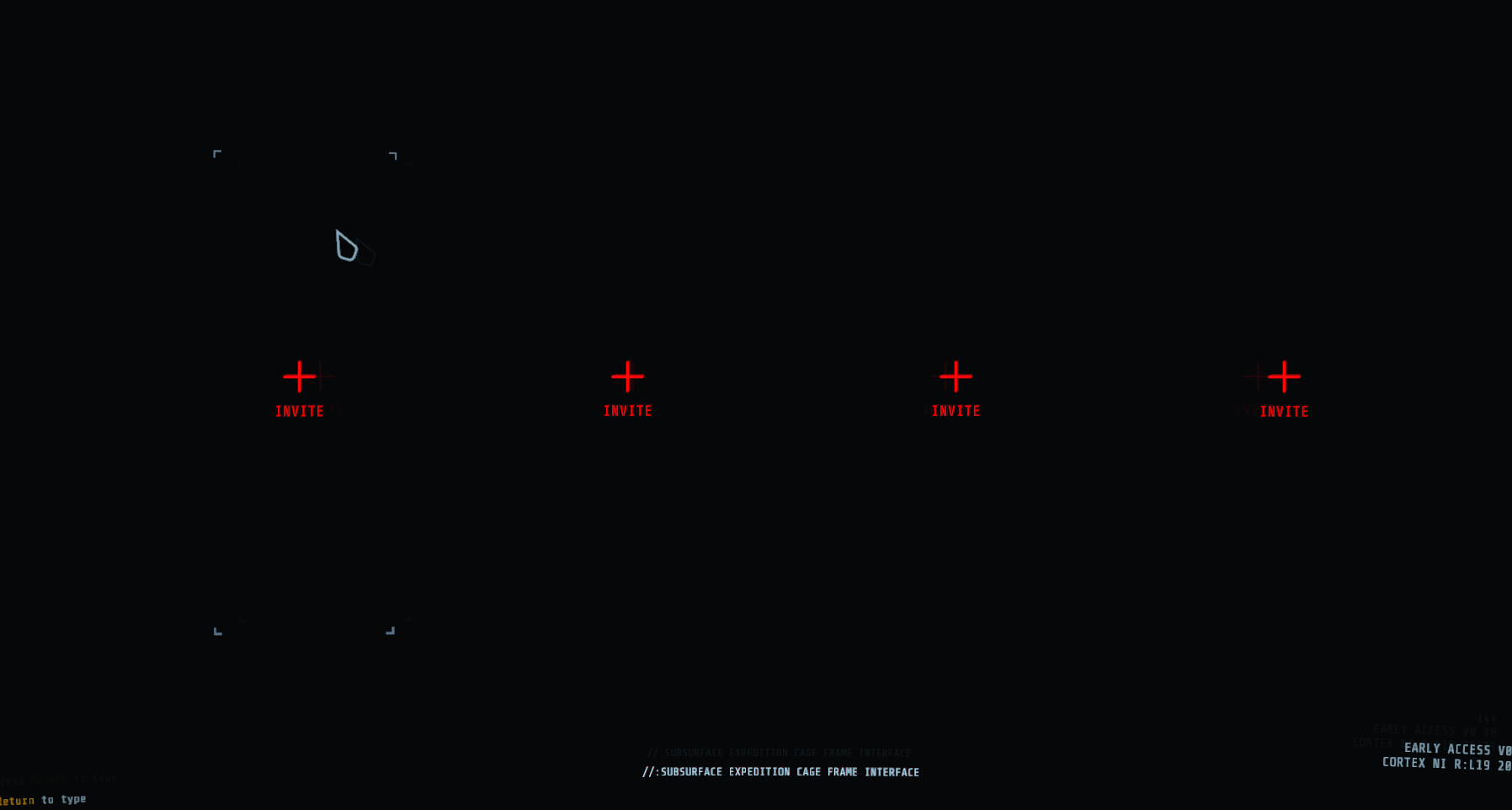
Hey yes, my friend is having an issue where it doesn't say it's a connection issue but after he enters the rundown he cannot join any game or no one can join him. When he joins or we try we're greeted by the screen with our character selection but with no characters, just the text INVITE
proper grove
IS he on the correct version?
willow elbow
Um he just updated it if that says anything
proper grove
Are you on the correct version?
proper grove
Ok, i make a lobby, can you both try to join me?
willow elbow
Excuse hold on, he's redownloading the game
proper grove
ok.
willow elbow
terribly sorry, I'll update when he tries it again
proper grove
ok.
wispy barn
It says last updated March 23rd (currently last updated May 19th) so you are getting a cached version @cold brook. Try clearing your cache and cookies or try a different browser
cold brook
tried them, not working. @wispy barn
wispy barn
Ahh, I must have the cached version, can replicate now. Bringing up to the team.
cold brook
alright
proper grove
I think you are on the wrong version of GTFO
 supple rapids
ths
proper grove
also check the options (right click properties)
 light sedge
im seeing the rundown 2 roadmap, not 3
wispy barn
The devs are working on restoring Rundown 3 on the roadmap
 hexed ferry
My friends and I still can't enjoy our this game due to crashes on all ends and horrid fps. I have done the app data clear and reinstall but that only gets one game without crash, sometimes none. Sometimes its only specific rundowns that wont work but it seems to happen randomly. We almost always have at least one person crash. Was hoping the update would solve this but that was not the case 😦 Anyone having crash and fps issues or have a fix that works?
 sonic scarab
Hey guys, I haven't played GTFO since Rundown 1, and I was wondering if the game has improved the framerate and performance since then.
I'm using an i7-8700K and a 2080Ti, but back with R1 I couldn't push much past 140fps or so, and I wanted to gauge recent players' opinion of optimizations and tweaks, if they exist.
proper grove
Hi @hexed ferry First of all i need some info:
Who hosts the game?
What hardware do you have?
HOW does the game crash: Doe sit only freeze, does the audio still play etc.
@sonic scarab i can not tell HOW much it improved, but i run a 2080ti with an amd ryzen 9 3900x. I get more than 150 frames.
sonic scarab
Nice, sounds good. I'll try to find some benchmarks or so but I just wanted to know if it had improved at all since then.
hexed ferry
We have switched around who hosts. Recently its been my one friends and I that crash but last night I wasnt crashing and another friend was. Its usually a Unity crash. I have an i7-4800HQ processor if that makes sense ( I apologize if this doesnt make sense I'm not the best when it comes to computer specs) @proper grove
hexed ferry
proper grove
Can you make the GPU one larger please ^^
hexed ferry
Yeah, I'm on a laptop and its a bit older at that. I'm not sure what my friends are running but i know the one has a desktop
proper grove
It is good enough to run the most games.
When you host a game, do you get a crash as well, have you ever experienced that?
hexed ferry
Yeah, I have hosted and had it crash but my other friend who crashes the most usually hosts because he has fiber and is plugged right in.
proper grove
Ok. What can happen is, if one has a corrupted file, that he crashes others. that why i try to determine who can cause the crash ^^
so:
are there moments the game crashes all the time? (hordes, alarms, dropping into rundown)
hexed ferry
Its usually on drop in
proper grove
ok.
hexed ferry
Actually always on drop in besides a couple random crashes here and there
proper grove
Have you tried dropping alone?
hexed ferry
it used to only be r2b2 consistantly but now its not
Yeah, I think we both still crashed when we tried that
it was a bit ago and I dont remember if the solo drop was good and then the group drop was bad or not im sorry
hexed ferry
Ill go try one now. Last night when we tried to play, I didn't crash so I don't know if I did manage to fix it or not.
okay thank you
hexed ferry
I did 🙂 I dropped into R2B2 with no issues
proper grove
ok, can you make a lobby? i try to join.
proper grove
all good ^^
hexed ferry
109775240990969813
I think thats right? I haven't played with people other than friends
initiate drop?
proper grove
y
hexed ferry
crashed :/
proper grove
Ok. So that's actually good to know.
one fix we can try is:
https://discordapp.com/channels/408196129470152705/633424858088472578/653718367676661770
It may be that a file is corrupted and it causes a missmatch what can cause this problem
hexed ferry
I've done this fix quite a few times now and the problem usually happens again, I will do it again because I havent done it in about a week. Thank you for your patience
proper grove
Do you use a VPN?
proper grove
Ok.
hexed ferry
He's at work but maybe when hes off i will tell him to ask for you or maybe tomorrow
proper grove
Do me a favor. Can you run "DxDiag.exe"? (just search it) and send me the output txt?
hexed ferry
I just uninstalled, should i keep running the first fix or do this first?
 astral hare
lfg tier 1
proper grove
You can do the first fix, and while reinstalling send me the dx
@astral hare wrong chat ^^
DxDiag is basically a collection about all informations of your pc, without personal stuff.
so i can see errors from software or hardware.
hexed ferry
its saying wait while it finishes collecting info 🙂
proper grove
+1
hexed ferry
save the file?
proper grove
Yes ^^
hexed ferry
okay, now what should i do?
hexed ferry
proper grove
Give me a couple minutes, in the meantime you can follow the first fix's steps and i see if i can find the cause of the problem ^^
hexed ferry
Yup!
proper grove
You also had problems with other games?
hexed ferry
Nope, just gtfo
proper grove
Ok, let's try to see if the first fix does anything.
proper grove
+1
hexed ferry
109775240991005068
proper grove
Ok, i think we are stuck in the drop*
proper grove
Ok. Return to lobby
hexed ferry
it just crashed
proper grove
Oh and i see the map.
hexed ferry
hexed ferry
xD when in doubt blame riot
proper grove
i have a guess
@smoky jasper i come back to you in a second. Did you guys crashed in the drop as well?
smoky jasper
we finished, a guy just crashed and it took extra long
proper grove
Oh so it was at the end?
 plain beacon
Does anyone get stuck at 30 fps even though the frame limit is "infinite" ?
 outer sorrel
Not sure if this is the right channel for it but... my wife and I cleared R2C1 Triangulation last night after much struggle. We just logged in for the next level and it is showing as not completed. Is there anything we can do about it other than trying to clear it again?
 cerulean vessel
Please, for the love of cheese, don't make us go through it again. We finally beat it. 😦
outer sorrel
Completion of the level is recorded in this log: https://files.layer7.solutions/uploads/Ferdi-PC.2020.06.02.zip-1591240323.gz
 tidal dune
hey, sorry if this is the wrong place to ask questions about bug reports. I'm wanting to file bug(s). I already got the tool, uploaded logs, and am filling out a bug report. My question is: I actually found 2 bugs within the same session, should I file these as the same bug (with the link to uploaded logs), or should I file 2 separate bugs with the same link in them?
(the 2 bugs don't seem to be related at face value)
 forest shadow
If unrelated to eachother then 2 seperate bug reports
outer sorrel
Is there a channel for it or do I submit a bug report for the level not being marked as completed?
outer sorrel
Ok, so a bug report. I'll do that. Thanks
wispy barn
@outer sorrel @cerulean vessel Sorry to hear you guys didn't get credit for the completion. This is a frustrating bug that the devs are working on fixing. They patched many causes of it, but seems there's at least one still alluding us that is being worked on. Be sure to submit a #bug-reporting and link the logs and we'll take a look and see if we can figure out why it happened, but you'll need to run it again to get credit, sorry.
@tidal dune As ShadowVipers said, if they are separate bugs, then a separate report as it allows us to track things better.
tidal dune
I figured as much. I just wanted to make sure in case they are connected in any way internally (one caused the other or something).
Will submit 2
outer sorrel
I think I confused who was being responded to. Thanks for the info, I'll submit a bug report.
tidal dune
thanks 🙂
wispy barn
Completion of the level is recorded in this log: https://files.layer7.solutions/uploads/Ferdi-PC.2020.06.02.zip-1591240323.gz
@outer sorrel Thank you for these logs, it actually is really helpful and I can see where it showed you completed it successfully, but it wasn't able to award credit. I'm hopeful this will help the devs get it fixed.
outer sorrel
My pleasure, submitted the bug report too so the log finds all the right people.
keen furnace
any settings recommendations to make the game run smoother? I've experienced multiple frame drops during alarm doors or when entering a new room/area.
 chilly dagger
lower resolution and lower shadows
unique blaze
turn off vsync, exclusive fullscreen, shadows to medium, depth of field (it really isn't used that much so why keep it), fxaa_default, max render queue frames not higher than 1, CPU culling workload to low unless it's more powerful than your video card.
@keen furnace
sorry for late reply
try restarting steam and your modem
chilly dagger
Ezzy, I have heard that having the CPU culling workload setting set wrong will cause a glob on your screen to appear and grow. Is that the actual setting that is causing the issue?
@unique blaze
unique blaze
I haven't heard of anything like that. can you post a discord link where someone told you this so i can look into it?
chilly dagger
Its pretty far back in this chat where I saw it. I saw it before D2 and E1 released.
but I can post a screenshot of what my screen turns into when the glob appears
many screenshots
chilly dagger
it goes away on its own, but sometimes it turns my screen completely black and I cant see anything. Most of the time its only a small portion of my screen. but sometimes its the whole screen as you can see
IDK if the CPU culling workload is the issue though because Ive had it happen on all 4 settings.
unique blaze
I'm not seeing anything in the bug hunting reports. Can you make a report with as much screens and video as you can showing before and after?
chilly dagger
Ill do that. Not sure if its a bug or something my laptop is just having an issue with.
My graphics card is a GTX 1650 and I have a hexa-core i7 9750, so i shouldnt have any issue
unique blaze
I'm asking around to see if anyone is familiar with this.
 bleak relic
:o
 brave sluice
I've noticed recently, the only time that i've never hosted the game, that the sleepers when they're up and moving around seem to glide across the ground with very little movement. My buddy hosting the game was the only other person in the game and we both have the same internet provider and pay for the same level of service, comcast fiber.. I just wanted to see if anyone else has seen this type of thing before because it's really jarring seeing that...
 jaunty charm
yep, just had that in last 2 rounds,. game has been pretty laggy the past week or so tbh.
wispy barn
Can you do win key + r
enter: %userprofile%\appdata\LocalLow\10 Chambers Collective\GTFO
press enter
upload the output_log.txt file please
@mighty cipher in that same location can you try deleting the gtfo_settings.txt file then relaunch the game
or upload it here first
then delete it
like literally nothing?
awesome, from the logs it showed the settings were corrupt, makes sense
cool, I can replicate it. should be a nice easy bug to patch.
wide zealot
lol when I read about buildslave (buildbot) to learn more about:
...
The guilty developer can be identified and harassed without human intervention. By running the builds on a variety of platforms, developers who do not have the facilities to test their changes everywhere before checkin will at least know shortly afterwards whether they have broken the build or not.
...
The overall goal is to reduce tree breakage and provide a platform to run tests or code-quality checks that are too annoying or pedantic for any human to waste their time with. Developers get immediate (and potentially public) feedback about their changes, encouraging them to be more careful about testing before checkin.```Also, what causes this wild settings file corruption? Does it have anything to do with Steam Cloud syncing?
 slow idol
anyone else having trouble connecting to games?
proper grove
Hi, do you get the "no connection" message?
slow idol
i get a small orange text on the top right of my screen above the level: //ERR unable to decrypt at, then the last word is too small to read
proper grove
can you send a screenshot?
i think you are talking about the start up sequence thats simulates a breach. There's such a message, but i always wanna go sure ^^
slow idol
ok my bad, I know this game does sim stuff, but yeah. send the screen shot in this channel?
proper grove
Yes please ^^
slow idol
of course when i try to get the screen shot the text no longer pops up...
proper grove
so the exact problem is you get stuck at the start-up sequence? Or can you get to the rundown screen?
slow idol
I cannot connect to any lobby either through a code or steam
proper grove
But you can see the Rundown screen`?
slow idol
yes
proper grove
ok, perfect.
slow idol
ah i go the screenshot
slow idol
I know its small but the orange text on the upper right
never saw it until now so idk if thats a related issue?
proper grove
did you just made a lobby?
slow idol
that was trying to join one, but i can also not make one either.
proper grove
Same problem?
slow idol
yeah, that screen for a few seconds then kicked back to the rundown
proper grove
Ok, did you had an error at one point? like a freeze or anything?
slow idol
no, i was able to join a lobby about an hour ago. then went to play again then just started
proper grove
mhh that is weird. the easiest fix to try first is always this: https://discordapp.com/channels/408196129470152705/633424858088472578/653718367676661770
Sometimes when you alt+F4 or anything similar, it can happen that a data get's corrupted.
slow idol
ok, will try. thanks for the help
proper grove
If you still encounter the problem let me know, i'm should be here for another hour
slow idol
ok, im doing the first thing now
proper grove
Thank you very much ^^
proper grove
Good to hear, thanks for letting me know ^^ Have fun and have a wonderful time ^^
mighty cipher
Me and my friends beat "Power Corrupts" rundown a few days ago, however it does not show as complete on my rundown map.
I was wondering if I did something wrong
 proper grove
No that can happen and is 100% a bug. But don't worry, you do not lose anything by having it not completed. You still can play all levels that the host has unlocked @mighty cipher. Sorry for late respond ^^
 river fractal
Have a problem for a long time. I set the game run under 1280x720 exclusive fullscreen. And the desktop is 1600x900. Sometimes the game runs still in 1600x900 resolution, like streched from 1280x720. Also, it's very possible when I hit any button in setting my monitor turns black - it's changing resolution.
(kind of don't know how to express for my poor english)
:(:з)∠)
proper grove
Hi, so from what i get, correct me if i'm wrong:
You have set the game to 1280x720, and your desktop is 1600x900?
river fractal
yes
proper grove
And the problem is that it changes to 900 by it's own?
river fractal
game itself is still 1280x720 and "fullscreen" but not the monitor
proper grove
sorry, i may be to tired xD
river fractal
😇
proper grove
do you have black bars?
proper grove
you say the monitor is not 720p.
river fractal
yes.
proper grove
proper grove
ok
river fractal
and the problem is every time I hit any button in setting, it will change
proper grove
ok.
river fractal
shit I try to get some screenshot for you...
proper grove
i think i get you.
i just was confused about the "stretched" thing, as they are the same ratio and should not be stretched... at least not in the traditional way.
river fractal
😇
proper grove
Just give me a minute.
proper grove
i mean. Of course.
They are the same aspect ratio, but if you have lesser pixel in a picture they have to be stretched :D
but i think about why the resolution should change, normally that shouldn't happen.
you could try borderless window.
with the same resolution.
proper grove
does the screen go black or does it flicker?
river fractal
go black for 1 sec
river fractal
PC
proper grove
ok.
river fractal
maybe this is not a big deal but it better be solved(((
river fractal
🤪
proper grove
sorry for the german xD
save the information and send it to me, i need to check something
river fractal
river fractal
🤔
proper grove
ok i see.
river fractal
this problem I encountered even at beta version
proper grove
can you send me your settings file?
river fractal
But I don't know what happened that time, just realize it's changing resolotion recently.
game setting?
river fractal
alright
proper grove
GTFO_Settings.txt
river fractal
proper grove
so what you could do is set your game to 1600x900
river fractal
🤪 it's ok under 1600x900.
Although when play E1 it will drop to 45 even 25 fps
😇
river fractal
I just have a kind of...fever, to 720p
proper grove
haha
river fractal
I played games on a shitty PC which can't perform L4D2 well years ago. So I always try to set any graphic setting to low
🤪
proper grove
yeah. i get you ^^
river fractal
It's not a problem but it's a problem so I want it get killed(?)
proper grove
Replace this one with the one you already have
river fractal
well it will still possibly turns black when I hit any button in setting
proper grove
Don't change any settings.
I wanted to know what resolution you get D:
x3
but don't worry.
river fractal
I never change, just hit the button in the left
proper grove
oh ok
river fractal
"GAMEPLAY" "VIDEO" these thing
proper grove
can you change the fullscreen window from exclusive to normal fullscreen?
proper grove
Fullscreenwindow sorry xD
river fractal
well no more turning black (because always 1600x900)
proper grove
and you cant change the resolution ?
river fractal
I can
 merry elm
I have this mouse delay when I'm playing on my native resolution (1440x900) like if I had Vsync on, even tho I don't. Then turning the resolution down to 1280x800, like one step down it dissapears but I don't wanna play on a lower resolution!
Am I the only one experiencing this?
proper grove
What fullscreen mode do you play on?
and how many queued frames do you have set?
merry elm
Exclusive fullscreen
it's like, regular fullscreen right?
since it doesn't say what it does
i have it on maximum
tho that might be the default setting
should that be low?
proper grove
i can't explain it so well. But exclusive fullscreen basically has higher prio.
Normally it runs better.
Max queue frames depends... what gpu do you have?
it basically buffers some frames in the background. it can cause delay but can help with framedrops.
proper grove
set the queue frames to 5 and please try "Fullscreenwindow"
proper grove
Thank you ^^
proper grove
not windowed
merry elm
Fullscreenwindow is windowed fullscreen
Or, should I say
Borderless Windowed Fullscreen?
river fractal
🤔
proper grove
yeah.
merry elm
Basically my problem was
that there was weight on the mouse
which I don't like in shooters for obvious reasons
proper grove
Yeah, totally understandable ^^
river fractal
kill vsync and set fps at 144...?
merry elm
but I guess disabling the frame queueing thing helped
btw What is CPU Culling workload?
For a Ryzen 5 what should I set that for
proper grove
More load on the CPU. i have tested it and couldn't see much difference tbh.
merry elm
so whats the difference between no AA and FXAA_highperformance
like, not having AA increases performance in general
@river fractal if GTFO wasn't scary enough, the fact that these devs invented "CPU culling workload" which noone on this earth know what does or how it works, makes it even scarier
river fractal
🤣
This is the result via Bing international. Maybe google has difference serch result
merry elm
Ok lets not chat in here to not disturb the flow of uhh, helping people out with technical issues
im GTFO'ing outta here
proper grove
@merry elm
AA= Anti aliasing. it smoothes the "corners" of any object. FXAA is just a different kind of how the AA works, there are a lot of different variants that all do the same but work a little different.
merry elm
Oh I'm familiar with AA, I guess FXAA_highperformance is basically the smallest AA that there exists which still provides the smoothening but with the least amount of performance it takes away
proper grove
Oh ok :D yeah.
if GTFO wasn't scary enough, the fact that these devs invented "CPU culling workload" which noone on this earth know what does or how it works, makes it even scarier
@merry elm
i suck at explanation. But culling is the "drawing" of objects in the 3D environment.
If you set it to high, your CPU get's more work assigned for this kind of stuff
if you set it low the GPU takes the most work for this kind of stuff.
If you ever saw an object in a game that vanished when you walked away from it, that is basically culling...

 proper grove
CPU= your processor
GPU= your graphics card ^^
river fractal
not rate, ratio
proper grove
sorry, i do not know what your question is :'D
keen furnace
turn off vsync, exclusive fullscreen, shadows to medium, depth of field (it really isn't used that much so why keep it), fxaa_default, max render queue frames not higher than 1, CPU culling workload to low unless it's more powerful than your video card.
@unique blaze how do I know if CPU cooling is more powerful than my video card?
unique blaze
cooling?
keen furnace
"CPU culling workload to low unless it's more powerful than your video card."
unique blaze
you miss read. Culling (edit: culling workload) mean to "restrict" in favor of something.
keen furnace
oh ok
but what do you mean by it? How do I determine if it's more powerful than my video card?
unique blaze
can you post your system specs please and I'll be able to tell you
unique blaze
do you have a gpu?
Also this will explain bottlenecks: https://www.youtube.com/watch?v=dt5CNi0aEpI

Sign up for Private Internet Access VPN at https://www.privateinternetaccess.com/pages/linus-tech-tips/linus1
Everyone hates bottlenecks. It’s a common question on our forums to ask whether a part will be a bottleneck… But what does a bottleneck even look like, and how can yo...
keen furnace
Intel(R) HD Graphics 4600 and NVIDIA GeForce GTX 960M
unique blaze
no problem! 😄
I would say your set up are about equal. you can leave the option alone. But feel free to test.
keen furnace
ok, thanks!
unique blaze
If you need any more help feel free to ask!
 misty blaze
https://steamcommunity.com/sharedfiles/filedetails/?id=2122005075 is fog supposed to look like this dense or i messed up with graphics ?

Steam Community: GTFO.
proper grove
No... this is normal
 true socket
Where can I report a player for hacking?
wispy barn
DM @rose thicket
 toxic sage
lusty niche
toxic sage
lusty niche
Life is not going well for him
 somber mountain
that's when guns comes in handy
 torn spear
Anyone have an idea how to reset you video settings? I set it to full screen in the hopes of gaining some fames since lowering the settings from ultra didn't doo anything 0.o but now it's just a blank screen XD
torn spear
Found the config files %USERPROFILE%\AppData\LocalLow\10 Chambers Collective\GTFO
if anyone needs it
Turns out I can't run exclusive fullscreen
 worn cape
Solutions anyone?? This started to happen everytime from rundown 1 @proper grove @carmine isle
i can't even turn on in game music cos the same thing happens
proper grove
hi @worn cape This one does not sounds good ._.
i would first suggest to reinstall the game for sure, it may be a sound file that is corrupted
@torn spear you can replace the file with the one i pinned here.
worn cape
i mean, after i get dropped pff it goes back to normal
but i can't turn on in game music
cos that sounds comes
proper grove
yeah.
worn cape
should i verify the game files?
proper grove
it is weird, it sounds like the format of the file is not supported. which shouldn't be the case.
worn cape
i have no idea on how to report this to the devs
worn cape
how do i report this specific one?
proper grove
Just follow the steps that are listed there :3
worn cape
can i just tag a dev here and get his idea on this?
proper grove
the bug report helps to keep track for this bug, and it helps for future reference
worn cape
@mighty cipher read FAQ for your suggestion
@proper grove would verifying the game help fix it?
proper grove
Like i said you can try it, verifying the game files is worth a try for sure.
If not you can reinstall the game. Lucky it's only ~3Gb in download
i've never heard of your problem, so i can not tell exactly if anything helps as i have no data on this.
worn cape
@proper grove btw I posted my issues on bug tracker. Hopefully the devs will see it
proper grove
ok super, have you verified the game files yet?
proper grove
Could you test it?