#gtfo-technical-support
1 messages · Page 18 of 1
 mighty cipher
 wraith spoke
@proper grove
 tender yarrow
For some reason we were invincible in B1 and B2
mighty cipher
someone in your game is most likely cheating.
tender yarrow
No we're all together
mighty cipher
There is no possible way to go invisible
tender yarrow
Invincible
mighty cipher
yeah that sorry autocorrect
we have seen people come with this throughout the week, its a cheat.
someone in your lobby is doing it.
tender yarrow
It came outta nowhere at teh end of B1 for one of us. We just started B2 and now we all have it
Again we're all in the same room so I can verify
Do the devs already know about this?
mighty cipher
so you're saying 1 of you had the invincibility?
in b1 and then in b2 all of you had it?
tender yarrow
Yeah I've already beaten b1 and was trying to help them. Then just before the final room fight one of us got the glitch (ONLY him). Then we started b2 to see if it carried over and we ALL have it now
Zero clue why
mighty cipher
Its not a glitch. This wouldn't just randomly happen haha.
tender yarrow
Lol well this is what's happened so I don't know
mighty cipher
Its a cheat.
tender yarrow
Ok, so why would I call myself out if we were cheating?
It happened, I don't know why, and I'm just passing this along
mighty cipher
Restart the lobby. All of you need to restart the game.
tender yarrow
We did already
It's fine now
I'm wondering WHY it happened though/how to fix it for the devs
mighty cipher
you got the full recording?
tender yarrow
I wasn't recording, I can only game clip on my comp
mighty cipher
yikes
make a bug report and include your in-game logs all the info on how to get them are here: #bug-reporting
please try and add the lobby owner's as well
tender yarrow
danka
 mellow pelican
so I bought this game today but having performance/input lag issues
I gave up on 4k resolution but even after going to FHD and ~90fps with the rest of the settings maxed there is this weird mose smoothing or input lag/floatiness
vsync disabled
googled around a bit, max render queue already at 0
spent 1-2 hours updating all drivers, playing around with different settings and resolutions, didn't help
i7-6700, 32GB, GTX 1080
any fixes known for this or am I out of luck? any other pointers appreciated too
mighty cipher
So my friends and I are trying to join each other and one of our friends cannot launch his own session/join ours and he cannot play at all.
 unique blaze
@mellow pelican try bringing your shadows to medium. then try out changing cpu culling.
@mighty cipher make sure you all have the same version. try restarting the game and steam.
mellow pelican
medium specifically? I tried lowest and highest setting for shadows both but didn’t see difference
mellow pelican
will try again with that, thanks
unique blaze
trying to think of things that might help
mighty cipher
That's not working unfortunately.
unique blaze
if that doesn't work try all settings on lowest. if that works, increase one setting at a time to see what the culprit is.
mighty cipher
He cannot get into a game/start his own game.
unique blaze
hmmmmmmm restart windows?
mighty cipher
He completely shutdown his computer multiple times, he has shutdown his PC and reset it, reinstalled GTFO, unblocked firewalls, different internet settings.
He has an error ticket, or I can even get him to join the server?
 brittle gull
Does this game support HDR? Or HDR10 more specifically?
unique blaze
@mighty cipher have him try the top one here https://discordapp.com/channels/408196129470152705/633424858088472578/653717685602877500
mighty cipher
I'll have him try it real quick.
unique blaze
@brittle gull i don't think so, at least for the moment. all the people who would know are sleeping ATM 😛
@mellow pelican how's it going?
mighty cipher
We tried it, no luck :/ I guess he's having an regional outage, thanks for the help though.
unique blaze
@mighty cipher No problem! Tell him to do a detailed bug report. with a dxdiag file. Just in case it is a bug.
the more detailed the better we can help
 random rapids
Hey guys, i'm having trouble getting the game to load
Just got it the 31st. I played it for about an hour to check it out. Now that i'm back from work I go to load it up from steam and all i get is a black screen.
I've already tried uninstalling and reinstalling
 maiden cypress
@random rapids Try replacing your setting file with the one pinned
 proper grove
@wraith spoke Ye?
proper grove
so I bought this game today but having performance/input lag issues
I gave up on 4k resolution but even after going to FHD and ~90fps with the rest of the settings maxed there is this weird mose smoothing or input lag/floatiness
vsync disabled
googled around a bit, max render queue already at 0
spent 1-2 hours updating all drivers, playing around with different settings and resolutions, didn't help
i7-6700, 32GB, GTX 1080
any fixes known for this or am I out of luck? any other pointers appreciated too
@mellow pelican
Hi sorry for late response ^^ Do you still encounter the problem please just ping me, i may be able to fix your performance problem
@random rapids hi! did the replacing fix your problem?
@unique blaze Thanks for helping out so much ^^
unique blaze
no problem, it's my job as a bug hunter ;P
unique blaze
i try to make lord ludvig proud :3
proper grove
He cannot get into a game/start his own game.
@mighty cipher What exactly does he see? and can he get on here too? it's always easier to directly fix a problem with the person :3
mighty cipher
had a bug where me and my friend spawned in with 4000 health
proper grove
@ @tight osprey
 tired heron
tried to pick up a glowstick and my game crashed, next game went to the terminal and typed logs and it crashed again
 tight osprey
whats his discord @
mighty cipher
oh dude hes an irl friend no worries
proper grove
@tired heron hi! Can you do me a favor and tell me what Hardware you have? And also a Screenshot of your Settings screen and you advanced settings?
random rapids
Where is the setting file pinned @maiden cypress @proper grove
I can't seem to find it anywhere
random rapids
I'm not seeing a settings file
random rapids
@proper grove My apologies, i meant in the GTFO game files
proper grove
All good
Don't worry ^^
How to find them?
go to:
C:\Users\PcName\AppData\LocalLow\10 Chambers Collective\GTFO
random rapids
Lawdy...just found it. I have never had such a hard time finding a file haha
I'm going to try it now
Worked. Would you mind explaining to me what happened?
proper grove
Sure
random rapids
Thank you! I just want to make sure i didn't do something that may have caused it and do it again haha
proper grove
^^
The Settings file probably got corrupted somehow. It can happen. It may was caused by Alt+F4 or something ^^
proper grove
@random rapids Hi! Sorry for ping. Do you have the exact day the problem, occurred ?
random rapids
I have a feeling it was when i tried to use steam link. I'll see if i can recreate it.
proper grove
Can you send me your Log files?
Would be nice from the date when it occurred.
and yeah, when you find a way to reproduce it, it would be awesome ^^
random rapids
I don't have the log files, but i'll make sure i have it next time
proper grove
it saves them.
You can download the tool on #bug-reporting and just enter the date when the problem occurred.
And then send me the Files via DM
mighty cipher
@proper grove I can try to get him to join the server, but he sees the main menu like normal, but when he joins, it doesn't send him into the screen to set up his weapons, it makes him look at the mission selector and wont let him do anything.
mighty cipher
I can get him to do that, I'll have to get him on.
proper grove

mighty cipher
@proper grove He joined the chat, he's going to record it and send it.
 edgy forum
hello
edgy forum
Its me that has been having the issues with the game.
edgy forum
Im a noob so I don't know how to record to share.
edgy forum
Yes
proper grove
Ok, do you have Nvidia experience?
mighty cipher
He's doing the xbox game bar to record.
mighty cipher
It's fine, I know how to use it from there, lmfao.
proper grove
Awesome ^^ Appreciate it.
It is just good to always have something to see where to problem could be.
mighty cipher
I get ya haha, we've been trying to figure this out for the past day, he was playing fine up to a point yesterday and he put his computer in rest mode and came back and never worked after that.
proper grove
Ok. We should be able to fix this :)
edgy forum
gtfo
 cosmic notch
Pubg ?
proper grove
Ok awesome! Really appreciate it
Can you send me your log files as well?
@cosmic notch Sorry?
@edgy forum In #bug-reporting there's an exe you can use to get them ^^
proper grove
@white radish ai!
 white radish
i want the logs too now
 cosmic notch
@proper grove ????
proper grove
How can we help you?
cosmic notch
Para jugar ?
 blissful pebbleBOT
Hello! If you are unaware, we have Looking For Group (LFG) channels to help users group up and play the game. They are located here: #lfg-north-america / #lfg-latin-america / #lfg-eastern-europe / #lfg-western-europe / #lfg-asia / #lfg-oceania / #lfg-africa.
If you are unsure of how to create or join a lobby, please see the instructions here: #how-to-matchmake.
edgy forum
https://files.layer7.solutions/uploads/DESKTOP-17S7M1F.2020.04.05.zip-1586191503.gz @proper grove @white radish
proper grove
awesome!
Now do following
Perform the following steps:
- Uninstall game on steam.
- Delete the following folders:
:PL: C:\Users\USERNAME\AppData\LocalLow\10 Chambers Collective
:PL: C:\Users\USERNAME\Appdata\Local\Temp\10 Chambers Collective\ - Install the game
white radish
easy way to get to appdata is just by searching %appdata%
proper grove
^ please provide the correct tutorial x3
Windows key + R
Type
%appdata
Press
enter
white radish
mighty cipher
If he doesn't have the 10 Chamber collective under the local/temp is that okay?
H deleted the one under Locallow
proper grove
yeah
mighty cipher
Cool.
proper grove
ignore that ^^
edgy forum
reinstalling
mighty cipher
Fingers crossed.
white radish
takes you to the same place
and you need percents on both sides
no need for win+r
proper grove
^ it does not work on any pc x3
white radish
weird
proper grove
yeah
white radish
it's worked for me on literally every pc I own
proper grove
I think it is when folder are hidden, but not sure.
proper grove
Hi Back with problem! How i may help you ^^
 wary stone
the framerate issue keeps happening, ive noticed that the CPU goes to 100% when the frame drop occurs
proper grove
C:\Users\YourPcName\AppData\LocalLow\10 Chambers Collective\GTFO
Awesome
Replace this with yours and tell me if it's fixed
wary stone
thank you
wary stone
testing
it does appear to be working now
not noticed any hiccups
what was the issue?
proper grove
I changed max render queues and CPU workload
 balmy egret
I do not have the most powerful PC, will optimization come out for the weak?
proper grove
optimization is something they are looking for for sure, what specs does your PC have?
balmy egret
Intel core i5, 8gb ram, AMD Radeon HD 7500m/7600m series
proper grove
7500/7600? you have two?
Can you open task manager please, and go to the tab "Performance" and say what it says on "CPU" and "GPU"? please
proper grove
Yeah, just send me a screenshot from your taskmanager window ^^
balmy egret
you won't understand anything
balmy egret
You know russian language
proper grove
It's ok
balmy egret
Ok
proper grove
^^
 weak drum
an 8320? kekw
proper grove
yeah
weak drum
that's pretty kek :^)
proper grove
@balmy egret if you are rdy to go, just ping me ^^
proper grove
let me get a better pic.
Can you get GPU info as well?
(right click in the CPU graph)
balmy egret
No I can’t
balmy egret
Yes I know, just wait
balmy egret
proper grove
Thank you
Ok. It's hard to say if such a low-end hardware is ever made compatible with the game. But maybe in future they add way more Settings ^^
balmy egret
I will hope
proper grove
maybe it's time for an update ^^
 pure tapir
Hello, I have a question regarding a bug I had tonight on B4. I'm filling the bug report right now but I didnt try to reproduce the bug which happened to me. So do I let reproduction rate at None or another value ? thx in advance 🙂
I'm not sure about the Priority to put too
mighty cipher
@pure tapir usually the rate is determined by you, how often do you think it'll happen? and depends on the bug itself and how much impact it would have on the game.
pure tapir
well basically I disconnected from the mission with my friends (the mission, not the game) to reboot my internet cause I lagged a litlle. We were about to launch the last alarm door (which is in the fog). My mate had the turbin running in his hands. But when I reconnected next to them my infection bar began to rise up, even though the turbin was next to me. I launched a fog repeller on the floor which worked, but when it stopped my infection bar rised up again (to 85%), not reacting to the proximity of the turbin at all. So I quitted the game, relaunched it and when I came back the bug disappeared. That's why it's a little special case considering the rate.
The impact is pretty important for me, but I dont knwo if it will happen again ^^
 viral fractal
on steam it still says the game is running but i closed it
the stop button doesnt do anything
proper grove
Close Steam via Task manager
 analog mist
Does anyone have a bug where they get a black screen when they launch the game since the new update? I haven't been able to play the game since then. I've reinstalled the game twice and verified files.
proper grove
Hi! could you download the .exe in #bug-reporting
And send me the Log files?
@analog mist
analog mist
I filed a bug report a few days ago at https://10chambers.atlassian.net/browse/GTFO1-3217
It has all the files I think
Here are the files.
proper grove
awesome!
Replace this File with yours
C:\Users\YourPcName\AppData\LocalLow\10 Chambers Collective\GTFO
This is the location
@analog mist ^^
analog mist
It worked! What settings did you change?
proper grove
oh your Settings file got corrupted.
So i gave you a clean settings file
You should be able to play again jsut fine.
If you encounter any problem again.
Feel free to seek help. ^^
analog mist
Interesting. I thought that reinstalling the game would have changed that.
proper grove
Some folders never get deleted, even after deleting the game.
That's why, after several years.
Some folders can be 30gb big...
analog mist
Well thanks man. Have a good evening.
proper grove
You too! Have an awesome one.
unique blaze
@balmy egret hmmmmmm. assuming you have all your settings to low, i recommend trying to lower your resolution.
@pure tapir The reproduction rate means how many times out of 10. So if it only happened one choose 10%, if 2, 20%. etc. If it happens every time 100%
@balmy egret also, try and turn off all background programs, browsers, etc. except steam.
antivirus as well.
7500/7600? you have two?
@proper grove this probably means that it's a 7500 chip that when tested at the factory preformed higher than average, so they slapped a new number on it and charged more. 😛
unique blaze
if he paid for it, then i don't see the harm in trying to help him make it happen anyways.
proper grove
That is true
unique blaze
it may suck, but lowering the resolution would be the fastest way to lower the resources demand
proper grove
That is true, but to which point do you still call it playable ^^
unique blaze
that it a good question! but probably up to him to decide?
proper grove
We still have to be realistic at this point ^^
unique blaze
he paid for it so we can make an effort.
proper grove
i'm on your side here.
And i get your point. where you are 100% correct.
But at this point i have to repeat myself ^^
unique blaze
let's see if he comes back and tries it. we may learn something new!
 sweet silo
Lavars, can GTFO run on my 420TX Saturn board and CPU?
unique blaze
1px x 1px should do the trick.
@proper grove <--- you got me good 😛
@heady cedar did you make this a bug report or just post this here?
Please make a report if you have not #bug-reporting
 heady cedar
i don't want to download any exec file. addotinialy i am not @ home and i don't have an gtfo here
unique blaze
link me the report if you can and i'll look into it
oh ok.
alright i'll put it down in the Bug Hunting section and we'll try to reproduce
thank you
if you have anymore information you'd like to give please DM me
 slender condor
Found 8 issues xD I'll report them as soon as possible )
unique blaze
please!
pure tapir
@unique blaze I put 20% as I didnt know :/, cause I wanted to go to bed so I applied the bug report like that and I can't change it
unique blaze
That's totally fine! You did good!
It's not that big of a deal.
As long as the bug report is well written we'll be able to make an educated guess 😉
pure tapir
okay that's a relief 🙂 hope it will help
unique blaze
of course! thank you for taking the time!
pure tapir
If you need more explanations about it dont hesitate to ask me
np I love the game and if I can help, I will 😄
unique blaze
sure. if you have more information you'd like to add use the @rose thicket and let them know. if you know the bug # that will point them in the right direction. I don't have access to the general side ATM.
or the title so we can search for it
slender condor
- Backlight of Sentry Gun(while trying to set/put it) shows incorrect type when trying to put it on a wall(i.e. you are trying to put a Sentry Gun on ground and when it shows orange backlight(meaning you can put it here) choose gun, look at wall and choose a Sentry Gun while looking at wall);
- If key
Enterpressed2 times(i.e. open and close chat) at the very start(when going down through the Rundown) a HUD shows up; - It may be that there's a change to have an infnite health after being hit while on ladder;
- Sometimes statistics above player(on HUD) are shown incorrectly comparing real values(from side of a player);
- Sometimes statistics on a map are shown incorrectly comparing real values(from side of a player);
- No time to change weapons when joining already started game(lobby shows for 2 seconds and instantly joins);
- Closed(after flash light used) spores sometimes exlode anyway;
- If already cracking a lock and someone already opened it, you continue hacking it;
- Unlooted lockers/boxes sometimes are shown incorrectly on a map(i.e. an empty locker/box is shown like non-empty on a map and vice versa);
- Mouse sometimes persists to be visible in the center even after
Alt+Tab, reclosing all overlays and changing window type; - Sometimes enemies hit without any amination, but just staying near player even with ping
30msand bandwidth>=300Mbps; - Sometimes enemies' attack animation is shown after more than
1 secondafter player already hit even with ping30msand bandwidth>=300Mbps; - Sometimes spores do not hide even after being under flashlight for a long time(i.e. 5 seconds and more). Like just ignoring flashlight;
I'll create bug reports later )
unique blaze
you can take a look here to see if someone else made a similar report: https://10chambers.atlassian.net/projects/GTFO1/issues/
and put a link to it in yours
proper grove
@proper grove <--- you got me good 😛
@unique blaze was not related to you ^^
 whole laurel
I noticed I have a Screenshots folder in "C:\Users\username\AppData\LocalLow\10 Chambers Collective\GTFO" with hundreds of screenies in it. I guess a key I use to move or something is triggering the screenshot function (didnt know there was one built in the game). Is there a way to change the key?
whole laurel
hey
proper grove
And did it create a folder?
whole laurel
they are called like "GTFO_Screenshot_2020-05-4-20-47-31.png"
and yes it creates a Screenshots folder there
proper grove
Is it just called "Screenshots"?
whole laurel
yup
proper grove
Ok give me a minute ^^
Ok!
@whole laurel First let's check something:
Do you have a Nvidia Graphics card?
whole laurel
yes absolutely
proper grove
My guess would be it may be The screenshot function of Nvidia Experience.
whole laurel
hah ^^ no clue what it can come from, not steam as I disabled overlay and screenshot key there
proper grove
ok
Just to be sure we should check that. Sometimes an option can turn on by itself when an update releases.
whole laurel
k so in steam any overlay is still disabled, and screenshot key set to F12 I just checked.
whole laurel
yes only gtfo, from the first day I played (R1) until yesterday my last game on R2
proper grove
Ok, have you played any other games in this time?
whole laurel
ye rdr2 (no steam) and maybe some rocket league
whole laurel
hmm before what? sry dont get that question x)
proper grove
My bad ^^ Before the problem occurred
whole laurel
yea, but I had just not noticed it I think
I guess it always took screenies haha
that's weird
proper grove
hehe ok ^^ Do me a favor and send me your Settings file please.
whole laurel
alright
proper grove
Awesome!
whole laurel
proper grove
appreciated
ok.
I can not see something unusual :D Let's just replace this file with a fresh one.
whole laurel
sure thing
proper grove
Keep me updated if it fixes anything.
whole laurel
sure, I ll play some games and use all the key I usually use and then see if any screenies created
proper grove
+1
whole laurel
thanks for the help (btw it's not really a problem, it doesnt give me any fps drops or anything but hey, just odd ^^ )
proper grove
Yeah it shouldn't happen
And after some time to have 500Gb of GTFO is nice to have, but i doubt you want it xD
whole laurel
haha right
proper grove
Have an awesome one ^^
whole laurel
thanks!
 rapid marten
So a couple days ago I asked about my game freezing when a large amount of enemies spawned, and someone said to mess around with the cpu culling setting within the game. I did that and it didn't seem to change or help anything.
rapid marten
Yeah sorry, I'm at work right now.
Cpu - ryzen 5 2600x
GPU - rtx 2060
Ram -16gb ddr4 3200
Mobo - msi b450 gaming plus
proper grove
You should not encounter any problems hardware sided.
Have you made a fresh installation of your GPU drivers?
rapid marten
I'm pretty sure I'm on the latest update version if that's what you mean. If not I'm not sure how to do a fresh install
I might need to update my mobi drivers, I don't think I've done that yet.
proper grove
rapid marten
So is that under "custom installation"? I always do "express installation"
proper grove
yep yep
rapid marten
Ok, I will try that when I get home.
 candid bobcat
hey i have an issue
the game runs smooth as butter when i play solo(60-70fps) but when i play with mith others the fps tanks and goes bellow 35 fps
my specs are i7 7700hq
gtx 1050
16 gb ram
 half fern
Hello, I have a question, I completed R2B2 and R2B3 today with my friend, but when i relogged, the progress was gone, i only had R2B1 marked as complete, is there any way to fix this or do I have to do these sections again?
 sleek yacht
You are able to still play with your friends if they host the missions for the ones you don't have unlocked, but I would assume if it isn't showing as completed even after you restart the game, that probably won't change. You could try reinstalling the game though if you want to give that a try, but it isn't guaranteed to work.
half fern
will try, but i really don't want to go R2B2 again :D
half fern
I have reinstalled, did not help, still only R2B1 registered as complete
proper grove
Yeah unfortunate that does not help. Like Ethan said you can play all levels that are already unlocked or which the host has unlocked ^^
Sorry for the inconvenience.
 stable shadow
Hello
4h hours of run on D1
 sonic niche
hello we have a problem ,one of our friends leaved the lobby without doing anything , and he can't come back. Is there any solution ?
proper grove
Have you tried joining via Steam?
sonic niche
yes
stable shadow
yes
proper grove
And Language please!
stable shadow
"make love"
sonic niche
me
stable shadow
no
proper grove
Me? No?
stable shadow
he was
sonic niche
i'm the host
sonic niche
yes
proper grove
ok perfect.
sonic niche
we play during 4hours
proper grove
What exactly happend?
stable shadow
the run is still going but i can't join
sonic niche
no problem of connexion
proper grove
yeah. I got the problem, i just need to know what happend so i can see where the problem is ^^
stable shadow
i was walking and the game kicked me
proper grove
Did the game also close it self?
stable shadow
no
proper grove
Or did you just got kicked into the lobby?
stable shadow
not in the lobby just in the rundown map
stable shadow
yes
sonic niche
we tried with another friend he can't join
 surreal geode
having the same issue right now. game crashed to desktop and every time i try and join back to the lobby i get the blank lobby with 4 invite slots
cant join via steam or in game
proper grove
Are you with them?
stable shadow
no
surreal geode
no seperate group
stable shadow
When i join the lobby look like this
proper grove
Ok let's keep it clear.
@stable shadow : ok, i know it's painful, but the only fix i know for this is following (give me a sec)
Perform the following steps:
- Uninstall game on steam.
- Delete the following folders:
:PL: C:\Users\USERNAME\AppData\LocalLow\10 Chambers Collective
:PL: C:\Users\USERNAME\Appdata\Local\Temp\10 Chambers Collective\ - Install the game
stable shadow
1 mb per sec bro
proper grove
If you can provide me your log files. I can pass them to the devs to see why that happend..
I know
stable shadow
Im crying
stable shadow
thank you
surreal geode
In the middle of a run, my game crashed to desktop.
Cant region the lobby because it just shows the 4 empty invite slots same as Benjy's screenshot.
Restarted my game as well as steam and my pc several times, also verified files
currently verify game files again
proper grove
OK. Can you provide me with your Log files? And apply the Fix aboth? I know it's not the best thing, but for now it is the only fix that was constant by all users
surreal geode
is the log file the debug.log file?
proper grove
You can download the .exe in #bug-reporting So it gathers all the files i need ^^
surreal geode
thanks
proper grove
Thank YOU!
surreal geode
after verifying it is still broken 😦
not your faulth
fault*
thanks for the help
proper grove
Perform the following steps:
- Uninstall game on steam.
- Delete the following folders:
:PL: C:\Users\USERNAME\AppData\LocalLow\10 Chambers Collective
:PL: C:\Users\USERNAME\Appdata\Local\Temp\10 Chambers Collective\ - Install the game
This is the only fix that helps with that problem for now.
rapid marten
@proper grove currently reinstalling my GPU drivers like you suggested, ill let you know when its finished
proper grove
Awesome! You should make a Bug-report (follow the link in #bug-reporting ) and attach your log-files.
If you have questions about it feel free to ask ^^
rapid marten
ok thank you
 slim tusk
game froze when entering terminal
no longer accepts input
other players were able to down me but couldn't move even after revive
mighty cipher
your game actually froze or are you just stuck in the terminal?
you might just be stuck in the terminal, try getting someone else to go into the terminal
slim tusk
I was able to quit and rejoin
mighty cipher
oh alright, sometimes you can get stuck in the terminal so just get someone else to go into the terminal next time
anyways enjoy
 dim aspen
can you still join midgame if you dc'd?
mighty cipher
@dim aspen yep!
dim aspen
how
mighty cipher
If you have the player on steam or if you have the room code you can rejoin the game.
proper grove
It does not work if you are the host, as this kills the server.
mighty cipher
^ That's the only caveat
proper grove
@dim aspen Did you got auto-kicked by the game?
dim aspen
Yes
dim aspen
Back into lobby
proper grove
Ok. Do you try to join via lobbyID or via Steam?
dim aspen
Both
The game displays the rundown lobby
I've reopened the game and it is back to the rundown lobby
proper grove
dim aspen
Yes
proper grove
Ok. We are currently trying to see what causes this problem.
Could you download the .exe in #bug-reporting and execute it?
I need the log files.
dim aspen
One moment
proper grove
Take your time, i really appreciate your help. And Sorry for the inconvenience!
 somber mountain
Lavars
dim aspen
Thank you
somber mountain
i have the same problem but i think the Room is full
somber mountain
hmmm
mighty cipher
Guys i am encountering a issue
it won't let me start GTFO
says network error : no connection
my internet is working as i am on discord
can someone help?
somber mountain
i think yes
i got the same issue
Steam in my region are just down
and i can't play the game till is up again
somber mountain
you can use the Google IP thing
mighty cipher
mumbai and chennai both is showing N/A
somber mountain
8.8.8.8
8.8.4.4
mighty cipher
If i am in India , i must be connecting to either mumbai or chennai server right?
these are both cities in India
mighty cipher
ok
 round quarry
So there was a bug in C1 where 3 of us got through a security scan door and then one player got stuck and the door shows up closed but we are on the other side and the enemy's were glitched to can someone explain or was it just a game bug but i have two screen shots
They were colliding with each other and they couldn't move ik this shows nothing but meh
 sleek meteor
Hey, i have super low fps when running the game and it's really hindering my gameplay? I have GTFO set to priority in task manager, all my graphics are up to date as far as I know, is there any way to optimize the game or do i just have a weak pc
The highest fps i've ever had while in game is a brilliant 16, but opening settings/lobby bumps it up to 35, which is basically the highest.
unique blaze
@sleek meteor Hi can you post your dxdiag.txt please? https://support.microsoft.com/en-us/help/4028644/windows-open-and-run-dxdiagexe
also, try shutting off all background programs. like antivirus, browsers, etc.
putting your settings to performance if you havn't as well
if the later works, you can increase each setting slowly
somber mountain
@round quarry connection issue? i have seen those when my connection hiccup and see people going through wall
round quarry
True
 ivory thistle
Hi I need help
unique blaze
@ivory thistle what's going on?
unique blaze
hmmmmmmmmmmm. restart steam please.
ivory thistle
ok
unique blaze
also make sure your drivers are updated: Graphics drivers: https://www.nvidia.com/Download/index.aspx or https://www.amd.com/en/support Microsoft: DirectX https://www.microsoft.com/en-us/download/details.aspx?id=35
ivory thistle
ok Thank you!
unique blaze
let me know if all that helps 🙂
half fern
Hi, I have completed B2 and B3 yesterday but the progress didn't register, is there a way to fix this? Or do I have to do them again?
Restarting the game and steam did not help. Nor did reinstalling or Restarting my PC.
proper grove
@half fern Hey ^^ Unfortunate there is no way for us unlocking you the levels. You always can play later levels as long as the host has them unlocked ^^ I'm sorry for the inconvenience.
half fern
But do I have to complete them to access tier C?
proper grove
@round quarry Hi! Sorry for the late answer! Sorry to hear that you encountered such an annoying bug. Sounds like a de-sync problem, but i could be wrong, you definitely should write a bug report (follow the link in #bug-reporting) and have you found a way to fix the problem?
But do I have to complete them to access tier C?
@half fern Only the host needs to have them unlocked ^^
@sleek meteor hi! Was your problem resolved? Do you still need help? Let me know so we hopefully find a solution if you still encounter any problems ^^
half fern
Okay, thank you
proper grove
is there anything else i can help you with?
unique blaze
@half fern i recommend hosting your own game and stating you are new and what levels you want to play. there are plenty of people happy to help.
half fern
I started with rundown 1 so I'm not that new :D
unique blaze
:3 then start your own in the right LFG
half fern
Thanks for the tips tho!
It's quite an annoying bug so I just want to tell you that it exists :D
Hopefully it's an easy fix
 cold spade
There is small bug with light, when the door broke, light is still count as door been closed
unique blaze
@cold spade Hiiii. Can you please fill out a bug report with the video included? #bug-reporting It would be greatly appreciated!
Sorry for late reply. just woke up ;P
sleek meteor
@unique blaze sorry for the late reply!
unique blaze
no problem :3
ah ok, your R9 M360 graphics card is very low end. You can try to lower your resolution.
sleek meteor
Alright, is there a graphics card you'd recommend me upgrading to?
unique blaze
the recommended system hardware is as follows:
Recommended:
    Requires a 64-bit processor and operating system
    OS: Windows 10 64-Bit
    Processor: Intel Core i7 4790K or AMD equivalent
    Memory: 16 GB RAM
    Graphics: NVIDIA GeForce GTX 970 or AMD equivalent
    DirectX: Version 11
    Network: Broadband Internet connection
    Storage: 15 GB available space

GTFO is a 4 player action/horror cooperative first-person shooter for hardcore gamers looking for a real challenge. Players get to play as a team of prisoners, forced to explore and extract valuable artifacts from a vast underground complex that has been overrun by terrifying ...
Price
$31.49
Recommendations
9516
they are listed on the steam store page
unique blaze
<@&408548765599793173>
 velvet sandal
thank you ❤️
unique blaze
thank YOU!
proper grove
Hi @mighty cipher sorry to hear that. It may be that only one player has a corrupted file which can cause such bugs. The easiest was would be to apply following fix:
Perform the following steps:
- Uninstall game on steam.
- Delete the following folders:
:PL: C:\Users\USERNAME\AppData\LocalLow\10 Chambers Collective
:PL: C:\Users\USERNAME\Appdata\Local\Temp\10 Chambers Collective\ - Install the game
But that should be done by everyone as i can not determine who causes the bug.
To find out who is the little trouple-maker you can make a Group of two and see if with one the game acts like this. If yes then swap the player and you can find out who need to apply the fix. (sounds more complicated then it is i think)
If i explained it poorly, just let me know x3
proper grove
Well... ._.
 wide zealot
Steam also has a "verify game cache" button which basically makes the deinstall / install process obsolete
 light sedge
heady cedar
light sedge
heady cedar
it is
unique blaze
there's a lot of things to delete. but once you trim off all the bloatware, it's pretty decent.
 rustic knoll
how do I check the update on steam ?
 carmine isle
 slender drum
one of my friend's game there is no sound while using headset, but he is able to communicate with us and able to talk to us. but in game there is no audio.
mighty cipher
- Balance tweaks on B1, C1, C2 & D1
What exactly got balanced ?
unique blaze
@slender drum sorry for the late reply. I would recommend a restart of discord. I'm not really privy to discord support, so I can point you to: https://support.discordapp.com/hc/en-us
@mighty cipher Enemy numbers, waves, and some other things you'll see. 🙂
Some things are intentionally kept hidden.
But feedback is welcome!
mighty cipher
well i played through everything already so i can compare when i play the game again
 wheat mountain
I tried to get to playing with a few friends after downloading the new patch. But when I attempt to join the lobby, I get a blank lobby screen with the four "invite" signs. Afterwards it automatically puts me back into the rundown.
It occasionally slips me in the lobby, jankily loading everyone in and often with the visors and other textures of the characters appearing bright teal.
If I press to ready up, the host cannot start the session.
I tried verifying the game files, even reinstalling, but these did not work.
wheat mountain
Also, it appears that if I leave the game, Steam continues stating that GTFO is still running.
proper grove
Steam also has a "verify game cache" button which basically makes the deinstall / install process obsolete
@wide zealot Not absolutley, the files only get checked, and it's a simple:
is it there? yeah? maybe? Ok, good enough
^^
one of my friend's game there is no sound while using headset, but he is able to communicate with us and able to talk to us. but in game there is no audio.
@slender drum Does this problem still occurr?
@wheat mountain Sorry for the late reply ^^ Have you tried to restart your PC and verify the Game Files via Steam?
wheat mountain
I have tried to restart the PC. But I have not checked the files afterwards. Will do.
proper grove
Thank you, if it should still should not wor just @ me
 idle harbor
D1 is just making players unpleasant, fogs and gross eggs. Rundown 1 was good me and my GF ,we beat like 20 times. Rundown 2 is just gross and harder, harder is good. but gross eggs just made us quit the game. My GF have Tropophobia, she can't play since B level, and I stopped playing on D level. NGL the fog just make people headache. thats our suggestion for this good game
proper grove
Hi joyal! ^^ you can Suggest game changes via "?t suggestion" followed by your suggestion. This is the Channel for Technical Support ^^
wide zealot
@proper grove no it's not that simple. It actually verifies the hashes of the game directory and various files and compares them and if it's find one line of code missing or corrupt file / whatever it will replace it. It does not only check for missing files it does a file integrity check of existing ones. What it will most likely ignore is stuff that the game write to %appdata%
wide zealot
of course not. so does not a simple deinstall and install procedure
wheat mountain
@proper grove Yo, would you perhaps want to help me give a try if the restart + verify happened to work?
proper grove
What exactly do you need help with?` @wheat mountain
wheat mountain
Trying to see if I can host/join someone.
proper grove
Oh sure, can you give me like 10 minutes? Then we can try for sure
wheat mountain
Aight.
proper grove
ok
wheat mountain
Right. How shall we go about this?
slender condor
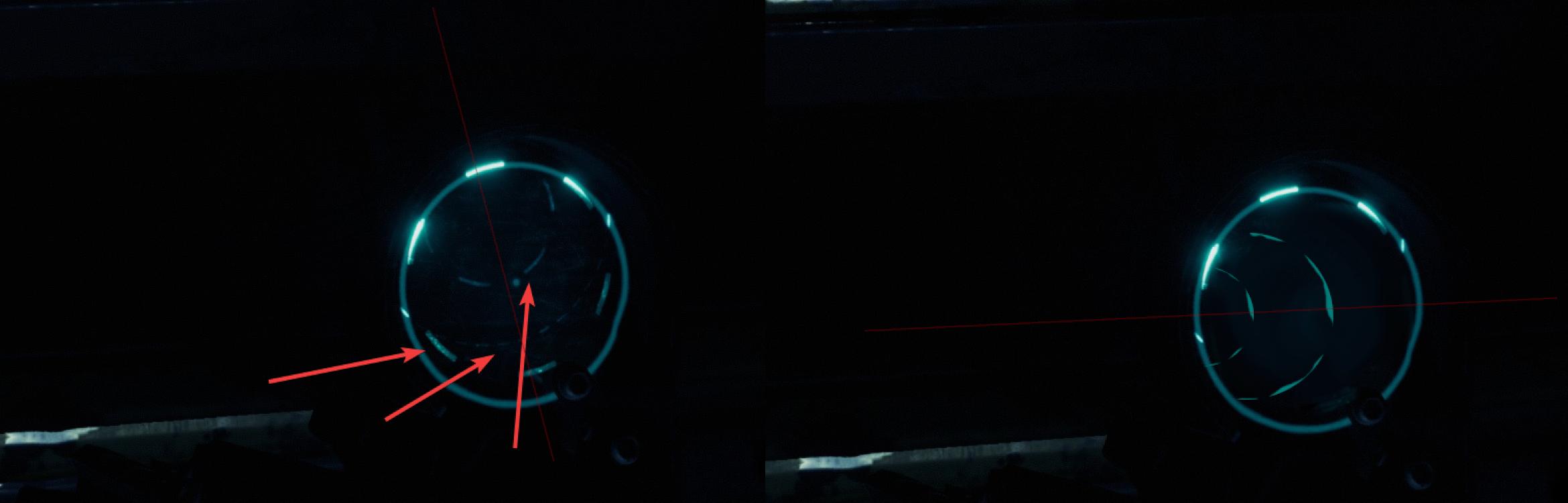
Hey all 😉 Is that an issue(when putting a hand Burst Rifle away)? Made some demonstration: https://i.imgur.com/OOGovsK.jpg (left side - an issue, right side - a photoshoped example)
 tiny sundial
Atm, I cannot host(solo) nor group up with people. When i host or join alobby, i get this. Is this the known issue "no players in lobby"? any workarounds for now?
slender condor
Atm, I cannot host(solo) nor group up with people. When i host or join alobby, i get this. Is this the known issue "no players in lobby"? any workarounds for now?
@tiny sundial Already reported
Restart game, recreate lobby
tiny sundial
tried verify game files, reinstalled GTFO, restarted computer, restarted modem+ router
proper grove
Perform the following steps:
- Uninstall game on steam.
- Delete the following folders:
:PL: C:\Users\USERNAME\AppData\LocalLow\10 Chambers Collective
:PL: C:\Users\USERNAME\Appdata\Local\Temp\10 Chambers Collective\ - Install the game
This one fixed it for 80%
slender condor
Hey all 😉 Is that an issue(when putting a hand
Burst Rifleaway)? Made some demonstration: https://i.imgur.com/OOGovsK.jpg (left side - an issue, right side - a photoshoped example)
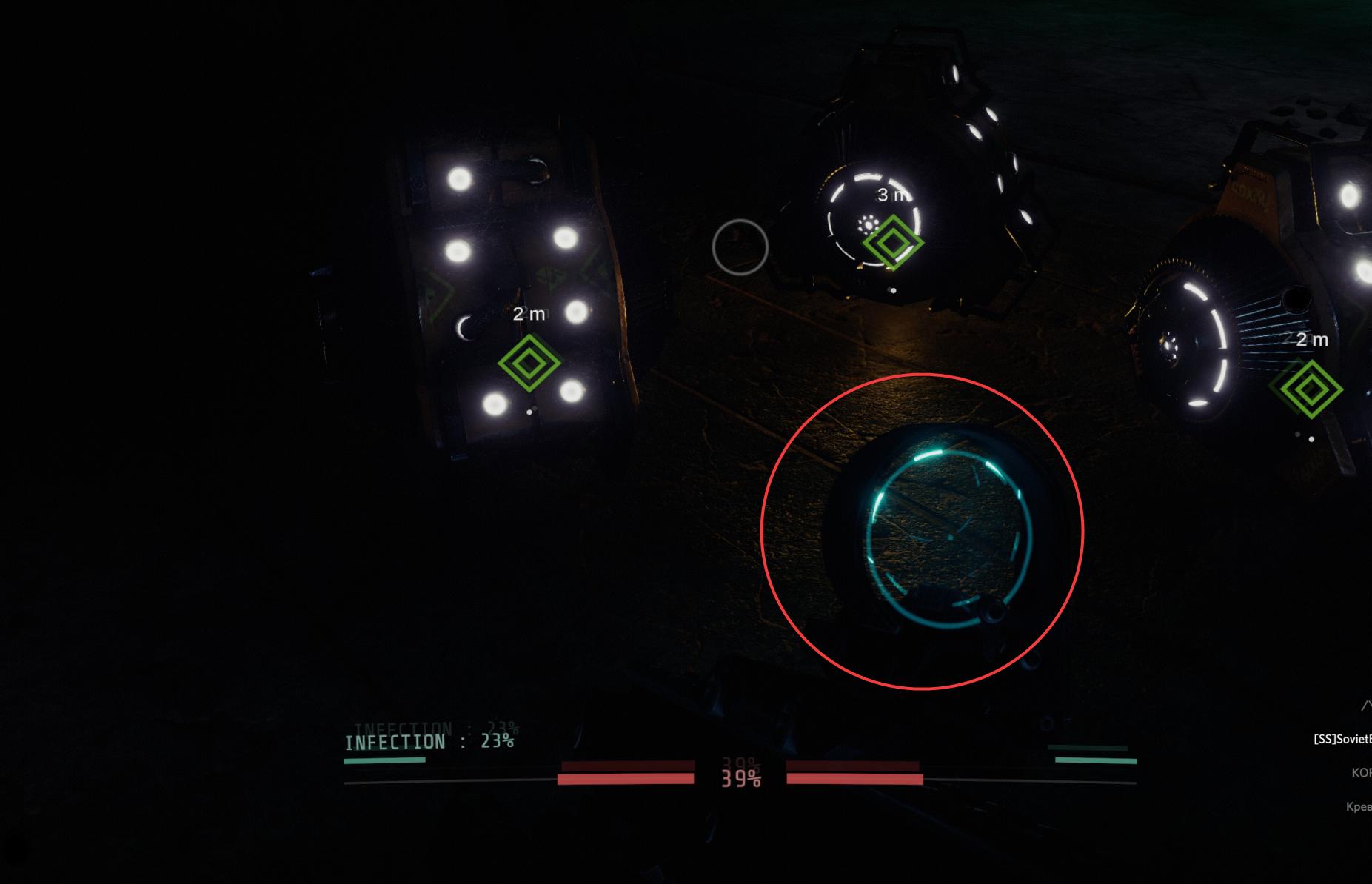
@slender condor Regarding this one. This image might show it more clearly: https://i.imgur.com/p2bOjJT.jpg
 tiny sundial
deleted " C:\Users\USERNAME\AppData\LocalLow\10 Chambers Collective"
did not find "C:\Users\USERNAME\Appdata\Local\Temp\10 Chambers Collective"
did not reinstall justnow(but i did before), but it works now ty
 viscid tiger
@slender condor this appears to be a design choice for literally every weapons optics except the revolver.
slender condor
Why? This makes no sense, no? It more likely seems like a model's bug xD
viscid tiger
nope its literally a thing on every weapon but the revolver
slender condor
Because this is not how optics work
viscid tiger
the revolver, you can see the dot optic when holding it in hipfire
every other gun either distorts or removes the reticle completely when in hipfire
slender condor
This is not how distortion looks like.
viscid tiger
could be some telescopic futuristic sight bs
slender condor
Nope. This is not a design choice for sure.
viscid tiger
but i honestly dont think its an issue
slender condor
It is
slender condor
The devs maybe just didn't notice.
viscid tiger
nope this was also a thing in the pre-alpha phase of the game
before they vamped it entirely
but i do agree, if its not some game design futuristic bs it might be something else
maybe purpose or accidental
one thing is for sure its not significant
slender condor
It is, if you want a game look finished.
viscid tiger
?
slender condor
I've asked a devs, not you btw. Let's talk about this in other room, not here ... wth
viscid tiger
i just want to know wym by finished
slender condor
ive been a supporter before alpha
@viscid tiger Good for you, are you a dev?
@slender condor this appears to be a design choice for literally every weapons optics except the revolver.
@viscid tiger This design choice makes no sense.
 lusty niche
I like it
 opaque zodiac
Hey all - a few times some people in our group have been in a room which is pitch black, whereas for other members it's actually somewhat bright. Any idea what might cause this?
proper grove
@opaque zodiac sounds like a bug with the light engine. It can help to just press esc. twice
 crystal tiger
Question, is there a way to unbind scroll lock from taking a screenshot?
slender condor
Question, is there a way to unbind scroll lock from taking a screenshot?
@crystal tiger https://i.imgur.com/XtUKoIX.png
 proper grove
Yeah there's a SS function. Not sure if unbindable.
crystal tiger
? @slender condor
slender condor
? @slender condor
@crystal tiger Have you binded this key by yourself?
crystal tiger
no, its a hidden keybind
i.e. it isnt in the games controls menu
i've taken a look through the game's input file (i.e. GTFO_Settings.txt) and it isnt there either afaik
its annoying bc scroll lock is my PTT because its (usually) an unbound key thats fairly useless
so i checked my C: drive just then to find 70gb of space used up by ultra high quality screenshots of GTFO
so now im wondering if anyone knows where the keybind input is stored so i can unbind it for the sake of my drive space
slender condor
Interesting
crystal tiger
any help is appreciated
crystal tiger
update: i found a work around by denying the system the ability to write to the screenshots folder, however unbinding entirely would still be preferable
any tips accepted
 languid mirage
question.. my friend stuck loading screen at cortex interface.. anyone know how to fix it?
my friend stuck like this..
slender condor
my friend stuck like this..
@languid mirage That's what she said
Actually, Alt+F4? This might be related to a host -> client packets.
languid mirage
hes stuck in there like 10/15 min i think
ok" ill ask him..
languid mirage
hey.. my friend now everytime hes launching the game.. he crash
@slender condor
slender condor
I'm sad to hear that. Try to delete a game + delete folders C:\Users\USERNAME\AppData\LocalLow\10 Chambers Collective\, C:\Users\USERNAME\Appdata\Local\Temp\10 Chambers Collective\. Reinstall.
languid mirage
ok ill ask him
wide zealot
so i checked my C: drive just then to find 70gb of space used up by ultra high quality screenshots of GTFO
Is your screenshot key bound on key W or what ? haha. I am confused why GTFO would have an own binding for screenshots when Steam supports it already and by default it's F12
proper grove
@languid mirage did it work?
whole laurel
@proper grove Hey just to let you kow I still find new screenies in the /appdata[...]/gtfo/Screenshots folder even after replacing settings file with a fresh one.. I could not identify what key triggers SS. Double-checked that I dont use any steam/discord overlay/SS function, as well as windows game mode/bar.. They're all disabled.
Also if I delete the screenshots folder it will come back after 1 or 2 games.
languid mirage
@proper grove a min let me ask him
whole laurel
sure
proper grove
KK
wide zealot
and his spec meet the minimum requirements
languid mirage
it is..
i5 9400
1660
8gb
wide zealot
game is installed on a ssd or hdd? may do a defrag check if it's on a hdd
wide zealot
i don't think so no. my personal guess is that something is very slow loading the assets at the game start
proper grove
@languid mirage try to replace the settings file with the one pinged
languid mirage
ok ill ask him
proper grove
pinned*
languid mirage
move it to game file?
proper grove
C:\Users\USERNAME\AppData\LocalLow\10 Chambers Collective\GTFO
crystal tiger
@proper grove Hey just to let you kow I still find new screenies in the /appdata[...]/gtfo/Screenshots folder even after replacing settings file with a fresh one.. I could not identify what key triggers SS. Double-checked that I dont use any steam/discord overlay/SS function, as well as windows game mode/bar.. They're all disabled.
Also if I delete the screenshots folder it will come back after 1 or 2 games.
@whole laurel its scroll lock. which is an issue if thats your PTT
languid mirage
ill ask him a min
wide zealot
%userprofile%\appdata\locallow\10 Chambers Collective\GTFO
paste this into the file explorer to directly jump to the LocalLow GTFO folder
languid mirage
he still stuck like that on that picture
proper grove
Can he swap to window (press alt+enter at start)
slender condor
Is it possible to somehow hide mouse cursor?
languid mirage
a min.. ill ask him
slender condor
A cursor
wide zealot
What. I don't see a cursor on the second picture. hiding the cursor is generally something you will regret afterwards 😉
why would you not want a cursor?
wide zealot
lol you post the menu screen and another screen without cursor 😂
press alt+enter twice, problem should be solved. dont alt tab all the time
slender condor
Sorry xD Bad screenshot 😄
It doesn't work.
Even after Alt+Tab, reclosing all overlays and changing window type;
- Changing resolution.
wide zealot
it's AFAIK not an issue with the game but how windows handles tabbing. Always worked for me to press ALT+TAB twice to go windowed and back to fullscreen
then you are screwed
languid mirage
he still stuck like that..
wide zealot
maybe try in gtfo to switch between fullscreen, windowed and fullscreen windowed
languid mirage
hes give up.. gonna refund lol.. rip..
wide zealot
maybe defrag the hdd
languid mirage
i think so too..
wide zealot
out of curiosity, how many times did he reinstall the game
languid mirage
4 times now
wide zealot
probably why the game will be more and more fragmented
languid mirage
hmmmm
wide zealot
he should install a graphical defrag program such as defraggler
make a quick check on the hdd to see if it's badly fragmented or not. if almost nothing is fragmented either check the fragmented files or let it be
if it's very fragmented it may help. I am certain his whole PC is waiting for that slow ass HDD to load in the assets
also, disable any anti virus during the testing. and generally all background noise (apps) and programs
maybe have a double check on the RAM usage, 8gb can get crowded depending on what he has in the background
whole laurel
@whole laurel its scroll lock. which is an issue if thats your PTT
@crystal tiger Thank you, actually I don't use scroll lock at all, but just realised it was the "home" key below scroll lock that takes screenshot aswell.
crystal tiger
yeah scroll lock is my PTT and guess where 70gb of storage space went
whole laurel
hah yeah, well at least that's great to have built in SS function tho!
crystal tiger
i havnt worked out how to unbind it, but i have a work around to save space if youre interested
whole laurel
oh yeah sure
crystal tiger
essentially navigate to the screenshots folder and set it so the "system" has denied write privileges
that stops them from saving and saves disk space
whole laurel
ah I see, thanks for that tip
proper grove
essentially navigate to the screenshots folder and set it so the "system" has denied write privileges
@crystal tiger awesome tip ^^
crystal tiger
its the best i could do unfortunately, scoured the game files for a solid 2 hours and couldnt find where the keybind is coded in :P
plz almighty devs give us a keybind that is editable
 edgy void
Hi, I am having this connection error issue suddenly. I have tried all of the resolution in #known-issues , uninstall and reinstall again, still having this issue. My friend with the same internet service provider does not have such problem.
wide zealot
I don't think the screenshot function is intended and was probably used before the game was on steam
Haruru it's a temporary issue. Can try to reopen steam every now and then, turn of the router for a minute and turn it on again, or just practice patience
edgy void
I did, i even leave the game like that for 2hour, and its still like that :|
wide zealot
it's the time of the day where most people are online (and probably redownloading games over and over)
edgy void
Then how does my friend even go into the game without waiting long or having such problem? Meanwhile i keep getting this error
wide zealot
can be routing, can be steam being overloaded and not all player can authenticate. it's not really possible to give an exact answer
edgy void
i see, guess i will just wait for new fix
wide zealot
there won't be a fix unless authentication is not handled by steam
you can try in steam to change download region. it may also help with authentication
in steam: top left"steam" -> Settings" -> "downloads" -> Download region -> Pick one close to your location
don't forget to switch it back. may not help at all
wide zealot
then you can switch back and probably have to wait 😕
proper grove
No joke, for most problems:
Perform the following steps:
- Uninstall game on steam.
- Delete the following folders:
:PL: C:\Users\USERNAME\AppData\LocalLow\10 Chambers Collective
:PL: C:\Users\USERNAME\Appdata\Local\Temp\10 Chambers Collective\ - Install the game
edgy void
i did that as well, still same
proper grove
you deleted the folders?
edgy void
yes
proper grove
even the second one?
edgy void
yes
proper grove
ok.
You can try to use a vpn, or your phone as hotspot. Or even use the thethering function of your phone...
edgy void
i did try my phone data, still same sadly
proper grove
mhh. weird.
edgy void
this problem just suddenly pop out
proper grove
weird indeed. haven't got many reports of this problem rn.
edgy void
indeed
i did try uninstall and reinstall for like 5 time already
while deleting the folder you say just now

proper grove
yeah i see.
wide zealot
I checked your location
I checked the steam status
in your region steam shows high load
by redownloading the game 5 times you are contributing to the issue 😉
edgy void
is it? i didn know that, if so, i am so sorry about that
wide zealot
it's more a joke, but if a large amount of people doing it, it does at some point
i would wait, it's just a problem on valve's side, not gtfo or your connection (most likely)
When you open the game, it checks if you are really owning the game and steam handles this authentication. if steam doesn't answer, gtfo will print the "network error".
This is not an official statement from the devs but I know how steam games work and it's not the first game people going nuts because not being able to start the game
it's a problem with DRMs
edgy void
i see, guess i will just wait and see if not i will just play other day, thanks anyway
 near oyster
Any 1 else having difficulties joining lobbies and lots of lag
 tawdry trellis
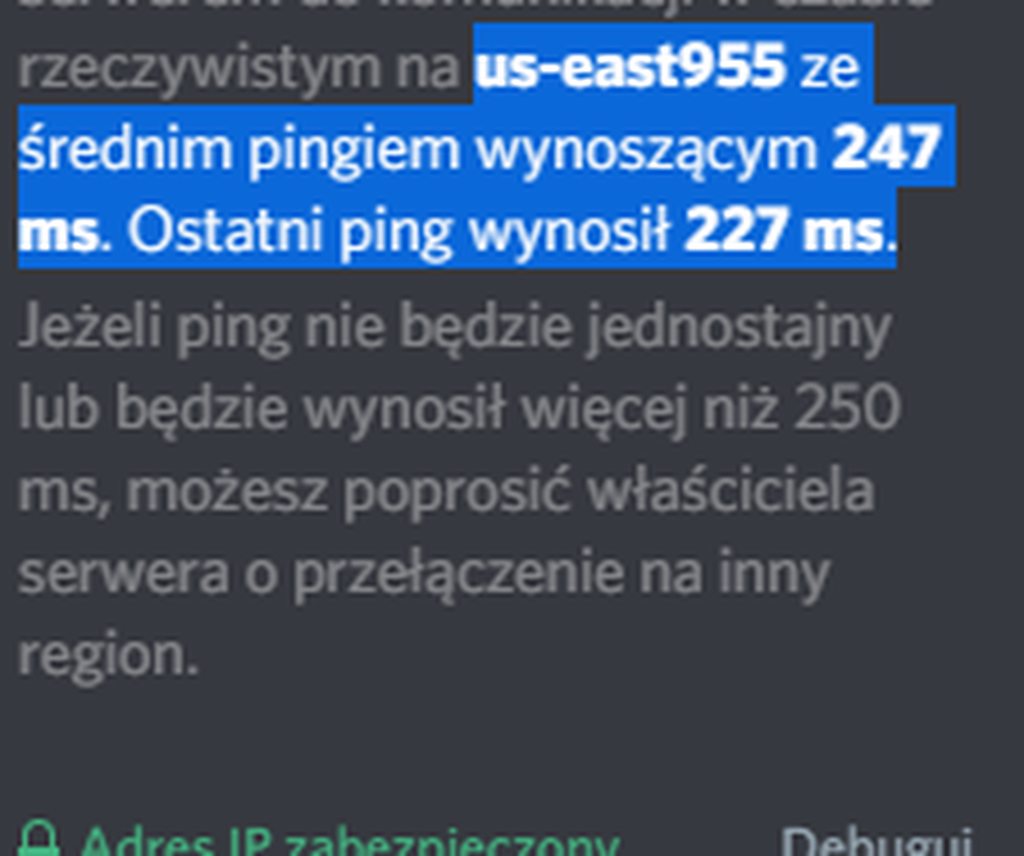
Can someone change back my server region from US to EU?
I play pretty often with guys from US but that doesn't help me really because now communication is laggy.
proper grove
What do you mean with your region?
 proper grove
This Discord server is located in the us as it is the most reliable location for such a huge community ^^.
@tawdry trellis
 silver bronze
Puffer overflow or something else: after 7 hours gameplay game uses like 7,5-8 GB memory. can't use report tool, becuase it kicks all other programs from memory
proper grove
Hi! Do you have ever encountered such a problem with another game?
silver bronze
no never. Only with games with memory leak... means not with ususal, stable build versions
proper grove
What are the other games that you encountered that problem with?
 fluid flume
Have an issue where when I run the game it is stuck on a black screen. Only thing that happens is the steam notification about shift-tab. But once that rises and falls, I'm stuck on a completely black screen
proper grove
@fluid flume Hi! Do you have a recording or a screenshot that explains your problem any further?
fluid flume
I'll try to run it again and take a picture but there isn't much to see. The game starts, and its just a black screen. I've played a good few hours and it ran like a treat. But now it just launches to a black screen. I tried the usual stuff, verifying integrity and when that didn't work, a reinstall. But still just a black screen
proper grove
Oh so it STARTS on a black screen
ok you may just need to replace the settings file
I attached a clean on in the pinned messages.
fluid flume
okay, I'll try that, thanks
proper grove
If you need help or get stuck let me know ^^
silver bronze
What are the other games that you encountered that problem with?
@proper grove Some early (later fixed) Deep Rock Galactic versions. It is early access too.
proper grove
Mhhh. I have not heard of your problem so far. Do you have a recording soft ware or similar?
silver bronze
Mhhh. I have not heard of your problem so far. Do you have a recording soft ware or similar?
@proper grove No,. And after game restart game only used like 2,5 GB.
It runs atill stable , but frreze candece begins too rize with time.
fluid flume
Thanks, it works now
silver bronze
i7-9700K, gigabyte aorus gaming Wi-Fi Mobo, 16GB DDR4, 1080Ti, Win7 x64
proper grove
Ok thank you.
Give me a minute :3
Ok @silver bronze I would need you to file a bug-report. How to do that you can find in #bug-reporting. Also it would be nice to attach your log files. Should you be stuck, or need help with anything, let me know ^^
silver bronze
Why is GTFO log manager not included into official game installation? Ingame bugreport would be much easier....
proper grove
You can attach this to your bug-report ^^
silver bronze
did it too )
mighty cipher
Hello. I cant seem to join anyone lobby cause I do not have the Join Rundown option
 kindred kindle
Why is GTFO log manager not included into official game installation? Ingame bugreport would be much easier....
@silver bronze This is something D0cR3d has been talking to the devs about, but it's a matter of dev time to create tools built into the game. D0cR3d created the log manager himself so the devs could focus on the game. Hopefully sometime in the future more could be done.
tawdry trellis
@proper grove ok thanks
 vapid aurora
my GTFO stays running in steam even after i close the game, is this a known issue, any workaround?
 true oasis
Try opening Task Manager and searching for GTFO in the Processes tab.
If it's in there, then that might explain it, and in which case you can just end it there.
If not, then try restarting Steam.
 vernal lance
I have restarted the game and my pc, rebound the key, and played multiple games, but toggle aim does not work. It only holds for about 4-8 seconds before dropping
unique blaze
Hmmm what button are you using?
 bold lava
Has anyone had issues with lights not rendering for clients? Couple of my friends were encountering issues where rooms were utterly pitchblack, despite myself (the host) and another client could see just fine
unique blaze
@vernal lance if it's shift control or alt it could be window's sticky keys, unless you have a special keyboard with drivers.
unique blaze
@bold lava did it happen whan you were crossing through a doorway?
@vernal lance any difference when rebinding it to g at all?
wraith spoke
we're really not for technical support
but @proper grove
might be able to help you out
 rotund sand

vernal lance
I'll repost my original question from gtfo related questions here one sec
unique blaze
@bold lava i recommend restarting the game and steam, you should be able to rejoin the game and discord voice channel as soon as you reenter.
@vernal lance it is kind of an odd problem i havn't heard of yet.
vernal lance
rotund sand
I had this problem in rundown 1. Didn't really ask for a solution though. I just turned it off and got used to playing without it. I had actually forgotten toggle aim is even a thing since then. It does seem to be selective though, as none of my friends have this issue despite using the toggle aim. If you find an answer, I'd also like to know. ^^
vernal lance
Thats really the only relevant information from that chat lol
rotund sand
My suggestion would be to play a game and if it happens, submit a bug report as detailed in #bug-reporting along with a description of your issue. The Dev's may be able to pinpoint the issue with that info.
bold lava
@unique blaze no, it's not just when looking through certain doors, and we're all in discord well before we start GTFO
unique blaze
Key: yeah, i can't think of anything. other than the possibility of a custom driver setting. but i doubt that's your case.
vernal lance
I'll submit a bug report tomorrow; I don't have the time tonight
rotund sand
Sorry I couldn't be more helpful. ^^
vernal lance
And it's not really an if as much as it is a when it happens
unique blaze
key; might as well get tonights logs saved. for the report later.
vernal lance
I'll play a few games tomorrow to get the most updated logs
unique blaze
@bold lava i would say that they should do the restarts. otherwise have them make a bug report. they can also try this: https://discordapp.com/channels/408196129470152705/633424858088472578/653718367676661770
the later sucks to do but it'll reset anything that's corrupted
@rotund sand thanks for coming over and trying.
rotund sand

vernal lance
Yeah thank you for trying
 covert perch
@mighty cipher please don't post off topic messages into this chat.
 mossy flower
Hi everyone, I have been running into an issue that whenever i join a friend's lobby, it shows a blank lobby with 4 invites. Appreciate it if anyone can provide some insight
mighty cipher
Hey Jacky! I responded to you in the general chat, but I'll repost my response here:
Have the host disconnect and recreate the lobby. That usually works for me.
mossy flower
tried remaking the lobby, and using all kind of methods in joining lobby
mossy flower
tried also reinstalling the game and validating the game files
mighty cipher
If you don't mind, can you tell me everything that you have done so far?
mossy flower
nothing work so far
mighty cipher
Asking so we can be on the same page. 😅
 crisp pike
^^ One of my friends is experiencing the same thing
We've re installed the game, validated the files, restarted the computers, etc
nothing is fixing it
mossy flower
if i launch the game, when i get to the rundown, if i have only just started the game first time around, i can host a lobby seeing myself inside, and playing the game solo
however, if i join a friend's lobby (through steam invite/joining via the game/ using the lobby code)
i will join a lobby with no one but 4 invite button (not even myself)
not sure if that's helpful, but after this, when i exit the lobby and again host a lobby of my own, i will also now get a blank lobby with 4 invite button
it happens 100% of the time
mighty cipher
So just as clarification, you cannot join other players, and other players cannot join you. Correct?
mossy flower
yes
same thing happens when i host a lobby and ask them to join me, they see blank lobby with 4 invite
mighty cipher
I believe this is something that the developers have noticed and mentioned in #known-issues and are currently working on debugging. But for the meantime, I'll see if I can help you to the best of my ability to get something working.
Let me launch my game.
mossy flower
thank you!
mighty cipher
Create a lobby and post the invite code here if you can. I want to see if it's just on your end or will it affect me as well.
mossy flower
give me a minute
mighty cipher
Sure thing
I'll admit technical issues aren't my strong suit. @proper grove would be able to give better assistance, but he's not here right now lol
 bleak relic
The issue still persists if someone were to join him
mighty cipher
Same issue for me as well
Conversely, are you able to join mine?
109775240984935171
bleak relic
I'd say to send the logs but I won't get ahead of myself and let Lavars do it
mossy flower
same issue @mighty cipher
mighty cipher
Hmmm
@bleak relic Honestly logs might be useful but I don't have the skillset to understand them fully.

bleak relic
Atleast you have them if someone needs them
but I don't know this issue fully so I can't really speak
mighty cipher
@mossy flower I'm pretty sure you've already checked this since you seem to have been pretty thorough, but are you running the current version of the game with the patch and all?
You said you redownloaded it so I can only assume that is the case.
mighty cipher
This is honestly pretty strange ngl.
mossy flower
i tried everything before i desperately seek help here
mighty cipher
Techno do you remember the issue that people couldn't get past the login screen?
mighty cipher
I'm wondering if this could be a potentially similar issue, though that's me going out on a limb here.
It's worth a shot though.
proper grove
Hello!
mossy flower
LAVARS
mighty cipher
Omg Lavars
proper grove
Let me get to the problem, then i can help ^^
proper grove
Ok. @mossy flower Have you tried to join others lobbies?
mighty cipher
Here's the start of the conversation if you haven't found it yet Lavars
https://discordapp.com/channels/408196129470152705/522894627007758353/698789917353967677
I had him try to join me in game. No success.
proper grove
ok super
So we know it's you
(just have to be sure)
Have you tried following these steps:
Perform the following steps:
- Uninstall game on steam.
- Delete the following folders:
:PL: C:\Users\USERNAME\AppData\LocalLow\10 Chambers Collective
:PL: C:\Users\USERNAME\Appdata\Local\Temp\10 Chambers Collective\ - Install the game
Specially deleting the folders
mossy flower
i tried to follow the steps above, but at#2 i cannot find the folders
proper grove
the second folder or the first one?
mossy flower
theres no appdata folder in my user folder
proper grove
oh ok
mossy flower
i recently reinstalled my windows and cleared everything on it
proper grove
i see
all good ^^
Press they windows key + R
a run windows open
Type %appdata%
PRess enter
mossy flower
but the second folder doesnt exist, the one in appdata\local
proper grove
The second one you can ignore


