#gtfo-technical-support
1 messages · Page 16 of 1
 old sluice
 proper grove
Can you join others lobby? and what happens if they try to join your lobby? ^^
old sluice
some lobbies, others not
proper grove
What happens when you try to join a lobby (that you can't join)
old sluice
nothing
proper grove
So when you get invited via steam, and you press "join". Just nothing happens?
old sluice
yep
do you need to complete the first tier before being able to do the next?
as in someone who hasn't done A1 can't do B2
proper grove
Oh you ca join peoples lobbies even if you haven't them unlocked.
old sluice
ok thx
proper grove
So no, you don't need them unlocked.
 clear thorn
do you have this bug in rundown 002 ? >> each player see a different value of my shootgun sentry percentage
proper grove
Good question. Let me check.
@clear thorn I will come back to you as soon as i know if this already a known bug ^^
clear thorn
@proper grove Thx
 willow lance
anyone having problems trying to launch the game? mine freezes on launch with the steam notification on bottom right screen
proper grove
@willow lance Can you send me a screen? I think i'm able to fix it ^^
 polar sluice
is anyone else having an issue with infinite loading
proper grove
Do you get it in the Dropdown?
proper grove
Ok, please give me a minute, i'm on another case. But will come to you in around 5 minutes ^^
do you have this bug in rundown 002 ? >> each player see a different value of my shootgun sentry percentage
@clear thorn hi! This is a known bug! But thanks :3 Appreciate sharing
clear thorn
@proper grove ok thank for your help !
proper grove
Have a nice one! And don't die to often ;)
@polar sluice
error: Game stuck on loading
Problem: Corrupted Settings file
Fix: replace with fixed Settings file
If the game looks like this, it is probably a corrupted Settings File!
proper grove
proper grove
If the game looks like this, it is probably a corrupted Settings File!
@willow lance
Error: Blackscreen on Startup
Problem: Corrupted Settings File
Fix: Replace with fixed File
Working Settings file!
proper grove
proper grove
Working Settings file!
my screen shows this when i try to join a lobby
@mighty cipher Hi! Did everyone downloaded the Hotfix that was released?
Yeah, but did Everyone? ^^
To be safe every one should restart steam and see if a update comes through.
Are you the host?
Can you hoist a single player game and see if it's working?
Ok, can other people join you?
Is it possible you can test that? because it does not have to be you who causes the bug ^^
Sometimes it's a little tricky ^^
 mighty cipher
Hi, is there a way to restart my settings? My resolution is too small and I can't reach the start game button.
proper grove
x3
Yeah.
@mighty cipher
Error: Super small window
Problem: ???
Fix: Changed resolution to 720p via Settings file
 lunar spire
Hello there, just wanted to report a bug we suffered las run, would this chat be the right place?
proper grove
What kind of Bug do you want to Report ^^
lunar spire
On A1, with the 2 cargos on the Extraction scan, when we reached 100% the Host got to the complete mission screen, but the other 3 members of the group got stucked inside the game. Enemies didn t try to hurt us but we couldn t end the mission.
proper grove
Ok, Yeah this is a known bug! But thanks for Sharing!
lunar spire
The scan showed yet 100% and the 2 cargo objectives where still inside the extraction
Oh, sorry then :) and thanks for your time.
proper grove
No all good. Rather i get 20 times the same bug report than 1 that's never get reported ^^
So you are all good.
Have a nice one!
lunar spire
Hahaha nice then, keep the great work :D
proper grove
Keep being great!
 stuck nimbus
Is the text in game supposed to be blury?
proper grove
Yes!
But to be sure you can send me a Screenshot.
So we don't oversee a bug or smth ^^
@stuck nimbus
proper grove
Yep looks like it is supposed to look ^^
mighty cipher
https://steamuserimages-a.akamaihd.net/ugc/1020569817346965909/4DACC04DAC8082C6D1E8FD5D5C05F9A7EC1F044C/ these three sleepers have so far always spawned inside this wall
 proper grove
Thank you! How often did that happen?
And what level is this?
nvm, it says top left x3
proper grove
ok.
mighty cipher
We were getting the key for the big bad door
They spawned in the wall above the door
proper grove
Ok, thank you.
Give me a few minutes please ^^
@gritty grail what resolution do you play on?
 gritty grail
and I send the bug report through bug tracker?
 tacit stag
proper grove
tacit stag
proper grove
and I send the bug report through bug tracker?
@gritty grail Sorry for delayed answer.
Make a Bug-report and attach your log files
@tacit stag hi ^^ Can you give more information on where this happens?
tacit stag
This happened in the first room in one of the rage rooms of the R2-B1
 halcyon zephyr

 slim spruce
Bug Report: I don't have the Join Lobby button! Anyone else know how to fix this? Same bug as: @spice parcel
proper grove
Did you played before and had the Join button? @slim spruce
slim spruce
No, this is my first time
proper grove
Ok, be sure you are following the steps correctly ^^
If the lobby is full you can not join and the button does not show too
 fiery sage
Bug Report: I think this is due to the hotfix regarding "bloody doors," on R2B1, behind the bloody door for Zone 721, there appears to be an enemy that spawned behind the broken down door. I believe since they spawn in lines now instead of grouped in front of the door, it spawned out of bounds.
Correction: he spawned in the wall above the door, and there appears to be multiple
 exotic raptor
who tringa
talk
Cus my wife tripping
" a convo doesnt mean i have to talk back"

Then thats just me talking to a wall lmfao
@mighty cipher
Come love me
wrong channel
lmfao
 white kettle
where do i report bugs
you can just open a door
slap a sentry down and close it
and it will clear a room without alerting anything
 jade pine
Monsters in the walls? :'] anyone else?
 quasi mantle
yep
white kettle
yeppers
my friend tried to be a hero, and now hes dying. is this what the devs want?
 velvet verge
 round elm
Me and my mate had issues yesterday. There was a huge delay and lag between us. Is this a common thing now that happened with the new update or is it something on our ends. We thought it might have been our NAT type but we couldn't fix it in the end.
 lone patrol
Anyone else's progress got lost today?
mighty cipher
I had this error yesterday, I changed my "download region" to Netherlands and its start working, but maybe its steam based
 wide zealot
@round elm most likely just the internet going nuts. We had the same issue (frankly my buddy plays through mobile LTE connection) and when we tried later in the evening (when all the normies turn of their TV and PC) it was all fine again
Also in general. If your GTFO (or whatever application crashes) and you don't know why, you can check the Windows Event Viewer:
Windows Key + R Key -> Type: eventvwr.msc -> Open Windows logs (left side) -> Open Application -> Search for the GTFO or sort by date and then check for "error" or "critical". Sometimes useful info can be collected, sometimes it's not useful unless you are the debugger of the application 🙂
 short mural


 sonic sand
😦
 cloud isle

 fossil dirge

round elm
I also get that. It takes a bit for me before it shows you your team
 obsidian gale
Is there a fix for trying to join someone's lobby when there's no join button ?
fossil dirge
he deleted them lol
 halcyon agate

obsidian gale
Oh
 naive flax
Oh
lone patrol
I completed a1 yesterday, cameback today to see that the game reset my progress. Any fix?
naive flax
I cant join any lobby unfortuntely Im on my own now, Guess I have to go Deathly Competitive Task 👀
round elm
Still a huge delay between me nad my mate. He lags big time when we play it so I guess it's just him?
 flat pollen
@lone patrol mine too
But some of my friend's progress still available
Maybe it has something to do with a VPN?
I've still the "network error, retying...".
I'm able to join the game with VPN (Start VPN, Start Game, Stop VPN)
Could that be a reason for that?
@lone patrol Did you also use a VPN?
 ivory dragon
idk what this is but why?
lone patrol
no i didnt use a VPN
lone patrol
sure
lone patrol
only a1 not that bad
 smoky tree
i was just playing r2b2 with some people and after a few rooms the enemies wouldnt move and none would spawn as well as alarm doors and extraction wouldnt work
smoky tree
no it
it didnt work
it showed the circle and then when we stood in it it dissapeared
proper grove
On what level did that happen? @smoky tree
and did someone have a recording or similar?
 rapid portal
I can't connect to server
proper grove
Check the pinned messages here, or #known-issues
:/ There are some workarounds, but non is guaranteed to work
 royal plume
not able to join other games using a copy and pasted code, I don't see an option on the left of the rundown menu anywhere
 paper fable
Has anyone else had issues with the wall screamers only being affected by the hosts' light source? We've played a few games and every time only the host could affect them with his flashlight.
smoky tree
@proper grove it was R2B2
 prisma spoke
Still getting the Network Error, even after proxy refresh, vpn, restart, router restart, checking all ports.. :/
proper grove
Issue:
When starting the game you get the error "No Network Connection".
Resolution:
This has a few causes:
- The game is having an issue connecting to PlayFab.com which is a service used for storing game data. This is likely an issue on their end or some regional outage. Please wait and try later, should resolve itself.
@proper grove
prisma spoke
I know that might be little bit mean but, ive been trying since the Update is out. Regularly atleast once per 2 hours..
Not a Chance.
proper grove
Ok. In what country are you located?
 sharp sable
Me too, i still have the network erorr bug :/ since yesterday nothing works and before it appeared 100% of all game starts and only a few times actually started afte it retried
'am from germany
proper grove
Yeah there's not much we can do unfortuante.. i wish i could for sure. We only can try to renew ip, or use VPN or use a phone as a hotspot
sharp sable
Well, that still doesnt workj fo rme either ^^
proper grove
Telekom gives the most problems as far as i know. There are probably some more who suffer thou Corona.
Well, that still doesnt workj fo rme either ^^
@sharp sable Did you tried to use "CMD" and renew your ip?
sharp sable
can you explain how? (and no i didnt)
proper grove
Of course i can ^^
Just a little info:
Your internet will disconnect for a short amount of time (maximun 5 minutes)
sharp sable
Its okay 🙂 gonna do it and then eat and shower hehe
proper grove
IF you want to use CMD just press the Windows key (Bottom left of your Keyboard) and "R" at the same time
sharp sable
its alread yopen 🙂
sharp sable
done
 long totem
Hello, we have a game bug over here... my mate cant start the game(network error no connection) any ideas what we can do ?
proper grove
type (first) "ipconfig /release" as written here but without " and "ipconfig /renew" afterwards without "
Hi Ahroo ^^
Did you tried to restart Steam, router and Pc already?
prisma spoke
Germany, Cologne
prisma spoke
but even using vpn with different locations, like great britain or something is not working
proper grove
Please use the LFG Channels to find players
but even using vpn with different locations, like great britain or something is not working
@prisma spoke have you tried Netherlands? Someone had luck with it
long totem
so
You can try to renew the ip, u just explained how.
@proper grove what do you mean ?
 keen torrent
I got Toggle Aim enabled, but I keep un-aiming without clicking at random.
mighty cipher
Hello
proper grove
@long totem Open CMD and type (first) "ipconfig /release" as written here but without " and "ipconfig /renew" afterwards without "
@keen torrent What happens if you dissable it ^^
@mighty cipher Hi! How can i help you?
mighty cipher
My friends getting the technical error to connect
All what he has to do is wait till it works again?
keen torrent
If I disable it, I need to hold right MB all the time to aim, no ill effects noticed then
proper grove
Open CMD and type (first) "ipconfig /release" as written here but without " and "ipconfig /renew" afterwards without "
@mighty cipher
mighty cipher
Alright let me see
proper grove
Mhh @keen torrent Can you send me your GTFO_settings file? If you don't know how, send me a PM
Sure, take all the time you need ^^
proper grove
Mh :(
 cosmic hollow
hi, how can i join other lobbies i can only create and there is no lobby to join or it doenst show to me
 dusk flower
Have you given it permission to go past the firewall?
proper grove
#how-to-matchmake @cosmic hollow
cosmic hollow
oh thx
dusk flower
Antivirus and windows firewall can block connections without permission, normally gives a pop up asking if it's okay though
 velvet raven
so I tried restarting steam, my pc and my router and nothing has changed :c
mighty cipher
It already is allowed
Did you guys try VPN? I found this workaround yesterday - connect to any country, launch the game, get past the "inject" button and move to the main menu, then disable VPN and you should be able to play on your normal IP. I believe some ISPs are blocking the connection due to the coronavirus
velvet raven
i was able to play the game before
proper grove
it's mainly to the provider who storages the Game progress.
They have massiv problems, that's why this error comes.
But some fixes can help to join the game
velvet raven
soooo what do I do?
dusk flower
What type of phone do you have
proper grove
I said hermit @dusk flower this one ^^
dusk flower
My bad for stepping on your toes boss
velvet raven
oh I read the sentence wrong
long totem
gg i guess we cant play today GTFO with this error :/
proper grove
^^ :P
proper grove
@long totem I will post Updates as i know something new I put your name on a list to ping you if i know more, ok?
mighty cipher
put me on the list too please xD
velvet raven
me too pls
proper grove
Will do!
long totem
@long totem I will post Updates as i know something new I put your name on a list to ping you if i know more, ok?
@proper grove ye thanks
proper grove
The minimum i can do.
@velvet raven
@mighty cipher
@dim oyster
@long totem
Sorry for ping already. We could need you "Json" Files. If you can provide me these, it may helps to fix the problem way faster.
How to find them?
go to:
C:\Users\lavars\AppData\LocalLow\10 Chambers Collective\GTFO
Swap "Lavars" with your Pc Name and send me the .JSON files located there as a Private message.
I appreciate your help <3
 dim oyster
I'm using a vpn and it's working now, gonna send you the file anyway, sec
proper grove
If you can not find the folder.
Press Windows key + R
a Run windows opens.
Type %appdata%
Press enter.
Click on Appdata
LocalLow
10 Chambers Collective
GTFO
@dim oyster Awesome!
mighty cipher
my friend just connected
it worked andomly
randomly
so its all good now 🙂
thbanks
 vocal radish
I also have this connection issue, but I dont have a clue about VPN
long totem
it worked andomly
@mighty cipher yesterday we got the same problem but after 5 min waiting the game was running... and today after 5 min waiting the game is crashing evry time.
proper grove
If you need to locate your Settings file:
go to:
C:\Users\PcName\AppData\LocalLow\10 Chambers Collective\GTFO
If you can not find the folder.
Press Windows key + R
a Run windows opens.
Type %appdata%
Press enter.
Click on Appdata
LocalLow
10 Chambers Collective
GTFO
I appreciate your help <3
If you can not find the folder.
Press Windows key + R
a Run windows opens.
Type %appdata%
Press enter.
Click on Appdata
LocalLow
10 Chambers Collective
GTFO
vocal radish
@proper grove all .JSON files? or only the newest ones?
proper grove
Only the recent ones. And if you could pack them in an archive it's a little easier* ^^
*for me x3
prisma spoke
I tried netherlands.. no luck. Seems like a really bad dev choice if you ask me..
velvet raven
uh so
I downloaded tunnelbear
and I switched my connection from Germany -> Netherlands
and it worked fine, when I switched back it didnt work anymore
proper grove
Interesting
 amber rapids
Hello! I encountered an issue where, while playing the stage B1, I had crashed twice. Has this been an issue for anyone else or is it an issue on my end? Thanks!
Oh, I did verify my game files and everything seemed to check out
proper grove
proper grove
If you need to locate your Settings file:
go to:
C:\Users\PcName\AppData\LocalL...
Hello! I encountered an issue where, while playing the stage B1, I had crashed twice. Has this been an issue for anyone else or is it an issue on my end? Thanks!
@amber rapids Hi! Sorry to hear you encountered such a problem, what did the crash look like? Did the game just close, was there an error message?
Have you, by any chance, a Recording or a screenshot?
amber rapids
Hi! I do not have a screenshot, it simply froize, turned white, and then there was the cliche "
"This program is not responding"
proper grove
Ok. Can you tell me what Hardware you have?
proper grove
Ok awesome. Did you had problems with others games before?
And what Graphics setting you are playing on ?
 thin niche
is there any direct fix for the connection error no network yet ? happend to me again
amber rapids
My CPU I believe is starting to kick the bucket, so I have had performance issues for most games in the past, and I am playing on medium/high ish graphics
proper grove
My CPU I believe is starting to kick the bucket, so I have had performance issues for most games in the past, and I am playing on medium/high ish graphics
@amber rapids Ok, awesome info. Can you tell me what "Advanced" Setting you use in this game?
Specially "CPU max workload" (Or similar x3)
@thin niche No But i pinged a message where you can find the JSON files. They can help to fix the problem. If you send them me i would really appreciate it :3
When i have news i can Ping you here, i write you on a list
amber rapids
Sure! I have set my CPU culling workload at medium
With max render queue frames at 2
proper grove
Set the culling on low. it puts less stress on your CPU. And your Queue frames at 5
amber rapids
Done! Hopefully that improves my experience, and thank you for your Time! Is there anything else you recommend or should that be adequate?
proper grove
Keep an i out on your CPU workload. You simply can use the Task manager ^^
amber rapids
Yup, I'll keep a lookout on that. Cheers!
proper grove
Have a nice one!
 toxic burrow
So when I start the game it tells me Network Error: No Connection even thought i have one. And I already tried the solutions form disc and some reddit and steam posts. None of then worked. can someone help please ?
proper grove
Hi! At this moment we have no direct fix, if you can provide me your JSON files, i will send them to the devs so they can see why this error occurs.
How to find them is pinned at this channel (Pin needle top right)
@toxic burrow I also can write you on a list where i will ping you as soon as i have new infos
The most consistens fix is to use a VPN, but it does not work for everyone,
toxic burrow
okay thanks i will look for the JSON files
proper grove
Awesome. Can you archive them via Winrar too? so they are more organised
toxic burrow
i'll look what i can do
proper grove
awesome!
 sudden belfry
I have a problem
when I try to start the game I only get to the screen where you start the game
but the problem is I have only a massage there that says Network error: no online connection
proper grove
Sorry to hear that
sudden belfry
Oh I see someone has the same probleme as me here
proper grove
WE are working on a fix for this problem.
sudden belfry
thank you 🙂
proper grove
Yes! If you can provide me with your JSON files (how to find them is pinged on this channel)
And i can ping you if i have news
sudden belfry
okey thanks
 ionic juniper
I've been having several issues with GTFO since last night.
To start, where I think my current issues now come from, I had blue-screened 3 times last night. Twice while in the animation dropping down, and once while in-game. Everything in my PC is updated, I had turned down settings, it had happened thrice.
After the 2nd, I had trouble getting into games, and now with the third, I simply am unable to play unless it's solo.
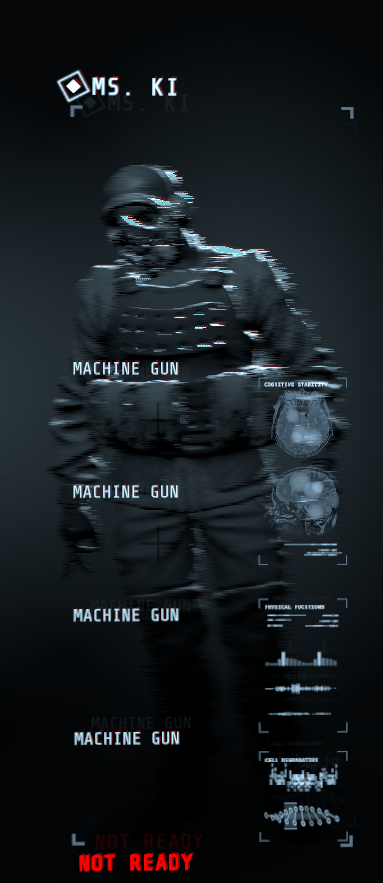
What's been happening is I get into a lobby and all of my weapons are just "Machinegun" and no items have their icons until I manually select them.
If anyone tries to join, whether I'm hosting, or another is, I'll see maybe one or two in the lobby and then cant see anyone else that joins, and can't see any loadouts update.
It's a weird desync issue. If they start the cage-drop, I am still in the lobby.
I've verified game cache, changed settings in game, uninstalled and reinstalled, all of these several times to no avail and it feels like it's only getting worse.
I'd make a bug report but all of these are one after another, and I feel like it might be a corrupted file, but I just don't know where to look.
proper grove
Hi! @ionic juniper Sorry to hear you had such an aweful experience. When you make a Bug report, you should include the JSON files.
Can you tell me What Hardware you have?
DO you have Screenshots of any problems?
Have you encountered similar or any problems in other games?
What message was shown on the Bluescreen?
 dawn raptor
109775240994029707
ionic juniper
Would you need the JSON files currently?
Also for the questions
Hardware:
- GPU: RTX 2070
- CPU: i9-9900k
- 16 gigs RAM
- Z390 Motherboard
- Anything else needed, just ask.
Only screenshot I have is of the example of all my items being machinegun. Other screenshots I'd feel wouldn't really display an issue. https://i.gyazo.com/f309581d1a9c3ae3e23a0a643013ed44.png
Only other game I've blue-screened on is Tabletop Simulator, but nothing else.
What appeared on the blue-screen that'd be important was; Stop code: WHEA_UNCORRECTABLE_ERROR
 proper grove
Ok, thank you! No the JSON files should be included into the Bug report. You can find the link in #bug-reporting.
I will check if we have similar problems reported to us. It may take a little bit ^^
ionic juniper
Ok, thank you :]
proper grove
And a last question for now: could you play without any problems before? Or is this since you started, and if yes when did you start. If not, when did the problems start?
ionic juniper
I was able to play with no issue before.
It seems the issues started after the hotfix, or at least when it was announced, as I only started seeing issues when doing B2, then when that completed I haven't been able to do B3 for the previously specified reasons.
sharp sable
lol, youre ip renewing killed my ethernet xD i fixe dit now lets see if the game now boots up @proper grove
proper grove
lol, youre ip renewing killed my ethernet xD i fixe dit now lets see if the game now boots up
@sharp sable That should not have happened, i'm sorry.
sharp sable
Well, My pc is to far away from my router for normal cable, so i use a wireless repeater and connected it with cable to my pc, and somehow it didnt saw the cable anymore* 🙂
Not youre fault 🙂 when the game boots up fine then it helped haha
sharp sable
nice steam crashed haha
proper grove
Ok. But you can restart it, right=
sharp sable
FINALLY its the FIRST TIME the game starts without a network error 🙂
proper grove
Nice!
sharp sable
You can be breath npow haha
proper grove
Sorry what?
sharp sable
breath out* ^^
proper grove
Oh ok ^^ Have an awesome one! And good luck down there!
sharp sable
fuck, fail i meant exhale ^^
proper grove
All good!
fossil dirge
where do report bugs
proper grove
#bug-reporting Follow the link there ^^ What do you want to report, it may be already a known bug
fossil dirge
i dropped this cell on the ground is b2 and couldn't pick it back up
proper grove
Oh this is a known Problem! Thanks for sharing anyways :3
i think it is possible for someone else to pick it up, but not sure
fossil dirge
no one could
proper grove
can someone (except the host) leave the game and join again
and then try to pick it up?
proper grove
Ok. Are you still in this game? or did you restart?
fossil dirge
still in game
proper grove
ok let me check if i find a fix. Sorry if it will take a little bit.
fossil dirge
ok
 heavy fossil
ok so basically everytime i try to join my friends lobby it'll just appear as this
fossil dirge
my friend has the same problem
proper grove
as aboth?
heavy fossil
yes
proper grove
Ok. Can you start a game by yourself?
 granite loom
played the first map in the new rundown, we made it but i didnt load back into the lobby screen so it didnt count for me, for everyone else it did
all infected were runing at place and I could kill them but nothing happened
anyone else got this too?
heavy fossil
yeah i can
proper grove
played the first map in the new rundown, we made it but i didnt load back into the lobby screen so it didnt count for me, for everyone else it did
all infected were runing at place and I could kill them but nothing happened
anyone else got this too?
@granite loom This is a known bug, they are working on a fix. Everybody can still play the next levels as long as the host has them unlocked.
yeah i can
@heavy fossil ok, can your friend join you?
proper grove
Can he start a solo game?
proper grove
Ok. Give me a little bit. Sorry for the inconvenience
heavy fossil
its ok
proper grove
ty
Can you try to join someone else without your friend? I need to know if he is the cause of the bug or you
heavy fossil
not really nobody else is on
heavy fossil
kk
proper grove
ok @heavy fossil join this lobby please
heavy fossil
kk
proper grove
And thanks a thousand times @keen dragon
heavy fossil
still
 keen dragon
Np, anything for a cutie
proper grove
Oh does it?
heavy fossil
yeah
 tribal notch
I'm having the same issue as @heavy fossil most of the time
keen dragon
I see them
proper grove
Ok. Thanks for the test. <3
fossil dirge
damn bro lavars is getting bombarded with stuff
proper grove
Yes :D
tribal notch
Also, I uploaded files and a bug report to the jira tracker on all machine guns
proper grove
+1
@heavy fossil can you try to join your friends lobby again? Maybe this fixed it.
keen dragon
Krim, is that a selfie?
tribal notch
proper grove
Is kind of weird how this is behaving 🤔
heavy fossil
still
tribal notch
what? my profile picture? yeah haha
keen dragon
You be looking hella cute then
tribal notch
is this just general like tech support and not bug reporting?
proper grove
This is tech support yeah, but i take bugs too. xD some are known and don't need another report
tribal notch
ahhh I don't keep up with the bugs that well haha my b
proper grove
You can send me your Most recent JSON files.
ionic juniper
For context, the issue Brax is having is one I'm having as well on top of everything else @proper grove
proper grove
@ionic juniper your case is something else x3
ionic juniper
Fair cx
tribal notch
hol up
 pallid canyon
that happens with me when the lobby is full or they are already in the game
tribal notch
I ran into these problems yesterday where reinstalling to a different ssd seemed to help for a couple of games but it's back to it.
proper grove
@heavy fossil Ok. From the beginning. You saw the lobby when you joined unzipped?
heavy fossil
yeah
proper grove
ok, so the problem may be your friend, and not you.
heavy fossil
yeah prob
proper grove
Can your friend come here too?
proper grove
Oh ok.
tribal notch
but the lobby issues Brax has I was dealing with after R2 dropped
proper grove
And do you get the lobby bug if you try to join a lobby, or "only" the MG bug?
tribal notch
the lobby bug happens when joining lobbies. I actually saw the MG bug one two players when I joined a lobby as well. but the screen capture was just me hosting a lobby myself to try and replicate
proper grove
Ok. I only have a guess.
ok. Have you verified the Files via Steam already?
and i say ok to often xD
tribal notch
well... actually... I'm reinstalling atm to see how quickly it happens on a fresh install
proper grove
Ok.
tribal notch
but I can do that as well kind fellow
proper grove
Would have asked you to delete some files before hand to be sure.
But let's try this way.
tribal notch
yeah, first try.
 mild seal
Does anyone else have the problem where when you look at another player to try to see their stats but it shows previous stats? Like the stats got locked at some point. The map displays correctly though so that's what I've been using for the most part.
proper grove
to get you correctly:
You played with person A
now you play with person B, but it still shows person A's data?
mild seal
no
mild seal
yes
proper grove
Ok. Sounds like a Desync problem.
mild seal
?
proper grove
could you try if shooting, loosing health, give resources or anything changes the stats? And does that occur to every player, or just one?
mild seal
nothing happens when I do any of those and it's for all players.
proper grove
ok, Thanks for the info, i will check if this problem was reported.
mild seal
aight thanks
proper grove
@heavy fossil Sorry for the aweful late response.
I would need your friend to test if he get's the bugged lobby if he joins someone else. As it appears that he is the cause of the bug.
I have to go for now
If your friend can not join other's lobby, please send me his recent JSON files, where and how to find them is explained in the pinned messages in this channel (top tight pin needle symbol)
dusk flower
@sudden adder
 stable tree
how do i reduce the input lag?
stable tree
idk how do i check
proper grove
GO to settings, advanced
stable tree
Consistent and no
proper grove
Try to play as host as it can be the connection that causes the input lag
The games uses p2p connection
stable tree
Ok ill try that
proper grove
Thank you ^^
stable tree
What happens if i turn up the frams q
proper grove
It "Buffers" Some frames, but it can cause input lag. I never had problems with it. I had it on 5 for stable FPS
it uses these buffered frames when the game has a light FPS drop to keep it smooth
stable tree
Ah ok
stable tree
@proper grove that didnt work its still really bad ty tho
i think it may just be my computer
stable tree
not enough i think it said 15 without enemys so its probably just my computer
stable tree
Not good enough my ram is 6080 the game said it wants 8000 its all good tho cuz i got the game on sale and im plaining on getting an upgrade soon
proper grove
ok perfect, if you need help with choosing hardware, you can ask me or use our #pc-build-help-and-tech-talk ^^
@stable tree ^^
stable tree
Ty @proper grove i have a build that i wanna get even tho its a pre built from ironside
Its the grunt advanced if you wanna check it out
proper grove
Always Check out #known-issues for updated Info about common Errors and possible fixes.
proper grove
proper grove
Always Check out <#633424858088472578> for updated Info about common Errors and ...
 cold spade
On map R2B1 there is a key RED_KEY_579 needed to open security door, but also we found key RED_KEY_231 what was the correct one, also was it the correct move or bug? Just post to let know everyone 🙂 also when we ping with console RED_KEY_579 is show location of RED_KEY_231
 cloud current
did ya try putting it in the door?
proper grove
Oh so the Key and door just have the wrong name? @cold spade
proper grove
Ok, so it's just a "Visual" bug.
cold spade
okay 🙂 we didnt know it's visual or item name 🙂 better say than sorry 🙂 alsways nice to help community! ^^
cold spade
@proper grove can u also help me with one other thing?
we found one other bug
I can show it to you if thats not a problem
there is enemy stuck in the wall after we open the door, we can hear him, but cant kill cuz he glitched into wall above the door
proper grove
Oh ok, they are working on a fix for this problem! But Thanks for recording and sharing! Awesome work!
cold spade
sure always happy to help 🙂
cold spade
Another guys flying above door at door to zone 720
btw lvl is R2B1
also many opponents on this lvl are spawn in one texture in the middle of the gate, with shotgun turret we can wipe few of on first shoot 🙂
when we open blocked ones
 somber mountain
i think some mobs got stuck in the corner or spawn underneath the floor in R2A1 and R2C1 too
cold spade
on A1 I didnt found any bugs at all
somber mountain
when the alarm start some mobs got stuck in a corner of the scan room and stand there for a long time
 stoic pier
Having an issue connecting to any multiplayer games. New lobbies won't function properly for me and joining a game in progress results in an infinite drop.
 mint palm
My game will launch but it wont get past a black screen and auto launches into window mode. Does anyone know how to help?
 wispy barn
On map R2B1 there is a key RED_KEY_579 needed to open security door, but also we found key RED_KEY_231 what was the correct one, also was it the correct move or bug? Just post to let know everyone 🙂 also when we ping with console RED_KEY_579 is show location of RED_KEY_231
@cold spade Can you send me the logs from that gameplay session with the incorrect keycard names. You can see how to get logs from #bug-reporting
ionic juniper
@proper grove As an update, as a last-ditch fix effort I deleted the 10 Chambers folder in AppData
I reinstalled and it seemed to fix all my issues
 fresh jackal
I beat R2B4 twice but still don't get the completion xd
Basically upon completion the host getout but everyone else get trapped in the game
and its counted as not completed for us. Please help xd
 short dove
Scouts arent getting cfoamed
fresh jackal
try to take one from the spawn point
u'll see 4 cells on the cart and 1 of them might work
@zinc spear
 zinc spear
we already used three of them
we checked and scavenged the rest of the area
this appears to be the last one
and its just bugged
fresh jackal
so there's no cells on the cart?
zinc spear
yah
fresh jackal
there should be 4 cells on cart even if you used the cells
zinc spear
we'll check again
fresh jackal
if thats not the case then god bless you
zinc spear
the cart is empty
fresh jackal
rip
zinc spear
rest in pieces
fresh jackal
this game is glitched hard atm, I beat B4 twice but still don't get it completed for some reason xd
 elder wasp
oof
 bright light
so i just played
and I had this happen
which I have no idea what this is
if this is intended or not
But it kind of sucked
 sleek yacht
I think it might be a giant blood spot that is supposed to divide into a bunch of small ones, but did it go away after a while?
proper grove
@bright light On what point did that happen? On the drop? Or while fighting? Did it just appeared out of nothing? Or did it gradually build up?
this game is glitched hard atm, I beat B4 twice but still don't get it completed for some reason xd
@fresh jackal Try to play as Host.
bright light
It went away after around 5 minutes(Which is way too long) it just appeared there while we approached a group of enemies, which was extremely disorienting because we were about to fight
proper grove
Did you hit an enemy at this point?
bright light
No
proper grove
Can you provide me your JSON file from this game?
How to locate them is pinned in this channel.
bright light
I can try
proper grove
If you need help just let me know ^^
bright light
I think I will, I opened the games files through steam but cant seem to figure where the json is\
proper grove
We could need you r"Json" Files. If you can provide us with them, it may helps to fix the problem way faster.
How to find them?
go to:
C:\Users\PcName\AppData\LocalLow\10 Chambers Collective\GTFO
And send the most recent .JSON files located there as a Private message to @proper groveIf you can not find the folder.
Press Windows key + R
a Run windows opens.
Type %appdata%
Press enter.
Click on Appdata
LocalLow
10 Chambers Collective
GTFOI appreciate your help <3
@proper grove
It is not in the Game installation directory ^^
bright light
So I didnt install the game in C: I installed it in D: would there be any difference to where it is?
proper grove
ok.
bright light
theres no folder that says appdata or locallow
proper grove
The most recent JSON file, i guess it was the last game you played?
proper grove
Awesome! Thank you.
bright light
cool
proper grove
Looks about right ^^
ok i downloaded it.
Are you able to record? In case it happens again?
bright light
I might? I stream sometimes but thats as far as I know what to do tbh
proper grove
x3 it is ok.
It just helps with such problems. But allready you helped a lot. Let's hope it was a one time thing ^^
Have an awesome one
bright light
Hopefully, thank you, you too. If you figure out what happened lmk, unless you cant 😅 , Im kind of interested in the inner workings of video games and that sort of thing
 winged zodiac
just a quick question am i able to change the rundown back to the first one if i wanted to or no?
proper grove
Nope, that is not possible, if a Rundown is gone, it's gone for good x3 @winged zodiac
@bright light If i know something new, i will ping you!
bright light
Ok thyank you!
 somber cairn
hi i cant connect to any lobbies when i copy the links the button to join using it ( under the gtfo discord link in the rundown screen) isnt there and when i accept steam invite or try to join through steam nothing happens. i have verified integrity of game files
somber cairn
my game is updated and i was trying to join a lobby on the lfg oceania
proper grove
Are you 100% sure the lobby isn't full
somber cairn
yes
proper grove
if the lobby is full you can not join.
somber cairn
there was another spot in it i was in the discord with them
proper grove
Ok, can you open a lobby and people join you?
somber cairn
im not sure i have opened lobbies previously and none has joined but that might just be noone tried to
proper grove
Just try with the people you want to play with.
somber cairn
ok thank you ill try that
proper grove
Tell me if it worked.
somber cairn
i couldnt try with the same lobby but i could join and invite my other mate to lobbies
proper grove
Ok, so probably the lobby was full.
Or they gave you the wrong code.
Something like this x3
somber cairn
probably sorry about that than
somber cairn
no worries
 wintry grove
Sooo uhm... How does one make a game suggestion? And is this the right channel for this question?
 rotund sand
@wintry grove You'll want to use the #bot-commands channel. Begin your message with ?suggestion and then follow that with your suggestion. You can see yours and other suggestions in the #gtfo-game-suggestions and vote on what you like. 🙂
 rotund sand
@carmine isle Have you seen this before? ^
mighty cipher
is it possible to refund to reset the play time timer? cause its been almost an hour
 carmine isle
nope, not really,
probably some timeout
I have no idea on how refunds and timers work, that's all on steams end 🙂
rotund sand
Though that does make me wish I could select my character as host. Heh.
Gonna ?suggest that
mighty cipher
@carmine isle https://steamuserimages-a.akamaihd.net/ugc/999177766142942437/921EC7BB75C9AEBC16DDDA7EFCAE6C6369825DF9/

He left and rejoined
carmine isle
If you could have whoevers having the issue send me his logs, that would be cool 🙂
- Press the Windows Key and the R key at some time. This will open a "Run" dialog.
- Inside put the following in: %userprofile%\AppData\LocalLow\10 Chambers Collective\GTFO
- Press enter. A new file explorer window will open.
- Locate the files for the date the bug happened. We are looking for the ones ending in "CLIENT.json" or "MASTER.json".
carmine isle
Thanks bud,
I hope we get you up.
what countries are you in btw?
behind any firewalls?
naive flax
I have a big problem be a Host Lobby or even join the other lobby . If I open the Host Lobby , the other players joining get stuck at the screen empty characters. When I go join the other lobby, The Host and I , 2players (1P&2P) can be playable but when the other 2 players(3P&4P) joining in the lobby, Because It just me who get stucked which didnt saw the other two characters (3P&4P) but the host did saw every characters (1,2,3,4P),After READY to Drop, I get stuck at the screen(No Dropping) except the other 3 players. 😨
And also I even cant open the lockers from previous R1 got this bug until now🤔
Im Alone in this game like forever 🤣
rotund sand
Hm. This just happened to someone else earlier as well. Could you please follow the instructions in #bug-reporting so that it will get to the Dev's and they can make a fix ASAP? 
naive flax
the logs give it to you? @rotund sand
rotund sand
It should have information of where to send the logs as well. Unfortunately I'm just a moderator and can't do much to help with in-game issues. 
 zinc bolt
how to show this stuff? anyone?
rotund sand
@zinc bolt The player hosting the lobby will have a button to click that will give them a lobby ID. It will copy it directly to their clipboard. They will then paste it to you (via CTRL+V, or the paste command) and you will then need to copy it. Once you have it copied, that red button should appear.
rotund sand

carmine isle
nice 🙂
 glacial lagoon
is the issue with saving game progress resolved?
carmine isle
hopefully, yeah
naive flax
@rotund sand Can the Hacking Tools button resolve quickly?
I even try setting the button from alpha7 to 8~9 alpha still the same which cant choose it
 bronze pumice
I don't know why, but the server name is telling me to leave.
 modern current
😄
round elm
Me and my mate still has the issue of a huge Delay between us.
We discovered that his internet, both up and down, speed plummeted and that might be the issue. Is this something with the game or the recent update because it wasn't like this before when we played
 wraith yoke
Hey, just clipped through the floor in R2B2. havent been able to replicate this
somber mountain
it's that time of the year
carmine isle
nice..
Yeah, just continue trying, usually https://steamstat.us/ downtime

Steam Status
Displays status of Steam client, Steam store, Steam community, Dota 2, TF2 and CSGO
so many on steam atm
somber mountain
i want to play 
somber mountain
😢
naive flax
@carmine isle i need help
carmine isle
wsup?
naive flax
the hacking tools button seem kinda broke to me , cant open the locker
even I change the setting alpha7 to other keys
 glass knot
i recommend asking a teammate to open the locker for u
thats happened in rundown 1 as well
glass knot
rip
idk if it helps but i recommend waiting for the hack to finish
like even when you finish matching the last bar, just wait a bit
and let the hacking animation exit by itself
naive flax
But I dont have the hacking tools to use duo , you know what i mean?
Theres no Hacking Tools on my gear list
glass knot
oh shit
carmine isle
It doesn't show in the lobby
nor in the inventory
should be able to get it up when approaching a locker,
or press 6... or 7 to equip it, not that you need to 🙂
naive flax
yeah I know , but what i means is even you approaced the distance to locker or the door locker , I dont have the ''E Button''
even I pressed 6 or 7
glass knot
ive never seen that happen before honestly 😦
naive flax
thats right
Thats what im talking about , I have this problem occured long ago from previous Rundown1 Stage R1A3 until now
glass knot
@naive flax i dont know the answer for that sorry
try asking again tho, i apologize for butting in
naive flax
dont mind it
 misty star
@naive flax Could it be that the locker has a physical lock on it?
naive flax
what do you mean physical lock on it ?
misty star
A new mechanic in Rundown 2 is that boxes, lockers and doors can all have either the hack-lock or a physical lock that needs to be smashed with a charged melee attack
naive flax
you mean the lockpad?
misty star
yes
naive flax
cuz the new mechanic in Rundown2 have no issue on it except the Hack-Lock which I have problem
misty star
huh, weird
idk then
naive flax
My issue is like, '' Why you guys have Hacking Tools but I didn't have it''
wispy barn
My issue is like, '' Why you guys have Hacking Tools but I didn't have it''
@naive flax Can you grab me log files
- Press the Windows Key and the R key at some time. This will open a "Run" dialog.
- Inside put the following in:
%userprofile%\AppData\LocalLow\10 Chambers Collective\GTFO - Press enter. A new file explorer window will open.
- Locate the files for the date the bug happened. We are looking for the ones ending in "CLIENT.json" or "MASTER.json".
- Zip up the files for this game session where you can't use the hacking tool and send them to me please.
wispy barn
thank you
 fossil hound
Theres weird shadows from the light that cover my whole screen and the flashlight does nothing.
 urban moss
anybody can help rn?
When we with friend playing (I was hosting a game) he has too big delay, why?
@naive snow
 flat gorge
anyone else getting that "no connection to network" message?
urban moss
We have only big delay, like gates with scan don't opening for other player or host see enemies but other guy don't @flat gorge
flat gorge
okay, maybe the servers are a bit stressed out at the moment ill check back later
urban moss
probably
carmine isle
Yeah, steam has been super slow the past days :/
We’ve been getting a lot of timeouts
flat gorge
al lot of people dont have a lot to do beside playing games at the moment
urban moss
Do you know after how much time problem will fixed ?
wispy barn
anyone else getting that "no connection to network" message?
@flat gorge take a look in #known-issues both the first message at the top and one at the bottom. Some network issue either on Steam or PlayFab's end. Sadly best that can really be done is wait and try again.
 faint crypt
When I join my friends lobby we are both invisible in the lobby screen and unable to play together
http://prntscr.com/rrqjz2
Is there a known fix for this?
 wispy barn
@faint crypt Can either of you join a lobby individually and drop down? Does it only happen if you try to join on each other?
faint crypt
Yea, only when joining one another
wispy barn
Can you follow #bug-reporting and grab logs and send them to me please.
toxic burrow
Well when i start the game it says Network Error even thought i have one
 rotund dirge
have anyone else "network error: No connection"?
wispy barn
have anyone else "network error: No connection"?
@rotund dirge take a look in #known-issues both the first message at the top and one at the bottom. Some network issue either on Steam or PlayFab's end. Sadly best that can really be done is wait and try again.
 magic summit
this connection error comes and goes, i had this 2 days ago, didn't have it yesterday, and now i have it again; vpn stills works as a workaround tho
proper grove
@magic summit Do you have times when it occurs in your region? And What provider do you use for VPN and from what region to which region?
magic summit
well, i have it now, and 2 days ago i had it around 3p.m CEST; vpn provider: NordVPN, vpn regions germany and netherlands; without the vpn i would be in germany
wispy barn
Yeah it's unfortunately out of our hands, all going to be internet/steam/playfab issue due to so many people being home from school and work and now using the internet more.
magic summit
it's the theme of the rundown
proper grove
@faint crypt hi! Sorry for the ping ^^ Do you still encounter the problem?
 distant gulch
Hello. Can somebody help me please? I bought the game yesterday on Steam and started it. Today i wanted to try it with a friend and everytime i started it i cant find a connection.
proper grove
@distant gulch Hi! Can you check out #known-issues ? There are some possible fixes. If you still encounter problems after you tried these, feel free to @ me ^^
mighty cipher
Heyo, just got informed I should move here
wispy barn
Also take a look at #game-announcements regarding the connection issue
mighty cipher
Gonna check known issues but does anyone know of a major darkness issue?
I asked about it in #gtfo-related-questions
proper grove
Hi @mighty cipher do you have a screenshot, or better a video for me?
mighty cipher
I do, gimme a sec

Me: security door in R2B2

My mate: same security door, same point of view
He's swapped his monitors, checked his brightness & gamma
It displays the same on multiple monitors
I know his graphics are set to the lowest & he's updating his PC soon, but I don't think graphics would flat out remove light sources
proper grove
Ok.
mighty cipher
Any suggestions would be appreciated. We're still in game, if that helps
mighty cipher
I'm the host
proper grove
Ok, then he can leave and join you back via Steam
mighty cipher
He's been back and forth between the menu to look for brightness settings
Ok, we'll try that now
proper grove
To restart the game.
mighty cipher
Cheers, he's trying it now
Is it a feature to take massive fall damage upon rejoining an in-session game btw?
proper grove
No that's probably just a De-sync problem.
mighty cipher
Ahh ok. We were playing B1 earlier and when he spawned back in, he rejoined a metre or two off the ground and dropped to 20%
proper grove
Yeah sometimes when the game missmatches some info it thinks it should you place higher, specially with all the lag going on at the moment
mighty cipher
Makes sense, good to know
We thought it was a feature to stop mid-game joining to replace lost health, so the warden just yeets you down instead of taking the lift lol
Anyway, he's rejoining now
proper grove
Smart thought.
mighty cipher
Alright, that's fixed the bug. And the Warden did not yeet him lol
Cheers, mate 🙂 We did get an objective bug where the generator we've done doesn't appear for him, but should be alright going forward I hope
Enjoy your day!
proper grove
You too! and Good luck satisfying the Warden ^^
mighty cipher
I'm doing my part! For the obituary statistics 😉 xD
 desert salmon
Hi... my game says "Network Error: No Connection " - U need an online connection to play GTFO ... but im obviously online and i recently played it
desert salmon
ty
proper grove
<3
urban moss
Why do we have too big delay between host and player ?
proper grove
That's to the Internet. the game uses p2p which is a direct connection from player to player. If you encounter problems in your area it can cause delays.
mighty cipher
The distance between you and the other player is taken into account as well.
Let’s say you’re in the UK and the person you’re trying to play with is in France. You’re going to have a bit of delay since you’re directly connecting to that person because of the distance between you two.
 tender quiver
Hey guys
proper grove
hi!
tender quiver
I cannot do anything on my rundown screen
I only have the option to JOIN LOBBY
which is not even clickable
proper grove
Do you have a Lobby ID coppied?
wispy barn
The join lobby will be blank if you don't have any friends on steam hosting a lobby. You can create your own lobby with host lobby button then coppy the lobby id and share to a friend, or copy a friends lobby id and join using hte button on the side of the screen
glacial lagoon
Issue with saving game progress is still not resolved...
glacial lagoon
i finished b4 like 2h ago, wanted to play c1 but i cant couse b4 is not done
wispy barn
i finished b4 like 2h ago, wanted to play c1 but i cant couse b4 is not done
@glacial lagoon can you get me your logs please
proper grove
You can play the level when the host has them unlocked. ^^
glacial lagoon
wait what? I need to host lvls to have them finished? xD
proper grove
no
glacial lagoon
oh i get it
proper grove
^^
glacial lagoon
where are these logs
wispy barn
#bug-reporting has info on grabbing logs
proper grove
When you need help let us now ^^
 quick trout
ok. need help
i am copying discord ids to join the game
but nothing shows in game for joining from a clip board like the channel shows
i have done both ctrl c and highlighting and right clicking and copy
what am i doing wrong at this point?
quick trout
the game id
i even had someone in the north american game room tell me exactly what to copy just to make sure and still no option to join a game from the clipboard
mighty cipher
Have you tried restarting your game?
proper grove
Ok, you need to be on the rundown screen
quick trout
i have restarted the game and the machine 3 times
i am on the rundown screen that shows the map of the the stages
hell i am even pasting stuff in to notepad just to make sure i am not having a keyboard or mouse click failure and the id's paste fine
just no option in the game to join like in the screen shot instructions
just back ground info on my device if need be. 32gb of ram, gtx 1070 video card, 500 gb ssd. windows 10 pro. it was just built 4 days ago, os was installed yesterday, this is game one i am attempting to play multiplayer on
my brother can join me fine but he is a friend on my steam friend list
so any idea what could be my issue?
proper grove
But can you host a lobby?
proper grove
Can you join your brother via Lobby ID?
proper grove
Did you verified the game files via Steam already?
quick trout
yes
proper grove
ok. Give me a second!
quick trout
even uninstalled and reinstalled it one time about a hour ago
proper grove
I think it is just the game not getting your clipboard.
quick trout
i am literally running straight up clean install windows. the only third party app i have is just steam, chrome, and discord on it right now
keen dragon
What you need me for?
proper grove
A lobby id, he does not see the prompt to join a lobby if copied.
keen dragon
On it
proper grove
<3
mighty cipher
Are you needing the ID to be checked?
 quick trout
109775240996105086
ok i am testing my copy and pasting is working
give me a minute
mighty cipher
hopping on and seeing if I can connect to the ID
keen dragon
Ye
quick trout
ok. give me a few more minutes. steam is saying gtfo is running but it isnt
keen dragon
Oki, I can wait
quick trout
steam is just being weird like that sometimes.
keen dragon
Ik, happens to me too
mighty cipher
The lobby is joinable
proper grove
Yeah you should force-close it via task manager
mighty cipher
Just joined zipped in it
keen dragon
Ye, I love helping
 quick trout
still the same
proper grove
you should be able to press Windows key + shift +S
Does work for SS too
not 100% sure about fullscreen
mighty cipher
You can use the Snip tool to get the exact info you need without capturing the entire screen too
keen dragon
Ye
proper grove
win+shift+s = Snipping tool but even faster
keen dragon
Snipping is life
quick trout
proper grove
ok.
proper grove
Can you change your fullscreen mode to windowed. just to test it?
quick trout
ok. will do
proper grove
and if this does not work:
Close game. (be sure it is not running in background)
Copy ID
Start game ^^
quick trout
bare with me. closing it but for some reason steam says it is still running
proper grove
yeah
proper grove
I just close steam entirely x3
quick trout
oh when i exit it isnt in task manager. steam does that to me a bit
proper grove
x3
proper grove
ok.
quick trout
nothing still
proper grove
Give me a hot minute
keen dragon
I will give you a cold minute
quick trout
109775240996105086 pasting pasting pasting 109775240996105086 109775240996105086
yeah
i am at a lost right now
proper grove
yeah. Let me think a lil' bit
I know i had someone with the problem.
But i need to find what the solution was.
quick trout
sorry. didnt mean to make it look like i was being a smartarse or anything. just really paranoid if i have a hardware issue
proper grove
I mean at least you could host for now
All good. It's not hardware
It's something conflicting.
ok @quick trout When you joined your brother, did you via steam, or lobby code?
quick trout
steam
proper grove
ok.
quick trout
he doesnt have discord
quick trout
i mean i got discord cuz i am a dev in a different channel
no idea if they can join
never tried that
proper grove
ok.
mighty cipher
That lobby code might not be working,
Try seeing if you can join this lobby @quick trout
109775240996126104
Different code
last lobby might have been bugged.
proper grove
i think it is no lobby problem
It is the problem that the game can not read his clipboard.
mighty cipher
You clicked on the GTFO window correct?
quick trout
correct



 proper grove
thats what i saidx3
quick trout
i mean. i can do a reinstall of windows, that wouldnt be a issue with me at this point
like i said, only 3 third party apps were installed
mighty cipher
You said you reinstalled the game, but you might want to try to verify the integrity of the files
I know Lavars lol I was just trying to clear that potential off the table
proper grove
Naw
quick trout
that was done already with the verification
mighty cipher
Your clipboard is working MDic. I don't think windows is the issue.
proper grove
Let's me ask d0c.
I know we had this already.
Just can't remember what we did back then, can't find it in my logs
keen dragon
Let's summon the all might D0c
quick trout
oof. well i understand when hick ups happen when u open up to a global audience
keen dragon
Ye, I hope we get this fixed, so you can enjoy the game, has fast has possible
quick trout
at this point the only thing i can think of trying is wiping and reinstalling my os on this machine, it wouldnt be a step back or anything, nothing invested into this current windows install
keen dragon
And by we, I mean them, has I'm doing nothing
mighty cipher
Honestly i'm doing nothing either lol
keen dragon
You're being cute
mighty cipher
do-nothing gang Zippy
keen dragon
That's a boost to morale
proper grove
Ok, that's not the channel for stuff like this x3 Even though i thank you for your help
keen dragon
Sowwy
quick trout
well if anything, if the dev life with gtfo is like me, then i like the do not disturb status to be up so i could focus on my work 90% of the time
plus the influx of dm's i get is usually insane.
proper grove
All good
quick trout
i hate waking up in the morning after patch release.
0_0 the horrors i get when i check discord
proper grove
ok can you give me your logs please in a pm, best is archived with winrar or winzip
quick trout
ah ok. gotcha
proper grove
^^
quick trout
am i to assume it is the debug.log file
quick trout
zero searches for client.json, zero searches for output.log