#Celeste Won't Open w/ Everest
30 messages · Page 1 of 1 (latest)
 restive spade
 acoustic ravine
ill give errorLog.txt as well
acoustic ravine
ill give errorLog.txt as well
Open your celeste saves folder and find the settings.celeste file. Either delete it or open it in a text editor and change the LaunchWithFMODLiveUpdate setting to false and save the file. If you're on steam you need to disable steam cloud so your changes don't get reverted. After launching the game once you can turn steam cloud back on and choose to keep local files.
acoustic ravine
Sounds good, thank you for the response, I’ll try this later and get back to you on it
acoustic ravine
restive spade
Open your celeste saves folder and find the `settings.celeste` file. Either dele...
im sorry to ask, but im really struggling to find the settings.celeste file. Im in the celeste resources folder rn and i just do not see it in there. Am i looking in the wrong spot? I am also on mac if that makes a difference
acoustic ravine
what is the directory path to the saves folder
currently im going through "macintosh HD -> users -> (me) -> library -> App. Support -> Steam -> steamapps -> common -> Celeste"
and then through there theres barely anything
checking the contents of "Celeste", all i have are 3 options: "info.plist", "MacOS", and "Resources"
I think i can solve the issue but i literally have no idea where my saves folder is
lmfao
i feel like i should know but i genuinely just cannot find my saves folder
OKAY SO
I found the folder
and deleted settings.celeste file
turned off the steam cloud
and then it still didnt work...
"Ver 1.4.0.0-fna [Everest: 6244-azure-37f52-beta]
04/05/2026 17:04:33
System.Exception: FMOD Failed: ERR_NOTREADY (Operation could not be performed because specified sound/DSP connection is not ready.)
at Celeste.Audio.CheckFmod(RESULT result) in Celeste.Mod.mm/Patches/Audio.cs:line 44
at Celeste.AudioExt.CheckFMOD(RESULT result) in Celeste.Mod.mm/Patches/Audio.cs:line 485
at Celeste.Audio.Banks.Load(String name, Boolean loadStrings) in Celeste.Mod.mm/Patches/Audio.cs:line 430
at Celeste.Audio.Init() in Celeste.Mod.mm/Patches/Audio.cs:line 87
at Celeste.GameLoader.LoadThread() in Celeste.Mod.mm/Patches/GameLoader.cs:line 87
at Celeste.RunThread.RunThreadWithLogging(Action method) in Celeste.Mod.mm/Patches/RunThread.cs:line 39"
i can access the FMOD folder too
idk if doing anything with that would be useful
also, i deleted the "settings.celeste" in my backups folder as well
didnt change anything
restive spade
acoustic ravine
also, i deleted the "settings.celeste" in my backups folder as well
Apparently the setting is also located in modsettings-Everest.celeste file so try deleting or changing it too, sorry for not noticing. And you don't need to delete the backups. The game doesn't read them.
restive spade
acoustic ravine
i didnt mess anything up by deleting the backup, correct?
It's just the Saves folder before your last save. The game doesn't read it or anything, it just exists there so you can get your save files back if you accidentally mess something up. You can probably bring it back from your recycle bin.
acoustic ravine
well uh i did already empty my trash so hoping that things just work out
trying to find that file you said rn
restive spade
restive spade
It's just the Saves folder before your last save. The game doesn't read it or an...
This mod makes the game make infinite backups instead of only one. I cannot recommend it enough. It has a setting to delete backups based on time so they don't take up too much space.
https://gamebanana.com/mods/53710
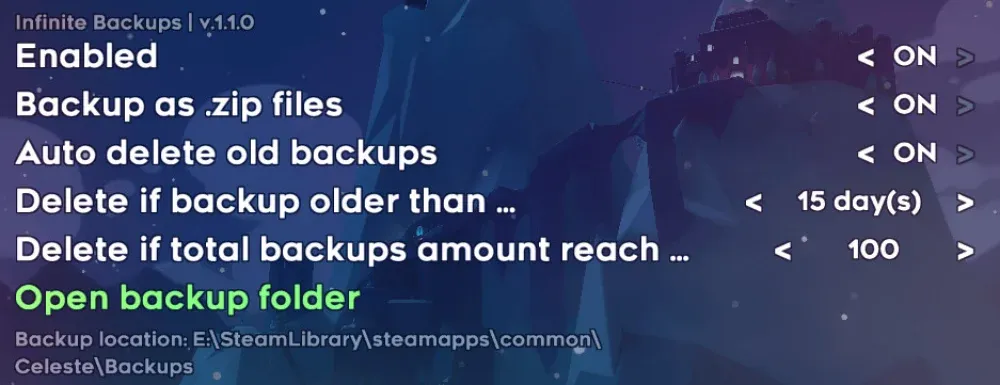
GameBanana
Backs up the entire savefile folder everytime the game saves... A Celeste (CELESTE) Mod in the Other/Misc category, submitted by WEGFan and CN Celeste Modding Team