#Can't even open regular celeste on my Mac.
136 messages · Page 1 of 1 (latest)
 rustic apex
 random lavaBOT
If you have crashed, and are on Everest Core, there will be a log in the CrashLogs folder, which contains extra information that the regular logs do not. The Core crash handler will tell you the file name, and give you the option to open the folder.
Otherwise, in order to get Everest logs, open Olympus, and:
- Press the "Manage", under the "Installations" panel on the main menu
- Press "Browse" to open the Celeste folder
- Send the
log.txtfile from that folder (not theerror_log.txtor any log fromLogHistory)
Note, on both Everest versions, there are older logs in the LogHistory folder inside the Celeste folder, but these are not the relevant logs. The most recent one is directly in the Celeste folder (and in CrashLogs for Core users), and not in any other folders.
Everest logs contain paths to certain files and folders in your system (e.g.: active helpers) to help with diagnosing problems. Remember to censor any usernames in log files before uploading them.
rustic apex
 waxen marlin
heres how to send longs
waxen marlin
heres how to send longs
hey thanks so much, ive reported crash things before and theres not been an easy way to find the log.txt but has just done that copypasta about everesting while you ever rest. and post your Log.txt 😄
 rose scaffold
rustic apex
hey thanks so much, ive reported crash things before and theres not been an easy...
rose scaffold
rustic apex
hey thanks so much, ive reported crash things before and theres not been an easy...
update your everest and mods
rustic apex
Last few times I've done that it's still not opened but I'll do it again now. If it still doesn't work I'll probably reinstall, and see how that goes.
rose scaffold
rustic apex
Last few times I've done that it's still not opened but I'll do it again now. If...
are you sure you're updating everest and not olympus?
random lavaBOT
To update Everest go to Olympus and click the cog on the top line, next to the Everest and Celeste buttons.
Select the version you want to install, typically this should be the latest stable, then press install.
If Everest or Lönn are currently open, close them since they open files in a way that prevents them updating.
If your Olympus does not look like this use the /updateolympus command
 rustic apex
we'll see how we go. thats what i had been updating as far as im aware. ill keep ya posted
its goin at the moment,
regular celeste opened. we're going for everest atm.
 rustic apex
❤️
rose scaffold
also have you updated your mods
if not, this will crash
go to manage installed mods and click update all
rustic apex
Updated all the mods
went to play it again today.
getting this when i open a regular map. Ill send the report that the "open log file folder" sends me to
 rose scaffold
rustic apex
Updated all the mods
went to play it again today.
getting this when i open a re...
rose scaffold
rustic apex
Updated all the mods
went to play it again today.
getting this when i open a re...
restart and try again
why is brokemiahelper looking for version 1 of cnet
rustic apex
no idea man, but celestenet has never worked for me (not sure if its a mac issue, ill turn it off)
rustic apex
sonoma 14.2.1
 surreal flume
Outdated helper presumably
rustic apex
i can update to 14.4 soon. just not been at home this weekend 😄
 surreal flume
1.7.2
 surreal flume
rose scaffold
surreal flume
rose scaffold
That's not the actual CelesteNet version, it's the assembly version, which most mods don't touch
 surreal flume
I mean, it works for everyone else. Not sure what would have changed that
rose scaffold
no clue either
idk why its looking for assembly version 1
what if you recompile brokemiahelper but reference cnet version 2.0
idk what libs you're using, maybe you're using an old cnet build for reference
rustic apex
ive turned off cnet for now. gonna see how it goes. , good to hear though
surreal flume
rose scaffold
what if you recompile brokemiahelper but reference cnet version 2.0
Can't do that until I update to the core project setup, which I've been delaying
surreal flume
rose scaffold
idk what libs you're using, maybe you're using an old cnet build for reference
After further thought, this is definitely the case, I extracted the dlls into a folder in November 2021 and haven't touched them since
Still don't understand why it's fine for everyone else
rose scaffold
good question
rustic apex
Its working with cnet turned off. happy to try things when we figure things out! ❤️
surreal flume
surreal flume
After further thought, this is definitely the case, I extracted the dlls into a ...
I copied in new ones
Should be fixed in the next update
rose scaffold
banger
@rustic apex meanwhile, what if you grab this cnet zip
it's practically identical, except i changed the assembly versions back to 1.0.0.0
download it and drag and drop it into the olympus window to install it
rustic apex
ooh awesome! ill give it a go!
rose scaffold
i don't expect things to break, but also wouldn't be too surprised if they did
rustic apex
rose scaffold
download it and drag and drop it into the olympus window to install it
any way to know that it installed? i tried to drag in the zip and as a folder.
it said olympus couldnt handle the zip, but the folder is unclear
rose scaffold
rustic apex
it said olympus couldnt handle the zip, but the folder is unclear
hm?
can you show me that prompt
rustic apex
sec
surreal flume
I think if you drag it into Olympus, it might try to treat it as an everest zip, not a mod
rose scaffold
no
rustic apex
 rose scaffold
rustic apex
rose scaffold
rustic apex
weeeeird
 rose scaffold
click on manage in the bottom left corner and then click on browse
you should have the game files opened
rustic apex
yep
rose scaffold
copy the cnet zip and replace the existing CelesteNet.Client.zip one
remove the old one as that'll cause issues
rustic apex
just in

this one? i dont see a cnet in there at all, ill just chuck the new one in?
ah in the mods folder
brain
done it
rose scaffold
rustic apex
ah in the mods folder
i thought i said that but didn't 
did you remove the old CelesteNet.Client one
make sure that the name is the same
rustic apex
yeye, it was the celesteNet.client. and i replaced it with Celestenet one that you sent
got this. but everything worked while i had it un enabled

 rustic apex
ill open a map and see how it goes, ive not played the coop maps yet, but was just making sure celestenet wasnt breaking the rest of my things.
HAHAHAHA
perhaps not
it was enabled

are the questionmarks you? :D:D
rustic apex
thats the one you sent e
me
ive gotta go for now but will be back soon xx
relatively soon
rustic apex
ye
rose scaffold
and idk how
rustic apex
i can send it back to you?
rose scaffold
sure
rose scaffold
???????????? where did it get this CelesteNet folder from

thats not supposed to be there
did you like unzip it at some point
alright, let me know when you're back
rustic apex
rose scaffold
???????????? where did it get this CelesteNet folder from
sorry, i think we're on different sides of the clock.
Sydney australia,
basically. when i downloaded it for the first time it Automatically unzipped into a folder.
and then i compressed it again.
rustic apex
ooh interesting. Ill remove it from my current folder and do it!
random lavaBOT
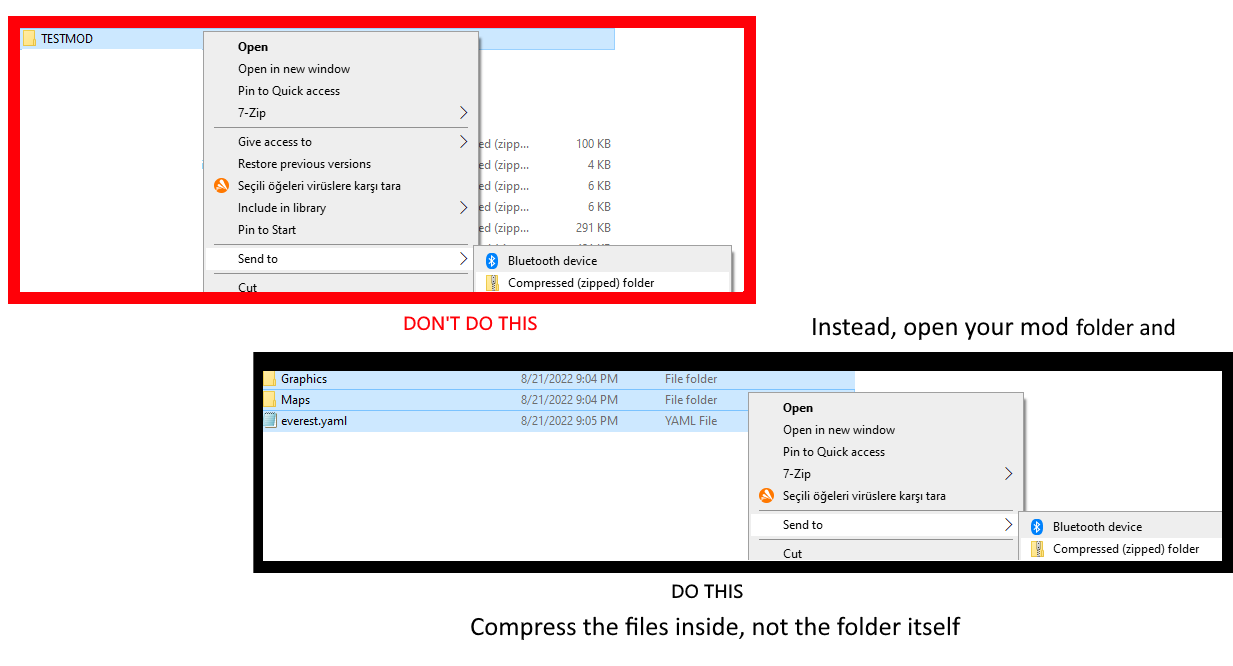

 limpid river
That issue comes up so often when packaging mods that we have a command for it :p
But installing through Olympus should be easier
rustic apex
ah interesting.
celeste doesnt say "X number of mods failed to load" how good!
I dont have anyone to jump on with to try it out. but im really appreciative of all of you guys

limpid river
There should be some people online at all times 
 restive flare
btw you can disable that auto extract functionality in Safari preferences