#Everest not opening, no mods installed
115 messages · Page 1 of 1 (latest)
 meager bison
I tried reisntalling the stable, beta, and newest verion (4214) which is the one i have installed right now
 primal horizon
feels like some everest settings are corrupted/missing?
could you check if the modsettings-Everest-MouseBindings.celeste (or something like that) is empty
and if so, delete it
you can find it in the Saves folder where your celeste is installed
meager bison
primal horizon
could you check if the `modsettings-Everest-MouseBindings.celeste` (or something...
you mean check if the file is empty?
if yes then no its not empty
meager bison
the other setting file is also not empty
primal horizon
cus like, it's crashing in UserIO.Deserialize and it's complaining about there being no root element
it doesn't help given there's like no indication what it's trying to deserialize, but if it doesn't crash in vanilla i feel like it's some everest stuff
meager bison
vanilla still works fine
primal horizon
hm, all usages of that method point to SaveData or ModSaveData, and if vanilla is fine it could be the latter one
meager bison
i even checked if vanilla works before sending the report
primal horizon
can you check if there's a n-modsavedata.celeste file that's empty (where n is a positive integer, including 0)
meager bison
i checked 0-modsavedata.celeste and 0-modsave-Everest.celeste and 0-modsessionEverest.celeste they all have at least something
primal horizon
do you have other saves 
meager bison
yes but no mod saves on those
primal horizon
can you check those then
i'm expecting one of them being empty, cus
System.Xml.XmlException: Root element is missing.
i dont have any modsave on that profile
primal horizon

meager bison
and no saves on the third profile because i dont use that one
primal horizon
so there's no other -modsavedata.celeste file other than 0?
meager bison
yes
primal horizon
can you send that one then, i'm wondering if something's wrong there
meager bison
here
primal horizon
mmm nothing looks out of the ordinary
what about modsettings-Everest_MouseBindings.celeste?
meager bison
here
i dont have any control bound to my mouse so i dont think there would be something weird happening here
primal horizon
yeah it looks fine here too
i'm gonna be honest and say i'm not sure what could be causing this then
is it something in Backups?
meager bison
primal horizon
is it something in `Backups`?
i dont have backups
well i do but theyre saved in another folder
primal horizon

meager bison
but 0.celeste in the backup folder is empty
primal horizon
hm
meager bison
idk if that has something to do with the crash
primal horizon
it could?
meager bison
and if it does it would probably crash both vanilla and modded
primal horizon
try copying your 0.celeste over the backup 0.celeste
no, the backup folder is something everest makes i believe
meager bison
hm
ok let me try that
im gonna try opening vanilla celeste and see if that crashes
it opened but the save file is corrupted
i think that save file is whats causing the crash idk though
meager bison
its just empty anyway
my main save file i made another backup of so its still there
meager bison
this is the save in the backups folder
primal horizon
it's all filled with NUL bytes
meager bison
so should i delete it
meager bison
nono that one is safe
primal horizon
okay, good
i think you'll be good deleting 0.celeste from the backups folder? 
(not the saves folder since that's the important one)
meager bison
its a backup anyway
primal horizon
yup
meager bison
deleting it wont affect my save
primal horizon
yeah, just want to double check 
 meager bison
primal horizon
meager bison
primal horizon
 okay it might be more than one file that's corrupted
can you check modsettings-Everest.celeste and look at the end
what does it say
i'm 99% convinced it's that file being truncated causing the error, i've seen this before
primal horizon
yeah, that's the culprit
did you change any everest settings?
if no, you're safe to delete it, everest will regenerate it on next boot
meager bison
primal horizon
did you change any everest settings?
i couldnt even open everset in the first place 😭
primal horizon
yeah thank god
this + the modsettings-Everest.celeste file is
though you're safe to delete it, as it'll be regenerated next time you start everest
primal horizon

are there any side effects, like any other missing/corrupted files or nah
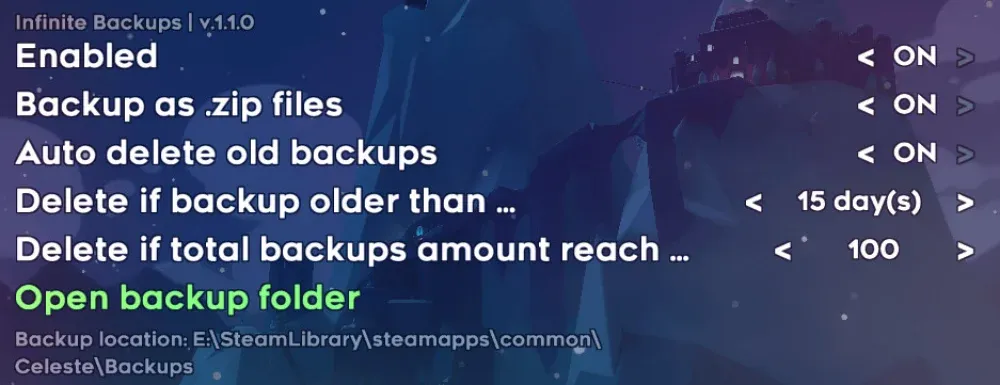
as for backups, you might like this mod
meager bison
not that i can see any
 tawny axleBOT
https://gamebanana.com/mods/53710
(shared by @primal horizon)
GameBanana
Backs up the entire savefile folder everytime the game saves... A Celeste (CELESTE) Mod in the Other/Misc category, submitted by WEGFan
primal horizon
understandable
the mod will back your entire saves folder up every time celeste makes a save
meager bison
yes
primal horizon
anyway, at least everest opens up 