#🔧-evrima-troubleshooting-🔧
1 messages · Page 319 of 1
 unkempt terrace
 hollow violet
Even if that's the case
Microsoft will not put The Isle on it's list of support for direct 12.
Huge games and huge developers like Blizzard and WoW? Sure I can see them working with em.
But Microsoft discontinued support for win 7.
Full stop.
I wouldn't count on win 7 working with direct 12
 viscid widget
hi im stuck under a water fall as a 50% deinosuchus, can an admin unstuck me please?
 thin oracle
viscid widget
hi im stuck under a water fall as a 50% deinosuchus, can an admin unstuck me ple...
thin oracle
viscid widget
hi im stuck under a water fall as a 50% deinosuchus, can an admin unstuck me ple...
Go to either the eu, au, na, or br channel
@ official server admins, give your IGN and issue
 azure sparrow
I am stuck in a tree, anyway to get out?
thin oracle
azure sparrow
I am stuck in a tree, anyway to get out?
if you're on an official server
go to either #evrima-na #evrima-eu #evrima-au #evrima-sa
@ official server admins, give your IGN and issue
 zealous moth
announcements for patch lag and crash ?
thin oracle
zealous moth
announcements for patch lag and crash ?
With Update 4, we'll be seeing a fix on this
 fathom pike
 covert nacelle
Hi i've updated my system and I was able to play evirma a while back before the update but now i cant load into the game, it crashes while starting, ive seen that the main solution is updating your device but since mine is updated and doesnt work,i was wondering how else i can fix the solution?
 terse forge
covert nacelle
Hi i've updated my system and I was able to play evirma a while back before the ...
terse forge
covert nacelle
Hi i've updated my system and I was able to play evirma a while back before the ...
What do you mean with "you updated your device"?
Maybe reinstall Evrima with all components and configurations deleted before.
 brazen falcon
So let me get this straight. There is currently no fix to the error not allowing you to play evirma. So only time will tell and we wait for the fix
 winter python
if youre referring to error 258, its caused by having below-minimum specs, so sadly the only "fix" is to upgrade to the minimum requirements :/
terse forge
And that is not the isle specific. Every game would have errors or problems if you have not the minimum of specs needed.
 minor orchid
help pls
 hollow violet
That's a very generic gpu error @minor orchid
Try the following
For anyone encountering fatal errors leading to crashes You will have to manually uninstall “The Isle” from Steam. This issue is typically caused when someone switches from the Legacy to the EVRIMA branch.
Open “Steam”
Right Click The Isle
Select Properties > Local Files > Browse Local Files
Delete everything inside of The Isle’s folder.
Then
-
Press Windows key.
-
Type "Run" to launch Run program.
-
Type in "%localappdata% and click 'Ok'.
-
Search for TheIsle folder.
-
Delete the TheIsle folder
Then launch.


 boreal hill
Hey guys , me and my friend we just started playing , we are on evrima and we cant invite each other . also the character menu is greyed out is it a bug ??
 static idol
boreal hill
Hey guys , me and my friend we just started playing , we are on evrima and we ca...
static idol
boreal hill
Hey guys , me and my friend we just started playing , we are on evrima and we ca...
to invite eachother you must be in -melee- range and press 2, to access the character menu you must press -insert-, the insert button might be different for you though, you should be able to see its keybind in the settings.
 restive badger
hollow violet
https://gyazo.com/8c1cac40ec65c922d4950386d9d19aba
restive badger
hollow violet
https://gyazo.com/8c1cac40ec65c922d4950386d9d19aba
hello can u help
boreal hill
oh ok thanks @static idol
static idol
👍
boreal hill
is there a way to spawn closer ? we need 30min to find each other ...
static idol
boreal hill
is there a way to spawn closer ? we need 30min to find each other ...
Pick the same spawnpoint
boreal hill
we did but it's still very far away
static idol
also use this https://vulnona.com/game/the_isle/
VulnonaMAP
This is an interactive map (un-official). Landmarks, water, ... You can show your current location by input coordinates. Also can upload images.
click on your coords in your character menu, this will auto copy it, then paste it into that map
boreal hill
yes i saw that 🙂 thanks
covert nacelle
@terse forge I've updated my windows to the latest version, I haven't had any issues with any other game that i play, only evrima
 ashen violet
why does underwater as dieno look red?
terse forge
covert nacelle
<@255087174297321490> I've updated my windows to the latest version, I haven't h...
You should have in mind, that the game is in a beta status and there could be a lot of bugs everywhere.
Did you reinstalled the game after you updated your os?
covert nacelle
Yes and it didn't fix or change anything, im fully aware its in beta which is why I just asked if there was anything else I could do that I hadn't tried, im assuming it's an issue that devs are aware of and are trying to solve as quickly as possible
terse forge
Okay, than i get out of options you could try.
The only idea i would have is that the minimum specs you need for that game are not fulfilled. But if it worked till the update of the os the idea could not be. Are you playing on Windows?
minor orchid
hollow violet
https://gyazo.com/8c1cac40ec65c922d4950386d9d19aba
Computer Information:
Manufacturer: Micro-Star International Co., Ltd.
Model: MS-7B46
Form Factor: Desktop
No Touch Input Detected
Processor Information:
CPU Vendor: GenuineIntel
CPU Brand: Intel(R) Core(TM) i7-8700K CPU @ 3.70GHz
CPU Family: 0x6
CPU Model: 0x9e
CPU Stepping: 0xa
CPU Type: 0x0
Speed: 3696 Mhz
12 logical processors
6 physical processors
HyperThreading: Supported
FCMOV: Supported
SSE2: Supported
SSE3: Supported
SSSE3: Supported
SSE4a: Unsupported
SSE41: Supported
SSE42: Supported
AES: Supported
AVX: Supported
AVX2: Supported
AVX512F: Unsupported
AVX512PF: Unsupported
AVX512ER: Unsupported
AVX512CD: Unsupported
AVX512VNNI: Unsupported
SHA: Unsupported
CMPXCHG16B: Supported
LAHF/SAHF: Supported
PrefetchW: Unsupported
Operating System Version:
Windows 10 (64 bit)
NTFS: Supported
Crypto Provider Codes: Supported 311 0x0 0x0 0x0
Video Card:
Driver: NVIDIA GeForce GTX 1050 Ti
DirectX Driver Name: nvldumd.dll
Driver Version: 30.0.14.7111
DirectX Driver Version: 30.0.14.7111
Driver Date: 6 21 2021
OpenGL Version: 4.6
Desktop Color Depth: 32 bits per pixel
Monitor Refresh Rate: 60 Hz
DirectX Card: NVIDIA GeForce GTX 1050 Ti
VendorID: 0x10de
DeviceID: 0x1c82
Revision: 0xa1
Number of Monitors: 2
Number of Logical Video Cards: 2
No SLI or Crossfire Detected
Primary Display Resolution: 1920 x 1080
Desktop Resolution: 3200 x 1080
Primary Display Size: 20.75" x 11.65" (23.78" diag)
52.7cm x 29.6cm (60.4cm diag)
Primary Bus: PCI Express 16x
Primary VRAM: 4095 MB
Supported MSAA Modes: 2x 4x 8x
Sound card:
Audio device: Динамики (Realtek High Definiti
Memory:
RAM: 16338 Mb
VR Hardware:
VR Headset: None detected
Miscellaneous:
UI Language: English
Media Type: DVD
Total Hard Disk Space Available: 2975563 Mb
Largest Free Hard Disk Block: 412053 Mb
OS Install Date: ??? 01 1970
Game Controller: None detected
MAC Address hash: 9a3f14b7f2a22324a65b68d8a9c7943fac315847
Storage:
Disk serial number hash: ab765e53
Number of SSDs: 1
SSD sizes: 120G
Number of HDDs: 3
HDD sizes: 2000G1000G30G
 ashen grotto
can anyone help me im stuck
EU#5
in game name also blaxel
 digital wave
anyone else rubberbanding on eu3
covert nacelle
@terse forge yeah its Windows
boreal hill
Is there a way to see my in game ping ?
 blazing violet
Hello, I'm stuck on the EU3 server, is there any way to get help for this?
 obtuse apex
Hey when I load into any sever the ground can take up to an hour to load
 tough ice
this one is interesting
 hallow oar
I want to play evina but since the June 3 update I haven't even been able to play 😭
thin oracle
blazing violet
Hello, I'm stuck on the EU3 server, is there any way to get help for this?
if you're on an official server
go to either #evrima-na #evrima-eu #evrima-au #evrima-br
@ official server admins, give your IGN and issue
@Blaxel#1365
 bitter jacinth
NA1 just reset and wiped my dino?
static idol
bitter jacinth
NA1 just reset and wiped my dino?
Everyones dino
 chrome anchor
AU#1 just reset and i lost my deinosuchus
why, i spend 5 hours on it and its gone just bc of a reset
ashen grotto
all my dino's are gone? what happend??
static idol
chrome anchor
AU#1 just reset and i lost my deinosuchus
All official servers reset.
static idol
ashen grotto
all my dino's are gone? what happend??
^
 tough stirrup
My game is crashing every time
 thin oracle
tough stirrup
My game is crashing every time
thin oracle
tough stirrup
My game is crashing every time
known crash, you can't do much currently
tough stirrup
Hope the next update will fix it
ashen grotto
im stuck in EU#5 can an admin help? my username is blaxel im at south pond
thin oracle
ashen grotto
im stuck in EU#5 can an admin help? my username is blaxel im at south pond
go to #evrima-eu
@ official server admins, plus your IGN and issue
thin oracle
 solid drift
Im stuck with other player too
solid drift
Im stuck with other player too
do the same above ^
solid drift
I died already, thanks anyways
thin oracle
if something like that happens again, I do recommend doing that!
Stay well
 austere fog
Hey guys need help, the isle keeps crashing ever since i updated it to evrima
 slate knot
Hey, I have a problem, when I start fighting game always crashing, someone have the same problem. It made my lose a lot of dino.
 static raven
Uh so, I think this is a new one. I Alt+f4 cause I couldn't safe log, then relog back and I'm a bit away from where I had been. I go back to the original spot I logged out in, and my body is still there? No growth lost or anything.
I was able to kill my older character that was still there and took no damage or anything. Positive it is me from before though!

 native orbit
are the servers down?
 deep brook
Finaly uninstalled that bullshit, iam tired of trying to fix everything for hours and days. pls PM once they manage to patch a game, without me having to basicly reinstall my system after they Patch their Game!
 tidal arrow
So I've installed Evrima, and while I seem to get the game running without issue, after the intro logos are shown and im brought into the main menu it turns into a black screen. I didn't have this issue on legacy fyi, just evrima. I can "sort of" interact with the main menu by "opening" the game using the thumbnail but the cursor registers the menu options at odd angles and clicking on anything causes it to tab down again.
I've validated all files on steam, updated drivers and reinstalled several times over. What am I missing? Adjusting the screen doesnt seem to work either.
 red thistle
ashen grotto
EU#5 where did my 100%stego go?
red thistle
ashen grotto
EU#5 where did my 100%stego go?
Same thing happend to me at EU5 but mine was 50% growth
Yesterday i save logged and today ute gone
Its*
thin oracle
red thistle
Same thing happend to me at EU5 but mine was 50% growth
there was a server wipe on officials sadly
static idol
fix for constant crashing when 😦
 honest flint
my game is incredibly blurry/fuzzy. ive fiddled with my graphics to no avail; rendering is set to 100%, taa, ive tried every version of anti aliasing level, not really sure what to do.
 unreal hawk
I just got Isle evrima and i can't open the character what do i do
 static idol
unreal hawk
I just got Isle evrima and i can't open the character what do i do
static idol
unreal hawk
I just got Isle evrima and i can't open the character what do i do
hit insert
unreal hawk
thx :D
 red rampart
Ok someone please help me...... I have not played the isle in a while and i got a new steam account and remembered the game and got it....... now im finding more things about the game....... Is quality assurance still the beta i need to get if so i don't see it...... or do i need to get the public beta someone help im so confused......
chrome anchor
can someone please help me, i just grew a deinosuchus and logged out and randomly lost it.
static idol
red rampart
Ok someone please help me...... I have not played the isle in a while and i got ...
 static idol
chrome anchor
can someone please help me, i just grew a deinosuchus and logged out and randoml...
static idol
chrome anchor
can someone please help me, i just grew a deinosuchus and logged out and randoml...
Did you try relogging? and when did you log out with said deino, the Reset was a few days ago which wiped all dinos.
ashen grotto
Does any one maby know's how to fix the shadows flickering in the grass?
 open siren
After playing for about 15 minutes my mic starts cutting out on discord. its only like this when i play evrima, and no other games
Anyone know why?
thin oracle
When i try to load Evrima it always comes up with the same error messageFatal error: [File:Unknown] [Line: 907]
Rendering thread exception:
Fatal error: [File:Unknown] [Line: 258]
Direct3DDevice->CreateUnorderedAccessView(Texture->GetResource(),&UAVDesc,(ID3D11UnorderedAccessView**)UnorderedAccessView.GetInitReference()) failed
at G:/UnrealEngine 4.26.2/Engine/Source/Runtime/Windows/D3D11RHI/Private/D3D11UAV.cpp:116
with error E_INVALIDARG
 small jackal
why do they just reset everyones progress on official server

 north swan
hey so im stuck behind the waterfall at pocket pond, is there any way to get out?
thin oracle
is anyone here a friend with the devs for the isle? i need to relay a message to them. I spawned outside the border on an official server
 near ingot
im stuck too how indeed do we get out
thin oracle
i just died
 violet spade
Anyone have any idea's how to solve a completely black screen? I died during a server crash ( Died right as it crashed literally a one in a million event) and now I just have an infinite black screen where I can't do anything but force quit the game if I try to load in. Its similar to the bug that used to exist where you could only see your dead body and not pick a new Dino when loading in, but its just a black screen instead.Sorry if this has been asked before.
 tough drift
What should I do to solve this issue? I can’t even get to the main menu of the game🥲

 wicked kettle
REGARDING THE ERROR 258, game currently works only in windws 10 + updated VGA drivers(cause of the water mechanics behind it), and your hardware specs must meet the minimal requiremets, I was having this issue also cause I was on win7, as soon I installed win10, no more errors showed up
 main edge
Game stops responding after launching and just before loading in the Main Menu. Tried re-installing, but that didn't fix the issue. Verified local files on Steam, still didn't fix the issue. Any suggestions?
 hallow wraith
Im playing as a Ptera and i cant airbrake so i went to settings to change it but all i see is adminmode
 long compass
does evrima need a beta code now or can anyone get it?
thin oracle
long compass
does evrima need a beta code now or can anyone get it?
https://gyazo.com/0c3347f2976f66d2e58bc9814becccd7
via this method
 thin oracle
tough drift
What should I do to solve this issue? I can’t even get to the main menu of the g...
thin oracle
tough drift
What should I do to solve this issue? I can’t even get to the main menu of the g...
currently there is no true fix
chrome anchor
static idol
Did you try relogging? and when did you log out with said deino, the Reset was a...
yes I tried relogging multiple times but nothing came back, I already lost a deinosuchus to the reset.
 errant tangle
I had a fullgrown teno on the server ''Tapkin'' and now when i logged in i came to the start menu where i choose dino. So my teno is completely gone even though i safe logged...
thin oracle
errant tangle
I had a fullgrown teno on the server ''Tapkin'' and now when i logged in i came ...
Should talk to the server owner or admin if they have a discord
errant tangle
yeee
 merry vector
hey guys i have a problem, the beta version works just fine for me but when i try to start the original ver of the game, it doesnt even open (when i click start on steam it says running for a few sec, then nothing happens basically). Tried installing vcruntime140_1.dll but it didnt help, reinstalled the game, updated my drivers. I have no idea what to do at this point.
 high pecan
<@&818552355796287508> Sorry for the ping but when I went onto Evrima UE 5 I had lost my full adult deino. I was wondering if there was a way to get it back
hollow violet
Not really. Server admins aren't really giving back grows.
hollow violet
merry vector
hey guys i have a problem, the beta version works just fine for me but when i tr...
Did you manually uninstall and reinstall or did you do it through steam?
 exotic prism
the esp bind does not work for me anymore and ive tryed uninstalling but i think im doing it wrong
 thin oracle
exotic prism
the esp bind does not work for me anymore and ive tryed uninstalling but i think...
thin oracle
exotic prism
the esp bind does not work for me anymore and ive tryed uninstalling but i think...
-
Press Windows key.
-
Type "Run" to launch Run program.
-
Type in "%localappdata% and click 'Ok'.
-
Search for TheIsle folder.
-
Delete the TheIsle folder once it has been located. No adverse effects will take place by deleting this folder, it will reset your keybinds to the correct keys.
tried this?
thin oracle
 gray gust
Help?
gray gust
Help?
you can't truly fix that as of right now.
Sorry about that
exotic prism
do i uninstall the isle on steam first?
thin oracle
exotic prism
do i uninstall the isle on steam first?
no, have it installed
thin oracle
all good?
thin oracle
all right then, stay well!
wicked kettle
gray gust
dang
game works correctly on Win10 + updated GPU driver, if you meet the minimum requirements

 thin oracle
 golden wharf
we stuck ;-;
golden wharf
we stuck ;-;
if you're on an official
go to either #evrima-na #evrima-eu #evrima-au #evrima-sa, @ official server admin, give your IGN and issue
golden wharf
thin oracle
if you're on an official
go to either <#543084446853890049> <#855544149407039520...
no it's not
thin oracle
golden wharf
no it's not
ah, go to Teutonics Discord and message their server admins
 merry vector
hollow violet
Did you manually uninstall and reinstall or did you do it through steam?
merry vector
hollow violet
Did you manually uninstall and reinstall or did you do it through steam?
i did both : /
gray gust
wicked kettle
game works correctly on Win10 + updated GPU driver, if you meet the minimum requ...
Okay
hollow violet
 warped cypress
I got this every time
warped cypress
I got this every time
tick 'hide empty'
hollow violet
merry vector
i did both : /
Has the legacy version ever worked for you?
merry vector
hollow violet
Has the legacy version ever worked for you?
No i just bought the game
hallow oar
Sorry to bother but this error will be fixed or will I never be able to play evrima again?
 thin oracle
hallow oar
Sorry to bother but this error will be fixed or will I never be able to play evr...
thin oracle
hallow oar
Sorry to bother but this error will be fixed or will I never be able to play evr...
Not currently, but I believe the devs are trying to make it more compatible in the next update.
Sorry about this, only thing we can do is hope!
hallow oar
thin oracle
Not currently, but I believe the devs are trying to make it more compatible in t...
Thank you, I hope you can solve it, I encourage
 vestal birch
hey, so i got pounced by a utah and since than im not able to lay down anymore, could be pretty bad if i want to log out in a few mins.. any solutions to this?
thin oracle
vestal birch
hey, so i got pounced by a utah and since than im not able to lay down anymore, ...
not sure exactly, but you can try swim or jump.
I think it's similar to the Ptera fly problem
vestal birch
thin oracle
not sure exactly, but you can try swim or jump.
I think it's similar to the Pter...
hmm i tried swimming but that didnt work, guess i have to wait for the carnos to leave my location before logging out than.. but thanks anyways :)
thin oracle
vestal birch
hmm i tried swimming but that didnt work, guess i have to wait for the carnos to...
yeah, good luck
 pine crag
Not sure if this is the right thread, but I had a fully grown deino. I came back to it about a week later and it was gone, I had to start again; do the servers wipe every so often or is this a bug?
thin oracle
yes, there was a large server wipe
pine crag
Ahhh okay, thanks for coming back so quick 🙂
thin oracle
all good
 serene kettle
hi, is the evrima problem finally solved?
i mean this, everytime when i start evrima it closes and this pops out

 zealous flower
how do i fix the lieing down and calls not working ive tried deleting the save files
 quick storm
Don't suppose this is where I can get help getting unstuck
Been stuck in the floor in evrima eu 5 for a few days now 🙂
winter python
quick storm
Been stuck in the floor in evrima eu 5 for a few days now 🙂
ping the official admin role in #evrima-eu with your steam name and server
hollow violet
serene kettle
i mean this, everytime when i start evrima it closes and this pops out
hollow violet
zealous flower
how do i fix the lieing down and calls not working ive tried deleting the save f...
You deleted this folder?
 vestal cave

 willow bridge
it wont actually let me into a server. might just be my internet connection but frustrating nonetheless.
hallow oar
hollow violet
https://gyazo.com/8c1cac40ec65c922d4950386d9d19aba
I am also having the same problem
thin oracle
-
Press Windows key.
-
Type "Run" to launch Run program.
-
Type in "%localappdata% and click 'Ok'.
-
Search for TheIsle folder.
-
Delete the TheIsle folder once it has been located. No adverse effects will take place by deleting this folder, it will reset your keybinds to the correct keys.
try this, and ask on #🔧-legacy-troubleshooting-🔧 next time!
thin oracle
all good, stay well
 flint obsidian
Can/will admins here help a stuck player on an official server?
thin oracle
flint obsidian
Can/will admins here help a stuck player on an official server?
go to either #evrima-eu #evrima-au #evrima-na #evrima-sa
@ official server admins, give your IGN and issue
 thorn arrow
Anyone know how to fix this? Can't spawn in some places
 flint obsidian
Thank you Lightclaw, I will next time I'm on
thin oracle
 buoyant tartan
I am stuck
server 5 help
buoyant tartan
I am stuck
server 5 help
#🔧-evrima-troubleshooting-🔧 message remember this please!
 mortal hawk
when panning I'll randomly get a see through grey-ish rectangle appear for a split second on the top right of my screen (p.s this issue i remember happening on the isle legacy when i had my old graphics card). Also when using scent as tenonto ill pan and get ripples of my tenonto appear to the opposite side to my tenonto, it will also happen when im ptera flying way above the water. Please help! <@&818552355796287508>

 livid folio
how long till you fix people useing cheats to find others
3rd time iv been chased across and entire map with them knowing exactly where I was every time I lost them
 cinder sphinx
I got a fatal error message and my game crashed and when i run it again and click once on a server every other server under the server i clicked dissapears. Any solutions?
 smoky herald
why my game crash and close when i try to launch it 😦
 runic apex
today upgrade to evrima and now i can't open the game, i skip this, it helps.

 autumn idol
im having issues please help my The Isle Evrima does not show in game at all its running from a local network i did the port fowarding it shows on Lan network servers under steam i cant find it at all nor my friends from other networks here is picture of evrima cmd https://gyazo.com/b4fb42b77108ecb5b3942a10722f1445 and here is picture of the server under steam servers https://gyazo.com/58db4004068881cea1bdeacc9d069d2a i do have legacy version and that server works 100% just strugling with evrima....


 vast fractal
mortal hawk
when panning I'll randomly get a see through grey-ish rectangle appear for a spl...
vast fractal
mortal hawk
when panning I'll randomly get a see through grey-ish rectangle appear for a spl...
have you experienced anything like that in any other game? it could potentially be a display issue rather than a game issue
 lofty matrix
updated the game and now my framerates gone from 70 to 14, any go to's I can check out?
 crude tundra
runic apex
today upgrade to evrima and now i can't open the game, i skip this, it helps.
crude tundra
runic apex
today upgrade to evrima and now i can't open the game, i skip this, it helps.
Did you solve this error yet? I am experiencing the same thing
runic apex
crude tundra
Did you solve this error yet? I am experiencing the same thing
no, I just read that I can try deleting the isle folder and reinstalling it but I didn't test
crude tundra
runic apex
no, I just read that I can try deleting the isle folder and reinstalling it but ...
okay thanks! im attempting to reinstall as well, but not today cause ive been downloading isle for too long now today 😅
 indigo rock
crude tundra
okay thanks! im attempting to reinstall as well, but not today cause ive been do...
indigo rock
crude tundra
okay thanks! im attempting to reinstall as well, but not today cause ive been do...
re downloading it won’t fix the problem. you either have windows 7 or an old gpu. only way to fix is to upgrade your system
 brazen trail
this is near south and I got stuck under the texture. Also got my friend stuck trying to find me.

 crude tundra
try safe logging and rejoining
brazen trail
I did but this spot needs to be patch since my buddy easily got stuck.
Hope this helps for any future issues of other getting stuck at this location.
thin oracle
@smoky herald @runic apex @crude tundra
#🔧-evrima-troubleshooting-🔧 message
this is the reason for error, usually it's caused due to the lack of DirectX12, but please read above
smoky herald
It work at me now
runic apex
I guess my problem is the GPU since then I have win 10 and the DirecX 12, well a shame I updated it because I got tired of playing the legacy but hey.
 versed valve
Hey is it just me or is it really dark in evrima now
mortal hawk
vast fractal
have you experienced anything like that in any other game? it could potentially ...
last tome it was happening was on legacy on a different monitor
vast fractal
mortal hawk
last tome it was happening was on legacy on a different monitor
Have you tried updating drivers/windows and reinstalling the game?
vast fractal
Hmm which gpu do you have?
indigo rock
crude tundra
i used to run evrima just fine a month or two ago
so did everyone elses
vast fractal
Sometimes gpus have some incompatible drivers. Had a friend try to play rust for a while and it would always get an error due to gpu drivers. It didn't work until they released a new driver update for that gpu
mortal hawk
vast fractal
Hmm which gpu do you have?
AORUS GeForce RTX™ 2080 Ti XTREME WATERFORCE 11G (had it 1 year/2months)(brand new)
 daring pier
indigo rock
so did everyone elses
daring pier
indigo rock
so did everyone elses
yeah
i am having the same problem
any idea on what i am supposed to do as i have re installed and verified the integrity of the files yet it doesn't work
thin oracle
Sorry, @daring pier
There is currently a very limited fix, that does not work for everyone
We can only wait till Update 4. To which it hopefully fixes it
thin oracle
Stay well!
 torn folio
daring pier
torn folio
daring pier
wasn't there a run file that helped the game?
 gilded dome
Why do I randomly get kicked out of the server?
thin oracle
 signal path
is there any variation of /unstuck?
signal path
is there any variation of /unstuck?
are you on an official server?
signal path
thin oracle
are you on an official server?
All good, I died - captured where it was in #evrima-au
and yeah, official AU
thin oracle
signal path
All good, I died - captured where it was in <#855544175507406848>
ahh
well next time this happens
go to either #evrima-eu #evrima-au #evrima-na #evrima-sa
@ official server admins, give your IGN and issue
sorry about that! Stay well 🙂
signal path
haha did that, but happened to time it right when everyone was away having dinner
thin oracle
ah shame, sorry 'bout that
signal path
all good, died in more stupid ways, all part of the fun
thin oracle
wish I could've helped with that! This time during the evening is pretty terrible for Euros and Aussies haha
 celest rain
i tryed reseting my PC that didnt work
thin oracle
celest rain
i tryed reseting my PC that didnt work
is this for the line 265 error?
thin oracle
currently, there is no hotfix this for issue YET! As the devs are working to fix current bugs for Update 4
@celest rain
daring pier
yep exactly the same message too
celest rain
thin oracle
is this for the line 265 error?
no line 258
thin oracle
ah
celest rain
thin oracle
ah
can you help please
thin oracle
update 4 hopefully
celest rain
me neither
 daring pier
yep
celest rain
how to fix
daring pier
another victim there is no way to fix it u can only wait for the next update
celest rain
is there going to be a update fixing it
daring pier
we are having the same problem
celest rain
oh ok
daring pier
celest rain
is there going to be a update fixing it
there should be atleast\
serene kettle
bought*
daring pier
serene kettle
but i actully buyed the isle for evrima, sooooo
same
celest rain
Me too
daring pier
celest rain
it worked in update 3 but is not working now
same again
serene kettle
i hope the will fix it soon
celest rain
me too
serene kettle
i love deino, its one of my fav dinos/ reptiles
celest rain
i like ptere
serene kettle
my top dinos are :
celest rain
ptera
serene kettle
utah, rex, allo, giga, spino, carno and finally baryonx
celest rain
i like (in order) ptera, utah, carno,deino, hypsi,stego,dryo,tenoto
serene kettle
my top herbivores are : trike, shant, edmonto, para, galli, theri, stego and finally brachio
i know more than 70 dinos without looking at my list xd
celest rain
in legacy utah nothing else
serene kettle
there are fucking 700 different dinos species, and we didn't found all (soz for my bad english)
ill just wait till they fixed that problem with evrima
 limpid lark
I also have that problem
 daring bough
sometimes while i am playing monitor starts be green for a second and then computer restarts, there is no communicates, only green screen and restart
that is happening ONLY IN the isle evrima
 mint wing
is there a report players option?
some guy has been harassing players, stalking them down, killing them, then tea bagging them...
winter python
mint wing
is there a report players option?
some guy has been harassing players, stalking ...
if you have evidence of harassment, send evidence to the official server admins
 vestal sun
<@&818552355796287508> I'm not 100% sure if this is what this channel is used for, but i have a question. Everytime i attempt to join the Official eu 5 server, i manage to get in, but after roughly 1 minute in the server im disconnected, is there a way to prevent this? or something i can do?
hollow violet
vestal sun
<@&818552355796287508> I'm not 100% sure if this is what this channel is used fo...
Do that and dm the results to me
 lean lake
Excuse me but every time I try to play evrima it crashes on me. I know my pc can handle it. But it isnt loading
<@&818552355796287508>
hollow violet
lean lake
Excuse me but every time I try to play evrima it crashes on me. I know my pc can...
Do this and dm the results to me please https://gyazo.com/8c1cac40ec65c922d4950386d9d19aba
lean lake
@hollow violet i have sent results to dms
 atomic mountain
How do I fix this? Cant spawn into these locations anymore!
 daring pier
lean lake
Excuse me but every time I try to play evrima it crashes on me. I know my pc can...
daring pier
lean lake
Excuse me but every time I try to play evrima it crashes on me. I know my pc can...
I have the same issue
daring pier
atomic mountain
How do I fix this? Cant spawn into these locations anymore!
That means u died too many times log on to a different server or come on to this server later
 rare plaza
@hollow violet if you have time can you help with some issues, i have sent them to you check dms when you can
thin oracle
rare plaza
<@!331636976539271169> if you have time can you help with some issues, i have se...
do you mind if I ask you what's wrong?

 thin light
The tab key doesn't seem to work for me and my friends
How are we supposed to invite each other? Is there some other way?
thin oracle
rare plaza
<@456226577798135808> this
be right back with this!
rare plaza
okay thanks
thin oracle
thin light
The tab key doesn't seem to work for me and my friends
TAB is not a current feature in The Isle Evrima!
thin light
So how do we invite each other? Or even find each other 😦
rare plaza
2 call when next to each other in game
thin light
I'm not gonna lie
That sounds almost impossible for 2 new players to find each other then 😦
thin oracle
hence why you should spread out and roam the island, find new players of the same species
or use the regional spawning system
daring pier
ye
daring pier
rare plaza
@rare plaza many people including me are facing the same problem they should fix this in the upcoming update
thin oracle
#🔧-evrima-troubleshooting-🔧 message
here is a statement from Krow about the issue! Sorry about the wait
it mainly revolves around DirectX11 ( a lack of DirectX12 ), however, it is also believed to be a GPU issue
daring pier
i am on windows 10
do u have any idea how to select a certain driver? because when i want to update my driver it just shows the latest update and when i try that it says not the recommended windows version and i updated it twice
thin oracle
daring pier
do u have any idea how to select a certain driver? because when i want to update...
I would check with Microsoft on how to do so
sorry about that
daring pier
oh
well my evrima was working fine till the interactive water update
any chance u can send a recording of how to update ur gpu??
thin oracle
Either try buying a new one, updating your current game drivers (geforce experience for Nvidia GPU owners)
daring pier
yes i have Nvidia but how do i update?
thin oracle
Geforce Experience
thin oracle
yes
 ruby tide
Every time I play and experience a server crash I lose my dino. Is there any counter to this? Or hopefully a bug fix on the way
hollow violet
Sounds like a bug, if you can report in #🐞-evrima-bug-reports-🐞 with evidence please do
daring pier
@hollow violet which is the recommended driver?
 plain pendant
This is more of a PC problem but the isle icon for both legacy and evrima is gone. It's using the default globe icon. I have tried getting a png and exporting it to ico and using that but it still won't work. I have tried making new shortcus after deleting old one. Restarting doesn't do anything.
thin oracle
daring pier
<@!331636976539271169> which is the recommended driver?
the most recent Video Driver update
daring pier
oh
thin oracle
if you're talking about Video Card/GPU
I'd suggest 10 series above
daring pier
wait
theres been a development i am getting in the loading screen and into the game but when i click play it crashes me
thin oracle
does it tell you what error you're getting?
daring pier
258
thin oracle
yeah, you have to wait for Update 4 to hopefully resolve your issue
daring pier
well crap
 night crater
Everytime I try and launch Evrima it tells me this, and when I press yes, it does nothing.
 rare plaza
@thin oracle umm idk how to update and what to update if I send you my steam info could you help me
 valid solstice
Hello, I just did a fresh install of The Isle, and it automatically installed Legacy and not Evrima... I didn't think we had to opt in to the Evrima branch any more?
thin oracle
night crater
Everytime I try and launch Evrima it tells me this, and when I press yes, it doe...
try contacting Windows/Microsoft Support with this
thin oracle
rare plaza
<@456226577798135808> umm idk how to update and what to update if I send you my...
if you use a Nvidia Video Card, I suggest using Geforce Experience.
There should be videos on YouTube that'll help (guides)
night crater
thin oracle
try contacting Windows/Microsoft Support with this
alright ty
daring pier
for me i just have to waitttttt for another 3 months till the next update
 fresh vector
Can't spawn at any of the south locations on the map and apparently the only fix is to clear your local cache. Was just wondering how I do that?
never mind, have discovered that this is in fact not a fix
serene kettle
hi, thanks for this tip, but it didn't worked look
fresh vector
and the games just cooked until they decide to fix it

 torpid bloom
@night crater hey my guy you are missing drivers on your pc that is why you are having that issue that happened to me and it was because i reset my entire pc and it took me sooo much time to fix it its that or even worst your graphics card is damaged from not cleaning it or just old so just take it to best buy if you dont know much about pcs and tell them you are having that issue.
 high belfry
serene kettle
well, this s still poping up
high belfry
serene kettle
well, this s still poping up
the same problem here, but I've updated everything, I've done everything I saw in order to solve the problem and even so it wasn't solved.
daring pier
high belfry
the same problem here, but I've updated everything, I've done everything I saw i...
I have been having the same problem there are no fixes for this but hopefully by the next update they will fix this
 strong ginkgo
My graphics are shit for some reason. Fix?
thin oracle
strong ginkgo
My graphics are shit for some reason. Fix?
screenshot?
hollow violet
serene kettle
well, this s still poping up
Then your GPU or gpu divers are old.
Do that and dm the results to me and I can tell you which is which.
atomic mountain
daring pier
That means u died too many times log on to a different server or come on to this...
it has been like this for 3 days, how long does it take to reset?
daring pier
atomic mountain
it has been like this for 3 days, how long does it take to reset?
oh
then idk
serene kettle
hollow violet
https://gyazo.com/8c1cac40ec65c922d4950386d9d19aba
what does this video mean, do i have to do that?
serene kettle
im stupid, ofc i have to do that lol
signal path
Just in case there is a mod on here not in the @ group, anybody able to help on official-au?
thin oracle
signal path
Just in case there is a mod on here not in the @ group, anybody able to help on ...
what's the issue?
signal path
ah, just like last time - fell into a little glitchy hole in the terrain and couldn't get out, but I died so all good
thin oracle
ah ok, saw Harriets thing. Sorry about that. Stay well!
 jaunty isle
is help getting unstuck a thing
 sturdy depot
I am trying to play the isle but when I logged on no servers will come up for me even when I typed in a server name
 warm turtle
Hey guys ! Here is my problem : I don't see the eyes of the deinosuchus, even after reloging ! What can I do pls ?

@sturdy depot did u check ur internet ?
sturdy depot
Yeah it’s good
I recently did uninstall steam and reinstalled it because my ark game kept crashing when I tried to load in
Oh nvm it just came up when I created a desktop shortcut
warm turtle
xD nice !
sturdy depot
I’m sorry about your problem I don’t know how to fix it maybe a setting got changed?
warm turtle
no problem ! I lnow it's something weird xD
Well, I put a few settings low but it would be weird for it to make eyes disappear
sturdy depot
Yeah, does evrima have the deinosuchus or is it legacy I don’t remember
warm turtle
only evrima 🙂
sturdy depot
Oh ok, I may play as that or something else
warm turtle
deino is long to grow but it's fun when u know how to play it 🙂 But u should try utah xD Its pounce mechanic and its gameplay are fun !
anyway, have fun ! I'll wait for someone who can resolve my problem 🙂
sturdy depot
I have played as Utah before I kinda hard tho because it doesn’t seem to be able to kill that much stuff
I have never found a pack and when I did they tried to kill me
warm turtle
oh, well utah pounce is very fun and when u master ur stam, u become a scary little killing machine ! but it sure is funnier with a pack and with a lot of patience
sturdy depot
I heard people say that you need to delete the local files of the isle in the appdata folder. I know you need to do that so the hotkeys of evrima are working properly but I don't know if it will fix that glitch. Didn't try it myself since I didn't have the bug but like I said I heard people say it helped. I just wanted to throw it out there so if it's the solution you heard about it. Good luck!
sturdy depot
warm turtle
oh, well utah pounce is very fun and when u master ur stam, u become a scary lit...
Oh ok
warm turtle
hmm~I think i've already done it for a few problems before xD I'll check again ! Goodbye and thx for ur time !
sturdy depot
Btw not my words I looked it up and someone said it worked after they tried that
 white laurel
ADMIN Stuck on EU5 as Dino ign Benafa please help.
warm turtle
I dont think they'll help
can u send a screenshot of ur case ? Mb I know how u can undo urself
@white laurel
Hey guys ! Here is my problem : I don't see the eyes of the deinosuchus, even after reloging and checking settings ! What can I do pls ?

 hollow swan
Hey, a while ago I downloaded this file for a skin glitch on legacy and its pretty common and I wanted to play legacy and It screwed up my game. The file looked like "PlayerSettings" but I cant find it.
So I attempted to switch over to the Evrima branch from legacy, and apparently I think it crews with the evrima files as well? I'm not too sure but I had trouble accessing the servers and I think its because of the glitched files Does anyone else know about this?
I tried reinstalling the isle and I also restored/replaced the OG file back to its place and I have no clue what else I can do. I no longer want this glitched file at all, its preventing me from playing Evrima
I also tried joining New Beginings, and they said they do not know how to UNBAN people apparently. Does anyone know how?
 thorn flume
I still have a problem with Evrima my Game start and crash after 3 sec did someone find a way how to fix it ?
 half crag
the one time I wanna play evrima. Everytime I open, it just does this. How do I fix this 

 finite pond
hi everyone. I'm playing on the official Evrima Na server and im at 100% with my Pteranodon but the pop up window for growth wont come up.
I tried googling it but could not find a solution
 tame mica
what do we do about someone with infinite stam and is invuln, running around cannibalizing everyone, he just killed 4 full growns an like 6 juvies all at once
daring pier
half crag
the one time I wanna play evrima. Everytime I open, it just does this. How do I ...
yes this is a common problem that should be fixed by the time next update comes
signal path
If you have an NVIDIA card, try deleting you shader cache @half crag
 split tangle
hey can i get some help?
thin oracle
split tangle
hey can i get some help?
what's the problem?
split tangle
thin oracle
what's the problem?
when i try to spawn as deino it just shows some mountains and i have to reset the game. this was an issue that happened when update 3 first came out but now its happening again.
thin oracle
split tangle
when i try to spawn as deino it just shows some mountains and i have to reset th...
split tangle
not the same mountains but yep
thin oracle
split tangle
when i try to spawn as deino it just shows some mountains and i have to reset th...
try this firstly
-Right click on The Isle in steam
-Select properties
-Go to Local Files, Verify integrity of game files...
split tangle
thin oracle
try this firstly
-Right click on The Isle in steam
-Select properties
-Go to Lo...
am doing that rn
thin oracle
split tangle
am doing that rn
good luck!
split tangle
thin oracle
good luck!
does this process take long? nvm it just finished and it said its all validated
thin oracle
shouldn't take very long
split tangle
ok i did it, should that fix it or is there another step?
thin oracle
hopefully, if it doesn't work. We'll try something else
split tangle
thin oracle
hopefully, if it doesn't work. We'll try something else
worked like a charm! thank you for helping me with this issue, and a such a fast rate!
thin oracle
split tangle
worked like a charm! thank you for helping me with this issue, and a such a fast...
all good, stay well 🙂
split tangle
thin oracle
all good, stay well 🙂
One other thing. After update 3 was released i could no longer use the escape button. it just wouldnt work. Is this another bug or just something that was changed because of the update?
thin oracle
split tangle
One other thing. After update 3 was released i could no longer use the escape bu...
-
Press Windows key.
-
Type "Run" to launch Run program.
-
Type in "%localappdata% and click 'Ok'.
-
Search for TheIsle folder.
-
Delete the TheIsle folder once it has been located. No adverse effects will take place by deleting this folder, it will reset your keybinds to the correct keys.
You can try this!
split tangle
hey just for future use you can also launch run by right clicking on windows and clicking run, when i typed "RUN" nothing came up
split tangle
thin oracle
- Press Windows key.
- Type "Run" to launch Run program.
- Type in "%localappdat...
is this the file your talking about?
 thin oracle
split tangle
is this the file your talking about?
thin oracle
split tangle
is this the file your talking about?
aye
split tangle
thin oracle
aye
ok it works, thank you. though i would recommend you add the detail that you can just right click the window icon to start up the run program. because looking it up didnt work for me and might not work for other. Once again thank you for helping.
thin oracle
split tangle
ok it works, thank you. though i would recommend you add the detail that you can...
all good, and sure will
daring pier
signal path
If you have an NVIDIA card, try deleting you shader cache <@629439674229850132>
wait i have this same issue how do u delete the shader cache? @signal path
signal path
- Go to your NVIDIA control panel> Manage 3D Settings, turn off Shader Cache and hit Apply.
- Reboot your PC.
- Go to %username%\AppData\Local\Temp\NVIDIA Corporation\NV_Cache and delete the contents of the folder (You can paste that address directly into a Windows address bar).
- Go back to your NVIDIA control panel> Manage 3D Settings, turn On Shader Cache and hit Apply.
(note nvidia control panel not gforce experience)
daring pier
can't find these files
this is the only thing i found in that file

NVIDIA corporation
winter python
daring pier
NVIDIA corporation
you're in the wrong file
you need to be in %appdata%
 winter python
daring pier
assuming its this
winter python
daring pier
assuming its this
youre in the roaming folder, you need to back out into AppData and open the Local file
winter python
you can restore it from the recycle bin
daring pier
 daring pier
winter python
you can restore it from the recycle bin
daring pier
winter python
you can restore it from the recycle bin
nope as in deleted deleted
daring pier
daring pier
lol leave it which one is it tho?
winter python
none of those, oddly enough
youre in the exact right spot but dont have the folder
daring pier
soooooooo @signal path any idea?
thin oracle
daring pier
assuming its this
you can delete this
don't stress
it's just a cache folder
signal path
if it's not the nvidia cache, I'm out of ideas sorry
It's worked for me and others I know when games start crashing on startup out of nowhere
I don't have any further things to try beyond the obvious - check game integrity, update graphics card drivers, do SFC
daring pier
oh i have done the a gajillion times
signal path
sfc /scannow ?
daring pier
uhh wht is that?
signal path
scans core windows stuff for you
Describes how to use the System File Checker tool to troubleshoot missing or corrupted system files in Windows 8.1, Windows 8, Windows 7 or Windows Vista.
It's usually the very first thing to try when something is amiss
also, might be worth another restart after you delete the shader cache and re-enable it, just in case
signal path
noooooooooooooooo don't say that, it's not your fault (probably)
do you need me to walk you through doing the scan? maybe making sure you did the shader chache thing properly?
atomic mountain
WHAT THE ACTUAL F*#@?!!!... I HAVE HAD THIS PROBLEM FOR 3 DAYS STRAIGHT NOW, ARE YOU F'ing KIDDING ME? FIX IT DEVS, whatever this stupid bugged timer crap is, seriously WTF?!
 daring pier
atomic mountain
WHAT THE ACTUAL F*#@?!!!... I HAVE HAD THIS PROBLEM FOR 3 DAYS STRAIGHT NOW, ARE...
daring pier
atomic mountain
WHAT THE ACTUAL F*#@?!!!... I HAVE HAD THIS PROBLEM FOR 3 DAYS STRAIGHT NOW, ARE...
dude atleast ur able to play the goddamn game don't be soo angry play on a different server
thin oracle
atomic mountain
WHAT THE ACTUAL F*#@?!!!... I HAVE HAD THIS PROBLEM FOR 3 DAYS STRAIGHT NOW, ARE...
what server is that?
atomic mountain
daring pier
dude atleast ur able to play the goddamn game don't be soo angry play on a diffe...
I cant play on a different server because i live in NZ and every other server besides Official AU has absolute ridiculous ping for me.
atomic mountain
thin oracle
what server is that?
Official AU
thin oracle
atomic mountain
Official AU
hmm, could be due to a lack of restarts
atomic mountain
daring pier
dude atleast ur able to play the goddamn game don't be soo angry play on a diffe...
And its the only server in the oceanic area that even has a population.
atomic mountain
thin oracle
hmm, could be due to a lack of restarts
restarts from the server end you mean?
thin oracle
yes
vestal sun
<@&818552355796287508> uh idk if this is the right channel to ask, but im stuck on Official eu 5... can i have help pls? XD
thin oracle
vestal sun
<@&818552355796287508> uh idk if this is the right channel to ask, but im stuck ...
go to #evrima-eu
@ official server admin, give your IGN and issue
vestal sun
oo oke
 tiny yew
Hey all. Just dowloaded the game and I am getting a black screen after clicking host a server. I tried the vruntime fix and it didnt work. And i have unistalled and reinstalled the game. I have also made sure my graphics are running latest drivers. Is there anything else i could try?
vestal sun
tiny yew
Hey all. Just dowloaded the game and I am getting a black screen after clicking...
try #pinned-troubleshooting for infoss
probably has the answer there
tiny yew
ok thank you
 simple briar
am stuck, is this the right channel to seek assistance? I'm in NA1
nevermind, gator took advantage of me being completely pinned between some rocks and killed me.
 safe flint
simple briar
am stuck, is this the right channel to seek assistance? I'm in NA1
safe flint
simple briar
am stuck, is this the right channel to seek assistance? I'm in NA1
If you ever stuck use <@&505047238674874368>
Say your name, which server and where you are stuck
simple briar
alright, thankyou
hollow swan
So uh, whys it red underwater for me? Help?
split tangle
Hey can someone help me out?
split tangle
hollow swan
Why is it red for me underwater like that 0.0 Is this normal..
This is happening to me as well.....
winter python
its a bug currently
split tangle
winter python
its a bug currently
is it fixable or do we have to wait for a hotfix?
winter python
you cant, at the moment, its something the devs will need to do
split tangle
winter python
you cant, at the moment, its something the devs will need to do
has it been reported to them yet?
winter python
yup
split tangle
ight
 fiery oasis
I been trying to figure out how to land with a pteradon some players says its Z but my is set on vocal then they said i need to go to controls and set Z as Airbreak, i dont have a Airbreak option in controls any suggestions.
hollow violet
I'd say just delete your local saved file for The Isle and reset your controls
-
Press Windows key.
-
Type "Run" to launch Run program.
-
Type in "%localappdata% and click 'Ok'.
-
Search for TheIsle folder.
-
Delete the TheIsle folder once it has been located.
Try that.
daring pier
signal path
also, might be worth another restart after you delete the shader cache and re-en...
i didn't try this yet ill see if this works
daring pier
signal path
1. Go to your NVIDIA control panel> Manage 3D Settings, turn off Shader Cache an...
finally found this
now to restart and see if it works
thin oracle
tiny yew
Hey all. Just dowloaded the game and I am getting a black screen after clicking...
hey! Currently the host feature does not work currently. Sorry about this, stay well
 lapis trail
how often does the official AU server get reset? I've been waiting for multiple days because of the respawn glitch
thin oracle
lapis trail
how often does the official AU server get reset? I've been waiting for multiple ...
not sure, that would have to be a Punch or Official server admin question
might want to ask on #evrima-au
lapis trail
yeah ok thank you
 tropic prawn
Does anyone know why my game keeps crashing when i go into a fight? its on all servers it does it, and i always lose my dino when im in fights, because im crashing. Any way to fix this??
Its only on evrima btw
 lofty parrot
haker fortnite
 azure fossil
Just for clearance, I've tried lots of different fixes for this and none of them worked, even the deleting cache one. So i'm assuming the devs will fix this in the next hotfix/update?

 odd lodge

 pliant dagger

 serene flame
hello here is admins for official evrima server
 coral nebula
So I’m having some extreme lag issues, like not even a frame per second even on just the startup screen. When I go into a server nothing actually loads; I can see my character and other people, the water, and the most basic of basic ground textures. Like playdoh textures. No foliage or anything loads in, it’s all totally bare, and waiting doesn’t help. I’ve never had this issue before so it’s not my computer as far as I’m aware. I’ve tried turning the computer off and on again and I’m about to verify files, but anyone else have any other ideas?
Files validated and nothing was wrong, I dunno what I should try now
Sounds are also incredibly choppy and I tried loading in again only to find that there is no longer any land to be seen, just water and floating characters
thin oracle
serene flame
hello here is admins for official evrima server
if you want to contact an official admin, please go to either #evrima-eu #evrima-au #evrima-na #evrima-sa (the server you're on)
@ official server admins, give your IGN and Issue
rare plaza
@thin oracle hey I'm just gonna get a windows laptop what do I need stat wise order to handle evrima or most steam games?
thin oracle
rare plaza
<@456226577798135808> hey I'm just gonna get a windows laptop what do I need sta...
well, there is a wide range of options you can pick from
If you're going to get a windows laptop, you need something strong and powerful. A gaming laptop, obviously.
They're usually cheaper than a whole gaming PC.
I recommend 16 GB RAM
You can get a GTX 1080, however if you want RTX go for it.
Don't get anything with an Intel GPU
You can, however, get something with an Intel CPU however AMD are a lot better (from experience)
You're going to be spending big bucks with this, I recommend getting a PC over a Laptop. But anyways, your choice.
I also recommend contacting your local Tech shop with recommendations on modern steam game recommendations.
Also! You can use CanIRunIt to check requirements for games.
Stay well
rare plaza
@thin oracle thanks for the help
thin oracle
rare plaza
<@456226577798135808> thanks for the help
all good Gonic!
 autumn mirage
it black screens when i try to host a server can someone please help
<@&818552355796287508> it black screens when i try to host a server can someone please help
thin oracle
autumn mirage
it black screens when i try to host a server can someone please help
Hey, currently hosting servers does not work in The Isle Evrima!
Sorry about this, stay well
-
Press Windows key.
-
Type "Run" to launch Run program.
-
Type in "%localappdata% and click 'Ok'.
-
Search for TheIsle folder.
-
Delete the TheIsle folder once it has been located. No adverse effects will take place by deleting this folder, it will reset your keybinds to the correct keys.
try this please!
rare plaza
@thin oracle Sorry for trouble again but i checked the isle computer spec requirements and the only thing i need is a graphics card. Would that fix this issue
 thin oracle
no, they don't have to
rare plaza
@thin oracle just checking my options what would you recommend
thin oracle
rare plaza
<@456226577798135808> Sorry for trouble again but i checked the isle computer sp...
This error is quite hard to fix, sometimes you can fix your issue easily by fixing your GPU
Sometimes it is not as easy.
I'm not sure if a better GPU, for you, can help your problem
able to find the "Saved" folder?
rare plaza
@thin oracle is there any way to know what to fix specifically or is it a guessing game
thin oracle
all right, no good then
try this!
Open File Explorer from the taskbar.
Select View > Options > Change folder and search options.
Select the View tab and, in Advanced settings, select Show hidden files, folders, and drives and OK.
Afterwards, at the bottom left of your taskbar there should be a white search bar. Type %APPDATA% in there and open your %APPDATA% folder.
At the top you'll see the filepath, click "Appdata" to go back to the actual Appdata folder, then to local > TheIsle > delete the "Saved" folder
thin oracle
rare plaza
<@456226577798135808> is there any way to know what to fix specifically or is it...
It's pretty much a guessing game
sometimes it is due to a lack of DirectX12, sometimes it's a driver issue, or a GPU issue
rare plaza
@thin oracle thanks for the help will let you know if i fix it
thin oracle
rare plaza
<@456226577798135808> thanks for the help will let you know if i fix it
sorry about this! Stay well
yes
daring pier
thin oracle
It's pretty much a guessing game
sometimes it is due to a lack of DirectX12, som...
what is directX12?
am sad 😦
i can't play as a carno and irritate people
thin oracle
usually via updating Windows
 frigid galleon
 formal pebble
I can not press the esc button when I am in the game, I first thought it was something that was not in the game, but my friends can press esc and bring up the settings menu. I have uninstalled and removed all files from the computer that have to do with the isle and tested install it again but I do not get the esc button to work in the game, same problem with getting the slow flying, the button doesn't work, crash landing like a master now "proud", what am I doing wrong?
thin oracle
formal pebble
I can not press the esc button when I am in the game, I first thought it was som...
When you are encountering issues with the escape menu and/or inability to properly use keybinds/controls, try this:
-
Press Windows key.
-
Type "Run" to launch Run program.
-
Type in "%localappdata% and click 'Ok'.
-
Search for TheIsle folder.
-
Delete the TheIsle folder once it has been located. No adverse effects will take place by deleting this folder, it will reset your keybinds to the correct keys.
This might work! 🙂
formal pebble
thin oracle
When you are encountering issues with the escape menu and/or inability to proper...
Thank you, so easy 🤦🏼♀️ it works perfect now 😁
thin oracle
hello guys my map is not loading can anyone help im like outside of the map falling or inside with no textures sometimes can walk§
azure fossil
 signal path
rare plaza
<@456226577798135808> Sorry for trouble again but i checked the isle computer sp...
signal path
rare plaza
<@456226577798135808> Sorry for trouble again but i checked the isle computer sp...
Have you tried deleting your NVIDIA shader cache? It's worked for a couple of people with that issue
Especially if the game has worked prior
daring pier
nope
doesn't work for me <@&818552355796287508> any other solves?
i deleted the isles folders and i am redownloading
might that work?
 torn girder
Bruh
 daring pier
now that i updated my driver it says runtime error after fatal error
torn girder
3.5 Update is real suck for me man the bug of years
delay ping server not good for Asia people and lag some times and big problem for now is "Grass Hack "
I dont know why deverloper not respect for this but i think i'm so tried for lost time 3000h. for this game :V
signal path
Totally random, but why the heck isn't @thin oracle an in-game mod yet
thin oracle
signal path
Totally random, but why the heck isn't <@456226577798135808> an in-game mod yet
I believe the mod team is full all ready.
I don't care about getting mod or official server admin. I'm just here to help wherever possible
thin oracle
torn girder
3.5 Update is real suck for me man the bug of years
Don't worry Jake, Update 4 is not going to just be a content update.
But, especially with the help of the QA team, we'll be seeing a lot of bugs being squashed with diets and fractures
signal path
thin oracle
I believe the mod team is full all ready.
I don't care about getting mod or offi...
Even if all you were allowed to do was unstuck people and spectate suspected cheaters I feel like it'd be worth
thin oracle
torn girder
Bruh
also with this Jake
If you can, put this into #🐞-evrima-bug-reports-🐞
Alongside that, if that was in an official server- You can always use #evrima-eu #evrima-au #evrima-na #evrima-sa to @ official server admins for some help with your issue
Just give in your IGN and issue, (plus server number corresponding with the channel- not here) and it should be all right
signal path
mod team seem a little unavailable lately
thin oracle
signal path
Even if all you were allowed to do was unstuck people and spectate suspected che...
oh it would be great.
It would certainly remind me of the old times, when I use to admin regularly
thin oracle
signal path
mod team seem a little unavailable lately
it seems like this time-slot (Evening Australian time/Morning England/Afternoon Europe) is pretty quiet in terms of active admins
thin oracle
signal path
It's not for anyone - I used to mod a legacy server but it ruined the fun
true that, some like to be the players, some don't
which is highly understandable
signal path
thin oracle
it seems like this time-slot (Evening Australian time/Morning England/Afternoon ...
Understandable, given they are all probably friends/family of the devs... and they probably don't want to risk the potential fallout from admin abuse with community selected mods
Certainly saw plenty of that in the old legacy servers
thin oracle
yeah
signal path
I think a lot of that was because most of them you needed to pay membership to get admin, and people felt like they were entitled to benefit from it
thin oracle
oh yeah
 lament skiff
Hey guys i have problem only 6 servers showing up
non of them are the isle official servers
thin oracle
lament skiff
Hey guys i have problem only 6 servers showing up
If you are having issues seeing servers Click the Hide Empty Box and that may fix the issue.
tried this?
lament skiff
i will try that
thin oracle
good luck
lament skiff
no good this is the only servers i have

i tried to change steam ping didn't help
in legacy i used to have 100+ servers
thin oracle
lament skiff
no good this is the only servers i have
you pressed hide empty, the box ticked.
Nothing happened?
 thin oracle
lament skiff
i tried to change steam ping didn't help
thin oracle
lament skiff
i tried to change steam ping didn't help
what did you change ping to?
lament skiff
from 5000 to 1000
thin oracle
lament skiff
try without hide full?
lament skiff
as 5000 ping ? ^
thin oracle
yeah
lament skiff
alright
thin oracle
good luck
lament skiff
it worked thanks dude !!
thin oracle
all good, stay well Igris
torn girder
thin oracle
also with this Jake
If you can, put this into <#783214088456896513>
Alongside t...
alright
torn girder
thin oracle
also with this Jake
If you can, put this into <#783214088456896513>
Alongside t...
thx
 twilit river
hi all iv got a problem with the isle hope someone can help so legacy works fine but when i load up evrima it gets as far as the intro green flichery screen an then just goes black and i get a error message saying to close the program ?
thin oracle
twilit river
hi all iv got a problem with the isle hope someone can help so legacy works fine...
do you know what the error says?
daring pier
twilit river
hi all iv got a problem with the isle hope someone can help so legacy works fine...
yeah i have the same issue its a problem and should be fixed by the next update
and btw has evrima worked for u before??
if it has its just an issue if not try updationg ur driver or GPU
 whole owl
hy @thin oracle hy, my dino its bug, my 1 2 3 4 and my H doesnt work so i cant sit and make calls. i tryed reloging but no way . i am in eu3. what can i do?
 solemn wraith
if your stuck how do you get help so you become unstuck
 desert abyss
Hi everyone, I just picked up the game today but i can't find any matches and when i try to host a game of my own there's just a black screen. how can i fix this?
terse forge
desert abyss
Hi everyone, I just picked up the game today but i can't find any matches and wh...
You cannot host an own game with the client.
With your description i think you don’t play the beta evrima, you play the legacy version.
For the legacy version use the channel #🔧-legacy-troubleshooting-🔧
In that channel you will find a lot of solutions in the pinned messages. Try that one first.
desert abyss
terse forge
You cannot host an own game with the client.
With your description i think you d...
thank you, sorry about asking in the wrong place, i'm new
twilit river
yes it did work before
thin oracle
whole owl
hy <@456226577798135808> hy, my dino its bug, my 1 2 3 4 and my H doesnt work s...
When you are encountering issues with the escape menu and/or inability to properly use keybinds/controls, try this:
-
Press Windows key.
-
Type "Run" to launch Run program.
-
Type in "%localappdata% and click 'Ok'.
-
Search for TheIsle folder.
-
Delete the TheIsle folder once it has been located. No adverse effects will take place by deleting this folder, it will reset your keybinds to the correct keys.
try this!
atomic mountain
Official AU server is black screen when loading into game, only started happening after server reset
 coral patrol
I'm also experiencing a black screen when trying to log on Official AU 1 <@&818552355796287508>
 final ore
EU server 3 i am a adult teno and am stuck in a bush, have relogged for like 7 times. <@&401466542140817419>
 royal bear
final ore
EU server 3 i am a adult teno and am stuck in a bush, have relogged for like 7 t...
royal bear
final ore
EU server 3 i am a adult teno and am stuck in a bush, have relogged for like 7 t...
Discord Moderators cannot help you with in game stuck reports. You need to tag the server admins in the Evrima channel with your IGN and server and wait for them to assist you.
final ore
ok thanks!
mortal hawk
When I go to join Official AU i get stuck at a black screen <@&818552355796287508> <@&505047238674874368>
royal bear
mortal hawk
When I go to join Official AU i get stuck at a black screen <@&81855235579628750...
Nothing we can do about that now. Gotta wait for Punch to wake up.
mortal hawk
royal bear
Nothing we can do about that now. Gotta wait for Punch to wake up.
Okay Thank you
 stark shell
Can anyone help me? When im playing everytime i get lag every 10 secs and than it goes well. Is like go for 7 fps to 130. Sound gliches too.
I made a hard reset to my laptop and still hapens. Idk if is the computer or the game. In theory it should work nicely.
royal bear
Wrong chat, use the Evrima server chats for requests to be unstuck.
whole owl
thin oracle
When you are encountering issues with the escape menu and/or inability to proper...
solved ty
 distant maple
whenever i try joining a server it shows this

<@&505047238674874368> <@&818552355796287508>
hollow violet
This looks like legacy to me, not evrima. Either way, how long has this been happening?
 gray patrol
My server browser doesn't works, can someone help me?
 mint plover
i havent been able to figure out how airbreaking works, in all the time iv played ptera. could i get some assistance? <@&818552355796287508>
trying lightclaws solution
got it working!!!
thin oracle
whole owl
solved ty
all good
 sweet cloak
my game crashes every time i start it idk what to do
error 285 it says
<@&818552355796287508>
hello?
 junior ferry
My antivirus program detected The isle as a trojan now all of a sudden. never happend before
sweet cloak
its prob nothing
that happens sometimes when you install games
or it updates/changes
<@&818552355796287508> help me please
my problem is Fatal error
 sudden turtle
can i get ome help? every time my game loads it apears very small, i havent been on in a while.
thin oracle
sweet cloak
my game crashes every time i start it idk what to do
do you have a Windows 7 or 8?
thin oracle
junior ferry
My antivirus program detected The isle as a trojan now all of a sudden. never ha...
go to your antivirus settings, or talk with your provider, about how to approve video games
make sure you're downloading The Isle via Steam.
thin oracle
mint plover
got it working!!!
stay well, if you need more help and @ing tech support does not give you a response.
You can DM or @ myself (Lightclaw)
daring pier
if yes then there are no current fixes but if no then try upgrading ur driver or GPU
 thin oracle
 clever lion
you can't currently do much about this fatal error, however!
I suggest trying to update anything that hasn't been updated. Eg, Video driver
clever lion
thanks
clever lion
but didn't help
thin oracle
All right, hopefully the issue is fixed in Update 4
Sorry about that!
 simple briar
<@&505047238674874368> I found a utah stuck in a rock on NA1 if someone would be able to help the poor thing. I'm a ptera, username TheBlox
 fallen python
im at eu3
simple briar
the utah logged out. hopefully it hops back on soon :U
simple briar
hope you can some help D:
thin oracle
fallen python
Is this where I can solve my problem? i'm stuck in a rock
go to #evrima-eu next time, for issues in EU official servers
@ server admins, give your IGN and issue
not sure if you're allowed to give help to those without permission, not sure though @simple briar
however, next time go to #evrima-na.
Although I do believe official server admins are away iirc
fallen python
ok thank u
 solid scroll
Any fix for this or is it still unfixable? https://cdn.discordapp.com/attachments/610022299294498816/863531818544005150/unknown.png

 still ginkgo
e
 atomic sphinx
Have you noticed that more and more players are using the foliage exploit. Only players who aren't any good at the game use it. Hope they fix it soon.
 dusky elk
There needs to be a way to unstuck yourself out of areas. Adding something that'd displace you from your spot when standing still for a certain amount of time would be nice as I've not only lost a full grown stego but also gator from these sorts of areas where I get stuck and unable to escape.

 stone lake
<@&505047238674874368> im (esp) emery and im stuck at eu 3 pls help
thin oracle
stone lake
<@&505047238674874368> im (esp) emery and im stuck at eu 3 pls help
try this in #evrima-eu next time 
thin oracle
stone lake
i did it
I do believe all official server admins are offline currently
sorry about this
stone lake
im ok now, ty anyway
thin oracle
stone lake
im ok now, ty anyway
wish I could've helped, stay well.
If you have any technical issues you are free to @ or DM me!
stone lake
ok, ty!
 proven wasp
https://youtu.be/6-n46dONL-4 heres a fix for yall who cant use the ESC button
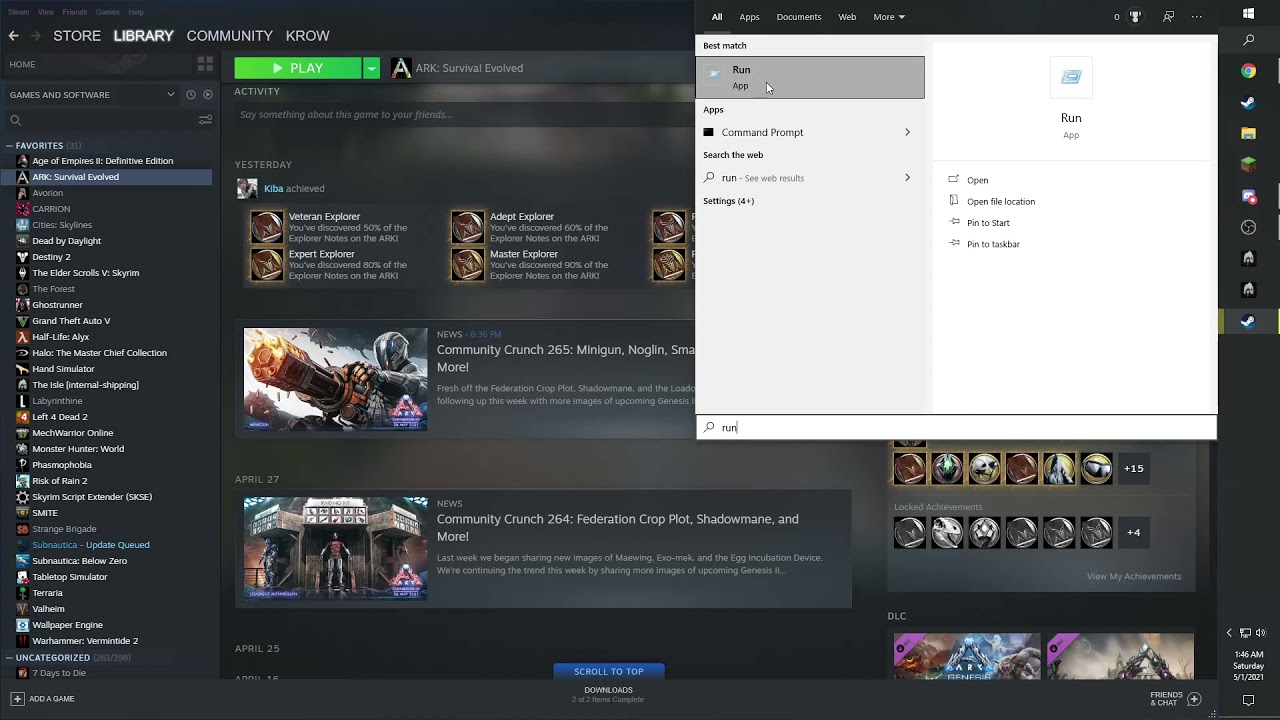
Video Made by krow
(Note) this may not work for the legacy Version of the Isle
(Note) Deleting the save file will only reset your control's
 dry saffron
question if i get stuck on trees (i was walking near the palm trees and it clipped me and somehow im one with the palm trees and cant get out) on official servers am i doomed or are admins or anyone in game able to provide me help?
 gentle escarp
Im stuck in a rock as a stego. Is there a way for me to get unstuck?
gentle escarp
dry saffron
question if i get stuck on trees (i was walking near the palm trees and it clipp...
crouch and it releases you
 visual zealot
Can anyone tell me why whenever I try to boot up Evrima, I get stuck at the welcome screen?
Video reference of game failing to launch
thin oracle
@dry saffron @gentle escarp
If you can't get out
Go to either #evrima-eu #evrima-na #evrima-au #evrima-sa (depending on the server you're on)
Then @ official server admins, give your IGN and issue
And wish for luck someone helps tp you out
gentle escarp
ty
thin oracle
gentle escarp
ty
all good, if you have any future tech issues, don't be scared to @ tech support for questions.
Or even @ or DM myself (Lightclaw)
stay well
sudden turtle
Love getting ignored, again, can someone please tell me how to fix my loading screen? Every time I try to load up the isle it appears super small.
signal path
sudden turtle
Love getting ignored, again, can someone please tell me how to fix my loading sc...
Happy to try and help, but I don't understand exactly what your issue is - could you take a screenshot of it? If it's just the game isn't full screen, you can fix that in your settings.
 winter python
sudden turtle
winter python
sudden turtle
<@&818552355796287508> any ideas?
hollow violet
Yeah maybe some display settings are fucky
@sudden turtle - Press Windows key.
-
Type "Run" to launch Run program.
-
Type in "%localappdata% and click 'Ok'.
-
Search for TheIsle folder.
-
Delete the TheIsle folder once it has been located.
Then restart it
sudden turtle
I'm sorry I'm so confused
I don't even have the isle folder, I just click play on steam..
Smh this isn't helping, checked and I don't have the isle folder, I just click on steam to play it.. now what?
thin oracle
sudden turtle
Smh this isn't helping, checked and I don't have the isle folder, I just click o...
you checked and you don't have TheIsle folder?
try this instead
Open File Explorer from the taskbar.
Select View > Options > Change folder and search options.
Select the View tab and, in Advanced settings, select Show hidden files, folders, and drives and OK.
Afterwards, at the bottom left of your taskbar there should be a white search bar. Type %APPDATA% in there and open your %APPDATA% folder.
At the top you'll see the filepath, click "Appdata" to go back to the actual Appdata folder, then to local > TheIsle > delete the "Saved" folder @sudden turtle
sudden turtle
My head is hurting, why do I gotta do all that??? I'm so confused... I don't see anything in file explorer that says view tab
Forget this bruh I'm not even gonna play anymore..
thin oracle
that's the view tab
 thin oracle
sudden turtle
Forget this bruh I'm not even gonna play anymore..
thin oracle
sudden turtle
Forget this bruh I'm not even gonna play anymore..
sure thing, stay well. Have a nice day
sudden turtle
Where is advanced settings??
 sudden turtle
Ok I clicked it, I don't see the isle
thin oracle
"TheIsle" this one?
sudden turtle
Yeah I don't see it
thin oracle
when going into %Appdata%?
sudden turtle
Wait where's that??
thin oracle
sudden turtle
Wait where's that??
Afterwards, at the bottom left of your taskbar there should be a white search bar. Type %APPDATA% in there and open your %APPDATA% folder.
This section ^
bottom left
 sudden turtle
K it says type the name of the progra, foler,
thin oracle
put in %APPDATA%
sudden turtle
K done, it took me to some files
thin oracle
sudden turtle
K done, it took me to some files
then to local > TheIsle > delete the "Saved" folder
then follow this
thin oracle
play The Isle
thin oracle
It's just a weird scenario, where Steam doesn't download The Isle properly, or some files turn corrupted
and that's all good
sudden turtle
Ok thanks again:)
thin oracle
all good, stay well
 pearl basalt
**All of a sudden i get a UE4 crash when trying to launch Evrima. **
"the Enreal engine 4 TheIsle Game has crashed and will ....
Fatal error"
Steps already taken.
Uninstall and install Everima via steam
Cleared Steam cache
Reinstall Nvidia WHQL Driver. 471.11
Deleted Saved folder
Installed Nvidia WHQL Driver 466.27 ( Clean install )
Tried launching other games, Superposition benchmark
( Gpu, cpu working )
Validate Steam files ( on The Isle )
Checked Win 10 Updates all clear
EDIT also tried
Manually deleted all TheIsle folders, both localfiles and local app data.
Hardware
Ryzen 3900x
2080ti
32GB ram
Corsair mp600 ssd
tough stirrup
There is a problem with Evrima EU 2 server. It restarted and now i can't join. Pls fix it!
pearl basalt
**6 hours and no answer.
**
hollow violet
pearl basalt
**All of a sudden i get a UE4 crash when trying to launch Evrima. **
"the Enre...
For anyone encountering fatal errors leading to crashes You will have to manually uninstall “The Isle” from Steam. This issue is typically caused when someone switches from the Legacy to the EVRIMA branch.
Open “Steam”
Right Click The Isle
Select Properties > Local Files > Browse Local Files
Delete everything inside of The Isle’s folder.
Then
-
Press Windows key.
-
Type "Run" to launch Run program.
-
Type in "%localappdata% and click 'Ok'.
-
Search for TheIsle folder.
-
Delete the TheIsle folder once it has been located.
Which is located in pins.
Do all of that at the same time manually not through steam.
Then try again and let me know.
pearl basalt
hollow violet
Do all of that at the same time manually not through steam.
I tried this now same result.
[CrashReportClient]
Zip file contains Saved crash folders.
hollow violet
pearl basalt
I tried this now same result.
[CrashReportClient]
Zip file contains Saved crash...
Do that and dm me the results please
thin oracle
pearl basalt
**All of a sudden i get a UE4 crash when trying to launch Evrima. **
"the Enre...
Hey there, I see your problem.
I have gone through a few forums and websites, building a variety of solutions that may or may not work.
I do see that you have done some other thing as well, but were unsuccessful.
Here are the links
https://www.drivereasy.com/knowledge/solved-halo-4-ue4-fatal-error-crash/
https://steamcommunity.com/app/376210/discussions/17/1696046342865299111/
https://steamcommunity.com/app/376210/discussions/17/1693788202026896215/
Sorry about this. If nothing works, I suggest going through some more forums... or try sending a report in #🐞-evrima-bug-reports-🐞.
Stay well and good luck

Halo 4 uses the popular Unreal Engine 4 as the engine of the game. But players are having the UE4 Fatal Error. To fix it, you can try the fixes in this guide.

Ever Since the last 2-3 updates When I try to play Dev Branch And Click play it just says, 'Fatal Error' The UE4- The Isle Game Has Crashed And Will Close, I have Validated 4 times restarted my computer 2 times Deleted and reinstalled the game twice, and nothing has worked I really need help

Don't know if anyone has this same issue, but I was messing around with the mods yesterday and I'd enabled 2 different mods together to see how they'd go together and maybe create a server of my own, but eventually got disconnected with a message saying ''Fatal Error : The Isle has crashed and will...'' I don't know what.
 wild hinge
good night i need help
winter python
wild hinge
good night i need help
error 258 is caused by having below-minimum pc specs. make sure you update to windows 10 and/or update your gpu drivers
 narrow plover
When i open evrima it shows like 12 servers
 white nymph
Why is au dead ?
thin oracle
narrow plover
When i open evrima it shows like 12 servers
If you are having issues seeing servers Click the Hide Empty Box and that may fix the issue.
try this
daring bough
Hello, when i am going to game i cant see as many servers than before, i reloged, verified local files on steam, and checked internet connection
yesterday i was opening ports in firewall to the isle server, but even when i closed them problem is still there
thin oracle
daring bough
Hello, when i am going to game i cant see as many servers than before, i reloged...

CCM
By default the in-game ping is set as 5000, however some game servers impose a ping limit, this can ultimately limit the amount of servers that appear when you are looking to play a game. This article will show you how to set the maximum allowed ping...
daring bough
i deceased server ping to 100
thin oracle
increase it to the max you possibly can
daring bough
so now is 5000, but still there isnt teutonic, official servers, or asuras
thin oracle
daring bough
so now is 5000, but still there isnt teutonic, official servers, or asuras
try this then, If you are having issues seeing servers Click the Hide Empty Box and that may fix the issue.
daring bough
yeah, now i ve got servers thank u!
thin oracle
all good, stay well
daring bough
btw, have you know that crash?
[CrashReportClient]
bHideLogFilesOption=false
bIsAllowedToCloseWithoutSending=true
CrashConfigPurgeDays=2
thin oracle
daring bough
btw, have you know that crash?
#🔧-evrima-troubleshooting-🔧 message
this one?
ahh
thin oracle
daring bough
btw, have you know that crash?
can't run your game now?
daring bough
its server-troubleshooting, if you have time and you can, could you help me
thin oracle
daring bough
its server-troubleshooting, if you have time and you can, could you help me
sure thing
pearl basalt
thin oracle
Hey there, I see your problem.
I have gone through a few forums and websites, b...
Thanks, i also found those threads before. Lots of the steps taken come from those threads.
Still no progress. 😦
All of a sudden i get a UE4 crash when trying to launch Evrima.
"the Enreal engine 4 TheIsle Game has crashed and will ....
Fatal error"
Steps taken.
Uninstall and install Everima via steam
Cleared Steam cache
Reinstall Nvidia WHQL Driver. 471.11
Deleted Saved folder
Installed Nvidia WHQL Driver 466.27 ( Clean install )
Tried launching other games HOTS, Superposition benchmark confirming
( Gpu, cpu working )
Validate Steam files ( on The Isle )
Checked Win 10 Updates all clear
Steps taken 2
Manually deleted all TheIsle folders, both localfiles and local app data.
Run in -windowed via "genereal settings in steam"
Run without HDR off, with Gsync off.
Latest Microsoft Visual C++
Disable overclocking and overlays
Hardware
Ryzen 3900x
2080ti
32GB ram
Corsair mp600 ssd
daring bough
@thin oracle that what you said helped me, but still i cant see empty servers. I have done my own server and i cant check is it in game, because i can see it
i reinstalled game
serene kettle
well
i just used geforce now to play the isle evrima
i am still using geforce now*
 zealous iris
Hi, I don't see the serv Official Evrima NA#1 anymore, just EU Official servs. Is there something I can do to have it back ? (I was able to play on the NA 1 official serv earlier, today)
 turbid halo
@mighty rapids
 mighty rapids
Why can't i see the NA sever today. I played there yesterday
 upper vine
Me and my friend both had fully grown deinos on official 2 eu, they are not there anymore, anything that could be done about it?
<@&818552355796287508>
winter python
upper vine
Me and my friend both had fully grown deinos on official 2 eu, they are not ther...
official servers were wiped, and tech support cannot help with in-game matters
pearl basalt
Regarding UE4 Fatal error crash.
A fresh Win 10 install solved the issiue. @thin oracle
 livid meteor
ok guys might just me that are noob but there is no airbrerak control, i have tried every buttom and checked control meny but there is no airbreak is it just me? i can send pic as proof...pls help
livid meteor
livid meteor
ok guys might just me that are noob but there is no airbrerak control, i have tr...
<@&818552355796287508>
hollow violet
livid meteor
ok guys might just me that are noob but there is no airbrerak control, i have tr...
You pressing Z?
livid meteor
hollow violet
You pressing Z?
Bruhhh yeah i have tried that but there is no flipping control for airbreak
hollow violet
livid meteor
Bruhhh yeah i have tried that but there is no flipping control for airbreak
-
Press Windows key.
-
Type "Run" to launch Run program.
-
Type in "%localappdata% and click 'Ok'.
-
Search for TheIsle folder.
-
Delete the TheIsle folder once it has been located.
Then try opening the game and trying again
livid meteor
hollow violet
Then try opening the game and trying again
Ok will try thx
thin oracle
pearl basalt
Regarding UE4 Fatal error crash.
A fresh Win 10 install solved the issiue. <@45...
ahh, that's good.
I'll note that down, thanks!
signal path
Are there any known causes if the UE4 crash that aren't significant PC issues (Win10, GPU drivers, etc)?
signal path
 fickle badge
theres a sub carno stuck on na 1
fickle badge
theres a sub carno stuck on na 1
Make sure to post that in the #evrima-na channel, pinging @.Official Server Admin (without the .) and give in game name
An admin may not be able to respond before they starve or dehydrate, so they should consider logging off while they wait
 thin hare
how do i fix this Error
 thin oracle
thin hare
how do i fix this Error
thin oracle
thin hare
how do i fix this Error
you can't really fix this problem, however here is a small statement about it
#🔧-evrima-troubleshooting-🔧 message
thin hare
oki thx
 radiant harness
Hiya! having a problem with geforce now on evrima. Worked on it all morning from updates to restarting my router.. It seems to run Legacy perfectly fine. Just saying no to evrima xD
thin oracle
radiant harness
Hiya! having a problem with geforce now on evrima. Worked on it all morning from...
does it tell you what is occurring when you try to launch Evrima?
 worthy creek
so bassically sometimes i'm on a server and i'm getting kicked out of the server for no reason and it gets me back to the menu screen with the message. Anyone know what to do or help?
 thin magnet
radiant harness
Hiya! having a problem with geforce now on evrima. Worked on it all morning from...
thin magnet
radiant harness
Hiya! having a problem with geforce now on evrima. Worked on it all morning from...
oh i came here to fix this too
when i download the evrima and press to lunch it says your connection is unstable and stops the session it just accurs on evrima not other games i tried like 5 game and i can play legacy just fine
did anyone find a way to fix it?
signal path
thin hare
how do i fix this Error
Some people have fixed that through deleting their NVIDIA shader cache, google the process and let me know if you have issues
signal path
thin magnet
when i download the evrima and press to lunch it says your connection is unstabl...
Are you using a VPN?
thin magnet
No i am not
I wrote to gfn tech support and decided to wait tomorrow maybe they fix it idk i could not find a way on online
thin oracle
thin magnet
oh i came here to fix this too
You can't really fix games via Geforce Now, as you can't mess around with files
You have to wait for Geforce to contact you back
thin oracle
radiant harness
Hiya! having a problem with geforce now on evrima. Worked on it all morning from...
Same with you above.
I would recommend contacting Geforce Now's Tech Support team about this
thin magnet
İts general i guess i have a friend that has the same issue today, thanks for trying to help us tho good night
thin oracle
thin magnet
İts general i guess i have a friend that has the same issue today, thanks for tr...
sorry about that, nothing much you can do with Geforce Now issues
thin magnet
But its wierd to play legacy normally
worthy creek
so bassically sometimes i'm on a server and i'm getting kicked out of the server for no reason and it gets me back to the menu screen with the message. Anyone know what to do or help?
thin oracle
worthy creek
so bassically sometimes i'm on a server and i'm getting kicked out of the server...
-Right click on The Isle in steam
-Select properties
-Go to Local Files, Verify integrity of game files...
try this firstly
worthy creek
thin oracle
-Right click on The Isle in steam
-Select properties
-Go to Local Files, Verify...
didn't work still getting kicked out of the server and it still gets me to the menu screen with the message
thin oracle
worthy creek
didn't work still getting kicked out of the server and it still gets me to the m...
are your drivers up to date?
worthy creek
thin oracle
are your drivers up to date?
what do you mean by up to date and how can i check if it is up to date?
thin oracle
worthy creek
what do you mean by up to date and how can i check if it is up to date?
are you using a Nvidia Video Card or AMD?
sorry
worthy creek
thin oracle
are you using a Nvidia Video Card or AMD?
sorry
hold on
worthy creek
thin oracle
are you using a Nvidia Video Card or AMD?
sorry
you mean my grapchis card is that correct?
thin oracle
worthy creek
you mean my grapchis card is that correct?
yes
worthy creek
thin oracle
yes
Nvidia
thin oracle
worthy creek
Nvidia
ah all right.
Do you use Geforce Experience by any chance?
if no, I suggest using it.
Download it for yourself and update your video driver there
worthy creek
thin oracle
ah all right.
Do you use Geforce Experience by any chance?
it's an app from my understanding?, i'm sorry i do not know much of Computers :"D
thin oracle
worthy creek
it's an app from my understanding?, i'm sorry i do not know much of Computers :"...
yes, free to download
worthy creek
so i will download it update it and then will see if the game still kicks me out of thr server will let you know when i do check ^^
thin oracle
worthy creek
so i will download it update it and then will see if the game still kicks me out...
if you game still kicks you out @ me or Tech support
hopefully it shoukdn't
worthy creek
@thin oracle so i downloaded geforce experience but now how do i update my drive?
again sorry i do not know much about computers
thin oracle
worthy creek
<@456226577798135808> so i downloaded geforce experience but now how do i update...
there should be a tab that says Drivers
worthy creek
ye i see it
thin oracle
 worthy creek
i download it i suppose?
thin oracle
yep!
worthy creek
after it gets downloaded what i do?
thin oracle
It should restart your PC/Rig
worthy creek
on it's own?
thin oracle
I believe there is a prompt once it downloads?
sorry, I'm not on my PC right now.
So I can't remember what the button's called
worthy creek
it's alright glad you are helping me 😄
i will let you know what it shows since it will be downloaded in a bout 10 minutes
thin oracle
all good
in the mean time, you can watch this little guide video about it
https://www.youtube.com/watch?v=gsr5AWNzbMI

To keep the latest NVIDIA graphics driver update, refer to the steps in this video.
More great tips and video tutorials for MSI Notebook, visit our MSI How To Channel: https://www.youtube.com/user/msihowtochannel.
If you have any questions regarding the video, please raise your question to us by creating an online web ticket. (https://register...
winter python
my drivers dont cause restarts when they update but you kight want to restart your pc just in case
thin oracle
it's always good to restart.
You don't have to, however, it's recommended
worthy creek
@thin oracle i got kicked again ;w;
thin oracle
worthy creek
<@456226577798135808> i got kicked again ;w;
seriously? Damn
is this ONLY happening on one specific server?
winter python
do you try servers with various pings? any servers in particular that you try?
winter python
thats a bit high, are there any servers available with lower ping?
thin oracle
can you also try running The Isle using Geforce Experience
worthy creek
you mean by launcing it by the geforce experience?
thin oracle
yes
worthy creek
yea i tried that a bit ago
worthy creek
no
like i'm playing and after sometime it just kicks me out of the server and i'm back at the menu screen with the message.
thin oracle
does it give you an error message?
worthy creek
nopr.
thin oracle
interesting, let me scroll through some forums and find something for you
seems like the forums and reddit still are trying to find an answer (excluding Old 2017 Legacy stuff)
 thin oracle
worthy creek
nopr.
thin oracle
worthy creek
nopr.
welp, all I can suggest is going through this Doc and going through some similar troubleshooting fixes.
https://docs.google.com/document/d/1o8xsbfZKesdLpvViUdnYwVkG2SiqEuFkw8W3qslI7V0/preview?pru=AAABcu_-xeU*OQUsVqcB068eLF2ldxAuYw#
Sorry about this.
If you find a way to fix this issue, please @ myself or someone in the moderator team. Thanks!

Google Docs
Steam-related Issues LAST UPDATE: May 2nd 2020 How do I install EVRIMA? Open Steam Right click “The Isle” Select Properties > Betas Select the beta “EVRIMA public branch” on the drop-down menu How do I participate in opt-in stress tests? Note: Stress tests are not always active and req...
worthy creek
aight i'ma try them later or tomorrow again thx
worthy creek
aw dam-
nothing seems here can help me maybe it's gotta be my own internet or something with the router maybe
thin oracle
worthy creek
nothing seems here can help me maybe it's gotta be my own internet or something ...
damn, well I hope it's fixed in the next update
worthy creek
Actually
It might be the fact that I'm playing on night maybe rn it's morning and I didn't get kicked or anything
So I guess at night I get kicked something like that or my internet connection or I have no idea then
radiant harness
thin oracle
does it tell you what is occurring when you try to launch Evrima?
ugh, yes. i have had geforce for some time now and have had no problems via wifi with it. it runs legacy perfectly fine, but when i open up evrima with it.. it says game stopped due to spotty connection.. my internet is fine as i was right next to the router.
ive ran evrima also as well fine. just today it says no
thin oracle
radiant harness
ugh, yes. i have had geforce for some time now and have had no problems via wifi...
have you tried this?
#🔧-evrima-troubleshooting-🔧 message
radiant harness
i will! only just seen this :D thank you!
thin oracle
all good
 past dock
i cant load into servers every time i try it just kicks me back to main menu
thin oracle
past dock
i cant load into servers every time i try it just kicks me back to main menu
is this immediately?
past dock
sometimes it lets me pick the species other times its immediately
i just verify the game files and then uninstalled and reinstalled
thin oracle
Have you recently updated your video driver?
past dock
its up to date
thin oracle
is this with all servers?
past dock
yeah cant join any
thin oracle
well, I can't really give you any help here then.
Sorry about that.
The same issue occurred with someone else earlier today.
However, just go through some of the pinned messages and try some of them.
Also, try going through any firewall privacy issues.
 lusty mural
Hey I'm suffering from the same problem loading Evrima on Geforce Now as some others seem to be, anyone heard back from their tech support?
thin oracle
hi you must swap always , it means you must download the files all the time to swap versions
lusty mural
no I'm talking about it not loading beyond the title card after it's been downloaded
as of like a couple days ago
thin oracle
i had no problem when i log this evrima
lusty mural
hmmmm what geforce now server do you connect to?
maybe it's an EU West problem
nope changing server didn't help 😦
thin oracle
i dunno where its join xD
livid meteor
hollow violet
- Press Windows key.
- Type "Run" to launch Run program.
- Type in "%localappdat...
yo this dont delete stuff like my play time, saced dinos osv?
proven wasp
@livid meteor it wont it will just reset your controls
livid meteor
proven wasp
<@526194295753932827> it wont it will just reset your controls
ok thanks
thin magnet
lusty mural
nope changing server didn't help 😦
any news about the geforce ?
one of the staff reply my tech submission he said that i need to give them a feedback through the geforce now client but i dont know how to do it
lusty mural
yeah they told me to do a developer feedback form too
basically they got no idea what we are talking about
thin magnet
now i send a feedback thru the client too
and they said that we need include The Isle Evrima phrase our text section I did that too so we just need to wait i guess
 wide swan

What's up with my server, it says completed and stuff but when i search up the name, nothing happens
fickle badge
<@&505047238674874368> teno is stuck
 abstract basin
Hi is there an admin that could help get a play unstuck
He is on na 1
In pocket under the waterfall

 thin magnet
radiant harness
Hiya! having a problem with geforce now on evrima. Worked on it all morning from...
thin magnet
radiant harness
Hiya! having a problem with geforce now on evrima. Worked on it all morning from...
do you still have the same issue or did you fix it ?
 hallow gulch
anyone else lagging hard on eu5?
 fiery scarab
 torn kayak
Make sure all your drivers are up to date and that you're using the most recent version of windows 10
radiant harness
thin magnet
do you still have the same issue or did you fix it ?
i actually spoke with tech support, they said apparently evrima isnt even on Geforce now. Even though ive been playing it on geforce now for months. then they cutt me off.
radiant harness
fiery scarab
Make sure all your drivers are up to date and that you're using the most recent ...
Yeah, does that to me too. Windows are up to date. seen the pinned msg. guess i need to get a better gpu heh
 median sapphire
i spawned in and i am stuck in the terrain upon spawning, can anyone help by chance?
<@&505047238674874368>
 tough hedge
someone?
 thin magnet
tough hedge
someone?
thin magnet
tough hedge
someone?
i was playing until yesterday
when i try to play now it says your connection is unstable and stops the session for no reason
thin oracle
tough hedge
someone?
Yes, there a few other people here that had the same problem.
I recommended asking Nvidia about it. However it seems they don't lnow what is happening
tough hedge
thin magnet
when i try to play now it says your connection is unstable and stops the session...
For some reason I loaded up the game once more & it worked. I genuinely do not know what the problem is here.
thin magnet
so you can evrima right now on geforce now?
where are you from btw maybe its about the server
tough hedge
thin magnet
so you can evrima right now on geforce now?
it's not about the server, I believe. I'm playing on EU central 2 or something similar.
tough hedge
thin magnet
so you can evrima right now on geforce now?
I'm playing right now, yeah.
thin magnet
do you have an idea for me to try
tough hedge
If we all submit here https://nvidia.custhelp.com/app/answers/detail/a_id/4681/~/submitting-feedback-through-geforce-experience%2C-geforce-now-or-shield.
they will probably fix the problem
could you do that with me right now? we'll just do several feedback reports, remember to make it detailed and have it explained good
thin magnet
i already done that even i open a submission on gfn tech support and talked with a nvidia staff
he asked me to use phrase ''The Isle Evrima'' on my feedback and i done that what he asked and still waiting these happened today
you are making the same steps as we do right you quit the legacy then download the evrima on properties
tough hedge
thin magnet
you are making the same steps as we do right you quit the legacy then download t...
https://www.youtube.com/watch?v=4Yo7VkIWt8s
i got the game like today so i just followed this tutorial

How to play Evrima on The Isle through GeForce Now (tutorial)
Note this - at 0:38 I was pointing at the steam link-up at the bottom left side of the screen with my mousecursor, but for some reason my cursor wasn't showing throughout the whole vid. So in case you've misunderstood, just fullscreen the steam link-up.
-
Launch The Isle
-
Fulls...
thin magnet
tough hedge
https://www.youtube.com/watch?v=4Yo7VkIWt8s
i got the game like today so i just...
geforce does the steam pop up intentionally i guess because same thing happens on witcher 3 cause otherwise you cant download the dlcs if the steam screen does not pops out but the games like you dont need to download dlc or anything else the steam does not pops out like in those games
but how are you still playing and we can not i got a friend that have the same issue at the same time with me and there is a player in here too which she has the same issue with us
worthy creek
i can't see any servers in evrima it just won't show any (i did do not show empty servers and still nothing)
 frail sun
Can someone help me, when I try to run the isle it pops up this message and when I install it this is what it says. Idk what any of this means

 thin oracle
frail sun
Can someone help me, when I try to run the isle it pops up this message and when...
thin oracle
frail sun
Can someone help me, when I try to run the isle it pops up this message and when...
that's basically the game engine
frail sun
thin oracle
that's basically the game engine
It won’t let me run my game after I download it, it just pops up the first message again. How do I get my game to run?
thin oracle
frail sun
It won’t let me run my game after I download it, it just pops up the first messa...
try to redownload the game
frail sun
I already did that
thin oracle
frail sun
I already did that
ah, I see.
Try going through this form
https://hub.acctivate.com/articles/microsoft-visual-c-runtime-library-error#:~:text=The most likely cause is,the Microsoft download webpage.
If you have received the Microsoft Visual C++ Runtime Library Error, this is not an Acctivate error. This error could be caused by installation of new software, and has been reported after installing
frail sun
I’ll look into it thank you ^^
thin oracle
stay well and good luck
thin magnet
I cant still play evrima this is frustrating now i tried everything whole day
thin magnet
<@&818552355796287508> I am having trouble like for 2 days with Geforce Now and I have seen 3 other players that has the same issue I contact with the Geforce Now staffs about it when we try to launch Evrima Geforce says ''your connection is unstable'' and stops to session for no reason cause i can play the legacy or other games normally can you guys contact with geforce now staffs too or give feedback thru the client as we do cause they dont seem they care
 swift jetty
hey whenever i try to launch the evrima branch I only get just past the unreal logo, I'll see a flash of the screen where I have to click 'I understand' and then it just seems to crash my video card, whole screen goes black and pc fans max out but discord voice still works and have to hard reset my pc. I manually reinstalled including the folder in appdata, put the runtime dll file in the .exe's directory, made sure everything was up to date and restarted but still no luck. Any ideas?
no problems running legacy maxed out
 unkempt cedar
Hello my friend is stuck in the official Evrima NA #1 with a stego. This are her coords: -248.025,578, -550.310,375, -29.622,098 and her steam name is Stray <@&505047238674874368>. Please help