#🔧-evrima-troubleshooting-🔧
1 messages · Page 315 of 1
 safe thorn
also, my CPU keeps being overheated for some reason, i doubt its for that, but could it also be for that?
now that i think about it it isnt because lots of people have the same issue and yesterday i overheated my CPU by playing isle and it worked just fine despite that
 kindred frost
I got the same crashes.
 grim chasm
I too. Dev punchpacket say on steam:
"Steam SubSystem Error/Fatal Error
To fix this please reset your system’s Winsock connection settings by opening a Windows command prompt as administrator (go to Start -> All Programs -> Accessories, right-click on “Command Prompt” and choose “Run as administrator”) and entering “netsh winsock reset" (without the quotes). Reboot your computer and check if your problem is fixed now.
If you're a Windows 10 user simply type "CMD" into the search bar at the bottom left, right click "Command Prompt" and select "Run as administrator", then continue following the instructions above.
If solution above does not solve the issue, a uninstall / clean install may fix this issue. When you uninstall, delete the Isle folder in Steam Apps to make sure any remaining files are gone."
Has someone already tried this?
safe thorn
someone already tried to reinstall the game and all of that you said but it didnt work iirc
let me try the solution above the reinstall a real quick
nope the whole CMD process didnt work

 last star
Hello. My friend has this issue here once she looks in the direction of the sky. She tried out Evrima for the first time today. I adviced her to repair the game and also check for a new gpu driver, which she did and installed now. She is about to test out if that fixed the issue already, but I wanted to reach out anyway if there´s anything she can do if the gpu driver and the repairing did not fix it.
safe thorn
what happens when she restarts her computer? i have a similar issue where some little flickering squares appear all over my screen because of overheating and the game is too heavy, and the problem seems like to be my videocard, perhaps its like that
last star
Oh and, once she tried the Pteranodon, the game crashed completely, so it has to be something about the sky-view, i guess.
She restarted it now and is about to test it. She has a Geforce GTX 1050 TI 4GB, so I don´t know if the game´s too heavy for her. Once the game starts and the issue persists, ill advice her lower graphic settings. Maybe itll fix that. Thank you!
safe thorn
restarting for me works with the flickering squares thing, but the thing is that it will do the same thing after some time. so if it fixed it, expect it to come back again, maybe its just the game being too heavy and her videocard/GPU is overheating, just like my videocard overheating from the game
 brittle loom
Perhaps tell them to try updating their gpu? Check if theres any updates
safe thorn
also adri here are the specs to compare them to your friends specs
 last star
Thanks bunni, but as I said thats the first thing I advised to her. Well see if that fix it.
Thanks forb, will do!
safe thorn
👍
brittle loom
grim chasm
I too. Dev punchpacket say on steam:
"Steam SubSystem Error/Fatal Error
To fix t...
None of it works.
 amber raven
brittle loom
None of it works.
amber raven
brittle loom
None of it works.
you being serious?
brittle loom
I am. It does not work at all
amber raven
damn
safe thorn
didnt work for me either
brittle loom
<@&818552355796287508> Me, and others need help. When i try launching the game. It instantly crashes. Im on windows 10. Tried updating everything. Reinstalling the game. And other things. None of it worked. This is what shows up when i try launching the game
 safe thorn
at this point we should wait for an update or something but im too impatient
 mossy ledge
It seems to work for most people, did you already try to delete your "Saved" folder in "AppData" or tryed to repair the game in Steam?
brittle loom
mossy ledge
It seems to work for most people, did you already try to delete your "Saved" fol...
How do i do that?
amber raven
mossy ledge
It seems to work for most people, did you already try to delete your "Saved" fol...
i have a nut inside my head, how do i do that?
lol
mossy ledge
Press Windows + R > type %appdata% and klick on open > go on the file path back to "AppData" > go to "Local" > search "TheIsle" > delete "Saved"
amber raven
argh
 thin oracle
same still no work
safe thorn
didnt work for me either other than changing resolution of my whole computer while i was ingame into a smaller one
brittle loom
Nope. Doesnt work
amber raven
does it changes anything?
safe thorn
no
for me again it just changed into a very small resolution ingame but still the same error
thin oracle
plss help game is black screen and crashes afterwards...i tried reinstalling,verifying game
mossy ledge
it resets your game files but this seems to have another cause
safe thorn
i dont wanna try reinstalling the whole game for 2 hours and then find out it still has the same issue 
brittle loom
safe thorn
i dont wanna try reinstalling the whole game for 2 hours and then find out it st...
But its useless nevertheless, it still wont work
safe thorn
yep
safe thorn
thin oracle
help pls?
that seems like to be basically the same issue we all were having
mossy ledge
think you´ll need to wait for Punch waking up
thin oracle
before the last 2 updates. game was working fine
safe thorn
indeed, now it doesnt work for most of us
thin oracle
the only difference with my issue is that it doesnt give me any error message. just black screen and just crashes
safe thorn
seems to be the same
mossy ledge
for me it works, only problem I have is that my fps are now 15 instead of 50
 indigo rock
Guys a lot of of what your saying has already been said and discussed .. scroll up and look before you go heLp pLz
we are waiting for fixes here
thin oracle
said and discussed but never resolved
indigo rock
you’re not resolving
safe thorn
i saw, im not calling for help, i was trying to tell others theyre having the same issue and discussing i tried different things but didnt work
thin oracle
im asking for help
 zealous root
you cant do anything
indigo rock
yeah that’s fine i’m just saying it’s frustrating when chat is spammed while trying to find fixes
safe thorn
thin oracle
im asking for help
its basically our issue, wait for punch to wake up at this point
thin oracle
very sad day i just bought the game and its like this
safe thorn
true, but i was discussing i tried stuff and it didnt work way earlier, so now im just waiting for punch to wake up
thin oracle
who is punching?
amber raven
a dev
mossy ledge
thin oracle
who is punching?
Punchpacket
 bleak ore
<@&505047238674874368> can you please help, my WASD controls stopped working. name is Dorado, server is official vrima AU
 storm olive
bleak ore
<@&505047238674874368> can you please help, my WASD controls stopped working. na...
storm olive
bleak ore
<@&505047238674874368> can you please help, my WASD controls stopped working. na...
Please check the pins in this channel pertaining to resetting your controls.
amber raven
this update was a mess lol
bleak ore
okay thankyou
 tawny plover
bleak ore
storm olive
Please check the pins in this channel pertaining to resetting your controls.
tawny plover
bleak ore
storm olive
Please check the pins in this channel pertaining to resetting your controls.
it didnt work.. can i be telported somewhere to see if that fixes?
please
storm olive
Please ping the Tech Support role
 gentle escarp
did the official servers just disappear for anyone else?
 woeful badge
yes
 paper locust
Yes me also
gentle escarp
brittle loom
<@&818552355796287508> Me, and others need help. When i try launching the game. ...
ik im not like the staff here or whatever but i studied stuff with this and this is probably not an error with the game itself, but instead with steam / the OS. try reinstalling steam and if that doesnt work, verify the integrity of Windows 10.
brittle loom
Ill reinstall steam and tell u if it works
gentle escarp
okay gl!
i didnt have a year of my life go to waste im so happy i can actually use this
 uneven kelp
An update was just released btw, that's why the servers disappeared
gentle escarp
ooh
amber raven
does that mean we can now access to the game?
brittle loom
amber raven
does that mean we can now access to the game?
Dont see anything crash related but fix
amber raven
question to those who have the update already ofc
amber raven
brittle loom
Dont see anything crash related but fix
so... thats a yes?
brittle loom
I dont know
 lapis grove
um I keep teleporting to the same place
gentle escarp
be grateful that you have been blessed with teleportation powers
lapis grove
well and now i got kicked from the server
brittle loom
Im installing steam again. But does that mean that all the games will have to re download when i log in?@gentle escarp
gentle escarp
possibly, idk
i imagine something as large and widespread as steam would have some sort of function to prevent all games being uninstalled
so probably not no, fingers crossed
brittle loom
Alr
 proud raft
He guys, anyone experiencing that the servers only have one slot? As a result all servers all full and I cant join any
zealous root
welp, still cant boot up the game
brittle loom
It needs to reinstall. Well its fine. Ill go out now anyways so by the time im home itll hopefully be done
 jaunty badge
for some reason the water is extremely red for me
 amber raven
the patch didnt fix it, great
safe thorn
brittle loom
It needs to reinstall. Well its fine. Ill go out now anyways so by the time im h...
oh so reinstaling fixes the issue?
im just gonna try it, it will not do anything if i dont try it
brittle loom
safe thorn
oh so reinstaling fixes the issue?
No i uninstalled steam and reinstalled it. Now i gotta download the isle again
But maybe it works. I dont know
safe thorn
back in 2017 a random fatal error kept popping up and the ONLY way it fixed was reinstalling, so im just going to try it at this point
brittle loom
Good luck mate
safe thorn
good luck too
amber raven
does the pinned solution works?
safe thorn
if you have a windows 7 probably
amber raven
ok
 scarlet sequoia

im in windows 10 too and having the same issue,if someone discovers how fix it can u ping me pls
safe thorn
scarlet sequoia
im in windows 10 too and having the same issue,if someone discovers how fix it c...
me and bunni are currently reinstalling the game, ill tell you if it worked or not, so you dont have to waste time yourself (i also have a 100% up to date windows 10 yet i have the issue)
scarlet sequoia
i did that already 2 times and didnt work
safe thorn
wait you did it twice?? well then wait for punch to wake up, in 2017 reinstalling it when a fatal error appeared worked for me
mossy ledge
maybe try reinstalling steam
scarlet sequoia
mossy ledge
but save your games before doing so
grim chasm
The FatalError of UE4 persists after the update.
 uneven hemlock
i love drink grass
safe thorn
yeah its an issue for other people too
ever since this update, but i have a way worse issue which is the fatal error and im forced to try and reinstall the game (and i doubt it works)
they might fix all of this later
 plush lantern
I can't safe log. It counts down to 0 and then just sits on the black screen with my deino breathing until I hit H and wake up again
safe thorn
odd
thin oracle
the rubber banding is messed up
its so annoying
 shell cargo
Someone knows how to fix this rare glitch/bug? When I get a grow as it, it looks normal then but is blind and doesn't have eyes, someone told me to remove a file and launch the game, it didn't help and then I did to reinstall it, it also didn't help
 thin oracle
shell cargo
Someone knows how to fix this rare glitch/bug? When I get a grow as it, it looks...
thin oracle
shell cargo
Someone knows how to fix this rare glitch/bug? When I get a grow as it, it looks...
thats your graphics
safe thorn
shell cargo
Someone knows how to fix this rare glitch/bug? When I get a grow as it, it looks...
i have the same glitch but i didnt know how to fix it back when i could play this
amber raven
safe thorn
ever since this update, but i have a way worse issue which is the fatal error an...
did it work for you?
 twin glade
anyone windows 7 crash?
safe thorn
update your pc to windows 10
twin glade
 safe thorn
you can see it in pinned; windows 7 is no longer in support
twin glade
oh shoot
safe thorn
but this happens in windows 10 aswell, but update your system anyways
thin oracle
any fix yet for black screen and crash?
safe thorn
theres no fix, wait for punch to wake up, or either wait for me to tell you if reinstalling worked for me so you can try it too; or try it anyways
safe thorn
twin glade
thanks, gonna make my friend upset
why would you make your friend upset? i mean, the isle is unplayable with windows 7 sadly
twin glade
safe thorn
why would you make your friend upset? i mean, the isle is unplayable with window...
cuz he has this problem, and he asked me to help him, he cant do it by himself cuz he is not english talking person xd
safe thorn
if he has windows 7 he simply has to update his PC to windows 10; if it still happens in windows 10 (like to me), try reinstalling, or wait for a fix from the devs
twin glade
is there still free update to windows 10?
thin oracle
wish i could upgrade to windows 10 from windows 8.1. it might fix the issue
safe thorn
twin glade
is there still free update to windows 10?
i dont think so, i never updated my old windows 7 to a windows 10 due to it being thrown out and now i have a windows 10 that supposedly was a windows XP back then
try looking it up, but i feel like it isnt
 inner badge
It still have the same problem even after the new update
 fervent knoll
Hello. Is Evrima still region locked? I still can not play/see any.. Just wanted to see if it is still an issue or im doing something wrong
 glacial breach
W7 is no longer supported?! Thats quite underkick!
 tardy patrol
Yoo anyone else getting a black screen when they try to join or host a server?
kindred frost
The Isle really just stopped supporting windows 7 with no plans to fix it? :(
grim chasm
safe thorn
you can see it in pinned; windows 7 is no longer in support
Thats a joke? Where was this announced?
safe thorn
its not a joke if i remember correctly?
even krow said it in pinned
doesnt mean krow is a god and genius; but i remember it being out of support
heard lots of people say that anyways
 tribal prism
wait so this is never getting fixed for win7 users now?
safe thorn
i suppose so but i dont own a windows 7 anymore so i cant tell if other windows 7 players experienced this, but if they do experience this they should upgrade to windows 10
thin oracle
How to fix it
 safe thorn
no one knows yet, im trying to see if reinstalling fixes it for me, but for other people it didnt
alot of people including myself have that
kindred frost
While you can safely say its a problem only in windows7, there is no mention that the devs won't fix it. They mentioned that updating your windows fixes the problem, but didn't say that they won't fix the game eventually.
safe thorn
yeah true
tribal prism
me who went from win10 to win7 = 🤡
safe thorn
but i never said its a problem ONLY on windows 7
amber raven
and how do i update it if its say theres no update for it 
safe thorn
my pc is an up to date windows 10 yet its having the same issue
amber raven
talking about w10 ofc, im not a w7 user
safe thorn
amber raven
and how do i update it if its say theres no update for it <:TI_HypsiShrug:696885...
restart steam if it didnt do the recent update
amber raven
amber raven
talking about w10 ofc, im not a w7 user
im talking about windows
safe thorn
ooh windows idk i never experienced that myself as my parents only ended up throwing my broken ass windows 7 and got me a windows 10
thin oracle
Does anyone know if they will fix it someday
amber raven
the isle devs are special species, so you never know
 celest crescent
It's not good to re install the game. I just tried
 thin oracle
I also
safe thorn
mine is still in the process to do so i guess im just wasting my time
odd because back in 2017 it worked for me when i had constant fatal errors
celest crescent
Is there a developer? How to solve this problem? As long as you start the game, it will crash. It's useless to install the game again!
 mossy ledge
safe thorn
odd because back in 2017 it worked for me when i had constant fatal errors
mossy ledge
safe thorn
odd because back in 2017 it worked for me when i had constant fatal errors
maybe a different error
 tepid kayak
Yeah I'm not getting a garbage operating system just for The Isle. RIP I guess.
celest crescent

 late remnant
i have the same problem...
 safe thorn
windows 10 isnt garbage if your PC is good in general, atleast in my experience
but i can agree windows 7 is much better, i still miss using it
celest crescent
Before the game update with a good new after this problem! Why are we talking about the quality of the operating system! No one came out to solve the problem???
grim chasm
So let's make coffee and wait for something better. good luck!
safe thorn
celest crescent
Before the game update with a good new after this problem! Why are we talking ab...
because its believed for windows 7 users the OS is the problem, but it happens in windows 10 anyways
 verbal marlin
bro i just attacked a raptor with my deino n got teliported to the skylimit in the forest n just started falling down tell i died
i just attacked a drinking raptor n nope not today u fall to death
thin oracle
this update is not good at all
 torn blaze
Anyone else noticed that the utah pounce is not doing bleed damage? Just pounced a stego for all my stam and he didnt bleed
am i doing sth wrong?
safe thorn
torn blaze
Anyone else noticed that the utah pounce is not doing bleed damage? Just pounced...
probs a bug
thin oracle
safe thorn
probs a bug
indeed
torn blaze
oh rip utah
 winged plover
can somebody help me i have just got the game i wanted to play evrima so i downloaded it but if i launch it then the servers do not show up can please someone help me???
safe thorn
have you tried reloading them
winged plover
can we hop in a call
safe thorn
the servers dont appear for me either until i reload them; also no i cant right now
winged plover
oh but is it refresh at the bottem left
safe thorn
yes it is
winged plover
doenst work
safe thorn
hmm, try relaunching the game or something, i sometimes had the same issue but dont remember what i did to fix it back then since it was like 3 years ago
winged plover
oke
safe thorn
i reinstalled the isle and guess what? it still does the fatal error and i knew it was just a waste of time but whatever i guess
celest crescent
你们好
safe thorn
i literally cannot get my game to run instead
celest crescent
me to
winged plover
you have to set the game on to evrima branch right ?
safe thorn
if you wanna play evrima yes, but it has alot of problems right now
celest crescent
All the time, I can't play the game all day. It's very hard
 winged plover
mine is asking for a code
safe thorn
celest crescent
All the time, I can't play the game all day. It's very hard
well theres no fix to this until the devs themselves fix it
safe thorn
winged plover
mine is asking for a code
can you show? it should show you evrima branch and legacy; im gonna show you a real quick
 jagged briar
celest crescent
All the time, I can't play the game all day. It's very hard
jagged briar
celest crescent
All the time, I can't play the game all day. It's very hard
same
safe thorn
 safe thorn
do you see these 2 options?
 wispy yarrow
are there supposed to be ripples in the water when you walk in it cus there are none
winged plover
yes i see
safe thorn
select evrima and close it
winged plover
done
safe thorn
is it installing right now?
winged plover
no it has already installd
safe thorn
it should reinstall the game into evrima branch
winged plover
i already did that but if i launch the evrima game no sservers show up
safe thorn
its a bug that alot of people also encountered
its probably from this update itself, since some people like me have a fatal error, some people experience drop in FPS after this, rubber banding to the sky and dying and the issue youre having right now
thin oracle
safe thorn
its probably from this update itself, since some people like me have a fatal err...
i have a fatal error too...
winged plover
well that fucking awesome
safe thorn
thin oracle
i have a fatal error too...
thin oracle
winged plover
well that fucking awesome
yes
thin oracle
safe thorn
<:TI_Succ:447626423365271562>

safe thorn
welp all we have to do is just wait for devs to fix all of this up since theres no solution to all of this
winged plover
thin oracle
safe thorn
welp all we have to do is just wait for devs to fix all of this up since theres ...
yes 😪
 old sage
Does anyone get a blue screen?
winged plover
no
safe thorn
even a blue fucking screen????!?!?!?!?
old sage
Been getting fatal error and sometimes blue screen
thin oracle
old sage
Does anyone get a blue screen?
no
safe thorn
im not having a blue screen BUT DAMN
winged plover
fix the game pls LOL
thin oracle
winged plover
fix the game pls LOL
YES PLS
safe thorn
old sage
Does anyone get a blue screen?
dont try it over and over again, dont do anything just wait for the devs to fix it up, i have tried literally EVERYTHING i even updated my windows 10 for this shit and nothing worked so it must be up for the devs
old sage
Yeah just got another fatal error
thin oracle
safe thorn
dont try it over and over again, dont do anything just wait for the devs to fix ...
all thing not work
thin oracle
old sage
Yeah just got another fatal error
so yes dont do anything
old sage
This is rough
winged plover
so the game i just bought is broken ? wow
safe thorn
winged plover
so the game i just bought is broken ? wow
will get fixed eventually
old sage
It seems to happen when the server goes over 40 for me.
thin oracle
How long do you think it will take them to fix this\
thin oracle
thin oracle
How long do you think it will take them to fix this\
idk
but i hope not too long
:/
 vestal bobcat
okay i have been trying to update evrima and for the longest time the updating bar on steam has been stuck at the very end saying "1.22 GB of 1.22 GB. UNPACKING..." its been stuck on this for such a long time. any fix for this?
amber raven
vestal bobcat
okay i have been trying to update evrima and for the longest time the updating b...
try pausing and then reactivated it, thats what i did
vestal bobcat
amber raven
try pausing and then reactivated it, thats what i did
i hvae. multiple times. also tried to go back and switch to legacy but now i cannot and it just remains stuck on the that
amber raven
vestal bobcat
i hvae. multiple times. also tried to go back and switch to legacy but now i can...
then idk
vestal bobcat
the download is actuall stuck and i cannot play any isle branch now
 last cradle
bro i just hit 100% utah, the server kicked me out and now my utah isnt there no more.
 bright flame
@vestal bobcat do you have enough space on your computer?, mine have paused before like that
vestal bobcat
bright flame
<@!691337765228380180> do you have enough space on your computer?, mine have pau...
plenty of space plenty. other games have literally just updated and are fine. isle just isnt doing anything
bright flame
weird.... I dont think its any help but maybe fuck around in steam options on the isle? like verify files and like that
vestal bobcat
it just finished
bright flame
niiiice
vestal bobcat
its done. after 2 hours of being stuck. WHAT. well thank god now lets see how buggy this game is... god please dont blue screen me....
safe thorn
for me it keeps doing the fatal error and my drivers are also all updated so i guess theres no solution to it
devs and other people keep saying to update the gpu drivers but my drivers are all updated since today
 dawn stone
Anyone have poor fps due to poor gpu usage? Its around 50-60%
safe thorn
lots of people are having that issue
dawn stone
So it must be some kind of coding error
 empty dew
Just got teleported into the stratosphere as a deino for no reason.....

Oh, and I died obviously. I was only smoll so no big loss but still....Weird.


 indigo fable
i dont seem to be able to chat global or see global in official evrima servers. is there a setting im missing?
 steady perch
@indigo fable it was removed as a design decision back when Update 3 released
 rough oxide
anyone else having the game crash after the loading screen
indigo fable
steady perch
<@!193735213883326465> it was removed as a design decision back when Update 3 re...
how do people form groups then?
steady perch
They bump into each other at random or use Discords or similar, like how it used to be in old legacy officials
indigo fable
discord makes sense. but for bumping into at random, how do you invite to group if you cant see names, or talk? I don't see an invite menu or tab menu either
steady perch
There is still local chat and you use the 2 call to invite or accept invites
thin oracle
indigo fable
discord makes sense. but for bumping into at random, how do you invite to group ...
you have to use the 2 call
indigo fable
interesting
thin oracle
lol
indigo fable
ty 🙂 ill give it a go
thin oracle
np
 fluid sequoia
I updated Evrima and restarted Steam multiple times - even updated drivers - and the water looks exactly the same. No ripples. Nothing
 quick sun
Can anyone tell me if their is anyway to reduce to stuttering and rubber banding ?
thin oracle
What’s up with the teleporting as deino? Finally got one to 60% and I teleported to a field of Utah’s..
Usually it just logs me out when it glitches
I just want an adult 😭😭
 potent vortex
Hi I wanted to ask if you guys know how to fix this , my game doesn’t get bigger it stays as this tiny small rectangle in the middle of the screen, I have restarted my pc multiple times and verified the game files but it is still like this.
It was working normally 2 hours ago. The box is so small that it only shows "greetings islanders" , thats all you can see in the box so i cant click accept because it doesnt even show cuz of how small the box is. . .
Im on the evrima branch
and it hadnt happened before until today
thin oracle
me too i hate this update
potent vortex
atleast u can get into a server and grow a new one . . .
thin oracle
potent vortex
atleast u can get into a server and grow a new one . . .
but it took 6 hour to grow
i fell u bro
potent vortex
ye i cant even get into servers tho because i cant even click accept so i can click play and search for servers and join one and grow
i cant play the game at all
thin oracle
potent vortex
i cant play the game at all
me too
amber raven
i cant even be in the menu screen
potent vortex
same lol
thin oracle
amber raven
i cant even be in the menu screen <:TI_HypsiShrug:696885704524824586>
indeed
potent vortex
so im not the only one with the problem?
amber raven
no
thin oracle
no
amber raven
and theres pretty much nothing you can do about it
thin oracle
amber raven
and theres pretty much nothing you can do about it
yes its boring
yes im angry too
 rotund beacon
rough oxide
anyone else having the game crash after the loading screen
rotund beacon
rough oxide
anyone else having the game crash after the loading screen
Same
thin oracle
this update broke everything
 rotund beacon
It gives me fatal error then kicks me out everytime i try to play
potent vortex
does anyone who can fix this ever look at this channel???
i try to make it have a fatal error which ive done to try and fix this but didnt work lol
im so pissed off
rotund beacon
 potent vortex
how did they stuff up this badly with 1 update
amber raven
isle devs 
potent vortex
lol
thin oracle
rotund beacon
It gives me fatal error then kicks me out everytime i try to play
me too
yes lmaoo
thin oracle
potent vortex
and on the weekend

potent vortex
lol
thin oracle
lol
potent vortex
should i @ a dev xD?
thin oracle
idk
potent vortex
cuz they need to fix this
thin oracle
potent vortex
cuz they need to fix this
yes
amber raven
@ punch
thin oracle
potent vortex
should i @ a dev xD?
try?
potent vortex
who should i @
amber raven
to punch
thin oracle
they are many dev
amber raven
since hes the one who should be pinged in this situation
potent vortex
i know but we should all @ the same one so they actually look
rotund beacon
don't do it man it is not worth it lol
amber raven
no
only punch
potent vortex
rotund beacon
don't do it man it is not worth it lol
why what will happen
rotund beacon
if you gonna @ someone @ a admin or smth
 winter python
The developers are actively aware of the problems and are attempting to fix them.
rotund beacon
potent vortex
why what will happen
well we are not suppose to @ dev i think you can get some sort of punishment for it but i am not sure
thin oracle
rotund beacon
well we are not suppose to @ dev i think you can get some sort of punishment for...
yes i think the same
thin oracle
potent vortex
very frustrating
yes 
amber raven
winter python
The developers are actively aware of the problems and are attempting to fix them...
isnt the fact that some ppl cant even get to the menu a priorority to fix?
winter python
amber raven
isnt the fact that some ppl cant even get to the menu a priorority to fix? <:TI_...
Yes, it is, and they are attempting to fix it.
amber raven
i guess they should at least inform about that
potent vortex
@winter python but are they aware of the other problems which im guessing the minority have sry if im not allowed to @ u
winter python
You can @ me, you're fine! It's just the devs that you can't. They're becoming aware of problems as they come in, which is why it's so important to use #🐞-evrima-bug-reports-🐞
potent vortex
ok thx
thin oracle
winter python
You can @ me, you're fine! It's just the devs that you can't. They're becoming a...
oh ok
 timid orchid
same
 potent vortex
Make a report , i just did with my bug and hopefully they will look
thin oracle
potent vortex
Make a report , i just did with my bug and hopefully they will look
i hope so
 winter quest
rotund beacon
winter quest
rotund beacon
read pins
winter quest
timid orchid
same
pins
 raw flare
rotund beacon
raw flare
rotund beacon
same problem, what i can do to solve this issue?
raw flare
winter quest
read the 1st pin
Fatal error: [File:Unknown] [Line: 907]
winter quest
line 907? oh
raw flare
i use win 10 pro...
raw flare
reinstalled the game, cleanned temp, using adm priority, using win 7 compatibility, and not fix
msconfig, and something more u imagine, i maked
winter quest
no
brittle loom
Did the crash thing get fixed?
winter quest
crash thing?
raw flare
Fatal error: [File:Unknown] [Line: 907]
Rendering thread exception:
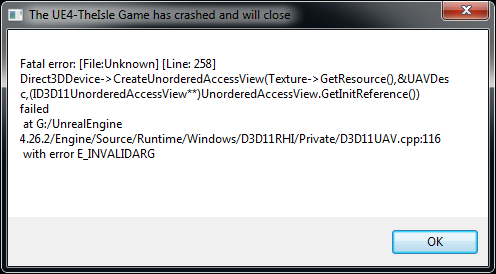
Fatal error: [File:Unknown] [Line: 258]
Direct3DDevice->CreateUnorderedAccessView(Texture->GetResource(),&UAVDesc,(ID3D11UnorderedAccessView**)UnorderedAccessView.GetInitReference()) failed
at G:/UnrealEngine 4.26.2/Engine/Source/Runtime/Windows/D3D11RHI/Private/D3D11UAV.cpp:116
with error E_INVALIDARG
now are this error
i have directx 11 and 12 perfetcly installed :/
after the update, i played, and disconected to update, and now cant connect more, i think 12 hours working in it, trying to solve, and no fix :C
winter quest
are you able to do it without adm priority?
raw flare
yes, are in adm priority, and no fix
winter quest
try reinstalling it, if that doesnt work, maybe ask admins
raw flare
maked, 3 times, and no fix
thin oracle
overall, even a lot of players have the same problem, hopefully he will fix it by the next update
winter quest
oh well
raw flare
im talking, 12 hours trying..
raw flare
thin oracle
overall, even a lot of players have the same problem, hopefully he will fix it b...
do u have any idea how long time to this update?
amber raven
nothing works atm as far as i know, yall gotta wait
raw flare
i too, i have 10 years whit gaming experience whit some games, and maked all to solve, and anithing works
thin oracle
I do not know the end, but probably for 1-3 days
raw flare
damn, lot of time ...
amber raven
👍
 pseudo lichen
developer should restore the versions before the update, and work on its implementation
raw flare
pseudo lichen
developer should restore the versions before the update, and work on its impleme...
true
pseudo lichen
I am thinking of all those people who are trying to do whatever it takes to run the game, reinstall the graphics drivers, and even the system itself. And all in vain because it is not the player's fault. Waste of time, stress and disappointment
raw flare
i maked it, reinstalled the videocard driver, and not solve
i played at the last time after the update, disconected by the server update
later that, cant run the game....
timid orchid
winter quest
pins
i dont have windows 7
raw flare
this is the error...
pseudo lichen
I had a similar situation, and also reinstalled drivers and updated windows and many others nothing helps, you have to wait
 long harness
Does anyone know if Keybinds in Evrima have any sort of function to the one's in legacy?
Like, if i change any keybind in Evrima, will it affect legacy keybinding, or..
(Im mostly asking because i have Evrima's keys in legacy, like Air Brake etc, which breaks legacy and i am unable to rest, attack, do most of things that i need to do in order to survive)
raw flare
pseudo lichen
I had a similar situation, and also reinstalled drivers and updated windows and ...
yes i too, now just the adm can help i think
pseudo lichen
shits happens
raw flare
raw flare
this is the error...
see all the video
pseudo lichen
raw flare
see all the video
I have the same
timid orchid
same here and i use windows 10 lmao
raw flare
start the intro, and not run the uav videos, i think are something about intro videos launch error
raw flare
timid orchid
same here and i use windows 10 lmao
i too
pseudo lichen
its about unreal engine, error in the code. I downloaded normaln version the isle and it turned on normally
raw flare
pseudo lichen
its about unreal engine, error in the code. I downloaded normaln version the isl...
lol
the normal version are ok?
amber raven
i just wonder how some ppl did get into the game
pseudo lichen
amber raven
i just wonder how some ppl did get into the game <:TI_HypsiShrug:696885704524824...
Because the problem doesn't happen to everyone. But they have other problems, for example with water and teleport.
safe thorn
they also have constant drop in FPS
amber raven
pseudo lichen
Because the problem doesn't happen to everyone. But they have other problems, fo...
yea but what are the conditions to at least be in the menu, thats my question
brittle loom
This error..
 amber raven
argh
safe thorn
brittle loom
This error..
oh hey bunni, remember i told you i reinstalled the game? it didnt work for me in the end either
amber raven
safe thorn
oh hey bunni, remember i told you i reinstalled the game? it didnt work for me i...
nothing works
safe thorn
exactly
brittle loom
safe thorn
oh hey bunni, remember i told you i reinstalled the game? it didnt work for me i...
Mines still installing- lmao my internet is so slow for some reason
safe thorn
well it wont work anyways
pseudo lichen
I tfinlk it can be many of conditions, starting at your drivers ending at directX hours of looking for a solution
brittle loom
Dang..
safe thorn
i also forced my computer to update several times with several updates that still werent installed and its still the same so i guess we'll have to wait, after all, we cant do anything with the source code or shit like that
considering legacy works fine
brittle loom
Yeah. Btw if i switch to evrima while still installing the game will it automatically get me in the evrima branch?
amber raven
idk but i think yes
safe thorn
what version are you installing right now
amber raven
depending on the %
brittle loom
Well my game is installing. And i put on evrima. So it says 9 gbs at total
Cuz when u usually install the game first u have legacy
safe thorn
you should be installing evrima right now
brittle loom
Mk
safe thorn
if you didnt set it to evrima and left it to ''none'' its legacy
but like, evrima doesnt work right now sadly but good to install it before a fix is put onto this lol
 arctic basin
Whenever i try and join a server it loads to 11% and then goes unresponsive
 hollow violet
safe thorn
i also forced my computer to update several times with several updates that stil...
hollow violet
safe thorn
i also forced my computer to update several times with several updates that stil...

do that and send to me please
safe thorn
hollow violet
do that and send to me please
Oh sure, but im on phone right now as its 1 AM here, so im going to send it to you tomorrow if it doesnt mind you
hollow violet
Sounds good!
safe thorn
👍
 zealous glacier
Krow I can’t open the game because of this and i am in windows 10
 hollow violet
zealous glacier
Krow I can’t open the game because of this and i am in windows 10
hollow violet
zealous glacier
Krow I can’t open the game because of this and i am in windows 10
Yeah I already told you to dm me those statistics from steam
zealous glacier
K
zealous glacier
Ill do later as I’m on phone as well
hollow violet
Mkay
It's usually windows 7 but I've seen 2 or three now that send me their rig details and they end up having really old outdated GPU's
zealous glacier
hollow violet
Mkay
Dm?
zealous glacier
hollow violet
It's usually windows 7 but I've seen 2 or three now that send me their rig detai...
My Gpu is 8 years old so that might be it
raw flare
krow, can i dm you?
 cloud lance
H e l p
Ive verified files and everything, it wont let me in any servers.. And any server with slots above 100 is negative?? I dont know whats happening lol
Game is updated and all.
Is this fixable?

Some servers even say like
127/-126
raw flare
cant play the isle, later the update, dont open more...
thin oracle
I created a evrima server a couple days ago and when I reached 16 player it was like a cap
When I joined it would kick me out like it was full. A couple of my friends joined and it also wouldn't let them in
Anyone have a solution?
raw flare
raw flare
this is the error...
@hollow violet
 vivid zealot
I just switched from legacy to evrima and every time i try to launch evrima it does the blue loading screen then my screen goes black and after a little bit crashes my pc and makes it restart. Does anyone have a fix?
amber raven
to everyone who has this issue ⬆️ , so after talking to Krow apparently the reason of that is because your graphic card is too old and it can no longer run the game, so yea, good luck getting a new and better pc if you want to play this again
vivid zealot
ok thank you
amber raven
in case it isnt your graphic card, then idk why
vivid zealot
ok
vivid zealot
I still find it weird how my pc runs legacy on the highest settings but won't launch the evrima branch
raw flare
vivid zealot
I still find it weird how my pc runs legacy on the highest settings but won't la...
me too..
 indigo oxide
Is there a solution for someone not being able to see all the servers? My friend isn't seeing like half the server list and we don't know why
amber raven
vivid zealot
I still find it weird how my pc runs legacy on the highest settings but won't la...
things change, the new interactive water is probably the cause of your graphic card not being able to run evrima
 loud sage
Oh no! My first error! Help!
 amber raven
loud sage
Oh no! My first error! Help!
amber raven
loud sage
Oh no! My first error! Help!
apparently the reason of that is because your graphic card is too old and it can no longer run the game, so yea, good luck getting a new and better pc if you want to play this again
inner badge
loud sage
Oh no! My first error! Help!
I also have the same error 
 dapper coral
How do i access Servers not in the EU? Because the only servers that show in the server list for me is EU servers, but i wanna play on US servers
inner badge
Try joining server thru steam servers
dapper coral
inner badge
Try joining server thru steam servers
i tried that but it wont load me into any servers
loud sage
amber raven
*apparently the reason of that is because your graphic card is too old and it ca...
PFFT that's awful. Well... I suppose it is time for an upgrade... though it's a 1050*** I believe? I'll have to recheck (changed numbers)
amber raven
loud sage
PFFT that's awful. Well... I suppose it is time for an upgrade... though it's a ...
sure itll be able to run it
 warm sinew
did the NA servers just go offiline?
raw flare
mine second day in the isle, buy the game, and that update make me a donkey.... why i buy a game, and that game make me idiot in one update, now i cant play the game?...... nice work to think in all players...
 smoky knot
nothing wrong with the game, sounds like an operator error
raw flare
smoky knot
nothing wrong with the game, sounds like an operator error
really? im playing, and shutdown by a update, when the game update, that game not run more, and are the operator?
no way
i can play legacy on high easy, and the evrima not running more, why?
oh yeah.... operator donkey....
smoky knot
yea operator error, working fine for everyone else,, sucks to be you
raw flare
when u search on chat's, in others servers, have lot of players whit same problem bro, are not operator error
aligators flying, yeah, operator too?
 hushed zinc
amber raven
*apparently the reason of that is because your graphic card is too old and it ca...
hushed zinc
amber raven
*apparently the reason of that is because your graphic card is too old and it ca...
please don't scare me and my 750ti
raw flare
nice way to get money, just do a update, and catch the money from the donkeys....
amber raven
hushed zinc
please don't scare me and my 750ti
i mean, you can try
raw flare
ridiculous things.....
pseudo lichen
gtx 1050 ti and same problem, i can play in cyberpunk but evrima dosent work becouse of new water hahaha
raw flare
pseudo lichen
gtx 1050 ti and same problem, i can play in cyberpunk but evrima dosent work be...
"operator error"
i can play enlisted on high, and cant play evrima on minimum or medium? lol"
pseudo lichen
its some colision between drivers and unreal engine new codes added at update and thats it, dev propably should fast fix it in nex update
raw flare
i can play ark survival on high, easy too, lot of effects, and evrima cant run on minimum, nice "operator error"....
pseudo lichen
dont listening him
raw flare
pseudo lichen
its some colision between drivers and unreal engine new codes added at update a...
praying for it...
unreal engine database, need a fix i think..
pseudo lichen
i told you it can be a new water textures is writing not corectly for all Directx version so d3d have a problem with it and crash
raw flare
pseudo lichen
i told you it can be a new water textures is writing not corectly for all Direct...
maybe
cloud lance
cloud lance
H e l p
Ive verified files and everything, it wont let me in any servers.. And a...
Anyone know whats happening here? ;;
raw flare
cloud lance
Anyone know whats happening here? ;;
idk 😦
cloud lance
aaa
raw flare
that last update, has turned on, lot of bug's
cloud lance
I see that
raw flare
im playing in prelud, and the server shutdown to update, when i fix the update, the game cant run more, lol
aligattors flying, and dive to death
pseudo lichen
servers are missing
raw flare
servers too
pseudo lichen
water is red
raw flare
i think, to fix that, need to restore last version from updates, and search the new scripts problem...
pseudo lichen
i think that to, but what does they do...
pseudo lichen
i play 2 days
raw flare
pseudo lichen
i play 2 days
me too
pseudo lichen
rly good fun, sometimes bugs but its beta i thinking. But now... i bought this game to relaxing in bushes not to stressing like that
tepid kayak
I have a GTX 1060 and I still can't run it.
pseudo lichen
i have gtx 1050 ti
raw flare
tepid kayak
I have a GTX 1060 and I still can't run it.
take care, "operator error" bruh '-'
tepid kayak
I'll just wait for this to be fixed, because my frames and everything were really fine the previous patch.
raw flare
yes, we know
pseudo lichen
tepid kayak
I'll just wait for this to be fixed, because my frames and everything were reall...
me to and i have rly good time with this game
raw flare
i think we need a nvidia quaddro to play this game again :3
tepid kayak
I think they just need to fix this.
raw flare
raw flare
i think we need a nvidia quaddro to play this game again :3
"laugh"
pseudo lichen
its game only for bitcoin miners
tepid kayak
I really doubt Win7 had anything to do with it.
raw flare
well done, let's wayt, see all later...
 vagrant cobalt
whenever I click a server to play all of the other servers disappear
pseudo lichen
i think it can be win 7 to, becouse i have 7 xD
raw flare
i have win 10 pro original
pseudo lichen
so its not win
raw flare
are not the SO
pseudo lichen
its operator
raw flare
pseudo lichen
its operator
"high laugh"
 remote viper
@cloud lance
If you haven't found a solution yet-you can try opting out of the Steam Beta setting. I had the same issue of servers showing up with - slots and couldn't get past the forever loading screen.
@dapper coral
If you have a VPN try switching it to run a US host. there was a bug a while back that wouldn't let people see servers not in their region.
cloud lance
remote viper
<@!313412678938918933>
If you haven't found a solution yet-you can try opting o...
I’ll have to try this. Thanks!
dapper coral
remote viper
<@!313412678938918933>
If you haven't found a solution yet-you can try opting o...
i dont have a VPN, it might be a virus protection issue but idk
remote viper
If you're not sure where the Steam beta setting is let me know
It's possible.
I had to use a VPN for a little while when I wanted to play on the EU servers in order to see them
Anyone know if they found a solution for the UE4 error code? I have friends in other circles that are getting this issue
pseudo lichen
remote viper
If you're not sure where the Steam beta setting is let me know
we got this problem to and we dont found solutions
remote viper
I'm wondering if it's UE4 having kittens with specific graphic cards that are known to have issues with it.
 formal dust
I get a crash error wverytime I try to start up Evrima now. Don't know how to fix that
 indigo rock
formal dust
indigo rock
formal dust
scroll up and you see a lot of people have the same issue. there is no fix
thin oracle
indigo rock
scroll up and you see a lot of people have the same issue. there is no fix
There's gotta be some sort of fix? I just got the same issue. Is there a work around?
indigo rock
thin oracle
There's gotta be some sort of fix? I just got the same issue. Is there a work ar...
There is not. Nothing posted here by mods has worked for anyone.
thin oracle
So those of us with this error is basically out of luck?
thin oracle
Damn. Guess my plan to get a desktop gaming computer is gonna have to come sooner then. Thanks.
indigo rock
thin oracle
Damn. Guess my plan to get a desktop gaming computer is gonna have to come soone...
well the thing is people with high end gaming computers are getting this error as well
thin oracle
Hi, is there a dev out there who can explain what happened to my f***ing deino?
winter quest
thin oracle
Hi, is there a dev out there who can explain what happened to my f***ing deino?
what happened
thin oracle
i was just chilling at pond when all of a sudden i got teleported miles away in the sky, and i fell to my death
...
hello?
CAN ANYONE EXPLAIN WHAT HAPPENED TO 10+ HOURS OF MY LIFE?!?!
indigo rock
read up others have had this issue , they are working on a fix. please read before you just chuck a message in chat
thin oracle
read what?
 thin oracle
ok, thank u, sorry i did caps, just mad at this f***ing game
indigo rock
same man, its frustrating for eveyone.
thin oracle
cloud lance
H e l p
Ive verified files and everything, it wont let me in any servers.. And a...
sometimes turning off Steam beta helps
if that solution someone sent you didn't work
 topaz roost
Hey I just re downloaded the isle and the main menu resolution is messed up and I can’t click on “I Understand” to get to the settings. Help please???
cloud lance
thin oracle
sometimes turning off Steam beta helps
*if* that solution someone sent you didn'...

 raven wadi

 spark pendant
every 5-10 minutes of playing is met with either a game or pc crash - nice
 warm birch
Hey, is there anyone here that can help me? I tried opening Evrima and got a message that said something about corrupt data and to please verify installation
indigo rock
warm birch
Hey, is there anyone here that can help me? I tried opening Evrima and got a mes...
Article "Verify Integrity of Game Files"
warm birch
@indigo rock Thank you!!
indigo rock
np
 covert pulsar
 formal dust
I had the same, no fix as of yet
covert pulsar
D;
thin oracle
do read the pinned messages
covert pulsar
how am i suppose to get my dino fix
 gentle compass
is that any ways to unstuck my dino stuck inside a rock?
thin oracle
try relogging
gentle compass
already did
thin oracle
not sure then, sorry
if you're on an official you can try and contact an admin on #evrima-na
gentle compass
okay ty
thin oracle
all good, stay well
 hearty pilot
any solutions for fatal error
 fast notch
I get an error stating Couldn't start then lists where the isle is dl
indigo rock
hearty pilot
any solutions for fatal error
not yet
thin oracle
hearty pilot
any solutions for fatal error
I presume you've checked pinned messages and it didn't work?
thin oracle
This error is only on evrim?
 unique beacon
if anyone can help me in the game the options are like that with me ??????
indigo rock
thin oracle
I presume you've checked pinned messages and it didn't work?
non of those “fixes” have fixed the fatal error for anyone and is not a windows 7 issue.
windows 7 being an issue should really be removed from the pin as you’ll have people going out and buying windows 10 only to have it not fix the error
tribal prism
man, i've been playing the isle since 2017 and now you tell me i'm not gonna be able to play anymore just because devs decided the bug is not worth their time? sweet
zealous root
my game just stops responding, not even crashing just stops at a black screen after the AE loading screen when booting up the game. Is there any solution or am i forced to wait another week?
indigo rock
zealous root
my game just stops responding, not even crashing just stops at a black screen af...
yes
zealous root

glacial breach
tribal prism
man, i've been playing the isle since 2017 and now you tell me i'm not gonna be ...
Hi! Developing game (mostly those, who want reach certain quality level) isn't on 40 minutes of work per weekend. 🤷 Its long progress, and sometimes it took more time to solve certain problems.
If you speaking about W7 no longer supported, despite it angered me that W7 will be no longer after those years, it making sense from the developer's side: less systems, less troubles = more time for something else. Also, upgrading to W10 is still free so... I managed to do it through evening.
tribal prism
glacial breach
Hi! Developing game (mostly those, who want reach certain quality level) isn't o...
Im pretty sure it stopped being free years ago
indigo rock
and not to mention there is still a high amount of the player base that use windows 7 and to just be like "Lol just don't use windows7 coz its old lmao" is very sad
tribal prism
indigo rock
and not to mention there is still a high amount of the player base that use wind...
this ^^
glacial breach
Its not supported by Microsoft. Which mean the security issues.
raw flare
players whit 3080 gpu getting problems, whit win 10, and are the old system too?
glacial breach
And no, I upgraded on W10 last evening completely fine. O.o
raw flare
i cant bellieve in that....
 limpid lark
when will it not be free to go to windows 10?
raw flare
are not the windows....
indigo rock
ive spoken to players who did upgrade to windows 10 and it didnt fix the issue
and players that have windows 10 are getting this as well
raw flare
players whit win 10, whit good gpu, having the same problems, are not the OS....
indigo rock
legit, people with top end new PC's are having the issue
raw flare
and are not the "old gpu"
are the database code problem.... scripts maybe.
i think the developers are working to solve it.. we need to keep patient..
just wayt and cry :/
indigo rock
yeah exactly , just unfortunate we haven’t got any mention of it in the last dev updates. a simple “ we are aware and working on a fix “ would be nice ☹️
uneven kelp
Hopefully @cloud crow can give us some insight when he's online 🙂
indigo rock
uneven kelp
Hopefully <@!115385482384375810> can give us some insight when he's online 🙂
ye bb ❤️
raw flare
indigo rock
yeah exactly , just unfortunate we haven’t got any mention of it in the last dev...
really
 woven warren
Hi all is there already a fix for the Fatal error: [File:Unknown] [Line: 258] it happend for me when update was here
indigo rock
woven warren
Hi all is there already a fix for the Fatal error: [File:Unknown] [Line: 258] it...
what is the fix ?
raw flare
woven warren
Hi all is there already a fix for the Fatal error: [File:Unknown] [Line: 258] it...
👀
woven warren
idk i ask you guys xD
raw flare
i think i have a good solution
woven warren
i cant play since new update
indigo rock
same with most people my guy
raw flare
a little bit of powder, one c4 and fire :v
woven warren
ohw damn does anybody know when its gonne be fixed ? its like game related ? not my pc ?
raw flare
its a jokeeee :C
indigo rock
woven warren
ohw damn does anybody know when its gonne be fixed ? its like game related ? not...
nah boo
raw flare
woven warren
ohw damn does anybody know when its gonne be fixed ? its like game related ? not...
lot of players same problem, win 10, 3080 gpu...
woven warren
i have win7 xD
raw flare
are not the computers...
woven warren
oke so does the dev team know the problem ?
raw flare
idk
woven warren
mennn i cry 😦
safe thorn
look the only thing you can do is just wait for a fix or contact someone
raw flare
i too, last night, im trying for 16 hours to solve, and nothing solve...
safe thorn
im currently waiting for krow to help me after i sent him my computer information so you can do that probs
raw flare
safe thorn
look the only thing you can do is just wait for a fix or contact someone
yes.
woven warren
ohw damn really... but there are alot more people with that problem i see on steam
happend for you with the new update ?
woven warren
soo i need 2 message krow ?
safe thorn
any moderator probs but krow can help
woven warren
Oke i did hopefully we can all play soon again 🙂
safe thorn
but some people have said its because our gpu drivers cant handle the game anymore and we might need to upgrade them, it just depends
i dont know whats up with MY situation but ill see when we get to it
woven warren
lol that should not be the problem tho because my load does not go over 50% before it was not a problem either
safe thorn
well it depends because they added new water
zealous root
just gonna say, these are all empty, maybe, just maybe, if any person has these NOT empty you can send em to ppl and they can replace them in the files and see if it worked?

im not a tech guy
so idk if it would do anything
indigo rock
ill check with my friend who has the game working
@zealous root so my friend with a working game says those files don't have text in them for him either so not the issue
good of you to actually look into it tho
zealous root
not even GameUserSettings? Also empty?
indigo rock
yeah
zealous root
aight
safe thorn
weird how legacy works just fine tho
potent vortex
I see they havent done shit about anything
 ashen grotto
im stuck in server #537187256717541376
thin oracle
ashen grotto
im stuck in server <#537187256717541376>
@ an admin in that channel
notify your steam name
ashen grotto
blaxel
 calm surge
sorry if this is a weird question to ask but does anyone know how to remove ai in spectator mode?
thin oracle
ashen grotto
blaxel
on #537187256717541376 lol
 austere remnant
Can somebody help me? Everytime i try to host a private game my game turns black, i have no idea how to fix it
zealous root
did a clean reinstall help with crashes?
raw flare
zealous root
did a clean reinstall help with crashes?
maked, and not fixed.
pseudo lichen
patience is the solution

 misty birch
indigo rock
https://tenor.com/view/master-oogway-kung-fu-panda-inner-peace-gif-11501576
misty birch
indigo rock
https://tenor.com/view/master-oogway-kung-fu-panda-inner-peace-gif-11501576
after the third reinstall the peace its very low
 worn salmon
ello, so, kinda need help so I wanted to ask here. Tried to start the game today and I can't get past the loading screen, it just stays black and isn't responding. Earlier it just crashed but I tried to restart steam, verify the files, reinstall the game entirely, update my graphics drivers and now it doesn't crash (which I guess is a plus) but it just stays black and doesn't respond. So I wanted to ask if there is a fix for this or something or am I just unlucky xd thanks in advance btw
indigo rock
worn salmon
ello, so, kinda need help so I wanted to ask here. Tried to start the game today...
seems you're an unlucky duck like the rest of us , welcome to the club 🙂
worn salmon
ayyy less goo
but like, is there really no fix for this at all? Do we just have to wait for the developers to come up with a fix? cause if so, then that sucks real bad
raw flare
worn salmon
but like, is there really no fix for this at all? Do we just have to wait for th...
yes, we need to stay, its sunday :x i think in that next week the developers are working in it.
pseudo lichen
worn salmon
ayyy less goo
if someone finds a solution, he will certainly share it, we have to wait and you do not have to reinstall everything because it does nothing, it can only add problems.
worn salmon
welp, thanks anyway
timid orchid
no news about the fixing of the crash error?
zealous root
nop
timid orchid
great, not like we wanted to play either way
zealous root
exactly
timid orchid
jokes ofc we want to play qwq
 thin briar
many server have 0/-126 slots for me , how can i fix that?
zealous root
check pinned msgs
mossy ledge
which gpu do you guys have? Krow said yesterday that an outdated gpu could be the cause
zealous root
wdym outdated gpu
pseudo lichen
mossy ledge
which gpu do you guys have? Krow said yesterday that an outdated gpu could be th...
1050ti
zealous root
got the same
mossy ledge
your gpu needs to be newer than gtx 960
 prime obsidian
people here that have the fatal error you guys have windows 7?
pseudo lichen
mossy ledge
your gpu needs to be newer than gtx 960
GTX 1050TI is much better then 960
mossy ledge
but you seem to have a new one
zealous root
ye
zealous root
prime obsidian
people here that have the fatal error you guys have windows 7?
pinned msgs
pseudo lichen
zealous root
pinned msgs
no some peopels have win 10 and get fatall error to
prime obsidian
well yeah win 10 people have the same problem
but its mainly win 7 thing
guess ill need to move on 😔
pseudo lichen
win 8 is the best solution then xD
pseudo lichen
oh 😦
prime obsidian
guess its better to move to 10 instantly who knows when microsoft leaves win 8
pseudo lichen
I can't start the game on 2 PC first win 7 i5 4600 gtx 970 second win 10 i510400F GTX 1050TI on both does not work
before update, the game worked without any problems on both
zealous root
yep
tepid kayak
There should be no reason to move on to win10 for a game this old.
Especially not if the game had no issues with Win7 beforehand.
prime obsidian
true if you know even windows 10 users get the same error
pseudo lichen
Requires a 64-bit processor and operating system
OS: Windows 7 64-bit or later (64 Bit ONLY)
Processor: Quad-core Intel or AMD processor, 3.0 GHz or faster.
Memory: 8 GB RAM
Graphics: NVIDIA GeForce GTX 960 or AMD Radeon R9 280X series card or higher.
DirectX: Version 11
SO should be working on that spec if dev say that
tepid kayak
Dropping support for Win7 would be unacceptable.
zealous root
but i can see why they would tho
pseudo lichen
tepid kayak
Dropping support for Win7 would be unacceptable.
exactly
tepid kayak
There's no reason to, Win 7 is better for gaming than Win10. That shit's been proven.
 marsh umbra
anybody else had issues in game.... like
Esc key does nothing no matter the server or dino
Z trot key works but u cant use it to land with Ptera ={
and H does nothing when your a stego I am cursed i swear
zealous root
marsh umbra
anybody else had issues in game.... like
Esc key does nothing no matter the serv...
does del save files not work? (saved folder)
marsh umbra
zealous root
does del save files not work? (saved folder)
ill try this
umm where are the saved files svaed btw?
zealous root
%appdata% - local - the isle
formal dust
It didn't do anything for me. Manually deleted everything and still same problem.
marsh umbra
it worked!! thankss!
woven warren
is there a fix ??
amber raven
i didnt say anything
zealous root
someone asked me to ask you guys something
''Could you ask in that channel for people to check their DirectX version?
You do that by running "dxdiag"''
woven warren
11 i got
misty birch
12 and crass error
pseudo lichen
11
misty birch
w10, directx12 and nothing
timid orchid
12 here, w10
indigo rock
ok i keep seeing this go round and round so here is what we have. THERE IS NO CURRENT FIX FOR THE FATAL ERROR ON LAUNCH
-
Windows 7 is not the issue as people with windows 10 are getting the same error
-
It is not the GPU as people with high end / new GPU’s are getting the error though people with low end GPU are more likely to have the issue.
-
Deleting all game files and reinstalling the game does not work.
-
Verifying game Cache does not work.
-
Updating/installing drivers does not work.
BE PATIENT
these conversations are making people confused so wait for a dev to update us on a fix. <@&401466542140817419> @cloud crow
misty birch
bad idea update saturday
pseudo lichen
indigo rock
ok i keep seeing this go round and round so here is what we have. THERE IS NO CU...
reinstal gpu drivers doesnt do anything to
woven warren
sooo true we just need 2 wait a lil boys
misty birch
yes only solution wait and patience
indigo rock
pseudo lichen
reinstal gpu drivers doesnt do anything to
ah yes i’ll add that as well , cheers
 formal flax
first time playing the isle in the enw update, is the water supposed to look like this at night or is it a bug?
 pseudo lichen
Legacy version is still working for everyone so if someone need to play today its a solutions
woven warren
but no crocs 😦
formal flax
formal flax
first time playing the isle in the enw update, is the water supposed to look lik...
ok it seems it only for the pond you start in if you spawn south, i respawned in another area and the water looks fine
pseudo lichen
woven warren
but no crocs 😦
it's just a comforting option
 wraith tartan
Quick question, I’ve been getting this error on the isle for a while. Not sure if this is the right channel but it’s as close as it can get I assume
 pseudo lichen
some people have 893 some have 258 and others
wraith tartan
I guess? It’s been happening for a while and google told me to delete it, ended up doing that and it still gave me the error
wraith tartan
A while as in a month I’d assume, all started happening in April
woven warren
ohw damn my error came since new update
wraith tartan
Damn, I’ll figure out something eventually
thin oracle
when i join my evrima server, my camera gets stuck in the sky without being able to do anything
any one have a fix?
wraith tartan
wraith tartan
Quick question, I’ve been getting this error on the isle for a while. Not sure i...
Okay so I ended up updating the isle considering it had a lot of new stuff to catch up with AND it said I wasn’t attached to any branches, so I set it to Evrima
MAYBE that’ll work
woven warren
and did it work ?
hearty pilot
I fixed the fatal error
 unreal briar
Is there a solution to why certain players (server admins) cannot use page up/page down to toggle AI/players/corpses on/off in spectator mode? These actions are also not present in their settings window and so cannot be remapped, reinstalling the game doesn't seem to fix this issue. 
hearty pilot
- multiple un-installs / cache deletion / resign-ins.
or if that doesn't work - reset ur internet.
- Swap from Evrima to NONE on betas under manager and properties on steam.
- download the isle
- Swap back to Evrima from NONE on betas and download Evrima beta again and execute after downloading ( MAY take multiple attempts but will get a clean install at some point)
safe thorn
hearty pilot
1. multiple un-installs / cache deletion / resign-ins.
or if that doesn't work
2...
might wanna try this but it will take a year considering it takes 2/1 hour to install
hearty pilot
I am on 500mbs speeds with cable.. we also live in the county so we only get 1/3 of that connection at our end.. depends on how bad u wanna play..
that indeed is the fix though.
safe thorn
also, do i need to download the legacy version and wait for it to finish and THEN reinstall evrima?
hearty pilot
yep. Push both through full downloads.
safe thorn
thought of doing that yesterday but was too lazy considering how long it takes
alright ill try that out
woven warren
i already did that like 3 times full deinstall then install first none then afhter start the game 2 look if it works it works... then i do on betas evrima downloads it when its done i check it does nothing same thing over again does nothing
i removed everything on my pc tha has something 2 do with The isle and everything is gone but does nothing LEG does work perfect but evrima not
safe thorn
woven warren
i already did that like 3 times full deinstall then install first none then afht...
legacy is confirmed to be working just fine, this is an evrima problem, but as director.doge stated, it might take a few tries
zealous root
i have the worst wifi so i cant do that.....
 junior ether

 dense pewter
not the fatal error people have been posting about....but still an error 😦 How do I fix this?
 winter quest
thin oracle
any one have a fix?
winter quest
thin oracle
any one have a fix?
maybe it will work if you rejoin
thin oracle
mine doesnt say anything like that, it just says 1.22gb and it stops there
how can i fix that?
 ornate bronze
I uh.... yeah... evrima is being funky
safe thorn
dense pewter
not the fatal error people have been posting about....but still an error 😦 How ...
try cleaning the files by deleting the save file in %appdata% > local > the isle and see the result
this doesnt fix fatal error, but maybe your error
ornate bronze

 ornate bronze
Im on evrima branch, this is happening and it won't stop updating even if it's at 100%. This is after my fatal error thing too
I cant open the game from steam or from the desktop shortcut
safe thorn
restart steam
ornate bronze
Tried
safe thorn
did you try restarting your computer?
ornate bronze
Not yet, I'll try that
safe thorn
tell me the results when you did
ornate bronze
It didn't seem to work. Now it says it's "unpacking" with the bar at about 75% of the way full
Yet on my games menu it says 100%
ornate bronze
It stopped downloading and now shows the play button
ornate bronze
Ah... got an error message
 safe thorn
this isnt even the fatal error message, strange
did you delete your save file before?
ornate bronze
Yep. Now it doesn't even show me the opening/intro thing
I've tried deleting the files, and then reinstalling the game as advised by tech support, but that was yesterday
dense pewter
For anyone with this error....I have fixed it! Here's how......right click Isle in steam, go properties, go local files, go "verify integrity of files".....Steam scanned it and redownloaded a file that didn't verify and now it works again! 👍
 ornate bronze
Eh I'll give that another try, seeing as I've got a different error from the fatal now
hearty pilot
I'd take a pay offer of 25k / yr to work questions here for tech support.
ornate bronze
I've got something! 1 file failed to validate, im waiting on it to be updated now. Let's hope it works
safe thorn
ooo
safe thorn
ugh
im currently in the process of reinstalling evrima after i reinstalled legacy earlier so ill see it myself
ornate bronze
For the fatal error message?
safe thorn
yep, i have the same issue
ornate bronze
Alright, keep me posted. Fingers crossed it works
safe thorn
yeah ill let ya know when it happens
safe thorn
lucky
 alpine island
Hey! I'm having trouble with server browser. Sometimes it shows like 15 servers, and sometimes all of them. I have chosen do not show empty and tried adjusting max pings between 5000-500. If i search "teu" sometimes it shows server 4, and nothing else. Last time I had to reinstall game and it worked fine for a day, now it started again. Thx for help in advance!
timid orchid
any progress with the crash?
austere remnant
my game always turns black when i try to host a game, someone knows why? or how to fix it?
safe thorn
timid orchid
any progress with the crash?
58% 34 minutes till i get to see if it worked for me with the fatal error
timid orchid
safe thorn
58% 34 minutes till i get to see if it worked for me with the fatal error
ive tried that two times already :/
 gusty zealot
hey so whenever my freind tries to play with me he just gets dced as if the server was full but it is not he showed me him joining and it goes to a loading screen then just blacks out he hears sounds ingame for a few seconds then boots him back to the main menu SOMETIMES he gets in and can play for maybe 5 mins anyone know a fix or whats up with this???
safe thorn
timid orchid
ive tried that two times already :/
director doge said it might take a few tries indeed
timid orchid
great
safe thorn
althrough if this doesnt work for me i dont have all day to reinstall and install continuosly through 1 hour everytime so i might do it again tomorrow once this ends
timid orchid
yeah thats the problem
last cradle
yooo utah pounces arent causing bleed.
frames dropping and rubberbanding whenever we fight or being chased
safe thorn
yes thats another issue in evrima right now
gusty zealot
anything about my issue?
safe thorn
what was your issue again?
gusty zealot
hey so whenever my freind tries to play with me he just gets dced as if the server was full but it is not he showed me him joining and it goes to a loading screen then just blacks out he hears sounds ingame for a few seconds then boots him back to the main menu SOMETIMES he gets in and can play for maybe 5 mins anyone know a fix or whats up with this???
safe thorn
that sounds weird
my suggestions are either; try checking your files, delete the save folder, restart steam or your computer or the isle itself, if none of this works im not sure what would
nope, didnt work (atleast in the first attempt). fatal error again
im just going to switch to legacy and play on that while i can
 molten lintel
Fatal error: [File:Unknown] [Line: 855] Rendering thread exception: Fatal error! Unhandled Exception: EXCEPTION_ACCESS_VIOLATION reading address 0x00000000 0x00007ff6fd96ef96 TheIsleClient-Win64-Shipping.exe!UnknownFunction [] 0x00007ff6fd98d6eb TheIsleClient-Win64-Shipping.exe!UnknownFunction [] 0x00007ff6fd97f673 TheIsleClient-Win64-Shipping.exe!UnknownFunction [] 0x00007ff6fe386cc2 TheIsleClient-Win64-Shipping.exe!UnknownFunction [] 0x00007ff6fe3875ce TheIsleClient-Win64-Shipping.exe!
can someone help me?
dense pewter
this update has caused so many issues 😦 sadge
 fair ember
<@&818552355796287508> Any ideas on what's causing this? my G drive is recently formatted / emptied, and beforehand there wasn't a /UnrealEngine folder visible or invisible there.
 safe thorn
@molten lintel @fair ember im having the exact same issue and im trying to find a way with smokealot right now, i will get help from krow too later on so if i ever fix this ill tell you all here
fair ember
safe thorn
<@!815308527727935519> <@!85058345987231744> im having the exact same issue and ...
Appreciate it, it's literally just started tonight for me after the most recent update, think it was 1.2 or 1.9GB on steam. Been playing fine of late, albeit at not ideal FPS thanks to my old system.
safe thorn
this recent update has caused so many issues for those who can still play it too, such as a drop in FPS, rubber banding, teleportation in the sky and falling to their death, pounce not dealing any bleed and more. those with fatal error seem to have basically no way to fix this but some of us are trying, including me
however, you can still play legacy in the while
fair ember
I should probably, incase Tech Support do indeed see all of this, mention the following: System is Windows 7, CPU is AMD FX-6300, GPU is GTX 970, The Isle WAS installed on a HDD when the Fatal Error happened, i've verified game integrity on steam, tried launching again, same error. Moved the Install folder from the HDD to a SSD, verified again, same error again.
safe thorn
some people here have said that the OS is not supported and is old (windows 7) so those with this OS should upgrade to windows 10, BUT windows 10 users (including me) have the same EXACT error so if you want keep your windows 7 up to yourself, its just the same
this isnt really an OS problem either
fair ember
safe thorn
some people here have said that the OS is not supported and is old (windows 7) s...
I mean, if i had the money to just go buy Win10, sure. My bank account says otherwise. And as far as i'm aware, i got too complacent for too long with my mental health issues, and missed out on the "free upgrade" thing from microsoft to just straight port over to Win10, so. Besides, if it's as you say, not linked to OS, then yeah, i'll just have to wait until the next patch i guess.
safe thorn
hearty pilot
1. multiple un-installs / cache deletion / resign-ins.
or if that doesn't work
2...
if you wanna keep your windows 7 go for it, everyone is basically waiting for a fix to this as it seems lots of us are having this issue, however someone else fixed it here ^ check it out
for me the first time i tried didnt work, but its stated this might take a few tries
so if you have ALOT of time to spare, try that
gusty zealot
how do i delte the save folder for the isle?
zealous root
@gusty zealot %appdata%- local - the isle
gusty zealot
my buddy has done everything else so
appdata has nothing ?
just takes him to bing
safe thorn
can you show a screenshot? has he searched %appdata% on the task bar search thing?
gusty zealot
were good
safe thorn
👍
gusty zealot
do i just delete the whole saved folder or what?
safe thorn
yeah
gusty zealot
not a certain folder in the saved one
safe thorn
you delete the entire saved folder indeed
gusty zealot
okay awesome
last cradle

Watch TheIsle and millions of other The Isle videos on Medal, the #1 Game Clip Platform.
weeeeeeeeeeeeeeeee im flying and now dead
safe thorn
yeah thats an issue of rubberbanding after this update
safe thorn
no fixes found yet personally
 lilac tartan
So whenever I launch the isle I can’t get the game to fit my entire screen no matter if it windowed or full screen
dense pewter
curious if any herbis have had the random falling from the sky issue?
lilac tartan
Alright I fixed it
thin oracle
did punching wake up yet?
 mint coral
 safe thorn
Yes, lots of us having this issue right now and has been discussed all day long. I will be getting help from krow later on and if it works, ill tell here
 haughty sundial
~dies cause of this error~
thin oracle
haughty sundial
~dies cause of this error~
lol
brittle loom
mint coral
This bug is still here? Thought they fixed it since yesterday. I had the same problem. Reinstalled the game and couldnt wait for evrima to download knowing that nothing will change. So now im playing legacy till they fix this.
safe thorn
Yeah im switching to legacy too till they'll fix
 wild torrent
😢
 thin oracle
What is your IGN @lucid quiver ?
thin oracle
Log back in for me.
thin oracle
Gotcha.
 lucid quiver
thank you so much
thin oracle
You're welcome!
lucid quiver
the unstuck command does not work there
 wooden quest
Idk how to take screen shots but here. I have been stuck on this screen for an hour now. Does anyone know how to fix it?(Sorry if someone posted a fix in here earlier about this, I check an may have missed it)

 raven quartz
i suddenly cant start isle up anymore
 raven quartz
may have fixed it, validated the files and found one that was messed, and its updating now
 latent relic
on windows 8 it gets past the unreal engine screen and the AE thingy but then the screen goes black
i tried the %localappdata% thing and it still doesnt work
raven quartz
latent relic
on windows 8 it gets past the unreal engine screen and the AE thingy but then th...
that happens to me every single time i load the game. For me,i i wait 10-15 seconds, maybe a little longer and the game starts. Have you tried waiting?
 civic tree
<@&818552355796287508> I am having issues with name tags it's stuck on show all and when i look at my controls i don't have the page down key i think it's called adminshowmodeup ?
raven quartz
and validating didnt fix it, but it got stuck on 100% resume so i had to reinstall. hoping for best but its gonna take forever
 hexed sail
the water simulation doesn't seem to be working for me, is there any way to fix it or are the devs still looking into this?
 cold seal
can't get into any server, can't choose a dinosaur or location because the buttons are all gone and I keep getting kicked out back to main screen. Anyone else having these issues?
Everything is updated and I have good internet.
 broken ibex
the greetings islanders screen is frozen i cant click on the "i understand" link HELP
winter python
broken ibex
the greetings islanders screen is frozen i cant click on the "i understand" link...
try pressing f11, itll change the games resolution and you might be able to click it then
warm sinew
NA server 4 is rubber banding hard right now
 light spear
When Pigs "Crocs" Fly [I Hope This Gets Fixed Soon, It Gets Frustrating]

 hidden ridge
Just glitched through the whole map and lost my fully grown Deino. This is crazy.
 broken chasm
Is there a secret to finding food at a Pteranodon? I haven't been able to find any ripples in the water.
hollow violet
latent relic
on windows 8 it gets past the unreal engine screen and the AE thingy but then th...
Can you do that and dm me?
 surreal merlin
Just lost four hours on my deino
 vernal tapir
Is there a way to stop rubberbanding? All of the servers I have been on today have been rubberbanding really badly.
thin oracle
it's a collect of the server's RAM, when it was last restarted and bugs
I've been on officials lately, had very little trouble
 coral mica
was minding my own business and randomly teleported to the edge of the map really high up.. oh no

glad I'm a ptera
spark pendant
random carno bleed?
 mortal fjord
For some reason I can't get past the "Greetings Islanders" pop-up when I open the game. I keep trying to click "I understand" but it doesn't work. I've uninstalled and reinstalled this game multiple times, and verified game data.
 broken ibex
<@&818552355796287508> I’m having problem half the admin team on the server I’m can change between show all and other options in spect mode and half of us can’t. And those who can’t change from show all almost always gets buggs on their dinos after using spect mode (either it’s no biting, rest, jump or something else vital). Please give an answer to this mystery. We’ve tried to uninstall and reinstall, wipe the computers of all data before redownload and more. Nothing works.
I don’t even have the option in setting to change or access up or pg down.
hollow violet
I will look into it for you and see what I can find
@broken ibex
@broken ibex Try deleting this folder
and then restart the game and try
broken ibex
<@&818552355796287508> thanks that did the trick 👍🏻
hollow violet
If you cannot change between show all and other options in spectator mode as an admin try the following:
-
Press Windows key.
-
Type "Run" to launch Run program.
-
Type in "%localappdata% and click 'Ok'.
-
Search for TheIsle folder.
-
Delete the TheIsle folder once it has been located.
hollow violet
hollow violet
If you cannot change between show all and other options in spectator mode as an ...
For future reference ^^
broken ibex
<@&818552355796287508> Hi again! That trick worked (works fine to change between see all and the other options now in spect mode) but now afterwards my frames dipped super low. I get a max of FPS 8 now.
 analog basalt
any admins that can help?
woven warren
is there a fix already for fatal error 258??
pseudo lichen
woven warren
is there a fix already for fatal error 258??
nope
 slate knot
latent relic
on windows 8 it gets past the unreal engine screen and the AE thingy but then th...
slate knot
latent relic
on windows 8 it gets past the unreal engine screen and the AE thingy but then th...
I have windows 8 and the same problem.
latent relic
hollow violet
Can you do that and dm me?
i'll do it later today, just got up
 ashen grotto
coral mica
was minding my own business and randomly teleported to the edge of the map reall...
ashen grotto
coral mica
was minding my own business and randomly teleported to the edge of the map reall...
this happend to me with adult deino to 🙂 cant fly dough
thin oracle
ashen grotto
im stuck in EU#2 server name is blaxel. im at south waterfall
if you get stuck again on an official, try and @ server admins on #evrima-na
giving the official server name and your steam user
 peak plover
i have no idea why, but when i play a dino and try to use alt and left mouse, it doesn't do the secondary attack like the claw of the teno
 soft mirage
