#🔧-evrima-troubleshooting-🔧
1 messages · Page 296 of 1

 dark lagoon
Yeah, but you have to delete The Isle directory by hand from the Steamapps/common folder to do so
 molten prairie
How come i can only see a few servers?
 echo rampart
So basically I can’t click on I Agree or what ever that button says because if I click it doesn’t work and I can’t get into the game. Any ideas?
 thin oracle
Hi there Problem to play with 2 screen. When i put it on my second screen it come back when i clic on the first screen.
echo rampart
@thin oracle I don’t have 2 monitors though
 restive cedar
@willow fractal Firstly, try verifying your game files through Steam. Open Steam, right click the Isle>Go to properties>Local Files> Verify. Restart your PC then try booting up the game. If this doesn’t work, you must do a clean reinstall, meaning manually deleting files in your Program(x86) and AppData
@echo rampart Restart the game if you’re stuck on the agreement page.
 ivory rampart
my FPS after some time go to 40-60 fps to 12-5 fps
and it's not because my PC can't handle the game neither because im in a laggy zone
i've tried running the game on all low and it still was 12-5 fps
 willow fractal
@restive cedar thnx ill try
molten prairie
How come u can only see like 5 servers
dark lagoon
@thin oracle try hitting f11 to go into windowed and see if that works
thin oracle
@dark lagoon dosen't work it freeze on my first screen.
dark lagoon
Aww sorry, that was meant for @echo rampart
Not sure, I don’t have two monitors myself. Are you using windowed or full screen windowed mode?
echo rampart
full screen
 pure jungle
In the 5th Evrima Official NA server i have a stuck tenonto, and ive tried to get out, but I keep getting slingshoted back to the tree, can an admin come on and get me out pls?
thin oracle
Hello. I keep getting this message when i open the game. Yes, I have checked the document, i also have removed the steam files manually before and have still had no luck with getting it to work
 peak hazel
I don't know what troubleshooting chat I need to put this in so I'm going to put it in both... Since I've downloaded Evrima I can't switch and download legacy. The legacy branch doesn't exist on my steam anymore and I don't know what to do, is there any way someone can help me?
 distant vessel
@peak hazel go to the same place you went to when you first changed to EVRIMA, in the betas, select: "None - Opt out of all beta programs"
peak hazel
ok thank you
 lucid hare
Hey, I have problem with greetings. When I launch the game, the greeting screen appers and I can't click 'I understand'. Any solutions?
 gloomy turret

Google Docs
Steam-related Issues LAST UPDATE: 25 June 2020 How do I install Evrima? Open Steam Right click “The Isle” Select Properties > Betas Select the beta “EVRIMA public branch” on the drop-down menu Screen is black upon loading up Ensure “The Isle” has been closed Open Steam ...
Look in here
 fiery scarab
@slate quest does it only do that in the isle or outside of the isle as well?
 slate quest
@slate quest does it only do that in the isle or outside of the isle as well?
@fiery scarab
Just the Isle, and only on the Evrima patch. It only does it in the ocean water or a lake. I can swim in a river perfectly fine without a problem. As soon as I touch standing water, it does this. I don't have this problem in the Legacy Branch and I don't have this problem in any other games.
fiery scarab
that is seriously weird, I'd submit it to #732251429082759249 if you haven't already. It may have something to do with your graphics card/driver being below requirements or out of date is the only thing I can think of.
 sharp wyvern
511550842055163909
thin oracle
~>userinfo @narrow comet
restive cedar
@willow fractal Try disabling Compatibility Mode and Run as Admin in Isle.exe, right click isle.exe>properties>compatibility>uncheck run in compatibility mode and run as administrator
slate quest
that is seriously weird, I'd submit it to #732251429082759249 if you haven't already. It may have something to do with your graphics card/driver being below requirements or out of date is the only thing I can think of.
@fiery scarab
I went to do that but it requests a link for the photos and I don't have an account anywhere that I can post them to. Is there a place I can set up a quick account to do that?
fiery scarab
Deviant art is free, thought not really that kinds of place...You could link to your post in this discord possibly?
slate quest
Deviant art is free, thought not really that kinds of place...You could link to your post in this discord possibly?
@fiery scarab
Honestly, I might try deviant art. I use the mobile version of Discord so I'm not sure linking it would work.
fiery scarab
ah ya deviant art would be a good choice then
 storm olive
Imgur is free and doesn’t require sign up to post images and provide a link for bug reports. @slate quest
 limpid spire
<@&505047238674874368> hi im stuck on a tree and need help....is anyone available?
fiery scarab
@limpid spire yep! which server? also please use #evrima-na next time 😉
limpid spire
hi criniti 😄 im on the one with 22 ppl on
i forget which one..but the only one with a population
and yes ok ill use the chat next time lol sorry 😄
just wanna say these V shaped trees are the worst..im constantly getting sucked into them.
fiery scarab
logging in will be just a second
limpid spire
okie np 😄 ty
slate quest
ah ya deviant art would be a good choice then
@fiery scarab
I've submitted a report about the glitches. Thank you for your help!
fiery scarab
awesome no problem!
 shrewd holly
this is my problem and I've already tired everything nothing has worked for me
(edit) admins i need help please, it doesn't show compatibly mode at all for me what do i do
also i dont have theisle.exe only thing that comes close to that is something that only says theisle
(fyi my time is eastern time not available through 9 pm to 10 am)
 raw latch
scroll up just a tad bit @shrewd holly someone had this issue a couple days ago that they fixed
shrewd holly
k
raw latch
First screenshot u see ~
shrewd holly
okay well what if it didnt show Compatibility Mode. cause mine doesnt oof
raw latch
Then that you'll have to wait for them to reply kek
shrewd holly
k thanks
 vernal perch
If anyone joins into the world and falls through the world, and either spawns back at the surface and cant attack or call, or goes to a infinite screen of the border, its probably the server as far as i can tell, some servers are broken some arent. If that happens join another server
raw latch
hey @shrewd holly
shrewd holly
?
raw latch
You still having that issue? i managed to fix mine went to delete and seen urs still up and think i found the compatibility tab
shrewd holly
yea still am
raw latch
right click the isles from your steam library, click properties, then click local files, browse local files and right click the isles from there and hit properties and u should see the compatibility tab
shrewd holly
ill try
raw latch
yeah and after you do that and you see the compatibility tab follow what LunchaBills said above "Try disabling Compatibility Mode and Run as Admin in Isle.exe, right click isle.exe>properties>compatibility>uncheck run in compatibility mode and run as administrator"
shrewd holly
raw latch
Hmm strange mine as well never showed compatibility directly from the desktop shortcut but it did bring mine up doing it that way
shrewd holly
oof thanks for trying to help me
raw latch
On that screen
the files screen actually put you mouse over the isles icon and right click it
shrewd holly
k
raw latch

 shrewd holly
omg i se it
raw latch
yeah makes a diff lol
shrewd holly
thank you 🙂
raw latch
No problem, now you just follow what he said to do and it supposedly worked for the other guy
shrewd holly
i will thanks a lot your a life saver
raw latch
You're welcome, take care
 sage seal
why can’t I exit the greeting message for evrima
raw latch
The "i understand" page? @sage seal

If you haven't already solved it try these while on the greeting message screen
sage seal
thanks @raw latch
raw latch
No problem man
 lost inlet
I need some help with Evrima.. My gaming laptop doesn't have an insert key, and I have no way to open the character menu otherwise.. The settings doesn't allow me to rebind the insert key either. In the normal version I was able to open it from hitting escape and selecting character but its greyed out
 dull widget
@lost inlet check the pinned post in this channel, there is a googledoc with instructions how to edit your keybinds out of the game.
 thick compass
t
thin oracle
i cant seem to find any evrima servers and all of my servers are based around china and stuff. i also realised basically all of my main servers i used to use have completely died. is it something to do with my region settings?
and the server populations have all went down to 200 or 100
i have around 1000 hours on the game but i stopped playign and now i want to come back for all of the new updates but i cant even find any servers with the new maps
raw latch
uh
i had the same issue on evrima, however i simply raised my http://prntscr.com/uai0ja to this and now i find them all just fine ~ Steam ---> in-game ---> and yeah @thin oracle

 wind sparrow
I have the same issue rn but changing that didn't save me. I can't see server I was playing on just yesterday :P
 faint lake
It's the same for me atm, most servers dissapeared since yesterday
 bold epoch
Maybe that's Steam problem and not evrima? çause this is problem for me atm too
Cannot join any server (but I see them) through Steam client also
thin oracle
Okay so is anyone else having internet/server connection issues? My internet changed supposedly to a faster speed instead it's not really connecting much I know majority of it might be because of that but when it does try to connect. 0 severs pop up like literally nothing. Any way to fix?
thin oracle
Nvm. It's on my end. It's Cox.
 arctic vale
Can anyone help me with this problem? I only got two servers showing up at all times
 unique rune
So I am trying to get on the EVRIMA branch of the game because legacy is acting up for me. I get to the thing where I can press "I agree" and then I cant hover over or click that button bu the video in the background is still going on.
 eager wadi
I can't see the server my friend is on. Can someone please help me?
thin oracle
are there still sever problems? i can see only a few servers and they're all empty, i have the ingame server browser set to 5000, tried playing with the numbers too
eager wadi
Me too
faint lake
It's still the same for me too
arctic vale
Looks like we're all in the same boat aye
 minor hare
it works for me xd
arctic vale

arctic vale
I've tried every solution there is and it still only shows me two servers like they're the only ones that exist on there
I tried adding the isle to the firewall, entirely disabling the firewall, turning off my antivirus, reinstalling the game, set the max pings to every single possible option, quite irrelevant but also tried putting in the vcruntime and i had no luck. . .
Anyone else that has this problem ?
 arctic vale
Where is the file to jump to Evrima???
@cedar widget Im guessing you mean how do you switch to Evrima? If that's what you mean, you have to go to Steam > Right Click on The Isle > Properties > Betas > Select the Evrima beta
 floral yew
Any one got any idea why I cant find the pangaea server, it worked fine 1-2 weeks ago but now I cant find it anymore + only a few servers are showing up I feel like there are way more but they arent shown to me
faint lake
It seems to be a problem, that many people have atm and I would say it has either something to do with steam or the game itself. (Not sure though)
This also happened to me in evrima before but the servers always came back after several hours or a day.
 cedar widget
@arctic vale I don't have any servers, I've already tried everything
 karmic tartan
what worries me is that nobody is coming with an official statement regarding this situation, the internet outage and all that's coming and this silence makes me feel uneasy
arctic vale
It's been two days and got no answers regarding this problem . Unfortunate
floral yew
Try VPN, that worked for me
raw latch
@unique rune i dont know if you fixed it yet but if you scroll slightly from your post up you'll see i posted a screenshot from the google doc on how to fix that
unique rune
so i set the pings per whatever too 5000?
raw latch
non
This x)
As for anyone else with the server finding issues setting it to 5,000 fixed it for me as it did for the legacy isles too... i still see well over 30-50+ servers (not going to count all exactly) you can try the VPN as Lexical suggested above if that suits your taste or your can try diff Max pings / minute i simply put mine straight to 5,000 bc why not, i heard each has their own sweet spot so 🤷♂️ and i suppose a more obvious but mentionable suggestion is to refresh a few times...even i sometimes have to refresh 3-5 times to get them to show cuz at first it'll show 2-20 or sometimes none hah
unique rune
thanks 😛
raw latch
All good enjoy although do be warned evrima is rather quiet...
unique rune
hmmm my mouse is out of sync with the screen on the EVRIMA branch
raw latch
Have you tried swapping between windowed and fullscreen mode?
faint lake
I tried different things for the missing servers (firewall, max ping changes, refreshing server list multiple times ect) and nothing worked for me
karmic tartan
@faint lake I subscribe to that
faint lake
Yeah there seem to be more than a few people where nothing really solved the problem
and that's why I guess, that this situation must have to do something with the game itself
 topaz haven
So my friend downloaded the game yesterday and is facing a problem, we dont know what do
 upper copper
the isle will take ages to load then comes up with an error message telling me to make sure steam is running, then windows tells me to shut down the program because its not running and my internest and connection is fine
 glacial lynx
I can’t get past the menu
wind sparrow
evrima broken what do
^ basically everything related to evrima is having this meaning ^
also yes I still se only 2 russian servers and yesterday I was playing with like 5 people who had the same issue
nothing helps
send flowers
 oak night
When attempting to launch the game clicking on I understand initially only changes game resolution. I did make it past this point by unplugging my 2nd screen. Once I got past that screen I couldn't click any options there without it only changing the resolution. I had to go through task manager to close the game. I wasn't able to close it any other way.
Was able to fix it and it work properly at least for launching after unplugging 2nd screen and restarting The Isle.
faint lake
Hmm I see maybe I should give VPN a try, but anyways I hope this will be fixed in the future so we don't have to use an extra program to see all servers.
 plucky chasm
Google Docs
Steam-related Issues LAST UPDATE: 25 June 2020 How do I install Evrima? Open Steam Right click “The Isle” Select Properties > Betas Select the beta “EVRIMA public branch” on the drop-down menu Screen is black upon loading up Ensure “The Isle” has been closed Open Steam ...
unique rune
So i checked the doc's and everything but after i get past the TOS into the menu were i can choose, "settings" "play" and "report a bug" my mouse is out of sync of where it really is and when i get it onto play or settings i can click press esnter but it does nothing.
 rancid tree
So i run windows on my mac which is how I usually play the isle. But for evrima it says I need a new AMD graphics driver, so i download the driver suggested, but when i download it, it says I do not have and AMD hardware. Is there any fix for this issue? or am i going to have to use windows to play.
rancid tree
?
 south arch
my graphics are pretty static or flashy. the dinosaurs look crisp and nice but the background, trees and grass look like garbage. i know its not the game, but i changed my texture setting to cinematic and then put it back to epic and i think that's what made it look like ass. all my graphic are on epic and always have been except for this time when i switched to cinematic and went back to epic
wind sparrow
Server problem magically got fixed for me right now
faint lake
Yeah most servers are finally back again for me too
dark lagoon
@topaz haven what gpu does your friend have?
south arch
What’s that sound icon that appears above the hunger bar every time you call?
 ember zinc
Mine is just a question, how do i go to Legacy whitout disinstalling evrima?
 spiral marsh
@south arch voice bar if you run out you can't roar anymore I think
south arch
@south arch voice bar if you run out you can't roar anymore I think
@spiral marsh aight thanks
 silk knoll
Sounds are buggy? Hear teno broadcast like 1/2 the map away. Each time switches close and far distance distortion even when broadcaster is stationary
 muted shuttle
 wispy plaza
i dont know wuts happened but the servers arent showing up it goes to data thing and then no servers show up
thin oracle
My Game (Evrima Branch) takes over the system language instead of the language (english) I`ve typed into steam for the game to be. Is there a way I can go into the script and change it or something?
 analog meteor
<@&505047238674874368> just bring some new dinos to the normal game out, so people can enjoy the isle while waiting for evrima to be ready
 ivory juniper
We're server admins, not developers. We don't handle the making of the game. Legacy though will not be updated @analog meteor
analog meteor
Oh xD
 lilac hatch
Some news about Keybiding for AZERTY Keyboard in next patch? <@&505047238674874368>
Sorry for the ping
 upbeat shale
Try adjusting max ping in the steam settings to be able to see more servers.
1000 works for me
thin oracle
Sorry for the ping
?XD
lilac hatch
i don't like pinging people, but still haven't got the info 😦
 abstract shore
Spawns points will need to be adjusted
But most level stuff is fixable with ease including optimizations
dark lagoon
Official server admins have no more knowledge than you do @lilac hatch
lilac hatch
ok No problem Ty 😉
 worn pier
How do i file a stuck report
 raven quartz
i cant get into any servers, it loads and sends me right back to the main screen. I have played many times and it worked fine. Also does this on the legacy as well, saying the host disconnected me. I've tried literally everything at this point.
raven quartz
i got in for like barely 10 minutes before getting kicked out again
 short surge
10 mins of loading still no server
raven quartz
convinced its my steam, because now BOB and primal carnage are both having the same issue. Idk what to do at this point
raven quartz
i should stop having hopes cause its apparent nobody gives two shits
 deft yacht
Hello! I've been looking more into the "I Understand" glitch when opening up the game and i did all the instructs placed out, it worked, but whenever i try to go back into full screen mode it goes back to being glitchy and i cannot press any of the buttons
Does Anyone know a fix to this?
nvm fixed! I went into settings, pressed reset while the screen was still small and it went back into working full screen <33
short surge
I restarted the game and reinstalled it and there still isn’t any server it’s been loading for a whole day what do i do?
fiery scarab
@deft yacht play in fullscreen window mode
@short surge there's a way to fix that by adjusting your ping settings, it's somewhere in the pins...i don't know how to do it off the top of my head
short surge
Adjust it to how much tho
thin oracle
Hi guys can someone help me with this error
I update the game and after that when i double click to lunch the game this error happen
What I must to do
Sorry about my writing
My english is bad
 thick copper
I am stuck on this screen and I’m not able to do anything I can’t even leave the server to leave I have to alt + f4 out and when I rejoin it does the same thing any ideas on what to do?
Ok I have fixed the issue you have to reset your settings
 hollow violet
@thin oracle You may want to try restarting steam to see if that doesn't fix the issue.
thin oracle
i fix that one but now i cant find any server
hollow violet
I would try checking this document https://docs.google.com/document/d/1o8xsbfZKesdLpvViUdnYwVkG2SiqEuFkw8W3qslI7V0/edit#heading=h.nf4bxn6ocrvw
Google Docs
Steam-related Issues LAST UPDATE: 25 June 2020 How do I install Evrima? Open Steam Right click “The Isle” Select Properties > Betas Select the beta “EVRIMA public branch” on the drop-down menu Screen is black upon loading up Ensure “The Isle” has been closed Open Steam ...
For any of those server issues. There's a specific server section regarding that.
dark lagoon
@raven quartz what kind of internet do you have?
@thin oracle did you check the pinned common fixes document?
raven quartz
My internet is fine, I’ve tried resetting already. I have the same issue with BOB as well, with the same host closed the connection message
I’ve played 200+ on the isle and it suddenly started doing this after I just bought BOB
dark lagoon
@raven quartz try this
short surge
I adjusted my max ping to every option and nothing has changed the server aren’t loading still and sometimes When i close the game it says the isle game has crashed and will close
hollow violet
I'd try that, or even before that do a verify files
Or this depending
It's the same fix but different error.
short surge
Nope non of them worked i think it’s time to give up playing Evrima ;-;
Okay it worked now i have 5 servers loaded i mean it’s 5 servers but i get to play
dark lagoon
@short surge can you see more using the steam server list?
short surge
I keep on refreshing to see different servers and sometimes no servers
 small viper
Its cuz no one plays it
 ruby mural
even if no one played there would still be servers
hollow violet
You may want to try this as well if you haven't also consider a VPN to see if that works as well
raven quartz
thank you it works finally
hollow violet
Glad to hear, sorry about the state of the servers, it is a beta, not everything will work as intended right away.
short surge
Nah it some how works now
hollow violet
@short surge Is there a specific thing you did before it worked, that caused it to work?
short surge
I restarted the game a couple of times
hollow violet
Okay, thanks.
short surge
No thank you
 lucid shadow
No thank you
 mint cape
i update to evrima nd cant found any servers, its empty 😦
 alpine ledge
Hi, I would like to ask, I have only Chinese and Japanese servers in my game, what could be the problem?
hollow violet
@mint cape @alpine ledge
alpine ledge
@hollow violet I tried it already, but my problem started not only on Evryme, but also on the main branch... and for some reason only in TheIsle
hollow violet
@alpine ledge As per punch about 2 years ago
Also, I've always had issues on the isle finding servers, Each computer has a sort of sweet spot.
A combo of checking to make sure anti virus isnt messing with it, using VPN's, adjusting steam settings, and making sure in game factors IE(Hide full servers, Hide empty) are clear can affect it as well.
 half verge
Hey I downloaded the evrima update and played it and wanted to go back to normal isle so I selected the normal isle and it’s making me download the game again
 rich lynx
Yeah, if you want to switch between the branches then the game has to reinstall iirc. There is a way to have both at the same time however
hollow violet
@half verge That is working as designed. There's a couple of YT tutorials on how to keep both at once.
 pale vine
so servers are all gone, cant see a single one. any idea how to remedy this when yesterday i could see them all just fine
hollow violet
@pale vine Supposedly steam is having issues all together, that may affect things. Make sure to check the document above for fixes reguarding server issues.
 meager saddle
I hope it improves to reception of how people are responding to the way Evrima was suppose to be. As I heard.
I'm sure with some fixes & corrections, it'll be good. I think that Evrima was rushed when making a game takes more time than ever.
thin oracle
Yo why are the servers down in evrima
hollow violet
Servers are down across steam.
meager saddle
Updates starting or not natural?
hollow violet
Elaberate?
meager saddle
Is it natural for them to go down or...
hollow violet
Updates? Or servers?
meager saddle
Servers
hollow violet
No, this is an unnatural event.
 sly portal
When will they come back up?
 lusty trout
My account is crashing as soon as I log, other accounts work fine. I think where I logged out is bugging. Who can delete my character file?
 hollow violet
Check #announcements For server issues ya'll
 hot granite
I HAVE THE SERVER FIX
Go to the \AppData\Local\TheIsle\Saved\Config\WindowsNoEditor
Open the engine file in notepad
At bottom of file add:
[OnlineSubsystem]
PollingIntervalInMs=100
must restart game to apply fix
dark lagoon
@hot granite I don't even have a WindowsNoEditor directory, may not be universal.
hot granite
find the local data files for the isle. then go from there. go for what is the closest
thin oracle
anybody else not able to play?
dark lagoon
Most everyone moose
thin oracle
hopefully a fix soon
lusty trout
@hot granite tried that fix didn't work. Has this been reproduced by anyone?
 empty robin
hopefully a fix soon
@thin oracle Yeah Steam has to do something about it, its not like that is the first time.
hot granite
this fix is working on legacy. at least 50 people have gotten it to work
Noobz is up to 35 people on, and they can walk you through it
lusty trout
Ok it appears to of worked for legacy.
 molten kayak
the fix didn't work for me either. restarted steam and everything, too
 remote stream
Fix worked for me guys
 mellow flicker
Hello, @hot granite fix seemed to somewhat have worked for me and a mate. We copied the text into the Engine.ini, but it didnt help at first. What we then did was go to View>Servers, and located the The Isle server we wanted to join, and connected directly to it via the Server list in Steam. This should start the game, but nothign more. Once you press ¨PLAY¨ ingame, a loading screen should pop up and you`ll load into the server
View->Servers on steam on top left corner
meager saddle
Steam servers back on?
hollow violet
Steam servers seem to be working again.
meager saddle
ok
thin oracle
It aint for me
Can u guys help
I want to have both legacy and evrima but evreytime on legacy it says server not found. Help plssss
@hollow violet Help
hollow violet
@thin oracle If none of the fixes in https://docs.google.com/document/d/1o8xsbfZKesdLpvViUdnYwVkG2SiqEuFkw8W3qslI7V0/edit this document provide any help I recommend waiting for steam to entirely fix their server issues.
Google Docs
Steam-related Issues LAST UPDATE: 25 June 2020 How do I install Evrima? Open Steam Right click “The Isle” Select Properties > Betas Select the beta “EVRIMA public branch” on the drop-down menu Screen is black upon loading up Ensure “The Isle” has been closed Open Steam ...
Some people are apparently still affected. But do try all of those in the respective document. Restarting steam, changing settings, ect.
thin oracle
Ok will do
Can you show me how to have both evrima and legacy, because the game works than when I copy file for the evrima it just stops connecting to servers
 manic lark
when i open up evrima, i get the greetings islanders message but cannot click it. >.>
hollow violet
@thin oracle Yay 
thin oracle
Yea THANK YOU.
lusty trout
My account is crashing as soon as I log, other accounts work fine. I think where I logged out is bugging. Who can delete my character file?
<@&505047238674874368> can someone help me free my character on Evrima EU 2 pretty please 🙏
fiery scarab
do you have a crash report pop up if so can you show me?
lusty trout
No it just throws me back to log in screen as soon as it loads
The main menu actually
lusty trout
Steam working, the account working on other servers, just EU 2 doesn't.
fiery scarab
if it keeps kicking you back to the main menu the server may be being dumb and you'll have to try again later
lusty trout
ok I'll keep trying, has been since last night though. And can log that server no prob on my other accounts.
fiery scarab
that's weird for sure but not unheard of for the official evrima servers they just really don't like some people
you can always fish through the pins to see if there's any possible fixes for not being able to join a server
 unborn sundial
Oyo tell them you logged on a rock
He logged out half bugged on a rock, trying to climb up as a teno, but not his character is glitched and boots him out as soon as he logs in
@fiery scarab it's a bug on the Isle's side I'm certain
fiery scarab
sounds like he was mean to the server and now it's repaying the favor jkjk
I can't fix that because you can't teleport a player unless they're in game
and if he can't join......
unborn sundial
You can delete his asset from the server file tho?
That's how mods have been unstucking people who's assets have dissapeared under the map
fiery scarab
I don't have access to the server that would be punch I believe but idk if they do that
you can always try dming him though
fiery scarab
I can unstuck people from under the map w/o server access it takes alot of precise timing and a great deal of luck
any time 👍
short surge
When ever i log onto evrima i can only see one server i tried changing the max ping in steam and it didn’t work
 edgy jay
Should I be seeing an update for the latest patch?
thin oracle
ditto, when will the update roll in?
is there a way to have legacy and evrima installed simultaeously
yes! copy the legacy folder to your desktop then install evrima via steam
ok i thought it might be that but wasnt sure
nvm it’s updating
?
 grave quest
ok drinking works as utah (i already grew it before the update), is secondary bite intended to only aim where you look at?
 swift girder
Do I have to enable AI?
 tender dust
Why does the game change everything to '"W" every time I try to change the keybinds?
 mortal hawk
Im getting no sound on life finds a way
 echo sky
Is the impossibility to do key settings a known issue guys ? Nearly all actions get binded to "W" whatever key I press ! The game is litteraly unplayable for me 😦
dark lagoon
@echo sky yes there are known keybind issues
mortal hawk
same on NA #4 and it does the old cant join some servers
echo sky
Ok, thanks ! It's a pity that issue hasn't been prioritized 😦 I know there are other tasks to complete, but making one part of the community not being able to play the game is kind of frustrating ! And it's less potential people playing the game that could report issues ! GL anyway on the dev, hoping that next release will be playable for me !
dark lagoon
I've been pushing for it. Going to personally do more testing with it. But I think if you delete the saved folder they should reset.
 low nexus
thin oracle
low nexus
thin oracle
I put my free look key on w accidently and now it doesn't want to rebind
So when I change graphics my fps get's higher/lower but the graphics don't change at all. (Worked normally before this patch)
mortal hawk
Im reinstalling the game havent found a fix yet
 fringe meteor
hello, when i search after server, i only find 5 or 6 server. My friend go on some server that i can't found can someone help me ?
 pastel iron
when i switch to evirma and get in i press play then ZERO servers doesnt say anything at all no servers meanwhile a lot of other people are in neve rmet anyone else with this problem can someone help me? i just wanna be new squek
 grizzled pebble
How do i fix the control senttings bug
 ember bough
my servers do not show up for some reason
i have restarted steam and PC fully and still nothing? @pastel iron has the same problem too it hink
pastel iron
i do
ember bough
i have typed up different server names aswell and also restarted my PC
pastel iron
i have aswell ive done many things but nothing has happened
ember bough
mhm i think someone needs to awnser us tbh
anyone?
wait @pastel iron have you browsed local files?
pastel iron
yes
pastel iron
imma try to find the problem
ember bough
ok
unique rune
So I cannot select any of the options after dong the tab trick to press greating islanders
ember bough
mike
unique rune
My mouse Is out of sync with the page no matter what I do and I cannot click anything exept the quit button.
ember bough
do you know how to get the ingame server list? cause rick and i can't see it
unique rune
no i do not
Any ideas because I really wanna try the update and not being able to click anything ever the multiplayer button is detrimantal
 west kayak
ooof
ember bough
@dark lagoon can you please help me fix my server issue?
dark lagoon
@unique rune if you hit F11 are you able to click on it?
@ember bough check the pinned document, most things should be covered in there
 placid lynx
Server list is only 5-10 servers and none are officials any ideas?
 versed zodiac
do you have to play in windowed mode to get your mouse to be aligned correctly though?
ember bough
@dark lagoon omfg thx so much it was at 5000 and i changed it to 1000 it shows servers now 🙂
ohh
it said fatal error?
dark lagoon
did you tab out by chance?
ember bough
yeahh
dark lagoon
@versed zodiac no, but it lets you get past the screen to go into settings and set resolution correctly 😉
 carmine forge
I can't join any server anymore, it just brings me back to the "I understand" menu
dark lagoon
are you joining servers that are 0.5.12.08?
carmine forge
Yes, I joined a server, grew a utah and now I can't connect to any 0.5 server 😦
ember bough
@carmine forge it did that for me too now?
pastel iron
so what was the fix for the server issue? cause i still dont get it
carmine forge
"Data acquisition in process" for 15 seconds and then the "I understand menu" twice
 slow sparrow
Server may be full
dark lagoon
^
pastel iron
no its just no servers exist
ember bough
@pastel iron go to steam/STEAM at top right/settings/ingame/server browse,ping/change it to 1000
pastel iron
ok
ember bough
i am in a server now
carmine forge
I thought about it and tried to join an empty serv, doesn't work neither =/
dark lagoon
You can also play with that value, 1000 may not be your sweet spot
pastel iron
set what to 1000 tho? i dont use steam either than playing games really
ember bough
magic emm why cant i swim? is that not added yet?
dark lagoon
you should be able to swim 😛
ember bough
hmm
dark lagoon
@pastel iron it's a setting in Steam having to do with pinging the server list
 devout juniper
Hi, I logged onto the evrima and my tenonto is stuck under water, under the map. Food and water isn't diminishing and I can't even log out or type in global. Anything I can do to fix it?
pastel iron
But where????
dark lagoon
Ghosted posted the steps for it
@devout juniper if you're on an official server, head to #evrima-na and ping the Official Server Admins to help you out.
devout juniper
ok and yeah I am
pastel iron
well i give up
ember bough
@pastel iron
i will show you ok wait a sec
Open steam up, at the top right there should be something saying 'steam' next to view,click on that, click settings, under family click in game, there will be something saying 'in-game server browser: max pings / minute, open that list up and click 1000, then reload the isle Evrima up and if it doesn't work keep going lower until it does. make sure your isle isn't running while you change the server amount. @pastel iron that should fix that 🙂
tell me how that goes :)))
pastel iron
where is 'family'
ember bough
in the settings under family it says ingame
pastel iron
by the way its not in the top right for me its top left second is that under steam when you click the lil button?
thin oracle
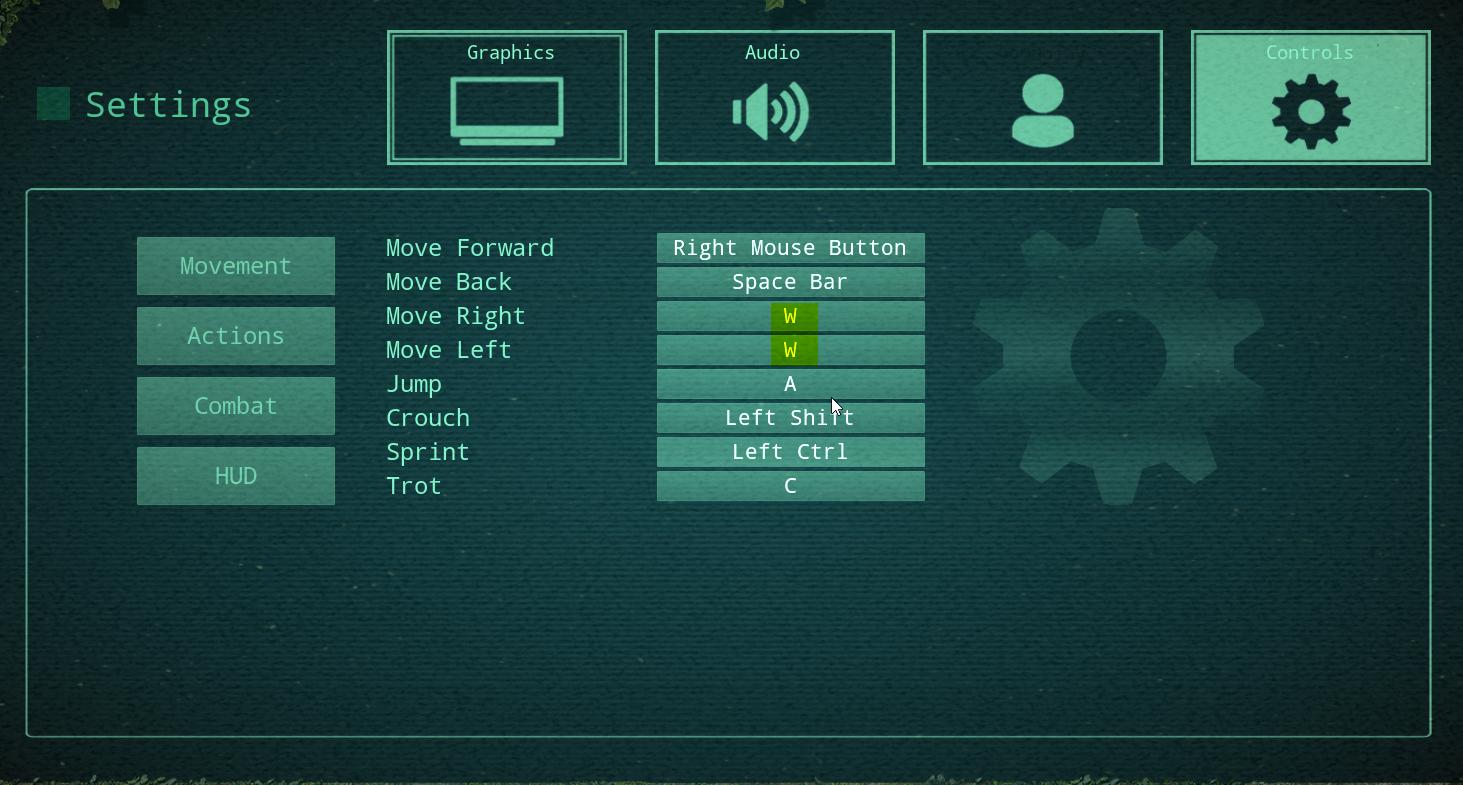
i cant change these from W, literally cannot move ingame, are these settings in files somewhere?
 crimson bone
I can't seem to hit the I understand button when starting up. No matter what buttons i press. Anyone have a solution to that?
crimson bone
Tyvm!
pastel iron
so can someone help me with the no servers problem? if i try switching my pings to 1000 it doesnt work no numbers work i have no idea what to do
 rancid temple
ia dont spawn ? or it need something for spawn ?
 opal shell
follow that
thin oracle
where is that
opal shell
the link at the top of the page
thin oracle
where is exactly the file
opal shell
im having an issue where i can use my alternate attack (ALT+LMB) any ideas?
i had my freelook mapped to left alt, if that helps any
thin oracle
wtf I can do with that
opal shell
if you follow the link it will tell you how to use that my guy
thin oracle
no it doesn't
"I’m unable to reset a keybinding
Make sure you’ve closed The Isle entirely
Navigate to:
C:\Users(your user)\AppData\Local\TheIsle\Saved\Config\WindowsClient
If you cannot find your AppData folder, check this link
Right click “Input.ini”
Open With > Notepad
If it appears empty, close the text document without saving
Open The Isle on Steam
Navigate to your Settings and hit “Apply”
"
opal shell
If you are unable to change your keybinds in-game then you’ll want to follow the following steps:
Download and open this file
Make sure you’ve closed The Isle entirely
Navigate to:
C:\Users(your user)\AppData\Local\TheIsle\Saved\Config\WindowsClient
Right click “Input.ini”
Open With > Notepad
Remove all text within Input.ini
Paste all the text from the Message.txt into the Input.ini
From here you should be able to manually edit your keybindings
 livid swan
Is there a drinking bug with Utah?
Im half full and im sick when i try to drink more
 violet crown
I’m having problems connecting, everytime I get on it kicks me tried multiple times now and on a smaller server with not as many people on
 simple trail
I don't know if it's a bug or not but as full adult dryo and live and well for 1 hour I let my food to drop to 30% and I ate 4 bushes, the eating took really long and the 4 bushes didn't even fill me up, I got to 70% food from those. Also I had to drink all the time and it took also very long time to fill up. I was drinking for 2 minutes from 50% to get it to full.
thin oracle
where is message txt?
opal shell
want me to call you and walk you through it on my screen?
thin oracle
???
opal shell
the message.txt you linked earlier is what you use
delete the one thats under that path from the page and insert the one from the notepad you downloaded
thin oracle
k
opal shell
save then start the isle back up, it worked for me.
hollow violet
Google Docs
Steam-related Issues LAST UPDATE: 25 June 2020 How do I install Evrima? Open Steam Right click “The Isle” Select Properties > Betas Select the beta “EVRIMA public branch” on the drop-down menu Screen is black upon loading up Ensure “The Isle” has been closed Open Steam ...
Use this if you're having issues joining servers.
opal shell
im having an issue where i can use my alternate attack (ALT+LMB) any ideas?
anything about this krow?
hollow violet
You can't use it?
opal shell
no i cant, i had my freelook mapped to left alt
hollow violet
You tried looking in an opposite direction, holding alt, and then attacking?
opal shell
now it wont let me use it at all. yeah i did. i logged i can try again
thin oracle
Now I have an error message and can't start the game
hollow violet
Have you tried rebinding your key and defaulting them back?
@thin oracle What kind of error? Can you screen cap it?
opal shell
yeah i tried that. it wont let me just put back defaults tho
as in the reset button doesnt work
 hoary wadi
anyone know how to get NA severs i only have EU servers
opal shell
nah my alt attack isnt working.
 hasty quartz
you probably had an adult utah before the update, right? It seems like those "old" Utahs can´t use the new attack. Kill it and regrow it for it to work properly.
empty robin
I get the hole time kicked out of the Severs.
opal shell
nah it was fresh, i did just die tho to what i can only assume was the ghost of a dryo i killed so ill try again when im grown. ill give another update then
hasty quartz
thanks
 grizzled nest
are servers still region locked? i did the steam thing and set my ping to 5000 and still cant find any NA servers
 coral badge
so yeah time remaining over 1 year? all data downloaded already. No other game has done this to me.
empty robin
It taked my Pc around 2h, and it saied 3 days. So dont worry.
 ancient sentinel
There isnt any server loading for me
coral badge
I downloaded the update in 5 minutes then it bugged out and jumped to over a year, after it was 7.1GB/7.1GB lmao
ancient sentinel
I was playing in a server then my dry got bugged i couldnt attack or drink. I left the server and now i cant find any servers to join
hoary wadi
anyone know how to get NA servers on i only have EU servers and no NA?
grizzled nest
i think u might be region locked like me
 umbral comet
Any reason why windowed mode isn't working?
grizzled nest
idk how to fix it
hoary wadi
hmm
grizzled nest
i wasnt region locked before this patch
hoary wadi
same
 tough arch
does AI spawn randomly or around you after a certain hunger point
distant vessel
randomly
grizzled nest
hi 🙂
hoary wadi
hey mulit do you know how how to not get region locked
tough arch
how rare is it
i've seen none on my Utah from before the update-
how many hours did you spend
hollow violet
Google Docs
Steam-related Issues LAST UPDATE: 25 June 2020 How do I install Evrima? Open Steam Right click “The Isle” Select Properties > Betas Select the beta “EVRIMA public branch” on the drop-down menu Screen is black upon loading up Ensure “The Isle” has been closed Open Steam ...
 pure citrus
hey there. I can´t use the alt-attack on utah in evrima. Anyone any ideas how i can fix that?
grizzled nest
so the only way to not be region locked is to use a vpn?
if i turn off the vpn once im in a server that normally i cant get to will it kick me out?
pure citrus
why would you go on a different region server? Are you deliberatly seeking out bad pings?
grizzled nest
no i just want to play with my friends
 somber parrot
If someone's already made a bug report with the same issue, is there a way for me to pitch in with my own evidence too?
 gloomy gorge
can someone help me my game is pixalized
 tall atlas
For me it‘s pixilated too
somber parrot
Yeah, doublecheck that your screen proportion (the slider on the screenshot above) is set all the way to 100.
gloomy gorge
and it doesn't come out pixalized in the prints
somber parrot
I think it's defaulting to 66 again, which leads to bluriness.
tall atlas
I have it at hundred and it‘s still blurry
somber parrot
Ooof. You should bug report that if it hasn't been yet today. They were supposed to have fixed that before this update, but I think this update rolled back a couple things there.
 tulip narwhal
my game is pixerlated, does anyone know how to fix it?
gloomy gorge
this bug came with the update before that everything was normal
my game is pixerlated, does anyone know how to fix it?
@tulip narwhal we were talking about it now
somber parrot
Wasn't the pixelated problem part of one of the initial updates before fixing it? Or when they first added video settings?
pure citrus
if you have anti-aliasing on FXAA, try TAA or None instead
 sullen mesa
I cant access NA servers from EU on evrima is that intentional?
opal shell
full adult again and ALT+LMB still doesnt do any kind of alternate attack
tall atlas
if you have anti-aliasing on FXAA, try TAA or None instead
Didn‘t help unfortunately
 hollow crescent
Hello! I need some help D : my "Use" key broke completely. It got set to W even though I didn't change it to that and kept it on E, and whatever key I press it just says "W" still. I can't wallow or eat or drink, so essentially I can't play anymore >.< Idk what I did
^^ I also clicked reset on my controls many times. Nothing works anymore and it's stuck at W.
opal shell
follow the link at the top its because you cant change your controlls
If you are unable to change your keybinds in-game then you’ll want to follow the following steps:
Download and open this file
Make sure you’ve closed The Isle entirely
Navigate to:
C:\Users(your user)\AppData\Local\TheIsle\Saved\Config\WindowsClient
Right click “Input.ini”
Open With > Notepad
Remove all text within Input.ini
Paste all the text from the Message.txt into the Input.ini
From here you should be able to manually edit your keybindings
do this basically
hollow crescent
thanks!
gloomy gorge
got a way to fix the pixalized game?
opal shell
change resolution?
Go to The Isle’s main screen
Select Settings
Change the Render Scale to 100% and change your anti-aliasing to low or high
Restart your game
gloomy gorge
Go to The Isle’s main screen
Select Settings
Change the Render Scale to 100% and change your anti-aliasing to low or high
Restart your game
@opal shell yes more my game continues pixealizad
opal shell
@gloomy gorge check the link at the top and see if any of those things help
gloomy gorge
ok
opal shell
@fringe meteor try unchecking the top box on the right side
fringe meteor
don't change anything
opal shell
did you hit refresh after?
gloomy gorge
What link? XD
fringe meteor
yep
opal shell
Google Docs
Steam-related Issues LAST UPDATE: 25 June 2020 How do I install Evrima? Open Steam Right click “The Isle” Select Properties > Betas Select the beta “EVRIMA public branch” on the drop-down menu Screen is black upon loading up Ensure “The Isle” has been closed Open Steam ...
I’m having trouble finding servers
It seems that Steam will try to show servers closer to you. Alternatively, you can use a VPN if you have one. Can’t see any servers? Try checking your Firewall and if it’s doing anything with The Isle. The best thing to do is to add a firewall exclusion for The Isle's folder located within your steamapps directory
Open Steam
Select “STEAM” on the upper left corner
Go to Settings > in-game
Increase the “In-Game Server Browser: Max Pings / minute” value and see if it helps..
gloomy gorge
ok
fringe meteor
ok i got it ty 😉
 topaz tendon
Right Bois my dryo got no peepers
 pulsar umbra
still can't alt attack as a utah :/ any solutions?
topaz tendon
Anyone got any fro my poor lil squeaker or wil lthis have to be a bug report
opal shell
still can't alt attack as a utah :/ any solutions?
@pulsar umbra no clue, ive been asking the same thing. only thing i was told was that if you have a utah from before the patch came out to kill it and start over. also have to be full adult
 tawdry arrow
I cant find US servers and im in EU, is it a bug or a new game mechanic?
opal shell
I cant find US servers and im in EU, is it a bug or a new game mechanic?
@tawdry arrow look like 5 messages up at what i sent
 tawdry hawk
For some reason my fps has dropped a ton. I used to have 50-60 normally on epic, but now every time I join a server I'm at 8. I've tried lowering graphics, messing with render distance, and turning off anti-aliasing, etc. Nothing seems to be working though. : /
opal shell
For some reason my fps has dropped a ton. I used to have 50-60 normally on epic, but now every time I join a server I'm at 8. I've tried lowering graphics, messing with render distance, and turning off anti-aliasing, etc. Nothing seems to be working though. : /
@tawdry hawk I’m stuck on 8 FPS
This bug appears to be typical of players with laptops that are at least two years old.
Navigate to and open: NVidia Control Panel > Manage 3D Settings > Program Settings
Search for "The Isle"
On "Select the preferred graphics processor for this program" choose either
High Performance NVidia Processor.
Select and change for all programs to use High Performance NVidia Processor.
Alternative fix for those with Windows 10 that do not have GEForce installed/cannot access NVidia control panel
Go to your windows settings or “Search Bar”
find “Graphics settings” > Underneath “graphics performance preference” select “Browse”.
Find the Isle.exe.>Select “Options” > Select “High Performance” > Select “Save”
tawdry arrow
@opal shell Server issue fix didnt work for me has it worked for anyone else?
opal shell
it worked for @fringe meteor earlier.
 sly cloud
please please please fix the key bindings
opal shell
did you follow all of the instructions properly? i messed up mine earlier and thats why it took me twice
sly cloud
i cant change anything in the settings
opal shell
please please please fix the key bindings
@sly cloud If you are unable to change your keybinds in-game then you’ll want to follow the following steps:
Download and open this file
Make sure you’ve closed The Isle entirely
Navigate to:
C:\Users(your user)\AppData\Local\TheIsle\Saved\Config\WindowsClient
Right click “Input.ini”
Open With > Notepad
Remove all text within Input.ini
Paste all the text from the Message.txt into the Input.ini
From here you should be able to manually edit your keybindings
do this basically
tawdry arrow
Yeah i did that aswell as allowing theisle.exe through the firewall
opal shell
https://docs.google.com/document/d/1o8xsbfZKesdLpvViUdnYwVkG2SiqEuFkw8W3qslI7V0/edit# heres the link @sly cloud
Google Docs
Steam-related Issues LAST UPDATE: 25 June 2020 How do I install Evrima? Open Steam Right click “The Isle” Select Properties > Betas Select the beta “EVRIMA public branch” on the drop-down menu Screen is black upon loading up Ensure “The Isle” has been closed Open Steam ...
opal shell
you get it?
sly cloud
on it now
opal shell
utah
thin oracle
I switched back to legacy for a bit to play there, and left the game alone for a while. I try to log in one day and it comes up with this error.
https://i.gyazo.com/135c355e3ce6e8800f832f62c26b8484.png
when I learned of the new EVRIMA patch, I switched back to the test branch, and the problem still persisted

I've updated windows, I've restarted, I've uninstalled and reinstalled, and still nothing
sly cloud
it worked to rested but once you change you have to start over
if you make a mistake
restart
opal shell
i have no clue about that one @thin oracle and it did not work for you @sly cloud
@thin oracle only thing i can do is point you to the troubleshooting page https://docs.google.com/document/d/1o8xsbfZKesdLpvViUdnYwVkG2SiqEuFkw8W3qslI7V0/edit#heading=h.kxhsm4j7gv84
Google Docs
Steam-related Issues LAST UPDATE: 25 June 2020 How do I install Evrima? Open Steam Right click “The Isle” Select Properties > Betas Select the beta “EVRIMA public branch” on the drop-down menu Screen is black upon loading up Ensure “The Isle” has been closed Open Steam ...
 winged nebula
I thought the blurriness issue was fixed? Renderscale 100 and its still fuzzy as all hell,,,
thin oracle
nothing in the troubleshooting page seems to be the answer to the problem, but... thanks anyways
opal shell
@winged nebula you followed all the steps on that link?
@thin oracle sorry i couldnt be of more help. i havent seen that issue before
 ruby bough
the game is more laggy?
winged nebula
Renderscale is 100, and anti-aliasing is low. Theyve been at those values for the past few updates. I'll shift em around and restart the game I guess and see how it goes
sly cloud
yes it seems to freez it when you key bind the same key as another one
opal shell
so you binded the key in game and it did that?@sly cloud
winged nebula
still oddly blurry. Its all in the foliage, and my dinosaur a 'bit' when i zoom out. My HUD looks fine and when i zoom in, my dino is fine. The tall grass and leaves pixelate together like hell though, idk what could be causing it.
I do have some of my graphics lowered for performance, but nothing lowered seems to me like it'd suggest making everything blended and pixelly
opal shell
what about your resolution? what is it set at?@winged nebula
winged nebula
1366x768
opal shell
you try putting it up a bit?
winged nebula
thats as high as it allows me to go
opal shell
hmm, gimme a sec ima look around
winged nebula
thanks
winged nebula
FXAA, low
opal shell
thats probably whats causing it
winged nebula
oke, I'll try and bump it up. Hope it doesn't hurt my frames too much tho, thanks
opal shell
i just changed mine and it went all nasty
winged nebula
hmm, doesnt seem to have fixed it. If anything i think it might be a little worse
 crimson pike
i can't get into any server it just kicks me out to the main screen, is there any ways i can fix this?
opal shell
im not sure then, it may be a question for an admin
winged nebula
oke, ty
opal shell
@crimson pike did you check this page?https://docs.google.com/document/d/1o8xsbfZKesdLpvViUdnYwVkG2SiqEuFkw8W3qslI7V0/edit#heading=h.e0e98xwqt30h
Google Docs
Steam-related Issues LAST UPDATE: 25 June 2020 How do I install Evrima? Open Steam Right click “The Isle” Select Properties > Betas Select the beta “EVRIMA public branch” on the drop-down menu Screen is black upon loading up Ensure “The Isle” has been closed Open Steam ...
crimson pike
i haven't but i will rn
opal shell
I’m having trouble joining servers
Ensure you are on the same build as the server
Try joining any server with low ping to see if it works
The server may be at their cap and cannot make room for more members
Being kicked, disconnected or failing to join the server causes issues: restart your game and try again
winged nebula
ok, new bug time. After drinking as Dryo, none of my keybinds work at all. Cant bite, dodge, call, or interact. I can move and type, but none of the other stuff
opal shell
@winged nebula lol youre just full of problems huh? did you try to safe log and come back?
winged nebula
;w;
i'm safelogging rn haha
is bug report channel still a thing so i can put this in there
opal shell
always safe log, the quick log will glitch out your character
crimson pike
ive tryed that and it didnt work and now it says "could not start The Isle" D:
opal shell
yeah it is, or should be
@crimson pike try completely uninstalling the isle and putting it on another drive
crimson pike
ok ill try it
 cold drift
is evrima gatekeeping ppl to regions now or is this server list that literally excludes servers normal now?
opal shell
if youre talking about how you cant see servers it may be something with your ping
Google Docs
Steam-related Issues LAST UPDATE: 25 June 2020 How do I install Evrima? Open Steam Right click “The Isle” Select Properties > Betas Select the beta “EVRIMA public branch” on the drop-down menu Screen is black upon loading up Ensure “The Isle” has been closed Open Steam ...
It seems that Steam will try to show servers closer to you. Alternatively, you can use a VPN if you have one. Can’t see any servers? Try checking your Firewall and if it’s doing anything with The Isle. The best thing to do is to add a firewall exclusion for The Isle's folder located within your steamapps directory
Open Steam
Select “STEAM” on the upper left corner
Go to Settings > in-game
Increase the “In-Game Server Browser: Max Pings / minute” value and see if it helps.
cold drift
thanks
opal shell

 primal cradle
my use key is not working any way to fix this i have uninstalled and reinstalled it already still not working
opal shell
https://docs.google.com/document/d/1o8xsbfZKesdLpvViUdnYwVkG2SiqEuFkw8W3qslI7V0/edit
try out the Can’t edit my keybinding part
Google Docs
Steam-related Issues LAST UPDATE: 25 June 2020 How do I install Evrima? Open Steam Right click “The Isle” Select Properties > Betas Select the beta “EVRIMA public branch” on the drop-down menu Screen is black upon loading up Ensure “The Isle” has been closed Open Steam ...
primal cradle
thx
winged nebula
this honestly just really hurts my eyes to play. I've been shuffling the graphics around for like an hour now and no progress. When actually playing and walking around, it's even worse, because every single pixel shits around in color constantly and it's just a sea of varying pixelated shades of green. All blends together, can't make out anything. I really thought they fixed this, 90% sure I read it in an announcement a while ago :/
looked back at older screenshots taken in Legacy and it definitely was so much cleaner and less pixelated, this is paining my eyes to play
primal cradle
fixed it thank you
 hardy shore
Okay, I dunno why but this happens every time the isle updates, the servers just never load, I know I'm supposed to increase or decrease my ping limit but I've set it to every option and it's still not working.
 little thunder
hi! just did the new update and went to join a server, but they're all locked. when i try to join it kicks me back to the main menu. did I miss something???
gloomy gorge
someone already managed to fix the pixealized game bug
tawdry hawk
I'm attempting to fix an 8 fps issue, but unfortunately the fix suggested in the google document doesn't seem to be working.
opal shell
you tried both of the ways to fix it? as in the alternative way as well?\
@tawdry hawk
tawdry hawk
I don't have a GeForce account so I used the secondary fix. I've set the game to run high performance, but it hasn't changed anything in game for me.
dark lagoon
@winged nebula what are you graphics settings set to? what AA mode?
opal shell
@tawdry hawk maybe trevor can help? the only thing i can think of is if you can make a geforce account to do so and if not i would check and see if the file you chose for graphics settings is correct
winged nebula
AA is FXAA, High
everything else is turned off or set to Low except Effects and Textures, at Medium and Epic respectively
tawdry hawk
I set up an account. Was having an issue with the app portal, but was able to get around it by going to their website. Will let you know how that goes.
winged nebula
Im on a low end laptop so I have to have the settings lower for performance, but this foliage blurr stuff jus seems silly even for me :(
dark lagoon
what is your render scale?
dark lagoon
is that the resolution of the laptop?
opal shell
@tawdry hawk ok sounds good
winged nebula
resolution of the ingame setting
dark lagoon
Right, I meant what is the native resolution of the laptop screen?
gloomy gorge
Someone already managed to solve the pixel bug I need to know how to solve it
winged nebula
me too pls
 oak plover
I'm having an issue where the game won't go to fullscreen. Back when the game first released I had to change it to be smaller because of something being wrong with the game
dark lagoon
Try pressing F11? That toggles between fullscreen and windowed. Not sure if that is what you mean
oak plover
None of those types of keys do anything except what they'd normally do for me. If that makes any sense.
Okay so like, The game at first wouldn't let me exit out of it so I was told to do something to keep it at a smaller size. And now I'm wanting to know how to change it back, every time I play, it's a very small screen now
 regal spear
i just got on the new update for the first time, is there still no fix for the blurryness? :/
tawdry hawk
I was able to fix my issue. Thanks a lot Qiz!
opal shell
@tawdry hawk happy to hear it!
dark lagoon
I am not sure what you did in the first place @oak plover in order to "undo" it
 viral shore
anyone else having issues with keybinds? I've tried changing some and now they're completely borked.
Resetting does nothing.
opal shell
0@viral shore https://docs.google.com/document/d/1o8xsbfZKesdLpvViUdnYwVkG2SiqEuFkw8W3qslI7V0/edit#heading=h.k2t9285h76nl
Google Docs
Steam-related Issues LAST UPDATE: 25 June 2020 How do I install Evrima? Open Steam Right click “The Isle” Select Properties > Betas Select the beta “EVRIMA public branch” on the drop-down menu Screen is black upon loading up Ensure “The Isle” has been closed Open Steam ...
If you are unable to change your keybinds in-game then you’ll want to follow the following steps:
Download and open this file
Make sure you’ve closed The Isle entirely
Navigate to:
C:\Users(your user)\AppData\Local\TheIsle\Saved\Config\WindowsClient
Right click “Input.ini”
Open With > Notepad
Remove all text within Input.ini
Paste all the text from the Message.txt into the Input.ini
From here you should be able to manually edit your keybindings
viral shore
Ah ty, I'll give that a try ❤️
opal shell
@viral shore did it work for you?
viral shore
yep!
 toxic phoenix
ok after redownloading legacy and then redownloading evrima, I am having the same issue the game closes out after the screen goes black to where it goes to the opening menu, I have not heard of anyone else having this problem and I played evrima last week just fine and since this update it will not open up on my PC
I have verified files and everything before and after redownloading and tried running in administrator mode, nothing works, I click the play button in steam, the grey box that says launching the isle pops up, then the screen goes black like its loading the opening menu but then doesnt open it and acts like I closed out the game, legacy still works its just evrima and I played it like a week ago, and it worked fine. Also I noticed on the black screen there was a few white spots at the bottom of the black screen, so I am not sure what was in the update that stops it from working and just shuts it down for me.
short surge
When i log onto evrima i can only see 2 servers does any1 know the fix?
 leaden sparrow
Pressing on insert key to open character isn't working for me. Can't change keybind on profile too. Been have this problem since first evrima update.
fiery scarab
have you tried the deleting your save folder fix in pins?
fiery scarab
gotta love it
leaden sparrow
Me?
opal shell
@leaden sparrow try out this link https://docs.google.com/document/d/1o8xsbfZKesdLpvViUdnYwVkG2SiqEuFkw8W3qslI7V0/edit#heading=h.k2t9285h76nl
Google Docs
Steam-related Issues LAST UPDATE: 25 June 2020 How do I install Evrima? Open Steam Right click “The Isle” Select Properties > Betas Select the beta “EVRIMA public branch” on the drop-down menu Screen is black upon loading up Ensure “The Isle” has been closed Open Steam ...
If you are unable to change your keybinds in-game then you’ll want to follow the following steps:
Download and open this file
Make sure you’ve closed The Isle entirely
Navigate to:
C:\Users(your user)\AppData\Local\TheIsle\Saved\Config\WindowsClient
Right click “Input.ini”
Open With > Notepad
Remove all text within Input.ini
Paste all the text from the Message.txt into the Input.ini
From here you should be able to manually edit your keybindings
@leaden sparrow then try this
 granite karma
I can only see these 2 servers. What should I do?
opal shell
@granite karma https://docs.google.com/document/d/1o8xsbfZKesdLpvViUdnYwVkG2SiqEuFkw8W3qslI7V0/edit#heading=h.k2t9285h76nl
Google Docs
Steam-related Issues LAST UPDATE: 25 June 2020 How do I install Evrima? Open Steam Right click “The Isle” Select Properties > Betas Select the beta “EVRIMA public branch” on the drop-down menu Screen is black upon loading up Ensure “The Isle” has been closed Open Steam ...
I’m having trouble finding servers
It seems that Steam will try to show servers closer to you. Alternatively, you can use a VPN if you have one. Can’t see any servers? Try checking your Firewall and if it’s doing anything with The Isle. The best thing to do is to add a firewall exclusion for The Isle's folder located within your steamapps directory
Open Steam
Select “STEAM” on the upper left corner
Go to Settings > in-game
Increase the “In-Game Server Browser: Max Pings / minute” value and see if it helps..
@granite karma did that help?
 rotund meadow
i cant seem to use the new alt bite for utah? i scrolled for a little and looking in the troubleshooting doc but didnt see anyuthign about it
granite karma
@opal shell I did them all but nothing changed. I think something else causes the problem.
opal shell
hmm, imm not sure then@granite karma
opal shell
@short minnow https://docs.google.com/document/d/1o8xsbfZKesdLpvViUdnYwVkG2SiqEuFkw8W3qslI7V0/edit#heading=h.k2t9285h76nl\
Google Docs
Steam-related Issues LAST UPDATE: 25 June 2020 How do I install Evrima? Open Steam Right click “The Isle” Select Properties > Betas Select the beta “EVRIMA public branch” on the drop-down menu Screen is black upon loading up Ensure “The Isle” has been closed Open Steam ...
 short minnow
ya i can't see any servers to join
opal shell
just a question
@topaz tendon i honestly dont know, if you can still play i would just try killing your dino off
I’m having trouble finding servers
It seems that Steam will try to show servers closer to you. Alternatively, you can use a VPN if you have one. Can’t see any servers? Try checking your Firewall and if it’s doing anything with The Isle. The best thing to do is to add a firewall exclusion for The Isle's folder located within your steamapps directory
Open Steam
Select “STEAM” on the upper left corner
Go to Settings > in-game
Increase the “In-Game Server Browser: Max Pings / minute” value and see if it helps..
@topaz tendon
here is what i have found for that.
@fringe meteor found a solution so maybe ask him
opal shell
@fringe meteor 
 rapid tulip
Where can I ask for a teleport if im stuck on an official server?
opal shell
Where can I ask for a teleport if im stuck on an official server?
@rapid tulip sheeeeeeit, try safelogging or croucning
rapid tulip
im stuck hovering in a V hole under swamp, cant sit or anything cuz I'm in a constant fall
short minnow
@opal shell steam ban if i change VPN right?
opal shell
@opal shell steam ban if i change VPN right?
@short minnow i have no slue about that
rapid tulip
I'm not even sure if this is the channel i should be asking for stuck help
opal shell
@rapid tulip yeah i dont think the admins on official are online rn
short minnow
@opal shell can't i just atlesat create my own host and play myself, i can't see any servers
 stone estuary
I have problems with new bite attack, can't get it to work
 dapper coral
Why can I not find US servers and only EU servers? I want to be able to play with my friends or on servers that actually have people on them. Can you fix this?
tough arch
Haven't seen a single AI yet
 maiden tangle
cant find any servers. i did all the things in the troubleshooting doc and restarted everything
 obsidian lintel
Try uninstall and reinstall?
 silk island
I played yesterday afternoon, and cant see any server in the evening yesterday. Today also don't see any evrima server. The instructions written about the firewall don't work. Besides, this problem is only on evrima serve. On old client all ok
And yes, this problem come after patch more than month ago
wispy plaza
i keep getting fatal error when i try to launch the game
Fatal error: File unknown line 3919
gloomy gorge
someone already managed to fix the bug that leaves the game pixealized who already managed to mark me please 😃
 grizzled crater
@gloomy gorge change your render scale to 100
thin oracle
After new path I cant start game. Pla help me! 😦
regal spear
i just got on the new update for the first time, is there still no fix for the blurryness? :/ render scale is maxed.
Its literally head-ache inducing to play evirma just because of the eye strain and I've got no idea on how to correct it.
tall atlas
Has anyone found a way to fix the pixilated screen ?
 swift jay
what are the settings for best performance? so I can actually play a game and not watch a powerpoint
 unique otter
I can connect to a server for at least 15 seconds and then it disconnects me.
gloomy gorge
@gloomy gorge change your render scale to 100
@grizzled crater .so it seems to be a bug because my rendering scale is 100%
dark lagoon
@regal spear what AA settings are you using?
@thin oracle did you tab out while the game was loading?
@swift jay depends on your GPU
thin oracle
The water in the swamps is flickering dark and light and it hurts my eyes
dark lagoon
@thin oracle what AA setting are you using?
thin oracle
Im reinstaled game and its work now 😉
dark lagoon
oh ok cool 🙂
 vague storm
Hey so as of the last patch evrima wont start and displays this message is there any way that I can fix this?
 mossy kernel
Has anybody else’s graphics gone to shit since the update? They were fine the other day, but now everything is, well, shit. I managed to fix the issue I was having with everything being blurry, but it’s all still rather... pixelated?
thin oracle
@dark lagoon Middle or high. not sure rn
regal spear
@dark lagoon I switched between multiple ones, surprisingly medium is the least eye straining but not by much.
I'm able to run epic everything if I want to but the blur just gives me headaches man.
 stuck urchin
It's been the second time i die from hunger, cause i can't find any bots around. They just never spawn!
dark lagoon
Hmm ok usually lower AA or fxaa I found previously had blur, resolution scale and resolution as well.
 warped spire
Does anyone have a potential fix for why i csn't use the bloody alt atk, it hasn't worked for me since the update came, reset my settings, restart the game and still nothing
 sacred pine
i can't rest and my configurations are like this: (i cant change it and when i press "reset" it doesn't change either)
thin oracle
idk why but somehow all my games- not only the isle kept kicking me out of the server. Especially in evrima i got kicked out and then i couldnt find the server anymore. needed to restart several times. may that be my internet? or is this a known bug?
 next quest
Hi there! I’ve been having issues loading up the game. I am on Evrima but it seems whenever I try clicking around on the game it’s self to do anything everything is frozen. Yet when I tab out of the game, things work fine. Is there anything I can do to fix this?
 vale narwhal
There are only like 3 super lame servers available for me on EVRIMA. It wont find any other servers. I'm trying to get onto asura cause all my points are there D:
floral yew
SInce the new update I don't seem to hear ANY other dinosaur, I ran around on a 100 ppl server for 3 hours straight and didnt find a single soul literally, well yea I founda juvie teno, an adult utah which I killed and 3 baby utahs which I ignored, overall pretty fing boring cant lie, before the update I heared dinos everywhere and it cant be that everyone is dryo and that is why I hear no one. My friend who was in the SAME CHUNK AS ME didnt even hear my full grown Utah 1 call, dunno what you guys did there but its pretty meh since usually I have loads of fun playing evrima but today it was very lame :/ Please fix the sound bug
leaden sparrow
My LMB+ALT for new utah attack isn't working?
 prime folio
So, I have been stuck floating under the map for about half an hour now, I've had an admin come and try to /slay and /teleport me repeatedly but nothing is working, I can't do anything, but I can still see chat moving, and I heaer the noise of being underwater. This is my screen
there's damage but it never goes farther than this and I'm just stuck suffering lol
I've even tried going back to legacy and then back to evrima but I'm still stuck like this on the one server
I saw that there's a bug report on this but is there any possible way to fix it? I only ever play on that server and now I can't on evrima 👀
 wet ravine
im having the same problem though i was able to get past the greetings screen the mouse is acting like its too high
 gritty gulch
Oh god why do dinos starve to death so quickly? Like after less than a minute after hitting red you just start to die
opal shell
Google Docs
Steam-related Issues LAST UPDATE: 25 June 2020 How do I install Evrima? Open Steam Right click “The Isle” Select Properties > Betas Select the beta “EVRIMA public branch” on the drop-down menu Screen is black upon loading up Ensure “The Isle” has been closed Open Steam ...
I’m having trouble finding servers
It seems that Steam will try to show servers closer to you. Alternatively, you can use a VPN if you have one. Can’t see any servers? Try checking your Firewall and if it’s doing anything with The Isle. The best thing to do is to add a firewall exclusion for The Isle's folder located within your steamapps directory
Open Steam
Select “STEAM” on the upper left corner
Go to Settings > in-game
Increase the “In-Game Server Browser: Max Pings / minute” value and see if it helps..
@short minnow did that help at all?
gritty gulch
Yep. Fell into one of those too
 sick pewter
haha did you recently?
gritty gulch
Yep
sick pewter
I saw a person with venom in the same game say that they fell in a hole
gritty gulch
Yep that was me
gritty gulch
A dryo fell in with me, said he was gonna log and play beasts of Bermuda lmao
sick pewter
damn, I had these two nice people in my pack stick with me trying to help me get out
welp I guess back to ark until they delete these fucking holes
gritty gulch
And the fact that you starve so quickly and there’s no food
gritty gulch
Mood
 pallid gull
hey, i can't seem to find any server, is there a fix to this or do i wait for a fix to come?
 snow oak
I played as a full adult raptor yesterday on Evrima. I ran uphill trough the forest and exactly when I was over the edge and the ground became flat again, I hit a tree (as usual) and then I got stuck. The raptor is beside and not into the tree, but can't walk away or jump. Even a relog doesn't help. I wasted my growing time to a stupid tree.
Maybe nexttime I'll choose a tree as character 😆 they seem to be op
 desert quartz
Well the baby teno run is busted. Instead of running smooth as you used to, it seems it got a speed but which is not matching the current animations or the sound of the footsteps.
Not to mention the whole limit on grazing makes no sense especially when a full adult dryo can eat a bush in 3 bites. The herbivores are going to starve out like this. Nice big herds are no more, every teno/dryo for themselves.
 charred geyser
Hi there,
can someone tell me where is the server number 2 ? 😮
 thin maple
Question, is there any way to fix my audio? I can't hear anything.
 acoustic breach
I somehow cant press insert to see my character screen? any help or is the general function unavailable
hollow violet
@snow oak I reccomend contacting the admin on the respective server you're playing on. To getting unstuck that is. The map is a wip and getting stuck unfortunatly will still happen.
@charred geyser I'd try searching https://docs.google.com/document/d/1o8xsbfZKesdLpvViUdnYwVkG2SiqEuFkw8W3qslI7V0/edit for server specific issues, my first guess is to try clearing the search bar, hitting refresh, relaunching the game, ect.
Google Docs
Steam-related Issues LAST UPDATE: 25 June 2020 How do I install Evrima? Open Steam Right click “The Isle” Select Properties > Betas Select the beta “EVRIMA public branch” on the drop-down menu Screen is black upon loading up Ensure “The Isle” has been closed Open Steam ...
@thin maple That sounds like a windows issue of sorts, is sound working outside Evrima?
@acoustic breach I've heard that pressing the default button in the key bindings helps with not being able to press certain key bindings. Also try changing the binding to something else if that doesn't work.
Also pressing 'default' reverts the key bindings to default, so be aware, try pressing it a lot. I heard that worked for someone.
acoustic breach
I cant change the key for char menu
Its always insert
and i tried all, reset, restart game, reinstall, nothing worked
charred geyser
@hollow violet thanks, i already tryed (restarting the game etc...) but i still can't see the #3 server :/
hollow violet
@acoustic breach Let me hop on and try troubleshooting
In that case snoopi i'd look at the document in changing around some steam settings that help with finding servers ^^
acoustic breach
pls tag me if you have an solution @hollow violet
hollow violet
I will.
charred geyser
@hollow violet thanks 🙂 as you can see on my screenshot, i wrote in the filter "option" but i don't have any problem to find others servers, there is only the official 2 that i can't find :/
hollow violet
@charred geyser
thin oracle
how can i fix the bug with the new utah raptor attack ?
still not working for me by holding alt and lm
lmb*
hollow violet
@thin oracle @acoustic breach Since this is an input specific bug that only affects a few people there's no known fix as of now, the only suggestion I've heard is try opening the bindings menu and pressing "Reset" a lot over and over until it works. In the meantime please submit in #732251429082759249 if it has not already been. And, obviously, make sure the button works outside of Evrima.
charred geyser
@hollow violet thanks, i checked, the parameters of steam & firewall are OK :/
hollow violet
@charred geyser Steam does select from near where you live, if you do not live near EU, it's possible it's not going to pick it up unless you use a VPN.
thin oracle
vpn? whats that
charred geyser
@hollow violet that's why i look for EU servers 😄 it's because i'm in EU
thin oracle
ok ill try@hollow violet#batchcee
hollow violet
A virtual private network extends a private network across a public network and enables users to send and receive data across shared or public networks as if their computing devices were directly connected to the private network. AKA it fakes your computer to think it's somewhere else, aka EU
thin oracle
aaah ok
hollow violet
@charred geyser Ah. I see. Sometimes I go for EU servers because my aussie friends play on them, had to make sure xD
thin oracle
so the only thing i can do so far is ...try to resett till it works ?
hollow violet
Aside from what's in that docuemnt and some general google searching "Can't find servers on steam" I cannot help further, sorry, note this is a beta and is subject to not work for some.
charred geyser
but maybe i'm not the only one who don't see the official #2 server ?
hollow violet
@thin oracle So far yes, expect fixes to roll out as the game continues.
charred geyser
@hollow violet do you have the possibility to check if the official server #2 is online ?
hollow violet
@charred geyser It's possible it's just down.
thin oracle
ty @hollow violet
hollow violet
I can't see EU either @charred geyser. I can ask someone and check for ya.
@thin oracle Thank the devs xD I just tell them what's broken, but np
charred geyser
@hollow violet it will be nice, thanks ❤️
hollow violet
❤️ I'll let you know if I get any progress
gritty gulch
Why are my keys being set to W when I haven’t even touched them? My grab key is w and I never changed it and I can’t change it back
 dull sphinx
Is there a reason i cant get past this screen?
 junior talon
I started the game after installing the most recent update.
The "Greetings Islanders!" message pops up.
I try to press "I understand" to continue to the game, but am unable to do so.
Now I am trapped in the "Greetings Islanders!" menu and can't press out or continue.
Any solutions?
 toxic tundra
I am experiencing the same issue as @dull sphinx and @junior talon
 opaque venture
Yeah I can't get any servers either @twilit thorn ^^^
Been sitting here for 10 minutes
 twilit thorn
ohh well
opal shell
@opaque venture @twilit thorn did you look at some of the older messages? https://docs.google.com/document/d/1o8xsbfZKesdLpvViUdnYwVkG2SiqEuFkw8W3qslI7V0/edityoull see this link along with how to fix your issue
twilit thorn
@opaque venture @twilit thorn did you look at some of the older messages? https://docs.google.com/document/d/1o8xsbfZKesdLpvViUdnYwVkG2SiqEuFkw8W3qslI7V0/edityoull see this link along with how to fix your issue
@opal shell
opal shell
Google Docs
Steam-related Issues LAST UPDATE: 25 June 2020 How do I install Evrima? Open Steam Right click “The Isle” Select Properties > Betas Select the beta “EVRIMA public branch” on the drop-down menu Screen is black upon loading up Ensure “The Isle” has been closed Open Steam ...
looks like it caught some of my own text in there
twilit thorn
i tried these already and non of them worked
opal shell
I’m having trouble finding servers
It seems that Steam will try to show servers closer to you. Alternatively, you can use a VPN if you have one. Can’t see any servers? Try checking your Firewall and if it’s doing anything with The Isle. The best thing to do is to add a firewall exclusion for The Isle's folder located within your steamapps directory
Open Steam
Select “STEAM” on the upper left corner
Go to Settings > in-game
Increase the “In-Game Server Browser: Max Pings / minute” value and see if it helps..
if you have all ready tried this and it doesnt work then idk
thin oracle
Any reason I get disconnected from the game every 5min or less?
twilit thorn
well i used VPN and got the server list but when i connected to the game i got DC after one min. then same thing even on VPN cant seem to get server list anymore
thin oracle
EU 1 smelled body , Followed it got stuck the same way, Fix this please
Small hole , still stuck and gonna die of Hunger <@&505047238674874368> EU 1
 worldly iris
so when i try to start the game it keeps saying UE4 -the isle has crashed. what do i do
 strange bridge
same
fiery scarab
there is a solution for that in the pins check the fixes for your bugs document (pretty sure that's the one it's in)
fiery scarab
also don't tab out when it's loading
toxic tundra
@dull sphinx @junior talon it turns out the root of this issue for me was Evirma and my Monitor fighting over resolution. The game would try and change the resolution to 2560x1440, but the monitor would force itself back to 3840x2160. I manually changed the monitor resolution in NVIDIA settings to match Evirma and it worked fine. I hope that helps!
 rapid sigil
I have this bug where after like a minute or 2 after joining a server the game auto dcs me from the server
then the I understand flashes twice, and if i rejoing any server the process repeats itself
anyone knows how to fix it?
worldly iris
i have tried restarting my laptop and reinstalling the game but nothing worked
 analog quest
Is anyone else having the issue where the official US servers aren’t showing up?
 past pecan
is there a way someone can delete my dino on Official Evrima NA #1. I'm in the underworld :(.
junior talon
@toxic tundra Thanks, that seems like a possible problem in my case.
Yet if I have to change my Monitors solution due to one badly buggy game, which managed to run just fine before,
I'd rather stop playing that broken game and wait until that shit gets fixed.
 carmine heron
Hello is this normal?
carmine heron
I tried doing everything that's written in the docs file but nothing works.
Been so excited to try the update-
strange bridge
yeah theres a lot of stuff going on with servers rn
carmine heron
I will be probably reporting the bug to uh... "Raise awareness..?"
 fast laurel
The "Drag" optioon its disable?
thin oracle
is there any bug fixes about the new utahraptor attack ?
 cinder kiln
I am stuck... xd https://gyazo.com/e8c44f933d73c4f579a6233f390a4388
<@&505047238674874368> I think I need assistance xD EU1
(safelogged)
worldly iris
So i placed the VCruntime thing in the file with TheIsle.exe and it still didn't work
I also UnInstalled and Reinstalled the game but nothing happened
toxic tundra
@junior talon I came to the same conclusion. I will wait until I do not need to reconfigure my system in order to play a game. Haven't had to do that since autoexec.bat was a thing lol.
 knotty furnace
Playing as a Dryo, drinking at a water source.
I opened up my character menu whilst I was drinking (force of habit to see values) and now I cannot bite, sniff, wallow or lay down. I can still graze and drink. I'm running around as a useless green-bean noodle unable to find my way, find food or safely log out.
I've tried changing my Graphics settings as an attempt to 'reset' my character state. Opened up the exit menu and character menu. In the end, I logged out entirely (and because I couldn't view player list and couldn't remember the server name, I cannot log back to find out if it fixed the issue on that server).
 median crypt
Relog, don't safelog if you can't. Restart the game
wispy plaza
servers dont show up some do but most dont i had to use vpn to get other servers
cinder kiln
<@&505047238674874368> I uhhh.... I am stuill stuck I need help...
nvm I am dead thanks for the help >.>
 royal bear
You might get swifter help if you ping an admin in the #evrima-na. Either way, Admins for Evrima are not always on. You're better off logging off and waiting. @cinder kiln
cinder kiln
@royal bear ... I reported that yesterday... xD So I DID log off and waited
I was still stuck after like idk 18 hrs?
 exotic hinge
Hey guys, the server list is empty for some reason I can only see up to 4 servers half of them are Russian ones, It was working just fine yesterday though, any clues? nothing was changed pc wise or setting wise
acoustic breach
Im falling through every water source on the map, basically i cant swim as a utah xD
Is this a problem on my end? because other players do swim for me but i myself cant i just run on the river floor
fiery scarab
this is a known bug
 rustic stirrup
does anyone know where to find key bind folder in the files?
 thick grove
any admins ?
my frind is stuck on eu 1
his name is catalypse and mine is F-ax
oh official eu 1 :evrima
he escaped sry for all of thisXD
 tardy escarp
i was about to start the game but it sometimes it crashes on me when i was choosing a server to play in how can i fix it?
gloomy turret
You can find the keybindings in your APPDATA Folder
tardy escarp
ok and sometimes when you play as a random animal the map is loading slow
 sly pulsar
i need someone to tell me why ervirma always needs an update when i go on it and when i go back to legacy i need to update 7 gbs ???
rapid sigil
Whenever you swap between legacy and evrima you need to reinstall
pure citrus
or just make a copy of the isle folder somewhere. Then patch. And whenever you want to change just switch the folders around
 swift perch
if you try and change movement keys to arrow keys in control settings the game just thinks you are trying to move up and down menus and doesnt allow you to choose up arrow or down arrow. Been broken since envrima first came out
 safe crest
Clicking on anything on the start menu is being difficult
fiery scarab
check fixes for your bugs in pins
 dusk blaze
idk if it's just me experiencing this, but ever since the update, I can't sniff bushes... at all. Also, places I know there are bushes, there aren't any. Are there just no bushes on evrima now or-?
 limber osprey
hello, is there anyone else who can't change the Fps? there is a conflic and i loose so much fps
 ebon dust
Yea i had that yesterday
fiery scarab
@dusk blaze right now there bushes don't respawn on evrima so if a server is up for a long time they eventually all get eaten and the server needs to restart for them to come back
@sly pulsar please do not attempt to tag everyone ;)
Were you tabbing out on the loading screens?
thin oracle
is seeing names when broadcasting still a thing or only when your in a group? also why are we not able to hear when people broadcast very far off anymore?
 robust raven
Where the hell are the isle config files located for evrima?
This buggy software magically rebound free look to W and it's impossible to change it back, to anything other than W.
I was wondering why the new utah attack wasn't working so I tried to rebind free look to alt and the game made it W instead for god knows what reason.
 stone lake
i need an admin in stuck in a swamp
opal shell
@robust raven @thin oracle https://docs.google.com/document/d/1o8xsbfZKesdLpvViUdnYwVkG2SiqEuFkw8W3qslI7V0/edit here is what youll need to fix your issues
Google Docs
Steam-related Issues LAST UPDATE: 25 June 2020 How do I install Evrima? Open Steam Right click “The Isle” Select Properties > Betas Select the beta “EVRIMA public branch” on the drop-down menu Screen is black upon loading up Ensure “The Isle” has been closed Open Steam ...
thin oracle
Even when I tried to fix the blurriness and horrible rendering, nothing really happened.
opal shell
@thin oracle you used the link?
thin oracle
The document? Yes.
opal shell
well if that didint work the only thing i can think of would be to try reinstalling the game. i havent had this issue so i apologize for not having any more info on it
 gentle peak
I can´t rest in the evrima version of the game. Is there a way to fix it?
 desert blaze
thin oracle
desert blaze
thin oracle
No worries Qiz, I'll try my best to fix it. Thank you
opal shell
@desert blaze @gentle peak check out the link thats on this page.
Google Docs
Steam-related Issues LAST UPDATE: 25 June 2020 How do I install Evrima? Open Steam Right click “The Isle” Select Properties > Betas Select the beta “EVRIMA public branch” on the drop-down menu Screen is black upon loading up Ensure “The Isle” has been closed Open Steam ...
 dim snow
hey everytime I try to hit play it shows me this I have tryed everything in my power to fix this problem! please help!
maiden tangle
can only find a few servers. ping is on 5000 so its not that
 gentle stag
5k is a bit high, might try 1k or even 500 if youre having issues
hollow violet
@dim snow Delete Steam files from:
C:... \Steam\dumps
C:... \Steam\steamapps\downloading
C:... \Steam\steamapps\temp
C:\Users\YourUserName\AppData\Local\Steam\htmlcache Try running steam as admin. Do not disable your firewall.
 sweet pike
Isle evrima built like an android camera on legacy
dim snow
 exotic geyser
just click yes
thin oracle
Hello i have a question! how well would you say evrmia is optimized? compared to legacy, when it first came out and i tried to play it my pc couldnt handle it, but it handles legacy now, do u think now since its been a couple months it will?
lucid shadow
I'm trying to play Evrima and when I join a server it brings me back to the welcome message. Any fix?
 flat mulch
Can anyone help please?
 stark shell
any admin? :/
 latent verge
I'm from the UK, how to I access and play on the Official EVRIMA NA Servers not just the EU servers? If this is the wrong Discord section please can you let me know which one I should ask this question in. :^)
lucid shadow
Why does my Evrima keep crashing and saying "Fatal Error"?
hollow violet
@stark shell Try checking out https://docs.google.com/document/d/1o8xsbfZKesdLpvViUdnYwVkG2SiqEuFkw8W3qslI7V0/edit @lucid shadow
Google Docs
Steam-related Issues LAST UPDATE: 25 June 2020 How do I install Evrima? Open Steam Right click “The Isle” Select Properties > Betas Select the beta “EVRIMA public branch” on the drop-down menu Screen is black upon loading up Ensure “The Isle” has been closed Open Steam ...
 humble badger
Hello! Is it a bug or a feature for people in a group to not see a team member’s name tag if they go far enough away from another player? For example if player A and player B make a group and B runs away and player A no longer sees the name tag, is this a bug?
tall atlas
No
 burnt moon
Fatal error: [File:Unknown] [Line: 149]
A FRenderResource was deleted without being released first!
Pops up for me when I try to enter a server, then the game crashes, this is new!
 wispy crest
Fatal error: [File:Unknown] [Line: 149]
A FRenderResource was deleted without being released first!Pops up for me when I try to enter a server, then the game crashes, this is new!
@burnt moon I have the same issue.
I'm gonna re-install the game, I've already tried a couple of things but no one worked.
Hope this gonna fix the fatal error.
 midnight helm
Official Server 2 : Players are spawning already in a group with random players
south arch
isle just gained a bad review from me 👍
like oh my god i never knew a game could have a bug fix, but still not fix the bugs
 gleaming aspen
Fatal error: [File:Unknown] [Line: 149]
A FRenderResource was deleted without being released first!Pops up for me when I try to enter a server, then the game crashes, this is new!
same 😔
the funny
 tight rampart
thin oracle
tight rampart
thin oracle

You update the game but don't update the client, lmao. All good though no stress accidents happen.
 untold pilot
@burnt moon @wispy crest @thin oracle (Apologies for the tag, but I wanted to make sure this gets solved for you guys)
I've spoken to a couple others who had this issue, a complete wipe of the Isle's steam directory (You can acess it via Properties > Browse local files), and then verifying the game files.
burnt moon
Thanks!
untold pilot
No problem, if you know of anyone else who has the issue, let them know.
 analog oar
How to fix Fatal error: [File:Unknown] [Line: 149]
(1) Right click on the Isle in your steam games list, and click on "Properties"
(2) Click on the tab labeled local files, then click on "BROWSE LOCAL FILES"
(3) This will take you to the game's directory, delete everything in this folder
(4) After deleting, go back to the properties menu and click on "VERIFY INTEGRITY OF GAME FILES"
(5) This will retrieve all of the deleted game files, and reinstall. When you relaunch the game, you should be able to join a server without issue
^ Kingjaffad found this solution
analog oar
analog oar
How to fix Fatal error: [File:Unknown] [Line: 149]
(1) Right click on the Isle...
 fair nymph
My friend can only see like 6 servers and none of the officials. They've tried restarting the game, checking for updates, verifying game files, and restarting their PC. Any ideas on how to fix it?
analog oar
have them go into their steam > settings > in-game and where it says 'in-game server browser: max pings/minute' have them change the number to a higher or lower one. They may have to play around with it.
thin oracle
@untold pilot We run a Server and it seems the issue is also caused if the server is not running on 0.5.19.28
So Joining a Server that isn't current will result in that crash
So if you're running or trying to join a server with this ver you will crash
 serene cedar
respawned under the map
am sinking
how fix?
on nycta
 steady ocean
Having some issues with this hotfix of about a 10-15 fps drop. I was getting 60+ a day before this update, but after it was released I'm around 45-50. As well, there are some stuttering issues. None of my settings have changed at all. I'm confused as most people say it improved their performance. Any advice would be appreciated, as long as it is not the useless "get a better computer" one.
 frank canopy
Fatal error: [File:Unknown] [Line: 149]
A FRenderResource was deleted without being released first!
Got this error after trying to enter a server.
Any fixes?
 rough mesa
There is in the pinned message @frank canopy
steady ocean
Turned out it is the shadows. I can have maxed settings in every other category and receive stable fps of 60+, but even slight shadows mess everything up.
 echo ocean
got the crash bug after using the fix
frank canopy
Thankies!
stark shell
https://cdn.discordapp.com/attachments/742917547610865794/762108072860319744/unknown.png
@PapaTwisty#3291 u know how i solve it?
oh i see the fixed hope it works
wispy crest
Hello i've a problem with alternate utah attack. ALT (hold) + Left click is not working, actually..it never worked for me..is there a way to fix it?
 opaque minnow
Where is the file you need to change for the incorrect controls bug?
 static pilot
Fatal error: [File:Unknown] [Line: 3194]
SoundWave /Game/TheIsle/Characters/Dinosaurs/_Shared/Sound/Foley/WAVs/Medium/WA_Footstep_Dino_Med_Walk_Rock_10.WA_Footstep_Dino_Med_Walk_Rock_10: Serial size mismatch: Got 152, Expected 7629
<@&505047238674874368>
I don't know who to tag sorry
royal bear
Sorry, I'm not an expert in this kind of thing. ^^;
pure citrus
Is there a fix for not beeing able to do alt-attack on Utah yet?
hollow violet
@pure citrus As far as I know, someone fixed it by spamming the reset button over and over.
@static pilot Try a verify files to fix. If that does not work, uninstall and reinstall.
 peak ravine
ola
static pilot
@static pilot Try a verify files to fix. If that does not work, uninstall and reinstall.
@hollow violet thank you so much!
hollow violet
 Yw
Yw
 jaunty steppe
The fix for the Fatal Error didn't work for me. If anything, the crashes are even worse. Reinstalled everything twice and no dice. Followed the instructions to fixing it too.
hollow violet
@jaunty steppe Which fatal error, can you ss for me?
jaunty steppe
FRenderResource error. 149 @hollow violet Sorry for the tag. I can't SS since I'm on my way to work atm. But I tried fixing it all day to no avail and followed the steps to fix it. :/
hollow violet
You can tag me anytime it's fine. You may have a DirectX issue or even a windows update issue. Do make sure to manually completely delete the isle from your computer everywhere. And reinstall and try. If not, again, may be a DirectX issue or windows issue, also, don't alt tab out of the game ever while it's loading. It will crash the game.
gritty gulch
Anyone have that bug where your USE and GRAB button is W and you can’t change it?
All my key binds just go to “W” and I can’t change it
Someone help, I can’t fix it and clicking reset does nothing
 royal geyser
Seems a common issue. It's been mentioned a few times
 formal wedge
Try editing the *.ini file with controls (I don't remember where's it exactly, somewhere in the game files),
also this was mentioned on the steam thread about contols problem
https://steamcommunity.com/app/376210/discussions/17/1693788384133493388/
On your in-game menu simply open Options > Controls > left click "Reset" at the bottom of the screen and restart your game, everything should be restored to default. As shown in this gif: https://gyazo.com/76eb2e3dcac7f029fa01db2761ecc4d0
Alternatively you can also try the following:
Open File Explorer from the taskbar.
Select View > Options > Change folder and search options.
Select the View tab and, in Advanced settings, select Show hidden files, folders, and drives and OK.
Afterwards, at the bottom left of your taskbar there should be a white search bar. Type %APPDATA% in there and open your %APPDATA% folder.
At the top you'll see the filepath, click "Appdata" to go back to the actual Appdata folder, then to local > TheIsle > delete the "Saved" folder.

Finding your System Specs Follow this: https://gyazo.com/8c1cac40ec65c922d4950386d9d19aba Now that you know you system specs, do the meet the minimum system specs shown on the Store Page? STOP! Have you Googled your problem? Most problems can be easily solved by a simple googl...


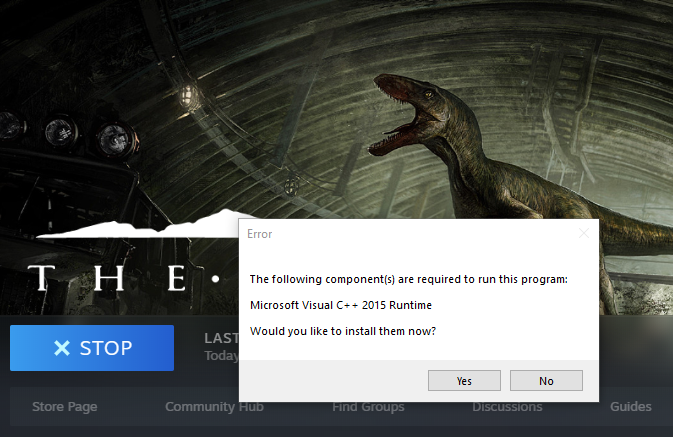

Btw, this is in the pinged messages in this channel.
empty robin
@hollow violet and @jaunty steppe (If you dont like my to ping you pls tell me) I have the same issue, I tried reinstall it once and doing it a second time rn. Do you have any indeas or does something helped?
hollow violet
The only thing I can suggest is try manually uninstalling, not just through steam, following this. Updating your graphics card, or windows. If none of that works, consider looking up how to reinstall direct X on your pc.
empty robin
Oh okay, thx a lot. I will try that if it still doesnt work.
hollow violet
Also you can ping me I don't mind.
empty robin
@hollow violet So okay, It both didnt work. I did that reinstall 2 times and I add this file but it still kicks me out.
And I updated NIVIDIA.
So Im updating my Windows right now. I tell you if it helps.
empty robin
didnt worked
empty robin
urgh I will sleep now and maybe it will work magically tomorrow... but I really dont think so. If anybody has a idea pls tell me.
hollow violet
@empty robin Do any other UE4 games work for you by any chance?
You can tag me anytime it's fine. You may have a DirectX issue or even a windows update issue. Do make sure to manually completely delete the isle from your computer everywhere. And reinstall and try. If not, again, may be a DirectX issue or windows issue,also, don't alt tab out of the game ever while it's loading. It will crash the game.
Remember not to alt tab as I said by the way. If you're alt tabbing everytime the game launches, it may send this crash everytime you try to play.
empty robin
@hollow violet What are UE4 Games? Yeah I tabb out very often, because i chat with friends or change music. I will try not to and see if it helps, it was never a problem for me, but if it helps I will be happy.
hollow violet
Yup. Just don't tab out. Let it load. See if that works.
hollow violet
 clear hedge
Redirected! Sorry brain tricked me
 brave shadow
I keep getting this
hollow violet
https://docs.google.com/document/d/1o8xsbfZKesdLpvViUdnYwVkG2SiqEuFkw8W3qslI7V0/edit Check the unable to launch section
Google Docs
Steam-related Issues LAST UPDATE: 25 June 2020 How do I install Evrima? Open Steam Right click “The Isle” Select Properties > Betas Select the beta “EVRIMA public branch” on the drop-down menu Screen is black upon loading up Ensure “The Isle” has been closed Open Steam ...
jaunty steppe
@hollow violet So I've completely uninstalled and wiped any trace of The Isle off my PC a total of 6 times. Windows is current and up to date. DirectX is current and up to date, and GPU is current and up to date. I'm still continuing to crash due to the Fatal Error. I'll try and mess with reinstalling DirectX tomorrow if I have time. But if that doesn't work... Might just uninstall until it's patched and fixed. :/
hollow violet
Sorry to hear that, the best thing I can suggest now is to search online for common errors. It seems this is beyond me.
thin oracle
So, in Evrima, does it make a difference where I live in order to join specific servers? Or should that not matter?
opaque minnow
How to fix grab defaulting to "w" key instead of "g"
 full quartz
I don't know if I misunderstood but is there grouping now in the game? And if so, how do I group up with my friend?
 meager frost
@full quartz you have to find them and 2 call next to them.
pure citrus
yus, finally managed to fix the "no alt-attack on utah" bug I had by deleting the "saved" folder under %appdata%/local/theisle. Thanks to Cyfi for posting that folders path earlier
 jaunty scarab
Could someone please explain me why i cant see any official US servers on Evrima? https://steamcommunity.com/sharedfiles/filedetails/?id=2249978107

Steam Community: The Isle.
 last nest
They're all empty anyway @jaunty scarab
jaunty scarab
@last nest lol, well, not all the time. can you see officials from US AND EU?
hollow violet
Guys please check https://docs.google.com/document/d/1o8xsbfZKesdLpvViUdnYwVkG2SiqEuFkw8W3qslI7V0/edit for server issues
Google Docs
Steam-related Issues LAST UPDATE: 25 June 2020 How do I install Evrima? Open Steam Right click “The Isle” Select Properties > Betas Select the beta “EVRIMA public branch” on the drop-down menu Screen is black upon loading up Ensure “The Isle” has been closed Open Steam ...
empty robin
Hey @hollow violet, just wanting to tell you all that not tabbing out doesnt work either. My Utah died today, because it crashed while some randoms attacked me.
hollow violet
@empty robin What kind of error does it throw you when it kicks you out?
I'm sorry to hear that happened to you 😰
 signal heron
i may have asked my previous request in a wrong thread/channel. Can anyone here assist with setting up a evirma dedicated server? using the guide and some parts i dont understand 😛 pm is ok or im in the voice channel
appreciate any help anyone can provide thanks! 😄
hollow violet
@pure citrus Can you describe the no alt attack bug to me? Is alt binded correctly in game? Does alt work outside of the isle?