#🔧-evrima-troubleshooting-🔧
1 messages · Page 196 of 1
 drowsy quarry
do /unstuck
 placid moon
doesnt work
drowsy quarry
placid moon
doesnt work
you can try again by loggin in the server and not moving
then do the command
 median swan
How do I make the water not so dark?
placid moon
drowsy quarry
then do the command
Bro I’ve done this 4 times
drowsy quarry
median swan
How do I make the water not so dark?
see if turning lumen on helps
if not, you can try relogging
 tulip hinge
<@&933486433342222376> So what should I do when I'm stuck and /unstuck didn't help, is there a way for someone to get me out?
drowsy quarry
placid moon
Bro I’ve done this 4 times
alright, then you can ask help from an admin
in the evrima chat youre stuck in, like NA, EU, CA
ping the @ official admin role + ingame name + server youre stuck + i'm stuck
drowsy quarry
tulip hinge
<@&933486433342222376> So what should I do when I'm stuck and /unstuck didn't he...
same for you
tulip hinge
Ok thanks
 fiery scarab
Kouga the troubleshooting mvp
 ashen cedar
@drowsy quarry something i just noticed cause yes im still trying to troubleshoot cause i a ctually want to try and play the game Xd i dont know if its a coincidence but i keep task manager open to check some temps here and there and i noticed that i can play when task manager is open but when i close it it stutters than i get this fatal error 1-2 mins after.. im gonna check if its 100% replicated
drowsy quarry
fiery scarab
Kouga the troubleshooting mvp
lol xd
ashen cedar
but i was able to play for about 1hour+ without getting the fatal error
drowsy quarry
ashen cedar
but i was able to play for about 1hour+ without getting the fatal error
usually when i keep my task manager open, i get lower fps in the games that are running in the background
cause my system is focusing on giving me the information
ashen cedar
im gonna try to play for an hour and close task manager to check for sure
 thin oracle
Hi, I can’t find any servers and sometimes lose connection to server
Anyone know a fix?
I was able to join a official envirna server 2 days ago but immediately lost connection and now I can’t find any servers
 normal glade
am I the only one who can't see/join EU 2 ?
 thin oracle
What’s wrong with envirna servers? I can’t see any
 vernal osprey
thin oracle
vernal osprey
thin oracle
 cosmic dew
I have same issue to
cosmic dew
yea i keep lagging back aswell
thin oracle
cosmic dew
yea i keep lagging back aswell
I actually got disconnected
cosmic dew
thin oracle
I actually got disconnected
yea i lag back for a few minutes then i lose connection
i get about 5 mins of play time then i have to restart my game and do it all again
 mystic bison
anyone know why i’m just not losing water, it’s been 30 mins and im still at 100% im just worried it might actually be going down and just not be visible to me
 green hedge
So started a troodon and got stuck in some rocks. /Unstuck isnt working any ideas?
 sturdy flame
I’ve been getting disconnected every 5-10 minutes on au servers only today would there be any good reason for this (update issue) or just awful connection?
 signal path
ashen cedar
im gonna try to play for an hour and close task manager to check for sure
signal path
ashen cedar
im gonna try to play for an hour and close task manager to check for sure
If you have a lot of RAM in your system (64 GB or more, especially if 4 sticks) you might have a mismatch between two sticks.
That could explain why sometimes things work fine and other times it crashes non-stop, and rebooting changes the behaviour
OCCT should of found it but it only tests 80% by default, and still depends on windows assigning the bad sector
drowsy quarry
mystic bison
anyone know why i’m just not losing water, it’s been 30 mins and im still at 100...
what dinosaur are you
 trail grotto
hey i keep getting an anti error and when i do load i get stuck on the blue screen
Anti-cheat integrity check failed
mystic bison
drowsy quarry
what dinosaur are you
beipi
drowsy quarry
mystic bison
beipi
are you inside the water
mystic bison
drowsy quarry
are you inside the water
wasn’t consistently no
about 50/50 spent on land
when i logged out it said my beipi had lost water on the server select screen, it was just constantly saying 100% for me on the server
drowsy quarry
mystic bison
when i logged out it said my beipi had lost water on the server select screen, i...
was it raining
mystic bison
it was not
this issue kept going for like the hour and a bit i was online for even if it was raining at some point it wouldn’t have been for long and besides im pretty sure it didn’t
drowsy quarry
strange, indeed
 zinc wedge
My game keeps freezing / crashing on boot, can some one help me?
drowsy quarry
zinc wedge
My game keeps freezing / crashing on boot, can some one help me?
This is caused by your third app antivirus (Norton, avast, avg, etc)
you can:
- uninstall your antivirus completely
or - disable it before launching the game (might not work)
or - create an exception in your antivirus for the entire isle folder
sometimes it requires you to reboot the pc or download the game again, as the files can be already blocked.
drowsy quarry
yey ^^
 alpine dagger
Would someone be able to assist in figuring out why i am crashing with a fatal?
 sand whale
can u do /unstuck to not be stuck ?
i try, nothing happen
but when i called admin, they say comign than i get d/c
alpine dagger
<@&818552355796287508>
 hollow fulcrumBOT
Many players encounter issues that already have solutions. Be sure to check the pinned messages for quick-fixes to common problems. If an issue persists a representative in this channel will assist you when available, otherwise you may contact Punchpacket directly.
thin oracle
<@&818552355796287508> Hello, no servers will appear when look for and I keep losing connection to them.
I tried validating, turn off firewall, reinstall, delete all files and nothings worked
hollow fulcrumBOT
Many players encounter issues that already have solutions. Be sure to check the pinned messages for quick-fixes to common problems. If an issue persists a representative in this channel will assist you when available, otherwise you may contact Punchpacket directly.
thin oracle
So the game for me is basically unplayable since I can’t find any servers
 plain sand
does anyone know how to get replays to work... permanently stuck on "available in: 30 minutes" for the whole week
 eternal pivot
thin oracle
So the game for me is basically unplayable since I can’t find any servers
eternal pivot
thin oracle
So the game for me is basically unplayable since I can’t find any servers
Have you checked the Anti Virus isn't blocking the game?
eternal pivot
plain sand
does anyone know how to get replays to work... permanently stuck on "available i...
Delete them (or move them out of the game folder), restart the game, then start with just one to see if it works, could also deleted the Config folder to reset all settings in the game, and of course verify the game in steam
cosmic dew
How do i fix error 21 i keep losing connection
plain sand
eternal pivot
Delete them (or move them out of the game folder), restart the game, then start ...
for some reason sitting in main menu for 15 minutes fixes it
 thorn horizon
guys how can i fix this

 oak wyvern
help am stuck in a rock and av tried /unstuck and nothing happend
<@&505047238674874368>
 rocky sonnet
Hi how can I stop sharow flickering?
fiery scarab
rocky sonnet
Hi how can I stop sharow flickering?
Play with your shadow smoothing and antialising settings that should fix it
 pearl kite
yooooo

 ashen oracle
pearl kite
yooooo
ashen oracle
pearl kite
yooooo
For that you have to relog
Your friend can use /unstuck command in game if no one is near them
pearl kite
ashen oracle
For that you have to relog
Before i relog my footsteps will glows...
This game is perfect
 zealous tundra
Does anyone know how to fix sound stutters? Like the moment it rains or I walk in tall grass my ears are dying
 flat dragon
<@&933486433342222376>
ashen oracle
Most times
 regal crater
Im stuck and /unstuck wont do anything ive tried multiple times <@&933486433342222376>
 drowsy quarry
 visual whale
How can I instal anti cheat
visual whale
How can I instal anti cheat
enter the game files and double click installanticheat
drowsy quarry
regal crater
Im stuck and /unstuck wont do anything ive tried multiple times <@&9334864333422...
you can ask an unstuck by going to evrima servers and typing
@admin role + IGN + server you're stuck + I'm stuck
drowsy quarry
 sinful igloo
guys my game freezes every time i try to launch it
sinful igloo
guys my game freezes every time i try to launch it
This is caused by your third app antivirus (Norton, avast, avg, etc)
you can:
- uninstall your antivirus completely
or - disable it before launching the game (might not work)
or - create an exception in your antivirus for the entire isle folder
sometimes it requires you to reboot the pc or download the game again, as the files can be already blocked.
sinful igloo
drowsy quarry
This is caused by your third app antivirus (Norton, avast, avg, etc)
you can:
...
okay thank you it worked!
 night niche
sinful igloo
okay thank you it worked!
night niche
sinful igloo
okay thank you it worked!
same!
night niche
drowsy quarry
This is caused by your third app antivirus (Norton, avast, avg, etc)
you can:
...
ty
drowsy quarry
yey ^^
 median jolt
everytime i open the isle i am stuck on this screen what do i do? i uninstalled and installed the game and it still doesnt work
 drowsy quarry
median jolt
everytime i open the isle i am stuck on this screen what do i do? i uninstalled ...
drowsy quarry
median jolt
everytime i open the isle i am stuck on this screen what do i do? i uninstalled ...
This is caused by your third app antivirus (Norton, avast, avg, etc)
you can:
- uninstall your antivirus completely
or - disable it before launching the game (might not work)
or - create an exception in your antivirus for the entire isle folder
sometimes it requires you to reboot the pc or download the game again, as the files can be already blocked.
median jolt
drowsy quarry
This is caused by your third app antivirus (Norton, avast, avg, etc)
you can:
...
alr thanks
signal path
zealous tundra
Does anyone know how to fix sound stutters? Like the moment it rains or I walk i...
Stuttering sound is usually a sign that your CPU is struggling, do you know your system specs? CPU, GPU, and RAM?
signal path
thorn horizon
guys how can i fix this
Try disabling DLSS and Lumen
signal path
cosmic dew
How do i fix error 21 i keep losing connection
- If you use Norton, McAfee, AVG, AVAST, or Kaspersky you will need to uninstall it or add The Isle folder in Steam as an exception. Disabling often does not work.
- In Steam, right-click The Isle, Manage, Browse local files, double-click UninstallAntiCheat then double-click InstallAntiCheat. Note no confirmation message will be given.
signal path
thin oracle
So the game for me is basically unplayable since I can’t find any servers
Can you please make sure you are on Evrima? It will default to Legacy when you first get it. https://i.imgur.com/wpZNmO7.mp4
 signal path
alpine dagger
Would someone be able to assist in figuring out why i am crashing with a fatal?
signal path
alpine dagger
Would someone be able to assist in figuring out why i am crashing with a fatal?
The issue depends a lot on exactly when the crashes are occuring.
If it is during load and is consistent (as in happens same place every time) please follow this:
#🔧-evrima-troubleshooting-🔧 message
If it happens during gameplay or is random, please follow this:
#🔧-evrima-troubleshooting-🔧 message
If you have a 13th or 14th gen Intel CPU, please also follow this:
https://www.intel.com/content/www/us/en/download/15951/intel-processor-diagnostic-tool.html
 serene cliff
Hey guys, i have an intel core I5-12400F, i am getting at most 20 frames, any recommendations?
drowsy quarry
serene cliff
Hey guys, i have an intel core I5-12400F, i am getting at most 20 frames, any re...
CPU alone doesn't make frames, need to know the other components
like GPU and ram
 whole shoal
serene cliff
Hey guys, i have an intel core I5-12400F, i am getting at most 20 frames, any re...
whole shoal
serene cliff
Hey guys, i have an intel core I5-12400F, i am getting at most 20 frames, any re...
maybe start with a gpu
serene cliff
drowsy quarry
CPU alone doesn't make frames, need to know the other components
Geforece RTX 3060 and 16gb
I'd say my gpu is decent?
drowsy quarry
alright, you can follow the tips in this video to increase your fps

This video shows you epic settings are a lie. Here you will see how to improve your FPS with my settings breakdown!
👀Bem vindo! Welcome!👀
PT-BR / ENG
Watch my Evrima Guides: https://youtube.com/playlist?list=PLdvqZdnB0LRXw2S_uSlgjno_i8bE1LbIn
Watch my Combat Guides: https://youtube.com/playlist?list=PLdvqZdnB0LRVhGGslKlu4wrFilMn_DsEj
--------...
drowsy quarry
serene cliff
Geforece RTX 3060 and 16gb
better than mine at least.
 misty cipher
how to un stuck
drowsy quarry
misty cipher
how to un stuck
/unstuck
serene cliff
drowsy quarry
alright, you can follow the tips in this video to increase your fps
https://yo...
this dude makes me delete my config, so i'll have to reapply me settings correct?
also he's crying about 60fps lmao
drowsy quarry
this "dude"?
signal path
serene cliff
this dude makes me delete my config, so i'll have to reapply me settings correct...
Yes, deleting config is something you need to do with Evrima
serene cliff
drowsy quarry
this "dude"?
OML I didn't see that was you 🤣
serene cliff
you had 60 fps before tho, i don't
signal path
Kouga's video is a good one.
serene cliff
drowsy quarry
I have 100 fps actually
yes, see how it says 'before'
serene cliff
drowsy quarry
that's what happens if you don't take care of the game
that'll still only make 40 tho
serene cliff
drowsy quarry
50% fps loss
that i meant
drowsy quarry
but you haven't even tried :/
serene cliff
drowsy quarry
but you haven't even tried :/
ik, i'm busy
you made it 8 minutes hang on lol
drowsy quarry
well, I did the best I could
serene cliff
ADDSSSS
serene cliff
drowsy quarry
well, I did the best I could
oh btw, could part of the problem be me playing on a tv screen, it's supposed to support 120 Hz though
serene cliff
drowsy quarry
is it 1080p
1080p
drowsy quarry
then nah
drowsy quarry
whatever u want
serene cliff
kk
drowsy quarry
I don't have dlss so I can't help
serene cliff
i just put it on balanced, i'll see
drowsy quarry
if u get screen tearing.... disable DLSS :p
 ashen oracle
signal path
https://cdn.discordapp.com/attachments/723260797719019620/1340935290180734986/20...
ashen oracle
signal path
https://cdn.discordapp.com/attachments/723260797719019620/1340935290180734986/20...
Turn off DLSS
 ember field
didnt worked either
signal path
Haha 
drowsy quarry
ember field
didnt worked either
bro uninstall your antivirus pls D:
signal path
Oh Kouga is that what you call screen tearing?
drowsy quarry
not really
ember field
drowsy quarry
bro uninstall your antivirus pls D:
I said it didnt worked xD
signal path
Ok just making sure I wasn't repeating
drowsy quarry
ember field
I said it didnt worked xD
what AV is that, Norton?
some antiviruses have an uninstall tool
plus you might need to reboot the pc + uninstall the isle
as the files can be already blocked
 drowsy quarry
for me, clicking apply gives me less GPU usage
cause it render things again
soooo it means more fps
serene cliff
Oh, nice one, i'll remember that
drowsy quarry
serene cliff
Oh, nice one, i'll remember that
if you copied my settings you should have a lot of fps
specially if the dlss works
makes pretty B)
serene cliff
drowsy quarry
if you copied my settings you should have a lot of fps
Btw where'd you get the tool thing at your top left?
drowsy quarry
u deleted the config folder right
drowsy quarry
okie, should fix the fps
signal path
Adding The Isle folder as an exception in your AV can help a little with FPS too. It reduces stuttering for me.
Even for good AV like Windows Defender
serene cliff
drowsy quarry
okie, should fix the fps
Ok so now have 50-60
drowsy quarry
mhm, for a 3060 is kinda good
serene cliff
drowsy quarry
alright, you can follow the tips in this video to increase your fps
https://yo...
Good enough, 10/10 would recommend
serene cliff
drowsy quarry
mhm, for a 3060 is kinda good
I had drops to 40 but clicking apply in server fixed that so thanks for that one too 😉
serene cliff
drowsy quarry
I'm curious
I'm sorry for calling you 'this guy' btw my good sir
serene cliff
drowsy quarry
is it the 3060 8gb or 12gb
Uuuh what
drowsy quarry
serene cliff
I'm sorry for calling you 'this guy' btw my good sir
nah all good
drowsy quarry
serene cliff
Uuuh what
there are 2 variants of 3060 in the market, one with 8gb vram and one with 12gb vram
 round adder
i have a question that you maybe able to help me with. i am getting any anit cheat error on the isle and it wont let me start the game any advice ? #00000022
serene cliff
I bought it pre-built, how do i check?
drowsy quarry
serene cliff
I bought it pre-built, how do i check?
open task manager > performance > click GPU
 tacit iron
Right click taskbar then settings also helps
drowsy quarry
niceee....... but you could get more fps tho
my friend with a 3050 gets 85fps.....
signal path
round adder
i have a question that you maybe able to help me with. i am getting any anit che...
In Steam, right-click The Isle, Manage, Browse local files, double-click UninstallAntiCheat then double-click InstallAntiCheat. Note no confirmation message will be given.
 civic idol
Are the servers down rn?
drowsy quarry
there's something consuming your GPU
drowsy quarry
civic idol
Are the servers down rn?
scheduled restart, shall be back in 10min
serene cliff
drowsy quarry
there's something consuming your GPU
I have The Isle, discord, steam app, settings and task manager
drowsy quarry
weird :D
drowsy quarry
serene cliff
I have The Isle, discord, steam app, settings and task manager
also do you perhaps know if your GPU drivers are updated?
drowsy quarry
I don't know how old your GPU drivers are
but if they're too old, they can have performance issues
serene cliff
drowsy quarry
I don't know how old your GPU drivers are
I opened the geforce app and i can install a version release today?
serene cliff
Might as well
serene cliff
signal path
60 is about right for a 3060 in some areas of the map, tbh
I was by the beach somewhere
drowsy quarry
yeah, kinda depends on the DLAA as well
serene cliff
serene cliff
I was by the beach somewhere
In bushes
drowsy quarry
sometimes 50 render is better than the DLAA in fps terms
serene cliff
I just found in the nvidia app it says The Isle hasn't been optimized, also your video doesn't talk about the slider there?
drowsy quarry
serene cliff
I just found in the nvidia app it says The Isle hasn't been optimized, also your...
DO NOT click optimize
Nvidia is terrible at it
signal path
DLSS balanced gives slightly lower FPS than the default 50% 3D render scale from what I've heard, and it matches my FPS and relative card performance
serene cliff
drowsy quarry
DO NOT click optimize
That's gonna undo my game settings right?
serene cliff
Ah
serene cliff
signal path
DLSS balanced gives slightly lower FPS than the default 50% 3D render scale from...
So instead of balanced i should turn it off?
signal path
DLSS looks waaay better on than off
drowsy quarry
you can try a lot of things, yarke
even changing the DLSS setting
serene cliff
Uhm
signal path
DLSS Performance I think it's called
drowsy quarry
performance, ultra performance, quality, balanced, etc etc
(for dlss)
serene cliff
I quit the isle: GPU usage jumped to 0%
drowsy quarry
oh no he died B)
signal path

serene cliff
drowsy quarry
oh no he died B)
wdym?
round adder
signal path
In Steam, right-click **The Isle**, **Manage**, **Browse local files**, double-c...
i did this and it does not work
drowsy quarry
nothing nothing, just a joke
drowsy quarry
serene cliff
wdym?
also, dunno if it's your case, but my windows when I installed was naturally set to "energy economy"
so it sucked a lot of my fps
serene cliff
drowsy quarry
also, dunno if it's your case, but my windows when I installed was naturally set...
i have like a million tasks called 'service host'
signal path
round adder
i did this and it does not work
Please try this
#🔧-evrima-troubleshooting-🔧 message
Note you may need to Verify Integrity of Files for other games in steam afterwards if they also use EAC
drowsy quarry
serene cliff
i have like a million tasks called 'service host'

I think I showed in the video as well, can put GPU at maximum performance too
other than that, not much u can do
serene cliff
so why tf does my gpu get used fully if it's not supposed to be The Isle's doing
signal path
100% GPU usage in game is normal, it just means GPU is bottleneck not CPU (that's a good thing)
serene cliff
drowsy quarry
without the isle?
No i meant with the isle open, i mean if it's already fully used how would i get more frames like you both said 3060 should
serene cliff
signal path
100% GPU usage in game is normal, it just means GPU is bottleneck not CPU (that'...
Alr, but isn't a bottleneck in general just bad?
drowsy quarry
serene cliff
No i meant with the isle open, i mean if it's already fully used how would i get...
ah, then it's normal
without fps limiter your GPU will always use 100% of itself to give you the best performance possible
signal path
serene cliff
Alr, but isn't a bottleneck in general just bad?
One or the other has to be the bottleneck
drowsy quarry
it's one of the reasons I cap my fps :p
serene cliff
drowsy quarry
it's one of the reasons I cap my fps :p
I have it capped at 144 fps lol, just was like that when i booted Isle up after deleten config file
drowsy quarry
yeah it's normal
I use Nvidia to cap it for me, since I can put whatever value I want
45fps my beloved.
signal path
I would turn off framerate cap completely in game, even though it's set high it caused me issues. If you want to limit it do it like Kouga said
 rare mirage
drowsy quarry
45fps my beloved.
rare mirage
drowsy quarry
45fps my beloved.
I play with 60 fps max to get a better graphics, but i can play with 120 fps, and i use Nvidia too, wich one u use?
drowsy quarry
rare mirage
I play with 60 fps max to get a better graphics, but i can play with 120 fps, an...
I use Nvidia app to cap it
rare mirage
rare mirage
I play with 60 fps max to get a better graphics, but i can play with 120 fps, an...
Mine isnt too good, but the rest of the Pc is awesome
rare mirage
drowsy quarry
I use Nvidia app to cap it
Oh, i use nvidia graphs card, so i dont need an app
drowsy quarry
the app comes with the PC tho
like GeForce experience
but now the new GPUs are coming with the brand new Nvidia app
rare mirage
Oh didnt know, i look stupid ;-;
 oblique shale
ive been playing legacy just fine, try to open evirma for the first time in a few years and it freezes on the ae screen. ive deleted config, deleted easy anticheat, verified files, uninstalled, allowed through antivirus. not sure what else i can do
drowsy quarry
nah all good, you can also cap it using the "Nvidia control panel" that comes with the PC as well
 winter python
oblique shale
ive been playing legacy just fine, try to open evirma for the first time in a fe...
winter python
oblique shale
ive been playing legacy just fine, try to open evirma for the first time in a fe...
What did you allow through your antivirus?
You need to allow the entire game folder, not just an .exe
rare mirage
oblique shale
ive been playing legacy just fine, try to open evirma for the first time in a fe...
U cant enter the game withouth easy anticheat, maybe thats the problem
drowsy quarry
winter python
What did you allow through your antivirus?
fastest typer in the west
serene cliff
Looking west costs me about 10 frames🤔
signal path
If you AV doesn't allow adding the whole folder you need the TheIsleClient-Win64-Shipping one under binaries->x64
oblique shale
rare mirage
U cant enter the game withouth easy anticheat, maybe thats the problem
i mean delete it and try verify afterwards
signal path
Not TheIsle
winter python
oblique shale
i mean delete it and try verify afterwards
He's referring to a different issue
drowsy quarry
serene cliff
Looking west costs me about 10 frames🤔
the isle is like that, believe it or not XD
oblique shale
winter python
What did you allow through your antivirus?
i use norton so not sure how to do whole folders
serene cliff
drowsy quarry
the isle is like that, believe it or not XD
I capped the isle's frames at 70 through the nvidia app while Isle was opened, idk if it makes a different but those 70 fps are very closely being hit
rare mirage
oblique shale
i mean delete it and try verify afterwards
Hmm then idk, but its normal for the first time, my dad fixed it for me, he,s informatic, but i saw in videos that is normal the games freeze the first time u enter, once u fixed it, wont freeze anymore
rare mirage
And @drowsy quarry, are u the real one? The youtuber?
drowsy quarry
serene cliff
I capped the isle's frames at 70 through the nvidia app while Isle was opened, i...
my idea for fps limiters are
"if I can't reach the value I set, I'll make it lower"
with 100% GPU I reach 100fps
with 80% GPU I reach 70fps
with 58% GPU I reach 45fps which is the perfect value for me. So I Cap it there
drowsy quarry
rare mirage
And <@398550373402411009>, are u the real one? The youtuber?
Yeah, I'm purple D:
rare mirage
drowsy quarry
Yeah, I'm purple D:
Idk what that means
serene cliff
drowsy quarry
this "dude"?
I'd guess so @rare mirage lol
drowsy quarry
rare mirage
Idk what that means
click my picture and see my purple tag
rare mirage
drowsy quarry
Yeah, I'm purple D:
Ohh i saw, i,m a fan broo
drowsy quarry
hiya :D
oblique shale
signal path
If you AV doesn't allow adding the whole folder you need the TheIsleClient-Win64...
any idea where to find it
serene cliff
You're making me one too
rare mirage
Didnt expect to see you anywhere :V
drowsy quarry
rare mirage
Didnt expect to see you anywhere :V
I live here, for at least 10h a day
serene cliff
First ever actual not scammy Isle performance vid
drowsy quarry
drowsy quarry
I live here, for at least 10h a day
in this channel specifically))))
rare mirage
Youtubers usually dont cares so much about their followers, but i see u,re not like that, we litterally started talking before i asked u :0
drowsy quarry
rare mirage
Youtubers usually dont cares so much about their followers, but i see u,re not l...
I just love to help, that's kinda my thing
signal path
oblique shale
any idea where to find it
Get to The Isle folder, then Binaries, then Win64
serene cliff
drowsy quarry
I just love to help, that's kinda my thing
'Why would i care about my fans specifically' LMFAO
rare mirage
serene cliff
'Why would i care about my fans specifically' LMFAO
HAHAHAHAHA
drowsy quarry
serene cliff
First ever actual not scammy Isle performance vid
well, tell me whatever u decide, I would be happy to reach 60fps at least but I do agree you could get a little bit more.
maybe driver issue, maybe "energy economy" issue, etc.
rare mirage
serene cliff
'Why would i care about my fans specifically' LMFAO
Lit 90% youtubers
serene cliff
drowsy quarry
well, tell me whatever u decide, I would be happy to reach 60fps at least but I ...
And i can't go to a store because all they'll say is 'yeah must be the game' -_-
rare mirage
drowsy quarry
well, tell me whatever u decide, I would be happy to reach 60fps at least but I ...
And kouga, not sure if i saw a video about best options for the game, could i did?
rare mirage
rare mirage
And kouga, not sure if i saw a video about best options for the game, could i di...
Yours i mean
serene cliff
drowsy quarry
alright, you can follow the tips in this video to increase your fps
https://yo...
This one!
drowsy quarry
serene cliff
And i can't go to a store because all they'll say is 'yeah must be the game' -_-
you don't need to, it's fine
we gave you the best tips possible for now, you can mess around later if you want. Try DLSS on, try DLSS off.... go ahead and compare things
it's your best bet to figure out the sweet mid spot for you
serene cliff
drowsy quarry
well, tell me whatever u decide, I would be happy to reach 60fps at least but I ...
Yeah but i'm confused with you saying i could get a bit more?
drowsy quarry
rare mirage
And kouga, not sure if i saw a video about best options for the game, could i di...
yarke pointed 👆
serene cliff
Right i gotta get going or me teno's gonna starve
 unique pier
I yearn for a day when Evrima is easily playable, and doesn't have a trillion bugs.
rare mirage
drowsy quarry
yarke pointed 👆
Wdym, i dont underdtund english at all ;-;
unique pier
Will this ever happen, do you think?
oblique shale
signal path
Get to The Isle folder, then Binaries, then Win64
nope still nothing
unique pier
rare mirage
Wdym, i dont underdtund english at all ;-;
The link. That he sent.
drowsy quarry
serene cliff
Yeah but i'm confused with you saying i could get a bit more?
well, it's a 3060, they're the most used GPU in the entire steam. I think you could get close to 80fps, but you need to mess a bit with the settings.
best of luck 🫡
rare mirage
unique pier
The link. That he sent.
Oh ok ty
drowsy quarry
rare mirage
Wdym, i dont underdtund english at all ;-;
what language do you speak
rare mirage
drowsy quarry
what language do you speak
Spanish
drowsy quarry
nice, close to my language. Portuguese.
unique pier
rare mirage
Oh ok ty
Your good mate
signal path
oblique shale
nope still nothing
My honest advice is to uninstall Norton, it isn't better than Windows Defender (often worse in independent testing) and it loves to cause issues
serene cliff
wtf's this?
 drowsy quarry
anyways, yarke sent the link but I can send again if needed ^^
drowsy quarry
serene cliff
wtf's this?
may I give you a video.
unique pier
rare mirage
Spanish
Como te llamas?
rare mirage
drowsy quarry
nice, close to my language. Portuguese.
Ohh cool, i know lots of portuguese ppl
serene cliff
drowsy quarry
may I give you a video.
you may
drowsy quarry
serene cliff
you may
dm
serene cliff
migration is the other way so huhhhhh
signal path
serene cliff
wtf's this?
Patrol Zone, PZ. Where your food is for herbivores, meaningless for carnivores
rare mirage
unique pier
Como te llamas?
Tu tmb hablas español, o es traductor?
unique pier
rare mirage
Tu tmb hablas español, o es traductor?
Mi teclado no es español
signal path
PZ also determines what is in your diet for herbivores, when it moves what you can eat also changes. It's tied to your group so you can force it to respawn by changing groups
rare mirage
unique pier
Mi teclado no es español
Ahh, but do u use traductor or not?
signal path
serene cliff
migration is the other way so huhhhhh
If you are a herbivore always follow PZ is my advice
unique pier
rare mirage
Ahh, but do u use traductor or not?
Algunos traductores, pero también hablando yo mismo
signal path
Or go to where you want to be and make PZ respawn
rare mirage
unique pier
Algunos traductores, pero también hablando yo mismo
Ahh bien bien
unique pier
Si
serene cliff
signal path
Or go to where you want to be and make PZ respawn
What
signal path
signal path
PZ also determines what is in your diet for herbivores, when it moves what you c...
This
serene cliff
Make spawn?
rare mirage
I started lesrning english from traductor soo
unique pier
I am learning spanish from classes and traductor
drowsy quarry
serene cliff
Make spawn?
I teach it in the video I sent you lol
serene cliff
Yeah i was just about to watch 😉
signal path
serene cliff
Make spawn?
PZ is tied to your group, so when you join a new group you get a new PZ. Even if you are alone you are still in a group of one
drowsy quarry
 kouga survival tips
rare mirage
unique pier
I am learning spanish from classes and traductor
Me too, but i,m the best of my class, so i dont lesrn so much from classes, i,m just better than the rest, i need to wait they catch me
Well, kouga, i gtg, i,m happy to see u bro, wish we can talk again soon, byee!
drowsy quarry
sureeee, bye bye :>
oblique shale
signal path
My honest advice is to uninstall Norton, it isn't better than Windows Defender (...
Removing it worked thanks, was pulling at hair tryna figure it out for hours
zealous tundra
signal path
Stuttering sound is usually a sign that your CPU is struggling, do you know your...
NVIDIA Systeminformationen-Bericht erstellt am: 02/20/2025 17:41:44
Version der NVIDIA App: 11.0.2.312
Betriebssystem: Microsoft Windows 11 Home, Version 10.0.26100
DirectX-Laufzeitversion: DirectX 12
Treiber: Game Ready Treiber - 572.42 - Thu Feb 13, 2025
CPU: Intel(R) Core(TM) i7-10750H CPU @ 2.60GHz
RAM: 16.0 GB
Speicher: SSD - 476.9 GB
Grafikkarte
GPU-Prozessor: NVIDIA GeForce RTX 3060 Laptop GPU
Direct3D-Funktionsebene: 12_1
CUDA-Kerne: 3840
Grafik-Taktfrequenz: 1425 MHz
Max-Q-Technologie: Nein
Dynamische Verstärkung: Nein
WhisperMode: Ja
Optimus erweitert: Nein
Größenverstellbare Leiste: Ja
Speicher-Datenrate: 14.00 Gbps
Speicherschnittstelle: 192-Bit
Speicherbandbreite: 336.048 GB/s
Gesamter verfügbarer Grafikspeicher: 14251 MB
Dedizierter Videospeicher: 6144 MB GDDR6
System-Videospeicher: 0 MB
Gemeinsam genutzter Systemspeicher: 8107 MB
Video-BIOS-Version: 94.06.0f.00.ae
IRQ: Nicht benutzt
Bus: PCI Express x16 Gen3
Geräte-ID: 10DE 2520 14401025
Teilenummer: 4735 0110
Sorry it is mostly in German
But the isle is literally the only game I am struggling to play
 marble coral
heyy for some reason my game freezes about 5sec into loading, I've tried uninstalling and reinstalling and its still doing the same thing?
 drowsy quarry
marble coral
heyy for some reason my game freezes about 5sec into loading, I've tried uninsta...
drowsy quarry
marble coral
heyy for some reason my game freezes about 5sec into loading, I've tried uninsta...
do you have a third app antivirus
marble coral
dont think so?
drowsy quarry
marble coral
I got Norton
This is caused by your third app antivirus (Norton, avast, avg, etc)
you can:
- uninstall your antivirus completely
or - disable it before launching the game (might not work)
or - create an exception in your antivirus for the entire isle folder
sometimes it requires you to reboot the pc or download the game again, as the files can be already blocked.
marble coral
ok Ill give it a go, thanks!
drowsy quarry
all good
 bitter stone
Anyone having issues with ai when you Croc?
thin oracle
<@&818552355796287508> Hello, I’m trying to get help about my problem but it doesn’t seem anyone is trying to help me. Is the support team completely ignoring us because this is unprofessional?
I been experiencing server connection issues and no servers appearing on the server list for the past 3 days and no fix is working.
I tried turning off my firewall, reinstalling the game, delete cache history, delete all files and reinstall, increase maximum server limit on steam and so far got nothing to work.
Legacy seems to seem work but I immediately get disconnected when joining a server.
hollow fulcrumBOT
Many players encounter issues that already have solutions. Be sure to check the pinned messages for quick-fixes to common problems. If an issue persists a representative in this channel will assist you when available, otherwise you may contact Punchpacket directly.
 sacred mason
What does this mean? Exactly and how do u fix it?
 thin oracle
sacred mason
What does this mean? Exactly and how do u fix it?
thin oracle
sacred mason
What does this mean? Exactly and how do u fix it?
I’m not sure, the support team isn’t answering our problems
I tried steam, here and Reddit for help but received nothing but vague answers
serene cliff
so i know this was just explained to someone but...

i've never had this before
okay nvm this wasn't explained ig?
also it fixed itself???
what is happening
winter python
The stretching is from having DLSS enabled, and the border is from changing some settings in game
serene cliff
winter python
The stretching is from having DLSS enabled, and the border is from changing some...
the stretching stopped, but i don't get the border
it looks like it's telling me i'm too hot or smth
 vivid mulch
i just bought and installed the game and everytime i try to start it i get instant fatal error what is the reason for this?
signal path
oblique shale
Removing it worked thanks, was pulling at hair tryna figure it out for hours
Good to hear! Thanks for letting me know it worked too, always good to know what does and doesn't
 sweet bay
Anyone having ghosting underwater? Playing as a deino. I have an AMD card
signal path
zealous tundra
NVIDIA Systeminformationen-Bericht erstellt am: 02/20/2025 17:41:44
Version der ...
That should all be good enough to play without issue. Do you use a third party antivirus or security suite?
 next spindle
<@&505047238674874368> I'm a deino stuck under a waterfall in NA2. The spot I'm at must be bugged because it keeps disconnecting me from the server saying error.
signal path
vivid mulch
i just bought and installed the game and everytime i try to start it i get insta...
Could you please follow these steps? #🔧-evrima-troubleshooting-🔧 message
The most common issues are third part antivirus and out-of-date GPU drivers. Make sure to download them from NVIDIA or AMD depending on which you have
fiery scarab
next spindle
<@&505047238674874368> I'm a deino stuck under a waterfall in NA2. The spot I'm...
Does it let you rejoin the server and then you get kicked or can you not join the server anymore and get the red text?
next spindle
fiery scarab
Does it let you rejoin the server and then you get kicked or can you not join th...
I get back in queue, i join and then within a minute it disconnects me and says error 21.
next spindle
fiery scarab
Does it let you rejoin the server and then you get kicked or can you not join th...
Im joining back in right now.
fiery scarab
Try /unstuck when you're back in. I'm not currently available for in game assistance so you'll need to ping official server admin role in #evrima-na if the command doesn't work
signal path
thin oracle
I’m not sure, the support team isn’t answering our problems
I'm sorry, there isn't really a support team, just a few tech savvy people who like to try to help. Networking issues are very very hard to diagnose remotely.
To help eliminate issues with your modem/router, could I get you to please try with a VPN active? If you don't already have one, I recommend CloudFlare Warp as a free option. https://one.one.one.one

Install the free app that makes your phone’s Internet more fast, private, and reliable.
ashen oracle
Sounds like a scam there
signal path
If that doesn't work, could you send me the log file to have a look through? ( press WIndows + R, put %localappdata% then press enter, open TheIsle, Saved, Logs, and send TheIsle file)
vivid mulch
i feel like im not seing all servers there is barely any active ones in my browser? anyone know why?
winter python
vivid mulch
i feel like im not seing all servers there is barely any active ones in my brows...
Could you share a screenshot?
signal path
ashen oracle
Sounds like a scam there
CloudFlare is the largest cloud hosting company in the world, by a long margin, they (along with Google) also operate one of the few widely used DNS. It isn't a scam, but they are welcome to research and use any VPN that they see fit.
ashen oracle
Naaaahhh that’s sending up red flags for me. I wouldn’t trust it at all. Looks like you posted up scams
signal path
🤷
1.2 million users on Android alone

All VPN providers - especially free - should always be approached with caution. CloudFlare is the only free one that I would recommend, though there are other paid ones that have a good reputation too.
signal path
sacred mason
What does this mean? Exactly and how do u fix it?
Could you please make sure your GPU drivers are up to date? Old drivers can cause this issue.
vivid mulch
winter python
Could you share a screenshot?

and is there a way to sort by pop or ping?
signal path
vivid mulch
vivid mulch
thank you my love
signal path
I'd recommend deleting your config data when switching from legacy to Evrima, too. #🔧-evrima-troubleshooting-🔧 message
thin oracle
winter python
The stretching is from having DLSS enabled, and the border is from changing some...
Hello, can I get some help? No one’s helping me
signal path
thin oracle
Hello, can I get some help? No one’s helping me
Did you read my last response?
thin oracle
signal path
Did you read my last response?
No
sacred mason
signal path
Could you please make sure your GPU drivers are up to date? Old drivers can caus...
Its up to date…
thin oracle
I didn’t see it
signal path
😦
thin oracle
I can’t see any servers
And I have connection issues
I immediately get disconnected when on a server when I join
signal path
signal path
I'm sorry, there isn't really a support team, just a few tech savvy people who l...
I understand. Please read this post
signal path
That would be my next step, yes. It doesn't have to be that one, any gaming orientated VPN would be fine.
From what you've said you have already done everything else we recommend, so that would be the next step
thin oracle
Plus I’m not sure about vpns, they seem to block my access
Saw someone say this
On your keyboard press the Windows key and R, put %localappdata% and hit enter, scroll down and double click TheIsle, then Saved, then delete Config.
Would this work?
signal path
thin oracle
On your keyboard press the Windows key and R, put **%localappdata%** and hit ent...
It wouldn't hurt
signal path
thin oracle
Plus I’m not sure about vpns, they seem to block my access
That's... Odd. Are to on some sort of special internet? University campus, for example?
signal path
and your home is just an ordinary house or apartment? No strange shared internet setup?
thin oracle
No it’s wifi password protected
When I get home imma try to turning off both fire wall and virus protection to see if that helps.
I didn’t turn off the virus protection so it’s maybe blocking it
I haven’t had this issue a year ago
Now it’s all coming down to a mess
signal path
Do you use a third party antivirus or security suite?
thin oracle
signal path
Do you use a third party antivirus or security suite?
No, I don’t like antivirus
They cause issues for gaming
signal path
thin oracle
No, I don’t like antivirus
If you only have the default Windows firewall, and haven't changed any settings with it, it is unlikely to be the problem, but trying again wouldn't hurt. From what you've told me I think it is more likely to be an issue with your router or DNS, however
When you disable the firewall make sure to do it for all 3 profiles (Domain, Private, and Public). Once you fix the issue or give up I'd also strongly advise enabling it again for safety's sake.
signal path
sacred mason
Its up to date…
Could you please open Task Manager, then Performance, then take a screenshot of the Memory and GPU pages?
If you have more than one GPU pages please take the screenshot of the one corresponding to your dedicated (AMD/NVIDIA) one
thin oracle
signal path
If you only have the default Windows firewall, and haven't changed any settings ...
What’s the dns
thin oracle
signal path
Could you please open Task Manager, then Performance, then take a screenshot of ...
My gpu and cpu are pretty good
Gpu gtx 4070
signal path
thin oracle
My gpu and cpu are pretty good
That wasn't directed at you Solaire
thin oracle
CPU AMD Ryzen 5 7600
signal path
Sorry for the confusion.
thin oracle
Oh ok
signal path
thin oracle
What’s the dns
DNS is the service that turns domain names (like google.com) into their IP, which is kinda like the internet equivalent of a street address
Most of the time by default your DNS will be one owned by your ISP (Internet Service Provider), and they can get things wrong
Changing it to one of the main DNS servers like Google's or CloudFlare's can sometimes fix odd issues connecting to stuff
thin oracle
How do change the dns
I don’t bother with my router or modem, whatever it’s called
Last time I had internet issues for a long Time
Well not that was because my internet line sucked
signal path
thin oracle
How do change the dns
I think a video guide would be easiest https://youtu.be/m596Mz9gYMQ
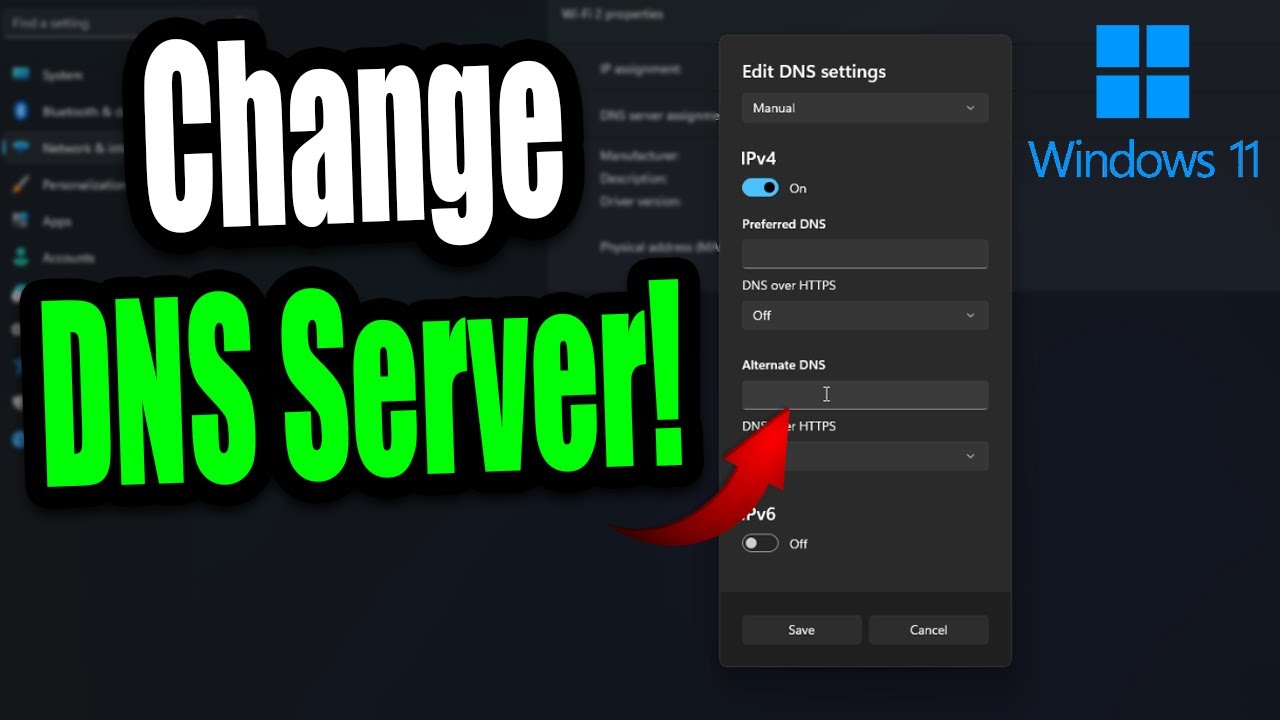
Do you want to know how to change your DNS settings on Windows 11 PC? In this video, I show you how to use custom DNS settings on your PC. To do this, go to settings, network & internet, and click on the Wifi or Ethernet tab which will bring you to the page where you can change your DNS server.
🔔 Like, Subscribe and ring the bell to get notifi...
signal path
thin oracle
Last time I had internet issues for a long Time
Does this mean you have changed something with your router? It's not all default?
rocky sonnet
What to do if I try to do croc alt attack but it is not happening ? I press alt and lmb but croc does just normal attack
winter python
rocky sonnet
What to do if I try to do croc alt attack but it is not happening ? I press alt ...
Are you holding alt while tapping LMB?
 fast oak
Anybody know how to fix the game launching zoomed in? idk if the resolution is messed up or something but i just bought the game and cant even play it
thin oracle
signal path
Does this mean you have changed something with your router? It's not all default...
No
It was a internet issue with my provider
Well crap, turning off fire wall and virus protection didn’t help

@signal path
Come on I been offline for like a year and this is what I get? I miss this game so much
Is my version correct?

Ah screw it, I’m tired of fiddling with it. I’ll come back to it later
I’ll wait till next update
drowsy quarry
thin oracle
sadly yes... your version is correct
signal path
thin oracle
<@117186041248481283>
Did you change your DNS as we discussed?
fast oak
<@&818552355796287508> i tried the pinned fix for my screen being zoomed in and still not working for me
fast oak
nevermind got it fixed. I had to manually change my resolution in the game files, very inconvenient for a new player
thin oracle
signal path
Did you change your DNS as we discussed?
What do I change the dns to
signal path
thin oracle
What do I change the dns to
Just follow the guide. 8.8.8.8 and 8.8.4.4 (Google) is fine, or 1.1.1.1 and 1.0.0.1 (CloudFlare) if you prefer
 clear sandal
i am stuck inbetween a hill and a man made wall where/who do i get help from
winter python
clear sandal
i am stuck inbetween a hill and a man made wall where/who do i get help from
Try using /unstuck
clear sandal
winter python
Try using /unstuck
i just type that in the local chat?
winter python
clear sandal
i just type that in the local chat?
Yup!
 gaunt trellis
how do I delete my saved data?
winter python
gaunt trellis
how do I delete my saved data?
What data are you trying to delete?
gaunt trellis
like all the dinos I have
it says data aquasition failed when I try to join a server I have a dino on
winter python
You can't delete dinos from servers
gaunt trellis
Oh my bad I thought you could is there another way to fix it
winter python
None that I'm aware of :(
ashen oracle
gaunt trellis
it says data aquasition failed when I try to join a server I have a dino on
For this I always have to restart my game if it keeps happening or refresh search
gaunt trellis
yea worked when I restarted it thanks
 wild adder
I was at 60% growth on a server, safely logged off, went to get back on today and was at 13% and in a completely different area
clear sandal
winter python
Yup!
that worked thank you! so glad i know now i just waited for so many dinos to die after they got stuck haha
 novel spoke
winter python
novel spoke
winter python
Enable Lumen, if your pc can handle it
 hard mist
Hello. I am brand new to the Isle and have been troubleshooting having extremely low FPS (20-30 FPS consistently) for having such a beefy computer. PC specs: Win11, i9 12900k, 96GB RAM, 2TB NVME (the isle installed here). RTX 3070ti
I am a tech person by trade with many years of experience so I think i've done most of the basics from what I found on google/reddit/youtube/discord/chatgpt. Updated windows and all drivers including chipset and GPU. One major factor for me is that I have no FPS issues at all on plenty of other games that I would consider resource intensive Escape from Tarkov as an example I have no problems running at 2k at 144 FPS.
When I run the isle, it's as though it is not even pushing my system. Nvidia overlay shows my rtx3070 just snoozing at like ~5-10% usage. CPU cores I see no individual core pegging as though the process is running single threaded. RAM looksfine also, only ~40% used. I have ensured that the power plan in windows is set to "ultimate" and that my GPU is set for max performance in the nvidia control panel. I've had steam verify the integrity of my game files and tried deleting the game settings file found under %APPDATA% but nothing seems to have an effect.
Not sure what else to check but really want to play the game at a reasonable FPS. Something clearly seems to be wrong but i'm not sure what. The one hint I have to what the issue MIGHT be is related to display adapters in Windows. While doing this troubleshooting I discovered that the isle was originally rendering using the embedded intel graphics adapter instead of my actual RTX 3070. I went down this path because I found other games were doing this by default also, which as you can imagine, gives really cruddy FPS. In other games I can pick which display device to use, but for the isle I just went ahead and disabled the intel UHD graphics in device manager and force it to use the GPU always. I had HOPED this was the core of my issue but alas, seems not!
drowsy quarry
hard mist
Hello. I am brand new to the Isle and have been troubleshooting having extremely...
sadly you're not the first with this absurd low fps with a 3070
they seem to struggle a lot in evrima, for some weird reason.
have you tried running legacy to see if it works normal?
hard mist
no i've not but i will. also i recognize you from the video settings video on YT 😂
drowsy quarry
hi :D
hard mist
as i was watching your video "mhmm ok set this in nvidia ok go it, ok now we go into the game aaaaaand he's getting triple my FPS without changing anything" 😄
drowsy quarry
yeah sadly seems like a 3070 issue specifically, ur really not the first
hard mist
ive read about 8gb vram being an issue so ive cranked all the in game stuff down super low. even tried at 1080 instead of 2k resolution
legacy is downloading now, will see how that behaves
drowsy quarry
go ahead and test legacy to see how it is, so we know if it's 100% evrima
or the isle XD
drowsy quarry
hard mist
ive read about 8gb vram being an issue so ive cranked all the in game stuff down...
I have 6gb B)
so no
hard mist
interesting to know that
so just launched legacy, in the menu im getting ~80 FPS so a huge jump from where I was. This is all with default settings in game. Seems to default to full screen windowed and 2k resol and quite high textures.
drowsy quarry
hmmm... evrima is the issue then
cosmic dew
how do i fix error 21 i keep lagging really bad then getting kicked
 stiff egret
im trying to get onto a player made server and it keeps saying "data aquistition failed"
eternal pivot
hard mist
interesting to know that
When you get back into Evrima, make sure to delete the Config folder to reset all settings, legacy vs Evrima can bug each other settings out
 pearl void
Anything that can be done about random Fatal Error crashes?
zealous tundra
signal path
That should all be good enough to play without issue. Do you use a third party a...
Sadly it already starts to struggle when I use discord or medal tv to record
 fallen scarab
stiff egret
im trying to get onto a player made server and it keeps saying "data aquistition...
fallen scarab
stiff egret
im trying to get onto a player made server and it keeps saying "data aquistition...
What server
rocky sonnet
Hey guys I played on my laptop and moved to my desktop pc, and my dino is gone now, is it not steam account wide?
winter python
rocky sonnet
Hey guys I played on my laptop and moved to my desktop pc, and my dino is gone ...
Did you join the server yet or are you just looking at the preview?
signal path
zealous tundra
Sadly it already starts to struggle when I use discord or medal tv to record
I understand, I was asking because a number of third party anti-virus cause performance issues, so that was one possible area you could see improvement
signal path
stiff egret
im trying to get onto a player made server and it keeps saying "data aquistition...
Some players have reported that restarting the game then trying again sometimes works, otherwise there is no fix but time
signal path
pearl void
Anything that can be done about random Fatal Error crashes?
Fatal Errors during gameplay are often a sign that you have hardware issues with your PC, typically a bad RAM stick, though may also be caused by Windows corruption or interference from another program. As a starting point, could you please download OCCT and do a CPU + RAM Stability test on the Extreme profile?
Prime95 is a different Open-Source option if you prefer.
 warped tusk
Every single Triple A title game I play has no issues, but some reason Evrima gives me a terrible Audio bug whenever I'm near a waterfall, if it rains, or just likes to do it almost instantly when I log onto a server. I have Verified integrity of files, messed with in game settings, and still have the issue. I'm hearing two things:
1: This is an issue that the devs have not fixed
2: Not a strong enough CPU
I have a Ryzen 7 5700G with an RTX 3060, 16GB RAM and I know damn well I've encountered players that do not have this issue whatsoever and most definitely have worse specs than me. What gives? Someone please tell me a fix and not some "I need an upgrade" excuse, because I've had times where I don't have the audio tearing whatsoever and other times it will not go away
zealous tundra
warped tusk
Every single Triple A title game I play has no issues, but some reason Evrima gi...
Only thing that helped me was lowering all the settings to low and also resolution to 1400x900
signal path
warped tusk
Every single Triple A title game I play has no issues, but some reason Evrima gi...
Audio stuttering usually occurs due to a audio buffer underrun - basically the game doesn't queue sound quick enough to keep up. Sort of like the sound equivalent of FPS dropping. Sound is done purely through the CPU, which is why CPU performance issues will manifest in audio stuttering.
Having said that, a 5700G should be more than fast enough, so something else is going on
zealous tundra
But the bug was still there
signal path
Do you have a second screen you can watch Task Manager on while it happens?
warped tusk
I only have 1 monitor in this current time unfortunately
signal path
Would you be prepared to install an in-game system monitoring tool like MSI Afterburner?
I'm wanting to see if your CPU is spiking towards 100% when the stuttering is occuring, as it should be sitting around 70% with a 5700G
There are also a few basic troubleshooting steps you can try that fix a lot of problems, like deleting your config #🔧-evrima-troubleshooting-🔧 message
warped tusk
signal path
Would you be prepared to install an in-game system monitoring tool like MSI Afte...
Could you tell me the steps I would have to take in order to use the monitoring tool within MSI Afterburner? I've never used it before
signal path
warped tusk
Could you tell me the steps I would have to take in order to use the monitoring ...
I'm pretty sure you just install it, then open and enable the overlay
I'm sorry I can't give you step by step instructions at the moment
rocky sonnet
winter python
Did you join the server yet or are you just looking at the preview?
Joined, and had to create new dino, on preview it was empty
winter python
Ah yea sometimes the data gets lost, sorry
rocky sonnet
winter python
Ah yea sometimes the data gets lost, sorry
But it got lost when I switched PC, on the official and unofficial server. Using same steam acc
rocky sonnet
I just wonder if that is a thing or not, so I wont be grinding on work laptop and then go back to pc
Oh alright
 onyx lynx
Having a pretty bad issue... Game is having the bug where is sits in the top left corner while being shrunk a bit, but when I try clicking on it, my screen goes black, and I am unable to do anything. I did try going into the files and enabling the DLSS to true, but it did nothing.
Fiddled with the resolution, and STILL nothing.
winter python
onyx lynx
Having a pretty bad issue... Game is having the bug where is sits in the top lef...
You have to disable DLSS, then
onyx lynx
I... Hmmmmmm... I had tried disabling it before, but nothing changed, but enabling it and disabling it now just fixed it lmao.
Thanks.
 limber kite
I have a bad issue i cant use nightvision at all.
warped tusk
signal path
Would you be prepared to install an in-game system monitoring tool like MSI Afte...
Me and my friend got stuck in a waterfall and were unable to get out and it ruined our experience. /unstuck doesn't do anything, and the entire time I was hearing this awful noise
winter python
limber kite
I have a bad issue i cant use nightvision at all.
Are you tapping X?
limber kite
yeah the control doesnt even show up in my settings
winter python
limber kite
yeah the control doesnt even show up in my settings
- If running The Isle, exit the game.
- Press the Windows key
- Type %localappdata% then press Enter.
- Find "TheIsle" folder. Open it.
- Open the "Saved" folder.
- Delete the "Config" folder. Note: This will reset any of your custom settings to their defaults.
- Restart the game. The issues should be fixed.
 frosty hinge
why does my nightvision get darker everytime i look up
limber kite
winter python
1. If running The Isle, exit the game.
2. Press the Windows key
3. Type %localap...
good now thanks
 clear flame
i keep getting fetal error crashes... games worked fine for a week. ive tried deleting config file, verifying files and uninstalling and reinstalling
any help would be appreciated
warped tusk
warped tusk
Me and my friend got stuck in a waterfall and were unable to get out and it ruin...
Update: I use this function called Sonar in an application called Steelseries GG for audio and Microphine filters. I shut down the application and the audio bug completely disappeared some reason. Wonder why that is?
signal path
warped tusk
Me and my friend got stuck in a waterfall and were unable to get out and it ruin...
OK that's definitely not a CPU issue, could you send me the log file to have a look through? ( press WIndows + R, put %localappdata% then press enter, open TheIsle, Saved, Logs, and send TheIsle file). If you can tell me roughly what timestamp you were getting bad audio issues at that would be great too
warped tusk
signal path
OK that's definitely not a CPU issue, could you send me the log file to have a ...
Just a few minutes ago before I posted that first video
signal path
warped tusk
Just a few minutes ago before I posted that first video
Do you use the virtual 8 channel feature on your headphones?
If so, try with it disabled, that might be the cause
warped tusk
signal path
Do you use the virtual 8 channel feature on your headphones?
What is that?
signal path
warped tusk
What is that?
From the logs you have Steelseries headphones, I believe they have a virtual surround feature where they appear as 8 channel surround sound to Windows then automatically mix down to 2 channels to create a virtual surround thingo
I'm not sure if that's on by default but if so that could explain it
Likewise Windows can do the same thing itself with Spatial sound
warped tusk
I use steelseries headphones but no Gamedac, it just has a headphone and microphone jack to my PC
I just use the GG program for Volume boost, surround sound equalizer, Mic filters
clear flame
i keep getting fetal error crashes... games worked fine for a week. ive tried deleting config file, verifying files and uninstalling and reinstalling
any help would be appreciated
signal path
warped tusk
I just use the GG program for Volume boost, surround sound equalizer, Mic filter...
Surround sound equalizer? That implies you do have some sort of virtual surround thing active
I'd start by disabling all that, get your output device in windows as a 2 channel
clear sandal
the game is not letting me eat. i tried different food sources and positions to consume them. anyone have suggestions?
warped tusk
signal path
I'd start by disabling all that, get your output device in windows as a 2 channe...
I do need my Volume boost tho or else things are super quiet, these headphones require a Gamedac but I didn't buy one with it. I'll try without the equalizer and keep volume boost to see if that helps any
signal path
warped tusk
I do need my Volume boost tho or else things are super quiet, these headphones r...
Sounds good. There's also a volume boost you can enable through Windows
warped tusk
signal path
Sounds good. There's also a volume boost you can enable through Windows
I know I've asked a lot of questions already, but if you are able to direct me to where I can find that I'd appreciate it. I feel like GG does tank my performance on really high end games just a bit
Apparently I don't know much of anything on PC's. This is why I bought a Pre-build 💀
signal path
warped tusk
I know I've asked a lot of questions already, but if you are able to direct me t...
I'm not super duper sure how to get there with Windows 11, but you want to get to the "Sound Control Panel"
For me on Windows 10 it's right-click on Volume thing, Sounds, then Playback tab... or also right-click Volume then Open Sound Settings then Sound Control Panel
That won't let you disable the Virtual Surround from GG but you can see which mode it is in through the Test
warped tusk
Thank you very much for the assistance man, turning off the equalizers fixed the issue and I can keep volume boost on. I feel super pumped to play now
marble coral
Still having problems.... also ignore the background noise lol
EDIT: got it working after verifying the files!!
Was able to play it fine a few days ago
 frail pond
What's up with waterfalls-
Like i try to get off one on gator and fall through into idek were
And how do you get unstuck?
 gleaming oak
is hordetest not showing up for anyone else? I've restarted my steam client several times and it's not in the properties>betas tab
signal path
frail pond
What's up with waterfalls-
Like i try to get off one on gator and fall through i...
Waterfalls are a trap for crocs haha. Avoid at all costs
signal path
warped tusk
Thank you very much for the assistance man, turning off the equalizers fixed the...
Heck yeah, glad you fixed it. Thanks for letting us know what the solution was too, that really helps
 glad chasm
CAN CONFIRM I am currently stuck in the waterfall on NA10
warped tusk
signal path
Heck yeah, glad you fixed it. Thanks for letting us know what the solution was t...
Unfortunately the moment I went to go open discord my issue persisted but if I keep everything closed I should be okay. Worst case scenario I don't get volume boost. I already turned volume up all the way in sound control panel and it's still quiet sadly
glad chasm
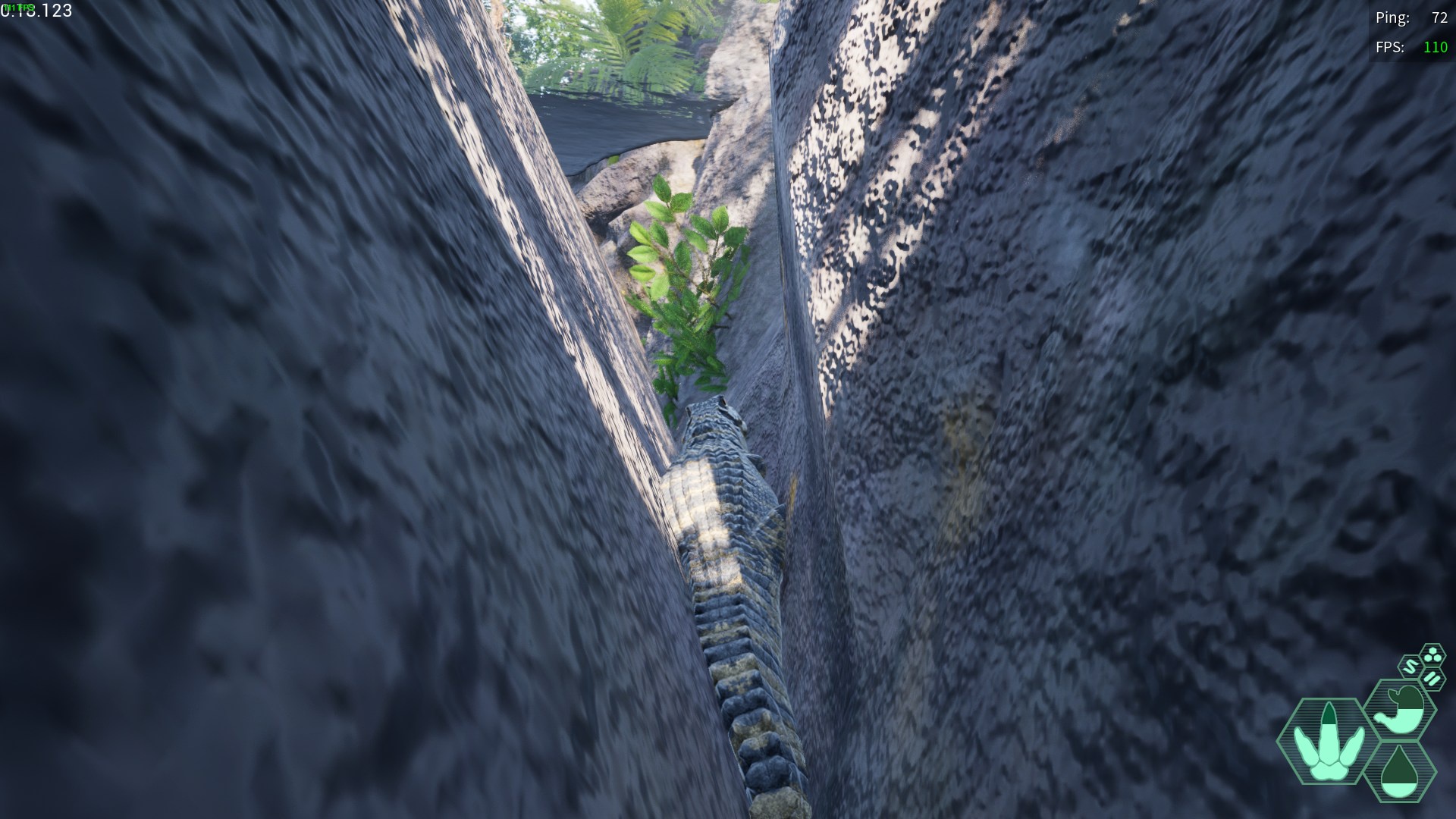
https://i.imgur.com/A7NVnBH.jpeg
how fix?
 signal path
warped tusk
Unfortunately the moment I went to go open discord my issue persisted but if I k...
signal path
warped tusk
Unfortunately the moment I went to go open discord my issue persisted but if I k...
You shouldn't need to babysit it that badly, still something else going on I think
signal path
glad chasm
https://i.imgur.com/A7NVnBH.jpeg
how fix?
/unstuck in chat
signal path
marble coral
Still having problems.... also ignore the background noise lol
EDIT: got it work...
Nice! I hear your cat is contributing as best they can haha
signal path
clear flame
i keep getting fetal error crashes... games worked fine for a week. ive tried de...
Fatal Errors during gameplay are often a sign that you have hardware issues with your PC, typically a bad RAM stick, though may also be caused by Windows corruption or interference from another program. As a starting point, could you please download OCCT and do a CPU + RAM Stability test on the Extreme profile?
Prime95 is a different Open-Source option if you prefer.
marble coral
signal path
Nice! I hear your cat is contributing as best they can haha
nvm its doing it again 😩
yeeh he's a loud purrer lol
 dire crater
signal path
/unstuck in chat
dire crater
signal path
/unstuck in chat
he had already tried that
warped tusk
signal path
You shouldn't need to babysit it that badly, still something else going on I thi...
It’s just on me for buying a poor choice of a gaming headset and not studio headphones with an amp. Arctis Prime’s are notorious for the headset mic not working and of course I ignored the reviews and when I got them the mic didn’t work whatsoever. Thankfully I got at least a solid USB mic
dire crater
<@&933486433342222376> what does @glad chasm need to do for a stuck issue when /unstuck doesnt work?
signal path
dire crater
he had already tried that
Oh, sorry. The only other thing you can do is ping server admins in the evrima channel for the server you are on with your in game name and server. The pins explain what to do
signal path
warped tusk
It’s just on me for buying a poor choice of a gaming headset and not studio head...
SteelSeries and tuetlebeach were pretty well regarded, I thought?
Did you figure out where you had to go to verify your sound output was in 2 channel mode?
signal path
marble coral
nvm its doing it again 😩
yeeh he's a loud purrer lol
My post immediately above yours would be a good idea I think, need to eliminate hardware issues otherwise you end up chasing your tail forever on the software side
 past epoch
Having never tried HordeTest, how do I go about participating in that?
signal path
past epoch
Having never tried HordeTest, how do I go about participating in that?
If hordetest is available you'll see it under the beta branches, like where you selected Evrima. I think it might have been switched off for the moment
past epoch
signal path
If hordetest is available you'll see it under the beta branches, like where you ...
Ah, good to know. Another thing is that I originally came to Evrima as a Legacy player and found that I needed to delete all the data in my Isle folder once I swapped to the Evrima branch to finally fix the constant fatal crashes I had been experiencing. If I were to swap to HordeTest and then back to Evrima, am I likely to deal with the same crashing issues again? 🤔
signal path
past epoch
Ah, good to know. Another thing is that I originally came to Evrima as a Legacy ...
Nup, you shouldn't need to do that again. Having said that, with Evrima you kinda need to delete that folder from time to time as maintenance anyway
past epoch
signal path
Nup, you shouldn't need to do that again. Having said that, with Evrima you kind...
I'll keep it in mind! 🙏
 wary spire
if anybody is having that weird brightness issue thingy on hordetest im almost certain turning on lumen can fix it
drowsy quarry
 weary hedge
What hordetest are we to download?
weary hedge
What hordetest are we to download?
 weary hedge
drowsy quarry
weary hedge
drowsy quarry
Thanks, I don't have that one, even after restarting steam. Happen to know a fix? 😅
drowsy quarry
🤔 i dont..
frail pond
signal path
Waterfalls are a trap for crocs haha. Avoid at all costs
Ty in that and yeaa I figured out hard way, now I gotta wait to starve to death or something
signal path
frail pond
Ty in that and yeaa I figured out hard way, now I gotta wait to starve to death ...
Sometimes you can grow out of the holes
frail pond
Oh? Even if it was the exact place in the picture of a gator in the hole above
thin oracle
signal path
Sometimes you can grow out of the holes
Sup, hey I messaged you if you wanna chst there about my issue with no server showing up
signal path
thin oracle
Sup, hey I messaged you if you wanna chst there about my issue with no server sh...
Ahh I'd love to but I can't join a call tonight, sorry
Friday night here in Aus haha 😅
thin oracle
signal path
Ahh I'd love to but I can't join a call tonight, sorry
No it ain’t a call
Just a message
anyone got the map i need it😭
thin oracle
thin oracle
anyone got the map i need it😭
You’ll need to open up the map, there is a site that helps you know your location.
Not sure if there is a new map for Envirma yet since they changed it.
warped tusk
thin oracle
anyone got the map i need it😭
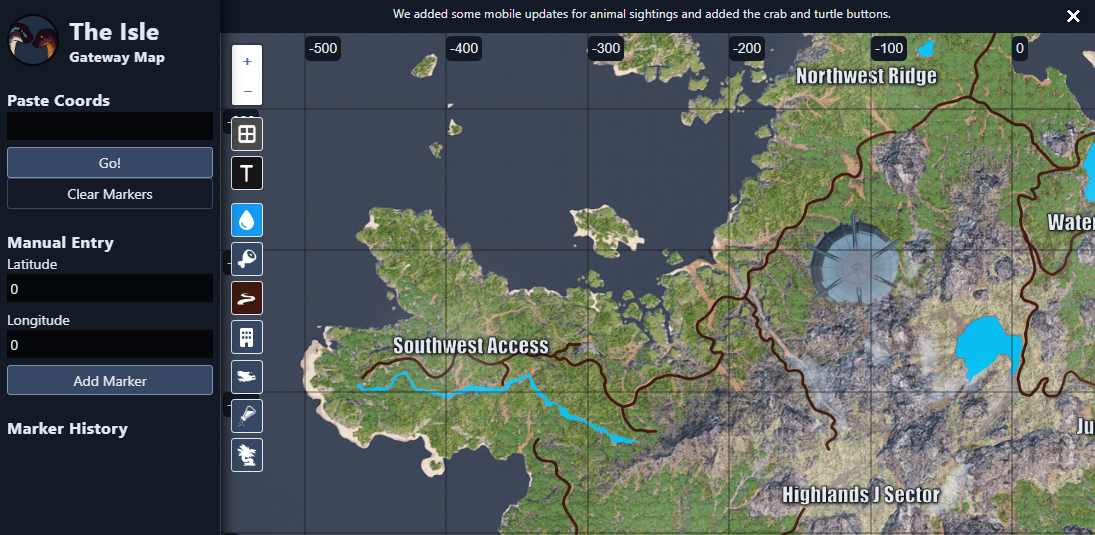
The Isle interactive map for Gateway. Explore the terrain, landmarks, and more.
drowsy quarry
 hot grail
Ah my bad
 proven saddle
Anyone have a issue where you get a fatal error and then relog and then get hit with a anti cheat integrity check failed?
 north bough
Someone help 😭 Isle wont start up, i get 5 seconds of the tech booting up sound and animation part then it freezes and i have to manually close it cause it doesnt move, i have verified files, restarted PC, uninstalled and reinstalled, and left it for over a week, and idk what to do
 true blade
does anyone know how to fix the fatal error that pops up literally minutes after joining the server? I can't play evrime because of it
warped tusk
signal path
SteelSeries and tuetlebeach were pretty well regarded, I thought?
Did you figur...
I put my 2 braincells together and figured out I could plug my headphones into my microphone and the volume for some reason is significantly louder through it and I had 0 audio issues. Had a blast playing
eternal pivot
north bough
Someone help 😭 Isle wont start up, i get 5 seconds of the tech booting up sound...
It's likely your Anti Virus
 uneven flax
even though my laptop isnt the best at running these games it can still run games like gta etc
and i have directx 12
but it still doesnt load the game
it says my systems doesnt support directx 12

while it literally says that the version is the latest one 12
does anyone know how i can fix it
 vapid spire
first time playing galli, is it supposed tdefwefo be this dark
 signal path
hard mist
Hello. I am brand new to the Isle and have been troubleshooting having extremely...
signal path
hard mist
Hello. I am brand new to the Isle and have been troubleshooting having extremely...
Not sure if you got your issue resolved, but in your shoes I would try:
On your keyboard press the Windows key and R, put %localappdata% and hit enter, scroll down and double click TheIsle, then Saved, then delete Config.
When you then launch the game, for to Setting, Graphics, make sure Framerate Limiter is Off and VSync is Disabled
hard mist
signal path
Not sure if you got your issue resolved, but in your shoes I would try:
On your ...
Issue is not resolved. No one has anything I haven't tried already unfortunately.
signal path
hard mist
Issue is not resolved. No one has anything I haven't tried already unfortunately...
So to confirm you tried the steps I just gave?
hard mist
if you read my original post, yes those steps are listed there.
signal path
north bough
Someone help 😭 Isle wont start up, i get 5 seconds of the tech booting up sound...
Freezing during load (typically on the AE or Unreal screen) is almost always caused by interference from your Anti-Virus. Either uninstall Norton/Avast/AVG/McAfee/Kaspersky and let Windows Defender take over or add the entire The Isle folder in Steam as an exception. You will likely need to restart and Verify Integrity of Files through steam afterwards. Just disabling the AV is usually not sufficient.
If you use and want to keep Norton, please follow this guide #🔧-evrima-troubleshooting-🔧 message
signal path
hard mist
if you read my original post, yes those steps are listed there.
I did read your post, you did not mention specifically turning Framerate Limiter off. That was an important part.
It defaults to on and is known to cause issues
hard mist
You're right I didn't go into individual settings in the game because pretty much every single one of them can also be controlled via nvidia control panel. vsync, fps limits, etc. are trumped by nvidia control panel by default. Yes i've turned them all off in both places. Yes i've tried setting everything (in and out of) game to extremely low settings, low resolution, no FPS limits, no power limits, everything max performance. Nothing has changed anything unfortunately.
signal path
@proven saddle @true blade
Fatal Errors during gameplay are often a sign that you have hardware issues with your PC, typically a bad RAM stick, though may also be caused by Windows corruption or interference from another program. As a starting point, could you please download OCCT and do a CPU + RAM Stability test on the Extreme profile?
Prime95 is a different Open-Source option if you prefer.
Ocbase is the home of OCCT, the most popular all-in-one stability / stress testing / benchmarking / monitoring tool available for PC

GitHub
Highlights of version: 30.8 build 15
see the latest WhatsNew.txt file for a full list of changes.
Huge improvements to stage 2 of P-1 when lots of memory is available.
Warning: upgrading in the mi...
If the stability test passes (at least 15min without errors) please follow through these steps:
#🔧-evrima-troubleshooting-🔧 message
signal path
hard mist
You're right I didn't go into individual settings in the game because pretty muc...
I would strongly recommend against attempting to force any settings via the NVIDIA control panel instead of in-game, especially as you are experiencing an odd issue with how the game is running.
As a tech savvy person, I'd also assume you would realise that the FPS limiter that NVIDIA enforces is completely independent of the FPS limiter that the game enforces
hard mist
If you didn't see, i get fine performance in other games. even in the main branch of the isle I pull 80+ FPS with no tweaks
signal path
Regardless
hard mist
seems to me that something is internally causing this issue with evrima
signal path
Yes, that would be a safe assumption, as would be the one that using the NVIDIA control panel to subvert the game settings would not lend itself to making the engine happier
signal path
warped tusk
https://www.islemaps.com/
Note this map is badly out of date, the only known current map is https://vulnona.com/game/map/

VulnonaMAP
This is an interactive map (un-official). Landmarks, water, ... You can show your current location by input coordinates. Also can upload images.
hard mist
nvidia control panel has never given me inconsistent results before and that's the trademark of a fantastic tool, reproducable and predictable results.
signal path
I'm going to be blunt, here. I'm really not interested in arguing, if you want my help let me know
hard mist
ready and waiting to hear something i haven't already tried!
uneven flax
does anyone know how to fix the problem i have?
uneven flax
uneven flax
.
 pliant stone
why am i stuck here when i first load up the game and into evrima
this is my first time playing this game
signal path
hard mist
ready and waiting to hear something i haven't already tried!
You haven't tried what I asked. You tried something different you are incorrectly assuming is the same.
winter python
uneven flax
.
What GPU do you have?
hard mist
signal path
You haven't tried what I asked. You tried something different you are incorrectl...
that's not what i said at all. I said I had done what you asked for and more.
uneven flax
winter python
What GPU do you have?
i play from a laptop so intergrated
winter python
pliant stone
why am i stuck here when i first load up the game and into evrima
Disable or uninstall your antivirus, or allow the game folder as an exclusion
winter python
uneven flax
i play from a laptop so intergrated
I'm sorry, but evrima requires a dedicated GPU
pliant stone
ahhh alr
uneven flax
winter python
I'm sorry, but evrima requires a dedicated GPU
damn
signal path
hard mist
that's not what i said at all. I said I had done what you asked for and more.
You did not say you turned off Framerate Limiter in game, you said you did it in NVIDIA control panel, which is different. You also said you attempted to overriding game settings using NVIDIA control panel, I asked you not to do that and you argued.
pliant stone
will disabling my anti virus shields atm work?
uneven flax
so even though it says i need directx 12 even though i have it the real problem is the gpu
hard mist
signal path
You did not say you turned off Framerate Limiter in game, you said you did it in...
legacy or evirma? what settings do you want in nvidia vs in game?
signal path
uneven flax
so even though it says i need directx 12 even though i have it the real problem ...
Laptops can have dedicated video cards, could you check Task Manager, Performance, GPU?
signal path
hard mist
legacy or evirma? what settings do you want in nvidia vs in game?
NVIDIA Control Panel needs to be reset to defaults, then make sure the two settings which can artificially limit FPS - aka VSync and Framerate Limiter - are both disabled
uneven flax
signal path
Laptops can have dedicated video cards, could you check Task Manager, Performanc...
 signal path
I'd also recommend disabling DLSS just in case
hard mist
signal path
NVIDIA Control Panel needs to be reset to defaults, then make sure the two setti...
so you don't want me to set the GPU to max performance in there?
thats the #1 thing i see recommended in the YT video posted in here in regards the FPS.
signal path
uneven flax
Oh, you were right, I'm sorry. No dedicated GPU 😔
uneven flax
signal path
Oh, you were right, I'm sorry. No dedicated GPU 😔
ye i knew mine is intergrated but hey what can we do
pliant stone
signal path
https://discord.com/channels/401464048610312193/723260797719019620/1342465779983...
thank you two so much @winter python
uneven flax
signal path
Oh, you were right, I'm sorry. No dedicated GPU 😔
i will wait until summer to play thats prob when i will build a pc so
thank you guys have a good one
signal path
hard mist
so you don't want me to set the GPU to max performance in there?
That can help but as you say other games work fine, so that is unlikely to be the issue. If NVIDIA control panel is all default then that removes a variable between your setup and the default everyone else has
pliant stone
wait uh what does it mean when it says data acquisition failed after i tried to queue a server
hard mist
@signal path Done. Defaulted nvidia control panel, verified what you asked for is set there and in game. FPS still horrible?


 signal path
I'd also make sure your GPU drivers are up to date, again because of they are too old that will 100% cause issues with some DX12.1 features, and secondarily because the driver update process can help reset any little oddball shader issues
hard mist
I also deleted my config file before this test
signal path
hard mist
I also deleted my config file before this test
And when you got in game you made sure Framerate Limiter was off?
hard mist
yeah sorry forgot to post that one
true blade
signal path
<@398581739729190914> <@1300375003807612998>
Fatal Errors during gameplay are o...
I did this test and everything is fine, what should I do now?
signal path
hard mist
yeah sorry forgot to post that one
All good, just making sure.
OK, next step is resetting compiled shader caches.
Could you try the following steps?
- Open the NVIDIA control panel.
- Go to Manage 3D Settings.
- Turn off Shader Cache.
- Save and apply changes.
- Reboot your PC.
- After the PC boots, open the Run dialog box or File Explorer.
- Type the following environment variable into the Run dialog box or the File Explorer address bar and hit Enter: %USERPROFILE%\AppData\Local\Temp
- At the location, find and open the NVIDIA folder.
- In the folder, find and open both the DXCache and the GLCache folder and delete all the items in the folders.
- Next, go back to the Local folder.
- Now, at that location, find and open the NVIDIA Corporation folder.
- In the folder, find and open the NV_Cache folder and delete the contents of the folder.
- Exit File Explorer.
- Now, go back to the NVIDIA control panel and turn on Shader Cache.
- Restart your PC.
- Try the game again at your desired settings
hard mist
 pliant stone
yea uh data acquisition after i restarted the game
still data acquisition failed
when i tried to queue a server
hard mist
im not sure either but i also think its messed up. When i look at my interface config file in %LOCALAPPDATA% it is written in there properly as 2k resol
i have extra monitors so maybe that's why?
fwiw when i drop down resolution, 2k not even listed there:
 signal path
I'd manually set to 2k in game just to make sure
A lot of games seem to do some fun y stuff with 2k monitors, often default to 4k and the like
 signal path
How odd. Out of curiosity, could you try windowed 1920x and see how it runs?
hard mist

 old steppe
im having issues with dx12 not supported
signal path
old steppe
im having issues with dx12 not supported
Do you know what your GPU is?
old steppe
Intel Iris Xe Graphics
signal path
old steppe
Intel Iris Xe Graphics
Ah, sadly that cannot run Evrima. I'm sorry 😞
hard mist
windowed 1080 gives me like ~40ish fps so improvement but still horrible for my pc specs
seems like a core problem with the game, many factors point to that sadly
can't detect my resolution and such
signal path
Yeah, that's not acceptable and yes, I would also assume it's an issue with the game, but exactly what it's having an issue with is what we are trying to work out
It is a UE5 render pipeline so it really shouldn't have problems with basic stuff like this
hard mist
my hunch is that it is related to my multiple displays / multiple GPUs. I only game off the middle center monitor and that is all ran off my RTX 3070 ti and am not attempting to stretch the isle across multiple monitors or doing anything strange like that. I've had this monitor setup for over 10 years
signal path
Could you follow the compiled shader cache reset procedure if you haven't already? Well put the resolution detection on the table for a little bit


 hard mist
idk if you saw or not agouti but i am brand new the isle, ive never ever played it before. so i doubt its a cache issue but i will run down that rabbit hole just so we can proceed if you think it's valuable
signal path
hard mist
my hunch is that it is related to my multiple displays / multiple GPUs. I only g...
Yeah, 6 displays is definitely an outlier and it would make sense that the game was having issues with it... Why is a puzzle but it seems like an easy thing to test. Disable the other monitors, launch the game, see if it behaves any differently
Another possibility is if it is struggling to choose the correct resolution it might also be struggling to pick the right refresh rate; 40 is not a default but 45 is... Windowed mode should have eliminated that but it might not have
hard mist
There's another factor pointing towards it being a multiple GPU / resolution issue in my first post also.
I discovered that the isle was originally rendering using the embedded intel graphics adapter instead of my actual RTX 3070. I went down this path because I found other games were doing this by default also, which as you can imagine, gives really cruddy FPS. In other games I can pick which display device to use, but for the isle I just went ahead and disabled the intel UHD graphics in device manager and force it to use the GPU always.
 hard mist
well yea you can't run 6 monitors off 1 gpu man
its 4 max usually unless you have a special card
signal path
You can but it's annoying. Most people run the extra heads off their integrated
That is 100% the most likely issue
hard mist
i would die if i had to leave the integrated gpu enabled LOL
bc the isle does not let you pick which gpu to render to, so it was defaulting to the crappy internal one
signal path
That's trivial to test though, look at the GPU usage for the 1070 while the game was running
signal path
hard mist
bc the isle does not let you pick which gpu to render to, so it was defaulting t...
Again Evrima physically cannot run off integrated, however the 1070...
hard mist
the 1070 is not being stressed either. checked that. What i haven't checked is if the intel one is being used still even though its disabled in devmgmt
when i enable the intel GPU -> start the isle -> disable intel GPU it crashes the isle.
so i think thats pretty telling which its using
after i finish with my work today i'll try disabling the 1070 also and see what happens
pliant stone
ok nvm it's just that official servers dont work
signal path
I wouldn't treat that as the smoking gun, to be honest. Who knows what shenanigans DirectX pulls when you disable a GPU. I think it's more likely that the GPu index changes (the game only knows "GPU 1" not "3070" so when a GPU is added or removed the numbering changes
hard mist
is it possible to try and use DX11? or is 12 the only option?
had not done any DX troubleshooting
signal path
Like I said. Evrima can't run off of integrated graphics, and it wouldn't get 40 fps if it could.
Sadly no, the developers have not added a DX11 fallback pipeline
hard mist
ok that's good to know
signal path
A DX12 issue is possible but unlikely, Evrima might be using a DX12.1 feature that is rare in the wild and that particular feature you are having issues with, but that seems very unlikely
Could you please try the shader cache reset procedure?
hard mist
do you work for the devs or bubble up info to them? not sure if they read in here? wondering if this info needs to get compiled into a bug report or is that what this channel is for?
ya i will try the cache nuke and report back also
signal path
I have no affiliation or unique communication pathway with the Devs, I'm sorry. I just do tech support on the side because I enjoy helping people
hard mist
np just wanted to check
signal path
pliant stone
ok nvm it's just that official servers dont work
Sorry, late reply. Data acquisition failure means that particular dino on that particular server saved in that particular spot is cursed - some people say that relaunching and rejoining over and over can fix it but I'm not sure
pliant stone
k
signal path
hard mist
ya i will try the cache nuke and report back also
If that doesn't work, and I'm not still online, what I would try next is:
Disable all your other monitors, restart PC, delete config, see if that helps.
Make sure Windows is up to date, update GPU drivers, see if that helps
Run step 6 here, just in case #🔧-evrima-troubleshooting-🔧 message
If none of that helps the logs might shed some light
hard mist
signal path
Could you please try the shader cache reset procedure?
FYI %USERPROFILE%\AppData\Local\Temp\Nvidia did not exist for me. What does exist is %USERPROFILE%\AppData\Local\NVIDIA and within there I have a DXCache dir but no GLCache
signal path
hard mist
FYI `%USERPROFILE%\AppData\Local\Temp\Nvidia` did not exist for me. What does ex...
Oh, good catch. DXCache is what it should say
GLCache is for OpenGL which Evrima doesn't use
signal path
pliant stone
bruh i cant even join any games
Could you please run through this entire process? Kinda lengthy but your issue is an odd one I've not seen before
#🔧-evrima-troubleshooting-🔧 message
pliant stone
wait uh i think i randomly was able to join an official server
 brittle marten
Hey, Is there any way to check if I got a Ban ? I read on the net that I should get a message with the time for how long the Ban is but I have nothing like that just infinite connection time to the servers. I did a verification of the game files did not help, I reinstalled the entire game to a new drive, and still nothing, nothing but a ban I can't think of but I don't know what could be the cause. I was running through the forest and the game has crashed.
 rough laurel
are all hordetesting server lagging or its me?
 glass grail
Why cant i find ht servers in steam
signal path
brittle marten
Hey, Is there any way to check if I got a Ban ? I read on the net that I should ...
There are some symptoms in your logs which line up with an EAC ban. If you want you can send me your log and I can have a look, or if you prefer not to I can write up a guide next time I'm at my PC
To get a good log:
Start the game
Attempt to join a server
Leave on Connecting for at least 10s
Quit th game
Got to %localappdata%, TheIsle, Saved, Logs, then open or DM TheIsle.log (extension may be hidden on your machine)
brittle marten
signal path
There are some symptoms in your logs which line up with an EAC ban. If you want ...
gonna do this right now and I will send you the logs, coz I have over 780 hours in the isle and I don't want to lose my account coz of some mistake they made.
signal path
brittle marten
gonna do this right now and I will send you the logs, coz I have over 780 hours ...
Note that EAC bams are completely separate from admin enforced bans, they are automated and can be tied to hardware (any system component) or SteamID
Admin enforced bans only apply to the server or servers they administrate and will give a message telling you the ban reason
 vast tartan
how to get ht?
 ashen oracle
vast tartan
how to get ht?
ashen oracle
vast tartan
how to get ht?
Reload steam
vast tartan
ashen oracle
Reload steam
I tried several times. unistalled evrima now it pooped up :)
popped* lol
 tight wigeon
could anyone inform me as to why everytime I start the game, or switch servers in the game i have to re-set my graphics settings back to low, and why i have to restart the game each time? and potentially how to perma fix this issue, Is frustrating waiting in que to finally get in, be unable to play because my settings are all at Epic, to reset back to low, and restart from steam again, and que up again for however long the que has become in the interim.
drowsy quarry
tight wigeon
could anyone inform me as to why everytime I start the game, or switch servers i...
have you tried putting your graphics manually? In the game file (I think it's settings.ini, I'm not on PC rn)
or you can try deleting config folder to force a reset
tight wigeon
nope not as of yet, i'd probably need to hunt a walkthrough to accomplish hunting files down
drowsy quarry
it's easy, I just don't remember the name of it
press windows + r
%localappdata%
find the isle > saved > config
I think it's inside the windows folder
you can send images here so I can refresh my mind
 dawn jackal
no idea what im doing cuz i legit just downloaded the game last night
this is the message i get whenever i open the game, i was following a thread on reddit and they said to look at this stuff but i lowkey have no idea what any of that means

 drowsy quarry
dawn jackal
no idea what im doing cuz i legit just downloaded the game last night
this is th...
drowsy quarry
dawn jackal
no idea what im doing cuz i legit just downloaded the game last night
this is th...
what's your graphics card name
dawn jackal
i have no idea i just got this laptop some weeks ago
drowsy quarry
open task manager > performance > click GPU
dawn jackal
 dawn jackal
oh damn
drowsy quarry
doesn't have enough power to run the game
dawn jackal
alright thank you
drowsy quarry
np
tight wigeon
drowsy quarry
it's easy, I just don't remember the name of it
thanks
tight wigeon
drowsy quarry
press windows + r
%localappdata%
find the isle > saved > config
I think it's ...
I've gotten to config, into windows client,from here it looks like my options are engine, game, gameusersettings, magicleap, magicleaplightestimation, motosynth, physxvehicles, voxelfree.
i open gameusersettings?
tight wigeon
lovely, its opened unto some ancient greek speaking of truths and falsehoods
drowsy quarry
you will see a lot of known things such as shadows, effects, etc
in there you can set numbers in front of each settings, like
shadows = 0
0 being low
tight wigeon
[ScalabilityGroups]
sg.ResolutionQuality=0
sg.ViewDistanceQuality=1
sg.AntiAliasingQuality=3
sg.ShadowQuality=0
sg.PostProcessQuality=3
sg.TextureQuality=0
sg.EffectsQuality=0
sg.FoliageQuality=3
sg.ShadingQuality=0
sg.LandscapeQuality=3
sg.GlobalIlluminationQuality=3
sg.ReflectionQuality=3
drowsy quarry
though I recommend doing it after cleaning the config folder, it's located in the same place
%localappdata% > The Isle > Saved > Config
to see if we fix your issue
drowsy quarry
tight wigeon
[ScalabilityGroups]
sg.ResolutionQuality=0
sg.ViewDistanceQuality=1
sg.AntiAlias...
yes, precisely this section
tight wigeon
seems they're "set" to low, how do i make that permanent?
drowsy quarry
yeah, that's the problem
I advice you to delete the config folder and restart the game, then manually put the settings
it should fix 🤷
tight wigeon
kk i'll give that a go before next playthrough, thank ya kouga
drowsy quarry
all good ^^
 amber wyvern
Hiii can someone help me i just gifted my friend the isle and when he downloaded it and launched the game his screen got stuck specifically at load screen (one with blue symbols before game boots up) everytime he tries to turn on game it gets stuck on same place and game wont turn on does somebody know wye it is happening or if someone who had similar situation knows solution T_T
winter python
amber wyvern
Hiii can someone help me i just gifted my friend the isle and when he downloaded...
Disable or uninstall their antivirus, or allow the game folder as an exclusion
amber wyvern
Okayyy thanks for help <33
thin oracle
Can someone help me urgently? I've tried everything to stop the screen from freezing when it's in the main menu (I uninstalled, installed, updated drivers for everything and nothing works)
drowsy quarry
thin oracle
Can someone help me urgently? I've tried everything to stop the screen from free...
by main menu you mean where you click settings, replays...?
 fast geode
my evrima just keeps saying connecting when i try connect to a server
drowsy quarry
fast geode
my evrima just keeps saying connecting when i try connect to a server
can try to restart PC or steam
fast geode
i have tried both but it just doesnt seem to connect
drowsy quarry
even unofficial?
fast geode
yeah both
drowsy quarry
last time I saw this issue the person had to buy the game in a new steam account :/
we still didn't found a fix for it yet
can be mostly anything, your internet, a block in the connection, steam issue, etc
fast geode
ah alright ill try use an alt rq
drowsy quarry
maybe uninstalling the game from the original account, then downloading in the alt one
fast geode
it seems to work on an alt but not onb this account
 digital idol
The game freezes on the screen with the Unteal engine after startup (it doesn't show any error it just freezes)
 sick totem
anybody ever had this issue? First download and download the evrima beta, the home screen is partially zoomed in to the top left and the mouse curser isnt showing accuretley if that makes sense
winter python
If your game is freezing or can't load beyond the black Unreal Engine screen OR the blue AE screen, you can either
Disable your antivirus
Uninstall your antivirus
Allow the entire game folder located in Steam/steamapps/common as an exclusion
You may have to search online to learn how to add an exclusion in your antivirus program
winter python
winter python
If your game is freezing or can't load beyond the black Unreal Engine screen OR ...
 median grotto
sick totem
anybody ever had this issue? First download and download the evrima beta, the ho...
median grotto
sick totem
anybody ever had this issue? First download and download the evrima beta, the ho...
never gotten that on menu, but something similar happens in game with dlss enabled often
sick totem
Yeah i dont understand it, got it disabled and have redone damn near everything. menu worked fine before the avrima download from steam
rocky sonnet
Any ways to increase fps in game? No matter if i put high or low or dlls it just stays at around 20-40 fps, i have 2060. Is it old gpu now ? I remember playing 2 years ago having 60 fps easily
 glad hollow
I've got screen tearing issues and it's annoying the crap out of me.
drowsy quarry
rocky sonnet
Any ways to increase fps in game? No matter if i put high or low or dlls it just...
This video shows you epic settings are a lie. Here you will see how to improve your FPS with my settings breakdown!
👀Bem vindo! Welcome!👀
PT-BR / ENG
Watch my Evrima Guides: https://youtube.com/playlist?list=PLdvqZdnB0LRXw2S_uSlgjno_i8bE1LbIn
Watch my Combat Guides: https://youtube.com/playlist?list=PLdvqZdnB0LRVhGGslKlu4wrFilMn_DsEj
--------...
 regal jolt
Does anyone know how to fix this error? It won't load in further than this and I have installed the latest nvidia driver

It won't go fullscreen either and It's frozen with no audio
winter python
regal jolt
Does anyone know how to fix this error? It won't load in further than this and I...
Check the pinned messages
 verbal ruin
Dinos deleting after restarts….
Please fix this cuz man I really love this game and it’s annoying spending hours to get big just to lose your character from not dying….
Honestly don’t even wanna play the game no more man
regal jolt
after a bit of tinkering It turned into this and when trying fixes in the pinned channel nothing happens

You can move it or click it, I've reinstalled too but nothing helps
nvm that was just a 1 time thing its back to before
 cedar basin
Hi, I can't find anything related to that bug and it happened to me a few times. Sometimes when I am on the steam overlay and I come back in game, my sensivity is like low af even tho it didn't change in the settings. Usually as I don't want to restart the game and wait for the queue, I just change my mouse DPI even tho it makes the game a bit shaky. And if that happens and I go again on the steam overlay, it lower even more the sensivity until I can't change my mouse DPI anymore. I guess it could be related to a keybind I press when I write messages on the steam overlay but I have no idea why it really happens...
 dreamy blaze

Hi, I just bought the game and when I select the Evrima beta version, the game stays on this loading screen and does not start. Can someone help me?
winter python
dreamy blaze
Hi, I just bought the game and when I select the Evrima beta version, the game s...
Check the pinned messages
 crimson osprey
Is it just me or do skin codes just not work? I create a skin, copy the code. Then import and it doesnt work
 formal dome
Ive been having really bad issues with freezing and rubberbanding, my ping is consistent between 40-60 and My pc runs the game fine however I still get these rubber banding issues, any help would be greatly appreciated
dreamy blaze
winter python
Check the pinned messages
I did what it says in the solution and it still doesn't work
drowsy quarry
dreamy blaze
I did what it says in the solution and it still doesn't work
whats your antivirus name
dreamy blaze
Avast
drowsy quarry
dreamy blaze
Avast
did you tried adding the entire isle folder as an exclusion
formal dome
formal dome
Ive been having really bad issues with freezing and rubberbanding, my ping is co...
I genuinely have no idea why this is happening, this only started a few weeks ago before then i've never had any issue like it before, any help or any ideas at all is greatly appreciated
I've tried wifi boosters, restarted my router, my graphics card is up to date same with my pc and any updates, i've validated game files, cleared my config, and messed with my settings nothing has helped
Thinking about reinstalling but I don't know if it will save my dinosaur data
dreamy blaze
drowsy quarry
did you tried adding the entire isle folder as an exclusion
The game now works for me I just had to delete the anti virus
Thanks
 tidal ruin
formal dome
I genuinely have no idea why this is happening, this only started a few weeks ag...
tidal ruin
formal dome
I genuinely have no idea why this is happening, this only started a few weeks ag...
How’s your ping?
 rocky turret
gettin antio cheat after trying to join server.. done all the steps. still not working
formal dome
tidal ruin
How’s your ping?
It doesn't really ever go over 67
rocky turret
so ive done everything on the pinnged message for the anitc-heat integrity... and nothing is working
 cosmic lava
I am stuck on sprinting, any suggestions or workarounds?
rocky turret
any mods for help
drowsy quarry
cosmic lava
I am stuck on sprinting, any suggestions or workarounds?
press shift (not hold)
cosmic lava
drowsy quarry
press shift (not hold)
I know, still don't work. It sprints no matter what lol
drowsy quarry
maybe the shift key is stuck
teu pressing it a lot of times
or blowing air in the key
rocky turret
absolutely none of the anti-cheat error steps work for me 😦
cosmic lava
drowsy quarry
or blowing air in the key
Thought of that, also tested in a different game - works fine. Only in ISLE it is doing it. :/
drowsy quarry
rocky turret
absolutely none of the anti-cheat error steps work for me 😦
download vrchat, run it once, close it, open the isle, then if it works you can uninstall VRchat and proceed playing
this is for easyanticheat not installed
cosmic lava
Already tried that, gonna do a fresh re-install.
 lusty pond
drowsy quarry
download vrchat, run it once, close it, open the isle, then if it works you can ...
lusty pond
drowsy quarry
download vrchat, run it once, close it, open the isle, then if it works you can ...
I have the same problem (I have a laptop)
vrchat doesn't help
launching the game via exe - error 10009
the laptop supports DirectX 12 and has been updated
rocky turret
yea vrchat didnt work at all.. this is unreal Ive never had anti cheat issues on any game unreal what I'm having to deal with
lusty pond
Did the developers say anything about this? I find a lot of complaints about this issue.
rocky turret
uninstalling the entire game for the 5 time sadge
 ember creek
could be just a me issue but i was playing herrera and everytime i got ate by a elite fish it never killed me it would just have me in the water and not techincally there and the only time it killed me is when i got ate by another elite fish
drowsy quarry
lusty pond
the laptop supports DirectX 12 and has been updated
dx12 errors means 2 things
your GPU needs a driver update
or your GPU doesn't meet the minimum requirements
drowsy quarry
rocky turret
yea vrchat didnt work at all.. this is unreal Ive never had anti cheat issues on...
what anticheat issue we talking about?
rocky turret
the easy anti cheat integrity error im getting it over and over trying to join a server. I've done every skill step in the pinned messages.. still nothing
drowsy quarry
ah I see, VRchat won't help sadly
rocky turret
yea this is crazy meanwhile everyone is playing game easy
and this isnt my first easy anti-cheat game so its confusing
drowsy quarry
not everyone, some are getting a weird infinite connecting bug
for now the only fix is to buy the game again
lusty pond
drowsy quarry
dx12 errors means 2 things
your GPU needs a driver update
or your GPU doesn't...
Here's what I found required features for the game "This game needs a dedicated graphics card to run. Integrated graphics cards will not work." Officially, I can forget about trying to launch on laptops, sadly
drowsy quarry
precisely
needs a dedicated GPU that supports dx12 (12_1)
some laptops come with one
 coral finch
hello im having trouble launching the isle
drowsy quarry
like Rtx 2060, 3050, 3060, etc
drowsy quarry
coral finch
hello im having trouble launching the isle
need more info
drowsy quarry
coral finch
This is caused by your third app antivirus (Norton, avast, avg, etc)
you can:
- uninstall your antivirus completely
or - disable it before launching the game (might not work)
or - create an exception in your antivirus for the entire isle folder
sometimes it requires you to reboot the pc or download the game again, as the files can be already blocked.
coral finch
how do you create a exception
coral finch
alr ima just uninstall avg and avast
coral finch
YEAAA IT WORKED THX KOUGA I ALSO LOVE UR VIDS
 reef lodge
Hello so everytime I launch the game it freezes I have tried several vids on youtube but still it freezes
rocky turret
nnone of this is any help.. this crazy
 lucid shell
how do you add the isle as a exception on Norton anti-virus
winter python
reef lodge
Hello so everytime I launch the game it freezes I have tried several vids on you...
Check the pinned messages
reef lodge
winter python
Check the pinned messages
doing that now
rocky turret
welp got the easy anti-cheat error fixed and working but def not by doing any of the pinned message steps
 delicate mango
Game crashing constantly, fatal error, anyone else?
drowsy quarry
rocky turret
welp got the easy anti-cheat error fixed and working but def not by doing any of...
what did you do?
 lucid reef
Hello,
I have my own Evrima server with a couple of friends just to mess around have fun with the game. My question is, as a server admin, can I manually spawn in AI Dino's? I havent seen any spawn automatically and regular AI spawn fine. When im on the admin chat panel is see options when I press "/" i see options like: "/spawn diablo" but when I type that in and hit enter nothing happens. I also don't see anything in the adminpanel regarding AI dino's, just the option to disable or wipe the AI. Any help would be very much appreciated!
 tribal meadow
i had a cera on eu2 it says i have one in the menu but i cant play it
i never died
drowsy quarry
lucid reef
Hello,
I have my own Evrima server with a couple of friends just to mess aroun...
I don't think u can
that seems like a dev level command
lucid reef
dang. was hoping to run around with a few friends on a private server with some AI Dino's roaming around
lucid reef
yeah, i have only ever seen the small animals spawn, and only in a small vacinity around me. boars, rabbits, etc
lucid reef
so do AI Dino's not spawn?
drowsy quarry
oh, AI dino? that doesn't exist
lucid reef
well crap. okay
drowsy quarry
Only Ptero and Compy
but they're bugged in evrima
in Hordetesting they working tho
lucid reef
i appreciate the insight, thanks Kouga
drowsy quarry
all good
tribal meadow
tribal meadow
i had a cera on eu2 it says i have one in the menu but i cant play it
i recorded the problem
 gilded jolt
Greetings!! I've just obtained The Isle and am having issues in lauching! This is what appears when i try to, my graphic card is Intel(R) UHD graphics 630, could someone help me figure this out? Thanks!

 winter python
gilded jolt
Greetings!! I've just obtained The Isle and am having issues in lauching! This i...
winter python
gilded jolt
Greetings!! I've just obtained The Isle and am having issues in lauching! This i...
Is that the only GPU you have?
 rare anchor
winter python
Is that the only GPU you have?
rare anchor
winter python
Is that the only GPU you have?
yes it is -answering for them, they're a computer noob lol)
it's the only thing they have
 winter python
Ah, I'm sorry but evrima requires a dedicated GPU to run, integrated GPUs won't work
gilded jolt

 last flare
Hey Can anyone tell me what to do when I have no acces to the menu or the character screen ?
 indigo valley
every time I try to connect to Official Hordetesting NA 3 - East I get "data acquisition failed" is there anything I can do to connect?
I tried restarting twice, and I havent played on it since like 2 HT's ago, says I got a 10% teno.
nvm finally put me into the que, was just being weird I guess. or the server is struggling to cram all these people in lol
 mighty acorn
Right now in hordetest when logging out of server, it makes us create a new dino each time. is this intended or a bug?
na3
 compact minnow
I jsut bought the game watched some videos to show how to make servers show but i cant get servers to load no matter what \
winter python
compact minnow
I jsut bought the game watched some videos to show how to make servers show but ...
Right click the game in your steam library, click properties, click betas, select the drop-down bar and select evrima
winter python
 stable rivet
I keep getting the anti cheat error
stable rivet
I keep getting the anti cheat error
Check the pinned messages
stable rivet
winter python
Check the pinned messages
Thanks, i have tried it, spash screen said waiting on game, now splash screen is gone
 vital herald
i cant get into evrima, everytime i get to AE loading screen the game freezes
winter python
vital herald
i cant get into evrima, everytime i get to AE loading screen the game freezes
Check the pinned messages
signal path
stable rivet
Thanks, i have tried it, spash screen said waiting on game, now splash screen is...
Can you please clip what is happening?
stable rivet
I was able to get it to work, thanks though!
 frozen harness

 signal path
frozen harness
WHAT IS THIS??? https://cdn.discordapp.com/attachments/1340570202378731521/13427...
signal path
frozen harness
WHAT IS THIS??? https://cdn.discordapp.com/attachments/1340570202378731521/13427...
A bug, sorry. /unstuck sometimes works, but you will likely need to log
Be aware relogging will break your nest, though
frozen harness
signal path
A bug, sorry. /unstuck sometimes works, but you will likely need to log
it went away
 wintry sail
Anybody know why when I play Evrima the audio is choppy and stutters making the ingame audio effectively useless? (only Evrima has this issue nothing else)
signal path
wintry sail
Anybody know why when I play Evrima the audio is choppy and stutters making the ...
Choppy audio can be caused by two things that I know of:
- Your CPU is struggling to keep up (too slow or your AV is getting in the way)
- Virtual surround sound
CPU issues can be from overheating or hardware that is just too old/slow
Do you know what your system specs are? CPU, GPU, and RAM?
wintry sail
signal path
Do you know what your system specs are? CPU, GPU, and RAM?
GeForce GTX 1060 6GB, 16GB RAM, Intel i7 960 3.2GHZ.
If that's right
I can run legacy on epic, but evrima it's a bit of a struggle
Sorry. 16GB RAM
signal path
wintry sail
GeForce GTX 1060 6GB, 16GB RAM, Intel i7 960 3.2GHZ.
If that's right
960 or 9600? If 960, that's a bit too old to be able to run Evrima happily
Evrima is sadly not very well optimised on the CPU front
wintry sail
- My PC is approximately 12 years old with the original cpu haha.
But is that the cause of my audio choppiness? I'm fine to play on lower graphics anyway
signal path
wintry sail
But is that the cause of my audio choppiness? I'm fine to play on lower graphics...
When your CPU is maxed out the game can't queue audio fast enough and you get what's called buffer underrun
Sort of like there's a minimum "audio FPS" and if you dip below that you get choppiness