#🔧-evrima-troubleshooting-🔧
1 messages · Page 192 of 1
 drowsy quarry
@still chasm what was your issue again?
 still chasm
Low GPU usage
drowsy quarry
still chasm
Low GPU usage
I have an idea :)
but it's not something you can fix, it's a completely normal behavior
after studying a bit about frame rates for both CPU and GPU, I discovered that CPUs take longer to compute the frames and then send to the GPU to work
which means the GPU need to wait to receive the frames
if the game depended 100% of your GPU, you could easily get double the frames you're getting right now
but sadly CPUs indeed have a higher frame rate and that's normal, they deal with a lot of things at once :/
here's a visual example made in the isle

as you can see, the CPU frametime is about 12ms, but the GPU is much quicker than it, so it tends to be on "idle" waiting for the new frames. This is a case of bottleneck
 lime hare
It’s not loading and got stuck

 winter python
@lime hare@grave sail Make an exception for The Isle in your antivirus, or disable the antivirus
 idle laurel
Hello
Everytime time I opend the game I get this Game security detected #00000022
 winter python
lime hare
Still happening
winter python
lime hare
Still happening
Did you make an exception for The Isle or disable/uninstall the antivirus?
lime hare
Wdym exception
 grave sail
I deaktivatet the antivirus and now it works finally
lime hare
Nvm
grave sail
Thank you so much Superlunary
 idle laurel
Same thing here
winter python
idle laurel
Same thing here
Either add The Isle as an exclusion to your antivirus, or disable the antivirus
winter python
Did you restart your computer after uninstalling it? Might help
drowsy quarry
lime hare
ive been trying to repair this thing for 3 hours
you need to reinstall the isle, the files are already blocked
drowsy quarry
idle laurel
Same thing here
what did you try
idle laurel
I did reinstall it but still same problem
Do I have to remove easy anti-cheat?
drowsy quarry
idle laurel
I did reinstall it but still same problem
Do I have to remove easy anti-cheat?
reinstall the isle?
also did u uninstall your third app antivirus
or made exception for the whole the isle folder

 bronze echo
 sick grove
Constantly getting kicked from a queue, any fixes?
 reef meadow
so i created a new toon and i spawned in a tree, stuck
is there an unstuck function ?
drowsy quarry
reef meadow
is there an unstuck function ?
/unstuck
reef meadow
thank you!
 plain barn

my game is looking like this and idk what to do
i changed the resolution and reinstalled but it still happens
winter python
plain barn
Disable DLSS
plain barn
winter python
Disable DLSS
Looks like that worked, thank you 🙂
 nimble ridge
any mods able to help me
a catfish ate me... but im invis under water. i cant move or do anything. Do i really have to logout? i just spent 30+mins in queue
 warm geyser
anyone know how to get rid of a glitched piece of meat stuck in your mouth?
 leaden saffron
warm geyser
anyone know how to get rid of a glitched piece of meat stuck in your mouth?
leaden saffron
warm geyser
anyone know how to get rid of a glitched piece of meat stuck in your mouth?
one way is to safe log
 stoic valley
can i get unstuck?
winter python
stoic valley
can i get unstuck?
Try /unstuck
stoic valley
winter python
Try /unstuck
thank you
 fossil jackal
have a fatal error and crash each time when loads into menu. What should i do? already tried -windowed in launch options and deleting config folder

 tribal meadow
Still happening
Got the video you asked for it is like this for deer goats and players
tribal meadow
bites dont do damage
 ionic granite
okay so i randomly crashed as a deino in the water, i was near full with the extra oxygen mutation but im 15 in queue and my friend told me my deino already disappeared which means i didnt die, so when i get in will i get sent back to the character select or will i be back on my deino?
ionic granite
winter python
Try /unstuck
do you know if ill get sent back to character select or back onto my deino if i crashed under the water?
drowsy quarry
ionic granite
okay so i randomly crashed as a deino in the water, i was near full with the ext...
back to Deino if you didn't die
ionic granite
drowsy quarry
back to Deino if you didn't die
it disconnected me from queue is that a sign i died 😭
drowsy quarry
nah it's not
 signal path
tribal meadow
Still happening
signal path
tribal meadow
Still happening
That looks like you might be having bad lag issues, that frog should be trying to swim away from you. What's your ping up the top right?
tribal meadow
signal path
That looks like you might be having bad lag issues, that frog should be trying t...
my ping has been worse and never had a problem this issue isnt on other servers only eu3
signal path
tribal meadow
my ping has been worse and never had a problem this issue isnt on other servers ...
Only one server or only one Dino? Have you tried Dieno on another server?
signal path
fossil jackal
have a fatal error and crash each time when loads into menu. What should i do? a...
Make sure the game is exited for each step below.
- Make sure Windows is completely up-to-date. Restart your PC if any updates are applied.
- In Steam, right-click The Isle, Properties, Installed Files, Verify integrity of game files. If Steam finds a problem, you will see the game start updating.
- On your keyboard press the Windows key and R, put %localappdata% and hit enter, scroll down and double click TheIsle, then Saved, then delete Config. This will also delete all your settings.
- On your keyboard press the Windows key and X, then select "Command Prompt (Administrator)" or "Windows PowerShell (Admin)". Copy the following two commands and paste (by right-clicking in the window, not ctrl-v) into the window that opened:
sfc /scannow

DISM /Online /Cleanup-Image /RestoreHealth
``` then restart your PC.
5. Uninstall then reinstall your graphics drivers (follow NVIDIA, AMD, or Intel instructions depending on which you have).
6. If none of the above has helped, uninstall then reinstall The Isleone deno on eu3
 neon urchin
everytime i join any eu server it says this
 signal path
 hearty mirage
I am currently stuck in a bush in NA4
hearty mirage
I am currently stuck in a bush in NA4
This channel is not for unstuck requests, please check the #evrima-?? channel pins for your region, e.g. #evrima-na.
Sometimes if you relog, don't move, and use /unstuck it works
signal path
neon urchin
everytime i join any eu server it says this
Do you use any sort of aftermarket security software (e.g. Norton McAfee)?
signal path
drowsy quarry
after studying a bit about frame rates for both CPU and GPU, I discovered that C...
That's not really how it works, CPU and GPU have things they need to do each frame but most of it occurs in parallel. If you want to understand more about how the UE pipeline renders things, and what takes up time in each frame, look here
https://www.youtube.com/live/af_M38Z325I?t=817
In their case, both CPU and GPU are nowhere near maxed and they are getting very low framerate - below 30 - and it's really unclear where the frame delay is.
I'm going to see if Evrima still has render debug tools enabled and, if so, get them to report that.
Unless someone has a bad CPU or has a very very good GPU their GPU usage should be at or close to 100%
or, I should say, they have some other way to limit the framerate like VSync or the in-game framerate limiter enabled
drowsy quarry
🤷

 past epoch
Is there any way to make the camera movement slower in a Replay? I'm trying to take some nice photos from recorded footage but each tiny tap of a direction key sends the camera flying much farther than I would like when I'm just trying to line up the framing nicely 🤔
drowsy quarry
past epoch
Is there any way to make the camera movement slower in a Replay? I'm trying to t...
can use a controller
past epoch
drowsy quarry
can use a controller
Ohh? I'll give it a look, thanks!
 tight maple
In trying to run Evirma but I'm getting the Dx12 not supported error. Is there any way I can fix that? Legacy was working fine with no issue but it's not letting me run Evirma
winter python
tight maple
In trying to run Evirma but I'm getting the Dx12 not supported error. Is there a...
What GPU do you have?
tight maple
Amd Ryzen 3 3100 4-core processor GHz
drowsy quarry
tight maple
Amd Ryzen 3 3100 4-core processor GHz
that's a CPU
you can find your GPU name in task manager > performance
tight maple
drowsy quarry
you can find your GPU name in task manager > performance
Radeon RX 570 series
Is that right?
tight maple
I updated my computer today and tried other methods to try and get Evirma to run but I get the same error
drowsy quarry
the computer or the driver?
drowsy quarry
that won't work
GPU drivers are updated via the official app of the brand
Nvidia uses Nvidia app
AMD (yours) use Adrenalin
drowsy quarry
sure
tight maple
Tyy
signal path
tight maple
Radeon RX 570 series
RX 570 does not support DX12_1, you will not be able to play Evrima on that card, sorry.
drowsy quarry
tight maple
Is there anything I could do or change?
you can try to update the drivers anyways, few months ago people with that GPU were able to play the game
it really doesn't hurt to try. After all, updating the drivers and the windows is something crucial and very much recommended
 mighty citrus
Is there a way to get unstuck?
drowsy quarry
mighty citrus
Is there a way to get unstuck?
/unstuck
mighty citrus
It doesn't work because my husband and I fell in the same spot. Is there another way?
drowsy quarry
one of you can log off and the other do the command
or if you prefer, can call an admin, but they can take some time to help
mighty citrus
What channel do I call admin for NA2?
drowsy quarry
in the NA channel, read pinned messages before doing so
 ruby oar
anyone know why the area selection is gone before spawning?
signal path
ruby oar
anyone know why the area selection is gone before spawning?
Design choice by the developers
ruby oar
Well that’s unfortunate. Gotta die a lot in game to hopefully spawn somewhere fruitful 😅
signal path
haha yup, but some spots that might seem bad at first can actually be good
ruby oar
signal path
haha yup, but some spots that might seem bad at first can actually be good
I can see that, my last three attempts as omni had me stranded on the beach with no fresh water/food nearby lol
signal path
ruby oar
I can see that, my last three attempts as omni had me stranded on the beach with...
That probably meant you spawned up in NW Ridge, which is actually a great spot for omni once you learn where the AI spawns (and the water there is very safe too, unlike most other spots)
 verbal flint
Right gang got a new problem. Load up the game then it just says scanning all frequencies forever
 outer edge
i cant even launch the game, steam seays game already running 😭
at least it doesnt crash my pc anymore
verbal flint
Damn I’d rather your problem I’m so so close yet so so far
@drowsy quarry you know how to fix?
Nevermind about my issue it was just server restarts and I had bad timing
outer edge
well sadly servers cant fix my issue
verbal flint
I hope u find a solution
outer edge
also i can swear this wasnt here before albeit i havent played in a while
 outer edge
verbal flint
I hope u find a solution
outer edge
verbal flint
I hope u find a solution
thx
 mossy shore
So me and a friend are tryna deino duo but we cant 2 call each other and party
 signal path
verbal flint
Right gang got a new problem. Load up the game then it just says scanning all fr...
signal path
verbal flint
Right gang got a new problem. Load up the game then it just says scanning all fr...
Did you switch to Evrima? What's the version number down the bottom right of the main menu?
signal path
lime hare
That issue is typically caused by interference from your Anti-Virus. Either uninstall Norton/Avast/AVG/McAfee/Kaspersky and let Windows Defender take over or add the entire The Isle folder in Steam as an exception.
signal path
mossy shore
So me and a friend are tryna deino duo but we cant 2 call each other and party
What happens when you try? You will need to do it with your heads above water
signal path
outer edge
also i can swear this wasnt here before albeit i havent played in a while
Correct, but it doesn't do anything so don't worry about it
signal path
outer edge
at least it doesnt crash my pc anymore
If your whole PC is crashing, it's almost guaranteed that you have issues with your PC hardware, likely a bad RAM stick
If you have a 14900k, 13900k, or some of the 13th series Intel chips your CPU might be failing
As a starting point, could you please download OCCT and do a CPU + RAM Stability test? Prime95 is an Open-Source option if you prefer, but it isn't as user-friendly.
Ocbase is the home of OCCT, the most popular all-in-one stability / stress testing / benchmarking / monitoring tool available for PC

GitHub
Highlights of version: 30.8 build 15
see the latest WhatsNew.txt file for a full list of changes.
Huge improvements to stage 2 of P-1 when lots of memory is available.
Warning: upgrading in the mi...
 glass shell
I unstuck commaned and got fixed into a rock and now stuck again
 harsh dew
"wait for 600 second to try again"
signal path
Relogging resets the timer, and protip is you usually teleport backwards so face away from where you want to end up
 dense quest
haii i have an problem cuz whenever i want to play the isle evrima game is loading and then just stop while loading and crush after a while and i try reinstaling it, changing beta`s, but nothing has work at now
and it`s first time cuz i play this game like 50 hours and never had something like that
 untold hill
dense quest
haii i have an problem cuz whenever i want to play the isle evrima game is loadi...
untold hill
dense quest
haii i have an problem cuz whenever i want to play the isle evrima game is loadi...
I have the same issue.
I did reinstall it already, tried changing Betas, nothing works I always end with the same issue. I did verify my game already but it came back with no issues.
The game starts up but when the Logo appears with the blue glitchy effect that's when it freezes and often goes to black screen only for the game
dense quest
untold hill
I have the same issue.
I did reinstall it already, tried changing Betas, nothin...
yesss same
i just wanted to play the isle why i can`t
untold hill
dense quest
i just wanted to play the isle why i can`t
Imma try things and if I get it to work I'll let you know unless devs are faster
dense quest
thx if i fix it first i too let you know
untold hill
dense quest
thx if i fix it first i too let you know
thank you
signal path
 gilded yarrow
fix the bug pls where you get stuck from eating plants !!!
gilded yarrow
fix the bug pls where you get stuck from eating plants !!!
The lesson all herbivores need to learn is never press G on orange trees, haha
all other bushes are fine, as are oranges on the ground
gilded yarrow
can't they just fisx it TT
signal path
🤷♂️
@dense quest @untold hill
That issue is typically caused by interference from your Anti-Virus. Either uninstall Norton/Avast/AVG/McAfee/Kaspersky and let Windows Defender take over or add the entire The Isle folder in Steam as an exception.
untold hill
signal path
<@528894425011847169> <@312704373098807307>
That issue is typically caused by i...
I swear Norton only causes issues lmao
Thank you! I'm reinstalling it now and having Norton disabled
signal path
🤞
dense quest
signal path
<@528894425011847169> <@312704373098807307>
That issue is typically caused by i...
ohhh thanks
untold hill
I did this, also manually uninstalled The Isle, reinstalled it without any of the antivirus programs active
it still doesn't work
signal path
Norton cannot be active when you launch the game unless you add the game as an exception
It's not just installation
untold hill
signal path
Norton cannot be active when you launch the game unless you add the game as an e...
yeah it is deactivated, Ik that. And I still installed The Isle again just because I wanted to
untold hill
signal path
I'd personally recommend uninstalling it 🙂
I'll do that now ngl, Norton only causes issues
untold hill
Update:
Thank you for the suggestion @signal path. I had to uninstall Norton and switched to Spiro just to make it install something. Now the game works and finally started properly
untold hill
 tight lotus
did it work?
tight lotus
did it work?
yes
signal path
untold hill
Update:
Thank you for the suggestion <@117186041248481283>. I had to uninstall ...

untold hill
smol question, been a few months since I last played isle
What branch is suggested?
I went to Spiro now (mostly to force the game to install) but that one is empty, And I think I heard Gateway is the new go-to .. welp found t
 ashen oracle
untold hill
smol question, been a few months since I last played isle
What branch is suggest...
ashen oracle
untold hill
smol question, been a few months since I last played isle
What branch is suggest...
Evrima. Spiro is old now just like Legacy
untold hill
ashen oracle
Evrima. Spiro is old now just like Legacy
thank you!
 mossy summit
I intermittently get this graphical error flashing on the screen for 1 or 2 frames out of 100. It goes away if I disabled DLSS. Most of the time I do not get this error with DLSS on, only on some game client starts. Restarting game client resolves it.
has anyone found the root cause yet?
 signal path
mossy summit
I intermittently get this graphical error flashing on the screen for 1 or 2 fram...
signal path
mossy summit
I intermittently get this graphical error flashing on the screen for 1 or 2 fram...
Only solution is disabling DLSS
 modest bobcat
When i open the game, do I press open the isle(evrima) or just the isle?
Do anyone have any tips on increasing fps?
winter python
modest bobcat
When i open the game, do I press open the isle(evrima) or just the isle?
Evrima
winter python
modest bobcat
Do anyone have any tips on increasing fps?
Try setting everything to Medium, and keep 3d resolution at around 45-50
 untold brook
reef meadow
untold brook
reef meadow
Hey, i have ~37-46 ping..and when i move i have insane network lag..like teleporting lag.. 🙂 network is fine no issues on other stuff..on EU3
 dire sparrow
It didn't help 😦
 versed spoke
Everytime I start the game, it will freeze in the loading screen even before the Lobby. I already searched for errors but couldnt find something.
winter python
versed spoke
Everytime I start the game, it will freeze in the loading screen even before the...
Either add an exclusion for The Isle in your antivirus, or disable the antivirus
versed spoke
How?
winter python
That depends on whichever antivirus you have, you'll have to search online
versed spoke
ok thx
dire sparrow
.
tight maple
drowsy quarry
Nvidia uses Nvidia app
AMD (yours) use Adrenalin
hey! im back on my computer and i was wondering if u could help me with using Adrenalin
drowsy quarry
tight maple
hey! im back on my computer and i was wondering if u could help me with using Ad...
what do you need?
drowsy quarry
tight maple
tyysmmmmmmm
are you running the isle? :D
 bleak swan
Im stuck on the blue AE screen for evrima, is there a fix for this?
signal path
@bleak swan @modest bobcat
That issue is typically caused by interference from your Anti-Virus. Either uninstall Norton/Avast/AVG/McAfee/Kaspersky and let Windows Defender take over or add the entire The Isle folder in Steam as an exception. You will likely need to restart and Verify Integrity of Files on Evrima afterwards.
 warped pine
why dont i have a setting for nightvision?
winter python
warped pine
why dont i have a setting for nightvision?
- If running The Isle, exit the game.
- Press the Windows key
- Type %localappdata% then press Enter.
- Find "TheIsle" folder. Open it.
- Open the "Saved" folder.
- Delete the "Config" folder. Note: This will reset any of your custom settings to their defaults.
- Restart the game. The issues should be fixed.
warped pine
Thank you will try right now
 thick crescent
is there a way to fix dlss graphics bug? other then turning it off, i lose like 60 fps when dlss is off for some reason lol (i usually set it to quality)
drowsy quarry
thick crescent
is there a way to fix dlss graphics bug? other then turning it off, i lose like ...
keep it off for 1 minute then turn it on until it glitches again
then turn off again... repeat...
thick crescent
drowsy quarry
keep it off for 1 minute then turn it on until it glitches again
then turn off ...
cba, and how long does this fix last for usually? if u know
drowsy quarry
thick crescent
cba, and how long does this fix last for usually? if u know
I don't sadly. I don't have a Rtx :/
thick crescent
okay! thanks
drowsy quarry
you can also try to optimize your game
thick crescent
drowsy quarry
you can also try to optimize your game
yeah everything is on low/off pretty much other then shadows and textures
drowsy quarry
thick crescent
yeah everything is on low/off pretty much other then shadows and textures
what about 3d
thick crescent
drowsy quarry
what about 3d
100
drowsy quarry
that's too much
thick crescent
is it?
drowsy quarry
50 is the default
thick crescent
il give it a try i guess
drowsy quarry
yup, I play with 47 even
only extreme high end GPUs can run 100 3d resolution at native resolution
drowsy quarry
all good ^^
signal path
modest bobcat
I already did that actually
What exactly did you do?
 sudden hemlock
whenever I start my game it gets suspended and I get locked at this screen, and I cant unsuspend it, as when I try it says access denied. anyone know what I can do?
 signal path
sudden hemlock
whenever I start my game it gets suspended and I get locked at this screen, and ...
signal path
sudden hemlock
whenever I start my game it gets suspended and I get locked at this screen, and ...
That issue is typically caused by interference from your Anti-Virus. Either uninstall Norton/Avast/AVG/McAfee/Kaspersky and let Windows Defender take over or add the entire The Isle folder in Steam as an exception. You will likely need to restart and Verify Integrity of Files on Evrima afterwards.
sudden hemlock
signal path
That issue is typically caused by interference from your Anti-Virus. Either unin...
I have tried all of the above but to no avail
I will try them all again and return
signal path
Please make sure you have restarted your PC after uninstalling the AV, and please make sure you have Verify integrity of files
sudden hemlock
signal path
Please make sure you have restarted your PC after uninstalling the AV, and pleas...
im gonna write the isle as an exception as I have a few things trying to grab at my computer instead
but I will do this
signal path
If you are worried about viruses on your computer, I strongly recommend switching from Norton/Avast/AVG/McAfee/Kaspersky to a different AV
signal path
Windows Defender, the default that comes with windows, is very good. It is recommended.
If you don't want that, F-Secure, Bitdefender, or ESET are very good options
signal path
Yes
sudden hemlock
perfect one moment
I had this problem yesterday aswell
but I downloaded a driver
and it didnt work so i reverted
but then my game loaded
so i couldnt be any more confused
ok it totally was norton
its working fine now
thank you bro
sudden hemlock
I have been trying to do this for like
3 hours
i was close to just ripping into the drywall and starting a new life selling crack
this is a much better alternative
signal path
haha
sudden hemlock
thank you very much and if theres anything I can ever return the favor with hmu
signal path
I'm at over 100 people in the last 2 months who couldn't launch due to Norton
You aren't the first by any means xD
signal path
sudden hemlock
thank you very much and if theres anything I can ever return the favor with hmu
Be kind, adopt a cute baby in Evrima
sudden hemlock
signal path
I'm at over 100 people in the last 2 months who couldn't launch due to Norton
thats insane
sudden hemlock
signal path
Be kind, adopt a cute baby in Evrima
deal
once i get past the 50 people queue
signal path
sudden hemlock
once i get past the 50 people queue
😭
 drowsy quarry
interesting
drowsy quarry
 spark hollow
a restart fixes it or you need to delete config folder?
spark hollow
Im sure that will fix it, however that 48 person que that I just sat through 15 mins ago 💀
 patent coral
Anyone know what this is? It goes after I turn off DLSS. But I can’t play without it
signal path
patent coral
Anyone know what this is? It goes after I turn off DLSS. But I can’t play withou...
Sadly no known is apart from the one you've already found.
You should be fine without DLSS, though; TSR, which is enabled when DLSS is disabled, does the same job at slightly lower fidelity.
 winter snow

 eternal kiln
hey im fighting a cera and i never got hit but puke, its not the 1st time what's going on? please explane if thats a thing
 charred abyss
Haven't played the game in 2 years, the isle ran well onf my PC, trying to start playing again but I can no longer join any servers (both official and unofficial), when I finish the queue and start to join I get disconnected back to the main menu with the timeout error. Please help as I am now unable to play, tried to verify files and restart my PC. Tried to find a fix online.

Already updated all my graphics drivers from the link provided by the launcher
Any help would be nice as I really want to play but can't with this reoccurring error
Actually very similar to this
Didn't have any antivirus issues last I played though
 fossil bluff
Why does my screen freeze and doesn't let me in the game when I start the game. It freezes when the game loads in to the main menu.
idle laurel
You have to shout down your AntiVirus
Shut
I have Avast so I need to shut it down just to start the game
Weird thing I don't know why they did not fix it
signal path
You can add The Isle's folder as an exception (should be C:\Program Files (x86)\Steam\steamapps\common\The Isle\ by default) to avoid having to disable it every time you want to launch the game, but my advice if you have Norton/Avast/AVG/McAfee is to uninstall and use something else. The default Windows Defender that comes with your PC is actually pretty good, better than most paid ones
@fossil bluff ^
signal path
charred abyss
Haven't played the game in 2 years, the isle ran well onf my PC, trying to start...
Unfortunately network errors can be tough to figure out, can you try disabling your firewall and seeing if it works? If you use an aftermarket security suite that comes with a firewall that's very likely to be the cause.
Make sure the game is exited for each step below.
- Make sure Windows is completely up-to-date. Restart your PC if any updates are applied.
- In Steam, right-click The Isle, Properties, Installed Files, Verify integrity of game files. If Steam finds a problem, you will see the game start updating.
- In Steam, right-click The Isle, Manage, Browse local files, double-click UninstallAntiCheat then double-click InstallAntiCheat
- On your keyboard press the Windows key and R, put %localappdata% and hit enter, scroll down and double click TheIsle, then Saved, then delete Config. This will also delete all your settings.
- On your keyboard press the Windows key and X, then select "Command Prompt (Administrator)" or "Windows PowerShell (Admin)". Copy the following two commands and paste (by right-clicking in the window, not ctrl-v) into the window that opened:
sfc /scannow
DISM /Online /Cleanup-Image /RestoreHealth
``` then restart your PC.
6. Uninstall then reinstall your graphics drivers (follow NVIDIA, AMD, or Intel instructions depending on which you have).
7. If none of the above has helped, uninstall then reinstall The Isle viral palm
my isle crashes on startup
viral palm
my isle crashes on startup
Please follow the posts immediately above
signal path
If it freezes on the AE screen, you will need to either uninstall Norton/Avast/AVG/McAfee/Kaspersky and let Windows Defender take over or add the entire The Isle folder in Steam as an exception. You will likely need to restart and Verify Integrity of Files on Evrima afterwards.
If it freezes anywhere else, please follow the above steps #🔧-evrima-troubleshooting-🔧 message unless you have a specific error you can share
 tight compass
i had to uninstall norton for my game to get past the loading screen !!
 gaunt tinsel
Anyone reckon they can help me?
I've tried loading up evirma and it just comes up with anti-cheat not installed, i've verified my files and that hasn't helped.
winter python
gaunt tinsel
Anyone reckon they can help me?
I've tried loading up evirma and it just comes...
Check the pinned messages
gaunt tinsel
just doing that now and it's worked 👍 cheers
 dusky oak
<@&505047238674874368> <@&401466542140817419> How to report cheaters
winter python
dusky oak
<@&505047238674874368> <@&401466542140817419> How to report cheaters
Check the pinned messages in the official server channels such as #evrima-na and #evrima-eu
dusky oak
nothing about cheaters..
winter python
dusky oak
nothing about cheaters..
Did you read the pinned messages in this channel or in those channels?
dusky oak
pinned troubleshooting?
winter python
dusky oak
pinned troubleshooting?
No, go to #evrima-na or #evrima-eu and click the thumbtack icon in the top right of the channel
dusky oak
oooh k
modest bobcat
signal path
What exactly did you do?
I did the execption thing with the isle folder
 shell latch
<@&505047238674874368> Hi, I went under the map and died.. 4 hours growth..
ashen oracle
If it’s a bug admins won’t do anything for that cause it can happen to anyone
shell latch
I just state the problem, I can't report it because I didn't have time for F2 , i was stun 😂 . This is a recurring mapping problem on this engine, but it's annoying to add new features..
ashen oracle
shell latch
I just state the problem, I can't report it because I didn't have time for F2 , ...
 vernal raft
signal path
(they just do that. known bug)
vernal raft
signal path
(they just do that. known bug)
not a bug its a feature
 lethal badger
officially hit a year since the last time i was able to play this game
two pcs
still wont work
 pale phoenix
Game crashing right at the Unreal Engine logo at the beginning. Hasn't ever really happen. anyone else?
signal path
modest bobcat
I did the execption thing with the isle folder
It is likely it wasn't done correctly or your AV didn't respect your decision. I would advise uninstalling it.
signal path
lethal badger
officially hit a year since the last time i was able to play this game
If you would like help with your issue, you will need to help others to understand what is happening
Sadly my mind reading powers have not yet developed 😔
signal path
pale phoenix
Game crashing right at the Unreal Engine logo at the beginning. Hasn't ever real...
That issue is typically caused by interference from your Anti-Virus. Either uninstall Norton/Avast/AVG/McAfee/Kaspersky and let Windows Defender take over or add the entire The Isle folder in Steam as an exception. You will likely need to restart and Verify Integrity of Files on Evrima afterwards.
sudden hemlock
signal path
That issue is typically caused by interference from your Anti-Virus. Either unin...
hey brother im having issues again
I disabled my norton but my game wont load still
it worked last night but it wont anymore
any ideas?
signal path
sudden hemlock
any ideas?
Uninstall Norton would be the first
sudden hemlock
signal path
Uninstall Norton would be the first
I have it all turned off is the thing
and that worked for last night
so nothing should be interacting
signal path
You have told it to turn off, that isn't necessarily the same thing
sudden hemlock
signal path
You have told it to turn off, that isn't necessarily the same thing
ohhhhhhhhhh ok
let me go into task manager and shut it all down too
signal path
You will likely need to Verify Integrity of game files each time too, if you decide to keep using it
sudden hemlock
oh alright
signal path
You might also need to uninstall then reinstall EAC
sudden hemlock
signal path
You might also need to uninstall then reinstall EAC
should I delete out of folder then verify it to redownload?
signal path
sudden hemlock
should I delete out of folder then verify it to redownload?
Right click on The Isle in steam, Manage, Browse, then double-click UninstallAntiCheat then InstallAntiCheat
With Norton disabled
Sadly it doesn't give you any sort of confirmation that it worked or not
sudden hemlock
im uninstalling norton rn\
are there any free antivirus you reccomend?
I forgot yours from last night lmao
brb restarting
signal path
sudden hemlock
are there any free antivirus you reccomend?
The one that comes with Windows is actually really good, better than Norton/McAfee etc
sudden hemlock
signal path
The one that comes with Windows is actually really good, better than Norton/McAf...
oh fr
alright
signal path
I don't know of anything free that's better
 open holly
????
 sudden hemlock
works for me then
sudden hemlock
signal path
The one that comes with Windows is actually really good, better than Norton/McAf...
agouti youve done it again
im in
thank you my humble amigo
signal path
sudden hemlock
thank you my humble amigo
Np! Update too, Bitdefender has a free option that I forgot about, it's probably the best choice if you want something more aggressive than the default Defender. It comes at some performance cost (things will load a little slower etc) but no worse than you put up with using Norton
sudden hemlock
signal path
Np! Update too, Bitdefender has a free option that I forgot about, it's probably...
❤️
 dry remnant
still getting fatal error crashes after doing everything pinned
signal path
dry remnant
still getting fatal error crashes after doing everything pinned
When do they happen? Just randomly when you are playing?
dry remnant
yeah
signal path
Have you done a stability test of your system?
dry remnant
not specifically when eating or doing anything in particular
signal path
dry remnant
not specifically when eating or doing anything in particular
Fatal Errors like that are usually a sign that you have hardware issues with your PC, typically a bad RAM stick, though may also be caused by Windows corruption or interference from another program. As a starting point, could you please download OCCT and do a CPU + RAM Stability test? Prime95 is an Open-Source option if you prefer, but it isn't as user-friendly.
Ocbase is the home of OCCT, the most popular all-in-one stability / stress testing / benchmarking / monitoring tool available for PC
GitHub
Highlights of version: 30.8 build 15
see the latest WhatsNew.txt file for a full list of changes.
Huge improvements to stage 2 of P-1 when lots of memory is available.
Warning: upgrading in the mi...
dry remnant
signal path
Fatal Errors like that are usually a sign that you have hardware issues with you...
@copper dock
 eternal kiln
so ya na no way thats legit
 strong junco
So I'm having a bit of a problem launching the game through steam it was getting stuck on the IE screen before so I validated game files and tried doing an uninstall/reinstall but now its getting stuck on the Unreal engine loading screen, has anyone else had this happen and is there a way to fix it?

 signal path
strong junco
So I'm having a bit of a problem launching the game through steam it was getting...
signal path
strong junco
So I'm having a bit of a problem launching the game through steam it was getting...
That issue is typically caused by interference from your Anti-Virus. Either uninstall Norton/Avast/AVG/McAfee/Kaspersky and let Windows Defender take over or add the entire The Isle folder in Steam as an exception. You will likely need to restart and Verify Integrity of Files on Evrima afterwards.
signal path
If you know the steps to replicate it, submit a bug report at #🐞-evrima-bug-reports-🐞
A clip or replay would be helpful too
sudden hemlock
I dont have any recording software
I could try
am I able to get it grown back for me?
or am i just boned
thats my first ever 100% cerato
and I lost it to some just bs glitch
and its very sad
 plucky torrent
I'm a Cera and for some reason I can not build a nest. Is this a bug or am I doing something wrong?
signal path
sudden hemlock
I dont have any recording software
Steam can record for you, as can Geforce Experience which should of come with your gpu drivers if you use nvidia
signal path
plucky torrent
I'm a Cera and for some reason I can not build a nest. Is this a bug or am I doi...
There are a few things that can stop nest building, usually the best bet is to have both parents leave group, unpartner, then repartner with N
 queen loom
My preferred food all disappeared.. what’s the best that could help? I tried relog and it’s not working
 vapid spire
Omni still getting kicked when dismounting.... and deers sounding like boars makes me go crazy xD
 tired ore
How to fix it guys? my friend has this problem with his 5 year old laptop
 winter python
tired ore
How to fix it guys? my friend has this problem with his 5 year old laptop
winter python
tired ore
How to fix it guys? my friend has this problem with his 5 year old laptop
Does their laptop have a GPU? Evrima requires a dedicated GPU to run
tired ore
winter python
Does their laptop have a GPU? Evrima requires a dedicated GPU to run
Integrated Intel(R) Iris(R) Xe Graphics
winter python
tired ore
Integrated Intel(R) Iris(R) Xe Graphics
That's an integrated GPU, they won't be able to run evrima on that unfortunately
 exotic holly
agouti i just did the ram thing works perfectly
 plush jolt
strong junco
So I'm having a bit of a problem launching the game through steam it was getting...
plush jolt
strong junco
So I'm having a bit of a problem launching the game through steam it was getting...
same issue mate. i keep trying ot fix it with no luck. 😦
plush jolt
plush jolt
same issue mate. i keep trying ot fix it with no luck. 😦
That issue is typically caused by interference from your Anti-Virus. Either uninstall Norton/Avast/AVG/McAfee/Kaspersky and let Windows Defender take over or add the entire The Isle folder in Steam as an exception. You will likely need to restart and Verify Integrity of Files on Evrima afterwards.
i just seen this.
 spiral siren
Is there anyone that can help. I cant play right now because my dino is stuck between 2 rocks and it keeps kicking me I assume it thinks im flying because my dino cant land between these rocks. so right now I load in just to be stuck and kicked over and over
drowsy quarry
spiral siren
Is there anyone that can help. I cant play right now because my dino is stuck be...
are you able to do the command /unstuck?
like, copy it and paste right when you enter the server
spiral siren
where do i put it
spiral siren
drowsy quarry
are you able to do the command /unstuck?
i got it but now im stuck IN a rock. maybe take away the 10min cooldown lol
drowsy quarry
spiral siren
i got it but now im stuck IN a rock. maybe take away the 10min cooldown lol
relog to reset the cooldown
spiral siren
no thanks 35min queue ill just die
 winged sorrel
signal path
That issue is typically caused by interference from your Anti-Virus. Either unin...
winged sorrel
signal path
That issue is typically caused by interference from your Anti-Virus. Either unin...
Do i have to uninstall the antivirus? I turned off everything in avast and uninstalled and installed the game 3 times and it still doesn’t work (i tried downloading the anti cheat too)
drowsy quarry
winged sorrel
Do i have to uninstall the antivirus? I turned off everything in avast and unins...
uninstalling it works super well
as windows defender is more than enough
but you can also do an exception in your antivirus so it ignores the isle
 thin oracle
How to fix it guys? help me i turn on the isle evrima and it crash right here
 drowsy quarry
thin oracle
How to fix it guys? help me i turn on the isle evrima and it crash right here
drowsy quarry
thin oracle
How to fix it guys? help me i turn on the isle evrima and it crash right here
disable your third app antivirus or uninstall it or create an exception for the entire the isle folder
thin oracle
thx its working now
 mystic talon
im stuck in a rock on NA5 i need help 😦
 pliant hill
hello everyone, i have a little problem with starting the game The isle evrima in general. I researched and found out that i would need to add a missing file. Can anyone help me?
winter python
pliant hill
hello everyone, i have a little problem with starting the game The isle evrima i...
What problem are you having?
winter python
mystic talon
im stuck in a rock on NA5 i need help 😦
Try /unstuck
pliant hill
winter python
What problem are you having?
well i updated my game to evrima and wanted to start it, but when i start the game it opens a window to download the anti-cheat system. but when its done it just closes
winter python
pliant hill
well i updated my game to evrima and wanted to start it, but when i start the ga...
Try these #🔧-evrima-troubleshooting-🔧 message
winged sorrel
drowsy quarry
uninstalling it works super well
Turns out i was doing something wrong with the antivirus turning off, now it Works perfectly fine
drowsy quarry
glad so :D
 nimble pier
so i downloaded the game it wanted resampledmo.dll and mfplat.dll so i was like okay i put them both in the isle's files in the isle the isle binaries win64 and then it sent me the error message of 0xc0000007b and then i got this on the bottom left. I already updated windows, updated my driver, checked my directx what was up to date so i aint sure what to do atp i would love some help. I remember once i got onto the loading screen but it was just blkack and infinite but since that i have redownloaded everything so what do i do rn??

i have 93 minutes in the game just trying to run it after solutions so
😭
(yes i have verified game files in steam a million times)
 robust sage
Hi, I'm having trouble getting into the game. It loads up but get stuck at the Unreal Engine loading screen. Anyone know what wrong?
drowsy quarry
robust sage
Hi, I'm having trouble getting into the game. It loads up but get stuck at the U...
disable your third app antivirus or uninstall it or create an exception for the entire the isle folder
drowsy quarry
nimble pier
so i downloaded the game it wanted resampledmo.dll and mfplat.dll so i was like ...
have you tried a clean reinstall after rebooting your pc? (since you said you downloaded windows updates)
nimble pier
amma give it a shot
drowsy quarry
How to do a clean uninstall
- windows + r
- search %localappdata%
- find The Isle folder and DELETE it
then - Right click the game on steam
- properties > local files > browse
- DELETE The Isle folder
- try to reinstall the game
nimble pier
okay i did it ill ping you when its downloaded and not working
ok now its telling me to put in resampledmo.dll and mfplat so ill do and see
robust sage
Disabled the Antivirus. I'm getting further but it freezes at the blue AE screen now. :/ (I reinstalled it)
nimble pier
@drowsy quarry same issue
drowsy quarry
robust sage
Disabled the Antivirus. I'm getting further but it freezes at the blue AE screen...
did you reboot your pc
drowsy quarry
nimble pier
<@398550373402411009> same issue
i think you dont need to put the files directly into the isle tho
just into your system
nimble pier
okay
robust sage
@drowsy quarry yea I restarted my Pc aswell
drowsy quarry
do you want to uninstall your antivirus?
robust sage
I guess if I want to try getting in thats the next step.. Paying for Norton tho feels bad to uninstall it
drowsy quarry
norton is indeed very bad
have you tried doing the exception for the entire isle folder?
robust sage
Yea says it is an exception already
drowsy quarry
well, my only advice is to uninstall it using the norton uninstall tool
antiviruses are difficult to get rid of
robust sage
I'll try it, if it does not work I'll just install it again
drowsy quarry
might be good to also reinstall the game from zero, as norton can keep the blocked files
and also restart your pc
robust sage
I'll try that. Thanks for tips
drowsy quarry
all good ^^
 jolly jacinth
anybody know how to fix this? every time I try and play the isle evrima it pops up with this message saying the game is already running when it isn’t

 lavish stump
Hello everyone! Every time I try to launch the game, I see the unity logo and then, when it fades, the game freezes. Any idea on how to fix it?
I tried to restart my pc, uninstall etc... And when I go on evrima troubleshooting docs I don't see anything related that is still up to date. (Saw a dll that might fix it but it isn't available for download anymore)
drowsy quarry
lavish stump
Hello everyone! Every time I try to launch the game, I see the unity logo and th...
disable your third app antivirus or uninstall it or create an exception for the entire the isle folder
tried this?
drowsy quarry
jolly jacinth
anybody know how to fix this? every time I try and play the isle evrima it pops ...
maybe rebooting your pc can help with that, or quit steam and come back
lavish stump
drowsy quarry
disable your third app antivirus or uninstall it or create an exception for the ...
Seems too work, thanks a lot!
 thorn crescent
they havent fixed the ai spawn rates yet?
 prisma swallow
Last time I played my Carno got stuck. I logged out. Now every time I join the sever it lets me in then kicks me back to main menu.
Also it kicks me from que once I get to #1
jolly jacinth
drowsy quarry
maybe rebooting your pc can help with that, or quit steam and come back
I tired that and now the game complately just doesn't open
 coral basin
some servers down?
lethal badger
signal path
If you would like help with your issue, you will need to help others to understa...
i havent actually spoke to you yet
maybe this will work
on my old pc it always hit me with error code 0x2202 or something like that
anti cheat verification error
but since ive gotten my new pc
i just cannot load into any server whatsoever
it will attempt to load into a game until the timer runs out
data acquisition is a problem too
drowsy quarry
jolly jacinth
I tired that and now the game complately just doesn't open
you can try a clean reinstall, deleting the files from %localappdata%
jolly jacinth
drowsy quarry
you can try a clean reinstall, deleting the files from %localappdata%
nvm its still popping up with it lol
I will try that tho
signal path
nimble pier
ok now its telling me to put in resampledmo.dll and mfplat so ill do and see
Make sure the game is exited for each step below.
-
Make sure Windows is completely up-to-date. Restart your PC if any updates are applied.
-
On your keyboard press the Windows key and X, then select "Command Prompt (Administrator)" or "Windows PowerShell (Admin)". Copy the following two commands and paste (by right-clicking in the window, not ctrl-v) into the window that opened:
sfc /scannow

DISM /Online /Cleanup-Image /RestoreHealth
``` then restart your PC.Make sure the game is exited for each step below.
- Make sure Windows is completely up-to-date. Restart your PC if any updates are applied.
- If you use Norton, McAfee, AVG, AVAST, or Kaspersky you will need to uninstall it or add The Isle folder in Steam as an exception. Disabling often does not work.
- In Steam, right-click The Isle, Properties, Installed Files, Verify integrity of game files. If Steam finds a problem, you will see the game start updating.
- In Steam, right-click The Isle, Manage, Browse local files, double-click UninstallAntiCheat then double-click InstallAntiCheat
- On your keyboard press the Windows key and R, put %localappdata% and hit enter, scroll down and double click TheIsle, then Saved, then delete Config. This will also delete all your settings.
- On your keyboard press the Windows key and X, then select "Command Prompt (Administrator)" or "Windows PowerShell (Admin)". Copy the following two commands and paste (by right-clicking in the window, not ctrl-v) into the window that opened:
sfc /scannow
DISM /Online /Cleanup-Image /RestoreHealth
``` then restart your PC.
7. Ensure your graphics drivers are up to date (follow NVIDIA, AMD, or Intel instructions depending on which you have).
7. If none of the above has helped, uninstall then reinstall The Isle granite herald
This isn't a huge deal, but it's annoying....my isle crashes almost every single time I log out. I keep getting "fatal error!" Upon log out...I've verified my files, ensured everything was up to date...idk why it's doing it
signal path
granite herald
This isn't a huge deal, but it's annoying....my isle crashes almost every single...
Have you had crashes or computer resets under any other circumstances?
granite herald
signal path
Have you had crashes or computer resets under any other circumstances?
Nope! This is the only game that does it
signal path
granite herald
Nope! This is the only game that does it
You could try step 5 here #🔧-evrima-troubleshooting-🔧 message
Near that folder is a logs folder, if you want you can have a look at the end of the logs and see what the error is.
granite herald
signal path
You could try step 5 here https://discord.com/channels/401464048610312193/723260...
Have done that already, this is my literal last resort besides re-installing cD
signal path
If you want you can DM one of the logs and I can take a look
Or just copy paste the last few lines in here
 inland nimbus
When I try open evrima I’m greeted with a message saying DirectX 12 is not supported on my system, yet when I ran the command thing to check it says my version is DirectX 12
What do I do and how do I open the game?
winter python
inland nimbus
When I try open evrima I’m greeted with a message saying DirectX 12 is not supp...
What GPU do you have?
 blissful urchin
Emh, so i just fell trough the map and im in the water. Cant do unstuck cause im swimming. Currently swimming into a wall so i dont drown cause my stam is gone. My dino just dead or anything i can get help with?
🙃

 dusty dirge
having an issue. tried a few things already but no such luck. can anyone shed some light? thanks
 winter python
dusty dirge
having an issue. tried a few things already but no such luck. can anyone shed so...
winter python
dusty dirge
having an issue. tried a few things already but no such luck. can anyone shed so...
Try these #🔧-evrima-troubleshooting-🔧 message
blissful urchin
Im still here swimming under the map. Anything i can get help with?
winter python
blissful urchin
Im still here swimming under the map. Anything i can get help with?
You can try contacting the admins for help following the instructions pinned in #evrima-na and #evrima-eu
 clear locust
anyway to fix this kinda screen tearing?
 winter python
clear locust
anyway to fix this kinda screen tearing?
winter python
clear locust
anyway to fix this kinda screen tearing?
Disable DLSS
clear locust
winter python
Disable DLSS
worked, thanks for the help
dusty dirge
still getting the same message. should i uninstall and install again? could that possibly fix it?
winter python
dusty dirge
still getting the same message. should i uninstall and install again? could that...
Try running the Uninstall.bat then the Install.bat in the game's installation
It'll look like nothing happens, that's normal
dusty dirge
i'm not pc savvy. i just get on and play, ha. where can i find those?
winter python
dusty dirge
i'm not pc savvy. i just get on and play, ha. where can i find those?
Right click the game in your Steam library, hover over Manage, click Browse
dusty dirge
that worked. thanks !
blissful urchin
Just got saved by the admin from a falling through the map senario. But where should i post these? Door that leads to the void that i fell trough!

 winter python
blissful urchin
Just got saved by the admin from a falling through the map senario. But where sh...
winter python
blissful urchin
Just got saved by the admin from a falling through the map senario. But where sh...
You can post the coords in here! #🐞-evrima-bug-reports-🐞
 junior nacelle
Anyone know how to deal with CPU usage sky rocking to 100% and tanking fps?
drowsy quarry
junior nacelle
Anyone know how to deal with CPU usage sky rocking to 100% and tanking fps?
what's the fps youre having?
junior nacelle
3-6
drowsy quarry
that's extremely low, what's your CPU name?
junior nacelle
 junior nacelle
Forever
drowsy quarry
I advice you to do it
junior nacelle
how?
drowsy quarry
close the game
press windows + r
write %localappdata%
find the isle > saved > delete config
then enter the game again and redo your graphic settings
junior nacelle
Giving it a shot and waiting through queue
drowsy quarry
feel free to join any server just to see how's yours fps
doing some optimization might be good as well
junior nacelle
fixed 100% thank you sm
drowsy quarry
yey ^^
 grave oasis
 quick tinsel
i have just fallen through ther map and au 2 as a croc at 72% and i got kicked loaded back in and i was dead????????????
quick tinsel
<@&818552355796287508>
 hollow fulcrumBOT
Many players encounter issues that already have solutions. Be sure to check the pinned messages for quick-fixes to common problems. If an issue persists a representative in this channel will assist you when available, otherwise you may contact Punchpacket directly.
 true apex
anybody can help me? i dont see the official servers in evrima
 gentle herald
true apex
anybody can help me? i dont see the official servers in evrima
gentle herald
true apex
anybody can help me? i dont see the official servers in evrima
they are restarting
true apex
oh okays
nimble pier
signal path
**Make sure the game is exited for each step below.**
1. Make sure Windows is c...
none of kouga's or your solutions have worked what i think the issue is easy anti cheat not trusting the resampledmo.dll file cus it gives me the 0xc000007b error then it says eac doesnt trust the file
signal path
nimble pier
none of kouga's or your solutions have worked what i think the issue is easy ant...
Do not repeat NOT download random dll's off the internet. That is a sure fire way to get a virus. EAC doesn't trust that file for a very, very good reason, and neither should you. Make sure you have deleted any copies you downloaded.
Please follow the instructions on this page to install the Windows Media Feature pack.
https://support.microsoft.com/en-au/windows/media-feature-pack-for-windows-10-11-n-september-2022-78cfeea5-c7d9-4aa8-b38f-ee4df1392009
If that doesn't work, it might be a missing realtek sound driver - please follow the instructions from your motherboard manufacture to get the appropriate driver, or post your motherboard model here and I can help link you to it
Learn how to install the Media Feature Pack for Windows 10/11 N editions (September 2022).
Do not attempt to "fix" it by manually downloading or copying any dlls into any folder, including The Isle and system32
Can you please confirm what anti-virus you are using?
nimble pier
signal path
Please follow the instructions on this page to install the Windows Media Feature...
oh ye (and i already ran a search on avast and have deleted the files) and there is no "optional features" in the settings like the website said so here's my motherboard model
 signal path
nimble pier
oh ye (and i already ran a search on avast and have deleted the files) and there...
signal path
nimble pier
oh ye (and i already ran a search on avast and have deleted the files) and there...
Windows 10 or Windows 11?
nimble pier
11
signal path
nimble pier
11
nimble pier
signal path
https://download.gigabyte.com/FileList/Driver/mb_driver_612_realtekdch_6.0.9235....
where do i extract it
just downloads?
signal path
nimble pier
just downloads?
Yup, anywhere you like is fine
Avast will also stop you from being able to play, when the time comes
You need to either uninstall it (recommended) or add The Isle folder as an exception
nimble pier
what antivirus do you recommend btw
nimble pier
signal path
Yup, anywhere you like is fine
now?
signal path
nimble pier
now?
Once extracted, run the installer that it made
signal path
nimble pier
what antivirus do you recommend btw
The one that comes with Windows (Windows Defender) is pretty good. It will turn itself on if you uninstall Avast.
If you want something better, the only choices I would recommend are (from most to least aggressive) Bitdefender, F-Secure, or ESET. ESET has the least performance impact, Bitdefender is the most likely to find a rare/unknown virus
Bitdefender is the only one with a free option
nimble pier
signal path
Once extracted, run the installer that it made
it doesnt run tho

like shouldnt there be a installer file
signal path
nimble pier
like shouldnt there be a installer file
That is an installer file, see how it says Application?
nimble pier
yea
signal path
I know it doesn't have the sort of icon you are used to seeing but that's just an old school one
nimble pier
nimble pier
oh ye (and i already ran a search on avast and have deleted the files) and there...
it wasnt exactly where the microsoft webiste said but i found the optional features tab
so we are all set yeah?
signal path
nimble pier
so we are all set yeah?
Should be. Once you've done both of those do another Verify integrity of Files and give it a try
 nimble pier
rn it loads up to this screen and closes

after a few seconds
Amma check if my driver is updated?
Nvm
I fixed it
🔥
thorn crescent
did they even fix the ai yet?
 hot orchid
Reinstalled the game after a few years and apparently i don't have a nightvison keybind and the audio bugs out and becomes distorted
signal path
nimble pier
🔥
Nice! Sorry I didn't get back to you sooner, glad you fixed it
Mind sharing the last step so we know for next time? Just a PC restart maybe?
signal path
 mint coyote
Hey i have problem. My game was crashing on loading screen
mint coyote
Hey i have problem. My game was crashing on loading screen
That issue is typically caused by interference from your Anti-Virus. Either uninstall Norton/Avast/AVG/McAfee/Kaspersky and let Windows Defender take over or add the entire The Isle folder in Steam as an exception. You will likely need to restart and Verify Integrity of Files on Evrima afterwards. Just disabling the AV is usually not sufficient.
nimble pier
signal path
Nice! Sorry I didn't get back to you sooner, glad you fixed it <:TI_Yay:46484459...
i think i put steam in compability mode which fixed it
i think that was it
 humble carbon
what should i do it’s just stuck on here and i can’t get into the game

 slim gate
you need to delet avg
humble carbon
what’s avg?
 wintry aspen
i have a problem: i join a queue on a Eu server and when im in the connection screen it just gets back to the first the isle menu and get ERROR 21 : lost connection with server. I can join a NA server without queue but when i join a EU server with a queue i just get that ERROR 21. Can anyone help me?
 inner leaf
bug in the port

 signal path
wintry aspen
i have a problem: i join a queue on a Eu server and when im in the connection sc...
signal path
wintry aspen
i have a problem: i join a queue on a Eu server and when im in the connection sc...
That issue can be caused by interference from a non-standard Anti-Virus, if you use one please try either uninstalling it and letting Windows Defender take over or adding the entire The Isle folder in Steam as an exception. You will likely need to restart and Verify Integrity of Files on Evrima afterwards. Just disabling the AV is usually not sufficient.
If that doesn't work or isn't applicable please try following through this list of steps #🔧-evrima-troubleshooting-🔧 message
 ruby urchin
my game dont start anymore i get the error i need easy anticheat? Do i need to install it extra?

i reinstalled it some minutes ago
winter python
ruby urchin
my game dont start anymore i get the error i need easy anticheat? Do i need to i...
Check the pinned messages
winter python
hot orchid
Reinstalled the game after a few years and apparently i don't have a nightvison ...
If you are experiencing issues with your controls (can't move camera, unable to court, etc) then please try wiping your config files in localappdata.
- If running The Isle, exit the game.
- Press the Windows key
- Type %localappdata% then press Enter.
- Find "TheIsle" folder. Open it.
- Open the "Saved" folder.
- Delete the "Config" folder. Note: This will reset any of your custom settings to their defaults.
- Restart the game. The issues should be fixed.
wintry aspen
signal path
That issue can be caused by interference from a non-standard Anti-Virus, if you ...
I did it and now I get This What now?

 chrome zodiac
yeah fix your game baby stego one shots fully grown cera ON THE TAIL now ?????
 burnt sonnet
nimble pier
I fixed it
burnt sonnet
nimble pier
I fixed it
with updating drivers?
signal path
wintry aspen
I did it and now I get This What now?
Could you please follow through all these steps. If you have trouble with any of them, please ask instead of skipping.
#🔧-evrima-troubleshooting-🔧 message
signal path
burnt sonnet
with updating drivers?
Uninstalling their AV is the main step, though they said they also used compatibility mode on the game executable which is likely a coincidence.
Are you having the same issue? If so, which steps have you tried already?
burnt sonnet
well my friend is having a problem.
when he tries to boot the game its just a black screen with 3 dots that never stop loading
he can load legacy just fine but not evrima.
and at first, he had the issue of not installing EAC when he first booted legacy branch up, and he said he just ran the eac install and it fixed it
but now its just endlessly loading on a black screen, he has tried fully deleting everything and reinstalling, verifying files, updating drivers, deleting config file, (i think also adding an exception in anti virus but idk), and nothing has helped.
he has not tried using compatibility mode, but he uses windows so idk
 cyan minnow
when i launch the game it says launch error and that i have not installed easy anti cheat. Can someone link me where to install it?
burnt sonnet
ya the isle has been an exception this whole time, and he uses default windows defender
did u ever get it to work? my friend has this exact issue and its also not antivirus
yo exact same issue 100%, did u ever find fix?
drowsy quarry
cyan minnow
when i launch the game it says launch error and that i have not installed easy a...
open the game files and double click installanticheat
drowsy quarry
burnt sonnet
did u ever get it to work? my friend has this exact issue and its also not antiv...
what antivirus your friend have?
burnt sonnet
windows defender
drowsy quarry
alright then it's not related
burnt sonnet
it looks pretty much like no one has a solution to this and that my buddy just cant play, bc im looking thru discord and no 1 looks like they resolved it
drowsy quarry
burnt sonnet
it looks pretty much like no one has a solution to this and that my buddy just c...
did your friend tried a clean reinstall?
burnt sonnet
yes but im abt to tell him to do it again, bc irdk what else there is to do
drowsy quarry
does he know how to do a clean reinstall?
by deleting the files from %localappdata%
burnt sonnet
ya im going to walk him thru it this time, i will be back
signal path
burnt sonnet
well my friend is having a problem.
when he tries to boot the game its just a bl...
As I said, their AV is almost certainly to blame. They need to start there.
burnt sonnet
its windows defender and the isle is made an exception, i also use windows defender and i dont have it excepted lol
i will double check to make sure that he has it proper excepted though
signal path
Oh! Well I would of lost that bet for sure. It's a very very common issue so I'm used to arguing it haha
If it's Windows Defender you shouldn't need to worry about that
burnt sonnet
lol ya thats the second thing i said, right after deleting config file, also that is good thanks
signal path
How comfy are you with command prompt and such?
burnt sonnet
comfy i guess lol, if it can get a fix i will do it
signal path
Ok. If you haven't already, open up the game folder (right click in steam, manage, browse local files) and run UninstallAntiCheat then InstallAntiCheat
This won't actually uninstall EAC, it just de-registers The Isle then re-registers
If that doesn't work, I'll run you through the "proper" process for total uninstall/reinstall. I've heard people do it by sort of force deleting it from program files and appdata but there's a better way, imo
burnt sonnet
okay, let me see about the anticheat
 lucid rune
hello, is it possible to get unstuck?
signal path
lucid rune
hello, is it possible to get unstuck?
Try putting /unstuck and pressing enter in the chat. If that doesn't work, please check the pins in the Evrima channel appropriate to your region e.g. #evrima-na #evrima-eu
burnt sonnet
ok well while i had stopped talking to him for 5 minutes, he had already uninstalled the game again thinking it would fix it. he said he deleted it from appdata tho so idk, what was your way?
signal path
burnt sonnet
ok well while i had stopped talking to him for 5 minutes, he had already uninsta...
There's a file inside the game directory (don't remember exactly where, and I'm not near my PC sorry) called EasyAntiCheat_EOS_Setup.exe
The two batch files I got you to run before just run that with different parameters (information passed to it)
There's a special parameter you have to pass to it in order to tell it to uninstall completely
burnt sonnet
i found setup file 👍
signal path
There's two ways to go about doing it. Way one is opening an Administrative Command Prompt, navigating to that directory, and running it
The other is modifying the UninstallAntiCheat so instead of just de-registering The Isle it uninstalls EAC properly
OK, the command that needs to be run to properly uninstall EAC is:
EasyAntiCheat_EOS_Setup.exe qa-factory-reset
If you do it through the batch file modify method, you need to right-click run as administrator
burnt sonnet
ok thank u yes, im not going to do batch file bc idk how to do that and my friend probably doesnt even know what a batch file is, thank u man, ill try this
if i uninstall it, it should reinstall properly when u reinstall game too right?
signal path
Yup, and it should when you Verify Integrity of Files too
Easiest way to get the command prompt open is open start menu, type cmd, then right-click on the result and click Run As Administrator
(Or select and click that on the right side, depending on your Windows version)
Should look something like this
 burnt sonnet
yes i feel like i skipped a step here or something
 burnt sonnet
ohhhh ok i understand now
signal path
So go back to the explorer window you have with the anti-cheat exe there, click in the address bar, and select everything after C:
So you should have copied \Program Files (x86)\steam etc
wintry aspen
signal path
Could you please follow through all these steps. If you have trouble with any of...
I now did everything But still cant play
signal path
Next, go back to the command prompt, type
cd "
Then right click in the window, then add another double quote and hit enter
So it should look like
cd "\Program Files..blah blah"
With whatever you copied
burnt sonnet
ya ya i got it
signal path
Heck yeah
Now just
EasyAntiCheat_EOS_Setup.exe qa-factory-reset
There should be no message at all if it worked correctly
burnt sonnet

 signal path
Oop not all in one go, gotta do one then the other
The cd first, then hit enter, then the EasyAntiCheat
So
cd "....."
(Press enter) EasyAntiCheat_EOS_Setup.exe qa-factory-reset
(Press enter)
burnt sonnet
wow ok i understood it and it worked thank u
signal path
Nice! You can do something most people can't these days haha
burnt sonnet
it did nothing 🎊 so yes it work, thank u man, u teach so great
signal path
Aww thanks! 
Next step is to reinstall EAC again, can do it by going back to the game directory and running InstallAntiCheat as administrator, or you can Verify Integrity of Files if you prefer
burnt sonnet
okay thank u so much, idek if it work but like now ik cmd prompt, ill be back if it works or not, thx fr
signal path
np, gl! Ping or reply if something isn't working, I might not see it otherwise
burnt sonnet
signal path
np, gl! Ping or reply if something isn't working, I might not see it otherwise
It didn’t work, I was sitting there arguing with him abt how to do it for 40 minutes lol
Can I like hook my pc up with his and just vomit the working game at him or smthing, bc idfk what to do, he says it’s patch issue
I am going to throw in the towel I guess, maybe the devs can do magic stuff and fix it in future update
 tribal finch
Hey guys, can anyone help me out? https://www.reddit.com/r/theisle/comments/1goxmrr/nvidia_dlss_screen_tearing_flickering_issue/
I have the same issue as this person, on reddit. Screen tear when DLSS is ON. I have capped my FPS. I have turned on VSYNC. I have done a lot of stuff.
I noticed that when capping at 60 it reduces the tearing but it still happens once in a while which is annoying. Thing is.. I can run the game comfortably at 100/120FPS and capping it at 60 with a 165 hz monitor is.. yea....
Has anyone been able to fix? Yes my drivers are up to date.
RTX 3060 12GB
AMD RYZEN 7 5800X
32GM DDR4 RAM
 hot orchid
winter python
If you are experiencing issues with your controls (can't move camera, unable to ...
hot orchid
winter python
If you are experiencing issues with your controls (can't move camera, unable to ...
✅
 hard berry
Is raptor latency fixed
hard berry
tribal finch
Hey guys, can anyone help me out? https://www.reddit.com/r/theisle/comments/1gox...
There isn't really a good fix out there, some might fix it for a very short while but it comes back. It's the isle's problem.
tribal finch
hard berry
There isn't really a good fix out there, some might fix it for a very short whil...
Ah man :/ Well.. Thanks anyways.
hard berry
tribal finch
Ah man :/ Well.. Thanks anyways.
For me putting on motion blur stops it, but motion blur is the bane of my existence
tribal finch
hard berry
For me putting on motion blur stops it, but motion blur is the bane of my existe...
Id rather have screen tear than motion blur honestly ahahha
hard berry
tribal finch
Id rather have screen tear than motion blur honestly ahahha
exactly lmao
signal path
burnt sonnet
It didn’t work, I was sitting there arguing with him abt how to do it for 40 min...
A couple of ideas:
Someone else said compatibility mode helped - browse to The Isle folder, then Binaries then x64 then right-click TheIsleClient-Win64-Shipping and click Properties, Compatibility, and try setting it to Windows 10 or Windows 7. Maybe for TheIsle in the base directory too
Could also be a firewall thing, try turning that off
Might be worth trying restarting their router too.
I've seen this issue a few time, if memory serves reinstalling EAC, deleting config, getting rid of non-standard AV seems to always fix but I don't have time to go back through the thread and read it up ATM 😦
signal path
tribal finch
Hey guys, can anyone help me out? https://www.reddit.com/r/theisle/comments/1gox...
Make sure you set it to Full Screen and disable FPS limit when you turn on VSync
If your monitor supports GSync or FreeSync it might be worth disabling that to see if it improves it
burnt sonnet
signal path
Might be worth trying restarting their router too.
I've seen this issue a few ...
Router is out of our control
I will ask abt compatibility mode tomorrow maybe, if i bother him again he will probably strangle me
:( lmfao
 steel nest
Hello, i tapped out of the game and now i cant make calls, cant write, and i cant sit down, i can bite and jump tho, i dont know what to do tbh...
 hearty coyote
Hi, on three occasions when I tried to log into EU4, my game received a fatal error. On the fourth attempt, it says I’m banned. What is the reason for this?It’s a bit frustrating that I didn’t even log into the server, yet I got banned.
hearty coyote

 blissful flame
Hi, my 2 Call doesn´t work most of the time.
Does anyone know this problem?
 hard anchor
Hello, does anybody know why i cant see anything when playing deinosuchus under water with nightvision?
 rough laurel
what this button does

 fathom current
hello dose anyone know what to do when it says easy anti cheat is uninstalled?
winter python
fathom current
hello dose anyone know what to do when it says easy anti cheat is uninstalled?
Check the pinned messages
fathom current
winter python
Check the pinned messages
i did and i still will not work
winter python
fathom current
i did and i still will not work
Try running the Uninstall.bat then the Install.bat
fathom current
winter python
Try running the Uninstall.bat then the Install.bat
it still will not work
winter python
fathom current
it still will not work
Did you try deleting the EasyAntiCheat folder and verifying?
fathom current
winter python
Did you try deleting the EasyAntiCheat folder and verifying?
no i will try that
fathom current
winter python
Did you try deleting the EasyAntiCheat folder and verifying?
now it tell me this when i try to run the game
fathom current
winter python
Did you try deleting the EasyAntiCheat folder and verifying?
DirectX 12 is not supported on your system. Try running without the -dx12 or -d3d12 command line argument.
winter python
fathom current
DirectX 12 is not supported on your system. Try running without the -dx12 or -d3...
What GPU do you have?
fathom current
winter python
What GPU do you have?
you good but i forgot...
winter python
You can check in Task Manager, under the Performance tab
Click GPU then its name will be in the top right
 winter python
fathom current
winter python
fathom current
That's your CPU, I need to know your GPU
fathom current
winter python
That's your CPU, I need to know your GPU
 winter python
fathom current
winter python
fathom current
You need to update your GPU drivers, you can do that either through the Nvidia App or by downloading them from Nvidia's website!
fathom current
winter python
You need to update your GPU drivers, you can do that either through the Nvidia A...
k thx for the help
winter python
Check the pinned messages
lethal badger
signal path
**Make sure the game is exited for each step below.**
1. Make sure Windows is c...
did all of this
and it aligned with my expectations
did not work
i think its just a lost cause at this point
 jade grotto
guys im in a infinite connecting when joining any server, i can only join if i reinstall the game again
signal path
hearty coyote
Hi, on three occasions when I tried to log into EU4, my game received a fatal er...
What is likely to have happened is you have an issue with your PC that is causing things in memory to get corrupted. This usually just causes Fatal Error and crashes, but one time you were unlucky and the way that it corrupted looked like cheats being used (that's exactly how cheats work after all, very selectively corrupting the game).
I can't help with the unban, but I can help with your PC
As a starting point, could you please download OCCT and do a CPU + RAM Stability test? Prime95 is an Open-Source option if you prefer.
Ocbase is the home of OCCT, the most popular all-in-one stability / stress testing / benchmarking / monitoring tool available for PC
GitHub
Highlights of version: 30.8 build 15
see the latest WhatsNew.txt file for a full list of changes.
Huge improvements to stage 2 of P-1 when lots of memory is available.
Warning: upgrading in the mi...
signal path
hard anchor
Hello, does anybody know why i cant see anything when playing deinosuchus under ...
Some areas of the map (such as the Swamp) are too murky to be able to see anything at night. If it is only happening in some spots or on really dark nights, it's intended, if it's everywhere every night we can try and figure it out
signal path
burnt sonnet
Router is out of our control
I will ask abt compatibility mode tomorrow maybe, i...
Ahh, sorry 😦
Good on you for trying so hard to fix it for them, though
signal path
steel nest
Hello, i tapped out of the game and now i cant make calls, cant write, and i can...
When you alt tab, sometimes alt get stuck on. Just tap alt a couple of times and it will come good 🙂
signal path
lethal badger
i think its just a lost cause at this point
Nothing is ever a lost cause if you are motivated enough haha.
Got a couple of network things to try if you are still keen. The easiest is trying a VPN. Now, using a VPN is placing a lot of trust in the company not to snoop on everything that goes through it, so you definitely should use due diligence when selecting one. The only free VPN that I know of from a reputable company is https://one.one.one.one/ by CloudFlare. CloudFlare is one of (if not THE) biggest server provider in the world, so the chances of them pulling shady stuff is negligible.
@burnt sonnet this might work for your friend too

Install the free app that makes your phone’s Internet more fast, private, and reliable.
Obviously you need the Windows version of that, not for your phone 😉
signal path
jade grotto
guys im in a infinite connecting when joining any server, i can only join if i r...
To clarify, are you saying that if you reinstall the game you can connect for a little bit then it stops working?
jade grotto
signal path
What is likely to have happened is you have an issue with your PC that is causin...
im not banned lol 😂 because i can join but only reinstalling the game
jade grotto
signal path
To clarify, are you saying that if you reinstall the game you can connect for a ...
stops working wheni turn off the pc
then i get the anti cheat error
signal path
OK, great, now I know it's an anti-cheat error I can help solve it for you
signal path
jade grotto
then i get the anti cheat error
Can you tell me exactly what the error says?
jade grotto
i cant now im at work
signal path
fathom current
k thx for the help
You also need to make sure Windows is up to date if you haven't already
Press Windows key or open Start menu or click in Search box in task bar, type updates, then click Check for updates
If it says Updates available in the top left click Install updates as soon as possible
signal path
rough laurel
what this button does
That isn't a button, just a little notification to show you are online 🙂
 tacit shore
hearty coyote
tacit shore
hearty coyote
If it is a private server, contact the community via their discord. If its public, no idea.
 copper dock
I am having fatal errors still. I can somehow run Red Dead Redemption II on ultra graphics, but cannot run Evrima without fatal errors every 10-40 minutes. I have tried validating all the files, redownloading the game, manual deleting the files, uupdating, deleting and redownloading my drivers etc. Not sure.
When I redownloaded the game, the issue left for a couple days then the frequency of the crash increases once it happens.

 signal path
copper dock
I am having fatal errors still. I can somehow run Red Dead Redemption II on ultr...
signal path
copper dock
I am having fatal errors still. I can somehow run Red Dead Redemption II on ultr...
Fatal Errors like that are usually a sign that you have hardware issues with your PC, typically a bad RAM stick, though may also be caused by Windows corruption or interference from another program.
I know RDR runs fine, but Unreal Engine seems to expose weaknesses in hardware where others don't, especially in... Less optimised games like Evrima. I'm speaking from experience here - I was having the exact same symptoms, Evrima crashes everything else was fine, and it was a bad RAM stick. Eliminating hardware as the culprit is by far the easiest first step to take.
As a starting point, could you please download OCCT and do a CPU + RAM Stability test? Prime95 is an Open-Source option if you prefer, but it isn't as user-friendly.
Ocbase is the home of OCCT, the most popular all-in-one stability / stress testing / benchmarking / monitoring tool available for PC
GitHub
Highlights of version: 30.8 build 15
see the latest WhatsNew.txt file for a full list of changes.
Huge improvements to stage 2 of P-1 when lots of memory is available.
Warning: upgrading in the mi...
signal path
 open surge
Any reasons?
open surge
Any reasons?
That issue is typically caused by interference from your Anti-Virus. Either uninstall Norton/Avast/AVG/McAfee/Kaspersky and let Windows Defender take over or add the entire The Isle folder in Steam as an exception. You will likely need to restart and Verify Integrity of Files on Evrima afterwards. Just disabling the AV is usually not sufficient.
copper dock
signal path
Fatal Errors like that are usually a sign that you have hardware issues with you...
No errors detected using the OCCT.
signal path
copper dock
No errors detected using the OCCT.
Could you please press the Windows key to open your start menu and type cmd. On the top result highlighted, hover/select and click Run as Administrator on the right side. A black window should open with Administrator: Command Prompt in the title. Copy the following two commands and paste (by right-clicking in the window, not ctrl-v) into the window that opened:
sfc /scannow

DISM /Online /Cleanup-Image /RestoreHealth
``` then restart your PC.Please let me know if they report any issues detected or resolved
copper dock
Will try once I crash and/or server restarts, whichever comes first
signal path
It might be worth checking your game logs, too. %localappdata%/TheIsle/Saved/Crashes/
but from my experience they are usually not particularly helpful, sadly
signal path
copper dock
No errors detected using the OCCT.
Just to make sure, you ran that without the game running, correct?
signal path
OK sweet
copper dock
signal path
Could you please press the Windows key to open your start menu and type **cmd**....
did this - not sure what I was looking for but restarted my pc etc as well.
my ability to read leaves when I use the cmd window
signal path
haha fair enough, give the game another go now and let me know if it crashes again
copper dock
Alrightyy
signal path
Also just to make sure: do you know what antivirus you are using?
copper dock
signal path
Also just to make sure: do you know what antivirus you are using?
had default windows anti-virus settings but turned it off.
Once servers are back up I will let you know if I crash again - should you not hear from me, all is well haha.
Though sometimes it can take a second to yeet me
signal path
🤞
copper dock
signal path
🤞
:( crash
signal path
copper dock
:( crash
hmmm. Are you getting any sort of error? Is it a whole PC crash or just to desktop?
copper dock
signal path
hmmm. Are you getting any sort of error? Is it a whole PC crash or just to deskt...
It just has a little pop up that says "fatal error" and thats it, doesn't effect anything else
I'll grab a screenshot of it once it does it again lol
signal path
Nah, that's OK
copper dock
Yeah its not like a whole pc thing at all etc
signal path
On your keyboard press the Windows key and R, put %localappdata% and hit enter, scroll down and double click TheIsle, then Saved, then Crashes, then the most recently modified folder, then open TheIsle.log and copy/past the last few lines?
copper dock
And onlyy does it when i am in a server, never when I am sitting in a menu or in queue - even with a long queue etc
copper dock
signal path
On your keyboard press the Windows key and R, put **%localappdata%** and hit ent...
Okie
copper dock
signal path
On your keyboard press the Windows key and R, put **%localappdata%** and hit ent...
[2025.02.07-04.51.21:701][759]LogD3D12RHI: Error: [GPUBreadCrumb]    3D Queue 0

[2025.02.07-04.51.21:710][759]LogD3D12RHI: Error: [GPUBreadCrumb]    Copy Queue 0

[2025.02.07-04.51.21:722][759]LogD3D12RHI: Error: [GPUBreadCrumb]    Compute Queue 0

[2025.02.07-04.51.21:734][759]LogD3D12RHI: Error: DRED: Last tracked GPU operations:
[2025.02.07-04.51.21:734][759]LogD3D12RHI: Error: DRED: No command list found with active outstanding operations (all finished or not started yet).
[2025.02.07-04.51.21:734][759]LogD3D12RHI: Error: DRED: No PageFault data.
[2025.02.07-04.51.21:735][759]LogD3D12RHI: Error: Memory Info from frame ID -1:
[2025.02.07-04.51.21:735][759]LogD3D12RHI: Error:     Budget:       0.00 MB
[2025.02.07-04.51.21:735][759]LogD3D12RHI: Error:     Used:       0.00 MB
[2025.02.07-04.51.21:747][759]LogD3D12RHI: Error: GPU Crashed or D3D Device Removed.

Use -gpucrashdebugging to enable GPU state tracking.```Yep already done that a day or so ago :(
although I've reset all my in-game settings, is there any that are a bit buggy etc? Something I may have on/off that shouldn't be
 hollow pilot
Anyone have a fix for underwater nightvision not working in rivers? Works fine in the ocean, but rivers are pitch black, cant even see myself our any outlines like usual
open surge
signal path
That issue is typically caused by interference from your Anti-Virus. Either unin...
ty2
signal path
copper dock
although I've reset all my in-game settings, is there any that are a bit buggy e...
I have everything on Low, might be worth a shot?
DLSS is def buggy, that'd be something to have off
It might be an issue you are having with DX12_1 or DX12_2 specifically, maybe give https://store.steampowered.com/app/3132990/Black_Myth_Wukong_Benchmark_Tool/ a try
This tool is separate from the "Black Myth: Wukong" game itself and is non-playable.The "Black Myth: Wukong Benchmark Tool" is a PC benchmark application specifically developed for "Black Myth: Wukong". It evaluates your hardware performance and system compatibility through the real-time rendering of an in-game sequence.You can customize benchma...
 hard anchor
signal path
Some areas of the map (such as the Swamp) are too murky to be able to see anythi...
hard anchor
signal path
Some areas of the map (such as the Swamp) are too murky to be able to see anythi...
Yeah it was the svamp where i got the problem
signal path
hard anchor
Yeah it was the svamp where i got the problem
That's by design, then. Nothing to fix
hollow pilot
hard anchor
Yeah it was the svamp where i got the problem
So my issue was all fresh water, however ive noticed that swimming through the damn at the bottom of delta to the salt water often causes/fixes this glitch. Took a minute to find the sweet spot but i fixed my vision swimming around the damn
copper dock
signal path
DLSS is def buggy, that'd be something to have off
yeah already have DLSS off
 warm hull
Hello guys, Is it normal that with an RTX 3080 graphics card and an i5 12600kf processor, my game is not fluid during combat or populated areas with graphics that are not fully set to "Epic"?

 heavy tide
Dzień dobry,
mam problem z dołączaniem do niektórych serwerów i nie wiem czym to jest spowodowane. Próbowałem na nowo instalować grę, sprawdzać spójność plików oraz szukałem rozwiązań tego problemu w internecie lecz nie mogłem nic znaleść na ten temat.
Serdecznie proszę o pomoc.

 split monolith
How Am I supposed to play

the glitch goes from bottom to the right and it switches multiple ties a second
 waxen cedar
I cant play the isle evrima because when i try to launch it, i get stuck in the loading screen thingy
 signal path
 scarlet hare
and it freeze
scarlet hare
and it freeze
That issue is typically caused by interference from your Anti-Virus. Either uninstall Norton/Avast/AVG/McAfee/Kaspersky and let Windows Defender take over or add the entire The Isle folder in Steam as an exception. You will likely need to restart and Verify Integrity of Files on Evrima afterwards. Just disabling the AV is usually not sufficient.
@waxen cedar same for you
signal path
split monolith
How Am I supposed to play
Disable DLSS
waxen cedar
signal path
That issue is typically caused by interference from your Anti-Virus. Either unin...
Oh alrighty
split monolith
signal path
Disable DLSS
why is it bugged like that?
So if I disable it and turn it back its gonna be fixed?
signal path
split monolith
So if I disable it and turn it back its gonna be fixed?
Only briefly. If you get the bug you just gotta live without DLSS
 serene badger
I got stuck in this corner

Does anyone know how I can finish my dinosaur so I can start another one?
signal path
serene badger
Does anyone know how I can finish my dinosaur so I can start another one?
Type /unstuck into chat
serene badger
I did this and nothing happened
hearty coyote
hello guys, im sorry to interrupt, but again, I tried to play in different server (evrima EU 2) but still again, I got a fatal error but this time after I logged out of the server. yesterday I got banned from evrima Eu4 server because it crashed with fatal error 3 times and it seems the bot tought I used a 3th party program, I checked my rams with the linked monitoring tool, and my ram worked fine, there is no problem with it. the anticheat works fine, I only have the Riot games anticheat downloaded because League of legends needs it but it never had a problem before. The game runs smooth but still I got crash. i really need help from an <@&505047238674874368> who can help me fix the issue
I try to redownload the game, but I don't think this will fix the fatal error problem
 empty locust
Hey guys, I got invisible under water as a deino and cant move anymore, /unstuck doesnt work. Any advice? Dont want to wait the queue again on the server :/
https://imgur.com/a/RLuy3oQ
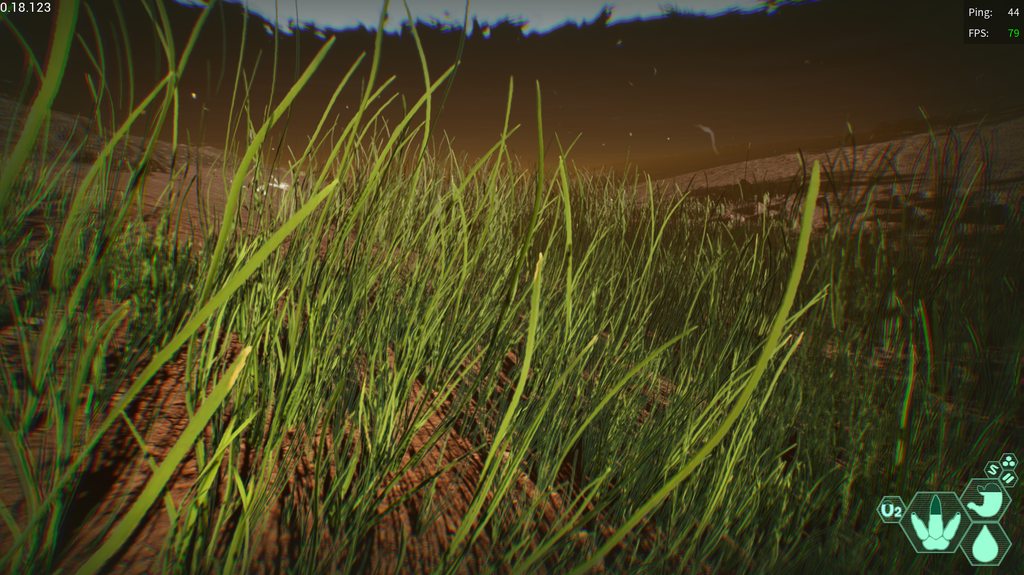 scarlet hare
empty locust
Hey guys, I got invisible under water as a deino and cant move anymore, /unstuck...
scarlet hare
empty locust
Hey guys, I got invisible under water as a deino and cant move anymore, /unstuck...
You got eat by a big fish
empty locust
scarlet hare
You got eat by a big fish
yeah but once I reconnected, after hours of queueing, I was still alive
scarlet hare
Idk
dire sparrow
Help!
 sly inlet
Is there a way to get rid of the black box that appears underwater?
 ashen nymph
Everytime I startup the game, the game freezes at the startup screen (either the unreal engine screen or the one right after that). I already tried: verifying the game files in steam, reinstalling the game and pausing Norton for 10 minutes, but nothing helps. Does anyone know a solution to this problem?
drowsy quarry
ashen nymph
Everytime I startup the game, the game freezes at the startup screen (either the...
this issue is 100% related to Norton
you either need to make an exception for the entire isle folder or simply uninstall Norton + reboot pc
 winter python
 little sable
i cant launch because easy anti cheat wont get downloaded
little sable
i cant launch because easy anti cheat wont get downloaded
Check the pinned messages
 upper shadow
hello, i have a few issue with the game. first of all when i try to change the graphic setting and i need to restart, it doesn't change anything. and second, this is how my game looks like

 velvet prism
Yo @drowsy quarry the isle finally works for me ty for the help!
drowsy quarry
all good :D
drowsy quarry
upper shadow
hello, i have a few issue with the game. first of all when i try to change the g...
How to delete CONFIG folder
- close your game
- press windows + r
- search %localappdata%
- find The Isle > Saved > DELETE Config
- do not write anything, just search it by eye!
all your settings will become default, including the automatic alt bite
try this
upper shadow
and i actually have texture now
thanks ^^
i'm running at a stable 35 fps
wich is ok to me
drowsy quarry
sure thing
ashen nymph
drowsy quarry
you either need to make an exception for the entire isle folder or simply uninst...
it worked, thank you very much 😊
drowsy quarry
yeyy ^^
 hasty drum
Please help I cant see any unofficial servers on evrima and no servers at all on legacy
drowsy quarry
hasty drum
Please help I cant see any unofficial servers on evrima and no servers at all on...
whats your game version at the bottom right
or in menu idk
hasty drum
drowsy quarry
whats your game version at the bottom right
it says 0.18.123
hasty drum
drowsy quarry
have you tried quitting steam and opening it again
yes ive had this problem since evrima released
drowsy quarry
hmm last time i saw it it was an internet issue, the guy i helped had to contact the internet provider
as it didnt even fix after he switched pcs
hasty drum
when i played with my friends they also couldnt see any non official servers so i dont think its an internet issue
drowsy quarry
indeed weird
hasty drum
I'll see if i can fix it
burnt sonnet
signal path
Nothing is ever a lost cause if you are motivated enough haha.
Got a couple of n...
thank u, today its working somehow, idfk how
he just reinstalled it and hit launch and it works perfectly. ik it was bc something u did bc he had done that like 20 times before and no worky. i think it was uninstalling with cmd. thank u, we all gamed happily ever after
 fading barn
Guys, here is such a problem, when choosing a server, I am entering the queue, there is a connection first, and then it throws out and such a problem "Data Acquisition Failed", I tried to find a solution on the internet, but it did not work out
 supple fern
I just spawned in and I am stuck in between two trees, anyone know how to get unstuck?
winter python
supple fern
I just spawned in and I am stuck in between two trees, anyone know how to get un...
Try /unstuck
 balmy lance
Hello I have a question how can I link my Discord on my The Isle Evrima server at the bottom of the Discord sign ?
 viscid sentinel
Hey, so i get stuck on this screen when i want to launch the game, what can i do

i'm lost and out of ideas
drowsy quarry
viscid sentinel
Hey, so i get stuck on this screen when i want to launch the game, what can i do
disable your third app antivirus
or create an exception for the entire the isle folder
viscid sentinel
how do i make it an exeption
and is there an specific antivirus app?
becasue i deinstalled them, but it still freezes
 mortal wharf
viscid sentinel
Hey, so i get stuck on this screen when i want to launch the game, what can i do
mortal wharf
viscid sentinel
Hey, so i get stuck on this screen when i want to launch the game, what can i do
following this because im having the same issue. and i havent touched isle in like 3 months and it was working fine then.
viscid sentinel
i never played it before🥲
i deinstalled the anti virus programs but i won't work
 small gorge
So I am trying to buy a new laptop to in order to play higher end games like evrima. I checked the steam page and saw the requirements and I’m guessing they are outdated could anyone here help me?
viscid sentinel
viscid sentinel
Hey, so i get stuck on this screen when i want to launch the game, what can i do
still not working
i deleted all my anti virus app
drowsy quarry
viscid sentinel
i deinstalled the anti virus programs but i won't work
make sure to reinstall the isle from scratch
as the files can be already blocked
reboot your pc as well
viscid sentinel
ok
drowsy quarry
small gorge
So I am trying to buy a new laptop to in order to play higher end games like evr...
yeah its very outdated
how much money do you want to spend?
viscid sentinel
it's still not working
drowsy quarry
viscid sentinel
it's still not working
thats 100% on your antivirus buddy
you need to get your antivirus out of your system
 gentle chasm
How does anyone deal with the Audio Chopping sound, I've know some buddies of mine been saying it gets consistent, loud and worse during and after rain sequences in game. Anyone have any tips for that?
vapid spire

 fiery breach
I also had this, no idea how to fix it. I just stopped playing and the next day it was gone.
drowsy quarry
vapid spire
restarting the game can fix it, happens when you mess with the settings and it rains
 marsh ivy
im having truobles withit saying antichaet is noit installed
drowsy quarry
marsh ivy
im having truobles withit saying antichaet is noit installed
open the game files and click installanticheat
marsh ivy
where @drowsy quarry in game
drowsy quarry
outside the game
right click the game in steam
properties
files
browse
installanticheat
marsh ivy
wondows can not access the specified device path or file you may not have approprite permisonsto access item @drowsy quarry
marsh ivy
apparentyli cant print screen on this keyboard it just dosent worek
 ocean dust
drowsy quarry
disable your third app antivirus
ocean dust
drowsy quarry
disable your third app antivirus
THANk YOU SO MUCH i had the same issue
drowsy quarry
^^
drowsy quarry
all good :D
 marsh ivy
no
drowsy quarry
you can try reinstalling the game from scratch
marsh ivy
trying that
drowsy quarry
How to do a clean uninstall
- windows + r
- search %localappdata%
- find The Isle folder and DELETE it
then - Right click the game on steam
- properties > local files > browse
- DELETE The Isle folder
- try to reinstall the game
 winter python
marsh ivy
so reanstalled and it says this agains
winter python
marsh ivy
so reanstalled and it says this agains
Check the pinned messages
drowsy quarry
marsh ivy
so reanstalled and it says this agains
can you open your game files now?
to see if you have access
marsh ivy
@winter python pinned where
winter python
marsh ivy
<@267085947688976384> pinned where
In this channel, click the thumbtack icon in the top right
drowsy quarry
marsh ivy
<@267085947688976384> pinned where
its this, but it has the same thing i told you to do as well
marsh ivy
 drowsy quarry
marsh ivy
<@398550373402411009>
drowsy quarry
marsh ivy
<@398550373402411009>
Troubleshooting error message: Windows cannot access the specified device, path, or file. You may not have the appropriate permission to access the item.

How to Fix Error "Windows cannot access the specified Device, path, or file. You don't have the appropriate permission to access the item" while trying to start a program or setup file on windows 10.
Subscribe for more videos https://www.youtube.com/muhammedshafikandoth?sub_confirmation=1
 drowsy quarry
this is totally related to your pc, i dont know exactly how to fix it 🤷
maybe someone blocked your access to admin permissions
 lime aurora
I just installed the game and have swapped to evrima but i have zero offical servers showing?
drowsy quarry
lime aurora
I just installed the game and have swapped to evrima but i have zero offical ser...
they are restarting rn
lime aurora
gotcha
was just confused becasue the 'Official Network Status' said online. again just got the game lol
drowsy quarry
not a problem :D
lime aurora
is there a website or channel in this discord to track status of the servers?
winter python
lime aurora
is there a website or channel in this discord to track status of the servers?
Servers restart every 8 hours, the times are pinned in #evrima-na #evrima-eu
lime aurora
thank you
drowsy quarry
:P yeah
 weary prawn
im trying to find a server but even w nothing typed into the search bar it just scans forever an never pulls up any servers, is there a fix?
drowsy quarry
weary prawn
im trying to find a server but even w nothing typed into the search bar it just ...
servers are restarting rn
weary prawn
well thatll do it
drowsy quarry
some servers are already appearing
 ashen oracle
Anyone else get grainy shadows? Is that just the way game is at max settings or just me?
drowsy quarry
ashen oracle
Anyone else get grainy shadows? Is that just the way game is at max settings or ...
do you have a screenshot?
ashen oracle
drowsy quarry
do you have a screenshot?
Currently in darkness but I can ping you an image when it’s day time again
drowsy quarry
sure
 novel fiber
hey!! Im with a problem that sometimes I press enter to open the chat and my game just switch to windowed mode and change the resolution, anyone knows how to solve it?
winter python
novel fiber
hey!! Im with a problem that sometimes I press enter to open the chat and my gam...
Tap alt a few times. Alt+Enter is a shortcut to change the window mode, and sometimes the alt key can get "stuck" after tabbing in or out of the game
novel fiber
winter python
Tap alt a few times. Alt+Enter is a shortcut to change the window mode, and some...
ty, I'll try :)
signal path
marsh ivy
Can you please right-click The Isle in Steam, Manage, Browse local files, then right-click on **InstallAntiCheat **and click Run As Administrator?
signal path
gentle chasm
How does anyone deal with the Audio Chopping sound, I've know some buddies of mi...
Choppy audio is usually a sign that your CPU cannot keep up. There are things that can sometimes be done to reduce things that the CPU has to do but it could be that their hardware just isn't good enough
 magic valve
Hey, playing Evrima and my water looks like...this. Even in midday.

North Lake floor

Surface
 signal path
magic valve
Hey, playing Evrima and my water looks like...this. Even in midday.
signal path
magic valve
Hey, playing Evrima and my water looks like...this. Even in midday.
Could you try disabling Lumen in your settings menu to see if that helps?
magic valve
Already off
signal path
Maybe try with it on 😅
gentle chasm
signal path
Choppy audio is usually a sign that your CPU cannot keep up. There are things th...
Cpu shows normal numbers it doesnt get too high and it runs every other high demand game just fine
magic valve
Still pitch black ;-;
gentle chasm
Even gta5 online too runs without issues
signal path
GTA5 isn't a particularly demanding game, to be honest... but I get your point. What AntiVirus do you use?
magic valve
It seems to only be deep water, this is what it looks like from the bank.
 signal path
magic valve
It seems to only be deep water, this is what it looks like from the bank.
signal path
magic valve
It seems to only be deep water, this is what it looks like from the bank.
With Evrima closed, on your keyboard press the Windows key and R, put %localappdata% and hit enter, scroll down and double click TheIsle, then Saved, then delete Config. Note this will also delete all your settings.
In that same folder, please delete the three files starting with D3D
signal path
 terse galleon
Hello, what do i do if i fall in a hole?
terse galleon
Hello, what do i do if i fall in a hole?
type /unstuck in chat and hit enter. If that doesn't work, you can relog to try again
If that doesn't work, check the pins in the #evrima-?? channel for your region
(e.g. #evrima-au #evrima-na #evrima-na etc)
magic valve
signal path
With Evrima closed, on your keyboard press the **Windows key** and **R**, put **...
Deleted the config file, don't see anything that starts with D3D.
 signal path
magic valve
Deleted the config file, don't see anything that starts with D3D.
signal path
magic valve
Deleted the config file, don't see anything that starts with D3D.
No D3DCompute_????? file in the Saved folder?
 signal path
That still looks a bit weird to me but I don't really play dieno so I might be misremembering
but, as long as you are happy I'm happy haha
gentle chasm
signal path
GTA5 isn't a particularly demanding game, to be honest... but I get your point. ...
Window defender & malwarbytes
signal path
That shouldn't be a problem. Do you know your system specifications? CPU GPU RAM?
gentle chasm
Ram 36
I7 intel
3050rtx
signal path
36 is an odd amount, it's probably likely that you have unmatched banks and it's running single channel as a result, which is not ideal but still doesn't explain the issues you are having
gentle chasm
32 they are a couple of 16gb ram sticks
signal path
Ah OK that sounds a lot better. Hmmm.
gentle chasm
It seems to go away if its low in terms of the number of noises overlapping one another but this doesnt happen in any other game
signal path
Yeah, the audio processor in Evrima is... not the greatest. Very CPU heavy and easy for it to struggle to keep up
The only things I can think of are pretty long shots, if you want to try to work through them?
gentle chasm
Okiee dokiee
signal path
Alright. The steps might be slightly different for you as I'm on Windows 10, but see how you go. On your desktop, can you right-click on the Sound icon down the bottom right and click Open Sound Settings, then on the right-hand side Sound Control Panel, then double-click the default device (with the green tick), then go to the Advanced tab, and let me know what the Default Format is?
signal path
Oh, that does NOT look right. Could you take a screenshot for me just to make sure you are where I think you are?
gentle chasm
Itcould be my earbud ill switch to my bigger headset
 tepid pendant
Anyone know why bepeis get permanent no preferred food glitch
gentle chasm
@signal path 2channel, 16 bit, 48000hz all boxes checked
signal path
Ahh yeah that sounds much much better
Do you get the glitches through your headphones as well?
gentle chasm
Ya i used the buds after i was still getting over whelmed by the noise in my bigger headsets
Yes its far louder
signal path
Yeah the rain can get a bit much
many people turn their sound down whenever it starts raining
gentle chasm
Ya i have tryed 6 other earphone types nothing different
Me too but i get killed alot because I can see but cant hear much then i get tackled by something i dont hear running in the trees near me
Im very much a scavenger as a juvi and sub so im not hunting until 80-90% adult these days
signal path
Just to make sure, do you know your exact model of CPU?