#🔧-evrima-troubleshooting-🔧
1 messages · Page 189 of 1
 ionic granite
 fervent ruin
yo i helped thanks so much kouga!!!!!!!!!!!!!!!!!
 drowsy quarry
all good
 low nest
I’ve just logged onto Evrima for the first time and I’m having trouble finding night vision. I’ve uninstalled the game and deleted all files relating to The Isle to see if it was a bug and reinstalled with no luck. Any tips?
 ashen oracle
low nest
I’ve just logged onto Evrima for the first time and I’m having trouble finding n...
ashen oracle
low nest
I’ve just logged onto Evrima for the first time and I’m having trouble finding n...
NV is N or X I think
low nest
I’ve tried every key on my keyboard and I’ve checked my controls, there doesn’t seem to be an option for NV anywhere
 winter python
low nest
I’ve tried every key on my keyboard and I’ve checked my controls, there doesn’t ...
winter python
low nest
I’ve tried every key on my keyboard and I’ve checked my controls, there doesn’t ...
If you are experiencing issues with your controls since the latest update (can't move camera, unable to court, etc) then please try wiping your config files in localappdata.
- If running The Isle, exit the game.
- Press the Windows key
- Type %localappdata% then press Enter.
- Find "TheIsle" folder. Open it.
- Open the "Saved" folder.
- Delete the "Config" folder. Note: This will reset any of your custom settings to their defaults.
- Restart the game. The issues should be fixed.
low nest
@winter python that worked!! Thank you so much
 drowsy quarry
ionic granite
literally just happened again lol
drowsy quarry
ionic granite
literally just happened again lol
were you in the queue?
ionic granite
drowsy quarry
were you in the queue?
i was 1 and then connecting, showing this and then disconnected me after a few seconds
 drowsy quarry
seems like your connection is being blocked
see if you have an antivirus in your pc
 umbral talon
Hey, I enjoy watching videos on the side (second monitor) when playing The Isle, when tabbed out of the game all videos are normal but as soon as I tab back into the game all video players freeze. would appreciate some help please
drowsy quarry
umbral talon
Hey, I enjoy watching videos on the side (second monitor) when playing The Isle,...
are you in fullscreen?
umbral talon
drowsy quarry
are you in fullscreen?
Windowed fullscreen
it only happens on this game too
ionic granite
drowsy quarry
seems like your connection is being blocked
i usually get in fine though and havent changed anything
drowsy quarry
umbral talon
Windowed fullscreen
weird, i can watch stuff in my second screen 🤔
drowsy quarry
ionic granite
i usually get in fine though and havent changed anything
recently all antiviruses have been hating the isle
umbral talon
drowsy quarry
weird, i can watch stuff in my second screen 🤔
Yeah that's what i'm saying. it's very odd hence putting a message in here, I've tried most things to try fix it
 signal path
low nest
I’ve tried every key on my keyboard and I’ve checked my controls, there doesn’t ...
signal path
low nest
I’ve tried every key on my keyboard and I’ve checked my controls, there doesn’t ...
Night vision is X
When it's active plants will softly glow
Different dinosaurs have different levels of NV, everything will still be black for some on dark nights, and during the day you won't notice it is on
 barren pawn
Anyone else had issues launching? Every time my friend launches evrima it freezes on the AE screen or it launches and closes right after.
drowsy quarry
barren pawn
Anyone else had issues launching? Every time my friend launches evrima it freeze...
disable your antivirus
such as norden, avast, etc
barren pawn
okay coolio ty!
 hearty pumice
I think i've witnessed evolution...

 queen urchin
im stuck in a hole at these cords and unstuck does not work

nvm after 30 min i got the right angle to get out
 kindred silo
im stuck

 fair glade
Can someone help me? I keep getting Error 21: lost connection to the server whenever i try to load in, I get through queue and then I load in, see my dino for a second and then DC
signal path
kindred silo
im stuck
Please read the channel description
signal path
fair glade
Can someone help me? I keep getting Error 21: lost connection to the server when...
Please follow ghostway's instructions here to make sure The Isle is allowed through the firewall #🔧-evrima-troubleshooting-🔧 message
Please also follow the same process for C:\Program Files (x86)\EasyAntiCheat_EOS\EasyAntiCheat_EOS.exe
 marsh crypt
Is there a fix for not working night vision underwater? Playing as deino
signal path
marsh crypt
Is there a fix for not working night vision underwater? Playing as deino
Some areas, like the swamp, are just too murky to see underwater at night.
 haughty ember
heyo had a bug where i got trapped in an invisible wall as a stego on NA1, gonna submit a bug report properly but my recording software wont let me clip stuff for some ungodly reason. gonna keep trying but yeah it is what it is. coords of the incident are LAT: 238.309.186 LONG: 75.120.978 (its in water, so you cant unstuck)
haughty ember
figured it out gonna be able to post a real report
signal path
Nice!
 eternal musk
is there a way to get out of the little cave hole thing at these cords when unstuck dont work?

 serene cairn
Does anyone else have any advice for this fatal error? because I noticed that when a lot of people join the server, it just crashes
signal path
serene cairn
Does anyone else have any advice for this fatal error? because I noticed that wh...
Fatal Error is almost always a problem with your PC hardware, usually a bad RAM stick
There are some things you can try first, if you like.
Make sure the game is exited for each step below. Feel free to try the game again after each step and stop if it is working correctly.
- In Steam, right-click The Isle, Properties, Installed Files, Verify integrity of game files. If Steam finds a problem, you will see the game start updating.
- On your keyboard press the Windows key and R, put %localappdata% and hit enter, scroll down and double click TheIsle, then Saved, then delete Config. This will also delete all your settings.
- On your keyboard press the Windows key and X, then select "Command Prompt (Admin)" or "PowerShell (Administrator)". In that window, copy and paste (by right-click paste, not ctrl-v) the following two commands:
sfc /scannow
DISM /Online /Cleanup-Image /RestoreHealth
``` then restart your PC.
4. Uninstall then reinstall your graphics drivers (follow NVIDIA, AMD, or Intel instructions depending on which you have).
5. If nothing above works, try uninstalling then reinstalling The Isle formal loom
Is anyone able to help me out? Anytime I launch the game, it goes full screen for a second, then windowed and as the unreal logo is fading. The app then freezes and the only way to close it is task manager. I have tried verifying the game files, reinstalling and restarting my pc. I used to play this game on the same pc last year.
 drowsy quarry
formal loom
Is anyone able to help me out? Anytime I launch the game, it goes full screen ...
drowsy quarry
formal loom
Is anyone able to help me out? Anytime I launch the game, it goes full screen ...
do you have an antivirus
if you do, try to disable it
formal loom
drowsy quarry
do you have an antivirus
I do, ill make an exception for it
drowsy quarry
use the entire the isle folder, not the .exe
formal loom
ok ill try that
formal loom
drowsy quarry
use the entire the isle folder, not the .exe
worked, ty
drowsy quarry
yey
 dire juniper
I'm not able to view any servers. It just loads indefinitely and when it stops loading it says 0 results for servers
 swift roost
Also me…
drowsy quarry
dire juniper
I'm not able to view any servers. It just loads indefinitely and when it stops l...
servers are restarting
every day, same time
drowsy quarry
swift roost
Also me…
same above
dire juniper
How long do they typically take to come back up, just in case it persists beyond it
drowsy quarry
dire juniper
How long do they typically take to come back up, just in case it persists beyond...
10min
swift roost
👌🏼
 bleak coyote
i ran into an issue. i tried to launch my game for evrima but it is now telling me easy anti cheat isnt installed. i have uninstalled and reinstall it but sadly it didnt work
winter python
bleak coyote
i ran into an issue. i tried to launch my game for evrima but it is now telling ...
Check the pinned messages
 soft stirrup
when i press Enter for the chat, it makes my game windowed
winter python
soft stirrup
when i press Enter for the chat, it makes my game windowed
Press Alt a few times
soft stirrup
I think it worked ty
 wise remnant
alt+Enter is fullscreen xD
 fervent glacier
So i keep on geting Fatal error :[ File;c\Users\ ect...
I have uninstalled and reinstalled the game. I have re configured my files, i have checked my graphics, i even checked for drivers that needed an update. I have even gone through the common bugs and fixes sheet to find a solution and nothing has worked. Any ideas?
 finite spade
I keep getting Error 21 as a troodon.. everytime i detach from my prey it kicks me from the server...
 latent tangle
Dilo toxin seems broken after some testing with friends. Clones arent showing up.
^hes getting banned
 cloud notch
going like this forever how do i fix it

 lime stratus
New bug where when you are eating you just get stuck. Cant do anything other than F call
 boreal goblet
 livid thorn
My replays wont load, they just keep saying 30 mins left??
 unborn cairn
drowsy quarry
use the entire the isle folder, not the .exe
unborn cairn
drowsy quarry
use the entire the isle folder, not the .exe
How do I do that
unborn cairn
k
ty
i have done it but it didnt workd
idk why it is like that couse when im trying to play legacy everything works
drowsy quarry
unborn cairn
i have done it but it didnt workd
still freezing when start?
unborn cairn
unborn cairn
idk why it is like that couse when im trying to play legacy everything works
.
drowsy quarry
unborn cairn
i tried unistaling but it didnt worked
did you restart your pc
and cleaned everything related to the antivirus? appdata/local etc
maybe even clean uninstalling the isle to make sure
 quaint oxide
Genuine question and not trying to pick fun at the whole 'The games just unoptimized'
But friend got game and im trying to bring them up from 10 fps (or less) to something somewhere decent?
what are some recommendations that I could try with them? They just bought it and its a fresh download, on a laptop I sadly dont know specs exactly but im looking for general ideas for fixes without needing to upgrade
Such as maybe have them download game to an External HD or something, what could help frames even if a lil?
drowsy quarry
quaint oxide
Genuine question and not trying to pick fun at the whole 'The games just unoptim...

This video shows you epic settings are a lie. Here you will see how to improve your FPS with my settings breakdown!
👀Bem vindo! Welcome!👀
PT-BR / ENG
Watch my Evrima Guides: https://youtube.com/playlist?list=PLdvqZdnB0LRXw2S_uSlgjno_i8bE1LbIn
Watch my Combat Guides: https://youtube.com/playlist?list=PLdvqZdnB0LRVhGGslKlu4wrFilMn_DsEj
--------...
quaint oxide
drowsy quarry
https://youtu.be/fk7mTsgYSI8?si=pzLJNvCDfeV05b6M
MANY THANKS ♥️🙏
 late wedge
guys how to fix it pls))

 opal sentinel
 rapid kelp
Sup fellas, is there a link or pinned comment on how to deal with the constant Fatal errors that keep causing me to crash to desktop?
 dense ivy
anyone have a fix for the low fps? i remember doing it a few months ago but cant remember, i knw its relatively simple
 clear temple
<@&401466542140817419> my frend mempfen stucks in a waterfall at eu 6
winter python
clear temple
<@&401466542140817419> my frend mempfen stucks in a waterfall at eu 6
Have them send /unstuck in game
clear temple
He is Disconnected and now in the Queue....i habe the same problem
 humble stump
signal path
**Make sure the game is exited for each step below.** Feel free to try the game ...
humble stump
signal path
**Make sure the game is exited for each step below.** Feel free to try the game ...
Fatal error: [File:C:\Users\Administrator\Desktop\Isle\IsleEngine\Engine\Source\Runtime\RenderCore\Private\ShaderCodeArchive.cpp] [Line: 405]
DecompressShaderWithOodleAndExtraLogging(): Could not decompress shader group with Oodle. Group Index: 1005 Group IoStoreHash:82551f5dc5637d4a1b41a109 Group NumShaders: 18 Shader Index: 11871 Shader In-group Index: 1005 Shader Hash: 82EAC2B16AD73C5F217C6D4B7DC36AA9F8F85C8E. The CPU (Intel(R) Core(TM) i9-14900K) may be unstable; for details see http://www.radgametools.com/oodleintel.htm
RAD Game Tools' web page. RAD makes Bink
Video, the Telemetry Performance Visualization System, and Oodle Data Compression - all popular video game middleware.
i need help pls
 jade adder
My friend is having a hard time getting past the AE loading screen. He presses play, it opens the game, and then freezes
fervent glacier
humble stump
Fatal error: [File:C:\Users\Administrator\Desktop\Isle\IsleEngine\Engine\Source\...
I've been having the same problem. I've tried everything
clear temple
is it possible to kill himself?
ashen oracle
clear temple
is it possible to kill himself?
Only if you starve to death or kill him
drowsy quarry
jade adder
My friend is having a hard time getting past the AE loading screen. He presses p...
disable the antivirus
 south condor
drowsy quarry
disable the antivirus
south condor
drowsy quarry
disable the antivirus
I’m having the same issue and I don’t have anti virus.
drowsy quarry
only windows defender?
jade adder
drowsy quarry
disable the antivirus
he has norton
drowsy quarry
yeah, gonna have to disable it
south condor
I only have windows defender.
jade adder
drowsy quarry
yeah, gonna have to disable it
He did the thing where he disabled norton for 10 mins to test and now hes got a black screen instead, still cant get past
drowsy quarry
jade adder
He did the thing where he disabled norton for 10 mins to test and now hes got a ...
uninstall norton
windows defender already do a very good job
dense ivy
dense ivy
anyone have a fix for the low fps? i remember doing it a few months ago but cant...
anyone
 nocturne yarrow
hi, im trying to play the isle for the first time and when i try and run it, it says i dont have easy cheat installed? how do I get that?
winter python
nocturne yarrow
hi, im trying to play the isle for the first time and when i try and run it, it ...
Check the pinned messages
nocturne yarrow
thank you!
drowsy quarry
dense ivy
anyone have a fix for the low fps? i remember doing it a few months ago but cant...
This video shows you epic settings are a lie. Here you will see how to improve your FPS with my settings breakdown!
👀Bem vindo! Welcome!👀
PT-BR / ENG
Watch my Evrima Guides: https://youtube.com/playlist?list=PLdvqZdnB0LRXw2S_uSlgjno_i8bE1LbIn
Watch my Combat Guides: https://youtube.com/playlist?list=PLdvqZdnB0LRVhGGslKlu4wrFilMn_DsEj
--------...
signal path
humble stump
Fatal error: [File:C:\Users\Administrator\Desktop\Isle\IsleEngine\Engine\Source\...
I'm sorry, your CPU is dying. If you can, try to get it sorted under warranty.
Right now you will only have issues with very demanding applications and games, and you can improve it by reducing boost clocks in your BIOS, but it will only get worse
 wintry gulch
Hi guys, what should I do about DLSS being a bit bugged right now? My computer heavily relies on it. When I have it on my fps stays 50+,but when I have to inevitably turn it off it immediately shoots down to 20 and below. (referencing the DLSS glitch where the screen pulls and minimizes itself)
signal path
south condor
I only have windows defender.
Are you 100% certain? Nobody else has had that issue using Windows Defender
If so, you can try adding the entire TheIsle folder in steam as an exception
drowsy quarry
wintry gulch
Hi guys, what should I do about DLSS being a bit bugged right now? My computer h...
you can try to squeeze more fps from the game
or disable DLSS, play 1 minute without it, enable again
 viral sundial
Hello, I bit a fish and now I can't move and I am invisible
 gray junco
just downloaded the game. instantly starts up at 2715x1527 resolution and I can only do 1920x1080. The screen is too big for me to do anything and I cant even apply any setting changes I want to make because the stupid apply button is all the way on the bottom right, which I cant see.
Any fixes?
winter python
gray junco
just downloaded the game. instantly starts up at 2715x1527 resolution and I can ...
Tap f11 or Alt+Enter to forcibly change the resolution
gray junco
thank you
 long timber
Im stuck in a hole and /unstuck wont function
signal path
 dusk jetty
is there any other way to actually have good fps
dusk jetty
is there any other way to actually have good fps
What are your system specs?
 nocturne tinsel
why the shadow moveinbg like this and how to fix it
 west sun
nocturne tinsel
why the shadow moveinbg like this and how to fix it
west sun
nocturne tinsel
why the shadow moveinbg like this and how to fix it
I think that’s the sun moving so the shadows change as well
nocturne tinsel
west sun
I think that’s the sun moving so the shadows change as well
do I can change this?
west sun
nocturne tinsel
do I can change this?
I don’t think so, I don’t like how it is either as can it be harder to see
 misty brook
why cant i launch the game? when i launch it and it comes to the loading screen with the blue it just freezes
 glossy swift

im stuck at that screen
it just froze
it was working normally yesterday
i tried deleting config file but it didn't help
misty brook
glossy swift
exactly thats it for me aswell
misty brook
glossy swift
i tried deleting config file but it didn't help
ive also done that
glossy swift
misty brook
exactly thats it for me aswell
I FIXED IT
@misty brook can you join vc and i can show you how i did it?
or i will just tell you here
delete all the isle files and then check your files on steam
idk if you understand
nah it broke again
damn
that was fast
misty brook
glossy swift
nah it broke again
:/
 supple robin
i have the same issue,i test it if i can start in now after 1 week,i did everything,downloadet in 2 times,15x checked my files,deleted everything from the isle etc pp..
glossy swift
supple robin
i have the same issue,i test it if i can start in now after 1 week,i did everyth...
and still frozen?
glossy swift
ahh
signal path
glossy swift
That is interferance from your Anti-Virus. Either uninstall Norton/Avast/McAfee/Kaspersky and let Windows Defender take over or add the entire TheIsle folder in Steam as an exception.
signal path
supple robin
update it now,and than i can tell you more 😄
Same for you, Shady
glossy swift
signal path
That is interferance from your Anti-Virus. Either uninstall Norton/Avast/McAfee/...
THAT MAKES SENSE
I DOWNLOADED AVAST
signal path
Undownload that haha
If you aren't happy with Windows Defender and want something better, either F-Secure, Bitdefender, or ESET are your best options
(I use better loosely here, Windows Defender does very well in all testing)
glossy swift
signal path
Undownload that haha
you saved my game
mods give him cool rank on server
pls
supple robin
does it work????
glossy swift
supple robin
does it work????
YES
 restive sundial
is this where i ask help regarding the game right
supple robin
i unistalled norton,if it does work...
restive sundial
this keeps popping up, i just got the game and i got all the requirements, please help i rlly want to play the game
 restive sundial
im not a pc person thse words make 0 sense to me
restive sundial
so I installed dx12
lets see if this works
keep in mind this is the beta version not the legacy
restive sundial
still not working, please can someone help me?
<@&818552355796287508> sorry for ping but im desperate
 hollow fulcrumBOT
Many players encounter issues that already have solutions. Be sure to check the pinned messages for quick-fixes to common problems. If an issue persists a representative in this channel will assist you when available, otherwise you may contact Punchpacket directly.
signal path
restive sundial
still not working, please can someone help me?
What is your GPU? You can check under Task Manager, Performance, GPU
 restive sundial
signal path
What is your GPU? You can check under Task Manager, Performance, GPU
restive sundial
signal path
What is your GPU? You can check under Task Manager, Performance, GPU
im sure this is good enough right? ^
signal path
restive sundial
im sure this is good enough right? ^
As far as I can see, the HD 7700 only has partial support for DirectX12, which means it will not be able to run Evrima
restive sundial
signal path
As far as I can see, the HD 7700 only has **partial** support for DirectX12, whi...
so what do i do
i wasted my money now what
cuz i tried legacy but its filled with chinese fake servers
so legacy is unplayable
signal path
You could upgrade your GPU to a newer model which supports DirectX12, or you could potentially refund The Isle
restive sundial
ive already spent 3hrs tryna fix it and even find a legacy server so refund is not possible
signal path
There may be workarounds for DirectX12 with the HD 7700, but I can't say how easy or hard they would be to find
restive sundial
whats an good gpu that can run evrima thats affordable
restive sundial
signal path
There may be workarounds for DirectX12 with the HD 7700, but I can't say how eas...
do you have any examples you know? my dads friend is a pc devolper or smt liek that but he knows alot abt pcs
signal path
Have a look for any card with at least 6GB VRAM made in the last 10 years or so. In my country, an RX 6600 can be found pretty cheaply (equivalent of USD $170 or so) and would be a good choice
AMD cards are usually cheaper than the equivalent performing NVidia card
restive sundial
is there any legacy servers i can play meanwhile? cuz everytime i tyr ot play i cant find a working server cuz its just chinese scam servers
restive sundial
signal path
Have a look for any card with at least 6GB VRAM made in the last 10 years or so....
would this be okay?
 wintry gulch
drowsy quarry
you can try to squeeze more fps from the game
wintry gulch
drowsy quarry
you can try to squeeze more fps from the game
hi i have done both of these things but when I turn DLSS back on the screen starts to tear again, I currently have most of my settings on low, textures epic, and effects also low. I have tried to get more FPS from the game by lowering my graphics and cleaning out my computer. I currently have zero photos, and like 3 other games. I feel that the fps that I get when I turn off DLSS is odd being that I have an rtx 3060, 16GB of ram (15.4 usable), AMD Ryzen 7 5800H with Radeon Graphics, updated drivers, and 400gb of free storage. 😭 srry for the essay
signal path
restive sundial
would this be okay?
Yup
I can't promise the framerate you will be able to get without knowing your CPU and RAM but that card is more than good enough to run the game at decent FPS
dense ivy
drowsy quarry
https://youtu.be/fk7mTsgYSI8?si=pzLJNvCDfeV05b6M
Thank you
restive sundial
signal path
I can't promise the framerate you will be able to get without knowing your CPU a...
and i got about 12 ram

 signal path
RAM is good but that CPU will probably struggle a bit
restive sundial
signal path
RAM is good but that CPU will probably struggle a bit
is it runable
idm putting settings on lowest
signal path
It'll be close, I'm not sure
restive sundial
as long as it can run without to much lag i really dont mind
 upbeat parrot
Does anyone know how to fix the issue as herbie when all of a sudden you have next to no food displaying on ur preffered foods?
 restive sundial
signal path
Your sound might be really glitchy with that CPU
restive sundial
signal path
Your sound might be really glitchy with that CPU
what cpu is good enough then
ima buy a better gpu but i think ill only be able to get a better cpu around april near to my bday and save up with bday money
would any 16 be good enouhg?
drowsy quarry
wintry gulch
hi i have done both of these things but when I turn DLSS back on the screen star...
with a 3060 you are totally capable of playing the game without the dlss
drowsy quarry
restive sundial
what cpu is good enough then
to use with a 6600? easy
Ryzen 5 5500, 5 5600
Intel i5-10400f, 12400f
whatever u want
signal path
restive sundial
ima buy a better gpu but i think ill only be able to get a better cpu around apr...
If you want to upgrade your CPU you will also need to buy a new motherboard, which might mean you also need to buy new RAM
I think it's worth a try as is. The 5500 that Kouga uses is about 30% faster, and it runs it fine
drowsy quarry
signal path
I think it's worth a try as is. The 5500 that Kouga uses is about 30% faster, an...
kouga uses? o-O????
signal path
Oh, sorry, I thought that's what you had. Apologies.
drowsy quarry
nah nah
 unique pier
I dont have a screenshot but there are sections of the barrier walls that literally dont reacj the jungle floor
you can walk right under them
and have like 30+ feet of clearance
 nova rune
I got stuck. I wrote the command and it didnt help
 drowsy quarry
nova rune
I got stuck. I wrote the command and it didnt help
drowsy quarry
nova rune
I got stuck. I wrote the command and it didnt help
relog and use the command again
nova rune
Thanks!
 radiant pivot
Anyone know why I keep getting a fatal crash on start up? Like I see the play, settings, ect.. screen, but it just freezes there. It used to run perfectly a few months ago, so I'm just curious!
 hard berry
Why do i always at some point disconnect from queue? sat in there for 30 minutes just to disconnect, happens all the time.
 west kestrel
i have a problem when ever i try to play the game it frezzes and i have tried everything
drowsy quarry
west kestrel
i have a problem when ever i try to play the game it frezzes and i have tried ev...
disable or uninstall your antivirus
drowsy quarry
radiant pivot
Anyone know why I keep getting a fatal crash on start up? Like I see the play, s...
do you have an antivirus
west kestrel
drowsy quarry
disable or uninstall your antivirus
okay
radiant pivot
drowsy quarry
do you have an antivirus
currently none
radiant pivot
drowsy quarry
like CPU, GPU, ram
and my ram is 8.0 GB, hopefully getting that improved soon. but if it's one of these causing it, then i guess one of the newer updates probably is too much for my PC

 drowsy quarry
hmmm the ram can be the problem yeah
8 is too little
make sure the GPU drivers are updated as well, use Nvidia app to do so
radiant pivot
drowsy quarry
8 is too little
Is 16 good? I plan to get a 16 when I can
drowsy quarry
yeah, I play with 16, low speed even
radiant pivot
drowsy quarry
make sure the GPU drivers are updated as well, use Nvidia app to do so
I'll try that out, thank you! If it doesn't work, I'll assume it's my ram, so thank you anyway
hard berry
Why do i always at some point disconnect from queue? sat in there for 30 minutes just to disconnect, happens all the time.
hard berry
me?
drowsy quarry
yeah
drowsy quarry
deleted the isle folder from appdata?
hard berry
yupp
drowsy quarry
welp
unique pier
unique pier
I dont have a screenshot but there are sections of the barrier walls that litera...
Is this a common problem???
 ebon lynx
anyone know what causes this and how to fix it?
https://gyazo.com/ace76e60c5a0e2115bc829bad56ad080

 undone wraith
is there a reason why my fps is so bad on official servers as compared to unofficials?
i can run Petit Pieds on 20-30 fps but when i go to NA east, which should logically be the closest server to me, i cant get above single digits
even though theres more players on PP + the servers are based further away
 plush gate
HI when i start the game it gets stuck on the blue screen anyone know how to fix?
drowsy quarry
unique pier
Is this a common problem???
yeah
drowsy quarry
ebon lynx
anyone know what causes this and how to fix it?
https://gyazo.com/ace76e60c5a0e2...
hitting reset in settings causes it
relog/deleting config folder fixes it
drowsy quarry
undone wraith
is there a reason why my fps is so bad on official servers as compared to unoffi...
I never heard about it, have you done any optimization for your game yet? such as clicking apply after joining, deleting config folder, lowering 3d resolution etc
drowsy quarry
plush gate
HI when i start the game it gets stuck on the blue screen anyone know how to fix...
disable or uninstall your antivirus
undone wraith
i havent tried deleting config folder but i have done the other two with no success x_x
plush gate
drowsy quarry
disable or uninstall your antivirus
and what anti virus should i download cuz i want my pc protected ,rn i have avg antivirus
ebon lynx
drowsy quarry
hitting reset in settings causes it
relog/deleting config folder fixes it
i didnt reset any settings, only logged in for the first time and it was like that
drowsy quarry
plush gate
and what anti virus should i download cuz i want my pc protected ,rn i have avg ...
windows defender is fine
drowsy quarry
undone wraith
i havent tried deleting config folder but i have done the other two with no succ...
This video shows you epic settings are a lie. Here you will see how to improve your FPS with my settings breakdown!
👀Bem vindo! Welcome!👀
PT-BR / ENG
Watch my Evrima Guides: https://youtube.com/playlist?list=PLdvqZdnB0LRXw2S_uSlgjno_i8bE1LbIn
Watch my Combat Guides: https://youtube.com/playlist?list=PLdvqZdnB0LRVhGGslKlu4wrFilMn_DsEj
--------...
drowsy quarry
ebon lynx
i didnt reset any settings, only logged in for the first time and it was like th...
deleting config folder will fix it
ebon lynx
drowsy quarry
deleting config folder will fix it
Sweet I'll give it a try
 small patio
Fatal error upon connection after I sit in queue? Has happened 4 times in a row on 4 different servers..
 zealous tiger
How to fix getting stuck on this screen

Ive redownloaded and verified file integrity
drowsy quarry
zealous tiger
How to fix getting stuck on this screen
disable your antivirus
or uninstall it
zealous tiger
drowsy quarry
disable your antivirus
Thanks!
 dim glacier
zealous tiger
Thanks!
dim glacier
zealous tiger
Thanks!
Did this work for you? I'm having the same issue.
zealous tiger
dim glacier
Did this work for you? I'm having the same issue.
Yeah i just turned off avg for 10 minutes
 zealous tiger
 tidal warren
why does this black block keep poping up when i go under water
tidal warren
why does this black block keep poping up when i go under water
Prob just need to turn up graphics settings
unique pier
no it happened to me too at max graphics
tidal warren
for what
unique pier
Its really terrible looming
tidal warren
im at high
 carmine forum
i think i found the problem my gpu was too overclocked
small patio
Any known fix for the game immediately FATAL ERRORing upon connection to a server? I can try to connect to any server and immediately get an error. On Evrima branch. I've verified files + uninstalled/reinstalled
dim glacier
I was stuck on the initial loading screen when booting up the game (the one after the UE5 screen, sometimes at the UE5 screen). I did a full reinstall of the game and EAC, purged my files in between uninstall and reinstall. I restarted prior to rebooting game.
I go to boot up the game again and then get this error. I also have allow this app to not be blocked by my firewall.
 drowsy quarry
dim glacier
I was stuck on the initial loading screen when booting up the game (the one afte...
drowsy quarry
dim glacier
I was stuck on the initial loading screen when booting up the game (the one afte...
to fix the stuck screen you wouldve needed to disable your antivirus
now i recommend you turn off your pc to fix the "game already running"
 plain lintel

everytime i try to boot my game up it gerts stuck here
is there anybody that knows how to fix this?
drowsy quarry
plain lintel
read my message above
plain lintel
drowsy quarry
read my message above
i dont know how to disable my anti virus one
and will it affect other games?
drowsy quarry
gotta search on the internet for that
drowsy quarry
plain lintel
and will it affect other games?
well, all antivirus hate the isle at the moment
i dont know about other games
plain lintel
ok
small patio
I receive this Fatal error upon connection to any server. The game isn't installed under the administrator account nor does the folder/location referenced exist, unless it's created ad hoc upon launch. I've uninstalled/reinstalled... why is it looking for files in this location?
Rendering thread exception:
Fatal error!
Unhandled Exception: EXCEPTION_ACCESS_VIOLATION writing address 0xffffffffd1e867e3``` arctic forge
im stuck with a stego in a tree and cant press unstuck in eu 4 devs pls
 ember mason
So...I am playing on a Radeon Rx 7900 XT 20GB. Is there anything I can do against these graphical glitches? They always happen when it is raining or something.

I already tried a lot of different settings, and nothing helps..
drowsy quarry
arctic forge
im stuck with a stego in a tree and cant press unstuck in eu 4 devs pls
you dont need to press unstuck, just write it
drowsy quarry
ember mason
So...I am playing on a Radeon Rx 7900 XT 20GB. Is there anything I can do agains...
tried deleting the config folder?
hard berry
I keep disconnecting from queue - i have good internet and have reinstalled the game, i wait for ages just for me to disconnect.
 cursive breach
Hello, has the dilo venom effect been nerfed? It doesn’t cause damage anymore; we tested it. Or did we do something wrong?
EU4
drowsy quarry
cursive breach
Hello, has the dilo venom effect been nerfed? It doesn’t cause damage anymore; w...
are you spawning the clones? using rmb in purple stage
cursive breach
drowsy quarry
are you spawning the clones? using rmb in purple stage
That’s right, we tried it on several types of animals—Stego, Dibli, Cera—but it doesn’t work.
drowsy quarry
might be buggy, yeah
cursive breach
The hallucination works, but it doesn’t cause damage.
Where could it be reported to request a fix?
drowsy quarry
cursive breach
The hallucination works, but it doesn’t cause damage.
its quite easy to dodge the hallucination, is that what the prey is doing?
 hazy cloak
How can we get unstuck if a corpse is in our mouth forever and no more interaction are available ?
drowsy quarry
ive seen people unstuck by asking someone to push them (diablo, teno, stego charge tail, etc)
hazy cloak
Okay can't for now but I notice thanks
 obsidian ledge
How to solve audio from stuttering? Is it a bug?
south condor
signal path
If so, you can try adding the entire TheIsle folder in steam as an exception
I’m positive. I just set this pc up a few weeks ago and specifically did not install any antivirus. Then isle is already an exception
 drowsy quarry
 viral wyvern
read pinned message
 warm arch
Do you also experience crashes today? Me and my friends experienced so many fatal errors today.
signal path
radiant pivot
Anyone know why I keep getting a fatal crash on start up? Like I see the play, s...
Make sure the game is exited for each step below. Feel free to try the game again after each step and stop if it is working correctly.
- In Steam, right-click The Isle, Properties, Installed Files, Verify integrity of game files. If Steam finds a problem, you will see the game start updating.
- On your keyboard press the Windows key and R, put %localappdata% and hit enter, scroll down and double click TheIsle, then Saved, then delete Config. This will also delete all your settings.
- On your keyboard press the Windows key and X, then select "Command Prompt (Admin)" or "PowerShell (Administrator)". In that window, copy and paste (by right-click paste, not ctrl-v) the following two commands:
sfc /scannow
DISM /Online /Cleanup-Image /RestoreHealth
``` then restart your PC.
4. Uninstall then reinstall your graphics drivers (follow NVIDIA, AMD, or Intel instructions depending on which you have).
5. Uninstall then reinstall The IsleCould you please download a stability testing tool e.g. https://www.ocbase.com/download and make sure everything in you system is stable at high loads?
Ocbase is the home of OCCT, the most popular all-in-one stability / stress testing / benchmarking / monitoring tool available for PC
signal path
small patio
I receive this Fatal error upon connection to any server. The game isn't install...
Please do step 2 from my message above
signal path
ember mason
So...I am playing on a Radeon Rx 7900 XT 20GB. Is there anything I can do agains...
Please follow the steps here #🔧-evrima-troubleshooting-🔧 message
signal path
hard berry
I keep disconnecting from queue - i have good internet and have reinstalled the ...
Could you please try restarting your modem/router and trying again? I recommend a low population server for testing
signal path
obsidian ledge
How to solve audio from stuttering? Is it a bug?
Audio stuttering is your PC not keeping up with the game, it can be caused by too little available RAM or a CPU which is running too slow
signal path
warm arch
Do you also experience crashes today? Me and my friends experienced so many fata...
Please follow the steps here #🔧-evrima-troubleshooting-🔧 message
If nothing there works, please download OCCT https://www.ocbase.com/download and do a CPU + RAM stability test
Ocbase is the home of OCCT, the most popular all-in-one stability / stress testing / benchmarking / monitoring tool available for PC
drowsy quarry
viral wyvern
You are incredibly funny
viral wyvern
Oh im dumb mb
 rose terrace
I had like 5 friends who cant connect to any server, its a infinite 'conection...' screen, we also tried to uninstall and even one formatted his pc. I can go in without any trouble so i tried to access to the game in my pc but in my friend's account and them i got the conection screem like they have, next i change to my account to try again and everything its ok, so its a problem of the accounts of my friends. They barely now eng, thats why im writting instead of any of them. Can someone help us with that? ty
signal path
rose terrace
I had like 5 friends who cant connect to any server, its a infinite 'conection.....
Please try step 3 here #🔧-evrima-troubleshooting-🔧 message
 worldly egret
-388,886.785, 234,274.904, 28,254.727 I'm locked in this position
EU3 west
is it possible to get an admin to free me up?
When I arrived there were two ceras, it might be an usual problem !
rose terrace
signal path
Please try step 3 here https://discord.com/channels/401464048610312193/723260797...
Ty but doesnt work
 drowsy quarry
worldly egret
drowsy quarry
worldly egret
/unstuck
worldly egret
haha
 hazy spire
signal path
Please try step 3 here https://discord.com/channels/401464048610312193/723260797...
hazy spire
signal path
Please try step 3 here https://discord.com/channels/401464048610312193/723260797...
Me and a few other friends are the ones who have this problem. We've done the latter, but it's impossible. Bika can play his game, but when he tries to play from my account he can't. The game starts, and when he tries to enter a server it stays eternally on "connecting". We don't know what else to do, because the support email doesn't exist and there's no way to contact any technical support. The last thing I have left to do is send a message on discord to one of the developers at the risk of being blocked or something similar.
We haven't been able to play the game since before summer.
It's very frustrating. It's my favorite game, and literally during the pandemic I bought my first good PC to be able to play it. And we've been like this for more than 5 months.
signal path
hazy spire
Me and a few other friends are the ones who have this problem. We've done the la...
I understand your problem, and I understand it seems to be account specific, could you please confirm you tried deleting the config per step 3?
signal path
rose terrace
Ty but doesnt work
Do you use any after-market security suite (Norton, Avast, McAfee, Kaspersky, etc)?
hazy spire
signal path
I understand your problem, and I understand it seems to be account specific, cou...
Yes. I just did everything in order, me and a friend with the same problem.
hazy spire
signal path
Do you use any after-market security suite (Norton, Avast, McAfee, Kaspersky, et...
No. We don't use any of that. The game is purchased through our steam account.
signal path
Out of curiosity, can you join Unofficial servers?
hazy spire
signal path
Out of curiosity, can you join Unofficial servers?
yes, and the same problem
signal path
Hmmm.
Do you all use the same WiFi/Internet connection?
Like, is it a college dorm situation or are you going to each others houses
hazy spire
signal path
Do you all use the same WiFi/Internet connection?
No. We are from different cities and even countries.
I even called my internet company to disconnect the CGNAT
signal path
I'm just trying to narrow down on the account specific side to make sure it isn't something else - so you and bika are completely separate but you lent him your account details to try?
hazy spire
We really think it must be an account issue. People who had the same problem had to create another account and buy the game again, which I find totally unfair.
signal path
Yeah, that's not right at all.
This sounds like something I can't help with, could you please DM PunchPacket
hazy spire
signal path
I'm just trying to narrow down on the account specific side to make sure it isn'...
That's right. I gave him my account. And he couldn't play the game through my steam account.
signal path
signal path
This sounds like something I can't help with, could you please DM PunchPacket
Provide all the details you have here, including the fact that you tried switching accounts on the one machine where one account worked and the the other didn't, that it also applies to Unofficial, and that other people have fixed it by buying new accounts
It sounds to me like it's an EOS issue, which only developers or such can help with
hazy spire
should i send you a md with all the details?
signal path
No, I have no affiliation with the game devs at all, all I can do is try to fix the usual PC issues
From the pins PunchPacket is the one to go with for issues that can't be fixed any other way
hazy spire
Sorry if I misunderstood. Who should I send the details to?
signal path
<@&818552355796287508>
hollow fulcrumBOT
Many players encounter issues that already have solutions. Be sure to check the pinned messages for quick-fixes to common problems. If an issue persists a representative in this channel will assist you when available, otherwise you may contact Punchpacket directly.
signal path
hazy spire
Sorry if I misunderstood. Who should I send the details to?
There is a developer with the Discord name PunchPacket, if you search up the top right you should see their name
hazy spire
ok. Thanks u so much QwQ
signal path
Wish I could of helped more, good luck! If you do figure it out please let us know, there's a few people with that issue and it sucks not being able to help
hazy spire
signal path
Wish I could of helped more, good luck! If you do figure it out please let us kn...
ok!
I can't find the name of the developer you mention


 hazy spire
ok yea thank u so much
 mighty oriole
Is anyone having issues with the game immediately crashing while loading into an unofficial server or is already in an unofficial server? For some reason my game has crashed 3 times and I got no message telling me why it crashed.
haughty ember
teehee youll never guess who got stuck again and the unstuck command isnt working again
 fallow tangle
IM STUCK
drowsy quarry
fallow tangle
IM STUCK
/unstuck
drowsy quarry
yes
 delicate kelp
Anyone have issues with replay just not being able to be selected at all? I can see all of them on the list, but can't click or highlight them.
signal path
delicate kelp
Anyone have issues with replay just not being able to be selected at all? I can ...
Yeah, a lot of people have issues with the replays, only advice I have is restart PC/game and hope
signal path
mighty oriole
Is anyone having issues with the game immediately crashing while loading into an...
Start here, and let me know if it's still happening after completing these steps
Make sure the game is exited for each step below. Feel free to try the game again after each step and stop if it is working correctly.
- In Steam, right-click The Isle, Properties, Installed Files, Verify integrity of game files. If Steam finds a problem, you will see the game start updating.
- On your keyboard press the Windows key and R, put %localappdata% and hit enter, scroll down and double click TheIsle, then Saved, then delete Config. This will also delete all your settings.
- On your keyboard press the Windows key and X, then select "Command Prompt (Admin)" or "PowerShell (Administrator)". In that window, copy and paste (by right-click paste, not ctrl-v) the following two commands:
sfc /scannow
DISM /Online /Cleanup-Image /RestoreHealth
``` then restart your PC.
4. Uninstall then reinstall your graphics drivers (follow NVIDIA, AMD, or Intel instructions depending on which you have).
5. Uninstall then reinstall The IsleThat's a shame. It's been an ongoing issue for me for weeks now, resetting doesn't help. 😔
signal path
delicate kelp
That's a shame. It's been an ongoing issue for me for weeks now, resetting doesn...
You could also try step 1 through 3 above, might help
delicate kelp
signal path
You could also try step 1 through 3 above, might help
Will give it a go! Thank you. 🙏
mighty oriole
signal path
Start here, and let me know if it's still happening after completing these steps...
Could also have to do with the latest update too, had a friend tell me that nesting is bugged and my game worked perfectly fine last Thursday
signal path
Nesting has always been a bit buggy, might just be conincidence
 undone osprey
Hey! I’ve been playing Evrima normally for days now and suddenly I’m getting the Error 21 Lost Connection To Server. I’ve tried reinstalling anticheat, checking firewall, i don’t have any other anti virus programs, ive checked for window & driver updates, I’ve reverified integrity of game files 4 times, and I’ve reinstalled the game itself. If someone could help it would greatly be appreciated ❤️
signal path
undone osprey
Hey! I’ve been playing Evrima normally for days now and suddenly I’m getting the...
I've gotten it once too, and I'm pretty sure everything I have is 100% good. Might just be a bug
undone osprey
Honestly I’m not sure but this happened after my PC crashed, I was still in admin spectator mode, which I never logged out before in spectator so I thought maybe that was the issue? But again I don’t know and I have no idea how to solve it
 harsh dew
i just joined the game after a few months a break , i see the DLSS issue still remains. Is that a really hard problem to fix? Where does it come from , since a lot of people have it i can see its not on my end, i have rtx 3050 btw
 frosty matrix
Are the servers down or something? because I cant seem to find a single one in 20minutes
west kestrel
same problem can't find a official
frosty matrix
west kestrel
same problem can't find a official
Might be server restart I just had some NA ones come up
 edgy aspen
Hi, im also stuck, can an admin pls help me?
 velvet crag
i have these shadows underwater and cant get them away. what can i do to remove them?
 long timber
I will launch the game and it will get past the unreal engine start screen and play the movie and freeze it would work just fine yesterday
 outer basalt
Is there an admin that can help, I'm stuck 😭
 solemn willow
anyone know how to fix a bug where i cant hear rain
 cunning crater
Anyone know how to fix "data acquisition failed". i cannot connect sor some servers.
drowsy quarry
long timber
I will launch the game and it will get past the unreal engine start screen and p...
disable the antivírus
 dapper belfry
Hi, my night vision doesn't work, I just see like without it under water(playing Deinosuchus), any ideas?
 zealous moth
clone dilo is totally broken, not work actualy
 brazen spindle
Does anybody know why my game keeps crashing even tho I verified the game files and even made it an exclusion to the AV PLUS I redownloaded it like 3 times does anybody know why
 swift swan
server list not loading? hlp
swift swan
how does one play as giga? not showing up
 edgy lantern
giga is not in evrima, only legacy version
 strange dew
Is there an issue with fish spawns?
swift swan
how do i unstuck?
 glad cove
signal path
long timber
I will launch the game and it will get past the unreal engine start screen and p...
glad cove
signal path
long timber
I will launch the game and it will get past the unreal engine start screen and p...
That is interferance from your Anti-Virus. Either uninstall Norton/Avast/McAfee/Kaspersky and let Windows Defender take over or add the entire TheIsle folder in Steam as an exception.
signal path
brazen spindle
Does anybody know why my game keeps crashing even tho I verified the game files ...
Make sure the game is exited for each step below. Feel free to try the game again after each step and stop if it is working correctly.
- On your keyboard press the Windows key and R, put %localappdata% and hit enter, scroll down and double click TheIsle, then Saved, then delete Config. This will also delete all your settings.
- On your keyboard press the Windows key and X, then select "Command Prompt (Admin)" or "PowerShell (Administrator)". In that window, copy and paste (by right-clicking, not ctrl-v) the following two commands:
sfc /scannow
DISM /Online /Cleanup-Image /RestoreHealth
``` then restart your PC.
3. Uninstall then reinstall your graphics drivers (follow NVIDIA, AMD, or Intel instructions depending on which you have).If none of that works, please test your PC hardware by downloading OCCT (https://www.ocbase.com/download) and doing a CPU + RAM test
Ocbase is the home of OCCT, the most popular all-in-one stability / stress testing / benchmarking / monitoring tool available for PC
signal path
swift swan
how do i unstuck?
Type /unstuck into chat
swift swan
thanks how do i get organs as deino
drowsy quarry
swift swan
thanks how do i get organs as deino
hold the food in the mouth
hold LMB + Shake your mouse
winter python
swift swan
work with elite fish?
AI have no organs
 weary adder
My game keeps freezing as I open it, I get to the unreal engine part and it freezes
I've uninstalled and will try again
 ocean crater
does enyone know why my game is freezing on that screen?
 drowsy quarry
weary adder
My game keeps freezing as I open it, I get to the unreal engine part and it free...
drowsy quarry
weary adder
My game keeps freezing as I open it, I get to the unreal engine part and it free...
disable your antivirus
drowsy quarry
ocean crater
does enyone know why my game is freezing on that screen?
same as above
weary adder
ocean crater
does enyone know why my game is freezing on that screen?
Mine freezes before then
 weary adder
drowsy quarry
disable your antivirus
weary adder
drowsy quarry
disable your antivirus
???
weary adder
Can I turn it off just for this game?
drowsy quarry
try
ocean crater
@drowsy quarry thank you so much
drowsy quarry
all good
weary adder
drowsy quarry
all good
It's still freezing
drowsy quarry
gonna have to disable it
weary adder
Dang
brazen spindle
Can someone tell me exactly why the isle keeps crashing,I verified files,turned off AV,added it as an exclusion,got rid of config file and now it says client disconnected
Now it says fatal error when it crashes
weary adder
I've tried getting that zip file, it isn't there anymore
drowsy quarry
brazen spindle
Can someone tell me exactly why the isle keeps crashing,I verified files,turned...
did you noticed your PC components overheating or something?
brazen spindle
No they don’t overheat
drowsy quarry
are they being used to 100%
weary adder
Nothing is working, it just keeps freezing
brazen spindle
My pc is pretty good and runs the isle excellently
brazen spindle
drowsy quarry
are they being used to 100%
No
drowsy quarry
hmm weird
drowsy quarry
weary adder
Nothing is working, it just keeps freezing
did you restart your pc
weary adder
Restarting it now, again
brazen spindle
Ill check but based on my knowledge they aren’t getting used 100%
drowsy quarry
use MSI afterburner to see it, it's super good
you can monitor your components closely
drowsy quarry
are the GPU drivers updated?
swift swan
drowsy quarry
I do, actually
1 on 1 lol?
drowsy quarry
windows as well?
brazen spindle
Yes
weary adder
drowsy quarry
did you restart your pc
Still freezing
drowsy quarry
swift swan
1 on 1 lol?
what u mean
drowsy quarry
weary adder
Still freezing
it's 100% your antivirus
you need to uninstall it
and antiviruses are difficult to get rid off, they always have some sort of module that keeps in the pc
drowsy quarry
brazen spindle
Yes
well. my other assumptions are ram and vram
brazen spindle
Oh idk if I mentioned but I also added the isle as an exclusion for the AV, and also disabled it
Wait ram?
Why would that be the problem
drowsy quarry
yeah ram can crash apps and games
brazen spindle
As of now it hasn’t had ANY type of problem
drowsy quarry
it is, but the problem is if your ram is good or not
sometimes one of them get issues
brazen spindle
How am I supposed to check if it even has issues
brazen spindle
Yeah but if it isn’t RAM let’s say then what else would it be
brazen spindle
Mhm understood
drowsy quarry
or even your game being Fullscreen
when I had it Fullscreen I couldn't stop getting fatal errors
brazen spindle
Well I guess I can try to make it not full screen Altough it’s gonna be weird
drowsy quarry
bordless is super good
allows you to multitask easily
while maintaining a good view
brazen spindle
Alright I’ll try that I hope it works cuz I heard allosaurus is coming soon and I’m hyped about it
 fluid falcon
Is there a way to play on evrima on Geforce Now?
drowsy quarry
no
fluid falcon
Any prospects on when it will be fixed?
fluid falcon
I know, beta branch stuff on GFN
But still if the standard is a legacy version of the game that's pretty sad.
Thanks for the info though
drowsy quarry
yeah, they're waiting for the game to be a bit more complete
fluid falcon
I'll see if the game runs on my setup and else I'll just return the game on steam.
drowsy quarry
fluid falcon
I'll see if the game runs on my setup and else I'll just return the game on stea...
what's your GPU
fluid falcon
Old one, AMD 570
drowsy quarry
if it doesn't support dx12 (12_1) it won't run
fluid falcon
Then I'll probably be done quite quickly.
drowsy quarry
if it's Rx 570
it supports 12(12_0)
fluid falcon
Then let's see how it runs. Was pretty excited to play it. We'll see I guess.
Thanks again for the support.
drowsy quarry
fluid falcon
Then let's see how it runs. Was pretty excited to play it. We'll see I guess.
I don't know if the game will open
you can try though
cuz it doesn't support the 12_1
 wary geyser
Camera os fine if I look down
Litteraly if I look forward ot tweaks
Keeps fixing itself and then doing it
drowsy quarry
wary geyser
disable dlss
wary geyser
drowsy quarry
disable dlss
Dlss has betrayed me 😭
brazen spindle
Ok so for some reason I don’t have borderless discreet I have windowed fullscreen
And it still crashed
😭
I’m starting to think the isle hates me
💔
 stark osprey
Can I have evrima and legacy downloaded at the same time
weary adder
drowsy quarry
GeForce doesn't really allow betas
That's what I'm on
Which is weird because I used to play it
Oh well guess I'll try and sort legacy
drowsy quarry
weary adder
That's what I'm on
Which is weird because I used to play it
Oh well guess I'll t...
you can play evrima when GeForce allow betas
or when evrima becomes the main beta
drowsy quarry
stark osprey
Can I have evrima and legacy downloaded at the same time
yeah, change the folder name and download the game again
when you want to play the previous version, rename to the original name
brazen spindle
I have a question
Since absolutely nothing works rn and I can’t play the isle
Do I just wait till the next update and hope I can play
Or just stop playing cuz I for sure don’t want to stop playing 😭
drowsy quarry
your call tbh
brazen spindle
Because it’s actually super weird that it keeps giving me fatal error for no reason even if it was playable like a couple months ago
 bold edge
cant see my compass,stam food and water plus i cant chat how do i fix
is there a keybind or option to fix this?
winter python
bold edge
is there a keybind or option to fix this?
Try tapping f10
 dusky swift
/unstuck
 onyx verge
I cant do a regular attack. No matter what I change in my keybinds, attacking always ends up triggering an alt-attack.
Does anyone else know the issue and/or how to fix it? Would help me out a lot
drowsy quarry
onyx verge
I cant do a regular attack. No matter what I change in my keybinds, attacking al...
did you enable manual alt attack
onyx verge
Theres an option like this?
drowsy quarry
yeah, in settings > gameplay
onyx verge
Like a box you can check? Ill look for it tomorrow when I play again.
drowsy quarry
yeah its a box
once you enable it, you can hold ALT to do the alt attacks instead of the game doing it automatically
so you can choose if you want to attack normally or not
drowsy quarry
all good
 candid parcel
drowsy quarry
disable your antivirus
candid parcel
drowsy quarry
disable your antivirus
bro thx i love you
 scenic sorrel
Can anyone help? Im currently stuck in a rock in a waterfall and /unstuck wont work. this is the 3rd time in 3 hours im going to die because im stuck 🥲
 solemn wren
hey guy my friend is having issues booting up evirma for the first time... it loads up to the unreal engine screen then it just stops and freezes?? any assistance would be great
 minor atlas
solemn wren
hey guy my friend is having issues booting up evirma for the first time... it l...
minor atlas
solemn wren
hey guy my friend is having issues booting up evirma for the first time... it l...
I´ve the same problem, and i don´t know how to fix it
 mellow grove
Hi, is there any current fix for the deinosuchus nv bug? I cant see underwater
 eternal pivot
candid parcel
bro thx i love you
eternal pivot
candid parcel
bro thx i love you
not a bro
solemn wren
minor atlas
I´ve the same problem, and i don´t know how to fix it
yehh still havnt figured it out either... he has uninstalled n reinstalled, did the anitcheat aswell still nothing
candid parcel
eternal pivot
not a bro
sry my mistake
 merry marlin
does the sound bug ever go away
its raining sound bug
but its not raining currently
literally a death sentence to move around at night while deaf
drowsy quarry
eternal pivot
not a bro
->
drowsy quarry
solemn wren
hey guy my friend is having issues booting up evirma for the first time... it l...
disable or uninstall your antivirus
@solemn wren @minor atlas
solemn wren
drowsy quarry
disable or uninstall your antivirus
<@513954321352753165> <@752279001841664102...
yehh we disabled antivirus but still same issue
drowsy quarry
you gotta uninstall it, sadly
solemn wren
so like uninstall norton???
drowsy quarry
would be an awesome idea lol
norton is tricky to get off your pc
theres always something it leaves behind
solemn wren
yehh for sure... ill see if i can get hime to uninstall it
drowsy quarry
norton has a uninstall tool as well
bleak coyote
What do i do if my protein is glicked and showing as a leaf but it's protein
solemn wren
drowsy quarry
norton has a uninstall tool as well
ok we fixed it he is in... it was norton lol but now he cant find official servers 🤣
winter python
solemn wren
ok we fixed it he is in... it was norton lol but now he cant find official serve...
It's the scheduled restart
drowsy quarry
solemn wren
ok we fixed it he is in... it was norton lol but now he cant find official serve...
servers are restarting right now
solemn wren
ok i can still see them all but he cant
drowsy quarry
give it 4 minutes
solemn wren
ok cheers 🍻
 novel fiber
Every single time i try to open evrima it freezes at this screen, idk whats going on, Ive alredy tried to check the files on steam and still freezing :/
someone now what to do?
 drowsy quarry
novel fiber
Every single time i try to open evrima it freezes at this screen, idk whats goin...
drowsy quarry
novel fiber
Every single time i try to open evrima it freezes at this screen, idk whats goin...
disable your antivirus
novel fiber
drowsy quarry
disable your antivirus
i think it worked ty :)
 upper walrus
i got same problem but it didnt work
ive tried everything but it still wont work
@drowsy quarry
drowsy quarry
upper walrus
ive tried everything but it still wont work
what is "everything"
if you could write some details for me
upper walrus
ive looked at 5 different vids that are ment to help it and nothing has worked
like ive reinstalled it, even through the system files
ive gone on anti virus and made an exception for both isle and stem
ive installed the anti cheat
drowsy quarry
upper walrus
ive gone on anti virus and made an exception for both isle and stem
did you made an exception for the isle.exe or the isle folder
upper walrus
the only file that is isle related is just called the isle
drowsy quarry
upper walrus
the only file that is isle related is just called the isle
can you uninstall your antivirus and then restart the pc?
drowsy quarry
yey ^^
 livid wave
Is there a way to play on Nvidia Now??😂
When i play it opens legacy🥲
And even there there’s no servers!
signal path
bleak coyote
What do i do if my protein is glicked and showing as a leaf but it's protein
Only solution I know of is relog
signal path
livid wave
Is there a way to play on Nvidia Now??😂
Sadly not
For future reference, if you are adding an exception in your AV for The Isle the important executable is .\The Isle\TheIsle\Binaries\Win64\TheIsleClient-Win64-Shipping.exe, NOT .\The Isle\TheIsle.exe.
The latter is just a launcher, the former is the actual main game executable. This is the same for all other UE4/UE5 games too.
eternal pivot
candid parcel
sry my mistake
NP.. How could you know, just giving a heads up 🙂 Edit: I made a mistake in my assumption, you were right
drowsy quarry
eternal pivot
NP.. How could you know, just giving a heads up 🙂 Edit: I made a mistake in my ...
despite my profile saying he-him
eternal pivot
drowsy quarry
despite my profile saying he-him
Damn Kouga, I really thought you a female, have I had to so wrong.. sorry about that :/
eternal pivot
drowsy quarry
im a mystery, thats what i am
You make Great YT videos and I thought you female
drowsy quarry
thank uuuuu 
drowsy quarry
brooo relax, i really dont mind the gender at all
eternal pivot
drowsy quarry
brooo relax, i really dont mind the gender at all
lol.. Ill relax now 🙂
 peak thorn
Does anyone know how to unlock the cannibalistic mutation? Since the most recent update it no longer shows up. I've tried testing on an admin server but no matter how much I eat of my own species at any 2nd or 3rd mutation slot it doesn't show. Am I doing something wrong?
 median lotus
drowsy quarry
despite my profile saying he-him
median lotus
drowsy quarry
despite my profile saying he-him
🤡
signal path
peak thorn
Does anyone know how to unlock the cannibalistic mutation? Since the most recent...
Has to be second mut, I believe
peak thorn
@signal path tested that
signal path
Ah, I guess it was removed. Good to know
 undone spindle
whats the fix for your dino going missing after safelogging
upbeat parrot
Guess ill starve?

 sudden monolith
upbeat parrot
Guess ill starve?
sudden monolith
upbeat parrot
Guess ill starve?
he prefers that XD
upbeat parrot
no MZ or PZ shows when I sniff, all food displays as leaf and doesn't give me any diet even though it would be on my preffered foods :/
 crimson phoenix
I can't court or be courted with as a diablo. I'm a nested Fullgrown (100%) female dibble and got eggs gestated with a perfect diet and no debuffs. But jsut as the male and i holding N no animation nothing is happening. Does anyone know why and how to fix? I've tried several steps:
Deleting config file,
Restarting,
Re-joining,
Unstuck in game,
Battles,
And they can court with other females so it's jsut me. We are also unrelated as they are a spawn dibble.
signal path
crimson phoenix
I can't court or be courted with as a diablo. I'm a nested Fullgrown (100%) fema...
You can't nest with a related Dino (sibling, aunt/uncle, niece/nephew, cousin, etc).
signal path
upbeat parrot
no MZ or PZ shows when I sniff, all food displays as leaf and doesn't give me an...
That just happens sadly. Sometimes you can fix by resetting your PZ (leave/join group, wait) but most times you have the relog
signal path
undone spindle
whats the fix for your dino going missing after safelogging
No fix, sometimes that just happens
crimson phoenix
signal path
You can't nest with a related Dino (sibling, aunt/uncle, niece/nephew, cousin, e...
They are a spawn so no relationship at all. And this is the second male i was unable to court with. The other male was also an spawn
signal path
crimson phoenix
They are a spawn so no relationship at all. And this is the second male i was un...
Ah, apologies for assuming. Sometimes having both pre-parents leave their groups helps with nesting
crimson phoenix
signal path
Ah, apologies for assuming. Sometimes having both pre-parents leave their groups...
no worries, nah this is a whole new day with a whole new dibble tha ti haven't met before haha
 plucky torrent
if i am stuck in a hole and /unstuck doesn't work is there anyone i can ask?
signal path
plucky torrent
if i am stuck in a hole and /unstuck doesn't work is there anyone i can ask?
Check the pins of your regions channel (#evrima-na #evrima-eu etc)
plucky torrent
Thank you.
 unreal perch
Hi, I am new to The Isle and am trying to load into a game...
I did once but the screen was black. I tried downloading one of the Betas in the properties menu on Steam for this issue... but now the game gui looks different and only 2 servers are available to play with 0 players. How do I fix this? When I try to join it also says that an anti-cheat thingy failed to check 😦
I will load images to show what is happening ✨
(first image) This is all that loads, when I go on any other Session Filters nothing appears. Before I downloaded the evrima, there was plenty of servers that loaded but then the ping was over 300 for each one... the lowest one I found was 299 ping, but when I tried loading into the server, the screen stayed black. I could hover my mouse over the screen and hear the game was loaded and hear myself hovering over buttons and all, but it was a black screen
(second image) When I try to connect it takes about 3 - 4 ninutes before it disconnects me.
(third image) I don't know why this is happening


(image one) Here is what it looked like before I downloaded the Evrima
(image two) This is what it looked like after I loaded in, so when I hovered my mouse across the screen I could hear the buttons and all but can't see anything.

 signal path
unreal perch
(image one) Here is what it looked like before I downloaded the Evrima
(image t...
signal path
unreal perch
(image one) Here is what it looked like before I downloaded the Evrima
(image t...
I'm impressed by how much effort you put in before reaching out! Also appreciate how much detail you have.
Let's start by making sure you have the right branch selected:
https://i.imgur.com/wpZNmO7.mp4
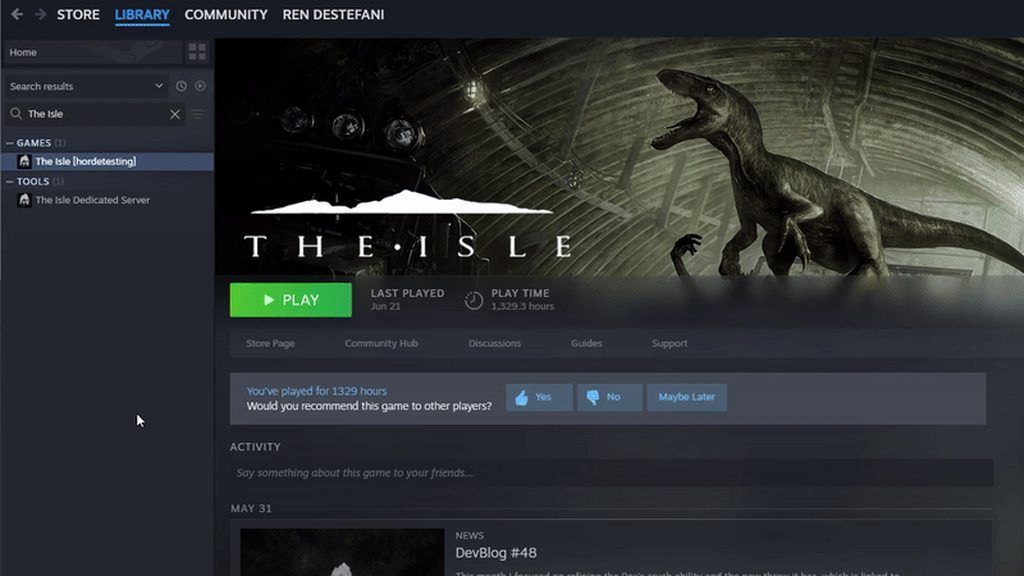
Next, please follow these steps:
Make sure the game is exited for each step below. Feel free to try the game again after each step and stop if it is working correctly.
- In Steam, right-click The Isle, Properties, Installed Files, Verify integrity of game files. If Steam finds a problem, you will see the game start updating.
- On your keyboard press the Windows key and R, put %localappdata% and hit enter, scroll down and double click TheIsle, then Saved, then delete Config. This will also delete all your settings.
- On your keyboard press the Windows key and X, then select "Command Prompt (Admin)" or "PowerShell (Administrator)". In that window, copy and paste (by right-clicking in the window, not ctrl-v) the following two commands:
sfc /scannow
DISM /Online /Cleanup-Image /RestoreHealth
``` then restart your PC.
4. Uninstall then reinstall your graphics drivers (follow NVIDIA, AMD, or Intel instructions depending on which you have).Hi! I am quickly re-installing the game, something happened while I was looking through the game folders.
Thank you so so much for helping me out!
signal path
If you have an error with EAC (Anti-Cheat), in steam right click on The Isle, Manage, Browse, then run UninstallAntiCheat then InstallAntiCheat
Lastly if you use a non-standard anti-virus such as Norton, McAfee, AVAST, Kaspersky, etc, add the entire The Isle folder in Steam as an exception
unreal perch
Thank you so much!!!
signal path

unreal perch
I will try these and come back to you if I am still having issues
I am just re-installing
 signal path
unreal perch
signal path
unreal perch
Based on the download size I don't think you have the correct branch selected, could you please double check?

 signal path
Yup!
 mild bloom
idk what to do this keeps showing up no matter what i do
 signal path
unreal perch
It is working now 🙂
signal path
unreal perch
It is working now 🙂

signal path
mild bloom
idk what to do this keeps showing up no matter what i do
Fatal Errors like that are almost always a sign that you have hardware issues with your PC, typically a bad RAM stick. Could you please download OCCT and do a CPU + RAM Stability test?
Ocbase is the home of OCCT, the most popular all-in-one stability / stress testing / benchmarking / monitoring tool available for PC
brazen spindle
Hello I’m also having fatal error crashes once OCCT has been downloaded I can just delete it right after the check is done right?
brazen spindle
Are you also having the same problem as me with fatal errors? 😭
 brazen spindle
I thought smt is wrong with my pc but for some reason I doubt something has happened with my ram because I can play everything else perfectly fine 😭
mild bloom
mild bloom
this right
mild bloom
brazen spindle
I thought smt is wrong with my pc but for some reason I doubt something has happ...
same
signal path
For whatever reason, UE5 games tend to expose issues with bad RAM way more than most other games
brazen spindle
I’m starting to get mad and atp imma just wait till a future update or just go back to legacy (god forbid I have to go back there) because my mom bought the isle like 3 years ago and I’m too scared to stop playing
brazen spindle
signal path
For whatever reason, UE5 games tend to expose issues with bad RAM way more than ...
Huh interesting
signal path
I had the exact same issue. Could play Rocket League, War Thunder, Minecraft, Project Zomboid... all worked fine 99% of the time, but Evrima would crash, and I just assumed it was buggy or whatever, except it slowly got worse and then I started getting bluescreens too
brazen spindle
If I gotta switch ram does that mean I lose data from my pc and gotta download stuff again or?😭
mild bloom
so do i have to wait 1h now and after that i can play again or am i just fckt at this point?
signal path
Did some memory testing, found one of the sticks was ever-so-slightly bad (MemTest86 took 5 hours to get an error), replaced the bad stick, never had a crash since
signal path
brazen spindle
If I gotta switch ram does that mean I lose data from my pc and gotta download s...
No, RAM is completely separate from storage
brazen spindle
Oh ok that’s a good thing
Do you remember how long it took until you started getting blue screens so I have an excuse to replace my ram?
Or no 😭
signal path
Like a month
brazen spindle
signal path
Like a month
Ugh I gotta wait I guess
signal path
Tools like OCCT will show the error if you have it, run it and choose CPU + RAM
Ocbase is the home of OCCT, the most popular all-in-one stability / stress testing / benchmarking / monitoring tool available for PC
You can also try other UE5 games, like the free https://store.steampowered.com/app/3132990/Black_Myth_Wukong_Benchmark_Tool/
This tool is separate from the "Black Myth: Wukong" game itself and is non-playable.The "Black Myth: Wukong Benchmark Tool" is a PC benchmark application specifically developed for "Black Myth: Wukong". It evaluates your hardware performance and system compatibility through the real-time rendering of an in-game sequence.You can customize benchma...

If both the above don't have any errors you can try the following general troubleshooting steps:
Make sure the game is exited for each step below. Feel free to try the game again after each step and stop if it is working correctly.
- In Steam, right-click The Isle, Properties, Installed Files, Verify integrity of game files. If Steam finds a problem, you will see the game start updating.
- On your keyboard press the Windows key and R, put %localappdata% and hit enter, scroll down and double click TheIsle, then Saved, then delete Config. This will also delete all your settings.
- On your keyboard press the Windows key and X, then select "Command Prompt (Admin)" or "PowerShell (Administrator)". In that window, copy and paste (by right-clicking in the window, not ctrl-v) the following two commands:
sfc /scannow
DISM /Online /Cleanup-Image /RestoreHealth
``` then restart your PC.
4. Uninstall then reinstall your graphics drivers (follow NVIDIA, AMD, or Intel instructions depending on which you have).
5. Uninstall then reinstall The IsleTheoretically what would happen if I just wait out the blue screens atp
Because I’ve done the delete the config file
Redownloaded the isle
Restarted pc
Add it as an exclusion
Disabled Av
Might aswell just wait out the blue screens rn 😭
signal path
brazen spindle
Theoretically what would happen if I just wait out the blue screens atp
Nothing serious, Windows might get a little scuffed but nothing the above steps (sfc and dism) won't fix
I'd advise chasing it down though
Most RAM is covered by lifetime warranties these days, so if it is bad RAM it shouldn't cost you anything to fix
Things get a little less sure with laptops
brazen spindle
Well I guess I’ll wait it out either way I have other games soooo 😭
But thanks for the advice
Really grateful for that
But at least now I know if I have bad ram I can just wait it out and ask for a repair 😺💪
signal path
signal path
mild bloom
just press Start?
Yup!
It'll throw a lot of info at you but don't get overwhelmed, you just need to watch the left side for errors. If you don't see any in 10-15 min then you are probably fine there and it's something else going on. Try these steps #🔧-evrima-troubleshooting-🔧 message
If that doesn't work, try the Black Myth Wukong benchmark and see if it's specific to Evrima or happens across multiple UE5 games
brazen spindle
Is there a way for me to check if there’s something wrong with my ram without having to download smt 😭
signal path
brazen spindle
Is there a way for me to check if there’s something wrong with my ram without ha...
You can run the Windows Memory Diagnostic but it's not very good at picking up little errors. If you open up the start menu and type in "memory" then choose "Windows Memory Diagnostic" your PC will reboot into the memory test
Once it has rebooted press F1 or whatever the advanced options key is and select "Detailed" for the scan mode
You'll need to let it run overnight, at least 12 passes if not like 20 if it lets you choose how many.
signal path
No problem. If you are a bit paranoid about what you download (which is a good thing) there are also open source tools that you can use for testing your memory
https://www.memtest.org is a better version of the Windows Memory Diagnostic, you'll need a USB drive to format and boot to, and it'll still take hours and hours to test properly
Memtest86+
Memtest86+ is an advanced, free, open-source, stand-alone memory tester for 32- and 64-bit computers (UEFI & BIOS supported)
Other things like Prime95 can also be used, they aren't as use-friendly but they are open source

GitHub
Prime95 source code from GIMPS to find Mersenne Prime. - shafferjohn/Prime95
If the issue is you just can't install stuff on the PC (maybe it's your parents or an Internet Cafe or something) Prime95 is an option, as is HCI's MemTest
brazen spindle
Ok so thanks again for the help but I’m still like really paranoid to download stuff,let’s say this fatal error is just with the isle then what can I do? Do I just wait for a future update orrrr?
Because I’m still super confused and really just don’t wanna give up on the isle because I would feel really guilty about it 😭
@signal path sorry to have to ping but I’m just really interested and wanted to know
unreal perch
Hi, sorry to bother again.
The servers restarted and all, and I did join a server with a Herrerasaurus. The progress shows when I click on the server but when I join it wants me to choose an asset again.
brazen spindle
That happened to me I think you just click on the dino you chose before and it should give you the same data for the dino like it’s growth and other stuff! Altough im not sure you can try
unreal perch
I did try this and it just gives me a brand new dino 😦
brazen spindle
Oh well then I’m really not sure about that
unreal perch
It's fine, I will just restart then! ✨
brazen spindle
unreal perch
It's fine, I will just restart then! ✨
Alright I hope you don’t have anymore bugs after that!
Also wish me luck with playing the isle evrima because it won’t let me for some reason it keeps crashing 😭
 thorn grotto
Hey so asking for a friend. He is stuck on the loading screen of evrima any helps it just keeps freezing as he loading in
 viscid rain
?

 void sluice
thorn grotto
Hey so asking for a friend. He is stuck on the loading screen of evrima any help...
void sluice
thorn grotto
Hey so asking for a friend. He is stuck on the loading screen of evrima any help...
does he have any antivirus installed other than windows defender? if so, tell him to uninstall them and try to launch the game again
thorn grotto
void sluice
does he have any antivirus installed other than windows defender? if so, tell hi...
We both suck at computers so I assume those are similar
void sluice
a lot of antivirus programs have proven to cause issues with evrima so yeah
thorn grotto
void sluice
a lot of antivirus programs have proven to cause issues with evrima so yeah
Ok well ill try that when i can get a hold of him
void sluice
if he doesn't want to uninstall it tell him to try making an exception for the isle's folder in the antivirus program
but it's likely he'll have to uninstall any antivirus programs
void sluice
viscid rain
?
hi! please try verifying the isle's game files through steam, and let me know if that works
if it doesn't, you may have to perform a clean reinstall

 void sluice
 split owl
send a bug report in #🐞-evrima-bug-reports-🐞
 scarlet relic
updated my nvidia drier and I now crash on launch and get the error
game security violation detected 00000022
Have reinstalled the game checked game files and have disabled all of my rgb programs. I have also tried to uninstall and reinstall anti cheat but this doesnt seem to fix it although I dont get a pop up and confirmer /licensing agreement when I try to redownload it. have been playing for the last 2 weeks with no issue and it only seems to have happened after updating drivers
void sluice
scarlet relic
updated my nvidia drier and I now crash on launch and get the error
game securi...
add the isle's folder as an exclusion in your firewall if it is not already and try to launch the game again. do you have any antivirus installed other than windows defender?
scarlet relic
Norton and its already allowed through the firewall
 void sluice
unfortunately it might be norton causing the issue still, it's been known to cause freezes and crashes on loading even with the game added as an exclusion. you might have to try to uninstall it and just use windows defender
scarlet relic
I assume its related to either updating my drivers or uninstalling fortnight its the only 2 things that have changed since I played yesterday and that may have caused problems with easy anti cheat
void sluice
ah so you didn't have problems with norton yesterday then?
are you having issues with any other games after your driver update?
scarlet relic
will test a few more and see
brazen spindle
signal path
No problem. If you are a bit paranoid about what you download (which is a good t...
Wait I have a question
I researched and Fortnite is a UE5 game
I’m confused on why it isn’t crashing but the isle is
In my logic that means the isle is the only one getting affected
 next apex
my game wont start and it says "Easy anti cheat is not installed" how do I fix this
void sluice
next apex
my game wont start and it says "Easy anti cheat is not installed" how do I fix t...
hey. do you know how to navigate to your The Isle folder in steam?
next apex
this was right after installing evrima btw
next apex
void sluice
hey. do you know how to navigate to your The Isle folder in steam?
I can try
alr
im in the file
stuff
thingyx
void sluice
there's a file called InstallAntiCheat.bat, run that file please
next apex
this?
 next apex
done
next apex
void sluice
then once it is done launch your game and lmk
it opened an CMD window for a sec
void sluice
yeah that's normal
next apex
worked ty
void sluice
np np!
void sluice
scarlet relic
will test a few more and see
in any case i'd try to maybe reinstall the nvidia driver in case something went wrong with the install
next apex
void sluice
in any case i'd try to maybe reinstall the nvidia driver in case something went ...
uh why does even the EU server have 500 ping for me
nvm
scarlet relic
void sluice
in any case i'd try to maybe reinstall the nvidia driver in case something went ...
Arma, marvel rivals and Hel llet loose which is another easy anti cheat game all launched. I'll try reinstall drivers
void sluice
alright lmk
brazen spindle
void sluice
alright lmk
Hey I have a quick question if that’s okay
void sluice
what's up
brazen spindle
So lately the isle (evrima to be more specific) has been acting up what I mean by that is when I join a server the first thing that happens when I spawn is it crashes
And it says
Fatal error
Everyone I ask gives different responses
Either faulty RAM
Or something else
I’ve tried to delete the config file
Nothing
Reinstalling
Nothing
Practically everything
Even making it an exclusion in Microsoft AV
yet it still crashes and I’m not sure why
void sluice
let me look back at what people told you, give me a minute
brazen spindle
Alright
scarlet relic
scarlet relic
Arma, marvel rivals and Hel llet loose which is another easy anti cheat game all...
Still the same issue, ill try find some other solutions and doubt it matters but its this point that I usually crash at
 drowsy quarry
scarlet relic
Still the same issue, ill try find some other solutions and doubt it matters but...
drowsy quarry
scarlet relic
Still the same issue, ill try find some other solutions and doubt it matters but...
do you have an antivirus
void sluice
scarlet relic
Still the same issue, ill try find some other solutions and doubt it matters but...
yeah in my honest opinion, it's probably norton causing this
even if it worked fine yesterday
mellow grove
Any fix for the Deino nightvision bug yet?
void sluice
brazen spindle
Alright
right so did you run any of the memory tests? it's very possible that even if your other games were working fine, and the isle is the only one having fatal errors, you may still have a memory issue
brazen spindle
void sluice
right so did you run any of the memory tests? it's very possible that even if yo...
A memory issue like not enough storage?
void sluice
no. RAM
brazen spindle
I’m not that good with tech
Ohhh RAM
Well no as I am pretty paranoid about doing that type of stuff
Last time I did it I almost ruined my entire pc
void sluice
it definitely won't hurt your pc to run a RAM check
void sluice
mellow grove
Any fix for the Deino nightvision bug yet?
bug is known, whenever they fix it they'll announce it in patch notes
drowsy quarry
I got super curious rn and I'm gonna download that OC tool
hehe. I wanna see how my system is doing, my ram is more than 5 years old rn
brazen spindle
Alright but how do I do it so windows checks my ram
drowsy quarry
I suspect some of my stuterrings are related to it
void sluice
honestly i might too. i get fatal errors occasionally
brazen spindle
I don’t rlly wanna download stuff
drowsy quarry
brazen spindle
Alright but how do I do it so windows checks my ram
windows is bad.
brazen spindle
Oh
void sluice
the windows inbuilt ram test is not the greatest at detecting ram issues
drowsy quarry
100% of the time you want to download the tool, it's much better and simple
like me and MSI, I downloaded it years ago to keep track of my system
and it's incredibly useful for me
brazen spindle
But then after I’m done how can I delete it Entirely so there’s nothing of it on my PC
drowsy quarry
GPU usage, temperature, CPU usage, temperature
how much RAM is being consumed
drowsy quarry
brazen spindle
But then after I’m done how can I delete it Entirely so there’s nothing of it on...
just uninstall it 🤷
it's not a virus or a malware
brazen spindle
because I’ve always had a problem when I download something I can’t fully delete it from my pc
brazen spindle
Oh then what is the normal way
I go to the settings and delete them from there orrr?
drowsy quarry
if you search around appdata local and roaming you will see a lot of folders for a lot of stuff you downloaded
such an editor that you downloaded 3 years ago. but yeah. the folder is still there.
why? to keep some settings, nothing much
brazen spindle
Ohhh so that’s why I still had a folder for discord on my pc from last year
brazen spindle
But does it delete the space it takes when it’s download?
drowsy quarry
it's just a minor setting that they keep there, Incase you ever download the app again
brazen spindle
like how much MB?
drowsy quarry
KB.
brazen spindle
Cause I for sure don’t want random stuff taking my space
drowsy quarry
weights less than a photo
brazen spindle
Ohhh
drowsy quarry
oh trust me. I had 240gb of space in my pc
I search every week for dumb stuff that is around my PC
they're 99.9% of the time so light that I don't even bother
brazen spindle
Idk as light as it is it just somehow bothers me because I don’t need it 😭
How do you even do an in depth search of stuff you don’t need
drowsy quarry
I'm curious.
I enter folders, open tabs
I'm not afraid of doing stuff, I love tech
brazen spindle
Same here but I’m paranoid and can’t understand stuff
drowsy quarry
you are against tools to help with that so I cannot suggest easy ways for you
void sluice
right so, the thing is, if you don't do the RAM test, i can't really tell you if that is causing your problem with fatal errors
drowsy quarry
months ago, before upgrading my storage, I downloaded a tool that searched my entire pc for useless stuff
I found Spotify was keeping 32gb in my PC 🤷
and yeah, ghost is correct.
you can, of course, don't bother at all doing the test, but the problem won't fix itself ya know
either send you Pc to a tech or do it at home alone
brazen spindle
Well as scared as I am to annoy my mom with such stuff I guess some time I can ask her to give me the number of a tech she knows so we can see if anything is wrong
void sluice
unless you diagnose the hardware issue you can't really fix it
brazen spindle
Well thanks a lot for the help and advice
drowsy quarry
without the tools, it's impossible to know what's going on
drowsy quarry
brazen spindle
The tech orrr?
the tech
brazen spindle
Aha
Well at least I’ll know the person face to face and not a program which may sound dumb but I’ve always been paranoid like that 😭
drowsy quarry
it's literally impossible to know how your PC is doing without using the tool
cause you can't play and look at the BIOs at the same time :/
brazen spindle
Well that’s true
Guess I gotta listen more in class
Altough the only things we do are some random stuff in excel that nobody wants
brazen spindle
I hope someday I can understand it and help clueless ppl like me 😭
drowsy quarry
well, it will only happen if you're curious enough to search around
YouTube, forums, reddit, talking to people, etc
brazen spindle
Ohhh how many times Reddit has helped me for the most random problems that I can’t find anywhere else 😭
Well again thanks for the help and advice
brazen spindle
Byeee hope ur ram is good!!
 shut tide
what is this

my game was running just fine about 10 min ago now it keeps crashing everytime i join a game
if anyone has any idea how i can fix this please let me know
 south iron
Anyone else getting weird sound lags especially when being close to a waterfall? It's like only the sound is lagging/breaking apart
void sluice
shut tide
what is this
hey, this linked post has some relevant links to what people have tried before to fix this error #🔧-evrima-troubleshooting-🔧 message
void sluice
south iron
Anyone else getting weird sound lags especially when being close to a waterfall?...
i think this is a known bug unfortunately
#🔧-evrima-troubleshooting-🔧 message can always try these to see if it helps but i think it is just a game bug
scarlet relic
void sluice
yeah in my honest opinion, it's probably norton causing this
disable norton and still the same issue and I dont see the isle in the old easyanticheat and easyanticheat_EOS doesnt seem to do anything when i try to run its setup or install
drowsy quarry
scarlet relic
disable norton and still the same issue and I dont see the isle in the old easya...
did you restart your pc afterwards?
and add an exception to the isle in norton
void sluice
he has an exception in norton already
scarlet relic
drowsy quarry
did you restart your pc afterwards?
yeah and its already an exception. the easy anti cheat is not an exe but a batch file its set up is an exe but doesnt do anything even when run as admin
 neon fern
Hi someone could help me ? I tried to download the game again , reinstalling, restart pc , internet is working fine
 scarlet relic

 drowsy quarry
this one

theisleclient
hes hidden inside the folders
the isle > binaries > win64
neon fern
neon fern
Hi someone could help me ? I tried to download the game again , reinstalling, re...
I tried like 6 times to join servers and still got this error message
scarlet relic
drowsy quarry
this one
launching it from there still ahs the same issue. Ill try the old version of the isle and see if that works at all
drowsy quarry
scarlet relic
launching it from there still ahs the same issue. Ill try the old version of the...
i dont mean launching from there
i mean using it as the exclusion
plus, you need to restart your pc and possibly download the isle again. Norton already blocked the entire game connection, and this block can continue even if you whitelist the game
you need to whitelist it before you launch the game
scarlet relic
Norton didn't block it I didn't have to add it to exceptions. It worked fine yesterday the only 2 things I have done are update my nvidia drivers and uninstalled some games that also had easy anti cheat althoguht games like Hell let loose which uses easy anti cheat still work
drowsy quarry
norton blocked it buddy
everyone here had the same issue as you, because of norton, avast, avg and other antiviruses
every single one of them are blocking the game connection, resulting in the "freeze" upon starting
scarlet relic
I disabled norton reinstalled and restated my pc. why would my anti virus randomly block it without any notifications or popups or updates to the anti virus
scarlet relic
drowsy quarry
every single one of them are blocking the game connection, resulting in the "fre...
its not a freeze the application is blocked by easy anti cheat because its recognising something as cheating software
drowsy quarry
it cant be a coincidence that you have one of the antivirus that are making problems
scarlet relic
my antivirus is still turn off now
drowsy quarry
for some people, it required a full uninstall of the AV
and for others, a simple restart
scarlet relic
neither have fixed it. its fine ill give up for now and look again later
drowsy quarry
did you used the norton uninstall tool
scarlet relic
yeah
scarlet relic
yeah
drowsy quarry
deleting the file in appdata?
scarlet relic
the error that I get is game security violation detected 00000022
drowsy quarry
perhaps its recognizing something youre using
like a third app, something that is alt tabbed, etc
reshade, filters, etc
scarlet relic
i know it is but i dont know what. i have nothing else open and no new background apps. it may be related to RGB stuff looking on line but it doesnt give me the name of the program causing the error so i am stabbing in the dark
scarlet relic
I dont use reshade or nvidia overlay or anything that should alter/interact wit game files and all of the rgb stuff that hooks into games is also disabled
yeah, i'm gonna give up for now and try again later. will post the fix if I find one
drowsy quarry
sure thing, good luck
 hollow scroll
There is a hole in map that you cant get out of it (dm i can send the place where is it)
drowsy quarry
hollow scroll
There is a hole in map that you cant get out of it (dm i can send the place wher...
hollow scroll
drowsy quarry
<#783214088456896513>
Alr
 jagged glacier
When I'm eating diet items, my diet isn't filling up at all
drowsy quarry
jagged glacier
When I'm eating diet items, my diet isn't filling up at all
do they show as leaf or nutrient icon?
and, do you have vomit sickness?
 rich heron
since a few weeks i cannot open The Isle anymore. game stop loading after 2 seconds. usualy on UNREAL ENGINE logo.
Have reinstalled, turned off anti virus, reinstalled graphic drivers.
Any have or had similiar issue?
 verbal dawn
how can i fix this it happens every time i launch the game
 jagged glacier
drowsy quarry
do they show as leaf or nutrient icon?
jagged glacier
drowsy quarry
do they show as leaf or nutrient icon?
Yes they show as nutrient symbol and no vomit sickness..its in the diet area not migration, so some show as leaf and some dont
drowsy quarry
rich heron
since a few weeks i cannot open The Isle anymore. game stop loading after 2 seco...
might need to uninstall the antivirus
drowsy quarry
jagged glacier
Yes they show as nutrient symbol and no vomit sickness..its in the diet area not...
are you full hunger?
jagged glacier
No, just half at the moment
I just logged out and back in again, and they've all changed to leaves..is my dibble bugged lol
 languid adder
Picking up items freezes my diablo have to log out to move again