#🔧-legacy-troubleshooting-🔧
1 messages · Page 46 of 1
 novel river
 honest river
@lean junco Please check the pins here for solutions to your server issue.
 hazy siren
everytime i tried logging in or out, it would keep saying this, how do i fix this?
 scarlet chasm
@hazy siren make sure you have the latest windows updates and drivers for your graphics card.
@novel river You're welcome! Hope it helps!
 lean junco
@honest river I already tried that
novel river
SO
I have reinstalled steam and geforce and updated my nivida drivers... I now get 60 fps max but if I turn at all it suddenly drops to like 10 fps and stutters constantly... Its really weird for me as my laptop is less than year old and it ran the isle absolutely fine a few months ago ^^'
Update: was told to pause windows defender that DID extremely fix it wow qwq obviously though I cant have that off all the time so would love another fix
scarlet chasm
I think you can add the isle to the whitelist of defender. However the ram upgrade should help especially with a lot running in the background
 undone delta
Hello, I bought the Isle a while ago because I saw people playing it on a mac, and when I tried to play it would not work. Is there something wrong with my computer? (I have a mac)
Also I tried to download windows on my mac but even by deleting everything I still need more space. Why's that? It's not like I can delete the system..
 final flume
Whoops. Posted in the wrong chat earlier. Anybody have a solution to servers not showing up in the list? I can be in a server that day, come back later and know it's up, only to not find it again despite search terms, changing search parameters, etc. The Isle is allowed on my Window's Firewall, and my steam settings are at max so the two ways I've found to try and fix it aren't working.
 green pawn
For some reason im only able to see the EU servers even though im located in the US. Do you have any idea how i can fix that? DM if you know how to fix it please
scarlet chasm
@final flume and @green pawn try the instructions in my pinned message if you haven't already.
novel river
The isle is added to the whitelist and yet it still causes massive lag
 hazy lagoon
@honest river I tried DMing you but it didn't work, i have some questions about a potential rule-break, didnt know where else to put the @
honest river
Those kinds of questions need to be directed at @lilac thistle
Though you should engage with the <@&401466542140817419> or <@&505047238674874368> team before you reach out to either of us.
 mild garnet
You can DM me if you need, that is us to know the in-game rules and Discord rules
hazy lagoon
Alright, ill do that. Thought since it said that it was ok to contact either of you in the rules i thought both of you handled these issues. Thanks!
novel river
Well so we figured it out and long story short don't touch in game sensitivity if you have gaming mouse.
honest river
My Server browser seems pretty bugged i have to refresh 20 times always to find a server or more...
I didnt check any filters and put max results 5000
I tried restarting and I am using a stable internet connection
 green hawk
i have a friend that has this problem right after she's installed the game: "The global shader cache file 'C:/Program files(x86)/Steam/steamapps/common/PUBG/Engine/GlobalShaderCache-PCD3D_SM4.bin' is missing.
Your application is built to laod COOKED content. No COOKED content was found; This usually means you did not cook content for this build. It also may indicate missing cooked data for a shader platform(e.g., OpenGL under Windows): Make sure your platform's packaging settings include this Targeted RHI.
Alternatively build and run the UNCOOKED version instead.
"
I've never had any problems and she has checked everything on her computer,even updated it and has tried to delete and reinstall the game 2 times,we've looked all over the internet and nothing we have found seems to work for her, she doesn't have a discord so I decided to ask for her, any ideas? Thank you in advance guys!
The example is from pubg, but is the same message with the isle
scarlet chasm
@green hawk it means your friend's graphics card doesn't support DirectX11. If they are using integrated graphics this may be why or a very old GPU. If they have a newer one, it could be they need to make sure they have the latest graphics drivers.
@honest river you can see my pinned message for possible fix to server listing issues. Let me know if those help.
green hawk
@green hawk it means your friend's graphics card doesn't support DirectX11. If they are using integrated graphics this may be why or a very old GPU. If they have a newer one, it could be they need to make sure they have the latest graphics drivers.
@scarlet chasm from what I've seen when she showed me, she has DirectX12 or something,at least that's what I saw,maybe she needs to check that even tho her drivers and everything is updated
scarlet chasm
Have them follow this and can post what Steam sees as their graphics card: https://gyazo.com/8c1cac40ec65c922d4950386d9d19aba
 green hawk
Thanks, we will try to figure this out and find a solution
honest river
seems to have worked ty @scarlet chasm
scarlet chasm
Yeah it is possible that Steam isn't seeing her graphics card correctly which helps The Isle determine capability.
Yay! Let me know if you run into that again @honest river 🙂
honest river
i mean my server browser is very slow and now after a few refreshes it has the same problem so i'll try the second solution
works okay now takes 1-2 refreshes sometimes
scarlet chasm
Hmm ok, you can always see if the Steam server list works better for you
honest river
steam server list?
scarlet chasm
if you go into the Steam window, View -> Servers and should be able to filter The Isle
some people have better luck seeing/connecting to servers that way.
honest river
ty
 lapis hill
hello, escuse me but
I would like to know why I can't put the v3 card on my dedicated server? I can only use Thenyaw's terrestrial map. So I take this opportunity to ask you how you are going to announce the name of the map, so that we can have it on the dedicated server?
 orchid swallow
to whome it may concern. I had been away from game for some months, and recently updated. I got into game, and got as far as customizing my dino. the game froze several times momentarily. then it just froze hard core. had to use task manager to end it. tried going back in, and get this error. will a fresh game install fix it? or is there a known bug that can be fixed via game files? ect.. thanks
 vast fossil
how do i turn of alt turn in my server
 harsh wren
tbh with you, there's no point turning it off
2 reasons;
- it's useful for manoeuvring in tight areas
- a more permanent version will soon be in the game, and cannot be disabled
orchid swallow
hmmm. not sure how to do that to be honest
scarlet chasm
Should be able to right click the game in steam and verify integrity or go into properties from the same menu
orchid swallow
ah cool thanks. wish me luck! XD
k got in game. just cant customise my dino. it keeps freezing. litteraly all I can do it click confirm repeatedly between freezups until it registers, and Im in game
 pale pike
What CPU do you have @orchid swallow ?
orchid swallow
spoke too soon. froze up. have to open task manager to end process
hmm let me check
AMD FX-8350 8 core
pale pike
That explains it
Take a look at this thread

Hey everyone, we are investigating the issue some users are experiencing with the character select and skin customization screens freezing, stuttering or otherwise degrading client performance. We believe that it's been narrowed down to the AMD Bulldozer line of CPUs, specific...
orchid swallow
eep! AMD are crappy CPUs for unreal engine games it seems
thanks. I will try that ^^
pale pike
Hopefully you manage to play the game , not too sure what esle we could try to help you
orchid swallow
Yeah. Ive been having a lot of problems with games lately. I might end up just replacing my CPU. any specifics you would recommend?
intel perhaps?
pale pike
It would depends on your budget
Amd's ryzen series are pretty solid too
Feel free to dm though if you dont want to publicly talk about budgets
orchid swallow
cool thanks ^^
 leaden condor
Any idea why this might be happening? 3 friends and I bought the game tonight to try out - but I am unable to launch. I've tried rolling back nvidia drivers, clean install / updating them, verifying integrity of game cache, reinstalling the game, ensuring no antivirus is running, adding firewall rules for the executable to allow all, updating/verified direct x installs...kinda given up at this point.
leaden condor
Found the fix - this might be important but probably will not affect a large number of people. I am a fellow unreal engine developer - and thus had some folders with previously set up user settings in (%appsettings%/Local/Unreal Engine). I removed this folder entirely and wow...it worked.
honest river
Idk 
 craggy hollow
Hello! I don't know if this is an issue with the game, Steam, or my computer, but I am only getting EU/Chinese/Korean servers. I live in the US, I've been playing in US servers, but suddenly I cannot view the same servers. Have you dealt with this issue before?
pale pike
this is the usual solutions for that issues @craggy hollow
- Click Steam in the top left of your Steam library.
- Go to Settings > In-Game > click the bottom dropdown box and change your max pings to 1000. Note: You may need to play around with the best setting for you. Some players have reported 500 works better for them.
IF that doesn't work, follow this:
Open an Administrator level command prompt
- Type in CMD on your windows search through your computer.
- Right click Command Prompt
- Click Run as Admin. It'll open a black weird box
- Type ipconfig /flushdns
- Hit enter
- Type netsh winsock reset
- Hit enter
- Reboot your computer
- Open up The Isle
craggy hollow
The first solution worked! Thank you very much. 🙂
 grizzled cedar
Hello, i have a wierd problem.
On the Thenyaw Map i have sound problems and very wierd static sounds in my headset once i play like 10 minuts. Not happening on the V3. I have a new headset and my pc never had any issues with the game. I made a break for some months and now im playing again. It really gives me headaches and idk how to fix it so far i tried to:
- reinstall the game
- deleted my saves folder
- looked for issues with my audiodata
but did not find any solution.
The game itself runs fluently.
Any advice?
pale pike
have you tried adjusting the Sound Quality setting in game ?
it's a first for me to read of this issue , not to sure what would be causing this but you are welcome to post your system specifications by following the method shown in this gif below
https://gyazo.com/8c1cac40ec65c922d4950386d9d19aba
 thorny plume
is it me, my pc, my country or wtf is going on? i can only find these servers by using ingame server /steam server search thingy, i live in EU (Finland)
Only way to play official server is get a invite by friend
 weary bloom
WHY CAN I NOT FIND EU1?!
 elfin echo
Could I speak to an official server admin somewhere?
honest river
I have The Isle running on 0.0.0.25 version, somehow i can't find any working server for this version! What am i supposed to do?
pale pike
close the game. open your steam library. Right click on The Isle and select ''properties''. In the ''updates'' tab , make sure the dropdown menu is set to ''always keep this game up to date'' @honest river
 worldly dust
whenever I try and load into a server, it says that the d3d device couldnt work and the unreal engine closes because of it
I was on windows 7 and am upgrading to windows 10 now, should that fix it?
worldly dust
nvm i got it working
 lilac thistle
@worldly dust DM me youir system specs using the gif in pinned messages
@loud hedge What's your issue?
worldly dust
Punchpacket updating to windows 10 fixed it, and I can run it at full cinematic settings now so it should be ok, thank you though
lilac thistle
Ah okay
 loud hedge
@lilac thistle I can't found other servers, only works 95 and my friends run about 675 servers
lilac thistle
What's your anti-virus/firewall software?
loud hedge
I thing the one who comes with my PC , the windows one
lilac thistle
Have you tried adding an exclusion for The Isle's game folder located in steamapps?
lilac thistle
Give this a shot, it might be an issue with your filters:
Open File Explorer from the taskbar.
Select View > Options > Change folder and search options.
Select the View tab and, in Advanced settings, select Show hidden files, folders, and drives and OK.
Afterwards, at the bottom left of your taskbar there should be a white search bar. Type %APPDATA% in there and open your %APPDATA% folder.
At the top you'll see the filepath, click "Appdata" to go back to the actual Appdata folder, then to local > TheIsle > delete the "Saved" folder.
loud hedge
Ok I will try that in a minute, I deleted and download the game again
lilac thistle
If you're reinstalling I'd suggest also deleting the game folder
As it sticks around after an uninstall
loud hedge
Yeah I deleted everything
scarlet chasm
@worldly dust I’d recommend sticking with Epic
worldly dust
Oh ok, is there a disadvantage to cinematic?
scarlet chasm
It turns off optimization things and is only meant for marketing shots I believe
loud hedge
@lilac thistle it doesn't work
 open plover
hi im a newbe on the isle and i have setup a new server on my laptop and its online but i am getting the following errors on the server when i start up
errors on the isle reboot
could anyone help me sort out these issues
please
grizzled cedar
@pale pike sorry wasnt paying attention, here are my infos:
i still did not find a fix for my problem
open plover
errors on the isle reboot
@open plover any upadte on this please
as there are more things i would link to ask.
and if there is a manual it would be better.
scarlet chasm
@open plover it may be better to ask in #server-hosting
open plover
@scarlet chasm already did and asked in #401464048610312195 but keep getting bounced around.
i would like to see if i can create my own landscapes and use them also.
i was thinking if all goes well i could dedicate a whole server from my cluster to the Isle. and maybe help out at some level in development. if you guys dont mind.
lilac thistle
@open plover I'm afraid you're most likely not going to find suitable advice for server hosting in this particular channel, your best bet would be to inquire with other community server owners.
open plover
@lilac thistle other community as in #server-hosting or with other steam or ue4 forums (ouside the isle game)
lilac thistle
Server hosting, etc.
open plover
@lilac thistle i am a server hosting company. i do cloud hosting and in house hosting. and i was looking to add the isle to our portfolio. but i am myself a programmer who is looking to see if i can develop anything for the isle.
 onyx cave
OKAY HI, quick question. I have a good computer, past the needed to play the isle. But my ping is constantly 800+ could this be a internet issue? Sorry not the best at all this computer stuff 
 young obsidian
hello guys im having a question regarding to finding servers, yesterday all was good for me and tried prety much everything, BUT the game cant find any server?
@onyx cave running other programs? using wifi instead of cable? what region?
open plover
OKAY HI, quick question. I have a good computer, past the needed to play the isle. But my ping is constantly 800+ could this be a internet issue? Sorry not the best at all this computer stuff :bshy:
@onyx cave its could be internet issue, it could be your wifi issue, if your host link is slow then it could be an issue with that. where are you hosting. give details of how you are hosting.
young obsidian
i still cant find ANY servers on the isle like huh??
onyx cave
Uhhh Im Australia- But even in my server i Host here myself i have bad bad ping.
scarlet chasm
@onyx cave the ping count in game is inaccurate, you’d have to be in a group and look at the group tab to see your actual ping
@young obsidian what have you tried so far?
young obsidian
im good tho apperantly i had to delete my save folder and restart the game and i got all the servers again ty for the response tho
scarlet chasm
Cool, glad you got it working!
young obsidian
yeah im a happy camper again 🙂
worldly dust
this is prob the wrong place but do you guys know how to fix the no audio output device is installed error
scarlet chasm
Is that a game message?
worldly dust
now whenever i try to launch the game, it says "dx11 feature level 10.0 is required to run the game." and doesn't let me play
scarlet chasm
Make sure you have the latest windows updates and graphics drivers
onyx cave
So it couldnt be a internet issue? ^^ regarding ping
 dull hull
I posted about a problem I had been having a few months ago. (You can read more about it here: https://discordapp.com/channels/401464048610312193/401485101046693888/664646308094672930)
I had a Moderator give me a step-by-step process of a possible solution, which I followed, and it worked for a short period of time. Process here: https://discordapp.com/channels/401464048610312193/401485101046693888/664662430667898979
The game started out flawless when I first got it about... year and a half, two years ago? (I could be wrong). But over time it just started having random FPS drops, that I don't have with other games. Every few minutes it'll drop from 60-70 FPS to 3-10 FPS for a minute or so before popping back up. Makes fighting/hunting near impossible and I've tried deleting the Saved folder in previous suggestions multiple times with hopes to keep it "clean", but it only works for so long, or hardly makes a difference anymore. I'm not gonna lie, I'm not too computer-savy, such as mechanics and such of the systems. I don't know if it's a setting I have, or if it's my internet (we got a tin roof on our house some months ago, I can't tell if there's any difference since then), or how the game is supported on my PC. It's a gaming laptop, with a NVIDIA graphics card (I don't know if that helps?)
If someone could help me out, either suggest a solution or maybe inform me why the game does this? Again, this the only game this happens with that I know of.

Discord
Discord is the easiest way to communicate over voice, video, and text. Chat, hang out, and stay close with your friends and communities.
Additionally, I have tried to search for a solution, but most results are either out of date or aren't quite the same problem I'm having.
 jagged helm
Anyone got any fixes for this? Just started happening yesterday randomly lol (already tried restarting Steam/my PC and validating files)
young obsidian
@onyx cave you can try restarting your modem and see if that fixes your issue when it comes to high ping?
open plover
Anyone got any fixes for this? Just started happening yesterday randomly lol (already tried restarting Steam/my PC and validating files)
@jagged helm i have noticed if you run steam client and steamcmd for the server on the same ports this seems to happen. try changing the server port for isle to 7778 and 27018. or any neighbouring ports. steam client uses 7777 and 27015
I posted about a problem I had been having a few months ago. (You can read more about it here: https://discordapp.com/channels/401464048610312193/401485101046693888/664646308094672930)
I had a Moderator give me a step-by-step process of a possible solution, which I followed, and it worked for a short period of time. Process here: https://discordapp.com/channels/401464048610312193/401485101046693888/664662430667898979The game started out flawless when I first got it about... year and a half, two years ago? (I could be wrong). But over time it just started having random FPS drops, that I don't have with other games. Every few minutes it'll drop from 60-70 FPS to 3-10 FPS for a minute or so before popping back up. Makes fighting/hunting near impossible and I've tried deleting the Saved folder in previous suggestions multiple times with hopes to keep it "clean", but it only works for so long, or hardly makes a difference anymore. I'm not gonna lie, I'm not too computer-savy, such as mechanics and such of the systems. I don't know if it's a setting I have, or if it's my internet (we got a tin roof on our house some months ago, I can't tell if there's any difference since then), or how the game is supported on my PC. It's a gaming laptop, with a NVIDIA graphics card (I don't know if that helps?)
If someone could help me out, either suggest a solution or maybe inform me why the game does this? Again, this the only game this happens with that I know of.
@dull hull ive noticed that the FPS drops if you run on a laptop battery, see if you plug the charger does it improve. if it does then change power settings in your laptop to full power.
Discord
Discord is the easiest way to communicate over voice, video, and text. Chat, hang out, and stay close with your friends and communities.
onyx cave
@onyx cave you can try restarting your modem and see if that fixes your issue when it comes to high ping?
@young obsidian Have tried.. I guess itll be an issue until i get an internet Upgrade, I live in the middle of no where and dont have the best speeds.
young obsidian
@onyx cave hm that may be the case then, not sure tho since im not an internet/pc expert.. im sorry if i couldnt help you more or fixing your issue.
dull hull
@open plover Are you talking about the power cord? I always have it plugged in when I’m on it.
honest river
Each time I try start the Isle I get a message that says "Fatal Error!" And the message above says "The UE4-TheIsle Game has crashed and will...". Then I have to press 'ok' and then the game closes. I don't know what happened. I didn't change any settings or whatever. I already have like 1,5k hours on the Isle and already played it today. I just went on Chrome and watched some vids and when I tried to start the game again that happened.
 wanton slate
@honest river Try to restart to ensure your ram/windows could be cleared - otherwise see if theres any updates to drivers.
Eventually try check your integrity of your files on steam.
 azure bear
start up the game -> press play -> eu#1 100/100 -> try to connect -> server is full -> drops me to the main menu -> press play again -> no servers found ->click the update button for 17 more times -> no servers found.
Even a game restart or pc restart doesn't fix this, i just have to sit for 10 or more minutes pressing the update button, and on the 1000 try it shows up again, and if the server is full, i have to do the same thing all over again, it sometimes takes half an hour or more to log on the server, not bcs it's full, but bcs they just dont show up.
 stark rapids
So Im here for help with finding A SPECIFIC SERVER.. I never had any trouble before but now Im unable to find the certain one Ive been looking for that all my friends play on.. anyway I can get this server to appear? Cause I can never find it.
I feel like ive tried everything and im still unable to find it
 tender pine
hi i need help finding the EU Official servers for some reason iv not been able to find them no matter what i do for over a week now and its getting a bit annoying as i can only play on the two US servers and not on EU which is where my friends play on does anyone know what it could be?
 shrewd lance
I'm not sure if this would be the correct place to put this, but does anyone know what the deal is with this game on Geforce NOW? My friend and I play The Isle together nearly every day, and the only way they can play is with their service. The Isle was removed from their library today, and there was something mentioning not opting in to renew past May 31st. Can anyone confirm that the devs did this on purpose, or was this just an oversight? Thanks.
wanton slate
@shrewd lance I think that a dev said he would talk with dondi about it on reddit
Not too sure if its intentional
shrewd lance
Wonderful, that's the most news I've heard about it so far, thank you.
wanton slate
Hm, actually i cannot find the post regarding it
shrewd lance
Don't Starve Together got removed too, and I know that the devs want that game on as many platforms as possible, so it seems like it could just be a matter of forgetting to reinstate it/not being told about the new opt-in program. At least I hope it is.
wanton slate
but its been mentioned a couple of times on reddit - so
idk hopefully they sort it out
shrewd lance
Yeah, I was looking at those new posts.
My friend is super bummed that they can't play anymore.
 warm mountain
Guys why i cannot play Isle on geforcenow, I was playing yesterday but now ı cant found the game
@gray trail
shrewd lance
@warm mountain That's what we've been trying to figure out.
warm mountain
Hmmm
Thats sad cuz I dont have computer so I was playing game on phone but I cant playing now thats realy bad for me
harsh wren
what is "Geforce NOW"?
warm mountain
Search from youtube
shrewd lance
@harsh wren It's a streaming service that lets you play from another computer with high-end graphical capabilities and stream it to your computer so you can play.
It's much more cost effective than buying an expensive machine to play it.
There's also a free version that lets you play for an hour at a time.
harsh wren
ah i see
 mortal mirage
yeah.
I was going to play the isle on geforce now too
noticed it was gone
hopefully they fix this problem
 full sleet
why cant i find any servers? it immediately says "no servers found" and it doesn't even search.
@surreal flower
 surreal flower
check the pinned messages, there is a guide for getting servers to show up
surreal flower
top right corner, the button that looks like a pin
full sleet
ooop sorry, thanks for telling me
surreal flower
no problem 👍
 earnest zephyr
is anyone else having this issue?
earnest zephyr
nvm its good now
 royal galleon
recording makes me studder how can i fix?
 acoustic bobcat
Are you using OBS?
acoustic bobcat
Ah, in-game recorder is very buggy so naturally will be quite laggy in appearance.
acoustic bobcat
OBS is a screen recording app, but it tends to be laggy.
royal galleon
also i ment for ingame play while recording
i have a screen recording app but dosnt show peoples ids and stuff
thats the problem but no lag
its prob just the game tbh
 real kindle
What type of recording do you use? A software or the in-game recording?
 long tulip
Hello, I'm having trouble nesting, I've already tried attacking before building nest, getting out of the game software, and key binding
hazy siren
hello, recently i just opened the isle, and its telling me to reinstall it again(which i did) is there anyway to fix this?
 lilac goblet
Hey so I got a problem that i might need some help figuring out how to fix.
so I am admin in a isle server, however recently I had to switch over to my laptop, and when I go to use either the spectator mode function or the Name tag (Delete button) function neither work. Nor does my sniffing key, none of these keys are broken lap top is in working fine condition. Everything else works. However when I go to the settings Im not findinding anything where I can change my key bindings for Spec and the name tag function.
i've tried the FN key plus all those buttons, and I have uninstalled and reinstalled the game. At this point I dont know what it could be.
pale pike
@lilac goblet try deleting your Saved folder ,you can find it by typing %localappdata% in your taskbar search box and pressing enter , scroll down to The Isle and it's there.
lilac goblet
Thank you i'll try that
lilac goblet
@pale pike Thank you so much! I appreciate your advice and help! It worked!
pale pike
Glad I could help!
 timber rose
i cannot find my home server no matter what search parameters I use, whether it's "Search all" or typing in the name specifically - I get null every time and this has never happened before. Halp
pale pike
did you try these solutions ? @timber rose
- Click Steam in the top left of your Steam library.
- Go to Settings > In-Game > click the bottom dropdown box and change your max pings to 1000. Note: You may need to play around with the best setting for you. Some players have reported 500 works better for them.
IF that doesn't work, follow this:
Open an Administrator level command prompt
- Type in CMD on your windows search through your computer.
- Right click Command Prompt
- Click Run as Admin. It'll open a black weird box
- Type ipconfig /flushdns
- Hit enter
- Type netsh winsock reset
- Hit enter
- Reboot your computer
- Open up The Isle
timber rose
i clicked on steam, there's no settings listed under it ><
nvm. stupid family mode.
okay I tried both things - still nothing T_T
Atlas is gooonnnee
 jaunty shadow
 fervent wasp
I need help badly
Whenever I go into a server it and play for about 10 mins it kicks me out saying “host has closed the connection” has been happening for about 2 weeks now
 willow hawk

 naive zenith
The host closed the connection any fixes? couldn't get in the game for like what 5-6 months. Decided to join doesnt work. Anyone else having this issue? Please DM if you know how to fix this. I tried everything to installing it again.
naive zenith
fervent wasp
Same I get that
fervent wasp
@scarlet chasm
naive zenith
We*
fervent wasp
@naive zenith try this https://www.reddit.com/r/insurgency/comments/acn51t/easy_fix_to_kicked_from_server_host_closed/
reddit
3 votes and 1 comment so far on Reddit
fervent wasp
it did for 40 mins now it doesnt
naive zenith
Admins arent responding, they got their own thing rn
I just want a fix for this
and thats about it
fervent wasp
yeah
fervent wasp
Yeah
scarlet chasm
You may need to reinstall Steam. I’ve had users say if you close steam, delete all the files/folders in the Steam directory except Steamapps and steam.exe, and start steam again, it’ll refresh steam and should work again.
naive zenith
Alright, I’ll try doing it. Thanks.
naive zenith
As soon as I load in a game I get logged back out
This has happened to me for 6 months now
fervent wasp
^
fervent wasp
Everyone tells me a different thing but none of them work
 fervent wasp
@naive zenith did it work?
pale pike
@shrewd lance it has been dealt with already but thank you for your concern.
 river jay
cant see a server my friend is on the list, any ideas? i refreshed 10x
fervent wasp
@naive zenith did it work?
 warped hamlet
Not sure the exact acuse but i keep getting a fatal error on startup. Ive uninstalled and re installed the game. No updates anywhere and i was playing yesterday just fine. Anyone know?
 feral moss
Does anyone know why my rtx 2070 keeps ramping up the fans randomly, The isle is the only game that this happens with and it's extremely annoying so any help would be appreciated.
 inland nimbus
Cant find a server my friend is hosting, just says no servers found
 bleak rapids
This is the error description.
Fatal error: [File:Unknown] [Line: 826]
Rendering thread exception:
Fatal error: [File:Unknown] [Line: 200]
Unreal Engine is exiting due to D3D device being lost. (Error: 0x887A0006 - 'HUNG')
DDoes anyone know a fix?
and can my radeoon pro 555x be able to run isle?
 valid arch
Does anyone know why the grass is screen tearing whenever i move. This only happens with the grass. The only reason i can think of is that im not on my usual computer and this computer has a slightly smaller monitor than the usual one. But other than that all the graphics cards are the exact same. Please help im getting really annoyed by it.
Also vsync and smooth fps is on. I also have the fps capped at 60
 surreal condor
I've been having a common issue I believe, when I go to look at servers it says No Servers found. I've changed my ping around in the settings but nothing changed it. Any help or ideas would be greatly appreciated! Thank you.
 analog sail
Anyone else have a problem with the game freezing for 1 mintue randomly when playing a sandbox dino?
Everytime i play sandbox dino it ends up being yeeted of a cliff when i freeze
bleak rapids
This is the error description.
Fatal error: [File:Unknown] [Line: 826]
Rendering thread exception:
Fatal error: [File:Unknown] [Line: 200]
Unreal Engine is exiting due to D3D device being lost. (Error: 0x887A0006 - 'HUNG')
DDoes anyone know a fix?
and can my radeoon pro 555x be able to run isle?
pale pike
That HUNG crash is related to your GPU either being to weak to handle the game or its driver being out of date @bleak rapids
And the pro 555x fall just short of the minimum recommended spec to play the game.
 west onyx
I am in need of help as I’ve been struggling with this for about 4 days already and to no avail have I managed to fix this but
I’ve tried everything I could from updating my pc, messing with the pings on steam, uninstalling The Isle individually for about 3 times until I uninstalled steam as a whole with it, did the cmd command after running is as administrator, restarted my router, tried joining the servers through friends and being redirected to another, just about any solution I could think of or find and this all happened after steams update
I really need help to fix this since none of my servers will show up on any of my games including Isle and now I require the power of the gods to assist me
 ocean cliff
I need some help with this, when I open TheIsleServer and then TheIsle I dont have the saved folder,
pls help meh
@pale pike
pale pike
@west onyx Did you try adding the game to your firewall and antivirus exlusion list? You can try running Steam s administator as well.
you can find it by typing %localappdata% in your taskbar search box and pressing enter , scroll down to The Isle and it's there. @ocean cliff. You were simply not looking at the right location.
ocean cliff
I did that but it doesn't show the same files or whatever that the tutorial shows
Is it fine like that?
Can I just copy and paste that file into this one
@pale pike
west onyx
I have done both and neither have worked
pale pike
Im not sure what you are trying to accomplish @ocean cliff
ocean cliff
Make a server...
ocean cliff
Ok
Someone told me to come ask in this channel
I'm not sure if they knew I was trying to make a server
 gloomy anchor
Can anyone help me i keep getting Steam Subsystem Failure and i cant fix it, i have tried the netsh winsock reset command and opening steam as moderater and everything else i could fin on google, can anyone help me pls?
 rough cipher
I need help and ive tried everything. I have two computers one is my laptop at the house which i have never had an issue, Brought to the office still no issues. My office pc no matter what i try i cant find any servers. I can host just fine i can find the servers in steam but then it wont connect. I have changed the ping every way u can i have done all the cmd promt and changed firewall settings i am at a complete loss i own the game on both computers so its not sharing the game ( just to see if it was the issue) I have watched a ton if videos and still nothing Ive installed the game a few different times and made sure windows is up to date and still no luck. I am begging for a solution. Windows 10 dual 2080ti liquid cooled i9 processor. I just dont have a clue what else to do and or who to ask for help
honest river
Hello
Is anyone there
I have a problem with a specific server I want to join
Isla nycta
I'm not able to find it in the sever list
And I need help
 fickle axle
hey guys, love the game but im having an issue as i cannot actually load into servers... i will join and no matter what ping i will get stuck looking at the northern lights and the side of a hill... im not gonna lie it looks good but i wish to actually play other than alone. is there a way to fix this?
honest river
Hey! I have a problem similar to others! I've seen the no servers found thing for a few days now. I toggled the pings, updated my computer, done the firewall and done a lot more to try to fix the problem. Unfortunately, I still have this problem. If I could have assistance, that would be amazing. Thank you!
 midnight rain
halp cant play isle every server i go on says host closed the connection
honest river
For the Host Closed Connection error that I also got on every single server I tried to join:
This worked for me so something to try!
 sacred zephyr
Hi - I dunno if this is the right place to ask this - but I can no longer play The Isle via Geforce Now. I had been for a long while, only for now to see that it's no longer supported. Did you guys happen to request it taken down or was it the other way around, or what exactly? Is it temporarily for like preping for EMNIRVA or not? And also to please try and put it back up at the earliest convinence - thanks!
https://imgur.com/mGsRglY
(This is what Im shown whenever I try to play/install it)
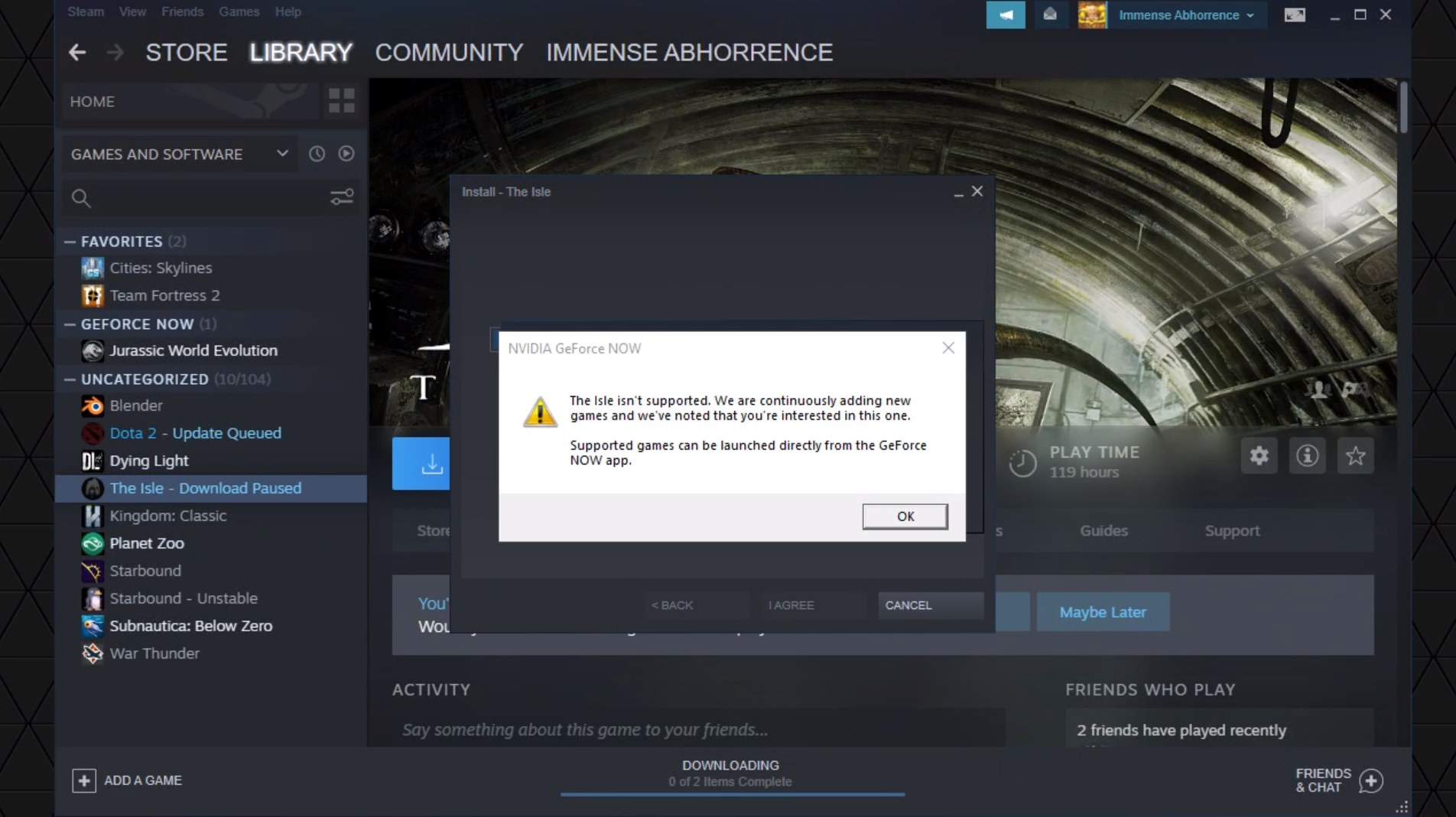
(Again, it DID work. I just don't know if you guys taken it down deliberately or if Nvidia was responsible).
sacred zephyr
And I suppose there's no follow up for that whole thing yet?
(Still thanks for being aware of this tho)
pale pike
We haven't gotten any follow up since then you are right
sacred zephyr
I've also notified them of this as well. Hopefully I'll get something although I highly doubt it. And just to be sure, from the sounds of it, they were the ones who dropped support for the Isle and not the Devs, right?
pale pike
That's my understanding of the situation aswell yes.
sacred zephyr
I thought so as well. Still thanks for clearing that up. 👍
 modest widget
For my friend the server list takes 5 minutes or more to load in servers and it's driving us insane--
 weary mortar
I have trouble with getting audio while in voice chat on discord. When I go in vc discord muted all other sounds. It's with Bluetooth headphone, it shows as 2 devices at sound in the windows bar. stereo and hands-free AG audio (same device name). When I tried to match this with the settings in discord I was able to hear YouTube videos while in vc for example. But The Isle still gives me no sound at all. Then I tried two other games and audio worked just fine while in vc. However whith the isle i get audio during the intro but when the main menu shows the audio is gone. I would really appreciate some help in this matter.
~Thanks in advance
pale pike
could be this setting in Voice & Video settings
make sure you headset is also set as the selected playback device
weary mortar
This is how the attenuation is set
pale pike
Hmm .. You could attempt to delete your saved folder which would reset the game's setting and perhaps fix the weird interaction if there was any.
But doing that would also delete your saved skins
sacred zephyr
I've been told/lead that the Isle's removal has to do something regarding an "opt in" policy that had recently been implemented. If my assumption's correct, you guys will have to once again request for it to be back in its service? Were you guys aware of this or lead to be aware in this? Or is this something completely different that Im not getting?
The person who made me aware of this isn't a mod to my knowledge, but this is how I discovered it. First link leads to what's seen above, while the other shows a list of games currently supported on the Isle (and spoiler alert, The Isle isn't on it)
pale pike
oh ya it turns out there was a follow up.
https://discordapp.com/channels/401464048610312193/401469622659973120/720427718122012752
I saw it later on after our discussion.
sacred zephyr
Oh jeez... I felt like I've should've seen that
I iz dumb
Still, glad to see that it's coming back 👍 Thanks guys!
I'll be looking further to play with everyone in the EMNIRVA build soon (hopefully)!
honest river
i need help i cant connect to any official servers ive been sitting here for 30 mins pressing the refresh button and ive reset my internet to
 still sable
try and go back to the menu screen and back, check for any possible spaces in your server name filter if i have the sisue useually exiting the menu and going back fixes it
still sable
try and check for spaces in any filters
And if that doesn't work. try and resarting it fully
honest river
ive done that and it still wont work XD
do you think the update will fix it cuz im willing to wait
still sable
Probably
Are you online?
Did you start it in offline mode
is your steam in offline mode
lilac thistle
I'll help out in this channel momentarily, just woke up
still sable
np thanks for taking over :p
 round moat
@tawdry cosmos Please discuss your hardware/software in this channel. Thank you!
 tawdry cosmos
ok
but no mater what game, ARK, isle, all my games crash at somepoint'
its says "out of video memory when trying to allocate the texture"
i never had this problem before
i have played the isle since 2017
tawdry cosmos
oh how do i check them?
 empty bloom
u can use DXDiag
press your windows key and just type DXDIAG and you'll have to run the program
tawdry cosmos
ok
tawdry cosmos
SRY FOR THE FINNISH LANGUAGE
can yo tell the condition of my beloved PC
i have playing isle for years and just now this problem came
 tidal robin
No info about your gpu.
tawdry cosmos
why everything goes head first to the shit for me
tidal robin
Are you able to right click system and show properties?
Or device manager.
Right click your start and open device manager, then open the monitor droplet and let me know what it says
tawdry cosmos
sorry if i sound stupid but what "start"
tidal robin
Or simply go to your desktop, right click on an empty space and click change screen resolution
Start is the windows button
tawdry cosmos
hoe does this screen resolution thing help at all
and also i dont have that feature
tidal robin
It shows me your gpu name.
tidal robin
Or do that, yes
tawdry cosmos
k
tidal robin
I didn't know Steam had that lol
tawdry cosmos
well then i wouldnt be here
tawdry cosmos
ok but its all in finnish
tidal robin
That's okay
tidal robin
Too long probably. Don't spam
pale pike
Paste it in different message
tidal robin
And calm down, we can figure this out
pale pike
Or in a notepad , and send the notepad
tawdry cosmos
i cant copy it
tidal robin
Do you right click or drag?
tawdry cosmos
right click and press copy
tidal robin
You need to right click like on the video.
Yes, then open a notepad and paste the info there
And then send the notepad here.
tidal robin
As I said.. put it in a notepad.
That's the whole purpose of it, because it's too long.
Paste the text in the notepad and then drag and drop the notepad in here.
Make sure you save it first
tawdry cosmos
tawdry cosmos
it first was about a year ago but my dad fixed it
it came back about start of the year
but it has been becoming worse
tidal robin
Did you recently update your Windows?
tawdry cosmos
yes
tidal robin
Or GPU drivers?
tawdry cosmos
how
tidal robin
Yeah, I figured that
But his problem specifies memory ...
On the bottom right, click the arrow up and right click GeForce Experience, open it and go to Drivers
Then, search for new drivers, and update.
tidal robin
Then make one. It's easy to do.
It's necessary anyway
Let me know when you update your drivers.
tidal robin
Does it tell you why?
tidal robin
I'm not sure how to help with this one, try and do it on browser?
tawdry cosmos
it says i have nvidia account
tidal robin
Right.
honest river
so reset the password?
tidal robin
Click on forgot my password or something like that and it will guide you to getting a new one.
tawdry cosmos
i dont know how to thank
tidal robin
If the problem persists.. Then your gpu is probably broken
tidal robin
Just give it time.
tawdry cosmos
updatet
 stuck monolith
anyone else having problems with the isle loading? i keep getting a sub system error
modest widget
I'm getting pretty pissed because my friend can't find any servers that I want to play. He used to be able to find the Official US and Official EU servers but now they refuse to show up in his search.
 young monolith
Hey everyone. I'm new to the Isle and I just safe logged out on a server earlier but when I try to reconnect to it, I can't pick my dino. I just get a option to do a new herbivore or carnivore. Am I missing something?
nvm im dumb I was connecting to the wrong official server
orchid swallow
@here Not entirely sure if this is the correct channel to ask this. I cannot play the Isle due to my CPU not being compatible. I cant just up, and buy a new computer just for the CPU for one game. my board is an Asus M5A97 R2.0 so it takes an AM3+ socket. however. its only compatible with AMD CPUS. which it sounds like are unable to play the Isle on. I looked up Intel. they are only compatible with their specific boards. are there any AMD CPUs that ARE known to work with the game? So I know what to look for. remember it needs to be AM3+ socket to match my board.
scarlet chasm
@orchid swallow AMD works fine, the issue is the age of those CPUs (intel included)
 brisk rune
@orchid swallow I would check the manufacturers site also just because a cpu is the same slot type doesn't mean it's supported by your bios.
orchid swallow
Yeah mine is the FX type. OK so other AMDs are fine. My computer has been slowing so when I replace with new avoid FX :)
 clear ridge
 inland sky
idk if l can say this here but did someone change my name ?
 dusk plinth
Probably. To appease Rule 6, names must be typeable on a standardized keyboard.
inland sky
yeah someone just told me but thx
weary mortar
Hmm .. You could attempt to delete your saved folder which would reset the game's setting and perhaps fix the weird interaction if there was any.
@pale pike Even reinstalled the game the audio still disappears after the isle intro while im in discord vc. I have to mention that i do here clicking noises. But as soon as i go out vc i receive normal audio from the isle.
honest river
Is the isle family sharing disabled?
I wanted to try the isle before buying it by using family share
 calm ledge
i tried hosting a map but it wouldnt let me confirm my dinosaur, im just curious if its me or if the game is in a state where you cant really play it because of the recode
weary mortar
@calm ledge I would have to look ingame, but there is something in the options that you have to enable for that. it does auto spawn you as utah i think but you can slay yourself and then you get the dino selection
calm ledge
oh ok ill give that a shot thank you 🙂
 weary ember
Sort of new to The Isle, does anyone know why the pings are so high when in-game using the 'Performance Stats' option. But in the server browser it is usually like 200ms - 400ms difference?
pale pike
When you reinstalled the game @weary mortar , did you delete the saved folder as well?
The ingame ping is innacurate. When you are in a group , look in the group tab to see your true ping @weary ember
weary ember
@pale pike gotcha thank you
weary mortar
@pale pike when i "Right click The Isle in my Steam library > left click properties > local files > browse local files > TheIsle" there is no save folder to be found there.
pale pike
Yeah that's not where you would find it @weary mortar
you can find it by typing %localappdata% in your taskbar search box and pressing enter , scroll down to The Isle and it's there.
 mint frost
Help!! first time installing the Isle and this keeps popping up everytime i try. im having some problems. please DM if you know what to do ;-;
 twilit basalt
@pearl oxide thanks for the help. It was for this person. Could you help them?
 pearl oxide
@mint frost What have you tried so far to fix it?
mint frost
I have tried restarting my computer and reinstall the game as well as reinstalling steam
I also looked things up on youtube to fix it but nothing showed up..
pearl oxide
Are you having this issue with any other games?
mint frost
not that im aware of
pearl oxide
What Antivirus are you using?
pearl oxide
Have you tried verifying your game files?
pearl oxide
One sec
mint frost
okay
pearl oxide
Right-click The Isle, go to Properties
mint frost
Ok, next?
mint frost
okay thank you! I will try!
pearl oxide
That will check your game files to make sure nothing is missing. If it is, it will tell you and attempt to replace it
If files are missing, it's likely that your security software is confusing the game for something dangerous and deleting it automatically
That can be fixed by adding a security exclusion to your software
pearl oxide
If you get stuck again feel free to tag the mod role for help, if I'm around I'll assist again
mint frost
ok!
weary mortar
you can find it by typing %localappdata% in your taskbar search box and pressing enter , scroll down to The Isle and it's there.
@pale pike oke i found it. now i did delete the save folder for sure. but it didn't work. the audio issue is still there.
mint frost
@pearl oxide nothing really worked. i verifyed and my computer is completley up to par
 pseudo fiber
ok so i can't smell.I have had dis problem for over a week i think, but i still can't smell I have tried to reset my settings but nothing works.So tell me am I being dumb or is it a real problem?
 viscid mango
what dino r u?
weary mortar
@pseudo fiber are you playing in survival mode? Cause if you pick a non survival dino in another mode you don't have smell.
lilac thistle
@pseudo fiber What did you to when trying to reset your settings?
 soft heart
I can't ever find Official EU servers.
Any help would be appreciated.
lilac thistle
@soft heart What's your anti-virus/firewall software?
Also please tag me in your replies, it's easier for me to notice.
pseudo fiber
@lilac thistle first yes I am playing on Survival mode and second, I go to setting and there is like this reset button so I press it and it resets my controls etc... But it still ain't working. Maybe I should reinstall the game (edit and yes, I am playing dinos that can sniff, I have experience in the game, I have had this bug multiple times before like 1 year but it usually fixes itself when I relog or when I walk a little bit not this time)
wanton slate
@pseudo fiber I know you said your Dinosaur can sniff, which one is it?
Is it in Juvi or adult stage currently?
Eventually try.. to bind the sniff to a different button (instead of the normal one) and see if it works
- try to press shift, alt, ctrl; sometimes those keys can have a tendency to be stuck even if... well even if you aint pressing it - but that would lead into the game thinking you're pressing like Alt Q instead of just Q etc.
(It usually unjames on keyboard press)
pseudo fiber
@wanton slate I have had this bug for 2 weeks I have played a lot fo different dinos nonoe of them work nor the adult stages.but I will try to do the things u told me and will see If it works and if it doesn't I will just reinstall the game
lilac thistle
@pseudo fiber Try this:
Open File Explorer from the taskbar.
Select View > Options > Change folder and search options.
Select the View tab and, in Advanced settings, select Show hidden files, folders, and drives and OK.
Afterwards, at the bottom left of your taskbar there should be a white search bar. Type %APPDATA% in there and open your %APPDATA% folder.
At the top you'll see the filepath, click "Appdata" to go back to the actual Appdata folder, then to local > TheIsle > delete the "Saved" folder.
pseudo fiber
Will try
soft heart
@lilac thistle
AVG with standard windows defender and etc
pseudo fiber
Doesn't the window key + r send u directly to the place where u should write appdata
lilac thistle
@soft heart Have you tried adding an exclusion for The Isle?
@pseudo fiber It's moreso that you need to follow the steps to enable the ability to view hidden folders, assuming you haven't already.
soft heart
@lilac thistle I can see other official servers, but I'll try 🙂 thanks.
pseudo fiber
Nah I have. But instead I think that wundos key+r is faster(I am not gonna continue this. discussion about the app data cuz there is no need for it rn) Anyway I will try and report back
lilac thistle
👌
pseudo fiber
ok so i did it and it now work ty very much
lilac thistle
You're welcome
 brazen junco
Hello to everyone who is taking a few minutes out of your day to read this (I'm from Brazil so the translation can be a little strange).
Well, for a few weeks now I'm having some complications with The Isle, on Saturday morning when I went to open The Isle, he appeared on that classic Steam screen Preparing to start The Isle and disappeared, he spent a few seconds and nothing from The Isle open, so I said
-Well, that must be the problem
I went to Steam, checked and repaired The Isle files and went to open it again and, nothing. I didn't understand and uninstalled and installed it again, went to open it again and none of it opened. I didn't understand anymore, so I went to a SAS staff (server that I play) and asked them for help, very nice they tried to help but as much as they tried to help me The Isle wouldn't open.
Without knowing what else to do I came to ask for your help.
 mental quartz
Hello, I'm not sure if this is the right place for this question but since Evrima is going to be a new branch. And you can get to legacy through the beta options. (supposedly?) what do you do if they aren't showing up but you 100% have betas enable in steam options?
(I don't have any available branches to switch to right now. I haven't been able to confirm if there are still the other 2 branches available at all)
I also have other games with experimental branches in betas that are working as expected.
pale pike
you're not seeing other branches simply because The Isle doesn't have any branches for you to switch to at the moment. Evrima isn't out yet so there's no legacy either for now
mental quartz
Okay, I wasn't sure if there were still branches besides the public. And I wanted to be prepared for Evrima whenever it comes out so I could switch when needed. 🙂 Thank for the information!
pale pike
@brazen junco post your system specifications by following this gif below
https://gyazo.com/8c1cac40ec65c922d4950386d9d19aba
honest river
checked pins just in case, but i'm UK, having trouble finding offical EU servers, i see the channels here are active. any tips?
full sleet
If I were to create some content for envirma, would I be able to play on it because I’m making content for YouTube? I will start making it as soon as I can play the update. I’m dying to get some new isle content.
??
@pale pike
vast fossil
wait on my server theres nothing to show update server?
so what i do
for when it comes out
full sleet
can i get the update if i start making videos and uploading them to youtube? if you dont know, could you plz find out for me?
full sleet
i cant access the update tho
vast fossil
the public will get it on the 18th as your not an official content creator from the isle you have to wait like everyone else
full sleet
ok thx
vast fossil
np
 clear portal
Who have said 18th ?
vast fossil
the devs
clear portal
Where ?
clear portal
Livestreams of the dev ? i dont find
vast fossil
bro its the 18th go and ask every isle streamer they will tell you its the 18th
 sage talon
@clear portal they're on twitch, they post when they're going live and you can just click the link to watch it
honest river
Me and a mate are trying to join a lobby but having loads of issues.
 deep nexus
Hello everybody!
I play The Isle on a Shadow Cloud PC and in between I have problems with strong lags and fragmentation. The problems only occur at The isle. Is there any problem known and / or are there any workarounds to improve performance?
 unreal dew
hello there! At the time of asking this question I do not know if it is the right place to ask it. How can I be a Content Creator for the isle? . I really love this game and my audience loves this game. I was broadcasting this game almost every night for a month on my facebook page (thanks to this game it started to live), I also made clips of both funny and sad moments for the page. At the moment I only transmit on facebook but I am thinking of uploading my clips and guides to YouTube.
I started alone the first night, and now I have a family of 7 to 11 players every night to play together but sometimes we are 16 and if we were all connected we would be about 28 players in total. I got people interested in the game and bought it in Argentina as in Mexico, whether to play with me or not. Although there are not many sales that I will have achieved, I can say that the public is very entertained by this game and its content. And I'd love to bring you the new map to show you.
I would also like to be a content creator for Latin America, just tell me what I need.
I leave you my facebook where I uploaded many videos of the isle: https://www.facebook.com/Flavioncho-101023501360543
Sorry for my English, but I use a translator
honest river
Is family share off for the isle?
pale pike
You would have to contact Punchpacket#7530 in order to have the CC role , he will tell you the requirements @unreal dew
Yes , family sharing is disabled on the isle @honest river
honest river
Oh
unreal dew
You would have to contact Punchpacket#7530 in order to have the CC role , he will tell you the requirements @unreal dew
@pale pike thank you very much 😄
 solar cedar
Weird black smoke around my dino, anyone seen this before? All my graphics settings are at the highest.
 ember fjord
i've seen it a lot around rocks. i think its just a bug or a weird visual error
sacred zephyr
Follow up question from last time - Did you guys send in the registered info for GeForce Now? Simply curious - for I know Nvidia is (supposedly) making a habit in releasing games every Thursday, and I was wondering if we Geforce members would expect to have it up this Thursday or some other Thursday depending on whether the docs had been signed and what not?
(And even if you guys did happen to get everything ready by now, I won't take it as the game certainly being released, say, this Thursday FE. That all depends on Nvidia themselves.)
 upbeat ocean
Uhh- so I'm on Official US 2, stuck in a tree and I cannot move
My name is currently: Thine Thicc Ass
Ah- nevermind,, growing helped. ;;
honest river
@sacred zephyr They said that they would turn in all the papers for it last week, so I assume that it will be coming out on GeForce this Thursday (if they keep up with adding the games)
 wooden panther
Hey guys. My specs check out for the most part for the Isle, but the processor is 2.21 ghtz. Will that be a problem?
sacred zephyr
@honest river - I definitely hope so. Past two weeks had been consistent, but I'm still wary for any bumps in the road. If not this Thursday than most likely next week (here's hoping its this Thursday tho)
honest river
@sacred zephyr there’s been a lot of games opting in recently, so I doubt that they will skip a day any time soon
sacred zephyr
@honest river - Just being cautiously optimistic.
 soft needle
lilac thistle
soft needle
lilac thistle
@soft needle Please do not tag developers, you're allowed to tag me however. Also this isn't the place for bug reports, it's a troubleshooting channel for technical problems.
soft needle
@lilac thistle alright thx for Info, can u use the Info i told u somehow ?
honest river
The error can be fixed when bug when you attack a player using the 2 types that are available when attacking and the dino stays floating and is small but is an adult seen in the live shows, for example: 2B2V correcting that bug would be great at 11:13 the error comes out
 willow viper
Hi! Excited to finally get this game. Using a MAC that has Windows running virtually on it (via Parallels). Downloaded The Isle via Windows. Seemed ok, but then got an error message I don't understand or know what to do on?
 scarlet rover
@willow viper i would verify your local files in steam first
Start from step 2:
https://support.steampowered.com/kb_article.php?ref=2037-QEUH-3335
Article "Verify Integrity of Game Files"
scarlet rover
It also looks like it might be an issue with hardware: https://steamcommunity.com/app/306760/discussions/1/350540780272650744/

The global shader cache file 'C:/Program Files(x86)/steam/steamapps/common/Obduction/Engine/GlobalShaderCache-PCD3D_SM4.bin' is missing. Your application is built to load COOKED content. No COOKED content was found; This usually means you did not cook content for this build. I...
If youre using a MAC with only integrated graphics with no support for DirectX 11 or 12, that could also be a contributing factor based on that link
scarlet rover
@willow viper Minimum requirements for the game:
MINIMUM:
Requires a 64-bit processor and operating system
OS: Windows 7 64-bit or later (64 Bit ONLY)
Processor: Quad-core Intel or AMD processor, 3.0 GHz or faster.
Memory: 8 GB RAM
Graphics: NVIDIA GeForce GTX 960 or AMD Radeon R9 280X series card or higher.
DirectX: Version 11
Network: Broadband Internet connection
Storage: 25 GB available space
Additional Notes: This game needs a dedicated graphics card to run. Integrated graphics cards will not work.
Make sure you have a dedicated GPU
honest river
Hey, I know there is a good chance that The Isle will be on GeForce Now tomorrow, but does anyone know what time NVIDIA updates it’s library of games?
sacred zephyr
No idea
honest river
Oof
 cosmic axle
.
 fast quartz
I have a Utah baby on Isla Nycta 1 - SemiRealism that is stuck between a fence and large rock. Is there something I am doing wrong to get out of it?
 amber tide
Post in their discord and ask for an admin to get you out. This wouldn’t be the place to post about a private server
@willow viper You would have to use a different computer, I would suggest trying to get a shadow tech vm as the cooked content error is the lack of the minimum requirements being met for the hardware.
 green cobalt
I've found a strange bug... I'm 99.99% sure this is already fixed in EVRIMA. It's nothing major by any means, but I'm still gonna say it.
So when you spawn in, and the first thing you do is hold Q to sniff, it will do nothing. However, if you move just a tiny bit and then try to do it again, it works. No idea what's causing this issue. Has anyone else experienced this?
pale pike
It happens to everyone
green cobalt
Ah, right. Thanks for the reply!
 slim dragon
anyone got any ideas why I cant find Official US servers?
I mean get the EU servers all day, US servers never show up. Did they go extinct in my part of the US? Not that I really need any servers I mean come on this isn't an online multiplayer game. oh wait nvm it is.
 fringe sage
@lilac thistle I don’t know if this is the right channel for this, so my bad if it’s not, but is The Isle EVRIMA update going to be on GeForce Now on release?
honest river
@fringe sage if you download the isle through steam on GeForce now, you can play it
fringe sage
@honest river nice, thanks m8, I appreciate it
sacred zephyr
@honest river - Well I got some bad news for you
sacred zephyr
Wait, what?
Its actually working?
I didnt see them announced at the Game Request thing?
honest river
@sacred zephyr you have to do it through the stream thing
sacred zephyr
Ohhh
I think I know what you mean -
Let me try
Ah it says it isnt fully supported - which only means I have to install it everytime I start a new game. A little annoying but hopefully within the coming weeks it will finally be fully supported
Hopefully it saves progress but we'll see
So confirmed it does work - unfortunately everything I had saved is gone, but at this point it doesnt matter since the recode will be released today
honest river
@sacred zephyr why is everything gone, all my dinos were fine
sacred zephyr
Saves and all? Even custom skins?
honest river
Yea
sacred zephyr
Hmmm...
How many times had you booted up the game since initially reinstalling it?
 azure axle
The update isnt showing for me? I hope it's alright to ask in here, I restarted steam multiple times and all it says under beta is "none opt out of all beta"
pale pike
You can try restarting your computer and then running steam as administrator , if that doesn't fix it then you might simply have to wait until your Steam client sync with their server.
lilac thistle
@azure axle #🔧-evrima-troubleshooting-🔧
 rustic briar
after updating i press play and shows preparing to start the isle then Nothing happens
 vagrant robin
?
honest river
i can get is but normal isle
vagrant robin
you have to update the game
 sinful coral
Every time I try to join a server it gets stuck on "data acquisition in progress"
vagrant robin
restart steam, open it up again, go on library-theisle-properties-betas then select evrima public branch.... thats how to update it
 raw mist
Guys this is for legacy, If you need something for evrima it's #🔧-evrima-troubleshooting-🔧
Helpful info in #pinned-troubleshooting
vagrant robin
steam, look in top right hand corner it should say steam hover the mouse over it and press exit... thats how to restart steam
vagrant robin
enter steam then follow the steps i said earlier
 unkempt gazelle
cant join any fucking servers on evrima just stay in legacy LMAO
all say not password protected but
always get sent to main menu
 wicked star
same
vagrant robin
also if you have issues with the EVRIMA update please go to #🔧-evrima-troubleshooting-🔧 please
 crystal wedge
when i put the file in this path C:\Program Files (x86)\Steam\steamapps\downloading it does nothing i still cant launch it o_0
 kind meteor
OK i extracted the file they said to extract, but ihave no idea how o put it into the Isle launch folder or whatevre they said to do. anyone know how? its already extracted, just need to figure out how to put it in the Isle folder
 iron cape
how do u get legacy?
 uncut bane
my game runs fine but i can't seem to update it, i restarted steam 2 timesnow
honest river
it wont open im saying an evrima prob cuz it wont let me type in that 1 idk y
uncut bane
i know
honest river
o
uncut bane
and its 4 am for me so...guess i stayed up for nothing...
honest river
lol
uncut bane
not blaming them but.. come on lol
honest river
(understading yeah not yay yeah)
 amber raven
honest river
amber raven
honest river
there's an issue regarding legacy server hosting, apparently there's intermediate crashing when player counts get above 60
 desert rampart
Anyone got a fix for no ingame sound? I have sound in the menu on both legacy and evrima but once in game its completely mute
 sharp imp
Anyone got a fix for no ingame sound? I have sound in the menu on both legacy and evrima but once in game its completely mute
@desert rampart Check yours Sound settings and restart Game or reinstall
round moat
@honest river Do not ping any of the developers as per #rules-and-info . Please only DM Punchpacket regarding this matter. If someone is available they will address you here.
 green quiver
How do i switch back to legacy? I went in betas and it isn't there
 agile pelican
When i try to run the TheIsleClient-Win64-Shipping it comes up with an error that says "... Could not find VCRUNTIME140_1.dll ...." is this a big problem and if yes. How can i fix it.
honest river
Not sure if this goes here or not but it's saying fatal error when I try getting into the normal Isle. Help? ;w;
 cunning hull
How to revert back to legacy?
round moat
@cunning hull https://gyazo.com/0c3347f2976f66d2e58bc9814becccd7

You can follow the same steps to access Legacy.
honest river
Guys someone please help, i reverted back to legacy but no servers show up
 mellow cloud
Think servers are down for legacy atm
honest river
ah...
cunning hull
oh thank you!
mellow cloud
Update on when servers will go back up for legacy??
 subtle yew
Never
 remote mesa
The isle won’t even launch for me
 prime leaf
i get "data aquisition failed" in the server list....cant join either
 clear bough
Nimi restart the game
 median igloo
If you have trouble loading servers, you can find servers through steam that will load up the game and put you in the server for u.
But only for legacy
 latent quest
when I boot up legacy I get sound, but once main menu is loaded there's no sound beyond that
even when I log in
 brave star
latent quest
brave star
latent quest
why does legacy have no sound?
 barren cove
So After Re Installing my Game to Play Legacy it seems i cant Even Launch it. Pops up with a Game Crash
 mystic geyser
Servers on legacy are working for me
 prisma path
hi, i have a big problem with the game so far i haven't found any help so i tried to connect to the discord. Can I find someone here to buy me a colat consultant if the game freezes? It's not the drivers, the graphics card is fine. I really like this game, but it's just unplayable when I get stuck for 1-5 minutes regularly after playing for a minute and the GPU stops working. Thanks
If there is anyone who can help me with this, please have a private message, but really someone who could know how to solve the problem. The GPU is either 99% or 0% and the game freezes. Only The Isle, no other or more demanding game, did it for me. Please help
 rugged oar
Hello. I'm loving Evrima so far but I kinda miss the legacy game. Is there a way to switch between the two?
 balmy wind
Yeah you need to opt out of the evrima beta
 smoky nebula
@rugged oar But download it again
honest river
I got stuck in a hole with my utah on eu#1 and cant get out. Right place to post? 😂
 severe current
Everytime I switch back to legacy there is a 9.3GB update
why
how do I fix that
 misty monolith
it downloads the whole Game again, you cant fix that...
severe current
damn so do I have to re-download the game all the time?
 raven pulsar
Hello, I’m having problems with Legacy. Ever since I redownloded legacy, every time I join a server after nearly an hour, everything in the server just stops, I can’t fill up my food, water, everything just stops in the server and eventually I am unable to rejoin the server until I wait after a long while.
prisma path
About a week ago I bought The Isle pears. I really like the game, its its concept and style. Unfortunately, from the beginning since we installed the game, I have a problem with the GPU but only with this single game THE ISLE. Other and much more demanding games play without any problems, but here, when choosing a dinosaur, I find that the GPU runs at 98-100% or drops to 0% in this game and the game freezes. The GPU will either start in a few minutes, sometimes seconds, or at all. I tried to delete the game and reinstall it, I tried the graphics card drivers, older and newer, I tried everything I found or found out, but the result is still the same. GPU is either 98% -100% or 0%. Please, I would like to play the game, but unfortunately it doesn't really work for me and I don't know what to do with it anymore.
honest river
do you have to redownload the whole game when reverting back to legacy or is that a bug
honest river
gotcha, thank you
 spice shoal
There are videos on how to have both at the same time on YouTube
 tender stirrup
ok first of all what is legacy and what is the diff between legacy and evirima
 maiden wigeon
Legacy is the game as you know it before the update.
Evrima is what was released recently.
tender stirrup
ooohh
 opal hawk
... ok, what is legacy? Sorry XD
 weak grove
Legacy is the isle before evrima was released.
Legacy just means "Older"
To put it simply
prisma path
@weak grove hello u are here?
 main canopy
why cant i find any servers on the isle legacy??
honest river
I can’t here anything when I play on legacy
 honest mountain
Restart
honest river
Did not work
honest river
I can’t hear anything when I play but I can here the loading screen
And starting up screen
 quiet folio
heyo so how do i change back over to legacy branch do i just got to betas then opt out of the evrima branch
weak grove
yip
 plush jungle
it wants you to verify your installation, so try redownloading legacy
 analog fulcrum
Trying to open legacy and this happens. Uninstalled twice and verified the files twice
plush jungle
I meant coyote
 nova remnant
@analog fulcrum ^ assuming they will answer
 rapid spruce
Ok so I’m dealing with something on the isle and admins don’t know what to do. I was a sub Rex on a separate server called “new beginning” (can hold up to 150 people) and all of a sudden I can’t bite anymore. I was using a gaming mouse while playing and I tried figuring it out but it won’t work on the mouse (it will work with other keys but not the mouse). Then not only that but two circle show up on my screen and I don’t know how to take them off. Can anyone help me? I’m very lost.
can someone help @honest river with this? i have no clue about it.
 trail falcon
I cant hear sound in game.
I Can hear the intro for the isle but not the in game sound or the UI, i tried checking my audio mixer, the in game settings, Restarting the game/ my computer, uninstalling, and checked a few forum posts. Sometimes i will get a loud ring or static noise but nothing more. it makes it alot harder to play the game and hunt without audio, so if i could get some help on this i would love that. thank you
median igloo
So i cant play legacy now, i tried to evirma but going back to legacy would say i was missing file privilege's
i cant even remove the local files either (fixed nvm)
 mellow pilot
just redownloaded legacy
Fatal error: [File:Unknown] [Line: 3919]
Trailing magic number (0d) in '../../../TheIsle/Content/Paks/TheIsle-WindowsClient.pak' is different than the expected one. Verify your installation.
0x00007ffcd602a799 KERNELBASE.dll!UnknownFunction []
0x00007ff6c8b77d89 TheIsle-Win64-Shipping.exe!UnknownFunction []
0x00007ff6c8bae6f9 TheIsle-Win64-Shipping.exe!UnknownFunction []
0x00007ff6c8b3779c TheIsle-Win64-Shipping.exe!UnknownFunction []
0x00007ff6c8b02e6d TheIsle-Win64-Shipping.exe!UnknownFunction []
0x00007ff6c9e13a15 TheIsle-Win64-Shipping.exe!UnknownFunction []
0x00007ff6c9e0976d TheIsle-Win64-Shipping.exe!UnknownFunction []
0x00007ff6c9e169b9 TheIsle-Win64-Shipping.exe!UnknownFunction []
0x00007ff6c9e1721c TheIsle-Win64-Shipping.exe!UnknownFunction []
0x00007ff6c9e13eaf TheIsle-Win64-Shipping.exe!UnknownFunction []
0x00007ff6c879549e TheIsle-Win64-Shipping.exe!UnknownFunction []
0x00007ff6c8797b96 TheIsle-Win64-Shipping.exe!UnknownFunction []
0x00007ff6c8794f4c TheIsle-Win64-Shipping.exe!UnknownFunction []
0x00007ff6c87951da TheIsle-Win64-Shipping.exe!UnknownFunction []
0x00007ff6c879d939 TheIsle-Win64-Shipping.exe!UnknownFunction []
0x00007ff6ca3f2936 TheIsle-Win64-Shipping.exe!UnknownFunction []
0x00007ffcd6d27bd4 KERNEL32.DLL!UnknownFunction []
0x00007ffcd8ccce51 ntdll.dll!UnknownFunction []
verifying does not work
verified 3 times
nada
mellow pilot
.<
reinstalled
still dosent
f*()&U*&*&
work
verified again without tabbing away from it
NOPE
cant even grow a para
 maiden willow
Sooo I have both versions of the Isle with the files thing and everything. Though I’m able to get into evrima I can’t with legacy i get the fatal error msg
Please @ me for any chance to fix this
It all happened after the update
 normal surge
can't find any official servers. When I do find them I can only find US servers. I can't find any EU servers anymore :(
 worthy burrow
@honest river ull have to re install legacy to hear the game
trail falcon
I cant hear sound in game.
I Can hear the intro for the isle but not the in game sound or the UI, i tried checking my audio mixer, the in game settings, Restarting the game/ my computer, uninstalling, and checked a few forum posts. Sometimes i will get a loud ring or static noise but nothing more. it makes it alot harder to play the game and hunt without audio, so if i could get some help on this i would love that. thank you
pls @ me if you have a solution!
 elfin mica
hello could someone help me?
[19:45]
my config AMD FX8350, RAM 8 GB, GTX1050 TI
[19:46]
I ENTER THE SERVERS AND MY CHARACTER STANDS OVER THE SEA!
 queen jackal
hello, i'm trying to host a server for my friends and I, and while im in the server, they are unable to find it. what could be the problem?
<@&505047238674874368>
 solemn mortar
@queen jackal Have your friends got any filters enabled that could affect the server from showing?
@queen jackal try the bottom solution first
queen jackal
Yeah, we did that and i worked. Thank you 🙂
solemn mortar
@queen jackal awesome, Enjoy 😄
 dusky horizon
Hi! My friends and I recently started a server, but unfortunately one of them cannot seem to find the server no matter what he tries. Any help would be greatly appreciated.
solemn mortar
@dusky horizon Please read the above fix which worked for Yamina.
dusky horizon
He's tried that.
solemn mortar
did he disable his firewall?
dusky horizon
Yes.
solemn mortar
can you send me a screenshot of his server filters?
dusky horizon
https://cdn.discordapp.com/attachments/276492471796498432/726071323431927808/server.PNG
He's been fiddling with the max results.
 solemn mortar
needs to be set to 1000
if that does not work, tick secure
then restart his game
dusky horizon
Tried it, he's getting every other server except the one he's looking for LOL
Gonna try verifying his files.
solemn mortar
is the server working for others?
 solemn oracle
I need trouble shooting help! My partner just got the game (as did I) and they tried to load into a server but nothing would show up? Like it just stayed on the night time screen with the aurora borealis and we could hear the sounds that usually come up when waiting to enter a server but it was nothing. It was just that screen. We waited for a while and nothing changed. Hopefully you guys know how to fix it?
 scenic spade
Is there a way to go back and forth between Evrima and Legacy without having to reinstall the patchs every time like there was back when it transferring from Region 2 to Thenyaw?
 harsh crescent
how do i access the small envelope on the bottom left corner of my screen
 slate quiver
@harsh crescent that just means that you have an unread message in Global, Group, or Local chat. Try switching to a different chat until it goes away
harsh crescent
makes sense. so my friend and i join the same server how to i add him to my group
slate quiver
@harsh crescent press tab and search for his name
harsh crescent
i searched and pressed the plus icon
slate quiver
then press the + button
harsh crescent
but he didnt recieve anything
slate quiver
then he has to press F1
sometimes it glitches when you send an invite just when someone logs on, try again and have your friend press F1 after you send an invite even if it doesn't show up
slate quiver
@harsh crescent try getting your friend to send you an invite then
trail falcon
I cant hear sound in game.
I Can hear the intro for the isle but not the in game sound or the UI, i tried checking my audio mixer, the in game settings, Restarting the game/ my computer, uninstalling, and checked a few forum posts. Sometimes i will get a loud ring or static noise but nothing more. it makes it alot harder to play the game and hunt without audio, so if i could get some help on this i would love that. thank you
pls @ me if you have a solution!
honest river
I'm having this problem were i can't get in any servers can hear the sound of the game for a second but it boots me back to main menu with this massage HOST CLOSED THE CONNECTION. I don't know what to do
honest river
any help?
 stuck creek
can someone explain to me why i need to mute my sound ingame (Master Volume on 0) to change my colors on my Dino or to tap out of the Game. when i dont do that my game freezes and it takes me forever to change my color or to just spawn on the world
worthy burrow
@trail falcon re in stall
worthy burrow
like the whole thing?
trail falcon
yup
ive deleted the files, uninstalled through steam, etc etc i unistalled steam at one point as well
worthy burrow
hm thats weird?
I reinstalled bc my sound wasntworking and it worked fine then..
trail falcon
well not for me unfortunately but im trying to contact the support team but noone is answering no matter how i contact them, im kinda angry atm
worthy burrow
god that sucks so much sorry i cant help wit that
trail falcon
its okay thank you anyway
 honest anvil
@trail falcon have you cancelled your audio in the task manager because i did that once if thats what you did then just turn on and off your pc
 unborn umbra
Hey, I switched back to legacy and I seem to be having troubles hosting a server for personal play. I go through the settings and when I click play it just sits at a black screen forever.
dusky horizon
Hi, back again. My friend still can't seem to find my server though everyone else is able to. He can join off of someone who is connected but can't seem to find it on his own.
He's tried:
- Verifying game files.
- Changed the limit of results.
- Firewall (he bypassed and then even tried shutting it off.)
- Changing the server name.
trail falcon
@honest anvil i tried turning on and off my pc many times i dont think its that if thats the fix
honest anvil
Yeah ok that worked for me ill find a way if you dont fund one :)
trail falcon
ty for trying to help : )
 low prawn
I cannot find any official servers, what could be the issue?
 next zinc
Why is my ping so absurdly high on every server I join? It makes this entirely unplayable, because all my enemies teleport around.
I even try to go by the server list, where I'll see a server with 20-30 ping, and second I get in game it's 170-300ms?
 sand nexus
 thorny canyon
My friend has tried every fix and can’t see servers
Was just playing the other day moved and. Ow can’t see any
 unborn matrix
Uh so a bit of a weird bug/whatever report I guess. But I was looking for a server and scrolled all the way down to the bottom when I saw this collection of servers that drew my attention. All had a max cap of 200 players which extraordinarily high online player counts. The names were all similar in a way, had china and then a few odd words, then a string of numbers. I logged onto one of the servers (the one i joined is 3rd from the bottom in that first screenshot) and not only was the server name different, but the online player count/list too. I've never encountered something like that before?
It's not something that impacts my gameplay, but I thought I'd bring it up in case there's some issue here with people falsifying server info or something like that. https://imgur.com/a/Msbo2yM
As far as I can tell the players are real players ¯_(ツ)_/¯ i wasnt in there long but i heard some utah calling and saw them in the distance
 thorny sundial
I had an issue where the server shows its 0/20 but then log in an it’s 18/20
¯_(ツ)_/¯
 hardy leaf
Game occasionally crashes when I tab out/press F 11 to go into windowed mode instead of fullscreen
 wanton olive
Game crashed upon spawn in took me 5 try tell Sub Giga starved to death?
 ocean acorn
hello, if i may ask why did my legacy game files disappear? if i revert back to it it starts downloading. surely steam must have failed to locate it?
honest river
when i get in any server the loading thing get's 100% and then it goes down to 38% after that it boots me to main menu and it gives me a message saying kicked from server host lost connection . Don't know what to do...
this is in legacy
 toxic plank
Is there any way to get EVRIMA and Legacy downloaded? So I don't need to uninstall legacy to play on evrima, or the other way around ...
 forest apex
i cant find my servers
trail falcon
I cant hear sound in game.
I Can hear the intro for the isle but not the in game sound or the UI, i tried checking my audio mixer, the in game settings, Restarting the game/ my computer, uninstalling, and checked a few forum posts. Sometimes i will get a loud ring or static noise but nothing more. it makes it alot harder to play the game and hunt without audio, so if i could get some help on this i would love that. thank you
pls @ me if you have a solution!
 rustic bough
i'm having an issue with server's not showing up at all and when they do finally show up they say i've lost the connection when i click on them like they are full. i've never had this issue before.
I should note that i was just in another server, just fine for a few hours and i have messed with my ping. i had also logged into an official server, but it won't let me log back into one now and the server is not full at all.
 white gyro
I've seen the pinned fixes for NO servers popping up, but recently only a few high ping servers appear for me in both Evrima and Legacy. Instead of the usual long list of varying ping servers. Would I just follow the fix for no servers appearing?
honest river
ok so i played evrima and switched back to the normal isle i geuss and now the colors arereally wacky and zoom out my screen what do i do
 fickle quail
I need help. I want to know how to switch back to Legacy.
round moat
@fickle quail You can follow the steps in this gif, just select the legacy branch and you’re golden:
Also how to swap your steam branch: https://gyazo.com/0c3347f2976f66d2e58bc9814becccd7
You may need to restart your Steam client for the legacy download to begin.
 tawny nest
Legacy Server
AiSpawnRate? What is the best setting in order to have frequent encounters with ai when Ai limit has been set to 300 with a server of 150 player slots?
 nocturne wyvern
You cant swap ai spawn rate, it is limited to 40 ai or so alive on map
@tawny nest
nocturne wyvern
<@&401466542140817419> Hello, I'm just wondering if the "@ officialserveradmin" tag is broken in #401465680848748547 channel.
I have been trying to get a response for almost 3 days now, and yet still no response?
Have legacy servers been abandoned? I would understand why, but at least a statement saying they will not receive admin support anymore would be nice.
Thanks.
 sour shore
I can hop on and see what's up.
 onyx hollow
Noticed this on US server a few days ago so not trying to break location rulesbut th map/terrain along the south gulf shore is broken. There is 1 long mesh crease where the mesh does not fit together causing a huge seam. Going along the shore towards the coastal pond and I had found multiple texture problems along the shore. 2 triangle black textureless cuts and 1 huge land texture that is grass where it should be sand. Very noticeable and out in the open figured I'd let you guys know.
 quiet orbit
They likely won't be fixing anything with the map/textures as they are working on the new branch, evrima
 candid moss
I having issues nesting on my legacy server after dying with a nest yesterday. The server has since restarted twice since I had these issues. I also have a friend that has a permanent nesting issue on multiple servers and we would both like to figure out how to fix this bug
 flint plover
What are you playing as?
Or is it all of your dinos?
@candid moss
If its all your dinos and its your own server you might need to go into your game files and delete your file (Same one that you'd be editing if you were injecting), its probably corrupted
tawny nest
@nocturne wyvern So it auto turns it down to 40? Or should I do it manually?
nocturne wyvern
from what server owners have said to me the ai is hardcoded and there is no way to change it
tawny nest
Ok thx 🙂 Will leave it to that then.
candid moss
If its all your dinos and its your own server you might need to go into your game files and delete your file (Same one that you'd be editing if you were injecting), its probably corrupted
@flint plover I'm not hosting it myself I bought it from Nitrado and I have no idea how to delete my file
flint plover
Do you have access to the server panel?
candid moss
Yes I do
flint plover
Okay so you log in, go to game services, select "File manager", then go through this file path: TheIsle > Saved > Databases > Survival/Sandbox (Whatever setting your server is set to) > Players
Then it'll reload for a while, when the page refreshes it should have a big list of player files with IDs as the names. Copy your ID from ingame and paste it in the search bar just above the first player file, then hit enter. It'll reload again, and yours should be the only one on the page after that. Check the box next to it and hit the delete option. Your dino will be gone and you'll have to start anew but it should be able to let you nest now
You should also not be in the server when deleting this
candid moss
Alright so I'm in my file do I just delete everything in my dino file?
flint plover
Delete the file itself
candid moss
Alright and now that I deleted it I can hop back into the server?
flint plover
Yes, you should be able to nest now
candid moss
Alright thank you
flint plover
Np!
low prawn
Hi, I am trying to press B to create a nest. but nothing pops up. Is there anything that can cause this issue?
(I am fully adult t-rex)
female, obviously
 turbid sleet
So im on legacy and any server i try to join it just says kicked from server, host closed the connection
is there any way to fix this?
weary bloom
ì cant get the EU servers on legacy to show up
flint plover
Hi, I am trying to press B to create a nest. but nothing pops up. Is there anything that can cause this issue?
@low prawn Have you tried biting first?
So im on legacy and any server i try to join it just says kicked from server, host closed the connection
@turbid sleet Try validating files, right click The Isle, go to properties, then local files, then verify integrity of game files, other than that I'm not sure what to do
sage talon
Ive re downloaded legacy but i get a fatal error when trying to open the game. it says the "Trailing magic number in (file name) is different than the expected one. Verify your installation. " but im not sure how to. ive verified the integrity of the game files but it still hasnt changed, can i get some help?
Ah never mind i got it, just had to delete the file.
 ocean citrus
Hi, Im a cera trying to nest, but relogging, biting before placing, and searching for dif terrain isnt working, no nest is put down. can anyone help please?
this is on the legacy server btw
flint plover
@ocean citrus Ceratos are notorious for their weird nesting. Depending on the server/admin, you might be able to get an admin that'll help you out and slay/regrow you if nothing else works
Other than that your best bet is growing from juvie again and nesting as soon as you hit adult
 mild basin
Anyone else recently having issues starting The Isle? Last time I was able to run it after switching from evrima to legacy just fine but for some reason it aint working as smoothly atm...
ocean citrus
ah okay, thanks for the tip
flint plover
Np np
 pallid matrix
so i have the isle and have been playing for about a month now and I found the evrima update and now i cant even join the game like it won't open let alone play it
oh i think i typed this in the wrong chat sorry
 remote gale
So your game dont start? This channel is for the legacy build -> for Evrima go to #🔧-evrima-troubleshooting-🔧
pallid matrix
yah i just realised sorry
 long tapir
hi, im trying to run the isle (legacy) on a computer my mom has had for a while. the issue is that it keeps popping up with "DX11 feature level 10.0 is required to run the engine." i've looked all over google and done everything from manually updating cards to installing latest windows updates and reinstalling the game. if anyone knows whats up and can help me id appreciate it so, so much!
also, when opening dxdiag, it says my dx version is 12, and it lists 10.0 in the versions logs.
long tapir
bro nah nevermind im just gonna play on my laptop
 worn yacht
when i try to find a server it say this and i have this problem from april anybody know how to fix it ??
 fathom sparrow
@worn yacht try going into steam - top left clcik steam - settings - in game - then set your server max pings a minute to a lower value
pallid matrix
hey question I am currently on evrima and it takes FOREVER to load back to legacy. Is there a quicker way to do this instead of every time waiting for it to load when I want to play Evrima and Im on Legacy.
sorry if this is the wrong chat I didn't know if this should go in evrima or legacy trouble shooting
flint plover
If you're talking about switching back and forth it just depends on your download speed @pallid matrix
pallid matrix
oh ok
 gray radish
For the past two weeks, whenever an announcement pops up on a legacy server, I see that same announcement pop up again two more times in less than 10 minutes. Other players are reporting seeing the announcement once, but I'm seeing every announcement three times.
Am using nord VPN. Have uninstalled, reinstalled, turned off and on, restarted, verified game files, updated etc. I want to see the sky again.
System info attached.
Have been playing for at least 8 months, this is new.
Anybody else see this? Or have other solutions?
 quick pumice
I'm unable to find the main servers I play on. I can't even find the official servers. What did start showing up were servers I've never seen before. (Servers that said "China" in the title.) Does anyone know how to fix this.
Side note: I just reverted from Evrima to original. This is when the proble. Started I think.
 dense ruin
How do you download back to legacy without adding extra gb?
 frank spire
servers wont pop up still says scanning all frequencies
 shy heath
@placid dune try uninstalling and re-downloading it. I had the same problem and that fixed it for me, hopefully it helps!
rustic bough
i'm still having an issue with the official servers. i can get them to show up, they aren't full, yet the server connection times out for me. i have no issue logging into other servers, it's only the office that it is doing that to me
 hasty crescent
i cant get the server i want to play on to show up. ive sat here for at least an hour a day refreshing but none of the servers i play on will show up. its been like this for a week or two, i dont know if it something you can fix though. i have restarted my pc, switched to evrima and back let the computer sit for a day and it hasint worked. i dont know what to do anymore. i hope you can help.
 median owl
Guys who can help? I can’t access the Russian servers! At first, everything was fine. I’m playing on Russian servers, and now the servers have changed! Ie not Russian servers how to return the old sheet with Russian servers? And I ask if you answer me then write at the beginning of the text "KHAN" it will be more convenient for me, I just don’t really know English) And I'm sorry if I distract everyone from the topic)
 sly fjord
@median owl - Add an exclusion to your anti-virus/firewall for The Isle.
Identify which anti-virus/firewall program you have (if any) and add an exclusion for The Isle. Anti-virus/firewall interference is generally the most common cause for this particular problem, exclusions often solving the issue entirely.
- Adjust your Steam In-Game server browser: Max pings / minutes.
At the top left of Steam you’ll see a little button labeled “Steam”, left click that and select settings > in-game > and adjust the dropdown menu at the bottom to around 1000. You may need to tinker around and find the magic number that works for you, afterwards simply hit ok and launch The Isle
Had the same issue the last month, changing the max pings/minute fixed it for me.
@hasty crescent
 heavy kettle
Okay I am having an issue with the Isle. At first I couldn't even load it. I could load other games but not the Isle. I updated my driver and my windows 10. That got me the ability to load the game. Alright, that's good I can play! Nope. No sound whatsoever, not through the headphones and not through the monitor. I went to the local files and deleted everything then uninstalled and reinstalled the game. I restarted the computer and then launched the game. It now has sound! Yay! I can play! Well, sort of... the sound only plays through my monitor not my headphones like it used to. Youtube sounds go through my headphones, other games go through my headphones, just not the Isle.
I'm at a loss. Do I do the same thing I did before, delete all my files, uninstall and reinstall and then restart my computer?
worthy burrow
i cant hear sound i even re installed can some1 help?
heavy kettle
Okay now I'm back at square one... My game has no sounds whatsoever again. :\ Do I really have to do that fix every single day that I want to play the game? I cannot even play other steam games while I wait for this to download every single time. And it takes a while for this to download. This is not fun.
@sly fjord Uh, I think I can grasp your meaning, maybe. I checked my volume mixer, it had my headphones and all the apps there. Unsure if it was making noise at the time, I have to do this fix all over again and see if it works this time and hopefully itll be the last time I have to do this fix... I didn't mess with it while the game was running, other than to turn spatial sound on and then turn it back off but that was it.
Oh another thing, in order for the game to load, I have to click on the black screen or it won't go to the title screen. Perhaps that has something to do with it? I'm unsure of how to stop it from doing that.
heavy kettle
https://youtu.be/N7HeHLblLXM made a video of the issue that I'm having. I hope this explains it better.
 worthy burrow
i fixed my problem with the sound, i had to delete the files out of the isle file and then uninstall did u try that
heavy kettle
Yes, as I had explained above in my very first post here.
I have to do this EVERY day i want to play too
Now that I did the fix, for the second time... I have made another video: https://youtu.be/_1AWIXnL3qw


 halcyon skiff
My in game recordings only show the beach and nothing else. Doesnt even show any dinos that pass that spot
Anyone have any idea how the fix this or whats causing it?
 gleaming frigate
only a certain amount of servers is popping up, yes ive already tried every single option for max pings/minute. doesnt work at all
 jade wyvern
Hiya, i could really use some help, a friend of mine has been struggling to run the game for more then an hour without crashing, i can send the error shown. However, when they log back in their frames and game can no longer run correctly, the laptop she uses isnt that old, is updated and recently had a factory reset to try and fix the issue, a response and a possible solution would be brillant! Thank you!
 thorny oasis
Bruh am I the only one thats just teleporting like crazy all the time?
 warped rivet
does anyone know how to fix the bug with sniff?
for some reason it wont show any thing or highlight anything
warped rivet
if you know you to fix it pls DM me on how to do it
warped rivet
Never mined I fixed
 fickle nova
My friend keeps crashing and getting this error message any ideas? Fatal error: [File:Unknown] [Line: 826]
Rendering thread exception:
Fatal error: [File:Unknown] [Line: 200]
Unreal Engine is exiting due to D3D device being lost. (Error: 0x887A0006 - 'HUNG')
0x00007ffaabbd3e49 KERNELBASE.dll!UnknownFunction []
0x00007ff6fec17d89 TheIsle-Win64-Shipping.exe!UnknownFunction []
0x00007ff6fec4e6f9 TheIsle-Win64-Shipping.exe!UnknownFunction []
0x00007ff6febd779c TheIsle-Win64-Shipping.exe!UnknownFunction []
0x00007ff6feba2e6d TheIsle-Win64-Shipping.exe!UnknownFunction []
0x00007ff6ff06bf5b TheIsle-Win64-Shipping.exe!UnknownFunction []
0x00007ff6ff06cd8b TheIsle-Win64-Shipping.exe!UnknownFunction []
0x00007ff6ff058900 TheIsle-Win64-Shipping.exe!UnknownFunction []
0x00007ff6ff0648e8 TheIsle-Win64-Shipping.exe!UnknownFunction []
0x00007ff6ff348796 TheIsle-Win64-Shipping.exe!UnknownFunction []
0x00007ff6ff36ab47 TheIsle-Win64-Shipping.exe!UnknownFunction []
0x00007ff6ff3754eb TheIsle-Win64-Shipping.exe!UnknownFunction []
0x00007ff6ff360e5a TheIsle-Win64-Shipping.exe!UnknownFunction []
0x00007ff6ff37227b TheIsle-Win64-Shipping.exe!UnknownFunction []
0x00007ff6ff12a70a TheIsle-Win64-Shipping.exe!UnknownFunction []
0x00007ff6ff3366df TheIsle-Win64-Shipping.exe!UnknownFunction []
0x00007ff6ff3289b9 TheIsle-Win64-Shipping.exe!UnknownFunction []
0x00007ff6feb11743 TheIsle-Win64-Shipping.exe!UnknownFunction []
0x00007ff6ff4a0b42 TheIsle-Win64-Shipping.exe!UnknownFunction []
0x00007ff6ff4a0bc8 TheIsle-Win64-Shipping.exe!UnknownFunction []
0x00007ff6fec22b4b TheIsle-Win64-Shipping.exe!UnknownFunction []
0x00007ff6fec2008c TheIsle-Win64-Shipping.exe!UnknownFunction []
0x00007ffaae106fd4 KERNEL32.DLL!UnknownFunction []
0x00007ffaae3dcec1 ntdll.dll!UnknownFunction []
honest river
the isle keeps crashing i tried some fixes but didn't work send help
heavy kettle
https://ptb.discordapp.com/channels/401464048610312193/401485101046693888/732506822887473194
https://ptb.discordapp.com/channels/401464048610312193/401485101046693888/732656500774010950
I'm still having this issue. The links just move you further up in this channel. The clean install only works to get sound through the monitor. And when I shut down my computer, that fix is destroyed. The next time I boot up my computer, I have to do the clean install again just to get sound again...through my monitor. I need it through my headset and for it to be a permanent fix. If someone could please help me, that would be very much appreciated!
 heavy hinge
@heavy kettle that little icon you see on the bottom right is from nvidea geforce. if you are in game press ctrl z to open a menu. click settings on the right then go to HUD layout. then click on status indicator then click off (should show the bottom right box for you atm)
for the blackscreen and sound i have no idea ill see if i can find something.
 left dust
I cant get servers to load. One pops up SOMETIMES. I am trying to get onto the nublar servers.
I know it has to be a wifi/network issue because I moved to my dads house recently and thats when its started to do this, it was perfectly fine before hand.
I have tried redownloading the game, lowering max pings/min (lowered it all the way down to 250 and still nothing), letting the isle through firewall/turning off firewall completely, opening a port in my wifi networking thing. Nothing has worked.
please help, I've tried everything I know @ me if you got something I can try
heavy hinge
@left dust i think you have to increase the max ping/min
left dust
hmmm.. Ill try that too, I did the whole cmd prompt thingy that was suggested and restarted my wifi and I was able to load up the server, so alls well for now
honest river
Not sure if it's part of the update or a bug, but has grazing been taken out?
woops meant that evrima, sorry
 humble jungle
uhso- i went into a server i admin on and when i logged in my dino was sliding across the ground, when it stopped and everything loaded in i went into spec. but it gave me a gmod sort of camera effect of my dinosaur walking around.
humble jungle
ive respawned and now i can no longer pick a dinosaur or do anything, ive uninstalled and re-installed the game and its just frozen on the background of the dinosaur picker
 timid trout
hello, sorry for bothering you but I got stuck in a rock while playing on your eu2 server, can someone help me or tell me what to do? thx
honest river
@jade wyvern
I have a fix for ur issue
U overclocked ur memory to high
Make it lower
jade wyvern
@celest path ^^