#🔧-legacy-troubleshooting-🔧
1 messages · Page 44 of 1
 pale pike
I'm not really aware of how network connections really work or if the game really handle it differently , all I can do is offer possible solutions that worked for some peoples , although it seems a few players have an unlucky situation where nothing works for them.
 weary stump
it would seem as such
so yea
tried switching regions
connected for 15 seconds and was promptly kicked
pale pike
Have you tried running the win64-shipping executable?
You'll find it in (wherever steam is installed) steam>steamapps>common>theisle>binaries
(Out of memory , im on my phone)
weary stump
uh
yea
i understand the difference between the two
I have packaged my own UE projects
sorry for the delay
kind of gave up and just trying to moderate within the discord
 empty sky
hey so i want to play the game but it says i need DX11 feature 10.00 to play. i know i have it installed as i just checked so how do i get on the game?
pale pike
What's your GPU @empty sky?
empty sky
i have two Nvidia Geforce 760m 2GB =4GB im on an alien ware gaming laptop
pale pike
Look to update your drivers if the game isnt detecting dx11 @empty sky
Also , if your CPU happens to have an integrated video chip , I would recommend giving priority to your Nvidia's cards so that the game doesnt try to use the integrated
pale pike
You can update your GPUs driver through the Geforce Experience software on your computer . if you do not have it installed , then head over to Nvidia's website
pale pike
Does it gives you an error code or something?
You tried through geforce or nvidia website ?
empty sky
GEforce
pale pike
Are you using windows 7 or windows 10?
empty sky
10
pale pike
Let me have a good look at your system specifications
Follow the method shown in this gif and copy paste the results here
 pale pike
Break it down into 2 or 3 messages
empty sky
Computer Information:
Manufacturer: Alienware
Model: M18xR1
Form Factor: Laptop
No Touch Input Detected
Processor Information:
CPU Vendor: GenuineIntel
CPU Brand: Intel(R) Core(TM) i7-2860QM CPU @ 2.50GHz
CPU Family: 0x6
CPU Model: 0x2a
CPU Stepping: 0x7
CPU Type: 0x0
Speed: 2492 Mhz
8 logical processors
4 physical processors
HyperThreading: Supported
FCMOV: Supported
SSE2: Supported
SSE3: Supported
SSSE3: Supported
SSE4a: Unsupported
SSE41: Supported
SSE42: Supported
AES: Supported
AVX: Supported
AVX2: Unsupported
AVX512F: Unsupported
AVX512PF: Unsupported
AVX512ER: Unsupported
AVX512CD: Unsupported
AVX512VNNI: Unsupported
SHA: Unsupported
CMPXCHG16B: Supported
LAHF/SAHF: Supported
PrefetchW: Unsupported
Operating System Version:
Windows 10 (64 bit)
NTFS: Supported
Crypto Provider Codes: Supported 311 0x0 0x0 0x0
Video Card:
Driver: Microsoft Basic Display Adapter
DirectX Driver Name: d3d10warp.dll
Driver Version: 10.0.18362.1
DirectX Driver Version: 10.0.18362.356
Driver Date: 6 21 2006
OpenGL Version: 1.1
Desktop Color Depth: 32 bits per pixel
DirectX Card: Microsoft Basic Render Driver
VendorID: 0x1414
DeviceID: 0x8c
Revision Not Detected
Number of Monitors: 1
Number of Logical Video Cards: 1
No SLI or Crossfire Detected
Primary Display Resolution: 1920 x 1080
Desktop Resolution: 1920 x 1080
Primary Display Size: 20.00" x 11.26" (22.91" diag)
50.8cm x 28.6cm (58.2cm diag)
and thats all.
pale pike
I see , steam is not detecting your GPU at all
empty sky
why is that
pale pike
perhaps it died of old age or it's not properlly installed
empty sky
what is the best way to fix this problem.
pale pike
I doubt i can walk you through opening your laptop and making sure that the gpu is correctly plugged in , my best suggestion would be to have your laptop checked at a computer store
empty sky
understandable thanks so much for the help. Hopefully i will be on the game soon.
pale pike
Although , before taking it to the store , it's worth the shot to try setting the priority for your nvidia card

Tech Advisor
We show you how to set a default graphics card in Windows 10, be it Nvidia or AMD.
Here's a guide you can follow @empty sky
 tulip nexus
Hey guys. I have a problem, The game does not look for official and Russian servers (I'm from Russia), The problem appeared a couple of days ago, before that everything was fine, what to do? Help pls
 scarlet chasm
@tulip nexus
If servers are not showing up:
- Click Steam in the top left of your Steam library.
- Go to Settings > In-Game > click the bottom dropdown box and change your max pings to 1000. Note: You may need to play around with the best setting for you. Some players have reported 500 works better for them.
IF that doesn't work, follow this:
Open an Administrator level command prompt
- Type in
CMDon your windows search through your computer. - Right click
Command Prompt - Click
Run as Admin. It'll open a black weird box - Type
ipconfig /flushdns - Hit enter
- Type
netsh winsock reset - Hit enter
- Reboot your computer
- Open up
The Isle
tulip nexus
@scarlet chasm It did not help( Maybe you misunderstood me, because I use Google translator, sorry. I have a server on the list, but these are not the ones I used to play on. If you put the official server in the filter, then the game does not find it. Also with Russian servers. Oh yeah i almost forgot, Through friends (using steam friends) I can connect to the server that interests me.
But friends don't always play on the server I need(
 tough kayak
help me its happens a lot when i press refresh i can't find server when i restart my computer it finds again but after 1 refresh again i cna't
 foggy marten
@scarlet chasm tried the list you gave me to fix for server issue, been trying to find the USA official server. this 2 solutions did not work at all. thanks for the help the
scarlet chasm
@pale pike is there anything I am not thinking of when not seeing certain regions of servers?
 willow cedar
Can't get any Official Servers to appear. Get tons of servers to show but second I check the Official box for the filters and nothing works.
scarlet chasm
@willow cedar look at my post a bit up if you haven't tried that
willow cedar
@scarlet chasm I did both still nothing.
pale pike
Adding the game in the anti virus / firewall exception list, and launching both steam and the game as administrator could help @scarlet chasm
@tulip nexus you could use the Steam Server Browser to try and find the server you want.
Open up steam > top left of the screen "View" > server > add a filter for the isle and search
tulip nexus
@pale pike No, it didn’t help ( Steam is looking for the same servers as the game. That is, there are also no official servers( For some reason, I only see servers in the European region. I don't know what this is about. More recently, I saw the servers of the Russian region and the official ones, since then I have not changed anything on the PC.
 keen edge
Hi, I've been having this problem just today. I'm being kicked from every server that I try to hop into. It's annoying me actually and I haven't broken any rules?
 acoustic laurel
what i did to fix it when it happens to me is
Step 1, verify integrity of game files for the Isle
Step 2, close the process to all steam items so its fully shut down then right click steam Shortcut and click Run as Administrator then start the isle up after.
Hope it helps if not i'm sure someone will help you with other means
pale pike
@tulip nexus did you try to add the game executable in your anti virus / firewall exception list ?
willow cedar
How do you add game to firewall exception list? That's one thing I haven't tried myself yet.
pale pike
In the Start menu click Settings, and then enter Firewall in the Find a Setting search box.
Click Windows Firewall in the search results. In the resulting Windows Firewall window, click Allow an App or Feature through Windows Firewall.
In the Allowed Apps window that appears, click the Change Settings button, and then select the check box for The Isle to allow it to communicate over the Internet without being stopped by Firewall.
@willow cedar
willow cedar
@pale pike Alrighty did that. Now Start up the game and see if that works?
willow cedar
@pale pike Still nothing.
pale pike
even from the Steam Server Browser?
willow cedar
@pale pike I can see the servers from that list but when select any one of them it tells me the server is not reaponding
pale pike
A dns flush may help that , running game/steam as administrator, I am not really sure what else
scarlet chasm
@keen edge delete all files within the steam program files folder EXCEPT Steam.exe and SteamApps. Then rerun steam
 lost junco
why is my game lagging
all settings low
like i am rubberbanding
and i am behind rex and he hit me!
acoustic laurel
That can be a number of things... depends what server you on, If your net is being crappy, If there's a large amount of players around you, If your computer is updating/downloading/virus scan in the background. loads of other possibilities.
 round zinc
Does anyone else get blue screens when playing the Isle and possibly know how to fix it? I tend to get them when accessing Replays or when playing (it seems to trigger often when I sit on cliff edges). There doesn't seem to be any fixed amount of time before it will blue screen. Sometimes I can play for hours before getting one or I can get several in a row. I've not had this problem playing other games.
tulip nexus
@pale pike Yes, I added to the antivirus and firewall exceptions, Without results( I'm desperate, nothing helps. I can't play my favorite game on my favorite servers((9
foggy marten
here again, reporting...cant find the USA official server! i tried command promt, fire wall, restarting game / pc, refreshing 1000 thousand times. looked at devs posts on steam forums on how to fix it, it does not work like always.
this, this is only officials servers i get. WTF. search server list is freaking garbage. needs to be fixed.
 shut trellis
My friend got this trying to load the isle for the first time. Help?
pale pike
his gpu doesn't support Dx11 most likely is the issue
shut trellis
Ok, they are getting a new graphics card soon but was just wondering before hand
foggy marten
no fixes for usa not showing on official server search?
pale pike
By the looks of it you already tried all ideas I can offer
foggy marten
@pale pike fixed it this time.
 slender parcel
pale pike
slender parcel
pale pike
It means your GPU is crashing @slender parcel , post your system specifications by following the method shown in this gif https://gyazo.com/8c1cac40ec65c922d4950386d9d19aba
tulip nexus
Can someone help me?(
Steam is looking for the same servers as the game. That is, there are also no official servers( For some reason, I only see servers in the European region. I don't know what this is about. More recently, I saw the servers of the Russian region and the official ones, since then I have not changed anything on the PC.
@tulip nexus
 mortal yacht
Can't find any servers. Any idea what I should do? The game has been working fine untill I booted it up today.
Oh never mind, its working now 😅
 honest river
I am having the same issue as Raptor but mine is still not working
 fresh fern
scarlet chasm
fresh fern
scarlet chasm
@honest river and @fresh fern have you guys tried the below steps?
If servers are not showing up:
- Click Steam in the top left of your Steam library.
- Go to Settings > In-Game > click the bottom dropdown box and change your max pings to 1000. Note: You may need to play around with the best setting for you. Some players have reported 500 works better for them.
IF that doesn't work, follow this:
Open an Administrator level command prompt
- Type in
CMDon your windows search through your computer. - Right click
Command Prompt - Click
Run as Admin. It'll open a black weird box - Type
ipconfig /flushdns - Hit enter
- Type
netsh winsock reset - Hit enter
- Reboot your computer
- Open up
The Isle
weary stump
So now I am getting this. I have verified game files. All validated
look all I wanna do is connect to the servers I am hosting while I am out of town
pale pike
that's from launching from steam?
weary stump
yep
well
so I cant find my servers in the in game server browser so this is from the steam server browser connect funtion
@pale pike
pale pike
hmm
try this :
Open library > Right click The Isle > Click Properties > Click Set Launch Options > Type +connect ''your serverip:yourserverport''
(minus the '' '')
and try launching the game manually
i mean from steam ''launch game''
pale pike
nah from steam library
weary stump
i mean I can make a shortcut and write launch options
pale pike
well that launch options should auto connect you to w/e server IP you write down there
hopefully that could get you into your server
weary stump
same error
pale pike
did you try to change/modify any of the games files prior to that error?
weary stump
no
pale pike
Type %localappdata% in your taskbar search box and press enter.
Scroll down to the isle's folder and open it , delete the saved folder inside.
pale pike
yup
pale pike
yeah that was my next step if deleting saved folder didn't help
pale pike
verifying integrity won't always find an issue to fix within your file
you could delete ''paks'' from Program Files (x86)\Steam\steamapps\common\The Isle\TheIsle\Content
and re verify integrity
but that's basically redownloading the game
weary stump
I am already re-downloading the game
though I am skeptical that it will work
so now
since reDL
and the lauch options
it just runs the connect twice
pale pike
wdym runs the connect twice?
weary stump
if you look at htis image and then the last one I sent
you can see that the +connect
only ran once on the first
pale pike
are you launching from steam web browser?
weary stump
and twice ont he secnd
I cannot even see my servers within the in game browser
so I am forced to try and connect through th steam lisdt
pale pike
yes but with that launch option , try launching the game normally , without connecting to a server through steam list
pale pike
so you already have a second launch option somewhere if it does it 2 times 
weary stump
no
launch option or not I get the error now
tested both ways
from steam with no launch argument
from the .exe
weary stump
ok
pale pike
can you look if any of the game's executable have the compatibility option enabled ? ( right click > properties on the exes > compatibility tab)
also , other users ( from different games) that has had the same issues seems to have fixed it by running Steam as Administrator
weary stump
so
yea
before3 coming here
I ran them both as admin
steam and this game
both executables
pale pike
and looked up at the compatibility setting?
pale pike
i've also found users mentionning that their anti virus and windows defender blocking the game from launching
pale pike
true true I forgot 
try running the UE4 Prereq Setup.exe in your steam files
Steam\steamapps\common\The Isle\Engine\Extras\Redist\en-us
weary stump
you do realize i just downloaded the game again right
pale pike
you do realize that I'm only trying to help , right?
weary stump
i do
same result
it just sucks
last night there was 70 people connected to my server and I could not connect to save my life
 random thorn
Hey! I can´t find any official servers. Worked fine yesterday. I Can however find un-official servers.. but I wanna play on officials 😮 any idea what´s wrong? Been trying to find them since 12:00 today.
 sterile token
@random thorn did you checked if you're steam is online?
random thorn
Yeah, I´m online.
sterile token
Do in max results 2000 in the game
On the right you can write in the max results do that to 2000
And search again
And if you don't find something try to restart your game/steam and try it again
random thorn
Yay, that worked fantastic 😄 thank you ❤️
sterile token
No problem man
 dawn forum
Could anyone tell me where the EU servers are located? I'm in the UK and I have 70 - 100 ping when under 70-ish people but 500 ping when server is full or close to it. Thanks 🙂
pale pike
Ping in the player list isn't accurate for some reason @dawn forum , though I can't answer where the servers are located because I don't know.
If you create a group/join one, you will be able to see your true ping in the group tab of your character sheet.
 vague smelt
My game keeps crashing. Anyone have any clue what’s going on?
pale pike
You're getting any error message when the crash happens ?
vague smelt
Yea let me try again and I will screenshot it.
Nvm it’s finally letting me in. It was the white box that says game has crashed. If it does it again I will post a screenshot here.
pale pike
Always screenshot it if you're trying to get help , as it can often tell us what's wrong 
dawn forum
Okay, thanks for your help Paco 🙂
 dense ruin
Does anyone know how to fix this? I’m so confused
dense ruin
ooo is there a way to fix or by pass
o maybe its an old laptop but ik alot of ppl who play on old laptops also
pale pike
No you cant bypass it , dx11 is mandatory to play the game
dense ruin
ahh ok ok i see. Thank you!
pale pike
Tell me what gpu you have
dense ruin
uhh Im sorry im so bad at tech stuff. how do i find that?
pale pike
Yeah HD 3000 is simply too old for dx11 compatibility
You would have to upgrade your computer to play the game
dense ruin
Ahhh okok thank you so much! Sorry about that
pale pike
No problem, that's why this channel exist
 frigid kelp
Fatal error: [File:Unknown] [Line: 153]
FWindowsReadRequest GetOverlappedResult failed code = 17!
0x00007ffc6cb19159 KERNELBASE.dll!UnknownFunction []
0x00007ff790597d89 TheIsle-Win64-Shipping.exe!UnknownFunction []
0x00007ff7905ce6f9 TheIsle-Win64-Shipping.exe!UnknownFunction []
0x00007ff79055779c TheIsle-Win64-Shipping.exe!UnknownFunction []
0x00007ff790522e6d TheIsle-Win64-Shipping.exe!UnknownFunction []
0x00007ff79058e823 TheIsle-Win64-Shipping.exe!UnknownFunction []
0x00007ff79058d2ce TheIsle-Win64-Shipping.exe!UnknownFunction []
0x00007ff7904d4faa TheIsle-Win64-Shipping.exe!UnknownFunction []
0x00007ff7905a2b4b TheIsle-Win64-Shipping.exe!UnknownFunction []
0x00007ff7905a008c TheIsle-Win64-Shipping.exe!UnknownFunction []
0x00007ffc6e1c7974 KERNEL32.DLL!UnknownFunction []
0x00007ffc7045a261 ntdll.dll!UnknownFunction []
Crash in runnable thread PoolThread 14
Game keeps crashing with this message
 cloud frigate
Hiho i have a geforce rtx 2080 and a complete new rly good computer and i wanted to ask if it is normal that only this game uses 100% of my gpu?
Fans are super loud and yea
random thorn
Is there a problem with AI-spawning atm? Me and my friend was playing on official EU 2 and we haven´t seen or heard an AI since we were at 100% food... and now my friend´s dying.. never had this happen before, AIs usually spawn when you´re getting under 75% food 😮
A third friend of mine have the same issue.
No AIs for almost 1 hour. We logged off so we wouldn´t die of starvation, anyways.
 tardy mural
I cannot find any US servers both official and unofficial
All I can find is Chinese, EU, RU, and AUS
With high pings
 violet bramble
uuugh hi, i dont see the phase two tab anymore
i only have isle discussion, lore theories and memes
 lilac thistle
Click on the category tab "The Isle" you most likely minimised it.
violet bramble
omg im so dumb! ty!
lilac thistle
Np
weary stump
Kicked from server: Host closed the connection.
I have uninstalled and reinstalled
rerun the UE4 preq
I have the ports open for my servers
I can connect for all of 30 seconds and then it boots me with the Kicked from server message
I can at least see my servers from the in game server browser now so thats an improvement
honest river
Yo, so i got a growth yesterday and ever since my game has been glitchy af, people have been walking side ways and i randomly just glitch and spin in a circle, ive tried uninstalling and clearing game cache and nothing is working 😛
i go to attack things and they look like they are running backwards away from me so idk where their head is or anything
it hasnt happened before it, so i dont think its a internet issue
pale pike
Do you have the smooth fps setting enabled ?
honest river
No
pale pike
Try enabling it and see if it stop acting weird
I know it may sounds weird but it has helped others with the same issue in the past. @honest river
pale pike
 zinc halo
I can't smell, since the smell was brought into the game, and i did installed it twice and reset the whole thing and nothing changed. And i am not as confident with my Pc to install anything really, anyone has that trouble as well?
honest river
Unrelated to the isle, but any time I open a tab and try to open another at the same time, the entire browser window crashes
Anyone have an idea on how to fix/stop this from happening?
please @ me if you respond
pale pike
Type %localappdata% in your taskbar search box and press enter.
Scroll down to the isle's folder and open it , delete the saved folder inside. @zinc halo
 ripe pike
Kicked from server: Host closed the connection.
I have uninstalled and reinstalled
rerun the UE4 preq
I have the ports open for my servers
I can connect for all of 30 seconds and then it boots me with the Kicked from server message
I can at least see my servers from the in game server browser now so thats an improvement
Please help, we run a server together :C
 light blade
Been looking all over the place for a solution and nothings worked so far. The past week I've only been able to get maybe 20 servers to pop up and its usually never even the same 20ish servers so if i join one I can't rejoin it since even searching the name wont give results.
 little terrace
Hey guys I keep having the problem of disconnecting and staying in game without noticing and I also have random dc’s that kick me from the game I’ve realised the ping is also crazy I’ve checked my pc internet is great and my pc is top spec but with this game I’m struggling big time any ideas ?
pale pike
If servers are not showing up:
- Click Steam in the top left of your Steam library.
- Go to Settings > In-Game > click the bottom dropdown box and change your max pings to 1000. Note: You may need to play around with the best setting for you. Some players have reported 500 works better for them.
IF that doesn't work, follow this:
Open an Administrator level command prompt
- Type in CMD on your windows search through your computer.
- Right click Command Prompt
- Click Run as Admin. It'll open a black weird box
- Type ipconfig /flushdns
- Hit enter
- Type netsh winsock reset
- Hit enter
- Reboot your computer
- Open up The Isle
@light blade
Ping shown in the server list and the player list isn't accurate @little terrace , doing the flush dns (like the above message) may help you with the kicks
little terrace
ty so much will try straight away, its only a recent problem was never like this
@pale pike ty so much the ping has instantly dropped with just the first recommendation
pale pike
Glad to hear
little terrace

light blade
Ok so I did both methods above and even tried messing with the max results and turning my firewall off temporarily. Still only getting around 10 -20 servers. Its strange because when I view the Isle servers on Steam under View > Servers. I get over 500 servers?
pale pike
Did you try adding the second .exe in your firewall? @light blade
light blade
second?
pale pike
In your steam folders , TheIsle > Binaries > Win64 > you should see a win64-shipping.exe
light blade
ok
It doesn't seem to have done anything
Thats alright, I'll just wait for the recode update to release or whatever. I gotta go to bed for work tonight, Thanks anyways for the help. Maybe the next update will fix these server problems idk.
pale pike
We all hope it does.
 copper spire
i'm having a problem where some servers don't pop up any solutions?:D
pale pike
If servers are not showing up:
- Click Steam in the top left of your Steam library.
- Go to Settings > In-Game > click the bottom dropdown box and change your max pings to 1000. Note: You may need to play around with the best setting for you. Some players have reported 500 works better for them.
IF that doesn't work, follow this:
Open an Administrator level command prompt
- Type in CMD on your windows search through your computer.
- Right click Command Prompt
- Click Run as Admin. It'll open a black weird box
- Type ipconfig /flushdns
- Hit enter
- Type netsh winsock reset
- Hit enter
- Reboot your computer
- Open up The Isle@copper spire
pale pike
Adding the game in your anti virus/firewall exception list could possibly help @copper spire
pale pike
are you using Windows Defender?
also ''A temporary work-around if you are unable to get server results from steam in-game, is to goto the steam client, click the view button, then servers, select the isle on the bottom left and join a server through this list built-in to steam''
 upper arrow
i dont know if this is a bug but every server i join after literally minutes it kicks me or disconnects me when my connection is completely fine
help 😦
upper arrow
please someone bro i cant play the game
honest river
Hello I need some help
My game can join fast V3 map but when ı join thenyaw map taking long time for joining and when do 100% sometimes doing time out
can help me how ı fix this?
pale pike
Open an Administrator level command prompt
- Type in CMD on your windows search through your computer.
- Right click Command Prompt
- Click Run as Admin. It'll open a black weird box
- Type ipconfig /flushdns
- Hit enter
- Type netsh winsock reset
- Hit enter
- Reboot your computer
- Open up The Isle
@honest river @upper arrow
honest river
it doesnt work :/
I mean,My game takes longer than usual and takes time out when it is 100%
scarlet chasm
@upper arrow what is the error message?
 nocturne sierra
Hey so i was trying out the EU 3 server earlier and somehow cant get my dinosaurs to drink water? I dont know if its because im being a bit stupid, and its because i cant find an actual watersource and because the ocean doesnt qualify as a water. Can someone maybe clarify if ocean water is drinkable?
pale pike
Ocean water is not drinkable.
Water you can drink will have the "press e to drink water" tooltip when you are next to it. It will also highligth in blue after using sent (hold q).
nocturne sierra
darnit i knew i was being a dumb dumb! Thanks <3
copper spire
Hey, so i can't join some servers lately only some popup and when i tried joining from the steam client msg pops up server is not responding tried changing my in game ping to all the options and still won't work also tried the CMD option and nope
any help i can get?
upper arrow
i believe i might have solved it myself with my huge brain lul but will say if it happens again
weary stump
what did you do @upper arrow
 long igloo
key board isnt working I have no trouble with any game but this one < and at 1st i had no trouble with this Game after an undate nothing works Reset and still no go
pale pike
Isn't working as in absolutely no key input is being registered or it only affect some keys? @long igloo
 white stratus
I figured out my issues. I had to log into the game first before joining a server.
I thought I was doing something wrong there.
 loud zealot
I have a question i keep crashing random when am in a server it give me a long text and a short text can someone tell me what happen??
pale pike
Could you screenshot the error message and show us @loud zealot?
loud zealot
i can try to find it idk if it saved
it didnt save dang it give me time and ill get a other screenshot then
@pale pike its like this dude getting https://cdn.discordapp.com/attachments/401485101046693888/680423985657413654/2020-02-21.png
 pale pike
Post your system specifications by following the method shown in this gif @loud zealot
https://gyazo.com/8c1cac40ec65c922d4950386d9d19aba
loud zealot
should i copy and pasta it here??
loud zealot
Computer Information:
Manufacturer: HP
Model: 870-224
Form Factor: Desktop
No Touch Input Detected
Processor Information:
CPU Vendor: GenuineIntel
CPU Brand: Intel(R) Core(TM) i5-7400 CPU @ 3.00GHz
CPU Family: 0x6
CPU Model: 0x9e
CPU Stepping: 0x9
CPU Type: 0x0
Speed: 3000 Mhz
4 logical processors
4 physical processors
HyperThreading: Unsupported
FCMOV: Supported
SSE2: Supported
SSE3: Supported
SSSE3: Supported
SSE4a: Unsupported
SSE41: Supported
SSE42: Supported
AES: Supported
AVX: Supported
AVX2: Supported
AVX512F: Unsupported
AVX512PF: Unsupported
AVX512ER: Unsupported
AVX512CD: Unsupported
AVX512VNNI: Unsupported
SHA: Unsupported
CMPXCHG16B: Supported
LAHF/SAHF: Supported
PrefetchW: Unsupported
Operating System Version:
Windows 10 (64 bit)
NTFS: Supported
Crypto Provider Codes: Supported 311 0x0 0x0 0x0
Video Card:
Driver: NVIDIA GeForce GTX 1060 3GB
DirectX Driver Name: nvldumd.dll
Driver Version: 26.21.14.3107
DirectX Driver Version: 26.21.14.3107
Driver Date: 6 5 2019
OpenGL Version: 4.6
Desktop Color Depth: 32 bits per pixel
Monitor Refresh Rate: 60 Hz
DirectX Card: NVIDIA GeForce GTX 1060 3GB
VendorID: 0x10de
DeviceID: 0x1c02
Revision: 0xa1
Number of Monitors: 1
Number of Logical Video Cards: 1
No SLI or Crossfire Detected
Primary Display Resolution: 1920 x 1080
Desktop Resolution: 1920 x 1080
Primary Display Size: 20.55" x 11.57" (23.58" diag)
52.2cm x 29.4cm (59.9cm diag)
Primary Bus: PCI Express 16x
Primary VRAM: 3071 MB
Supported MSAA Modes: 2x 4x 8x
Sound card:
Audio device: Headset Earphone (2- Corsair VO
Memory:
RAM: 8127 Mb
VR Hardware:
VR Headset: None detected
Miscellaneous:
UI Language: English
Media Type: DVD
Total Hard Disk Space Available: 952605 Mb
Largest Free Hard Disk Block: 65940 Mb
OS Install Date: Dec 31 1969
Game Controller: None detected
MAC Address hash: 8c111bfc1143bcb4dbf5326603cfbf186bddb259
Disk serial number hash: e5c5c16b
that all
pale pike
Try to update your GPU's driver, the version you are on is almost a year old
upper arrow
@weary stump i did a network reset and that seemed to fix it
 half locust
about 8 or 9 out of 10 times i try to connect to a server (any server) the game hangs on a black screen before the loading screen forever. tried to validate the game files, reset config to no avail. i have to keep restarting the game until it decides to work
half locust
steam server browser also doesn't work. if i use Connect to server to launch the game, it launches to the title screen and does nothing else most of the time
pale pike
I see your GPU's driver could use an update @half locust , this might help you load in a server.
honest river
Guys where could i get help from a server mod?
dense ruin
My friend is stuck in the isles official 1 EU server there is no admin in there can someone join so he can do the /stuck command
<@&505047238674874368>
 devout nebula
if i try to join a server i get a message showing that the host has closed the connection while my friends are playin on the server
This happens
weary stump
@devout nebula had the same issue for a few weeks
finally got it fixed
with a fresh windows install
lol
 hybrid lion
Hey for anyone that is struggling to fix the isle i have found a solution for the "No servers Found" bug. After about a month of trying different things and watching videos i figured out that I had to install a different Virus Protection/Firewall. Some of them that work are Norton and mcaffe.
frigid kelp
So it's gotten worse. I just updated my computer and now I even get the message when ever trying to even open the game. I can't join the event on isla nycta 5 so I wasted my time. Does anyone have answers?
This was the first image
 icy plaza
is the current or with the update, Is the isle FreeSync Premium Pro combatable?
 spring geyser
My friend can't get group invites, send group invites, or open her chat, what do we do?
She just got the game today and it was working earlier
pale pike
@frigid kelp post your system specifications here by following the method shown in this gif
https://gyazo.com/8c1cac40ec65c922d4950386d9d19aba
@spring geyser have your friend try this :
Type %localappdata% in your taskbar search box and press enter.
Scroll down to the isle's folder and open it , delete the saved folder inside.
pale pike
You're welcome!
frigid kelp
@pale pike
pale pike
try updating your GPU's driver.
Your CPU also have an integrated video chip which could cause some issue running the game, I would suggest giving the priority to your Nvidia card through the Nvidia control panel
frigid kelp
Thank you Paco. Will do!
honest river
so..my isle kinda just noped itself
saying it cant run?? ive had the game for months and i run the game fine but i had gotten some weird message as i opened the game
and now i cant see any servers can someone help me?
scarlet chasm
Do you still get the error message @honest river ?
honest river
Yeah I have been didn't get a screenshot of it last time it came up though cuz I'm kinda dumb like that
pale pike
post your system specifications here by following the method shown in this gif
https://gyazo.com/8c1cac40ec65c922d4950386d9d19aba @honest river
frigid kelp
Wait
Paco, what do you mean by putting priority to my nvidia card. I'm not much of a computer tech person.\
frigid kelp
OMG
XD
For anyone complaining about the pop up like me. I have news.
Just click on the game around the box (Click away from the box) and you can still play the game! This is so dumb... But it works!
Okay, but if you die or leave the game, it freezes so I would recommend fixing it... Don't listen to me...
pale pike
1)Open the Nvidia Control Panel, You can do this by right-clicking on the desktop and selecting Nvidia Control Panel.
2)Select Manage 3D Settings under 3D Settings.
3)Scroll down a bit in the list until you see 'preferred graphics processor'
4)Change your 'preferred graphics processor' setting from 'Auto-Select' to 'High perfomance NVIDIA processor'
@frigid kelp
pale pike
can you show me what you see?
frigid kelp
okie dokie
I'm going to do a test run.
Still crashing
It's strange because i've played for a while and never had this problem.
pale pike
that's weird , your specs are good it should run fine
can you try deleting you saved folder if you havent tried already?
frigid kelp
ok
pale pike
Type %localappdata% in your taskbar search box and press enter.
Scroll down to the isle's folder and open it , delete the saved folder inside.
frigid kelp
still getting it
pale pike
hmm , do you still get the crash if you launch the game from the win64-shipping.exe ?
C:\Program Files (x86)\Steam\steamapps\common\The Isle\TheIsle\Binaries\Win64\TheIsle-Win64-Shipping.exe
you can right click it and Run as Administrator
pale pike
I would consider trying reinstalling the game
frigid kelp
ok
 lone swift
Hello everyone. Can I ask how the nests works with the database? There are nests on my server, but the "Nests" folder is empty.
scarlet chasm
@undone coyote best to ask here
 undone coyote
Appreciate it
undone coyote
No matter what i do there's a lot of servers that just don't show up on the list.
If anyone know of anything i can try that would be great
scarlet chasm
Try this:
If servers are not showing up:
- Click Steam in the top left of your Steam library.
- Go to Settings > In-Game > click the bottom dropdown box and change your max pings to 1000. Note: You may need to play around with the best setting for you. Some players have reported 500 works better for them.
IF that doesn't work, follow this:
Open an Administrator level command prompt
- Type in CMD on your windows search through your computer.
- Right click Command Prompt
- Click Run as Admin. It'll open a black weird box
- Type ipconfig /flushdns
- Hit enter
- Type netsh winsock reset
- Hit enter
- Reboot your computer
- Open up
undone coyote
Thanks.
 ivory cypress
I've had the rubberbanding issue for the past 4 days everytime I play, every server I'm in. I've tried every fix possible and none so far have worked any help would be appreciated Even uninstalling and reinstalling I've verified the integrity or whatever too idk man It's making the game basically unplayable and it's a bit upsetting because I love the isle so much
Please ping me if you can help
scarlet chasm
@ivory cypress what do you mean by rubber banding?
 azure bear
Every time I open TAB it shows that i have 300+ ping on eu#1 (im from eastern europe), but i cant really tell am i lagging in-game or is it just a visual ?bug?, does anyone know what's the problem or has/had the same stuff?
scarlet chasm
That’s a bug, your ping in the group list/character one is accurate
azure bear
okay, thx
ivory cypress
@scarlet chasm I keep getting teleported backwards or to the side
scarlet chasm
Try biting the ground
ivory cypress
I've done all that
I've relogged
I've bit at the ground and wiggled my mouse
I've tried breaking my leg
I've moved away from the area it started
I even got tped to another spot
I've tried swimming
And I had my cords changed
Uninstalled and reinstalled
Unplugged my router waited a minute and plugged it back in
I've tried everything I can think of
scarlet chasm
Hmm biting the ground usually works :/
 north stratus
I'm kinda having issues with my cpu dropping to .78 gh when opening the game, outside of the game, it's perfectly fine. I haven't had this issue since buying it last year, it's just slowly gotten worse and worse and I still can't figure out why, and I'm not sure if my laptop is slowly dying, or what. I can send the specs if it helps, I believe they meet more than the minimum requirements and are at least between the recommended requirements and the minimum. I'm not tech-savvy, though, so feel free to say otherwise. I've updated my drivers, I've updated the windows, I tried different servers, and some give worse results than others so maybe its the servers I play in? I'm able to play multiplayer Ark: Survival servers with no issues and I just want help so I can play a game I genuinely enjoy.
pale pike
please do post your system specifications
north stratus
The first issue I noticed that was with most every big server I played in, I used to have 40+ fps, great ping, and no stuttering. And now it seems I can't get more than 20 fps and a frame time of 57-68(occasionally spikes to 106 for a split second and goes back).
And let me grab them.
pale pike
any unsual heat coming from your laptop when the game is running?
What graphic settings are you using?
north stratus
I have an external cooling system that I keep under my laptop while playing, so maybe some heat is generated? But my laptop is generally cool or mildly warm even after binge plays.
As for the graphic settings, I've went all the way down to low on everything, and cinematic, but there's no difference with the performance statistics.
The fps, ft, ping, and cpu all stay the same no matter the setting changes.
When playing, I had always kept it on high for each setting, I've never had to change them in the past, but not even low helps the performance now.
pale pike
about your external cooling system , how is it powered?
through a USB connected on your laptop?
north stratus
Yeah. Could that be the issue?
pale pike
Could be , can you try running the game without it?
pale pike
laptop is running on battery or is plugged?
north stratus
It’s plugged in, but I don’t have battery saver on and the power mode is all the way to Best Performance.
I’m not sure if it matters or makes a difference, but with other applications the CPU steadily changes or shifts, but with the isle, it’s an unchanging number.
pale pike
I'm trying to think what could cause just The Isle to be affected that much
is your 1050 set to the priority when running game ? perhaps the isle is trying to use the integrated video chip on your CPU and it can't handle it.
north stratus
Could you tell me how I could check for that?
pale pike
Open the Nvidia Control Panel, You can do this by right-clicking on the desktop and selecting Nvidia Control Panel.
2)Select Manage 3D Settings under 3D Settings.
3)Scroll down a bit in the list until you see 'OpenGL rendering GPU'
By default it is on auto-select , you can set it to your Nvidia card.
north stratus
Alright. I did it, let me try opening the game and see what it does.
Same thing.
From reading the specs that I sent, should the CPU be able to handle the game? Along with the other hardware?
pale pike
3.0GHz is the minimum recommended for a GPU , but I personnally run on a 2.66Ghz and I'm not getting any CPU perfomance drop.
north stratus
I don’t know what to do, tbh. It used to run well enough and now it can barely hit 20 FPS half the time.
I thought maybe it was a connection issue and I connected an Ethernet cable, but that didn’t work. Uninstalled and reinstalled the game, validated files, tried getting rid of some stuff I don’t normally open or play(before I found it was a processing issue)
I ran my antivirus to see if it found anything, just in case somehow something malicious got put in the game’s files. Found nothing.
pale pike
what's your CPU's behavior like before / during / after launching the game. GHz drop , but does disk usages % and or temperature fluctuate?
north stratus
As soon as I open the game, GHz drops immediately. After closing, it picks back up like normal. Disk stay at 0% when opening or closing. And I haven’t plugged the cooling system back in and the Isle has been sitting in the background. Feels like it’s on, but not hot.
If the Base Speed for my cpu is 2.30ghz, what makes it go drastically below that?
pale pike
CPU can bottleneck itself for a few reasons , over heating , too much power is being demanded
but with your laptop not being too hot , and not running on battery , this pretty much rules these out for me
north stratus
Maybe I overheated them in the past or something? I didn’t always have my cooling pad, but I’m not sure why it would start dying out now.
pale pike
but a hardware issue wouldn't affect only the isle
north stratus
Oh, I just noticed something.
Under performance in the task manager, it’s saying the intel graphics card is hitting 90% but the Nvidia Graphics isn’t even at 2%.
pale pike
did I make you change the wrong setting in the Nvidia control panel
can you look if there's any more GPU related setting in there ? ( something like CUDA)
north stratus
There is, it’s set to “All”
pale pike
what are the option you can choose between?
north stratus
It gives me the option for the GeForce graphics processor.
Should I select that one?
Oh wait, it’s already selected.
pale pike
If you only see the Geforce one in there, most likely is that it's only detecting your Nvidia card
north stratus
Gotcha. Then why would it be running the intel one when the Isle plays?
pale pike
that's a question I wish I knew the ansfer
north stratus
Up at the top, it says Preferred graphics Processor, and then “Auto-Select” under it. Is it safe to just switch that to the Nvidia card?
pale pike
totally safe
you don't actually need the integrated chip to be running since you have a dedicated GPU being your 1050
you could technically disable it entirely through your BIOS setting
but that could lead you to having to reconfigure your whole display setting on your laptop.
north stratus
BIOS settings scare me.
pale pike
I think theres another way outside of BIOS
north stratus
Wouldn’t setting the preferred graphics card to Nvidia just make my computer completely ignore the intel one?
north stratus
It’s barely using the intel card and it’s using 21% of the Nvidia one now.
CPU is still .78, though.
pale pike
I'll have to look more into that one , but for the time being , it's getting a bit late here though . come back later on so I can look into again.
north stratus
Alrighty. I work the next several days, but I’ll hop back on for help when I get the time :3
Thank you for the help! At least we fixed a couple things instead of none.
pale pike
Can also dm me directly too , just to happens that I have to wake up early tomorrow
north stratus
Will do, have a nice evening/early morning 😋
 grim peak
Sorry, can somebody help me with this error: Fatal error: [File:Unknown] [Line:200] Unreal Engine is exiting due to D3D device being lost. (Error: 0x887A0007 - 'RESET')
scarlet chasm
@grim peak please follow this and post here:
grim peak
what can I do with it?
scarlet chasm
@grim peak I think you would need to force it to use the AMD card as well as make sure you have up to date drivers
grim peak
I checked drivers. It doesn't need to update. So, how can I can to force it to use AMD card?
@scarlet chasm
scarlet chasm
It says your driver is from 11/11/2014...
grim peak
Yes? I just tried to update it, but Windows said it doesn't need update.
Need I use special program to update them?
@scarlet chasm
scarlet chasm
You should be able to install the amd drivers from their website and select your specific card vs going through windows update.
@pale pike am I missing something? 😛
grim peak
Thank you@scarlet chasm ) Hope It'll work) But I visited amd.com and can't understand what I need to choose from all this. Maybe you can help me with it?
Or maybe from those...
 scarlet chasm
Can you check the pc specs through steam and DM them? Want to see if it is seeing it correctly. Have you rebooted your pc?
pale pike
Game might be using the integrated video chip
weary stump
E_INVALIDARG seems like a driver issue.
 wanton moss
@grim peak I believe your pc isn’t recognising your graphics card and is using the integrated one on your motherboard. To fix this you will need to re-boot your pc with up-to-date drivers and make sure you graphics card is correctly connected to your motherboard
 hollow mango
Yo I'm from the Netherlands and I'm playing on Isla Nublar 3 and whenever someone is on my ass and I try to turn or move at all I stutter to a location and I cant move out of that location, it keeps teleporting me back.
Its look like I'm lagging like crazy, but the enemy and my surroundings seem just fine... so I don't think its lag
grim peak
@wanton moss Thank you)
scarlet chasm
@hollow mango bite the ground
hollow mango
@scarlet chasm
hollow mango
What is even going on and whats the cause of this? Can I fix this?
 tame spoke
thats happened to me a lot recently, might just be a bug
hollow mango
Well its quite the game changing bug. It happens very often for me. And the fact I dont know whats going on and how to play around it makes it even worse
pale pike
Is your Smooth FPS setting enabled?
 vocal hinge
pale pike
vocal hinge
pale pike
Try with it yeah @hollow mango
hollow mango
Alright thanks. At 300?
pale pike
It's a FPS limiter so set it as you would like. For exemple if you set it to 100 the game will never go above 100 fps . @hollow mango
I know it sounds a bit silly but this setting did help other users with similar kind of issue in the past.
hollow mango
No it doesnt sound that silly actually
hollow mango
Nope didn't work...
hollow mango

honest river
Fatal error: [File:Unknown] [Line: 826]
Rendering thread exception:
Fatal error: [File:Unknown] [Line: 251]
Result failed
at D:\UnrealEngine\Engine\Source\Runtime\Windows\D3D11RHI\Private\D3D11Viewport.cpp:304
with error 8876017C
0x00007ffd38539159 KERNELBASE.dll!UnknownFunction []
0x00007ff687167d89 TheIsle-Win64-Shipping.exe!UnknownFunction []
0x00007ff68719e6f9 TheIsle-Win64-Shipping.exe!UnknownFunction []
0x00007ff68712779c TheIsle-Win64-Shipping.exe!UnknownFunction []
0x00007ff6870f2e6d TheIsle-Win64-Shipping.exe!UnknownFunction []
0x00007ff6875bcf33 TheIsle-Win64-Shipping.exe!UnknownFunction []
0x00007ff6875ac6ba TheIsle-Win64-Shipping.exe!UnknownFunction []
0x00007ff6875b3fea TheIsle-Win64-Shipping.exe!UnknownFunction []
0x00007ff6879d125b TheIsle-Win64-Shipping.exe!UnknownFunction []
0x00007ff6879cee56 TheIsle-Win64-Shipping.exe!UnknownFunction []
0x00007ff687b34c7c TheIsle-Win64-Shipping.exe!UnknownFunction []
0x00007ff687b36a51 TheIsle-Win64-Shipping.exe!UnknownFunction []
0x00007ff687061743 TheIsle-Win64-Shipping.exe!UnknownFunction []
0x00007ff6879f0b42 TheIsle-Win64-Shipping.exe!UnknownFunction []
0x00007ff6879f0bc8 TheIsle-Win64-Shipping.exe!UnknownFunction []
0x00007ff687172b4b TheIsle-Win64-Shipping.exe!UnknownFunction []
0x00007ff68717008c TheIsle-Win64-Shipping.exe!UnknownFunction []
0x00007ffd3aaa7974 KERNEL32.DLL!UnknownFunction []
0x00007ffd3be2a261 ntdll.dll!UnknownFunction []
hi i have this problem
 plain sierra
Hi, is this the appropriate room for questions about low fps related issues? Or just bugs and stuff?
Anywayz, my friend has a better computer than me but he always has about 10-13 fps on low to medium settings while I have about 40-60 on medium to high settings (textures on epic). He updated his graphic card driver(NVIDIA GeForfe GTX 1050 Ti 4 GB) but still no change. He says this is the only game that does this, everything else runs just fine. Any suggestions?
pale pike
@hollow mango hmm could be a network related issue then , have you tried reseting your dns?
@honest river your game is trying to run with the integrated video chip (I'm assuming you are on a laptop).
Update your GPU's driver , restart your computer and try running the game again.
You can have your friend contact me on discord or steam , troubleshooting through a middleman gets time consuming and complicated , I would rather deal with them personally. @plain sierra
plain sierra
@pale pike thanks, I have told him, however I don't know how well does he speak english, usually he asks me to do this kind of stuff on his behalf.
 pseudo pine
um, I had bought the game, and I've talked with a friend about this- it says I own the game, but my friend says its supposed to say "play instead of "install"--
This might be easy to fix for you guys but I really have no idea how steam works I literally got it today please help
honest river
@pale pike but i have new version driver and game still not work
pale pike
Show me your specs @honest river
honest river
@pale pike Computer Information:
Manufacturer: Acer
Model: Aspire VX5-591G
Form Factor: Laptop
No Touch Input Detected
Processor Information:
CPU Vendor: GenuineIntel
CPU Brand: Intel(R) Core(TM) i5-7300HQ CPU @ 2.50GHz
CPU Family: 0x6
CPU Model: 0x9e
CPU Stepping: 0x9
CPU Type: 0x0
Speed: 2496 Mhz
4 logical processors
4 physical processors
HyperThreading: Unsupported
FCMOV: Supported
SSE2: Supported
SSE3: Supported
SSSE3: Supported
SSE4a: Unsupported
SSE41: Supported
SSE42: Supported
AES: Supported
AVX: Supported
CMPXCHG16B: Supported
LAHF/SAHF: Supported
PrefetchW: Unsupported
Operating System Version:
Windows 10 (64 bit)
NTFS: Supported
Crypto Provider Codes: Supported 311 0x0 0x0 0x0
Video Card:
Driver: Intel(R) HD Graphics 630
DirectX Driver Name: nvldumd.dll
Driver Version: 22.20.16.4691
DirectX Driver Version: 25.21.14.1935
Driver Date: 6 2 2017
OpenGL Version: 4.6
Desktop Color Depth: 32 bits per pixel
Monitor Refresh Rate: 60 Hz
DirectX Card: NVIDIA GeForce GTX 1050
VendorID: 0x10de
DeviceID: 0x1c8d
Revision: 0xa1
Number of Monitors: 1
Number of Logical Video Cards: 1
No SLI or Crossfire Detected
Primary Display Resolution: 1920 x 1080
Desktop Resolution: 1920 x 1080
Primary Display Size: 13.54" x 7.64" (15.51" diag)
34.4cm x 19.4cm (39.4cm diag)
Primary Bus: PCI Express 16x
Primary VRAM: 1024 MB
Supported MSAA Modes: 2x 4x 8x
Sound card:
Audio device: Динамики (Realtek High Definiti
Memory:
RAM: 8060 Mb
Miscellaneous:
UI Language: English
Media Type: Undetermined
Total Hard Disk Space Available: 953318 Mb
Largest Free Hard Disk Block: 520959 Mb
OS Install Date: ??? 01 1970
Game Controller: None detected
VR Headset: None detected
pale pike
Game is using the integrated video still , even still isnt detecting the gpu
1)Open the Nvidia Control Panel, You can do this by right-clicking on the desktop and selecting Nvidia Control Panel.
2)Select Manage 3D Settings under 3D Settings.
3)Scroll down a bit in the list until you see 'preferred graphics processor'
4)Change your 'preferred graphics processor' setting from 'Auto-Select' to 'High perfomance NVIDIA processor'
@honest river
hollow mango
Ty for the sup devs 🙂
pale pike
 tribal sorrel
I got myself a new laptop with good specs that meet the requirements. I have installed on steam for the first time, but when I try to launch it, nothing happens. No error message, or flashed screen. Other games launch fine from steam.... Is this a steam problem? or Just the game?
 clear granite
What do I do if I can't load any servers whatsoever, even if you've tried restarting the game, steam and your computer. Done the thing where you go into ingame settings, verified the game files, and tried other things like checking the firewall?
pale pike
Please post your system specifications by following @tribal sorrel , follow the method shown in this gif
You could try this @clear granite
Open an Administrator level command prompt
- Type in CMD on your windows search through your computer.
- Right click Command Prompt
- Click Run as Admin. It'll open a black weird box
- Type ipconfig /flushdns
- Hit enter
- Type netsh winsock reset
- Hit enter
- Reboot your computer
- Open up The Isle
clear granite
I still can't load the servers, I've done everything you've just directed me to do.
tribal sorrel
Okay Updating didn't work. even after restart.
pale pike
Type %localappdata% in your taskbar search box and press enter.
Scroll down to the isle's folder and open it , delete the saved folder inside.
And
1)Open the Nvidia Control Panel, You can do this by right-clicking on the desktop and selecting Nvidia Control Panel.
2)Select Manage 3D Settings under 3D Settings.
3)Scroll down a bit in the list until you see 'preferred graphics processor'
4)Change your 'preferred graphics processor' setting from 'Auto-Select' to 'High perfomance NVIDIA processor'
@tribal sorrel
tribal sorrel
@pale pike I've done that with the Nvidia control panel. Theres is no Isle folder in the localappdata
I am able to find the error of XAPOFX1_5.dll was not found.
With X3DAudio1_7.dll
pale pike
Try downloading and installing this @tribal sorrel

Microsoft Download Center
The Microsoft DirectX® End-User Runtime installs a number of runtime libraries from the legacy DirectX SDK for some games that use D3DX9, D3DX10, D3DX11, XAudio 2.7, XInput 1.3, XACT, and/or Managed DirectX 1.1. Note that this package does not modify the DirectX Runtime instal...
honest river
@pale pike hi, its dasn,t work
scarlet chasm
@pseudo pine did you install the game? If you did then it means steam isn’t seeing it
pseudo pine
Well, i only bought it. And i think that i likely didn't actually install the game, but even if i do click "install", nothing happens, I'm not at my computer right now so i cant really do much for now
scarlet chasm
Ok. Yeah you’ll need to be on your computer to install it. If you have issues just respond here 🙂
 worn solstice
Been having a weird issue where certain sounds are louder in the right channel than the left channel of my headset. Some sounds play just fine in both. Others not so much. Scrolling through "buttons" in the game, walking around, biting/attacking. But ambient sounds sound normal. And the ambient sounds in the menu. Haven't had this issue with any other game.
pseudo pine
hey @scarlet chasm ,, uh, not sure if i'm allowed to mention you, but I'm back on my computer. Still not working, and I have no idea how to even install this thing if clicking on install does nothing
scarlet chasm
@worn solstice there is a known issue with 7.1 channel headsets. Do normal speakers play fine?
pale pike
How much free space is on your disk @pseudo pine?
worn solstice
@scarlet chasm Yes. Normal speakers play fine. I have a Logitech G430 headset. The aux cords for the output and input plug into an adapter that connect to the computer via USB. I noticed if I take out the adapter, and plug in the aux cords directly into the respective input and output jacks on the computer the sound seems fine, but then this sacrifices the software used for the surround sound for the headset, and the computer is just recognizing the headset as a basic set of headphones... if that makes any sense.
scarlet chasm
Yeah makes sense. It’s an issue with UE4 being used in the current build. Best to use speakers or the setup that bypasses the software surround sound for now
worn solstice
Thank you. At least I know I'm not crazy lol.
pseudo pine
I'm not sure how much free space i have, if theres a way i can tell please say
@pale pike it doesnt even tell me that i have low space, or anything. it doesnt even give me a pointed finger cursor when i hover my mouse over the install option. is this- some sorta glitch or?
pale pike
If you right click > properties on your C drive it should tell ya @pseudo pine
Also deleted your "downloading" folder found in c:/program files/steam/steamapps
pseudo pine
ok this might be a while. I right clicked and I can't even find properties, and also i have no idea what a C drive is, i know almost nothing about this and im sorry.
clear granite
I still cannot get onto any servers. I have tried what you suggested Paco.
@pale pike
 prisma aspen
So when I try and run the isle, it usually says that I don't have the qualities to run it, and I don't know what that means. I looked it up, and I looked at my specs, but I don't know what I need to run it.
prisma aspen
 thorny tide
it looks like you have an integrated video card, so you don't have the specs to run isle
all hope isnt lost however. you can run the game (with max settings) with nvidia's geforceNOW,, look it up and give it a try. that way you dont have to spend a shit ton of money to run isle
sounds like im trying to promote it lol but im just tryna help since i used to have this exact same issue
clear granite
I can get onto the servers via the Steam view servers window, but I can't load them on the server list ingame
pale pike
That usually means your anti virus and or firewall is blocking the game , and you should add the game to their exclusion/exception list @clear granite
clear granite
Can you direct me on how to do that from Windows?
pale pike
I'm on my phone right now and wouldn't be able to tell you every step of it out of memory , though there should be plenty of guide for it if you do a quick google search!
clear granite
Tru
prisma aspen
@thorny tide This is what I did, I did it last night and the restart finished, so now I'm gonna wait until I get home from school to try it
thorny tide
good luck :)
 warped warren
hey
 bitter hill
it says no server found for like 10 minutes
if it does happen it normally happens for like 2-3 minutes
bitter hill
yes
warped warren
press shift tab and go to settings. the last setting tab should be "ingame". go to max pings/minute in that tab ands set it to 1000. that should fix it
warped warren
did you have a spacebar in the search bar?
bitter hill
no
warped warren
what did you do
warped warren
lmfao youre offline on steam aren't you
bitter hill
SIGNED OUT OF FRIENDS & CHAT
Friends and chat are not available in Offline Mode. Please go online to access your friends list and chat.
warped warren
uh
bitter hill
thats what imma do
warped warren
but that shouldnt affect it now that im thinking
unless youre completely disconnected from steam
like you started in offline mode
warped warren
maybe that?
bitter hill
yes it worked
warped warren
ok sweet
bitter hill
ty
warped warren
yeah no problem lul
honest river
Fatal error: [File:Unknown] [Line: 826]
Rendering thread exception:
Fatal error: [File:Unknown] [Line: 251]
Result failed
at D:\UnrealEngine\Engine\Source\Runtime\Windows\D3D11RHI\Private\D3D11Viewport.cpp:304
with error 8876017C
@pale pike i have problem its dont work i need help
scarlet chasm
@honest river it means it can’t validate your graphics card supports DX11. Your best bet would be to uninstall the nvidia drivers completely and then reinstall them.
The problem is it’s trying to use the onboard graphics instead of the dedicated card
honest river
@scarlet chasm
I didn’t understand if I reinstall the invisible drivers, then the game will work
scarlet chasm
Your laptop has an onboard graphics card by intel which you never want to use for games. Windows is trying to use this one because it’s having an issue detecting the much better Nvidia card.
In short, reinstalling the Nvidia graphics driver should allow that card to be detected and used instead of the intel one.
honest river
ok i can try
honest river
@scarlet chasm
It works with the Intel GPU, but when I installed the drivers on Nvidio its not work
scarlet chasm
The game works when the nvidia ones were uninstalled?
pale pike
The game is not meant to be run on integrated cards , it will be unstable just like you're experiencing .
prisma aspen
Ok, so I got home from school and got on the isle, but it says no servers found
probably cause I'm using a laptop
but idk
honest river
@scarlet chasm yes
scarlet chasm
@honest river https://www.geforce.com/drivers/results/158181
@prisma aspen these are the full instructions:
https://discordapp.com/channels/401464048610312193/401485101046693888/639939070625316864
honest river
i need delte my driver and instal this driver or instal this driver now
scarlet chasm
If you have an nvidia driver already, uninstall and install this one. Make sure to reboot in between
prisma aspen
@scarlet chasm oh shit it worked, thanks so much
honest river
@scarlet chasm
I was tormented, I think you, too, have been tormented to help me, I’m giving it up and I’ll wait for the video on YouTube how to solve this problem of farewell, thanks for all the good
prisma aspen
when I pull up the game and its loading with the glitchy AE thing, how do I get it to not click audio like its pulling a juicewrld
 chrome trout
Hello guys, I was wondering does anyone know how to play the game on a macbook air and not have it so glitchy 🙂 ?
chrome trout
I have downloaded windows with Boot Camp Assistant
Im just not sure where it goes from there
I was wondering if anyone else has been in this issue, ive seen people talk about playing it on mac with windows.
pale pike
Ah then it's a matter of your laptop perhaps missings the necessary perfomance output to emulate windows and play games.
chrome trout
Yes I think one issue is the GPU but i was wondering if anyone was able to make it work.
pale pike
Macbook air are usually equipped with a dual core i5 , and the game requirements is a quad core with higher Ghz
chrome trout
Well hopefully I can find some way to figure it out
pale pike
I hate to bring you the bad news but only getting a better laptop will help you with your issue.
chrome trout
Yes, it seems like it, thank you for your help. I'll see what I will have to do so I can play the game! Thanks!
May I ask what kind of Windows Computer you have, like not sure if that makes any sense ?
pale pike
I had a computer made from various parts manufactured by different companies , can't "name" you my computer.
chrome trout
Ah okay thank you, funny thing is I have a windows 8 computer but its old and well has lots of viruses on it. I was thinking I could wipe it clean and start over and that might work, not sure.
pale pike
Depends on the system specifications, not sure how good windows 8 is to run the game to be honest.
chrome trout
Okay thank you for the help, very much appreciated.
pale pike
If you know what components are in it , I could yell you if it would run it or not (disregarding windows 8 uncertainty)
chrome trout
Okay I will try and check and see this weekend, so i will give you a shout and check the components later. If thats okay with you
pale pike
Sure thing
chrome trout
Thanks!
scarlet chasm
@chrome trout You could checkout GeForce Now if upgrading hardware isn't an option (if you have good internet) 
chrome trout
@scarlet chasm Ah that sounds nice, i looked it up, so what would I have to do with it? like would it help me play the game?
@scarlet chasm I have good internet I guess, is there a certain kind of internet I need ? Sorry to ask so many questions
scarlet chasm
It's just a service that renders games on their servers and feeds you the images basically with low latency so your computer isn't doing the hard work.
it's a bit beyond The Isle troubleshooting though 😛
 fringe ivy
Hello my friend is having trouble starting up the game, he was able to start up and join a server but crashed about 15-20 mins into playing. After the first crash he couldn't even join any servers, he would get the loading screen and then once it hit 100% it would crash and give him the “Fatal Error” message. - Update: A PC restart seemed to help initially but now the game will run just long enough for him to enter a server and play for a bit before crashing again and giving the same message.
scarlet chasm
@fringe ivy what exactly is the error message? If it says anything about D3D11 device lost your friend needs to update their graphics drivers
fringe ivy
It just says Fatal Error from what I can tell, how would he find out what the problem is specifically
 distant dagger
I need help asap this screen tearing like thing keeps happening nonstop
honest river
That is supposed to happen around human structures.
 fiery merlin
im having a problem finding servers, a lot of the servers dont show up when i search them and im not sure why. one of the servers i play on "nublar no rules 1" im able to join off a friend but then i get an empty screen. im contacting admins on that server although my biggest issue is that most servers dont show up in my search which requires me to join off friends as the only way to play this game.
honest river
When the game is open, shift-tab and open up the settings menu. In the In-Game tab, change the In-Game Server Browser: Max Pings / Minute to 500, then hit ok. Try searching for the specific server again after that.
fiery merlin
should i restart the game after i do that
honest river
Shouldn't need to no.
fiery merlin
that worked thank you!!!!
honest river
Anytime!
chrome trout
So how do I use the GeFroce Now to the Isle?
clear granite
Can I have some directions on how to allow the isle through the firewall? It is apparently already been allowed through, but servers still wont load.
 nova garnet
Hey i just downloaded the isle on my laptop and i cannot connect to any of the servers. It gets to 38% then instantly kicks me. any advice? is my laptop not good enough to handle the game?
scarlet chasm
@nova garnet can you see the servers via steam? Should be able to go to View -> Servers in the steam window I think
nova garnet
yes i can see one that is 0/100 players, just tried to join and it disconnected me instantly
will the game not let me join servers if it says that red "system does not meet requirements" message, or is that message always there as a bug?
 inland nimbus
Keep getting "your connection to the host has been lost". Ive restarted the game, my internet connection is fine, and the server has at least 5 slots open
scarlet chasm
@inland nimbus can you send a picture of the error?
@nova garnet try these:
If servers are not showing up:
- Click Steam in the top left of your Steam library.
- Go to Settings > In-Game > click the bottom dropdown box and change your max pings to 1000. Note: You may need to play around with the best setting for you. Some players have reported 500 works better for them.
IF that doesn't work, follow this:
Open an Administrator level command prompt
- Type in
CMDon your windows search through your computer. - Right click
Command Prompt - Click
Run as Admin. It'll open a black weird box - Type
ipconfig /flushdns - Hit enter
- Type
netsh winsock reset - Hit enter
- Reboot your computer
- Open up
The Isle
inland nimbus
The error stopped appearing after 10 consecutive tries, if it happens again ill send it here
 merry sleet
I am trying to follow this. https://i.gyazo.com/5d897435ca1781b5861a823c642a3b92.png But Idk where to find the Engine.ini file. Can someone help?
 scarlet chasm
@merry sleet I’m not at my computer right now but I’ll try to find it and let you know
merry sleet
@merry sleet I’m not at my computer right now but I’ll try to find it and let you know
@scarlet chasm Thank you!
scarlet chasm
@merry sleet mine is here C:\Users\<yourusername>\AppData\Local\TheIsle\Saved\Config\WindowsNoEditor\Engine.ini
merry sleet
@scarlet chasm Super thank you!!
scarlet chasm
@inland nimbus Try this:
Right click The Isle in your steam library > left click properties > local files > browse local files > TheIsle > Binaries > Win64 > and launch the game via the TheIsle.exe file. Tell me if you get any error.
inland nimbus
Thanks ill try it out next time im on
clear granite
I checked my issue via the firewall, but I still can't load any servers and The Isle is on the exceptions list
I can connect via the view servers tab on steam, but I can't load servers on the ingame server list
 hasty perch
"no server's found" issue... i can find every server but the one i actually play on... tried several solutions but none of them work.. need help
i now tried all the solutions you guys suggested.. nothing works
hasty perch
is there anybody?????
honest river
When the game is open, shift-tab and open up the settings menu. In the In-Game tab, change the In-Game Server Browser: Max Pings / Minute to 500, then hit ok. Try searching for the specific server again after that.
Other than that, I usually only get that issue when there is an issue with my internet connection.
scarlet chasm
@lunar swallow Please follow this and post your specs here:
https://gyazo.com/8c1cac40ec65c922d4950386d9d19aba
 livid coral
so I cant get any servers to come up, at all. They came up for like 5 minutes but then just disappeared, not sure if its an issue Im having with steam not connecting or if its something wrong with my computer. Ive changed my ping, several times. Anyone have any ideas?
scarlet chasm
@livid coral try this:
Open an Administrator level command prompt
- Type in CMD on your windows search through your computer.
- Right click Command Prompt
- Click Run as Admin. It'll open a black weird box
- Type ipconfig /flushdns
- Hit enter
- Type netsh winsock reset
- Hit enter
- Reboot your computer
- Open up The Isle
scarlet chasm
@lethal sage You should delete all files in the Steam folder except SteamApps and Steam.exe. Make sure steam is not running, then open Steam.exe and it will "reinstall" steam
 long night
I need some help. A friend just got The Isle today, and the only servers showing up are Euro/Asian servers. He has adjusted his ping, restarted Steam completely, and even changed his download region and reinstalled the game completely. He is based out of LA. Any suggestions?
Nevermind he got it, thank you
 plush apex
I cant log in any server, all i get is black screen
 upper shore
Can i get help I'm getting massive random fps drops and for some reason it wont fix I've messed around with the settings and also checked that i have the latest graphic drivers imma try to re install the game but does anyone have any fix?
plush apex
Guys, i still cant log in in any server, just black screen, changed drivers, account steam and wiped my OS and reinstalled, but i still get the black screen.
clear granite
No servers will load at all. I can connect to servers via the steam server tab, but when I try to load servers on the ingame server list nothing shows up. I have checked the firewall many times, done the command promt, reinstalled the game, restarted steam, messed with the ping settings, everything. I have done every possible thing to get my game working but nothing is working...
I need help on what to do.
scarlet chasm
@plush apex if you don't mind, please follow this and post here. Thanks!
https://gyazo.com/8c1cac40ec65c922d4950386d9d19aba
plush apex
Informações do computador:
Fabricante: System manufacturer
Modelo: System Product Name
Tipo: Computador de mesa
Sem entrada de toque
Informações do processador:
Fabricante da CPU: AuthenticAMD
Marca da CPU: AMD Ryzen 5 2600 Six-Core Processor
Família do processador: 0x17
Modelo do processador: 0x8
Stepping do processador: 0x2
Tipo do processador: 0x0
Velocidade: 3394 MHz
12 processadores lógicos
6 processadores físicos
HyperThreading: Suportado
FCMOV: Suportado
SSE2: Suportado
SSE3: Suportado
SSSE3: Suportado
SSE4a: Suportado
SSE41: Suportado
SSE42: Suportado
AES: Suportado
AVX: Suportado
AVX2: Suportado
AVX512F: Não suportado
AVX512PF: Não suportado
AVX512ER: Não suportado
AVX512CD: Não suportado
AVX512VNNI: Não suportado
SHA: Suportado
CMPXCHG16B: Suportado
LAHF/SAHF: Suportado
PrefetchW: Não suportado
Versão do sistema operacional:
Windows 10 (64-bit)
NTFS: Suportado
Códigos criptografados do fornecedor: Suportado 311 0x0 0x0 0x0
Placa de vídeo:
Driver: NVIDIA GeForce GTX 1060 6GB
Nome do driver do DirectX: nvldumd.dll
Versão do driver: 26.21.14.4187
Versão do driver do DirectX: 26.21.14.4187
Data do driver: 12 de 24 de 2019
Versão do OpenGL: 4.6
Profundidade de cor da área de trabalho: 32 bits por pixel
Taxa de atualização do monitor: 74 Hz
Placa DirectX: NVIDIA GeForce GTX 1060 6GB
VendorID: 0x10de
DeviceID: 0x1c03
Revisão: 0xa1
Número de monitores: 1
Número de placas de vídeo lógicas: 1
Nenhum SLI ou Crossfire detectado
Resolução do monitor primário: 1920 x 1080
Resolução da área de trabalho: 1920 x 1080
Tamanho do monitor primário: 18.78" x 10.55" (21.54" diag)
47.7cm x 26.8cm (54.7cm diag)
Barramento primário: PCI Express 16x
VRAM primária: 6143 MB
Modos de MSAA suportados: 2x 4x 8x
Placa de som:
Dispositivo de áudio: Alto-falantes (G533 Gaming Head
Memória:
RAM: 16320 Mb
Hardware de RV:
Headset de RV: Nenhum encontrado
Outros:
Idioma da interface: Português (Brasil)
Tipo de mídia: Indeterminado
Total de espaço disponível em disco: 1659188 MB
Maior bloco livre do disco rígido: 911708 Mb
Data de instalação do SO: dez 31 1969
Controle para jogos: None detectado(s)
Hash do endereço MAC: 39aa2a5b73832070fe120198ae3665bfc3d35951
Hash do número de série do disco: c80ad9cd
 scarlet chasm
All good Azure
plush apex
if you need anything translated , let me know
scarlet chasm
Looks like the graphics driver is from december
 stone otter
Yeah
stone otter
Install it from GeForce Experience
plush apex
maybe windows is intalling the old one?
 oblique peak
Just as a question because i know it breaks it for me, are you opening the game through your hotbar or through steam?
plush apex
steam
oblique peak
Kk
stone otter
Opening it via hotbar shouldn’t do anything though, at most it should just say they can’t connect for steam
stone otter
@plush apex open the GeForce Experience app, you should see your drivers from there
stone otter
Next to “Home”, you should see “Drivers”
plush apex
here says the same thing about the driver, i need to upgrade to the new one
stone otter
Install New Driver
scarlet chasm
yeah it won't be out of support for a long while
stone otter
Well 1660 is getting more common at this point in time
stone otter
Ye 1660 Ti
Turing Architecture and 1070 performance for $225, which is why
1060 has just been in people’s systems for a while now, they’re starting to upgrade
plush apex
yep
scarlet chasm
let's not have a hardware discussion here


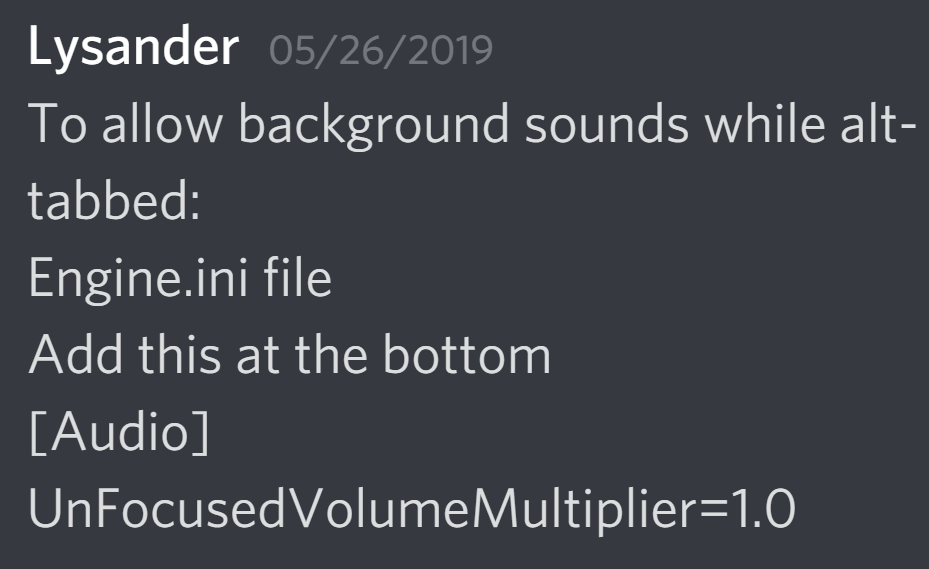 plush apex
Placa de vídeo:
Driver: NVIDIA GeForce GTX 1060 6GB
Nome do driver do DirectX: nvldumd.dll
Versão do driver: 26.21.14.4259
Versão do driver do DirectX: 26.21.14.4259
Data do driver: 3 de 4 de 2020
Versão do OpenGL: 4.6
Profundidade de cor da área de trabalho: 32 bits por pixel
Taxa de atualização do monitor: 74 Hz
Placa DirectX: NVIDIA GeForce GTX 1060 6GB
new driver
same black screen
dont know what to do anymore
But thank you guys
 whole mantle
is there someone who can tell me why there are almost no AI spawning in game?
stone otter
@whole mantle it depends on your hunger and the amount of players in the server, #401464048610312195
whole mantle
200 out of 200 players and im about to die from starvation.
scarlet chasm
any higher than 100 players and AI glitches out
@pale pike Would you have any other ideas on the blackscreen when joining servers?
plush apex
I can host my own session in lan and play the game, the black screen its just for log in in any server
whole mantle
this is stupid. adult giga dead because the server admin wont even respond?
pale pike
Try flushing your dns and launching the game from the win64-shipping.exe
(Steam\steamapps\common\The Isle\TheIsle\Binaries\Win64\TheIsle-Win64-Shipping.exe) @plush apex
plush apex
Try flushing your dns and launching the game from the win64-shipping.exe
(Steam\steamapps\common\The Isle\TheIsle\Binaries\Win64\TheIsle-Win64-Shipping.exe)
@pale pike same result, black screen, but the black screen is not in the loading, its still in the server list, i can hear the sounds of the buttons
when my mouse pass by, i can click too
i click in the "return" button and works, back to main screen of the game
going back to server list its become all balck again
pale pike
Hmm maybe you could try deleting your saved folder (type %localappdata% in your taskbar search box and press enter, scroll down to The Isle and delete the folder)
plush apex
Hmm maybe you could try deleting your saved folder (type %localappdata% in your taskbar search box and press enter, scroll down to The Isle and delete the folder)
@pale pike same, the game just dont like me anymore...
clear granite
@pale pike No servers will load at all. I can connect to servers via the steam server tab, but when I try to load servers on the ingame server list nothing shows up. I have checked the firewall many times, done the command promt, reinstalled the game, restarted steam, messed with the ping settings, everything. I have done every possible thing to get my game working but nothing is working...
I have no clue how to do this. I need help.
pale pike
You have gone through all my possible solutions already @clear granite , I have nothing more for you to try but to wait for the recode to see if it improves.
clear granite
Alright
 wheat parrot
So i'm trying to play the Isle like any normal human would, and when I press play it says "DX11 feature level 10.0 is required to run the engine." and it just says "Exit" right below it. Anybody know what this means?
 warped cedar
I cant ask to join a server
scarlet chasm
@wheat parrot it means it doesn't think your graphics card meets the requirements. Follow this and post here:
https://gyazo.com/8c1cac40ec65c922d4950386d9d19aba
wheat parrot
Alright ty (also it wasn’t for me but for a friend, but thx anyway)
scarlet chasm
yo ucan have your friend do that
wheat parrot
Yep will do
honest river
I'm trying to join a specific server (Walking with Dinosaurs Realism RP) but the only way I found it would work is if I refresh the server list over and over again until it shows up. I tried changing the ping level and using the bootstrap client on steam. Now some of the admins from that server tell me that its the server itself but I want to know if it's something I'm doing or if theres a possible fix
plush apex
@pale pike @stone otter @scarlet chasm sorry to ping you guys, but now i can play again
uninstalled and reinstalled 7 times to work, lol
THank you guys for your help
scarlet chasm
At least it is working now!
 marsh valve
@scarlet chasm Is there a known easy fix to the problem I have:
when in the servers page I have "officials" selected I have to refresh many times with the result being "No servers found" before I get a random selection of officials to choose from, usually the US servers and EU servers repel eachother and almost never appear on the same refresh. The US ones come up a lot less than the EU ones?
 pulsar mantle
i typed something in the group, where it is shown for other player, but isnt shown for myself
in the gam,e
scarlet chasm
@marsh valve try one of these if you haven't yet:
If servers are not showing up:
- Click Steam in the top left of your Steam library.
- Go to Settings > In-Game > click the bottom dropdown box and change your max pings to 1000. Note: You may need to play around with the best setting for you. Some players have reported 500 works better for them.
IF that doesn't work, follow this:
Open an Administrator level command prompt
- Type in
CMDon your windows search through your computer.- Right click
Command Prompt- Click
Run as Admin. It'll open a black weird box- Type
ipconfig /flushdns- Hit enter
- Type
netsh winsock reset- Hit enter
- Reboot your computer
- Open up
The Isle
marsh valve
I have tried both on many occasions... maybe its my connection being trough a usb shared 4g via my samsung phone
scarlet chasm
could be, are you able to see them through the Steam Server List?
scarlet chasm
in Steam if you go to View -> Servers just curious if they all show up for you
scarlet chasm
You might have to select The Isle in the dropdown for Game
marsh valve
I did that too
scarlet chasm
It might be slow just cause of your connection
marsh valve
is there something I can do here to make them higher priority or something?
scarlet chasm
Not that I can think of. someone else may have a better idea.
 nocturne schooner
is this only for isle troubleshooting? im having issues with the isle discord server vanishing and reappearing in my server list like im getting kicked and rejoining over and over
scarlet chasm
how often does that happen?
honest river
it happens pretty often for me on mobile
though, I wouldnt say im being kicked, its a weird message that shows and says something about a server outage
pale pike
That's not something we can really do something about it. It's an issue between Discord's servers connectivity and your device.
bitter hill
why are some servers not showing up
scarlet chasm
@bitter hill you can try my instructions a few posts up
bitter hill
kk ty
 rough temple
Hey I'm not sure where I should ask this but I bought the Foszor die cut decal a few days ago and today I wanted to check my order but it doesn't let me check
It wants me to log in or register but when I try log in it doesn't do anything
pale pike
Can you link me that die cut decal @rough temple?
rough temple
pale pike
I think you would have to contact pmapparel about it since they are the one handling it
rough temple
Ahh okay then
honest river
Every time i log onto the isle,i have trouble finding servers. I have to type in the full name and refresh several times to find the server i want. (usually takes around 15-30 min) Is there a fix to this? I have another friend who is experiencing the same problem.
pale pike
Did you try adjusting your max ping? @honest river
If servers are not showing up:
- Click Steam in the top left of your Steam library.
- Go to Settings > In-Game > click the bottom dropdown box and change your max pings to 1000. Note: You may need to play around with the best setting for you.
 vast fossil
is there a way i can get a bot that logs majority of stuff in my isle server
 daring rock
I have a problem with my game.. Everytime I try to launch te game I get a Fatal Error everytime I start up my game. Can someone please help me?
https://cdn.discordapp.com/attachments/690947010345304124/690947196094513202/unknown.png


I allready tried to reinstall the game but it still keeps sending the message.
 vestal moon
Whenever I try to open The Isle or any other Steam app it says that it "couldn't connect to the Steam network." Is anyone else having this problem?
pale pike
@vestal moon flush your dns
Open an Administrator level command prompt
- Type in CMD on your windows search through your computer.
- Right click Command Prompt
- Click Run as Admin. It'll open a black weird box
- Type ipconfig /flushdns
- Hit enter
- Type netsh winsock reset
- Hit enter
- Reboot your computer
- Open up The Isle
Post your system specifications by following the method shown in this gif @daring rock
vestal moon
@pale pike Tried twice, still no luck. With my problem I can't even open the Steam app, it will only pet me go on in offline mode
daring rock
@pale pike Here are my specifications. It worked for a bit a few hours ago. But don't know if it is fixed. Don't tick it is.
Error is still there.
pale pike
Have you considered trying to reinstall Steam? @vestal moon
Try updating your gpu's driver @daring rock
vestal moon
@pale pike I reinstalled it and now everything works. Thanks!
pale pike
Zaros's issue seem to have been resolved after updating their GPU's driver. (For those with a similar error)
 simple heron
i had the same problem than @daring rock and ur help worked for me; i hope for zaros too ;-; , thank you !
daring rock
I just had to update my GPU’s driver. And now it works 🙂
 wise crescent
Hi, I logged out The Isle then logged back in - now saying It cannot find any servers - I have checked my network, made sure that the Isle can go through my firewall and cI have adjusted the amount of severs from 5000 - 1000/500. If anyone has a fix please advise 🙂
 short oak
I know pretty much that I get told 'if it doesnt happen on an official server, its not our problem'
But anyway, Several populated servers on V3 lag extremely, takes ages to load in my character or the map, the death and everything is delayed for no reason. I get over 150 players may lag a little but before the last windows update it never did this. I'm quite confused as well as pissed becaue the more time pass, the less stabile V3 seems to work.
pale pike
Does it happens on every server you're on or just a specific one @short oak?
pale pike
Then the issue is most likely your internet or computer. Not that specific server.
Try reseting your modem/router
short oak
It works perfectly fine on deathmatch servers and on the officialls, just not these I usually play on
But yes, Ill try restart my router and try again
@pale pike Didnt helped
pale pike
Make sure your drivers are up to date
short oak
First thing I checked
I have 300-400 ping on a rather full server but my character acts like I have a ping of 1000
pale pike
And what are your system specifications ?
short oak
You only need System Infos right? Or the whole DxDiag?
Also it not just me lagging, its the AI as well as other players teleport around and the map needs ages to load me in.
I do think it is something with the internet connectio and the amount of players but It never was like that nor was it sensitive like this?
pale pike
I just want to know what hardware you're using
short oak
Time of this report: 3/22/2020, 20:36:35
Machine name: DESKTOP-8TS25Q7
Machine Id: {9EB88442-8691-4DF2-9B67-2478A0779A77}
Operating System: Windows 10 Pro 64-bit (10.0, Build 18362) (18362.19h1_release.190318-1202)
Language: German (Regional Setting: German)
System Manufacturer: MSI
System Model: MS-7918
BIOS: V2.10 (type: UEFI)
Processor: Intel(R) Core(TM) i5-4590 CPU @ 3.30GHz (4 CPUs), ~3.3GHz
Memory: 16384MB RAM
Available OS Memory: 16332MB RAM
Page File: 10637MB used, 8510MB available
Windows Dir: C:\WINDOWS
DirectX Version: DirectX 12
DX Setup Parameters: Not found
User DPI Setting: 96 DPI (100 percent)
System DPI Setting: 96 DPI (100 percent)
DWM DPI Scaling: Disabled
Miracast: Available, with HDCP
Microsoft Graphics Hybrid: Not Supported
DirectX Database Version: Unknown
DxDiag Version: 10.00.18362.0387 64bit Unicode
pale pike
What's your gpu?
But so far from your CPU alone, Idont think your specifications are the issue. Hmm...
short oak
How do I find out what my GPU is?
short oak
Im sorry its german 👀
pale pike
No worry
GPU should be fine too..
Is your Smooth FPS setting enabled ? I mean the game setting
short oak
yes it is, I turned it off and tried it out but neither helps
pale pike
Is your monitor plugged into your motherboard or your gpu?
short oak
motherboard I highly assume
Its just weird it always worked fine but since a few days it just wont
pale pike
Try changing port
Being plugged in the motherboard, your computer might default to the integrated video chipof your CPU instead of your AMD graphic card
short oak
what if there is no plug?
pale pike
Every GPU has ports on it
Or if you can take a picture of your computer (where all the wires are plugged in)
short oak
I tried, didnt change anything /:
short oak
😭 the pain of reinstalling it
verifying the files didnt helped either but... I can try reinstall it 
Thank you very much for the time, I'll reinstall and if that doesn't fix it, I'll have to come and bother you again 👌
 midnight venture
Okay my mic makes the weirdest noise when I talk, everyone hates it. I don't know what's going on, but I cannot communicate with my friends without their ears being killed, my mic makes this weird screeching noise. I don't know if its my mic quality, or my mic settings, but if someone could help me that would be great.
pale pike
In discord , Setting > Voice & Video , under the "Advanced" section , what are the 4 settings set at? @midnight venture
midnight venture
everything is turned on under addvanced
pale pike
Hmm , screeching noise usually come from audio feedback (your mic picking up the sounds from your speaker in continuous loop amplifying it every time) , and you would have to adjust your sensivity setting to atenuate the feedback
Look in your windows sound settings if you can change something in there related to sensivity, or even in discord . @midnight venture
pale pike
Did you unplug and replug the mic?
Visited the manufacturer website for any sort of drivers you could download?
pale pike
Any other computer you could use to test it with?
midnight venture
nope
pale pike
If you want to dm me what model you have , ill do a proper research for your specific mic when I have more time available
 forest oracle
So I've been having an issue finding a server. I've tried everything. I've reset my computer, my internet, steam, uninstalled and reinstalled the game., changed my max ping, and verified and validated my game files. If anyone has any ideas besides those let me know.
 next hatch
Does anyone know how to get mods for the isle? I’ve seen people playing on old versions with like the quetz when I was still in game and I’ve seen people playing on frozen north and other maps and I was wondering how they do that, because I can never seem to figure out how. Not sure if this is channel appropriate but I assumed this was the channel for questions ;;
 quiet condor
Hello There,
how can I change the duration of the night? and waht does
bServerDynamicTimeOfDay excatly do?
pale pike
You cannot change the length of the night @quiet condor
Also #server-hosting
You'll be better off asking in general or offtopic , this channel is to help people with issues with their game @next hatch
scarlet chasm
@forest oracle try this if you haven't yet:
Open an Administrator level command prompt
- Type in CMD on your windows search through your computer.
- Right click Command Prompt
- Click Run as Admin. It'll open a black weird box
- Type ipconfig /flushdns
- Hit enter
- Type netsh winsock reset
- Hit enter
- Reboot your computer
- Open up The Isle
forest oracle
Okay I’ll give this a shot thanks!
short oak
So I reinstalled the game, turns out nothing changed. Guess this is a lost case then?
forest oracle
@scarlet chasm I tried it and unfortunately it didn't work :/
@scarlet chasm What exactly was I trying to do?
scarlet chasm
Can you see them in Steam going to View -> Servers? @forest oracle
forest oracle
Yes that's the only way I can see them @scarlet chasm
@scarlet chasm Figured that out today by looking up forums.
scarlet chasm
ok, then I would just use that for now
 gleaming frigate
hey can anyone help me out? my friend is trying to play the isle for the first time but only a certain amount of servers pop up(Maybe 20 or 30), i tried having him join the bio isle, nublar, and eden, but none pop up for him? and everytime he restarts the game more or less pop up. if anyone can help, thank you.
wise crescent
@scarlet chasm hi, I am having the same issues as @forest oracle TwitchyMike - unable to find any servers (tried restarting computer, altered the ping level, reinstalled the isle, and made sure my firewall was not blocking the isle... this started after i tried to host my own server (not sure if that has anything to do with it)
and I am unable to access the serves via steam too 🙂
pale pike
If servers are not showing up:
- Click Steam in the top left of your Steam library.
- Go to Settings > In-Game > click the bottom dropdown box and change your max pings to 1000. Note: You may need to play around with the best setting for you. Some players have reported 500 works better for them.
IF that doesn't work, follow this:
Open an Administrator level command prompt
- Type in CMD on your windows search through your computer.
- Right click Command Prompt
- Click Run as Admin. It'll open a black weird box
- Type ipconfig /flushdns
- Hit enter
- Type netsh winsock reset
- Hit enter
- Reboot your computer
- Open up The Isle
@gleaming frigate
If you have an Anti Virus, you'll have to make sure The Isle is allowed through it too @wise crescent
 ruby hare
Hi just wondering if anyone has any information regarding a "Fatal Error: [File:Unknown] [Line:200] Unreal Engine is exiting due to D3D device being lost. (Error: 0x887A0020 - 'INTERNAL_ERROR')" ? It's only started doing it this evening.
pale pike
Not the right channel for this but contact punchpacket @honest river
pale pike
@ruby hare please post your system specifications by following the method shown in this gif
ruby hare
over 2000 chars, so sent in txt file
ARK is also crashing on startup so I'm guessing its something to do with UE4 not liking something very much?
wise crescent
Hi @pale pike , thank you for your reply. I ensured that The Isle is allowed through but still no luck... any other suggestions?
ruby hare
Issue has been resolved, dodgy driver installation must have occurred automatically earlier. reinstalled it and no everything is fine.
 gusty nest
@ruby hare Did you just reinstall the same drivers my friend is having the same problem
ruby hare
@gusty nest yes, i went on geforce experience and went to drivers and clicked "reinstall driver" on the most recent one
gusty nest
ok thank you
So that didnt work for my friend if anyone could help us out the would be great
@pale pike If you had an idea how to fix it i could get him to send his specs
pale pike
Please have them provide their specs
gusty nest
Thats my friend
pale pike
And you are getting the same d3d error?
gusty nest
no just he is he updated his drivers yesterday so we think that might be why
pale pike
Is the monitor plugged into the GPU or the motherboard?
If it is on the motherboard, the computer might default to the integrated video chip ,leading to the d3d error.
gusty nest
He has a laptop and has a monitor plugged ito that
pale pike
Ahh laptop.. missed that part.
If the issue started with the latest driver's update , maybe he can try going back to an older version and see if it helps.
pale pike
You cant with geforce alone, you need a software such as DDU and manually download an old version from nvidia's website
pale pike
Guru3D.com
Here you can Download Display Driver Uninstaller, this Display Driver Uninstaller is a driver removal utility that can help you completely uninstall AMD/NVIDIA graphics card drivers and packages from your system, with...
At the bottom
 broken edge
thats amd
at the bottem
so it said it can help or make things worse
is that good lol
pale pike
Ok so when youll have it :
Using DDU , perfom the steps to uninstall your current driver . Then restart your computer.
Once the computer has been restarted , install the driver you just downloaded
Might want to do a second restart after that to make sure everything is ok
gusty nest
So hes saying that his sscreen went black