#🔧-legacy-troubleshooting-🔧
1 messages · Page 33 of 1
 modern bridge
Its usually my teammates walking behind me
So huge ass trex adults and I dont hear them walking 😂
 neat thorn
Yeah, that's UE4 dropping channels in 7.1
 amber tide
You’ll only hear your team mates if you look in their direction, it’s a known thing and will be fixed in the recode
For now there’s no fixing that
But for the foot steps, you’d have to change it to stereo instead of 7.1 like lethal said
 sick fox
I'm having the same issue as Darkness, I cant find the NVidia other than from the Uninstall Programs on the computer control panel (I tried run, and I searched into Computer and found only copies of the same file-- that were all random documents i dont think I could open ) here are my specs:
Manufacturer: MSI
Model: MS-7A74
Form Factor: Desktop
Touch Input Detected
Processor Information:
CPU Vendor: GenuineIntel
CPU Brand: Intel(R) Core(TM) i7-7700 CPU @ 3.60GHz
CPU Family: 0x6
CPU Model: 0x9e
CPU Stepping: 0x9
CPU Type: 0x0
Speed: 3600 Mhz
8 logical processors
4 physical processors
HyperThreading: Supported
FCMOV: Supported
SSE2: Supported
SSE3: Supported
SSSE3: Supported
SSE4a: Unsupported
SSE41: Supported
SSE42: Supported
AES: Supported
AVX: Supported
CMPXCHG16B: Supported
LAHF/SAHF: Supported
PrefetchW: Unsupported
Operating System Version:
Windows 10 (64 bit)
NTFS: Supported
Crypto Provider Codes: Supported 311 0x0 0x0 0x0
Video Card:
Driver: Intel(R) HD Graphics 630
DirectX Driver Name: igdumdim32.dll
Driver Version: 25.20.100.6323
DirectX Driver Version: 25.20.100.6323
Driver Date: 11 18 2018
OpenGL Version: 4.5
Desktop Color Depth: 32 bits per pixel
Monitor Refresh Rate: 60 Hz
DirectX Card: Intel(R) HD Graphics 630
VendorID: 0x8086
DeviceID: 0x5912
Revision: 0x4
Number of Monitors: 1
Number of Logical Video Cards: 1
No SLI or Crossfire Detected
Primary Display Resolution: 1360 x 768
Desktop Resolution: 1360 x 768
Primary Display Size: 14.17" x 7.99" (16.26" diag)
36.0cm x 20.3cm (41.3cm diag)
Primary Bus Type Not Detected
Primary VRAM: 1024 MB
Supported MSAA Modes: 2x 4x 8x 16x
Sound card:
Audio device: Headphones (High Definition Aud
Memory:
RAM: 8085 Mb
Miscellaneous:
UI Language: English
Media Type: DVD
Total Hard Disk Space Available: 500170 Mb
Largest Free Hard Disk Block: 157635 Mb
OS Install Date: Dec 31 1969
Game Controller: None detected
VR Headset: None detected
neat thorn
@sick fox that's because you don't have an nVidia graphics card to use in your computer. @whole tiger try this too:
Go to your Steam folder - Common - The Isle - The Isle - Binaries - Win64 - TheIsle-Win64-Shipping.exe
Run the shipping exe
sick fox
I ran it, but I might've already been using that, because when right-clicked it said it was pinned to the taskbar. (that's where I launch it) I'll play for a while and see if it happens again.
 stable path
anyone having trouple with non-official servers getting multiple call-stack errors the last couple days? causes server crashes pretty often
 ripe cipher
Any one familiar with the "Pending Connection Failure" notification. I can't seem to get on any Isle servers
Reinstalled the client and my internet is good
not sure what the problem could be
Screenshot for reference
 alpine nest
y does it take me forever to refresh
@ripe cipher thats the server ur on, if ur trying to get on nublar dont because their servers are dying atm
thats the only reason ive had that error pop up anyways i guess it could be something else
 soft ermine
@ripe cipher
Do you have an outdated game? Or does your computer/desktop not have the proper equipment to make it work?
amber tide
Open an Administrator level command prompt
Right click CMD - Run as Admin
Type ipconfig /flushdns
netsh winsock reset
Reboot your computer
@ripe cipher
 mild garnet
We need help.
We are an unofficial server group that currently has 3 servers. We have two machines, one with 2 of our servers, the other with a single one. We are facing a large issue of all three of our servers crashing almost constantly. It started about 2 days ago where every hour or two a server would crash. It picked up in speed and finally settled down around 12am PST. We had no issues for around 10-12 hours when it started to happen again. Since then our server crashes have been increasing to what it is now where they crash only minutes from each other. The only errors we have collected is callstack errors. We have tried re-installing the game on all three servers and the only thing we kept was the player files. We have contacted our host as well and so far they can find nothing on their end that is causing the issues. I tried contacting a few other server owners to see if anyone else was having an issue similar to ours and found that one such server group was also getting the same type of call stack crashes that we are. I really do hope that there is some more information someone can give to us. The last option we can think of is wiping the player files as well but we want that to be a last resort due to the population of our servers and we would hate for our players to have to lose all of their progress, server #2 alone as over 15,000 player files.
amber tide
I would suggest making a backup of the player files and try seeing if that fixes it. It's not like the players can get on either way to your server. But I would ask around inside the #server-hosting tab
neat thorn
@mild garnet How much disk space is left on the server>?
 crude garden
Last few days I've been getting 'Kicked from the server' Host closed the connection! Can anyone help? I get in for like 10 seconds and then removes me. Was working perfectly till 2 days ago
I feel like I've tried everything from Verifying game files to reinstalling again
My specs:
Processor Information:
CPU Vendor: AuthenticAMD
CPU Brand: AMD Ryzen 5 1600 Six-Core Processor
CPU Family: 0x17
CPU Model: 0x1
CPU Stepping: 0x1
CPU Type: 0x0
Speed: 3194 Mhz
12 logical processors
6 physical processors
HyperThreading: Supported
FCMOV: Supported
SSE2: Supported
SSE3: Supported
SSSE3: Supported
SSE4a: Supported
SSE41: Supported
SSE42: Supported
AES: Supported
AVX: Supported
CMPXCHG16B: Supported
LAHF/SAHF: Supported
PrefetchW: Unsupported
Operating System Version:
Windows 10 (64 bit)
NTFS: Supported
Crypto Provider Codes: Supported 311 0x0 0x0 0x0
Video Card:
Driver: NVIDIA GeForce GTX 1060 6GB
DirectX Driver Name: nvldumd.dll
Driver Version: 26.21.14.3039
DirectX Driver Version: 26.21.14.3039
Driver Date: 4 17 2019
OpenGL Version: 4.6
Desktop Color Depth: 32 bits per pixel
Monitor Refresh Rate: 60 Hz
DirectX Card: NVIDIA GeForce GTX 1060 6GB
VendorID: 0x10de
DeviceID: 0x1c03
Revision: 0xa1
Number of Monitors: 2
Number of Logical Video Cards: 2
No SLI or Crossfire Detected
Primary Display Resolution: 1920 x 1080
Desktop Resolution: 3840 x 1161
Primary Display Size: 20.91" x 11.73" (23.94" diag)
53.1cm x 29.8cm (60.8cm diag)
Primary Bus: PCI Express 16x
Primary VRAM: 6143 MB
Supported MSAA Modes: 2x 4x 8x
Sound card:
Audio device: Speakers (Yeti Stereo Microphon
Memory:
RAM: 16336 Mb
Miscellaneous:
UI Language: English
Media Type: Undetermined
Total Hard Disk Space Available: 952480 Mb
Largest Free Hard Disk Block: 430712 Mb
OS Install Date: Jan 01 1970
Game Controller: None detected
VR Headset: None detected
amber tide
Open an Administrator level command prompt
Right click CMD - Run as Admin
Type ipconfig /flushdns
netsh winsock reset
Reboot your computer
@crude garden
crude garden
Just did that, So far I'm okay... but that happened earlier
amber tide
It should be fine after doing that, let us know if it happens again, we have another solution
crude garden
Questions is... Will it remove me after a while or when I try to log in later will it deny me access
amber tide
No, it's just basically refreshing your dns
crude garden
Okay brilliant, if it happens can I ping your tag here?
amber tide
Sure
crude garden
Thank you
ripe cipher
Hey all!
I tried the above recommendations to my problem earlier yesterday (seems to be similar to Envyy's problem) but it seems to not have resolved the issue
Here are my specs if it helps:
Computer Information:
Manufacturer: Dell Inc.
Model: XPS 8500
Form Factor: Desktop
No Touch Input Detected
Processor Information:
CPU Vendor: GenuineIntel
CPU Brand: Intel(R) Core(TM) i7-3770 CPU @ 3.40GHz
CPU Family: 0x6
CPU Model: 0x3a
CPU Stepping: 0x9
CPU Type: 0x0
Speed: 3392 Mhz
8 logical processors
4 physical processors
HyperThreading: Supported
FCMOV: Supported
SSE2: Supported
SSE3: Supported
SSSE3: Supported
SSE4a: Unsupported
SSE41: Supported
SSE42: Supported
AES: Supported
AVX: Supported
CMPXCHG16B: Supported
LAHF/SAHF: Supported
PrefetchW: Unsupported
Operating System Version:
Windows 10 (64 bit)
NTFS: Supported
Crypto Provider Codes: Supported 311 0x0 0x0 0x0
Video Card:
Driver: NVIDIA GeForce GTX 1070
DirectX Driver Name: nvldumd.dll
Driver Version: 26.21.14.3039
DirectX Driver Version: 26.21.14.3039
Driver Date: 4 17 2019
OpenGL Version: 4.6
Desktop Color Depth: 32 bits per pixel
Monitor Refresh Rate: 59 Hz
DirectX Card: NVIDIA GeForce GTX 1070
VendorID: 0x10de
DeviceID: 0x1b81
Revision: 0xa1
Number of Monitors: 1
Number of Logical Video Cards: 1
No SLI or Crossfire Detected
Primary Display Resolution: 3440 x 1440
Desktop Resolution: 3440 x 1440
Primary Display Size: 31.42" x 13.19" (34.06" diag)
79.8cm x 33.5cm (86.5cm diag)
Primary Bus: PCI Express 16x
Primary VRAM: 8191 MB
Supported MSAA Modes: 2x 4x 8x
Sound card:
Audio device: Speakers / Headphones (Realtek
Memory:
RAM: 32728 Mb
Miscellaneous:
UI Language: English
Media Type: DVD
Total Hard Disk Space Available: 1891350 Mb
Largest Free Hard Disk Block: 1777560 Mb
OS Install Date: Dec 31 1969
Game Controller: None detected
VR Headset: None detected
ripe cipher
Upon poking around I learned that if I log into the servers through steam, it occasionally works. Most of the time it says the server I'm connecting to (ANY server) is not responding and I will refresh it (sometimes several times sometimes a few times) until I can connect this way.
Leads me to believe that possibly could be an issue with my internet?
neat thorn
Connection timed out? @ripe cipher
 raven goblet
"Kicked From Server: Host closed the connection", keeps coming up when I try to join, is there anything I can do? Edit: I managed to join and see the world for a second then I was kicked again
neat thorn
Steam Subsystem Error OR No servers showing.
Open an Administrator level command prompt
Right click CMD - Run as Admin
Type ipconfig /flushdns
netsh winsock reset
Reboot your computer
raven goblet
Thank you very much
neat thorn
Welcome!
Windows Search - CMD, forgot to add that part
THen right click, and the rest
 undone plinth
 late pilot
uh
so this has been like this for a long time
it says WARNING: Known issues with graphic driver
The installed version of the NVIDIA graphics driver has known issues. Please update to the latest driver version.
NVIDIA GeForce GTX 770
Installed: 388.13
Recommended: 388.31
my problem is idk where to go to update the graphics driver
and i remember before in old days of the isle i had a worse computer that had this message and later on i couldnt play the isle so i had to get a new pc and now im afraid its gonna happen again soon
and also a red message appears at the bottum of the menu screen beside the version of the game but it dissapears too quickly to read it
neat thorn
Nvidia.com, support section, drivers.
Although that may be the newest version for the 7 series. That's a rather old card in terms of technology.
@late pilot
late pilot
ok
neat thorn
@wide gull try playing in windowed Fullscreen if you aren't already.
@blazing dome let's start here If you're encountering an issue with the game that you'd like assistance with be sure to provide your system specifications, which you can find using this gif below:

 wide gull
Unfortunately I've tried that already and ran into the same problem, I have resorted to reinstalling my game to see if that will fix the error... If not I'll go from there and look into it more, thank you for your help though!
late pilot
thanks leathal, i was able to find what the problem was, i never had an automatic updater
neat thorn
Perfect!
wide gull
I hate to be a bother again, but it seems the same problem is occurring. I've even gone to the extent of updating my graphics card and still had the same problem. This video is what happens, I've even tried all display modes.
amber tide
Does it happen in other games?
neat thorn
Desktop or laptop? Updated drivers lately?
wide gull
Nope not in other games, everything is updated, it's a desktop.
I do have dual monitors though, I don't know if that may be causing an issue? Although I've been running the game with dual monitors for months and had no issues until today.
 languid glacier
Hello everyone
Can you please help me with this?
I can't seem to play anyserver
even those with no players
Never met this problem before
 blazing dome
@neat thorn only in the isle
i have the pc over 3 years and its only happening in the isle
amber tide
He asked you to provide your pc specs if you needed assistance @blazing dome
You can follow this gif to provide the specs:
https://gyazo.com/8c1cac40ec65c922d4950386d9d19aba
@languid glacier Open an Administrator level command prompt
Right click CMD - Run as Admin
Type ipconfig /flushdns
netsh winsock reset
Reboot your computer
languid glacier
@amber tide Okay. I'll try itt
amber tide
👍
 mighty oyster
hia y'all, i just joined this server and i only bought the game yesterday, so im fairly new to this. and i've been looking around and i could be that i've just missed something. but i was wondering how do i get this dev branch version of the game? whenever i look up how it just tells me to right click on the isle in my steam library, go to properties, then betas, and click on the down arrow and click dev branch or something. but my list only says: NONE - opt out of all beta programs.
amber tide
There is no dev branch, there is only the official servers @mighty oyster
amber tide
You're welcome ^_^
 gleaming rain
Hi folks!
I can't find the official EU servers...
Even when I'm searching only for official servers, there appear only US 1 and US 2 and after refreshing none of them are available. After refreshing 3 times only US 1 appears again.
Does anybody have any clues?
Thx and greets!
neat thorn
@gleaming rain No server found solution :
At the top left of Steam you’ll see a little button labeled “Steam”, left click that and select settings > in-game > and adjust the dropdown menu at the bottom to around 1000. You may need to tinker around and find the magic number that works for you, afterwards simply hit ok and launch The Isle.
gleaming rain
@neat thorn Thank u very much!
neat thorn
Welcome!
 plush beacon
We are continuously getting this and would love to find out why it's happening.
[2019.05.07-19.11.01:267][ 90]LogWindows: Warning: CreateProc failed: The system cannot find the file specified. (0x00000002)
[2019.05.07-19.11.01:268][ 90]LogWindows: Warning: URL: ../../../Engine/Binaries/Win64/CrashReportClient.exe
[2019.05.07-19.11.01:268][ 90]LogWindows: Error: === Critical error: ===
[2019.05.07-19.11.01:268][ 90]LogWindows: Error: Fatal error!
[2019.05.07-19.11.01:269][ 90]LogWindows: Error: Unhandled Exception: EXCEPTION_ACCESS_VIOLATION reading address 0x00000360
[2019.05.07-19.11.01:269][ 90]LogWindows: Error: [Callstack] 0x00007ff6329c2891 TheIsleServer-Win64-Shipping.exe!UnknownFunction []
Then the [CallStack] repeats about 30 times and crashes the server.
[2019.05.07-19.11.01:273][ 90]LogWindows: Error: [Callstack] 0x00007ffc3c1784d4 KERNEL32.DLL!UnknownFunction []
[2019.05.07-19.11.01:274][ 90]LogWindows: Error: [Callstack] 0x00007ffc3ce3e851 ntdll.dll!UnknownFunction []
[2019.05.07-19.11.01:274][ 90]LogWindows: Error:
[2019.05.07-19.11.01:281][ 90]LogExit: Executing StaticShutdownAfterError
[2019.05.07-19.11.02:033][ 90]LogWindows: FPlatformMisc::RequestExit(1)
neat thorn
Check the hard drive free space on your server.
 elder bison
What are values for the player json file that would work for any injection
@neat thorn
 ruby vale
@elder bison what do you mean?
elder bison
The values in the player json file for servers is there a value for things like health, stamina, etc
ruby vale
you can leave the values as is, but set them as 9999 just to be safe because sometimes people spawn in with low health/hunger/thirst
it'll go back to the proper value once they spawn in with the dino
elder bison
Ok this will help for my tool thx
plush beacon
@neat thorn We have 250gb for the server and we are only using 24gb.
neat thorn
I'm still at work but will look into these errors more this evening. Especially the stop codes.
elder bison
What is the highest oxygen value of the Dino's
ruby vale
set it to 9999 if you want
elder bison
ok thx
 solid lynx
why does my game freezes when joining the us2 server? the other servers load nicely but in us2 I'm always stuck before the message of the day
neat thorn
What's the ping to the server? What dino are you there?
 strange dirge
Hello I can't find servers I have tried the things the developers have told me to do but it does not work for me
 dim lintel
I feel like it is mostly my internet. As of today, I cannot even locate any of the official Isle servers. Sometimes EU 1 comes through, but that is it.
I am now "Consistently" getting the EU servers, but still not the US.
neat thorn
@strange dirge @dim lintel No server found solution :
At the top left of Steam you’ll see a little button labeled “Steam”, left click that and select settings > in-game > and adjust the dropdown menu at the bottom to around 1000. You may need to tinker around and find the magic number that works for you, afterwards simply hit ok and launch The Isle.
If that doesn't work then.....
Steam Subsystem Error OR No servers showing.
Open an Administrator level command prompt
Right click CMD - Run as Admin
Type ipconfig /flushdns
netsh winsock reset
Reboot your computer
strange dirge
I have no idea how to do the 2 bit
elder bison
@neat thorn do you know what is the file path to the database of a server is?
strange dirge
Why does it not work for me xd
neat thorn
@elder bison for player files?
There is no database, players are all Jon files now.
Json*
elder bison
Yes I know but where those files are kept on a server
One of those files is called database
I mean folders
neat thorn
well using the globe icon in your server in File Manager>The Isle>Saved>Databases>Sandbox(or
Survival depending on game mode.
elder bison
Ok thx that's what I needed and also do you know any server admins that would help me test a tool I am making for the game
neat thorn
@strange dirge windows search CMD, then right click it as admin and follow the rest of the second paragraph instructions
neat thorn
@elder bison what kind of tool?
elder bison
It is a python script that can do injections that I hope to make it do mass injections of players
strange dirge
@neat thorn it did not work
elder bison
It has gui and I am soon hoping to make it a stand alone program for admins to do injections easier
neat thorn
What did not work? The first or the second?
strange dirge
Both
neat thorn
And no servers are showing or just certain ones.
neat thorn
No filters checked? Nothing in the search box? Max results set at 1000?
strange dirge
Yes
Btw I got the flame on the 24 Dec 2018 and I was only able to play it for one day
Game not flame
neat thorn
Try this: A temporary work-around if you are unable to get server results from steam in-game, is to goto the steam client, click the view button, then servers, select the isle on the bottom left and join a server through this list built-in to steam
neat thorn
You can't find Steam?? The client is Steam. Open Steam.
strange dirge
No I can't find the client on steam
neat thorn
Check the lower right of your screen by the time and date.
There is no client on steam.....Steam is the client.
strange dirge
XD
neat thorn
Open stem. Click view.
strange dirge
K
neat thorn
Then follow the rest.
neat thorn
Do the servers show in steam?
neat thorn
Ok so it's probably an issue with your firewall. Just use the steam server browser for now.
Welcome!
strange dirge
You are awesome =3
elder bison
Lethal
neat thorn
Yes?
elder bison
Never mind
 odd quarry
Did they remove family share from the isle??
 cobalt bison
 scarlet dock
got a quick question is the isle no longer able to be shared through family sharing? ive been doing it fine but my son tried to logged under his steam today but its no longer letting me share?
its been letting me family share up til today and all my other games he can access
amber tide
Correct you cannot family share
scarlet dock
@amber tide thank you for the dev response it does make sense:)
amber tide
😋
solid lynx
@neat thorn about the freezing when logging in us2: im full grown T-Rex and ping is usually 200 to 300 there, also can't remember the last place I was at exactly, but it was near the aviary, you can @ me when you reply to message
 molten solstice
why this is a thing????
I'm trying to play the isle on my main account and this keeps popping up and I can't find any servers
WTF
 pearl oxide
Try restarting Steam or your PC
solid lynx
still can't log in us2  every atempt makes my rex lose hunger
neat thorn
@molten solstice
Steam Subsystem Error OR No servers showing.
Open an Administrator level command prompt
Right click CMD - Run as Admin
Type ipconfig /flushdns
netsh winsock reset
Reboot your computer
@solid lynx Reset Controls/Controls not working properly | Method Two
Open File Explorer from the taskbar.
Select View > Options > Change folder and search options.
Select the View tab and, in Advanced settings, select Show hidden files, folders, and drives and OK.
Afterwards, at the bottom left of your taskbar there should be a white search bar. Type %APPDATA% in there and open your %APPDATA% folder.
At the top you'll see the filepath, click "Appdata" to go back to the actual Appdata folder, then to local > TheIsle > delete the "Saved" folder.
@honest river
Steam Subsystem Error OR No servers showing.
Open an Administrator level command prompt
Right click CMD - Run as Admin
Type ipconfig /flushdns
netsh winsock reset
Reboot your computer

 honest river
oh sorry. miss read XD
neat thorn
No worries!
molten solstice
Ok I try that after I have reinstalled Isle first. Thanks for help Bacon!
solid lynx
@neat thorn thank you it worked! 💙 is there a way i can paste a file from the old saved folder to have only my custom control inputs back quicker?
neat thorn
@solid lynx honestly not sure. I'm not on front of s computer to check right now but I can later tonight
molten solstice
Thanks it's working now!
neat thorn
You're welcome!
 bold badger
So I'm trying to log into a server VIA the steam server list and it's putting me into a different server from the one selected. I've been on the server previously (Life Finds a Way 1) with no problems. I've tried resetting steam and my computer both
neat thorn
Ugh. Probably sharing an IP with a different server. I've seen this before.
Try this
Steam Subsystem Error OR No servers showing.
Open an Administrator level command prompt
Right click CMD - Run as Admin
Type ipconfig /flushdns
netsh winsock reset
Reboot your computer
bold badger
Yeah, I mean it does redirect to Life Finds a Way 2, but I've had it happen with completely unrelated servers as well a few months back when i was looking for a new server to play on so I figured maybe it was a Steam/Isle level bug.
I'll give that a try and get back to you
@neat thorn No luck
neat thorn
I'll have to look those servers up manually to check the IPS.
bold badger
Alright. Yeah It's Life Find A Way #1 (official) and Life Finds A Way #2 (Official)
neat thorn
Ivknownits because they probably share the same IP but with a different port number. However, I don't know the fix other than a dns flush.
It may be your isp DNS server. Try using Google DNS or something different
bold badger
Yeah, I'll see what I can do. Worst case I don't play on it. i really liked it though lol Weird that it's suddenly an issue when I played on it before with no issue. shrug technology
neat thorn
@bold badger try this. For the Update Game issue that's already up to date
Go to your Steam folder - Common - The Isle - The Isle - Binaries - Win64 - TheIsle-Win64-Shipping.exe
Run the shipping exe
bold badger
@neat thorn That worked 😃
neat thorn
Awesome!
 spare thunder
ok so my issue is that i cant see any severs come up in the server list of the isle, the exact msg say "No Servers Found." i have tried the cmd thing, i have tried changing the ingame ping option in steam, nothing works. the only shinning light is i saw 1 server come up one "called one in a box" or something like that, but that it cant find it again and nothing else i have tried works plz help me, i really want to play your game 😦
neat thorn
@spare thunder have you tried this?
No server found solution :
At the top left of Steam you’ll see a little button labeled “Steam”, left click that and select settings > in-game > and adjust the dropdown menu at the bottom to around 1000. You may need to tinker around and find the magic number that works for you, afterwards simply hit ok and launch The Isle.
Steam Subsystem Error OR No servers showing.
Open an Administrator level command prompt
Windows Search CMD-
Right click CMD - Run as Admin
Type ipconfig /flushdns
netsh winsock reset
Reboot your computer
neat thorn
If they don't show by doing this, you have a firewall/antivirus/ISP problem
A temporary work-around if you are unable to get server results from steam in-game, is to goto the steam client, click the view button, then servers, select the isle on the bottom left and join a server through this list built-in to steam
spare thunder
ive added an exception through my fire wall idk what it could be im getting really frustrated that i have to do all this to play a game i paid for. you shouldent even need to do any of this. anyway thats my little rant over with any other ideas?
also how do u do that isteam server browser, cant seem to find it
i really just want to play the game so badly man this is so frustrating to deal with
spare thunder
fyi steam browser dont work either
neat thorn
If steam browser doesn't work it's an issue with your firewall or modem/router.
spare thunder
i can see the servers and able to click connect on the steam server browser but i does nothing to my game
it cant be my firewall because i added an exclusion for the isle.
neat thorn
Ok. If you can see the servers it's definitely not your firewall
That's correct.
honest river
<@&505047238674874368> I have a friend who has to refresh the server page again and again to find the right server (officials chosen). He's now been trying for like 10 minutes.. Anyone know why that happens?
neat thorn
No server found solution :
At the top left of Steam you’ll see a little button labeled “Steam”, left click that and select settings > in-game > and adjust the dropdown menu at the bottom to around 1000. You may need to tinker around and find the magic number that works for you, afterwards simply hit ok and launch The Isle.
If that doesn't work......
Steam Subsystem Error OR No servers showing.
Open an Administrator level command prompt
WIndows Search - CMD
Right click CMD - Run as Admin
Type ipconfig /flushdns
netsh winsock reset
Reboot your computer
amber tide
@honest river
spare thunder
@neat thorn any ideas i really want to play the game, its really bugging me :(((
spare thunder
in the steam browser
neat thorn
And nothing happens?
spare thunder
yes
neat thorn
Does the Isle launch?
spare thunder
yes
neat thorn
And.....
spare thunder
nothing
spare thunder
ok let me try now
neat thorn
please do
spare thunder
ooo hang on
i sawe a little red msg pop up as i lauched but it was on my screen for half a second
im tring to print screen this msg but its on for like 0.2 seconds
ok
i just saw that msg pop up
neat thorn
Oh
Let's check something
I need you to do what's in the GIF and then post the results here. All of them, it will be a lot of text.
spare thunder
my comp is worth like 5k so i shouldent have probs 😦 ill do it now
spare thunder
Computer Information:
Manufacturer: PC Specialist LTD
Model: Intel X299
Form Factor: Desktop
No Touch Input Detected
Processor Information:
CPU Vendor: GenuineIntel
CPU Brand: Intel(R) Core(TM) i7-7820X CPU @ 3.60GHz
CPU Family: 0x6
CPU Model: 0x55
CPU Stepping: 0x4
CPU Type: 0x0
Speed: 3600 Mhz
16 logical processors
8 physical processors
HyperThreading: Supported
FCMOV: Supported
SSE2: Supported
SSE3: Supported
SSSE3: Supported
SSE4a: Unsupported
SSE41: Supported
SSE42: Supported
AES: Supported
AVX: Supported
CMPXCHG16B: Supported
LAHF/SAHF: Supported
PrefetchW: Unsupported
Operating System Version:
Windows 10 (64 bit)
NTFS: Supported
Crypto Provider Codes: Supported 311 0x0 0x0 0x0
Video Card:
Driver: NVIDIA GeForce GTX 1080 Ti
DirectX Driver Name: nvldumd.dll
Driver Version: 26.21.14.3039
DirectX Driver Version: 26.21.14.3039
Driver Date: 4 17 2019
OpenGL Version: 4.6
Desktop Color Depth: 32 bits per pixel
Monitor Refresh Rate: 165 Hz
DirectX Card: NVIDIA GeForce GTX 1080 Ti
VendorID: 0x10de
DeviceID: 0x1b06
Revision: 0xa1
Number of Monitors: 2
Number of Logical Video Cards: 2
SLI Detected (2 GPUs)
Primary Display Resolution: 2560 x 1440
Desktop Resolution: 4480 x 1440
Primary Display Size: 23.54" x 13.23" (26.97" diag)
59.8cm x 33.6cm (68.5cm diag)
Primary Bus: PCI Express 8x
Primary VRAM: 11263 MB
Supported MSAA Modes: 2x 4x 8x
Sound card:
Audio device: Speakers (Realtek High Definiti
Memory:
RAM: 32444 Mb
Miscellaneous:
UI Language: English
Media Type: Undetermined
Total Hard Disk Space Available: 952979 Mb
Largest Free Hard Disk Block: 781280 Mb
OS Install Date: Jan 01 1970
Game Controller: None detected
VR Headset: None detected
neat thorn
Well, GPU drivers are up to date. Steam is recognizing your hardware
I'm not sure why you're getting the Unsupported message
Stand by for a few while I investigate!
spare thunder
ok ty and ty for taking the time appreciate it 😄
neat thorn
You're welcome!
spare thunder
i really want to play this game xD
neat thorn
I bet, and that's an awesome machine to do it with!
spare thunder
yea its a beast 😄
neat thorn
It does this with both the WIN64-Shipping.exe and TheIsle.exe?
spare thunder
whats this?
neat thorn
it does this if you launch the game from Steam and also from: Go to your Steam folder - Common - The Isle - The Isle - Binaries - Win64 - TheIsle-Win64-Shipping.exe
Run the shipping exe
?
spare thunder
ill try
spare thunder
ok i dont know where this shipping.exe is?
neat thorn
here is the path: Go to your Steam folder - Common - The Isle - The Isle - Binaries - Win64 - TheIsle-Win64-Shipping.exe
Run the shipping exe
spare thunder
ok i opened it that little msg is still there and no servers
neat thorn
When you open The Isle, in the lower right corner, what are the numbers there?
It should be 1.52.3 I think.
spare thunder
i dont believe so ill check tho
neat thorn
Or any other screen sharing software?
spare thunder
no, if u want to see my screen want to call on discord? may be easyier
or i can download one if u like
aslong as its free 😛
spare thunder
ok ill have to close everything so give me 3 mins 😄
neat thorn
No problem!
spare thunder
k im back, i swear if it works now 😠
neat thorn
LOL!
neat thorn
Poop
have you deleted your Save folder?
Open File Explorer from the taskbar.
Select View > Options > Change folder and search options.
Select the View tab and, in Advanced settings, select Show hidden files, folders, and drives and OK.
Afterwards, at the bottom left of your taskbar there should be a white search bar. Type %APPDATA% in there and open your %APPDATA% folder.
At the top you'll see the filepath, click "Appdata" to go back to the actual Appdata folder, then to local > TheIsle > delete the "Saved" folder.
neat thorn
yes
spare thunder
oki 😄
neat thorn
I've got another trick....let's see.
First off, right click The Isle in your Steam library > left click properties > local files > browse local files > TheIsle > Saved > Config > then go into the WindowsNoEditor folder. When you're inside the folder, download the Engine.ini file linked
Place the Engine.ini file into your WindowsNoEditor folder.
After you've placed Engine.ini into your WindowsNoEditor folder, simply launch your game and see if you can connect to a server. If you're unable to join a Thenyaw server, try one with V3. Some maps may work, some may not.
Attachment file type: unknown
Engine.ini
590 bytes
spare thunder
wait
with this
browse local files > TheIsle > Saved > Config >
there is no config
wait
no
neat thorn
hang on, let me check the path
neat thorn
yeah, this goes in the Appdata folder
Which you probably don't have since we deleted it and you haven't joined a server.
-_-
neat thorn
Restore it
spare thunder
the %appdata% one?
neat thorn
The Engine.ini goes in the appdata/local part
Yes
\AppData\Local\TheIsle\Saved\Config\WindowsNoEditor
Engine.ini goes in that folder
spare thunder
b4 we continue can we screan share just to make sure im not messing anything up
neat thorn
hang on before we do that, gimme a minute
spare thunder
ok
amber tide
@spare thunder What is your graphic setting on while in game?
amber tide
Change it to low, restart the game and then try it
spare thunder
ok so the liitle red msg still pops up and 1 server poped up :DDDD
but only
1 sever
its called "One in a Box"
ill try and join it
amber tide
Okay so that’s a step closer lol
amber tide
Hahahaha yay! So now we try the other fixes to get the servers back
amber tide
Yeah but he was able to get the one server now
neat thorn
true
spare thunder
i was able to find this server b4 at 1 point
but it was only this 1 like right now
neat thorn
What brand is that motherboard?
spare thunder
let me find outtttt...
ASUS® ROG RAMPAGE VI EXTREME: DDR4, 6Gb/s, CrossFireX/SLI, WIFI - RGB Ready
im gonna leave this server and see if i can find it again
neat thorn
Do you have ROG Gamefirst installed??
spare thunder
i dont think so, not willingly ill check
neat thorn
Do you have any Gamefirst software installed?
spare thunder
no i searched my pc and checked the uninstall a program thing
dont see it anywhere
neat thorn
Any ASUS software?
spare thunder
Searching
neat thorn
Also, it would be worth going to this website under LAN and updating your LAN drivers. https://www.asus.com/us/Motherboards/ROG-RAMPAGE-VI-EXTREME/HelpDesk_Download/

ASUS USA
ASUS ROG Rampage VI Extreme - Built for award-winning gaming performance. 5-Way Optimization, integrated water cooling for advanced overclocking & more!
spare thunder
ok will do and no no asus stuff
neat thorn
Good. Gamefirst can monkey with internet
spare thunder
i do have nvidia control pannel and the experience thing
neat thorn
That's fine, it's not related to networking
spare thunder
download the lan driver
neat thorn
Well, there's a couple there but I'd start with the 2019 one
spare thunder
so it downloaded as a rar file
neat thorn
Yup. Unzip it, then install it
spare thunder
ive never done this b4, haha what one do i open
neat thorn
Asus setup
neat thorn
Sure
spare thunder
😦
spare thunder
brb gonna get quick drink
amber tide
Why is your right side monitor so dark?
spare thunder
i didnt think it was :/
amber tide
neat thorn
that BIOS is way out of date.
amber tide
^
neat thorn
It's the software that tells your hardware what to do before the OS loads
spare thunder
ok, is that afecting my game?
neat thorn
Possibly
spare thunder
if so how do i fix?
neat thorn
Still looking at some things, hang tight
spare thunder
i got hours 😉
amber tide
Okay so I have two things we can try, we'll try updating the bios as an alternative
spare thunder
ok
neat thorn
What is Sheep.exe?
spare thunder
huh? xD
neat thorn
nevermind, that's Unity, not Unreal engine
amber tide
On your desktop, right-click and select NVIDIA Control Panel from the menu that pops up
When the NVIDIA Control Panel opens, click on Adjust desktop size and position underneath the display tab on the left-hand menu
In the ‘Adjust desktop size and position’ options, click the drop-down menu under ‘Perform scaling on’ button and select GPU
From there, select the scaling method and accompanying options that best fits your needs
neat thorn
Huh
spare thunder
the little msg poped up again and one in a box shows up
neat thorn
Network driver is still showing as old
Name: Intel(R) Ethernet Connection (2) I219-V
Device ID: PCI\VEN_8086&DEV_15B8&SUBSYS_86721043&REV_00\3&11583659&0&FE
Driver: C:\WINDOWS\system32\DRIVERS\e1d65x64.sys, 12.17.0008.0007 (English), 9/25/2017 05:44:10, 546880 bytes
Driver: C:\WINDOWS\system32\e1d65x64.din, 5/7/2018 10:59:38, 3130 bytes
Driver: C:\WINDOWS\system32\NicCo4.dll, 4.02.0003.0000 (English), 5/7/2018 20:12:20, 134416 bytes
Driver: C:\WINDOWS\system32\NicInstD.dll, 9.12.0020.0000 (English), 10/21/2016 00:43:50, 91624 bytes
Driver: C:\WINDOWS\system32\e1dmsg.dll, 10.00.0768.0000 (English), 9/22/2017 00:55:26, 79936 bytes
spare thunder
the only server there
amber tide
ouch, 2017
neat thorn
Yeah, apparently the update didn't work
neat thorn
Driver software
spare thunder
am i just being stupid, prob
neat thorn
Device Manager - network Adapters - Intel 219V Ethernet - Right click, Update Driver
See if WIndows does it beter
spare thunder
neat thorn
hey hey
 pale pike
would updating such driver requires a modem/router restart hmm?
spare thunder
want me to try?
amber tide
It wouldn't require it, but at this point we gotta try what we can haha
Go ahead and do a router restart
neat thorn
OS reboot not a bad idea either
spare thunder
back
ill try now
btw, my steam ingame ping is still at 1000, should i change that at all or no?
neat thorn
no
spare thunder
didnt work
neat thorn
Disconnect your ethernet and try it
spare thunder
ok on wifi
neat thorn
Fire it up, see if it's any different
spare thunder
are you fucking kidding me
neat thorn
?
amber tide
Welcome back to The Isle 😉
spare thunder
wait
so i gotta use wifi to play the isle now
oh god no 😦
well at least i can play
neat thorn
Well, two opinions from me
BIOS setting for Ethernet, BIOS update needed for LAN chipset
amber tide
Your Ethernet driver might be out of date
neat thorn
One of those two
amber tide
What bacon said
neat thorn
However, I don't know which
pale pike
wow
neat thorn
Let me dig a tad, see if I come up with anything
pale pike
we usually tell people NOT to play on wifi 
neat thorn
Ey, I'm on WiFi
spare thunder
hahah my wifi is especialy bad aswell
spare thunder
wait can i be connected on both wifi and ethernet at the same time
amber tide
I’m assuming it’s what lethal said, his bios needs to be updated which is probably affecting his Ethernet adapter
You can/can’t. It’s like an oxymoron
I would suggest going to the Asus manufacturer website, and downloading the latest bios
Do a full restart and then you should be good to go
neat thorn
Wait, how many ethernet ports do you have on the back?
amber tide
While on WiFi, does that red message appear?
spare thunder
let me restart and on the back of what? comp or router
neat thorn
Comp
neat thorn
There are
I downloaded a manual
XD
Anyway, were you using the port closest to the audio jacks?
spare thunder
1 symbol is slightly different next to the other eth port
spare thunder
ok
spare thunder
gimme a min 😄 hard to get too
neat thorn
XD
spare thunder
omg that took some work
im connected to the other port let me launch
that is stupid
so 1 port works
with the isle
and 1 dont
omg
why is that a thing
computers are so stupid xDDDDD
let me check my connection to servers, see if it has changed at all
ping and what not
neat thorn
You know, more often than not, it's the simplest thing that you never ever think to check that's the issue
spare thunder
yep connection is the same
ik
all that tine
for swaping ethernet ports
xDDDD
neat thorn
XD
spare thunder
im dying inside
spare thunder
i want to smack my face into my keyboard
i havent played this game for nearly a year
ALL BECAUSE OF MY ETHERNET CABLE
WAS IN THE WRONG PORT
HAHAHAHA
neat thorn
Remember this for future issues, yeah?
amber tide
Ahahaha definitely
spare thunder
yep, i aint forgetting this
amber tide
Got a little notepad going
spare thunder
well thank you 2 guys for helping me
and im glad u now know a new soloution
xD
only 1 more thing
amber tide
Well thanks for going through our hoops, were always glad we could get one more person back onto the game
spare thunder
that little msg still pops up
neat thorn
Forget the message if it works
amber tide
Just ignore it like lethal said, it’s a little bug. Users in the past had it and ignoring it worked fine
neat thorn
I think I need a barley pop right now.
neat thorn
Your patience is astounding. XD
spare thunder
is there anything i can do for you 2
like leave a review or anything like that
idk how this works really
amber tide
Nope, you getting on the game again is enough 🤗
neat thorn
Go play. That's the best review ever.
spare thunder
u 2 are the best!!!!!!!!!!!
but
its 3:07am im going to bed i can play tomorrow
XDD
goodnight guys and thanks yet again ❤
amber tide
Well then haha, we hope you have a good night and enjoy your weekend!
spare thunder
❤
 sage stirrup
Gettin error messages and game crashes at least 10 times today
tried verifying my cache didnt seem to help
was there some stealth update that is causing this or what
neat thorn
What error message?
neat thorn
Try running this exe
For the Update Game issue that's already up to date
Go to your Steam folder - Common - The Isle - The Isle - Binaries - Win64 - TheIsle-Win64-Shipping.exe
Run the shipping exe
@sage stirrup
sage stirrup
i did the winsock reset and a hardreset on pc ill try that if it crashes again
neat thorn
Sounds good!
sage stirrup
neither worked ;/ https://imgur.com/TFAGJ1Y
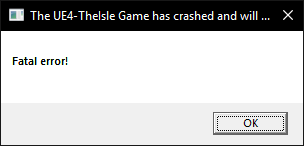
 neat thorn
Did you try the win64-shipping?
 subtle fox
<@&505047238674874368> @exotic walrus's game broke and none of the servers they're looking for are showing up on the list. I told them to click official under the filter options, but nothing shows up still after refreshing and restarting the game.
neat thorn
@exotic walrus No server found solution :
At the top left of Steam you’ll see a little button labeled “Steam”, left click that and select settings > in-game > and adjust the dropdown menu at the bottom to around 1000. You may need to tinker around and find the magic number that works for you, afterwards simply hit ok and launch The Isle.
Or
Steam Subsystem Error OR No servers showing.
Open an Administrator level command prompt
Right click CMD - Run as Admin
Type ipconfig /flushdns
netsh winsock reset
Reboot your computer
 gentle flax
@sage stirrup Google: VC redist pack and dll, install it. Restart your pc. Try to play the game.
sage stirrup
yes bacon i did
it's just so weird this is just now happening after playin 200hrs without crashing xd
 slate schooner
is there anything i can do to make the game not run so hot? the isle is the only program thats making my CPU and GPU shoot up over 60C at 70+ my pc just shuts off
neat thorn
Turn your fan profiles up. It's a CPU intensive game
Also, might be worth it to clean it and make sure the fans are all working
slate schooner
alright ty
sage stirrup
I was having some CPU issue on my event logger yesterday, i turned my OC down a bit hasn't happened yet today
some weird WEHA stuff
neat thorn
Oh, was that the issue with your crashes?
amber tide
👀
sage stirrup
i was gettin an Internal parity error in one of my cores
did some driver updates and turned my oc down a bit
im assuming thats the cause of it since it hasn't happened before
neat thorn
Good to know, nice find and fix!
 fickle mortar
Hey guys. not sure if this is a trouble shooting issue. but a friend sent me a replay I want to save to my own. I cannot find this %localappdata% folder that were supposed to access. Ive checked the steam library and in its This Isle folders but no luck
the*
amber tide
If you go into your settings > Gameplay tab, it'll show you at the bottom where to locate it exactly
It'll say "Config Path"
fickle mortar
Ill check it out now
fyi Im pretty stupid on computer technology and know as much as the average guy
fickle mortar
alright well Ill admit I have no idea which settings folder to then config path were talking about
amber tide
So the path is basically a step by step, start at the first folder, then look for the next one
fickle mortar
is it an isle folder or a regular PC folder?
neat thorn
here's where your recordings are: Open File Explorer from the taskbar.
Select View > Options > Change folder and search options.
Select the View tab and, in Advanced settings, select Show hidden files, folders, and drives and OK.
Afterwards, at the bottom left of your taskbar there should be a white search bar. Type %APPDATA% in there and open your %APPDATA% folder.
At the top you'll see the filepath, click "Appdata" to go back to the actual Appdata folder, then to local > TheIsle > Saved
fickle mortar
thank you for this advanced tutorial. I needed it lol
neat thorn
No problem!
fickle mortar
I completed the view folders part. But (in my case my search bar in my Task menu is the top right,) still it can't find the appdata folder. :/ zooweemama
@neat thorn
nvm found it
it was tucked in the corner of my account for this PC
do I just throw it in the Saved? Ive noticed there are other files in it too
neat thorn
It needs to go in it's own folder but I don't know the name. never really messed with replays
Hang on
Create a Demos folder inside the Saved folder
Put the Replay file in the Demos folder
fickle mortar
sweet
 halcyon zephyr
So im hosting a server, but I cant invite my friends, can anyone help?
amber tide
You're self hosting or you have a dedicated server hosting?
Follow this guide so that you can host a server on your machine and have your friends join.

Having had trouble finding a clear and updated way to do this, I decided to create this guide for those of you who wish to host a dedicated server. This is a server you can host on your computer and n
@halcyon zephyr
neat thorn
@halcyon zephyr If you're using the in-=game host button, that's single player only. For multiplayer, follow @amber tide post.
 fleet wedge
I can't seem to find any of the Official EU servers in my list. I've looked times and times again but none of them show up. Any help or suggestions?
amber tide
At the top left of Steam you’ll see a little button labeled “Steam”, left click that and select settings > in-game > and adjust the dropdown menu at the bottom to around 1000. You may need to tinker around and find the magic number that works for you, afterwards simply hit ok and launch The Isle.
Try this method first, if it doesn't work then we have a second solution:
Open an Administrator level command prompt
Right click CMD - Run as Admin
Type ipconfig /flushdns
netsh winsock reset
Reboot your computer
fleet wedge
Alright, thank you very much!
amber tide
You're welcome 😄
 fast matrix
Whenever I try to join a server it lets me in for a second and then kicks me out immediately saying i was kicked, i've tried so many things and it still keeps doing it :c
amber tide
Open an Administrator level command prompt
Right click CMD - Run as Admin
Type ipconfig /flushdns
netsh winsock reset
Reboot your computer
fast matrix
um how exactly do u open as administrator
amber tide
Right click CMD - Run as Admin
 onyx wind
What’s a CMD?
amber tide
The command prompt
onyx wind
Where do you find it
amber tide
Hit your windows button, and type in Command Prompt
Then right click it and choose Open as admin
onyx wind
Okay and you type all that right?
amber tide
Type ipconfig /flushdns
netsh winsock reset
Hit enter
Then you restart your computer
onyx wind
You don’t put it on the same line right? Just like how you did it
amber tide
exactly like i did it
onyx wind
Oki
amber tide
Are you having the same issue as Yasqweenslay?
amber tide
Because you need to hit enter
onyx wind
Oh
amber tide
Type ipconfig /flushdns then hit enter
Then type netsh winsock reset and hit enter
Then restart your computer
fast matrix
TYSM
onyx wind
Tysmmm
amber tide
Glad I could help!
 undone isle
Anyone can help me with what key do you record? I tried to look in the controls but I don't even see the option.
neat thorn
@broken spear Steam Subsystem Error OR No servers showing.
Open an Administrator level command prompt
Right click CMD - Run as Admin
Type ipconfig /flushdns
netsh winsock reset
Reboot your computer
@floral junco same as above.
Also
No server found solution :
At the top left of Steam you’ll see a little button labeled “Steam”, left click that and select settings > in-game > and adjust the dropdown menu at the bottom to around 1000. You may need to tinker around and find the magic number that works for you, afterwards simply hit ok and launch The Isle.
 edgy abyss
hi, i gopt a problem when i try to enter in a server. I got an ad: connection to the host has been lost, what should i do?
neat thorn
@edgy abyss Both of the above fixes
 rotund depot
a year ago everything was fine (on high details) but now this is happening (on low details)😟
please help me
gentle flax
@rotund depot Solutions: Go clean up you your gpu and cpu. Update your gpu drivers. If problems persits. Your gpu is dying.
 pseudo marsh
So a server I was on restarted while I was on it, and now I cant seem to find any US server at all. I restarted the game, steam, and even my PC and still cant seem to find any servers for my region on the server list even by typing out specific server names and after clearing all filters.
amber tide
@pseudo marsh
Open an Administrator level command prompt
Right click CMD - Run as Admin
Type ipconfig /flushdns
netsh winsock reset
Reboot your computer
@rotund depot please follow this gif to provide your pc specs
pseudo marsh
@amber tide I am still unable to see the US region's servers including the server that I was connected to previously. The server's up and others I was playing with are currently connected to it
amber tide
No server found solution :
At the top left of Steam you’ll see a little button labeled “Steam”, left click that and select settings > in-game > and adjust the dropdown menu at the bottom to around 1000. You may need to tinker around and find the magic number that works for you, afterwards simply hit ok and launch The Isle.
pseudo marsh
@amber tide this worked, thanks!
amber tide
😋 Glad it worked! Enjoy!
 bitter lotus
can someone help me whenever i try joining a server it says you are kicked i just downloaded the isle after a year in my new pc. please help
amber tide
Open an Administrator level command prompt
Right click CMD - Run as Admin
Type ipconfig /flushdns
netsh winsock reset
Reboot your computer @bitter lotus
 covert osprey
ok so this has been a thing for me for a couple of months and now im getting sick of it
so basically my replay does this (top left), roars dont show and other peoples dinos walk/move sideways. Now im thinking its just i dont have certain files for the replay system but i want to use my replay for screenshots and stuff so i would to fix it if possible
 round moat
The replay system has been in a broken state for a while. The programmers have been hard at work developing a from-the-ground-up new replay system to replace the old cumbersome code. A new system is on its way. @covert osprey
 idle glade
@honest river , i have some trouble seein servers, US officials, or any official server do not apear for some reason, and other servers too
any typs?
amber tide
At the top left of Steam you’ll see a little button labeled “Steam”, left click that and select settings > in-game > and adjust the dropdown menu at the bottom to around 1000. You may need to tinker around and find the magic number that works for you, afterwards simply hit ok and launch The Isle.
Try not to mention a specific person, and just the rank group so people have a chance to see it 😄
@idle glade
idle glade
ok, ty for the help!
amber tide
Let me know if that resolves it, it should but there is also another fix
idle glade
@amber tide hey, so i tried all numbers but in any of those does the offcial servers apear, i get servers from korea, brazil and so and empty ones.
amber tide
Open an Administrator level command prompt
Right click CMD - Run as Admin
Type ipconfig /flushdns
netsh winsock reset
Reboot your computer
idle glade
@amber tide hey, again, sorry to bother but still nothing, maybe it has to do with my time zone, since im at CDMX, still is weird that i can connect to asiatic servers or far south ones and not US ones
amber tide
Sounds like your fire wall is blocking access to the isle, adding theisle.exe into you antivirus / firewall exclusion list should help
elder bison
I was wondering how does or what protocol does the client use to get server info ex: servers population, version, gamemode, etc.
honest river
ADMINS my user does not work at all, tried all fixes to sort it and nothing works. I blieve my ip address has been banned?
amber tide
Sorry but that statement doesn't make sense, can you be more specific and state exactly what your issue is?
What are you trying to accomplish?
honest river
https://cdn.discordapp.com/attachments/570923987815759882/577272870242353152/unknown.png @amber tide this is my issue

 amber tide
Open an Administrator level command prompt
Right click CMD - Run as Admin
Type ipconfig /flushdns
netsh winsock reset
Reboot your computer
honest river
that doesnt work
amber tide
Open File Explorer from the taskbar.
Select View > Options > Change folder and search options.
Select the View tab and, in Advanced settings, select Show hidden files, folders, and drives and OK.
Afterwards, at the bottom left of your taskbar there should be a white search bar. Type %APPDATA% in there and open your %APPDATA% folder.
At the top you'll see the filepath, click "Appdata" to go back to the actual Appdata folder, then to local > TheIsle > delete the "Saved" folder.
honest river
that doesnt work either
ive tried everything
i think my account may have been banned or something like that
before update everything was fine
after, the game just seems to not work
amber tide
Can you join any other servers or is it happening on only one
Since you deleted the save folder, now try doing this:
Windows Search - CMD
Open an Administrator level command prompt
Right click CMD - Run as Admin
Type ipconfig /flushdns
netsh winsock reset
Reboot your computer
honest river
@amber tide i cant join other servers
amber tide
Redo that last step i posted to see if it makes a difference after the save folder has been deleted
If that doesn't work, then we'll have to add an exclusion to your av/firewall
amber tide
Go to your Steam folder - Common - The Isle - The Isle - Binaries - Win64 - TheIsle-Win64-Shipping.exe
Run the shipping exe
honest river
Done that
amber tide
After the things we've tried just now?
honest river
Yup
I tried all 3 again
Still nothing
Will you be on tomorrow, I need to get to bed sadly
amber tide
Yes
I'll leave this for you to try when you wake up: Add theisle.exe to your anti virus/firewall exclusion list, and verify the integrity of game files
honest river
I’ll give it one last go tomorrow, cheers
 oblique relic
Anyone know why my auto recording isnt working?
ive tried resetting my settings and it still isnt working
its never done this before, only glitched a bit but outright refused to record nope
amber tide
Recording in general is pretty much broken and is being worked on. You could use a third party program, or you could try deleting your save folder in your isle folder and it'll reset all controls/settings. Probably still won't work but its worth a try
Open File Explorer from the taskbar.
Select View > Options > Change folder and search options.
Select the View tab and, in Advanced settings, select Show hidden files, folders, and drives and OK.
Afterwards, at the bottom left of your taskbar there should be a white search bar. Type %APPDATA% in there and open your %APPDATA% folder.
At the top you'll see the filepath, click "Appdata" to go back to the actual Appdata folder, then to local > TheIsle > delete the "Saved" folder.
amber tide
@oblique relic
oblique relic
Okay, thank you! Ill give it a try here soon
neat thorn
@edgy abyss Steam Subsystem Error OR No servers showing.
Open an Administrator level command prompt
Right click CMD - Run as Admin
Type ipconfig /flushdns
netsh winsock reset
Reboot your computer
If that doesn't work
For the Update Game issue that's already up to date
Go to your Steam folder - Common - The Isle - The Isle - Binaries - Win64 - TheIsle-Win64-Shipping.exe
Run the shipping exe
oblique relic
It worked! Thank you @amber tide
amber tide
Yay! Glad it worked 😋
 lost stream

honest river
Hey I cant really seem to find how to fix this. The audio inside the game wont work at all, and I have tried many things. Also, it works on the loading screen of the game and thats it
amber tide
Do you have an AMD processor?
amber tide
Goto the settings screen on the main menu
Goto the audio settings area
Set audio quality to Low
Lower all audio sliders to 0%
Apply settings
Join and play on servers normally
Once fully in game, redo your audio settings
honest river
didnt work
amber tide
Try opening Steam Library- Right click The Isle - Properties - Local Tab - Verify local game files
honest river
Nope
amber tide
Are you using headphones?
honest river
Yes
amber tide
1: Right click on the speaker/volume control on the right side of the control bar (where your start menu/etc are)
2. Click on "Sounds"
3. Go to the "playback" tab.
4. double click on either your speakers or headphones (I recommend doing both just in case)
5. Once opened, click on "Spacial Sound" tab
6. In drop down menu, set spacial sound to "off"
7. Apply changes.
8. Cross fingers and hope this was the issue.
amber tide
Open File Explorer from the taskbar.
Select View > Options > Change folder and search options.
Select the View tab and, in Advanced settings, select Show hidden files, folders, and drives and OK.
Afterwards, at the bottom left of your taskbar there should be a white search bar. Type %APPDATA% in there and open your %APPDATA% folder.
At the top you'll see the filepath, click "Appdata" to go back to the actual Appdata folder, then to local > TheIsle > delete the "Saved" folder.
amber tide
Follow the steps above, you'll find a folder called "Saved" it basically is a cache
amber tide
After you have deleted the saved folder, yes launch it
amber tide
Do me a favor and unplug your headphones and see if the issue persists
amber tide
You hear sound in the menu, but it completely goes away when in-game?
honest river
No,
I hear sound in the loading screen into the game
Which leads to the menu
From there I cant hear
amber tide
change your speaker configuration in the windows sound settings. Right click the volume icon on the taskbar and set the speaker setup to Stereo instead of 7.1. It's possible that 5.1 may work, but given the spotty support of surround sound in Unreal there's no guarantee.
for OS versions older than Windows 10 you might need to open the playback devices settings and configure it in there, as shown here..
@neat thorn Any ideas?
amber tide
😉
honest river
wait..
LOL
Thanks?
XD
I heard some loud noises and I asked my friend, is that you? He goes.. no..
amber tide
Haha, technology is funny like that, happy it was resolved
amber tide
😄
neat thorn
👍
honest river
Hello, I have a problem with my server. My Server is a Steamcmd server. The server works wehn i start him, but i cant join him. I saw a tourtorial on steam and I did all the steps. I use hamachi fot the ports. The last to notifications are: LogGameState: Match State Changed from WaitingToStart to InProgress and LogGameMode: Display: Match State Changed from WaitingToStart to InProgress. what does they mean. Can someone help me?
 brisk sonnet
I've got kind of a weird problem, The Isle wont work on my school internet? I know it is nothing wrong with the game, and totally not the devs fault but I was wondering if anyone else had problems with wifi at like schools and such? I live at an dorm and our internet blocks all kinds of stuff such as sites with drugs/guns/sexual content and yeah.. But all games work except for The Isle? I know you guys cant solve it but ugh it is very annoying. It lets me launch the game but when I try to join a server it tells me that the connection to the host is lost? does that mean that the internet is blocking online feature? I've tried to host a server private and it works sometimes so?? Sorry if it is irrelevant but I'm completely lost on what the cause is and how to fix it
neat thorn
Steam Subsystem Error OR No servers showing.
Open an Administrator level command prompt
Right click CMD - Run as Admin
Type ipconfig /flushdns
netsh winsock reset
Reboot your computer
Or
For the Update Game issue that's already up to date
Go to your Steam folder - Common - The Isle - The Isle - Binaries - Win64 - TheIsle-Win64-Shipping.exe
Run the shipping exe
@brisk sonnet
brisk sonnet
it still wont work :/ I've asked the dude at the dorm who controls the wifi if it was blocked on the firewall or anything but he said it is supposed to work? It's quite weird that it works at home but not here?
neat thorn
WiFi or Ethernet?
brisk sonnet
wifi
neat thorn
@honest river why hamachi? Trying to lan or something?
honest river
i wana know if the server works. When he works good i take him to my router(sry my english is not the best)^^
does hamachi works?
neat thorn
@honest river I don't know if local server like that works or how to configure it. Just get rid of hamachi and try it the normal way.
Also, if there is a multihome line in the your launch.bat get rid of that part
It's not needed.
neat thorn
👍
honest river
the last question?
neat thorn
The last two lines are correct btw. Server should be live after thst
honest river
when the server works. Does he shows when i make on the filter list only lan?
neat thorn
I don't know. Never done a lan setup. I was not aware it was an option.
@brisk sonnet it's a DNS issue but the fixes I posted should have fixed it.
honest river
start /wait D:\TheIsleServer1\TheIsleServer.exe /Game/TheIsle/Maps/Landscape3/Isle_V3?multihome=25.55.75.107?Port=7777?QueryPort=7777?MaxPlayers=10?game=Survival -log this was the old and the new is start /wait D:\TheIsleServer1\TheIsleServer.exe /Game/TheIsle/Maps/Landscape3/Isle_V3?Port=7777?QueryPort=7777?MaxPlayers=10?game=Survival -log
neat thorn
Make the port and query port different
honest river
okey thx now i do different ports
i mean on my router
i hope it works then thx for your help^^
😃
neat thorn
Welcome!
brisk sonnet
I tried the fixes but it didnt work, any other tips?
neat thorn
Go to Windows options
Network and Internett
Status
Network reset
Reset now
Reboot.
brisk sonnet
it still isnt working 
honest river
how can i bring sandbox dinos in the survival?
amber tide
You would edit their Json file and change the Dino type to the corresponding Dino you want. I tagged you with a link to the guide in the #server-hosting channel
neat thorn
@eager beacon If you're encountering an issue with the game that you'd like assistance with be sure to provide your system specifications, which you can find using this gif below:
 tender umbra
Is someone able to help. No servers showing up STILL. I’ve tried everything and uninstalled and reinstalled the game and reset it to default settings and updated steam and my internet works, but it’s like the game isn’t connected to the internet. Really aggravating, it worked earlier in the day yesterday, then I shut down my computer, and now it doesn’t wanna work at all.
I changed the max ping, I changed the region and then switched it back, I have added the game as an exclusion in my firewall like the steam page suggested etc.
These are my system specs:
Computer Information:
Manufacturer: PC Specialist LTD
Model: GTAV Elite PC
Form Factor: Desktop
No Touch Input Detected
Processor Information:
CPU Vendor: AuthenticAMD
CPU Brand: AMD Ryzen 5 1400 Quad-Core Processor
CPU Family: 0x17
CPU Model: 0x1
CPU Stepping: 0x1
CPU Type: 0x0
Speed: 3194 Mhz
8 logical processors
4 physical processors
HyperThreading: Supported
FCMOV: Supported
SSE2: Supported
SSE3: Supported
SSSE3: Supported
SSE4a: Supported
SSE41: Supported
SSE42: Supported
AES: Supported
AVX: Supported
CMPXCHG16B: Supported
LAHF/SAHF: Supported
PrefetchW: Unsupported
Operating System Version:
Windows 10 (64 bit)
NTFS: Supported
Crypto Provider Codes: Supported 311 0x0 0x0 0x0
Video Card:
Driver: NVIDIA GeForce GTX 1050 Ti
DirectX Driver Name: nvldumd.dll
Driver Version: 24.21.13.9836
DirectX Driver Version: 24.21.13.9836
Driver Date: 6 24 2018
OpenGL Version: 4.6
Desktop Color Depth: 32 bits per pixel
Monitor Refresh Rate: 60 Hz
DirectX Card: NVIDIA GeForce GTX 1050 Ti
VendorID: 0x10de
DeviceID: 0x1c82
Revision: 0xa1
Number of Monitors: 1
Number of Logical Video Cards: 1
No SLI or Crossfire Detected
Primary Display Resolution: 1920 x 1080
Desktop Resolution: 1920 x 1080
Primary Display Size: 23.54" x 13.23" (26.97" diag)
59.8cm x 33.6cm (68.5cm diag)
Primary Bus: PCI Express 16x
Primary VRAM: 4095 MB
Supported MSAA Modes: 2x 4x 8x
Sound card:
Audio device: PL2730H (NVIDIA High Definition
Memory:
RAM: 8129 Mb
Miscellaneous:
UI Language: English
Media Type: Undetermined
Total Hard Disk Space Available: 952501 Mb
Largest Free Hard Disk Block: 860912 Mb
OS Install Date: Jan 01 1970
Game Controller: None detected
VR Headset: None detected
I'm not very computer savvy so will need to be handheld through it haha
amber tide
Open an Administrator level command prompt
Right click CMD - Run as Admin
Type ipconfig /flushdns
netsh winsock reset
Reboot your computer
@tender umbra
tender umbra
How do I open a command prompt on windows 10, and what is CMD
amber tide
Hit the windows button on your keyboard and type in cmd and right click the command prompt and hit run as admin
tender umbra
Okay, thank you, I will try this when I’m back at my computer!
amber tide
And by the way, your graphics card is out of date by a year, you'd need to update that as well
tender umbra
Is that important? I bought this whole setup second hand recently
amber tide
yeah it's pretty important. You don't really have to get every single update, but by a year is a bit much 😄
tender umbra
Wait I typed it in differently, it went through, now I’m loading up the game after restarting my computer
Nope still hasn’t worked
No servers found
amber tide
Go to your Steam folder - Common - The Isle - The Isle - Binaries - Win64 - TheIsle-Win64-Shipping.exe
Run the shipping exe
tender umbra
No servers found Dx
neat thorn
WiFi or Ethernet
tender umbra
Wifi
amber tide
Open up steam, go to "View" > Servers > Change filters to: The Isle hit search and see if any servers come up
amber tide
UE4 fatal?
amber tide
Try joining one off of there
tender umbra
That works, thank you!
amber tide
Yeah, that's an issue with your firewall
tender umbra
I have windows 10 defender but don’t know exactly how to 100% let The Isle be excluded, I just typed in ‘The Isle’ in exclusions and hoped for the best
amber tide
You would go to the exclusions tab, and search for "The Isle.exe"
neat thorn
And also the win64-shipping.exe
tender umbra
Now I can’t find the exclusion tab again ahh I’m so dim, but thanks guys I’ll find it
amber tide
"Allow an app through firewall"
tender umbra
Yeah the boxes for Isle are ticked already
amber tide
there's theisle.exe and the win64shipping.exe and they're both ticked?
amber tide
it's the bottom isle app listed on there
Well, if you wanted to test more, you could disable defender entirely and try finding servers through the game and if it works, some setting is blocking it in defender
Otherwise you could use the steam browser
tender umbra
I might try the steam browser for now because I want my computer protected
amber tide
Okie doke, well glad we could get you back on the game, enjoy your day!
tender umbra
Thank you so much ^^
amber tide

neat thorn
Change your connection type to private. And check the private box in the firewall. Home internet should always be private.
gentle flax
any ideas ? i cant get past server message
amber tide
Can you be more specific in your issue? What exactly is happening
gentle flax
stuck all the time at server message of the day screen on eu 2
only happening today
did verify files and 0 corrupt
amber tide
What do you mean stuck, does your game freeze?
gentle flax
yp
amber tide
Please provide your pc specs, follow this gif to find out how to get them: https://gyazo.com/8c1cac40ec65c922d4950386d9d19aba
gentle flax
amd fx 8370, 16gb ram, rx 380x
amber tide
I need everything from the gif posted
amber tide
👍
pale pike
not relevant to this channel topic, and we don't usually grow peoples dinos back @warped moat
 mental elk
@tender umbra did you fix the problem? i might be able to help if you havent fixed it yet
tender umbra
It’s not fixed, just using a work around right now, with the steam server page.
honest river
I can't smell in-game. I have tried relogging, walking around, attacking, jumping, laying down, and it still won't work. I'm a juvie galli. How can I fix it?
neat thorn
@honest river Reset Controls/Controls not working properly | Method Two
Open File Explorer from the taskbar.
Select View > Options > Change folder and search options.
Select the View tab and, in Advanced settings, select Show hidden files, folders, and drives and OK.
Afterwards, at the bottom left of your taskbar there should be a white search bar. Type %APPDATA% in there and open your %APPDATA% folder.
At the top you'll see the filepath, click "Appdata" to go back to the actual Appdata folder, then to local > TheIsle > delete the "Saved" folder.
pale pike
@deft charm
Steam Subsystem Error OR No servers showing.
Open an Administrator level command prompt
Right click CMD - Run as Admin
Type ipconfig /flushdns
netsh winsock reset
Reboot your computer
do this and it should fix your issue 👍
mental elk
ok but feel free to pm me spoon if you want, i do have 3 solutions that almost always work
neat thorn
If they work that well, post them here so we can pin them
amber tide
It's an open forum here, post them so other people can try them if they run into the same issue 😄
neat thorn
@mental elk
 dreamy pendant
I'm trying to join a server that's on v3, but it seems stuck? I can see the map, but after a few minutes of waiting it still hasn't allowed me to spawn (no menus or MOTD either). The ping is around 97 and my connection appears to be fine.
amber tide
So what does it show exactly @dreamy pendant
 honest arrow
for some reasons i can't join some servers, if i try to join it goes to 36% and the in says that the i lost connection to the host
amber tide
That only happens for some?
amber tide
That's weird, try this.
Open an Administrator level command prompt
Right click CMD - Run as Admin
Type ipconfig /flushdns
netsh winsock reset
Reboot your computer
honest arrow
ok
 silk wind
I have this problem when I watch my replays, all of the other dinosaurs except me are spazzing out all over the place. Anybody know why this is?
amber tide
Replays are kind of buggy and are being reworked by the devs
silk wind
ok
 tepid saffron
I am unable to make a broadcast to my friends who want to watch me play The Isle. I can make a broadcast on other games like Wrongworld and Feed and Grow Fish, but Steam will not allow me to broadcast The Isle. Is it something to do with my settings or how The Isle works?
amber tide
What do you mean it won’t let you? What happens?
tepid saffron
The option doesn't show up on my page. It says 'join game' but not 'watch game'.
Nor does Steam notify me that I'm currently broadcasting.
I can stream Feed and Grow Fish, Wrongworld, Amazing Frog, and other games just fine.
amber tide
You’re trying to broadcast through steam itself?
Steam broadcasting is broken in itself, if you want to broadcast game play you’d be better off using a third party program like obs
tepid saffron
Ooft
amber tide
It’s not, a lot of games don’t have it enabled
neat thorn
OBS and The Isle takes some CPU horsepower
amber tide
😉
amber tide
It might help your computer run it a little bit smoother but generally no
neat thorn
Probably should clean your heatsinks and maybe apply some new paste if they go into overdrive
amber tide
Or get liquid cooling 😁
neat thorn
Interesting note: A recent test showed that a quality air cooler like a Noctua was better or equal to a pre-made loop
 hollow birch
<@&401466542140817419> Can't see any voice channels besides general
 timid terrace
There are no other voice channels.
amber tide
That’s because that’s the only one
hollow birch
k
dreamy pendant
Sorry for my late response. No menus ever appeared, but it seems like the issue was only occuring with that one server. It was perfectly fine upon joining a different one
amber tide
😮
amber tide
Go to your manufacturers website, if you have an nvidia card, there should be a nvidia control panel
neat thorn
 vague sinew
neat thorn
vague sinew
neat thorn
Aye
amber tide
That would do it
vague sinew
click?
amber tide
Yea
amber tide
Okay cool
amber tide
install it
amber tide
You don't need to post updates lol, just let it do it's thing until it's all updated and installed
vague sinew
did not say that this driver is not compatible with these windows
amber tide
It didn't say that, or it did?