#🔧-legacy-troubleshooting-🔧
1 messages · Page 29 of 1
 pale pike
download and install this
https://www.nvidia.com/Download/driverResults.aspx/145536/en-us
@somber elk
 somber elk
oh
Thank you
Sorry for asking you to walk me through every little step, but I'm quite grateful for the help
pale pike
dont worry i'm always happy to help 
somber elk
So, in the event, say, that my laptop is secretly a Decepticon and is ridiculously stubborn about downloading at a decent rate even with an ethernet cable.. tips?
 safe beacon
Is there a permanent link I can use for this discord? I have my own discord channel and we’d like to link this discord but the invite link keeps expiring. Help appreciated.
 hoary adder
@pale pike But it can not be net, that nothing comes forever ...
somber elk
@pale pike can confirm that updating did nothing to fix the issue. After taking over an hour to update, nothing has changed.
pale pike
are you getting any crash error message? @somber elk
somber elk
Just to send a report to Unreal Engine about what I was doing when the game crashed.
I've sent too many to count at this point. Only so many times I can send 'Nothing, was trying to load into a server'. 😦
Let me try again and see if the message says anything more specific
This is what I get when it crashes.
somber elk
Reinstalled the game again.
Still no dice.
It honestly never did this before and I'm completely lost on what to do. I still can't load into a server, but I can sit on the main menu for as long as I want.
 eager beacon
Funny, been on the game yesterday, didnt have problems. Just now i try to log in and there arent ANY servers, even after restarting steam. Reinstall game?
somber elk
@eager beacon try your computer first. I've had that issues before too, but restarting the game was always how I fixed it. If restarting doesn't work, then yeah, I'd reinstall. Hopefully I'm not out of line answering in here :/
pale pike
what graphic settings do you currently have it on? @somber elk
somber elk
@pale pike epic/cinematic. They've never been an issue before, but I'll mess with them and see if anything like that helps
eager beacon
Found the problem, steam updated and now i see the servers again. Still strange because normally steam updates right off the bat when im starting the pc, somehow it didnt do it this time
pale pike
try with everything at low just to see if it work and if it does, slowly bring them up until you reach the crash point and play just under that point @somber elk
somber elk
@pale pike Nope! Crashes on low too.
pale pike
hmm... and you tried to uninstall /reinstall?
somber elk
Oh you betcha.
OH. So.... I uh, might have missed out on one little thing you told me to do earlier... we'll find out in a second
Yup. I forgot to actually install the driver. Somebody smack me
pale pike
Yeah it would be better if you did install it
somber elk
I mean
You know, maybe just a bit
Alright, it's installed 😂
And set up and logged into and everything
@pale pike it's installed, setup, I restarted the laptop just to be safe, all settings on low, and it has crashed once more..
somber elk
Could someone maybe please DM me if they figure anything out? I have to hop off and get to bed for work tomorrow.
 forest bridge
I have a friend whos having issues joining 2 servers. It keeps telling him his client is out of date even when hes updated steam, the isle and his computer. Does anyone know how to fix this?
 neat thorn
Are the servers he's joining older versions? 53.2?
forest bridge
He says the server doesnt even show up for him so he cant tell what version it is. I'm on the server now and it worked just fine for me
I just looked at mine and it says 1.53.2
neat thorn
Oops, my bad. 53.2 is the latest version.
neat thorn
Are they sure their client is 53.2?
forest bridge
How would you check that? He's able to join the official servers and everything
neat thorn
Well, if he can join official then it's up to date
I don't have any ideas on the issue then
I haven't seen this particular one before
forest bridge
It's all good. Thanks for the help 👍
neat thorn
If I find something I'll ping you
pale pike
@somber elk not really sure what could be the problem then tbh
somber elk
I'm currently on break at work, but I plan to try reinstalling one more time when I get home.
If that doesn't work, then I have zero idea what I'm going to do
somber elk
@pale pike I'm doomed.
 mighty pond
i cant join any servers and i just bought the game someone please help!!
i have stong intrenet so that should be the issue but im not a very tech savy person
shouldn't*
neat thorn
What do you mean by can't join servers? Need a better description than that...error message or???
@mighty pond
mighty pond
yes it say kicked from server host closed connetion
 jade pollen
@neat thorn I'm trying to help him right now also, he can't join servers. Its telling him the host closed the connection
neat thorn
I have a fix for that
mighty pond
someone helped me to allow my firewall but still didnt work
neat thorn
Open an Administrator Command prompt
type /ipconfig release
then /ipconfig renew
then netsh winsock reset
then restart computer
jade pollen
/ipconfig' is not recognized as an internal or external command,
operable program or batch file.
Thats the error he is getting
when typing tthat
Is he not in admin?
jade pollen
Does he then need to type the netsh winsock reset??
mighty pond
thx so much i can finally enjoy this game! @neat thorn
neat thorn
Welcome, glad it worked!
 crimson ibex
Hey, everytime i log in for the first time a day, the sniffing mechanic will play the sound and visual, but it doesnt work. What's going on?
pale pike
more of a #401465476661641217 @crimson ibex, I know what you mean, it's just how the game works atm. It helps if you walk a good distance away from where you spawned in
crimson ibex
@pale pike i walked about an hour away from where i spawned by now. It does work SOMETIMES, but it takes like 12 tries
if i go in and delete player files, it will work decently for a day, but the next time i log in its all over again
 grand zealot
@neat thorn hey i have the same issue as Universe but the ipconfig release dosnt work
 timid terrace
@umbral grove
Add theisle.exe to your anti virus/firewall exclusion list, then
open a command prompt as an administrator and run the following commands:
netsh winsock reset
ipconfig /flushdns
Then reboot your pc and try playing on a server.
 umbral grove
timid terrace
umbral grove
timid terrace
👍
 vale grove
Hey guys having issues finding a server ive added the game to my firewall but it still says no servers found no matter how many times i restart i had no problem the first day i downloaded and now i cant get any servers to load any ideas
pale pike
No server found solution :
At the top left of Steam you’ll see a little button labeled “Steam”, left click that and select settings > in-game > and adjust the dropdown menu at the bottom to around 1000. You may need to tinker around and find the magic number that works for you, afterwards simply hit ok and launch The Isle. @vale grove
try this above
vale grove
i tried tht to 500 but ill keep tinkering around with it and see if tht wrks thanks @pale pike
 weary ember
If u have the lost connection or kicked out of the game instantly/host shut down server problem. Just go into steam and Validate the game files. Then it works.
 dense frigate
Why is The Isle changing my windows language to english?
pale pike
what do you mean @dense frigate??
dense frigate
When playing the The Isle it changes my keyboard layout to english from swedish @pale pike
pale pike

 honest river
does any one know how to fix this
neat thorn
First, make sure The Isle is allowed through your firewall
Then, open Admin Command prompt
Type ipconfig /flushdns
Then, netsh winsock reset
Then reboot PC
neat thorn
What AAntivirus do you have?
honest river
ESET Internet Security
neat thorn

The ESET firewall acts as a network traffic filter that regulates communication within the local network or internet. Using predefined rules, the firewall analyzes network communication and decides whether or not to allow it. You can configure your
neat thorn
Yes
honest river
ok
this might not be related to isle but
a week ago my pc started lagging and stuff and its still happening it was running smoothly untill a week ago
do u know any reasons why and maybe fixes?
neat thorn
Could be anything really. Just make sure Windows and all your drivers are up to date. If you've recently installed some software, uninstall it and see if it helps
vale grove
still no luck fellas it still says NO SERVERS FOUND i have checkes my fir wall set the ping to 250 and validated the files any other ideas as to why i can't find a server
 dusky crest
I have been trying to host a server to play with a few friends, however the server is unable to be found once it has been made, and the steam join friends game option does not come up. I have spoken to a mod, and followed the advice as adding the steam file as an exclusion however this still does not seem to fix the problem, thank you in advance for your assistance
neat thorn
Are you using SteamCMD or the In Game Host button?
dusky crest
in game host
neat thorn
that's single player only, basically hosting a server just for you
dusky crest
oh
neat thorn
You need to use SteamCMD or another host like PingPerfect
dusky crest
how would you open steamcmd? sorry I don't have much knowledge on this subject
neat thorn
Use this without the RCON and Battlewarden sections

Hello. I am going to guide you on how to set up a server for the game using SteamCMD. This method is a little different from using the dedicated server tool downloaded from your steam tools as it allows you to play on the same machine with which you are hosting with. It is al...
dusky crest
Thank you I will read though 😃
neat thorn
I hope your PC is beefy if you plan to play on it at the same time
neat thorn
Core i5/Corei7 12-16 gigs of Ram and a decent video card
neat thorn
Minimum 8 gigs for V3 is what the Devs say
dusky crest
ok ty ill try a smaller map
neat thorn
worst case is it won't work
dusky crest
true
neat thorn
Thenyaw has less requirements
dusky crest
oh i see
pale pike
also @dusky crest, the #server-hosting channel might be a better place to seek advice/help next time 
 vapid lantern
Hello, I am experiencing repetative black screens while playing The Isle, which happen mere minutes after entering a server and playing my dinosaur. Tried both survival and progression, happens on both. All of the black screens are eesentially crashes, I never manage to get back into the game, untill I force-close it, and open it again, only to get another black screen after a few more minutes of gameplay.
I also tried reducing the graphics, that did not change anything, I can send my computer specs if needed.
vapid lantern
Thank you, but I tried, it said it was already up to date, unless I didn't quite do it right.
neat thorn
What is your video card?
vapid lantern
AMD Radeon R9 200 series
vapid lantern
Nay, I believe it is seperate
Actually, not I'm not so sure anymore
I built the computer almost four years ago,
Any convenient way of confirming it?
neat thorn
R9's are separate cards
vapid lantern
Oh, so I wasn't mistaken.
Then what do you suggest I do?
I should by the way, stop and thank you for your help, must have slipped my mind. So thanks.
neat thorn
No worries, was investigating AMD cpu's to see if R9 was ever integrated. Doesn't look like it
neat thorn
I would clean sweep your GPU driver and install again fresh. Also check your GPU temps while running and see if it's getting hot, might need to be cleaned.
Use this program to delete/uninstall GPU driver
This article provides information about the AMD Cleanup Utility and is organized into the following sections:
vapid lantern
Oh, alright, lets see what we got here.
 amber tide
I would also try suggesting a simple verify integrity of game files through the steam library just to see if that’ll fix it. It might just be an update needed to the graphics card like lethalbacon mentioned
vapid lantern
I will try that first then, just after I understand why I'm getting a "windows update runing" error message whenever I try the first solution.
Or perhaps my priorirties are wrong, I'll try that immediately.
Well it seems like the game files were installed correctly.
Back to plan 1
amber tide
So you join a game, and it just black screens you?
Right click The Isle in your Steam Library > left click properties > local files > browse local files > TheIsle > delete the "Saved" folder and re-launch The Isle. It'll reset everything back to default, the folder itself will refresh upon launch.
It sounds like your computer cannot handle it if your drivers are already up to date, but you can follow this gif and post your system specs so that we can look at them

 sweet ocean
i just purchased this game to play with a friend. i have spent the past 2 hours trying to fix it. any dino on any server i choose cannot walk or run more than 2 steps with stopping and bogging down like it is mud. have have not even been able to learn how to play because this makes the game unplayable. i do not have any mods, i have verified the files, i have reinstalled, and i cannot find anything in the troubleshooting about this issue. i just got the game today and spent the last 2 hours in frustration.
oh and i have a gtx 1080, i7 6700, 16 gigs of ram and windows 10
please help
sweet ocean
i think i fixed it by deleating the files and reverifing to reaquaire them and unpulled my keyboard and pull it back in
amber tide
Let us know for sure if it's completely fixed.
 foggy drum
hello im stuck in the rocks on eu 2 my game name is jajm201 could you help
pale pike
@foggy drum use the admin tag "@ Official Server Admin" in the #537187256717541376 asking for assistance 👍
 molten shuttle
So, my game used to search for servers just fine, but recently, I can no longer find many of the servers. I know they are online, as I have friends who are on them frequently, but I just can't see the servers. If I search for it, nothing pops up, but when I don't other servers come up. Any way to fix this?
The only servers that say official that pop up also aren't in my country.
I already tried verifying the game files numerous times, and it said nothing is wrong
amber tide
I would suggest some of the solutions here: https://steamcommunity.com/app/376210/discussions/17/1693788384133493388/
Finding your System Specs Follow this: https://gyazo.com/8c1cac40ec65c922d4950386d9d19aba Now that you know you system specs, do the meet the minimum system specs shown on the Store Page? STOP! Have you Googled your problem? Most problems can be easily solved by a simple goog...
molten shuttle
Adjusting the ping worked. Thanks!
amber tide
Sounds good! Glad that worked, enjoy your time on The Isle 😉
 summer quail
@chilly cairn Try the following in order to make burrows:
Navigate to C:\Users\YourName\AppData\Local\TheIsle and delete the "Saved" folder, then restart your game.
 chilly cairn
I'll try that if the issue happens again, but I died and it started working on my next life. Thanks!
sweet ocean
@amber tide it seem to have worked
amber tide
Sounds good, glad it worked
amber tide
@warm jacinth Navigate to C:\Users\YourName\AppData\Local\TheIsle and delete the "Saved" folder, then restart your game.
vapid lantern
@amber tide Computer Information:
Manufacturer: Gigabyte Technology Co., Ltd.
Model: H97-HD3
Form Factor: Desktop
No Touch Input Detected
Processor Information:
CPU Vendor: GenuineIntel
CPU Brand: Intel(R) Core(TM) i5-4460 CPU @ 3.20GHz
CPU Family: 0x6
CPU Model: 0x3c
CPU Stepping: 0x3
CPU Type: 0x0
Speed: 3200 Mhz
4 logical processors
4 physical processors
HyperThreading: Unsupported
FCMOV: Supported
SSE2: Supported
SSE3: Supported
SSSE3: Supported
SSE4a: Unsupported
SSE41: Supported
SSE42: Supported
AES: Supported
AVX: Supported
CMPXCHG16B: Supported
LAHF/SAHF: Supported
PrefetchW: Unsupported
Operating System Version:
Windows 7 (64 bit)
NTFS: Supported
Crypto Provider Codes: Supported 311 0x0 0x0 0x0
Video Card:
Driver: AMD Radeon R9 200 Series
DirectX Driver Name: aticfx32.dll
Driver Version: 15.200.1062.1004
DirectX Driver Version: 8.17.10.1404
Driver Date: 8 3 2015
OpenGL Version: 4.5
Desktop Color Depth: 32 bits per pixel
Monitor Refresh Rate: 60 Hz
DirectX Card: AMD Radeon R9 200 Series
VendorID: 0x1002
DeviceID: 0x6810
Revision Not Detected
Number of Monitors: 1
Number of Logical Video Cards: 1
No SLI or Crossfire Detected
Primary Display Resolution: 1920 x 1080
Desktop Resolution: 1920 x 1080
Primary Display Size: 26.65" x 15.00" (30.55" diag)
67.7cm x 38.1cm (77.6cm diag)
Primary Bus Type Not Detected
Primary VRAM: -2048 MB
Supported MSAA Modes: 2x 4x 8x
Sound card:
Audio device: Headset Earphone (Corsair VOID
Memory:
RAM: 8066 Mb
Miscellaneous:
UI Language: English
Media Type: DVD
Total Hard Disk Space Available: 953766 Mb
Largest Free Hard Disk Block: 222487 Mb
OS Install Date: ??? 01 1970
@amber tide Sorry about the wait, our time differences make it a tad awkward.
amber tide
So upon closer look, it seems that everything looks fine except your video card is below the minimum requirements so that could very well be the issue as that's a big thing. Some people have reported it working while being below the minimum requirements, so could you explain further what exactly happens?
Also, were you able to follow LethalBacon's suggestion?
 vapid lantern
I did, but the program didn't run through properly, error messages and other troubles, I can't remember them by heart, but I ended up using "System Restore" to revert the changes. Anyway, I could always give it another go if other things don't work.
About what happens in game:
I play for several minutes, and then the screen goes black, then into an even darker black, and if I'm not mistaken, I still hear background noises from ingame, but does not matter how long I wait, the black screen persists.
I did however notice, that while the game is at nighttime, the crashes are ever more frequent. Might have forgot to add this bit before.
Which definitely strengthens the video card thing you pointed out.
amber tide
Yeah unfortunately a lot of things happen especially at night time, and it's a known issue to happen that's linked to the graphics card; which we know is already below the minimum requirements. I really wished I could help you more, but alas it looks like the graphics card is the culprit and there's not much to be done about that.
I have googled a link specifically for you which has multiple "fixes" or things you could try to get it working first rather than replace the card entirely with an updated one.
I'm not saying anything will work but it has worked for some people in the past:
https://windowsreport.com/black-screen-gaming-fix/

Windows Report - Windows 10 and Microsoft News, How-to Tips
If your scren turns black while you play your favorite game, don't panic. You can fix this Windows 10 malfunction with the help of the following steps.
Tom's Hardware Forum
Hey guys,i have a problem with my display recently and im new to pc gaming and i just built it myself .
But sometimes it goes black when i was playing video games,
for couple seconds it was very smooth 60+ FPS but when the black screen "attacks" it will go black for couple ...
Those are two really good websites to follow, I especially like tom's hardware as it's an open forum for others to comment on, so you can see when people post that it worked or when it didn't. If you end up fixing the issue without replacing the graphics card, please let me know I'd love to hear about it
honest river
Can somebody help
It syas no servers
vapid lantern
@amber tide Hmm, alright, thanks a lot, although it does seem like doing so would be ignoring the biggest issue, as you mentioned, which is that my graphics card is a little behind in performance. I will try to follow through some of the instructions there, however it does seem like the wisest decision would be to just get a better graphic's card. But again, I will try to wait with the last course of action and see what I can do with the forums.
amber tide
@honest river Add an exclusion to your anti-virus/firewall for The Isle.
Identify which anti-virus/firewall program you have (if any) and add an exclusion for The Isle. Anti-virus/firewall interference is generally the most common cause for this particular problem, exclusions often solving the issue entirely.
- Adjust your Steam In-Game server browser: Max pings / minutes.
At the top left of Steam you’ll see a little button labeled “Steam”, left click that and select settings > in-game > and adjust the dropdown menu at the bottom to around 1000. You may need to tinker around and find the magic number that works for you, afterwards simply hit ok and launch The Isle.
@vapid lantern Yeah, it would be a good idea to try evrything first, as upgrading could be a bit pricey 😮
 bitter roost
@unborn swallow Post your scent issue here and someone will be able to assist.
amber tide
@unborn swallow Hi Brian, did you need assistance with something?
 unborn swallow
Hola tengo un problema con lo de poder oler, no me sirve nada y he hecho todo lo que la gente me ha dicho y no se soluciona, es decir que no puedo oler en el juego, Gracias y buen juego. Hi, I have a problem with being able to smell, nothing works for me and I have done everything that people have told me and it is not solved, that is, I can not smell in the game, Thanks and good game.
amber tide
You need to regenerate your Saved folder. So please navigate to C:\Users\YourName\AppData\Local\TheIsle and delete the "Saved" folder, then restart your game and you should be able to sniff
A simple and easy fix that has worked for some people has also been to unbind the sniff hotkey, and rebind it after
Necesitas regenerar tu carpeta guardada. Así que navega a C: \ Users \ YourName \ AppData \ Local \ TheIsle y borra la carpeta "Guardado", luego reinicia tu juego y deberías poder olfatear
Una solución simple y fácil que ha funcionado para algunas personas también ha sido desenlazar la tecla de acceso rápido y volver a enlazarla después de
unborn swallow
tengo que ir desde propiedades?
amber tide
@unborn swallow
Haga clic con el botón derecho en The Isle en su Biblioteca de Steam> haga clic con el botón izquierdo en propiedades> archivos locales> busque archivos locales> TheIsle> elimine la carpeta "Guardado" y reinicie The Isle.
unborn swallow
lo hice le di a reset despues en controles y todo pero no me aparece oler
no me funciona 😦
amber tide
¿Eliminó su carpeta "Guardado" después del último mensaje?
unborn swallow
si
la elimine, entre en the isle le di a reset de controles, sali y volvi a entrar en the isle y no aparecia lo de oler
 sage jacinth
anyone know a fix for the huge lag spikes? I join in sometimes and lll just lag so bad its unplayable
amber tide
De acuerdo, vuelva a eliminar la carpeta guardada, cierre sesión en Steam, reinicie su computadora y vuelva a intentarlo @unborn swallow
sage jacinth
I have the specs to run this game
unborn swallow
vale, lo intentare, gracias
sage jacinth
I play official only and it does it on all servers
Only sometimes too, like last night I was playing without issue and today I log on just to be bombarded by lag spikes
amber tide
Si eso no funciona, entonces tendrá que desinstalarlo, eliminar las carpetas sobrantes y luego intentar reinstalarlo @unborn swallow
unborn swallow
voy a probar lo ultimo
amber tide
@sage jacinth The game is lagging or you're just getting low frame rate?
sage jacinth
The game is actually lagging, like my frame rate is at about 71 but the game just freezes
amber tide
Most people solve the issue by a combination of things, whether it's ensuring your drivers are up to date or putting the settings back to default
Try lowering the shadow quality as well
 valid meadow
sometimes when I try to get into a server it opens this screen and I can not play normally
open this screen and do not leave it
amber tide
Have you tried hitting the windows button to get the mouse to show up to click the red button?
valid meadow
to tell you the truth, it's like the game crashes my PC because I can not even change the window and my PC meets the requirements Same thing happens with the screen to make the skin, the screen stops working and I can not get out of it and when I'm playing I almost do not see FPS drops and I play with several settings at the top
amber tide
@valid meadow When was the last time you updated your drivers?
 modern spear
@shut fossil sometimes deleting the 'saved' folder helps with having no scent
neat thorn
that's actually THE fix for it
neat thorn
Windows search %localappdata% Open it, open The Isle Folder, delete the Saved folder inside
Or, navigate to C:\Users\YourUserName\AppData\Local\The Isle
@shut fossil
valid meadow
@amber tide I changed my PC motherboard these days and then started the problems maybe I should format the PC
neat thorn
Did you change your motherboard without reinstalling the OS?
Same motherboard or different?
neat thorn
There's a possibility that's an issue but I'd start with driver updates first
Especially the video card
But the issue you posted where the MOTD shows and no mouse cursor happens to a lot of people, The Isle devs are working on fixing it
So, I doubt it's an issue on your end
valid meadow
Ok
 compact girder
servers not found
i have closed all firewall settings and still
its because i use my phone as hot spot cause my router is pretty far
when i use internet from ruter no prob but i have veery low mbps
unborn swallow
no me ha funcionado, que es eso de desenlazar la tecla de acceso rapido y volver a enlazarla despues?
parece que el juego no quiera que yo pueda oler 😂
ya me salio la opcion de olerrr
wiiiiii
amber tide
- Adjust your Steam In-Game server browser: Max pings / minutes.
At the top left of Steam you’ll see a little button labeled “Steam”, left click that and select settings > in-game > and adjust the dropdown menu at the bottom to around 1000. You may need to tinker around and find the magic number that works for you, afterwards simply hit ok and launch The Isle.
pale pike
The Isle works best on a direct ethernet connection, might not even fix it if you are using a phone hotspot 
neat thorn
@unborn swallow Windows search %localappdata% Open it, open The Isle Folder, delete the Saved folder inside
Or, navigate to C:\Users\YourUserName\AppData\Local\The Isle
unborn swallow
ya me funciona gracias por la ayuda ^^
 quiet condor
Hello there, what does this log entry mean:
LogOnline: Warning: STEAM: AUTH: Was not able to kick player xxxxx Valid world: 1.
 hybrid cedar
hey there 😃 since yesterday i cant play anymore because i get kickt from every server. Is there a solution to this problem?
pale pike
Open an Administrator Command prompt by typing "CMD" in your taskbar search box and right click > run as administrator.
Once the command prompt is open you will want to enter these 3 following line:
ipconfig /release
ipconfig /renew
netsh winsock reset
Then restart your computer and try playing on a server. @hybrid cedar
hybrid cedar
still the same problem :/ "Host closed the connection"
 unborn kraken
no servers found i check the firewall but is good everything someone can hekp me
pale pike
@unborn kraken
- Adjust your Steam In-Game server browser: Max pings / minutes.
At the top left of Steam you’ll see a little button labeled “Steam”, left click that and select settings > in-game > and adjust the dropdown menu at the bottom to around 1000. You may need to tinker around and find the magic number that works for you, afterwards simply hit ok and launch The Isle.
@hybrid cedar is The Isle added into your firewall/antivirus exclusion list?
unborn kraken
yes
not works
i prove deactive antivirus and firewall and change in steam 1000, 1500, 3000, 5000 and automatic and not works
unborn kraken
dont worry i check i new form in steam server i search a manual server of the isle in this moment is the only solutions to play only this game please update the game to find a best solution sorry for disturbing
 hidden flare
How do I cook data? I just received this game as a gift and when I tried to play it sent me this.
amber tide
The cooked content error means that your graphics aren't supported
Your gpu doesn't support the right version of DirectX, so you'd be unable to play
 fair wind
So I've been trying to get my cousin set up on the isle for a while now but I cant find any of the official servers. I've done the firewall trick, tried all the steam ping options, and even tried manually entering the ip addresses in the the steam server search. The servers in the steam favorites are listed as not responding so I dont know what to do anymore lol. Can I get some suggestions on what to try next?
amber tide
You've followed these steps?
At the top left of Steam you’ll see a little button labeled “Steam”, left click that and select settings > in-game > and adjust the dropdown menu at the bottom to around 1000. You may need to tinker around and find the magic number that works for you, afterwards simply hit ok and launch The Isle
 heavy bone
I bought a new computer to play the isle and already purchesed it and tried to play it on my old. Where can I download it from for my new computer ?
heavy bone
I cant find it on steam anywhere thats why Im asking yall
amber tide
You're logged into the same steam account where you bought it?
There are a few ways to solve you not being able to find it as long as you're logged into the correct steam account that bought The Isle in the first place.
https://support.steampowered.com/kb_article.php?ref=5168-EUIA-6643
Article "Games Are Missing from my Library"
heavy bone
Thanks OverP I was able to find it with your help and started to download it on the new unit !
amber tide
Sounds great! Enjoy the game!
fair wind
Okay so I went back and tried the ping suggestion and I still cannot find the official servers. I tried all the options there from 5000-250
heavy bone
,
amber tide
Hmmm, what are you setting your in-game server settings to on the right hand side? The official servers are for survival on V3 only. Try to update your steam as well, sometimes it doesn't update and that could be a culprit, otherwise the other option would be having to do a clean installation of the game
@fair wind
"A temporary work-around if you are unable to get server results from steam in-game, is to goto the steam client, click the view button, then servers, select the isle on the bottom left and join a server through this list built-in to steam"
 proper lantern
So are people back on servers and playing The Ilse?
amber tide
No one ever stopped, but you'd be better off going to #401464048610312195 as this specific channel is for people who are having issues with the game 😉
proper lantern
okay thank you Hypno-Toad whos pwr lvlis over 9,000
amber tide
😮
proper lantern
😋
 soft bramble
Anyone by chance know what might be the cause if someones Escape Button or Character Menu button are not working?
amber tide
Try unbinding and doing it again, otherwise you'll have to delete your saved folder and re open the isle to generate a new default setting file
Windows search %localappdata% Open it, open The Isle Folder, delete the Saved folder inside
Or, navigate to C:\Users\YourUserName\AppData\Local\The Isle
hybrid cedar
Kicked from server "host closed the connection" still got that problem :/ i tryed the ping stuff, reinstalled, addet the isle as exeption to my antivirus and firewall. PLS HELP
amber tide
Open an Administrator Command prompt
type ipconfig/ release
then ipconfig/ renew
then netsh winsock reset
then restart computer
That should fix it
@hybrid cedar
 slow bridge
I can’t get US 3 to show up in the list, how do I fix this?
pale pike
try using this fix @slow bridge
No server found solution :
At the top left of Steam you’ll see a little button labeled “Steam”, left click that and select settings > in-game > and adjust the dropdown menu at the bottom to around 1000. You may need to tinker around and find the magic number that works for you, afterwards simply hit ok and launch The Isle.
slow bridge
I’ve been trying that with different values, no success so far
pale pike
did you add the game into your firewall/antivirus exclusion list? might help
slow bridge
I’ll give it a shot
I don’t see where I can do that
@pale pike
Oh, apparently it’s already allowed through, so that’s not the problem
pale pike
@slow bridge hmm try this one then
open the command prompt as an administrator and run the following commands:
netsh winsock reset
ipconfig /flushdns
Then reboot your pc.
if this fails too ill have you use the work around
which is :
A temporary work-around if you are unable to get server results from steam in-game, is to goto the steam client, click the view button, then servers, select the isle on the bottom left and join a server through this list built-in to steam
slow bridge
Ah okay, I’ll try that when I’m done playing thank you. I managed to join by using a friend on my steam list, so I’m good for this session
amber tide
If you uncheck the official filter, and type in "Official US" for the server name it'll pop up as well
slow bridge
Okiedokie I’ll give that a try as well
 royal reef
Since I was hosting my own servers to find out skins to use, the official server list has disappeared for me since. I have been restarting the game, refreshing and even restarted the computer to no avail. I even used the no server found solution and nothing has worked. Only the official servers will not appear for me, everything else is fine. help
amber tide
Can you be more specific in the no server found solution you used as there seems to be different ones to do?
@royal reef
amber tide
Uncheck the Official filter on the right hand side and type in Official US and see if anything pops up
royal reef
I typed 1 and us 1 and nothing appeared
amber tide
Sweet, glad I could help 😃
bitter roost
@void otter This is the place for you for your issue that you posted in Bug Reports.
 void otter
okay, gonna repost it here then,
Bug/issue, try to find a server but always get the "server not found", by the way everytime i'm launching the game and it's loading, it gets stuck for a few seconds, then i'm on the menu search for a server, gets stuck for one or two seconds and boom "server not found"
amber tide
At the top left of Steam you’ll see a little button labeled “Steam”, left click that and select settings > in-game > and adjust the dropdown menu at the bottom to around 1000. You may need to tinker around and find the magic number that works for you, afterwards simply hit ok and launch The Isle.
void otter
already tried this, didn't fixed it,tried to put a firewall exclusion for the isle too, didn't worked, the bug literally came like that on it's own i always had the max ping thingy at 5000. So nah, changed nothing.
amber tide
None of the servers at all pop up or are you just trying to find the official servers?
@void otter
void otter
None of the server pop up @amber tide
neat thorn
open the command prompt as an administrator and run the following commands:
netsh winsock reset
ipconfig /flushdns
Then reboot your pc.
@void otter
If that doesn't work, if this fails too ill have you use the work around
which is :
A temporary work-around if you are unable to get server results from steam in-game, is to goto the steam client, click the view button, then servers, select the isle on the bottom left and join a server through this list built-in to steam
void otter
So i tried both solutions, the first one didn't worked, the second one doesn't even allow me to join the server, even if empty, i noticed something tho, i have the "hide outdated" box checked and even after trying to research for server i keep only finding empty outdated servers. @neat thorn
neat thorn
Uncheck all boxes in search
Set Max Results to 1000
Make sure your Steam Max Ping is 1000
and search again
With no search terms in the box, just look for all servers
void otter
Still nothing, i noticed my game gets stuck for 2-3 seconds when loading to the menu, and it gets stuck again for 1 second when searching for a server. @neat thorn
neat thorn
Yeah, after you click to search a server it takes a while to find them. Mine takes a good 20-30 seconds
void otter
weird, didn't took me so long before, i still can't find any
neat thorn
What antivirus do you have?
void otter
McAfee
neat thorn
Ooooh, I wonder if that's blocking it
Add an Exception to the Isle for that also
A recent update may have nuked it
void otter
okay.
neat thorn
WHen you did the command prompt was it Admin Level?
Right click CMD, Run as Administrator?
void otter
yeah
neat thorn
Ok, that usually fixes this issue
neat thorn
Which EXE for the Isle did you add as an Exception?
TheIsle.exe or TheIsleWin64-shipping.exe?
void otter
TheIsle.exe
neat thorn
Try the other one
void otter
where's the other one located?
neat thorn
It's in TheIsle-Theisle-Binaries-Win64
neat thorn
You added it to the Firewall, not the Antivirus scanning part right?
void otter
Yes.
void otter
Still not working.... wow...
The bug/issue really came out of nowhere
just came like that one day.
neat thorn
Have you tried Verifying Game Files in Steam?
 pearl oxide
I apologize if you've been asked this already, but just out of curiosity what are your system specs?
void otter
wait, i'm trying to figure out how can i copy my specs and paste them.
pearl oxide
Steam > Help > System Info I believe
You can paste it in quarters if it's too long
Tbh Bacon has already gone through about anything I can think of personally, but I'm interested in something.
neat thorn
I'm down to the modem/router blocking it
pearl oxide
Do you have custom settings on your router?
void otter
Computer Information:
Manufacturer: ASUSTeK COMPUTER INC.
Model: GL503VM
Form Factor: Laptop
No Touch Input Detected
Processor Information:
CPU Vendor: GenuineIntel
CPU Brand: Intel(R) Core(TM) i7-7700HQ CPU @ 2.80GHz
CPU Family: 0x6
CPU Model: 0x9e
CPU Stepping: 0x9
CPU Type: 0x0
Speed: 2808 Mhz
8 logical processors
4 physical processors
HyperThreading: Supported
FCMOV: Supported
SSE2: Supported
SSE3: Supported
SSSE3: Supported
SSE4a: Unsupported
SSE41: Supported
SSE42: Supported
AES: Supported
AVX: Supported
CMPXCHG16B: Supported
LAHF/SAHF: Supported
PrefetchW: Unsupported
Operating System Version:
Windows 10 (64 bit)
NTFS: Supported
Crypto Provider Codes: Supported 311 0x0 0x0 0x0
Video Card:
Driver: NVIDIA GeForce GTX 1060
DirectX Driver Name: nvldumd.dll
Driver Version: 25.21.14.1967
DirectX Driver Version: 25.21.14.1967
Driver Date: 3 17 2019
OpenGL Version: 4.6
Desktop Color Depth: 32 bits per pixel
Monitor Refresh Rate: 120 Hz
DirectX Card: NVIDIA GeForce GTX 1060
VendorID: 0x10de
DeviceID: 0x1c20
Revision: 0xa1
Number of Monitors: 1
Number of Logical Video Cards: 1
No SLI or Crossfire Detected
Primary Display Resolution: 1920 x 1080
Desktop Resolution: 1920 x 1080
Primary Display Size: 13.54" x 7.60" (15.51" diag)
34.4cm x 19.3cm (39.4cm diag)
Primary Bus: PCI Express 16x
Primary VRAM: 6143 MB
Supported MSAA Modes: 2x 4x 8x
Sound card:
Audio device: Haut-parleurs (Realtek High Def
Memory:
RAM: 16339 Mb
Miscellaneous:
UI Language: English
Media Type: Undetermined
Total Hard Disk Space Available: 1196988 Mb
Largest Free Hard Disk Block: 661720 Mb
OS Install Date: Jan 01 1970
Game Controller: None detected
VR Headset: None detected
pearl oxide
Hmm, definitely not the computer hardware
I know they've had some compatibility issues regarding certain AMD processors, but your setup is actually extremely similar to my laptop that I own.
neat thorn
I'm curious, what happens if you plug an ethernet cable directly into the modem instead of WiFi?
void otter
i know the bug came like that straight out of nowhere
neat thorn
Do the servers show up in the Steam Server Browser then?
pearl oxide
Interesting.
neat thorn
And what happens when you click Join?
void otter
depends if the game is open it ill try to click join and will do nothing
if the game is closed it will just open the game
pearl oxide
You mean it just doesn't respond?
void otter
yeah
neat thorn
If it were me, I'd uninstall McAfee, reboot the laptop and try it that way
Windows Defender is plenty to protect you for testing
neat thorn
Ok, have you tried using a hardwired ethernet cable instead of WiFi?
void otter
well i was getting angry at some point but i'm trying to calm down :p
nah, didn't changed anything,
i rember i tried everything in the discussion that punchpacket made and nothing helped me out xD
the game is just tired of me playing
neat thorn
Well, if Steam can see the Servers but The Isle can't, it's definitely in the Firewall or something
If it was in the router/modem/hardware, Steam wouldn't be able to see them
void otter
Maybe in the next big update will fix this, i dunno.
neat thorn
Last resort: Uninstall The Isle and Reinstall. Make sure to delete the Isle folder in Appdata also
void otter
oof the thing that i did 20 times
neat thorn
did you delete the Appdata folder also?
void otter
yeah
neat thorn
Ok
Well, no sense doing that again
Do you have any other antivirus installed?
By chance?
void otter
i noticed tho the game gets stuck when launching, at the moment when it's loading at the menu, maybe it's that exact moment that something goes wrong
neat thorn
That's why I'm thinking there's still something blocking/interfering with it
void otter
and no, got nothing
neat thorn
Anything like Malwarebytes?
void otter
nope
neat thorn
K, lemme ponder for a minute
void otter
okay.
neat thorn
What DNS are you using, do you know what that is?
Are you using something like OpenDNS or Google DNS?
void otter
Google DNS
amber tide
What is your NAT type currently if you happen to know?
neat thorn
Should be fine, I am too
void otter
NAT type?
pearl oxide
So, what security software are you actually using atm?
neat thorn
NAT shouldn't be an issue since Steam can see the servers but The Isle can't. It's isolated to The Isle. If it were NAT, Steam wouldn't see them either
void otter
is windows defender a security software?
neat thorn
Yes
void otter
then this;
neat thorn
Built into Windows
void otter
i'm using this then
neat thorn
Right because we nuked McAfee to rule it out
pearl oxide
Nothing else? No AVG, Norton, WebRoot, none of that?
void otter
nope
pearl oxide
You're using Defender's Firewall too I assume?
void otter
yes.
amber tide
Turn the firewall off then check it and see and turn it back on after
void otter
Ok.
pearl oxide
It might be worth it to disable Defender completely -- temporarily, mind you -- to see if it's interfering
amber tide
You might have to make an exception through the firewall for the isle directly
pearl oxide
And this doesn't happen with any other game, correct?
pearl oxide
I mean I don't think TI uses any special network ports compared to other games
neat thorn
Nah, we want to see you play as bad as you want to play
void otter
i think i got the issue 2 weeks ago
void otter
ooh..
lemme try
Nah, Nothing new. Just now it doesn't get stuck upon searching for a server.
neat thorn
Well, that's something
amber tide
When you disabled the firewall, did you also disable windows defender and run as admin?
void otter
i'll just wait for the big update, i can't anything about it.
nah
i will try that way
amber tide
Try disabling both and running as admin
It seems with other games, some people just change their firewall/av settings to default and usually it works. One or the other has to be blocking it, but I’m fine with going through solutions as long as you’re willing to try them
void otter
Nah, nothing changed it even got stuck and the searching server.
The funny thing is, it gets stuck when loading to the menu at a completly random moment.
neat thorn
Mine has always done that. Pauses at the AE screen right before the menu?
void otter
yeah
neat thorn
2-4 seconds?
void otter
yes
neat thorn
IMO, that's normal
void otter
mine never did that.
neat thorn
Huh, weird
void otter
🤔
amber tide
Can you remember what you did differently when this started to happen?
void otter
Yeah, started looking for solution tried to run it as admin, tried to set the max ping thingy.
was always trying to seach for a server for 30 minutes
pearl oxide
My game pauses there too tbh
It's more noticeable on my SSD than on my hard drive though, I've had the game on both now
Granted the overall time on that screen is shorter on the SSD
neat thorn
Yup
void otter
the thing that really surprised me is that i was playing the game normally and then the next day i launched it and the issue was there 🤔
amber tide
Sorry if this has been mentioned, what router are you using
neat thorn
Can also try disabling IPV6.
If you still do not have servers, try disabling IPv6 (internet Protocol Version 6), open your start menu and type "Network and Sharing Center" and launch it, then click on "Change adapter settings"
next you will want to right click whichever network adapter you are using (If your using Wifi find the wireless adapter) and click on properties, then disable the IPv6 box and click OK to see if you can find servers.
void otter
imma try this
Quite tough issue right here, nah, nothing changed, starting to give up 😦
amber tide
Are you able to hard reset your router/modem?
void otter
yes
neat thorn
Now that we've disabled all of the A/V, try these commands again
Admin command prompt
ipconfig /flushdns
void otter
ok
neat thorn
You can see servers in the Steam Server browser though?
void otter
yes
amber tide
Are all of your server filters cleared and nothing is checked along with no name in the search bar
void otter
yeah.
amber tide
Try adding the whole TheIsle folder as an exclusion instead of just the exe
neat thorn
Can't do that in a Firewall.......
void otter
yeah XD.
amber tide
But he can through defender
And you’ve been able to play other games since this has happened?
void otter
yes
i only can't play the isle because of this
maybe the only solution for me is to wait for the big update
which is in 1 or two months
But i must say, Thanks all of you guys for trying to help me.
Bye.
amber tide
After bacon had you go into the cmd prompt and reset the winsock did you restart your computer?
amber tide
One last question regarding the ping solution.. would you be willing to try setting it to 1500? Or have you already tried it
I wish I could kidnap your computer lol
void otter
I already tried it.
amber tide
Alright, sorry we couldn’t get the issue resolved. Whenever you’re willing to try more things feel free to message me at any time
void otter
okay.
void otter
Holy moly ! almost forgot it ! thanks LethalBacon !
 celest yacht
I am looking for a certain server and it is not showing up, i know the server is up but i cannot see it but i can see several other servers, help ?
neat thorn
use the Steam Server Browser instead
pearl oxide
Check the Steam thread in pins, Common Solutions to Common Problems. If it doesn't fix anything you can let me know
neat thorn
Steam - View - Servers - The Isle from the drop down menu at the bottom
celest yacht
apparently steam is having issues so maybe thats it
neat thorn
Steam is having issues?
pearl oxide
Well today is Tuesday, that's their maintenance day isn't it?
neat thorn
Oh yeah
celest yacht
yes
 whole stirrup
what have happened to all the servers in the isle?`
neat thorn
What do you mean?
whole stirrup
when i refresh it says not found immidiately
celest yacht
im having the same issue
whole stirrup
same for my friend
celest yacht
its just steam
neat thorn
If you refresh and NOTHING is showing, try this
Open an Admin Command Prompt
type ipconfig /flushdns
then netsh winsock reset
whole stirrup
how do i open that
neat thorn
reboot computer
WIndows search magnifying glass, CMD
Right Click CMD, Run as administrator
Or right click Command Prompt if that's what shows in seach
honest river
Is the game working for everyone? For me it says "no servers found" constantly. Just played an hour ago and worked fine..
neat thorn
It's Steam Maintenance day
So, it might just be a bit before they're back
You can try checking the Steam Server Browser
Steam - View (At the Top) - Server Browswer - The Isle from the drop down menu at the bottom
honest river
Tried that way and the "normal way". Both not working..
neat thorn
You can try this
If you refresh and NOTHING is showing, try this
Open an Admin Command Prompt
type ipconfig /flushdns
then netsh winsock reset
if that doesn't work, Steam just may be down temporarily for you for Maintenance
neat thorn
@void otter Well crap, Steam has been down most of the day, come to find out.
Which means, all of our testing might have been in vain since it's a Steam issue
void otter
yeah i noticed that
neat thorn
Cuz it's affecting me too lulz
void otter
:p
neat thorn
No Servers Found
My server can't connect to Steam either
Sooooo.,....Don't lose hope!
Try again later.
amber tide
Well, it seems that today is a really bad day for steam as their connectivity numbers are around 5M, with their usual around 15M, so hopefully when it's back to being stabilized we can maybe retry some of the solutions for ya @void otter
void otter
okay.
amber tide
@snow wind I was browsing the US1 channel, and noticed you were having a connection issue. Were you able to solve it or are you still having problems?
 calm charm
ok, how do i correct this lag issue of being pushed in random directions where i try moving forward but am pushed backwards by an invisible force; run the direction it is pushing me and get pushed diagonal...is it me or is it on the server?
amber tide
How long has it been happening, and has it happened before?
calm charm
someone said to bite the ground a bunch of times and i did that but yes this has happened before though only once before
amber tide
When you log out and log back in, does it still do it?
calm charm
even closed the game down and still did it
amber tide
Open the Command Prompt as admin, type ipconfig /flushdns, then netsh winsock reset, and then restart your computer
Hopefully that'll fix any lag issues, but I'm honestly not sure as I've never encountered anyone with that issue
amber tide
@calm charm is it still happening
amber tide
Interesting, well thanks for responding back so everyone else knows for next time!
calm charm
it was @sharp goblet that suggested it
neat thorn
@river garden IN here
Open an Admin Command Prompt
type ipconfig /flushdns
then netsh winsock reset
then restart your PC
 river garden
i already did an ip flush but i will try again
river garden
still has same issue
neat thorn
It was an Administrator level command prompt? You right clicked and Run as Administrator?
river garden
yes
neat thorn
Have you tried verifying game files through Steam? It's odd though, the netsh almost always works
river garden
yes. I verified and resinstalled after that failed
neat thorn
Have you checked your account for a VAC ban?
neat thorn
Are all of your drivers up to date?
Something else I found was logging out of Steam and logging back in again
river garden
all drivers are up to date but will recheck
all drivers are updated and i relooged into steam but i still have the same issue
neat thorn
Only other thing I can think of is firewall if nothing else works
Honestly, I've never had the netsh command NOT work for the Kicked from server issue
river garden
it was firewall related. thanks for the help
 chilly lodge
Not sure if this is the right channel, but a few peeps and I are unable to see a specific server (Eden Isle), but it shows for most poeple. Is there something going on between Isle and Steam? Or the host (PingPerfect)?
neat thorn
The Isles server browser is kind of wonky
Are you using a specific search term for it?
For example, if you're searching for Eden Isle, try just Eden or just Isle. Yeah, might have to scroll through results but it typically works for me
The other option is to use the Steam Server Browser
Steam - View (At the top) - Servers - The Isle from the drop down menu bottom left, then search for your server
@chilly lodge
chilly lodge
I have all the boxes unchecked, and have just "Eden" in the name box
neat thorn
You can also save Favorites and view your history this way
chilly lodge
This is my search settings https://i.imgur.com/F83Wnx4.png
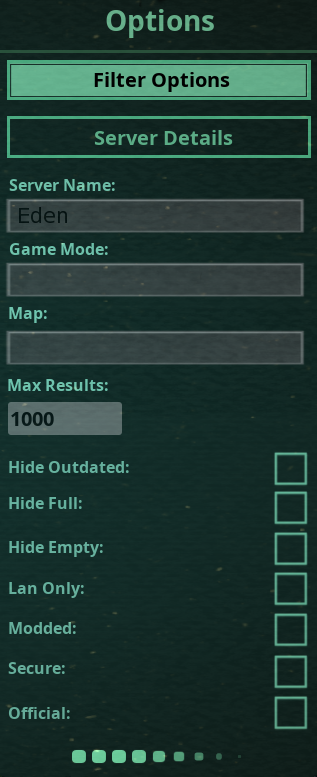
It shows another server but that's not the right one
neat thorn
Right. The Isles server browser is wonky. I would honestly try the Steam Server Browser if you can't find it
chilly lodge
even steam browser isn't showing it, but others are finding it just fine with ingame browser
neat thorn
Orly, now that's interesting
neat thorn
Have you tried searching for Friendly or Isle or another term?
chilly lodge
trying Friendly, but it works sometimes, but not others its pretty annoying since I donated to Eden Isle xD
neat thorn
What I would do is find it in the Steam Server browser and save it in Favorites there
Then you can always get to it
chilly lodge
"Friendly" shows a completely different one that I've never been on.
neat thorn
It's only showing one result?
chilly lodge
yea, this time its TWP-[High AI]-Semi-Real-Friendly
neat thorn
I would try the Command Prompt method to see if it helps
Admin Command Prompt
ipconfig /flushdns
netsh winsock reset
then reboot the computer
chilly lodge
yea ive done that before, one sec
ok brb in a couple mins
okay, loading game. Let's find out
it shows now! I hope I don't have to run that every day tho lol
chilly lodge
done lol
neat thorn
Awesome!
chilly lodge
Now that its working, I'm planning on getting the admins to get as many people as possible onto the server (they have a 'safezone' where herbs and carnis can't attack and they provide food for carnis)
and making a screenshot of everyone on the server roaring at same time
then making a blog post to promote the amazing server xD
 half urchin
Is nesting messed up?
pale pike
nesting (or putting down a nest) does seems bugged at the moment @half urchin, if you are having trouble with it you can try to spam the left click button before pressing B, it sometime fixes it
void otter
I hope the massive update will fix my issue...
void otter
It's most likely i should have posted it in bug reports since the common fixes haven't worked.
amber tide
It wouldn’t be posted there as we narrowed it down to being somewhat part of your modem/router settings since when you connected straight through Ethernet they showed up
The bug reports section is for bugs concerning the game
void otter
no
they didn't showed up @amber tide
only in the steam server browser thingy
even without the ethernet thing
neat thorn
Have you tried again since Steam came back up yesterday?
neat thorn
Yeah, I'm stumped at this point. We've tried everything. I still think something in your firewall is blocking it because Steam can see them but The Isle can't.
void otter
but how it can be the firewall if this issue came like that straight out of nowhere 🤔
neat thorn
WIndows updates
Some other software update
It happened to someone else last night in here, their firewall reset for some reason
void otter
Interesting.
neat thorn
Yup, that's what I said.
It was working then 2 hours later BOOM, no work
Turns out it was a firewall issue
void otter
and how did you guys solved it?
neat thorn
I had them check their firewall, they added a new exception and it worked
after we went through everything else
void otter
so yeah it ain't this solution for me since we already tried
neat thorn
Right. The only thing I can think of is to go through your programs list and uninstall anything you don't use or recognize. It also may be worth uninstalling the most recent Windows update to see if that fixes it. SOmetimes those do weird things
neat thorn
Right Click Windows Icon, choose pps and Features
On the right hand side, choose Programs and Features in blue text
Click View Installed Updates upper left side
Select update and right click, choose Uninstall
void otter
how should i know what's the latest windows update
or more likely what should i unistall exactly
neat thorn
They're all dated
void otter
yes
neat thorn
I would look up the KB number and see what they are
 snow wind
<@&505047238674874368> assistance plz
pale pike
is this for an in game issue @snow wind?
 calm wigeon
Servers aren't showing up for me today. I have tried several times to find servers, and I'm lucky if I get even one server to pop up. I've got the latest version installed, I've tried searching for a server with all boxes checked, none of the boxes checked, I've tried restarting the game, restarting Steam, everything I have tried doesn't fix the problem.
Edit: I managed to get servers to pop up, but they're all in Chinese.
pale pike
did you try this?
No server found solution :
At the top left of Steam you’ll see a little button labeled “Steam”, left click that and select settings > in-game > and adjust the dropdown menu at the bottom to around 1000. You may need to tinker around and find the magic number that works for you, afterwards simply hit ok and launch The Isle. @calm wigeon
calm wigeon
That seems to have fixed it. Thank you, El Paco!
 quaint hatch
I can't seem to join any Isle servers at all. It just keeps saying "Kicked from Server" and underneath, "Host closed the connection."
amber tide
Open an Administrator Command prompt by typing "CMD" in your taskbar search box and right click > run as administrator.
Once the command prompt is open you will want to enter these 3 following line:
ipconfig /release
ipconfig /renew
netsh winsock reset
Then restart your computer and try playing on a server.
@quaint hatch
quaint hatch
Alright I'll try that out, thank you
amber tide
You're welcome 😉
 copper folio
Help
pale pike
Restart steam as an administrator @copper folio
copper folio
How do I do that?
pale pike
close steam first, then right click on the steam icon > run as administrator
@copper folio
copper folio
amber tide
Click Steam > Settings.
Click Downloads > STEAM LIBRARY FOLDERS.
Right-click inside the Window and click Repair Library Folder.
Re-try the install/update and hopefully this time it succeeds.
@copper folio
 onyx surge
Im having trouble finding US official 3, all of the other servers show up but not US 3
amber tide
It was actually down, you should be able to find it and connect again @onyx surge
amber tide
Have you tried the ping solution and you’re sure that it’s actually up?
chilly lodge
It's up. There's like 30 or so people on it on average and ppl are on it now, according to their discord
neat thorn
What did we do yesterday to fix that, the netsh winsock reset command?
chilly lodge
I even added it to my stream server favorites. Can't connect that way either
Yea but I'm live right now, I'd have to end stream and do all that
neat thorn
Ooooh, that sucks
What does it say in the Steam Server Browser favorites?
Just blank?
copper folio
Do I find the steam thing in folders?
neat thorn
@copper folio No, the shortcut on your desktop
No, you shouldn't kenson
Does it show in the Steam Server Browser though?
chilly lodge
My backup servers show fine. But they're much more toxic lol
neat thorn
It may be a DNS issue on their end
Or yours, for that matter. Are you using Google DNS or the ISP DNS?
chilly lodge
I'm using isp one. I think
neat thorn
If you know how to change it, do it in your Router or modem and use Google's DNS
8.8.8.8 and 8.8.4.4
That way your whole network will use that DNS
You can also change it in your Network Properties on your PC if you want
chilly lodge
Unfortunately I'm renting a room. Don't have access to router.
chilly lodge
Once my apartment opens up I'll have full access then

 chilly lodge
Oof even flush DNS didn't fix it this time
neat thorn
After the netsh winsock reset need to reboot computer
You can also try ipconfig /release
then ipconfig /renew
neat thorn
Then you're good
neat thorn
It's not showing if you search for it in Steam Server Browser?
I would say that's a DNS issue or something
The other possibility is that the port they are using for their server is blocked on your end for some reason
neat thorn
At this point I'm thinking a port or DNS issue. If their host is using an odd port, maybe your router isn't configured to see it
chilly lodge
Yea... Unfortunately
neat thorn
It could be as simple as some other software you have using that same port
becaus it worked yesterday after a restart
Might try shutting off everything but Steam
and searching agian
neat thorn
Were you streaming last night?
Cuz if not right after the reboot, OBS may be using a needed port
neat thorn
I can't remember off the top of my head. Something in the 7000's and another in the 25000's
chilly lodge
I do know my chat bot uses port 8111
neat thorn
7777
7778
27015
are defaults
But who knows how the server is configured
mine uses different ports
chilly lodge
Hmm, don't think any of my software I use for streaming uses those
neat thorn
You can CTRL-ALT-DLT task amanger
Click the Performance tab
The Open Resource Monitor at the bottom
Click the Network tab
and you can see allllll your open connections and ports
chilly lodge
Ctrl + Shift + Esc opens task manager directly 😉
neat thorn
Right now The Isle is using 27021 for me
ItunesHelper is using 27015
Hey hey,
that's an Isle port
would be worth a look
chilly lodge
I dont use itunes, I use spotify and pretzel. spotify is off, pretzel is geared for streams
chilly lodge
steam is using 27036, but it kinda needs steam running right?
chilly lodge
ah I have the game closed, one sec
mine is using 27015
dont even have itunes installed
chilly lodge
ah. this is so irritating lol. my fave server not working, lol
chilly lodge
guess I'll play another game for now, that's my server 99% of the time, and not working = no fun xD
river garden
I am getting the classic 'Kicked from Server. Host closed the connection." That we troubleshot yesterday successfully. I have not changed anything but have started to get the error again.
amber tide
Open an Administrator Command prompt by typing "CMD" in your taskbar search box and right click > run as administrator.
Once the command prompt is open you will want to enter these 3 following line:
ipconfig /release
ipconfig /renew
netsh winsock reset
Then restart your computer and try playing on a server.
river garden
I used this fix last time unsuccessfully but I will try again.
amber tide
Then what fixed it yesterday and have you tried that method again?
 timid hare
So, ever since a few days ago, my game keeps crashing whenever I die or try to respawn and never use to do it before.
amber tide
Verify the integry of your game files @timid hare
river garden
@amber tide I did ip fix method and it worked for about 15 minutes until I was kicked
amber tide
Add theisle.exe to your anti virus/firewall exclusion list, and verify the integrity of game files
@river garden
river garden
i currently have my firewall and antivirus software still disabled completely since the last attempt
amber tide
👀 Try verifying the integrity then
river garden
I have done this the last attempt but I will do this step again.
amber tide
You said you fixed it yesterday, what steps did you take that fixed it then?
Do you have windows defender enabled? Cause you would need to do the same for that as well
Also you might want to try updating your drivers
@river garden
river garden
integrity is good. game will run for about 15 minutes and then i get 'Kicked from Server. Host closed the connection." i do not have windows defender enabled. I have updated my drivers yesterday.
amber tide
Hmmm you're correct and then restart the computer after
@neat thorn ty
@river garden Like lethalbacon said,
ipconfig /flushdns
netsh winsock reset
then restart computer
river garden
ive dopne this step 3 times and still get the same result
amber tide
You’ve done it with flushdns instead of the ipconfigrelease/Renew? Two different things
 solemn sandal
@chilly lodge
Try adjusting your Steam In-Game server browser, The Isle is pretty finicky with it's server browser.
At the very top left of your Steam you’ll see a button labeled Steam, click that and select Settings, then In-Game, and adjust the dropdown menu at the bottom to around 500. If that doesn't work, try 250 or 1000, different numbers work for different people.
chilly lodge
If I make it too low, unfortunately, it affects other games. So I don't want to lower it any further than 1500.
Someone on the server's discord recommended I bring up the in-game 'max results' to 5000, so when I get back to my desktop in a few hours I'll be trying that, @solemn sandal
solemn sandal
Hope it works
chilly lodge
I'll find out in about 2.5-3 hours. 😃
amber tide
@chilly lodge How did that work?
chilly lodge
Sorry, I haven't been able to get on yet, I'm waiting on the gas company to come by. They haven't arrived yet and they don't usually honk so I need to be able to see them drive by.
 loud ivy
sorry I'm late to the party, have you checked if you are double nat'ed or not? that will cause all sorts of fucky in-game symptoms if you can play at all.
neat thorn
Double nat'ing though would affect all servers, not just one
It's only one single server that's not showing for him
loud ivy
not necessarily
neat thorn
He also doesn't have access to the access point/router
so if that's the case, they're SOL until they can get access to it
loud ivy
I know. but he could still run a traceroute, count the hops before public, and atleast know the issue is out of his power and to find alternatives
I used to be in a situation like that with my old apartment
neat thorn
That's their exact situation........
apartment
we had it working the other day with a dns flush
Personally, I suspect the server they're connecting to is using an odd port and other software on their machine is using said port
because after a DNS flush and a fresh reboot it showed up
But when streaming and multitasking it won't
Although NAT would do that too
loud ivy
it's a real curious problem. he could always traceroute the direct IP of the server VS the FQDN and do some comparisons, see if he can even connect to it at all. That is assuming his server responds to ICMP
this is a server he is renting, right? not something local he's setup?
neat thorn
No, this is a server he plays on that shows up intermittently in the server list
They stream while playing on it and I think a streaming port is interfering with it or some other software they have installed
loud ivy
could be. have we done any basic pings to the server at all? Really should do that or a traceroute to the IP and the FQDN before we go deep into the sauce. We would have to get him to PM one of us the results though so he doesn't dox himself with posting his public ip
sorry brb eating trailmix and got a giant piece of granola in my teeth lmao
nvm it popped out
oh if you know what the servers name is I'll try and see if I can get the FQDN and IP and find out the ICMP situation
loud ivy
104.223.91.138:14020?
loud ivy
thats what comes up here: https://gamemonitoring.net/en/server161529

GAMEMONITORING
Server Eden Isle (Friendly + High AI) for The Isle with map Isle V3
admittedly I'm new to the isle, not 100% sure how to find the FQDN im about to boot the game and see if it shows through the menus
just gotta switch outta ubuntu
loud ivy
understood, I wont waste the time switching boot
yup ICMP is a go. I have great ping too
neat thorn
I'm going to fire up OBS and stream and see which ports are used
loud ivy
word.
neat thorn
I don't have anything using that port for me but it's hard to say for the other person
At least we know better what to look for now
loud ivy
yeah. hopefully its just a port conflict. can you change the port in your software or is it hardcoded to a range or something?
neat thorn
I host my own server, I can use whatever ports I want. however, I'm not sure if you can do that for a third party hosted service
And for services like Twitch or YouTube streaming, I don't think you can change them
loud ivy
you're talking about you run your own Isle server, yeah? I figured you could change it, don't know much about streaming though.
loud ivy
Oh yeah should be no issues there
neat thorn
Right but I don't stream to Youtube and have no idea what ports they use
loud ivy
hmmm brb google fu-ing
neat thorn
Port 14020 shows up for some Origin games and other things
Uplay uses it
I wonder if that's interfering.....
loud ivy
the usual suspects for youtube, 53 and 443
that sounds much more likely
especially if its something that might just pick ports in a range at random, that explains intermittent behaviour
neat thorn
Yup. Uplay is verified to use that port so........we'll have to see if that's running at the same time
loud ivy
yup. solid lead.
that gives him two good things to look at, a quick look at the hops JUST to be sure as well as seeing about this conflicting port
I mean if he can
can't ping the server reliably, its over right there ya know?
would hate it for the guy, same with double nat, but atleast he would know
neat thorn
that's true also since it doesn't show for Steam or The Isle
@Kenson TL:DR we found out Ubisoft and Uplay use the port your server uses
@chilly lodge TL:DR we found out Ubisoft and Uplay use the port your server uses
So those might be interfering. It would be good to open a CMD prompt and ping the IP address 104.223.91.138:14020 and see what Windows says
And do a traceroute also
loud ivy
I support all this + if you need to share screenshots of those results either block your public Ip (if you know how) or PM one of us the results
chilly lodge
I only have Steam, Origin, and Battle.net launchers
neat thorn
Origin uses that port also
neat thorn
No, it's not on your end
Well, shut Origin down and see if it works
that will tell you...........
loud ivy
yeah. I don't have origin, does it run in the background after you close it? may have to kill the process
chilly lodge
alright, lets try that haha
neat thorn
It looks like oVerwatch and Blizzard Voice chat may also use that port
loud ivy
just to be sure its dead
chilly lodge
only Steam auto starts
neat thorn
so kill battle.net also
loud ivy
oh ok
neat thorn
YES!!! Awesome!
loud ivy
fuck yeah
chilly lodge
I guess I have to keep origin closed unless i'm playing apex lol
neat thorn
Rusty found the IP and port
loud ivy
oh yeah I forgot. Good move figuring out what origin uses. I forget there are other launchers.
loud ivy
yeah that really blows. If its not on steam I'm not gonna get it probably.. am I stubborn? haha
chilly lodge
I don't have epic, or uplay. So I'm good there :P
chilly lodge
I don't even have Epic, because they're taking steam data without asking for your permission. And it also owned by tencent 40% which sell your data to the Chinese government
loud ivy
fuck that with a capitol FUCK
chilly lodge
There have been multiple blog posts where they show epic taking steam friends data without getting authorization
neat thorn
Yeah, that's why I haven't bought anything there. And I don't run the launcher unless everything else is closed
loud ivy
TBH I was going to install epic so I could buy satisfactory but now I'm kind of thinking about just throwing that $30 in my VR fund
its an epic exclusive
loud ivy

Epic Games Store
Satisfactory is a first-person open-world factory building game with a dash of exploration and combat. Pioneering for FICSIT Incorporated means charting and exploiting an alien planet, battling alien lifeforms, creating multi-story factories, entering conveyor belt heaven, au...
pale pike
let's not get too offtopic though