#🔧-legacy-troubleshooting-🔧
1 messages · Page 22 of 1
 pale pike
 night locust
I sent you a screenshot in Dms @pale pike
 surreal timber
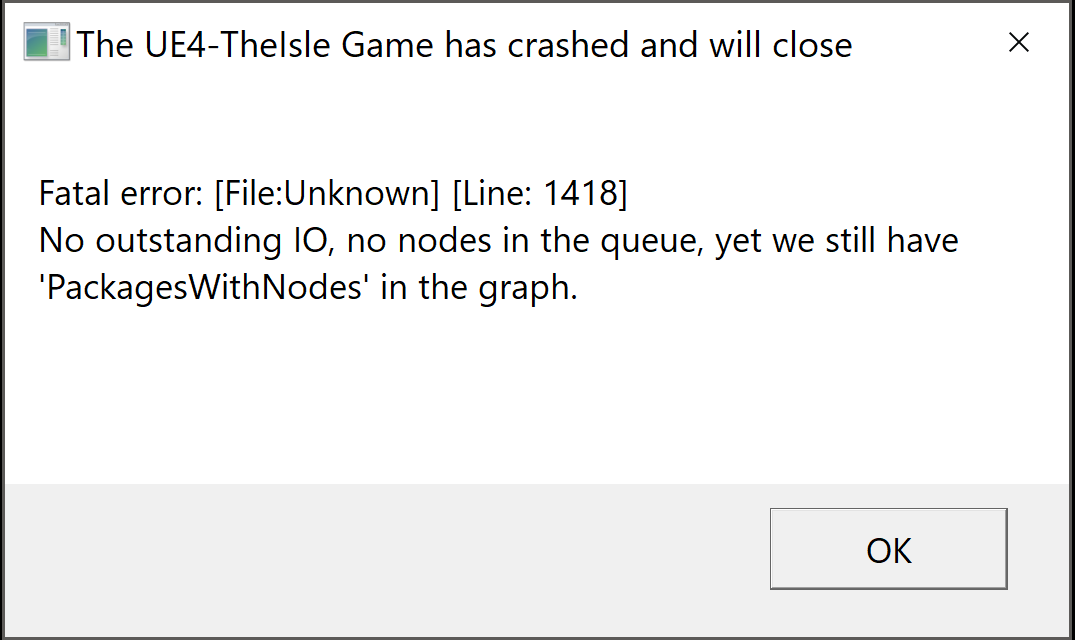
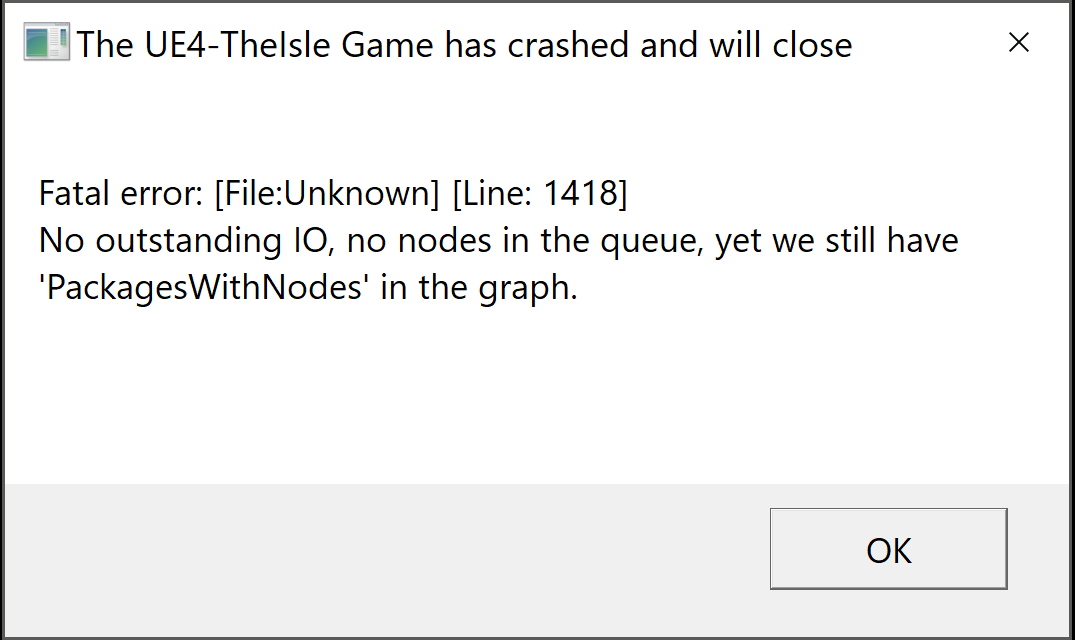
Fatal error: [File:Unknown] [Line: 1418]
No outstanding IO, no nodes in the queue, yet we still have 'PackagesWithNodes' in the graph.
0x00007ff8a859a388 KERNELBASE.dll!UnknownFunction []
0x00007ff609205039 TheIsle-Win64-Shipping.exe!UnknownFunction []
0x00007ff60923ba09 TheIsle-Win64-Shipping.exe!UnknownFunction []
0x00007ff6091c497c TheIsle-Win64-Shipping.exe!UnknownFunction []
0x00007ff60918fa8d TheIsle-Win64-Shipping.exe!UnknownFunction []
0x00007ff6092748c5 TheIsle-Win64-Shipping.exe!UnknownFunction []
0x00007ff60926f828 TheIsle-Win64-Shipping.exe!UnknownFunction []
0x00007ff60920ff6b TheIsle-Win64-Shipping.exe!UnknownFunction []
0x00007ff60920d44c TheIsle-Win64-Shipping.exe!UnknownFunction []
0x00007ff8aaa93034 KERNEL32.DLL!UnknownFunction []
0x00007ff8ac011471 ntdll.dll!UnknownFunction []
Crash in runnable thread FAsyncLoadingThread
Uhhhhhhh
 stuck rock
@surreal timber can you send me your log file from that crash?
surreal timber
Oh great looks like my dino was deleted too
Rip
Okay can't find the log file
Not really 100% sure where to search :')
 pearl oxide
Likely not, they're stored on the server not on your PC
I can probably track that down for you, one sec
surreal timber
Well, when I attempted to log in again the server asked me to pick a species etc. etc.
When I crashed I was in an area with not a single other soul
pearl oxide
Maybe you weren't as alone as you thought? Not sure
Your Windows account will be the folder name where the bit is scratched out
AppData is also a Hidden folder, so you'll have to use the View options to enable seeing it
pearl oxide
Looks to be it
 sharp turret
Hi im on the dev 0.1.51.4 branch, my hud is not showing, if static is on it only shows stam, even if i drink or eat the hunger and thirst doesnt come on
 honest river
you need to restart the game.
 brazen sparrow
Paco i have a serious question so Christmas is approaching and i have decided to just buy a new laptop which one do you suggest i get so i will be able to actually play the isle i been waiting to play this game forever and i do NOT want a refund please help 😦
pearl oxide
Something like that is suited more for #401470471750811669 but as a general rule it is recommended that you purchase a desktop for gaming if possible, any quality gaming laptop will be quite expensive
 honest rivet
That image is like 144p xD but if it says Fatal error just try again, it'll usually fix itself. I'm guessing this happened after you tried to load into a server?
pale pike
what's your system specifications @worn coral
brazen sparrow
@pearl oxide price range?
pale pike
check if you have some windows update to do @velvet raft
hold on im looking
@velvet raft download the latest version on their website. Then uninstall the one on yoir computer via the control panel and install the one you just downloaded
 cinder abyss
What are your specs? @wild frost
cinder abyss
I'm not sure that falls under the minimum required specs for this game
cinder abyss
Try installing from here: https://www.microsoft.com/en-us/download/details.aspx?id=48145

Microsoft Download Center
The Visual C++ Redistributable Packages install run-time components that are required to run C++ applications built using Visual Studio 2015.
 wild frost
Uninstalling older versions
'another already in progress hmm'
evertime I try in install or update the stupid microsoft VC everything traumatic is gonna happen
pale pike
@wild frost try adding an exclusion to your firewall / anti virus for the isle
wild frost
@pale pike Ok thanks. Will do!
 tall salmon
anyone able to help with a problem
pale pike
What is the problem?
tall salmon
scent wont work on the dev server but only client side for my friend but i can still use it
deleting the save folder doesnt fix the issue either
ive also sent copies of my files and it did not fix it
pale pike
does his dinosaur do the sniffing animation? also where was thst saved file you deleted located at?
pale pike
that is the old one, the one that has to be deleted now is in your appdata>local>theisle now.
but hmm.. have him run The Isle as administrator just in case
tall salmon
not relogging hes tried doing a few different things and it still persists
 proud crater
reset settings?
tall salmon
i cant remember but i had the same probelm but fixed it somehow
pearl oxide
Is it an issue of the scent command not existing or is the animation playing and it isn't highlighting anything?
tall salmon
the keybind itself doesnt work at all for him
pearl oxide
So not even the animation plays?
tall salmon
nope
pearl oxide
Does the Scent option show up in his keybindings?
tall salmon
yeah
proud crater
is this by any chance the old trike on a sandbox server?
pale pike
@tall salmon he deleted the wrong saved file
use this method instead :
Reset Controls/Controls not working properly | Method Two
Open File Explorer from the taskbar.
Select View > Options > Change folder and search options.
Select the View tab and, in Advanced settings, select Show hidden files, folders, and drives and OK.
Afterwards, at the bottom left of your taskbar there should be a white search bar. Type %APPDATA% in there and open your %APPDATA% folder.
At the top you'll see the filepath, click "Appdata" to go back to the actual Appdata folder, then to local > TheIsle > delete the "Saved" folder.
tall salmon
can confirm is working now, thanks
wild frost
@pale pike 😦
when I tried to install visual c ++ 2015, the setup failed
Now this game is forcing me to update the windows so okay
havent been updating for a very long while due to im using illegal windows
Ive uninstalled every vc +++ in my pc
and somehow have problem with setting up vc ++ 2015
my control panel above shown that vc 2015 is installed on my pc (but may not properly)
due to the below setup failure
look at the log file
wild frost
Been hours paco attempted to help but nothing works
I really want to play it but its done
Microsoft visual c++++ messed things up for me
 broken garnet
i can see you have an old version of windows, i think that could cause this kind of problems
wild frost
alright @pale pike thanks for escorting me for 2 hours. Now I've decided up to install the new windows 10 and now trying to install the game.
windows 8.1 is lame
now my laptop is extremely fast like when the time I was buying it
pale pike
hope it works better for you under windows 10!
 trail rover
Hello, do not tell me why I do not display 1 Pangaea,I tried all the options,deleted the game,deleted the game files,a bunch of ticks put and removed,but still not displayed,please tell me if you know what the reason ? Thanks
I have the main game client, it will display all of Pangaea in addition to the first,I don't know what the problem is,all my friends work,and I sit like an outcast,maybe it depends on my location
pale pike
you tried the "no server found" solution in the pinned message? (it's the first one)
@trail rover
trail rover
@pale pike sorry I'm a little confused about what you write
I can not find 1 Pangaea,and Pangaea 2 finds,don't understand what's wrong
I DON'T KNOW WHAT TO DO, THIS IS THE END ((
pale pike
did you do this @trail rover?
No server found solution :
At the top left of Steam you’ll see a little button labeled “Steam”, left click that and select settings > in-game > and adjust the dropdown menu at the bottom to around 1000. You may need to tinker around and find the magic number that works for you, afterwards simply hit ok and launch The Isle.
 pearl oxide
That's quite odd, I see it on mine
pale pike
can you do a Ss from the whole store page?
 balmy terrace
nope
im curious if because they converted steam prices to australian dollars recently if this could be a bug for me
pearl oxide
Aaaahhh, the currency thing might be it
I think a while back something about Steam's market changed to where you have to provide the price in each individual currency as it won't do it automatically
balmy terrace
ohhh
pearl oxide
I dunno if that's true but I'll try and bring that up to see if a price can be added
For Australian dollars right?
pearl oxide
Well I can only suspect that's the problem
It won't be an immediate fix but if that is the problem I will try my best to remember to tell you
balmy terrace
thanks!
 final cedar
I've searched here, I've googled, and I can't seem to find the answer. Trying to make it where a test map server/deathmatch stays daylight all the time. I changed the ServerDynamicTimeOfDay to 1, and then to 0, and neither work. Is that the wrong one or is there something I'm missing?
 brisk compass
That setting does not work at this point in time @final cedar
final cedar
Thank ya kindly
trail rover
@pale pike Thank you for responding to my message, but I tried all the numbers and everything was useless, it seems it’s not my fate to play on this server
pale pike
@trail rover
you can always try a quick dns reset
open the command prompt as an administrator and running the following commands:
netsh winsock reset
ipconfig /flushdns
Then reboot your pc and test the server browser again
trail rover
@pale pike I did everything as you said, a black screen appeared, then disappeared and I started restarting the computer.After I turned on the game, and everything was useless, as nothing worked and does not work, Thank you for helping me!
pale pike
that's unfortunate :/ I've reached the extent of my knowledge on this issue, dont know what else it could be, maybe someone else would help
trail rover
@pale pike I was advised to change the ip-address, do you know if this will help me?
pale pike
I don't know, I don't have much experience in networking
honest river
ok so does anyone know why my game keeps crashing now its never crashed before but after the small update it crashes kinda alot and ive lost 2 grown dinos to these crashes any solutions
honest river
https://www.elkjop.no/product/data/stasjonar-pc/HP6900002NO/hp-pavilion-gaming-690-0002no-stasjonar-pc-sort Is this PC good enough to play the isle?

Elkjøp
Mer kraft til både jobb og moro. Den stasjonære PC-en HP Pavilion Gaming gir strålende ytelse takket være 8. generasjons hexa-core Intel Core i5-prosessor, neste generasjons Nvidia-grafikk, rask SSD-lagring og rikelig med tilkoblingsmuligheter.
 rigid stump
Which one should I buy for The Isle? https://www.dustinhome.no/product/5011094571/gs63-7re-stealth-pro?ssel=true&LGWCODE=5011094571;91289;5443&gclid=Cj0KCQiAxNnfBRDwARIsAJlH29Bx9A0nLTM4ZC2_HpMLxnbOJCGFnJLLgxSJj3N593YXU-Lx2h-zj7UaAlozEALw_wcB or https://www.elkjop.no/product/data/barbar-pc/10160/asus-tuf-gaming-fx705-17-3-barbar-gaming-pc-gullstal

Elkjøp
Den bærbare PC-en Asus TUF Gaming FX705 leverer solid ytelse i Full HD-oppløsning for gaming i høyt tempo. PC-en har et solid kjølesystem som forhindrer oppbygging av støv og et hardført tastatur som tåler mange lange timer med gaming.
honest river
personally id go with the asus
pearl oxide
The desktop will slightly outperform the laptop
But I recommend something with a GTX 1060 or above
This belongs in #401470471750811669 however
rigid stump
So will the asus work on The Isle?
 left yew
I can't seem to use scent at all on dev branch. I've completely re-downloaded TI, tried a number of other solutions, but nothing seems to help.
pearl oxide
When you say that you can't use it, can you be more specific? Does the animation still play? Does the keybinding for it still exist in the menu?
left yew
No animation plays, and if SenseFocusMode isn't Scent, then no, it's not on the list.
pearl oxide
No, there should be an input called Scent
left yew
Then it isn't there.
pearl oxide
For me it's the second entry in the Dinosaurs category of your controls
left yew
I only have nest building and the calls
pearl oxide
If it's not present then you need to delete the Saved folder located at C:\Users\{Your Account Name}\Local\AppData\TheIsle
Actually, that's not quite right
It should be AppData\Local
Not Local\AppData
AppData is a Hidden folder so you'll have to enable seeing it via the View menu
left yew
That works. Thank you very much for your time.
 limpid lava
Hello, I have a question.
So I wanted to host my own server, so I tried a lot of things, at first I went in the menu, I pressed "Host", checked all the infos and tried to see what I could do.
Then, I did some researches, I learnt about the "game.ini" file, so I copied what I found on the steam forum, I changed some options of it to "customize" my server.
Then I added myself as an admin.
So I went admin, and from here it's okay.
I tried some commands like /time or /weather and so on.
I wanted to see why a guy on Youtube (on this video : https://www.youtube.com/watch?v=SbHf0PzOc-s&t=80s) had to run "SteamCMD" or things like this, because for me it was like you only host it and when you're on the game the server is on.
But what I also want, is the server to be on, even if I'm not online, and if it crashes for some reason, it restart automatically.
I know it might seems long to read, but if someone can help me, thanks a lot.

Get your Isle server started quick and easy. Everything you need will be on my site below. http://playground-au.tk/howto-the-isle-dedicated-server/ https://d...
pale pike
@limpid lava
Although this more of a #server-hosting thing, the Host button in game and hosting a server through SteamCMD are not the same thing.
The host button lead you to host your server, but that server is "offline", only you have access to it.
Running a server through the SteamCMD makes it a dedicated server enabling other players to join it.
And there is no such thing as "admin" in host button, commands will not work.
limpid lava
Ok thanks for the answer, and the linked video there, is it a good tutorial to make a server?
pale pike
I don't really know, better ask in the server hosting channel!
limpid lava
Ok thanks a lot for the answers.
honest river
ok so does anyone know why my game keeps crashing now its never crashed before but after the small update it crashes kinda alot and ive lost 2 grown dinos to these crashes any solutions
 rigid stump
Will Asus work on The isle? Scroll up.
pale pike
yes
honest river
ok @pale pike i sent it
 worn coral
@pale pike
pale pike
@worn coral what graphic cards are you using?
also what is the issue you have?
honest river
https://www.elkjop.no/product/data/stasjonar-pc/HP6900002NO/hp-pavilion-gaming-690-0002no-stasjonar-pc-sort Is this PC able to play the isle?
Elkjøp
Mer kraft til både jobb og moro. Den stasjonære PC-en HP Pavilion Gaming gir strålende ytelse takket være 8. generasjons hexa-core Intel Core i5-prosessor, neste generasjons Nvidia-grafikk, rask SSD-lagring og rikelig med tilkoblingsmuligheter.
@pearl oxide ^
pearl oxide
Would recommend the GTX 1060 over the 1050, but it should handle the game at low settings with a steady 30+ fps
honest river
Ah ok
 cedar gorge
i'm having a weird issue
i can't use scent on dev branch after trying all of the common fixes
when i deleted my saved folder as per the most reccomended fix, nothing changed, and when i checked back in the files after starting the game and closing it again, the saved folder was still gone, without a new one created/downloaded after launching the game
i validated my files, scent still broken, saved folder still gone
i deleted all the game files and am reinstalling rn
<@&401466542140817419>
rigid stump
It has 4 GB, I think, it's that enough?
honest river
Yea
pale pike
@cedar gorge you most likely deleted the wrong one. try this one :
Open File Explorer from the taskbar.
Select View > Options > Change folder and search options.
Select the View tab and, in Advanced settings, select Show hidden files, folders, and drives and OK.
Afterwards, at the bottom left of your taskbar there should be a white search bar. Type %APPDATA% in there and open your %APPDATA% folder.
At the top you'll see the filepath, click "Appdata" to go back to the actual Appdata folder, then to local > TheIsle > delete the "Saved" folder.
cedar gorge
ill try that, thank you!
 broken terrace
hey i cant use scent and when i open up my settings i cant find it to see what key its binded to any help on fixing it?
broken terrace
<@&401466542140817419> ?
 main wave
Hold Q for scent.
Walking while using scent shows footsteps immediately, but it's a short duration.
Standing still while using scent takes longer, but the scent trails last longer.
broken terrace
i dont have the option for it
holding q does nothing
ill post a screenshot of my settings
main wave
It should be at the very bottom of the controls list
pearl oxide
Delete the folder at C:\Users\{Your account name}\AppData\Local\TheIsle\Saved
AppData is hidden and to see it you need to enable seeing Hidden folders in the View options
 reef flame
Fatal error: [File:Unknown] [Line: 1418]
No outstanding IO, no nodes in the queue, yet we still have 'PackagesWithNodes' in the graph.
0x00007ff8009ea388 KERNELBASE.dll!UnknownFunction []
0x00007ff759085039 TheIsle-Win64-Shipping.exe!UnknownFunction []
0x00007ff7590bba09 TheIsle-Win64-Shipping.exe!UnknownFunction []
0x00007ff75904497c TheIsle-Win64-Shipping.exe!UnknownFunction []
0x00007ff75900fa8d TheIsle-Win64-Shipping.exe!UnknownFunction []
0x00007ff7590f48c5 TheIsle-Win64-Shipping.exe!UnknownFunction []
0x00007ff7590ef828 TheIsle-Win64-Shipping.exe!UnknownFunction []
0x00007ff75908ff6b TheIsle-Win64-Shipping.exe!UnknownFunction []
0x00007ff75908d44c TheIsle-Win64-Shipping.exe!UnknownFunction []
0x00007ff800e83034 KERNEL32.DLL!UnknownFunction []
0x00007ff8023d1471 ntdll.dll!UnknownFunction []
Crash in runnable thread FAsyncLoadingThread
(Not sure if this is the wrong place to post it, but there.)
pale pike
not sure what is causing this crash @reef flame but if you try again a few time it should let you in
 lilac thistle
Fatal errors have often been fixed by updating your GPU Drivers.
 royal steppe
I believe this has been occurring quite consistently but on most servers, official and nonofficial, i have been getting very low fps in the 10-20 range. I have a good computer and have tried verifying the game files and deleting the fps limit but nothing has changed. Many of my graphics settings are also lowered but i still get low fps. The only time i get higher fps is usually only on the test map.
Any help would be appreciated
pale pike
dm me your system specifications @royal steppe
royal steppe
okay
proud crater
^^
 quaint merlin
G'day, just had a friend try to buy the game here in Australia, it's not showing a price for us at all? I already have the game, but they can't buy it, wishlist it, or put it in their cart. When I go to check price on it, no price appears for me either. We cannot change profile country or currency. Is this a problem where the Isle itself hasn't set a price for Aus, or is it a steam problem?
pale pike
@quaint merlin, Steam recently introduced AUD to their store, but game developers have to set the price themselves before you can buy it. The issue is known and should be dealt with shortly :)
quaint merlin
Fantastic, thank you! We will sit tight then.
 fickle pelican
I cannot change my resolution in windowed fullscreen
pale pike
anything special happening when you attempt to do so? @fickle pelican
fickle pelican
nothing happens at all
I could change my resolution in windowed and fullscreen
the worst part is, when in windowed fullscreen the size and quality of the UI changes
fickle pelican
correct
pale pike
weird
try to manually set it by editing the config files
follow this :
As an alternative of deleting your Saved folder if you are having issues with changing your settings (resolution , sound) ,you can manually change them by editing the ''GameUserSettings'' found in :
C:\Users?\AppData\Local\TheIsle\Saved\Config\WindowsNoEditor
fickle pelican
still doesnt work
 tight hollow
i dunno if this is the rite spot but in my steam there is no option to buy the game at the moment??? is there a reason or there no sale due to the sale on steam atm?????
@pale pike u seem to be active in here today any idea?
maybe u can talk to developers for me or somthing lol?
pale pike
you from australia? they know already
tight hollow
oh is it an aussie thing is it?
pale pike
mhm
tight hollow
damn been away a few days come home thought ill look through sale and grap it for the kids pc/account and there is nothing lol
pale pike
as the AUD was just recently introduced to the steam store
pale pike
games have to set their AUD prices before you can buy it
tight hollow
sml then np lol
few cd key sites have europe keys only 😦
no global keys 😩
ok too easy thnx ill let them know they cant play for a while 😛
hf
 scarlet stream
For less confusion and ease to find your saved data..
Press "Window Key + R" and enter > "%localappdata%\TheIsle"
 rugged sand
do anyone know why when i want to download the dev branch, when i'm at 100% it says download cancelled and it does the same thing two times?
And its not a storage problem i got 110Go left
scarlet stream
Other downlaods do something on steam?
rugged sand
nope other downloads works completely fine
(i've deleted my downloading directory in steam and restarted the download a third time #ThanksPaco)
scarlet stream
and there's no leftover Isle folder in steamapps?
rugged sand
in the games?..
pale pike
your isle game is installed in steamapps, dont delete it
scarlet stream
You can try; a winsock reset.
scarlet stream
Just trying to understand what you deleted lol.. Leave you to it then. Mods will help you when they get to it
rugged sand
thx captain obvious
rugged sand
(and problem fixed, solutions: restart steam and delete downloading folder in steamapps)
honest river
no. That's not official
pearl oxide
@primal summit you'll have to communicate with the admins of that server for assistance. We can only assist with official servers
honest river
Hello, I haven't played the game in a long time and started again yesterday. They told me that by pressing "Q" for a while, you would activate scent. It doesn't for me sadly though. So they told me to check my key bindings and that it should be t the bottom of the list. Yet my list ends with something about a holster. I can't find "scent" anywhere in my settings. I hope you guys can help me out. Sincerely, a noob.
honest river
it's only a little down the list, under 'Dinosaurs'. Also, only certain dinos have scent as of right now.....if you're on an official server though, you should be ok with that. @honest river
I am on an official server
I don't have a dinosaur option though :S
Only options I have under dinosaurs are: mouse sensitivity and mouse smoothness
settings/controls/Input Method...should have all your keybindings
I went there...nothing :S
My settings look completely different o.O
not sure but i think you have to delete your 'saved' folder within your Isle directory
okay I'll try that
C:**********\Steam\steamapps\common\The Isle\TheIsle\Saved - this one.
it'll reset all your gfx settings too, just fyi
Okay thank you!
no worries, let me know if it works 😃
pale pike
that is the old saved folder
the new one that has to be deleted is in appdata/local/theisle
honest river
@honest river ^
yes but I can't find them in either, so deleted the isle folders in genereal and reinstalling the game now
that should work too lol
pale pike
is your "show hidden files" option enabled? folders in appdata are usually hidden
honest river
lemme check
alright now I found it
it didn't change anything
Oh wait, it does say scent now though ^^
thanks guys!
pale pike
@mental elk look at the pinned messages here, you should find a fix for servers not showing
 lilac mortar
I'm having some freezing issues every ten or so seconds. I'm not entire sure why its happening. I'm currently running this game on dev branch on an MSI laptop that has no issues with running it in the past up until now where the freezing is just getting to a point where its ridiculous to even try playing
pearl oxide
I haven't noticed it in particular, when did it start for you?
lilac mortar
since I started playing it today, I haven't been on the Isle in a month
pearl oxide
What's your graphics card?
lilac mortar
940M Nvidia GeForce
pearl oxide
Hmm, what settings do you normally play at?
pearl oxide
Hmm, what framerates do you normally get?
lilac mortar
hard to tell because my fps doesn't show up where its supposed to, but at best it runs at least 30fps
specially if I keep the settings like this. Any higher and it lags like hell
pearl oxide
Is it still around that amount, ignoring these freezes?
lilac mortar
it drops in frames when the freezes happen before it returns to normal, only to repeat
pearl oxide
Have you noticed anything happening on-screen associated with them?
lilac mortar
with the fps? No, nothing unusual when I tested it out on Thenyaw
pearl oxide
And what server were you experiencing this on?
lilac mortar
hosted my own server for a bit
pearl oxide
Which map?
lilac mortar
Thenyaw
pearl oxide
Hmm, kind of wondering if maybe your PC was having issues with hosting the server. Have you tried using an official server at all?
lilac mortar
yes, same results, tried on a test server where there was death match going on, there was some very mild freezing and better fps, but when dinosaurs roared, they sounded like they were jerking... as in... stopping in milisecond with the roar as they broadcasted
its hard to describe the sound
pearl oxide
Hmm, that to me sounds like it might be system strain
I do have to say that a 940M is pretty low end by now
How is the RAM and CPU?
lilac mortar
CPU is an Intel i7 quad core, RAM is 8gb
pearl oxide
Seems okay. Is the computer getting hot when you play?
Hotter than it ought to I mean
lilac mortar
no never, stays completely warm
pearl oxide
Are you using a hard drive or an SSD? I don't think it would impact an issue like this but maybe if it's a load time thing
lilac mortar
I have a 1 terrabyte hard drive, the game is stored on the C drive
hard to tell if I'm using it or not
pearl oxide
Hmm, well I have noticed a dip in performance on the current patch, staying above 30 but not by as much as it used to. I kind of suspect it's the new volumetric fog that might be causing problems for you
lilac mortar
people have said they haven't noticed the issue
might have better PCs or laptops than me
pearl oxide
IIRC it's a post-processing thing. You can try bumping it down to High to see if it does anything
Well I can tell you right now that at the beginning of night, running at all High/Epic, my GTX 1070 is getting 34 fps
lilac mortar
I'll give it a whirl and test it on a test server
pearl oxide
I know volumetrics was something that killed framerates in Monster Hunter World too. I doubt it's as taxing here as it was there, but it may be something.
lilac mortar
okay lowering the processor to High seems to help a bit, it's less stuttery than it was before, but its still there. So I reckon cranking it down to Medium might fix it more
pearl oxide
As long as you don't bork your nightvision I'd turn it as low as it can go
lilac mortar
its helped a lot Sour, thank you
pearl oxide
Sure. I know it sucks, but I'd prob look into maybe getting a new laptop, or a desktop for gaming if you can
I know gaming laptops are super expensive, since I'm using one
lilac mortar
yeah its a gaming laptop and is reaching its end, so I'll have to ask my father about it when I get enough cash again
pearl oxide
Yeah. Just a friendly suggestion, since if I'm being real with you, I don't see problems like this going away as more and more games come out with more advanced computers in mind
lilac mortar
no problem. I don't play many games that put a lot of stress on the processor, The Isle is the only demanding game I've got
pearl oxide
If you do end up in the market for a new PC anytime soon, I'd look at getting a GTX 1060 or better for the graphics card, should be enough to run TI on medium settings at a decent framerate
lilac mortar
any laptop recommendations?
pearl oxide
But yeah, glad that was able to help a bit, if you need more help feel free to ask, I just dunno what all else I can do
Ehhhh. I mean the GPU is gonna be the main thing
16GB of RAM and an i7 is probably just going to happen anyway, if you find something with a 1060
lilac mortar
can do, and again, thanks. Your help made it a lot better
pearl oxide
Anytime
pale pike
personally I'd put everything on low except post processing
and your view distance really doesnt have to be at high, it wont change how far you can see other players but only affect the rendering distance of tree/bushes/grass
 vapid otter
Hi, so I cant get the scent working at all, any help?
pale pike
@vapid otter when you press and hold Q, does it make the animation for it or just nothing is happening?
 thorny dawn
For some reason my nightvision isn't working at all in replays
Any way I could fix that?
honest river
No, replay is messed up right now, Devs are knows about this it's just isn't priority right now.
vapid otter
@pale pike Nothing happens.
pale pike
@vapid otter delete your saved folder in appdata.
type %localappdata% in your taskbar search box
open the folder "the isle"
deleted the folder "saved".
launch your game and try using scent
vapid otter
You are a bloody miriacle, I saw this fix but could not find that save folder for the life of me.
 brisk pendant
Hey. Ive noticed that when I start playing the Isle, my GPU's for both integrated and NVIDIA skyrocket. When im not playing the isle, its very low for both
it seems like the isle is... sharing both GPU's?
 twin raft

pale pike
somewhere in your nvidia control panel, under 3d graphic setting, you should be able to set your nvidia card as your priority
@brisk pendant
pale pike
ergh im not sure what could be done
@lilac thistle thought on shrek using both GPU (integrated and a nvidia) to run the game?
lilac thistle
If it's not using his dedicated card then his drivers are more than likely to be massively out of date.
twin raft
His driver's are updated.
brisk pendant
I just installed the new NVIDIA driver which is weird
Yea... im not sure whats going on. I just reset my nvidia control panel and then put it back to using the dedicated card... but its still using up alot of my main GPU
which is integrated. I really dont understand :/
pale pike
is your dedicated card and integrated card some how connected to one another?
brisk pendant
I wouldn't know. Its a laptop
My nvidia card is getitng more use by x2 but my integrated card is still being used for SOMETHING
would it be my multiple google chrome tabs with discord, and other launchers?
pale pike
ah this might be possible that your card usage is related to it running your background apps and not the game itself
pale pike
try closing all of the unnecessary apps and see if its usage drop
brisk pendant
It doesn't really matter. I still am having huge FPS drops from 40 FPS and then when im turning my dino, to 5...
I really dont know whats causing it and its frustrating
brisk pendant
And I actually stopped playing games and my GPU for both went to zip to 5% if that... so my system has to be using both
pale pike
I'm looking into it, will dm you if i find anything relevant to your situation
 maiden wigeon
I seem to have been kicked from dev 1 after a game crash and cannot rejoin.
It keeps kicking me as well upon trying to relog.
pale pike
@maiden wigeon only getting a kick message nothing else?
maiden wigeon
Managed to fix it, needed to enter another dev server than log off there.
Still an odd situation.
pale pike
indeed, glad you got it working though!
maiden wigeon
Ty
honest river
@inner gust ask here not in the feedback
 inner gust
Oh I'm sorry
So ye there is no update option on steam and game keeps saying that it's outdated
honest river
My Isle don't record in any way. Both automatic and manual isn't working. Any solution?
 round moat
What server are you trying to record on, @honest river ?
honest river
Official 1
round moat
Recording is disabled for official servers
honest river
Oh :C I forgot. Thanks for the fast help 😃
round moat
Hehe, no worries
 jade grove
Ello – A quick compatibility question: will an Intel HD Graphics 4000 graphic card with a Intel Core i5 processor and 6RAM do, or meh? Budget gamer btw~ 😇
pale pike
the game doesn't support integrated video card that well @jade grove, and you dont have enough RAM
pale pike
mods arent working right now @honest river
pale pike
might be old screenshots they had, or perhaps mods are working on the legacy branch? I'm not sure.
if you wanna give a try to the legacy branch, go into your steam library
right click the isle and click properties
select the BETAS tab
choose legacy in the dropdown menu
@honest river
ah yes switching between branch makes you download the game again
 muted briar
It seems as though I have been banned from entering any isle servers. I can't join any and this pops up everytime. Have I been banned for some particular reason and if I did get banned could I know why I did?
Yes
Yeah im not sure. Going to try and restart steam and the isle and see if it fixes
Just restarted now I’m going to try and load into a server
Did the same thing
Same thing on different servers like I was banned from getting into dev servers
Yeah
I’m not sure why
Every server I’ve tried it wont let me in
Is that still a thing?
Am I allowed to tag Punch here?
I’ve never had that problem before either
Just started today
Yeah I’m not sure what’s happening
^^^^^^
I mean they say that we’re allowed to tag lunch
*punch oof autocorrect
@lilac thistle Sorry in advance if I'm not supposed tag you. This problem just started today where I cant join any isle servers and I get this message.
lilac thistle
try restarting Steam as an administrator.
muted briar
Alright
lilac thistle
also you can tag me whenever you want
muted briar
Ok thank you
@lilac thistle This pops up whenever I try and do anything to steam. Should I click install service?
This has never happened to me before so I’m really not sure what to do
I would like to get some sort of confirmation before I do something like that
Well I’m reinstalling and I hope it will all go well
Alright it seems like it reinstalled so let me see if it worked out
muted briar
I haven’t either. Just popped up today
Yesssss
It loaded
Thank you for recommending to restart my steam. I appreciate it Punch
 hollow bough
My discord is currently dying a slow death. I´ll come back to you as soon as this is sorted.
hollow bough
^sorted
 ornate holly
anyone know how to cut the stuttering out of this game? I have a more than capable machine as I stream a shadow tech Pc
ornate holly
I’ve tried them all @pale pike
ornate holly
No I don’t have vsync on either
 half raven
good afternoon, im on the isle and cant seem to find any of the dev servers, I have the public development branch version and when i come on to the isle i cant see any and only have a small selection of servers
 pale pike
@half raven look at the top pinned message
proud crater
High CPU and GPU usage when I play the game that causes ping spikes into the 800's on the test level and teleporting/stuttering, both on public branch and dev. This has been a constant issue since the last big patch dropped. The CPU and GPU were in the single digit percentages prior to the graphics update
 crystal lava
;-;
pale pike
can you dm me your spec @proud crater
half raven
@pale pike i have it on that setting
 pallid harbor
HOw do i make my computer compatible?
 ruby vale
new hardware
honest river
I'm sure this has probably been asked before by now but, certain servers aren't appearing for me on the server list and haven't appeared for about a week. Is there a way I could fix this so I can play on them again?
 molten delta
there's some fixes to the server list coming in the next dev branch patch, hopefully that might solve the issue
honest river
alrighty, thanks
pale pike
@honest river if you haven't done so already there is a solution in the pinned messages too
honest river
Is there? I must've missed it when I checked then
pale pike
The first one no server found solution
honest river
that works for fixing certain servers too? A lot of them still appear, it's just a select few that don't
pale pike
name of it may be misleading should still work😁
 storm owl
i cannot use scent ive tried reseting bindings ive deleted save files, and ive reinstalled the game.
pale pike
@storm owl where was the saved folder you deleted?
storm owl
in the isle save files
pale pike
i meant where was it located at? in steam folder? appdata folder?
storm owl
steam folder
pale pike
it:s the wrong one
do this :
Reset Controls/Controls not working properly | Method Two
Open File Explorer from the taskbar.
Select View > Options > Change folder and search options.
Select the View tab and, in Advanced settings, select Show hidden files, folders, and drives and OK.
Afterwards, at the bottom left of your taskbar there should be a white search bar. Type %APPDATA% in there and open your %APPDATA% folder.
At the top you'll see the filepath, click "Appdata" to go back to the actual Appdata folder, then to local > TheIsle > delete the "Saved" folder.
storm owl
k im gonna see if it worked
it gave me a fatal error
yep i can scent now!
thank you!
 hollow hatch
i very recently had to get a new hardrive and reinstall windows. Now that that is done, each time i try to install dev branch for isle, it gives me all of the non dev branch servers. Servers like the official dev servers will not come up. no idea what is going on...?
brisk pendant
Really dont know why im going from 40 FPS and then in a fight, hitting 6 FPS, which makes zero sense. Its so ridiculous. I cannot play the isle anymore. Im even on a lower resolution. Used to be able to play the game, now I can. Its depressing
 boreal sapphire
When other players enter my render distance, my fps drops to 0 then stays at a steady 5-10 until they leave my render distance. I dont think its my computer, as I've run far more demanding games than the isle perfectly fine.
brisk pendant
Its just the latest dev branch update. I was running it fine on previus builds. I ran it fine when the first dev branch update came out with the new HUD and the rivers. Ran it at 90. Then the hunger fix came and no one could play with the blood. That fix came, I could play again! Then this last update came out and... well now I cant play at all.
I mean i know its not my system... but its depressing either way.
proud crater
game's been really laggy for me too lately :/ especially dev branch thenyaw
brisk pendant
I only am having FPS issues. Ping is usually how it is for The Isle for me LOL
games just not optimized sadly
 sudden meadow
The key to see the sheet of his dinosaur does not work anymore. I tried with various keys, with disconnections / reconnections and checking the files of the game but the bug persists.
 limber rover
Can anyone help me try to get the server list working for me? i load the game and try to play on a public server but it lists that no servers can be found.
pale pike
@limber rover tried the fix found in the pinned message?
@sudden meadow usually fix itself after a safe log
limber rover
@pale pike Where is the pinned message?
pale pike
top right corner : it's a pin icon on pc, or tap the three dots on phone
limber rover
alright thaks
thanks**
oh hey @pale pike when i click the login button at the start screen it says that new logins are restricted by the system administrator is it like that for everyone?
pale pike
yeah ignore the login button it has no uses right now
limber rover
alright thanks
 gleaming cipher
hello
i have a problem with the game can some1 help me pls
i get an error when i whant to open the game
i have a screenshot with the error can i upload it here maybe some1 knows ?
 fading mauve
I notice that in-game my shadows shimmer and I can't change any graphic settings unless I do it on the main menu screen. But nothing changes once I enter a server, and my graphic settings are grayed out. What's the dealio with this?
gleaming cipher
i can`t start the game because this error appears
i reinstaled the game 3 times
my video drivers are up to date
and nothing
and the game worked just fine for the past week
pale pike
@gleaming cipher what are you system specifications?
follow this: https://gyazo.com/8c1cac40ec65c922d4950386d9d19aba
@fading mauve are you clicking "apply" once you changed it?
fading mauve
Of course
The settings even show they've changed in-game, the changed settings just end up doing nothing to change my game visually
pale pike
can you send me your spec too
fading mauve
Lemme dig it up
CPU: intel core i7-4790k 4GHz
32.gb RAM
windows 10 OS 64bit
nvidia gtx 970
pale pike
erhh could you send it to me using the gif posted above?
would give me a bit more info
fading mauve
Mind if I send it in a PM?
pale pike
sure
gleaming cipher
Asus ROG G752VSK i7-7700
32 gb RAM
GForce GTX 1070 8gb
win 10 64 bit
dx 12
 pliant lodge
I get a lot of lag, and I mean, a lot of lag walking through birch forests. Is this common? a few other friends say the same. Not sure if it's the right place, but I drop a fair 10fps walking through there, and my fps is already kinda crappy. Same thing for bodies, if theres more than 3 I end up lagging?
proud crater
same
i lag really hard in birch forests and around the rivers, and if there's even one body in my render range
 frigid isle
@gleaming cipher I'm getting the same error and have been looking around for answers. It seems to be from one of the recent driver updates. It should get fixed next patch or two.
 modern sedge
Why does it seem I’m only able to see a small selection of the available servers? I’m required to refresh multiple times to find a specific server, while other servers pop up much more frequently. I can refresh several times and server A comes up frequently, and then after enough refreshes, server B finally shows. In fact, there is one server I haven’t been able to find after hours of trying, but the same old others show up randomly each time.
Please tag me in your response.
pale pike
@modern sedge tried the no server found solution in the pinned messages?
modern sedge
@pale pike No, I see servers...I only get no server found when using the search function. But I will try and find it and look it over. Maybe it’ll help me
pale pike
it should help still
modern sedge
Can you direct me there...not sure where it’s pinned
pale pike
No server found solution :
At the top left of Steam you’ll see a little button labeled “Steam”, left click that and select settings > in-game > and adjust the dropdown menu at the bottom to around 1000. You may need to tinker around and find the magic number that works for you, afterwards simply hit ok and launch The Isle.
here you go
modern sedge
Thx
modern sedge
@pale pike That worked!
frigid isle
I keep trying to switch to dev branch but every time it finishes the download it starts all over again. Suggestions?
pale pike
@frigid isle
add an exclusion to your anti-virus / firewall.
then delete "downloading" found inside your steam folder
pale pike
@elder spear that shouldn’t keeps you from playing, there is no known fix that I'm aware of.
 elder spear
Yeah, it seemed to be a client crash.
 dense comet
why i cant search a server ?
pale pike
@dense comet look at the pinned messages
pale pike
add an exclusion to your firewall and anti virus if you have one
dense comet
i dont have 1 xD
pale pike
what OS do you have?
win10? win8? win7?
Click the Windows icon, and select Control Panel. The Control Panel window will appear.
Click on System and Security. The System and Security Panel will appear.
Click on Windows Firewall. ...
If you see a green check mark, you are running Windows Firewall.
pale pike
Go to Start > Settings > Update & Security > Windows Security > Virus & thread protection.
Under Virus & threat protection settings, select Manage settings, and then under Exclusions, select Add or remove exclusions.
add Theisle.exe for your exclusion
dense comet
can i show you my screen ?
bc i didn't find the exclusion thing
pale pike
^being dealt with in dm
pale pike
@peak kite did you adjust max pibg settings like said in the pinned messages?
 peak kite
I was to 5000 I go to 500 and nothing
pale pike
@dry relic delete your saved folder to get your scent working 😁
pale pike
hm you are in the steam folder?
because that is the wrong one.
Open up your task bar and type in the search box %localappdata% and hit enter.
scroll down to The Isle and open it.
delete "saved"
@dry relic
 dry relic
yes it worked thanks
dense comet
anyone have a fix for my bug ?
no ?
all the right fix wont work to me
i think i need another update for the isle
stuck rock
@dense comet try simply opening the servers window and waiting for 1 min, then hitting refresh if its still empty, seems to be a steam issue in our engine version
pearl oxide
By default it's in C:\Users\<Your Account Name>\AppData\Local\TheIsle
pearl oxide
What's the error again?
pearl oxide
... Huh.
No details huh? That's uh, a new one for me
What hardware are you running on?
@pale pike You're usually pretty good at the troubleshooting help, have you seen this in your travels?^
pale pike
never seen it, but dm me your spec @honest river
 spark rock
it's been a while since I've been able to play, Dilo has scent, correct?If so, how do I use it? Do i need to re-install the game or something to reset the options for keymapping?
pale pike
Open up your task bar and type in the search box %localappdata% and hit enter.
scroll down to The Isle and open it.
delete "saved"
@spark rock
dense comet
its still wont work @stuck rock
dense comet
why it wont work to me ?
dense comet
 scarlet stream
Has happened on other Unreal games with AMD Processers. One work around is setting the CPU affinity to 1 while it opens, then set back to full once loaded.
Open Isle > Open task manager on "Details tab" > Find "The Isle" and right click -> Set affinity > Uncheck all except 'CPU 1 '> Let game load, set affinity back to normal.
With any luck you may be able to play, doesn't work, no harm done.
tall salmon
it didnt work
scarlet stream
Damn, hopefully someone can fix it soon for you :/
 pastel kernel
Just installed the game. Grafix settings seem locked on ultra. How do I change ?
pale pike
@pastel kernel log out of the server if you want to change them
pastel kernel
Haven't logged into a server yet
pale pike
eh weird, try deleting your saved folder then
type %localappdata% in your taskbar search box and press enter.
scroll down to the isle folder, open it and delete the saved folder.
pastel kernel
That seem to work . Let me change settings .. fyi . That matrix green flashy loading screen in migraine inducing lol
Awe that's too bad. Looks like I can run this. 5fps on lowest setting..
Cant*
pale pike
best way to crank fps up is lowering your resolution
if you are playing 1080, try lower
stuck rock
Shadows to Low is probably the biggest impact outside of lowering the rendering resolution
pale pike
he's already at lowest
and i found that the actual resolution has a way bigger impact than rendering scale
stuck rock
@pastel kernel what graphics card do you have?
pastel kernel
Eh I'm not sure . On my office pc . Specs looked simular to other games I play at work so I assumed it would run just as smooth .
Pulling 12 fps with everything on low at 1024x768 windowed. Playable . But barely
stuck rock
It sounds like it may not have a dedicated graphics card, which is not recommended
pastel kernel
Yea all my lap tops are dedicated vid. Well this stinks
pale pike
https://gyazo.com/8c1cac40ec65c922d4950386d9d19aba if you wanna see your specs @pastel kernel
pastel kernel
stuck rock
would you be able to take a screenshot of the Video Card section of that window, will have to scroll down some
pastel kernel
 narrow mulch
I seem to be having issues with my screen in which it’s just a solid white whenever I turn on my pc. And then turns black. I don’t know if this would count for this channel, but it just happened now and it’s frustrating. If anyone can lend some help I would appreciate it a lot
pale pike
@narrow mulch laptop?
and yeah seems like you are using integrated video card @pastel kernel
pastel kernel
Playing like this takes me back to the 90s. Lol playing AvP2 on a old CRT monitor
narrow mulch
Nope, desktop
pastel kernel
Kinda feels like I'm playing as a xenomorph too lol .. need vision modes
pale pike
https://www.webopedia.com/amp/TERM/W/white_screen_of_death.html
https://www.ifixit.com/Answers/View/29716/My+computer+screen+is+just+turning+white+on+startup
Idk how relatable these are to your situation @narrow mulch
The White Screen of Death (WSoD) is an operating system error that causes the computer or device to stop working and display only a white screen.
iFixit
Same thing has happened with my computer screen. While I was using it, suddenly it would just turn white. So I told my parents, and my dad brought it to a computer guy to fix. The guy said it had to do with the board that is inside your computer (directly under your keyboard)...
narrow mulch
Thank you I’ll look at these and see if I learn how to solve the issue from them
No luck
pale pike
I'll be able to help a bit better once I get home and on my computer too it those link doesn't provide anything useful.
narrow mulch
okay thank you
 naive pawn
Hi um I joined this server specifically to troubleshoot because I've been trying to solve this problem on my own for the last day and I haven't found any solutions that have worked.
I'm using the public branch and I know the game is up to date because I reinstalled it yesterday. The server list, without any checkmarks and no phantom values inside any of the search text fields, is... weirdly sparse. IDK if thats normal. But, any use of the checkboxes gives me no results, including filtering for Official servers. Only 'Hide Outdated' does anything, which gives me more servers, which is extra strange.
Yesterday I was perfectly able to join an official server through Steam's 'Join Game' function through the friendlist. I haven't a clue why the official servers won't show up for me.
And my server list legit has about 8 servers on it, but the 'longer' list caused by the 'hide outdated' filter is like 15 at best
pale pike
have you tried the fix in the pinned messages @naive pawn?
top right of the screen, pin icon on pc or the three dots on mobile.
naive pawn
I did try something similar yesterday but I'll give it another shot!
Ooh, okay a different number worked for me! Thank you! Sorry for the probably dummy question xD
pale pike
there is abolutely no problem bud! 😁
narrow mulch
Alrighty it’s been a while since the monitor outburst. I’ll turn on my pc to see if the problem fixed itself
Still there 😦
pale pike
make sure your psu is properly connected to your board
might be a defect in video drivers or the hardware itself
can you try another monitor?
pale pike
all my research is leading me to a faulty piece of hardware 
narrow mulch
Oh damn really? It just started today
pale pike
never encountered thst issue myself so I can only look online for people with similar issue
its all thats coming up
narrow mulch
Oh damn that sucks. Well thank you though
 knotty marsh
Um may I ask what the minimum system requirements are for an HP non-gaming laptop? Like what settings will let me play the development branch?
knotty marsh
Not entirely sure I got to figure out how to see my specs
stuck rock
this is the easiest way using steam https://gyazo.com/8c1cac40ec65c922d4950386d9d19aba
knotty marsh
Kinda a few things are off but should block the Development branch.
Shouldn’t I mean
Any way to lessen the lag at least?
Like what resolution is best to not get lag?
stuck rock
If you have an integrated GPU which it sounds like you do there isn't a whole lot you can do to make it playable, other than lowering the games resolution, rendering resolution, setting everything to low
knotty marsh
Alright, actually I wonder if they ever plan to put it on a console at all. It’ll work better on those.
 floral galleon
@fallen sablemin i need to speak to a head admin pls im banned and wasnt even on server
<@&505047238674874368> need help pls with isle of bermuda server 2
pearl oxide
We cannot assist except on official servers. You need to contact that server's staff about it @floral galleon
floral galleon
well how do i do this been srtuggling for long and no one can help me get the same need to this need to that !
pearl oxide
The server owners are pretty much allowed to ban whoever they want, and no one here has the ability to alter this. If they have their own Discord server, you should join that and ask their staff. Otherwise find out who their staff are and attempt to reach them on Steam
We cannot control what unofficial servers do
 valid atlas
A friend of mine is having issues with her taskbar appearing in her game whenever she looks up. Is there a way to stop it from happening? She has a Windows 10 OS.
pale pike
@valid atlas playing in fullscreen, windowed?
valid atlas
windowed fullscreen. Though, the two of us playing with her have the same setting and it's not happening to us.
pale pike
have her switch back and forth to fullscreen and then to windowed
-
Right-click on the taskbar and select Settings on the context menu.
-
If you are using a desktop, make sure Automatically hide the taskbar in desktop mode is on. If you are using a laptop, make sure Automatically hide the taskbar in tablet mode is on.
or trying this
valid atlas
Alright, that fixed it she says. 😃 Thank you.
 cloud ember
I'm having trouble finding the dev servers, I've double checked to make sure I'm connected to the dev branch but just wondering what other common fixes I could do?
 warm wadi
cloud ember
warm wadi
cloud ember
Alright, thank you. I've done the drop-down list ping solution but it still doesn't seem to be showing Dev servers. I can see others, but no officials.
stuck rock
@cloud ember A temporary work-around if you are unable to get server results from steam in-game, is to goto the steam client, click the view button, then servers, select the isle on the bottom left and join a server through this list built-in to steam
 cloud ember
It is working now! Thank you so much. 🙌
 dawn basin
Yo so recently I've been having problems with the game. It started happening ever since my PC was upgraded to windows 10. I can't join any servers apart from DV TestLevel ones. It usually loads for around 3-4 minutes, the game stops responding for a few seconds and then closes the whole game without a message. I don't know why this is happening or how, and I'm pretty sure it has nothing to do with my graphics card because I was able to join servers normally on my laptop which isn't meant for such high-graphic games like the Isle. I have been able to play the Isle on this PC before so I find it rather odd, though sometimes when I join a server I can get in for a split second after choosing a dino to play before it says something to do with video memory and just closes.
 chrome tide
@dawn basin did you try verifying game files? and updating your drivers?
dawn basin
I'm not a tech genius so I don't know how to verify game files c':
chrome tide
right click the game in steam library and click properties
then under one of the tabs there should be an option to verify game files
dawn basin
a'ight i'll try that once i get home
pearl oxide
Potentially security setting issues as well. Add exclusions for Steam and The Isle if you haven't already, may help
dawn basin
alrighty thank you both
 trail girder
I can't see most servers, occasionally they pop up and i can connect to the ones i can see just fine. I tried a lot of different things including using different internet and swapping from wifi to wired, but still nothing.
i'm verifying my game files for the 2nd time
pale pike
tried the fix in pinned message?
No server found solution :
At the top left of Steam you’ll see a little button labeled “Steam”, left click that and select settings > in-game > and adjust the dropdown menu at the bottom to around 1000. You may need to tinker around and find the magic number that works for you, afterwards simply hit ok and launch The Isle.
this one i mean
trail girder
yeah i tried that one, i can try again
pale pike
try opening the command prompt as an administrator and running the following commands:
netsh winsock reset
ipconfig /flushdns
Then reboot your pc and test the server browser again
or try this too
trail girder
It worked! thanks
trail girder
and its broken again
pale pike
" A temporary work-around if you are unable to get server results from steam in-game, is to goto the steam client, click the view button, then servers, select the isle on the bottom left and join a server through this list built-in to steam" @trail girder
 burnt sonnet
I have this problem where I constantly lose connection to the host when I try to connect
Same issue as above where I can't see any servers until I refresh a couple of times
My whole connection just slows down and I have to TIME my attempts to connect to any server else it'll fail to connect
This + the fact that servers are always full means that I have to spend half an hour just trying to connect
It seems to be something exclusive to The Isle that just messes with my entire internet connection
 fading socket
So I got the game and I have it installed but when I go to play the game I see a load screen the when that is gone just see my desktop.. is there a way to fix that..
Trying reinstalling the game now
pale pike
@fading socket what is your system specifications? follow this :
https://gyazo.com/8c1cac40ec65c922d4950386d9d19aba
fading socket
Ok once its reinstalled I'll try that right now I am using a laptop with i7 4800h 16gb ram and gtx 970m so it should ring it with no issue
Wait it's an i7 6800hq
pale pike
it really only matter that your i7 is a quad core with 2.5Ghz or more
GPU is at bare minimum tho
what setting are you trying to play the game on?
pale pike
make sure your drivers are all up to date
fading socket
I'll let u know more here afterwards I have 3.4 GB left to download
 remote cedar
Need some help. can't find any of the Dev servers and i'm on Dev branch. I've tried switching to legacy then back to Dev i've re installed and even deleted the save file
pale pike
@remote cedar try the "no server found" solution in the pinned messages
remote cedar
I'll give it a shot
pliant lodge
@quiet eagle what are you having issues with? its not really a bug report, so we'll move it here.
 scarlet yacht
Every time I try to load into a server, I get the message "fatal error" then it crashes and closes, which is weird because I was able to play it before
 rain dune
My scent has been broken (doesn't work at all) for several months now and I have tried every option I could find including deleting my saved folder, but nothing ever works. Can you guys help me out with this?
pale pike
@rain dune
You're most likely deleting the wrong saved folder.
Type %localappdata% in your taskbar search box and press enter.
Scroll down to The Isle and open it > delete saved folder.
@scarlet yacht
dm me your system specifications using this method :
https://gyazo.com/8c1cac40ec65c922d4950386d9d19aba
 neat ginkgo
Whats a good way to fix it when are opted into Dev Branch but still shows Public servers?
 naive tartan
Audio static issue. Occurs after tabbing and tabbing back in for me. Seems to increasingly affect lower, deeper noises - most normal gameplay effects are fine or only display very slight hints of this crackling distortion, but UI sound effects, some roars, and ESPECIALLY a few environmental sounds like everything surrounding thunder and rain are incredibly painful, distracting, and seem to also cause screen tearing and game stuttering. Restarting the game fixes the issue. Switching over to another audio device, switching back, and replugging things does not.
 quiet eagle
I just realized that I cant go in the game without anyone playing, so when is the next time you guys are going toplay
pliant lodge
@neat ginkgo hide outdated servers to show dev branch/your current branch only
the little checkbox to the side
proud crater
@quiet eagle what does that even mean
 amber cargo
hm cant seem to get any servers
ive set my in game ping browser to a higher number but i still see a very small amount of servers
anyone know a fix for this?
pale pike
''A temporary work-around if you are unable to get server results from steam in-game, is to goto the steam client, click the view button, then servers, select the isle on the bottom left and join a server through this list built-in to steam'' -looter
you'll see way more server this way
@amber cargo
amber cargo
oh thank you so much
honest river
I was able to get a bunch of servers to show up but I can't get into any of them. I tried making my own but the connection timed out. Does the above info go for this problem or is there a different solution?
 acoustic thicket
am not an expert on this and there are better ppl to answer ur stuff but until they see ur issue, i could give my take on it. the server issue might be a problem with ur firewall not liking the isle, u could try giving the game a pass on ur firewall settings and see what happens then
honest river
Alright. I'll try it later on since I need to sleep. XD Thank you!
pale pike
are you still having issue @honest river?
honest river
No I got in the game
I now realize tho that I need a better graphic thing
Its The one thing that's below the minimum
I do need help with figuring out how to eat as an herbivore
pale pike
i gotchu
honest river
Couldn't find food. Died before I could. Its the whole finding food in general that I'm confused about.
pale pike
@tawny arch delete your saved folder this way :
type %localappdata% in your taskbar search box and press enter.
scroll down to The Isle, open it and delete the saved folder.
launch your game and see if your issue is fixed
 rough jasper
for some reason after i played the isle for my first time it keeps saying no severs found and i don`t know y can someone please help.
honest river
Try unchecking any filters you added, and refreshing. If that doesn't work, make sure you have stable internet.
 charred ingot
I tried to join a server but it says I have to update the game? I don't see any button to let me do that :/
We're do I update the game at?
charred ingot
idk wat that is i dont know how to use steam :/
proud crater
there's public branch which is the default branch, dev branch which is where all the new updates come out, and legacy branch which is an older build of the game
this last update should've merged dev and public, tho, so idk why your game says it's outdated 
how to switch to dev branch;
https://gyazo.com/3c919c8ff7345c57532f6581646587b8
proud crater
update graphics drivers, close all other programs, delete temp files to free up space
at least those are my go-to's and they seem to work
charred ingot
how do i update the graphics driver?
proud crater
uh...mine is an Nvidia graphics card and gets updated through the GeForce Experience that came preinstalled on my PC
you'll have to find out what kind of card you have first, then search for new drivers on the manufacturer's website

Tech Junkie
https://www.youtube.com/watch?v=15iYH-hy1M8
Millions of people use Windows 10 devices every day for work, school, and play. The ubiquity and general presence of computers running Windows 10 make it one of the most popular and
charred ingot
tho i think its the fact that there are a billion programs opened right now, cuz this is my dads computer and he works here :/
 modest barn
not able to get on offical servers i just downloaded the patch but in server searching its not pulling up any of them
charred ingot
dose haveing a lot of tabs and apps open couse more lag?
 mild solar
I’m getting this error every time I attempt to even get into the game now after updating it. Is there a known fix for this? ^^
pliant lodge
@sonic bear this is the right place to put that
 sonic bear
Oke
 cedar bramble
 wispy chasm
помогите прошу! не могу спокойно играть. это стабильно. каждый 15 минут. либо вообще не пускает на серв.
honest river
 charred ingot
I managed to make take away most, if not all of the lag (witch I'm supper happy about) but after a while the screen freezes and It stays like that for like 3-6 mins. It's really annoying and it can kill me cuz apparently I still move. The first time it happened when I came back I was in a different place than were I left off, b3cause I was walking when it happened :/
pearl oxide
Does it happen every time you launch the game? Or was it just during gameplay?
 marsh raft
Updated my drivers, no issues now it seems. It would crash on startup.
pearl oxide
Hmm, okay. If it happens again just post here
 lavish rover
"Fatal error: [File:Unknown] [Line: 242]
CommandList->Close() failed
at d:\unrealengine\engine\source\runtime\d3d12rhi\private\D3D12CommandList.h:66
with error E_INVALIDARG
Crash in runnable thread RHIThread "
and
"Fatal error: [File:Unknown] [Line: 242]
Device->CreatePipelineState(Desc, IID_PPV_ARGS(&PSO)) failed
at D:\UnrealEngine\Engine\Source\Runtime\D3D12RHI\Private\Windows\WindowsD3D12PipelineState.cpp:762
with error E_INVALIDARG
Checked: Video Card driver, winsock reset, clean reinstall and ran other games to be sure issue was not local.
Issue started after mega patch and kicks in as soon as connects to the server or within a minute of logging in.
 spring escarp
Again I'm at a stage where I can't play on any servers because of the map(s), Both V3 and Theynaw. Grids of Black and White mostly take up the lag and freeze up on me. This HAS happened to me before in the past but just making it a clear issue as it is continuous throughout patches. I can't even take a screen shot of the glitches since they're that fast. It shows my homescreen ingame and flickers between alot of ingame grids and my HS. But this is the error I always got now and then. (Even Verified my files but I don't even know what that does tbh. I just wanted to fix it but what do I know lol)
pale pike
@lavish rover @spring escarp
dm me your system specifications using this method if you are still in need of help.
surreal timber
Fatal error: [File:Unknown] [Line: 1418]
No outstanding IO, no nodes in the queue, yet we still have 'PackagesWithNodes' in the graph.
0x00007fff876ba388 KERNELBASE.dll!UnknownFunction []
0x00007ff79869e269 TheIsle-Win64-Shipping.exe!UnknownFunction []
0x00007ff7986d4c59 TheIsle-Win64-Shipping.exe!UnknownFunction []
0x00007ff79865dbac TheIsle-Win64-Shipping.exe!UnknownFunction []
0x00007ff798628a2d TheIsle-Win64-Shipping.exe!UnknownFunction []
0x00007ff79870db15 TheIsle-Win64-Shipping.exe!UnknownFunction []
0x00007ff798708a78 TheIsle-Win64-Shipping.exe!UnknownFunction []
0x00007ff7986a91ab TheIsle-Win64-Shipping.exe!UnknownFunction []
0x00007ff7986a668c TheIsle-Win64-Shipping.exe!UnknownFunction []
0x00007fff88793034 KERNEL32.DLL!UnknownFunction []
0x00007fff8afd3691 ntdll.dll!UnknownFunction []
Crash in runnable thread FAsyncLoadingThread
The hell just happened?
Seemed like a normal server crash at first, but then that popped up
charred ingot
i keep disconnecting from the server :/ every time i join it crashs
 wild hawk
Hey guys I’ve just got back to playing ages ago I changed my keys so that Q was sprint but now I’m told Q should be scent and I cant sniff
charred ingot
oof
proud crater
@wild hawk try resetting your controls to default
wild hawk
How in the game?? I’ve rest them to default and it didn’t work 😦
proud crater
in Settings under Controls, hit reset and then restart your game
wild hawk
Ok I’ll give it a try thanks 🙏
lilac thistle
@wild hawk If that doesn't work try this:
Open File Explorer from the taskbar.
Select View > Options > Change folder and search options.
Select the View tab and, in Advanced settings, select Show hidden files, folders, and drives and OK.
Afterwards, at the bottom left of your taskbar there should be a white search bar. Type %APPDATA% in there and open your %APPDATA% folder.
At the top you'll see the filepath, click "Appdata" to go back to the actual Appdata folder, then to local > TheIsle > delete the "Saved" folder.
That'll 100% fix it.
honest river
um
why the update isn't downloading for me?
oh great because of fcking patch I don't have memory for game again.
pale pike
how much space is being used / is left on your disk?
honest river
nvm @pale pike I just needed wait longer and it's downloading now
pale pike
kk if anything (because i saw the lil fuss in #401464048610312195) just ping me or punch directly next time for a quicker answer, or dm works too @honest river
pale pike
he def went to the wrong directory @austere dirge
do this :
type %localappdata% in your taskbar search box and press enter.
scroll down to The Isle and open it.
delete saved folder.
 honest river
are you sure you updated your game?
 alpine linden
it also may be that the server is wrong version though
 lime charm
@sonic bear it's most likely because they didn't update their server
And has anybody figured out why we can't choose the new pachy in any current server?
 echo elk
The Pachy was removed
lime charm
damn, right after releasing it too lol
echo elk
It wasn't supposed to be released...yet
lime charm
0.o then i can agree then. I will wait lol
wild hawk
Thanks punch that worked I can now smell again I have a nose and it’s glorious
 zealous sparrow
yo
my computer is shit
and wont let me download the isle, everytime I try to download it, my computer freezes
any help?
plz?
i trade memes for help
 slow needle
Check your memory
Or wait for someone like punch or paco that actually knows what they’re talking about
pale pike
@zealous sparrow you can dm me your issue. your whole pc freeze, as you cant do anything but restart it??
surreal timber
Fatal error: [File:Unknown] [Line: 1418]
No outstanding IO, no nodes in the queue, yet we still have 'PackagesWithNodes' in the graph.
0x00007fff876ba388 KERNELBASE.dll!UnknownFunction []
0x00007ff7ac30e269 TheIsle-Win64-Shipping.exe!UnknownFunction []
0x00007ff7ac344c59 TheIsle-Win64-Shipping.exe!UnknownFunction []
0x00007ff7ac2cdbac TheIsle-Win64-Shipping.exe!UnknownFunction []
0x00007ff7ac298a2d TheIsle-Win64-Shipping.exe!UnknownFunction []
0x00007ff7ac37db15 TheIsle-Win64-Shipping.exe!UnknownFunction []
0x00007ff7ac378a78 TheIsle-Win64-Shipping.exe!UnknownFunction []
0x00007ff7ac3191ab TheIsle-Win64-Shipping.exe!UnknownFunction []
0x00007ff7ac31668c TheIsle-Win64-Shipping.exe!UnknownFunction []
0x00007fff88793034 KERNEL32.DLL!UnknownFunction []
0x00007fff8afd3691 ntdll.dll!UnknownFunction []
Crash in runnable thread FAsyncLoadingThread
yay it happened again
Seriously, this is breaking my game
sonic bear
Fatal error: [File:Unknown] [Line: 1418]
No outstanding IO, no nodes in the queue, yet we still have 'PackagesWithNodes' in the graph.
0x00007ff89b36a388 KERNELBASE.dll!UnknownFunction []
0x00007ff66f51e269 TheIsle-Win64-Shipping.exe!UnknownFunction []
0x00007ff66f554c59 TheIsle-Win64-Shipping.exe!UnknownFunction []
0x00007ff66f4ddbac TheIsle-Win64-Shipping.exe!UnknownFunction []
0x00007ff66f4a8a2d TheIsle-Win64-Shipping.exe!UnknownFunction []
0x00007ff66f58db15 TheIsle-Win64-Shipping.exe!UnknownFunction []
0x00007ff66f588a78 TheIsle-Win64-Shipping.exe!UnknownFunction []
0x00007ff66f5291ab TheIsle-Win64-Shipping.exe!UnknownFunction []
0x00007ff66f52668c TheIsle-Win64-Shipping.exe!UnknownFunction []
0x00007ff89e9c3034 KERNEL32.DLL!UnknownFunction []
0x00007ff89ee53691 ntdll.dll!UnknownFunction []
Crash in runnable thread FAsyncLoadingThread
 stuck rock
@surreal timber @sonic bear I am working on a special debug version of the game to get out next patch that will help me fix this crash and the server crash
surreal timber
Thank you!!
sonic bear
Okay! thank you! this has been happening alot when ever i log/quit the game
dawn basin
to those people who helped me during my problem with getting into servers it has officially been fixed and i wanted to say thank you c:
actually it said there was a problem allocating a texture
i could get into the server itself but now there's that problem
 foggy harness
hi guys. can I ask for help about the game in this chat room?
pale pike
What is your issue?
 soft warren
already sorted it out paco, dw
 ashen cedar
I was told to come over to here, but i cant find the Official dev 4 server i clicked the official tab and type in the name, dev 4 or official dev 4 and it still says no servers found
pale pike
No server found solution :
At the top left of Steam you’ll see a little button labeled “Steam”, left click that and select settings > in-game > and adjust the dropdown menu at the bottom to around 1000. You may need to tinker around and find the magic number that works for you, afterwards simply hit ok and launch The Isle. @ashen cedar
soft warren
@ashen cedar if that doesn't work
ashen cedar
i did that, and then also did the number below it and the lowest number. and resetting steam and the game each time.
soft warren
just un check the official server box
iirc if the official server checkbox is marked dev servers won't show up
ashen cedar
all good found it after unchecking it! wooo
honest river
So im trying to play the game for the first time and it says my computer doesnt meet the minimum system requirements, help?
 modern spear
what components do you have? (graphic card etc.)
honest river
Its an asus tablet and keyboard, im probably expecting too much from it tbh but my laptop is broken
modern spear
Im not good with computer stuff, but it says this on steam: ' This game needs a dedicated graphics card to run. Integrated graphics cards will not work.'
modern spear
sorry for not being that helpful, I just bought stuff, made a PC out of it and it is working, I have no idea of what is good and what is not
honest river
Seems to be working alright anyway! Is there any place i can get information on getting started? Like finding servers and such
dawn basin
most servers you can hop right in and just have fun
the community is really friendly most of the time so there's no need to be shy
pale pike
your game will most likely crash or be very unstable @honest river, the game isnt meant for tablets
honest river
Oh
dawn basin
also, can someone help me with my problem? it just comes up with a message saying 'error allocating a texture' whenever i play on the isle v3 or theynaw island and i've tried verifying the files and updating my driver but it keeps doing it
honest river
I havnt played it yet so i could still get a steam refund i guess
pale pike
@dawn basin send me your system specifications using this method :
https://gyazo.com/8c1cac40ec65c922d4950386d9d19aba
and yes you can request for a refund @honest river
 timid terrace
 honest river
Ive started to play it and everythung seems to be running smoothly for now
Youre all very helpful, thanks!
dawn basin
Computer Information:
Manufacturer: Acer
Model: Aspire X3950
Form Factor: Desktop
No Touch Input Detected
Processor Information:
CPU Vendor: GenuineIntel
CPU Brand: Intel(R) Core(TM) i5 CPU 650 @ 3.20GHz
CPU Family: 0x6
CPU Model: 0x25
CPU Stepping: 0x5
CPU Type: 0x0
Speed: 3192 Mhz
4 logical processors
2 physical processors
HyperThreading: Supported
FCMOV: Supported
SSE2: Supported
SSE3: Supported
SSSE3: Supported
SSE4a: Unsupported
SSE41: Supported
SSE42: Supported
AES: Unsupported
AVX: Unsupported
CMPXCHG16B: Supported
LAHF/SAHF: Supported
PrefetchW: Unsupported
Operating System Version:
Windows 10 (64 bit)
NTFS: Supported
Crypto Provider Codes: Supported 311 0x0 0x0 0x0
Video Card:
Driver: NVIDIA GeForce GTX 650 Ti BOOST
DirectX Driver Name: nvldumd.dll
Driver Version: 25.21.14.1694
DirectX Driver Version: 25.21.14.1694
Driver Date: 11 12 2018
OpenGL Version: 4.6
Desktop Color Depth: 32 bits per pixel
Monitor Refresh Rate: 60 Hz
DirectX Card: NVIDIA GeForce GTX 650 Ti BOOST
VendorID: 0x10de
DeviceID: 0x11c2
Revision: 0xa1
Number of Monitors: 1
Number of Logical Video Cards: 1
No SLI or Crossfire Detected
Primary Display Resolution: 1920 x 1080
Desktop Resolution: 1920 x 1080
Primary Display Size: 18.78" x 10.55" (21.54" diag)
47.7cm x 26.8cm (54.7cm diag)
Primary Bus: PCI Express 16x
Primary VRAM: 2047 MB
Supported MSAA Modes: 2x 4x 8x
Sound card:
Audio device: Speakers (High Definition Audio
Memory:
RAM: 8183 Mb
Miscellaneous:
UI Language: English
Media Type: Undetermined
Total Hard Disk Space Available: 937767 Mb
Largest Free Hard Disk Block: 404495 Mb
OS Install Date: Dec 31 1969
Game Controller: None detected
VR Headset: None detected
i dont know if all of it is useful but
there it is
also i am completely aware that my video card is beyond the minimum but i have managed to play the game many times before with medium or low graphics
i can get onto servers without this texture allocation problem on my laptop which is definitely not meant for gaming
pale pike
issue seem caused by the card yeah
dawn basin
oof
pale pike
what resolution do you play the game on?
try setting your desktop resolution and your in game resolution to either 720p or 768p, should be less demanding on your gpu
dawn basin
okay, but how do you do that? c':
pale pike
ill dm you
dawn basin
alright
 soft nest
My friend has a problem. after the sever crashed she is barely getting any servers to show. she doesn't have any boxes checked and she closed and reopened the game. Anyone have a solution?
pale pike
No server found solution :
At the top left of Steam you’ll see a little button labeled “Steam”, left click that and select settings > in-game > and adjust the dropdown menu at the bottom to around 1000. You may need to tinker around and find the magic number that works for you, afterwards simply hit ok and launch The Isle. @soft nest
soft nest
Thank you so much!
pale pike
make sure to leave all filter unchecked too @soft nest
soft nest
Thank you! I told her and am now waiting on her response
She got it to work Thanks again
foggy harness
hello :)) please, what to do when no matter what keys are set to make sounds (friendly, threat, etc) the dino still doesn't do anything and doesn't make any sound at all?
pearl oxide
Does the animation play?
 fading vale
@foggy harness ^
 indigo acorn
hello, i too am having the no servers found issue...
i have tried the drop down with every number, it only worked when i was set to 1500 and i got one server, refreshed and that server went back to no servers
i am dmz host onmy router
only windows security on my computer which is allowing steam and the isl
isle*
all drivers installed. did some research and tried almost everything
 wintry scaffold
does anyone else have an issue where the game really locks up if you alt tab? Like trying to type in discord and i click back on the game on my main monitor and it takes 30 seconds to let me back in. sometimes i even have to restart the game
I have this issue with Conan Exiles as well and I thought it was just that game til I started the Isle yesterday. I have no idea what's causing it
stuck rock
@wintry scaffold I don't have the issue but all of the alt-tabbing code is handled in the engine, so I guess it would make sense you experience the issue in some other UE4 titles
wintry scaffold
ok, thanks for the response. Best I can hope for is using fullsceen windowed mode, but if it's like Conan it wont matter. 😦
honest river
Just installed the game and I got this
I did the update but I didn’t work and I restarted steam
pale pike
@honest river try running steam as an administrator
 midnight venture
Why the fuck is it when I delete stuff from my computer, my disk space goes UP instead of down.
I had more space before i deleted stuff
I am pissed offf
What.The.Fuck. I deleted something and threw it into the recycling bin and now my disk space went up. Yes, I emptied the recycling bin.
pale pike
run the command prompt as admin and type "CHKDSK /F" without the "" @midnight venture
you'll have to restart pc after
 full aurora
can someone tell why game says its outdated? I installed the small update but connecting to dev 3 or 4 wont work. Other servers are working though.
it says 0.1.51.9 version
sry i mean 0.1.51.8
lavish rover
I just clean (folder + appdata, the drill) installed the game after the recent update (just now). Still unable to play on Thenyaw or V3, same error too.
Fatal error: [File:Unknown] [Line: 242]
Device->CreatePipelineState(Desc, IID_PPV_ARGS(&PSO)) failed
at D:\UnrealEngine\Engine\Source\Runtime\D3D12RHI\Private\Windows\WindowsD3D12PipelineState.cpp:762
with error E_INVALIDARG
0x00007ffe8707a388 KERNELBASE.dll!UnknownFunction []
0x00007ff60521e269 TheIsle-Win64-Shipping.exe!UnknownFunction []
0x00007ff605254c59 TheIsle-Win64-Shipping.exe!UnknownFunction []
0x00007ff6051ddbac TheIsle-Win64-Shipping.exe!UnknownFunction []
0x00007ff6051a8a2d TheIsle-Win64-Shipping.exe!UnknownFunction []
0x00007ff6056c1116 TheIsle-Win64-Shipping.exe!UnknownFunction []
0x00007ff6056c1959 TheIsle-Win64-Shipping.exe!UnknownFunction []
0x00007ff6056c3bfb TheIsle-Win64-Shipping.exe!UnknownFunction []
0x00007ff6056816c4 TheIsle-Win64-Shipping.exe!UnknownFunction []
0x00007ff605686fbd TheIsle-Win64-Shipping.exe!UnknownFunction []
0x00007ff6056b6e13 TheIsle-Win64-Shipping.exe!UnknownFunction []
0x00007ff605a81f44 TheIsle-Win64-Shipping.exe!UnknownFunction []
0x00007ff605a86dc0 TheIsle-Win64-Shipping.exe!UnknownFunction []
0x00007ff60511782c TheIsle-Win64-Shipping.exe!UnknownFunction []
0x00007ff605119e4c TheIsle-Win64-Shipping.exe!UnknownFunction []
0x00007ff6052291ab TheIsle-Win64-Shipping.exe!UnknownFunction []
0x00007ff60522668c TheIsle-Win64-Shipping.exe!UnknownFunction []
0x00007ffe8a473034 KERNEL32.DLL!UnknownFunction []
0x00007ffe8a983691 ntdll.dll!UnknownFunction []
Crash in runnable thread TaskGraphThreadNP 0
@full aurora , do you have to opt into dev branch to join the dev servers? I thought it was necessary for those.
yours seem to be normal branch
same as mine
full aurora
i deactivated the dev branch and set it to normal branch
i could try that aswell and switch back to see if that helps
although i believe its another issue
pale pike
@full aurora what server did you attempt to log in?
if you want to play on server using the 51.9 update you'll have to switch to dev branch and download the uodate
you are still on 51.8
stuck rock
@lavish rover try updating your graphics cards drivers
pale pike
@stuck rock doesnt work, even had him do a clean install of older version to see if issue persisted, it did.
stuck rock
make sure in steams launch options for the isle, you don't have anything like -dx12
full aurora
Dev 4 and Dev 3
stuck rock
it seems like it's trying to use the DX12 renderer which is definitely not supported by Isle currently
full aurora
no i have no options set @stuck rock
pale pike
hes talking about drakahn
full aurora
oh ok 😃
pale pike
you do the dev branch switch, it should fix your issue
full aurora
yea ill try that
lavish rover
@stuck rock @pale pike it worked. I must have set this a long time ago. tks for the help.
the culprit was -DX12
stuck rock
Okay cool, UE4 doesn't really support DX12 so we dropped support for it around 6 months ago
lavish rover
oh, ok. Good to know. tks again!
 lavish ether
i apologize in advance if this is the wrong place; since the last update ive noticed i get a massive fps drop, only when a nearby player of a different species than i am, comes within a few hundred yards (a very poor game approximation i admit). I havent had this issue before, and lowering settings in the game/aspect ratio didnt effect this in any way. Is there something else i need to clean/check/uninstall/restart?
indigo acorn
is there someone available ot have their brain picked so i can solve the no servers issue im having?
full aurora
switching to dev branch seems to fix the server issues for me thanks again
indigo acorn
@full aurora how would one do that?
think i found it. public development branch? trying that now i think.
full aurora
yes!
indigo acorn
searching for servers.
no servers found.
refreshing
no servers found
resrting computer
restarted. and searching
no servers found
refreshing
no servers found
will try again with the pings since im in dev now.
will update in a min
1500 - no servers
1000 - no servers
each have a search + refresh
500 - no servers
250 - no servers
is there a region? or a way to change location for the game?
im not using a vpn and im dmz host
wild frost
this unpacking doesnt seem to end
 drifting sand
@stuck rock I'm getting this message I was on the game this afternoon now I'm getting this steam says that my client is updated.
 static edge
Question, how do you switch to “dev branch”?
brisk compass
@static edge https://gyazo.com/3c919c8ff7345c57532f6581646587b8
 obtuse tiger
Um, so, I’ve updated my Isle 3 times and it keeps saying I need to update. I’ve restarted steam and everything. Anyone know why this is happening?
 delicate iris
I've got the same issue happening as Necro :'D
 ashen zealot
Hey i'm having a problem being able to sniff. I press the q key and nothing happens.
delicate iris
Are you pressing or holding down?
delicate iris
Nope, just holding down works for me :>
ashen zealot
huh weird
delicate iris
Sometimes I find it gets a bit finnicky tho so maybe it's that?
ashen zealot
is there a key binding for it?
delicate iris
I mean in the settings it's Q by default -v-
Make sure you're standing and idle- Idk if that was obvious but I'll put that there too
ashen zealot
I'll try it when i get on later, if not i'll post in bug report
delicate iris
Alriight
ashen zealot
ty
delicate iris
Np ^^
 deep magnet