#server-hosting
1 messages · Page 41 of 1
 woeful mulch
 strange zinc
woeful mulch
ive looked back into this channel and tried previous troubleshooting (changing g...
strange zinc
woeful mulch
ive looked back into this channel and tried previous troubleshooting (changing g...
So your problem is that your server isnt showing up in the server list?
woeful mulch
Sorry for the late response, its showing in the server list, shrouded by question marks and 0/0 players. Its also showing for others outside of my server pcs internet connection so i know ports are correct.
strange zinc
@woeful mulch hmm this is something new for me, i've never heard from this problem before so i can't really help you, sorry brother
 spare sigil
Could anyone help me with making a server to EVRIMA?
 worldly hamlet
Hi! I noticed this discord button on the right. At this moment is it possible to put something there?
 violet marsh
Currently, no that button has no function. Wait until a new patch and check the patch notes for when it's finally added, it'll be mentioned in there somewhere
woeful mulch
there is a way to add it, works on some servers
and @strange zinc yeah i cant find info on it anywhere, gonna try another fresh install somewhere else and use different ports. if i figure it out ill get back to ya
strange zinc
aight @woeful mulch, i wish u goodluck
violet marsh
From the patch notes for update #2, and there is not a note about it being added or fixed in any of the newest patches. If there's a way to do it, then I'm not aware of it
 cosmic cedar
Im geting stuck on this :
[2020.12.19-06.27.14:911][ 60]LogGameMode: Display: Match State Changed from WaitingToStart to InProgress
[2020.12.19-06.27.14:912][ 60]LogGameState: Match State Changed from WaitingToStart to InProgress
 merry urchin
This happens when -anyone- wants to join my server. can i just pull the file from my game folder on my pc and put it into the path?
violet marsh
I would try just redownloading or reupdating the server first. If that doesn't do it, try manually deleting all the server files (you can back up the player saves and config folders), and then try to manually reinstall completely.
merry urchin
reupdateing wouldnt do anything as the error says somthing is missing in my steam library-folders. as the message appears on my server (which is standalone) the update wont touch my steam paths as it isnt supposed to do so. other question is, if that file shouldnt be in the server-files instead in my steam library folders. i will try putting in that file and see what it does.
merry urchin
yeah, but i already did that xD
as it is the easiest thing its always my first standards steps, along with restarting the whole machine
 static spire
yeah its not working i reinstall the server again and not working stay whit the same issue
violet marsh
Have you tried quickly running back through the pinned server guide to make sure you've done everything to the letter? Not missed a step or anything? We didn't have any issues starting our server up after the update and we joined just fine, but we also use ping perfect to host.
merry urchin
Yes i did 🙂 The server is starting up just fine just if anyone wants to join the server spits out that error. I am now seeing if updating the steam client on my server will help.
 hollow plover
I'm having the same issue. Reinstalled steam, steamcmd, remade the server using the guide, same error. Some other things that didn't help as well (like deleting appdata for steam).
violet marsh
If updating the steam client on the server doesn't fix it, try a complete reinstall as well. Anything I've looked up has been pretty game-specific, but completely reinstalling should reinstall the missing dll file as well.
That's about all the advice I've got though. dlls are out of my realm of knowledge
merry urchin
thanks for your replies anyway, its always nice to have someone try to help you 🙂
okay, im giving up. after reinstalling the normal steam client and installing the game through it on my server, the first dll message is gone but gets replaced with this one.
renting hardware for a server isnt cheap and id like that to fixed asap please T_T
nvm both of them appear now
 bitter garden
so steamcmd not installing a dll file we need?
merry urchin
its basically telling that there are missing informations inside the steamclient64.dll, i tried cmd standalone, i reinstalled the server, i reinstalled the steam client. the file itself is there but seems to be missing something.
weird thing is, if i click ok on my server and delete my playerfile in the serverclient i get the same error, but Ok-ing them both brings me to the character creator.. if needet i can do a video on that
hollow plover
Reinstalled the stuff again in case something went weird and it's the same again. Not sure what else to try but leaving this here
 bitter garden
hollow plover
https://steamuserimages-a.akamaihd.net/ugc/1649971635810255909/147CCC57FAF6B92D2...
bitter garden
hollow plover
https://steamuserimages-a.akamaihd.net/ugc/1649971635810255909/147CCC57FAF6B92D2...
yep same here
merry urchin
check the pinned messages 😉
 dusk crypt
Getting the same error here as well.
bitter garden
there's a guide for it in pinned messages but doesn't seem to be workin now...
 dusky hearth
Nothing changed. So your guide should still work.
strange zinc
Hmm aight, thats what i thought
merry urchin
@bitter garden @hollow plover @static spire i could fix the .dll issue on my server so i wanted to share in case it -could- fix it for you too. as i am running my own rootserver i still had the steam client installed. by deinstalling steam (not the cmd) i could fix the issue. my server runs wonderfull again.
hollow plover
Tigg, uninstalling Steam seems to have helped wonderfully for me as well. It's strange and I did use Steam on that pc sometimes but for now I'm glad things are running, thank you! :)
merry urchin
im happy that it worked out for you too! 😄
strange zinc
@merry urchin @hollow plover is this something that is worth putting in my troubleshoot section of the guide?
merry urchin
as this prevents any player to join servers with this specific error i think so, but i dont see the majority of people having that issue @strange zinc
hollow plover
Would be interesting to see if anyone has managed to run their server with steam installed. Regardless, imo it could be a good thing to add
strange zinc
@hollow plover Most people run a server while steam is installed since they want to play the game while running a server on the same machine
@merry urchin it was my first time hearing about it, but i might add in the future. I still have to ask hypno to have my writing permission back of the document since its a copy of my original one
merry urchin
alright 🙂
bitter garden
So just uninstall steam? Lol ez.
 tired stump
How does one spectate in Evrima? It does not seem to be the same button as before
violet marsh
The new buttons are shift+/ however you can now edit it in the controls menu
tired stump
Awesome! Thank you! @violet marsh
 stark girder
Is there any sort of API or RCON so I can check if a player is currently logged in /
violet marsh
Currently you can either check while inside the game, or the only way to check while outside of the game is to check the server logs and look for a specific user's login. Nothing currently with RCON or other methods that I'm aware of.
stark girder
Alright ty
 river needle
yeah i was able to run a server with the steam client installed but now im completely unable to
pretty frustrating 😂
 tawdry sentinel
stark girder
Is there any sort of API or RCON so I can check if a player is currently logged ...
tawdry sentinel
stark girder
Is there any sort of API or RCON so I can check if a player is currently logged ...
If you know how to use JavaScript to make a bot it's not that difficult to set one up to show how many people are on a server
 muted zealot
I'm not sure if this is the place for this.. is it possible to host Evrima servers on pingperfect?
If not, where should I go?
stark girder
Sure luffy but that's reading the log files right ?
violet marsh
@muted zealot yes you can use pingperfect to host an Evrima server.
muted zealot
Awesome, I've looked into it more and got it all covered, appreciate it a lot!
merry urchin
excuse me can someone tell me why can't see anymore official server EU1/2 & US1/2 on the isle ? 😦
 toxic spruce
Hey hey, anybody who knows something about server hosting. Im trying to host a server on my computer but cannot get TheIsleServer.Exe to startup even after completing the steps. Anyone know why?
river needle
are you starting it with a batch file?
 bronze jacinth
you don't need the batch file actually
you can just start it
check your task manager
you'll see it located there
remember to enable thios
river needle
yeah, but utilizing the batch file can start the server with a realtime log rather than the server just running in the background
makes it less confusing and easier to know when the server is up and running
strange zinc
toxic spruce
Hey hey, anybody who knows something about server hosting. Im trying to host a s...
You need to start the server with the .bat file, not with theisleserver.exe
 worldly tree
teutonic why i haven't opened my ban yet it's been 1 month
bronze jacinth
@worldly tree you should probably ask that in the teutonic discord...
strange zinc
Lmao
bitter garden
any update if someones figured out how to run dedicated servers without that crash?
strange zinc
What crash @bitter garden?
violet marsh
If it's the one with the Steam DLL, you need to make sure that steam is uninstalled from the machine that's hosting the server (I think). That seems to be what's fixed it for everyone else
bitter garden
violet marsh
If it's the one with the Steam DLL, you need to make sure that steam is uninstal...
thank you!
merry urchin
Someone fix the black screen problem during hosting server?
 feral cedar
Any acro eggs on teutonic 1?
strange zinc
Lol
 winter yarrow
yeah i'm totally lost on how to host a server/make it appear on EVIRMA using pingperfect.
 tulip pendant
Heey im having some issue, ive had a server up and running before on the legacy branch, but ever since the update i couldnt manage it to work, so i restarted all over again, now when i get all the files from steam.cmd i am not getting the right files, when the guide wants me to go to saved/config/windowsserver there should be alot of files there, but i cant seem to get em to show up except for one, ive tried "starting" the client both at the exe file and the bat file, nothing really works, any ideas of what the problem is? ^^
tulip pendant
i think ive redone this process atleast 3-5 times, still just getting the wrong files everytime, gets frustrating xD
 indigo moat
Hey guys, belated new year everyone. would someone take care of me and help me set up the Evrima server? As far as everything is done as described by Hypno but he is anyway
not online. I would be very grateful to them. Greetings from Akira
strange zinc
indigo moat
Hey guys, belated new year everyone. would someone take care of me and help me s...
Hello there, what exactly don't you understand about the guide?
Since im the maker of it, i want to know if its an unclear guide or not
indigo moat
strange zinc
Hello there, what exactly don't you understand about the guide?
Hello, sry, I am only now answering, I was at work. I did everything as it says in the guide. Still, I can't find the server in Evrima. the last thing loaded is:
4-12.34.51: 588] [331] AnimBlueprintLog: Warning: SLOTNODE: 'UpperBody' in animation instance class ABP_Dryosaurus_C already exists. Remove duplicates from the animation graph for this class.
and then it stopped. further up is something in red:
4-12.15.18: 775] [0] LogStreaming: Error: Couldn't find file for package / Engine / EditorMaterials / GizmoMaterial requested by async loading code. NameToLoad: / Engine / EditorMaterials / GizmoMaterial
[2021.01.04-12.15.18: 777] [0] LogStreaming: Error: Found 0 dependent packages ...
and
4-12.15.22: 726] [0] LogLoad: Error: Failed to enter / Game / TheIsle / Maps / TitleMap: Servers can't open network URLs. Please check the log for errors.
SRY for my bad english- i hope you can understand me 🙂
strange zinc
Hmm well i actually don't know what to do in this situation, but it seems like it doesn't find the files that he has to find. Are you sure that the paths are correct in the .bat file? @indigo moat
indigo moat
Yh i´m sure
I was able to do this exactly because I created the SteamCMD folder under C: as in the guide ... etc.
..... / Engine / EditorMaterials / GizmoMaterial ........
he is looking for something in the "folder" engine that he cannot find. that's how I understand it. The engine folder only contains: Binaries, Extras and Saved. Is that right or is something really missing?
And what about the ... Servers can't open network URLs .... all about?
I do not know if this is normal that it is displayed that way. I've already done the whole thing 3 times😫
 strange zinc
Wait a second
It says warning: swimming
That always happens when the server is up and running.
Having a lot of yellow text and some red texts saying stuff is missing isn't a problem, its normal. If you can't see your server in the server list, that means that you have to port forward your router @indigo moat
Im like 99% sure your server is running just fine, just need to port forward your router as well
@ me if you're here again
indigo moat
strange zinc
Wait a second
it is currently a rented server. do I have to write to support there that they have to insert these ports in the router over which the server runs?
strange zinc
In the guide you had to port forward some ports in your firewall, you'll have to port forward the same ones on your router. Go take a look at your router and see what brand it is and what model. Then look up on google 'router name/model how to port forward'
and you'll find a specific guide for your router. You'll probably have to login on the website of your router and port forward in there
@indigo moat
indigo moat
all are active in the firewall, i did that.
but as I said the "evrima server" runs on a rented server.
strange zinc
I know, but it still goes through your router
Good chance that the ports are closed on the router and already open on the site that you rent it from
indigo moat
ok
strange zinc
If the server still doesnt show up after opening those ports on the router, contact the site where you rent the server
indigo moat
strange zinc
If the server still doesnt show up after opening those ports on the router, cont...
no success so far. I will contact the support from the rented external server that should release the ports in their "router". and then contact me again. thank you for your time
strange zinc
okay
indigo moat
Hello again ^^ so support says all ports are released
strange zinc
Nice, let me know if its working @indigo moat
indigo moat
strange zinc
Nice, let me know if its working <@!270631327349342209>
nope not working but i have find anything
can we do it privately and at the end post the result here? if someone else has the same problem at some point?
indigo moat
strange zinc
Nice, let me know if its working <@!270631327349342209>
when I press ctrl + c the server shuts down. So no server should be found either. That is also the case.
I was always irritated by a "QA test server!" in the list.
So I tested, I activated "TheIsleServer.exe" with a double click, so a server should be online.
It is. But when I activate the "Server_Start.bat" file "", "TheIsleServer.exe" is automatically activated again. Which leads to a server going online twice. Hence an error message comes with ..... See screen
It showed me 2 QA test servers! on, this could also be seen in the log.
So I shut down the server with Ctrl + C, so there was only a "QA test server!" To be seen in the list. I closed "TheIsleServer.exe" via the task manager so there was NO "QA test server" in the list.
I repeated this 3 times and it came to the same result, so this "QA test server!" Is my Evrima server.
I can't join because it says 0/0 player.

I even gave this port (27019) free in the firewall
This error message does not exist if "TheIsleServer.exe" is not "activated" but only the "Server_Start.bat" file ^^
strange zinc
You dont need to open the server with "TheIsleServer.exe", only with "Server_Start.bat"
indigo moat
yh i know
strange zinc
I really dont know what to do in this situation lol
indigo moat
If this "QA TestServer!" Is my server - the problem is with joining. First of all, it did not take over the server name or the maximum number of players from the Game.ini
 indigo moat
strange zinc
hmm
indigo moat
strange zinc
hmm
I took over the "Game.ini" and changed my "MaxPlayers". also entered my server name.
I also entered my server name in the "Start_Server.bat".
So why does he create a server for me called: QA Testserver! 0/0
At least that's what I've figured out now lol
one more thing, maybe someone will think of something spontaneously ^^
 strange zinc
show me your game.ini file @indigo moat
indigo moat
i will send you privat is it okay?
strange zinc
okay
merry urchin
hello how can i host a server for me and a friend
strange zinc
@merry urchin pinned messages
 harsh hamlet
can someone point me in the right direction for dino injecting on server non survival ?
dusky hearth
harsh hamlet
can someone point me in the right direction for dino injecting on server non su...
Hey there! Just go into your server files (Legacy version) like: ...TheIsle\Saved\Databases\Survival\Players and open one of the player profiles. Look at CharacterClass. Replace the code with the dino you want to create. Make sure the player is safe log out or changes will not take effect. You can find a proper list of all the codes if you ask google!
harsh hamlet
thx 🙂
dusky hearth
no problem 🙂
indigo moat
strange zinc
okay
I found the mistake. While we had a fire alarm xD .... I did not save the Game.ini as .ini but as txt .......... found errors in this regard. Then the story with the .dll ^^ was also solved. Server RUNNING!
strange zinc
@indigo moat oh damn what a stupid mistake xD, im very happy that u found the mistake tho, goodluck with your server!
merry urchin
I was about to start a hosting session on Isle but Ive been noticing I only Get the Main Menu Music Theme, are there any other ways that i can Host my own server, without paying money? if there is please DM On Discord. Thank you and have a great day
strange zinc
@merry urchin look at the pinned message, thats a free way
 silk flame
Any know what the map name is for the commandline?
ie v3 is Landscape3/Isle_V3
Ok, sorted that, but now I'm getting
RegisterComponentWithWorld: (/Game/TheIsle/Maps/Game/Isla_Spiro/Isla_Spiro.Isla_Spiro:PersistentLevel.BP_Dryosaurus_C_2147478264.Navigation Invoker) Already registered. Aborting.
``` 😦 north plank
is it possible to use the Spectator Camera in Evrima?
violet marsh
@north plank shift+/ though you can edit the keybind in the settings menu.
merry urchin
@shell laurel
north plank
Do I have to activate this Funktion in the server settings?, because wenn I hit shift+\ nothing happens, and I can‘t find any setting for this in de Menu
north plank
okay i found out how it works
indigo moat
silk flame
Any know what the map name is for the commandline?
ie v3 is Landscape3/Isle_V3
With evrima you don't need a map command line, the following line is sufficient:
C:<Directory>\TheIsleDedicatedServer\TheIsleServer.exe MultiHome=your public ip address?Port=7777?QueryPort=7778 -log | set /P "="
A guide is pinned by Hypno and is very well described
Otherwise for the legacy server these here:
Current maps ingame are:
/Game/TheIsle/Maps/Landscape3/Isle_V3
/Game/TheIsle/Maps/Developer/DV_TestLevel
/Game/TheIsle/Maps/Thenyaw_Island/Thenyaw_Island
 somber ingot
i have a question about hosting a server, my current modem(?) does not support the port that allows others players to connect to my computer, but if i use something like hamachi would it work?
i wanted to start a server on evrima but in kinda lost
 nimble saffron
So I am having trouble still with my hosted server not appearing when I search for it. I'm hosting it through Citadel, and the support there has been less than helpful since on their end everything seems to be configured correctly. I've checked settings per the steps here that seem to apply, but have not had any success. If possible was hoping someone here either user or mod is familiar with Citadel and might be able to help me sort this out.
strange zinc
nimble saffron
So I am having trouble still with my hosted server not appearing when I search f...
Port forward the necessary ports on your router
nimble saffron
strange zinc
Port forward the necessary ports on your router
Hmmm, will have to try to figure this out, am stationed overseas right now so isn't a US brand name router
Tried the IP address to access the router and no joy
strange zinc
@nimble saffron shouldnt be to hard to do, just look up how to portforward your brand/model and you'll probably have to login into the site of your router
Name and password can be both admin
Try that
nimble saffron
hmmm maybe
nimble saffron
Will do, sadly gotta head to work, wheee for 12 hours of fun times with a 3am start time
but, at least figured out the IP address thing xD
 fast plinth
how much space should i have on my device to host a server?
strange zinc
fast plinth
how much space should i have on my device to host a server?
Maybe like 5gb, not sure tho
Just do 10gb to be sure
fast plinth
strange zinc
Just do 10gb to be sure
thnx
nimble saffron
@strange zinc Well, tried setting up the port forwarding on my personal computer, can't find the port forward options with Citadel's dashboard, still not a sign of the server
strange zinc
Hmm, maybe try contacting the company of your router? @nimble saffron
nimble saffron
hmmm, might be able to. Will need my realtor to help translate lol
strange zinc
Lol aight
nimble saffron
@strange zinc So the server company got back to me, they're saying apparently the server is using the beta version? I'm really confused now, the config file doesn't seem to be using the beta format
strange zinc
Well idk either.. @nimble saffron
nimble saffron
line by line checking the game.ini file to make it match the Legacy version except for the settings I know for sure we set up different
so there's a line called serverdatabase = true, am not sure if I need that or not. Gonna leave it, fire up the game, and see what happens
nimble saffron
So finally got one of the server host employees to sit down and reliably respond. Turns out the server updater was trying to update the Legacy version using the Evrima updater, which kept breaking the back-end files and thus making the server not reachable. So had to wipe and reinstall the whole thing, but is now working!
strange zinc
@nimble saffron i would not have thought about that lol, im glad that it worked out for you. Everything that you really need in the game.ini file is in the pinned guide. You dont need anything more
 untold spruce
i have a question for a dev but i am unable to message any of them would it be possible for a dev to message me so i could have a 2-3 min chat if possible
untold spruce
seperate question to the above but maybe someone can help i'm looking for an API for the game i can use on my server has anyone got one?
i want to pull data which players are currently active
strange zinc
untold spruce
i have a question for a dev but i am unable to message any of them would it be p...
Just dm punchpacket or hypno, you are allowed to. (only those 2.)
untold spruce
thanks
 past arrow
im just wanted to know if this happend to anyone else but ive tried to host a server and it just goes to a black screan has this happend to anyone else and does anyone know how to fix it
untold spruce
i host on a dedicated server so not come across that issue sorry @past arrow but maybe someone else has
are you running legacy or evrima btw
 rustic swallow
if you mean you're attempting to host a server via the "host" button on the server list, that no longer works for whatever reason. i'm assuming it was another thing the devs broke with their legacy updates
 queen sentinel
Hi, Is"ServerSteamGroup" working on legacy version? Any way to whitlist members on it?
violet marsh
Last I had checked, all it did was add the lock icon to the server but did not actually prevent anyone from joining the server, in the group or not. So, if I'm not mistaken, no that setting really doesn't do anything
queen sentinel
Thanks
merry urchin
Does anyone know if you can leave a dedicated server 24 hours a day?
 slow tulip
how do i host a server?
 proper shell
How I can host a server in Evrima??
violet marsh
Either the first pinned message in this channel or you rent one from an online provider.
 knotty drift
I have followed the steps exactly for setting up a dedicated server. I have followed all troubleshooting methods. The issue i have is when i launch the server.exe to generate files for server editing. It crashes immediately.
knotty drift
Ok so i am past the above message. The issue i run into now is my windowserver folder is empty. Running the exe for the server does not generate needed files. I additionllay reupdated the build and that also did not generate the files. Help!
@last thorn or @spark gale could you assist?
knotty drift
this is the only file that is being created
 wind gyro
hello someone know how i can remove a dino from sandbox?
 sturdy glade
Hi, do you know how to apply premium dinosaurs to users on the server?
strange zinc
@slow tulip @proper shell @merry urchin look at the pinned messages
proper shell
ok I already saw, thank you 😄
merry urchin
where ?
violet marsh
This icon at the top of this channel
strange zinc
@merry urchin ^
merry urchin
Cheers mate
 spare shadow
Hello, here is a tutorial on how to create a server in legacy?
violet marsh
spare shadow
Hello, here is a tutorial on how to create a server in legacy?
Pinned messages, the second pin
 cursive gull
any ideas? firewall ports open (firewall disabled at the moment just to rule it out lol)
router ports are open
This is a personal side project the server I admin on is up and running
Also added the extra port it is saying is blocked in previous image
 distant spoke
i keep getting an entrypoint error... any ideas?
indigo moat
cursive gull
any ideas? firewall ports open (firewall disabled at the moment just to rule it ...
Close TheIsleserver.exe via the task manager and start the Server_start.bat file normally and you will see it running.
If the exe file does not close with the task manager, restart the server or computer
Oh and something else, because of the "QA Testserver Complete 1" the Game.ini must be an .ini file! no .txt
cursive gull
Yeah i have done server starts after full system restarts. The game.ini file is an ini file also. Thanks for suggestions though.
I read above some people had probs becuase they have steam installed on the sytem they are useing for the server. Is it possible that is causeing my problems?
My plan was to test setting up and running server on my gaming rig then once I know what I'm doing experiment with old hardware I have to construct a make shift home server
 ruby pumice
When I try to host a server, the screen is black. Any ideas on how to fix?
cursive gull
Found problem causing it to run QA server, I must of resaved the game ini as ini file twice so it became game.ini.ini 
Still can't find the server when it is running though, anyone know of an idea how to fix?
Getting this line in log
LogSockets: Warning: Could not serialize 82.41.35.173?Port=7777?QueryPort=7778, got error code SE_NO_ERROR [0]
latest log
Any help will be greatly appreciated
cursive gull
 cold ibex
So if I download that I can have my own server for free
cold ibex
So if I download that I can have my own server for free
there's a server set up guide in pins
strange zinc
 supple elbow
Can anyone tell me how can I create a server ?
supple elbow
Can anyone tell me how can I create a server ?
pinned messages
supple elbow
I have the same problem
proper shell
I'm sure I did evrything well
proper shell
I guess no one will help fast 😦
supple elbow
😟
proper shell
Nobody is checking it channel
violet marsh
The yellow warnings don't usually affect your server in any noticeable way. The reds are actual issues, however I believe that those 3 issues are common and won't prevent the server from running. The fact that you're getting the line Warning: Swimming means that your server is in-fact running and something is swimming on it. If you can't find your server in the server list then you probably failed somewhere at the port forwarding stage
proper shell
I'm sure I did it well
But ok, I'll try again tomorrow
I made it ports again and don't helped
Maybe I'm really doing something bad
strange zinc
proper shell
@supple elbow Everyone has those warning lines, there is nothing wrong with it, its in fact normal to have them
As long as your server is running, there is no problem
supple elbow
Ok
Thank you my love
strange zinc
np
supple elbow
And you sure that's going to work, eh
proper shell
Ok but I’m still not seeing my server
strange zinc
proper shell
Ok but I’m still not seeing my server
Did you port forward your router as well?
proper shell
strange zinc
Did you port forward your router as well?
how to port forward router
I only did it what you can see on screenshoots
strange zinc
Its in the troubleshoot section, its different for every router. Just look up your router brand/model and how to portforward it. You'll probably have to login into the site of your router
proper shell
strange zinc
Its in the troubleshoot section, its different for every router. Just look up yo...
-_-
violet marsh
It's in the troubleshooting section of the guide
strange zinc
proper shell
<#723260797719019620> yes?
No, what Auxiar said above me
proper shell
Ah ok
 dusk radish
Can someone help me with how to make a server? me and a friend were tryna host a server for a long time, but we need help since its our 1st time :/
ping me with reply
dusky hearth
dusk radish
Can someone help me with how to make a server? me and a friend were tryna host a...
Hey! There is a guide pinned in that channel with all informations 😉
dusk radish
Aight ty
 stark phoenix
is there any way i could get some help with port forwarding
proper shell

Tom's Hardware
If you want to open firewall ports in Windows 10, here’s how you do it.
Here
stark phoenix
thanks
proper shell
Np 🙂
 simple veldt
Is there anything that can be done with lag issues after the updates to legacy? I use pingperfect to host my servers, updating Visual c+++ and reinstalling updates has done nothing.
 wanton abyss
do you think the devs or someone else would ever make an isle server manager similar to the ark server manager ?
slow tulip
<@&505047238674874368> i need help to host a rever and i need to know if it free or nor becus i wanted to create a server the hole time and everyday i trying to find videos on youtube but i cant find any so please i need help with that. 🙂
 carmine kite
slow tulip
<@&505047238674874368> i need help to host a rever and i need to know if it fre...
carmine kite
slow tulip
<@&505047238674874368> i need help to host a rever and i need to know if it fre...
To host a server you need to find a host that supports the isle. Pingperfect for example can host isle servers. As far as I know all game server hosting websites cost $$$ to have a server on
 crisp mural
That would be around 27 USD monthly on Pingperfect
then you can add extra RAM support, CPU priority or have the server hosted on an SSD for extra cost
strange zinc
slow tulip
gow much for a server with like 40 slots?
There is a way to host it for free, there is a guide in the pinned messages on the top right
cosmic cedar
looking 3 weeks in configfiles and i forgot to open UDPports hahaha facepalm
nimble saffron
I've also been encountering this with my server, don't know what's going on/if it's connected to my issue with my admin ability to see player data using DEL. This is after a fresh install of the game
 delicate lance
@nimble saffron goto C:/users/(your pc name)/appdata/local/theisle/saved/config/windows client then rename the input file to input1. this will re enable the DEL keyto see player names.
nimble saffron
Dude you're a lifesaver, will try this when I get home
 clever snow
My server has the 'unknown' guy as well. We think it's the server host, but it hasn't caused any problems yet ^^
 bronze hill
@nimble saffron I have that in my server as well. Who hosts your server?
nimble saffron
I use Citadel
distant spoke
anyone know how to change from sandbox to survival in citadel o-o i cant seem to find it and tickets take FOOOOOREEEEVEEERRRRR
violet marsh
I'm not sure how Citadel handles it, but the way to switch game modes in legacy is to change the launch option for the server. Again not sure what Citadel's interface looks like, but should be something like command line, launch arguments, etc...
distant spoke
yeah im not sure how to open the launch
violet marsh
It would be the same place you go to change the map at. I don't know if this is the same CitadelServers or not but it'll probably be under this big button that says Commandline Manager on it. If this isn't the same CitadelServers then a screenshot of your gamepanel would be helpful
wanton abyss
violet marsh
It would be the same place you go to change the map at. I don't know if this is ...
hide you ip info 😦
violet marsh
It's not mine. Just some random image from Google. I appreciate the concern though.
distant spoke
i got it thanks 😄
 glad rune
Hey I'm looking for a new server to join preferably eu with a decent player base, any recommendations?
merry urchin
i might sound annoying but how to host a server on the isle? sorry, because i tried like 2 times and ended up failing
strange zinc
@merry urchin pinned messages
 lethal notch
I'm having 1 problem, I start the server as the tutorial (in the pinned messages). But when I click to enter the server, it does not enter the server.
Attention: I see the server in the list. But when I click to open, it goes back to the game's start screen.
#evrima
lethal notch
I figured out how to solve the problem.
HOW TO FIX?
Go to your evrima server installation folder.
** Example: ** C: \ servers \ evrima1 \ TheIsle \ Saved \ Config \ WindowsServer \ Game.ini
Open the Game.ini file in Notepad
Search for ProjectVersion=
and put the current version of evrima.
Example:
ProjectVersion=0.6.48.29
Save the file and try start your server.
If you don't have the Game.ini file or the folder.
I'm leaving one for you to download here.
lethal notch
The server files are missing from these files inside the "WindowsServer" folder, the developers need to fix this.
And in the current tutorial on how to create a server, you need to inform the current version of the server and the game (#evrima) for it to work correctly.
 warm sundial
I'm getting these errors, can someone help? thx!
 spice crow
can anyone help, I've had my servers running for a while now on legacy and just did a restart to add a new admin and now it seems to be installing the evrima serve. anyone have any idea as to why
my bat file is as follows :TheIsle
echo (%time%) Checking for updates...
start /wait C:\Users\server\Desktop\Steamcmd\steamcmd.exe +login anonymous +force_install_dir C:\Users\server\Desktop\TheIsle +app_update 412680 +quit
echo (%time%) isle server started.
start /wait C:\Users\server\Desktop\TheIsle\TheIsleServer.exe /Game/TheIsle/Maps/Landscape3/Isle_V3?MultiHome=12.345.67.890?Port=14009?QueryPort=14010?MaxPlayers=75?game=Survival -log -NOSTEAM | set /P "="
echo (%time%) WARNING: isle server closed or crashed, restarting in 10 seconds.
timeout /t 10
goto TheIsle
violet marsh
It shouldn't be trying to download the Evrima branch unless they removed the Legacy version and made Evrima the main game branch. Which I'm sure we would have seen an announcement for. To download Evrima you'd need to add -beta evrima right before the +quit part I'm sure.
What makes you think it's downloading Evrima exactly?
spice crow
comes up with an error saying that V3 map is not found and if you click to load default map.its loading in the evrima map
violet marsh
Can you share a screenshot
violet marsh
That's super weird, I've never seen that before. Unless they brought Spiro into the legacy version and just never got it accessible to us then I don't think it would be trying to load it on the Legacy version. But it doesn't look like it's trying to load a normal Evrima server either, Evrima doesn't use the UltraDynamicSky I don't think. Or at least I've never seen those warnings about it on an Evrima server's log
You said you've tried to reinstall, have you completely deleted everything (backing up your ini files), and then tried fresh installing it from there?
spice crow
yep I've tried that already still the same
violet marsh
Can you try loading up any of the other currently available worlds right now just to see if they will load?
spice crow
I tried it with the dv level still the same, doesn't seem to make a difference which map I pick
violet marsh
Alright, just for kicks try loading up Spiro and see if that causes the same map not found issue.
spice crow
its definitely loading it as evrima checked the ip on steam server list
only thing i can think of is if its a problem on steams end so its downloading the wrong files
 fathom ginkgo
any tips on reducing desync on evrima? any settings to tweak, what does the server run heavy on? how much ram should i go for on the server box?
lethal notch
spice crow
the problem is in the shortcut or .bat file you are using to start the server. Remove the v3 map from the shortcut or .bat file
shortcut:
C:\servidores\evrima1\TheIsleServer.exe ?MultiHome=127.0.0.1?Port=7777?QueryPort=7777 -log
or
file.bat
cls
echo Protecting isle server from crashes...
title EVRIMA 1
:TheIsle
echo (%time%) EVRIMA 1 starting...
start C:\servidores\evrima1\TheIsleServer.exe ?MultiHome=127.0.0.1?Port=7777?QueryPort=7777 -log | set /P "="
echo (%time%) WARNING: The EVRIMA 1 is closed, restart in 40 s.
timeout /t 40
goto TheIsle```and this error in red. let's say it's normal.
Oh sorry. your problem is legacy server?
nvm: I read too quickly and understood that it was a problem on evrima server.
Sorry
@spice crow For the legacy
Try this:
Save your file.bat (start server or your shorcut)
save your MOTD.txt located in "TheIsle\Saved"
save your game.ini
located in "TheIsle\Saved\Config\WindowsServer"
and save your Databases
located in "C:\servidores\servidor1\TheIsle\Saved"
from Databases you can save all or just Bans and the folder Players inside survival or sandbox.
delete the server folder, reinstall your server from scratch. And put the files you saved back on your server.
dusky hearth
@spice crow
Try that please: +app_update 412680 validate
 raw gust
when will deinosuchus come out?
merry urchin
When will the Deinosuchus com out ??
violet marsh
When it's ready and not a moment sooner. I'll also refer you to the #rules-and-info channel and specifically at rule #9
merry urchin
I'm new to the Isle and want to make sever for my discord how do I do that?
I want to make a sever on the lsle but I have never created one before

violet marsh
If you check the pinned messages there are two guides, one for the Legacy branch and one for Evrima
 silk bane
I think did something wrong setting up my evrima server
server looks like it's running, but get that the server when I try to log into it
static spire
it can not on the same machine evrima then you remove steam for playing the isle
silk bane
ok I'll try and delete steam off of my server computer
 fervent sky
I'm trying to run a deathmatch server and survival server on the same box. My unmanaged host has two IP addresses assigned to it. But for whatever reason I can't get the deathmatch server to show up.
This one works
@echo off
cls
echo Protecting isle server from crashes...
title The Isle Server - ****
:TheIsle
echo (%time%) Checking for updates...
start /wait C:\steamcmd\steamcmd.exe +login anonymous +force_install_dir C:\TheIsleServer +app_update 412680 +quit
echo (%time%) isle server started.
start /wait C:\TheIsleServer\TheIsleServer.exe /Game/TheIsle/Maps/Landscape3/Isle_V3?MultiHome=74.91.xxx.xxx?Port=7777?QueryPort=7777?MaxPlayers=150?game=Survival -log | set /P "="
echo (%time%) WARNING: isle server closed or crashed, restarting in 1 minute.
timeout /t 60
goto TheIsle
This one does not work
@echo off
cls
echo Protecting isle server from crashes...
title The Isle Server - **** Deathmatch
:TheIsle
echo (%time%) Checking for updates...
start /wait C:\steamcmd\steamcmd.exe +login anonymous +force_install_dir C:\isledeathmatch +app_update 412680 +quit
echo (%time%) isle server started.
start /wait C:isledeathmatch\TheIsleServer.exe /Game/TheIsle/Maps/Developer/DV_TestLevel?MultiHome=192.223.xx.xxx?Port=7779?QueryPort=7780?MaxPlayers=50?game=Sandbox -log | set /P "="
echo (%time%) WARNING: isle server closed or crashed, restarting in 1 minute.
timeout /t 60
goto TheIsle
I've tried different ports as well.
Any tips?
 abstract crane
silk bane
I think did something wrong setting up my evrima server
abstract crane
silk bane
I think did something wrong setting up my evrima server
Did you manage to fix this issue?
abstract crane
Because I have the same error where when somone tries to join the Evrima server an error pop up box similar to that shows up and if I click okay the person is able to join but if I dont the person will not be able to connect. Does anyone know how to fix this?
 heavy ether
so im at this point in the server hosting of evrima , yet i keep on getting an error no matter if i type it myself or copy and paste it
abstract crane
nevermind I figured the steamclient64.dll error out myself
strange zinc
@heavy ether dont use that old guide, use the new guide in the pinned comments (made by me)
abstract crane
Is there a way to make a motd for an Evrima server and if so how would you do it?
strange zinc
Dont know about that
cosmic cedar
is there a bot for injecting dinos from Discord to server ?
 fallow sinew
hi im wonder ing if any one maybe knows why the isle server im tyring to set up for legacy is doing this when trying to load the v3 map
 fallow sinew
also noticed server shows up for a moment in steam as unreal test!
not sure what i did but its working now
 balmy cove
can anyone tell me what i am doing wrong i am coping and pasting from the pinned link
fallow sinew
from what i know you don't have a server name defined in the game.ini file under theisle\saved\config\windowsserver\game.ini but thats just my guess
balmy cove
thats what i thought so i checked it and it is.. but idk
fallow sinew
im still figureing out the stuff it kinda similar in the way ark has its setup but at same time way different
violet marsh
Ark and the Isle both use Unreal Engine 4 as their game engine so naturally will utilize a lot of the same files and rules and such. Both games have changed the setups though which are why they are similar yet different.
Now, @balmy cove that QA Test Server! means that either you didn't create the game.ini in the proper place, or you didn't define the server name properly. If you could screenshot the Game.ini file and share that would be the most helpful.
violet marsh
rename the file to Game.ini with a capital G
balmy cove
ok
violet marsh
And then where it says YourSteamID you'll need to actually change that to being your steamID for you to have administrator permissions. Otherwise that should work I would think
balmy cove
ok thanks trying it now
thanks did it all but still keeps it at a QA server so really idk..lol
violet marsh
Wrong channel lmao.
But the file should say Game, and then the file extension should be .ini if that clears it up.
balmy cove
violet marsh
Ok it seems as if yuo've also put that file int he wrong location
That whole WindowsServer folder is supposed to go here: common\TheIsleDedicatedServer\TheIsle\Saved\Config\WindowsServer
strange zinc
balmy cove
You also didn't remove the spaces between the words The Isle Dedicated Server, it should be TheIsleDedicatedServer
 torn chasm
Whenever i try to host a non dedicated server, the screen turns black but it never happened before
Is there a specific combination of settings that only then can host a server?
 trail cypress
how do i fix the black screen when hosting ?
spare shadow
how will i update?
 unreal quail
I had a question, Is it possible to make this work by using the steam tool the isle dedicated server or do i have to do this through steamcmd
violet marsh
While it's probably possible to make it work with regular Steam, there have been reports of the servers not starting properly whenever Steam was installed on the same machine that the server was being hosted from.
So to avoid that problem alltogether, you're better off using SteamCMD
 toxic yoke
i have a question: how do i fix a black screen while loading into the server i made
 agile bluff
^^ same issue here
 dim tapir
^^^ Same
 final dove
You can't host a ingame server 🙂
The ability does not work - so if you press "Host game" ingame, you simply will end up on a black screen.
you have to use Dedicated Server Tools, such as the guides show (pinned messages).

Having had trouble finding a clear and updated way to do this, I decided to create this guide for those of you who wish to host a dedicated server. This is a server you can host on your computer and n
 empty wren
 I run a server on a dedicated blade and working on coding my bot at this point of time. For ease of access to be able to read, edit and store player data, I'm curious to know if setting up an external SQLite database for the server, using the JSON configuration, would still be possible.
 lime moon
pls, how we unban players on EVRIMA?
violet marsh
I believe that you can manage bans from in-game using the admin menu. Clicking the big "Bans" button on the bottom should show you a list of all currently enacted bans and should give you the option to lift them.
final dove
@empty wren Don't think so 🙂
I'm a bot developer for 3 servers, with over 25.000 members in total.
I've personally just ended up using (and editing) the normal JSON configuration files tbh ~~ Not sure isles SQL functions work anymore.
final dove
violet marsh
I believe that you can manage bans from in-game using the admin menu. Clicking t...
Correct - otherwise you can open the servers folder, and direct into the playerfiles. In there theres a .json file called "playerbans.json" or something alike, and edit that.
empty wren
final dove
<@!324234408427126786> Don't think so 🙂
I'm a bot developer for 3 servers, with...
 fudges
 lyric solar
Hey is annyone hosting a official server with player’s on it?
Because i wanna grow up as a allo
 strange tide
i keep getting this error, does anyone know how to fix this?
 strange zinc
as long as your server is running, it shouldnt be a problem
strange tide
strange zinc
as long as your server is running, it shouldnt be a problem
it does say its running but i cant seem to find it
 strange zinc
have your forwarded the router?
strange tide
yes
like the server is doin stuff but i cant find it


@strange zinc do you have to do something specific to find the server?
strange tide
this probably isnt an error i should be receiving, my ports are forwarded on both firewall and router PC is strong enough for this i've set up my ipv4 to a .bat file, running as admin does not fix these issues do i run with -NOSTEAM enabled or is there a workaround

 zinc mulch
i want to host a server and its just black?
 heavy narwhal
I own a legacy server on Nitrado and every person even myself can't connect to the server I was wondering how I could fix this issue.
 strange tide
Still needing help 🥴
 twilit shadow
How can I view the server status or the number of players outside the game on my website?
twilit shadow
heavy narwhal
I own a legacy server on Nitrado and every person even myself can't connect to t...
lets see config pls
 young spruce
How can I make my own server? Like host it? Ik how but like.. what does the Stream Group ID mean? And everytime I host and make one my screen stays black to (just saying)
 balmy forum
I couldn't get the dedicated server to work. Port forwarding is correct and bat file same as before, but it just doesn't connect, can't download the game.ini as it does on initial load. Spent hours going back and forth couldn't get it to work...
final dove
heavy narwhal
I own a legacy server on Nitrado and every person even myself can't connect to t...
Dm the nitrado support might be better for you
final dove
zinc mulch
i want to host a server and its just black?
Host button ingame is not functional
final dove
My suggestion is taking a look into the pinned messages ^^
zinc mulch
K
final dove
Theres two links - one legacy; one evrima
zinc mulch
Ok thanks but I now have a problem when I’m going to port forward now I don’t have internet on my computer?
zinc mulch
ok
well
im stuck because i dont have the ini files in windows server when making it even when i run the exe
@final dove could you help?
violet marsh
@zinc mulch you are allowed to ping punchpacket but but I'd recommend trying others before the devs. You don't have the ini files if you're trying to host an Evrima server because you have to make them yourself, as the guide specifies
zinc mulch
im doing legacy
violet marsh
Ah, let me read up on the guide really fast then, it's been a while since I've looked at it
zinc mulch
ive made game.ini but all the others
violet marsh
Have you ran the server yet? You have to run it at least once without all of those files for it to automatically generate them according to the guide
zinc mulch
its just all yellow errors and red ones
violet marsh
It's supposed to be until you edit the files. But you need to run it in order to generate the files. If running the server didn't generate the files then I'd try completely uninstalling and deleting it and then restarting the process
Actually, apparently this is a new issue from the comments in the guide. The only solution I can figure out if it doesn't work would be to get the files from someone else who already has the legacy server files, but I do not
violet marsh
I'll try but I doubt I'll have any better luck
violet marsh
@zinc mulch I also had no luck getting the files to appear.
violet marsh
more than half of any server owners for sure. No one I can think of off the top of my head though. If anyone would feel gracious enough to leave a google drive link here and on the steam guide to the legacy server config files that would be more than helpful. Or at the very least detail how you got the files after Legacy's most recent updates.
zinc mulch
alright its 4 am for me been up all night for this thanks
 patent anchor
Hey, can anyone help with this problem? This is the legacy version if that.
Everything was fine before. But at some point, the server first stopped being displayed, and then started completely.

The console also outputs this at the end. . .👀
 patent anchor
fallow sinew
not sure what i did but its working now
patent anchor
fallow sinew
not sure what i did but its working now
how did you do this? ,_,
fallow sinew
Mine was port related server wasn't opening correct port but I fixed it by making sure I had my firewall configured properly. as for the yell Text I'm not sure what's causing that and I assumed it was normal
Also I'm using the v3 map not the way
Thenyaw*
As far as I can see it had started and may be steam servers going wonky
Other then that I don't have a clue as I'm still trying to learn how the legacy servers work
patent anchor
Hmm, you need to figure this out. I have been struggling with this problem for a long time. thanks for the answer х)
zinc mulch
@hoary cave your my last hope do you have the .ini files
 fringe juniper
Yo so I might just be an idiot but is there a way to increase the growth rates?
fringe juniper
This is for a friend but I'd assume he does
zinc mulch
who is he
fringe juniper
Hes not in this discord but hes a buddy called snufs_jay, think he was here at one point
zinc mulch
can you message him
violet marsh
@fringe juniper there are no ways to increase the rates of growth yet, Legacy or Evrima
zinc mulch
ted
fringe juniper
Hopefully we'll get that eventually.
zinc mulch
@fringe juniper
fringe juniper
Wassup
 paper path
I'm on the right update, but it's not finding isle v3 as a map,
zinc mulch
@fringe juniper have you talked to your friend
fringe juniper
Hes sleepign rn
zinc mulch
im going to eat myself
paper path
I'm getting the same problems
Getting stuck on the big yellow collider component endless list
patent anchor
zinc mulch
<@!354398361689915394> do you?
consider that I do not have this file. I read that it should not have been updated and took it from the old version - it does not work.
two shorter with tried :D
zinc mulch
patent anchor
consider that I do not have this file. I read that it should not have been updat...
It’s a bunch of .ini files in theIsle, saved, config, windows server.
patent anchor
zinc mulch
It’s a bunch of .ini files in theIsle, saved, config, windows server.
Yes I know. he's tuned up and stuff. I don't even understand what the mistake is. . .
zinc mulch
I’m confused what your saying
patent anchor
wow I say that I know where this file is located (sorry for my english............)
I do not understand what the problem is eh
zinc mulch
patent anchor
I do not understand what the problem is eh
The problem is that i can't get the .in files
paper path
zinc mulch
The problem is that i can't get the .in files
The only ini file you need is Game.ini, which you have to make by creating a text file and then pasting everything in place
zinc mulch
oh well I can do that
But when I launch the server a million errors pop up
So I thought that
paper path
Yeah
zinc mulch
Well do you also know about when it just says no servers found no matter what
Even when I try it through the steam thing
 rocky venture
Are you trying to run legacy or evrima?
zinc mulch
Legacy
rocky venture
Do you have your Game.ini file created and your server run.bat as well?
zinc mulch
I’ve done that
rocky venture
Thats fine
zinc mulch
 rocky venture
Ah yes, the endless spawn simulations
Im trying a couple things rn but I get the same stuff
zinc mulch
So uh what the hell do these mean
rocky venture
Not sure whats causing it
zinc mulch
I’ve seriously been trying for over a day now
rocky venture
Yeah me too
Im getting the same results no matter what
someone mentioned it being a firewall thing, but I havent had any luck
zinc mulch
Nah I think that was a different thing
Well
Steam sent me over a thousand of that message
paper path
Yeah, I havent found a fix
zinc mulch
I spend like another 60 dollars on copies of this game for my friends and said I’d host a server and now it’s been 2 days of fee along crap ahout and there’s no progress
paper path
well, you could always host an evrima server
zinc mulch
Idk I’m sick of those dinos
It’s also all the servers I want to join are Chinese with like 500 ping that wanna charge me 50 bucks for a t rex
There are no au servers with people in them ever
zinc mulch
UUHHHHH
When I get the errors gone now it says no servers found ahhhhhhhhhhhhhhhhhh
Has anyone port forwarded on a belong router
final dove
Those errors doesnt matter - just ignore them ^^
paper path
Oki! 👌
zinc mulch

K has anyone port forwarded a belong router?
Because I’m not sure where to put all the numbers and stuff it’s different to other ones
zinc mulch
@rocky venture have you
paper path
zinc mulch
<@553730428184559626> have you
I could help u through it
paper path
Well, if you really wanna pay for it
merry urchin
Does anyone know how to appear + dinosaurs?

@lavish iris voce sabe como faz para os outros dinos aparecerem para escolher, por exemplo o velo ?
please help ;-;
violet marsh
@merry urchin Progression has been effectively broken since they started working on the survival gamemode. The only developed game modes (the only full working ones) are the Sandbox and the Survival game modes
merry urchin
violet marsh
<@456226577798135808> Progression has been effectively broken since they started...
There are still a lot of people who like Progression, a lot of them, and I wanted to open a server for them to play
violet marsh
I appreciate the want to do that, however, the gamemode is fundamentally broken. You can try to play it but I think it starts to fall apart after the first 1 or 2 dinosaurs
merry urchin
The problem is only the lack of dinosaurs
violet marsh
because the gamemode itself is broken. That's why there are no servers for it.
merry urchin
violet marsh
*because* the gamemode itself is broken. That's why there are no servers for it.
There's no way to change that in the settings, right?
violet marsh
Correct. As far as I'm aware, there's no way to get the other dinosaurs back into progression. They simply are not in it because they quit developing the gamemode to focus on Survival. Later on it will probably become one of the first modded gamemodes, but we still have a way to go before we get there.
merry urchin
violet marsh
Correct. As far as I'm aware, there's no way to get the other dinosaurs back int...
do you mean that maybe they will fix it in the future?
violet marsh
Not likely no. Players will probably be the ones to recreate the game mode with mods
paper path
hmm.. not sure why but hosting legacy servers are now kinda difficult and Im not sure why its not working anymore. Worked fine before but now its acting up
 livid furnace
Hi, will hosting legacy be fixed?
paper path
I hope so, maybe not. It was legacy was gonna get the ban hammer soon
 smoky crane
Hey guys is there any website hosting The Isle evrima?
livid furnace
Well is there a website to host on legacy?
paper path
yes, but you have to pay for it
 edgy dock
Is there a server hosting service for Evrima?
 quartz bear
edgy dock
Is there a server hosting service for Evrima?
quartz bear
edgy dock
Is there a server hosting service for Evrima?
nope
violet marsh
@edgy dock and @quartz bear yes there are, PingPerfect and Citadel are the more popular ones, and I'm sure that a google search can find you one or two more services that also host Isle servers.
edgy dock
Thanks
merry urchin
Question. I'm an admin on someone else his isle server with some others. The server owner can use del to see player names but we can't. Is that an option that has be turned on?
violet marsh
@merry urchin I'm assuming this is on a legacy server? If so, are your names yellow in the chat as well?
merry urchin
Yep, legacy and we are yellow
violet marsh
Huh. It should work as long as your names are yellow. There might be a keybind that's unlisted that controls it? I'm not entirely sure I haven't heard of this issue before
merry urchin
I checked the bindings and to be sure I reset them back to default but that didnt help me
 outer spindle
@hoary cave Does The Isle have any kind of tool, API, or similar system that allows remotely running admin commands? I'm wanting to make some integrations or custom administration tools to help make the moderation aspect easier, without requiring someone to actually log into the game in order to perform moderation.
I added you as a Discord friend for a space to have a more elaborate discussion on this topic if possible. I think it would add a lot of value to the game if it doesn't already exist.
violet marsh
@outer spindle It used to have RCON implementation for banning and kicking people before the in-game commands were brought in. I've seen some users connect Discord bots to the server that fed the server log (filtered to chat/important events) into some channel in their discord, and I've seen a few of those bots even execute commands in-game when issued the command from within the discord. The exact method to me is unknown, but it's definitely not any sort of official method that's for sure.
outer spindle
violet marsh
<@!246536086996779008> It used to have RCON implementation for banning and kicki...
My friend and I have been exploring options for a similar implementation. I was just wanting to find out if there is any official method of getting this to work. Do you happen to know any of the users that have accomplished what you've mentioned?
violet marsh
Off the top of my head, unfortunately not. I do believe that one of the users may have gone by the name Pathos at the time, I'm not sure if they've changed their name or not though. He's the first person I can remember showing off some sort of system like that, and they've done way more than just that in regards to things that weren't intended.
And there are no official methods as of yet no. Currently it's all community workarounds that aren't openly shared.
outer spindle
violet marsh
Off the top of my head, unfortunately not. I do believe that one of the users ma...
Fair enough.
 vital hull
@heavy narwhal - Hey, did your figure out what was causing the "Pending Connection Failure" issue? I have the same problem with a hosted server from Nitrado. Still waiting on them to respond as there were other issues as well, that I managed to clear up.
 balmy mica
Anybody know how to fix the black screen issue when trying to host a server?
 strange walrus
Trying to set up a self-hosted server but no matter how much I think I understand, or how well I follow guides, it's not coming up in the server list and I'm unsure if it's really running correctly.
I keep finding guides that either feel outdated or have missing/unclear information.
I already run Minecraft and ARK servers, self-hosted (ARK is through SteamCMD). So I'm very familiar with server set up, port forwarding, etc.
However the command lines for the .bat are all over the place when it comes to the guides, as some are simple and others highly complex.
When I launch the server, here are a few errors I feel are contributing to this. Nothing else really stands out.
The cmd window says LogSteamCore: Warning: Created session! QA Test Server! each time it finalizes. I'm a little confused by this message as well. Shouldn't it say the name of the server somewhere?
There is also LogLoad: Error: Failed to enter /Game/TheIsle/Maps/TitleMap: . Please check the log for errors. because there's no map in the .bat command. Legacy says to put the map, but Evrima does not. Should I ignore this warning?
Thanks for the help!
violet marsh
@strange walrus Well it depends on which server you're trying to run. Many users, and myself included, have found that trying to host a legacy server from scratch fails to download many required files. However by following the google doc by NoClipSize pinned in this channel to the letter, you should be able to host an Evrima server from scratch.
Considering that you're seeing the QA Test Server I'm assuming that you trying to host an Evrima server, in which case it appears you might have missed the step where you have to create a folder and then add a Game.ini file to it manually where you then define the server's name, administrators, and other settings. Make sure you add the folder to the correct location, and keep the naming convention the same as in the guide, otherwise the server will refuse to find the file and will continue producing that error. As for the failed to enter titlemap, that's standard it's just something that happens for now.
strange walrus
violet marsh
<@!335762007242571786> Well it depends on which server you're trying to run. Man...
Does the .ini need to be capitalized? I've already had that set up but it's all lowercase. And you are correct, it's an Evrima server. I've doubled checked and it's in the right location (it's actually the exact same setup for the ARK server, so I was aware of how to get it set up there manually). The capitalization is the only difference. I'll try it and see if it works.
violet marsh
If it's capitalized in the guide then yes that would be the problem.
strange walrus
It was a mix, two guides didn't have it capitalized and the other did, so I didn't think about it.
However, after double checking the file itself... something happened to my data. So I'm resolving that now and doing another test.
No idea why the file was blank. I know I saved it several times because I had to go back and add some settings. Will update in a moment!
violet marsh
👍 I'm actually getting off for the night, but having followed the pinned guide I managed to get a server working and connected to it, so if there's anything you're unsure of I recommend just rereading that part of the guide and seeing what's different from your setup. The pinned google doc is the most up-to-date version that I'm aware of and recommend sticking to that one for the most part.
strange walrus
violet marsh
👍 I'm actually getting off for the night, but having followed the pinned guide ...
It worked. Thanks! I wouldn't have thought to double check the game.ini but I'm glad you mentioned it. Still unsure of what happened to my original file lol
merry urchin
Legacy
have this showing as a user on my server, anyone know how to get rid? "ERROR, BAD UNIQUE NET ID"
Also, my servers dont show up names in the steam serverlist, theres only numbers. anyone have a fix for that too?
strange walrus
Can't get the Discord link to work? Is this a normal thing in Evrima self-hosted? I've done everything I can think of but the link is returning invalid/expired.
 rare shadow
Guys when i hosting a server can i put the DC inv link here? So anyone can join? 😄
sturdy glade
How can premium dinosaurs be applied to users?
 runic sinew
Guten Morgen kann mir bitte jemand bei der Einrichtung auf ein root server helfen ich versuche es seid 2 tagen. Schaffe es zwar das er startet aber sowie viele leute drauf sind bringt er so viele fehler das er abkackt
 hard stream
anyone know how to fix the issue where the saved > config> windows* file is missing all the .ini files? i tried downloading the dedicated server from steam and even that is always missing files
runic sinew
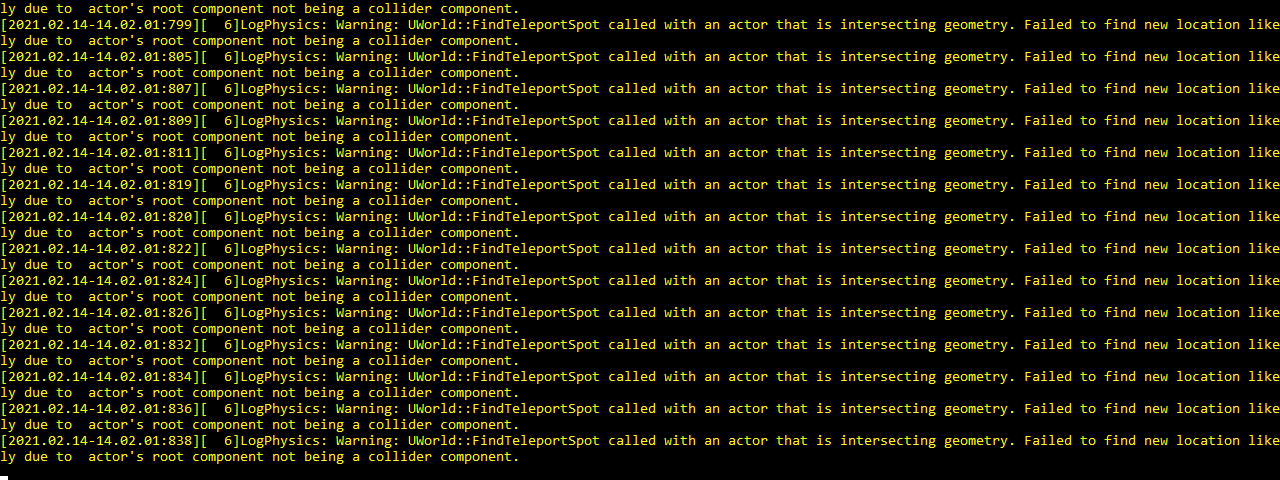
[2021.03.10-19.07.45:079][199]LogNet: Warning: UNetConnection::ReceivedPacket - Too many received packets to ack (256) since last sent packet. InSeq: 16178 [UNetConnection] RemoteAddr: 76561198059866733:19000, Name: SteamNetConnection_2147472302, Driver: GameNetDriver SteamNetDriver_2147482315, IsServer: YES, PC: BP_PlayerController_C_2147472280, Owner: BP_PlayerController_C_2147472280, UniqueId: Steam:UNKNOWN [0x1C423D07CF0] NextOutGoingSeq: 97 [2021.03.10-18.54.32:473][ 5]LogPhysics: Warning: UWorld::FindTeleportSpot called with an actor that is intersecting geometry. Failed to find new location likely due to actor's root component not being a collider component.
Can someone please tell me what's wrong there leuft that comes so off the ROOT server does not Packt have the problem whenever more than 60 to 100 players are there can help me please there someone further. us Sorry would about puts
2021.03.11-10.13.10:153][ 6]LogPhysics: Warning: UWorld::FindTeleportSpot called with an actor that is intersecting geometry. Failed to find new location likely due to actor's root component not being a collider component.
merry urchin
Too many received packets to ack (256) since last sent packet
zu viele pakete erhalten (informationen die vom spieler zum server kommen) seit der letzte informationsfluß vom server zum spieler gesendet wurde.
klartext ist, der server schafft es nicht die menge an daten zu verarbeiten.
beim andren fehler weis ich leider auch nicht was des is.
runic sinew
Danke echt danke
 lavish mason
Anyone wanna join my discord?
stark girder
So I was recommended to read the log file to see if players are connected before messing with player files
But I cannot read the log file while the server is running, is there another way to check if a player is online ?
final dove
stark girder
But I cannot read the log file while the server is running, is there another way...
Theoretically not - but what you can do is checking the activity of gamefiles.
The same sadly only saves them each 5 minutes, unless player safelogs
 cosmic comet
rare shadow
Guys when i hosting a server can i put the DC inv link here? So anyone can join?...
cosmic comet
rare shadow
Guys when i hosting a server can i put the DC inv link here? So anyone can join?...
i wanna join:)
stark girder
@final dove I mean that would be fine, problem I would have is while I can (and do) check for safelogging I have no way of knowing if the player is currently active
I have found I can update or change the files while they are online (or even not safelogged) and it just ignores the file
lavish mason
I'm hiring for my server if anyone would like to join
 lament reef
@lavish mason I've never join to be co-host before. =_=
sturdy glade
How can spino be applied to user?
final dove
@sturdy glade Modify the users file and apply "Spino" to the CharacterClass
And remember to set health values etc to 999999
 rapid echo
So i've heard you guys can make admin tools? I'm just wondering who i'd get in contact with in order to see if anyone can 🙂
 magic relic
Does anyone have an idea why the servers arent displaying?
merry urchin
you may have a firewall problem?
happens to me every time I log into Evrima from Legacy or after an update
 autumn geode
@merry urchin U know how to solve that kind of problem? :( ive been unable to play evrima for more than 3 days i think..
merry urchin
You'd have to check your firewall privacy settings
If that doesn't work, talk with whoever you're with
@autumn geode
autumn geode
@merry urchin ill try it thx for answer :+1:
rapid echo
Looking for someone who makes admin tools and discord bots for servers
merry urchin
I've got a question about a hosting bug. If someone can answer?? 🙏
 safe tapir
I have a question. Why can't i go to the isle disscusion chat. Its gone so is the isle lore theories
merry urchin
I have a question. Why can't i go to the isle disscusion chat. Its gone so is the isle lore theories
@safe tapir
click the arrows under the certain channel
hello.. I've got a quick question about hosting.
 pliant marlin
i press host game and its just black pls help
merry urchin
@pliant marlin that is what I've been asking help with all day and yet still nothing
violet marsh
The host button does not work, and hasn't worked. The only way to currently host your own server is to follow the guide (google doc for Evrima, steam guide for Legacy) in the pinned messages, or to rent it from a third-party like PingPerfect or Citadel.
merry urchin
@violet marsh thank u
@violet marsh although when will then host button be working??1🤔🤔🤔
violet marsh
¯_(ツ)_/¯
It'll either be in a later update, or they'll remove it if they decide to not implement it.
merry urchin
And if it's not going to be working now or anytime soon who do I have to talk to about hosting my own server like one of the methods you mentioned above
violet marsh
Just search PingPerfect on google. From there you can rent an Isle server and set it up how you need. Following the guides that are pinned will give you the stuff you need to set up the configuration files and such.
merry urchin
Ok and fa sho
merry urchin
@violet marsh so I have it active now what do I do
violet marsh
Whatever you want. You'll want to configure the game.ini files to match whichever guide you're following, customizing it to your needs. And then that's it. You got your server.
merry urchin
Okay so which pinned comment do I look at or can you walk me through it
violet marsh
If you're hosting for evrima, you use the Game.ini file in the Google Doc. If you're hosting for Legacy, you use the Game.ini file in the Steam Guide
merry urchin
Honestly this is my first time hosting so I don't know the difference between the two
violet marsh
Evrima is the beta branch of the game that they are continuing to develop. Legacy is the main branch of the game, and the one that you play when you start the game without opting into Evrima
merry urchin
Ok then.. The main one
violet marsh
You find the Game.ini section of the Steam Guide here: https://steamcommunity.com/sharedfiles/filedetails/?id=1502947359 and edit your Game.ini on the server to match. You customize what you need to for your own server, like name and such.
Having had trouble finding a clear and updated way to do this, I decided to create this guide for those of you who wish to host a dedicated server. This is a server you can host on your computer and n
rapid echo
Looking for someone who can make an admin tool 🙂
 topaz stream
why am i getting this error?
https://prnt.sc/10nacw1
 stark girder
@rapid echo Until there is better support for detecting if players are online or offline its a crapshoot
sturdy glade
@final dove Where's the user file?
 vital granite
sturdy glade
<@!113616977779621895> Where's the user file?
vital granite
sturdy glade
<@!113616977779621895> Where's the user file?
The Isle\Saved\Databases\Survival(or Sandbox)
sturdy glade
oh thx 😄
 stoic schooner
I figure this channel is more for dedicated servers, but I don't suppose anyone knows of a reputable company/website where I can rent an evrima server as I would have on legacy? Can't seem to find what i'm after. Please DM me, Thanks in advance.
 dark dune
when i host a game i have a black screen ?
 oak holly
dark dune
when i host a game i have a black screen ?
oak holly
dark dune
when i host a game i have a black screen ?
Doesn’t work
You gotta rent a server from externals
Like ping perfect
It’s not cheap either sadly
dark dune
okay
 upbeat charm
i run a server with a vps, where is the files location to change map and player slots?
vital granite
sturdy glade
I've tried many times, but all of them failed
What name do you type in the player file?
sturdy glade
@vital granite Albe, alberto
dusky hearth
sturdy glade
<@!106334510831931392> Albe, alberto
Albert is the correct one
upbeat charm
I’m trying set up a evrima server with steamcmd I’ve downloaded the server from steamcmd but none of the game.ini files are there neither is the .bat file can someone help?
vital granite
upbeat charm
I’m trying set up a evrima server with steamcmd I’ve downloaded the server from ...
Run the server once (just wait for 5 min) and the files will get generated. Close the server again and edit them ^^
 inland kraken
Hi
does anyone have an idea how I can get rid of this error "UWorld::FindTeleportSpot"?
the server starts once with the map unreal test and the server name is a number
sequence
merry urchin
Does a dedicated server hosting need port-forwarding
vital granite
Yes, wherever you host a server, you need certain ports to be open. Some hosting partners do that for you.
upbeat charm
vital granite
Run the server once (just wait for 5 min) and the files will get generated. Clo...
Ty sorted it now 🙂
 scarlet osprey
my server is having trouble responding? is there a way i can fix it?
merry urchin
hey my friend used pingperfect setting up a server, it auto put it on evrima but we wanted legacy,anyone have experience with this and know how to switch?
violet marsh
@merry urchin
 merry urchin
where an she find that,on the pingperfect website?
we are very new to this sorry for the noobness
violet marsh
It should be right there on the front page of the GamePanel where she goes to change everything else with the server
your good
https://gamepanel.pingperfect.com/ is the link to the gamepanel. I recommend she save that for when she wants to make other changes to the server later, such as adding admins and such.
merry urchin
tysm!
merry urchin
violet marsh
It should be right there on the front page of the GamePanel where she goes to ch...
hey so we switched but now we cant find the actual server, is there any steps we gotta do,like selecting the v3 map or something we are missing?
violet marsh
You'll need to make sure to set a new command line using the button that can be seen in the same screenshot I sent earlier. PingPerfect should have some pre-defined ones for each map and gamemode
merry urchin
okay so then after we do that it should show the server in game?
violet marsh
If you set that correctly and you have all of your configuration files set up, then yes it should. I would think so anyways
scarlet osprey
I think I did everything right but server is still not showing up?


 twilit shadow
Hey cera cant nesting? 
upbeat charm
Run a steam update in server panel normally fixes the issues
final dove
I think its better to contact Ping Perfect in these cases 🙂
Its their servers at the end of the day, and thats the reason they have a helpdesk 😄
- just tell them to fix! 👀
 peak ravine
Can I rent a server or do I have to make my own like maken files downloading stuff etc.?
merry urchin
You can do either
Renting a server costs money
Using it's a monthly fee, around 25 USD (30 AUD). However that depends on the amount of RAM, player slots etc.
Or you can hosts your own server
hosting your own server means = at least 2 PCs (one to run it, one to actually play on it)
You would also need something with a large amount of RAM (32GB to 64GB+) and just in general... a good rig
peak ravine
Is there a link in this official isle discord of where I can go to rent a server?
merry urchin
you can't officially rent a server
however there are some websites that can allow you to do so
eg.
- Nitrado
- pingperfect
peak ravine
What's eg.? And okie thank you
peak ravine
Oki and again thank you
 fiery vault
Hello, I have a little problem with my server ...
I can't see the player names in the Spectator. And I've already tried everything that can be found on the net.
It would be nice if you could help me here.
violet marsh
If you're in Evrima, the default keybinding is Shift+U. If you're in Legacy, it's the Delete key. Legacy shows AI, as well as distance from player and whatever they're playing as. Evrima only shows players, and only their names.
fiery vault
It is in Legacy....but the Delete key don`t work....
violet marsh
You might need to reset your saved folder then. Does it work when you're outside of spectator?
fiery vault
I can see my groop members and when i ativate the nametags i can see all...
violet marsh
So, you can see nametags of players whenever you are not in spectator mode, but when you try to in spectator mode you suddenly can't?
fiery vault
yes....
violet marsh
That's weird. Honestly I'd try deleting your saved folder. find %localappdata%\TheIsle and delete that whole folder, then verify the files in Steam. Your saved skins will be in there somewhere, if you don't want to remake them then I suggest you find the folder they're in and make a backup of it. I'm not sure where they're at myself.
 heavy storm
It's about the root server we operate. None of our admins can use the delete button to display the player names. We can only see nearby names if we activate the tags in the server settings. But then other players too
violet marsh
Ah, do you all have admin permissions? Name yellow in the chat and all that?
heavy storm
yes
violet marsh
Hm. What service are you all using to host the server?
heavy storm
ZAP Hosting
violet marsh
Oh I'm not sure how they have their stuff set up over there. If you have an option available, I would make a backup of your config file and then try reinstalling the server, or reupdating it. It could fix the issue, but if it doesn't it won't hurt anything to try anyways.
fiery vault
we have a dedi windows root server and install the isle with steam cmd
heavy storm
Ok thanks. We try
fiery vault
So we have reinstalled everything but the same error still exists. Could it be because of the Game.ini ???
violet marsh
I don't believe so, but the possibility exists. Legacy has been having more and more issues with the server side of things as time's gone on
fiery vault
Do you have a current game ini ????
violet marsh
Not for legacy, no. Using the steam guide that's pinned in this channel is the only source I'm aware of
fiery vault
ok...thanks
merry urchin
fiery vault
Hello, I have a little problem with my server ...
I can't see the player names i...
C:\Users\UserNameHere\AppData\Local\TheIsle. Delete the saved files while your game is closed and not running. Then launch the game. It will create a new saved profile. You will obviously have to reset your controls to how they were before as everything got reset to default.
Hopefully this works 🙂
as it seems it could be a keybind issue
 hallow coral
i cant create a server
its just start the game from work area?
i do this but still black screen
hallow coral
merry urchin
C:\Users\UserNameHere\AppData\Local\TheIsle. Delete the saved files while your g...
all this
what i do now?
merry urchin
how are you trying to create/host a server?
hallow coral
i enter the game,i click in play,host i config the server and i click confirm
but is black screen
merry urchin
https://www.youtube.com/watch?v=dGMkYLu091s
try this for The Isle
This video shows how to verify the integrity of game files on Steam.
This is useful when the game files are for whatever reason corrupted, or something is missing in the game files.
This video was created in relation to the following Steam Guide: https://steamcommunity.com/sharedfiles/filedetails/?id=1912418281
This video was created in relat...
violet marsh
If you're trying to host using the "Host" button in the menus, that doesn't and hasn't worked for quite a while.
hallow coral
Yes
merry urchin
than that's a no show for you
violet marsh
You'll need to either follow one of the pinned guides to host your own server from your machine, or pay a service like PingPerfect to host it for you.
hallow coral
Ok
 quiet fog
i try to go to host game and i fill everything out and get an infinite black screen
what do i do
merry urchin
@quiet fog are you playing legacy or evrima?
lime moon
hello, is this configuration in .bat is correct for legacy? ```d
@echo off
cls
echo Protecting isle server from crashes...
title name server
:TheIsle
echo (%time%) Checking for updates...
start /wait C:\legac\steamcmdd\steamcmd.exe +login anonymous +force_install_dir C:\legac\theislet +app_update 412680 +quit
echo (%time%) isle server started.
start /wait C:\legac\theislet\TheIsleServer.exe /Game/TheIsle/Maps/Thenyaw_Island/Thenyaw_Island?MultiHome=00.00.00.00?Port=7777?QueryPort=7778?MaxPlayers=10?game=Survival -log | set /P "="
echo (%time%) WARNING: isle server closed or crashed, restarting in 1 minute.
timeout /t 60
goto TheIsle
have you firstly searched through the pinned messages?
lime moon
@merry urchin sorry, I'm not sure anderstand what you mean
 worn patrol
@dusty tartan i there i really need help
i opened an server for the old isles but it wont let me connect to the server in steam could someone please please help me with this
i have rented a server from nitrado
merry urchin
@worn patrol
If your server isn't working, try contacting with Nitrado for help
worn patrol
all sorted now thanks they moved our server and it worked never had to link it to steam i was being an idiot.
merry urchin
Guys
final dove
@merry urchin think you should further express your sentence 😄
final dove
lime moon
<@456226577798135808> sorry, I'm not sure anderstand what you mean
Press the pin in the top of Discord and check if theres something relevant - your bat file could be right, but it looks like steamcmd is written wrong (unless you intentionally wrote steamcmd with two d’s for folder.. your isle folder is called theislet? make sure to also set correct ip & the ports you’ve forwarded.
patent anchor
can someone tell me what to do about it? What is the problem..?
 final dove
Nothing you can do, its a normal error 🙂
Its not an issue, and its not something you fix 😛
Is there for everyone
patent anchor
final dove
Nothing you can do, its a normal error 🙂
Its not an issue, and its not somethin...
Hmm. Then why is my server not showing up in the list?
P.s. Everything worked fine before. I had 2 dedicated servers, and then something incomprehensible happened...
final dove
It shouldn't be related to the error there.
Are you sure the port forwarding etc is done correctly?
Have you tried opening the server on diff. ports?
Reinstall the server?
Make sure game.ini is correct - or the launch line?
If any of these things are wrong server won't show
patent anchor
I haven’t tried the diff server and I don’t know what it is. The ports seem to be all right.
Yes, I reinstalled the server and with the help everything is fine.
Could this be due to bad internet?
I'm not sure about the server start line though. I would like to find a template for Evrima...
nevertheless, I guess that in this case the problem is in my computer :(
peak ravine
can somone help me set this server up i bought and is renting the server but it wont stop restarting and i tryed adding it into the steam fav. and it dident work i need help can somone help
merry urchin
peak ravine
can somone help me set this server up i bought and is renting the server but it ...
talk to your server provider firstly about this
peak ravine
talk to the websit onwer???
peak ravine
ya
merry urchin
than you are able to send in a ticket/report
peak ravine
okie dokie so i sed tickeet and wait???
merry urchin
yes
peak ravine
okie dokie im ganna go do it and cry from stresss thank you so much
simple veldt
Can I have some help with this? Server keeps crashing and no idea why, Pingperfect can't figure it out and it's not a box issue.
simple veldt
Does anyone know what this means?
[2021.04.10-02.44.30:579][428]LogNetTraffic: Warning: Notification::ProcessReceivedAcks - Missed Acks: AckedSeq: 3905, OutAckSeq: 3394, FirstMissingSeq: 3395 Count: 255
 lofty leaf
<@&818552355796287508>
Hi, i'm planning to develop an administration tool which connects with the server and send commands like ban, unban, etc. for easier managing and other special functions.
Is there a way to connect with the server since rcon isn't available anymore?
Thanks in advance!
(the question is related to both legacy and evrima)
merry urchin
I cant say much as i don't have much information, however...
I have a server owner friend who uses one account to run commands (evrima). If you're able to code a system, that could be a start. Good luck
lofty leaf
That would be expensive and resource heavy because for everyone who wants to use the bot have to create and buy an extra account, set up a machine which can be 24/7 online, handle "playing" the game, connect the account to the server and stay there.
That's a nightmare...
merry urchin
Depends on your resources
If you're server hosting via your pc, not a third party, and you are a programmer... depends on your skill.
Renting? Would certainly be harder
lofty leaf
That's killing the idea of an easy for everyone to use bot
i hope with evrima comes the rcon connection back or in the worst case just a console where i could use i/o simulation to enter the commands...
final dove
lofty leaf
i hope with evrima comes the rcon connection back or in the worst case just a co...
RCON is on the list for planned features.
Until then, its either what Lightclaw says - or modify (and hook) .dlls into the game, opening up backdoors for you to do such things (injecting stuff from the outside into game - such as commands)
However, I would highly recommend against this - because A: It breaks the EULA/ToS of the game (modifying someone elses property) & also just obviously Steam / VAC wouldn't like such things.
I suggest just waiting till rcon gets introduced!
lofty leaf
Thanks for the reply.
It's good to hear that rcon is on the planned feature list.
My question is answered :)
 fallow orchid
merry urchin
fallow orchid
merry urchin
what are the deino's controls?
merry urchin
merry urchin
what are the deino's controls?
they are in #announcements
merry urchin
Ight thanks
 still silo
why do i only see EU servers?
 dense shard
you wanna play the new update but all servers are full
and when there is space its just lying
merry urchin
still silo
why do i only see EU servers?
Same happened to me as well, and i still can't see NA servers
 sinful flare
why doesn’t show servers?, only 2 unknown servers
 nocturne slate
how come whenever I try to enter a server I get kicked out instantly? What can I do to get in the servers
 frozen elk
on host how can i change it to isle v3 not just thenyaw_island and dv_testleval
still silo
merry urchin
Same happened to me as well, and i still can't see NA servers
did you fix it
merry urchin
where are server eu1?
 hushed finch
 crisp belfry
I think NA6 just went down
because i got kicked and the server isnt in my server lists anymore as well as other servers.
 sharp oxide
I don't see NA5 anymore either
 steel jasper
Hopefully it'll start ya back wherever you were before the crash
steel jasper
RIP NA6 is down again
merry urchin
steel jasper
I see NA5, but after every refresh its 0/110 people
If you find yourself getting booted back to the menu after attempting to join a stress test server it's likely because the server is full, even if the playercount says otherwise. That's because of the sheer amount of users attempting to connect to these servers, resulting in the playercounts not displaying the correct number immediately
steel jasper
merry urchin
If you find yourself getting booted back to the menu after attempting to join a ...
Yeh it was when NA5 and NA6 were down. Was just commenting about some people seeing it full and was just saying I saw it with 0/110, sorry for the confusion
merry urchin
All good
 robust lake
where is the NA1 ?
still silo
robust lake
where is the NA1 ?
yeah where is na
 swift hemlock
Hello, where can I ask for help regarding setting up a dedicated server for the evrima version? I can start the Server but its not showing up in the server list and I checked that the ports are open.
swift hemlock
I also followed the guide which is pinned by hypno.
 slender condor
Is it possible to open a QA server ?
merry urchin
slender condor
Is it possible to open a QA server ?
No
merry urchin
swift hemlock
I also followed the guide which is pinned by hypno.
Have you selected the right branch?
swift hemlock
merry urchin
Have you selected the right branch?
When I start the Server the is always a yellow warning message telling me a QA Test Server was created could that be the problem?
merry urchin
Ahh
You can't run servers in the Beta branch
Hi, where know why i cant join the Stress Test server if there are 88/110 players?
merry urchin
merry urchin
Hi, where know why i cant join the Stress Test server if there are 88/110 player...
If you find yourself getting booted back to the menu after attempting to join a stress test server it's likely because the server is full, even if the playercount says otherwise. That's because of the sheer amount of users attempting to connect to these servers, resulting in the playercounts not displaying the correct number immediately
Aaaa
I understand
Thanks
swift hemlock
merry urchin
You can't run servers in the Beta branch
Why?
The guid from hypno https://docs.google.com/document/d/1n2lxKdZTDi42H-1j0zQQPoghmqrp2KuQffD99RXNYcs/edit told me to do so

Google Docs
EVRIMA Server Hosting Guide Made by NoClipSize. First download SteamCMD: https://developer.valvesoftware.com/wiki/SteamCMD Extract the .zip file to the location where you want your server stored. Mine is in a folder I created, named ‘SteamCMD’. Launch SteamCMD and let it update itself. Once...
app_update 412680 -beta evrima
 hearty bobcat
there is current evrima servers ^ as daniel says
swift hemlock
There are alot of evrima server so it have to be possible
hearty bobcat
time to play another game xD just got fked by 3 adult deinos as an adult
swift hemlock
bruh
hearty bobcat
that is 23rd time dying
merry urchin
i cant download anything, i am 9 yeahrs old
swift hemlock
merry urchin
You can't run servers in the Beta branch
is it allowed to ping discord moderators otherwise I would ask Krow if he could help me?
swift hemlock
merry urchin
i cant download anything, i am 9 yeahrs old
Wrong channel for that, and arn't you a bit to young to play this game?
merry urchin
No i am not to young :З
hearty bobcat
this game is rated ma15+, isnt it daniel?
swift hemlock
yeah I thought so
merry urchin
swift hemlock
Why?
which beta? Evrima or Open beta?
swift hemlock
swift hemlock
app_update 412680 -beta evrima
.
thats what I was told to do so by the guid
merry urchin
ah alright
hearty bobcat
Evrima
merry urchin
you are running Evrima branch I suppose than?
swift hemlock
I have the Evrima branch also installed on my pc yes
swift hemlock
 hearty bobcat
any suggestions for au server hosters?
swift hemlock
merry urchin
you are running Evrima branch I suppose than?
And thats what I used for the Server as the guid told me to: C:\SteamCMD\steamcmd.exe +login anonymous +force_install_dir C:\TheIsleServer +app_update 412680 -beta evrima +quit

@merry urchin any ideas?
swift hemlock
merry urchin
I'm not sure
yeah Im also quite lost at this point XD I double checked everything but I just cant think of anything that could cause that problem.
merry urchin
I'll try this guide in the evening when my parents are at home. (or tomorrow so that there are not so many players on the servers)
swift hemlock
This channel is for Server Hosting if you have problems with joining servers, go to #🔧-evrima-troubleshooting-🔧
Or to #🔧-legacy-troubleshooting-🔧 if you use the legacy version
 small harbor
swift hemlock
The guid from hypno https://docs.google.com/document/d/1n2lxKdZTDi42H-1j0zQQPogh...
small harbor
swift hemlock
The guid from hypno https://docs.google.com/document/d/1n2lxKdZTDi42H-1j0zQQPogh...
I followed this guide and I am getting the same error as the picture you referenced above
when I join, it brings me back to the main menu
swift hemlock
I cant even find the server
small harbor
swift hemlock
I cant even find the server
did you port forward in you router settings?
 swift hemlock
small harbor
did you port forward in you router settings?
swift hemlock
small harbor
did you port forward in you router settings?
Sure as the guid told me to
And for me it’s not a router I’m not hosting the server over my pc or so I have the Server running in a datacenter so it’s just a Firewall where i opened the ports
 vale seal
Why BR4 and BR5 was shutdown?
 modern crescent
tem como comprar um vip
violet marsh
@small harbor I haven't seen that exact issue, but previously any issues with the steamclient64.dll were solved by uninstalling Steam from whatever machine you're hosting the server on.
small harbor
violet marsh
<@!168368716826935296> I haven't seen that exact issue, but previously any issue...
I've solved the issue by making sure every directory of the isle (including the server folder) has a copy of all the necessary.dll files. If the error keeps persisting, spamming the OK button works.
merry urchin
I d'like to know how remove some species choice ( I mean disable Rex and Giga from the selection menu ).
Can someone tell me which file i have to change for that please ?
 static cedar
Hi I was just wondering if there was a way to make the little Discord link thing work for private servers or no? 👀
merry urchin
static cedar
Hi I was just wondering if there was a way to make the little Discord link thing...
which discord link? Alongside, what branch?
static cedar
merry urchin
which discord link? Alongside, what branch?
Sorry Evrima and like when you're connecting to a server it has the little discord symbol you can click and it brings you to discord and such. I was just wondering if you could actually attach your discord to that button or not yet?
merry urchin
static cedar
Sorry Evrima and like when you're connecting to a server it has the little disco...
that currently doesn't work! However, when the UI update hits... it sure will
static cedar
merry urchin
that currently doesn't work! However, when the UI update hits... it sure will
Okay awesome tysm! ^^ I was thinking that might be the case 😄 have a great day!
 pseudo merlin
What do I do if someone stole my server name and it's chinese?
merry urchin
Does anyone know how to solve the issue where your server shows up in the server list for envira but it says "QA TEST SERVER!" and has 0/0 players even when you set it everywhere?
 merry urchin
Does anyone know how to solve the issue where your server shows up in the server...
merry urchin
merry urchin
Does anyone know how to solve the issue where your server shows up in the server...
QA Test server isn't the official test server
merry urchin
merry urchin
QA Test server isn't the official test server
You completely missed my question but it doesn't matter now I fixed it anyway.
 sand agate
Hello guys 🙂
i need some help about multiple admin with my gameini ^^
I put like this

but he dosnt work 😒
i cant put multiple admin with this :x
the first one work
but the second dosnt work
sand agate
so is fine now ^^ i don't have any prob now thx https://steamcommunity.com/app/376210/discussions/16/1814296907961200359/

For Server Config in TheIsle \ Saved \ Config \ WindowsServer (Game.ini) [/script/theisle.igamesession] ServerName=Server ServerPassword= ServerSteamGroup= ServerMOTD= bServerDatabase=true bServerAllowChat=true bServerGlobalChat=false bServerNameTags=false bServerExperimental=false bServerBattleye=true bServerAI=false ServerAIMax=100 ServerAIRat...
🙂
i do "+" on the line starting
and is work right now
merry urchin
does anyone know what this error means or how i can go about fixing it?
 worn patrol
how do i change my server from the legacy game to evrima i have a server from nitrado.net
 pure talon
Need help this is the only servers showing up to me i have changed server ping same problem
 merry urchin
Hi, I get a bunch of these when I try to host my server. Any solution ?

 outer pendant
What is the server password
 pliant flicker
merry urchin
Hi, I get a bunch of these when I try to host my server. Any solution ?
pliant flicker
merry urchin
Hi, I get a bunch of these when I try to host my server. Any solution ?
Does anyone know how to fix this? I am getting it too
Pastebin
Pastebin.com is the number one paste tool since 2002. Pastebin is a website where you can store text online for a set period of time.
^log
pliant flicker
anyone?
 quasi latch
how do you set your server to host Evrima
pliant flicker
no legacy
 tired dome
Au1 is down
 ember rapids
Hello, For some reason my WindowsServer folder only has 1 file and not the rest for the server to work. Can someone help me?

 ornate cedar
ember rapids
Hello, For some reason my WindowsServer folder only has 1 file and not the rest ...
ornate cedar
ember rapids
Hello, For some reason my WindowsServer folder only has 1 file and not the rest ...
Did you start the theislandserver.exe?
ember rapids
Yes
ornate cedar
Just create Game.ini and copypaste
AdminsSteamIDs=YourSteamID

[/Script/TheIsle.TIGameSession]
ServerName=ServerNameHere
MaxPlayerCount=Amount
bEnableGlobalChat=true
bGlobalIsSpeciesOnly=false
bLocalIsSpeciesOnly=true
LocalChatRange=20000.f

[/Script/Engine.GameSession]
MaxPlayers=Amount```This config is for the legesy game right?
ornate cedar
Evrima
ember rapids
I'm doing the legesy game atm as I can't add admins for some reason in Evrima
Don't know if I did it wrong but I cant add an admin to Evrima
ornate cedar
Did you add AdminsSteamIDs=YourSteamID ? hex64id
ember rapids
I added the ID that is in someones profile link
ornate cedar
Does not work
ornate cedar
about STEAMID I/O, the steamID converter
put their id from the profile link in there
ember rapids
Thanks
ornate cedar
 You are welcome
Let me counter ask a question @ember rapids, any idea what isle_spiro has in terms of map structure? Game/Maps/et.c...
ember rapids
Not really
ember rapids
@ornate cedar I need the steam hex right?
 ember rapids

 tawdry spindle
I cannot connect to any of the Official servers please help!
 verbal jewel
Can i host a server of the version of the QA build?
 sand goblet
How long does it take to get Eu4 back online?
final dove
merry urchin
does anyone know what this error means or how i can go about fixing it?
You're hosting a server in EVrima right?
Whoever is hosting that server, need to delete the C:\Program Files (x86)\Steam folder.
merry urchin
eu4 still down?
 fleet swan
is there a reason why I can not host a game or am I doing something wrong?
merry urchin
final dove
Whoever is hosting that server, need to delete the C:\Program Files (x86)\Steam ...
You cant have steam installed when you host an evrima server?
final dove
I've noticed that is what does that error
once i deleted that steam folder
everything worked after lol (When hosting the server)
merry urchin
i see
Im prob gonna just move the server to my second rig then
But ill wait till the new update actually drops.
final dove
I was dealing with that error there yesterday XD hence i realized it
 robust mica
Server starts so does not appear in the game
 ornate cedar
robust mica
Server starts so does not appear in the game
ornate cedar
robust mica
Server starts so does not appear in the game
ports not open
ornate cedar
robust mica
Server starts so does not appear in the game
Also you are using shipping exe, try using theisleserver.exe instead
ornate cedar
How do you create a database for the server? I see all these hints leaning towards databases where you can change and unlock other dinos but never a guide on how to. Does anyone know?
 faint kettle
ServerAdmins=76561198138051534
ServerAdmins=76561198138051530
isnt making both of these people admin it is making the second server admin id the admin and bypasses the first one
how do we fix this

 ornate cedar
faint kettle
ServerAdmins=76561198138051534
ServerAdmins=76561198138051530
ornate cedar
faint kettle
ServerAdmins=76561198138051534
ServerAdmins=76561198138051530
Try removing the duplicate of you
faint kettle
i did.
ornate cedar
hm
faint kettle
i did that to see if it was infact taking the most recent added admin
ornate cedar
Can any or both of you use /adminpanel?
worn patrol
how do i change my server from legacy to evrima i rent a server from nitrado.net please help 😦
ornate cedar
ask their support
tawdry sentinel
faint kettle
Donno if you've sort it, but you're editing the wrong game.ini file, that one is the defaultgame.ini.
Open your server folder and follow this:
TheIsle/Saved/Config/WindowsServer
And there you'll see a file just called Game.ini that's the one you need to edit it in
worn patrol
havent sorted it out their support only gave me the the legacy maps what do i put there for it to be on the evrima map/server?
faint kettle
Anyone know how to spawn a spino or any other Dino that’s not on the list for legacy?
 slow briar
@fleet sluice Dont u think that was rude to post ur Discord over my just recent post of our Server
When u had just posted Today already
 fleet sluice
slow briar
<@!282208529199267842> Dont u think that was rude to post ur Discord over my jus...
fleet sluice
slow briar
<@!282208529199267842> Dont u think that was rude to post ur Discord over my jus...
I didn't even think of that. If I can make it good again I'll remove it.
It's removed now
slow briar
fleet sluice
I didn't even think of that. If I can make it good again I'll remove it.
Ok Thank you
 autumn merlin
y
 rotund tapir


 final dove
ember rapids
final dove
ember rapids
Why in my Evrima Server when someone joins I get this error?
Error Message In Text
---------------------
TheIsleServer-Win64-Shipping.exe - Entry Point Not Found
Error Message Screenshot
