#BTRFS and Timeshift ERROR only ubuntu-type layouts with a and ahome subvolumes are supported
1 messages · Page 1 of 1 (latest)
 drowsy ibex
So you can check in the script for where they created the subvolumes and see if they follow these names
 compact radish
drowsy ibex
Yeah so what Timeshift is asking for is for at least your home subvol and your r...
compact radish
drowsy ibex
Yeah so what Timeshift is asking for is for at least your home subvol and your r...
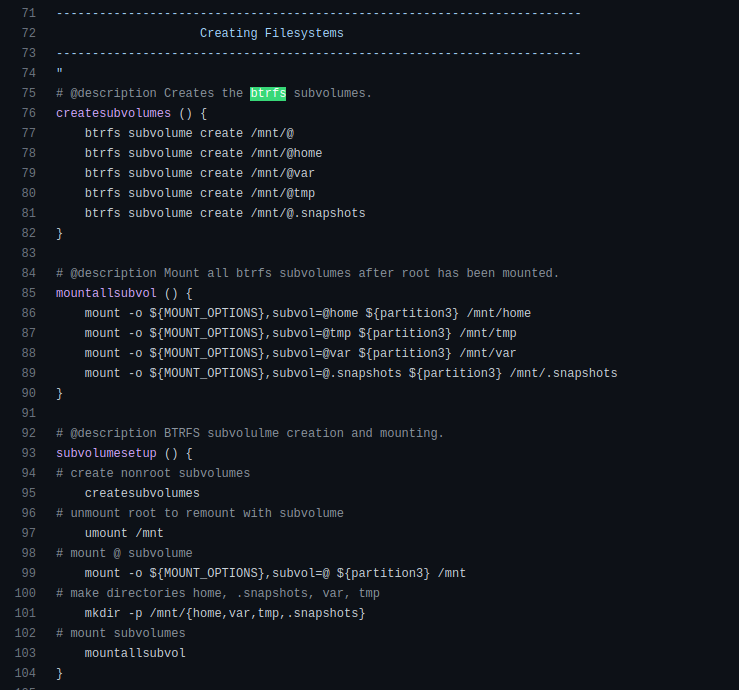
i checked the script and it seems to match my current setup
not really sure what needs fixing here
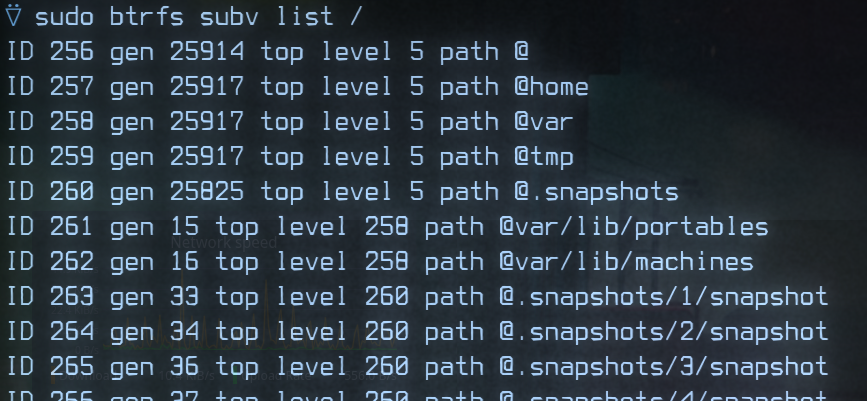


it seems like it matches 1 to 1
from what i read in the documentation it seems like all the important was created as a sub volume
 weak vessel
compact radish
https://i.imgur.com/URvRupO.png
weak vessel
compact radish
https://i.imgur.com/URvRupO.png
oh no no no
dont use a @tmp subvol
/tmp is better with tmpfs instead
which is already done by default
weak vessel
compact radish
https://i.imgur.com/URvRupO.png
same with var
/var/lib/pacman
is where pacman stores its list of packages
and their versions
if you seperate that from root
that's very bad
cus if your restore a snapshot of root but dont restore var to the same time as the root subvol
pacman will think your packages are upto date even tho they arent
and any installed packages that was uninstalled and restored root subvol
(pacman will think that it's still there even tho it's not)
or you installed a package and restored root subvol
(pacman will think it's no longer there but in reality the files are still there)
@compact radish i recommend you use a better layout of subvolumes
something like
root home var/log snapshot
is sufficient
weak vessel
weak vessel
same with var
/var/lib/pacman
is where pacman stores its list of packages
and th...
someone should tell this to chris titus
that layout can really mess up if people dont know what theyre doing
compact radish
ooh shit
compact radish
weak vessel
someone should tell this to chris titus
that layout can really mess up if peopl...
@weak vessel can i get some commands brother?
weak vessel
welp
youre better off reinstalling at this point cus you have to do alot of moving
compact radish
oh man am i that fucked
that really sucks been using this setup for a couple months now
weak vessel
compact radish
oh man am i that fucked
it's fine
just
remember to snapshot @var if you snapshot root
compact radish
well it explains why ive been struggling with btrfs lol
weak vessel
and restore @ the same time as you restore @var
compact radish
weak vessel
welp
youre better off reinstalling at this point cus you have to do alot of movi...
https://github.com/ChrisTitusTech/ArchTitus/blob/main/scripts/0-preinstall.sh here is the link to the github page, im probably not gonna tell him because i got alot of figuring out to do

GitHub
Automated Arch Linux Install. Contribute to ChrisTitusTech/ArchTitus development by creating an account on GitHub.
compact radish
weak vessel
and restore @ the same time as you restore @var
https://ask.fedoraproject.org/t/qemu-virtmanager-in-combination-with-btrfs-and-timeshift/25365/6 this was the method i used to save my vm, would it be possible to bring the snapshot of the vm over to a fresh install ?

Ask Fedora
Not tested but something like: Shutdown libvirt and all VMs mv /var/lib/libvirt /var/lib/libvirt-old btrfs subvolume create /var/lib/libvirt mv /var/lib/libvirt-old/* /var/lib/libvirt/. rmdir /var/lib/libvirt-old
weak vessel
do you still have a snapshot from when you first installed? or no
compact radish
naw it was just one i made recently
weak vessel
oh wait i misread
compact radish
so i can protect the vm's from timeshift
weak vessel
youre saying you want the vm diskfile to not be snapshotted
compact radish
pretty much
weak vessel
just make a subvolume for /var/lib/libvirt
this will make it get excluded from the snapshots of @var
compact radish
weak vessel
just make a subvolume for /var/lib/libvirt
this will make it get excluded from t...
sweet
i already did that
weak vessel
wait
does timeshift create snapshot for @var?
i dont really know since i dont use it
if so then youre fine (im talking aout the first problem btw)
compact radish
i'm still learning about timeshift and btrfs so no idea, i just know timshift kept messing up my vm's
so i had to get it to stop bullying them
basically put in it in a sub volume to quarantine it from the rest of computer
whats the fastest way to unfuck myself here? if you have a decent install script that's gonna unfuck me up id be more than happy to use that. (just as a time saver)
weak vessel
compact radish
whats the fastest way to unfuck myself here? if you have a decent install scrip...
cant make one rn
im busy
probably tmrw or overmorrow
compact radish
its okay no rush, im probably gonna work on it this weekend
this seems like one of those time consuming blackhole problems where you start early in the morning and you look up from your computer and its 2am and the dog has to take a shit
but thank you for helping me out, its been struggle to try and figure out btrfs
compact radish
im guessing just forking christtitus script would be fastest method
drowsy ibex
compact radish
pretty much
Can u not move the VM disk file to somewhere else
And then btrfs sv add ...
compact radish
drowsy ibex
Can u not move the VM disk file to somewhere else
I can but i think it should be fine as is. Worse comes to worse i can move it to an external drive.
drowsy ibex
Ye that works also
@var isn't best ngl
It can break stuff if u revert to an older snapshot with a newer /var
I would recommend /var/log
compact radish
var/log ?
wait
nvm its in my linux book
would /var/log save all my dot files?
I have my computer set up to where my work flow is really nice would like to have to keep that way
drowsy ibex
Dotfiles are best on github
Setup a dotfiles folder in your home folder and use symlinks to link them back to their original locations
Dotfiles are not in /var/log, they're usually located in ~ or ~/.config
compact radish
woe cool idea I'll definitely start working on that
weak vessel
drowsy ibex
It can break stuff if u revert to an older snapshot with a newer /var
💀 that's what i said above
weak vessel
@compact radish
here's the modified version of archtitus' 0-preinstall script
if you wanna know what i changed
here's the diff
compact radish
weak vessel
<@323245064929280002>
here's the modified version of archtitus' 0-preinstall scr...
thank you so much!!!
 haughty mesaBOT
i0bz received a thank you cookie!
compact radish
im gonna take a look into it
i have some time today to work on my linux stuff i wanted to see if i can save my configuration before i do reinstall
also
going to post this script to archtitus github
weak vessel
weak vessel
if you wanna know what i changed
here's the diff
oops
i think i missed a comment there
oh well it's just a comment
compact radish
weak vessel
oops
i think i missed a comment there
oh well it's just a comment
so question for ya which way you think is best way to run this ? i was thinking of throwing it in github and then doing a git at the start like i did with the other script, you think that would work?
weak vessel
yeah that would work
wait i dunno if there's other scripts that it depends
cus i just changed some lines in archtitus's 0-preinstall.sh
you should fork his repo and put the changes for your own
compact radish
weak vessel
you should fork his repo and put the changes for your own
definitely will thank you!
haughty mesaBOT
i0bz received a thank you cookie!
compact radish
Im probably gonna post this code in issues just so he can make the adjustment
 sonic egret
weak vessel
same with var
/var/lib/pacman
is where pacman stores its list of packages
and th...
sonic egret
weak vessel
same with var
/var/lib/pacman
is where pacman stores its list of packages
and th...
ID 256 gen 9316 top level 5 path @
ID 257 gen 9334 top level 5 path @home
ID 258 gen 9282 top level 5 path @snapshots
ID 259 gen 9331 top level 5 path @var_log
ID 260 gen 9275 top level 5 path @var_cache
better setup?
weak vessel
sonic egret
ID 256 gen 9316 top level 5 path @
ID 257 gen 9334 top level 5 path @home
ID 258...
eh sure
there's barely anything in /var/cache for me tbh so i just ignored that
sonic egret
ahhh just saw underneath you proporsed the same
sonic egret
weak vessel
eh sure
there's barely anything in /var/cache for me tbh so i just ignored that
lazy.
compact radish
lol erm all good?
compact radish
drowsy ibex
Setup a dotfiles folder in your home folder and use symlinks to link them back t...
working on this atm.
compact radish
weak vessel
eh sure
there's barely anything in /var/cache for me tbh so i just ignored that
Getting a PXE over PV4 error
Mmh not sure how to get to my boot menu from here 🤔
weak vessel
compact radish
Getting a PXE over PV4 error
when booting to the iso?
 silver quiver
drowsy ibex
Setup a dotfiles folder in your home folder and use symlinks to link them back t...
silver quiver
drowsy ibex
Setup a dotfiles folder in your home folder and use symlinks to link them back t...
also, try dotter
https://github.com/SuperCuber/dotter

GitHub
A dotfile manager and templater written in rust 🦀. Contribute to SuperCuber/dotter development by creating an account on GitHub.
compact radish
weak vessel
when booting to the iso?
Yes after installation
weak vessel
PXE over IPv4: Means What? This message pops when your computer cannot start from your drive. It happens due to incorrect BIOS configuration. You will see this error message when other booting devices are unavailable
this us the only thing i can find abiut that error
compact radish
weak vessel
PXE over IPv4: Means What? This message pops when your computer cannot start fro...
I thought it meant secure boot was enabled but I checked all the bios settings and it seemed fine
compact radish
weak vessel
PXE over IPv4: Means What? This message pops when your computer cannot start fro...

GitHub
Automated Arch Linux Install (btrfs fix) . Contribute to thealmanac1/ArchTitus development by creating an account on GitHub.
weak vessel
compact radish
I thought it meant secure boot was enabled but I checked all the bios settings a...
btw youre using uefi right?
and not legacy bios
compact radish
Yep
weak vessel
other stuff i found in the internet says it's related to legacy
compact radish
Mmh maybe I should double check that but its fucking with me abit i swear only my desktop is has a legacy setup
weak vessel
culd oyou also show me the bootorder
compact radish
Yeah sure one sec
Hanging charging my laptop


Secure boot is disabled
Im gonna try and install the script arch titus again. To see if its a problem with the code or the computer
Okay i have vm settings enable maybe its that?
compact radish
No fuckin idea
weak vessel
compact radish
ok ik what it means now
It's probably trying to boot into an internet drive
compact radish
Okay 👍 I’ll try that
Mmhh its not letting me boot from the usb
I just get a screen flikr
Just gonna give it a few minutes
weak vessel
wait
how are you trying to boot into it btw?
are you just plugging it in and just opening it?
youre not opening the boot menu?
the boot menu for the ideapad is f12 or fn f12
spam that while booting
it should give options as to where to boot
compact radish
Been pressing f12 to get to this boot menu

Screen just flickers when i select load from usb
Mmh i think im fubar
weak vessel
hmm did you not flash anythinng on the usb?