#emulator-support
1 messages · Page 98 of 1
 steel flicker
Follow the below steps to resolve Black Objects/Buildings/etc. while shadows is turned on.
Exit the game using the back button.
Clear Cache.
Go to Gameloop Settings and disable the Render Cache and Enforce Global Render Cache.
Save the Settings and Exit.
Open the Gameloop's Installation Folder > UI > Delete ShaderCache Folder.
Launch Gameloop > Launch PUBGM > Change the Settings which uses shadows (i.e: Balanced+) > Restart the Game by pressing the Back Button.
These settings will help you in resolving the invisible/black ground issue too.
 valid niche
yes yes exactly how this guy has explained it
steel flicker
first of all, make sure to download all the resources pack in-game
@valid niche no.....try not to download the resource pack....it is not well optimized
valid niche
i also had the same problem but when i followed this steps it worked out well for me
@valid niche no.....try not to download the resource pack....it is not well optimized
@steel flicker oof! yikes, i already downloaded them. but i'm not getting any issues so far
steel flicker
Id u dont have any fps issues then its okay
valid niche
well i have, but i think it's coz of my rig..
maybe the emulator is not that well optimized
 vocal bough
@steel flicker no buddy if this issue is faced by me means its my internet issue but at a time in my squard 3 members got same message at a time is this internet issue as we are using different broadbands and living at different places 🤷♂️
steel flicker
@peak swift that sardarji guy is muted again 😅
steel flicker
@south lion
 autumn cove
😂
steel flicker
Jeezuz
 peak swift
Party
 rustic notch
@autumn cove 🤣🤣🤣
Reinstall the emulator
steel flicker
Follow the below steps to resolve Black Objects/Buildings/etc. while shadows is turned on.
Exit the game using the back button.
Clear Cache.
Go to Gameloop Settings and disable the Render Cache and Enforce Global Render Cache.
Save the Settings and Exit.
Open the Gameloop's Installation Folder > UI > Delete ShaderCache Folder.
Launch Gameloop > Launch PUBGM > Change the Settings which uses shadows (i.e: Balanced+) > Restart the Game by pressing the Back Button.
These settings will help you in resolving the invisible/black ground issue too.
Party
disco
autumn cove
Thx @steel flicker
steel flicker
happy to help
 midnight robin
I need help
 feral shaleBOT
We are unable to provide assistance if you do not ask a question or state a problem, @midnight robin. Remember to read through #faq before asking questions in the support channels.
steel flicker
@midnight robin state your prob 1st
midnight robin
I can't unlink my account fromy fb
feral shaleBOT
If you have encountered an issue with the account unlinking feature, @midnight robin, please ask in #708032127458869340.
peak swift
@midnight robin the feature is disabled atm
midnight robin
Ok thanks
 viscid bobcat
@steel flicker @merry garnet i am going to reinnstall windows tell me how to backup gameloop turboaow engine
@steel flicker
@tough nexus
steel flicker
Stop tagging everyone
viscid bobcat
@steel flicker help me sir
 gleaming rock
@viscid bobcat just save the TxGameassistant folder
viscid bobcat
okay sir
 hushed panther
How to uninstall resource pack ?
How to stop auto download of all resource pack ? Like when I open my inventory or shop it's start downloading automatically so how to stop it I don't want anything only erangel. So plz help .
 unique plinth
@hushed panther if you play in emulator Click on clear cache
And you cant stop them unless you play solo and Dont open shop / inventory
Because the game automatically download skins that came in your screen
peak swift
@hushed panther you can find an option in the settings > download > turn off auto download
And the resources in the shop or from the inventory will be downloaded when you view those
hushed panther
Ohk so everytime I need to stop them manually .
Nd there is no option in setting for turn-off auto shutdown @peak swift
Download*
peak swift
I see
hushed panther
If ur close to pubgm developer team plz suggest them to add option so stop auto download resource pack we don't have unlimited internet data and not high-end mobile for that much data @peak swift
hushed panther
I just posted ty for information
 tight spear
hello my game is not connecting to match server during classic matches
peak swift
every time i have to restart my game to get ultra sound and hdr why?
i have started my game i cant select hdr then i have to close the game and gameloop start again then i can select it why?
peak swift
@peak swift try selecting HD 1080P and HD in Emulator settings
@peak swift ok thank you
 oblique depot
@peak swift what is best setting for emulator in my laptop?
peak swift
could you send the diagnosis window of gameloop
gleaming rock
I may or may not have uploaded a settings guide in the pinned messages
not sure if it's still here
yep it's still here in the pinned messages
peak swift
oblique depot
@peak swift i am not understanding can u type settings for my laptop
peak swift
@oblique depot try this
 glass moss
after update i get disconnect from game every time
peak swift
most likely an internet issue
oblique depot
@peak swift thanks
peak swift
welcome
happy to help
 feral cloak
help
oblique depot
@feral cloak what happen!
peak swift
yeah
peak swift
disable it
peak swift
that too
oblique depot
Ok thanks
peak swift
@merry garnet u had a software which restart ISP can u send
steel flicker
@peak swift do u mean lsp repair ?
steel flicker
peak swift
thx
steel flicker
let me know if it helps solving high ping issues @peak swift
 merry garnet
Always run as administrator @peak swift
steel flicker
@merry garnet dw he will ...as he is "bot4ever"
 amber kettle
I need help here
 lyric stone
 clever oak
That's happens to me on HD aswell, any other graphic settings fixes it tho
steel flicker
@amber kettle as i said in gameloop server..post ur problem first
 dusky tundra
why is it that some games i have a stable 250ish ping, while others i have a stable 100ish, while my partner always has sub 100 regardless ?
dusky tundra
alright i'll give it a try now
merry garnet
@tribal swallow 
 tribal swallow
@merry garnet 
steel flicker
?
unique plinth
fix the emulator Lag ffs
merry garnet
any one got https://cdn.discordapp.com/attachments/527856162901721089/709655622261407835/unknown.png please dm me
 unique plinth
Gameloop sucks
merry garnet
@peak ruin hi are you available?
steel flicker
in pubgm settings , fps settings- Low: 20fps
Medium: 25fps
High: 30fps
Ultra: 40fps
Extreme: 60fps
merry garnet
people think low settings will help..but fact is something else...when have a good pc then its recomended to keep maximum everything
steel flicker
no he is "inactive"
steel flicker
btw doesnt gameloop run on fast mode ?
merry garnet
we think there is no need to normal startup just need to close dugbug and test setting mode
by
1:Run CMD as administrator 2:Paste "bcdedit /set debug no" HIT ENTER 3:Paste "bcdedit /set testsigning off" HIT ENTER 4: Restart your Pc"
steel flicker
yeah he was running in test mode
merry garnet
so that need to be closed..gameloop ll not permit that
merry garnet
so try this only from now
steel flicker
ok
merry garnet
startup clould be like this
normal may cause high cpu usage
ok final update by devs
steel flicker
🤨
merry garnet
users who facing "warning gameloop cant start without normal mode"
1: choose selective startup 2: Run CMD as administrator 3: Paste "bcdedit -set loadoptions ENABLE_INTEGRITY_CHECKS" HIT ENTER 4: restart PC
let us know if it works
merry garnet
merry garnet
users who facing "***warning gameloop cant start without normal mode***"
`1: ch...
unique plinth
Should virtulization Enabled?
steel flicker
@unique plinth yep
dusky tundra
ooohh i see it
so i've changed it to the correct time now, do i leave the 'automatic time zone' box unticked ? or retick it ?
thanks so much btw, really appreciate your help (:
steel flicker
👍
 next star
@steel flicker Ok so
steel flicker
U can play on fast boot mode
next star
O
OOOOOOO
ok lemme see how
1:Run CMD as administrator
2:Paste "bcdedit /set debug no" HIT ENTER
3:Paste "bcdedit /set testsigning off" HIT ENTER
4: Restart your Pc"
i do this?
steel flicker
yup
steel flicker
Why ?
steel flicker
lol
dusky tundra
aw what, back to 260 ping
merry garnet
btw run in selective startup@next star
 peak swift
whats this for @merry garnet
merry garnet
Normal mode actually loads all programs so that causes lag
So if anyone having that 'warning.3'issue its for them
peak swift
ohk
 oblique gorge
i have nvidia 860m 4gb, 16 gb ram and i7. i use smooth emulator and smooth in game options. when there is a people on the first landed point, one or two, or when some people enter the 300m view, game has so different lag. i am understand that there is a people near me because of lag and this gives me advantage. what to do to have not lag when a player in 300 m seen sapce?
also if the lag is high, people near me are around 150m. if i have a little lag, people are between 150m or 300m.
i can understand everything near me with lag.
when i look a specific point i have lag, when i am not i dont have lag. so i understand that which point makes lag there is an enemy. so i go there and yes, there are enemies. so it is some kind of advantage. what should i do to not have lag.
i think they have the lag problem too, because when i go the specific lag point, they are already ready for anything.
 unique pike
Why my emulator take to much time to start the game. 😋
next star
@merry garnet I downloaded pubg then in installing it brings me the warning do i restart with the solution then retry ?
 lean otter
i got disconnected to many time when entering match on vikendi and in the game it so much lag.. other maps working good.. is there any problem with vikendi map or it just me?
next star
@merry garnet I did the command u sent and restarted and still gives me the error
@steel flicker doesnt work still ;/
 sudden compass
hi i found bug in emulator --- while i am at cheer part and my friends in lobby invites to his team and starts match all the ui becomes invisible in game and i can't able to move, so i have to restart emulator to get back in game
steel flicker
@next star sorry i wqs sleeping...now what happens ?
@oblique gorge post your gameloop diagnosis window screenshot
steel flicker
@next star let explain u the difference between normal boot and selective boot
steel flicker
In normal boot , every driver and every application which u have enabled at startup that starts as u launch windows and in selective boot , only the drivers u select and only the apps u select launch at startup
So what i do and suggest to do is at first select normal startup in startup option and then unselect the drivers and apps manually that u dont need ....that sinply moves u to selective startup
What happens to u when u start with selective startup...some necessary drivers for gameloop arent started
@next star
This way cpu usage will be low and u will not have that message in gameloop
Ok ? @next star
next star
@steel flicker do i go fastmode or normal mode?
steel flicker
normalboot ....then deselect...that will automatically move u to selective startup
steel flicker
@next star nope
oof
didnt u read my whole lecture ?
😑
u have to select normal boot ...then deselect the drivers and apps u dont need at startup
next star
@steel flicker how do i deselect the drivers and apps i dont need at start up?
dusky tundra
so i've tried the bat file, changed dns, changed emulator timezone, still occasionally getting 260 ping in my page. anymore ideas ?
merry garnet
@next star sorry i got headache and slept..
users who facing "warning gameloop cant start without normal mode"
1: choose selective startup 2: Run CMD as administrator 3: Paste "bcdedit -set loadoptions ENABLE_INTEGRITY_CHECKS" HIT ENTER 4: restart PClet us know if it works
@merry garnet @next star
Tried this command s?
next star
Ok ill try
merry garnet
Ya
dusky tundra
@steel flicker anything else i can try ?
steel flicker
try lsp repair......change time zone and restart .......change DNS to google ......if these 3 doesnt help....your only option is to contact your isp and ask for a better ip address
oblique gorge
what about graphics if you start windows in safe mode with internet?
steel flicker
i dont think u will be able to run any game on safe mode
next star
rahh this warning is so annoying
smhhhhhhhh
@steel flicker rip i did all solutions and still got the warning
idk whats
wrong
steel flicker
thats why i told u to use normal boot with closing the drivers and apps u dont need
use that for now
merry garnet
@next star how is your internet connection?
Try
"1:Run CMD as administrator 2:Paste "bcdedit /set debug no" HIT ENTER 3:Paste "bcdedit /set testsigning off" HIT ENTER 4: Restart your Pc"
@next star
steel flicker
lol
merry garnet
Do again
Check if that helps
Dev team said us that only dugbug mode and test mode is should be off
goes asleep again
@next star
My internet got asleep
merry garnet
Try
"1:Run CMD as administrator 2:Paste "bcdedit /set debug no" HIT ENTER 3:Paste "bcdedit /set testsigning off" HIT ENTER 4: Restart your Pc"
Ya
steel flicker
yep
steel flicker
After done send your diagnosis.zip here please
steel flicker
wut ?
steel flicker
lol
next star
@merry garnet here btw^^^ if u didnt see
sudden compass
@merry garnet abnormal activity got solved?
steel flicker
yep
steel flicker
Follow the below steps to resolve Black Objects/Buildings/etc. while shadows is turned on.
Exit the game using the back button.
Clear Cache.
Go to Gameloop Settings and disable the Render Cache and Enforce Global Render Cache.
Save the Settings and Exit.
Open the Gameloop's Installation Folder > UI > Delete ShaderCache Folder.
Launch Gameloop > Launch PUBGM > Change the Settings which uses shadows (i.e: Balanced+) > Restart the Game by pressing the Back Button.
These settings will help you in resolving the invisible/black ground issue too.
try this @sudden compass
steel flicker
oh idk then
sudden compass
Not ground it solved
steel flicker
wait for rock47
gleaming rock
that abnormality detected issue happens when the game detects that your emulator is of an older version
steel flicker

steel flicker
nope he is batman
u have to lit the light from gotham city police dept. to call him
sudden compass
@gleaming rock no it will happen if you run more than one instance of the emulator turbo engine at same time example: if you double click the app multiple times
gleaming rock
that too
 glossy gust
Please add a Chanel for find players .. Emulator only
gleaming rock
there used to be one
but it was empty so they combined it
steel flicker
lol
merry garnet
@next star ok got that..i was asking about internet speed...(thought that doesn't matter)
@next star thanks a lot for checking with us...
steel flicker
😅
merry garnet
@next star quickly send me the warning text
That pops up
Like this?same?
@next star
the last warning number is 215000 or 215001?
merry garnet
Ya please
merry garnet
Ok
next star
do i send pic or just number?
next star
ight
no no problem
ill ss it
sec its opening installation
then it will tell me the error

 merry garnet
🎉 error
next star
im downloading the pic
 download?
next star
merry garnet
download?
next star
merry garnet
@next star
Try
1: choose selective startup 2: Run CMD as administrator 3: Paste "bcdedit.exe /set nointegritychecks on" HIT ENTER 5: restart PC
next star
ok imma try
next star
@merry garnet i alr have selective start up selected do i kep it that way?
merry garnet
@merry garnet i alr have selective start up selected do i kep it that way?
@next star
Ya
merry garnet
Ok
next star
@merry garnet didnt work sadly
merry garnet
Pasted this whole bcdedit.exe /set nointegritychecks on in CMD?
next star
yes
merry garnet
Ok saying them again
steel flicker
@next star u alive ?
next star
yes
steel flicker
@next star help the devs to get a permanent fix ...so that we can more people
look i have an idea @next star ...screenshare the dev....dont give remote ...ask him what to do
and i give u secret job @next star copy the devs discord id and give me 🤫
next star
huh?
steel flicker
yeah 😁
steel flicker
@peak swift try clearing cache 2 times
peak swift
Ok Brother, Thank you
peak swift
Yep I saw that
steel flicker
what ?
peak swift
He's batman.....
peak swift
So?🤷♂️
steel flicker
😑
 waxen glade
my gpu (amd radeon r5 m330) what is best game settings ?
1080p or 720p
steel flicker
@waxen glade post your gameloop diagnosis window screenshot
waxen glade
steel flicker
@『MR』PaTRicKツ#3491 laptops doesnt show dedicated gpus sometimes
 tiny fractal
¯_(ツ)_/¯
steel flicker
yes @waxen glade
glossy gust
@gleaming rock can they add it back .. Emulator find players... It's not fun having to mention emu everytime
steel flicker
lol
 wide tendonBOT
@civic epoch:
Why has my account been suspended?
Accounts are suspended due to violation of the terms of service, usually when suspicious account activity is discovered during a manual investigation, or as an automatic precautionary measure when the anti-cheat system detects unusual account activity. The most common reasons, all which gain an unfair advantage over other players and are not supported by the game developers, include, but are not limited to:
:white_small_square: use of unauthorized third-party software or methods—such as cheats, hacks, modifications, scripts, plug-ins, automation software, and so-called "GFX tools"—to modify or manipulate the game or its functionality;
:white_small_square: purchases from third-parties;
:white_small_square: forced refunding through Google or Apple, and;
:white_small_square: use of unauthorized, unofficial and/or cracked game versions.
However, if you believe that your account has been wrongfully suspended, you can submit an appeal by clicking the File Claim button located in the bottom-left corner of the account suspension dialog box. If no reply is delivered within a reasonable time span, your only option is to wait until the punishment automatically expires.
Please do not repeat questions regarding account suspensions, in the Discord server. Contributors, moderators, administrators, and the community team are unable to assist with this in any way, nor do they have the ability to lift account suspensions. Repeated failure to abide by this warning will result in a permanent termination of your access to participate in the Discord server.

@civic epoch:
Why has my account been suspended?
Accounts are suspended due to violation of the terms of service, usually when suspicious account activity is discovered during a manual investigation, or as an automatic precautionary measure when the anti-cheat system detects unusual account activity. The most common reasons, all which gain an unfair advantage over other players and are not supported by the game developers, include, but are not limited to:
:white_small_square: use of unauthorized third-party software or methods—such as cheats, hacks, modifications, scripts, plug-ins, automation software, and so-called "GFX tools"—to modify or manipulate the game or its functionality;
:white_small_square: purchases from third-parties;
:white_small_square: forced refunding through Google or Apple, and;
:white_small_square: use of unauthorized, unofficial and/or cracked game versions.
However, if you believe that your account has been wrongfully suspended, you can submit an appeal by clicking the File Claim button located in the bottom-left corner of the account suspension dialog box. If no reply is delivered within a reasonable time span, your only option is to wait until the punishment automatically expires.
Please do not repeat questions regarding account suspensions, in the Discord server. Contributors, moderators, administrators, and the community team are unable to assist with this in any way, nor do they have the ability to lift account suspensions. Repeated failure to abide by this warning will result in a permanent termination of your access to participate in the Discord server.
steel flicker
why twice ?
peak swift
You can use X-mouse for key mapping, and rapid or micro are not allowed it will lead to ban
@civic epoch
 civic epoch
i aks about xmouse but because of word bot delete message
peak swift
^
civic epoch
ok thank you
 haughty ridge
Hi ! One of my friend is getting notification after 6H of 15m break. He is old enough and playing most of the times in lockdown. How to stop getting notification ?
 mint jetty
@haughty ridge settings>other click yes
waxen glade
I will never stop talking about GameLoop laggggggg
gleaming rock
Even when it runs consistently at 60?
 inland peak
ATB for new season guys
gleaming rock
it doesn't run like that yet
well there's a "yet"
merry garnet
and i give u secret job @next star copy the devs discord id and give me 🤫
@steel flicker
They aren't in discord...even not accept my request
steel flicker
@merry garnet aawwwww
@haughty ridge go to pubgm settings set your age over 18
As @mint jetty said
mint jetty

peak swift
Hello
Can someone give me a picture from ABOUT page in SETTING when the game running?
merry garnet
Can someone give me a picture from ABOUT page in SETTING when the game running?
@peak swift
cant get you...are you asking about setup of paging memory?
peak swift
Yes
Why can't?
My pc have 8G memory
I set the gameloop memory on 4096
But in game just use 2G
steel flicker
Whats wrong with it ?
Why can't?
@peak swift cause we still dont understand your point
peak swift
help my fps dropping again after update 😦
help
@steel flicker low FPS
when face enemy it drops from 50 to single digit like 8 9
steel flicker
@peak swift switch to opengl+ and sd 720p
peak swift
@steel flicker at 720p my graphics are to much blurry
steel flicker
people who are having fps drops or lag or freeze issues can try these steps
- set extreme fps in in-game settings
2.disable render cache and enforce global render cache from gameloop settings and keep anti-aliasing closed
3.Open the Gameloop's Installation Folder > UI > Delete ShaderCache Folder.
4.switch to opengl+ (for some people directx+ is better ...depends on their cpu and gpu combination)
5.set 720p in display quality
6.dont download resource files
7.try a clean reinstallation of gameloop- uninstall gameloop...delete the temp and program files folder from gameloop install location.......turn off antivirus and windows firewall...then reinstall gameloop from gameloop.fun
thats all u can do for now
@peak swift your cpu doesnt meet min. Requirement
@peak swift check the steps
peak swift
@steel flicker you are right but in previous update it works fine for me
steel flicker
@peak swift try the steps i mentoined above
peak swift
@steel flicker ok let me try
merry garnet
uhu need v ram even if you have dedicated gpu..emu acts as window element programs...so that needs v ram for system
dedicated gpu is just for that androaid emu component..all v drivers run on your system
@steel flicker
steel flicker
Oh
steel flicker
@merry garnet but i told that for the people who had freeze
gleaming rock
Programs will use as much memory/ram/vram as they need, nothing more, forcing it to use more of your memory related resources won't improve your fps
waxen glade
My display res : 1920x1080
Emulator res : 1920x1080
480 DPI
And game are 720p what res I choose?
Is there is something better than 1920x1080 480 DPI?
steel flicker
1024x576 = 120 DPI
1280x720 = 160 DPI
1366x768 = 240 DPI
1600x900 = 360 DPI
1920x1080 = 480 DPI
Is there is something better than 1920x1080 480 DPI?
@waxen glade nope
My display res : 1920x1080
Emulator res : 1920x1080
480 DPI
And game are 720p what res I choose?
depends on your pc
Programs will use as much memory/ram/vram as they need, nothing more, forcing it to use more of your memory related resources won't improve your fps
@gleaming rock how can someone "force" to use more memory in gameloop ?
😕
 fair adder
how i can do this
peak swift
i thought you'll do that
steel flicker
and i thought u will do that 😅
peak swift
@fair adder one of your friend had to be offline for more than 28-30 days and send him the invitation link and when he joins he need to use your code (which is given in the SS you send) and you have to complete some missions with him to get that outfit.
it wont work
one of your friend had to be offline for more than 28-30 days
gleaming rock
@gleaming rock how can someone "force" to use more memory in gameloop ?
@steel flicker memory allocation
steel flicker
@gleaming rock but still gameloop will not use that memory ....will it ?.....idk
gleaming rock
no, but that memory will be reserved for the program
steel flicker
Ok
 crimson cloak
Emulator is showing try login with updated version..(i cant play .)
Bt i can use my account in mobile
gleaming rock
Did you update your emulator?
gleaming rock
not sure, I haven't updated myself due to poor connection
steel flicker
@crimson cloak check pinned messages to find the last update date and version
peak swift
My ping is too much high after the new update
steel flicker
try lsp repair......change time zone and restart .......change DNS to google ......if these 3 doesnt help....your only option is to contact your isp and ask for a better ip address
steel flicker
@peak swift check if u have right time in emulator or not
steel flicker
@peak swift set the right time in emulator just like in android
1024x576 = 120 DPI
1280x720 = 160 DPI
1366x768 = 240 DPI
1600x900 = 360 DPI
1920x1080 = 480 DPI
@fair adder
peak swift
@steel flicker thx dude it really helped me
steel flicker
happy to help
fair adder
i have 90 ms its high or good
 atomic harness
@fair adder It's good.
peak swift
There is a new bug i cant select smoke by keyboard key
steel flicker
@peak swift remove the skin
@peak swift remove the smoke grenade skin
and let me know if it works
steel flicker
@peak swift did smoke work after removing skin ?
steel flicker
Ok
unique plinth
@steel flicker Who are the devs of emulator
steel flicker
@unique plinth i wish i knew
gleaming rock
wrong ping
steel flicker
yeah
gleaming rock
@unique plinth Look for them in the gameloop server
lean otter
how does the mvp calculated now? high damage n kills doesnt give mvp sometimes
 unkempt oar
Hi there! I was wondering if theres a fix of a certain sound bug. It happens usually when you press "y" to open mic and to press it again to mute ur mic. The sound is a continuous low distortion/cricking sound, it's very annoying since I play my game very loud and the louder my volume, the louder the cricking is.
Also is my pc build not able to play at 1080p resolution? I keep getting fps drops even in 720p res the fps drops/miss usually happens if I am in close like 1 meter combat with an enemy in classic mode, I get 60 fps on my current settings which is
graphics: smooth
fps: extreme
I tried 1080p before and the graphics is better but fps drops/ 1 sec screen stick is more frequent than in 720p
steel flicker
hmmmmm
gleaming rock
@unkempt oar check the pinned messages, there is a message regarding optimal emulator settings
tight spear
when is guncraft out?
 serene basin
Soon, We don't have any particular date regarding this.
wide tendonBOT
@waxen glade:
Why has my account been suspended?
Accounts are suspended due to violation of the terms of service, usually when suspicious account activity is discovered during a manual investigation, or as an automatic precautionary measure when the anti-cheat system detects unusual account activity. The most common reasons, all which gain an unfair advantage over other players and are not supported by the game developers, include, but are not limited to:
:white_small_square: use of unauthorized third-party software or methods—such as cheats, hacks, modifications, scripts, plug-ins, automation software, and so-called "GFX tools"—to modify or manipulate the game or its functionality;
:white_small_square: purchases from third-parties;
:white_small_square: forced refunding through Google or Apple, and;
:white_small_square: use of unauthorized, unofficial and/or cracked game versions.
However, if you believe that your account has been wrongfully suspended, you can submit an appeal by clicking the File Claim button located in the bottom-left corner of the account suspension dialog box. If no reply is delivered within a reasonable time span, your only option is to wait until the punishment automatically expires.
Please do not repeat questions regarding account suspensions, in the Discord server. Contributors, moderators, administrators, and the community team are unable to assist with this in any way, nor do they have the ability to lift account suspensions. Repeated failure to abide by this warning will result in a permanent termination of your access to participate in the Discord server.
peak swift
@peak swift lag might happen due to your system specs
Even in a low end pc I'm not having any issues
Mine is i5 and 4gb Ram
So you can try now
Nope
Haven't experienced any lags till now. the game do have optimised
 woeful lodge
 hot dune
greeting. please I want to check my account again I have never used hackers and I never plan to do it you think that the one who invests money will always use hackers
I need my return account since I am losing my money from my premium subscription if you want to check it again you can check it but I want my return account with all the ones I have.
That enough money is spent on that account to give me without using hack if I played with someone who if I had a hack I am not at fault if I meet him in the game
merry garnet
@hot dune you got a ban?
peak swift
@woeful lodge did you removed a linked account
 rotund quartz
I am using laptop i have integrated + dedicated gpu , like Intel HD 620 and Dedicated AMD radeon 520 2gb Graphics Card. which will be the best setting or how do i run the game on GPU ?
merry garnet
you can checkout this..though eneble prioritize decated gpu/...https://youtu.be/ogFG60eBTv8
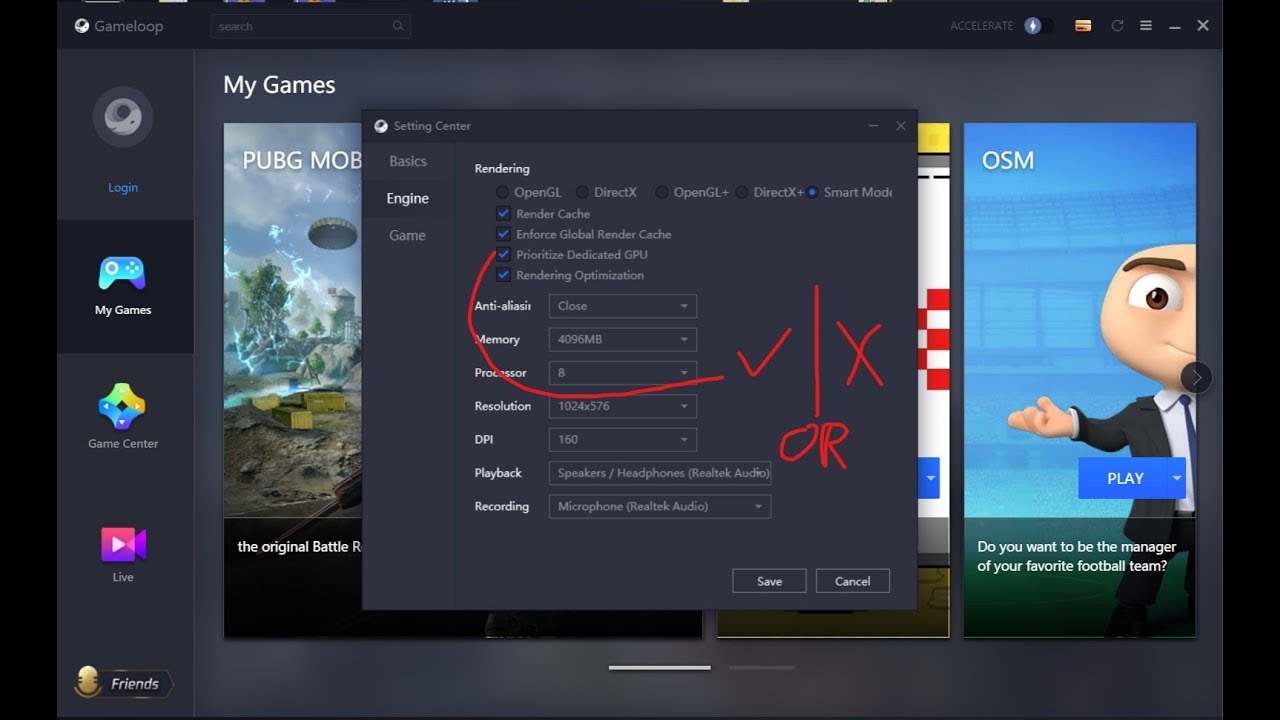
there are lots of user reported that checking dedicated gpu doesnot work really so here is the video to get a smooth gameplay tips and using gpu properly and something about the brand update
feel free to ask in comments..perdon me for voice as i dont have a proper mic
here ...
btw if you are in win 10..1909..you need to include androaidemulator.exe located in installation drivr>program files>tx..>ui to the win settings >display>graphics settiings>classical app
@rotund quartz
merry garnet
btw if you are in win 10..1909..you need to include
androaidemulator.exelocated ininstallation drivr>program files>tx..>uito thewin settings>display>graphics settiings>classical app
@merry garnet
then follow this too
merry garnet

 mossy moon
when new season come my emulator crashed many times
peak swift
Did you update the game from gameloop or...@mossy moon
steel flicker
@mossy moon can u pls explain the crash issue....like what type of crash
mossy moon
wait
First crash : Classic match loading screen
second crash : suddenly in the game . [note. not front of enemy]
steel flicker
I asked what type of crash .....bsod or grey screen or something else ?
mossy moon
freezing screen
steel flicker
Bsod ?
mossy moon
hm
steel flicker
@mossy moon can u post a picture of that bsod ?
Or u can go to cdrive->windows->minidump and send me the dump file
merry garnet
me
steel flicker
awwwwww
peak swift
hello, can anyone tell me why it shows this in gameloop?
steel flicker
@peak swift did u try to buy something ?
gleaming rock
bug
steel flicker
@languid bloom check pinned messages
 quiet jungle
Emulator is not my expertise, unfortunately.
 languid bloom
ok
merry garnet
@languid bloom clear cache
 nimble heron
can someone tell me the settings
specifications :
intel i5 8thgen
ram:8gb
graphic card:nvdia GTX 1050
128gb SSD
can any body give me the settig my game is choppy
legion y530
nimble heron
ok bro thanks
steel flicker
happy to help
steel flicker
@peak swift post your gameloop diagnosis window screenshot
peak swift
I faced with 5 hackers today
3 of them was in one team
Why pubgm dont care about players
Pubgm just want money
peak swift
But this game should care about players too
gleaming rock
Yet they haven't implemented 2 step verification
steel flicker
@gleaming rock does any mobile game has 2FA security ?
gleaming rock
maybe, I don't know
it's quite irresponsible of them to not implement it for such a popular game
steel flicker
😑
 keen violet
@steel flicker Clash Of Clans has 2FA
feral shaleBOT
Hello, @feral cloak!
Should you encounter players that are cheating or otherwise gaining an unfair advantage over other players through the use of unauthorized third-party software or methods that are not supported by the game developers, please report them by using the built-in report system which is available on the score/spectate screen at the end of every match and in the Tier Overview section of their profile via friend search. This is the best and most efficient method to notify the anti-cheat teams, and to get informed through in-game mails about successfully suspended cheaters.
Alternatively, in case you have additional evidence, such as screenshot(s) and/or video(s), feel free to submit this form in compliance with each required field:
:white_small_square: http://cheater-report.pubgm.cc
Additionally, you can submit a report in #cheater-reports in compliance with the channel's pinned instructions.
peak swift
@keen violet coz they have a different login method (supercell ID )
steel flicker
@keen violet but still u can login it without supercell id
Even a level 2 cracker can crack it
steel flicker
@peak swift wut ?
lol
@peak swift is that laptop ?
do u have a dedicated gpu ?
sometimes laptop doesnt show dedicated gpu
@peak swift 👆
@peak swift what is that gpu ?
i dont know much about laptops ....so i need to compare your gpu with a pc gpu 1st
thats in-built graphics ...not dedicated gpu
whatever ....use lowest settings possible..wait posting them
and also set in-game fps to max and Open the Gameloop's Installation Folder > UI > Delete ShaderCache Folder
@peak swift 👆
happy to help
merry garnet
+get a cooling pad..an play games while power cord connected
steel flicker
#protips
steel flicker
its taking too long in loading screen
@peak swift everyone has the same...it takes 1-2 minutes or more
lol what ?
merry garnet
use smart mode
steel flicker
@viscid bobcat sensitivity should be saved with account....idk much about in game problems
@peak swift ☝️
 wintry raven
When will cheated section open?
steel flicker
What ?
wide tendonBOT
@wintry raven:
Why has my account been suspended?
Accounts are suspended due to violation of the terms of service, usually when suspicious account activity is discovered during a manual investigation, or as an automatic precautionary measure when the anti-cheat system detects unusual account activity. The most common reasons, all which gain an unfair advantage over other players and are not supported by the game developers, include, but are not limited to:
:white_small_square: use of unauthorized third-party software or methods—such as cheats, hacks, modifications, scripts, plug-ins, automation software, and so-called "GFX tools"—to modify or manipulate the game or its functionality;
:white_small_square: purchases from third-parties;
:white_small_square: forced refunding through Google or Apple, and;
:white_small_square: use of unauthorized, unofficial and/or cracked game versions.
However, if you believe that your account has been wrongfully suspended, you can submit an appeal by clicking the File Claim button located in the bottom-left corner of the account suspension dialog box. If no reply is delivered within a reasonable time span, your only option is to wait until the punishment automatically expires.
Please do not repeat questions regarding account suspensions, in the Discord server. Contributors, moderators, administrators, and the community team are unable to assist with this in any way, nor do they have the ability to lift account suspensions. Repeated failure to abide by this warning will result in a permanent termination of your access to participate in the Discord server.
steel flicker
Lol....another one bites the dust
mint jetty
I see
peak swift
@viscid bobcat you can store the sensitivity settings in cloud. Scroll to the bottom to see the option
 dusty quail
If i change my dns, Can i get my account back?
mint jetty
Follow the faq
 coral phoenix
I am having this problem since morning. my internet is getting fiberoptic 100 mbps. But when I enter the game, the request takes time out and does not load even the European server 250ping
steel flicker
@coral phoenix check if ur emulator has correct time or not
coral phoenix
where can i look?
steel flicker
open game window and swipe down ....check if u have right time or not
coral phoenix
ok man, i am looking right now
peak swift
@steel flicker ia that really important?
steel flicker
@steel flicker ia that really important?
@peak swift really really
if u want good ping
peak swift
Oh thanks
steel flicker
👍 😁
coral phoenix
finally! you guys are great!
steel flicker
happy to help
peak swift

steel flicker
😁
gleaming rock
Speaking of the time thing, I remember before broadband connections were popular, I had a modem,
my pc had a problem where the time would reset every time you start the pc, so when I plugged in the modemmy internet wouldn't work. We had to call the dude who sold the modem several times, it worked on his laptop.
Later we found out that it was due to the pc's incorrect time
steel flicker
@gleaming rock lol.....when i was first introduced to broadband 3 years ago.....i reseted my IP ......that was horrific
also....i bricked my previous motherboard by trying to flash it with bios update
peak swift

merry garnet


 feral shaleBOT
Please avoid going off-topic. You can have unrelated conversations in #chat.
 unkempt bridge
@regal swan hackers are back and in very large numbers , and they are using magic bullet and down you with very less bullets without even aiming , why dont you suspend them like you used to do in season 9 and 10 and post lists every day , please take reports serious or they will get out of control , atleast find a solution for the bullet tracking when its not following its track and give a suspension for 10 min when you cant verify cheating , im on diamond in europe duo and im facing all hackers using magic bullets.
feral shaleBOT
Hello, @unkempt bridge!
Should you encounter players that are cheating or otherwise gaining an unfair advantage over other players through the use of unauthorized third-party software or methods that are not supported by the game developers, please report them by using the built-in report system which is available on the score/spectate screen at the end of every match and in the Tier Overview section of their profile via friend search. This is the best and most efficient method to notify the anti-cheat teams, and to get informed through in-game mails about successfully suspended cheaters.
Alternatively, in case you have additional evidence, such as screenshot(s) and/or video(s), feel free to submit this form in compliance with each required field:
:white_small_square: http://cheater-report.pubgm.cc
Additionally, you can submit a report in #cheater-reports in compliance with the channel's pinned instructions.
unique pike
1st Why my emulator take to much time to start the game And 2nd sometime its stuck on Match Starting screen or loading screen.
steel flicker
@peak swift at first set in-game fps to extreme
peak swift
yes I've done everything smooth+extreme
direct x+
I've unchecked the first two columns in engine
cleared cache
I have Amd ryzen Rx560x as dedicated gpu
steel flicker
Open the Gameloop's Installation Folder > UI > Delete ShaderCache Folder.
thats all u should have 60 fps
steel flicker
u using laptop or pc ?
peak swift
On previous version of gameloop I used to get FPS above 50 but now
Laptop
Acer nitro 5 ryzen 3550h with vega 8 and Rx560x as dedicated gpu
steel flicker
Try adding gameloop from graphics control panel...somehow its not using your dedicated gpu
@merry garnet can u help him ☝️ ?
merry garnet
@peak swift choose in game settings extreme
peak swift
@merry garnet
But in gameloop diagnosis it's showing integrated GPU,I have Amd Rx560x as Dedicated GPU.
I'm using Acer nitro 5 Ryzen 5 3550h
I don't get 50+ FPS like I used to get on previous version of gameloop
peak swift
Too many lag spikes
merry garnet
eneble prioritize gpu
merry garnet
and try this https://youtu.be/ogFG60eBTv8
peak swift
I already followed his steps but diagnosis does not detect Dedicated Gpu
Still shows integrated GPU as open gl in Diagnosis
I use Directx+
Sometimes FPS is below 25
Everything is set to high performance but still less than 30fps all game long even on smooth + extreme
With updated latest amd drivers
@merry garnet
peak swift
@peak swift turn off the render cache and enforced global render cache
steel flicker
@peak swift 👆 try this settings
Open the Gameloop's Installation Folder > UI > Delete ShaderCache Folder.
also use smooth+extreme in-game
peak swift
@steel flicker@peak swift
Thank You so much🙏 now I'm getting much better Fps than before 😎

steel flicker
Happy to help
mint jetty
This support is for pubg lite garena too?
 buoyant mulch
My laptop configuration is 8GB memory, i5 4210U processor, 1TB HDD, 2GB nVidia 830M graphics card, and additional 240GB SSD (game installed in SSD).
With all these configurations, I cannot even enter the game in PUBG. Playing the game is different, I cannot even open the game completely. And yes, I cannot get more than 5-8 FPS. Please Help me.🙏
steel flicker
@mint jetty i dont think pubg lite is supported by gameloop
@buoyant mulch please wait
But at first set in-game fps to extreme
buoyant mulch
have done everything to play pubg in this lockdown. butfailed. Already set fps to extreme.
steel flicker
Open the Gameloop's Installation Folder > UI > Delete ShaderCache Folder.
also use smooth+extreme in-game
@buoyant mulch 👆
try these settings
buoyant mulch
sir i have done all this already but no relief.
i asked for help in gameloop page they suggested this also
steel flicker
did u tried opengl+ ?
buoyant mulch
yes once but i cannot enter in the game
steel flicker
i asked for help in gameloop page they suggested this also
@buoyant mulch lol...i think i am that guy
buoyant mulch
Yes i also think that
steel flicker
😅
buoyant mulch
please help me.. your earlier version the tencent gaming buddy was outstanding.. after upgraded to gameloop, i am not able to play. i spend money on SSD and RAM upgrade still canot play 😦
steel flicker
people who are having fps drops or lag or freeze issues can try these steps
- set extreme fps in in-game settings
2.disable render cache and enforce global render cache from gameloop settings and keep anti-aliasing closed
3.Open the Gameloop's Installation Folder > UI > Delete ShaderCache Folder.
4.switch to opengl+ (for some people directx+ is better ...depends on their cpu and gpu combination)
5.set 720p in display quality
6.dont download resource files
7.try a clean reinstallation of gameloop- uninstall gameloop...delete the temp and program files folder from gameloop install location.......turn off antivirus and windows firewall...then reinstall gameloop from gameloop.fun
thats all u can do for now
please help me.. your earlier version the tencent gaming buddy was outstanding.. after upgraded to gameloop, i am not able to play. i spend money on SSD and RAM upgrade still canot play 😦
@buoyant mulch ssd and ram doesnt increase gameloop performance....it may lower the loading time...thats it
u should have spent that money on a cpu upgrade
buoyant mulch
my friend has same LAPTOP with same config...his game runs smooth with 55-58fps
steel flicker
70% of gameloop's performnce depends on cpu...so check if he and u have the same gen. Or not
As u have i5 4th gen...u doesnt meet min. Requirement of gameloop
buoyant mulch
we both have same laptop with same processor (i5 4210u)
i5 is not min. requirement 😮
OMG then i should delete this game if i5 4th gen is not minimum req. 😄
steel flicker
Then try a clean reinstallation as i suggested on no. 7.....
i5 is not min. requirement 😮
@buoyant mulch i5 7th gen is the min. Requirement for gameloop
buoyant mulch
okay. sed lyf. cannot do anything 😦
steel flicker
I think u should put your laptop for a servicing as u said your friend is having higher performance
@buoyant mulch
buoyant mulch
thank you guys. i think i should not invest more time on checking about this game.
buoyant mulch
😄 not in my fate
peak swift
@mint jetty this section is only for Emulator not for pubg lite
help guys
help guys i got this msg
i do not know anything and i never suspected anyone who is cheating in my friends
wide tendonBOT
@peak swift:
Why has my account been suspended?
Accounts are suspended due to violation of the terms of service, usually when suspicious account activity is discovered during a manual investigation, or as an automatic precautionary measure when the anti-cheat system detects unusual account activity. The most common reasons, all which gain an unfair advantage over other players and are not supported by the game developers, include, but are not limited to:
:white_small_square: use of unauthorized third-party software or methods—such as cheats, hacks, modifications, scripts, plug-ins, automation software, and so-called "GFX tools"—to modify or manipulate the game or its functionality;
:white_small_square: purchases from third-parties;
:white_small_square: forced refunding through Google or Apple, and;
:white_small_square: use of unauthorized, unofficial and/or cracked game versions.
However, if you believe that your account has been wrongfully suspended, you can submit an appeal by clicking the File Claim button located in the bottom-left corner of the account suspension dialog box. If no reply is delivered within a reasonable time span, your only option is to wait until the punishment automatically expires.
Please do not repeat questions regarding account suspensions, in the Discord server. Contributors, moderators, administrators, and the community team are unable to assist with this in any way, nor do they have the ability to lift account suspensions. Repeated failure to abide by this warning will result in a permanent termination of your access to participate in the Discord server.
 restive jewel
Need help, when i open my pubg mobile on mobile or emulator in checking for update it lode and says (unable to connect to server.please try a different network or grant WIFI access to the game in your setting. ERROR code:154140716)and my Internet was fine even my pubg pc version was connecting well and my ping was around 30-40 need help please help
merry garnet


 feral shaleBOT
Hello, @peak swift!
Should you encounter players that are cheating or otherwise gaining an unfair advantage over other players through the use of unauthorized third-party software or methods that are not supported by the game developers, please report them by using the built-in report system which is available on the score/spectate screen at the end of every match and in the Tier Overview section of their profile via friend search. This is the best and most efficient method to notify the anti-cheat teams, and to get informed through in-game mails about successfully suspended cheaters.
Alternatively, in case you have additional evidence, such as screenshot(s) and/or video(s), feel free to submit this form in compliance with each required field:
:white_small_square: http://cheater-report.pubgm.cc
Additionally, you can submit a report in #cheater-reports in compliance with the channel's pinned instructions.
steel flicker
lol
 magic bobcat
Can’t spectate my friend playing on mobile even if he has 0 spectator...need help
peak swift
You can't spectate from Emu to mobile or vice-versa@magic bobcat
 elder drum
so only a mobile player can spectate emulator player?
steel flicker
@elder drum no emulator can spectate only emulator players and mobile players can only spectate mobile players
elder drum
most of my friend use phone/ipad and they spectate me ...
so your statement is false
@steel flicker
steel flicker
@peak swift ☝️
peak swift
I see
If you don't believe me spend some time in Customer service and you'll find the answer " spectator limit reached" @elder drum
feral shaleBOT
Hello, @elder drum!
Should you encounter players that are cheating or otherwise gaining an unfair advantage over other players through the use of unauthorized third-party software or methods that are not supported by the game developers, please report them by using the built-in report system which is available on the score/spectate screen at the end of every match and in the Tier Overview section of their profile via friend search. This is the best and most efficient method to notify the anti-cheat teams, and to get informed through in-game mails about successfully suspended cheaters.
Alternatively, in case you have additional evidence, such as screenshot(s) and/or video(s), feel free to submit this form in compliance with each required field:
:white_small_square: http://cheater-report.pubgm.cc
Additionally, you can submit a report in #cheater-reports in compliance with the channel's pinned instructions.
 kind wyvern
Just installed the emulator and I’m having graphics issues. Can’t get it to a higher resolution. It’s always fuzzy. When I use the built-in recorder, it looks better than the live gameplay. Any ideas? Or is the game just stuck on mobile-level graphics?
merry garnet
show your settings
steel flicker
@kind wyvern
steel flicker
@peak swift how's your ping in numeric ?
peak swift
before update took 80 pings but now even my ping going 400
steel flicker
@viscid bobcat Open the Gameloop's Installation Folder > UI > Delete ShaderCache Folder.
also use smooth+extreme in-game
and uninstall resource files
and if u still face lags...then try opengl+
i already did all
@peak swift your dns is google right ?
peak swift
yup
steel flicker
try lsp repair......change time zone and restart .......change DNS to google ......if these 3 doesnt help....your only option is to contact your isp and ask for a better ip address
peak swift
ok
restive jewel
When i open the game it shows like this please help me it make ever time frustrated when i open my emulator and i want to restart for like 4 to 5 time any know the solution?
 shrewd raven
This is an issue with your internet, @restive jewel, contact your ISP.
feral shaleBOT
Please refer to this channel's pinned messages for further information, @dusty quail:
:white_small_square: Android: Click on the channel name and select Pins located at the top.
:white_small_square: iOS: Click on the channel name and select Pinned Messages located at the bottom.
:white_small_square: PC: Click on the pin icon located in the top-right of the channel.
dusty quail
Oof
shrewd raven
lol he is in the right channel
@dusty quail
could you send me a screenshot of your diagnosis window.
restive jewel
@shrewd raven but my other games are working fine?
mossy moon
anyone give me a good sensitivity?
steel flicker
🤦♂️
@restive jewel try lsp repair assistant(run it as an administator)
@dusty quail please send your gameloop diagnosis window screenshot
steel flicker
restive jewel
@steel flicker i try tried isp you have send but no result😩 😫
steel flicker
@restive jewel can u share a screenshot of that commands ?
and also try to launch the game on your phone with the same connection and tell if u have the same problem or not
restive jewel
the game or command prompt?
yes i tried in my mobile too it was same like emulator😫
steel flicker
the game or command prompt?
@restive jewel command prompt of the lsp repair
no need of that
yes i tried in my mobile too it was same like emulator😫
@restive jewel if thats the case i have to ask mods wait
restive jewel
ok bro thanks for your time
steel flicker
@restive jewel mods say ....its your internet problem.....try loging in with a vpn on...dont play the game with a vpn on..it bay lead u to a b4n ....just try to login and let us know the result
restive jewel
Ok i will try and i will inform you just a sec
steel flicker
👍
restive jewel
I like same after using vpn too bro
I normal i can open other games normally games like cod, pubg pc, even free fire are working fine bro!
steel flicker
i think something is wrong with your account then as u have the sameproblem in mobile too...but not in other games
@peak swift can u pls help him ?
restive jewel
No i think my account was not problem i try with my other account to it behave like same😢
steel flicker
@restive jewel idk dude ....i am from emulator support and its not your emulator problem as u have the same in mobile devices
restive jewel
Its ok bro thanks for your help 👍
gleaming rock
@mossy moon your sensitivity will be mostly dependent on your own preference but do try this:
If you use your wrist to aim then use a high sensitivity
If you use your whole arm to aim then use low sensitivity
for example, I use a 1350 dpi mouse and I aim with my whole arm so my sensitivity is set to 4% on red dot
you have to experiment to find out what suits you the best
steel flicker
absolute knowledge
restive jewel
@peak swift no it not fixed
 modern tendon
im having problems that my emulator forces me out of the emulator window
like when i aim on window mode it forces my cursor out of the emulator more often
restive jewel
@modern tendon make sure tha your resolution of the emulator is as same as windows resolution
restive jewel
You lower your emulator resolution right?
modern tendon
yeh
restive jewel
Then Change you windows resolution as it in emulator
steel flicker
press f11 ...i dont think it will drop fps
modern tendon
still dropping
steel flicker
@modern tendon can u post your gameloop diagnosis window screeshot
gleaming rock
just set a custom resolution, and play on full screen
steel flicker
@gleaming rock RIP keymap
steel flicker
lucky that u were close to a resolution that gameloop has...everyone ios not that lucky
i tried to play with 2560X1080....RIP keymapping....and i was too lazy to keymap myself
gleaming rock
It works as long as it's 16:9
steel flicker
@gleaming rock yes...exactly
gleaming rock
there's another aspect ratio that supports but I forgot what it was
it's definitely not 4:3
modern tendon
@steel flicker sry it took long im playing pubg lite
peak swift
@restive jewel can you provide yourin-game User ID
steel flicker
Open the Gameloop's Installation Folder > UI > Delete ShaderCache Folder.
also use smooth+extreme in-game
also delete resource files in-game
@modern tendon try this 👆
tell me if still have lag ....i will optimize more
modern tendon
i am using it
steel flicker
okay lol
 rose pumice
yes im here now
peak swift
i have a problem that its always show "no response from server try again please help
steel flicker
@rose pumice ok ..post that pic again
peak swift
@rose pumiceuser ID
modern tendon
ill try it later
rose pumice
wait
steel flicker
@peak swift that @peak swift guy too...i guess
modern tendon
I just tried playing pubg m on pc cuz I want a more casual experience than pubg lite
turns out the emulator is as buggy as it is
peak swift
@peak swift can you provide your user ID and a Screen shot
rose pumice
im trying my game is stuck on loading
steel flicker
turns out the emulator is as buggy as it is
@modern tendon yes...lol
steel flicker
well he is gone...dw he will come back soon
modern tendon
pubg m needs more graphics options like in pubg pc for it to be able to manually oprimize
steel flicker
pubg m needs more graphics options like in pubg pc for it to be able to manually oprimize
@modern tendondont expect too much...lmao
rose pumice
man im tired of this issue
modern tendon
I expect more to pubg m
cuz pubg lite is much more better to play on than pubg m
even in mobile
modern tendon
dude its almost the same system requirements
peak swift
Is smoke skin bug fixed m
modern tendon
and yet pubg lite is more optimized than
pubg m
steel flicker
Is smoke skin bug fixed m
@peak swift i dont think so
gleaming rock
don't forget you're emulating pubgm not running it natively
steel flicker
si por favor
steel flicker
why are u compairing with phone lmao 
What are the minimum system requirements?
- Operating System: Windows 7 (64-bit)
- Processor: Intel® Core™ i3-8100
- Memory: 4 GB RAM (6 GB virtual RAM)
- Graphics: Direct X 11.0+ supported (NVIDIA GeForce GTX 660 recommended)
- Network: Broadband Internet connection
- Storage: 2 GB available storage
modern tendon
then I wont compare it
steel flicker
"minimum"
rose pumice
@steel flicker when will wall e come online again?
peak swift
when this bug gonna fix after season 13??
modern tendon
I guess I need a new laptop for it to play 60 frames on 1080 resolution
in full screen
cuz its really buggy on window mode
peak swift
@rose pumice @restive jewel can you guys check if there's any update for Google Play Services and Google Services Framework, after that clear cache of Emulator and reboot the Emulator
Also an update for playgames
rose pumice
@peak swift i never installed google play and other stuff in emulator befr
i did clean reinstall the game
steel flicker
@rose pumice can u try loging in in an other account ?
rose pumice
playing with 20 pings each match
my game is not even start from loading screen, cant change the account
steel flicker
🤦♂️
rose pumice

steel flicker
@peak swift updating what ?
rose pumice
waiting
steel flicker

peak swift
Play service
steel flicker
i dont have knowledge about those things 😢
peak swift
And manually installing is against the ToS
steel flicker
still trying
need to research
@rose pumice are u online ?
can u try this ? - open facebook- remove pubgm as a login option - then open pubgm and login with facebook
rose pumice
?
steel flicker
can u try this ? - open facebook- remove pubgm as a login option - then open pubgm and login with facebook
.
steel flicker
guniea pig @steel flicker can you tell what this means?
@rose pumice 🤣
nvm it was a pun
 warped raft
@modern tendon the emulator doesnt run very well
I have emulators that runs pubg mobile better but the only thing it does better than any other emu is making the controls smooth
steel flicker
guys there is an in-game update for performance in pubgm.....let me know if its ok or not
modern tendon
hmmmm
@modern tendon the emulator doesnt run very well
I have emulators that runs pubg mobile better but the only thing it does better than any other emu is making the controls smooth
@warped raft the peeking mechanic is kinda slow
warped raft
still better than the rest of the emu's when it comes to controls
but how well it runs
kinda slow yknow
steel flicker
Lmao
restive jewel
@Champ finally found someone who have same problem i have😌
Champ did got got fixed that issue
@peak swift :ID5140104404 this was my pubgm ingame id and i had also tried with my Internet provider to reset my router and still the issue was same😞
@peak swift While opening the game it shows that error message like that and after trying and open the game in lobby it say server not respond after trying that too afer 30min finally i can play the game and the game was fine even it was run smoothly with 20-32 ping😑
steel flicker
@rose pumice did my trick work ?
atomic harness
Anything for the lag issues?