#emulator-support
1 messages · Page 94 of 1
 peak swift
 errant warren
Does HDR graphics fix released for emulators???
peak swift
Due to the crashing issue it was removed @errant warren
Will be adding after fixing it
 golden oasis
It's the S12 grenade skin that is bugged.. Others work fine. I'm using Arctic Witch grenade skin and can use 4 with it.
peak swift
@golden oasis i think it will fix in next update i also have that problem
 lapis crest
GAME CRASHED AGAIN,... crown 2 to crown 3 --- no wonder hackers are hackers
 feral shaleBOT
Hello, @lapis crest!
Should you encounter players that are cheating or otherwise gaining an unfair advantage over other players through the use of unauthorized third-party software or methods that are not supported by the game developers, please report them by using the built-in report system which is available on the score/spectate screen at the end of every match and in the Tier Overview section of their profile via friend search. This is the best and most efficient method to notify the anti-cheat teams, and to get informed through in-game mails about successfully suspended cheaters.
Alternatively, in case you have additional evidence, such as screenshot(s) and/or video(s), feel free to submit this form in compliance with each required field:
:white_small_square: http://cheater-report.pubgm.cc
Additionally, you can submit a report in #cheater-reports in compliance with the channel's pinned instructions.
 random cloud
so my google account is wiht pubg on my phone if i login into the emulator will my information be their too
 shrewd raven
No it will not be @random cloud
 strange ibex
Error code: 154140716
peak swift
@strange ibex it's your internet issue
strange ibex
no its not
peak swift
Could you send a SS @strange ibex
peak swift
Do you play in NA @strange ibex
strange ibex
i did and cod warzone playing well
peak swift
Restart the emulator too
strange ibex
what can i do now ?
strange ibex
i tried defend network connection but it's still same
@peak swift hy game is working on mobile its well (same network)
 random grail
can i download the maps and resources from the outside and just put them in a certain path?
hello?
@peak swift
peak swift
@random grail no
peak swift
It will lead to ban
peak swift
For modifying
peak swift
@strange ibex force close the emulator and reopen check for an update then open the game
@random grail it's better to download via in-game
strange ibex
😦
 night otter
@peak swift thank you so much, I removed the nade skin and it worked!!
peak swift
👍
night otter
I have another question
For a pc with lower ram, is it better to disable render cache in the emulator settings?
 rotund quartz
Can somebody help me with emulator settings? I have i3 7020 2.3GHz CPU with Intel HD graphics 620 + AMD Radeon 520 2GB Graphics card. with 8GB of Ram. My game lags too much . While shoot while landing everytime, I always get killed in closerange because of that. Please help me
strange ibex
gameloop eng ver download link pls
peak swift
https://gameloop.fun/en/game/fps/play-pubg-mobile-on-pc
@strange ibex just select the version as English
@night otter disable it
@rotund quartz could you send a SS of the Emulator settings
shrewd raven
@lusty oak What is the issue?
 lusty oak
@shrewd raven i get very bad lag spikes the game jus freezes and then come back to normal it happens every one minute but the rest of the time it runs smooth
peak swift
@rotund quartz what was your issue?
rotund quartz
Emulator settings for my Config ?
Can somebody help me with emulator settings? I have i3 7020 2.3GHz CPU with Intel HD graphics 620 + AMD Radeon 520 2GB Graphics card. with 8GB of Ram. My game lags too much . While shoot while landing everytime, I always get killed in closerange because of that. Please help me
can you help me?
@peak swift
peak swift
well it oftenly lags while encountering enemies in close range, that's known as render.
sometimes this occurs more excessively than usual when your cpu is over heated or you're running too many apps in background. @rotund quartz
rotund quartz
Actually i close all the apps while playing. can you help me with normal settings which i can use to play @peak swift . for my pc config.
peak swift
mark display quality to smooth and rendering to DirectX
set memory to 2048mB, processor to the respective cores you have and save it. @rotund quartz
rotund quartz
OK i will try it. R u sure about memory ? I have 8 gb ram
peak swift
memory depends on the graphics card i guess.
rotund quartz
Direct X or Direct X+
peak swift
Direct X
rotund quartz
Okay Thank you so much..!!
peak swift
no problem, I'm not sure if it will help or not but you can still give it a try.
rotund quartz
I will give it try and get back to you. If you get any solution from any other person. Please let me know.
peak swift
yeah, sure.
peak swift
@peak swift @peak swift I am experiencing a problem here.
My game was a bit laggy so i decided to re install my emulator
and now the engine shows this error when i open it up
when i click on re install
it shows that its installing but it doesn't go further
it just stays at 0.0%
any solutions?
Just turn off the antivirus software @peak swift
And try again
Make sure the internet connection is working
the internet is working , i bought a new pc and it ain't working now @peak swift
i upgraded from i3 to i7 , 4gb ram to 8gb ram
and gtx 1050
Lemme check just a min
my antivirus is off , i only have windows defender enabled @peak swift
Turn that off too
uh isn't that necessary
Uninstall gameloop from the control panel
i have done that
After turning off the antivirus.
Install gameloop
aight
btw the game wont lag right?
Also delete the temp folder
cause im literally broke now
but its worth the quarantine days ig
It won't you do have a nice spec ri8 now
yea man
i hope
i was so tired of lagging and dying
still the same error @peak swift
@peak swift try this
|| https://youtu.be/GZZ7CeO2d9M ||
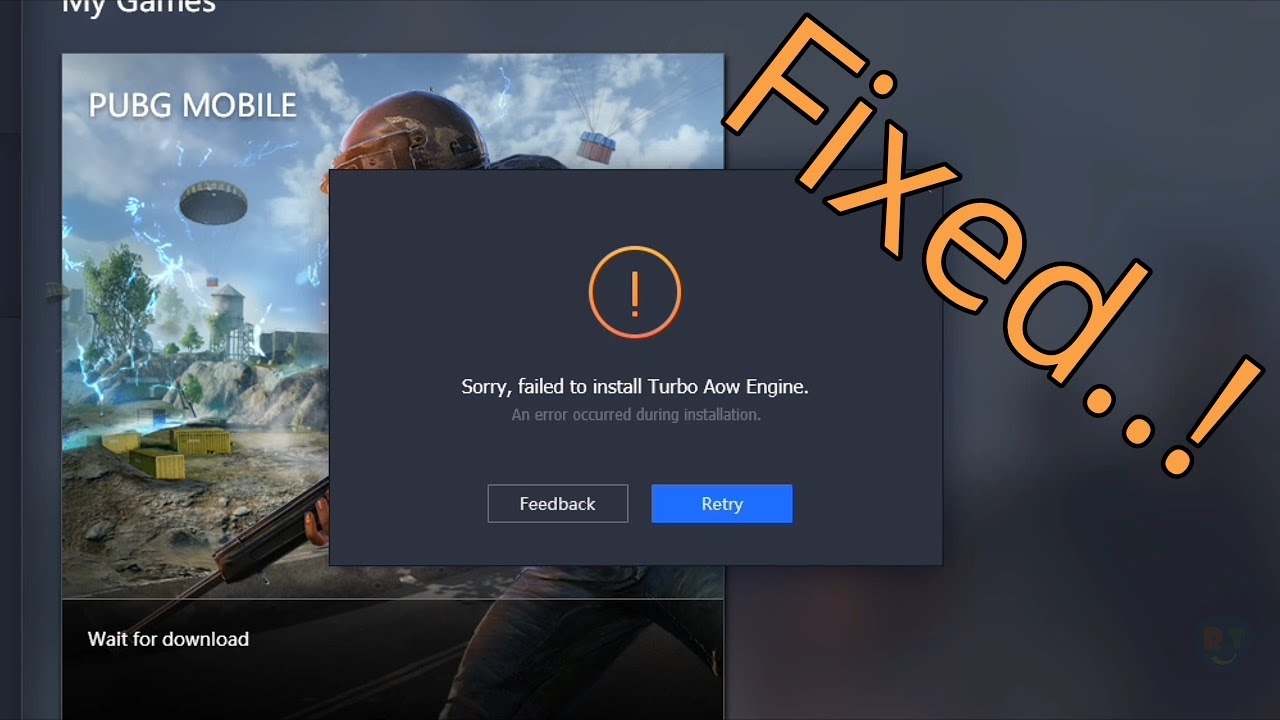
Hello Guys, Today I'm Going To Show You How To Fix Tencent Gaming Buddy's Error ' Sorry, Failed To Install Turbo Aow Engine ' .
As We Looked Into This Issue, We've Found That, The Error Is Because Of Antivirus. The Antivirus Installed On Your PC/Laptop Is Blocking Some Of The...
not working ;-; @peak swift
Uhoh that's something unfortunate
so any other solution for this?
I'll look for a solution and will inform you @peak swift
alright man , thanks and enjoy the day ! @peak swift
be sure to mention me or dm me if u find a solution
You too
Yeah will do that @peak swift
peak swift
@peak swift found any solution yet?
nah
why is this happening ;-;
i bought a pc to play the game and now the game ain't working
peak swift
double check whether the defender's real time protection is turned on or not
@peak swift if i close gameloop while installing aow engine will the download continue from where it was disconnected last time or i will have to strat from Beginning?
it will be working inthe background (in the tray you can find it )@peak swift
i'll suggest you to minimize it
@peak swift yeah, so the download will run in background if the device stays connected to internet.
yeah
gotcha.
rotund quartz
@peak swift you have solution for my spec?
peak swift
your setting seems fine @rotund quartz
you could try going for the DirectX
rotund quartz
@peak swift this are my current settings what should i change
peak swift
you could put the memory to 8GB and processor to how much core you have
peak swift
just try both
@peak swift
any solutions? 😪
just uninstall and remove all files related to gameloop,clear the temp folder, disable antivirus, make sure you download from the official website,https://gameloop.fun/en/game/fps/play-pubg-mobile-on-pc
bro i disabled my windows defender , what else do i disable? @peak swift
restart your system too
peak swift
@peak swift i disabled windows defender , is there anything else i should disable
nah
is there any other antivirus software in that system @peak swift
there was Bytefence , the guy that i bought the pc from had LDplayer installed and not gameloop btw
i uninstalled byte fence though
but still
@peak swift
just do a clean reinstall @peak swift
https://youtu.be/AGJokcy9b44

for several problems you may need to reinstall tgb which now termed as gameloop,but you should know the clean reinstallation process for betterment of game..here is how..
gameloop official download link (https://gameloop.fun/)
gameloop discord(https://discordapp.com/invite/...
bruh so basically , i should disable my windows defender and clean reinstall the emulator right? @peak swift
yep
windows defender is disabled @peak swift
just follow that video for a clean reinstall
@peak swift still not working
i got an idea though
lemme install an antivirus
ok
and then direct it to windows
and then disable it
i think windows defender is the issue here
even though i got it disabled
 wide tendonBOT
@high junco:
Why has my account been suspended?
Accounts are suspended due to violation of the terms of service, usually when suspicious account activity is discovered during a manual investigation, or as an automatic precautionary measure when the anti-cheat system detects unusual account activity. The most common reasons, all which gain an unfair advantage over other players and are not supported by the game developers, include, but are not limited to:
:white_small_square: use of unauthorized third-party software or methods—such as cheats, hacks, modifications, scripts, plug-ins, automation software, and so-called "GFX tools"—to modify or manipulate the game or its functionality;
:white_small_square: purchases from third-parties;
:white_small_square: forced refunding through Google or Apple, and;
:white_small_square: use of unauthorized, unofficial and/or cracked game versions.
However, if you believe that your account has been wrongfully suspended, you can submit an appeal by clicking the File Claim button located in the bottom-left corner of the account suspension dialog box. If no reply is delivered within a reasonable time span, your only option is to wait until the punishment automatically expires.
Please do not repeat questions regarding account suspensions, in the Discord server. Contributors, moderators, administrators, and the community team are unable to assist with this in any way, nor do they have the ability to lift account suspensions. Repeated failure to abide by this warning will result in a permanent termination of your access to participate in the Discord server.

 high junco
feral shaleBOT
high junco
feral shaleBOT
Please refer to subpoint #3.17 in #faq for further information, @high junco. Make sure to read through this channel before asking questions in the support channels, as your questions could have been answered there.
 small idol
What do you get when approving?
peak swift
it's the EULA/GDPR @small idol
small idol
@peak swift Does something happen upon approval?
peak swift
Its for the data protection @small idol
small idol
@peak swift Ok, why can't I change the region?
peak swift
There's a count down once you changed the region
small idol
@peak swift I do not have the option to change the region
peak swift
It's not available in the Europe @small idol
small idol
When I transfer data, can I change the region?@peak swift
peak swift
The region changing is not available for Europe atm
peak swift
@peak swift
any solutions yet?
im so bored
where do i download the gamedownload.exe @peak swift
The above link
@peak swift
bruh
Just hit the download button @peak swift
i did
its downloading
so where do i replace the file
nvm found it
AppMarket
bro
ur a life saver
its downloading now!!!
thanks!!! @peak swift
tysm!!

i was bored from whole day
thanks dude!!
you made my day
Always welcome @peak swift
Rock47 for the win
i thought there was no solution for this
ty so so so much man.
uhh 😓 @peak swift
What happened @peak swift
nvm the game download was stuck at 0.0% but i restarted the emulator and it is working now @peak swift
Ohk
 fair adder
I have question: people who are playng pubg mobile they can play with players who are using pubg for pc
random grail
ill dm u since i think its not allowed to say it here
peak swift
@fair adder only gameloop is the only recommended one
Also check the #faq 3.18
@peak swift
uh
@peak swift??
nvm figured it out
thanks
the game was in korean and i couldnt understand
at first i thought i downloaded korean version
but i somehow found language button
and its good now
thanks brother @peak swift

why do i see fps drops even on 20 ping
when the enemy is close
random grail
fps have nothing to do with the ping
 next echo
how to get low ping
iam using 100mbps internet speed
i get high ping
when i get automatched
peak swift
@peak swift
my account got banned
for doing nothing
i want proof
for what i did
i never used hacks in my life
what the f did i do
is the guy drunk?
i havent done anything
@random grail still the game stutters a lot even tho it's 60 fps most of the time
@peak swift sad bro, you had skins on that account?
yes
that was my main acc
that's unfair really
Can you provide a SS @peak swift
@peak swift i quit pubg bro
it took me ages to get a decent pc
to play the game
and when i finally did
☹️
@peak swift bruh idc if i get my acc back or not
i need proof
of what i did
i dont hack
some cry baby probs reported me
wait
Contact the customer service
i think the file
you gave me
@peak swift bruh are you sure that file was correct
that file may be 3rd partied
wide tendonBOT
@peak swift:
Why has my account been suspended?
Accounts are suspended due to violation of the terms of service, usually when suspicious account activity is discovered during a manual investigation, or as an automatic precautionary measure when the anti-cheat system detects unusual account activity. The most common reasons, all which gain an unfair advantage over other players and are not supported by the game developers, include, but are not limited to:
:white_small_square: use of unauthorized third-party software or methods—such as cheats, hacks, modifications, scripts, plug-ins, automation software, and so-called "GFX tools"—to modify or manipulate the game or its functionality;
:white_small_square: purchases from third-parties;
:white_small_square: forced refunding through Google or Apple, and;
:white_small_square: use of unauthorized, unofficial and/or cracked game versions.
However, if you believe that your account has been wrongfully suspended, you can submit an appeal by clicking the File Claim button located in the bottom-left corner of the account suspension dialog box. If no reply is delivered within a reasonable time span, your only option is to wait until the punishment automatically expires.
Please do not repeat questions regarding account suspensions, in the Discord server. Contributors, moderators, administrators, and the community team are unable to assist with this in any way, nor do they have the ability to lift account suspensions. Repeated failure to abide by this warning will result in a permanent termination of your access to participate in the Discord server.
random grail
what did he gave you @peak swift
 hoary zealot
hi, when I use granade skin, it can't be equipped by pressing 4. Can you look into this?
peak swift
Just don't use the nade skin atm @hoary zealot
hoary zealot
Yeah. I'm not using this right now. But it should be fixed. shouldn't it?
peak swift
It will be fixed soon
 warm ocean
Screen freezes while loading game what could be the reason
shrewd raven
Make sure gameloop is updated
 autumn dune
why i get this screan And I play with the official emulator Gameloop
@peak swift
shrewd raven
Diagnosis window screenshot please, @autumn dune.
autumn dune
@shrewd raven
shrewd raven
@autumn dune
autumn dune
@shrewd raven
autumn dune
@shrewd raven what's the issue ?
 oblique depot
shrewd raven
oblique depot
shrewd raven
I suggest you do a clean installation of the Emulator, @autumn dune.
peak swift
Hello can someone Help me please ??
My pc shut down when i start pubg MOBILE only in pubg
Please i need Help to fix this !?
daam
i faced the same issue
@peak swift how die you fix it ?
i tried reinstalling and removed my antivirus software, then turned off windows defender.
@peak swift i ill try it Thank you
@peak swift is yours a cracked OS
btw, you've to update your OS to the latest version ig.
@peak swift no 10
home?
Yes
check if there's any updates available
i turned off me windows defender and its work now
shuld i turned off when i want to play ??
@peak swift make sure you do have the latest version of gameloop and windows
yep
 merry garnet
Also its recommended to exclude emulator files from any antivirus @peak swift
Including defender
peak swift
link of reporting page of youtuber who cheating ?
@peak swift how to report youtubers who is using cheats on live
feral shaleBOT
Feel free to use this form if you want to report YouTube channels that feature PUBG MOBILE cheating activities, @peak swift:
:white_small_square: http://bit.ly/37Lgfbm
warm ocean
@shrewd raven it is updated bro
So I will describe what happens
I start the game and the loading screen appears and then there will loading screen for a while after which you find yourself in lobby again with option saying enter match again and when I click yes enter match again it goes in the game where my charater is if I am not dead and then all game is having bad lag and low frame rate and map loads very slowly I mean buildings do not load quickly and when do load then i find that someone has killed me already and its frustrating bro
peak swift
Can you send a screenshot of your Emulator settings @warm ocean
warm ocean
Sure give me a minute
shrewd raven
And a screenshot of your diagnosis window, @warm ocean.
shrewd raven
First update your emulator, @warm ocean.
Use these settings, and after unchecking the first two options, make sure you delete the Shadercache folder.
You can find it in here, C or D, depending on where you installed the emulator.
If DirectX gives you errors you can switch back to DirectX+
peak swift
He doesn't have a dedicated GPU @shrewd raven
shrewd raven
Oh sorry, forgot to uncheck that when I took a screenshot!
It won't do anything anws even if he checks it, since he doesn't have one.
peak swift
Nah you're doing great in here @shrewd raven
shrewd raven
Thank you! @peak swift
warm ocean
when i click update it downloads market.exe and when it is downloaded is the update finished or should i have to do something else?
shrewd raven
You should apply the settings I sent in the screenshots I sent above.
warm ocean
that i will apply but i am asking that when market.exe is downloaded is the emulator updated?
peak swift
Yeah it is
The emulator will restart once the download and the installation complete 's
@warm ocean
 unique plinth
@shrewd raven @peak swift https://cdn.discordapp.com/attachments/505322257157980160/699679685650677870/unknown.png

Should i use same setting?
unique plinth
I Mean direct x or directx +
warm ocean
Directx+
unique plinth
And unchecking Render cahche and enforce render cache
warm ocean
Bro I'm not sure @shrewd raven help this guy bro
unique plinth
He is offline
warm ocean
@peak swift
unique plinth
I am suffering from lag in game
warm ocean
Same bro we are on same boat
You try these if they work then fine otherwise you can always change the settings
warm ocean
For the processor you open task manager and go to performance tab there you see your processor or cored at bottom right corner and set the processor to that number in emulator bro
Yeah i tried
unique plinth
It reduce your lag?
unique plinth
Ok
merry garnet
@unique plinth ya you can
render options eneble can give drops in fps sometime
if you having a good gpu go for dirtx+
and also selecthigh performance in nvdea control panel power management
autumn dune
@shrewd raven i uninstalled the emulator and installed from begin as you say and the problem remains !!
merry garnet
@autumn dune nothing can unban you.. probably that can resist getting ban again..if you not using any third party
unique plinth
@merry garnet Protitize dedicted gpu Should be enabled?
peak swift
@unique plinth yep it should be enabled
shrewd raven
@unique plinth Set processor to 4 and memory to 8GB.
And after unchecking the first two options, make sure you delete the Shadercache folder. You can find it in here,
CorD, depending on where you installed the emulator.
peak swift
@oblique depot you don't have to spam that everywhere
@near bolt please do state the issue here
@near bolt only gameloop is the recommended Emulator. Using others will lead to ban.
Make sure to use gameloop after the ban time expires
peak swift
is grenade bug fixed ?
shrewd raven
Not yet, @peak swift.
peak swift
Guys new gameloop update available
 snow hound
Hello guys my name is amit. i live in india. i play on emulator on PC with lan connection with 30MBPS speed. (will attach screenshot for reference
peak swift
i hope i had this ping 😭
snow hound
there are two problems i m facing. 1st is my ping is very high during gameplay. 2 nd as i live in india pubgm should match me with indian players mostly but i m matched with other country players
when i play in classic match my ping goes beyond 250ms. but when selecting region it says 20ms
peak swift
i live in Afghanistan and i also dont match with Afghani players
snow hound
earlier it doesnt happen. but since 1month or so it happening. can someone help
 cedar sparrow
anyone help me ?
peak swift
@cedar sparrow
You could try this with processor 4
@snow hound contact your ISP for a IP change
warm ocean
@peak swift bro i did all the settings you suggested but game still lags one moment you get above 30 frames and the other moment it is below 10
As you can see my laptop specs are well capable of running the game
In the early days when it was named tencent gaming buddy emulator ran fine but for the past few months it is very bad and we don't have any other option
peak swift
It's just a name change
warm ocean
@peak swift I know but does not runs smoothly anymore
peak swift
Make sure you do have enabled the virtual memory
warm ocean
Virtual memory is 4gb i changed it
Back in early days of this emulator I didn't set virtual memory or anything like that but game was playable now it is unplayable even I do all these settings @peak swift
peak swift
Emulators uses virtual mem
shrewd raven
Can you send the diagnosis window screenshot after you updated, @peak swift.
 soft fern
when death replay will be available?
shrewd raven
That update is a couple days old 😄
peak swift
pls help
white lines
help
Whats the rendering option you gave in the settings @peak swift
opengl+
Try DirectX or DirectX+
ok
shrewd raven
You can't, once an account is linked, you can't unlink it, @peak swift.
peak swift
@snow hound you should turn your matchmaking to hindi and English then start your match
snow hound
@peak swift ieven tried it but no use
peak swift
its due to the low player counts
unique plinth
@peak swift @shrewd raven Thanks 🙂
peak swift
did that works @unique plinth
peak swift
ohk
 violet steeple
@peak swift there is a way, delete your fb account
peak swift
@violet steeple you can delete your FB account but if it is linked with pubgm you won't be able to login again
 shadow kayak
I'm facing the render gltich often how can I reduce it plz help me ...in classics and arcade matches often I face with this trees n building appear and disappear how to fix it
 peak swift
Disable render cache @shadow kayak
peak swift
Ok save and close the app (from the tray too)
shadow kayak
Rest any changes I ned to in 2nd image memory n processor??
peak swift
You can select how much ram you have in the memory section
shadow kayak
Wht does it differ from auto to if any other I slect
peak swift
It just you giving the memory info to the Emulator instead of it detecting automatically @shadow kayak
shadow kayak
Will it affect game if I dont or no?
And Mine is a gtx nvdia 1050 card any change I shud make in the gaming resolution and display quality
peak swift
Going default 720p is the better option atm.
Just enable prioritize dedicated GPU.
That's all @shadow kayak
shadow kayak
K ..the rendering option is smart mode better or direct x?
merry garnet
whats your system specifications
merry garnet
as you have good gpu go for dirtx+
ok its laptop..use smart mode
also use power cord while playing games and use power mode high performence from gpu control panel
shadow kayak
How do I do tht while plying games?
merry garnet
do what?for power mode you can see in nvdea control panel after selecting the programme
shadow kayak
S I have set the option now to max
merry garnet
ok keep playing
also for laptops to get a good performence you must get a cooling pad..as they terbo boost the cpu
shadow kayak
Thanks for help appreciate it @merry garnet and @peak swift
peak swift
🎊
@merry garnet https:/www.amazon.in/Tecknet-N9-Cooling-Adjustable-Temperature/dp/B016CL2F5S
how is this cooling pad
im thinking to buy this but not sure
merry garnet
bro you can buy any
like i have a single fan
but before that it used to freeze the games
but after cooling pad i can run apex even
shadow kayak
Which company is good?
peak swift
ok
shadow kayak
As I saw above I changed to balanced mode still I dont have the option of death replay
Wht else I ned to change?
peak swift
You need to restart the game @shadow kayak
shadow kayak
K..thank you
unique plinth
@peak swift i also have gtx 1050 should i go with 720P?
But i feel the gameplay is diffrent when using 720P Res its not just a quality
?
shrewd raven
No you should be fine with 1080p, @unique plinth.
shrewd raven
Send diagnosis window screenshot and Game and Engine tabs screenshots, @peak swift.
shrewd raven
Set processor to 4 instead of 2 and choose HD 1080p instead of 2K
Also do you have the shadercache folder deleted?
@peak swift
peak swift
i deleted it
 inland peak
i just uninstalled my game due to lag and fps drop and now i cant change the language ... help!!!!!!!
peak swift
Settings> basic > language @inland peak
 wintry raven
Game is still freezing at any time
 vocal nymph
Hello, i just installed tencent gaming buddy/gameloop and have a problem with the low graphics...anybody has a fix for that plzz tell (i have set the in-game and emulator resolution to max settings)
shrewd raven
Set in game frame rates to extreme
And switch the game from emulator settings from 720p to 1080p
vocal nymph
@shrewd raven already did that
shrewd raven
Gameloop anti aliasing?
vocal nymph
but still getting lower graphics compareed to other emus
ultimate
and i can't also get hdr graphics
feral shaleBOT
Please refer to subpoint #3.17 in #faq for further information, @vocal nymph. Make sure to read through this channel before asking questions in the support channels, as your questions could have been answered there.
peak swift
HDR option is not available right now
unique plinth
@vocal nymph Make sure you are using the native res of your monitor
And if you have nvidia Carte graphic
Go to nvidia control pannel
And use the best setting for high quality
wide tendonBOT
@latent valve:
Why has my account been suspended?
Accounts are suspended due to violation of the terms of service, usually when suspicious account activity is discovered during a manual investigation, or as an automatic precautionary measure when the anti-cheat system detects unusual account activity. The most common reasons, all which gain an unfair advantage over other players and are not supported by the game developers, include, but are not limited to:
:white_small_square: use of unauthorized third-party software or methods—such as cheats, hacks, modifications, scripts, plug-ins, automation software, and so-called "GFX tools"—to modify or manipulate the game or its functionality;
:white_small_square: purchases from third-parties;
:white_small_square: forced refunding through Google or Apple, and;
:white_small_square: use of unauthorized, unofficial and/or cracked game versions.
However, if you believe that your account has been wrongfully suspended, you can submit an appeal by clicking the File Claim button located in the bottom-left corner of the account suspension dialog box. If no reply is delivered within a reasonable time span, your only option is to wait until the punishment automatically expires.
Please do not repeat questions regarding account suspensions, in the Discord server. Contributors, moderators, administrators, and the community team are unable to assist with this in any way, nor do they have the ability to lift account suspensions. Repeated failure to abide by this warning will result in a permanent termination of your access to participate in the Discord server.
peak swift
@tiny fractal make sure you do have enough RAM and virtual memory
rotund quartz
bug report . my gameloop not starting afterloading screen window goes off and bug report recives.
peak swift
Is the gameloop up-to-date
 tiny fractal
Idk. I deleted my gameloop and downloaded a new one
Which is quite different than the previous one
peak swift
Seems like you were using the old version at that time
tiny fractal
Nah previous one was updated.
Current version which I'm using doesn't have speed boost stuff
And I didn't delete my game data and I just copied and pasted in new emulator
Which says Pubg Mobile Non Gameloop as I have done custom installation
Is that a problem?
tiny fractal
Ugh okay.
I wanna know whether I'm using the right emulator @peak swift
UI version - 3.21.598.100
Latest?
peak swift
Yeah it's the latest
Also you could check for updates by clicking the Hamburger button on the top and select updates
tiny fractal
Alright. Thanks
 oblique gorge
hi guys. I am playing this game from gameloop. And I want to use Game booster applications/softwares like WTFAst, Advanced System Optimizer, Razer Cortex.
So, I wonder if ant kind of game booster software on pc make a restrict problem in pubg mobile with gameloop.
 split vigil
then go for Razer game booster
peak swift
You don't need a game booster
oblique gorge
i am actually wondering for stopping windows unneccesary services for gaming
not to touch anything to pubg mobile
when I am recording with 1920 1080 60 fps and 6000 cbr it makes lag
with 44 ms also
split vigil
wait you get lag on an 16gb ram?
oblique gorge
yes
split vigil
WTH
peak swift
I think it's ok to use Razer not sure about the rest of them
oblique gorge
my emulator settings are 480 dpi 1920 1080 hd and 1080p
in game settings are extreme and hd
split vigil
just use 720p mode
oblique gorge
i tried it but game ui become huge
split vigil
in game settings are extreme and hd
@oblique gorge
use balanced 60fps otherwise
oops
oblique gorge
ok i will try. i will lost some shadow graphics but i will try
and i will try razer with guest firstly
allright
split vigil
i recommend disabling game bar first
oblique gorge
which settings emulator or gameloop?
split vigil
WINDOWS settings
oblique gorge
allright then, i am at there
split vigil
title: Gaming
split vigil
this one?
oblique gorge
exactly
it is same closed
ok ok so i will try razer with guest, i will check it
then try
oblique gorge
hmm i closed it
it was open. now closed
any more tips to increase some lags
these are my settings, i have smooth and repeated lag.
i have 45 fps
split vigil
disable rendering optimisation
oblique gorge
i did
split vigil
graphics smooth or balanced
oblique gorge
balanced makes some shadow graphics disappear
split vigil
BTW i cant understand your settings language
oblique gorge
so my audience will lack of shadow
it is turkish
but the list is same
i will try balanced
oblique gorge
balanced has but i recorded both of them hd has a real experience but balanced is less experience
there is still shadow but blackness or quality is low
i will try balanced
i choosed
also i want to ask something
what is the laws of usage of pubg mobile footage in youtube videos?
can i do everything with the pubg mobile footage? like changing the car that comes to me to a dragon?
oblique gorge
i am checking while i am asking my question to contributor
it is nice guideline i will check thanks
split vigil
wait that file belongs to error 404
i just made a copy of it
oblique gorge
i downlaoded already
is it wrong
i have it and reading now
@split vigil you helped me a lot
lots
with this guide
i didnt even know pubg has it 😄
there is no contributors avaliable, would administrators answer my question?
split vigil
thank error for it
btw ima have lunch bye
there is no contributors avaliable, would administrators answer my question?
@oblique gorge
idk they handle only discord cases i think
oblique gorge
allrgiht. it helped me i wont forget this favor. have a great time
shrewd raven
disable rendering optimisation
@split vigil @oblique gorge Disabling rendering optimization will make the game more laggy, and give less FPS
oblique gorge
@shrewd raven where was the shadercache folder?
@shrewd raven @split vigil @gleaming rock i wrote your instructions, i got your names. so when my researches and tryouts are ended i will post my computer spesific, my gameloop settings, my inside game settings, and my obs settings. Until that time. have a good time!
split vigil
ok
peak swift
its under the UI directory
peak swift
yep
 gleaming rock
The shadercache folder linked in the pinned messages are quite old
so it's not worth using
split vigil
its in the middle
peak swift
havent got anything in my dm@oblique gorge
gleaming rock
Shorten it down for everyone to read
split vigil
make a copy of them before deleting
oblique gorge
allright i will shorten
i made as shorten as...
what is the laws of usage of pubg mobile footage in youtube videos?
can i do everything with the pubg mobile footage? like changing the car that comes to me to a dragon?
so this was the my question
How to use pubg mobile footage in only youtube and facebook?
can i change any kind of footage that pubg mobile has?
ı am well equipped and graduated industrial designer and i want to be content creator of this game.
I am playing this game since season 7 and i have 5300 achievement points, and succeded with glass cannon and other hard stuff
so i want to make animations, humor to support my pubg mobile gameplay videos.
what can i change and what can i not change?
@split vigil okay i will try your way. i wrote to my list
gleaming rock
@oblique gorge I am pretty sure you're okay with making any kind of videos on the game
as long as the actual in-game files are abused. They won't sue you if you make sfm out of the models, or add animations post recording
oblique gorge
@gleaming rock allrightyyy. i will try my best to entartain my audience with some kind of animations and talking. I will not touch or change any raw footage of pubg mobile footage. I will only make montages. nice.
gleaming rock
Editing the footage won't get you sued
peak swift
can you guys take this to #emulator-chat
gleaming rock
They will sue you if you are spreading false info about the game unironically without any hint of satire
@peak swift sure no problem
Go to #emulator-chat
shadow kayak
Is I make my resolution to 1080 instead of default 720p my screen game gets smaller. All icons in game start n all are small and during weapons chnge are also differing
And still I'm facing the glitch of automatic shoot in tdms and classics plz help me solve tht also during intense fights gun starts shooting auto n not stops fr a while..its not ping issue as I get 50 to 60 constant
peak swift
@shadow kayak if you are facing issue in 1080 then lower your settings to 720p
@hallow quartz restart your computer
@cedar sparrow try this
 hallow quartz
i did @peak swift
peak swift
open gameloop and check if the problem is fixed @hallow quartz
Guys plese i kees Help to fix this error
i formated my pc and still this problem
update your drivers
repair corrupted system files
@peak swift
@peak swift how can i repair corrupted system files ?
hallow quartz
@peak swift NO it's same problem
peak swift
Right-click Start and select "Command Prompt (Admin):then>
sfc /scannow
After that, type: chkdsk C: /f /r /x and hit Enter; (Replace C with the drive letter of your Windows partition drive letter.)
after that restart the computer@peak swift
make sure you do have the latest version.
Tinst.exe this is the error right @hallow quartz
https://gameloop.fun/en/game/fps/play-pubg-mobile-on-pc
make sure you do download from this website
N and restart the pc@peak swift
hallow quartz
txgameassistant
peak swift
a reinstall might help you
peak swift
i have spectate issue it stuck at one place
@peak swift i tryed evrything still this problem
 jade meteor
@peak swift hi,
I guess you are the only person who actualy answers to us,
so Im begging you, please, report this bug,
in the middle of the game, at any possible moment, the screen freezes and there is nothing to do, we have to restart the game,
CAN YOU IMAGINE this problem in the middle of rushing!?!?!?
CAN YOU IMAGINE this problem while driving a vehicle?!!?
CAN YOUUUU?!?!?!?!?!?
vocal nymph
@jade meteor Try setting the game to high priotity in emulator....keep the resolution to 900*1600
using taskbar you can do so
@unique plinth I have already tried that
peak swift
@vocal nymph HOW CAN I SET HIGH PRIOTITY?
peak swift
is there any Eimulator for pubg mobile not tencent ???
shrewd raven
Setting the Emulator to high priority won't do anything, @vocal nymph.
is there any Eimulator for pubg mobile not tencent ???
@peak swift There are many, but other than gameloop might get you banned as the official one to play PUBGM is gameloop.
shadow kayak
And still I'm facing the glitch of automatic shoot in tdms and classics plz help me solve tht also during intense fights gun starts shooting auto n not stops fr a while..its not ping issue as I get 50 to 60 constant
 grim sable
Hello guys
my account has been frozen and when i ask system why , this massage show me(Your account status turns out normal, you can log in and play as it should be. If you encounter any log-in issues, please click the button below for the solutions.) what i do ?
peak swift
Can i use two version of pubgm at the same time in gameloop
peak swift
@peak swift two versions
yes
kr and global
@grim sable is it banned right now or can you give a screenshot
i just download kr in morning
in mobile
KR won't support using the Emulator
do u know atro ??
he also use kr in emu
I think you didn't get me
You can play the KR version. But their community doesn't want players to use emulators
so u mean if i play i will get ban if they spot me that am a emu user ?
Yeah
vocal nymph
@shrewd raven It does... IT makes it much more faster if you're using discord or an anti virus
grim sable
peak swift
@grim sable reinstall the emulator
grim sable
I do that and same problem
peak swift
uninstall the emulator, delete the temp file ,restart the computer then download from this website https://gameloop.fun/en/game/fps/play-pubg-mobile-on-pc
grim sable
I formatted pc and same problem
peak swift
you can only login to that account after that date
wide tendonBOT
@grim sable:
Why has my account been suspended?
Accounts are suspended due to violation of the terms of service, usually when suspicious account activity is discovered during a manual investigation, or as an automatic precautionary measure when the anti-cheat system detects unusual account activity. The most common reasons, all which gain an unfair advantage over other players and are not supported by the game developers, include, but are not limited to:
:white_small_square: use of unauthorized third-party software or methods—such as cheats, hacks, modifications, scripts, plug-ins, automation software, and so-called "GFX tools"—to modify or manipulate the game or its functionality;
:white_small_square: purchases from third-parties;
:white_small_square: forced refunding through Google or Apple, and;
:white_small_square: use of unauthorized, unofficial and/or cracked game versions.
However, if you believe that your account has been wrongfully suspended, you can submit an appeal by clicking the File Claim button located in the bottom-left corner of the account suspension dialog box. If no reply is delivered within a reasonable time span, your only option is to wait until the punishment automatically expires.
Please do not repeat questions regarding account suspensions, in the Discord server. Contributors, moderators, administrators, and the community team are unable to assist with this in any way, nor do they have the ability to lift account suspensions. Repeated failure to abide by this warning will result in a permanent termination of your access to participate in the Discord server.
shadow kayak
And still I'm facing the glitch of automatic shoot in tdms and classics plz help me solve tht also during intense fights gun starts shooting auto n not stops fr a while..its not ping issue as I get 50 to 60 constant
peak swift
@shadow kayak is your emu up-to-date
unique plinth
Pubg mobile on emulator needs alot of work I hope the devs can fix the lag and the glitches in the game If you have high end Pc you probably wont see Fps drops or macro stutter But for normal users the game is so laggy And it needs to be fixed
For some reason In Domination mode The game isnt laggy and its playble Maybe you can apply the same thing in The other modes
feral shaleBOT
Please refer to this channel's pinned messages for further information, @unique plinth:
:white_small_square: Android: Click on the channel name and select Pins located at the top.
:white_small_square: iOS: Click on the channel name and select Pinned Messages located at the bottom.
:white_small_square: PC: Click on the pin icon located in the top-right of the channel.
shadow kayak
S @peak swift I check daily fr updates
I'm facing this issue since I had bought a new lap n installed it
peak swift
Do a in-game routine repair @shadow kayak
shrewd raven
@shrewd raven It does... IT makes it much more faster if you're using discord or an anti virus
@vocal nymph ?
shadow kayak
@peak swift I repair often when it becomes more but not goes
Having good specs stil cant play due to this really pissing me off
peak swift
when i open microsoft edge my fps down to 20 from 50+ even i closed still it did not improve every time i have to rebot my system why? please help me

 crimson latch
Are we ever going to see more than 59 fps for the emulator? I do get smooth gameplay on the phone but it’s always crappy to play on the emulator.
Will we ever see uncapped framerate or are we stuck at 59 forever?
shrewd raven
Are we ever going to see more than 59 fps for the emulator? I do get smooth gameplay on the phone but it’s always crappy to play on the emulator.
Will we ever see uncapped framerate or are we stuck at 59 forever?
@crimson latch 120FPS is already in chinese version which means it will soon be in global.
shadow kayak
And still I'm facing the glitch of automatic shoot in tdms and classics plz help me solve tht also during intense fights gun starts shooting auto n not stops fr a while..its not ping issue as I get 50 to 60 constant
shrewd raven
[Latest Version of Gameloop: 18/4/2020]
Market : 3.11.353.100 ( This might differ )
Emulator : 3.21.705.100
Rootfs : 3.31.54.100
Change log : Bug fixes, HDR and Ultra audio fix, and fixed BSOD issue caused by Valorant.
@here
@quiet jungle Can you Pin this please.
 quiet jungle
shrewd raven
[Latest Version of Gameloop: `18/4/2020`]
Market : `3.11.353.100` ( This might d...
unique plinth
quiet jungle
shrewd raven
[Latest Version of Gameloop: `18/4/2020`]
Market : `3.11.353.100` ( This might d...
unique plinth
@shrewd raven How to play in chinese Version in emulator
shadow kayak
And still I'm facing the glitch of automatic shoot in tdms and classics plz help me solve tht also during intense fights gun starts shooting auto n not stops fr a while..its not ping issue as I get 50 to 60 constant...any help ??
crimson latch
@crimson latch 120FPS is already in chinese version which means it will soon be in global.
@shrewd raven this is good news
shrewd raven
Yup, don't expect it to be like too soon
unique plinth
@shadow kayak Its probably from your mouse
peak swift
[Latest Version of Gameloop:
18/4/2020]
Market :3.11.353.100( This might differ )
Emulator :3.21.705.100
Rootfs :3.31.54.100Change log :
Bug fixes,HDR and Ultra audio fix,and fixed BSOD issue caused by Valorant.
@shrewd raven thx ❤
I pinged u rock
sorry
shrewd raven
You're welcome!
 shy phoenix
hello any support
i want to download the old gameloop setup
bcx i wnat to install the game in sdd drive
shrewd raven
I will send you the link in DMs since I can't send links in here, @shy phoenix.
unique plinth
@shy phoenix Tencent gaming buddy?
peak swift
i tested kr version in emu it load so fast but in pubgm global it take more than 5min maybe
idk what's wrong
shadow kayak
@Itz Rami it happens due to mouse really?
@unique plinth I bought new lap n new mouse from then it started
peak swift
The mouse click might haven't been registered or something like that @unique plinth
Check for an update for the mouse drivers
shadow kayak
I'm facing the issue of not shooting first time I tap once again I ned to fr shoot because of it happening?
peak swift
Check for mouse drivers updates
shadow kayak
Is it due to th update or mouse company or stuff ?
As my mouse is not a gaming with high amount one so
How to fr its updates?
peak swift
Your OS @shadow kayak
shadow kayak
Any special to wher I ned to to thses updates or any settings??
peak swift
Check your system settings > updates
unique plinth
If i download And play Chinese version of pubg
Can i play with my friend in global?
merry garnet
no
thats rings of eliasm diffrent game now
and you cant play that in global emulator
shadow kayak
Will it be solved after updating?
peak swift
Make sure you do have both emulator and system OS updated to the latest @shadow kayak
shadow kayak
Il se if any update n reply in soon
peak swift
Ok
unique plinth
@merry garnet Chinese player have 120 Fps Thats not fair
shadow kayak
But how the os update is related to the game n to the shoot in it ?
merry garnet
but thats different app..rather different game@unique plinth
thay cant match with global
peak swift
@shadow kayak it could be bug from OS
Only gameloop is allowed by pubgm
Using others could cause ban on your account @unique plinth
unique plinth
👍
shrewd raven
@shadow kayak If you're using KR version it isn't supported in Gameloop, as the developers of the game requested that it doesn't gets played in Emulators.
unique plinth
@shrewd raven You are a developer?
shrewd raven
I am not
unique plinth
Ok
shrewd raven
I'm a contributor in GameLoop's server, @unique plinth.
unique plinth
Keep it up
shrewd raven
👍
jade meteor
@vocal nymph this is not a problem for emulator, its for all devices! emulator android devices and iphones
shadow kayak
Stil I'm facing the same issue after updating both os n gameloop
Wht else shud I do tho.
 keen violet
My Gameloop is lagging a lot after yesterday's HDR and Ultra Support Update. Any help?
peak swift
@keen violet could you tell me the system specification of yours and a screenshot of the gameloop engine settings
keen violet
Sure. Just a second. I am re-downloading the game as well as the client.
My system is a laptop.
i5 8th Gen, 8 GB RAM, GTX 1050Ti (4 GB GDDR5) running on Windows 10 2004 Build.
Here you go. @peak swift
peak swift
you could turn off render cache and global render cache
try DirectX+@keen violet
keen violet
Okay. Will try and let you know.
peak swift
ok
shadow kayak
@peak swift stil facing the same gltich after updating wht else can I do
peak swift
im not sure whether thats a glitch or not. I'll forward it to gameloop @shadow kayak
peak swift
when loading issue will fix 😦
there's no issue with the loading
it's
in kr version it load faster
but in global it take maybe 5min
oh please dont compare KR with global
it might be because of low ram or something not an emu problem
it was fine before 0.17 update
but now this problem happening
warm ocean
found a rare drop only super man take it 
peak swift
@warm ocean its normal
warm ocean
happened to me first time and i took the screenshot lol
shadow kayak
@peak swift ..k plz let me know wht else I cn do to fix it if solution is ther
peak swift
Will do
merry garnet
@brittle helm
Please try the following steps:
-1. Quit GameLoop
-2. Turn off your anti-virus software and windows defender
-3. Download our bat file, and run it over. Here is the file link: https://drive.google.com/open?id=1RRBR2LIYHhQbpov5swidbmKBFh26_w-R
-4. Restart GameLoop if you still have this problem please try to re-install GameLoop in another path, then try it again.
 brittle helm
okk
brittle helm
peak swift
try reinstalling the emulator@brittle helm
brittle helm
I did that
same problem is coming
now this problem is coming after running the error code 1 .bat file
I tried reinstalling the emulator more than 10 times
please help
unique plinth
Update your windows
If not work try to reinstall your windows
It will take 2 to 3 hour
peak swift
@brittle helm
Download our bat file, and run it over. Here is the file link: https://drive.google.com/open?id=1RRBR2LIYHhQbpov5swidbmKBFh26_w-R
run the bat file as administrator
peak swift
restart your pc and try once more
brittle helm
okk
brittle helm
same problem coming again
and i updated it too
c:\aow_drv.log
this file is not there
its saying
in the command prompt
brittle helm
i will try downloading again by this link
while run the setup should i switch off the antivirus
peak swift
Turn off the antivirus @brittle helm
peak swift
Is the OS cracked or something
peak swift
Retry
brittle helm
lol...now its stuck at 98%
peak swift
Disable the antivirus
brittle helm
its already disabled
peak swift
@brittle helm you mean the engine download
brittle helm
yes
peak swift
Make sure the windows defender is turned off
peak swift
Is there any windows update
brittle helm
nopes
peak swift
and then the same error code 1 is coming
@brittle helm is this error showing now
brittle helm
yess
 grim falcon
i was playing 60 fps in gameloop but i forget the settings i rlly need a good settings for my pc
please can someone help me
peak swift
Your system specs @grim falcon
grim falcon
hello?
 narrow knoll
hey i need some help ...i have seen some streamer getting 20 MS so how can i get that kind of MS plzzz someone tell me
merry garnet
Depends on your internet and how close you are from servers..how many people are matching with you at that time..
grim falcon
batman help me pls
grim falcon
😦
merry garnet
@grim falconi m on mobile rn😔
grim falcon
aa okey sir
merry garnet
Rendering dirtx+
Render,global render (closed)
Prioretize gpu ,4th option (enebled)
Delete shader cache from program files>txgaming>ui>
And graphics based on your gpu and monitor
grim falcon
okey bro i will test that
unique plinth
@merry garnet Should i turn off shader cache in nvidia settings?
night otter
Suddenly I can't choose between my weapons using 1 and 2 keys and also holding alt to look around doesn't work
Can anyone one help me? I tried reset my controls in both the emulator and the game but it didn't work
night otter
Lol just noticed that some of my keyboards keys don't work and it has nothing to do with the keyboard
peak swift
@night otter restart the emulator
And close the background apps that are performing atm
 polar portal
I recently noticed that downloading gameloop has become really complicated. Its didn't use to be so confusing before. Now there are so many websites that claim to be gameloop. When one chooses to download English version, they get Chinese or Taiwanese package. Just be careful of what you guys download to your system
peak swift
https://gameloop.fun/en/game/fps/play-pubg-mobile-on-pc
@polar portal
merry garnet
@steel flicker can you please send settings to @grim falcon
polar portal
Yes I know the site @peak swift
I'm just saying that people need to know about other sites like gameloop.me or gameloop.mobi where they get wrong packages😁
peak swift
There are different websites which claims to be the real.
 steel flicker
@merry garnet But u already told him the settings
@polar portal lol..but yep u are right
 sweet glacier
Lol i am back ingame
anyways thanks. I logged in again with my fb credentials and i am back in the game.
thanks for the help.
peak swift
@peak swift
im experiencing something else now
@peak swift dude
uhoh
check this video
its happening to me and my friend
@peak swift
keeps crashing
lemme check
it happened to my friend last night
and now i woke up
and its happening to me as well
so can i have a solution for this?
clear the emu cache
from where?
from the AOW Engine (then click the hamburger button and you will see the Clean cache option ) after that close the emu and reopen
@peak swift
aight
shadow kayak
@peak swift stil the same issue now it is happening a lot in even training so much of autofire..wht cn I do cnt play even a game
peak swift
yea it works , ty @peak swift
@peak swift welcome
@shadow kayak do you have an extra mouse to try
shadow kayak
I have 2 mouse one old n new stil same with both
peak swift
also bro i wanna ask something else @peak swift
@peak swift yes
@shadow kayak i do have reported the issue.
@peak swift man since i bought this pc , the game runs ultra smooth but
sometimes my scope lags
the game doesnt lag
but when i open 3x or 4x and 8x
the game lags like f
and the scope gets laggy and its harder to aim
shadow kayak
K.
peak swift
any solutions for this?
shadow kayak
Til when can I have a solution fr it
peak swift
@peak swift I'm not sure about that issue. lemme check on that
@shadow kayak gotta wait for an update or something
yea please do
merry garnet
hey all who are facing the keymap issues like
autofire,granade not working,etcand if you still getting any issues of keymapping use
control-3from pubg in-game setting
https://cdn.discordapp.com/attachments/527856162901721089/661985172069154847/unknown.png
if still not then unequippe Granade skin
thanks all by


let us know if this working or not
 merry garnet
> hey all who are facing the keymap issues like `autofire,granade not working,et...
peak swift
merry garnet
merry garnet
> hey all who are facing the keymap issues like `autofire,granade not working,et...
peak swift
any solutions yet buddy? @peak swift
brittle helm
@peak swift is there any else solution left to the 98% stuck problem?
merry garnet
@brittle helm try disabling prioritize gpu
and obviously disable antivirus or put gameloop in exclution
brittle helm
how to put gameloop in exclusion? @merry garnet
peak swift
@merry garnet
brittle helm
prioritize gpu iss off default
peak swift
@peak swift my friend is having lag issues
when he drops , his game works fine for 5 minutes
and then the game starts lowkey lagging
every 5 seconds
any solutions?
might be the high CPu usage
so whats the solution
also did u find the solution for the scope lag thingy
the scope issue you mentioned is not a game issue
but the game works fine other than when i open scope
my internet is also fine
you could find different solutions in the internet for high cpu usage
can you tell me the best one
im not experienced that much in hardware stuff
im mainly experienced in software
@peak swift try a routine repair in game
shadow kayak
@merry garnet stil I'm facing the issue few times in tdms after even changed to 3rd one