
#Heatwave F18
1 messages · Page 1 of 1 (latest)
 stiff obsidian
 lofty wagon
Very nice...seems like you're on your way with button panels. Depending on how far you want to go with printing, you can download the Fusion 360 models...even with a 'free' personal use license you can use it's utility / make option to export parts for 3d printing. The #start-here has links with guides on how to download the model. And even better, since you're still in school you can get a free F360 student license which unlocks the paid features.
given your budget the other thing to look at is just wiring up the buttons directly to an arduino. The warthog project has some videos on that.
 formal dragon
Yo dude what country are you located in? Ive got some very early laser cut top legend plates I might be able to send you.
 jagged plaza
If you want to PM me your address I have some extra left console backlight and ABSIS boards I can send you.
 jade nova
This is such a wholesome thread <3
stiff obsidian
lofty wagon
Very nice...seems like you're on your way with button panels. Depending on how ...
That you very much I will look in to that
stiff obsidian
formal dragon
Yo dude what country are you located in? Ive got some very early laser cut top l...
I’m located in the US but my parents would not be very thrilled to send my Address out online 😅 But thank you tho

 split ivy
I was just going to say. I’d check with your parents first before sending out your address
 keen brook
When I first started and was trying to figure out I really wanted build this thing I used pvc pipes for the structure the whole thing cost me like $45 might be something you could do that fits your budget.

 celest cedar
stiff obsidian
celest cedar
stiff obsidian
Cardboard and wood panels is a good start. You can use it to create mock-ups and figure out what works for you, how you can place things, etc. It’s good practise, so good effort on your part!
celest cedar
stiff obsidian
I’m located in the US but my parents would not be very thrilled to send my Addre...
There may be a way to still get it delivered to a pick up center near you, in which case you don’t submit your own address but that of the delivery centre. Not sure that’s possible where you live or what the process for that is there. I use this with Amazon because deliveries here are unreliable, so I rather pick it up at the delivery centre.
stiff obsidian
keen brook
When I first started and was trying to figure out I really wanted build this thi...
Oh yes I’m going do that
stiff obsidian
split ivy
I was just going to say. I’d check with your parents first before sending out yo...
Ya for real. Very thoughtful tho
stiff obsidian
celest cedar
There may be a way to still get it delivered to a pick up center near you, in wh...
Think my parents will be more confused why I want to pick up a package from a stranger 😂
jagged plaza
split ivy
I was just going to say. I’d check with your parents first before sending out yo...
Yes Absolutely! If you get your parents permission you are welcome to them.
lofty wagon
As you get into building...look to what options you have at school for shop space, or local makerspaces. You may find tools / courses that would eventually allow you to do parts of the project without having to buy things beyond materials.
stiff obsidian
lofty wagon
As you get into building...look to what options you have at school for shop spac...
My dad owns a electrician company and we have a big shop so there tools there
lofty wagon
cool...now talk him into a CO laser so he can make his own company branded plates and signage. lol
stiff obsidian
lofty wagon
cool...now talk him into a CO laser so he can make his own company branded plate...
IM TRYING MAN😂
lofty wagon
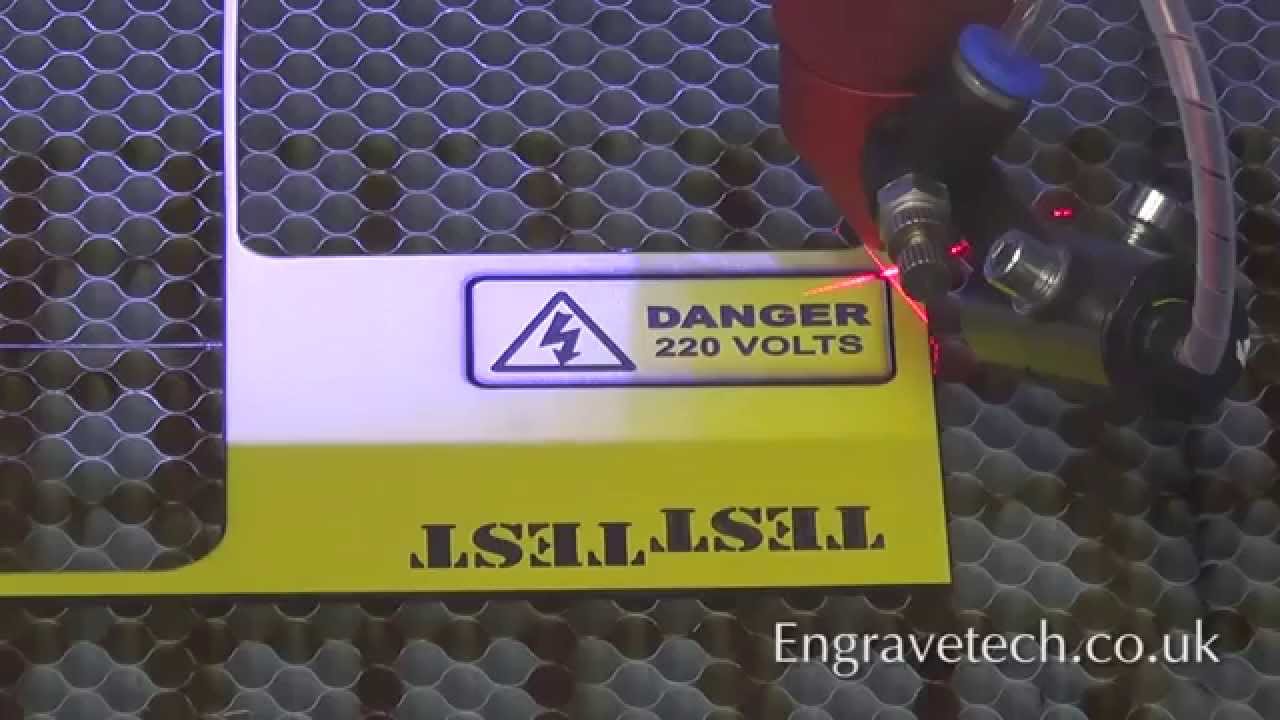
A small electrical safety sign DANGER 220 VOLTS being engraved on our 100W ( 90W RECI ) CO2 Laser engraving and cutting machine. The material is an acrylic based engraving laminate (1.5mm thick) with a yellow upper layer and black base layer. The sign is first engraved and then cut out using the same machine.
If you need any engraving / brandin...
tell him you'll run it 🙂
formal dragon
stiff obsidian
I’m located in the US but my parents would not be very thrilled to send my Addre...
All good, I'm in Australia and work in youth development so understand any concerns, so talk to your parents and DM me if your interested, when I started out some people helped me so now just returning the favour. The offer is still there.
stiff obsidian
lofty wagon
https://www.youtube.com/watch?v=CeAin7WuSGc
What do you think the best co2 laser engraver is for a low price
stiff obsidian
formal dragon
All good, I'm in Australia and work in youth development so understand any conce...
Thank you very much
lofty wagon
For the US...the consensus is omtech is very good source. The K40 is the lowest price option that is capable of cutting clear / white acrylic. One can get cheaper options of a K40...but at the cost of needing the upgrades that omtech has done to make them safe. Don't think anyone here will recommend going with lower class lasers given how dangerous they can be for your eyesight. Here is a link to the 2 options of K40s...the updated version has some compelling features over he model that's $100 cheaper. https://omtechlaser.com/collections/df-series-co2-laser-engravers.

stay away from the diode lasers if you want to cut acrylic.
stiff obsidian
Ok I look into it
stiff obsidian
Anyone know why my Arduinos boards are not uploading the code? It never worked until one random day and now it stoped working again.
lofty wagon
Using the Arduino IDE? If so have you selected the correct board type and port number?
Post a link to the Arduino you have.
stiff obsidian
Ok

HiLetgo 3pcs Nano 3.0 ATmega328P Type-C USB CH340 Controller Board Compatible to Arduino Nano CH340 USB Driver Nano V3.0 ATmega328
I also bought the IDE cord just to be sure
lofty wagon
Which board manager did you download for it, and then selected under Tools -> Board?
stiff obsidian
lofty wagon
Which board manager did you download for it, and then selected under Tools -> Bo...
what download?
oh ye
 lofty wagon
Reading the Amazon comments...someone says to be sure to use the old bootloader...do you have this selected:

I don't have one...but you'll select the port number that shows up on the list when you have it plugged in.
may help to select the right port by only having just one connected at a time.
stiff obsidian
I was yapping at the end.😭tho i kinda did some trash wiring on a few I’m probably going re do that and LDG lights and antiskid should work. Also how do yall make gages I want to try make a break pressure gage
lofty wagon
OH manufacturing files and PDFs are on github...this is the direct link to the break pressure... https://github.com/jrsteensen/OpenHornet/tree/v1.0.0-beta1/release/OH4_Left_Console/OH4A3A3 - ASSY%2C BRAKE PRESSURE INDICATOR

GitHub
OpenHornet 1:1 F/A-18C Simulator Repository. Contribute to jrsteensen/OpenHornet development by creating an account on GitHub.
stiff obsidian
lofty wagon
OH manufacturing files and PDFs are on github...this is the direct link to the b...
Thank you I get kinda lost and confused on the GitHub
formal dragon
Have you installed the CH340 USB driver correctly on your PC, if you are using Windows look in the Device manager for "unknown Devices" it's most likely due to the CH340 driver. Sounds like youve got it sorted though.
stiff obsidian
formal dragon
Have you installed the CH340 USB driver correctly on your PC, if you are using W...
For what?
lofty wagon
Downloading the driver would only be for fixing the Arduino if it showed up as an unknown device in the window's device manager. Your issue was selecting the correct Board and Processor Type in the IDE.
stiff obsidian
lofty wagon
Downloading the driver would only be for fixing the Arduino if it showed up as a...
Oh no it started to work
stiff obsidian
Definitely starting to use the OH files and switching it up a little
 zenith mountain
Heatwave new account