#pc crash
131 messages · Page 1 of 1 (latest)
 kind mountain
 sage nest
my pc just crashes sometimes
sage nest
my pc just crashes sometimes
specs/have you overclocked?
sage nest
kind mountain
specs/have you overclocked?
rx 7900 xt, i7 14700k ddr4 3200mhz 4 sticks 128gb not overclocked, it crashed once in rainbow six siege and once in valorant, it just restarts no bluescreen
kind mountain
sage nest
rx 7900 xt, i7 14700k ddr4 3200mhz 4 sticks 128gb not overclocked, it crashed on...
did you ever apply patch to your cpu?
also what psu
sage nest
evga supernova 750watt p2 platinum, i updated bios when i got my cpu to prevent the overvoltage thing

it never crashed when playing uncapped call of duty modern warfare 3 multiplayer
sage nest
kind mountain
did you ever apply patch to your cpu?
mention
 west warren
@sage nest when did you build the pc, or rather how long has it been since you updated the bios cause I have a 14700k, I built it in January 2025 and I did update the bios then but since then multiple new versions have came out
It could be a power issue though, I do have a pretty big hunch that if you swapped to a 1000w PSU you'd be okay
 cunning linden
west warren
It could be a power issue though, I do have a pretty big hunch that if you swapp...
cunning linden
west warren
It could be a power issue though, I do have a pretty big hunch that if you swapp...
750W for a 14700K and 7900XT just doesn’t seem like it would be sufficient. I run a 13700k and 4070Ti with a 1000W PSU just for that reason
sage nest
I’ve had it exactly like this since october 2024, no issues until now recently i probably updated it, november/ december 2025
 hot tundra
@sage nest How many NVMe drives?
You are getting NVMe errors.
You also have a lot of WHEA warnings (Windows Hardware Error Architecture). And lots of informational events about corrected WHEA events.
All of them point to a PCIe device. WIth WHEA it will just point to the port the device is connected to so you have to check if this is also the NVMe (Which it hopefully is).
Open Device Manager (Windows key + R, enter "devmgmt.msc" and click Ok). At the top of the window click on View → Devices by connection. Expand ACPI x64-based PC → Microsft ACPI-Compatible System → PCI Express Root Complex. You should now see several entries starting with "PCI Express Root Port". After this, it should say "- XXXX" which is the hardware ID. You are looking for 7A48. Expand that to see what is connected there.
Example: https://i.imgur.com/7JiZE2a.png
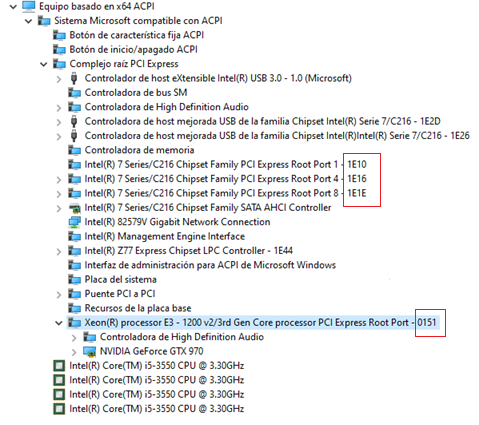
If your Chipset driver isn't up to date it won't show the ID after the name and you need to manually check each root port. Right click → Properties and in the Details tab select Hardware IDs in the dropdown menu.
You are looking for PCI\VEN_8086&DEV_7A48
If the NVMe is connected here a faulty drive is the main suspect, but you can try re-seating it, checking for firmware updates and check temps in case it's overheating (70°C).
sage nest
hot tundra
If the NVMe is connected here a faulty drive is the main suspect, but you can tr...
I will check when i get home, but the only PCIe device connected is my GPU. I have three m2 nvme drives and a couple sata.
sage nest
its this one, how would i know if anything is connected to it
 hot tundra
sage nest
its this one, how would i know if anything is connected to it
hot tundra
sage nest
its this one, how would i know if anything is connected to it
That's the NVMe you see connected
With NVMe, the controller is part of the SSD itself and not a component on the motherboard like with SATA
So if you have three NVMe drives connected, right click on it and select Properties.
In the Details tab select "Hardware IDs" in the dropdown menu
It should say something like "PCI\VEN_XXXX&DEV_YYYY where XXXX and YYYY are the vendor ID (X) and device ID (Y).
You can then check the IDs on devicehunt.com
Example from my PC:

So I enter this on Device Hunt

Oh, crap. I just remembered. The manufacturer doesn't make the controller.
They buy it from someone else
So on mine I just get Phison which makes most NVMe drive controllers
I think you just have to shut down, remove one NVMe and check if it's gone from Device Manager.
Repeat with all drives (Just leave the OS drive which will be confirmed by excluding the other drives)
sage nest
hot tundra
Repeat with all drives (Just leave the OS drive which will be confirmed by exclu...
Thank you for good help, i’ll check it out
sage nest
hot tundra
I think you just have to shut down, remove one NVMe and check if it's gone from ...
i removed the nvme drive connected to 7a48 now
hot tundra
sage nest
i removed the nvme drive connected to 7a48 now
Great, just use it normally and see if you still have any issues
sage nest
if my pc works fine now then that means that the ssd is broken?
sage nest
hot tundra
Great, just use it normally and see if you still have any issues
Should i send event viewer?
hot tundra
@sage nest You are still getting WHEA events. The informational ones don't point to a specific port or device unfortunately. You also have a million page fille errors just in the last hour (The page file is a file on disk that is basically used as extra RAM).
By informational, I mean the ones that look like this (Excuse the language)
 hot tundra
@sage nest Motherboard is certainly a possibility here. It never looks like the motherboard, it looks like the components that connect to the faulty part of the motherboard. So you usually find out that it's the motherboard after replacing everything else.
sage nest
But at first in pointed to the ssd? and after i removed the ssd the problem is still there
hot tundra
Because of the page file errors, I think we should check which drive has the page file. Then we try removing that. It's usually on C:, but it can be on any drive or even multiple drives.
sage nest
but i used to be able launch rainbow six siege, it crashed once, now it dosent even launch
hot tundra
Do you have a drive with little or no data on it that you could install Windows to for testing if the page file is on C?
sage nest
yup
hot tundra
sage nest
But at first in pointed to the ssd? and after i removed the ssd the problem is s...
The main issue is the shutdowns which nothing is pointing to. I wanted to remove the SSD because you were getting hardware errors from it.
hot tundra
Let's first check which drive has the page file
sage nest
yes
hot tundra
Open Powershell and run Get-CimInstance -ClassName Win32_PageFileUsage -Property *
You are going to get a bunch of data, we only care about the driver letter
 hot tundra
I would remove that drive as well, then install Windows to something else. If that also crashes, I would be suspicious of the motherboard.
It's really bugging me that it's a shutdown though and not a BSOD. Shutdowns are for very specific issues.
So I'm just trying stuff and seeing if something makes sense.
sage nest
okay, but if it dosent crash with the e disk and no c disk, does that point to the windows install or the c disk? because the c disk is the oldest in my pc i think
hot tundra
You just have to test
So if it doesn't crash I would first re-install the first drive you removed
Then if it that runs fine, reinstall the OS drive (Still boot to the other OS) and see if it's fine.
sage nest
i have these as well now, there were no symbols on them before
 sage nest
yup
hot tundra
Which drive do they refer to? Could it be the removed drive?
sage nest
all my my drives have them now
hot tundra
The top one has a Windows logo so I assume that's C:, just making sure
 hot tundra
It might be a Bitlocker error, I haven't seen that before
The lock makes me think Bitlocker
Though not sure if the lock is part of the error or if they just overlap
sage nest
this is the most complicated fault i've had
hot tundra
If you right click → properties on them
sage nest
im lost, so ill follow your instructions and try to install windows on e disk and remove c disk
hot tundra
Does that say anything?
sage nest
 hot tundra
Google image search indicates that it's Bitlocker is disabled.
While you are doing stuff like this I would keep it disabled
Sorry, not disabled, suspended/paused
So I would disable it properly
So that you don't lose any data
sage nest
okay, should i try and install windows on disk e and remove disk c, and start rainbow six siege on a different os
i dont have anything super important. most photos is in adobe cloud
hot tundra
If you enter 'bitlocker' in the search window, you should only get one settings result. Open that.
Then disable the encryption
 sage nest
 hot tundra
No, it says 'encrypting' on all of them
Did you have a menu before that with just a slider with general enable/disable?
Again, excuse the language


 hot tundra
I don't use Bitlocker so I really don't know here. But it the warning triangle should be because of Bitlocker being paused/suspended.
And not a big error


 sage nest
hot tundra
I don't use Bitlocker so I really don't know here. But it the warning triangle s...
sage nest
hot tundra
I don't use Bitlocker so I really don't know here. But it the warning triangle s...
Is it possible to call you? If you’re not too busy
hot tundra
No, sorry. I'm text only
sage nest
I did that, but i just get error when i try to install os on e disk
hot tundra
sage nest
This error?
If yes, you have to delete the partition. If you don't need any data from that drive, click on each partition and then click Delete.
You should be left with just one "Disk X" entry which will say "Unallocated Partition"
Select that, then click Next
(Though you might have to format it to GPT, tag me if you do)
sage nest
I tried starting r6 without gpu, and it started with integrated cpu gpu, when i plugged my gpu back it and tried to start it crashed again
Could it be the psu?
hot tundra
Yes.
sage nest
Is there some software that can log peak wattage when it shuts down?