#need help i gotta enable secure boot in gigabyte bios and it locks me inside the bios when i do
474 messages · Page 1 of 1 (latest)


 high rock
Thats what i was about to say
Then to enable it (secure boot) then save and exit
Ggs fams

 dark lichen
it doesnt work
i mean
enabling secure boot works
but
it locks me inside the bios
i can't leave if i do so
@high rock
high rock
Hmm
Seeing some things about needing the drive to be in gpt format vs mbr if running a legacy setup but not 100% certain ill swing back through if I find anything unless another comes along
dark lichen
alright i guess
i tried so many dif things
i just can't get it to work
i wanna play valorant but since i switched to windows 11 i can't play it because of the vanguard anti cheat
high rock
Re enable csm to enter windows and show your drive properties
Autocorrect is brutal today
dark lichen
how do i do that
high rock
From within windows open the file manager (file folder) then click my pc on the left hand tabs and right click on your main drive and select properties from the window it opens
Then take a Pic or windows printscreen
 high rock
My mistake that doesnt show it I suppose, click the search tab and type in disk partion ill drop a visual how to check
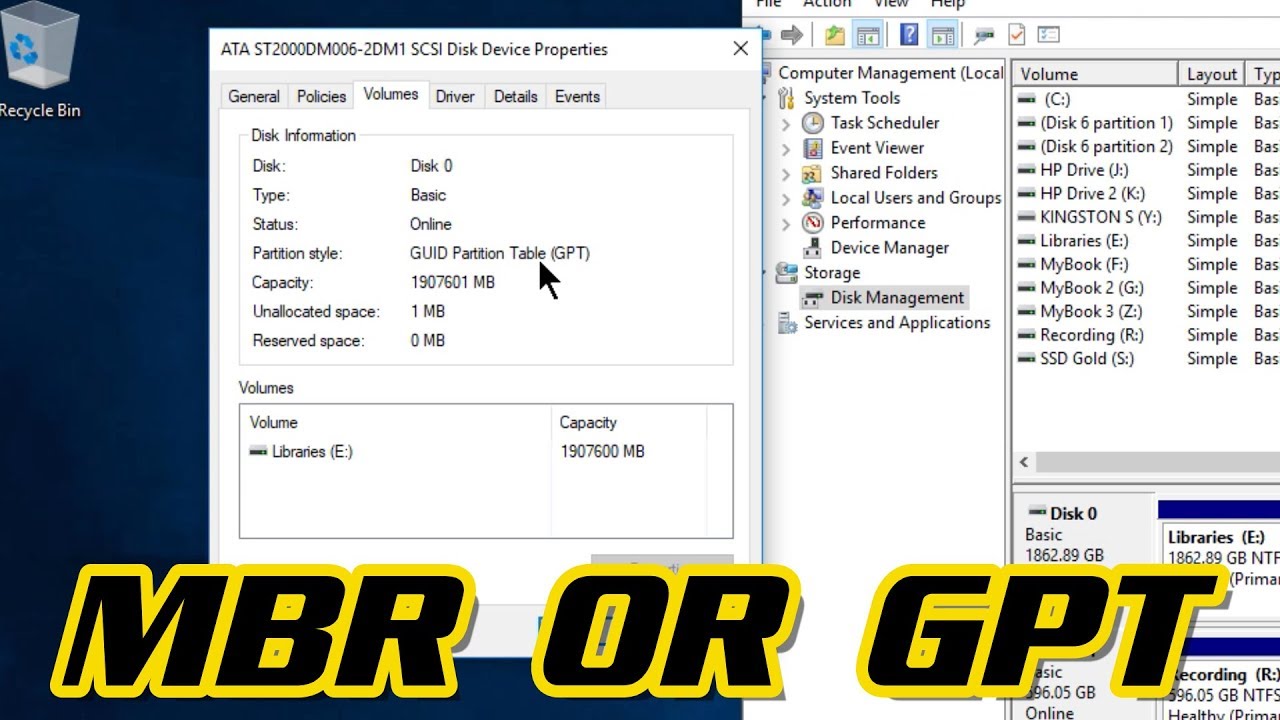
👉SUBSCRIBE! In this video I'll show you how to quickly check if your hard drive or SSD is a MBR or GPT partition. I am using Windows 10, but this is the same process for other versions of Windows (Windows 7, Windows 8)
▶HOW TO CONVERT A DRIVE FROM MBR TO GPT
https://youtu.be/AzojtcgEsbI
What's the difference between MBR and GPT?
https://w...
This is just to check what it is* dont convert anything or itll delete everything on the drive with this tool*
 high rock
dark lichen
i need to convert it into mbr?
high rock
dark lichen
i need to convert it into mbr?
No, its in the right format. Not sure why secure boot wont allow you to boot then
Ill have to leave for another that may have more expierence with the issue, but i wish you lucks 🍀 . Ofc if I find something ill swing back in here and ping ya
 high rock
If that works  , but not sure
dark lichen
@high rock worm do you think if i restart my pc or install windows it will fix it?
 dense bloom
You should do a reinstall of windows and make sure csm is disabled in bios
dark lichen
dense bloom
You should do a reinstall of windows and make sure csm is disabled in bios
i need to disable my csm before i reinstall windows?
@dense bloom
 cyan sundial
dark lichen
i need to disable my csm before i reinstall windows?
cyan sundial
dark lichen
i need to disable my csm before i reinstall windows?
Yes
dark lichen
cyan sundial
Yes


how fun
all i wanted to do is be able to play valorant
can't enable secure boot
and i can't even reset my fucking pc now
 cyan sundial
dark lichen
cyan sundial
dark lichen
are you trying to reset windows via “reset my pc”?
cyan sundial
You’ll need to completely wipe it and reinstall with a usb
dark lichen
cyan sundial
You’ll need to completely wipe it and reinstall with a usb
yea but what if i don't have a usb
how do i even do that
the thing with usb
cyan sundial
Well. You have a couple options
- Keep secure boot disabled and don’t play valorant until you can procure one
- Keep secure boot disabled and don’t play valorant indefinitely because it’s a mid game (imo) and basically installs malware as anticheat
dark lichen
i wanna reset my pc
how do i do that in my position
reinstall windows*
if i use a usb
i need another computer
or?
cyan sundial
video guide:
https://youtu.be/MBCiMK4AmEI
Article:
https://www.howtogeek.com/784979/how-to-create-a-bootable-windows-11-usb-drive/
Bypass Microsoft account requirement (if you care about that)
https://youtu.be/LK75SWX4F2s
Notes: remove other drives besides boot drive when installing. The installer will sometimes put the EFI boot partition on a different drive, forever tethering those 2 drives together with that install

Thanks to MSI for sponsoring this video and sending us the laptops! Check them out using the links below!
Raider 18 HX AI: https://msi.gm/S6B768A1
Vector A18 HX: https://msi.gm/SEB22335
Stealth A16 AI+: https://msi.gm/S28C6EC4
Whether it's finishing the fresh Windows install on your new laptop or prebuilt, or you're just trying to do some debl...

How-To Geek
All you need to create a bootable Windows 11 USB drive is a flash drive and a program from Microsoft.
With the new version of Windows 11 REQUIRING Microsoft accounts and the REMOVAL of BypassNRO from 25H2. A New BETTER command that is faster has improved the setup experience.
The New Command:
start ms-cxh:localonly .
►► Digital Downloads ➜ https://www.cttstore.com
►► Patreon ➜ https://www.patreon.com/christitustech
►► Twitch ...
I don’t know if that bypassnro will work anymore as I’ve heard Microsoft removed it. If you don’t care about a Microsoft account, ignore it
dark lichen
@cyan sundial
do you know how to update the bios by any chance?
i got gigabyte bios
and i have a usb
cyan sundial
Look up your motherboard model + bios

 cyan sundial
Oh your current version is f12
cyan sundial
Okay. What usb drive do you have?
cyan sundial
Is it usb 2 or usb 3
dark lichen
don't know what that means
cyan sundial
Usb 2.0 is an older standard that usually plays nicer with bios updates. It shouldn’t matter but it would be preferred. Anyway, extract the contents of the zip into the root directory of the drive
cyan sundial
Cool
 cyan sundial
Yeah
dark lichen
am i supposed to extract it?
cyan sundial
Yes. Extract the contents into the top level of the usb drive. Do no folders
dark lichen

so right now i gotta extract from here right
extract all

i extracted all
what do i do now tho
cyan sundial
Open the read me
 cyan sundial
That’s fine. reboot and go into the bios. Btw, do you have a ups? Uninterruptible power supply?
dark lichen
cyan sundial
That’s fine. reboot and go into the bios. Btw, do you have a ups? Uninterruptibl...
idk what the last part means
i'll go to bios and talk from my phone
cyan sundial
That’s fine.
cyan sundial
Is there a bios or qflash option on the main menu?


 cyan sundial
Go to the bios menu
dark lichen
How
cyan sundial
dark lichen
This is it

 dark lichen
Nope
cyan sundial
Let me check something
cyan sundial
Uhhh. Find a full size keyboard?
dark lichen
I don’t think I have any tbh
Lemme check
I don’t have any
Nvm I do

@cyan sundial

 cyan sundial
Click on this dropdown

 cyan sundial
I told you to extract the files into the usb
So you didn’t
Boot back into widneos and put the bios file on the drive
dark lichen
You told me to read the thing I think
cyan sundial
cyan sundial
Yes. Extract the contents into the top level of the usb drive. Do no folders
^
 cyan sundial
The .f14 file
cyan sundial
Yes, put it in the drive
cyan sundial
That’s fine. Extracting it into the drive saves the step of moving it afterwards
cyan sundial
Back to qflash
dark lichen
 cyan sundial
Is your usb drive sandisk? And where is it plugged in on your pc?
 cyan sundial
dark lichen
cyan sundial
dark lichen
Try the “A:Unknown device” option
 cyan sundial
Oh wait I’m so dumb, I forgot the formatting. Boot back windows and reformat the usb as fat32.
dark lichen
Huh
cyan sundial
Right click on the drive in windows > format > make sure it says fat32, and quick format was checked
dark lichen
 cyan sundial
No you put the zipped folder in
It needs to be the .f14 file
Is that what I’m seeing?
dark lichen
Huh how do I put the f14
Your probably right
Idk how to put the f14 file without being zipped tho
Should I just put a none extracted one?
cyan sundial
This file
 dark lichen
Oh
cyan sundial
Copy it and paste it into the drive

 cyan sundial
There it is
 cyan sundial
Cool, it’s updating.
dark lichen
Yeah
Do you think that’s why secure boot enabled is locking me in?
Because my bios was outdated
?
cyan sundial
F12 to f14 doesn’t seem like much of a difference
dark lichen
Damn so it doesn’t matter?
dark lichen
Why is my bios locking me inside when I enable secure boot tho
That’s the real question
cyan sundial
Because windows 11 is a broken piece of garbage
cyan sundial
Before we continue with this fresh install, is there anything on your boot drive you don’t want to lose? Like documents, pictures, videos, etc?
cyan sundial
You bought this pc 2 hours ago?
 cyan sundial
So the windows install is new?
cyan sundial
Okay now exit bios to make sure windows boots
cyan sundial
dark lichen
Should I unplug the usb drive?
Do you have any other usb drives?
dark lichen
cyan sundial
Do you have any other usb drives?
Nope
cyan sundial
Go ahead and leave it plugged in. If we’re reinstalling windows, we’ll need to use it again for windows
cyan sundial
2 hours ago?
cyan sundial
Okay. Try disabling csm and enabling secure boot
dark lichen
Ok
Wait uh
Should I unplug the usb drive?
And I can’t enable secure boot for some reason
cyan sundial
Did you disable csm?
dark lichen
Yea
cyan sundial
Where was the secure boot option before?
cyan sundial
dark lichen
I don’t see it here
dark lichen
Let’s see
It doesn’t
Omg bro I will lose my mind
This isn’t supposed to be that hard

I don’t think not having factory’s on authorized timestamps and osrecovery signature is right
I think not should have factory as well
Both*

Is this normal btw?
Hello
Did you leave me?😭 @cyan sundial
 cyan sundial
Discord compression destroyed that so I can’t read anything
Anyway, if the install isn’t valuable, disable secure boot again and we’ll make a bootable usb to start fresh
dark lichen
Wdym a bootable usb to start fresh
Do you really think you can fix the secure boot lock problem?
Not being toxic ofc
Just genuinely asking
I’m disabled secure boot and went into windows again
cyan sundial
I’m going to hope so
cyan sundial
video guide:
https://youtu.be/MBCiMK4AmEI
Article:
https://www.howtogeek.com/784979/how-to-create-a-bootable-windows-11-usb-drive/
Notes: remove other drives besides boot drive when installing. The installer will sometimes put the EFI boot partition on a different drive, forever tethering those 2 drives together with that install
Thanks to MSI for sponsoring this video and sending us the laptops! Check them out using the links below!
Raider 18 HX AI: https://msi.gm/S6B768A1
Vector A18 HX: https://msi.gm/SEB22335
Stealth A16 AI+: https://msi.gm/S28C6EC4
Whether it's finishing the fresh Windows install on your new laptop or prebuilt, or you're just trying to do some debl...
How-To Geek
All you need to create a bootable Windows 11 USB drive is a flash drive and a program from Microsoft.
dark lichen
Which video am I supposed to watch
To be able to enable secure boot without getting locked in bios
cyan sundial
After creating the USB, we will go back into the bios, enable secure boot, and then reinstall windows, and hopefully it will boot with secure boot on
dark lichen
I gotta reinstall windows again?
And I have no idea how to create a usb
@cyan sundial
cyan sundial
cyan sundial
**video guide:**
https://youtu.be/MBCiMK4AmEI
**Article:**
https://www.howtogeek...
This video and article will explain
Make sure that no other internal drives are connected to your computer
Do you have a separate game drive or data drive?
dark lichen
The only usb drive I have is the one I bought 3 hours ago
 void dust
it needs to be like atleast 8 gigs
also reinstalling windows means you will lose all data on your current one so you have to reinstall and relogin into everything
dark lichen
void dust
also reinstalling windows means you will lose all data on your current one so yo...
will it fix the lock problem when i enable secure boot tho?
if it does i will do it
and i have a 16gb usb drive
void dust
im not sure on that
but if you do decide to reinstall windows turn secure boot on before booting into the usb
i think like that windows installs itself with secure boot auto enabled
dark lichen
the thing is if i enable it it will still lock me inside
so i can't leave it at all if its enabled for some reason
dark lichen
what changes
void dust
in the bios when you enable secure boot does it let you save the changes and reboot
dark lichen
if i enable secure boot and "save & exit" instead of letting me into windows again it just gives me an error and makes me stay in bios
dark lichen
yea one sec
void dust
okay
dark lichen
 void dust
i see
have you tried resseting the secure boot keys
there should be a setting in ur bios for that
dark lichen
Wdym
void dust
do you use something else then windows on your pc
also do you have UEFI enabled in ur bios
that could also be messing up your secure boot
void dust
no
it should be in the boot section in ur bios
you might see it as legacy on your bios if its set to the wrong thing
 dark lichen
Oh
void dust
only onther thing is loading the keys from the os
dark lichen
Should I disable it
void dust
dark lichen
send me a picture of this
void dust
dark lichen
Should I disable it
no leave it as is
dark lichen
Wdym a picture of what


 dark lichen
 void dust
go in EFI
and there should be a folder called BOOT or Microsoft i forgot which one exactly

 dark lichen
K
void dust
the boot that you saw before clicking on the microsoft thing
dark lichen

 void dust
yes
cyan sundial
dark lichen
the thing is if i enable it it will still lock me inside
Something is wrong with the boot partition of this windows install. Reinstalling should make the boot partition work with secure boot
void dust
cyan sundial
Something is wrong with the boot partition of this windows install. Reinstalling...
holdon i mightve cooked (hopefully)
void dust
dark lichen
Should I keep it on custom?
send me a picture
i dont have an option like that in my bios
dark lichen
void dust
holdon i mightve cooked (hopefully)
I swear to god if it works
cyan sundial
void dust
holdon i mightve cooked (hopefully)
Thought about that but decided to stick with what I know and give a guide for reinstalling
 void dust
yeah try custom
dark lichen
Alr
void dust
save and reboot
dark lichen
Wish me luck
void dust
dark lichen
I swear to god if it works
hopefully it works
void dust
dark lichen
Wish me luck
im wishing you the best of luck
dark lichen
NO FUCKING WAY
void dust
worked?
void dust
ur welcome mate
void dust
bruh all this conversation for just that lol
void dust
cyan sundial
I hate windows
it might be because he installed windows with it diasabled
cyan sundial
No problem
void dust
dark lichen
Omg thank you both
no problem
cyan sundial
void dust
it might be because he installed windows with it diasabled
That’s definitely why. I still hate windows. For secure boot reasons and Microsoft reasons
dark lichen
I’m so shocked you have no idea
The his has to be a dream
I tried fixing this for the last 3 days
And you somehow figured it out
void dust
cyan sundial
That’s definitely why. I still hate windows. For secure boot reasons and Microso...
i hate it cuz it sucks down ram so much and it takes up a lot of space
void dust
dark lichen
And you somehow figured it out
nah i think you just didnt try the begginer steps but
what matters now is that its fixed
cyan sundial
Secure boot keys are not something most people mess with
cyan sundial
dark lichen
How can I thank you
We’re all just here because we love tech and helping each other. No payment or anything for tech support
dark lichen
i swear this server has to be the best discord server oat
void dust
dark lichen
Genuinely how
seeing that it works is enough for me
dark lichen
everyone here is goated and know so much about tech
dark lichen
void dust
yeah
can i add you
cyan sundial
dark lichen
everyone here is goated and know so much about tech
Imma head out now, good luck on valorant!
void dust
dark lichen
can i add you
yeah
void dust
no problem
dark lichen
void dust
no problem
Bro😭 I have no idea what happened but I needed a recovery key for some reason
And I did some stuff
And now I’m locked inside the bios
Again
Not because of secure boot
Just locked in there
No error no nothing
If I press save and exit it just makes me rejoin bios
And I restart my pc I can’t either
void dust
you use bitlocker?
dark lichen
void dust
you use bitlocker?
Idk what even is it honestly