#Pc doesnt boots up
99 messages · Page 1 of 1 (latest)
 bright silo
 pliant wolf
bright silo
any more details?
pliant wolf
bright silo
any more details?
pc was taking long to boot few days back, red light (indicator) was delayed, then started shutting down during gaming. now it's not booting at all, both indicator lights off. only cpu light on mobo shows up. i tried cmos reset, replugging cables, reseating cpu + ram (cleaned ram too), reapplied paste. sometimes blue light comes after many tries, but no red. thinking either psu or mobo dead. using ryzen 5 3600, 16gb xpg, msi b450 pro m2 max, 240gb ssd + 1tb hdd, antec bp450 psu. which part should i replace
bright silo
what gpu do you use? and do you have a spare mobo or psu (doesnt have to be anything fancy, just for testing)
pliant wolf
1650 super
pliant wolf
bright silo
what gpu do you use? and do you have a spare mobo or psu (doesnt have to be anyt...
no i dont have it😭
bright silo
do you have a different gpu by any chance
pliant wolf
nope
bright silo
so from what i know it could be many different things oh and what blue and red leds do you mean?
afaik it could be psu gpu cpu or mobo
pliant wolf
the indicators on top of case
bright silo
do you have a prebuild pc? and if yes which one?
pliant wolf
so like previously when i was playing games it was restarting automatically
pliant wolf
bright silo
do you have a prebuild pc? and if yes which one?
no just this one ( custom build)
bright silo
what case do you have?
pliant wolf
i think its the psu
pliant wolf
bright silo
what case do you have?
antec nx200
bright silo
pliant wolf
so like previously when i was playing games it was restarting automatically
have you checked your cpu and gpu temps and did it bluescreen, did it just turn off and turn back on did it turen off and not turn back on automatically
pliant wolf
yes cpu gpu temps were normal
and like it midway it was turning off and and then turning on automatically
wait there is one thing iforgot to mention
like for temporary the problem got fixed when it did bios reset settings
but now its not working
i searched online it says blue light means for the power and red light for reading storage
and blue light too not glowing
bright silo
imo that screams mobo / bios defect
pliant wolf
i have always taken care of temperatures and stuff is there any chance my gpu or cpu got damaged?
pliant wolf
bright silo
imo that screams mobo / bios defect
maybe i will need to take it to repair shop finally after 5 years lol
bright silo
yes there is a chance but its pretty low especially with cpu
did you buy your gpu new?
bright silo
oh and one more thing, your mobo should have some debug leds (for my mobo a msi b450m pro vdh max theyre in the top right) do any of them illuminate when trying to boot and if yes do they stay on
bright silo
pliant wolf
just for knowledge do cpu fails often? or is it rare?
afaik its pretty rare
pliant wolf
bright silo
oh and one more thing, your mobo should have some debug leds (for my mobo a msi...
cpu light lits up
bright silo
does it stay on?
bright silo
is your 4/8pin eps plugged all the way in?
pliant wolf
yes but i can try replugging all stuff once more
bright silo
yh, do that and then pls tewll me does your cpu have any bent pins?
bright silo
ok
pliant wolf
idk but i tried booting up the pc without the cpu fan attached just to see if it heats so it did
i didnt do this for long just felt warm and i turned it off
so right nnow i should replug stuffs na?
bright silo
yes, just try it
if that doesnt work try booting with minimal needed components, so remove all your ram sticks execpt one, unplug all storage devices etc so just gpu, cpu and one ram stick if that doesnt work try a different ram sitrkc (if you have more than one)
any updates?
pliant wolf
Yes replugging stuff
pliant wolf
bright silo
if that doesnt work try booting with minimal needed components, so remove all yo...
Lemme do this first
bright silo
k
 bright silo
then i think your mobo is dead since cpus (ALMOST) never die so yh
 bright silo
then i think your mobo is dead
bright silo
pliant wolf
So my psu is good?
i cant gurantee anything but i think yes
do you have another system you can test it on?
or do you have a multimeter (something to measure voltage with)
if yes you can follow this guide https://www.corsair.com/de/en/explorer/diy-builder/power-supply-units/how-to-test-a-psu-power-supply-unit/
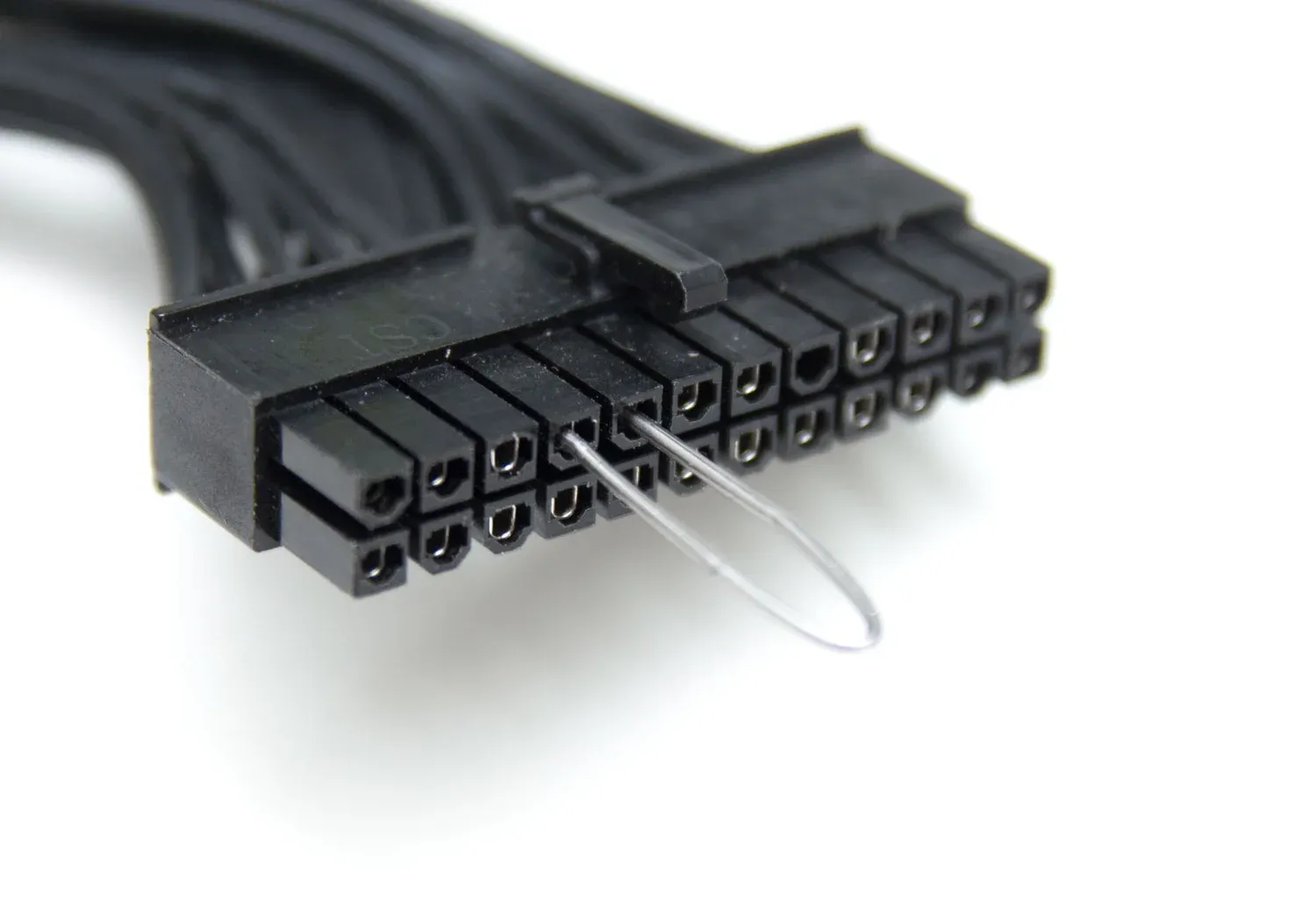
If your PC is experiencing power problems, here's a quick way to test the PSU to help you narrow down the cause of the issues.
pliant wolf
I have multi meter yes
bright silo
then follow this guide to check if youre psu is good
pliant wolf
Okay
bright silo
it isnt a 100% guarantee since it is possible that the voltage only drops when under load but if this doesnt work its definitely effed
pliant wolf
bright silo
it isnt a 100% guarantee since it is possible that the voltage only drops when u...
Okay
@bright silo sorry for the ping 😔
I think I am gonna do paperclip method that multimeter looks very complicated
bright silo
oh sorry, was away
you need both
the paperclip is just to turn the psu on and then you measure the voltages with the multimeter
it shouldnt be that complicated, ive done it before

 bright silo
set it to the thing i marked

then stick the black probe into the far right hole based on the clip (the one i makred with red (number 24), the blue mark is your paperclip)
 pliant wolf
Okay
bright silo
so numberand then measure number 10,11 (it should be around 12 volts so between 11 and 13) number 21, 22, 23, 6, 4, 9 (these should be around 5 volts so 4-6 volts) number 1,2, 12, 13 (these shoukld be aroudn 3.3V)
if thats ok, then your mobo is broken
if not its your psu
gtg for now bye and good luck
pliant wolf
Hmm
Yep I think I don't have good luck today
My multimeter died mid way

So yeah
I think I have to go where I bought this pc
pliant wolf
Gonna buy a multimeter tmr
bright silo
K, good luck
bright silo
Ok, then try again pls
bright silo
Any updates
pliant wolf
Will try tmr sorry but surely will update @bright silo tmr is my first day of clg so
bright silo
K, good luck 🤞