#Need some help getting a NAS running with Samba, and getting Jellyfin to run on Debian 12 (Bookworm)
344 messages · Page 1 of 1 (latest)
 wild nebula
Oh, right, I'm on Debian 12 (Bookworm), I was following a guide or two for Samba, the most recent guide for Samba was this one:
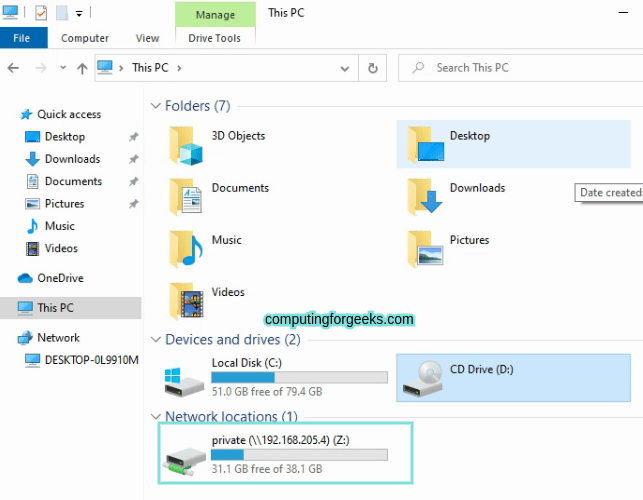
This guide will equip you with the required knowledge on how to configure Samba Share on Debian.
But I didn't do a Public or Private Folder, electing to name it NAS_Server, and setting it up like the Private on the thing.
sudo testparm outputs this:
Loaded services file OK.
Weak crypto is allowed by GnuTLS (e.g. NTLM as a compatibility fallback)

Server role: ROLE_STANDALONE

Press enter to see a dump of your service definitions

# Global parameters
[global]
    log file = /var/log/samba/log.%m
    logging = file
    map to guest = Bad User
    max log size = 1000
    obey pam restrictions = Yes
    pam password change = Yes
    panic action = /usr/share/samba/panic-action %d
    passwd chat = *Enter\snew\s*\spassword:* %n\n *Retype\snew\s*\spassword:* %n\n *password\supdated\ssuccessfully* .
    passwd program = /usr/bin/passwd %u
    server role = standalone server
    unix password sync = Yes
    usershare allow guests = Yes
    idmap config * : backend = tdb


[homes]
    browseable = No
    comment = Home Directories
    create mask = 0700
    directory mask = 0700
    valid users = %S


[printers]
    browseable = No
    comment = All Printers
    create mask = 0700
    path = /var/tmp
    printable = Yes


[print$]
    comment = Printer Drivers
    path = /var/lib/samba/printers


[NAS_Server]
    comment = NAS Server
    force create mode = 0770
    force directory mode = 0770
    inherit permissions = Yes
    path = /mnt/md0/NAS_Server
    read only = No
valid users = @smbshare```But everytime I do smbclient '/mnt/md0/NAS_Server' -U sambauser, it returns:
do_connect: Connection to nt failed (Error NT_STATUS_NOT_FOUND)```I did do the line the guide has here sudo ufw allow from 192.168.205.0/24 to any app Samba
sudo ufw status returns Status: Inactive
ip addr returns with this:
    link/loopback 00:00:00:00:00:00 brd 00:00:00:00:00:00
    inet 127.0.0.1/8 scope host lo
       valid_lft forever preferred_lft forever
    inet6 ::1/128 scope host noprefixroute
       valid_lft forever preferred_lft forever
2: eno1: <BROADCAST,MULTICAST,UP,LOWER_UP> mtu 1500 qdisc fq_codel state UP group default qlen 1000
    link/ether 98:90:96:ad:79:80 brd ff:ff:ff:ff:ff:ff
    altname enp0s25
    inet 192.168.1.39/24 brd 192.168.1.255 scope global dynamic noprefixroute eno1
       valid_lft 52881sec preferred_lft 52881sec
    inet6 fd0a:5823:aa7c:5f61:5c03:41ea:61e9:10f/64 scope global temporary dynamic
       valid_lft 1747sec preferred_lft 1747sec
    inet6 fd0a:5823:aa7c:5f61:453a:7cc:183c:eefb/64 scope global temporary deprecated dynamic
       valid_lft 1747sec preferred_lft 0sec
    inet6 fd0a:5823:aa7c:5f61:9a90:96ff:fead:7980/64 scope global dynamic mngtmpaddr noprefixroute
       valid_lft 1747sec preferred_lft 1747sec
    inet6 fe80::9a90:96ff:fead:7980/64 scope link noprefixroute
       valid_lft forever preferred_lft forever
3: docker0: <NO-CARRIER,BROADCAST,MULTICAST,UP> mtu 1500 qdisc noqueue state DOWN group default
    link/ether 5e:50:12:ee:2a:bd brd ff:ff:ff:ff:ff:ff
    inet 172.17.0.1/16 brd 172.17.255.255 scope global docker0
       valid_lft forever preferred_lft forever
4: pterodactyl0: <NO-CARRIER,BROADCAST,MULTICAST,UP> mtu 1500 qdisc noqueue state DOWN group default
    link/ether d6:cd:b4:cf:9d:ed brd ff:ff:ff:ff:ff:ff
    inet 172.18.0.1/16 brd 172.18.255.255 scope global pterodactyl0
       valid_lft forever preferred_lft forever
    inet6 fdba:17c8:6c94::1011/64 scope global nodad
valid_lft forever preferred_lft forever``` link/ether 2e:a3:df:71:3f:99 brd ff:ff:ff:ff:ff:ff
inet 172.21.0.1/16 brd 172.21.255.255 scope global wings0
valid_lft forever preferred_lft forever
inet6 fe80::2ca3:dfff:fe71:3f99/64 scope link
valid_lft forever preferred_lft forever
6: br-bb42aa4e3f66: <BROADCAST,MULTICAST,UP,LOWER_UP> mtu 1500 qdisc noqueue state UP group default
link/ether a2:49:f9:9c:e6:be brd ff:ff:ff:ff:ff:ff
inet 172.20.0.1/16 brd 172.20.255.255 scope global br-bb42aa4e3f66
valid_lft forever preferred_lft forever
inet6 fe80::a049:f9ff:fe9c:e6be/64 scope link
valid_lft forever preferred_lft forever
7: vethdd75d32@if2: <BROADCAST,MULTICAST,UP,LOWER_UP> mtu 1500 qdisc noqueue master br-bb42aa4e3f66 state UP group default
link/ether 46:ae:10:de:e5:b7 brd ff:ff:ff:ff:ff:ff link-netnsid 0
inet6 fe80::44ae:10ff:fede:e5b7/64 scope link
valid_lft forever preferred_lft forever
10: veth32b5434@if2: <BROADCAST,MULTICAST,UP,LOWER_UP> mtu 1500 qdisc noqueue master br-bb42aa4e3f66 state UP group default
link/ether a6:4f:c7:73:f2:e3 brd ff:ff:ff:ff:ff:ff link-netnsid 3
inet6 fe80::a44f:c7ff:fe73:f2e3/64 scope link
valid_lft forever preferred_lft forever
12400: vetha19a8bd@if2: <BROADCAST,MULTICAST,UP,LOWER_UP> mtu 1500 qdisc noqueue master wings0 state UP group default
link/ether 62:0c:e9:77:88:30 brd ff:ff:ff:ff:ff:ff link-netnsid 1
inet6 fe80::600c:e9ff:fe77:8830/64 scope link
valid_lft forever preferred_lft forever```And I think that just about catches here up with my posts in the #linux channel
 grand silo
Did you figure this out?
Things to check, file permissions on the share ls -al in that folder to list the current permissions or redo the chmod lines if not sure and make sure targetting your folder instead of private
other things to check, groups sambauser should see:
sambauser : sambauser smbshare
if not make sure to add the user to the group.
For the user themselves can check cat /etc/passwd as well and make sure see a line in there like:
sambauser:x:1001:1002::/home/sambauser:/sbin/nologin
oh crap also when you connect use the share name not the actual like local path on the filesystem so should be like: smbclient '\\localhost\NAS_Server' -U sambauser
Do the last thing first 🙂
Basically in the smb.conf each square bracket section aside from the [global] one is defining the name of a share and then settings for that named share, but from smb client side it can "only see" the share names not the specific mount location it's mapped to internally
Also if run into issues typically good to go into /var/log/someservicenamehere like /var/log/samba/log.%m <-- is where config says the samba logs will be but typically can just poke around in there and look for log files related to whatever service you're trying to start. Can be helpful to get a bit familiar with systemctl and journalctl for checking out systemd units (roughly equivalent to windows "services.msc" and "eventvwr" respectively for managing background/startup/timer-based processes)
wild nebula
I'll say I haven't gotten it yet, but I'll try to do what you've suggested
Okay, unsure what folder I should be doing the File perms on, if it's the one /mnt/md0/NAS_Server or what.
groups sambauser does indeed return sambauser : sambauser smbshare
cat /etc/passwd contains sambauser:x:1003:1004::/home/sambauser:/sbin/nologin in the second to last row
doing the smbclient '\\localhost\NAS_Server' -U sambauser asks me for the Password, and when I put it in it says Try "help" to get a list of possible commands. with smb: \> as the header now
Okay, I suppose I might've misunderstood what the Parameters/Variable needed to be to do the smbclient line, I thought I needed to give it a File Path to the drive, though atm, I'm unsure how Samba works, and am only trying to set it up from a Guide.
Okay, trying to access the server from my Windows PC, has my PC saying it can't find the Server. And if I go in the server file on the server, I can't delete files as it says I don't got permissions... Gonna try to add myself to sambauser or smbclient group and see if that allows me perms
Yeah, I got the Demo txt file in the wrong Location, I tried to delete it, and I get
There was an error deleting the file "Demo1.txt"
Permission denied```Okay, closed the Explorer window I had open, and went onto the Server again, was able to delete the file successfully
grand silo
cool cool yeah logout/login to apply groups* is usually the thing so that makes some sense reconnect did the same
wild nebula
Now I gotta figure out why I can't connect to it via Windows, like the Guide shows in the next step
grand silo
on the server should be able to cd /mnt/md0/NAS_Server then ls -al to show all the permissions info there, should have the read/write/execute bits for "user/group/other" there and the owner user/group next to each file/directory
you can try \\hostname-of-server or \\192.168.0.11 or whatever the IP is usually to browse samba shares but tbh usually I setup a mapped network drive then forget all about it 😄
wild nebula
Okay, I can't cd into /mnt/md0/NAS_Server it says Permission denied
Or well... bash: cd: /mnt/md0/NAS_Server: Permission denied
grand silo
hmm can su to switch to root then check in there (just be careful as root can delete most everything)
exit to leave the root shell once done looking around or modifying permissions if needed
chmod and chown are the two commands used for modifying the permissions, chmod sets the read/write/execute bits for user/group/other, chown changes the user/group ownership of files
wild nebula
drwxrws--- 3 root smbshare 4096 Jul 10 23:51 .
drwxr-xr-x 4 root root     4096 Jul 10 23:42 ..
drwxr-sr-x 2 root smbshare 4096 Jul 14 16:43 demo-NAS_Server
Okay, so how would I go about finding the IP for the Samba share system?
grand silo
ifconfig usually or ip -4 a one of those to see network inteface info
can also cat /etc/hostname and/or cat /etc/hosts to see what the network name should be but IP can be a bit easier if you set a fixed IP from router side or on device set static IP (I prefer the setting fixed IP from router), names can work but can have issues resolving sometimes too if has fixed IP usually more reliable long term
wild nebula
Well, before I got the Drives and set them up in a RAID1 Array, I did set up Pterodacytl to make game servers
grand silo
eh gotcha not super familiar with Petrodactyl but looks like is all in Docker containers so shouldn't affect anything with the share or anything, really all that matters here is the samba server itself being on the same network as the windows client machine and not having any sort of firewall or routing that is stopping requests from getting through
wild nebula
The Guide had me do this sudo ufw allow from 192.168.205.0/24 to any app Samba, so does that mean that Samba is looking for a connection on ip 192.168.205.0 port 24?
The Windows PC Prolly has a Firewall
grand silo
for user permissions is just based on the smb.conf config on allowed users from the smbshare group being able to use a share or not and then on the windows side making sure using same sambauser and password creds for connecting
windows side (firewall) shouldn't matter here when it's acting as a client to the service run on the linux side so should be okay there
with regard to this: sudo ufw allow from 192.168.205.0/24 to any app Samba it's a CIDR so is showing the IP-range/netmask basically meaning allow any device on 192.168.205.x where x is any number to connect, but if UFW not setup then won't apply there either
gotta eat back in a few here
wild nebula
Wait... do I need to Port Forward for this...?
grand silo
You're on same lan right, if so then no port forwarding should be needed... Also guess assuming here that the samba server host is on same lan as client
wild nebula
Yeah, the Windows PC and Debian are both Ethernet, Debian is attached to a Secondary Router, that's attached to a Switch, and the Windows PC is attached to that Switch
grand silo
Okay cool and on same subnet too like same IP range and not segmented on router/network level then should be all good...
Can try ping between the two as a check
wild nebula
I dunno, each time I enter in \\IPHere, Windows says Windows cannot access \\IPHere
Opened Powershell, and entered Ping DebianIPHere and it sent 4, recieved 4, lost 0
Went onto my Terminal, did Ping WindowsPCIPHere and have PING WindowsPCIPHere (WindowsPCIPHere) 56(84) bytes of data. and nothing else yet...
Okay, it's been at least 8 minutes, and nothing...
Ping Statistics says 662 packets transmitted, 0 recieved, 100% packet loss, time 676853ms
I disabled all the Windows PC's Firewall, and now Debian is getting all the Packets...
Seems it's only getting 100% Packet loss when the Private Firewall is Enabled
So what can I do now?
grand silo
Hmm if using "private network" rules for Windows I don't think should need to fiddle with the firewall there but if getting ping back now can just go to winkey+R and \\thehostnameorIPhere and should see prompt for username/password user sambauser and your samba password and then should be able to open explorer and browse around in the network share
wild nebula
Oh, just \IPhere?
grand silo
can right click one of the shared folders there and map a network drive... I may have had to do something to save samba credentials
double slash but yea
sorry about that discord treats first slash as escape character or something if not "code style"
wild nebula
Oh, I see
Okay, so would I put the IP of the Debian PC into the Run Terminal leading with \\?
grand silo
yeah just in run box or in explorer path can be \\someIP or \\somehost
wild nebula
I don't think it's connecting to it... Weird...
I do have some Ports Forwarded for Game Server stuff
grand silo
hmm yea I just did one setup here again and was a little fiddly it prompted me for login first time I gave it nothing happened I tried again and it opened second time for whatever reason (just gave this a run through in VM since had somewhat recently setup SMB shares for other things but wanted to see where you were stuck here 🙂 )
wild nebula
Well, each time I type in \\DebianIPHere into Run, it says Windows cannot access \\DebianIPHere
Even if I put the host name in, it seems to do the same thing
grand silo
so long as the ports being forwarded don't conflict with samba ports things should be alright with regard to other services running on the same debian host/box but can also do sudo apt install net-tools then can netstat -tulnp (in root shell) and see list of all processes bound to different network ports can be helpful once have more than handful of services running on different ports on a box
hrm not sure on not able to resolve from windows side still though that's strange... you just use debian 12 server install?
grand silo
I mean is just like https://www.debian.org/download but not using some other fork of debian or anything, just wondering if has some other default firewall in place or whatnot that might be blocking things still
wild nebula
OS Name: Debian GNU/Linux 12 (bookworm)
Pretty sure it's just Debian, I think I just grabbed it off their site, when I was recommended it
When looking for Network drives on my Phone, it shows up the Windows PC...
I think in the Linux chat the other day, that someone said my IP settings were set wrong or something
grand silo
cool cool okay yeah I'm not sure now tbh would maybe check out that /var/log/samba/ location like tail -f /var/log/samba/* to just watch all the log files in there while trying to connect and see if can get any info from server side about client requests coming in but does sound like maybe something funky going on networking wise too potentially
output from netstat should look something like this

where is showing ports 139 and 445 there are being listened to by those processed with PID 730 I think it is, bad resolution from screenshot in VM in VM 😛
grand silo
ah looks like it doesn't like _ in the share name itself, folder can have that but share name in smb.conf can't have underscore in name I guess mnt/md0/nas_server contains invalid characters (any of %<>*?|/\+=;:",)
wild nebula
... so I gotta Change the name?
grand silo
oh wait my bad not the underscore it's the slashes but yeah basically the name in the smb.conf in [] square brackets has to just be a plain "share name" rather than a full path
the folder itself/full path can be whatever but share name is just like simplified "folder name" to represent the path to the actual share
wild nebula
so...
comment = NAS Server
path = /mnt/md0/NAS_Server
writable = yes
guest ok = no
valid users = @smbshare
force create mode = 770
force directory mode = 770
inherit permissions = yes```
Has to have the [NAS_Server] Part changed? Should it just be [NAS Server] or [NAS-Server]?oh no wait red herring I think sorry just jumping the gun on any red flags 😄 but think that might have just been from when you tried to connect with the full path name before, your smb.conf looks good to me... I'll try one with an underscore just to be sure here
would leave that tail going and from windows side start trying to connect again, tail with -f should update to show latest logs as new things happen if anything
wild nebula
Well, that's not the full Config, just me roughly following what the guide was telling me
grand silo
if still showing old logs then isn't getting connection to the smb service I think for some reason
yeah that's all good
wild nebula
So Redo the Tail, or?
grand silo
yeah can just leave that running while trying to connect from windows side, tail just prints out the contents of files and we just told it "wildcard" * to print anything that is in that folder, the -f is "follow" so it will also print out any updates if the files change
wild nebula
. . . What?
When I do the tail -f /var/log/samba/* without being on Root, I get this:
tail: cannot open '/var/log/samba/*' for reading: No such file or directory
But when on Root, I get the bit from before that
grand silo
oh yeah watch the logs as root, that's just to monitor those files so we can see if there's anything new that pops up when you try to make new connection but if leave that tail -f command running (it shouldn't exit immediately) then can go to windows computer and try to connect again and should see newest log entry show up at the bottom if anything new happens from samba service that results in logs like an error
thing is tail prints all the previous log info too so we might see old stuff in there from previous attempts to connect... if leave it open/running though and then try to connect to samba share with windows client should see new errors pop up at the bottom of the tail logs if anything goes wrong.. if nothing shows up for some reason it just isn't getting connection to the service still (networking/firewall related issues)
also would try with \\192.168.0.X whatever actual IP from ifconfig is on the linux/samba server share instead of hostname since hostnames can also have issue with resolving properly to an IP but IP based share should always work I think
wild nebula
Well, I tried using the PC's IP, and nothing showed up
grand silo
well f
how about netstat output it show smb service bound to those ports?
I mean it must be working if local client connection works...
wild nebula
Trying the IP the Guide told me... Still nothing
grand silo
na gotta use your actual server IP check on debian box with ip -4 a
I get mixed up on which distros have which default networking tools and whatnot sometimes here
that should work I think though
wild nebula
When I do ifconfig, it says command not found
grand silo
yeah just use the ip one same info just need IP address
wild nebula
ip -4 a returns:
    inet 127.0.0.1/8 scope host lo
       valid_lft forever preferred_lft forever
2: eno1: <BROADCAST,MULTICAST,UP,LOWER_UP> mtu 1500 qdisc fq_codel state UP group default qlen 1000
    altname enp0s25
    inet 192.168.1.39/24 brd 192.168.1.255 scope global dynamic noprefixroute eno1
       valid_lft 51782sec preferred_lft 51782sec
3: docker0: <NO-CARRIER,BROADCAST,MULTICAST,UP> mtu 1500 qdisc noqueue state DOWN group default
    inet 172.17.0.1/16 brd 172.17.255.255 scope global docker0
       valid_lft forever preferred_lft forever
4: pterodactyl0: <NO-CARRIER,BROADCAST,MULTICAST,UP> mtu 1500 qdisc noqueue state DOWN group default
    inet 172.18.0.1/16 brd 172.18.255.255 scope global pterodactyl0
       valid_lft forever preferred_lft forever
5: wings0: <BROADCAST,MULTICAST,UP,LOWER_UP> mtu 1500 qdisc noqueue state UP group default
    inet 172.21.0.1/16 brd 172.21.255.255 scope global wings0
       valid_lft forever preferred_lft forever
6: br-bb42aa4e3f66: <BROADCAST,MULTICAST,UP,LOWER_UP> mtu 1500 qdisc noqueue state UP group default
    inet 172.20.0.1/16 brd 172.20.255.255 scope global br-bb42aa4e3f66
valid_lft forever preferred_lft forever```yeah so do \\192.168.1.39 on the windows machine
like winkey+r put in runbox and open or else file explorer and Ctrl+L and put in as a path/address
wild nebula
Man, I keep confusing Keyboards and Mice lol
grand silo
hahaha
yeah problems I got like 10 VMs am always trying to figure out what box is doing what 🙂
wild nebula
I got two keyboards and two mice, each set controlling another computer
Windows cannot access \\192.168.1.39
grand silo
KVM nice to have if plan to stick with that for a while, my monitor has some KVM functionality so can toggle display/inputs between machines
bah
wild nebula
I'm just running the HDMI from the Debian Machine, into a Capture Card
grand silo
think would check netstat on the server next see that processes are bound to the right ports, but feels like must be some firewall/network config getting in the way just not sure what
wild nebula
Windows Network Diagnostics says it can't communicate with the device or resource
Netstat, what?
grand silo
But pinging the IP worked from windows to that 39 address right? At least with firewall off there or as "private network" mode.
^^ for netstat
wild nebula
Windows pings it fine, with or without Firewall. Debian needs me to disable the Window's PC Firewall to Ping the Windows Machine
grand silo
Ah okay yeah that's fine we just need windows to be able to ping the Debian box
wild nebula
So, I'm looking for 77614/smbd listings for PID/Program name, right?
grand silo
Yeah PID doesn't really matter to us here just that there's a SMB process bound to the right ports for ipv4/v6
wild nebula
If so,
tcp 0 0 0.0.0.0:139 0.0.0.0:* LISTEN 77614/smbd```And,
tcp6 0 0 :::139 :::* LISTEN 77614/smbd```Maybe give windows machine a reboot since have been trying things maybe it has some cached some from during config changes or something, but into grasping at straws territory too, not sure what else to check here
On my local network in VM the setup from the guide basically just worked (no ufw but was fine)
wild nebula
I rebooted it when we went for Food, went into Windows Features and enabled SMB or something, minus the server one, but I can enable the server one and reboot again
Well... could it be that I tried to follow two guides?
grand silo
Yeah I mean possible other config conflicting but usually can trust netstat output in terms of what is bound to which ports and all just not sure if other network config that is messing things up
So long as no port conflicts which the os will yell about there shouldn't be a problem but not sure what else to check now
Guess show ip output from windows side can see if maybe something with subnets or otherwise stands out, can do ipconfig in a cmd prompt on windows
wild nebula
Though the difference between the guides seems that one uses sudo apt update && sudo apt install samba, and the other uses sudo apt update then sudo apt install samba smbclient cifs-utils to install Samba
Is Powershell fine too?
Ethernet adapter Ethernet:

   Connection-specific DNS Suffix  . :
   IPv6 Address. . . . . . . . . . . : fd0a:5823:aa7c:5f61:d9f7:9ffc:f1b9:e8da
   Temporary IPv6 Address. . . . . . : fd0a:5823:aa7c:5f61:a931:c291:e7dd:e9e6
   Link-local IPv6 Address . . . . . : fe80::bcf5:c9db:afbf:c7e3%8
   IPv4 Address. . . . . . . . . . . : 192.168.1.34
   Subnet Mask . . . . . . . . . . . : 255.255.255.0
   Default Gateway . . . . . . . . . : 192.168.1.1

Ethernet adapter Bluetooth Network Connection:

   Media State . . . . . . . . . . . : Media disconnected
Connection-specific DNS Suffix . :```Yeah is okay on those installs too second one just including more tools for checking things from local
Yeah same broadcast same subnet nothing looks weird just acting weird
wild nebula
And my phone doesn't want to connect to it either, it seems
Unless I'm getting the connection port wrong
Though... if... the connection IP is supposed to be 192.168.1.39... wouldn't I want to input sudo ufw allow from 192.168.1.39/24 to any app Samba instead of sudo ufw allow from 192.168.205.0/24 to any app Samba ?
or sudo ufw allow from 192.168.1.34 to any app Samba
grand silo
yeah would want sudo ufw allow from 192.168.1.0/24 to any app Samba
wild nebula
Okay, I can try that, not sure if it'll help
grand silo
yeah if no ufw shouldn't matter but doesn't hurt to try
from windows side can use nmap to port scan for open ports too but have to install that

Official Download site for the Free
Nmap Security Scanner. Helps with network security, administration, and general hacking
basically if process bound to port and ports open there's 0 reason this shouldn't work at that point dealing with ghosts 😛 👻
wild nebula
Aight, what do I look for in Nmap?
grand silo
just what I showed in screenshot there I put in the IP address and chose "quick scan plus" instead of the full scan since figured will be faster and probably show what I want, and shows the port list there of which open ports are available on the debian server from the windows side, doesn't change anything is just a way to check for open ports or not from client perspective
grand silo
192.168.1.39 is what you'd put in there since that's your debian server if I got it right and are coming from 34 as the windows host
the command it just generated
I just hit scan after putting in IP and choosing option
wild nebula
Nmap scan report for 192.168.1.39
Host is up (0.00055s latency).
Not shown: 90 filtered tcp ports (no-response), 7 filtered tcp ports (admin-prohibited)
PORT     STATE  SERVICE    VERSION
22/tcp   closed ssh
444/tcp  closed snpp
8080/tcp closed http-proxy
MAC Address: 98:90:96:AD:79:80 (Dell)
Warning: OSScan results may be unreliable because we could not find at least 1 open and 1 closed port
Device type: general purpose|specialized
Running: Linux 2.6.X, VMware ESX Server 3.X
OS CPE: cpe:/o:linux:linux_kernel:2.6.11 cpe:/o:vmware:esx:3.0:2
OS details: Linux 2.6.11, Linux 2.6.18, Linux 2.6.20.6, Linux 2.6.23, Linux 2.6.39, VMware ESX Server 3.0.2
Network Distance: 1 hop

OS and Service detection performed. Please report any incorrect results at https://nmap.org/submit/ .
Nmap done: 1 IP address (1 host up) scanned in 3.42 seconds```I take it as those should be open?
grand silo
yea we should see 139 and 445 there too
the state closed is okay for other ports if they aren't being used means they can have things sent to them but not active but not seeing other ports listed for smb related things is a problem
or VMware ESX may have some kind of firewall config too possibly... I've only use proxmox here which does have it's own firewall too
wild nebula
Okay... When I did that sudo ufw status the other day it returned Status: Inactive, when I do it now, it returns Status: Inactive
But, I looked up the command a minute ago that goes sudo firewall-cmd --state and it says running ... So... another type of Firewall is Running?
grand silo
hrm so again guessing but is this relevant to your setup: https://vdc-download.vmware.com/vmwb-repository/dcr-public/0a40d9c5-4d4b-490d-8efa-e373a0ff2109/43a3c005-3878-4e05-8b60-35aca804d61d/doc/GUID-CB2A997E-9B49-4B08-8202-3FB220EADE9D.html
possibly
wild nebula
So, what do I do here?
grand silo
if do systemctl status firewalld does it show a running service?
wild nebula
Looks to be Active
grand silo
alright I mean can just shut-off that firewall temporarily but probably want to lookup how to just poke hole in it for 139 and 445 ideally for long term too
wild nebula
Is Firewalld and Firewall-cmd part of the same program?
grand silo
if you're behind router with firewall and not poking any holes/port forwarding anything then less concern to have bunch of internal firewalls but always good idea really
yea
seems so I'm no super familiar but typicallly you have a "daemon" or service basically that runs in background then "client app" for configuring things from CLI for that given service/daemon process
can use systemctl to stop/start any of the daemon services associated to the ctrl/client command usually though and be okay
wild nebula
Okay, I looked it up, and I think I excluded the Ports
grand silo
can try the share again and/or nmap scan see if seeing anything different
wild nebula
Hmmm.... Nmap still doing the 22/tcp, 444/tcp, and 8080/tcp closed
Perhaps I need to allow ssh through?
grand silo
nah I mean not unless trying to ssh to the box too I just open that out of convenience here on most VMs while setting things up but should just need the samba/smb ports open for the windows shares
wild nebula
Oh, it says it was already enabled
Okay, I went ahead and temporarily disabled firewalld with sudo systemctl stop firewalld
Now when I do nmap it's all open, and I can access the network with run... so... it's been the firewall this whole time... bruh...
wild nebula
I need to figure out how to do the ports, but for now it seems to... so to start firewalld, I'd just do what? sudo systemctl start firewalld?
grand silo
is okay too had to get past that initial path vs share stuff too but guess will remember next time try nmap look for other alternative firewalls
yeah
might have just needed firewall restart after any config changes too
some of the control/client programs will auto restart daemons/sevices but not always
wild nebula
Welp, after I get the holes poked for Samba... I'll start moving my +1TB Movie Rips over, and try to get Jellyfin to start
grand silo
nice nice yeah just start new thread if get stuck on jellyfin too it's one of the "self host" things I've been wanting to try anyhow so can give it a run through if get stuck and see if can help ya out in the process 🙂
wild nebula
Welp, with it restarted, nmap reports port 22/tcp closed
grand silo
recently setup pangolin here for some other self hosted things (photoprism, openproject, pen potter, last one needs performance improvements but just getting some tools for self)
ah
grand silo
yeah trusted looks like is most permissive or maybe home could work too https://firewalld.org/documentation/zone/predefined-zones.html not super familiar with firewalld at all though either
firewalld
Welcome to the firewalld project homepage! Firewalld provides a dynamically managed firewall with support for network/firewall zones that defines the trust level of network connections or interfaces.
wild nebula
Search Engine AI just said sudo firewall-cmd --permanant --add-service=samba ... and it seems to have the two open now...
grand silo
sweet
wild nebula
And Samba seems to take updates from the Windows side...
Though, can I set it so JellyFin can Read/Write the Files within the Array that Samba can Read/Write to as well?
grand silo
should work basically so long as using same credentials or at least credentials that are in same group and writing/reading files with same underlying unix user/group then should work fine between systems, can get hairy if trying to do some mix of NFS and Samba or want to have some kind of more universal login handled outside the server but if stick with server users and group/user IDs there then usually should be good
wild nebula
And is there a Size Limit to Samba Transfers, or can I just shove my almost 2TB Digital Media (Mostly Movies) Folder onto my 12TB Array?
grand silo
should be okay but ya know fafo kind of situation there 🙂
I can't say I've seen any problems but I have only used a few ridiculuously big video files from my shares here too
wild nebula
Okay, Perhaps I should move it all in sections then...
Well, now I can move files off my 404GB free of 5.45TB WD Black HDD
Welp, after I move the Movies, and Shows, I'll probably need help with Jellyfin, when I tried installing it, it didn't seem to want to start or such
grand silo
Cool yea can either ping here if get stuck on it or start another thread if want since this one kinda long now, can ping me though just include some deets on what guide you're following and where got stuck
Usually use official docs ideally for setup too if they have em and not terrible
wild nebula
Aight, If it's all the same, I think I'd do the Messaging here.
wild nebula
Okay, back now, trying to Jellyfin lol... Stuck at trying to do the Docker command line interface.
docker: Error response from daemon: Conflict. The container name "/jellyfin" is already in use by container "c8083577b7fd973530c4a049630f5ebe5bacde962d28a25a1596640139c4ab70". You have to remove (or rename) that container to be able to reuse that name.```So quick answer is docker ps to see running containers should be able to docker rm jellyfin to stop/remove the old container so can recreate but also partially why I use the yaml files is can just docker compose up -d to start and docker compose down in the folder with the yml/yaml file in it and have all the params saved
Should have docker compose available without any extra setup too just the yml file with the config in a folder somewhere (I put mine in ~/Development/jellyfin something like ~/containers/jellyfin might be better name but I just default to making a development folder on every machine for stuff I'm working on
wild nebula
I... used docker ps a moment ago and only see two images, Mariadb:10.5, and redis:alpine, neither of which seem to start with c80835
though using the docker rm jellyfin and doing the docker run bit, it responds with a fairly long jumble of numbers and letters
Okay, the guide tells me to create a docker-compose.yml with a list of things, where should I make it?
grand silo
Can be wherever but is what I was saying above I just made a place in my home folder for the compose file and the config just need to be in that folder when do the up or down command and it'll use that info for the container
Share some more in a bit but gamin
wild nebula
Okay. Just to talk about what's happening. This is what I have in my docker-compose.yml file, within my JellyFin/config folder, since I figured I should keep it with the configs.
  jellyfin:
    image: jellyfin/jellyfin
    container_name: jellyfin
    user: 1000:1000
    network_mode: 'host'
    volumes:
      - /JellyFin/config:/config
      - /JellyFin/cache:/cache
      - type: bind
        source: "/mnt/md0/NAS_Server/Digital Media/Videos/TV and Movies"
        target: /media
      - type: bind
        source: /path/to/media2
        target: /media2
        read_only: true
      # Optional - extra fonts to be used during transcoding with subtitle burn-in
      - type: bind
        source: /path/to/fonts
        target: /usr/local/share/fonts/custom
        read_only: true
    restart: 'unless-stopped'
    # Optional - alternative address used for autodiscovery
    environment:
      - JELLYFIN_PublishedServerUrl=http://example.com
    # Optional - may be necessary for docker healthcheck to pass if running in host network mode
    extra_hosts:
- 'host.docker.internal:host-gateway'```But, I dunno if I did it right, does the Target name have to be where the Media is stored, or is it telling it to look for Media files?
And when I do docker compose up I get this error:
jellyfin  |  ---> System.IO.IOException: Permission denied
jellyfin  |    --- End of inner exception stack trace ---
jellyfin  |    at System.IO.FileSystem.CreateDirectory(String fullPath, UnixFileMode unixCreateMode)
jellyfin  |    at System.IO.Directory.CreateDirectory(String path)
jellyfin  |    at Jellyfin.Server.Helpers.StartupHelpers.CreateApplicationPaths(StartupOptions options)
jellyfin  |    at Jellyfin.Server.Program.StartApp(StartupOptions options)
jellyfin  |    at Jellyfin.Server.Program.<Main>(String[] args)
jellyfin exited with code 139```For the volume bindings for media effectively are mapping from host to container so what's the mounted path for the media is outside to where you want it to appear within the container (can be anywhere inside that you can find it then in the web-ui to load up libraries of media)
About the error if want relative paths use ./ Instead of / for the beginning of the paths or if start with / has to be the full absolute path to the location
wild nebula
For the volumes, the sources, or?
grand silo
For the source paths basically for each binding you're giving a "source" which is from the host where a thing is and destination is where to map it to inside the container
mine looks like this:
shaun@ubuntu-workhorse:~/Development/jellyfin$ pwd
home/shaun/Development/jellyfin

shaun@ubuntu-workhorse:~/Development/jellyfin$ cat docker-compose.yml

services:
  jellyfin:
    image: jellyfin/jellyfin
    container_name: jellyfin
    user: 1000:1000
    network_mode: 'host'
    volumes:
      - /home/shaun/Development/jellyfin/config:/config
      - /home/shaun/Development/jellyfin/cache:/cache
      - type: bind
        source: /mnt/NAS/public/videos
        target: /media
      - type: bind
        source: /mnt/NAS/public/music
        target: /music
      - type: bind
        source: /mnt/NAS/public/Pictures
        target: /pictures
      # Optional - extra fonts to be used during transcoding with subtitle burn-in
      - type: bind
        source: /usr/share/fonts/
        target: /usr/local/share/fonts/custom
        read_only: true
    restart: 'unless-stopped'
    # Optional - alternative address used for autodiscovery
    environment:
      - JELLYFIN_PublishedServerUrl=http://jellyfin.shaun-husain.com
    # Optional - may be necessary for docker healthcheck to pass if running in host network mode
    extra_hosts:
      - 'host.docker.internal:host-gateway'
on the host I did basically mkdir -p /home/shaun/Development/jellyfin/config /home/shaun/Development/jellyfin/cache (did in different steps but should work in one shot)
the published server URL is a fake sub-domain (probably not working/not needed but I filled it in in case I do point a sub-domain at it and want it to use that host, but using local IPs for now)
the fonts config I'm not entirely sure is right but only matters for subtitles/captions I think, but anyhow with other paths setup should be able to load web interface and from the "wizard" from web interface should be able to add media libraries and then will use like /media or whatever your target paths are in the container to load up media
but yeah with that file in place can navigate/cd into that folder cd ~/Development/jellyfin and then docker compose up -d and the service starts back up, main thing is if you change the user probably need to fix permissions on the /config data but so long as stays the same I haven't had to fiddle with it beyond that yet
for the binding sections you can add read_only:true if want to make sure jellyfin doesn't write anything back to a given location too but it has some options to save metadata and/or album art etc back alongside the media if you want
can watch docker logs -f jellyfin to see it starting up too or if has errors or whatnot, is partially how I was watching logs (or can look at em in config folder)
takes like 20-30s for it to boot up but then should be able to access from on the server as localhost:8096 on the server it should throw you over to a first time setup wizard
if have to access from another machine just make sure firewall has rule to allow (can check again with nmap from client against server to see if port available)
oh also , doesn't matter really but if docker ps -a with the -a flag will show old containers that were stopped but not removed yet think that's what happened earlier with jellyfin, wasn't in running state so didn't show without the -a flag when doing docker ps
also also if curious about docker volumes vs bind mounts they go over it in docs here https://docs.docker.com/engine/storage/volumes/ the docker docs in general pretty good, things have shifted some over time but happens with all new development (old docker-compose versions have screwed me over more than once)
oh also... sorry lots of alsos... the target folder/destination for the binding will just be automatically created inside the container, so no need to make that path just need to know where it is when in the jellyfin web interface to tell it to add stuff to a library from there
wild nebula
Okay, so all I had to do was fill in the path for the Volumes, and add a . to the / before mnt, right? (If not, Sorry, I'm getting tired and my focus is waning) I did that and now get:
service "jellyfin" refers to undefined volume home/Riku/JellyFin/config: invalid compose project
grand silo
Ah I was knocked out but iirc there was a step for creating some volumes for the container to use along with the "bindings" for the folders to map from host to container
Can use docker volume ls to list out any that exist or other docker volume related commands to create or remove volumes as needed
wild nebula
Though, how do I tell what Volume goes to what process? cause Pterodactyl runs on Docker, and I don't want to kill the Panel or Wings
wild nebula
Oh, God Dammit... The thing lost power yesterday, and now I can't access the server with Samba... "Unable to access location" "Failed to mount Windows share: No such file or directory"
grand silo
hmm if haven't setup some way to "fix" the IP address for the debian server the IP may have changed? can check with ifconfig and/or see if the service running pretty sure is just called samba so systemctl status samba to see if it's running
usually I setup server type things or printers on my network and other stuff where I use IP for connections by giving them a "reserved" or fixed IP address in the router configuration, but can do either there or choose some IP outside of DHCP range and set that as fixed address from the client/debian server machine itself
can also try connecting by network name/hostname but is more hit or miss with name resolution between systems vs IPs that once fixed just about always work
wild nebula
Hmmm, checking the mnt/md0/ directory shows it's empty...
grand silo
hmmm yeah so your mounts should be saved in /etc/fstab typically could be other stuff that mounts things but that's the default
wild nebula
The GUI based Disk tool says the array still exists... The Debian Files program says that it sees a 14TB Volume, which I'm guessing is my Array... so maybe I should change the path from mnt/md0/NAS_Server to whatever the path is for the 14TB Volume?
grand silo
eh not sure, you using like logical volumes with set of disks or some other kind of RAID setup (sorry if already told me but I forgot), effectively need to get whatever it is mounted back at that location but for "more permanant" mount locations/config usually do those in fstab so don't have to manually re-run mount commands later
wild nebula
I dunno, I'm a bit of a Linux Newbie, got it for Pterodactyl, but will be trying to use it more in the future...
So I'm not sure how to do that stuff yet
grand silo
yeah all good I've been using linux pretty regularly for over a decade but I still end up looking up stuff like format for fstab for mounting specific types of filesystems, but anyhow can usually use lsblk for including filesystem info use -f flag so lsblk -f and should be able to see what the device name is for the drive and what filesystem type it's using which should be what you need to mount it or setup an /etc/fstab line to auto-mount it on boot-up
wild nebula
Man, typing my messages into the Terminal... couldn't be me lmao...
grand silo
ls is for list basically shows files/folders in current folder then there's a slew of other ls commands that get used a lot for listing different kinds of things
lshw, lsusb, lspci all somewhat common things to list different hardware info
anyhow not to info dump but can often use ? flag like ls -? or ls --help to get brief info about flags/command usage or man ls man to see manuals but not always easiest to read
wild nebula
Anyways, I see what looks to be 3 drives, sda, sdb, sdc... both sda and sdc have 9.7T and look to be on the same mount point, while sdb seems to be the Boot Drive / Pterodactyl drive
Though I do believe the drive is currently mounted
grand silo
Hmm yeah if lsblk shows a mount point then is usually right and is mounted
wild nebula
Though I'm not sure if I manually mounted it or not
Does Samba sllow me to use a /dev/ instead of /mnt/?
grand silo
I think no, pretty sure the disk/device has to be mounted to a location to be exposed through samba service
You can't really read or write without mounting the device first when it comes to disks (outside of writing partitions typically or if doing DD blockwise "blind" copy)
Mounting it is roughly equivalent to giving a drive letter in windows disk management if you're familiar with that
wild nebula
Well, how would I go about finding the mount location that doesn't start with /dev/ instead of /mnt/?
... I'd use the mountpoint in that lsblk -f then... wouldn't I...?
grand silo
yeah whatever is on a given disk should be visible at the location you see in lsblk
wild nebula
Which would mean that the Mount Point changed when the system lost power, and now I should change the location in the Samba config and restart it...?
Or... I don't know how to do it on Debian, but when I used SteamOS, that's based on Arch iirc, I could do a Symbolic Link...
Though, Can I change the file name (Mount File) here... or would it hurt the Mount or Array?
grand silo
/dev is basically a special place for all you devices... this page explaains better than I can https://tldp.org/LDP/Linux-Filesystem-Hierarchy/html/dev.html effectively you use it to communicate with devices but for disks you typically mount them to read/write data on the fileystem, where you mount them to is almost anywhere (/dev /proc https://tldp.org/LDP/Linux-Filesystem-Hierarchy/html/proc.html being exceptions as "special locations" but can make arbitrary directories most everywhere else and use them as mount points)
with regard to how to fix can do either way I think if mount location is different from where was previously mounted can update the samba config restart service and should be good to go
from the Steam side assuming it is using stuff through the mapped network drive it is "none-the-wiser" about where it's actually mapped to on the server
can cat /etc/fstab or nano /etc/fstab if want to see or edit the default mount locations, but should work either way
it is somewhat conventional to make mount points for external drives or whatever in /mnt but they can be really anywhere it's just a path in the tree
not to derail but since are newish to linux too think this page is good overview of high level where stuff typically is, things can vary a bit distro to distro or depending on how a thing was installed but good to have rough lay of the land too https://www.linuxfoundation.org/blog/blog/classic-sysadmin-the-linux-filesystem-explained
wild nebula
Okay... changed the config for samba to point to the location, and did systemctl restart smbd... now when I double click on the NAS_Server directory in my Server Listing, under Networks on Debian, it asks for a Username, Workgroup and Password, but doesn't accept any of them...?
And on the Windows side it claims it cannot access it either...
grand silo
hmm first guess would be folder was mapped to somewhere in sub-directory before that had different permissions or something got botched in edit, but would look for samba logs while trying to connect and or check out nmap for port scan again see if looks like is available* or not
wild nebula
NMap says that the ports are open
grand silo
oh also just systemctl status smbd not samba I think... my bad too many services
grand silo
hmm, can monitor journalctl -ru smdb on the server and/or tail -f /var/log/samba/* and see if anything output about errors when trying to connect
wild nebula
Looks like it might be a Perms issue?
Just checked one of the locations through the GUI and it says "none"
But I'm not sure how I'd change the perms, looking through the guide, I used, I see chgrp and chmod but I'm not sure if I'd have to navigate to the directory to use those or not
grand silo
typically doesn't matter where you are with those because they take the path to modify as an argument
usually I just use chmod or chown since first one can do permission flags for user/group/other/execute options and second can modify user/group ownership of things
I sort of think so long as the share name is right and samba running and config for the "samba user" on the server is right you should at least be able to connect to the share even if you can't write to it... maybe need at least read permissions to map network drive though not sure tbh
wild nebula
So, for the File Perms, I'd have to steer it to the directory in the Arguments, but what would options like 2770 or 2775 do?
grand silo
eh wikipedia explanation of those looks decent is bit easier to see visually https://en.wikipedia.org/wiki/Chmod effectively they are what permissions different people (owner/group members/others/all) have on different folders/files
some of them are really common like 777 (everyone can do everything, insecure but definitely can read/write) or 644 (only owner can write others can read), I don't really use the bit way of setting things usually though if just tweaking something can use + or - to add or remove user/group/owner permissions like u+x for user + execute bit on or o-w to remove write for "others" (not owner or group) ls -al to see current permissions and owner/group info
so the little columns of drwxr-xr-x is four chunks really d is for it's a directory (or not) then [user, read write execute] rwx [group, read, no-write, execute] r-x [other, read, no-write, execute] r-x
eh hopefully that makes some kind of sense
wild nebula
Okay, I tried routing the thing to the NAS_File location and nothing
wild nebula
Okay, I tried creating a Symbolic Link from the current location to the old one and changed the samba config to the old one, nothing. I did use the Tail thing we did back before the Firewall issue was resolved and tried to connect with my Windows PC and got this in the Logs:
And trying to mount it through the Networks > Gaming-Server > NAS_Server, nets me this:
[2025/07/18 20:31:06,  0] ../../source3/rpc_server/rpc_worker.c:1125(rpc_worker_main)
  rpcd_classic version 4.17.12-Debian started.
  Copyright Andrew Tridgell and the Samba Team 1992-2022

==> /var/log/samba/log.rpcd_winreg <==
[2025/07/18 20:31:06,  0] ../../source3/rpc_server/rpc_worker.c:1125(rpc_worker_main)
  rpcd_winreg version 4.17.12-Debian started.
  Copyright Andrew Tridgell and the Samba Team 1992-2022

==> /var/log/samba/log.samba-dcerpcd <==
[2025/07/18 20:31:06,  0] ../../source3/rpc_server/rpc_host.c:2841(main)
  samba-dcerpcd version 4.17.12-Debian started.
  Copyright Andrew Tridgell and the Samba Team 1992-2022

==> /var/log/samba/log.gaming-server <==
[2025/07/18 20:31:46.115156,  0] ../../source3/smbd/smb2_service.c:168(chdir_current_service)
  chdir_current_service: vfs_ChDir(/media/linkone2/cc28c564-f6e6-4734-99eb-e62533b2cdab/NAS_Server) failed: Permission denied. Current token: uid=1003, gid=1004, 2 groups: 1004 1003
[2025/07/18 20:31:46.115372,  0] ../../source3/smbd/smb2_service.c:168(chdir_current_service)
chdir_current_service: vfs_ChDir(/media/linkone2/cc28c564-f6e6-4734-99eb-e62533b2cdab/NAS_Server) failed: Permission denied. Current token: uid=1003, gid=1004, 2 groups: 1004 1003```So, based on the messages, I'm guessing it's a Permissions Issue. But, I'm not sure what the exact problem is, nor the solution
grand silo
ah was afk here for a bit, you figure this out? I'm not entirely sure you need a symbolic link here, if you're only accessing the data through the samba share then should really just need the disk/volume mounted to some path and the samba service configured to expose that path as a "share".
About the error though like you said does look to be permission related, you can check out cat /etc/passwd or use grep to search for certain values in it, the /etc/passwd has all the users or like id sambauser to see uids/gids for given user
grand silo
ls -al /some/path to check out current permissions or without path will use current directory pwd to print that full path if not sure where you're at
wild nebula
Weird... I try changing the perms of the NAS_Server folder, but when I check the perms in the Properties tab, it says "none"
Though... checking ls -l /Path/To/Server/ on the Server's Listing, I see drwxrws---
So... I know rwx is Read/Write/Execute, but what does rws do?
grand silo
Ah s is alternative execute bit means executable but runs as the owner of the file instead of user that launched it
Setuid it's called
wild nebula
I tried giving myself Root and rebooted, unsure what to try atm
Though, I do still get this type of thing:
chdir_current_service: vfs_ChDir(/media/linkone2/cc28c564-f6e6-4734-99eb-e62533b2cdab/NAS_Server) failed: Permission denied. Current token: uid=1003, gid=1004, 2 groups: 1004 1003```changed ownership of the file to my account and group, still nothing when trying to log into it from my Desktop or from Debian's Network section
grand silo
Since have a valid users set in the share definition any users you're trying to connect with have to exist on the debian machine and be a part of that smbshare group. Otherwise not sure what else might be wrong, would make sure the path is pointing to a mounted location you want to share, could try testing with a new folder and give 777 permission just to make sure is open to anyone at first with regard to file permissions, but best if the folder/file permissions are locked down to users who need access really
wild nebula
Okay... After I learned how to get into fstab, it looks like it was one letter off the path
after putting the letter back in, it seems to work?
Hmmm... but Permissions...?
wild nebula
Jellyfin's issue was a set of missing /s at the start of each directory, not linking them to the Root Directory, but rather the current Directory.
wild nebula
And well, the Botched First install taking the Ports for itself, and having to open the Ports in the Firewall to let other devices use it.
grand silo
Cool cool, yeah for the most part config for that worked for me without a ton of issues too but always matter of monitor logs or check for processes bound to ports or check with nmap for available ports