

165 messages · Page 1 of 1 (latest)
 mild island
In a past post we fixed the issue with the blue screens
I reinstalled a completely new copy of windows 11
Using a cd drive
On Wednesday
The past week (js to say when it was)
And Friday (this past week)
So like 2 days ago
So u can see my cooler and gpu above obviously
using an i9-14900
I think my gpu is bottle necking it
But like
It was still bluescreening before the reinstall
So I think my cpu cooler maybe isn’t getting it cold enough
On fishing planet cause that’s all he plays
Or Roblox sometimes ig
Not really
But mostly fishing planet
It gets like 15% utilization
And I don’t really know about the temps
But I feel like it can’t be so bad with only 15% utilization????
Okay so
2 tb m.2 nvme ssd or wtv
Like the one that goes in the mb slot
Gives like 1.89tb
64 gb ddr5 corsair RGB ram
Uhhhhhhhhh
Oh
ASUS ROG MAXIMUS Z790 DARK HERO MB with WiFi 7
Some about Asia horse RGB fans
9
I don’t know the push pull config
Ohhhh
Fishing planet
It only blue screened once since the last 2 hours
Cause that’s when he started playing
But it has closed the game like idk 8 times now? Or some
 old star
Go to C:\Windows\Minidump and check if you have any minidump files. If you do, go back to the Windows folder and copy the Minidump folder itself to the Downloads folder (You can use the desktop if you don't have OneDrive syncing files). Zip the copied folder and attach it to a post. Please follow the instructions to the letter as Windows doesn't like you messing with files in this location.
mild island
old star
Go to C:\Windows\Minidump and check if you have any minidump files. If you do, g...
What does attach it to a post mean
Where am I attaching it
old star
send here
mild island
So I js copy and paste it all here,
old star
yes
mild island
but js to reaffirm
only blue screened once last night
but the game closed or crashed or some like 8 times
old star
list every single part inside your pc
old star
mild island
but the game closed or crashed or some like 8 times
have you ever used anything amd before on that pc?
 brisk stone
@old star Doesn't he have the RX 590 linked in the OP?
old star
brisk stone
<@577552639508873231> Doesn't he have the RX 590 linked in the OP?
no clue buuut
 old star
brisk stone
<@577552639508873231> Doesn't he have the RX 590 linked in the OP?
old star
brisk stone
<@577552639508873231> Doesn't he have the RX 590 linked in the OP?
also was just about to ping you
brisk stone
If you are thinking about the one crash listing amdkmdag.sys, that's the GPU driver
old star
yea
but how tf would that work
since i really do not feel like this is a amd type person
brisk stone
?
old star
what gpu do you have
mild island
What yall talking about
brisk stone
@mild island What is your GPU?
old star
amd or nvidia
brisk stone
This looks like a memory issue though
old star
o wow
old star
mild island
The special edition up there
might i ask why 14900 with uhm that
brisk stone
It's white
mild island
Well
We bought the i9
For my computer
But incorrect cpu slot or like
Idk the LGA socket
Wtv wtv
So he bought that new mb
But because
He had already put the computer together with the i9
He had to remove that
And he kept everything else
Currently in my computer
And he js kept the i9
In the other computer
Up until Wednesday
brisk stone
Doesn't really matter for the BSOD issue
brisk stone
My main concern is that you haven't update the BIOS. Intel messed up the microcode for the CPU so they fry themselves.
mild island
And installed the gpu
brisk stone
And when they die from that, it looks like memory
brisk stone
And your crashes look like memory
old star
brisk stone
My main concern is that you haven't update the BIOS. Intel messed up the microco...
my main concern is that he has a HELLA old resolderd gpu withg a 14900 a cpu known to not be too nice
old star
brisk stone
And your crashes look like memory
cant that be both cpu and gpu?
brisk stone
No
old star
so only ram, ok got it
mild island
But I thought
brisk stone
No. Storage (page file), CPU (memory controller) and RAM.
How?
How did you test the RAM?
old star
the 14900 when it starts shitting itself tends to throw out memory errors
mild island
Omg this stupid WARSHIP BOT
mild island
So what yall think?
brisk stone
brisk stone
How did you test the RAM?
.
brisk stone
You said you confirmed it wasn't RAM?
old star
no
mild island
Because all the other error stuff
old star
confirm how
mild island
Wtv yall were yapping about up there
Okay
I used his ram set in my pc for over a week
old star
that only tells us when windows is unhappy and it said windows was unhappy due to something memory
brisk stone
Remove two sticks and RAM and run it with two sticks at a time. DDR5 CPUs hate four sticks. If it crashes, use the other two sticks.
Use slots A2 and B2
(Second and fourth slot when counting from the CPU)
old star
and then its the aida test for ram?
brisk stone
I know
old star
bad
brisk stone
That's why I said it
old star
xd
mild island
But the four ran fine in mine tho (core ultra 7 265k or wtv)
I can’t do it rn tho
My dad doesnt like me opening and doing stuff with the computers
brisk stone
And you should update the BIOS ASAP. If it's RAM, you don't want the CPU dying.
mild island
Anything less invasive I can do?
mild island
brisk stone
And you should update the BIOS ASAP. If it's RAM, you don't want the CPU dying.
It did come with a little usb
But where do I go to update the bios
And is the update on the usb possibly to old
old star
in the bios
brisk stone
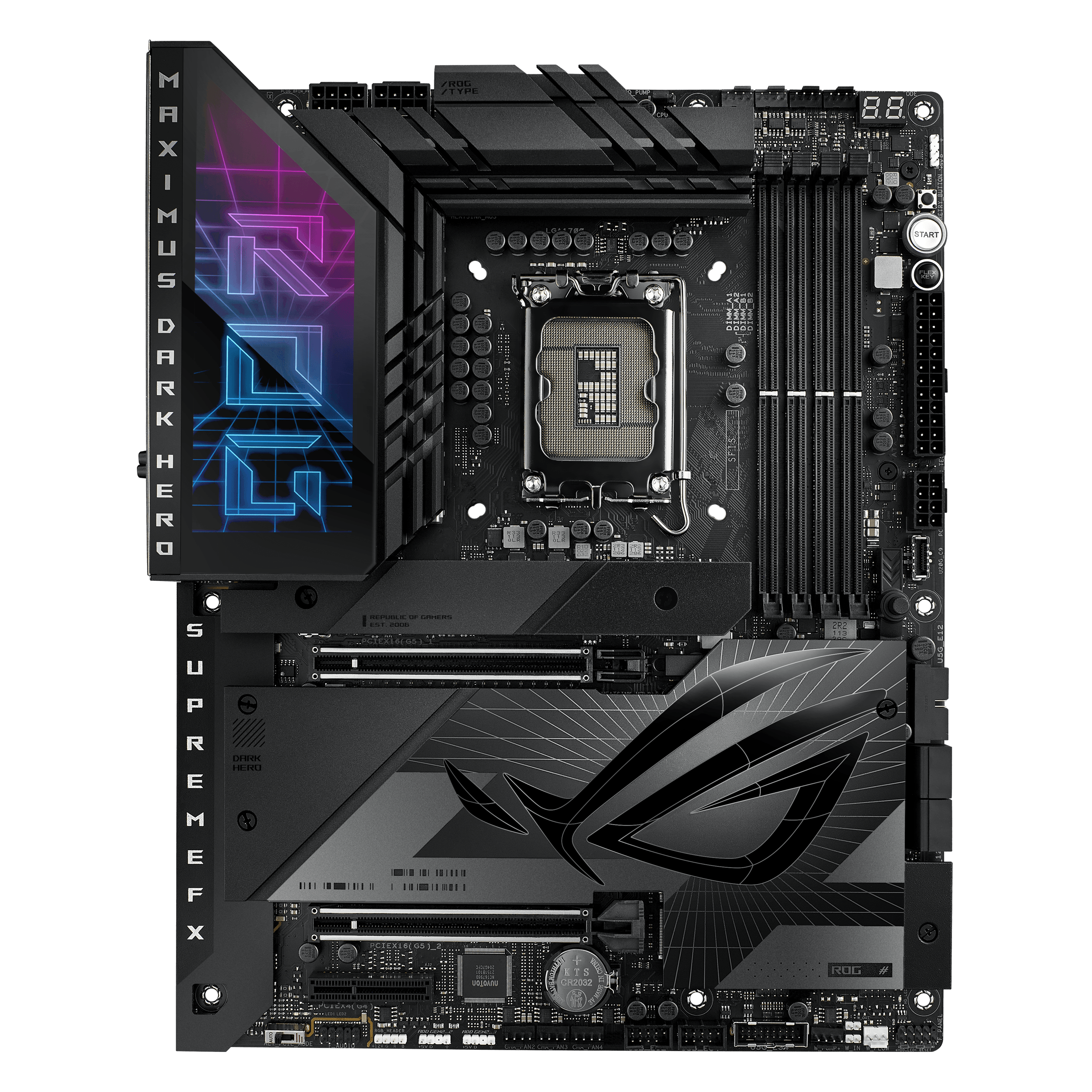
The ROG Maximus Z790 Dark Hero makes builds soar with 20+1+2 power stages, hyperspeed DDR5 support and the latest PCIe® 5.0 connectivity. It features five M.2 SSD slots with heatsinks, Intel® Wi-Fi 7, Thunderbolt™ 4, USB 20Gbps support, AI Overclocking, AI Cooling II, AI Networking, Two-Way AI Noise Cancelation and Aura Sync RGB lighting.
mild island
And I need a newer one?
brisk stone
Yes, get the latest version
mild island
Okay
So should I delete the stuff that came on the usb
So I can download the new
And it’ll have only the new stuff?
Because when we first got the computer working if u were there for that
When I had issues with the drive
And uhhhhh
Like internet
I believe I said some about watching a video telling me to update the bios
So I did
I didn’t this time
And it’s not as bad
mild island

