Didn’t blue screen or have any issues when running the 3Dmarks (only did it maybe 3-4times) reset it back to its original speeds and now it’s acting funny. Randomly blue screens and after a driver update I can’t get 1440p resolution? It also won’t let me stream discord anymore without it lagging everything when it never did that previously.
#Overclocked my 3080 just to run 3Dmark a few times and now it’s acting funny
339 messages · Page 1 of 1 (latest)
 uncut hinge
Seemed to have gotten it back to windows. Critical error is Kernel power throwing error 41
 tranquil plume
How much did you overclock it?
 thorn snow
I would remove (uninstall) whichever OC software you chose to set your custom OC's (such as MSI Afterburner, EVGA Precision, etc)
reboot
Then run through a DDU (display driver uninstaller) uninstall of your graphics driver. Steps for DDU here: https://www.intel.com/content/www/us/en/support/articles/000091878/graphics.html
reboot
Reinstall your 3080 drivers via Nvidia App (aka: what was "Geforce Experience", or download from Nvidia support site manually) afterwards, reboot, and test again.

Intel
Steps to install and use the DDU tool.
uncut hinge
tranquil plume
How much did you overclock it?
I can't remember I don't believe if was anything insane
uncut hinge
thorn snow
I would remove (*uninstall*) whichever OC software you chose to set your custom ...
I will give this a go thank you
uncut hinge
@thorn snow Hey I did all that and it works ok now, got my monitor back to normal but now everything looks very grey?
Its still displaying color but very faint
 fickle dagger
uncut hinge
Seemed to have gotten it back to windows. Critical error is Kernel power throwin...
fickle dagger
uncut hinge
Seemed to have gotten it back to windows. Critical error is Kernel power throwin...
That error only means your pc had to shut down unexpectedly. It's 99.99% of the time when you force a shut down, aka, holding the power button down, or flipping the psu power switch.
uncut hinge


Any idea why this happened
I don’t know what is going on with my pc but it just keeps doing random shit
fickle dagger
uncut hinge
If multiple things have been happening, make sure bios is up to date, and a fresh install of windows wouldn't hurt
uncut hinge
fickle dagger
If multiple things have been happening, make sure bios is up to date, and a fres...
This is the only thing odd I can find

It's from playing Destiny 2 on all low...
Idk why its so hot for nothing
fickle dagger
Seems like new thermal paste are in this cards future.
uncut hinge
I'm running out of options
fickle dagger
Not an actual bsod
uncut hinge
Nah I mean the bluescreen
The discoloration seems to only happen with discord streams
No clue why
fickle dagger
It looks like auto hdr is being forced
I know the latest update from windows fubar'ed it
uncut hinge
So I am turning that off?
 fickle dagger
No, you want that on
uncut hinge
Ah ok
fickle dagger
In search, bottom left, type auto hdr, or just hdr
Im not on my computer atm so can't give exact instructions
uncut hinge
Sends me back to that screen
fickle dagger
Your on windows 11?
 fickle dagger
Well, you know they are ceasing support for 10 soon, right?
uncut hinge
Yeah, wanna ride it out till its over tho
fickle dagger
To disable Auto HDR on Windows 10, go to your Settings > System > Display, then select your HDR-capable display, expand the "Use HDR" section, and toggle off the "Auto HDR" option
uncut hinge
I hate windows 11
fickle dagger
It's better then 10 now imho
uncut hinge
Isn't it off?
fickle dagger
Why do you hate it?
That's what I'm trying to have you checked. Because that looks like forced hdr colors
uncut hinge
uncut hinge
This is the only thing I can find that has to do with HDR
And it says off
fickle dagger
Ok. And you have done a ddu wipe?
uncut hinge
For my graphics drivers and after burner
fickle dagger
If you have an OC on the gpu, I'd start by turning it off and see if the problem goes away
uncut hinge
Already did that
Didn't seem to fix anything
I currently don't have any OC software downloaded
fickle dagger
And this is the only game it does it. Or every game?
And does it work for a while then poof bad colors, or is it like this just booting up the game?
uncut hinge
fickle dagger
And does it work for a while then poof bad colors, or is it like this just booti...
Only time I ever have bad colors is watching someones discord stream
fickle dagger
Ohhhhh hahahaha
They are running hdr
Sorry. Yeah, when you see the colors like this on discord, someone is running hdr
When someone is streaming to discord with hdr on, on their side, it always makes the colors wonky exactly like this to everyone else.
uncut hinge
Ahhhh ok
fickle dagger
Are you able to use hdr on your monitor?
uncut hinge
Honestly the only times I can remember it blue screening have been on D2
uncut hinge
fickle dagger
Are you able to use hdr on your monitor?
Believe so
fickle dagger
Whenever you use hdr, notice how all the colors and contrast are wonky until you load up a game?
uncut hinge
Yeah my monitor looks like everything is grey
The colors are 100x worse then before I wiped my drivers
fickle dagger
Its the same thing. Discord isn't able to relay the color palate accurately so it ends up like this
uncut hinge
So I probably had HDR on before
And its off now
So it looks like shit
Or am I stupid?
fickle dagger
Yup
 solemn phoenix
Go to C:\Windows\Minidump and check if you have any minidump files. If you do, go back to the Windows folder and copy the Minidump folder itself to the Downloads folder (You can use the desktop if you don't have OneDrive syncing files). Zip the copied folder and attach it to a post. Please follow the instructions to the letter as Windows doesn't like you messing with files in this location.
Just to see if the BSODs are GPU related
uncut hinge
solemn phoenix
Go to C:\Windows\Minidump and check if you have any minidump files. If you do, g...
It's empty
fickle dagger
But even still, with hdr on, it won't look right. Discord just can't transmit that.
As far as bluescreening goes, absolutely do what bjoolz said
uncut hinge
 uncut hinge
fickle dagger
But even still, with hdr on, it won't look right. Discord just can't transmit th...
uncut hinge
fickle dagger
But even still, with hdr on, it won't look right. Discord just can't transmit th...
Will everything look better with it on tho?
Like is that why the colors look grey compared to before?
fickle dagger
No, because everyone's is different.
uncut hinge
No
Like ignore discord
In general
My games, desktop discord etc
All look greyish compared to before
I'm just gonna turn it on
fickle dagger
Oh, did you enable "full" colors under nvidia?
 fickle dagger
Yup. Colors look ok from what I can see there.
fickle dagger
Duno. I'd say try a different cable. So long as the settings are where they should be. As far as bsods that is something else entirelly. It's possible they are related. But the discord thing is absolutely because the person streaming the game had hdr on, and discord cant capture hdr content
uncut hinge
fickle dagger
Duno. I'd say try a different cable. So long as the settings are where they shou...
That makes sense
Idk I just want my shit back to how it was. I don't know what happened but this just sucks, everything looks like garbage and it blue screens now
Guess I will just have to save up for a new one 
fickle dagger
Its possible it's the gpu dieing. The only thing you could do to make sure there are no conflicting drivers etc would be a fresh wipe of windows
uncut hinge
fickle dagger
Its possible it's the gpu dieing. The only thing you could do to make sure there...
Had it for like 3+ yrs someone had it before me wouldn't be surprised
But she held up real good in all the benchmarks so who knows
Not willing to do a fresh wipe though, internet isn't great atm and don't wanna sit and babysit downloads

Still holding on
They don't even make em anymore XD
uncut hinge
solemn phoenix
Which crash errors have you seen?
Only seen Kernel
solemn phoenix
Kernel_Security_Check_Failure?
solemn phoenix
That's not the BSOD error, that just means unexpected shutdown.
uncut hinge
Thats all I get
solemn phoenix
Open one of the Kernel-Power events
uncut hinge
Alright

 solemn phoenix
Details tab
 solemn phoenix
uncut hinge
solemn phoenix
uncut hinge
That's NVMe error.
uncut hinge
was doing both mb
solemn phoenix
Which would make sense with you not getting dump files.
solemn phoenix
292 is in decimal. Nothing else anywhere uses decimal for these codes, they all use hex
292 in hex is 0x124 which is WHEA_Uncorrectable_Error.
uncut hinge
Even tho all the tests i've ran for it came back fine?
solemn phoenix
There aren't any tests you can run on NVMe unfortunately.
solemn phoenix
SMART was nerfed into the ground with NVMe, it's completely useless.
uncut hinge
Ah okay
solemn phoenix
SMART is the self diagnostics of storage
uncut hinge
So logically speaking how long do we think she has
solemn phoenix
All tools check SMART.
uncut hinge
Not sure I can dish out for a new M.2 atm
solemn phoenix
uncut hinge
So logically speaking how long do we think she has
We can't 100% say it's the SSD. It could be the slot/motherboard, a firmware issue or overheating. This error is the only WHEA error that is driver reported. And the driver only knows that the SSD randomly went AFK.
Which drive is it?
uncut hinge
Like model?
solemn phoenix
Yes
uncut hinge
its a discontinued intel one
Disk 0 (C:)
INTEL SSDPEKNW010T8

Capacity:    954 GB
Formatted:    954 GB
System disk:    Yes
Page file:    Yes
Type:    SSD

Read speed    0 KB/s
Write speed    0 KB/s
Active time    0%
Average response time    0 ms
Think its the 990p or smtn like that
its the 660p
Been running for like 6-7* yrs
solemn phoenix
Ok, I'm not aware of any bugs from them. 24H2 changed the default cache size for DRAMless SSDs which caused a bunch of them to start giving BSODs because the firmware was crap.
solemn phoenix
And it's the only connected NVMe?
uncut hinge
I've been meaning to upgrade just been a minute
Yeah
Does it help u if when it bluescreens i have to wait for it to refind the m.2
solemn phoenix
I unfortunately don't have a better suggestion than replacing it and seeing if the crashes stop.
uncut hinge
Usually have to fully remove power and shut off
solemn phoenix
uncut hinge
Does it help u if when it bluescreens i have to wait for it to refind the m.2
Very common with this crash. Doesn't push me in either direction.
uncut hinge
Fair enough
solemn phoenix
You have Intel's SSD tool? Did you check for a firmware update?
uncut hinge
Any ideas why my display looks like crap after wiping my drivers?
uncut hinge
solemn phoenix
You have Intel's SSD tool? Did you check for a firmware update?
They don't support it anymore its too old
solemn phoenix
That sucks
solemn phoenix
uncut hinge
Any ideas why my display looks like crap after wiping my drivers?
Screenshot.
solemn phoenix
6-7 years is a decent lifespan for an SSD.
uncut hinge
solemn phoenix
Screenshot.
Idk if it'll help tbh
I'm basing it off what it used to look like
Which ig isn't helpful at all
solemn phoenix
I just want to see if it's rendered weird or if it's something else
uncut hinge
 solemn phoenix
And is it in games or on can you tell on the desktop?
uncut hinge
Looks kinda blurry
And the colors are different, much worse then they used to be
Best way I can describe it is blurry and dull
solemn phoenix
And was this just pressing Prnt Scr or did you use some other method?
uncut hinge
sniping tool
solemn phoenix
Do print screen, I want to check the resolution
uncut hinge
solemn phoenix
Do print screen, I want to check the resolution
Can't say i've done that before how do I do that>
Should be 1440p
solemn phoenix
Just press the print screen key on your keyboard once, then Ctrl+V in Discord.
 solemn phoenix
Yeah, that's correct resolution.
uncut hinge
Can't seem to explain it well enough
solemn phoenix
The screenshot looks sharp to me.
uncut hinge
Wish I could so I could figure out what was wrong with it
solemn phoenix
Screenshot your Nvidia settings.
solemn phoenix
Display → Change Resolution
In Nvidia Control Panel
Just want to make sure it's not super sampled or a TV resolution.
uncut hinge


 solemn phoenix
Also, that page there is just for video files. And it's kinda weird after most things switched to web video even in apps
I think it doesn't work for video in browsers anymore at least
uncut hinge
 solemn phoenix
uncut hinge
solemn phoenix
uncut hinge
Sorry, didn't see that it was multiple pics
solemn phoenix
Ok, you see here where it says Ultra HD, HD, SD?
 uncut hinge
yeah
solemn phoenix
That's TV resolutions. Well, I call them that, it's probably some standard.
If you scroll down, you should see another headline called PC
uncut hinge
Yeah I see that
solemn phoenix
And under there you will have more resolution options. See if you see 2560x1440 there
uncut hinge
I do not
solemn phoenix
Only 1080p there as well?
 solemn phoenix
Ehm
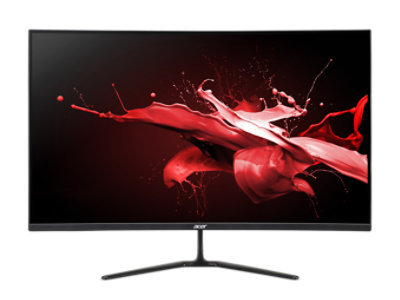
Acer United States
ED320QR Sbiipx - Tech Specs | Monitors | Acer United States
Is that your monitor?
 solemn phoenix
I'm not finding any similar sounding models that are 1440p either.
uncut hinge
I very well could just be stupid
solemn phoenix
Well, if it's 1080p it would be downsampling 1440p and that can look blurry.
If you want to use 1440p, we can do DSR instead. It might work a bit better.
DSR is an Nvidia feature where you can render at a higher resolution and then downsample for the monitor.
I use it on my side monitors because I find it annoying that they aren't at the same "height" when mousing over
solemn phoenix
Is 1080p looking good if you switch the settings?
solemn phoenix
Great. Do you want to try DSR or just keep 1080p?
uncut hinge
It swapped all my stuff to the other monitor
will DSR make it look like it just did
Or will it actually make it look good
solemn phoenix
It will be a bit fuzzy, but as bad probably.
You can also set the sharpness in settings.
uncut hinge
Cuz I am pretty sure I had it on 1440p at some point
We can try it
Worst case it sucks and i swap it back
solemn phoenix
Ok, near the top in Nvidia Control Panel, find Manage 3D-settings
uncut hinge
kk
solemn phoenix
Find DSR - Factors.
For 1440p with a 1080p display, the scaler you want is 1.78x
Excuse the language
 uncut hinge
 solemn phoenix
Great. Now you see the Smoothness right below it?
That's blur. 33% is a shit load of blur.
Set it to 0% and see if you like it a bit higher.
Then go to the resolution settings and you should see DSR resolutions at the top
 solemn phoenix
Did you press Enable after setting DSR?
uncut hinge
 solemn phoenix
uncut hinge
solemn phoenix
uncut hinge
That could be the custom res, it shouldn't be there
uncut hinge
Yeah its back to being blurry again
solemn phoenix
After enabling DSR and pressing Enable in Nvidia, the screen should flash black for a second
uncut hinge
 uncut hinge
solemn phoenix
After enabling DSR and pressing Enable in Nvidia, the screen should flash black ...
uncut hinge
solemn phoenix
After enabling DSR and pressing Enable in Nvidia, the screen should flash black ...
Yeah it flashed like 5 times
solemn phoenix
Hmm
uncut hinge
 solemn phoenix
Not sure why it's not showing up then
Oh, it might bethat top one
See how it says 1080p, but 2560 x 1440
uncut hinge
 uncut hinge
solemn phoenix
See how it says 1080p, but 2560 x 1440
uncut hinge
solemn phoenix
See how it says 1080p, but 2560 x 1440
Will try it
Good catch

Yeah its blurry
About the same as before
solemn phoenix
Ok. I have no idea if we got the right one, but even DSR will be slightly blurry.
Want to check the colours if they are still washed out with the 1080p resolution?
uncut hinge
Yeah let me give that a go
solemn phoenix
Ok, go to Adjust Color Settings for Desktop under Display.
Select the correct monitor and change the Digital Vibrance to +10% of what it was.
 solemn phoenix
Show the whole window
uncut hinge
 solemn phoenix
Second option
 uncut hinge
Mb i'm stupid
solemn phoenix
The colors down there are just for video files.
So if you play a video later you might have crazy colors
Because those bars looked maxed
uncut hinge
Would those possibly fuck with discord?
 summer terrace
solemn phoenix
That's NVMe error.
summer terrace
solemn phoenix
That's NVMe error.
Thanks for this. My kid knocks the PC on the desk at home all the time and randomly it does this with the same error. I was going to re-seat everything.. clearly I need to tell the little shit more sternly not to hit it. Guessing this is due to anti-vibration on the motherboard picking it up.
solemn phoenix
I don't think so?
solemn phoenix
summer terrace
Thanks for this. My kid knocks the PC on the desk at home all the time and rando...
More likely the seating. We see this in laptops all the time.
solemn phoenix
@uncut hinge You should see Digital Vibrance at the bottom here
 summer terrace
solemn phoenix
More likely the seating. We see this in laptops all the time.
summer terrace
solemn phoenix
More likely the seating. We see this in laptops all the time.
I will dig it out soon. Probably not the boot drive with Frozr on it but the game drive I use that’s got its own heat sink.
uncut hinge
solemn phoenix
<@444348951173267456> You should see Digital Vibrance at the bottom here
Yeah I bumped it by 10
solemn phoenix
@uncut hinge For brightness, I really don't like using the Nvidia tools because it looks like a white filter over the screen. Not actually brighter. I prefer using the monitor OSD or game settings.
uncut hinge
Looks a bit better at max ingame brightness
summer terrace
solemn phoenix
<@444348951173267456> For brightness, I really don't like using the Nvidia tools...
This. Unless you’re competitive and making it brighter to see players, then that white filter is better imo
uncut hinge
Well its def much better then before
So thank you
And I will look into a new m.2
Any suggestions?
Pref more then 1TB cuz I have hated living on 1
solemn phoenix
I don't recommend anything
uncut hinge
like keep the one i'm using?
Or u just dont have input
And I should be applying new thermal paste to my gpu yeah?
uncut hinge
@solemn phoenix Looks alot better thanks man!
solemn phoenix
np
solemn phoenix
uncut hinge
Or u just dont have input
Don't have input.
solemn phoenix
uncut hinge
And I should be applying new thermal paste to my gpu yeah?
A 3080 should be many years from needing a repaste. Unless you removed the cooler.
fickle dagger
solemn phoenix
A 3080 should be many years from needing a repaste. Unless you removed the coole...
He was hitting 96c in thermals
Sorry, 97c
In gaming, not stress testing
fickle dagger
It absolutely is, and yes it was hotspot, and memory both hitting 96+.
I think the core temp was 85c
Thats very hot in gaming. Without knowing specifics of the case etc.
With hotspot temps reaching 95+ it will throttle
Sure, it could be a vrm, and those can handle 150c. But anything over 90c there is an issue somewhere.
thorn snow
As a previous 3080 owner, I can say that I also had hot sensor reports from factory across the board. After replacing all thermal pads with gelid (Must research the proper thickness of pad in mm - all coolers hug the PCB & chips differently, respective to model/make), I learned that the hotspot can have a 20C +/- discrepancy from actual temp. Although my hotspot went from 94C to 77C under load (post-repad), those hotspot numbers should be taken with a grain of salt.
As for core & mem temps; I don't like the sounds of 96C on the mem. Core hitting 82C is a touch too warm for me personally, but not outside the realm. I like to have some headroom available to add mild OC's. circumvent throttling, and extending life of the hardware. Repasting & "re-padding" my 3080 yielded roughly 15-17C decreases on the mem & core under full load. (Arctic MX-4 TIM)
And of course, modify the GPU fan-curve a tad. That certainly contributed to my success.