#Pc randomly restarts after new gpu
272 messages · Page 1 of 1 (latest)
 wild ledge
 worldly falcon
yes
 harsh yarrow
wild ledge
I recently have got a new gpu, I installed it, got the right drivers, played a f...
harsh yarrow
wild ledge
I recently have got a new gpu, I installed it, got the right drivers, played a f...
It sounds like a power issue.
Could you provide us with full system specs to look at?
wild ledge
harsh yarrow
It sounds like a power issue.
Could you provide us with full system specs to loo...
Ryzen 5 5600x
16gb ram
4060 gaming oc
B350-f gaming mobo
Corsair rm750 power supply
256gb ssd
1tb hard drive
harsh yarrow
Finally someone who actually knows what full system specs are, thank you!
wild ledge
I did check it all in pcpartpicker before purchasing the new gpu, and it had plenty extra power
wild ledge
harsh yarrow
Finally someone who actually knows what full system specs are, thank you!
Haha np, thanks for helping (:
harsh yarrow
Yeah I know 750W is more than enough
Could you humor us and try just replugging the power connector into the graphics card?
That way we're 100% sure it's actually seated in fully.
wild ledge
harsh yarrow
Could you humor us and try just replugging the power connector into the graphics...
I did try that after the first restart
harsh yarrow
Hmm
Okay, let's try putting a load on the graphics card to see if it's actually caused by it
Something like furmark should work well.
wild ledge
Is that free?
wild ledge
I did use a benchmark software and couldn’t get it to happen again after the first restart
harsh yarrow
If the thermals look good and the system doesn't immediately shut off, we know it's not the graphics card.
wild ledge
Starting mc pc up, will doenlaod it now
harsh yarrow
great, let me know how it goes
wild ledge
Was using heaven benchmark 4.0 before btw, don’t remember the exact results tho
harsh yarrow
Hmm... That's curious
Perhaps it just wasn't enough to push it over the edge.
Another culprit I can think of is that the CPU might be overheating.
So we'll approach that theory after we've eliminated the graphics card.
harsh yarrow
Both work, it's just the file server
 harsh yarrow
The preset itself doesn't really matter in this case, just click the GPU stress test
wild ledge
Running it now
wild ledge
60 degrees c
harsh yarrow
nice and cool then
wild ledge
96% usage
harsh yarrow
Yeah that should be more than enough usage for this test
wild ledge
How long does it go for?
harsh yarrow
It basically goes for infinitely, I think we can call it quits in about 5-10 minutes
wild ledge
O ok
harsh yarrow
Because realistically we're now making the card draw about as much power as it would, if that was the issue we would know
wild ledge
Yeah
wild ledge
wild ledge
I recently have got a new gpu, I installed it, got the right drivers, played a f...
I did also run a ddu for my old drivers from the old gpu
harsh yarrow
That's good, drivers shouldn't be the issue here then
wild ledge
Ok
harsh yarrow
Yeah I think that's about enough... How do the thermals look now?
wild ledge
65
wild ledge
harsh yarrow
Yeah I think that's about enough... How do the thermals look now?
do i stop it?
harsh yarrow
Might as well, I don't think it's the graphics card
wild ledge
alright
harsh yarrow
I guess we gotta look at that CPU next then
I typically use this to monitor CPU thermals
Once you get it on your system, I want you to take a look at the thermals immediately so we can get a baseline.
wild ledge
 harsh yarrow
idle temps look normal
so we gotta run a CPU stress test then
You could either play something CPU heavy or you could run Prime95
choose one
wild ledge
is prime95 free?
harsh yarrow
yeah it is
harsh yarrow
alr
Prime95 will make the CPU run hotter than what you would see in real world applications
so if the thermals are a bit on the toasty side, it means that the system is doing just fine
wild ledge
Sorry I gotta go for like 5 mins, then I’ll run it
harsh yarrow
right
wild ledge
Sorry
harsh yarrow
Well I mean if you gotta take a piss then do it
I'm not expecting people to glue their faces onto their monitors :P
 harsh yarrow
After extracting it yeah
wild ledge
now what do i do
harsh yarrow
If the stress test is running, open up the core temp on the side and look at the thermals
wild ledge
harsh yarrow
If the stress test is running, open up the core temp on the side and look at the...

just press ok?
wild ledge
Alright
harsh yarrow
Are the thermals going up at all?
 wild ledge
How do I do that
harsh yarrow

This is a bit annoying
CPU theory went out the window
All this just falls back to that power feed issue I was talking about earlier.
We could of course check everything on the driver side.
But I'm beginning to think there's just something wrong with the PSU.
harsh yarrow
So... Wanna play around with drivers a lot or do you want to jump straight to ruling out the PSU?
wild ledge
your choice
harsh yarrow
Okay let's do a quick rapid fire Q&A so we can figure out what we need to do.
First off, are you running the latest version of Windows?
wild ledge
windows 10, and yes
harsh yarrow
Yes or no will do, gonna do this quickly
Did you install the latest B350 chipset drivers?
harsh yarrow
okay, gonna check that
wild ledge
like bios?
 sour cargo
No
harsh yarrow
did you update the BIOS?
sour cargo
wild ledge
no
harsh yarrow
Okay I guess those are the things we gotta do then
Let's start with the chipset drivers.
Download and install this
wild ledge
Download Not Complete
Article Number
Download-Incomplete
Review the guide below for solutions to download your file
where do i fine it
find
wild ledge
alright its downloaded
harsh yarrow
yup, go ahead and install them
wild ledge
all of those?
 harsh yarrow
yup
wild ledge
It’s just restarting
harsh yarrow
okay
sour cargo
Basically try to replicate the issue unless you want to ddu as well
Which isn’t a bad choice..
harsh yarrow
I suppose we should update the BIOS next then
wild ledge
harsh yarrow
I suppose we should update the BIOS next then
alright
wild ledge
sour cargo
Basically try to replicate the issue unless you want to ddu as well
i havent been able to replicate the issue intentionally
harsh yarrow
ROG STRIX B350-F GAMING correct?
wild ledge
yes
sour cargo
Most of the times when I see people have the random cut off issues
It’s either loose gpu cable/extenders/riser cable
harsh yarrow
wild ledge
yes
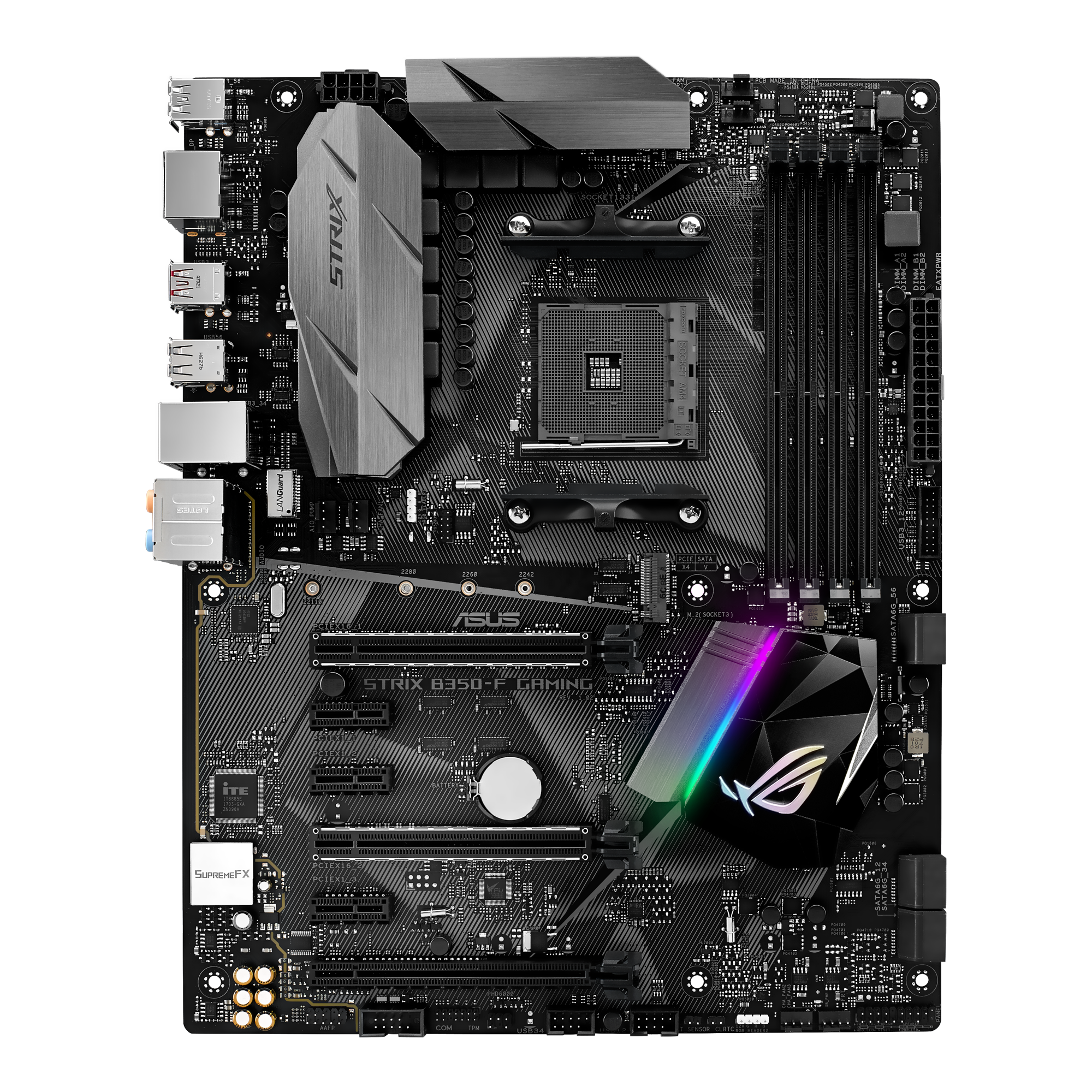
Experience next-level performance with the ROG STRIX B350-F GAMING, powered by AMD® Ryzen™ AM4 processors. Unlock your system’s full potential with 5-Way Optimization featuring SafeSlot and Fan Xpert 4 while personalizing your build with AURA Sync RGB lighting. Integrated NVMe M.2, gigabit LAN and USB 3.1 deliver maximum connectivity speeds.
sour cargo
When temps aren’t at play anyway
wild ledge
harsh yarrow
https://rog.asus.com/us/motherboards/rog-strix/rog-strix-b350-f-gaming-model/hel...
what do i do with this exactly?
havent updated bios before
sour cargo
Asus has a pretty short guide on YouTube
harsh yarrow
Once you've downloaded it, you would open it up and there's a CAP file inside
wild ledge
yes
harsh yarrow
Assuming we're going to do this with Asus ez flash, you would take that file and move it into a USB stick
You would then connect that USB stick to the rear IO of your motherboard
wild ledge
harsh yarrow
Assuming we're going to do this with Asus ez flash, you would take that file and...
just the cap?
harsh yarrow
Then turn off your system, turn it on and immediately start hitting F2 or Del until you enter bios
harsh yarrow
wild ledge
just the cap?
yes
wild ledge
harsh yarrow
You would then connect that USB stick to the rear IO of your motherboard
aly slot?
any
wild ledge
In bios
harsh yarrow
can you send me a pic so I know what you're seeing?
BIOS is a bit different from mobo to mobo
wild ledge
 harsh yarrow
Click tool
wild ledge
 harsh yarrow
Select EZ flash utility
 wild ledge
 harsh yarrow
Click yes
 harsh yarrow
Yup
 harsh yarrow
Yes
harsh yarrow
Everything is going as it should
wild ledge
Processing
harsh yarrow
Yup it's now installing the bios update
wild ledge
I may have done this when I got my new cpu actually
harsh yarrow
What ever you do now, do not turn the system off
wild ledge
Can’t remember
harsh yarrow
wild ledge
I may have done this when I got my new cpu actually
Most likely you did
Since 5600X doesn't run on B350 out of the box
Not until a BIOS update made it compatible
wild ledge
Cause I got the system of a friend with an older cpu and 1060 3gb, been upgrading since
Yeah, I upgraded cpu a year ago, so can’t really remember
I was planning on going through and upgrading the bios if no1 replied here, but was just scared to do so
It’s done
harsh yarrow
Great, I guess you can then return to Windows and proceed with another DDU
wild ledge
 wild ledge
harsh yarrow
Great, I guess you can then return to Windows and proceed with another DDU
wild ledge
harsh yarrow
Great, I guess you can then return to Windows and proceed with another DDU
What do I do here
harsh yarrow
Hit F1
wild ledge
harsh yarrow
Hit F1
Then boot?
harsh yarrow
I see that the BIOS update also reset your DOCP, might as well enable that
wild ledge
What’s that
harsh yarrow
in the BIOS I mean
Makes your RAM run at the rated speed
right now it's locked at 2133 as you can see
harsh yarrow
Yeah
wild ledge
I did it at some point but can’t rly remember
wild ledge
Like that?
 harsh yarrow
Yeah
wild ledge
Now just boot normally?
wild ledge
Oh
harsh yarrow
Better leave that disabled then
harsh yarrow
Yeah, just boot normally then.
harsh yarrow
Run DDU and then download and install the latest drivers for the graphics card
wild ledge
harsh yarrow
Run DDU and then download and install the latest drivers for the graphics card
Alright
I’m right to remove the usb?
wild ledge
Clean and restart?
harsh yarrow
Yeah
wild ledge
wild ledge
Express or custom?
@harsh yarrow
harsh yarrow
Express is fine
wild ledge
Alright
harsh yarrow
There's really not much point in doing a custom install when you're going to install the whole driver package anyways
would just slow down the whole installation process
I guess you're done with the driver installation now?
harsh yarrow
Well...
There's one more thing I could think of, I doubt it's going to be super important but.
You could run command prompt as admin and run sfc /scannow
It will check for system integrity violations and solve them if it finds any
But other than that we've done literally everything on the driver side of things
wild ledge
Alright
harsh yarrow
So if the problem presists...
Then it can only be a hardware issue
And at this point the PSU seems like a likely culprit
wild ledge
Ok
harsh yarrow
Yeah so, keep using the system as usual and let us know how it goes
wild ledge
harsh yarrow
You could run command prompt as admin and run **sfc /scannow**
Windows Resource Protection found corrupt files and successfully repaired them.
harsh yarrow
wild ledge
Windows Resource Protection found corrupt files and successfully repaired them.
It's not uncommon for it to find some stuff that's broken so it may be nothing.
harsh yarrow
Alright
wild ledge
harsh yarrow
Alright
havent ahd it happen again, thanks so much for your help 😄
harsh yarrow
You may need to use the system for a bit longer to know for sure