#building my 1st pc
1 messages · Page 9 of 1
 pale tulip
 arctic lotus

 topaz solstice
arctic lotus
topaz solstice
arctic lotus
tdp != power draw
 forest inlet
🐧🐧
topaz solstice
arctic lotus
my ryzen 5 3600 has a tdp of 65w, but it can draw up to 130w depending on what load that gets put onto it
arctic lotus

 naive robin
 arctic lotus
 pale tulip
what did it answer with]
arctic lotus

loved this one
lol
"but here's the thing" taken straight from a ltt video script lmao
basically just power limiting your cpu
the technology is called ppt and its made by amd but im sure intel has its own version
topaz solstice
https://www.corsair.com/us/en/explorer/diy-builder/power-supply-units/what-psu-is-best-for-rtx-4090/

The NVIDIA GeForce RTX 4090 is a high performance graphics card that requires adequate power in order to render extremely detailed graphics for today's games.
arctic lotus
i didnt even know you could control that
topaz solstice
arctic lotus
the technology is called ppt and its made by amd but im sure intel has its own v...
intel's is just known as power limit
you have pl1 and pl2
pl1 is boost, pl2 is sustained
though for amd you use what is known as PBO2 to tune the cpu
precision boost override
arctic lotus
so i could limit the power to my cpu and gpu worst case scenario
and if i get atx 3.0 then itll probably add more flexibility to that
oh i think ik why atx12v 3.0 is called that.
it only supplied 12v? and the motherboard steps down the volts depending on what it is
topaz solstice
arctic lotus
it only supplied 12v? and the motherboard steps down the volts depending on what...
no
atx 3.0 psu's like atx 2.0 psu's turn ac mains to 3.3v,5v, 12v dc
arctic lotus
is atx 3.0 for motherboards too or is it just psus?
topaz solstice
just psu
arctic lotus
like does it have a 2nd section of the specification with the same name as "atx 3.0"
2nd section for just mobos
arctic lotus
topaz solstice
atx 3.0 psu's like atx 2.0 psu's turn ac mains to 3.3v,5v, 12v dc
maybe it just comes from the max voltage then
original atx did 12v too lol
so i think they just added it to the specification so that people wouldnt mix it up with mobos
topaz solstice
arctic lotus
original atx did 12v too lol
it also did 3.3v and 5v
topaz solstice
only atx12vo does 12v only
topaz solstice
arctic lotus
so that means theres 3 rails?
yes
arctic lotus
so does that mean the ones marked as single rail on the tier list are atx12vo?
topaz solstice
topaz solstice
arctic lotus
so does that mean the ones marked as single rail on the tier list are atx12vo?
no
multirail = several 12v rails
arctic lotus
 topaz solstice
arctic lotus
single rail = 1 12v rail
topaz solstice
arctic lotus
single rail = 1 12v rail
yup
topaz solstice
arctic lotus
completely different from atx12vo
highly different
naive robin
GPU and CPU
topaz solstice
arctic lotus
what parts are 12v important for
cpu, gpu are the 2 main ones
naive robin
The motherboard is just a fuckload of data traces and stuff
Doesn't really require any power on its own
It's all the components that go on it that require power
arctic lotus
which means the cpu power plugs in through the mobo too probably
probably not the back of the mobo or the cpu directly
naive robin
Of course
arctic lotus
atx12vo also has a 12vsb rail
whats the point of the 12vsb rail? ik it supplied power when the system is turned off.
naive robin
So your USB ports can still supply power when the PC is off
arctic lotus
ohhh
ik atx12vo is really just atx12vo 3.0 since it is still atx 3.0 but does that mean regular atx 3.0 doesnt include a 12vsb rail in it's specification?
topaz solstice
arctic lotus
whats the point of the 12vsb rail? ik it supplied power when the system is turne...
it outputs 12v only, and on the mobo it converts it to 3.3v and 5v
arctic lotus
topaz solstice
it outputs 12v only, and on the mobo it converts it to 3.3v and 5v
thats what i meant earlier by the step down thing. i had gotten it wrong tho, it wasnt atx12v 3.0. it was atx12vo

so vsb rails dont count as multi rail designs. its like they dont count that rail
even for atx12vo
which is technically still a single rail design.
but they are not the same thing. ik that.
 steel sapphire
have we stopped talking abt vans and inverters even though they dont matter
arctic lotus
it would seem that RGB makes the psu less efficient
enough to make silver psus bronze
 lusty tiger
rgb in a psu is useless
lusty tiger
in 90% of cases, you wont even see it
arctic lotus
oh you mean the shroud
lusty tiger
yes
arctic lotus
that's why you dont do a shroud with rgb psu
lusty tiger
thats why you dont do an rgb psu
arctic lotus
i mean you could if you wanted to for aesthetics
lusty tiger
the esthetics of a shroud far outweigh the esthetics of an rgb psu
arctic lotus
but yeah if you care about max efficiency then you wouldnt. but rgb psus are cool
i personally hate the way shrouds look.
lusty tiger
HOW
lusty tiger
you like the look of a disgusting ass mess of cables at the bottom of your case?
arctic lotus
i wouldnt get ketchup and mustard cables
lusty tiger
good cables still make a disgusting mess of cables
lusty tiger
youd need custom cables that are exactly to size
arctic lotus
are custom cables a thing. ive heard a rumor that you cant use ANY other cables even cables from the same exact psu otherwise it blows up or some stupid shit
lusty tiger
you cant use other psu cables
arctic lotus
i remember talking about custom cables and i want to do that bad
ik not other psu cables
lusty tiger
but you can order cable ends for your specific psu and make your own, or buy some from someone like cablemod
arctic lotus
but how do you buy the custom cables. cause wont those just be random cables
i just dont want custom cables that will make it blow up
lusty tiger
you buy wire, sleeving, and motherboard/eps/pcie cable ends
lusty tiger
arctic lotus
i just dont want custom cables that will make it blow up
it wont lol.
arctic lotus
can this custom job be performed after you buy the psu
lusty tiger
yep
 runic bloom
Yes
arctic lotus
cause the psu probably comes with the mustard and ketchup cables
lusty tiger
no
arctic lotus
ohh
lusty tiger
afaik, any 1kW+ psu will have blackc cables
runic bloom
Only like supreme budget ones really are mustard
lusty tiger
only non-modular ~500w psus have colored cables
for the dark power 13, you would buy "plugs" for all of these connectors that you need, psu motherboard, cpu, pcie 5.0, etc. then, you would buy eps and (motherboard side) motherboard power plugs

in your case (if you get this psu, please do), you probably wouldnt need more than 1 drive, 1 P8 (thats cpu i believe), 2 pcie 5.0 (1 for the psu and one for the gpu), and each of the motherboard connectors
topaz solstice
arctic lotus
cables are soft and flexible unlike a whole ass shroud
when singularly sheathed yes, but not as a bunch
topaz solstice
arctic lotus
are custom cables a thing. ive heard a rumor that you cant use ANY other cables ...
custom cables are a thing, and are limited to a couple brands tbh, it's more that extensions can be problematic instead
topaz solstice
arctic lotus
that's why you dont do a shroud with rgb psu
as it's the fan having rgb on it, and the fan always faces down, you'd never see the rgb on a psu
also there's a couple rgb psu's that have the potential to kill your system
lusty tiger
no idea why she doesnt like psu shrouds, it makes no sense
topaz solstice
i know how to make it look ok without the shroud being there but tbh, having a psu shroud there is a good thing
lusty tiger
exactly
topaz solstice
though i have mine cable managed even under the shroud
lusty tiger
no matter how much you "cable manage", there will always be at least a slight mess of cables where they come out
but a shroud still looks nicer than bare wires
topaz solstice
lusty tiger
no matter how much you "cable manage", there will always be at least a slight me...
trust me, going anally ocd on cable managing for 3 hours minimum definitely means less chances of a mess
lusty tiger
lol
topaz solstice
takes 15-30 mins to build a pc when you've done it enough times, but if you're really particular about how you want it cable managed, 3 hours is like the minimum
i don't follow the shove it in and push down the cover on it approach
lusty tiger
i dont either
you can spend like 5-10 minutes of work to make it look much better
and the #1 rule is: dont cross wires (unless there is no way around it)
steel sapphire
arctic lotus
cables are soft and flexible unlike a whole ass shroud
this thread is giving me brain damage
 honest totem
arctic lotus
honest totem
arctic lotus
well i had ram chosen
and mobo is close
ram is basically chosen
im working on psu now
storage is also chosen
topaz solstice
should have already chosen mobo
arctic lotus
yeah but it took too long and i got tired of doing research on it
i needed to take a break and work on while i was at work since im at work like almost all the time
had a couple weekends where i was busy and didnt have time for this
but not psu and mobo are p much in the same place
so i mostly can only do it on my own time in my database
and that just takes awhile
so the case determines the psu form factor
not the mobo
naive robin
Of course
One could look at it the other way around
The PSU form factor determines what cases will fit it
arctic lotus
thats true which is how i will do it
cause i care more about the psu than the case
and i care more about the mobo than the case
i dont want the case choice to limit either the psu or mobo
lmao
 lusty tiger
arctic lotus
i dont want the case choice to limit either the psu or mobo
lusty tiger
arctic lotus
i dont want the case choice to limit either the psu or mobo
So atx for everything
topaz solstice
arctic lotus
thats true which is how i will do it
so atx psu, atx mobo, and something like a 5000d airflow
that way no limitations for you then
lusty tiger
great minds think alike 😆
the 4000-5000-7000 lineup of corsair cases are soo cool imo. theyre pretty low profile (as in not super gamery) so they can look like a pretty "normal" pc that still packs a punch
topaz solstice
7000d is a full atx case while 4000d and 5000d are both mid atx cases
arctic lotus
i have mostly been only looking at atx, but i will compare it to itx and sfx stuff
to see what i will be missing out on
lusty tiger
It limit your options
lusty tiger
arctic lotus
to see what i will be missing out on
Nothing other than size
arctic lotus
yeah but in terms of mobo, it seems like i wouldnt lose that much so far
lusty tiger
just m.2 support
topaz solstice
arctic lotus
theres a really good itx board
arguanly "good"
lusty tiger
id recommend an atx build anyway for a first time builder. it has less hastle than smaller builds
topaz solstice
arctic lotus
couldnt i mount the mobo to the van lol
you asked this before and i told you no
lusty tiger
arctic lotus
couldnt i mount the mobo to the van lol
there's no grounding, and no protection. and anyway, you can get $70 fully featured cases
arctic lotus
i feel like a custom case would be so cool. like one you build yourself into the van
lusty tiger
wait until youre better at building pcs for a custom case
arctic lotus
but ig you wouldnt be able to take it with you out of the van if that was ever going to be a thing
topaz solstice
arctic lotus
i feel like it would be fine on the cieling or something
no mounting for psu, wires can easily get damaged, vibrations affecting the system, and definitely no way you can use a hdd
arctic lotus
maybe i will wait on a built in build until after i get the van if i get the van cause i can just take the new pc apart again in the future and rebuild it into the van
cases are cheap
topaz solstice
arctic lotus
cases are cheap
some cases are, some not so much
arctic lotus
anything under $300 for a case seems dirt cheap to me
topaz solstice
that is a bad take
topaz solstice
some of the best cases are $80-150
topaz solstice
there's a case i've been after, finding it is like finding hens teeth
and at best an import of it will be around $800 usd/£900 gbp
it's a specific dual system case
arctic lotus
damn
naive robin
Oh can't wait to get into the cooler debate after we finish screaming frozen notte 360 at them for another thread's worth of text
topaz solstice
naive robin
Oh can't wait to get into the cooler debate after we finish screaming frozen not...
well i've already suggested the deepcool lt720
naive robin
Same difference
topaz solstice
and that would be overkill itself for the 7950x3d
topaz solstice
arctic lotus
damn
would you like to see said case?
arctic lotus
topaz solstice
would you like to see said case?
yes
topaz solstice
arctic lotus
yes
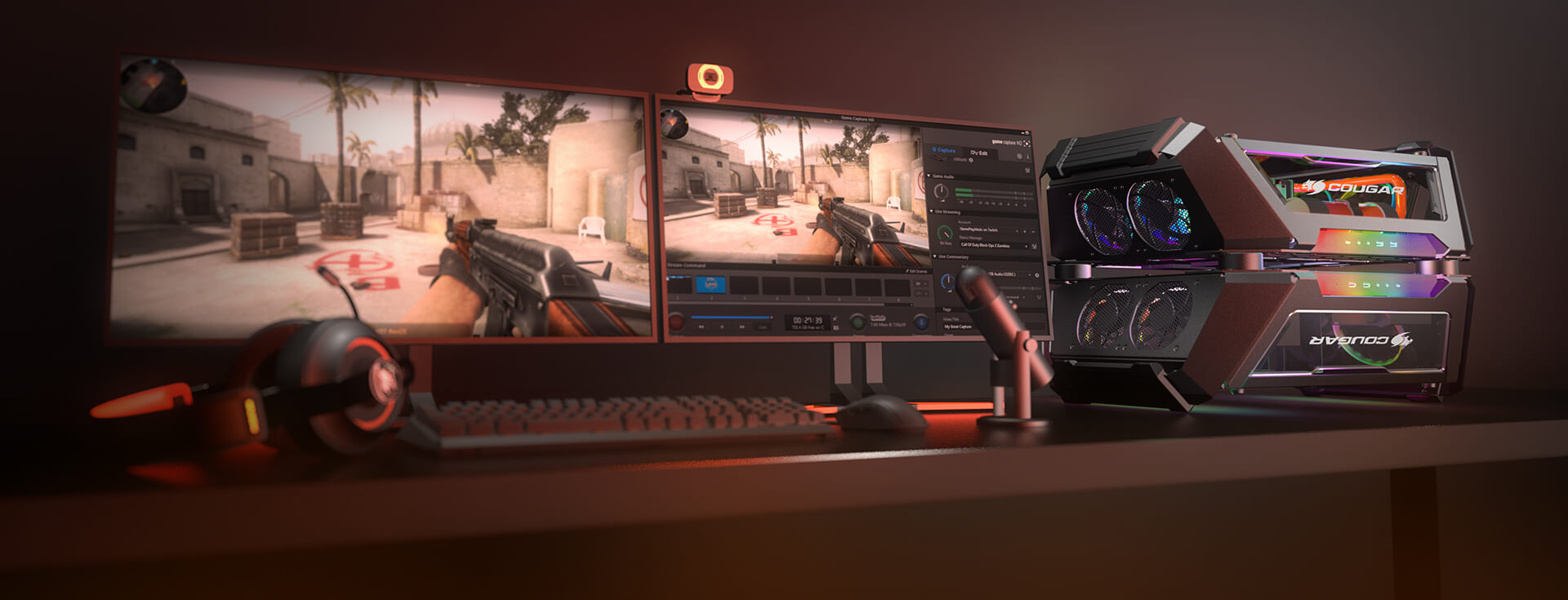
GEMINI X The Power of Two The best dual build case ever created. Great aesthetics, high-end component support and extreme cooling capabilities in a grand design that breaks conventions to deliver something never seen before. GEMINI X The Power of Two The best dual build case ever created. Great aesthetics, high-end component support and extreme ...
arctic lotus
naive robin
Oh can't wait to get into the cooler debate after we finish screaming frozen not...
oh yeah i forgot i already chose an aio
topaz solstice
arctic lotus
oh yeah i forgot i already chose an aio
an over priced one that's beaten by one that costs $140
arctic lotus
wait which one
naive robin
topaz solstice
https://cougargaming.com/products/cases/gemini_x/
Get a HAF stacker
topaz solstice
naive robin
Get a HAF stacker
nah i want to get this and mod it
i can combine a nas and my main pc all in one in that case
arctic lotus
topaz solstice
https://cougargaming.com/products/cases/gemini_x/
okay yeah this case is awesome
topaz solstice
arctic lotus
okay yeah this case is awesome
my current case https://cougargaming.com/products/cases/panzermax-g/ though i've modified it slightly

PANZER MAX-G The Ultimate Full Tower Gaming Case Panzer Max-G is a full tower gaming case with a full-sized tempered glass panel that has been designed with gamers, overclockers, modders and professional level computer lovers in mind. It brings you great freedom when designing your system, with lots of space for components and superb cooling […]
arctic lotus
topaz solstice
https://cougargaming.com/products/cases/gemini_x/
so this one $800
topaz solstice
arctic lotus
so this one $800
yes
naive robin
I'd love to get a HAF stacker 915r but they seem to not exist literally anywhere lol
lusty tiger
arctic lotus
oh yeah i forgot i already chose an aio
what aio
lusty tiger
arctic lotus
anything under $300 for a case seems dirt cheap to me
the montech air 903 begs to differ
arctic lotus
begs to differ what
arctic lotus
lusty tiger
what aio
actually i dont think i chose an aio mb.
i just thought i did. but ive only chosen that i will go aio
lusty tiger
arctic lotus
begs to differ what
~$75 for the fully featured version of the case. 3 argb fans and a fan and rgb hub
arctic lotus
that's less than $300
lusty tiger
($72 for the black, $77 for the white)
arctic lotus
are you all so poor you dont know what dirt cheap means
lusty tiger
i mean a cheap case can still be a really good option
arctic lotus
i thought you meant begs to differ as in you were about to give me an expensive option lmao
topaz solstice
arctic lotus
are you all so poor you dont know what dirt cheap means
no, but $40 = dirt cheap case
arctic lotus
$800 is kind of expensive for a case
lusty tiger
*$400
topaz solstice
arctic lotus
$800 is kind of expensive for a case
$300 is expensive for a case
lusty tiger
or $300 yeah
arctic lotus
$75 is just as dirt cheap to me. thats literally lunch money
nahhh $300 is nothing.
lusty tiger
what the hell lunch are you getting
topaz solstice
my current case was only £135 gbp, so around $160 usd
arctic lotus
where are you eating??
lusty tiger
arctic lotus
nahhh $300 is nothing.
are you that used to making poor financial decisions?
lusty tiger
arctic lotus
where are you eating??
not something that would cost $75
arctic lotus
my financial decisions are prem
lusty tiger
....
arctic lotus
only reason why im in my position tbh
topaz solstice
@naive robin if i ever went itx, i'd get this https://www.ebay.co.uk/itm/373755970456

eBay
Find many great new & used options and get the best deals for Cougar QBX Mini-ITX Ultra Compact Pro Gaming Case 1 x 90 mm Fan at the best online prices at eBay! Free delivery for many products.
lusty tiger
arctic lotus
only reason why im in my position tbh
i dont want to go back through the bad decisions you made throughout this build
topaz solstice
arctic lotus
ive made none
2kw psu
lusty tiger
optane, t700, liquid suprim 4090, 96GB ram
topaz solstice
not really
topaz solstice
arctic lotus
im going the 905p or p5800x
poor choice there tbh
topaz solstice
yes, yes really
arctic lotus
one of them is wendell
after i came across that, theres nothing that can change my mind on it
arctic lotus
lusty tiger
whats your psu choice, please pick one

dream's Notion on Notion
A new tool for teams & individuals that blends everyday work apps into one.
you can monitor the progress here
topaz solstice
topaz solstice
<@219445812017496064> if i ever went itx, i'd get this https://www.ebay.co.uk/it...
i'd modify this into looking like mjolnir and sit it into a resin based rock
lusty tiger
but, anyway, the best choice is the Dark Power 13, as so many (including me many times) have said
topaz solstice
imagine having a pc looking like this
 arctic lotus
lusty tiger
but, anyway, the best choice is the Dark Power 13, as so many (including me many...
arctic lotus
lusty tiger
but, anyway, the best choice is the Dark Power 13, as so many (including me many...
its literally only A tier
not A+
and it's 1000w
topaz solstice
arctic lotus
and it's 1000w
which is fine
arctic lotus
theres so many other options
topaz solstice
it only needs to be tier A
lusty tiger
A+ doesnt exist
arctic lotus
yes it does
lusty tiger
show me
topaz solstice
arctic lotus
yes it does
nope
arctic lotus
lmao
lusty tiger
arctic lotus
lmao
highest spot on the tier list....
 naive robin
arctic lotus
nahhh $300 is nothing.
naive robin
arctic lotus
nahhh $300 is nothing.
I have some choice words for people like this but I'd have to ban myself if I said them
topaz solstice
 lusty tiger
but prove me wrong. show me an A+ tier psu
arctic lotus
the blue ones are = A
the gold ones = A+
topaz solstice
arctic lotus
the blue ones are = A
the gold ones = A+
no, that is not how it works
 topaz solstice
arctic lotus
yes it is
topaz solstice
arctic lotus
yes it is
nope
arctic lotus
yes it is
topaz solstice
 arctic lotus
on the tier list it doesnt say A+ but in the spreadsheet, the gold ones are A+
topaz solstice
colouring does not mean it's A or A+
lusty tiger
arctic lotus
on the tier list it doesnt say A+ but in the spreadsheet, the gold ones are A+
they would put it in an A+ tier
if it was "A+"
naive robin
arctic lotus
There is quite literally an A+ PSU there that's magenta
arctic lotus
naive robin
There is quite literally an A+ PSU there that's magenta
please read the full conversation unless you are directing this towards them lol
topaz solstice
most of tier B, several in gold colouring, definitely not A+
 arctic lotus

🤯
also we already went over this
the subtiers on the list are all A- or B- or C- etc
here's the A-
 topaz solstice
arctic lotus
topaz solstice
arctic lotus
and as that states the '+' means it's to be gold colour, which means this
 arctic lotus
topaz solstice
most of tier B, several in gold colouring, definitely not A+
arctic lotus
topaz solstice
most of tier B, several in gold colouring, definitely not A+
yeah cause thats B+ lmao
topaz solstice
so no, no tier A+
topaz solstice
arctic lotus
yeah cause thats B+ lmao
nope
arctic lotus
YES
topaz solstice
the '+' as they stated is to just to have it gold coloured for the text
it's not a tier lettering
lusty tiger
why would anyone put a psu in A tier and then call it A+ tier
topaz solstice
there is no b- either
sub tiering it to low priority, which they clearly labelled it as
totally incorrectly reading their legend
arctic lotus
no i am not lmao
topaz solstice
yes, yes you are
arctic lotus
no im not 100%
topaz solstice
tier A low priority
 arctic lotus
topaz solstice
tier A low priority
arctic lotus
topaz solstice
tier A low priority
yeah thats A-
 desert mist
bro no
topaz solstice
arctic lotus
ive also already fact checked this
nope, if you did you would have spoken with one of the psu cultist people, or be on their discord
 desert mist
It's like to a 5 yr old w a god complex
topaz solstice
arctic lotus
yeah thats A-
nope
lusty tiger
I assure you dream, you will not find a better psu with all the quality of life features that the dark power 13 has, at least not at that price. i know you thow out price, but thats really really bad. theres no reason to spend extra money for no reason
all falling on deaf ears :/
desert mist
You can lead a blind horse to water but you can't make it drink
topaz solstice

The worlds first dual case system for Streamers
lusty tiger
at least its available
topaz solstice
til you see the conversion price
desert mist
tbh for my next case I'm thinking of a open air design and full water cooling cause why not
 kind bane
Wow
 eager yoke
Now is there a plug that can run 25A of 240V
arctic lotus
why cant i find the corsair rmx shift on pcpp
pale tulip
youre searching wrong or smth
eager yoke
Nice if ram seller listed all timing that are not set at jedec and made them better then jedec rather then worse
arctic lotus
pale tulip
youre searching wrong or smth
send me the link
arctic lotus
okay so far here are the psus i think i will probably go

EVGA SuperNOVA 1600 T2 1600 W 80+ Titanium Certified Fully Modular ATX Power Supply (220-T2-1600-X1)

Corsair AX1600i 1600 W 80+ Titanium Certified Fully Modular ATX Power Supply (CP-9020087-NA)

Super Flower Leadex Titanium 1600 W 80+ Titanium Certified Fully Modular ATX Power Supply (SF-1600F14HT)

SeaSonic PRIME TX 1600 W 80+ Titanium Certified Fully Modular ATX Power Supply (PRIME TX-1600)
these are all 1600w, all are titanium and all are A+
the axi is the smallest size at 200mm

Corsair HX1500i (2022) 1500 W 80+ Platinum Certified Fully Modular ATX Power Supply (CP-9020215-NA)

ADATA XPG CYBERCORE 1300 W 80+ Platinum Certified Fully Modular ATX Power Supply (CYBERCORE1300P-BKCUS)
here are some good platinum options
both of these are A+ but the HX platinum is $270 and the cybercore is $195
but the cybercore is relatively much smaller at 160mm

Silverstone DA1650 Gold 1650 W 80+ Gold Certified Fully Modular ATX Power Supply (SST-DA1650-G)

Corsair RM1000x (2021) 1000 W 80+ Gold Certified Fully Modular ATX Power Supply (CP-9020201-NA)
here are some good gold options

EVGA SuperNOVA 1000 G7 1000 W 80+ Gold Certified Fully Modular ATX Power Supply (220-G7-1000-X1)
the g7 is the smallest one
all 3 are A+

SeaSonic PRIME TX 1300 W 80+ Titanium Certified Fully Modular ATX Power Supply (PRIME-TX-1300)

be quiet! Dark Power 13 1000 W 80+ Titanium Certified Fully Modular ATX Power Supply (BN661)
 sharp harness
arctic lotus
https://pcpartpicker.com/product/2BcRsY/super-flower-leadex-titanium-1600-w-80-t...
sharp harness
arctic lotus
https://pcpartpicker.com/product/2BcRsY/super-flower-leadex-titanium-1600-w-80-t...
That seasonic one is looking really nice for that price.
oops replied to wrong message.
arctic lotus
these two are worth mentioning. they are titanium and still A normal priority but the dark power 13 is also $270, i just feel like there are better options than these
arctic lotus
sharp harness
oops replied to wrong message.
oh you mean the seasonic below it
sharp harness
If you are even considering the Dark power 13 get it.
arctic lotus
this one is cheaper and seems to be just as good
EVGA SuperNOVA 1600 T2 1600 W 80+ Titanium Certified Fully Modular ATX Power Supply (220-T2-1600-X1)
sharp harness
arctic lotus
https://pcpartpicker.com/product/tFvdnQ/seasonic-prime-tx-1600-w-80-titanium-cer...
This one.
arctic lotus
wouldnt the t2 be better in terms of money
sharp harness
arctic lotus
wouldnt the t2 be better in terms of money
not in stock at the place it is priced better.
 arctic lotus
the psu that has the highest wattage that is close with the dark power 13 is this one
Cooler Master M2000 2000 W 80+ Platinum Certified Fully Modular ATX Power Supply (MPZ-K001-AFFBP-UK)
except the dark power 13 is smaller and 50% cheaper and is titanium not plat
sharp harness
Dark power 13 is just really good, no point in getting anything higher in wattage above 1200
since according to your research anything below 40% power utilization of the psu has a hard drop off in efficiency.
arctic lotus
relatively hard drop off
but it's kind of still small and is really a nitpicky thing
sharp harness
Yes, Im almost certain you would have better eff with even the dark power at that point rather than the 1600w choices.
sharp harness
arctic lotus
and it's efficiency only
Yeah but you want as much as possible when you are not plugged directly into the power grid.
arctic lotus
oh you mean for vanlife
sharp harness
yes.
sharp harness
Also the Dark Power 13 is just really good for the price and has 10 year warranty which is a big plus in my books.
Although you could get a pro 12 if you can find one which would be better since it would be 1200w.
According to what you want at least.
arctic lotus
what its also not 40% workload
at 50% workload the specification is at its peak efficiency. if the load is greater or less than 50% is scales accordingly and it is up to 3% less
bringing it down to like 90-91% ish
sharp harness
arctic lotus
what its also not 40% workload
at 50% workload the specification is at its peak...
It's different between each PSU some have really hard fall off below 40% from what I saw.
you typically want higher than that than lower.
arctic lotus
so the psu itself makes the line flatter depending on the psu
sharp harness
yes
arctic lotus
so it still peaks at around 50-60%
but a lower workload below 50% is usually less steep than the one after 60% even for good quality psus
meaning, if you pick a psu with less wattage its actually worse than picking a psu with too much wattage
sharp harness
Yes to a certain extent
Also remember your parts wont be always drawing 700 watts of power but will usually be lower than that since im assuming you will be watching youtube and stuff.
and not only benchmarking and playing games.
basically anything above 1400 makes no sense.
unless you dont care
arctic lotus
so if the load is like 600w, and the psu is 1200w. you will sit close to that 50% area, but if you do 1000w psu it is no longer a 50% workload but a 60% workload which is worse than a 40% workload at least for modern psus. however, 1000w and staying around the 60% workload area is pefectly fine and you probably wont sustain around there for long.
sharp harness
arctic lotus
so if the load is like 600w, and the psu is 1200w. you will sit close to that 50...
Yes but the load is only that high when you are gaming so it really depends on what your average gaming times are.
arctic lotus
a 1400w psu by comparison would also be only 43% not 40% too which isnt much, but you are basically still peaking with a 1400w psu
whereas a 1000w has less going for it, its not bad at all, but why choose the shorter end of the stick.
im still considering 1000w psus and 1200w psus tho
in fact i have specifically hand picked those ones based off their tier
dream's Notion on Notion
A new tool for teams & individuals that blends everyday work apps into one.
here is my full notes on it
there is a lot of speculation on the psus that just came out
so its hard to say much about some of them
im willing to add any psu that anyone recommends tho
meanwhile an 850w psu with a 600w workload would be about 71%
and a 1600w psu with a 600w workload would be 37.5%
there is a really good chance i wont be going a psu above 1600w which we can finally say for certain
before all this i was considering the m2000, but i dont think i will be now
sharp harness
I honestly think this fits your build the best but its really a matter of whether or not you care for whether its on the list or not https://pcpartpicker.com/product/hMCZxr/be-quiet-dark-power-pro-13-1300-w-80-titanium-certified-fully-modular-atx-power-supply-bn500

be quiet! Dark Power Pro 13 1300 W 80+ Titanium Certified Fully Modular ATX Power Supply (BN500)
arctic lotus
any other 2000w psu, ended up not being on the tier list at all, or was just flat out bad.
sharp harness
If we want to play it safe see if you can find a pro 12 in a nearby microcenter
arctic lotus

Silverstone HELA 2050 W Fully Modular ATX Power Supply (SST-HA2050-PT)
this is A tier
but the efficiency isnt listed
it's relatively compact at 180mm
but the m2000 is better than this
since it is safer and cheaper of a purchase
and they are both beat out by the dark power 13
arctic lotus
sharp harness
I honestly think this fits your build the best but its really a matter of whethe...
i did see this
i was immediately interested
i think its speculated to have good quality parts but it is a bit of a risk still just not knowing since it is such a new psu
because the dark power pro 12 is amazing
so the dark power pro 13 is hopeful
sharp harness
I don't see anything bad about it online, I especially like their warranty.
arctic lotus
in fact i already have both the 1300w and 1600w versions in the list
sharp harness
Must've missed them.
 exotic seal
fully modular W
sharp harness
Pretty much every PSU we are looking at is modular.
arctic lotus
realistically i would probably get this one if i went dark power at all
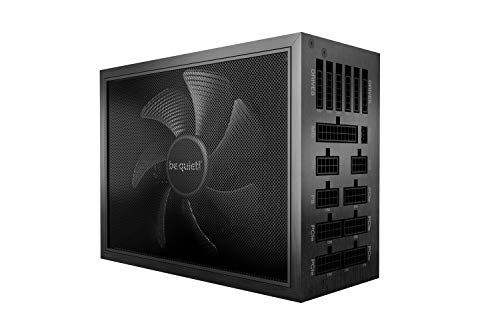
be quiet! Dark Power Pro 12 1500 W 80+ Titanium Certified Fully Modular ATX Power Supply (BN647)
arctic lotus
but this one is basically the same thing but cheaper and better

Thermaltake Toughpower TF1 - TT Premium 1550 W 80+ Titanium Certified Fully Modular ATX Power Supply (PS-TPD-1550FNFATx-1)
it is 180mm instead of 200
50 more watts and $60 less
these two psus almost make the axi look inferior cause so far all i see is an additional 50w for $200
i like the branding tbh, but that just doesnt make sense
sharp harness
I can't say i would go with anything above that anyways so if you want that psu get it imo.
its basically what you want anyways based off of what you have been saying.
can't see why it would be a bad choice besides not being atx 3.0
but the darkpower pro 12 isnt either iirc
only reason atx 3.0 matters btw is looks.
i think i showed you the cable mess the adapters make on my 4080
arctic lotus
atx 3.0 turns 3 needed cords into just 1 needed cord right
sharp harness
4 since you have a 4090 but yes
kinda ugly but doesnt really matter that much besides taking 15 more seconds when building your comp
sharp harness
arctic lotus
atx 3.0 turns 3 needed cords into just 1 needed cord right
Are you getting custom cables for your psu or keeping those stock?
Completely unrelated question btw.
arctic lotus
probably stock at first
arctic lotus
sharp harness
4 since you have a 4090 but yes
damn so 4 into 1 with atx 3.0
arctic lotus
ik what you meant
sharp harness
did you mean that 4 is now 1 instead of 4 goes into 1?
arctic lotus
yeah
sharp harness
might have misinterpreted that lol.
arctic lotus
atx 3.0 still makes it 1 cord even if 4 would have been required
thats really nice tbh
sharp harness
Yes
arctic lotus
what else is there to compare tho?
i can compare the atx12v specifaction
some will be atx12v 3.0 or atx12v 2.0 etc
sharp harness
arctic lotus
what else is there to compare tho?
Nothing, atx 3.0 is only for the 12vhpwr cable.
arctic lotus
ik its relatively very helpful but overall p minor
sharp harness
yeah
sharp harness
basically only reason i recommend atx 3.0 is becasue you dont give a shit about budget.
$$$
arctic lotus
 sharp harness
but i guess the cost will be about even if you plan on getting cable mod or other custom cables in the future
arctic lotus
sharp harness
$$$
yeah i dont
sharp harness
since you can cut 3 cables out of the cost
arctic lotus
i will probably end up going atx 3.0
arctic lotus
arctic lotus
tbh idk about any of these
can a psu have all of them lol
how do i check to see if the psu has these
sharp harness
any power supply you will be buying will have all of those
arctic lotus
and how to i check for sure if it is atx 3.0
sharp harness
arctic lotus
and how to i check for sure if it is atx 3.0
The 12vhpwr connector at the back of the psu
arctic lotus
sharp harness
any power supply you will be buying will have all of those
oh wow so you can have all of them and multiple
sharp harness
usually pcpartpicker has photos of the back of the psu
arctic lotus
is there a place to check for the supported protections?
i was told the 12vhpwr connector doesnt mean it is atx 3.0 tho
sharp harness
arctic lotus
is there a place to check for the supported protections?
manufactures website, they love bragging about marketing spiel.
arctic lotus
so psus have a manufacturers website just like mobos too
sharp harness
arctic lotus
i was told the 12vhpwr connector doesnt mean it is atx 3.0 tho
meh, doesn't really need to be 3.0 just needs to have the connector and be A-A+ imo
arctic lotus
or A
not A * too risky
oh also the connectors
ive seen people make the back io of the psu into a big deal
like "oh i got this psu because it had an additional blah blah connector"
what connectors are important and how many do you need of each
i kind of remember some but i didnt learn all of them
topaz solstice
the 2 main ones is the 24 pin motherboard and the eps
after that it's the pcie/gpu ones
then it's sata & molex
arctic lotus
 topaz solstice
arctic lotus
not A * too risky
topaz solstice
arctic lotus
not A * too risky
the '*' just means it's in speculative position
arctic lotus
yeah
topaz solstice
it's not a tier
topaz solstice
+/-/* is for their legend so they (psu cultist) know what to put it as on the website itself
topaz solstice
arctic lotus
it says its a subtier
for the website
and speculative just means it can go fully Tier A, or go tier A low priority or drop to B
arctic lotus
yeah ik that too
arctic lotus
no point in buying a psu with less testing and less reviews only to later find out it dropped to B
topaz solstice
but for what you want we all suggested to go tier A just for the ease
arctic lotus
well yeah i dont want B tier
topaz solstice
arctic lotus
no point in buying a psu with less testing and less reviews only to later find o...
there is a point, and that point is, the system will be fine
arctic lotus
im not looking for fine tho
topaz solstice
it would be bad if it suddenly drop to tier E/F instead
arctic lotus
yeah
but why buy a B tier psu when you could have an A tier psu
and why take a chance on a speculative psu
when not enough info is out to say it is definitively well placed within that tier being A or B or C
topaz solstice
arctic lotus
but why buy a B tier psu when you could have an A tier psu
pricing
arctic lotus
Also why opt in for buying a low priority psu, when you have this time now with the money available to you to buy an A gold psu
topaz solstice
and i've also shown an example a long way back where a bronze rated psu (tier B) completely out performed a gold rated psu (tier F)
arctic lotus
if you showed that example i dont remember it
and i also dont understand how that is possible
topaz solstice
originally the p750gm was rated tier A for a short while til it exploding happened
i can even point out a brand that got a psu gold rated only to swap parts out for it to be bronze rated instead after just so they can claim the psu is still gold rated with out retesting
topaz solstice
arctic lotus
and i also dont understand how that is possible
it's as easily possible as having a platinum rated psu being a bomb instead and having it nuke your system completely
arctic lotus
yeah then that psu belonged in tier F.
ive already included and considered gold and platinum options
topaz solstice
bronze rated psu selected, gold coloured on the tier B list (literally is a silver rated psu til they did away with the silver ratings)

 arctic lotus
are you saying to consider silver or bronze too
topaz solstice
gold rated psu, no colouring added on the list, tier F, explodes

 arctic lotus
i was just confused by the word rated at first. im not anymore
topaz solstice
arctic lotus
are you saying to consider silver or bronze too
nope, what i'm saying is you never select a psu to buy, by it's efficiency rating
arctic lotus
well that's good cause i didnt
topaz solstice
said company that has a fake gold rated psu that really a bronze rated psu

if it wasn't for those in the psu cultist network creating this tier list we'd never know about some of the stunts some manufacturers have gone to
desert mist
Gigabyte 🫠
arctic lotus
im p sure gamemax is all tier E
desert mist
Great brand, but has 1 exceptionally bad model of PSU
topaz solstice
arctic lotus
im p sure gamemax is all tier E
nope
topaz solstice
desert mist
Great brand, but has 1 exceptionally bad model of PSU
1 complete bad line
desert mist
topaz solstice
said company that has a fake gold rated psu that really a bronze rated psu
It says right all unit soooo @arctic lotus
arctic lotus
a lot of brands have at least 1 bad tier psu
arctic lotus
desert mist
It says right all unit soooo <@841694455747706911>
what?
desert mist
That pictures shows all gamemax units to be F tier
desert mist
topaz solstice
1 complete bad line
That’s what I said
arctic lotus
yeah its bad
topaz solstice
arctic lotus
a lot of brands have at least 1 bad tier psu
yes, evga has 3 lines that are tier F, and a further 3 that are tier E, the tier F ones well one of them catches on fire
desert mist
Anything below C tier I personally wouldn’t even consider for a budget build
topaz solstice
desert mist
That’s what I said
nah, you said model, which would just be a p750gm, not a whole line
desert mist
Buying a $500 pc and putting a $40 PSU in it…is just not worth it
arctic lotus
well thats cause D tier is for igpu builds
desert mist
topaz solstice
nah, you said model, which would just be a p750gm, not a whole line
The model would be the P-GM model lol
topaz solstice
desert mist
Buying a $500 pc and putting a $40 PSU in it…is just not worth it
it is, but for $40 you get a tier C psu straight away
desert mist
750 and 850
topaz solstice
desert mist
The model would be the P-GM model lol
that's a whole line
desert mist
I wouldn’t call it a line seeing as theirs only 2. It’s just two variants of the same model
Two garbage PSUs
topaz solstice
desert mist
I wouldn’t call it a line seeing as theirs only 2. It’s just two variants of the...
2 models from a production line
topaz solstice
desert mist
Whatever, it’s just generally a terrible model of PSU
which funnily enough was designed by a company that makes power bricks for laptops which gigabyte basically paid to have them design
on the odd occasion, if you're very smart you can get a brand new tier A or B psu for $40
arctic lotus
is this psu atx 3.0

NZXT C1200 1200 W 80+ Gold Certified Fully Modular ATX Power Supply (PA-2G1BB-US)
desert mist
I had a Corsair CX750M which is an exceptional C tier PSU. And was OCing my 7900 xtx and 5800x and then upgraded to a EVGA supernova g2 1300w and couldn’t be happier
topaz solstice
arctic lotus
https://pcpartpicker.com/product/RHfnTW/nzxt-c1200-1200-w-80-gold-certified-full...
i wonder?

 desert mist
topaz solstice
on the odd occasion, if you're very smart you can get a brand new tier A or B ps...
desert mist
topaz solstice
on the odd occasion, if you're very smart you can get a brand new tier A or B ps...
I got mine for $60 1300w Supernova G2
pale tulip
its like
 arctic lotus
okay cool
desert mist
Normally like $200+
arctic lotus
it said it on it's name, but it doesnt say anothing on pcpp
pale tulip
wtf 10 years warranty
topaz solstice
desert mist
I had a Corsair CX750M which is an exceptional C tier PSU. And was OCing my 7900...
originally i had an aerocool intergrator mod 750w (tier D at the time) which is a tier F which i paid something like £70-80 for
topaz solstice
swapped it out for a corsair tx650m (gold) for £60, it wasn't even on the tier list till a month or so later, end up finding out it's a tier A psu
i can say for sure it's worth being a tier A psu after going through 3 powercuts in a single day
desert mist
Mine was a return and I also got it on sale 
pale tulip
my b12 is decent so far
topaz solstice
i need to get another decent psu to swap out the one in my mum's pc
she has a pc i built from my spare parts that's worth around £400 at the time
though it has said tier F psu inside it
i missed out on getting another tx650m that was on sale for £45
still though, it means you can get a more decent psu for less than over spending for a psu that can be majorly worser
 hazy hedge
what chair are you gunna get?
 gentle elm
hazy hedge
what chair are you gunna get?
gentle elm
hazy hedge
what chair are you gunna get?
Don’t start her on peripherals
topaz solstice
hazy hedge
what chair are you gunna get?
she wants luxury, so it's going to have to be a herman miller
hazy hedge
topaz solstice
she wants luxury, so it's going to have to be a herman miller
the one i just got?
topaz solstice
dunno but if she's planning on blowing 5k of a pc, i suspect 1.5k on a chair will be spent
hazy hedge
topaz solstice
dunno but if she's planning on blowing 5k of a pc, i suspect 1.5k on a chair wi...
That chair all together was $2047
arctic lotus
topaz solstice
dunno but if she's planning on blowing 5k of a pc, i suspect 1.5k on a chair wi...
im not the chair kind of girl
if i had a house or something
but i am literally moving out and most likely with someone or most likely into a van
if i wanted to show people my personality through my house decor i will just bust out animal crossing like bruh
i will get a 2nd switch before i get a house to own a chair
a pink chair though omg that would be so so cute. like those ones with the cat ears 🥺
i would happily spend a couple thousand on something like that.
arctic lotus
topaz solstice
dunno but if she's planning on blowing 5k of a pc, i suspect 1.5k on a chair wi...
you can expect this for the monitor tho
topaz solstice
arctic lotus
im not the chair kind of girl
put it this way, herman miller is top of the line for computer chairs
arctic lotus
okie
 remote sapphire
hazy hedge
G9 all the way for monitor
remote sapphire
hazy hedge
G9 all the way for monitor
One Day ill have a set up as Overkill as you (one Day)
arctic lotus
i was gonna ask about that
gentle elm
remote sapphire
One Day ill have a set up as Overkill as you (one Day)
Fr same for me
topaz solstice
hazy hedge
G9 all the way for monitor
nah bad choices for what she wants to do
arctic lotus
is g9 overkill
gentle elm
hazy hedge
G9 all the way for monitor
until it cracks
arctic lotus
cause if so i want it
gentle elm
gentle elm
**until it cracks**
and Samsung refuses warrenty
remote sapphire
arctic lotus
is g9 overkill
It would be like using the death Star on a mosquito Overkill
hazy hedge
arctic lotus
is g9 overkill
Let’s put it this way if I’m buying it then it’s over kill lol and i already purchased it
pale tulip
might be a bit too big if its going in a van
topaz solstice
arctic lotus
is g9 overkill
it's a curved monitor but totally unusable for what you want to do, especially if used in a van
 arctic lotus
hazy hedge
Let’s put it this way if I’m buying it then it’s over kill lol and i already pur...
arctic lotus
hazy hedge
Let’s put it this way if I’m buying it then it’s over kill lol and i already pur...
so i could just copy your build
i almost got those sabrents
topaz solstice
arctic lotus
so i could just copy your build
you could but you won'd be able to make use of it's performance
hazy hedge
arctic lotus
so i could just copy your build
Not trying to be rude but it might be out of your budget
arctic lotus
whats the build so far
hazy hedge
$27k i think
arctic lotus
no i mean the link
hazy hedge
I have an old on it’s not up to day 1 sec
Part List - Intel Core i9-13900KS, GeForce RTX 4090, Corsair 7000D AIRFLOW ATX Full Tower
arctic lotus
did the ks drop in price??
hazy hedge
I think if we update it it should be at 30k or over in price
topaz solstice
hazy hedge
https://pcpartpicker.com/list/GczX9r
the noctua's and mouse are not that great tbh
hazy hedge
topaz solstice
the noctua's and mouse are not that great tbh
Yeah it’s an old list
So much has changed to more overkill stuff
The keyboard I’m building is like $1.5k
topaz solstice
hazy hedge
Yeah it’s an old list
yeab, but those $32 nocuta fans loose out to a $9 arctic fan
arctic lotus
did the 13900ks really drop that much in price?
arctic lotus
wtf
hazy hedge
With all the 14 gen talk they are trying to sell all the stock
arctic lotus
ngl but you guys will hate me if thats true lmao
topaz solstice
arctic lotus
did the 13900ks really drop that much in price?
yes it did, still not a cpu to use for gaming purposes
arctic lotus
lmaooo
topaz solstice
hazy hedge
With all the 14 gen talk they are trying to sell all the stock
3% gains over what you're using, nothing but what you can already get from an OC
 sturdy anchor
Apparently it’s 15%
topaz solstice
arctic lotus
ngl but you guys will hate me if thats true lmao
it looses out against a 7800x3d when it comes to gaming
hazy hedge
topaz solstice
it looses out against a 7800x3d when it comes to gaming
is that with an oc?
topaz solstice
hazy hedge
is that with an oc?
yup
topaz solstice
hazy hedge
boost oc or like a good oc
both tbh
hazy hedge
topaz solstice
both tbh
how much did it win by?
topaz solstice
hazy hedge
how much did it win by?
depends on the game tbh
topaz solstice
arctic lotus
ngl but you guys will hate me if thats true lmao
for future reference, that's 493w on the 13900k

as for gaming, and with the 4090 showing a bottleneck (1080p after all)

495w on the 'KS'

13900k/ks + 4090 = 1kw minimum needed but a 1.2kw psu is better, and that 1.6kw psu he selected is perfect due to his use case
arctic lotus
everything loses out to the 7800x3d
i joined this server because of the 7800x3d lol
topaz solstice
arctic lotus
everything loses out to the 7800x3d
it's the most efficient cpu for gaming, 5800x3d being second to that
pale tulip
nah
desert mist
I play at 4K so i don’t have much of a reason to upgrade to it 🫠
If I didn’t I’d upgrade
desert mist
 arctic lotus
hazy hedge
https://pcpartpicker.com/list/GczX9r
arctic lotus
hazy hedge
https://pcpartpicker.com/list/GczX9r
also why are you going for the 4 sabrents
arctic lotus
hazy hedge
https://pcpartpicker.com/list/GczX9r
also why two kits of 2x32gb ram
and not one kit of 4x32gb ram?
arctic lotus
its better than the 13900k
ks was just an overpriced option before. this changes everything
desert mist
Does it tho
arctic lotus
afaik it has the best productivity performance out of any cpu right now for a consumer workstation.
followed by imo the 13900k
then the 7950x
then the 7950x3d
it also outperforms the 13900k in gaming
arctic lotus
idk how it fairs against the 7950x in gaming but of course the 7950x3d and the 7800x3d are better in gaming
arctic lotus
desert mist
and the 7800x3d outperforms them all
yeah but its ass in productivity.
desert mist
Its not really lol its a current gen processor comparatively to last gen its pretty solid if you look at it that way
13900KS + 4090 is really meh if you seriously need that type of processing power look at the xeon or epyc lineup
lusty tiger
arctic lotus
yeah but its ass in productivity.
And the 13900ks is ass at being cooled
gentle elm
lusty tiger
And the 13900ks is ass at being cooled
Yeah only aios that can even semi cool it are lf2s and custom looping
You almost need a custom loop for 13900ks
arctic lotus
im most concerned about the power consumption
desert mist
well its a 400 watt chip and the "Efficiency" cores are not efficient at all
 hollow orchid
where did you get 400 watts from?
 worldly shore
if this is your first pc your gonna have a massive Eectricity bill spike
You got the fucking raminator eating all your power
hollow orchid
hollow orchid
where did you get 400 watts from?
 eager yoke
Well with out power limits and very good cooler 400W is not shocking
arctic lotus
worldly shore
You got the fucking raminator eating all your power
raminator?
arctic lotus
eager yoke
Well with out power limits and very good cooler 400W is not shocking
are you saying 400w isnt that bad
worldly shore
arctic lotus
raminator?
Don’t worry abt it it’s a joke
worldly shore
What’s the part list so far
eager yoke
Tech power up with stock just with removed power limits got over 400w
lusty tiger
eager yoke
Tech power up with stock just with removed power limits got over 400w
Because intel motherboards push way too much voltage
eager yoke
Well if intel cpu vc cure need it well that intel problem
 solar gulch
arctic lotus
are you saying 400w isnt that bad
solar gulch
arctic lotus
are you saying 400w isnt that bad
it is not good
well
its not good or bad tbh
lusty tiger
Bad compared to the 7950x3d
hazy hedge
arctic lotus
also why are you going for the 4 sabrents
To fill all the nvme slots
hazy hedge
arctic lotus
also why two kits of 2x32gb ram
and not one kit of 4x32gb ram?
Over clocking reasons
 unreal zenith
Michael is overclocker
arctic lotus
lusty tiger
Bad compared to the 7950x3d
yeah horrible compared to the 7950x3d
120 tdp, 140w ish irl
continuous load
eager yoke
hazy hedge
Over clocking reasons
Well any 4 stick config is bad any way
arctic lotus
hazy hedge
To fill all the nvme slots
why did you go for qlc though, are these going to be your bulk drives?
eager yoke
And 4x32 and 2x2x32 is that same but 4x32 was test to work as 1 kit
arctic lotus
yeah, but isnt it safer to go 4x32
ive heard that if you even mix the same kit like a 2x32 and another 2x32 together, it could be bad.
and its like the same everything
if that's not the case and buying 2x2x32 is completely fine with no issues that's great
lusty tiger
arctic lotus
ive heard that if you even mix the same kit like a 2x32 and another 2x32 togethe...
The same exact kit is probably fine
4x kits are much less common and a lot more expensive
arctic lotus
ive also heard that its completely false, and that mixing kits is mostly fine to an extent
cause that's kind of a big deal for me personally
cause i could just do a 2x kit now and get another 2x kit later
instead of a 4x kit now
or if i get a 4x kit now, i could first time boot with 2 sticks and then experiment with 4 sticks
lusty tiger
Don’t get 4 ram sticks lol
eager yoke
lusty tiger
The same exact kit is probably fine
Not always
And 4 dimms on ddr5 is just bad idea if you want any good speed or want to oc since daisy chain
And more imc load
lusty tiger
Yes
eager yoke
But there a some user who just like lots of ram
But I like fast 16gb over slower 32gb
2133 was not about not to get error fast with 4x8gb but 2x8gb 2400 easy to get running stable now I going into the hell of tunings timings
hazy hedge
arctic lotus
why did you go for qlc though, are these going to be your bulk drives?
Yeah
lusty tiger
eager yoke
But I like fast 16gb over slower 32gb
It’s not even that hard to get fast 32GB anyway
exotic seal
i have 64 gigs ofn ram and oh boy i can run valo, discord and csgo all at once
all the high mem apps
eager yoke
Well I am not buy more ddr3
lusty tiger
Oh ddr3
exotic seal
ddr5 is the latest innit?
lusty tiger
Yep
lusty tiger
Yes
eager yoke
Ddr4 is faster for some thing eg PiPrime but the records was set on intel 11 series due to i having better imc then 12 series
arctic lotus
hazy hedge
Yeah
but doesnt qlc endurance suck
arctic lotus
eager yoke
And 4 dimms on ddr5 is just bad idea if you want any good speed or want to oc si...
ok then why is micheal going 4 sticks
hazy hedge
arctic lotus
but doesnt qlc endurance suck
Honestly it depends
hazy hedge
arctic lotus
ok then why is micheal going 4 sticks
Because I’m crazy lol
arctic lotus
but you oc
eager yoke
To flex the capacity of slow ram
hazy hedge
eager yoke
To flex the capacity of slow ram
I got faster ram then I’m expecting to run at that way i can get 4 stick to run at what i want
eager yoke
192gb of ram is over kill for most
arctic lotus
cause i wanted to do a qlc drive for my bulk drive and i was told no lmao
eager yoke
And but 96gb now that’s ok since you get that in 2 sticks
arctic lotus
hazy hedge
I got faster ram then I’m expecting to run at that way i can get 4 stick to run ...
so you ram that is rated for higher MT/s
and you think that will make the ram not slow down as much
hazy hedge
arctic lotus
so you ram that is rated for higher MT/s
Yeah knowing it won’t hit that high but still be high
eager yoke
But daisy chain mobo hate 2dpc
arctic lotus
also, what does the godlike have that you plan to use?
hazy hedge
arctic lotus
also, what does the godlike have that you plan to use?
The nvme slots
And price tag
And 10 gig network
Thunderbolt 4
eager yoke
I hate my .05gbit internet
arctic lotus
that's not really a good specific reason, there are other mobos that have all of that.
arctic lotus
does it really have 7
hazy hedge
Yeah
hazy hedge
 hazy hedge
arctic lotus
dont you still read and write to your bulk drive tho?
hazy hedge
arctic lotus
dont you still read and write to your bulk drive tho?
Wym?
arctic lotus
cause i thought with a cold storage bulk drive, you wouldnt read and write to it as much so i was thinking that a qlc drive would work best for a bulk drive but i was told no
hazy hedge
I’ll be using my bull drives daily. The files i work with range from 1 gb files to 100gb files for work all day long
I honestly don’t care about the nitty gritty i wanted fast drive with lots of capacity
arctic lotus
so wouldnt it be a bad idea to go qlc then if you are going to be reading / writing to those drives on the daily
that cant be good
they arent even fast tho
which is why im having a hard time understanding
arctic lotus
i mean for a bulk drive gen 4 is plenty
gen 4 always fast, but its still qlc
ig im just wondering why not gen 4 tlc
or gen 5 for someone like you
i see the t700. im going one as well
hazy hedge
Crucial T700 4TB Gen5 NVMe M.2 SSD - Up to 12,400 MB/s - DirectStorage Enabled - CT4000T700SSD3 - Gaming, Photography, Video Editing & Design - Internal Solid State Drive https://a.co/d/f0RASG5

Are you ready to feel the rush of extreme performance? The Crucial T700 PCIe 5.0 NVMe SSD offers speeds of up to 12,400MB/s sequential reads and up to 11,800MB/s sequential writes** (up to 1,500K IOPS random reads/writes**) for faster gaming, video editing, 3D rendering and heavy workload applica...
This is my boot drive
arctic lotus
that should be fine, but its more a main drive with your os on it. i wouldnt call it a dedicated boot drive.
hazy hedge
Yeah
arctic lotus
why have you decided not to go a dedicated boot drive btw?
hazy hedge
The pc is already gunna boot on the matter of seconds I’m not gunna worry to much about that
arctic lotus
also i only see the t700, and the 4 sabrents. are you still working on searching for the last drive?
hazy hedge
I rather get more storage
arctic lotus
last 2 drives i mean
hazy hedge
Prolly two more sabrents
arctic lotus
actually your boot speed shouldnt be much faster than anyone elses really, but that's okay.
arctic lotus
hazy hedge
Prolly two more sabrents
ive heard about your work, but can you remind me why you need so much storage.
hazy hedge
arctic lotus
ive heard about your work, but can you remind me why you need so much storage.
Design files i use my home pc as one of my backups
I have all my files saved on a NAS at my office. Then a cloud backup then i also have a back up on my pc
arctic lotus
are you like an artist
arctic lotus
oh nice, what kind of prints
hazy hedge
I designed, printed, wrapped, then photographed this truck as a example of my work
The whole package was like $20k
arctic lotus
maybe if i get a van i will pay you to do my vanlife van
 arctic lotus
where is it
arctic lotus
that's where im going
arctic lotus
ohh
the rest of the state is still beautiful
is it like, possible to do most of your read and writing to your t700 and just keep your sabrents as cold storage
cause if so, i would totally, go like 1 of those.
arctic lotus
hazy hedge
Design files i use my home pc as one of my backups
also why are you doing the fe
on pcpp it's $2500
topaz solstice
gentle elm
Yeah only aios that can even semi cool it are lf2s and custom looping
frozen notte 360mm and deepcool lt720 also
topaz solstice
arctic lotus
are you saying 400w isnt that bad
it is, it's where you need a 1200w -1600w psu to power the system
topaz solstice
arctic lotus
also, what does the godlike have that you plan to use?
you got to realise, his system is based on what he does for work, though he could of gone with a 13700k
topaz solstice
also you got to realise, using a 13900k/ks means no van life at all, ever @arctic lotus
7800x3d/7950x3d you will still have a chance of it
arctic lotus
topaz solstice
also you got to realise, using a 13900k/ks means no van life at all, ever <@8416...
how much was yours again
like 600w continuous load
topaz solstice
528w roughly, but i use a ryzen 5 3600 + rx580
arctic lotus
so the inverter's continuous load has to be greater than the continuous load of all the pc parts or the psu?
topaz solstice
arctic lotus
so the inverter's continuous load has to be greater than the continuous load of ...
for an inverter, it would need to be able to handle more than just the pc
as you may want to use something else at the same time as said pc
ther are certain things you'd run straight off a battery
i.e. rv pump, lighting, fans for airflow
arctic lotus
why not just have 2 inverters
topaz solstice
arctic lotus
why not just have 2 inverters
totally unnecessary
arctic lotus
why
topaz solstice
also you're working with limited room
arctic lotus
yeah but that doesnt matter if something become impossible
topaz solstice
well you won't be using an inverter in a house
arctic lotus
it can't just be the continuous load of the parts cause the psu has to draw an extra amount of power to make up for it's lack in efficiency
topaz solstice
as you'll be tied to the mains grid
arctic lotus
so it must be the continuous load of the psu
which is probably not the max rated wattage
it would probably be less than that, but more than the pc parts.
arctic lotus
topaz solstice
528w roughly, but i use a ryzen 5 3600 + rx580
idk how much power the rest of the parts use yet. but im already up to at least 600w
topaz solstice
arctic lotus
idk how much power the rest of the parts use yet. but im already up to at least ...
an estimated 600w**
arctic lotus
thats what i said
topaz solstice
but pcpp's estimated wattage never covers for transient spikes let alone if someone is going to OC
600w can be just the gpu alone
arctic lotus
the continuous load of the 7950x3d is around 140w
topaz solstice
arctic lotus
the continuous load of the 7950x3d is around 140w
that's when gaming, combined with a 4090, that will be 740-750w
remember the "official wattage" from nvidia is 450w, they don't disclose it's transient spike
and they do this with all their gpu's
the 3090 is labelled as a 350w gpu, yet with transient spikes it easily does 500-550w
arctic lotus
ik the aibs can push 600w
topaz solstice
arctic lotus
ik the aibs can push 600w
no, this is not pushing it to 600w
this is a power spike that happens
arctic lotus
im saying at least 600w because 120w + 480w
topaz solstice
a transient spike, is a power spike/surge that happens in tha matter of microseconds to seconds
arctic lotus
ik what a transient spike is
topaz solstice
do you?, do you really?
arctic lotus
yeah
topaz solstice
do you know how to account for them when looking at what psu you will want?
arctic lotus
no
topaz solstice
the old addage for psu is look at the total wattage of gpu + cpu and then add 50w for head room
but that does not account for spikes
what you would do is have a 100-200w head room
50w of that covers for everything else that's plugged into the motherboard mainly, and 100-150w covers for transient spikes
it is why a fair few of us here have told you that you won't need more than 1.2kw for a psu
arctic lotus
200w of headroom, honestly i thought that was the bare min headroom. not the 50w
or 100w
so you dont compare the continuous load of the cpu + gpu + other peripherals (the full wattage of the system.)
you compare the max power of the system
to the continuous load of the inverter (not the max wattage of the inverter)
topaz solstice
i do yes, for some that might sound wrong, but you would have to realise specifically in a van while your pc is on, and you wanted to have a drink of tea/coffee at the same time, you would need to combine the wattages of the 2
or turn 1 off to use the other
400w-1kw is a rough estimate but there are higher wattage ones for the heating element, and still you would need to be able to handle both being on at the same time
arctic lotus
what is the power consumption of the 13900ks
topaz solstice
arctic lotus
what is the power consumption of the 13900ks
495-497w if power unlocked, but around 300w if not
arctic lotus
so yeah you want the continuous load of the inverter to be equal to or higher than the psu wattage
topaz solstice
the 11700k can hit 442-447w, 12900k can hit 450w, and 13900k can max out at 493w, while the 13900ks will do 495-497w maxed out
topaz solstice
arctic lotus
so yeah you want the continuous load of the inverter to be equal to or higher th...
higher than the psu wattage
arctic lotus
yeah for other things
topaz solstice
a 1kw pc build you'd want it to handle a 2kw continuous load
most inverters are quite inefficient
any transient spikes that a gpu has should be covered by the psu, but it doesn't mean it couldn't cause a surge in the inverter
arctic lotus
tbh, it sounds like you are exaggerating
topaz solstice
which is why i also said about reading up on the inverter's info
might sound it, but i'm not
eager yoke
When will pc need there own power breaker
topaz solstice
if you got an inverter to match your system, it's continous load will be around half it's peak load
topaz solstice
eager yoke
When will pc need there own power breaker
we're already at that for an american home
eager yoke
Well 2.4kw is Standard for the most outlets and then we can get 50%. More power to outlets were just 15 amp plugs in Australia but we do have a 32A plug standard
topaz solstice
in the uk, at maximum we can do 4kw out of a socket
arctic lotus
okay so an inverter is like a giant psu, and i basically want to get as high as possible
topaz solstice
the circuit breaker can be either 32a if it's ring mains, or 16a if it's done on a by room bases, on a star main it can be 16 or 32a
but the plugs themselves are fitted with either a 3, 5 or 13a fuse in most cases
topaz solstice
arctic lotus
okay so an inverter is like a giant psu, and i basically want to get as high as ...
yes but instead of converting AC to dc, it converts DC to ac
12/24/36/48v dc being the voltages being used to convert from when it comes to an inverter
arctic lotus
okay, yeah. im p sure i will still be able to do vanlife if i do the 13900ks
not that it would be right away
topaz solstice
arctic lotus
okay, yeah. im p sure i will still be able to do vanlife if i do the 13900ks
only if you used a 6kw inverter from the get go, not a 3kw one
and despite that, the heat output of a 13900k/ks is the main part of what would be preventing you
it's a cpu where a 360mm aio is minium requirement for it
or to go custom loop
arctic lotus
then ill just go the 360mm aio
topaz solstice
and even then custom loop in a vehicle is not a great choice
topaz solstice
arctic lotus
then ill just go the 360mm aio
pretty limited to 3 decent aio's then to handle it
arctic lotus
i wont do custom loop
topaz solstice
deepcool lt720 (360mm), arctic liquid freezer 2 360mm, thermalright frozen notte 360mm
and due to the gpu you want to use, it means you now need a case that can handle 2x 360mm rads
topaz solstice
so we'd be definitely looking at something like a corsair 5000d airflow as minimum
as it can handle up to 3x 360mm rads on it
though i should have said earlier, your gpu choice prevents you from doing an itx build more so
mATX/ATX only will be your choices
though as you want ATX primarily it means going mid ATX or full ATX case
5000d af = mid ATX case
7000d af = full ATX case
sharp harness
topaz solstice
deepcool lt720 (360mm), arctic liquid freezer 2 360mm, thermalright frozen notte...
I have a LS720 which is functionally the same as the LT720 besides the rgb and I like it a lot.
topaz solstice
sharp harness
I have a LS720 which is functionally the same as the LT720 besides the rgb and I...
yup, the pump and fans realistically are the only difference between them
sharp harness
topaz solstice
yup, the pump and fans realistically are the only difference between them
The pump is the same, only difference is looks iirc.
topaz solstice
sharp harness
The pump is the same, only difference is looks iirc.
thought the pumps had a minor difference in it's tuning
sharp harness
topaz solstice
thought the pumps had a minor difference in it's tuning
You're right.


Interesting.
LT720 is the first one and LS is second btw
topaz solstice
the ls720se might be more similar to the lt720 pump wise
sharp harness
topaz solstice
the ls720se might be more similar to the lt720 pump wise
pretty sure rather than the pump being tuned differently it is the previous generation of their pump
for the SE
topaz solstice
possibly but newer gen pumps will mean improvements, so some of it will be in it's tuning
as some gens it may mean a whole new redesign from the ground up rather than a minor modification
desert mist
arctic lotus
the continuous load of the 7950x3d is around 140w
No no it’s not. Not at full load it’s way higher
TDP is pretty much a useless metric to see how much wattage a cpu will pull nowadays
For example my 5800x has a TDP of 105w and regularly pulls 145w+ under full load with an undervolt and slight OC it was higher before I undervolted
arctic lotus
its tdp is 120w
desert mist
At full load it will pull more then 120w
arctic lotus
that's what i said lmao
desert mist
Well it’s still higher then 140w lol
runic bloom
desert mist
Well it’s still higher then 140w lol
140 is pretty close
desert mist
It’s actually around 165+
runic bloom
It's like 150 under full load
desert mist
According to public benchmarks at stock clock
runic bloom
Gamer nexus test had it at 156

 runic bloom
Either way still not far off from 140
arctic lotus
so it would seem that the 13900ks is basically on par in gaming with the 7950x3d
but i would still say the 7950x3d is slightly better in gaming.
but hardly
it's much better in gaming in benchmarks where the 13900ks had to use the same ram speed as the 7950x3d likely 6000
but when a 13900ks ddr5 7200 is compared with the 7950x3d ddr5 6000, it either performs better or on par most of the time, and sometimes is slightly worse.
runic bloom
13900ks gonna be way better in most productivity tasks though, i don't think anyone should buy it for gaming
arctic lotus
hazy hedge
https://pcpartpicker.com/list/GczX9r
oh nevermind lmao, the price went back up
that $450 price tho, was insane.
would have made the $200 price hike on the 7950x3d so hard to go for
because taking the additional productivity performance + the almost on par gaming performance would have been more worth it imo
is there a place to look at inverters and compare their metrics like pcpp?

1200 watt pure sine inverter with transfer switch conforms to UL458
this one can do 1200w continuous load but it's a 2400w inverter
i could have a dedicated inverter for the pc
topaz solstice

 topaz solstice
arctic lotus
i could have a dedicated inverter for the pc
topaz solstice
arctic lotus
i could have a dedicated inverter for the pc
no, use a single inverter that can run everything
topaz solstice
topaz solstice
techspot btw@runic bloom@desert mist
desert mist
Yea the data I got I think was just in general computing around 165w but still proves TDP is a useless metric
arctic lotus
topaz solstice
no, use a single inverter that can run everything
yeah but its possible
finding an inverter that does 2kW or 3kW continuous load might be hard to find
topaz solstice
 arctic lotus
topaz solstice
arctic lotus
topaz solstice
im already aware of power consumption