#Suggestions on ASRock AM5-boards to pair w/ my R7 7900X3D?
397 messages · Page 1 of 1 (latest)
 fierce hare
 wind mirage
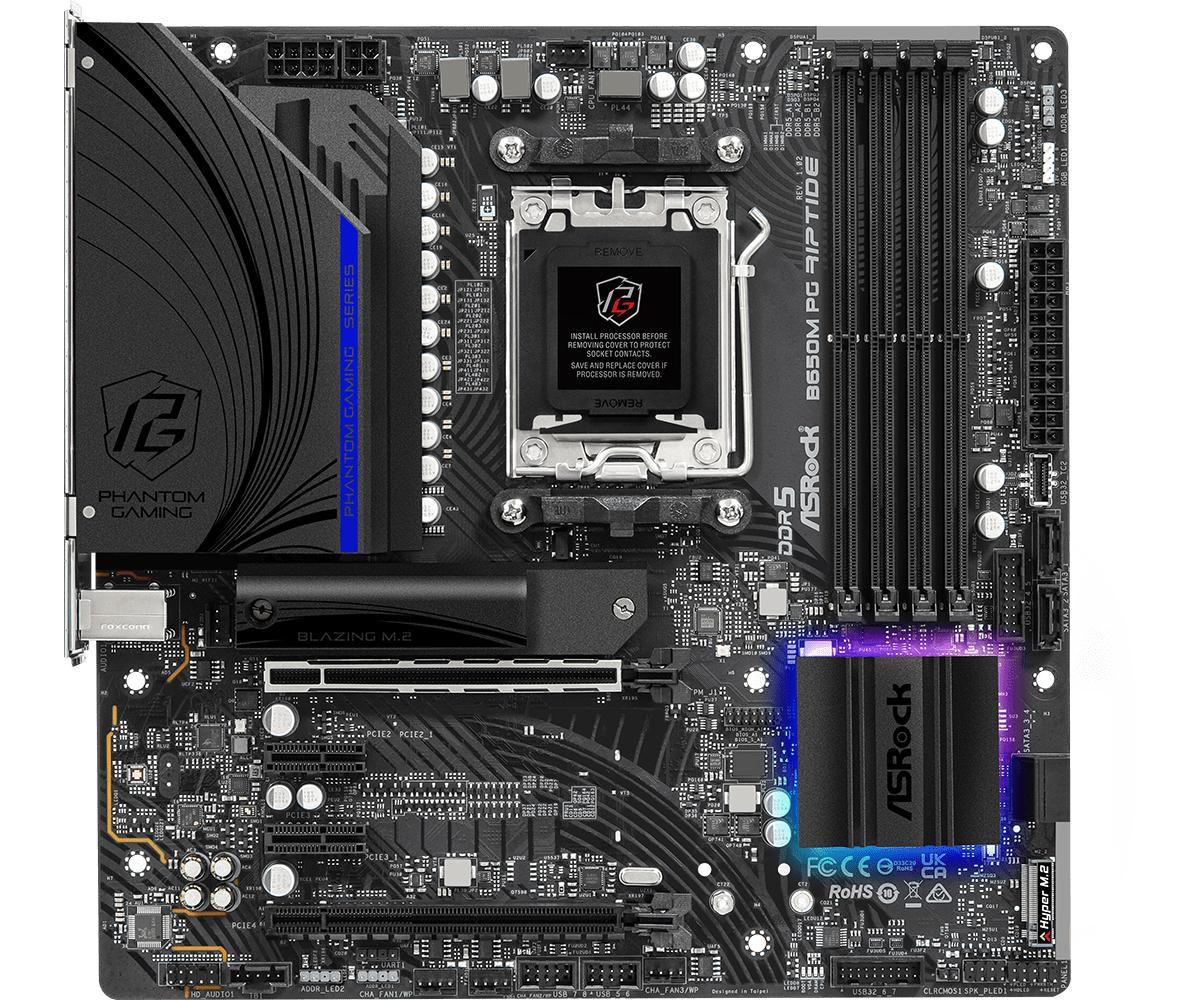
ASRock B650M PG Riptide WiFi AMD Socket AM5 Ryzen 7000 Series Processors Motherboard https://a.co/d/1VLuv9j

MFR-PART#: B650M PG RIPTIDE WIFI CPU:SUPPORT AMD AM5 RYZEN 7000 SERIES PROCESSORS CHIPSET:AMD B650; MEMORY:DUAL CHANNEL;4DDR5;MAX 128GB; SLOT:1PCIE4.0X16;1PCIE4.0X16;2PCIE3.0X1; GRAPHICS:INTEGRATED AMD RDNATM2 GRAPHICS(ACTUAL SUPPORTY VARY BY CPU);HDMI;DP AUDIO:7.1-CH HD AUDIO(REALTEK ALC897)...
These are pretty sweet motherboards
They have higher end one like the Taichi but they’ll be pretty expensive
fierce hare
yeah. already used alot of cash
fierce hare
wind mirage
ASRock B650M PG Riptide WiFi AMD Socket AM5 Ryzen 7000 Series Processors Motherb...
Is this one a slightly better version of it?
2 931,00 kr Hovedkort, størrelse: ATX, AMD AM5 socket, AMD B650E chipset, 1 x PCI-Express 4.0 x16, Dual DDR5-5600 4 x DIMM slots, lagerporter: 4 x SATA-600 / 1 x M.2 NVMe PCI-Express 3.0 / 1 x M.2 NVMe PCI-Express 4.0 / 1 x M.2 NVMe PCI-Express 5.0 (M.2 size: 2242 / 2260 / 2280), USB 3.2 Gen 2 type A & C, skjermtilkobling: 1 x HDMI 2.1, Killer E...
fierce hare
3 665,00 kr Hovedkort, ATX, AMD AM5 Socket, AMD X670E, 1 x PCI-Express 5.0 x16, Dual DDR5-5600 - 4 x DIMM slots (AMD EXPO support), 6 x SATA-600 / 1 x M.2 NVMe PCI-Express 3.0 / 3 x M.2 NVMe PCI-Express 4.0 / 1 x M.2 NVMe PCI-Express 5.0 (2242 / 2260 / 2280), USB 3.2 Gen 2x2 Type A & C, HDMI 2.1 forbindelse, Realtek RTL8125 2.5 Gigabit LAN, WiFi...
I might go for this one. The 7900X3D is a performance CPU so I better not pick a mid to high-end motherboard - but rather go for something better, I got Corsair 1000W Gold PSU, RTX 3080, brand new Asus cooler which cools real nice. and a Kingston Fury 2TB w/ 7300/7000mb/s r&w.
Would be dumb of me to cheap out on a motherboard and get bottlenecked by my performance parts.
wind mirage
Your motherboard will not bottleneck your cpu lol
Only thing you’d have to worry about is the VRM capacity and with 12 power phases the riptide for sure would be able to handle it
Especially not on am5 boards they all have PCIe gen 5 and 4 from my understanding so your drive storage wouldn’t bottle neck either
fierce hare
 royal rock
And why Asrock in particular?
royal rock
And why Asrock in particular?
I'm not bound to buy an Asrock. Anything will go if its good. I'm fairly new to the whole AMD-builds. I mean, ive even seen reviews where cheaper boards perform better than the more expensive line
If you know of some great boards from other brands, I would greatly appriciate any suggestions.
royal rock
Oh ok
Then buy the cheapest b650matx/atx board you can find with could vrms
Wait r7 7900x3d
Do you mean r9 7900x3d or r7 7800x3d
fierce hare
R9 7900X3D 😄
fierce hare
My bad
wind mirage
Really not a point in buying a super high end board then. That riptide board will do fine tbh
fierce hare
thnx man!
wind mirage
No problem
royal rock
I agree
fierce hare
wind mirage
No problem
Is there any alternative to the riptide if I want an ATX-card? My case don't got those uplifted screw-holes for the bottom part of the motherboard, making the lower part flex.
I have a bigtower
wind mirage
You have to make a compromise to stay at the same point though
You’ll have to play $200 or more for a ATX board equivalent to the riptide
There that but it’s pretty ugly
fierce hare
oh god
any tip for not bending the board? never put something under it to hold it up right, just be careful? will go for riptide then
Also, I only find the riptide without the wifi on the board in norway webshops: https://deal.no/asrock-b650m-pg-riptide/cat-p/c/p1003320323
Same thing, just without wifi or what? its cheaper and im using LAN-cable anyway
 royal rock
Yep just without Wi-Fi and Bluetooth
fierce hare
Actually. its AM4 😄
friggin found it: https://www.multicom.no/asrock-b650m-pg-riptide-hovedkort/cat-p/c/p1003320323?ref=prisjakt
Only one shop in norway sells it

 valid pebble
fierce hare
I'm not bound to buy an Asrock. Anything will go if its good. I'm fairly new to ...
valid pebble
fierce hare
I'm not bound to buy an Asrock. Anything will go if its good. I'm fairly new to ...
I'm using a ASUS X670 for my 7600X, the RAM worked out of the box at 4x16 GB (5600 MHz)
The motherboard arrived on latest BIOS, the CPU runs cold, the pbo functions pretty well compared to Zen 2 which I was using before
fierce hare
Nice
valid pebble
It came with a lot of accessories and I like the way ASUS packs their boxes, MSI doesn't pack it properly
I don't know about other brands though, but I like having a sealed box
MSI doesn't seal the boxes
fierce hare
I already ordered the Riptide now. If you would feel my pain right now with bios flashback, reseating the cpu. new thermal paste. flashing bios without gpu, cpu and the m.2 ssd etc, makes me not wanting to try another asus board.
Got a friend working at the webshop where i ordered the parts, telling me that Asus won't give a new board using RMA
valid pebble
I'd probably have picked a MSI or ASUS, a X670
wind mirage
Eh id steer clear of asus personally but it’s up to the buyer ig
valid pebble
but I think the asrock is not that bad either
fierce hare
wind mirage
Eh id steer clear of asus personally but it’s up to the buyer ig
I agree.
valid pebble
wind mirage
Eh id steer clear of asus personally but it’s up to the buyer ig
The nice thing with Asus / MSI is the fan control options and boot option options
ASrock has no proper boot menu or fan control
fierce hare
think of the motherboard just dying and u cant get a new board.
wind mirage
Gigabyte does thooo
valid pebble
Gigabyte has changed their UEFI like 10 times
the last gigabyte I had had the 3D one
wind mirage
I’ve got a am4 board and it’s pretty noice

 wind mirage
Those look ancient
valid pebble
not that ancient 😄
wind mirage
Thr gigabyte current bios layout looks nothing at all like that
valid pebble
I knew they changed it, did they add a proper fan control too?
fierce hare
It was about money this time. already spent alot for the dead motherboard and now I ordered ASrock Riptide. I think I will be fine.
valid pebble
Especially with how CPUs spike nowadays, having it controlled only on CPU temp is annoying because opening chrome makes the fans ramp up
Asus / MSI doesn't do that, and they never did
Gigabyte to be fair always had the option to change it too, but it wasn't simple (it was from windows)
valid pebble
fierce hare
It was about money this time. already spent alot for the dead motherboard and no...
I don't think it was a bad choice either
but if you looked on the website
3 467,00 kr Hovedkort, ATX, AMD AM5 Socket, AMD X670, 2 x PCI-Express 4.0 x16, Dual DDR5-5600 - 4 x DIMM slots (AMD EXPO support), 6 x SATA-600 / 3 x M.2 NVMe PCI-Express 4.0 / 1 x M.2 NVMe PCI-Express 5.0 (2242 / 2260 / 2280), USB 3.2 Gen 2x2 Type A & C, DisplayPort 1.4 / HDMI 2.1 forbindelse, Intel RTL8125BG 2.5 Gigabit LAN, AMD WiFi 6E (802.1...
Like this one you get WiFi 6/BT, more PCIe ports with better layout, more m2 slots, X670
and from what I can tell a better BIOS
fierce hare
valid pebble
Like this one you get WiFi 6/BT, more PCIe ports with better layout, more m2 slo...
I thought about it, but I have always just used 1x PCI-E slot for my GPU, no expansionslots for wifi and I never used the integrated BT and Wi-Fi. USB-C hub for adding more usb-ports is what I do to expand the amount of ports
wind mirage
You can control via temp, pwm or voltage
And set the intervals in which to ramp it up
Like a delay
Yea I’ve got a Aorus Pro v2

 fierce hare
this has to be the worst month for me. my z390-F build with i7 9700k just died. I was lucky to get the new AM5-build yesterday. Defective motherboard.
fierce hare
its an Asus B650M-A WiFi II. My mate working at the shop says all their RMA's going to Asus get denied if the CPU-socket got bent pins.
And its continuing to happening
valid pebble
I think thats common unfortunately, If the socket pins are bent its your fault
provided you're the one who bent them
fierce hare
yeah. Even If It came like this out of the box or not, you will not get a new board most def. I don't want to spend time, ending up not getting a new board.
fierce hare
valid pebble
provided you're the one who bent them
I think It was my fault, but the board was defective before I re-seated the CPU and thats what bent it I suppose. I can't really tell. Have used alot of time, going mad.
fierce hare
But before the CPU-reseat, the cpu went from 50-100 celcius in 3-5 seconds
fierce hare
I probably should have just done a flashback to see if that sorted it, instead of reseating the cpu
valid pebble
That wouldn't be a software problem tbh
Most likely a sensor / cooler contact problem
How badly are the pins bent out of curiousity? I fixed a CPU with bent pins not too long ago
fierce hare
Could be bad sensor. Using a Asus AIO cooler for it. also brand new. water runs through and fans spins. nothing wrong with the cpu cooler. The odd thing is that on my first post to the bios, It skyrocketed from 50c to 100c in 5 seconds
valid pebble
You might still be able to unbend the pins
fierce hare
I can't really tell if It's the CPU that was the main issue. I just have to try it with the new ASrock and be careful this time
valid pebble
or if the cooler has air in it
it shouldn't get too much above 80c
and thats under full load
fierce hare
valid pebble
or if the cooler has air in it
can't be the cooler as it only took 5 seconds for it to go to 100 celcius
valid pebble
It goes fast, so if the water isn't moving it will
fierce hare
oh
fierce hare
atleast I can RMA the cpu and the cooler is the issue.
valid pebble
Good luck 😄
fierce hare
Any tip on how I should try everything step by step?
valid pebble
Try to tilt it around a bit if its still overheating once the asrock is installed
because since you are using AIO instead of standard watercooling you don't have a reservoir tank
that means your AIO is actually only like 95% filled up, so sometimes in transportation the air gets stuck in the pump and it won't spin
since in a normal watercooling system you have the reservoir full of water and the pump below it so the pump always has water, that's not how it works in a AIO, so if it still overheats i'd tilt the computer around a bit, or put the pump to 100% in BIOS and let it run for a while
it might help to shake the AIO a bit or flip the case around for a while
That is, if its the AIO thats the issue 😄
fierce hare
valid pebble
that means your AIO is actually only like 95% filled up, so sometimes in transpo...
You mean the fans dont spin?
fierce hare
oh I see
fierce hare
360 mm
valid pebble
Is the radiator mounted in the front / side of the case or at the top
if its at the top the airlock thing should never happen, if its in the front though it might
fierce hare
valid pebble
yeah thats one of the really nice ones
fierce hare
the radiator is mounted inside on the top
valid pebble
Ok then air in the cooler is probably not going to be the issue
fierce hare
I touched the pipes from the cooler and felt the water flowing with a little of vibration
valid pebble
In the picture, theres no AMD backplate

theres the AMD bracket but not a AMD backplate
is it just using the one that came with board?
fierce hare
aight.

Its mounted like this. If only the pipes wasn't this long
Its not a bad bend right?
valid pebble
No its fine
Theres water in the tubes so they can't fold
I see, it looks fine, however something I noticed which is probbaly a unrelated issue
Was that motherboard installed without standoffs?
😳
 fierce hare
it has standoffs for the top and middle parts, but I did not screw the bottom since it will bend the card.
valid pebble
The reason it would bend the card is you did not put standoffs
if the bottom of the card touched the case on the back since you didn't add standoffs, it would have shorted out, and probably killed the motherboard and other components too
you have to move the standoffs when you use micro atx
fierce hare
Can I unscrew standoffs and place it for the bottom part? i really havent paid attention before I screwed the motherboard on
valid pebble
the one at the bottom you have to move it up, you don't need all screws screwed in but all standoffs is so important
yes
you can use pliers or something if they are hard to get out, you unscrew them and you can just move them then
to fit your motherboard
fierce hare
do I screw it from behind of the case or just use a.. what do u call it again. u know the tool to claw the standers
yeah pliers it is
valid pebble
You can look at the back of a motherboard all the solder points and connections, imagine what happens if that touchs the metal part of the case
valid pebble
yeah
Nah
You just take pliers
and you unscrew the standoffs
but I guess since your next motherboard is ATX right
not micro
it doesn't matter, its fine like this
or wait
fierce hare
its mATX
fierce hare
so it will be the same. thanks for the pliers-tip
valid pebble
okay yeah
fierce hare
yes
valid pebble
you need to move those standoffs
its really important
you don't need to put screws into them even, but you need to move them, you 100% don't want the motherboard to somehow touch with something
while its turned on
fierce hare
I'll do it right now actually. the board is dead so I can move the standoffs and test the board for seating
valid pebble
yeah
fierce hare
you saved me from another new headache actually
I'm more happy that the CPU didn't get screwed. its more expensive than the motherboard itself
fierce hare
I even took a photo of it, and no scratches behind and on the front of the cpu.
valid pebble
yeah good that theres no damage on CPU
Tbh I think the motherboard was also fine
It was some problem with cooler contact or pump wasn't running for some reason
fierce hare
yeah at first. not after the bent pins. u can only see it on a picture
fierce hare
jesus christ I would be mad If it was on a X670
fierce hare
one question.. should I use regular bios flash or bios flashback before I use the card first time I boot it?
royal rock
Wait ur mobos broken?
valid pebble
don't do anything
just use your PC
all new motherboards come with new BIOS
if theres no problem, don't update BIOS
fierce hare
got it
valid pebble
Its weird, my ASUS X670 came with latest BIOS, maybe your store had the motherboard laying around for a long time then
they don't produce new motherboards and put old Bios
no one does that
fierce hare
valid pebble
Its weird, my ASUS X670 came with latest BIOS, maybe your store had the motherbo...
yeah, they have the biggest stock in norway. they dont update the bios before sending the box
they make custom PC's and stuff, but only Asus tests or sends them, and then the shop just sell them
valid pebble
the ASRock might be on old bios too then
so its worth it to check
and if its old then update it
but I don't recommend using the button
fierce hare
I will check. This time I'm using another webshop. one that I have never had any issues from using
maybe I should start using them more often lol
valid pebble
It only has 1 heatsink at the top, theres no heatsink for the top part
fierce hare
I've seen some reviews on YT. and the B650M-boards was sometimes better than many high end boards
valid pebble
I see
royal rock
Yeah x670s are a waste of money
valid pebble
I don't think the performance changes too much as long as the motherboard is strong enough
fierce hare
Jay2cents reviewed a bunch of boards
valid pebble
but I know some cheap B650 and A620
if you use ryzen 9
it will lock to 100w
and it will be like ryzen 7
royal rock
A620s are trash
fierce hare
I mean, from what I found out now, is that the B650-line from Asus is the worst. The X670-boards are fine
valid pebble
royal rock
A620s are trash
I don't think x670 and a620 are trash bro
its just different options
royal rock
X670s aren’t trash
royal rock
There too expensive for what they are
And a620s have no overclocking potential or pbo or anything
valid pebble
I think in the end always just pick a motherboard that has the features and looks good to you, no reviews will be 100%, actually a MSI / ASUS X670 could break after 2 years, and a ASROCK A620 could live for 6 years
as long as it handles the cpu (which you checked in reviews it did) its a good choice 😄
fierce hare
royal rock
There too expensive for what they are
Is the difference really just some premium features like more pci-e slots, less or more usb-ports etc, from your knowledge?
valid pebble
There is some special features
Something about ram, pcie slots, more usb c and usb ports, and normally X670 motherboards are better quality and more expensive
so they have better audio and overclocking and stuff like that
but if you don't care and don't think you are missing out on anything B650 is not that bad actually
B650M in a big ATX case with a Ryzen 9 is a little weird
but it will work fine
fierce hare
one thing is the cmos reset button and things on the higher end boards that is missing on for instance B-line boards having to use the battery-remove trick instead. some has jumpers to the right or left of the battery to
fierce hare
valid pebble
B650M in a big ATX case with a Ryzen 9 is a little weird
The PC is hidden in the corner under my table anyways. I don't look at it, but I know what you mean.
valid pebble
I think the hardware price of the B650 vs X670 chipset is not that big difference, so adding too many features to a B650 motherboard doesn't make sense
maybe some B650 like ROG STRIX B650 has a lot of features
but it makes more sense to put a X670 chipset on a high end motherboard
valid pebble
fierce hare
The PC is hidden in the corner under my table anyways. I don't look at it, but I...
fair enough then
and you can always add USB wifi or a USB hub or something if you need it
fierce hare
valid pebble
maybe some B650 like ROG STRIX B650 has a lot of features
trust me. from what I've read, seen and encountered myself. Never go for a B-card from Asus. They are utter trash.
valid pebble
But MSI and ASUS generally have the best looking motherboards
like you said you had Z390-F
for higher end motherboards ASUS is pretty nice imo
fierce hare
yeah, the Z-line on intel chipset boards are fine, but not the cheaper line which doesn't start with Z or X
fierce hare
Even roblox would kill the B650-boards from asus. jk
valid pebble
xD
one thing
B650M you only have 5 fan headers
but I guess you don't have more fans than that / you have a splitter?
wind mirage
Just buy a hub lol
fierce hare
splitter from the case itself
valid pebble
yeah nice
wind mirage
Who wants 5 fan headers hooked into the mobo it looks terrible tbh
fierce hare
cpu cooler also have a splitter with only 2 fan connectors going to the board. one 4pin going to the usb-header
nothing more than that
valid pebble
wind mirage
Just buy a hub lol
Tbh its easy to buy B650M motherboard + Wifi USB hub + Fan hub + other accessories like that
and end up at the same price of a ATX motherboard
so bette rmake sure you have everything you need
wind mirage
ATX am5 is pricey asf
valid pebble
fierce hare
cpu cooler also have a splitter with only 2 fan connectors going to the board. o...
I think you're good to go then, as long as it boots without issues this times 😄
fierce hare
I'm more of a guy who don't go for aestetics, but rather use what works
fierce hare
nah. wont need the fan hub etc. my fans run supercool
valid pebble
yeah
fierce hare
motherboard was at 24c
valid pebble
I guess you don't care about the rgb either
fierce hare
trust me, I don't 😄
valid pebble
Fair
fierce hare
I'm getting to old for that. 34 years now.
valid pebble
I'm oldschool so I just have everything on red, i've been using that for 10-15 years
fierce hare
I used to rock all blue before
valid pebble
I have the ROG X670, so it has rgbs, but I put everything to red
same with my gpu and ram
and cooler
wind mirage
I just use my case rgb hub for all the fans
valid pebble
RGB kinda just took over everything
fierce hare
wind mirage
Just buy a hub lol
One day 😄
wind mirage
And the gpu has software I think
wind mirage
🤌🏻
 valid pebble
wind mirage
🤌🏻
valid pebble
wind mirage
🤌🏻
Oh this looks pretty clean
fierce hare
One day when I sell all my crypto again, I will even buy a new GPU and case + fanhub
valid pebble
full tower case though
I like Corsair stuff
I think Corsair and ASUS make the best looking products
fierce hare
wind mirage
🤌🏻
thats the cleanest build I've ever seen.
valid pebble
but that one is clean
wind mirage
Thanks
valid pebble
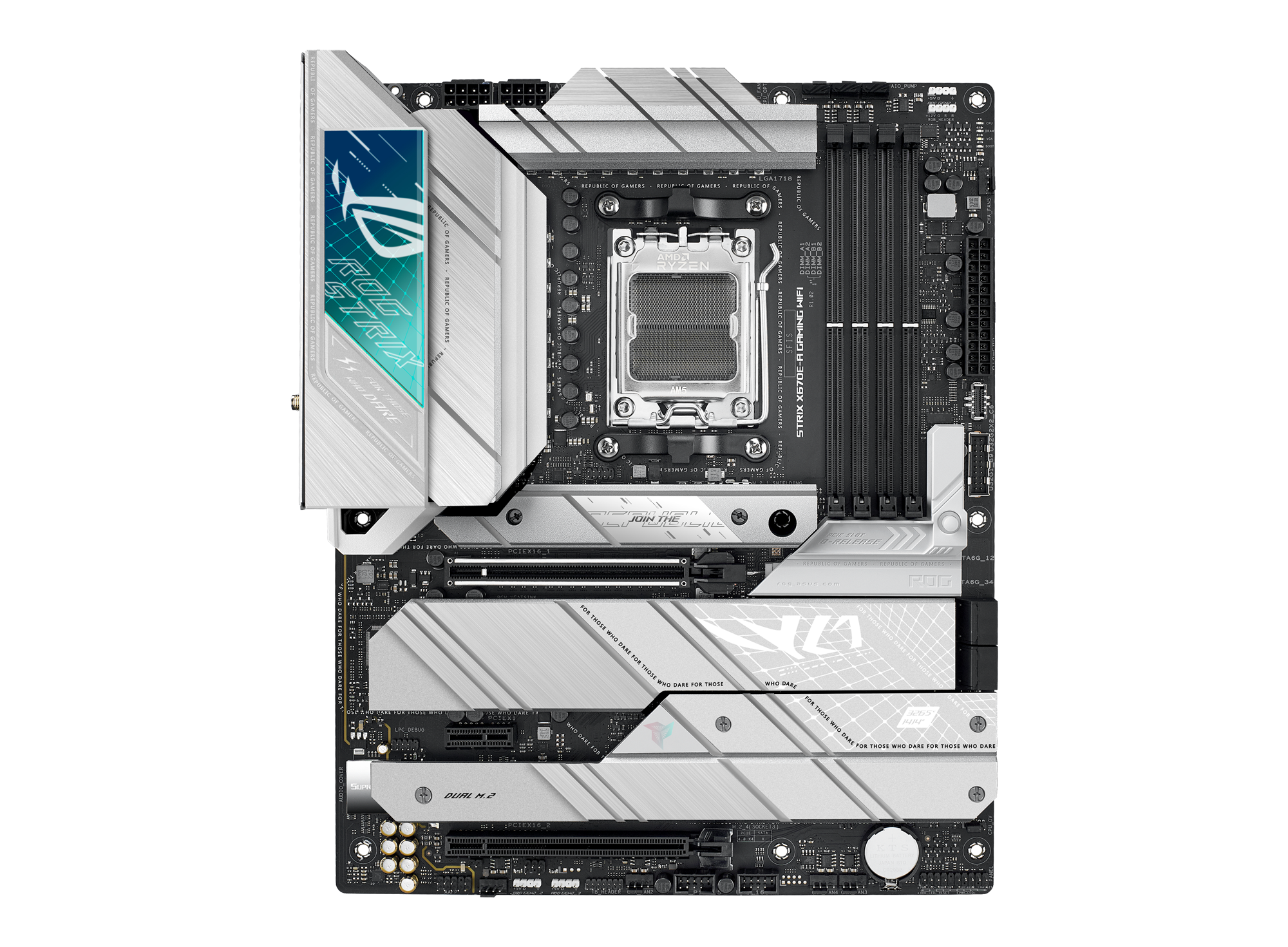
ASUS ROG Strix X670E-A Gaming WiFi features 16+2 power stages, DDR5 support, four M.2 slots with heatsinks, PCIe® 5.0, USB 3.2 Gen 2x2 front-panel connector, and onboard WiFi 6E. It also features AI Cooling II, AI Networking, Two-Way AI Noise Cancelation. ROG Strix X670E-A Gaming WiFi caters to gamers and all builders looking for well-rounded sp...
wind mirage
I spent way too much on it 😂
wind mirage
Eh I don’t like asus I’d probably buy the white Asrock Taichi board
valid pebble
oh they have white ones too
fierce hare
I actually next time, will buy a completely new PC, built custom and I just go get it
wind mirage
Plus it’d match my gpu so
fierce hare
maybe its my sanity speaking right now. 3 weeks with troubleshooting my old PC and now 2 days with the new one
in a row
valid pebble
fierce hare
I actually next time, will buy a completely new PC, built custom and I just go g...
I like the Alienware cases
but I heard they have overheating
fierce hare
oh fuck no. that dissaster PC's
valid pebble
I heard they have big cooling problems
fierce hare
but the cases looks cool
valid pebble
yea
building a PC yourself is cool when it works too, but if you want something that looks really good, it takes a lot of effort
cable management and stuff is almost impossible for us normal guys
but on youtube they make it perfect in like 5 minutes
its a skill
I guess Dxtchin can do it
wind mirage
I’m personally a fan of the fractal design cases
valid pebble
unless he cheated and he didn't build that pc he sent
wind mirage
Mines a Pop air XL
valid pebble
maybe he bought it
I like the case
Its also easier to do cable management when the psu is hidden away like that
it looks like a good case
 valid pebble
its not visible from the other side so its good
wind mirage
When this pc dies ill upgrade to the newest amd series cpu and mobo and get it all white
fierce hare
I've seen a guy who did custom paint his computer-parts white 😄
was in the middle of the lockdown and he couldn't even see parts in white in stock for months
wind mirage
Nahhhh thatys too much work for me lol
fierce hare
it is lol
just think of the paint. it costs money to

Got markings of atx, m and A
wind mirage
needa move the standoffs from the very bottom to fill all the top standoff holes
fierce hare

Done
Just one atx standoff left, but thats just an extra one
Learned alot today. and especially to build taking my time and not rushing it
took me 20 years lol
wind mirage
it happens we all get in a hurry sometimes
wind mirage
dam that this has alot of harddrive storage
fierce hare
Corsair 760T bigtower. Red RGB and not some flashy colour. was just what I needed. decent, but nice airflow with stock fans
fierce hare
wind mirage
dam that this has alot of harddrive storage
Yeah. I removed the storage enclosements
or else the 3080 would not find well.
wind mirage
ahhh

Fractal fuse flair with function in the new Pop series of cases that doesn’t skimp on aesthetics or flexibility. The entire series offers a solid foundation and excellent build quality, giving all users plenty of options and room to maneuver.
fierce hare
i only have the bottom storage thingy left and the top one for my DVD burner. I only kept the dvd rw drive, just because my dad always from time to time wants to copy his dvd-collection of marriges and family videos to digital storage, then onto our family-plan Google Drive.
wind mirage
theres mine but mines white
fierce hare
wind mirage
https://www.fractal-design.com/products/cases/pop/pop-xl-air/rgb-black-tg-clear/
holy fuck.
u know what the thing is? Norway have limited amount of cases they sell here
getting them from amazon costs alot of shipping from the weight and tax
getting something heavy or goods for about 250 usd, costs 2-300 usd in shipping + tax
thats the worst part of being a gamer in norway. you just have to get what is available and not overcostly
wind mirage
rip