#♡ i am still building my first pc ever ♡
1 messages · Page 4 of 1
 brave brook
Yes
 spare sedge
so itx is smaller than rackmount case
brave brook
I can almost guarantee
brave brook
spare sedge
so itx is smaller than rackmount case
Yes
spare sedge
okii
 spice yacht
Also rack pcs
are generally very noisy smaller fans required. That's why racks are in closets or in different rooms.
spare sedge
if rack mount is bigger with only having the functionality of a atx, then its not worth
brave brook
spare sedge
if rack mount is bigger with only having the functionality of a atx, then its no...
Yes. As I said, putting 10+ “computers” in a rack is smaller, but not 1 computer
 spice yacht
More than 10 in some racks
spare sedge
this looks like 1
spice yacht
Depending on form factor
brave brook
spare sedge
this looks like 1
That’s pretty much the size of a regular pc case, which isn’t worth rack mounting
brave brook
spice yacht
More than 10 in some racks
Yeah, that’s why I said 10+. Also, “computers” was referring to servers, windows pcs, and switches
Btw, if you do go itx, a pink case may not be an option, because the color already doesn’t sell as well, and when it’s also itx, it’s even less of a market
Unless you wanna pay $200+
 solar cliff
spice yacht
Also rack pcs
are generally very noisy smaller fans required. That's why racks ...
solar cliff
spice yacht
Also rack pcs
are generally very noisy smaller fans required. That's why racks ...
Yep :D
brave brook
solar cliff
You bozo there are smaller racks too
You can’t get a rack small enough for it to be practical for a van. And an itx case is still smaller so just stop talking
You clearly don’t know what you’re talking about
solar cliff
brave brook
You can’t get a rack small enough for it to be practical for a van. And an itx c...
Or you could. Also you clearly dont know what you're talking about if thats your argument.
spare sedge
brave brook
Unless you wanna pay $200+
$200 is nothing
solar cliff
brave brook
Unless you wanna pay $200+
$200 is nothing, for someone who isnt gonna build it ever
brave brook
solar cliff
Or you could. Also you clearly dont know what you're talking about if thats your...
Find me a rack that is smaller than the nr200
solar cliff
brave brook
Find me a rack that is smaller than the nr200
Why dont you find it? Thatll also fit 4090 etc. etc.
Hf!
Talk to me after you find
brave brook
solar cliff
Why dont you find it? Thatll also fit 4090 etc. etc.
You’re the one saying it’s better, prove it
solar cliff
brave brook
You’re the one saying it’s better, prove it
You're the one 1 doesnt exist. Prove it.
solar cliff
brave brook
You know what, just leave
Byeee the door is righ tthere
brave brook
So leave
solar cliff
Aint helping anyone, with you tryna make people leave
@oblique pumice didnt mmean this sorry
Bruh wtf
can i not ping mod?
solar cliff
solar cliff
<@117789569788674050> didnt mmean this sorry
<@&750150305383186585>
brave brook
Seriously? You’re calling mod on me?
solar cliff
brave brook
Seriously? You’re calling mod on me?
Yeah
brave brook
Wow
 modest valve
@solar cliff why don’t you find a rack if you’re suggesting it? Surely you know what you’re talking about right?
brave brook
thats what i told him
solar cliff
modest valve
<@469808869426724865> why don’t you find a rack if you’re suggesting it? Surely ...
He's the one thats suggesting one doesnt exist. So he can find one?
brave brook
but he doesnt want to look because he knows it doesnt exist
modest valve
he’s so childish lmao we’re all just trying to help the person in this thread not start fights
brave brook
this man says "do a rack mount because its smaller".
its not smaller than an itx build, like one in the nr200, and never ever will be
solar cliff
modest valve
he’s so childish lmao we’re all just trying to help the person in this thread no...
Yeah literally. Thats what ive been saying.
creeperboy is so childish
modest valve
I’m talking about you
solar cliff
modest valve
I’m talking about you
About creeper?
brave brook
solar cliff
About creeper?
talking about you @solar cliff shut up
solar cliff
brave brook
talking about you <@469808869426724865> shut up
<@&750150305383186585>
brave brook
what are you expecting to accomplish?
brave brook
solar cliff
<@&750150305383186585>
youre the one saying a server rack is smaller than an itx build, so you better find that fucking rack real quick
solar cliff
brave brook
youre the one saying a server rack is smaller than an itx build, so you better f...
You can find it?
brave brook
solar cliff
You can find it?
youre so sure of there being one, so i want you to find it. or else, just shut up and leave, because you dont know what youre talking about
solar cliff
brave brook
youre so sure of there being one, so i want you to find it. or else, just shut u...
<@&750150305383186585>
being harrassed
 dapper crescent
brave brook
youre the one saying a server rack is smaller than an itx build, so you better f...
dapper crescent
brave brook
youre the one saying a server rack is smaller than an itx build, so you better f...
Define itx build and define server rack
brave brook
my definition is something equivelant to an nr200
dapper crescent
Define a server rack .
brave brook
i want him to find a server rack thats smaller than an nr200
brave brook
dapper crescent
Define a server rack .
a rack for holding rack mounted servers i guess
that lets it "slide in and out"
spare sedge
 brave brook
there isnt one i will guarentee it
spare sedge
i could mount this to my van
brave brook
spare sedge
i could mount this to my van
the dimensions of an itx case will be smaller, because everything is able to be close together. with a rack case, you need the gpu on a big long riser
brave brook
solar cliff
being harrassed
how much do you actually know about servers and rack mounting
solar cliff
brave brook
how much do you *actually* know about servers and rack mounting
Enough to have some in my room
brave brook
solar cliff
Enough to have some in my room
what kind of server
and what thickness is it?
 spare sedge
so asus rog strix is a mb too?
dapper crescent
 solar cliff
brave brook
and what thickness is it?
solar cliff
brave brook
and what thickness is it?
Thickness? 2 4us
brave brook
the nr200 may not actually fit a 4090
i believe this will though
https://www.newegg.com/black-jonsbo-mesh-screen-mtx-case-micro-atx/p/2AM-006A-000B8
brave brook
solar cliff
Thickness? 2 4us
thats a lot bigger than an itx case
solar cliff
did i say i have an itx case?
i have a big enough room
for big racks
<@&750150305383186585> being harrassed still.
brave brook
solar cliff
did i say i have an itx case?
my point is, you dont have any experience with small rack servers
solar cliff
brave brook
my point is, you dont have any experience with small rack servers
Do you even own a computer?
 supple narwhal
what
brave brook
solar cliff
Do you even own a computer?
fuck yes
solar cliff
brave brook
fuck yes
is it an itx?
dapper crescent
solar cliff
<@&750150305383186585> being harrassed still.
Ehhh I wouldn't personally consider this harrassment (not a mod tho)
Also don't ping the mods multiple times
solar cliff
supple narwhal
what
He keeps telling me stfu, and, telling me to leave etc.
supple narwhal
stop poinging mods if you cant win an argument or a discussion
dapper crescent
Hi momo
brave brook
solar cliff
is it an itx?
no, but my brother made an itx case that is much smaller than any rack mounted case
supple narwhal
ignore him, ping with whats bothering you and we will deal with it when we get to it
solar cliff
brave brook
no, but my brother made an itx case that is much smaller than *any* rack mounted...
Is that you? Not you.
solar cliff
supple narwhal
ignore him, ping with whats bothering you and we will deal with it when we get t...
Okayy tyy!
brave brook
solar cliff
Is that you? Not you.
first hand experience that you dont have
solar cliff
brave brook
first hand experience that you **dont** have
You dont either
dapper crescent
supple narwhal
ignore him, ping with whats bothering you and we will deal with it when we get t...
So knowing this thread for the next 8 weeks
I'm just here for popcorn 🍿
solar cliff
dapper crescent
So knowing this thread for the next 8 weeks
:D
brave brook
solar cliff
You dont either
i literally said my brother has an itx build
supple narwhal
thats it
dapper crescent
solar cliff
:D
This is the OTHER THREAD
solar cliff
supple narwhal
thats it
? Are you mad at me or him?
supple narwhal
Im not mad at either of you, just drop the discussion, you guys cant seem to get to common ground and its not productive for the thread lol
solar cliff
supple narwhal
Im not mad at either of you, just drop the discussion, you guys cant seem to ge...
Meh fair enough. However, knowing CreeperBoy this discussion is never ending
supple narwhal
hey
dapper crescent
So that means both.
supple narwhal
i didnt say you could bad mouth them,
brave brook
i just want him to find a server rack that is smaller than an nr200
solar cliff
supple narwhal
i didnt say you could bad mouth them,
Aw. :(
solar cliff
Im sorry Creeperboy, that I almost won the argument 🤝
supple narwhal
....
solar cliff
supple narwhal
....
I said sorry
brave brook
are you kidding me?
dapper crescent
solar cliff
Meh fair enough. However, knowing CreeperBoy this discussion is never ending
 solar cliff
brave brook
are you kidding me?
solar cliff
brave brook
are you kidding me?
Nop
brave brook
dapper crescent
All have a lower volume then the nr200
im thinking of the dimensions though. a wide flat server is harder to store than a small box
dapper crescent
I mean if you put it on its side
dapper crescent
Make a 1u radiator
brave brook
i really would not recommend a water cooled system, especially this type, for a first time builder
but thats me
one other thing, either of these solutions would not fit the liquid x 4090
dapper crescent
Custom loop.
brave brook
brave brook
i really would not recommend a water cooled system, especially this type, for a ...
^
dapper crescent
For the funnies
brave brook
um
 orchid gate
Good thing I missed your little tirade 
orchid gate
spare sedge
so asus rog strix is a mb too?
Whole “franchise” practically
They have laptops termed that (ASUS ROG Strix Scar 15/17 or G15/17), GPUs, motherboards
now they replaced the 17” with a chonk 18”
iirc 15 is also 16” too
orchid gate
spare sedge
so asus rog strix is a mb too?
If you want an ITX case that looks like a rack mount (but it’s just laid down sideways) check out the fractal ridge
Very compact and I hear some plan to build it for attending gaming LANs like DreamHack (Google this)
Fractal ridge size comparison

.
Just wait a sec you wanna build in a rack?
orchid gate
Oh yay you’re alive
spare sedge
yeah its honestly not a bad idea. i could mount it to my van somewhere. it would offer easier access to hardware and might not be a problem when driving. its also for sure flatter. so it actually is p compact, and with some rgb it could be really cute.
but i am also considering itx because it is smaller, and idk if i need all the features of an atx, but like i might want them all and go fully featured with an atx and just live with it cause the vans are bigger than you think. i am up for the challenge of building because after its built, it's fine. itll be a hassle when you have to troubleshoot hardware and go back in one day, but that's also fine because that's a hassle anyway even with an atx.
spare sedge
orchid gate
Fractal ridge size comparison
this honestly looks amazing
definitely up my alley
spare sedge
my only thing is, idk if im willing to compromise on a 4090 or 7950x3d for the case or the ram
orchid gate
Tight squeeze if you ask me
 spare sedge
but i am willing to compromise on the aib
orchid gate
Woohoo
spare sedge
if i have to drop down a couple aib choices in terms of size thats fine
orchid gate
Oh it’s not a rack btw
spare sedge
orchid gate
Tight squeeze if you ask me
this is honestly insane
orchid gate
Just has options for laying sideways
With the foot underneath the fat flat side
Flat like this
 spare sedge
if its a matter of screwing in parts and putting the cords where you guys tell me to
orchid gate
In other words console but not a console
spare sedge
then it should be possible for me to do this
orchid gate
Right… we got more parts to cover first
spare sedge
yeah
orchid gate
spare sedge
if its a matter of screwing in parts and putting the cords where you guys tell m...
Ah, if you still plan on a 4090 a DIY solution for cable management may be needed
Depends on its size
But no no to the liquid X here
 orchid gate
Hmm
spare sedge
orchid gate
But no no to the liquid X here
in this case that would be mostly fine
orchid gate
You could compensate with RGB lighting to be pink 🙂
spare sedge
how does that work exactly
orchid gate
(Connect to an ARGB header, addressable means “ok computer do this”)
Need some software for it
spare sedge
orchid gate
Flat like this
this is a good option too
orchid gate
Once the other guys wake from their slumber they probably will advise
spare sedge
orchid gate
(Connect to an ARGB header, addressable means “ok computer do this”)
so just a adjustable rgb
orchid gate
I’m doing some script memorising atm for drama class
spare sedge
are there any other types of rgb
orchid gate
spare sedge
so just a adjustable rgb
Yes, but more hues than RGB alone which is only red green blue
Uhh not really
You have other colour gamuts however
spare sedge
orchid gate
I’m doing some script memorising atm for drama class
oh wow i remember doing that in high school. too bad im too far gone and instantly thought of ai.
spare sedge
orchid gate
Yes, but more hues than RGB alone which is only red green blue
how is rgb literally red green blue
orchid gate
orchid gate
You have other colour gamuts however
This won’t apply to case lighting
orchid gate
spare sedge
how is rgb literally red green blue
Well all I know is you combine those colours to get that of your computer display
modest valve
orchid gate
Tight squeeze if you ask me
What ab the thermals? I mean it’s a 4090 with a 7950x3d
orchid gate
with printing it’s the opposite, CMYK - they delete each other to get more basic shades
orchid gate
modest valve
What ab the thermals? I mean it’s a 4090 with a 7950x3d
Idk leave a side w/o the panel?
I was hinting at that :p
spare sedge
i thought rgb was like cosmetic detailed lighting. not the computer display
orchid gate
orchid gate
Idk leave a side w/o the panel?
And remember for the GPU you can have fans facing outward to the side
Mounting it that way
modest valve
orchid gate
Idk leave a side w/o the panel?
That might bring in a lot of dust
But could be manageable ig
spare sedge
there might be longer cases
orchid gate
modest valve
That might bring in a lot of dust
I did say DIY might be needed :p
orchid gate
spare sedge
there might be longer cases
Cooler master already is bigger
maybe go with their white NR200P?
modest valve
If airflow is not efficient then the gpu might suck in its own hot air
spare sedge

Asus ROG STRIX X670E-I GAMING WIFI Mini ITX AM5 Motherboard (ROG STRIX X670E-I GAMING WIFI)
i was thinking about this
orchid gate
With mini-ITX motherboards you lose out on 2 ram slots and an ssd slot
So only 2 are available for the former
spare sedge
im p sure you lose more than that but
orchid gate
Makes adding more capacity a little less convenient
spare sedge
i could care less about 2 ram slots and 1 ssd
orchid gate
spare sedge
im p sure you lose more than that but
Not much space in ITX cases for HDDs as well
spare sedge
especially when im yelled at about using 4 slots
orchid gate
Believe there also is less ports on the side
spare sedge
and especially when i plan on using m.2 which is much more compact anyway
orchid gate
spare sedge
i could care less about 2 ram slots and 1 ssd
2 SSD I think
orchid gate
spare sedge
and especially when i plan on using m.2 which is much more compact anyway
And about 2-3x the price but ig for you it’s nothing
modest valve
@spare sedge how much storage do you need
orchid gate
Less fragile which is good
spare sedge
i mean with m.2 the sky is the limit right
orchid gate
modest valve
<@841694455747706911> how much storage do you need
^^
orchid gate
spare sedge
i mean with m.2 the sky is the limit right
Nope
That’s HDDs
Though their capacities are getting larger
spare sedge
didnt i see like 22 T
orchid gate
Select vendors can do 8TB on a single drive
orchid gate
spare sedge
didnt i see like 22 T
HDDs I’m sure
spare sedge
i can't imagine needing more than that one day
orchid gate
Not SSDs
orchid gate
spare sedge
i can't imagine needing more than that one day
Another issue with big drives is if that drive fails it could be your life’s worth of data gone
modest valve
Yeah
orchid gate
so just a psychological fear hence why most ppl keep SSDs and onboard storage small
spare sedge
ive also been developing a free cloud storage loophole thing
orchid gate
they use external storage otherwise
spare sedge
unless that already exists
modest valve
Don’t get an hdd especially if ur budget is this high
orchid gate
You see this in music production, the engineer puts files on an external RAID array
which itself is also backed up

orchid gate
spare sedge
ive also been developing a free cloud storage loophole thing
You mean NAS? Network attached storage
orchid gate
Mhm
orchid gate
I’d say to make the most of ITXs limits grab like a 2TB drive or 4TB
if you want
Usually i don’t rec >2TB
Expensive NAS here, 8 hard drives

What you searching rn @spare sedge
spare sedge
heres what ik on form factors
 orchid gate
Ignore the stuff below mini ITX for this build
Otherwise you’re making a server PC
Oh wait ik the ROG VIII Formula is E-ATX
Occasionally there’s a couple high end boards that are a bit larger than normal to flaunt 5 SSD slots or such
Hmm so you’re saving up some extra research for future upgrades or self assistance I take it
Or helping those close to you
spare sedge
narrowing by am5 leaves us with 6 itx boards, about 63 matx boards, 8 eatx boards, and 54 atx boards
spare sedge
orchid gate
Ignore the stuff below mini ITX for this build
no ik
orchid gate
So are you set on going mini-ITX?
 orchid gate
probably check for the NR200P Max regardless, see if there’s a pink variant in stock
spare sedge
but that requires atx or matx
modest valve
And u still only want an x670/e mobo?
orchid gate
So an ATX case can fit ITX motherboard
Just looks silly
NR200P is for mini itx to MATX
spare sedge
the vast majority of boards are 128 gb ram limit.
except for some of the shitty matx boards which are 96 gb ram limit
orchid gate
won’t need more than it for the coming decade I’m sure
spare sedge
all the itx boards are 64 gb ram limit except for one that has 96 gb ram limit
spare sedge
modest valve
And u still only want an x670/e mobo?
i was, but then someone bitched and said that x670/e wasnt the best chipset. so now i have to re look into it
because the research i did on chipsets wasnt enough
orchid gate
X670 is the top of the line chipset
I believe that extra letter gave you a specific model of motherboard
orchid gate
ASUS naming scheme
spare sedge
hm
orchid gate
Like z690-a, z690-e, x570-F
spare sedge
modest valve
And u still only want an x670/e mobo?
if i can narrow by chipset, we have even less options
are there more boards that dont show on pcpp?
orchid gate
Sometimes like B660-M or z690-I it is useful in telling you the form factor (MATX or ITX)
spare sedge
ik z is intel
orchid gate
Yes
spare sedge
and ik b is mid range
orchid gate
H can be low end or high mid range
spare sedge
and anything below b isnt worth talking about
orchid gate
H610 or H670
spare sedge
yeah h
orchid gate
But irrelevant mb
spare sedge
no its fine
spare sedge
lmao
spare sedge
its okay. its dark
orchid gate
:p
So off the top of my head. Z790/H770/B760/H710 would be this gen’s Intel chipsets
Note that Intel is backwards compatible (6— boards work with 13th and 12th gen Intel processors)
AMD hell no
AMD this time round - x570/B650… anything else?
modest valve
orchid gate
X670 is the top of the line chipset
X670E is the same but has some more features like more pcie lanes and m.2s I’m p sure, and there’s some other small/ obscure features
spare sedge
so intel's 600 boards work with 13th and 12th gen
orchid gate
spare sedge
so intel's 600 boards work with 13th and 12th gen
Correct
But 13th Gen requires a BIOS update sometimes to work
spare sedge
orchid gate
AMD this time round - x570/B650… anything else?
did you mean x670
orchid gate
So a slight hassle
orchid gate
spare sedge
did you mean x670
Yes
spare sedge
okii
orchid gate
Fatal error 🤦♂️
orchid gate
also if you ever find half your savings disappeared 13th Gen can run DDR4 memory too
Unlike new AMD forcing DDR5
spare sedge
but afaik, chipset just determines probable features. it doesnt determine anything besides a way for them to market to you
orchid gate
but the motherboards themselves are either/or not both
spare sedge
like form factor determines size
spare sedge
form factor determines features for sure because of how it has to fit on the board
spare sedge
but i dont understand "expansion slots" atx is supposed to have 7 expansion slots so where tf do they all go? this proart board that i was looking at has like 2 or fucking 3. like wtf
orchid gate
spare sedge
but i dont understand "expansion slots" atx is supposed to have 7 expansion slot...
Expansion slots… I wonder if that’s an umbrella term commonly abused
spare sedge
this one
orchid gate
could mean x16 slots which can run stuff like 10G networking cards
orchid gate
HUH
spare sedge
dtx is 2 which is why people were saying dtx is better than itx
because it was an insane opportunity trade off
and by dtx i mean mdtx
orchid gate
As a fun fact only PCs have expansion slots
Laptops and smaller don’t :p
Why ever choose DTX
 open iris
spare sedge
but i dont understand "expansion slots" atx is supposed to have 7 expansion slot...
open iris
spare sedge
but i dont understand "expansion slots" atx is supposed to have 7 expansion slot...
They can have 7 they don't have to also that proart has 6
4 pcie 2 m.2
orchid gate
Was about to ask if m.2 slots counted
As expansion slot is an umbrella term, just anything that connects to the PC by attaching to the motherboard
through PCIe in this case
modest valve
spare sedge
but i dont understand "expansion slots" atx is supposed to have 7 expansion slot...
supports up to 7 max for any board with that chipset
spare sedge
orchid gate
Laptops and smaller don’t :p
well ig i wasnt thinking about laptops
spare sedge
open iris
4 pcie 2 m.2
so each m.2 counts as 1 expansion slot??
i thought it was only pcie
thats still only 5 right?
orchid gate
spare sedge
so each m.2 counts as 1 expansion slot??
#1139391773253316608 message lookie here
Any slot that’s PCIe and for connecting things to the motherboard is called an expansion slot
orchid gate
Includes M.2 too
spare sedge
anything else?
orchid gate
Not really
spare sedge
thats still only 5 slots on that proart afaik
orchid gate
modest valve
supports **up to** 7 max for any board with that chipset
Yes but ^^
spare sedge
open iris
They can have 7 they don't have to also that proart has 6
yes but ^^
orchid gate
They can have 7
Not has to have 7
I’ll scour the general market and report deviances across mobo models tmrw
see if it’s significant (at least +- 3)
spare sedge
i also found out that the yellow IS a x16
 orchid gate
spare sedge
i also found out that the yellow IS a x16
orchid gate
spare sedge
i also found out that the yellow IS a x16
He miscounted
spare sedge
orchid gate
It’s not
that's a m.2 under a heatsink right?
orchid gate
spare sedge
that's a m.2 under a heatsink right?
Above yes
so I’m wrong as well
It is 5
spare sedge
oh okay
spare sedge
does that count?
on the website it just says this

you can wall mount your case??
 open iris
spare sedge
i also found out that the yellow IS a x16
open iris
spare sedge
i also found out that the yellow IS a x16
Red is one
open iris
Pcie x1
spare sedge
so x1, x4 and ,x8 all count as expansion slots
open iris
Yes
spare sedge
i thought it was only x16
spare sedge
okay, anything else or just all pcie and all m.2
open iris
Just those 2 yeah
spare sedge
open iris
Anything that can connect something through pcie counts
yeah but m.2 counts and thats not pcie.
okayy
spare sedge
spare sedge
but on pcpp, it also doesnt explain this or show that it has pcie x1 at all
open iris
It allows for pcie connection
spare sedge
and it says that it has 4 m.2
spare sedge
open iris
It allows for pcie connection
what does
open iris
Probably showing you a slightly different board
open iris
spare sedge
what does
m.2
spare sedge
okay but 3x pcie x16 and 4x m.2 = 7 expansion slots
open iris
Yeah
spare sedge
so if that x1 counts. thats 8
open iris
That's not that image though could be at the board you're looking at
Can you just send the link of where it's saying the other information
spare sedge
but there is only 2 pro art boards
x670 and b

Asus ProArt X670E-CREATOR WIFI ATX AM5 Motherboard (ProArt X670E-CREATOR WIFI)
open iris
Yeha that's a different motherboard to the picture

Notice the expanded heat sink for the m.2 and loss of the x1 slot
spare sedge

Asus PROART B650-CREATOR ATX AM5 Motherboard (PROART B650-CREATOR)
it was the b board

thats 4 pcie then
but thats still 4 m.2 slots
4 pcie doesnt = 7
4 m.2 doesnt = 7
4 pcie + 4 m.2 doesnt = 7
also, then why doesnt sata or usb count?
or ram or thunderbolt
or ethernet
open iris
That's just pc part picker bekng pc part picker if you go to the spec sheet on the site it's 3 m.2s
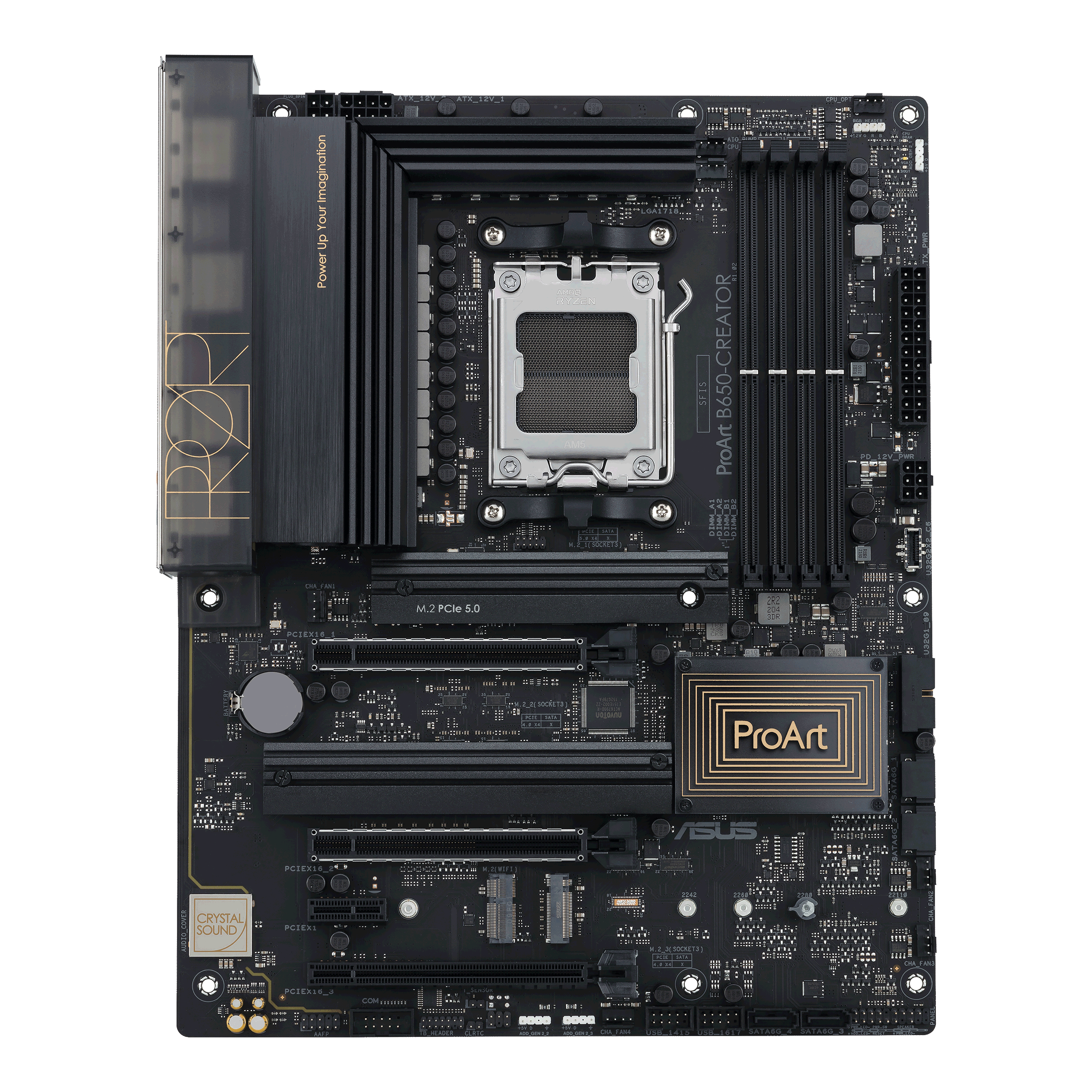
ASUS Global
Every aspect of ProArt Series motherboards is built to remove barriers and deliver optimal performance to content creators who work in 3D modeling and rendering, animation or media production. The series empowers you to concentrate on your creativity and expand what is possible.
orchid gate
Kassy, are you seriously going to fill every one of the M.2s or PCIe slots?
Or is all this just for the sake of clarity and consistency/fighting misinformation
spare sedge
clarity obviously.
orchid gate
Alr
spare sedge
im not even getting this board
orchid gate
Obv enough
Do you have one in mind yet or should I do that research tmrw and tell ya
open iris
Also for why sata, usb, ram, ethernet don't connect through pcie
spare sedge
actually it is still 4

the 1 on the top and the 2 at the bottom. the way its listed looks like 5, but its really just 3 with each type listed. below the quantity.
however, RIGHT HERE it says there is another m.2 called ekey which IS listed on pcpp

the other 3 are called Mkey

also this only explains what is circled in pink which is nice because i didnt even know that was a thing
the pink is a m.2 ekey slot
open iris
Well i guess it just has 8
spare sedge
idk what the blue is. but it looks exactly like the m.2 ekey flipped over
spare sedge
open iris
Well i guess it just has 8
okay but then why can they only fit 1 m.2 under that heatsink on the top whereas they can fit 2 on the bottom one. how can they put two of the same thing under one heatsink
open iris
That's just m key
spare sedge
ik the first 3 are mkey
orchid gate
Consult the manufacturer 😉
spare sedge
orchid gate
Consult the manufacturer 😉
that wont help me
orchid gate
spare sedge
M.2 is above the heatsink
spare sedge
its also sunday bffr
spare sedge
orchid gate
M.2 is above the heatsink
i was told it was under wdym above
orchid gate
Here
 spare sedge
what???
open iris
No it's below it
orchid gate
Oh wait mb
spare sedge
lmao
open iris
Also i was saying that blue is the m key
spare sedge
all the boards look different. its okay
spare sedge
orchid gate
Layered on top
im on board with taht
orchid gate
spare sedge
im on board with taht
Completely invisible to the untrained eye in other words
open iris
I actually just think they labelled this like shit ngl
spare sedge
or are they not the same
spare sedge
open iris
And that's the 3rd one
ohhh
but wait, if they ekey lays to the right, does it not cover the mkey? and if it doesnt lay to the right, it should lay to the left but wouldnt that still cover the x1?
orchid gate
Identify this; most of the lower half is hidden under their respective heatsink
 spare sedge
orchid gate
Identify this; most of the lower half is hidden under their respective heatsink
spare sedge
orchid gate
Identify this; most of the lower half is hidden under their respective heatsink
lmao
maybe after this one
open iris
It's to the left and no
open iris
E key devices arw smaller
orchid gate
Sorry ik my image is a bit blurry
Seems sharp enough though when zoomed in on mobile
spare sedge
open iris
E key devices arw smaller
wait no this is wrong
wait not its right kind of
i think
the key doesnt represent size

its the numbers
but the keys represent he teeth
open iris
Yeah i know
spare sedge
but also certain keys only use certain sizes
open iris
But ekey devices are still smaller
spare sedge
 orchid gate
So they are smaller
spare sedge
so it doesnt cover the x1
i wonder why there isnt 22110 e keys
unless there is
or even 2242
or 2260
open iris
The only time an ekey device is like bigger is when it's being used as a adapater to mkey
That's kinda cheating though i guess
 spare sedge
so the numbers are the sizes?
open iris
Yeah
Oh yeah fun fact since m.2 has pcie connectivity it's one of the ways you can just connect a gpu to a laptop pretty easily
With one of these
 orchid gate
M.2 2280 is extremely common for PC SSDs
orchid gate
open iris
With one of these
I believe most people prefer to use Thunderbolt 3/4 for an eGPU
spare sedge
1 x M.2 PCIe 5.0 slot with heatsink
∙ 1 x 2280 (PCIe 5.0 x 4)
2 x M.2 PCIe 4.0 slots with heatsink
∙ 1 x 22110 (PCIe 4.0 x 4)
∙ 1 x 22110 (PCIe 4.0 x 4)
open iris
orchid gate
I believe most people prefer to use Thunderbolt 3/4 for an eGPU
No that's way better yes
spare sedge
so then why is m.2 listed as pcie in parantheses
open iris
But not all laptops have thunderbolt
spare sedge
orchid gate
I believe most people prefer to use Thunderbolt 3/4 for an eGPU
what is egpu?
orchid gate
I saw some arcane process to crack open an old laptop and stick a GPU to it
open iris
Only intel laptops have them even
Amd can only use gpu enclosures now thanks to usb4
Which most egpu enclosures don't properly support yet
orchid gate
spare sedge
what is egpu?
You buy a box for a desktop GPU, it has a slot you stick it in, then you plug a certified Thunderbolt USB-C cable into your laptop connected to the box with the GPU inside
And viola desktop grade graphics
spare sedge
orchid gate
You buy a box for a desktop GPU, it has a slot you stick it in, then you plug a ...
im so lost
open iris
It's not relevant for you anyway don't worry about it
spare sedge
open iris
It's not relevant for you anyway don't worry about it
that doesnt help me tho
orchid gate
spare sedge
im so lost
Ok so, an eGPU is a normal GPU you put in a box designated for it
spare sedge
so like an external gpu.
orchid gate
Which has a connector for USB-C, which then is connected to a laptop
Yes that’s what it stands for
spare sedge
that's what the e stands for?
orchid gate
But uhh Thunderbolt is necessary
spare sedge
ohh
spare sedge
what use case does an egpu have
orchid gate
with DisplayPort alt mode as well I think
orchid gate
spare sedge
what use case does an egpu have
On the go video editor who works for marquee brownlee I’d say
And he’s demoing an 8K camera
open iris
Say you need a stronger gpu in your laptop
spare sedge
what's marquee brownlee
spare sedge
so egpus cant work on a desktop
orchid gate
spare sedge
what's marquee brownlee
Tech YouTuber who does a lot of tech reviews
orchid gate
spare sedge
so egpus cant work on a desktop
They can as well
Been used before for iMacs
Or apples monitor-like PCs
spare sedge
in that case, an egpu might be an option for me.
open iris
They can but it makes no sense to do that
orchid gate
spare sedge
in that case, an egpu might be an option for me.
NONONONO
orchid gate
welp ok maybe
But then you’d need to hunt for a motherboard with Thunderbolt
And some companies have shit support for that
spare sedge
like if i go itx, i can mount an egpu somewhere
open iris
Well you'd just use a riser if you wanted that solution you wouldn't go the thunderbolt route probably
orchid gate
orchid gate
And some companies have shit support for that
Been a few issues on and off with the Thunderbolt ports on motherboards
spare sedge
i just set the egpu on top of the case
spare sedge
open iris
Well you'd just use a riser if you wanted that solution you wouldn't go the thun...
i still dont know what thunderbolt is exactly
everytime i see it in a sentence i just go blank
orchid gate
The enclosure is this big fyi
 spare sedge
all i know is that it is not lightning
orchid gate
spare sedge
everytime i see it in a sentence i just go blank
Lightning speed usb port
spare sedge
orchid gate
The enclosure is this big fyi
that's not so bad
open iris
spare sedge
like if i go itx, i can mount an egpu somewhere
At that point just get a slightly bigger case though
spare sedge
orchid gate
Lightning speed usb port
what does this even mean lmao
orchid gate
Alr imma peace out now
spare sedge
kachow he said
orchid gate
Help her out mage
spare sedge
orchid gate
Alr imma peace out now
alr ni ni
open iris
It's just usb that can interact with pcie
spare sedge
oof still really weird
open iris
Has better bandwidth than usb and was mainly made as a way to connect more devices to laptops
It was made by apple and intel which is why amd laptops get cucked
spare sedge
i knew the apple intel thing. and thats weird af too
open iris
And you don't really see it on pcs cause you have pcie slots
So it's not really as useful there
spare sedge
open iris
It was made by apple and intel which is why amd laptops get cucked
so its just not a thing on amd laptops tho?
open iris
Yeah even on amd motherboards they have to use an intel chip
spare sedge
open iris
Yeah even on amd motherboards they have to use an intel chip
so the intel chip is inside the thunderbolt thing
open iris
The thunderbolt controller on a motherboard yeah
open iris
spare sedge
so its just not a thing on amd laptops tho?
No which used to be a big deal
But usb4 closed the gap between thunderbolt
So it doesn't matter that much anymore
Thunderbolt 4 is still slightly better though and thunderbolt 5 will be a lot better
spare sedge
open iris
No which used to be a big deal
no as in yes its not a thing and it used to be a big deal as in amd really wanted it on their laptops back then but dont care anymore
and thats cause usb4 is better than thunderbolt now?
open iris
It was just a big selling point for a laptop to have
spare sedge
oh tb is better still
so all these things
have gens too
so like
tb 4 and tb 5 are gens like pcie 4 and pcie 5
open iris
It's still better but like 90% of these users won't actually notice the difference
Sure
spare sedge
sure as in yes or not really
open iris
Usb naming schemes are something else though
Yeah
Thunderbolt and pcie keep the names simple at least 
spare sedge
cause if they arent called gens. i dont want to call them gens
i like learning about pcie
not so much thunderbolt. its annoying cause idk what it looks like or what its for
pcie is so widely used for everything
it seems
open iris
"usb 3" has like 4 different versions with dumbass names instead of them just going up numbers
open iris
Thunderbolt really shouldn't matter to you anyway i imagine
spare sedge
open iris
Thunderbolt really shouldn't matter to you anyway i imagine
that doesnt help me tho
open iris
If you want just in case it does just pick a motherboard with a thunderbolt controller
spare sedge
open iris
"usb 3" has like 4 different versions with dumbass names instead of them just go...
so are the numbers after usb like 3 and 4 gens as well?
and then the gens get split into inter generation names like skylake or some stupid bs
open iris
Yeah
well in usb case
usb 1.0
usb 2.0
usb 3.1 gen 1
usb 3.1 gen 2
usb 3.2 gen 1
usb 3.2 gen 2
usb 4
open iris
oh wait theres also usb 3.2 gen 2x2
spare sedge
and then the 2nd is like a midway gen
so at the end of the day tho, the newest one is gonna be better
open iris
yeah
spare sedge
so right now we are on usb 4
open iris
yes
spare sedge
or usb 5 just came out
open iris
dont have usb 5
spare sedge
oh okay good
what do they usually improve and work on when upgrading the gen
what do the gens enhance in other words
open iris
usually transfer speeds
 spare sedge
open iris
apple, intel, hp, few others idk the names of
spare sedge
open iris
apple, intel, hp, few others idk the names of
oh so no one invented usb they all just make them
spare sedge
so it originated from intel
but now all those companies basically update it together
spare sedge
so is thunderbolt a usb?
open iris
no
they function almost the same
and thunderbolt 3 and 4 do use a usb type c connector
but they arent the same
same way how thunderbolt 1 and 2 used a mini displayport connector
and did have the functions of minidisplayport but wasnt it
spare sedge
open iris
and thunderbolt 3 and 4 do use a usb type c connector
wait so it looks like type c
open iris
yeah
spare sedge
open iris
same way how thunderbolt 1 and 2 used a mini displayport connector
nononono youre fucking kidding
lmao
open iris
spare sedge
dp to usb type c
open iris
thunderbolt 🤝 leeching off other connectors
spare sedge
lmao
im gonna sleep on thunderbolt a little longer

so whats up with this
all gen 4. p standard
the 4x1 was right
but the the 4x16 at the bottom is actually a 4x4 or??
and the 4x16 in the middle is also a 4x8?
and the 4x16 at the top is still a 4x16 (thank god) but its also a 4x8 but for some reason the middle and the bottom cant fit a x8 or an x16 or a x4 on the right side like the top equivalent?
i thought they were all just 4x16 easy done.
spare sedge
spare sedge
i thought they were all just 4x16 easy done.
the 3 that is
open iris
yeah no usually only the first slot is full powered
which is why you always put your gpu in the first slot
the reason the other slots usually dont need those lanes
like msot the time it would just be like a sound card, network card shit like that
youre not going to need the full bandwidth
spare sedge
open iris
which is why you always put your gpu in the first slot
i didnt know rhis
spare sedge
open iris
youre not going to need the full bandwidth
wdym the full bandwidth
so are they x16 or no
open iris
they arent
spare sedge
spare sedge
wdym the full bandwidth
does x16 have more bandwidth
open iris
they can just physically fit x16 cards
open iris
spare sedge
does x16 have more bandwidth
yes
spare sedge
then why are they x16 size
spare sedge
if they can fit x16 doesnt that make them x16?
open iris
even gpus today dont even ultilize the bandwidth of 16 pcie 4.0 lanes
no
ok think of it this way
spare sedge
i see three x16 slots. an x1 slot and 4 m.2 slots
open iris
there are physical lanes and electrical lanes
physically they are x16
electrically they arent
spare sedge
oh i didnt know derbaur is just an extreme ocer
WAIT WHAT
micro center only has 25 locations???
and are only in the US
wow i guess i got lucky
im literally close to 2 of them
spare sedge
thats crazy
spare sedge
just learned this

the first 2 numbers is width only
the last numbers are length
all measured in mm
spare sedge
open iris
can only get that cpu from microcentre
ik they have the 7950x3d
in a bundle deal too
modest valve
spare sedge
just learned this
I literally told u this ages ago but ok
open iris
like you literally cant buy it anywhere else
spare sedge
open iris
i meant that amd only released 5600x3d with microcentre
oh wow mc exclusive content lmao
spare sedge
modest valve
I literally told u this ages ago but ok
i either forgot. or it got lost in chat
did i respond?
spare sedge
open iris
electrically they arent
so there are physical and electrical lanes and the electrical are more just energy not physically there
open iris
yeah you can sum it up like that
spare sedge
so why does that matter tho
open iris
wdym
spare sedge
i dont think you ever finished youre point
you just sort of said lanes are physical and electrical
open iris
is there more to add it answers the question why they arent all x16
spare sedge
does it
im still lost on that. i was just waiting this whole time
but i just learned this too

also lpx and btx
interesting
open iris
spare sedge
im still lost on that. i was just waiting this whole time
Physically the slots are x16 so you can fit in cards that size. Electrically they don't have 16 lanes because it's unnecessary for basically any secondary card you'd use so they give the other slots less electrical lanes to save on cost and stuff
open iris
Physically
spare sedge
so are you saying i can't plug in a x16 card into the 2nd pcie slot because it is not electrically x16
open iris
You can plug it in
spare sedge
how
open iris
Just with lower bandwidth
spare sedge
when you say bandwidth should i think electrical lanes
open iris
Yes
spare sedge
lol ok
so then how does it power the x16 if its not x16 electrically
like how is x4 enough ig
open iris
Because lanes have nothing to do with how much power is supplied to a card
spare sedge
oh okay then what do they have to do with
open iris
Bandwidth
open iris
Yes
Every pcie slot can supply 75 watts and if more is needed you need power from your power supply
spare sedge
yep but thats power delivery
so my thing with the 3 pcie x 16 slots on this mb is
why not just be electrically x16 too
why is the 2nd one only electrically x8
 vast geyser
uhh
spare sedge
and why is the 3rd one only electrically x4
vast geyser
prob not enough bandwidth
spare sedge
yeah but why
vast geyser
isnt that what they did
 spare sedge
yeah
open iris
yeah
spare sedge
it's three x16 and the 2nd and the 3rd are not electrically x16
whats the point
like why not just be a physical x8 at that point
and why not just be a physical x4
vast geyser
the designers thought it would be better that way
open iris
spare sedge
it's three x16 and the 2nd and the 3rd are not electrically x16
So you can still fit in cards of x16 size
Cause like i said just because they are that size doesn't mean they need the full bandwidth
spare sedge
why would you want to do that if you dont get enough bandwidth
vast geyser
ah wait i might have not realized what youre talking about
open iris
Again barely anything actually uses all the bandwidth in the first place
open iris
So you're just giving yourself less options for cards if you reduce their size
vast geyser
😭
spare sedge
and then theres this
 vast geyser
huh
vast geyser
where did you get that from lol
open iris
No
open iris
Also they don't have to have 7 that's not like a rule
spare sedge
and ALSO that would make the first pcie slot like an x24 all together
vast geyser
vast geyser
it can be either x16
or x8
you can make it x8 if you put another gpu beneath for rendering purposes
so you have more powahhhh
open iris
Or sli moment
spare sedge
then why can't the 2nd or the 3rd be x16 or x8 but not both??
vast geyser
theres no point in giving more bandwidth to those slots though
open iris
Also no cpu can handle that many lanes
vast geyser
+that yeah
spare sedge
do you mean lanes as the physical ones or the electrical ones
open iris
Consumer ones anyway
vast geyser
epyc ❤️
open iris
Electrical
spare sedge
its not the cpu tho. its the pcie
open iris
No cpus actually have a cap on how many lanes it can handle
12900k is like 20
Threadripper pro is like 100+ kinda based
open iris
I know
And im saying it's pointless for both to be x16 cause your cpu couldn't do it
And the fact you aren't going to put it 2 cards that both need that much bandwidth realistically
vast geyser
huh..
 vast geyser
i mean they need the most out of any component
spare sedge
im guessing x8/x8 is shorthand for dual x8?
vast geyser
yes
spare sedge

reddit
408 votes and 123 comments so far on Reddit
whats the difference between an expansion slot and a bus?
vast geyser
anyway that list doesnt have what you need
 pearl heath
The bus is the electrical connection
The expansion slot is the physical connection
vast geyser
hi random
pearl heath
spare sedge
and atx is supposed to have 7
ATX is sized to support 7 but doesn't need to have 7 slots
pearl heath
spare sedge
why would you want to do that if you dont get enough bandwidth
The RTX 4060 is electrically PCIe x8 but physically x16
CPUs on consumer platforms don't have that many PCIe lanes available
brave brook
Ryzen 3000 has 16 lanes (gen 4), ryzen 5000 has 20 lanes (gen 4), and ryzen 7000 has 24 (gen 5)
Threadripper has 64 (gen 4). Threadripper pro has 128 (gen 4)
 haughty quail
pearl heath
The RTX 4060 is electrically PCIe x8 but physically x16
haughty quail
pearl heath
The RTX 4060 is electrically PCIe x8 but physically x16
That's how my old Rx 460 is wired
I use that to test things
I would
Not use it for your use case*
spare sedge

if you wanna make gamer boys salty with your own aesthetic pink pc set-up, here's an animated beginner-friendly tutorial on how to build your own!! ✩ please don’t forget to SMASH that like button and hit subscribe whilst you’re at it, because that would be pretty pog™ and this video took me a long time to edit together!
✩ PCPARTPICKER LIST: ✩
h...
in this video they mention putting the ram in slot 2 and 4
haughty quail
So that you don't get bounce back especially if you're running higher speed ram
spare sedge
yep thats the reason
spare sedge
no its dual channel regardless lmao
haughty quail
spare sedge
from the heat
That could be a reason to do that but the furthest lot from the CPU is the end of the lane for the ram slots if you put it in the closer ones you could get bounce back from the empty slots and cause it to be less stable at higher speed
Learned that the hard way running 3600 mega transfer per second ddr4
spare sedge
vast geyser
its to get dual channel

Will you see any noticeable differences in performance when choosing either 2 or 4 RAM Modules for your PC? We've taken a closer look.
vast geyser
A1 "1"and B1 "3" are normally reserved for Single Channel of the same type
A2 "2" and B2 "4" are typically reserved for Dual Channel of the same type
Current boards don't really seem to give a * where you put dual channel but single channel still is preferred on A1 and B1.If you need to know more its time to start reading on the difference between Single and Dual Channel.
https://www.gamersnexus.net/guides/1349-ram-how-dual-channel-works-vs-single-channel?showall=1
haughty quail
What are the things you're going to be doing with this computer?
spare sedge
haughty quail
That could be a reason to do that but the furthest lot from the CPU is the end o...
i knew about bounce back, but i didnt think that happened from that reason
i thought bounce back was caused from other things
spare sedge
haughty quail
What are the things you're going to be doing with this computer?
a lot why
haughty quail
spare sedge
a lot why
Do you plan to do video editing, gaming, game development, lots of research
What particular tasks are you going to throw at the thing
spare sedge
vast geyser
A1 "1"and B1 "3" are normally reserved for Single Channel of the same type
A2 "...
i already read up on ram
pearl heath
spare sedge
yep thats the reason
Slots A2 and B2 are the last slots in the daisy chain of the motherboard, meaning they can reach the highest speeds
Using slots A1 and B1 on a daisy chain topology motherboard limits your maximum RAM speed quite drastically
haughty quail
That would explain why I kept blue screening when trying to run 3600 on ddr4
Considering you're running ddr5 at much much higher speed I would go with the slots that random is recommending
 vast geyser
a1a2b1b2 is how the slots are numbered
a2b2 is the recommended memory configs
as seen here
 pearl heath
Usually vendors have a table within the manual to tell you what slots to use for what memory configurations
But when in doubt, A2 B2
vast geyser
manual <3
vast geyser
for real
spare sedge
vast geyser
as seen here
i literally just posted this
pearl heath
Yes, he's cropped out the part that you should pay attention to
vast geyser
how does amd do 4 sticks with the new agesa updates btw
haughty quail
Just had a heart attack because my laptop wasn't giving me audio output but it was muted we're good
vast geyser
true, but its not heat that is the deciding factor
spare sedge
its not dual channel either lmao
Will you see any noticeable differences in performance when choosing either 2 or 4 RAM Modules for your PC? We've taken a closer look.
vast geyser
surely this website gives better insight than the manufacturers of the motherboard
spare sedge
what?
vast geyser
which portion of the article shows the memory configs
haughty quail
I'm just going quad channel so that I don't have to worry about it
and I think 64 is going to be enough especially with my workload
if I go 128 I'm going to build a new computer 😭
open iris
spare sedge
BECAUSE you want it as far as possible from the cpu
thats a new one
haughty quail
Y'all need to chill like I know this is a high-end ass PC but calm down!
I'm not going "high-end" but I am going quite overkill for my application
13700k and 3080 with 64gigs 16x4 and LOTS of storage around 6tb combined
I'm also leaving myself some wiggle room to upgrade the 3080 would be great to upgrade to a 4090 but I don't need that kind of power nor do I have the budget
Right now I'm taking my time and trying to have as much fun with it as I can.
This is the first time I've worked with high-end hardware so I'm nervous and would be frustrated as hell with myself if it didn't work.
But again I'm trying to look on bright side
This form as well as tech Haven has been my best friend as well as googling things that I don't know
vast geyser
what
spare sedge
im gonna just take a break from motherboards
i guess cpu cooler is next
alright so how do you choose a cpu cooler
whats the best cpu cooler
vast geyser
aio or aircooler
vast geyser
spare sedge
alright so how do you choose a cpu cooler
checking benchmarks tbh
pearl heath
Arctic Liquid Freezer 2 240 is the default choice for a good AIO
Thermalright Peerless Assassin is the default choice for a good air cooler
Which would you pick?
Well, which do you like the looks of lol
vast geyser
check cooler
huh this looks nice
see if its not absolute dog crap
buy
open iris
i think shes going for the aio gpu why so air makes more sense
shoving 2 aios in 1 case sounds fun

 open iris
also you have to decide what case you want before the cooler
vast geyser
(please buy an aircooled gpu)
open iris
cause that changes the answer
vast geyser
open iris
also you have to decide what case you want before the cooler
true
open iris
if you actually want an itx case it changes your options
spare sedge
open iris
shoving 2 aios in 1 case sounds fun
is it fun?
vast geyser
spare sedge
is it fun?
can i say rq
the black gpu tubes would look trash in a pink and white, so consider the air cooled version instead
vast geyser
open iris
idek if anyones actually done that
ofc someone has
open iris
sounds extremely dumb unless your case it pretty big
brave brook
open iris
sounds extremely dumb unless your case it pretty big
Yes
 pure mica
Do we have a list of part yet on pc part picker?
brave brook
pure mica
Do we have a list of part yet on pc part picker?
Many people have put lists on, but dream is still figuring out ram, and motherboard. Case and psu haven’t even started yet
pure mica
brave brook
Many people have put lists on, but dream is still figuring out ram, and motherbo...
OOF
brave brook
This isn’t as much “give me the best pc list” as it is “I want to learn all about them”
vast geyser
brave brook
Many people have put lists on, but dream is still figuring out ram, and motherbo...
psus gonna be a pain
spare sedge
for mb i need to take a break
orchid gate
Guessed 
brave brook
spare sedge
for mb i need to take a break
can you just decide if you want itx or atx?
spare sedge
its too stressful. i spent all night last night trying to learn or pick one. but i could pick one at all
spare sedge
brave brook
can you just decide if you want itx or atx?
i cant cause idk what i lose out on with itx
orchid gate
It’s like learning maths or English
spare sedge
ik general features but idk what all of them are for
orchid gate
They can be used together and also are complex on their own
spare sedge
and idk what itx loses
i also dont know what chipset really does.
i want to choose x670e and narrow all the boards
orchid gate
spare sedge
and idk what itx loses
Are you concerned there’s some hidden heavy pitfall bc of a form factor change
brave brook
spare sedge
i also dont know what chipset really does.
i already told you. it adds pcie lanes
spare sedge
but what if a really good b board is better than a shitty x670e board
orchid gate
spare sedge
i also dont know what chipset really does.
Allows you to overclock CPU, and arrange storage as a RAID array
orchid gate
orchid gate
Allows you to overclock CPU, and arrange storage as a RAID array
Z790/X670 tier
brave brook
spare sedge
i want to choose x670e and narrow all the boards
if youre getting itx, i dont think x670 is worth it
brave brook
orchid gate
Allows you to overclock CPU, and arrange storage as a RAID array
no it doesnt
only on intel actually
spare sedge
i watched a video and saw that this h board beat a gigabyte b board