#gpu fan are not spinning
1 messages · Page 1 of 1 (latest)
 shrewd kettle
i have not resitting the gpu
i have tried unlplugging the psi 2 times havent tried new cable
im just trying to see if u guys got ideas
 sage urchin
shrewd kettle
i have tried unlplugging the psi 2 times havent tried new cable
sage urchin
shrewd kettle
i have tried unlplugging the psi 2 times havent tried new cable
If your gpu is working the psu is fine
Maybe run a stress test and see if they spin
sage urchin
shrewd kettle
already did
Did they
shrewd kettle
ran the 1080p bench and stress test

fans still 0 rpm
i also have the thing where fans dont spin unless heavy temps
so the yshould be spinning 24/7
when i tried playing a real game i tested a big one like dying light 2
still nothing
@sage urchin
im desparate
shrewd kettle
sage urchin
Maybe chek your temps and fan curve
 sage urchin
shrewd kettle
sage urchin
shrewd kettle
Do it in the bios
sage urchin
shrewd kettle
ill lyk dont go anywhere
I am going out o have to go for about 20 minutes sorry
sage urchin
But I will keep checking
sage urchin
When I first built my first pc I had to faulty mother boards
Chek you mother board Manuel
Or look online
 sage urchin
shrewd kettle
sage urchin
shrewd kettle
Q fan control
It will probably be in there
I do not like ASUs products
But when you play games are your temps fine
If so there is nothing to worry about
shrewd kettle
sage urchin
But when you play games are your temps fine
uh
idk
i’d have to do more testing
i’ve only played like 3 mins


@sage urchin what should i do next
could the fans just be broken?
and i need to replace it
i’m gonna do more test
sage urchin
And look at temp
shrewd kettle
sage urchin
And look at temp
rn its 70
sage urchin
shrewd kettle
i’m gonna do more test
What game
shrewd kettle
sage urchin
What game
dying light 2
sage urchin
Also run the test for like 10 minutes
sage urchin
shrewd kettle
rn its 70
The temps are not high
shrewd kettle
dying light 2 is a heavey game
sage urchin
Run something like 3dmark
 sage urchin
Stop running the game
Otherwise you are going to have a blue screen
Try using this software
ASUS GPU Tweak enables complete control over 3D graphics
performance and monitoring for ASUS, ROG, Strix , and TUF
Gaming graphics cards.
shrewd kettle
well idk how to explain it i run high temps on dl2 in the first place ima try a dif one
shrewd kettle
sage urchin
https://www.asus.com/campaign/GPU-Tweak-III/us/index.php
alr
sage urchin
If when you put the fans to mark on this and it does not work
You have a faulty gpu
Have you just built your pc
shrewd kettle
well my fans usely worked but now they just stopped working around after i oc and got new ram
shrewd kettle
sage urchin
Have you just built your pc
pre
sage urchin
shrewd kettle
well my fans usely worked but now they just stopped working around after i oc an...
Remove the overclcok
And clear CMOs
shrewd kettle
sage urchin
And clear CMOs
?
sage urchin
Can you reset all setting
shrewd kettle
restetd also gpu is stuck at 90 doing nothing

 sage urchin
Ok
sage urchin
If there is no clear CMOs button then remove the battery on the mother board and put it back in
shrewd kettle
ohhhh
sage urchin
shrewd kettle
cmos battery
That battery
sage urchin
Change the fan curve
shrewd kettle
 sage urchin
So that at 0 degrees it is max rpm
sage urchin
Ok explain
shrewd kettle
no no
i need u to
idk where fan curve is
do u mean this
great its not sending
my gpu fan speed is at 100% but the its not spinning
shrewd kettle
sage urchin
You have a faulty gpu
should i buy a new gpu fan
sage urchin
shrewd kettle
should i buy a new gpu fan
So speak to the company who gave you the prebuilt
tell them@that you cleared CMOs
Ran theses stresse tests
And if it is in warranty they will give you a replacement gpu
shrewd kettle
i dont have a warranty
ok but listen
my "dead fan" ran one time on boot this morning then i restarted and now it dont run
so i was gonna resit my gpu
befire u di anything crazy
before do*
sage urchin
shrewd kettle
so i was gonna resit my gpu
Re seat jt
I thought you did that sorry
My fault
shrewd kettle
shrewd kettle
my "dead fan" ran one time on boot this morning then i restarted and now it dont...
is this good n ews or
bad
sage urchin
Re seat your gpu
shrewd kettle
sage urchin
Re seat jt
i rly didnt want to cuz pre builts are so placed bad
but i will
sage urchin
shrewd kettle
i rly didnt want to cuz pre builts are so placed bad
I agree
That is why I do not have a pre built
shrewd kettle
sage urchin
I agree
i should have built my pc
sage urchin
shrewd kettle
i should have built my pc
Does not matter
I do not want to make my advice seem less powerful but I have only built one pc
Bu I like to help others
Do you watch Ltt
sage urchin
Then you can definitely built a pc
shrewd kettle
i know how to build a pc and stuff i just gotta wait till like chrismas
but i got school soon so ima resit my gpu after and hope it works
but if it don’t work
should i buy a fan kit
sage urchin
Then speak to the company who made your pc
Do not get a fan kit
How old is your pic
Pc
Not pic
sage urchin
Then they should fix jt
sage urchin
Then you may need to buy a new gpu or make some mods
shrewd kettle
sage urchin
Then you may need to buy a new gpu or make some mods
what’s wrong with a new fan
will it not work
 last tendon
Someone I know was having issues, and the fan cable wasnt fully in, it was either not turning on or was way too high RPM. I would suggest simply just taking like a tooth pick or something nonconductive and pushing the cable down into its slot better. You can do this without taking apart GPU often or any tools outside something to push it down with. 🙂
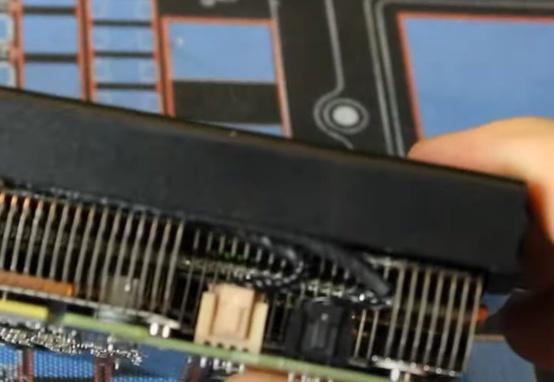

not your GPU but they look something like this
shrewd kettle
last tendon
Someone I know was having issues, and the fan cable wasnt fully in, it was eithe...
thx does it involve me taking my gpu out
last tendon
shrewd kettle
thx does it involve me taking my gpu out
yes it would, but it wouldnt be hard! Simply remove the screw (assume they screwed it in) on left side, unplug gpu if it requires power, and press the level on motherboard to release GPU then simply check if the cables are in properly, dont remove them, just press them in. Then repeat but backwards, you should be able to do this in roughly a few minutes. 🙂
shrewd kettle
last tendon
yes it would, but it wouldnt be hard! Simply remove the screw (assume they screw...
ok u got it
also this wasn’t happening until i oc and got faster bigger ram
is there a chance it could have died
like the fan
i but i opened up my pc to figure out why my top usb ports weren’t working it was bcuz it wasn’t plugged in i might have bumped something and it came loose
so i’ll take it out after school
sage urchin
shrewd kettle
also this wasn’t happening until i oc and got faster bigger ram
I think it is has gone because you may have noked it or oc it
last tendon
shrewd kettle
is there a chance it could have died
did you mess with core voltage, it seems unlikely that a Oc can cause a fan to die, unless you mess with core voltage or set a fan curve and messed up. Putting too much voltage into a gpu could def kill a fan but if you didn't touch core volt it seems really unlikely.
I am not writing it out but I never heard of it
shrewd kettle
last tendon
did you mess with core voltage, it seems unlikely that a Oc can cause a fan to d...
yes i did mess with core volt
i’ll try what u said first and if that don’t work
do u think buying a new gpu fan would work
@last tendon
last tendon
shrewd kettle
do u think buying a new gpu fan would work
outside my scope, logically yes if it correct size, they use a univeral plug standard so you should be able to just replace it. I don't know anyone who has, I assume you can youtube gpu fan replacements or like a crypto person doing it 😄
shrewd kettle
last tendon
outside my scope, logically yes if it correct size, they use a univeral plug sta...
alr
i’ll do it after scho
last tendon
gl fam squad