#GPU Hotspots Too High (111 Celsius) - New PC Shuts Down
1 messages · Page 1 of 1 (latest)
 misty jewel
 bitter tiger
run stress test
I will recommend to install hwinfo64
and to install furmark
run a stress test for 5 minutes
how to check properly is
you run hwinfo first, and check the sensors, go to your gpu and look for temps and also power draw
do not close hwinfo,
then open furmark and run the stress test
while it's running, look at your sensors
you will see the power draw, the temps
i would also recommend you to check your event viewer and send screenshot of any errors, warnings are minors, but errors are important sometimes
misty jewel
Okay thanks
bitter tiger
misty jewel
Okay thanks
this will show how much power your house is drawing, I would also recommend running a scan on windows prompt
to check if there is any corrupted windows files
and run a memory test by using memtest86
to check for windows corrupted files you open your window search bar and type command prompt
and then you run it as administrator
then type
sfc /scannow
You can follow this guide
Describes how to use the System File Checker tool to troubleshoot missing or corrupted system files in Windows 8.1, Windows 8, Windows 7 or Windows Vista.
misty jewel
bitter tiger
this will show how much power your house is drawing, I would also recommend runn...
Hm, this is possibly why?

 untold walrus
bitter tiger
to check if there is any corrupted windows files
untold walrus
bitter tiger
to check if there is any corrupted windows files
wont make a diff tbh its a phisical issue not with windows most likely
also are the utilization spikes happening in all games? or just certain ones?
untold walrus
misty jewel
Hm, this is possibly why?
ok hot spot is WAY to fucking hot gawd dam
welp repaste ig
bitter tiger
did you get your 6700xt brand new or second hand, are you gpu fans running 
bitter tiger
untold walrus
welp repaste ig
if it's brand new he could RMA it
untold walrus
bitter tiger
if it's brand new he could RMA it
yup
bitter tiger
if it already has been opened they would refuse it to rma 
bitter tiger
untold walrus
yup
your option isn't bad either,
untold walrus
bitter tiger
did you get your 6700xt brand new or second hand, are you gpu fans running <:Mai...
look at the pic hwinfo is saying theyre running and maybe running at max
bitter tiger
he should check for the cooler 🤔
untold walrus
bitter tiger
your option isn't bad either,
its the cheapest
bitter tiger
untold walrus
its the cheapest
yeah
but it's his first pc build, asking him to tear down his gpu would be a challenge 🤔
untold walrus
@misty jewel get thermal paste and repaste the gpu maybe get pads for memory as well
untold walrus
bitter tiger
but it's his first pc build, asking him to tear down his gpu would be a challeng...
not really
you cant overtighten
and its really hard to crack a gpu die by just screwing it down
untold walrus
untold walrus
you cant overtighten
in most cards they have springs on the coolers so
untold walrus
misty jewel
Hm, this is possibly why?
would also be better if you could get a screenshot
gpu z will tell you your memory temps
memeory might be dying too tbh
bitter tiger
untold walrus
and its really hard to crack a gpu die by just screwing it down
oh I didn't mean this in particular, I'm just thinking if he is new it could be a bit pressuring to him, since he may not be that good with manipulating hardware 🤔
but you're not wrong indeed
untold walrus
bitter tiger
oh I didn't mean this in particular, I'm just thinking if he is new it could be ...
i mean yeah ive repasted my cpu many times but never a proper die to cooler situation
ive seen many gpus on yt having springs
so i suppose its like laptop coolers which ive had way too many fucking experiences with repasting QwQ
untold walrus
misty jewel
I got it on ebay 💀
okay dry thermal paste it is
misty jewel
it's a SWFT XFX 309
untold walrus
do you have a tech store near you?
untold walrus
misty jewel
it's a SWFT XFX 309
would you be comfortable with repasting this card yourself with me guiding you through?
and @bitter tiger will help too
bitter tiger
misty jewel
I got it on ebay 💀
ooooof, my poor dude, can you still get a refund?
untold walrus
bitter tiger
ooooof, my poor dude, can you still get a refund?
no no wait a second lets see if hes okay with repasting
untold walrus
bitter tiger
i~
if you wanna?
bitter tiger
untold walrus
no no wait a second lets see if hes okay with repasting
sure
misty jewel
untold walrus
would you be comfortable with repasting this card yourself with me guiding you t...
I'm not sure if I have enough thermal paste, my AIO came with thermal paste so I didn't apply any myself. I have, in the past, applied thermal paste to CPUs though soo maybeee 🤷
untold walrus
misty jewel
I'm not sure if I have enough thermal paste, my AIO came with thermal paste so I...
its as easy as cpus imo
bitter tiger
misty jewel
I'm not sure if I have enough thermal paste, my AIO came with thermal paste so I...
well you will need thermal paste, but also thermal pads
untold walrus
just gott be a tad more careful
bitter tiger
it would be better if you replace the thermal pads too
untold walrus
bitter tiger
well you will need thermal paste, but also thermal pads
maybe not pads atm depends
untold walrus
bitter tiger
it would be better if you replace the thermal pads too
i mean yeah but if memory is running 80 or lower its fine
misty jewel
GPU Hotspots Too High (111 Celsius) - New PC Shuts Down
untold walrus
good new title
bitter tiger
untold walrus
maybe not pads atm depends
it would be better to do both while he is at it, to make sure the issue is solved instead of having to tear it down again and replace the pads too 🤔
untold walrus
now we talkin
untold walrus
bitter tiger
it would be better to do both while he is at it, to make sure the issue is solve...
yeah
untold walrus
but we shall see
misty jewel
I have contacted the seller on ebay too explaining that I have an issue and asking if they have any suggestions
untold walrus
Dee get Gpu-Z and see how memory temperatures are under load if you can
misty jewel
might have to return though eghhh
misty jewel
untold walrus
Dee get Gpu-Z and see how memory temperatures are under load if you can
okaty
untold walrus
misty jewel
I have contacted the seller on ebay too explaining that I have an issue and aski...
best option now is to repaste
untold walrus
misty jewel
might have to return though eghhh
no not yet my friend i wont let u feel the pain of ebay returns QwQ its shit ive had to return a thing and it cost like 40 euro to return a 120mm fan
QwQ returns are a pain
oh wee problem i might need to go soon in like an hour or so :/
misty jewel
Woo
 untold walrus
right amd cards dont report mem temps
shit]
i mean overall the gpu temp is not bad
misty jewel
yeh so it must be just one area
untold walrus
just that hotspot might be a problem since ur die might burn there
misty jewel
im wondering what the gpu temp average is excluding the hotspot(s)??
untold walrus
misty jewel
im wondering what the gpu temp average is excluding the hotspot(s)??
82 acc to gpuz
bitter tiger
misty jewel
im wondering what the gpu temp average is excluding the hotspot(s)??
it should be around 70-80
untold walrus
A hotspot temp over 100 isn’t too worrying, but it also depends on the average GPU die temperature. Anything that’s around 10C more than the average die temperature is fine and is considered normal. However, if the difference between the two is too much (like the average temperature is 70C while the hotspot is 100C), then it is definitely worrying.
womp womp
bitter tiger
but as said, your card is having a stroke, and hotspots hitting 110
untold walrus
google told me that in a big box so its true
untold walrus
bitter tiger
but as said, your card is having a stroke, and hotspots hitting 110
my cpu hits 105 daily so lol
bitter tiger
untold walrus
womp womp
womp womp
misty jewel
also thank you guys so much for helping lol
bitter tiger
cpu or gpu
untold walrus
bitter tiger
your what
well 104.7 usually while tcase is 105
bitter tiger
(●—●)
misty jewel
my CPU has been running well so far lol
untold walrus
misty jewel
my CPU has been running well so far lol
which model/brand?
misty jewel
bitter tiger
brother, you want to make a bomb (●—●)
misty jewel
untold walrus
which model/brand?
ryzen 7 5800x
untold walrus
misty jewel
ryzen 7 5800x
wow
untold walrus
bitter tiger
brother, you want to make a bomb (●—●)
i5 3470 pipebomb
bitter tiger
untold walrus
i5 3470 pipebomb
untold walrus
i mean its improved as ive added a 3d printed shroud to it
80 max now
with the same rendering load
bitter tiger
good
untold walrus
blender stresses cpu more than your average prime95
untold walrus
bitter tiger
<:catsad2:628541812210008064> <:catsad2:628541812210008064>
im getting an RTX a2000 for this lil guy
i might go up to a 3770 tho
bitter tiger

bitter tiger
untold walrus
i might go up to a 3770 tho
how old is that cpu (●—●)
untold walrus
bitter tiger
<:pepoJuice:670049444539924487>
rtx+3rd gen
bitter tiger
untold walrus
rtx+3rd gen
just your temps are enough to heat up the whole antartica ma boy, ecologist won't be happy with the amount of heat you're producing
untold walrus
bitter tiger
just your temps are enough to heat up the whole antartica ma boy, ecologist won'...
nahhh the a2000 is like 70w
and cpu maxes out at 65
bitter tiger
untold walrus
nahhh the a2000 is like 70w
I meant the cpu temps at 100
untold walrus
bitter tiger
I meant the cpu temps at 100
cpu at 65w is 100 lol
bitter tiger
lel
@misty jewel so hum, is any other parts of your pc from eBay?
btw, your gpu, when you bought it on eBay, it was listed as used?
or brand new?
untold walrus
bitter tiger
<@272147910026723350> so hum, is any other parts of your pc from eBay?
my pc was 80 from ebay and is a SFF dell lolololooo
bitter tiger
(I'm pretty sure is used)
untold walrus
bitter tiger
btw, your gpu, when you bought it on eBay, it was listed as used?
or brand new?
used most likely
my setup with all peripherals is 100 so far
250 euro gpu + 80 euro pc is good idea fr
misty jewel
bitter tiger
<@272147910026723350> so hum, is any other parts of your pc from eBay?
the CPU too lol
and that's about it tbh
I snagged some good deals on Amazon
and got an nzxt h1 v2 on Scan
untold walrus
misty jewel
I snagged some good deals on Amazon
wow how much was the build?
bitter tiger
misty jewel
I snagged some good deals on Amazon
fair enough
untold walrus
misty jewel
and got an nzxt h1 v2 on Scan
brit/irish i see? since Scan
misty jewel
roughly 760gbp
misty jewel
untold walrus
brit/irish i see? since Scan
yhh
untold walrus
wow thats not a lot
bitter tiger
hummmmmm, your cpu temps are ok?
misty jewel
the case/AIO/PSU was a very good deal lol
misty jewel
bitter tiger
hummmmmm, your cpu temps are ok?
seems like it
untold walrus
misty jewel
yhh
im like 200-600km away lol depends on where in uk u are lol im in ireland
misty jewel
I could stress test them too ig
untold walrus
i love meeting ppl from fellow countries
bitter tiger
well, you would most likely need to do as he said and relate your gpu, you can check your cpu, but it would be good I think
check for the cpu Max temps wouldn't hurt
untold walrus
bitter tiger
well, you would most likely need to do as he said and relate your gpu, you can c...
*repaste
bitter tiger
just to be sure
bitter tiger
untold walrus
*repaste
my auto correct, it's 5am here 😭
untold walrus
bitter tiger
my auto correct, it's 5am here 😭
ong its 10pm here lol
sleep my child
sleep otherwise youll be tired af
untold walrus
misty jewel
I could stress test them too ig
use blender ngl
do the BMW benchmark rendered on cpu and see temps
bitter tiger
untold walrus
sleep otherwise youll be tired af
I'm jet lagged
untold walrus
rendering in blender flucutates cpu usage a lot so its the worst case scenario
bitter tiger
untold walrus
sleep otherwise youll be tired af
you old dinosaur
bitter tiger
untold walrus
mf im 15
mf called me child (I didnt get it badly dw)
that's why I assumed you were a dinosaur
untold walrus
bitter tiger
mf called me child (I didnt get it badly dw)
i live in ireland i do that a lot ngl
bitter tiger

bitter tiger
I'm going to bed, ttyl guys
misty jewel
Hmm

CPU peaked at 80
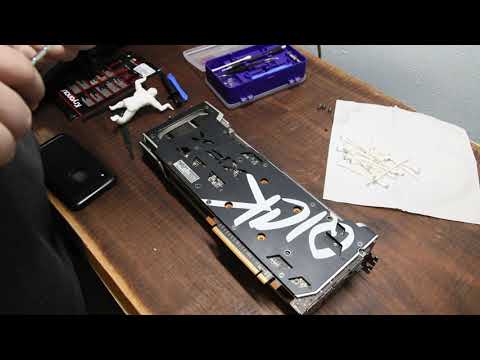
This is part two of our repasting video, in this video we are repasting the XFX 6700xt with Kryonaut, by Thermal Grizzly.
untold walrus
misty jewel
CPU peaked at 80
thats fine
did u set it to render cpu?
oh yeah u did
i can see
thats good
untold walrus
misty jewel
https://www.youtube.com/watch?v=HBSMXBZ6Pis
follow that tbh
misty jewel
untold walrus
follow that tbh
I happen to have some thermal paste lying around. Soo ima repaste
untold walrus
misty jewel
I happen to have some thermal paste lying around. Soo ima repaste
aight
use the toutorial
untold walrus
misty jewel
might follow this for thermal pads too
yes
misty jewel
lol I don't think they're that thicc though?


Did tear them though so... Fml
OH OKAY
 untold walrus
misty jewel
OH OKAY
untold walrus
misty jewel
OH OKAY
Yeah that's not true
untold walrus
misty jewel
lol I don't think they're that thicc though?
The paste needs to be in an X and in the middle
Not a dot off of the side
Add more than you think is needed
misty jewel
untold walrus
The paste needs to be in an X and in the middle
Okay thanks
I'm going to wait until the thermal pads arrive tomorrow
And not play any games in the meantime
untold walrus
Yeah
misty jewel
There was a bit of plastic under one of the thermal pads
The issue is now resolved, temps are better now lol
untold walrus
misty jewel
The issue is now resolved, temps are better now lol
YAY
can you like send here?
bitter tiger
misty jewel
There was a bit of plastic under one of the thermal pads
was it the plastic or the thermal pads?