Recently swapped from a ASROCK A320M HDV R4.0 to this new GIGABYTE B550M DS3H. Everything was working fine, and I got a new install of Windows. Now, neither of my old solid state drives are being detected, but they show up in Task Manager. I tried to initialize, and got the "This request cannot be completed because of an I/O device error." The parts worked just fine on a different board 10 minutes before the swap. Any help would be appreciated, thanks. Can call or stream, whatever is needed.
#Disks Unable to be Initialized
1 messages · Page 1 of 1 (latest)
 shut widget
shut widget
shut widget
my ssds are being detected by my motherboard and task manager but i cant intialize them, its like they're locked even though they've never been locked before and worked on my other pc 10 mins ago
shut widget
@tall quartz
shut widget
NVMe
 tall quartz
Do you have another SSD in the new PC that works?
shut widget
fresh install of windows on an nvme drive
tall quartz
shut widget
fresh install of windows on an nvme drive
Is it one of the two old ones
shut widget
no, brand new
shut widget
yes
tall quartz
Hmm
shut widget

tried old cables, then put the ones that came with the motherboard on
also tried different SATA slots, neither worked
tall quartz
Are they all named C drive
Windows won't mount them if they all have the same drive letter
shut widget
you cant put a letter on them until you intialize them
shut widget
UEFI ..?
tall quartz
I mean your ide controller

 thorny sapphire
Is there data on the old discs that you need?
shut widget
yes
id like to set them up here without formatting
(and even then i cant format them currently, i dont have the option to)
tall quartz
Can you go to properties, advanced, and check what PIO Only is set to
On the ahci controller
thorny sapphire
Have you installed all the chipset drivers for the new motherboard?
shut widget
tall quartz
Can you go to properties, advanced, and check what PIO Only is set to
i don't have advanced
tall quartz
shut widget
i don't have advanced
Yeah then I'm thinking the same as osku
shut widget
ill go look
thorny sapphire
did that already, sec
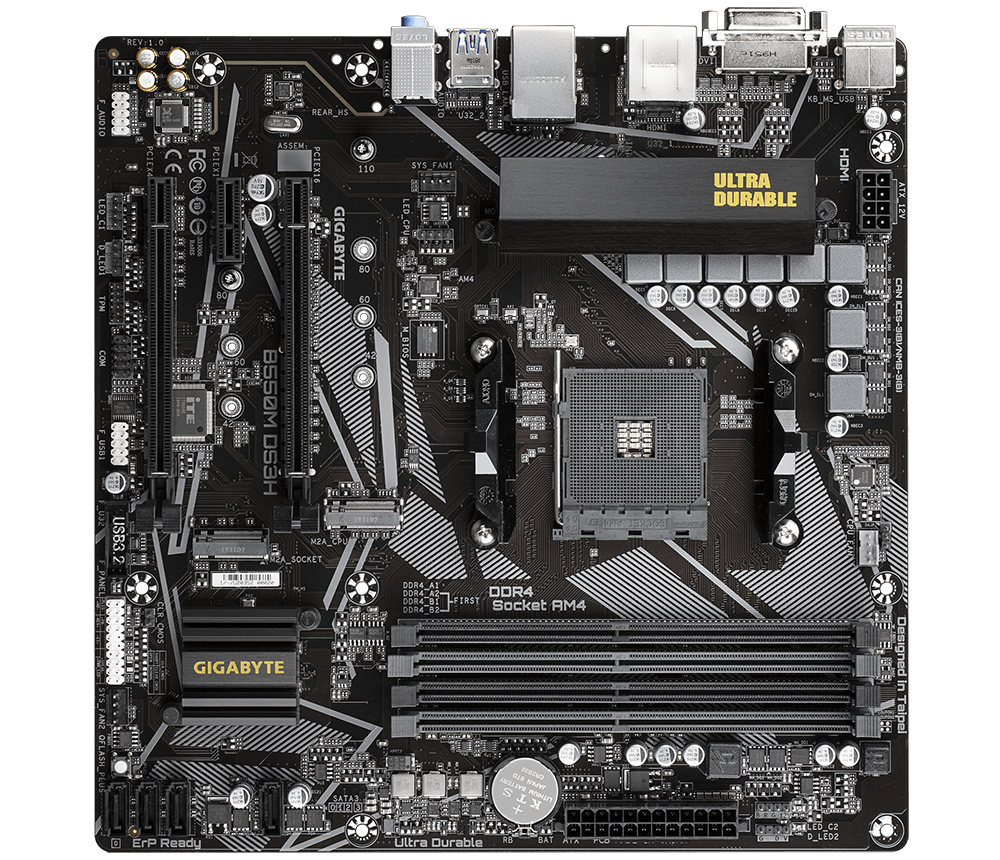
GIGABYTE
Lasting Quality from GIGABYTE.GIGABYTE Ultra Durable™ motherboards bring together a unique blend of features and technologies that offer users the absolute ...
That might solve something
well, just grab em all and install, audio, chipset, lan, sata drivers
although the sata driver seems to be just a raid driver
tall quartz
Yeah
thorny sapphire
the others should be installed at least
put em in a folder, you'll need them later if you end up reinstalling
shut widget
installed all
tall quartz
Fingers crossed
 thorny sapphire
win 10 or 11?
shut widget
10
thorny sapphire
good, the page was for win10 drivers
look like at least the lan driver for 11 is a different file
shut widget
tried to boot twice, failed both times
thorny sapphire
geez
shut widget
a bit worried now to be honest
now neither of the two ssds are showing as boot options when they did previously
thorny sapphire
yeah that's not great, try again until you get to the repair menu
 shut widget
still in repair
idk what its doing but its taking its sweet ass time but im scared to reboot
💯
tall quartz
shut widget
idk what its doing but its taking its sweet ass time but im scared to reboot
Ugh I've had that happen to me a number of times, it's a pain
shut widget
 tall quartz
Trying to fix anything in windows causes 2 more problems
shut widget
Im tempted to power it off
thorny sapphire
Inaccessible boot device hrmm.
shut widget
But I don't want to in case something happens
thorny sapphire
If you do, go back to bios and check that nvme raid mode is set disabled
tall quartz
What LCD is that
thorny sapphire
stupid driver install shouldn't change that though..
tall quartz
thorny sapphire
stupid driver install shouldn't change that though..
Imagine tho
tall quartz
Oof
shut widget
another inaccessible boot device
shut widget
thorny sapphire
If you do, go back to bios and check that nvme raid mode is set disabled
where would i find this..?
tall quartz
Maybe it's trying to boot from the wrong SSD?
shut widget
no, only the nvme is accessible to boot from
tall quartz
Hm
thorny sapphire
settings / io ports / I think

 thorny sapphire
this manual isnt helping me much either
just mentions that there is a setting, pretty much
shut widget
bro boutta call linus himself
thorny sapphire
is there a menu called tweaker?
 shut widget
):
thorny sapphire
settings, under sata configuration?
thorny sapphire
finally made sense of these paragraphs, although the menu doesn't look the same, probablby different bios version
shut widget
 thorny sapphire
is the nvme raid mode there as well?
shut widget
its disabled, yea
thorny sapphire
well hmm, I guess we hope windows can sort itself out, give it half an hour or something?
 shut widget
thorny sapphire
well hmm, I guess we hope windows can sort itself out, give it half an hour or s...
shut widget
thorny sapphire
well hmm, I guess we hope windows can sort itself out, give it half an hour or s...
and if not, no harm no foul, just another fresh windows install
shut widget
¯_(ツ)_/¯
thorny sapphire
I'd start with just the chipset though.. maybe check if there's a bios update available
tall quartz
Can you put this SSD in your old mobo
shut widget
I did update the bios
thorny sapphire
and no need to touch the raid drivers
shut widget
to f16a
tall quartz
Then transfer your files that way
shut widget
yeah, ill probably end up buying another ssd as well anyways
where would i even move the files to if i cant get the ssds working on this pc
shut widget
still diagnosing
tall quartz
Oof
 thorny sapphire
no text?
thorny sapphire
starting to think there might be something off with the motherboard or cpu install, like some pins not connecting.
guess you'll try a new windows install in the morning
shut widget
probably something to do with the f panel being wrong
 shut widget
i get flashed with "choose os" for 5 seconds before it selects on its own, and then proceeds into "getting ready" for several hours
shut widget


made it back to windows
ssds still not accessible, its as if they're locked by some FTPM thing
 forest summit
did you ever sort this? lol @shut widget