


1 messages · Page 1 of 1 (latest)
 cinder pasture
So i'm trying to solve this issue for like a few months. I have a Dell Inspiron 7577 laptop (1050 Ti, 16 GB RAM version.) but sad part is i can not play games on it. My problem is, when my CPU temperature hits 74 celcius, my CPU clock speed goes down to 0.79 GHz and because of that, my games running at like 3 - 5 FPS with very laggy situation. I've tried many things to escape from this power throttle limit but i couldn't be successful about it. So i wanted to ask here. Let me type things i've tried:
Downgrading BIOS version to 1.9.3 (It's my current BIOS version right now.)
Undervolting CPU via ThrottleStop.
Changing "Turbo Boost Power Max" value to 50W from 45W in XTU.
Deleting "esif manager.info_amd64... " and "dptf acpi.inf_amd64... " folders in "C:\Windows\System32\DriverStore\FileRepository"
Enabling "Speedshift" and disabling "Speedstep" in ThrottleStop.
Ticking "Disable and Lock Turbo Power Limits" checkbox in FIVR section of ThrottleStop.
Making a bad sector test to my 1 TB HDD and 128 GB SSD using the HD Tune Pro application. (No bad sectors seen.)
Please help me. I want to play games on my device but i can not because of this power limit. Please save me from this suffer.
 naive crest
I had a look on Intel site, TJ max is 100c, so I'd have thought it should only start thottling around 95c
Oh, nvm, so it's not thermal throttling hmm
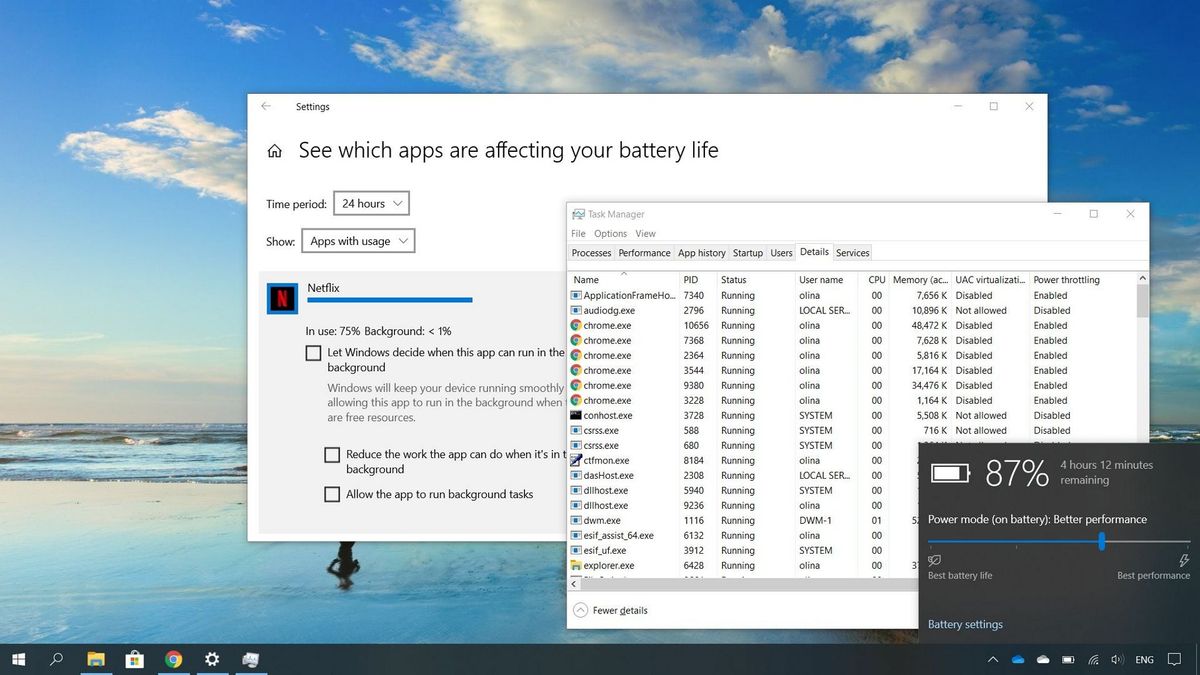
Power Throttling is a feature to improve battery life on Windows 10, but when it doesn't work as expected, you can use this guide to manage its settings.
This might help, it looks like it's something to do with Windows power settings?
You could also play around with this utility - https://coderbag.com/product/quickcpu
Disable core parking, but there is a lot of other things you can do too
 willow kayak
Doesn’t look like a « fresh » device, you could try cleaning the internal and re-pasting the cpu & gpu
Also I have heard some good from users of fan-stand for laptops
 azure talon
willow kayak
Doesn’t look like a « fresh » device, you could try cleaning the internal and re...
azure talon
willow kayak
Doesn’t look like a « fresh » device, you could try cleaning the internal and re...
It’s not really a reposting problem
My laptop has an i5 1235U and it does the same throttling
I think it’s related to the laptop not having enough power to enter that PL2 boost state
Because it only heats up to like 50 degrees without fans fully spinning
On cinebench
@naive crest how much power does your power brick supply
For the laptop
cinder pasture
mine is 130W
naive crest
azure talon
<@697946668972376066> how much power does your power brick supply
I don't have a laptop currently, I believe the question was for k_carmZ
cinder pasture
naive crest
I don't have a laptop currently, I believe the question was for k_carmZ
it didn't work 😕
 cinder pasture
 cinder pasture
naive crest
I think maybe it needs to be set at 100%?
cinder pasture
naive crest
I think maybe it needs to be set at 100%?
idk
you guys have any idea what is blocking my laptop performance ?
 low lynx
cinder pasture
low lynx
cinder pasture
set speedshift to 1 and change power limit
low lynx
there's also the techsupport subreddit
cinder pasture
https://linustechtips.com/topic/1477966-how-to-remove-the-power-throttle-limit-on-dell-inspiron-7577
First of all, i want to apologize if that's the wrong section on forum for my problem. I'm kinda new to this forum. So i'm trying to solve this issue for like a few months. I have a Dell Inspiron 7577 laptop (1050 Ti, 16 GB RAM version.) but sad part is i can not play games on it. My problem is, ...
low lynx
just say you need to change the power limit
cinder pasture
low lynx
there's also the techsupport subreddit
oh
low lynx
cinder pasture
https://linustechtips.com/topic/1477966-how-to-remove-the-power-throttle-limit-o...
throttlestop forum?
 low lynx
some of the devs are there too
cinder pasture
low lynx
some of the devs are there too
i opened a thread in forum
 warped onyx
What is the total wattage drawn by the CPU when the power limit kicks in?
You didn't mention it specifically, but did you enable High Performance mode in windows energy settings?
cinder pasture
warped onyx
What is the total wattage drawn by the CPU when the power limit kicks in?
You di...
i don't know first questions answer but i enabled high performance mode in power settings
how can i see value of watt drawn when limit kicks in ?
i also tried disabling speedstep in bios but didn't solve problem
warped onyx
HWInfo64 is a great tool
azure talon
naive crest
I don't have a laptop currently, I believe the question was for k_carmZ
Oh my bad
willow kayak
azure talon
Because it only heats up to like 50 degrees without fans fully spinning
Oh that’s a crappy firmware imposing stupid limit to the cpu then indeed
Did you try following steps in this video https://www.youtube.com/watch?v=VhXIiBPJseI ? I have serious doubt about the « power off and not reboot » sentence but it does detail how to install a driver to tweak power limits

Here's a short video on how to unlock TDP power limits on Skylake and ABOVE CPUs (7th gen/8th gen).
I removed previous video to better explain some things.
Regular Throttlestop 8.70 Download:
https://www.techpowerup.com/download/techpowerup-throttlestop/
RwDrv.sys (Error) Throttlestop 8.70 Download:
https://www.dropbox.com/s/mbo1crxptui61mc/T...
cinder pasture
willow kayak
Did you try following steps in this video https://www.youtube.com/watch?v=VhXIiB...
can i try this also?
willow kayak
It was for you 😂
cinder pasture
willow kayak
It was for you 😂
can u help i couldn't find the right TDP value to set in throttlestop. my cpu is intel i7-7700 hq
azure talon
willow kayak
Oh that’s a crappy firmware imposing stupid limit to the cpu then indeed
It’s from Samsung lol
They aren’t the best with laptops in term of BIOS and that stuff
But the laptop is good for college and watching videos so yeah
willow kayak
cinder pasture
can u help i couldn't find the right TDP value to set in throttlestop. my cpu is...
No idea It will depend on the thermal headroom of your laptop
azure talon
cinder pasture
maybe try TDP level control and manually set it
azure talon
willow kayak
Oh that’s a crappy firmware imposing stupid limit to the cpu then indeed
idk what happened but i thought id do the same cinebench runs i did with it to test
no more power limit and the score went to an all time high without even using high power plan

the CPU went from sitting at 0.9ghz to 3100Mhz pcore and like 1800+ mhz E core
didnt touch throttlestop either
22 watts boost power
on high power plan

 stark pier
Sounds like you may need to repaste and remount your cooler.
azure talon
stark pier
Sounds like you may need to repaste and remount your cooler.
It’s a brand new laptop
Oh wait yire talking to OP. Maybe
This power throttling is weird. It just kicked back in for me
When plugged in ATM the PL1 power limit is 8 watts and PL2 is 20 watts
When I unplug it, the PL1 goes to 15 watts and pl2 is 28 watts
Yesterday plugged in it was 18-28 or something
willow kayak
Huh shitty firmware ..
Or powerbrick issue, usb-c pd negotiations might be off ?
cinder pasture
Are answers for my problem ?
I mean on forum a throttlestop ceo replied to my post he said there is no solution for this sell ur device
azure talon
willow kayak
Huh shitty firmware ..
Or powerbrick issue, usb-c pd negotiations might be off ?
Perhaps
It’s the Samsung included PD brick
I’d argue it’s not the brick but who am I to speak when I got no idea what it is
All I know is that yesterday I got performance out of it that IVE NEVER ever thought I could get
willow kayak
I have seen some weird stuff, laptop unable to boot while having usb-c power, but since the battery was too low he apparently wasn’t able to even negotiate enough to boot .
Love usb-ce but the stuff feel wonky sometimes
cinder pasture

azure talon
cinder pasture
what should i do guys ??
Exactly what he said…
cinder pasture
so selling the device ?
azure talon
cinder pasture
so selling the device ?
if you really need that performance then yes id do it


