#no display on monitor

1 messages · Page 1 of 1 (latest)

jade pecan
#

Recently built my first PC, after about 6 hours of putting it together like a bumbling fool, I turned it on and...... Nothing

I honestly don't know why but the monitor comes back with no signal, Ive tried reseating the GPU, ram, swapped HDMI cords, plugged into a different monitor, and before anyone asks, yes I did plug the HDMI cable into the GPU and not the motherboard, hoping someone sees something I don't cause I've been at it for two days now

jade pecan
#

Help is needed

ancient loom
#

Do that fans spin up and the pc turns on but no signal?

#

If so I'm having this same problem and I think it's the gpu

jade pecan
#

Thank god, someone else has the same problem, yeah the fan (my mobo only came with one CPU fan pin and one system fan pin) turns on, everything looks to be fine, just no signal

#

I'm also thinking it could be GPU but I want to make sure it's the GPU as to not spend more money if I could just fix it

green sentinel
#

i have the same problem no signal when it is plugged in to the gpu but i can get a signal if i just plug it in to the motherboard instead

jade pecan
#

Not sure what the light means tbh, it runs through each section and stops on boot

jade pecan
#

Already reset cmos

blissful pebble
#

What board is it

#

And CPU

jade pecan
#

B550M pro

blissful pebble
jade pecan
#

Ryzen 5 3600

B550M pro motherboard, not the wifi one

650GQ EVGA power supply

Nzxt h510 flow case

Msi Radeon 570ti GPU

Ripjaw 2 × 8gb ram

1tb NVMe storage

#

The specs

blissful pebble
#

I guess

#

If nothing else worked

jade pecan
#

Yeah tried that too, on suggestion of someone on reddit

blissful pebble
#

Have you tried using only one stick of ram

jade pecan
#

Yeah, also Reddit suggested

blissful pebble
#

Checking all the cables and everything too I suppose

jade pecan
#

Yep everythings plugged in properly, Ive also taken the GPU apart, applied thermal paste (second hand)

blissful pebble
#

It’s not your GPU

#

Pretty sure a white CPU light means no CPU detected

#

Or faulty CPU

jade pecan
#

Well that would make sense to me if the light didn't go down the list

blissful pebble
#

Yeah it should go down

jade pecan
#

It goes CPU, to ram, to VGA, and stops at boot

#

Damn, I'll boot it up and take a vid rq

blissful pebble
#

Check if your CPU has any missing or bent pins

jade pecan
#

Alright, I'll go take a peak

jade pecan
#

Nevermind I got it

#

Pins look fine

blissful pebble
#

And the socket

jade pecan
#

Just put it back in🤦🤦🤦🤦

#

But o matter how I looked at it, there was no baby pins

high venture
#

Try bios update

ancient loom
#

@blissful pebble I'm having this same problem but no lights, and my gpu is a really old gtx 780 that works fine on a 4th gen intel system

#

My setup is an i3 12100f b660m ds3h gtx 780

blissful pebble
ancient loom
#

Do I just remove CMOS battery and then plug back in?

blissful pebble
#

What board do you have

#

The maker

ancient loom
#

Gigabyte B660m ds3h

blissful pebble
ancient loom
#

Is that the reset button?

#

On f panel?

blissful pebble
#

Does the board look like this

ancient loom
#

Yes

blissful pebble
#

Hold up

#

Short the pins under the CLR_CMOS

ancient loom
#

Ok

#

Thank you

blissful pebble
#

Grab a screwdriver and touch the 2 pins with it

#

Hold it for 5-10 seconds

ancient loom
#

Do I do that on boot or after it's run for a min

#

Or while it's off

blissful pebble
#

No turn the PC off and switch off the power supply

ancient loom
#

Ok

#

And do I have to do that every time I use it or just once

blissful pebble
#

Also hold your power button for 4-5 seconds after you turn off and switch the power supply off

ancient loom
#

Yeah

blissful pebble
ancient loom
#

Ok

blissful pebble
#

Do your fans spin ? But you have no video

ancient loom
#

What do I do if it doesn't work

ancient loom
#

No signal to monitor nothing

blissful pebble
blissful pebble
#

When you do it, ping me here and let me know. Or if you have any questions

ancient loom
#

I was told that my gpu didn't support my motherboard bios but I'll try this

#

Ok will do

#

I appreciate it

ancient loom
#

@blissful pebble I tried the cmos thing and it didn't work

blissful pebble
ancient loom
#

Could it possibly be that my gpu is to old and my bios is not on legacy setting?

#

That's what I was told earlier

blissful pebble
frozen imp
#

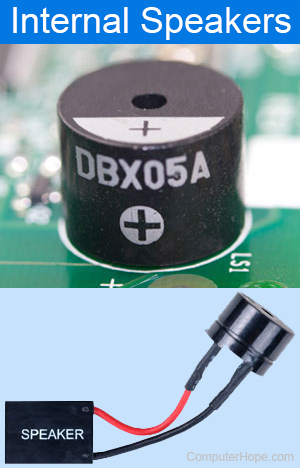
do they have the bios speaker included in box nowadays?

#

this is why i prefer my cpu to have igpu

#

no display error can be caused by faulty ram too

#

soo.... test your ram

ancient loom
#

I do have a speaker

#

@blissful pebble I have tested the ram and nothing happened but I can try again

#

When I power on the pc with the speaker it clicks a few times after booting up

blissful pebble
#

What’s the interval and how many times

#

It’s trying to tell you something 😂

ancient loom
#

I'll have to check again

#

@blissful pebble one click long interval 4 with short intervals and 1 final click slightly later

blissful pebble
#

Gigabyte motherboard speaker code

#

Or something along those lines

ancient loom
#

I can't find the code

frozen imp
ancient loom
#

1 long beep and 9 short beep : Memory Error

#

Does that sound like it

frozen imp
#

test all the ram slot, with all the memory stick?

ancient loom
#

Ok I tested both ram sticks one at a time in every ram slot with no difference

#

Can someone watch the video and count the beeps I feel like I'm getting it wrong and I'm tired so my brain is foggy

#

@blissful pebble @frozen imp I can't find the bios manufacturer

ancient loom
#

@blissful pebble should I contact gigabyte support?

blissful pebble
#

And ram

ancient loom
#

I'm getting new gpu soon

ancient loom
blissful pebble
ancient loom
frozen imp
#

yea, or can you get to local computer store?

#

ask them to trouble shoot, hard to do it with limited tools

ancient loom
#

They will charge like 100 euros for something that doesn't cost them anything