
#Wi-Fi Speed CAP
1 messages · Page 1 of 1 (latest)
 sharp vortex
 jaunty sierra
WiFi has different limitation than LAN and runs at a much slower speed than the 1/2.5/10 Gbps port you probably have on your motherboard. You're just under 50MB/s which is roughly the limitation of your hardware and is displaying correctly.
sharp vortex
can you please explain that in caveman language cuz half the terms i didnt understand
jaunty sierra
If you want to benefit from the full 2 gigabit connection I'd suggest using an unmanaged network switch. This connects directly to your modem and offers the FULL SPEED of your bandwidth to anything connected.
sharp vortex
how do i do that?
jaunty sierra
type in unmanaged network switch (ports are the limitation on the number of devices you can plug in)
on google or somewhere
decent 5-8 port switches are anywhere from 20-50 dollars
Then you have the limitation of your LAN port and not WiFi
sharp vortex
this is my wifi adapter

 remote surge
I don't think they can run ethernet if they're on wifi unless if your PC is close enough to your modem
jaunty sierra
correct
network switches require ethernet cables
the only way you get full performance is through a hard lined LAN connection
sharp vortex
nah i cant run a ethernet cable
remote surge
They might be wifi connector bottlenecked
jaunty sierra
the next best option then would be a mesh wifi6 router
remote surge
I mean I can run 535 on my wifi but I'm also running a $200 router and a wifi 6e card
sharp vortex
i got this router from my isp
remote surge
There's your problem
jaunty sierra
its not slow wifi by any means though
remote surge
Isp routers are shit by design
jaunty sierra
400mbps wifi
sharp vortex
idk man they told me it would still run pretty well even on wifi
jaunty sierra
if you are using the ISP's router that's the issue
remote surge
Yes but then they have the "upgrade package" for "better performance"
jaunty sierra
you are better off buying your router and reducing your monthly bill by the rental of their router
they charge 10+/month for garbage
remote surge
Or find a way to run ethernet
jaunty sierra
free at the COST of speed
sharp vortex
youre right
sharp vortex
 sharp vortex
wtf is a wifi antenna
jaunty sierra
find an 8dbi antenna and you'll probably see a significant boost in at minimum stability and at max performance

Specifications: Gain: 8dBi Frequency Range: Dual Band WiFi 2.4GHz 5.8GHz VSWR: <2.0; Polarization: Linear Vertical; Impedance: 50 ohm; Direction: Omni-directional; Connector: RP-SMA Male Connector; Dimension: 16cm x 1.5cm; Net Weight: 52g; Operating Temperature: -20°С ~ +80°С Storage Temperature:...
remote surge
The little pointy thingie that comes out of the router
sharp vortex
my router has none
remote surge
There's your problem
jaunty sierra
ya isp provided routers don't have visible antennas
remote surge
Rip
jaunty sierra
which is why they typically have poor signal
and offer lower performance than aftermarket routers
remote surge
Pcb antennas go burr ig
jaunty sierra

Faster Speed For Your Needs Up to 1.8Gbps for smooth HD streaming, improved gaming, uninterrupted video calls, and no more waiting for content on smart phones, computers and tablets. Capacity Beyond Belief MK63 with next generation WiFi 6 technology has 1.5X more capacity than previous WiFi, deli...
on sale now
I use this exact model to run a gpu farm, servers, multiple workstations all from my home
sharp vortex
dude im not tryna farm xD
jaunty sierra
you don't need to
sharp vortex
im getting packet loss in valorant
jaunty sierra
point is the performance is there
remote surge
That might be a bit expensive for them. Theoretically speaking you should be fine with Ax1800
sharp vortex
so i figured my router is the problem
jaunty sierra
with mesh routers you can kinda fake hardline your system
remote surge
TP-Link AX1800 WiFi 6 Router (Archer AX21) – Dual Band Wireless Internet Router, Gigabit Router, USB port, Works with Alexa - A Certified for Humans Device https://a.co/d/hpLqQOd

TP-Link AX1800 WiFi 6 Router (Archer AX21) – Dual Band Wireless Internet Router, Gigabit Router, USB port, Works with Alexa - A Certified for Humans Device
This might be more in their price category
jaunty sierra
one ethernet cable from the main router plugs into the modem while the other 2 satellite receivers only require power and have ethernet ports you can plug an unmanaged network switch and hardline your pc from the satellite receiver.
meaning you don't need ethernet ports in your wall to hardline your pc
you just need power and a network switch

The NETGEAR 5 Port Gigabit unmanaged Switch provides an easy, reliable, and affordable way to expand your network connections in homes and small offices. It is plug and play and features a rugged metal case. Features also include Auto MDI/MDI, LED indicator on Each port, energy efficient technolo...
this switch offers 1gbps connections to anything connected
sharp vortex
i dont have a network switch in my room
jaunty sierra
no one does until you buy one
sharp vortex
wait am i talking about the same thing
im talking about the thing thats in the wall that you connect to the router
jaunty sierra
a network switch has a power adapter and ethernet ports. One of the ports you connect to a satellite receiver from a mesh router system
sharp vortex
what is a satellite reciever?
jaunty sierra
the 3 black boxes above are routers. 1 has multiple ethernet connections on it, while the other 2 only have 1
it's so you can have a hardlined connection technically over wifi
 jaunty sierra
probably from voskcoin who is an idiot lol
those are trash
those were "pre-mesh router" mesh routers
and offer terrible performance in comparison
sharp vortex
jaunty sierra
https://www.amazon.com/gp/product/B07S98YLHM/ref=ppx_yo_dt_b_search_asin_title?i...
and how does this work in caveman language?
remote surge
sharp vortex
and how does this work in caveman language?
It go in different areas of house to give wifi to different devices
And you can plug in things to the back of it for Ethernet
jaunty sierra
it's the same as a mesh router but uses slower older technology
sharp vortex
and how much of an improvement would i get with those?
jaunty sierra
mesh wifi expands your signal so everywhere in your home has full signal strength, while also offering ethernet ports wherever you place the satellite receivers. They connect wirelessly to the main router (that is connected to the modem with an ethernet cable) offer wifi and hard lined ethernet in rooms where the satellite receivers are plugged in. Full circle your modem connects to one of the 3 boxes, this gives the other 2 boxes wifi signal and these 2 can use a network switch to expand the number of ports offered to hardline in rooms far from the modem.
hopefully that helps
sharp vortex
jaunty sierra
mesh wifi expands your signal so everywhere in your home has full signal strengt...
but if i connect those to my router then i wont see any improvement
my pc isnt that far from the router
sharp vortex
so what do i need to buy?
jaunty sierra
https://www.amazon.com/gp/product/B086ZN5R6P/ref=ppx_yo_dt_b_search_asin_title?ie=UTF8&psc=1 is your mesh router system. You will also want 2 of these for the satellite receivers. https://www.amazon.com/gp/product/B07S98YLHM/ref=ppx_yo_dt_b_search_asin_title?ie=UTF8&psc=1
Faster Speed For Your Needs Up to 1.8Gbps for smooth HD streaming, improved gaming, uninterrupted video calls, and no more waiting for content on smart phones, computers and tablets. Capacity Beyond Belief MK63 with next generation WiFi 6 technology has 1.5X more capacity than previous WiFi, deli...
The NETGEAR 5 Port Gigabit unmanaged Switch provides an easy, reliable, and affordable way to expand your network connections in homes and small offices. It is plug and play and features a rugged metal case. Features also include Auto MDI/MDI, LED indicator on Each port, energy efficient technolo...
sharp vortex
dude i dont wanna spend 200 bucks over some internet
jaunty sierra
last thing you'd need is an ethernet/Cat5/6 cable from your pc to your network switch (which will be connected to the satellite receiver)
I mean what does 2gbps cost
cause you're getting half the wifi you're paying for
sharp vortex
2 gbps?
my max speed is 500mbps
and im only getting 200
if those are called mbps
sharp vortex
sharp vortex
Hello, I'm paying for 500 up and 150 down and my wifi doesn't wanna go above 200...
.
sharp vortex
my tv is 1080p
jaunty sierra
that's 80% of your total from your ISP
sharp vortex
 jaunty sierra
Your options are run ethernet and take 80% of everything or get a mesh router and hardline your pc for performance in between wifi and hardlined connections
jaunty sierra
I've used them in the past and never liked any model I had
the performance wasn't there
sharp vortex
then what can i do
sharp vortex
is there any way i can get better stability for like 50 bucks?
jaunty sierra
yes
those antennas I sent are like 10
and are probably 5x the signal of the one that came with your motherboard
sharp vortex
how do i know if they can be plugged into my router
jaunty sierra
that wouldn't change the modem/router at all and offer better signal
they plug into your motherboard
you should have 2 coax looking connections on your mobo
sharp vortex
so i need to unscrew the router?
 jaunty sierra
is that a usb wifi adapter?
sharp vortex
yeah
jaunty sierra
that's probably what is causing the issue
sharp vortex
then what should i get?
jaunty sierra
your motherboard doesn't have antenna ports on the back of the I/O?
if not its fine
sharp vortex
i have this
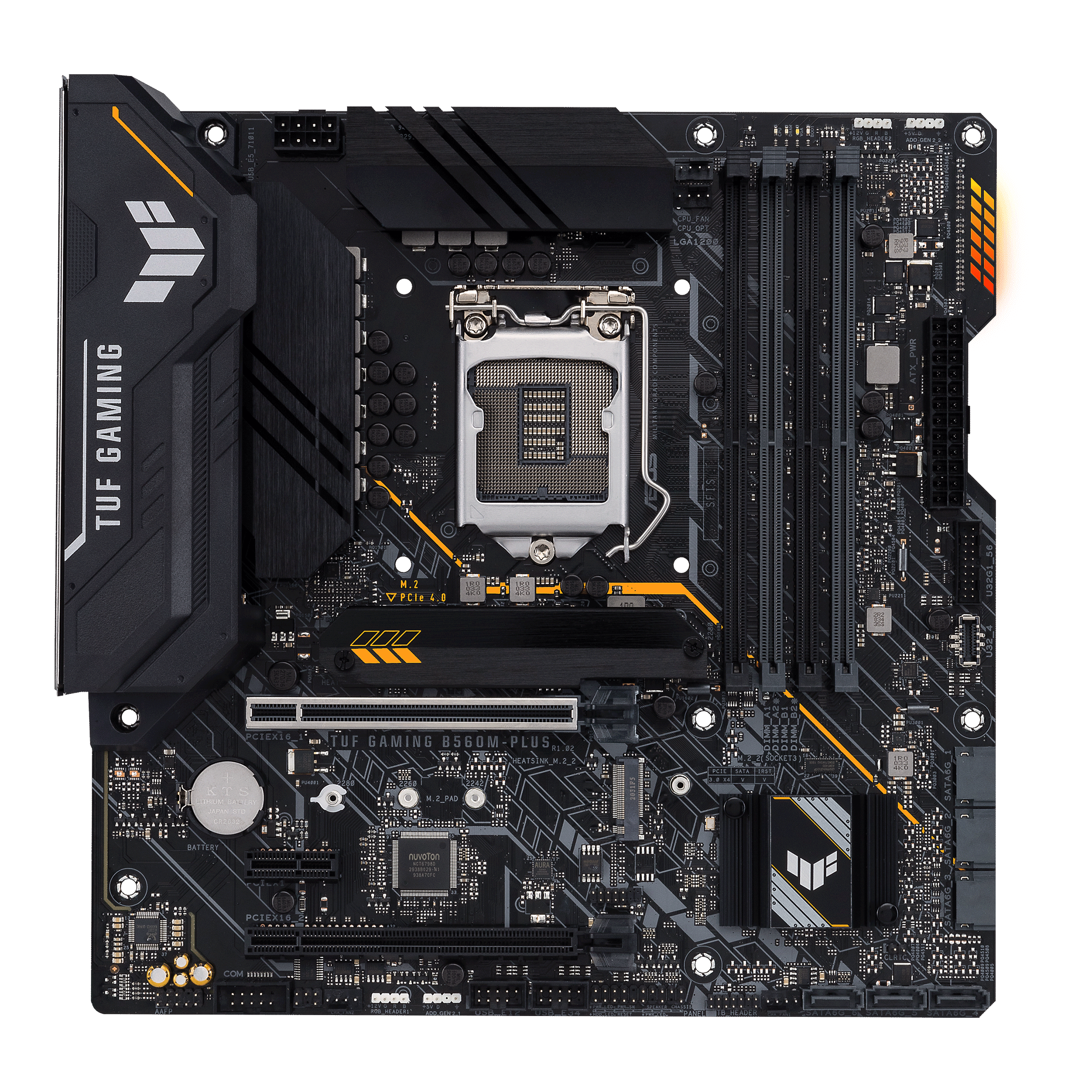
ASUS Global
TUF Gaming series distills essential elements of the latest AMD and Intel® platforms, and combines them with game-ready features and proven durability. Engineered with military-grade components, an upgraded power solution and a comprehensive set of cooling options, this motherboard delivers rock-solid performance with unwavering gaming stability.
 sharp vortex
yeah but my motherboard doesnt have wifi
jaunty sierra
ya I see that
can you link the one you are using
that's 100% the culprit
and a cheap fix
jaunty sierra
are you connected to 5g or 2.4g
sharp vortex
5ghz
jaunty sierra
ok good
that's actually a decent wifi adapter
from what I can tell your hardware is fine
this may go back to the modem/router provided by your ISP
your side is fine
their side probably isn't
sharp vortex
should i maybe call them?
jaunty sierra
I'd call and say your modem/router isn't producing the speed you're paying for. They'll send someone out. Keep them working until you see the speed you're paying for.
You may need to move your pc near your modem to hardline the connection to "verify" their speed
I never use ISP provided anything at this point
sharp vortex
jaunty sierra
You may need to move your pc near your modem to hardline the connection to "veri...
it doesnt make a difference
sharp vortex
ofc
jaunty sierra
armory crate is actually really handy
keeps all the necessary drivers in 1 place mostly
Ya man this issue isn't from your end as far as I can tell
Either you have neighbors watching 8k on your connection or your ISP pushed shit product in your home to rent it to your family as long as they allow it
sharp vortex
nah i verified all the devices
jaunty sierra
I'd ask how much the monthly fee is for their router and start calculating what I'd be willing to spend to remove it entirely
I fought with my ISP for 3 months in a prior location over something similar.
Monopolies suck
jaunty sierra
your welcome
sharp vortex
ill try and contact them