#folding-and-boinc
1 messages · Page 36 of 1
 sour bolt
If you can find a CPU WU haha
 odd barn
Keyboard / mouse don't worry about since I have those already
 serene fossil
i just added 2 mroe 2 core slots and one instantly got a job
 rich depot
CPU wu is pretty much
 storm talon
I have like 9 cpu wu's goin
serene fossil
eta is 2.44 days
odd barn
might yeet the cooler
rich depot
eyyyyy
odd barn
if AMD comes with one
sour bolt
Mine is stuck at 8.19 days but at the way it's progressing it'll be done in a few hours max
rich depot
is there any secondhand case?
storm talon
I would get an nvme m2
odd barn
unfortunately no
serene fossil
oh it moved to 1 hour now
storm talon
that wd blue gonna slow your load times in games
 dreamy hazel
actually, don't use the AMD cooler, they had issues with being below spec on ryzen 3x
rich depot
ouch
sour bolt
Can confirm
odd barn
It's better than using a HDD tbh
rich depot
also need to downgrade some stuff? you just fold with the system right?
odd barn
Blue is just for now
storm talon
why not a evo
odd barn
Well, if you can downgrade and if it makes sense to them sure
rich depot
How long are you waited for your passkey huys?
 hot spoke
I take it they added some servers since I have one WU in cue before my current one is finished
odd barn
Cost savings
rich depot
ok
sour bolt
@rich depot 5 seconds
odd barn
Will factor in an evo once I save more
 snow fractal
5 mins but that was folding month last year
odd barn
The point is to have a SSD that can hold me over for now since I'll mostly be folding
sour bolt
Added my information, and by the time I opened my email in another tab it was there
storm talon
should be more than fine for folding
snow fractal
if no pass within 24hrs request again
rich depot
@sour bolt I'm waiting for about 15 mins
storm talon
and you're future proof for.... at least 3 months 😉
sour bolt
I did mine about 30 mins ago and i got it within a minute at least
odd barn
@storm talon If I plan on getting back into gaming, definitely getting an evo, just not in the budget hehe
sour bolt
mmm raid...
sour bolt
still
rich depot
what do y'all think? i7-8750H & 1050 Ti for folding?
serene fossil
anything is good
sour bolt
I personally have no use for raid because all I have is games on my drives, but damn it's cool
serene fossil
cpu more so in your case
sour bolt
@rich depot Anything is good.
odd barn
There's also a problem with prices here at times
storm talon
I have a year's worth of clips backed up, lots of stuff to go thru in the "I'll get to in someday" pile
dreamy hazel
only have a raid1 on my nas
rich depot
3,9 GHz/ 12t
- can you have 2400MHz or 2666 instead 3200? if no big deal in price different so yeah
- You need an aio
odd barn
Where a prebuilt PC with an i5-9400H or something and a 1050Ti goes for like $1299
and gets branded as "gaming" just because
sour bolt
Yike.
rich depot
Yike
storm talon
just because it has rgb fans doesn't make it gaming
sour bolt
My build doesn't have a single piece of RGB I think I built it wrong
storm talon
my question is, what fps does it get in Rust
sour bolt
fuk
odd barn
Is Linus gonna slap RGB on the F@H servers when he gets them
serene fossil
my case only has blue fans is it not gaming??????? 😦
storm talon
cause that game is caused me to spend thousands on hardware
serene fossil
😮
rich depot
if he has spare RGB stuff so possible
sour bolt
hahaha
dreamy hazel
@odd barn don't go for any ram below 3000, it will bottleneck your cpu. What I did was getting 32gb of 3000mhz Micron E-die RAM and overclocking it to 3600mhz
 modest spoke
Your case needs to have at least 256 colours or it isn't gaming.
odd barn
3200 should be fine right?
dreamy hazel
ye
sour bolt
Yeah
rich depot
@odd barn I'm waiting for this RGB on servers, I think he will watercool whole thing tho
storm talon
my 1080ti has full on rgb
odd barn
I might be able to kick it up a little bit more
rich depot
crai in 2666MHz because no 3200
odd barn
Oh shit
storm talon
i can make it blink and stuff too
sour bolt
I wanted to save money so I bought stuff without rgb haha
odd barn
my G.Skill Ram though, I gotta tell you guys
serene fossil
my board cant boot with 3600 so i have it at 3500 😦
odd barn
I got it at 3200
sour bolt
All air cooled, just works tho.
odd barn
it went up to 3666 no issues
rich depot
the thing is, you need an aio, or put your system near the windows
dreamy hazel
what i found was that 3000's with a low timing are cheaper and overclock just as well as 3200's
rich depot
Oh.......
sour bolt
Honestly yeah.
storm talon
odd barn
those are nice timings
dreamy hazel
https://www.amazon.com/Ballistix-16GBx2-PC4-24000-288-Pin-Memory/dp/B07HPBV5RT got these, oc'd to 3600mhz CL16 with absolute ease
storm talon
yea i spent months dialing those in
odd barn
yikes
storm talon
did everything short of calling wendell
sour bolt
Alright boys I'm gonna bounce. Cya!
odd barn
see yaaa
rich depot
gotta commit sleep as well
rich depot
Oh you're 1 hours in my future
odd barn
Also quick question
rich depot
ye?
rich depot
yes, but you need a better cooler
odd barn
okay
rich depot
aio if you can afford
odd barn
I'll account for that then so long as my case can hold it
dreamy hazel
as i said before, @odd barn , they usually come with a cooler; however AMD has had issues with their coolers not being up to spec and tended to not be enough for their cpu's stock configs
storm talon
stock cooler is "ok" but
I would get an AIO
amd's love putting out heat when you use em
dreamy hazel
i'd take the "ok" with a grain of salt
rich depot
take it with a bag of salt pls
tried mid fold, 3600 ft stealth cooler, almost boiled my CPU
dreamy hazel
friend of mine was noticing system slowdown on his 3700, fan had died during game
odd barn
Sadly unable to
dreamy hazel
i mean, aircooled is fine, i'm on a bequiet dark rock pro 4
storm talon
yes, they do come with coolers aparantly
odd barn
Unfortunately what happened is one of the loops broke without me noticing and smoke started coming from the PC 
dreamy hazel
top-down fans
storm talon
is that what this is
odd barn
eventually blew a breaker and the PC died
dreamy hazel
yes it is
storm talon
it looks like not too bad of a cooler
rich depot
amd stock cooler is pretty decent, depending on your cpu. if you have the best cpu with that cooler its meh, if you have the worst cpu with that cooler is pretty good
It's fine for vanilla usage
but for hardcore, eh no
serene fossil
aois rearley break like that
dreamy hazel
for enduring load, not at all
storm talon
yea i obviously never even considered using it
dreamy hazel
that makes two of us larry
dreamy hazel
well, non overclock is not a thing with ryzen 3x
rich depot
I'm using a stock cooler and I get to max 76 degrees on full 100% artificial load
Definitely not good for OC and folding
ah yeah, running a 2600x
serene fossil
larry what cpu?
storm talon
2600x
dreamy hazel
ryzen 3x uses PBO, this exceeds the capabilities of their coolers at times, especially with long time loads
rich depot
I'm thinking about corsair 120mm aio or noctua air cooler after the lockdown in my end being laxxed a bit
Also sff build tho
My stock cooler can't yeet in mid
only reason I'd wanna upgrade cooler is for noise, not for temps
storm talon
the corsair you can only really hear when you first start up
and then it's quiet enough to not bother me
rich depot
makes sense
serene fossil
i have a fractal s24 celcius and i barley hear the fans on max
storm talon
it just makes a little pissing noise as the air moves up to the top of the loop
rich depot
I got the fractal meshify C so that lets through a lot of noise
 forest belfry
finally ... cpu and gpu working now
dreamy hazel
fractal define s2
rich depot
but it did lower my temps with like 10 degrees switching from a very closed case to the meshify, so thats neat
serene fossil
still no gpu job but both cpu slots are used
dreamy hazel
hardly hear a tone
forest belfry
best way to drop temps is ..... open the side panel
storm talon
mmmm.... idk about that
rich depot
I'd do that if I didn't have a cat that likes to touch spinning parts
storm talon
if you have your air going thru the case properly opening the side panel isn't gonna help
serene fossil
yeah not sure about that one either
forest belfry
it helps a lot
storm talon
depending on if you're running posi or negative pressure
forest belfry
it's mostly the GPU temp
storm talon
open air systems suffer from a lot of buffering zones
forest belfry
because u cant really properly airflow it
unless u have a case with fans on the bottom
rich depot
sure you can airflow gpu's. just 3 fans at top speed at the front pulling air in, all hot air out of the back
serene fossil
i put a fan right under my gpu to help
storm talon
you'll know when you got your airflow right, you will be taking your sweater off once your WU's kick in
rich depot
😂
I'm not sure I do have my airflow right, it does keep my temps down a bunch, but it makes my case a bit too dusty
forest belfry
rich depot
got 3 120s at the front with filtered intake. 2 140s at the top as exhaust, and 1 120 at the back as exhaust
forest belfry
one of the 140s is ruining airflow tbh
rich depot
honestly I still have no idea how points work
dreamy hazel
i have 2 140's flowing in in the front, 1 140 flowing out in the back
 pale solar
rich depot
pale solar
rich depot
you are talking about the most front 140 prob wikisoul? I've been thinking of removing it yeah. or at least unplugging it
dreamy hazel
now, should i open the top panel so air can go out or nah?
rich depot
but the problem with 6 fans is that I don't know which header its on anymore, so I can't do it in software xd got to open the case first
forest belfry
yes
@rich depot from the bios just switch between PWM and DC
that way i identify them
dreamy hazel
yes to who?
forest belfry
to u
dreamy hazel
aight
forest belfry
u dont have fans on top ?
rich depot
I could prob go in fan software and figure out which it is, but meh
 small current
forest belfry
small current
forest belfry
add one on the top
rich depot
rather annoy you people
dreamy hazel
i don't have another
forest belfry
cant find any fan software
or a good fan controller than can be used with a software
 languid river
is it just me or is the work queue stuck on download. Is it my internet or their servers
pale solar
@languid river normal. just wait for it
languid river
ok
rich depot
@forest belfry I have a gigabyte mobo and their fan software is pretty awesome. the SIV thingy
small current
what about my problem?
languid river
thx
forest belfry
on the other hand my CPU , GPU and my laptop CPU is working now
small current
oh no
 polar pelican
Yeah i was able to secure a job for my GPU last night
small current
that last .1 just took a very very long time
forest belfry
@rich depot i have gigabyte as welll ...
rich depot
try installing the SIV software. its basically the same as the bios but better and from inside windows, so nice to use while stresstestnig
languid river
i got 2 for my gpu and 3 for my cpu that i ran overnight.
pale solar
gpu ripped through its first WU in about 4 hours. going to be done in 5 minutes. hopefully it picks up another without having to wait a whole night
dreamy hazel
gigabyte x570 aorus pro here. fan software is meh compared to what i saw from asus's x570's tbf
rich depot
x470 aorus gaming
forest belfry
i have b450 auros pro and yeah the way fans ramp up to max for a sec is freaking annoying because i opened chrome
small current
ocing for folding
forest belfry
they measure temp by the max core temp which is wrong
it should be average
like what ryzen master do
rich depot
you can set the check interval higher so it won't take those spikes
forest belfry
i look for quiet operation
dreamy hazel
i'm just wondering how long that teeny tiny chipset fan is going to last on my x570 board...
serene fossil
is there a reason you have that temp sensor selected?
serene fossil
you can click on the case and choose what fan is where and what sensor to use
rich depot
I changed something in my setup, the software needs to catch up. it still uses the same sensor (cpu) as always
serene fossil
system 1 for me has never gone over 30c so really no point in choosing that
i just have all set to the cpu one
rich depot
yeah same, this is just a small error in the software cause I changed my setup a bit
it's taking readings from the cpu
forest belfry
it's just a thing with Ryzen 3000
it throws too much voltage on a split of a second ... fans go crazy because of that because one of the cores went hot for like 0.01 sec
serene fossil
true
i just have them at 40% when the cpu is below 70 and at 80 when its above
aio fans are the only ones with ana actual curbe
dreamy hazel
yep lol, voltages on ryzen 3000 jump around like mad
forest belfry
gigabyte needs to catch up with ryzen master
dreamy hazel
pretty funny they call that state "stable"
forest belfry
and use the average
dreamy hazel
lmao
dreamy hazel
why does that make me think of the streamer who set his apartment on fire
rich depot
what I did do to keep temps down btw is turn off all the fans, turn 1 on and slowly ramp them up till I heard them above my normal background noise in the room. thats why my fans all run pretty fast even with low temps, and reduces the spike if the temp goes a bit higher
forest belfry
on my old msi board i was able to delay the fan speed increase and decrees ... that feature was amazing
storm talon
lol deyta, the guy who put the fire out by setting it on fire?
forest belfry
:D
rich depot
like this 60% on these fans is silent for me
rich depot
what I did do to keep temps down btw is turn off all the fans, turn 1 on and slowly ramp them up till I heard them above my normal background noise in the room. thats why my fans all run pretty fast even with low temps, and reduces the spike if the temp goes a bit higher
@rich depot this. not higher than ambient noise
only fan in my system which makes a lot of noise is my stock cpu fan, which is also why it ramps up a lot more
 fresh zealot
Deem Wiki....you mea
dreamy hazel
https://www.youtube.com/watch?v=KUOD8SaNblE @storm talon

Japanese Man Accidentally Burns Down His House While Live Streaming Japanese Streamer Home Fire Minecraft Player Live Streams House Fire -Japanese streamer Daasuke 配信者が配信中にオイルマッチで火事になる大事態に 2015年10月4日 Japanese streamer Daasuke took a break from playing Minecraft to show off his...
fresh zealot
you make a lot
forest belfry
yeah cus two systems
 serene fossil
GPU JOB LETS GO
 velvet radish
serene fossil
velvet radish
velvet radish
serene fossil
velvet radish
anyone getting wu's?
pale solar
weird... just got ryzen master and apparantly my cpu clock current profile is set to 1550 on a ryzen 5 1600. i should be good to just pump that up to 3600 right? havnt Oced before. though this is more like putting back where it should be im guessing. do i need to watch any other settings? before progressing?
forest belfry
@pale solar use the bios
pale solar
@forest belfry ok. more reliable than ryzen master? or just better practice to do from bios?
serene fossil
better practice
forest belfry
more reliable and overall better control
 maiden grotto
I'm running project 13861, how do I look up what that is for?
pale solar
fresh zealot
what is better to do? folding or Boinc and is there a point to doing both?
forest belfry
@pale solar used to run 1600 on 3.8ghz with auto voltage ... u might need to give a lil more voltage to stable
serene fossil
11778?
pale solar
@forest belfry thank ill do that then. definitely explains why my pc has never done as much as i expected in general if it somehow came out of the box clocked to 1550
dreamy hazel
eh, khali
have you installed the chipset drivers?
i've actually sometimes had that issue on some cores of my cpu
and a restart would then set everything to normal again
pale solar
@dreamy hazel pretty sure i have them butt good idea to check
serene fossil
eyy my gpu got a covid project
dreamy hazel
my entire system is running covid19 WUs :D
 random silo
i know i heard someone got viewer working on windows, where's the link to that?
storm talon
downgrade to 7.4.4
serene fossil
?
dreamy hazel
either that or use this https://linustechtips.com/main/topic/1164541-ltt-folding-teams-emergency-response-to-covid-19/page/141/?tab=comments#comment-13397099 this post has a link to a github, the lower link being fixed files
Linus Tech Tips
just replace those in your fah folder with the ones from that git and it'll work
rich depot
does anybody know at what temp ryzen 2 2600x lowers it clocks if on pbo?
random silo
thanks
serene fossil
i have never seen this high ppd on my rig before damn
serene fossil
yeah looks like they pushed out somemore
forest belfry
or maybe linus installed that server :D
serene fossil
nah im still waiting on a proj to send
rich depot
would be nice. I wonder if that video would be posted right after its done, or first a week on floatplane. since its not really a call to action anymore on folding, but would create more interest in it
serene fossil
i think itll be up when its finished
polar pelican
Yeah they prioritize GPU's. Just got a new WU and it was sent to my GPU. Just got F@H yesterday and had only 2 WU's so far.
serene fossil
im at 7
polar pelican
Nice
forest belfry
for me they love cpu
serene fossil
but 0 points cause i got my passkey this morning
dreamy hazel
so i have a WU that hasn't completely uploaded and been stuck for 12 minutes now
velvet radish
for me my 1060 never got a single WU
 solid thunder
yeah i got a WU about 10 or so minutes ago
velvet radish
but my 5700 xt been getting WUs all day
solid thunder
i'm on a 1060 and i did 3 WUs today
serene fossil
ive got one on all 3 of my slots
solid thunder
all GPU
polar pelican
For anyone that got a WU on the GPU, what model GPU?
 fringe elk
it's a distributed system, it's possible for someone to get it while others don't
polar pelican
I had only 2 WU so far and I have a 2080 Super
fringe elk
it's how scheduling works
dreamy hazel
my 1060 is on its 4th wu today
serene fossil
anyoen know why this is here? it was the first gpu wu but it never finished
polar pelican
Dang nice
fringe elk
it's probably waiting for confirmation that the data has been received
TCP - handshake,ack,send,receive,ack, say goodbye
serene fossil
cause the proj right below it in the qeueu is my gpu so it got another
fringe elk
again distributed systems will schedule according to the algorithm being used. It is more than possible that some chunks get stuck on a bad block on a SSD for example
serene fossil
oh ok
fringe elk
I'm sure they never assumed 30% of the world would never actually help
the hardware must be screaming
polar pelican
Got a WU running right now on my GPU. It seems to only hover at about 45% total usage. Is there a way on the F@H GUI to control GPU usage?
serene fossil
whats the folding power at
polar pelican
gotcha
snow fractal
or switch a graph to cuda or compute
polar pelican
folding power can be found on F@H gui? @serene fossil
dreamy hazel
yes
dreamy hazel
on any of the settings pages, it's the low/medium/full options on a slider
serene fossil
dreamy hazel
or on rightclick of the icon
serene fossil
polar pelican
@serene fossil Gotcha thanks. I have it currently set to full.
serene fossil
np
yeah then do what deyta said and get hwinfo
i use cpuid but they do the same thing
polar pelican
okay thanks guys. I just got it downloaded.
serene fossil
np
dreamy hazel
20:28:33:WU04:FS04:Uploading 4.96MiB to 155.247.164.214
20:28:33:WU04:FS04:Connecting to 155.247.164.214:8080
20:28:39:WU04:FS04:Upload 64.33%
20:28:45:WU04:FS04:Upload 84.51%
20:29:13:WU04:FS04:Upload 85.77%
20:30:33:WU04:FS04:Upload 92.08%
20:42:39:WU04:FS04:Upload 93.34%
dead since then
serene fossil
ive never hit my cpu so hard, ive been at a constant 75c and 100w for the last 4 hours
dreamy hazel
what's happening there
serene fossil
same
dreamy hazel
it doesn't even tell me that
serene fossil
it was at 81k now its 78k
dreamy hazel
project is 14328
dreamy hazel
dw
 rose parcel
how do you get the protein viewer to actually view the wu your computer is folding
serene fossil
scroll up theres a link
polar pelican
thanks @dreamy hazel and @serene fossil
serene fossil
the second zip file download worked for me
dreamy hazel
use this https://linustechtips.com/main/topic/1164541-ltt-folding-teams-emergency-response-to-covid-19/page/141/?tab=comments#comment-13397099 this post has a link to a github, the lower link being fixed files
Linus Tech Tips
serene fossil
np!
dreamy hazel
just replace those in your fah folder with the ones from that git and it'll work
pale solar
would be cool if you could actually do something with your credits. i mean buying stuff would be too much obviously but something. i dunno a mini rpg that has your points act as currency or something.
serene fossil
i have 11778 not uploading
maybe they paused uploads for ltt server to come up?
doubt it but its possible
dreamy hazel
even it being LTT i doubt they'd have it done this quickly
serene fossil
lol true
pale solar
@serene fossil im on the same project. both last WU and this one
pale solar
first one did quite quickly. this one has 3 hours left
dreamy hazel
after 15 minutes
serene fossil
it just sayd 1 hour 33 min and hasnt changed for about half an hour
fringe elk
it depends on their host load, if it takes random amount of times, don't worry about it
or what may seem as randomized durations, it won't be based on your WAN connection speed.
rose parcel
@dreamy hazel thanks for your help
 dusky loom
I'm getting so few jobs I'm being displaced!
dreamy hazel
np
storm talon
i've got 8 jobs running atm
serene fossil
how many threads per cpu slot?
storm talon
each instance is a quad core
dusky loom
I've got 7 idle hosts
storm talon
yea i'm running em on a r810
esxi backend
I haven't mucked with affinity yet, but results are good
serene fossil
im listening to this comptia A+ course and the guy said "most mobile devices support a battery change" lol
pale solar
@serene fossil outdated by like a decade
pale solar
old af computorialy speaking
dreamy hazel

odd barn
hahaha
pale solar
ouch
odd barn
I feel that
serene fossil
was at 81k and now its 75k
dusky loom
yeah
dreamy hazel
mine's only a tiny one, but still
serene fossil
my case is cool, all air coming out is cool but my cpu is at 78
rich depot
surprised my gpu isn't being crushed by this
serene fossil
anything will be fcrushed by this
dreamy hazel
it's a synthetic load after all
rich depot
gpu won't go above 50%
dreamy hazel
then you're using task manager
if you're not specifically checking cuda load, it's not displaying correctly
just use hwinfo64 and you'll see your gpu actually being near 100%
serene fossil
it finally sent
odd barn
Nothing in task manager shows properly because the numbers are represented as an average over a polling time of 1-3 seconds
 hushed bobcat
change one of the graphs to either CUDA or Compute_0
pale solar
:dance:
dusky loom
i've got 100+ thread just sitting idle
odd barn
Aight time to make this PC a sleeper build buy buying the cheapest PC case possible
dreamy hazel
yeah, just use hwinfo64
serene fossil
what are you running htat has 100+ threads?
dusky loom
2x MP5,1 R730 1900x
serene fossil
whats the ppd on that
 forest sapphire
hellz ya
serene fossil
what are you viewing that with?
storm talon
vsphere
 dusty hemlock
When running on mine, one core jumps to near 100% and then the rest in the WU hover at like 50%
 deft vortex
anyone else only getting GPU jobs vs cpu?
storm talon
not running gpu jobs today
dusky loom
TBH, it kills me a little that the jobs are random. I would expect the most efficient cpus to fill up first.
odd barn
I was going to proceed to checkout for my new build, but damn my account added an Acer Nitro Spin 5 which was like 1,700 to my cart smh
storm talon
got some render tasks
deft vortex
I haven't had a CPU job for a while now
 wheat lynx
anyone who has their core split up, can i see how your config.xml is set up? my advanced viewer is borked so was going to do it manually
 opaque rune
I'm only getting GPU WUs for the last day
and just as I typed that.. one downloaded..
rich depot
I'm only getting GPU WUs
dusty hemlock
odd barn
Hey @serene fossil Here's an idea of how much my build'll cost me 😄
odd barn
that's 1200 US
serene fossil
what was the specs?
odd barn
https://ca.pcpartpicker.com/list/j82zCL specs here
dusty hemlock
During the steady its running a WU too
serene fossil
nice!
odd barn
It's not bad right?
serene fossil
pretty good
 mild kiln
Looks Like GPU is up running again
odd barn
Of course I'll upgrade as neded but I think I should be good for now
serene fossil
definetly good for a few years
yeah the gpu projects seem to be a lot more demanding
theyre worth a ton tho
rich depot
its been stuck at 21.00% for about 5 minutes now
mild kiln
boom
 visual lily
Worth a ton but I don't feel like I'm getting many points
I'm hoping it's because stats are slow
mild kiln
weird how my estimated credit is more than base and when done I just get base points than the estimate
rich depot
I'd get about 90k from my first one on gpu
 gritty shale
im getting only cpu jobs and no gpu
small current
I want to sideload this to my quest
gritty shale
havent all night
rich depot
my gpu ones refuse to do anything if power isn't set to full
serene fossil
what is boinc?
mild kiln
Weird
small current
boinc
mild kiln
I had a convo with a guy over our different RTX cards
our cards boost the same, mine is a bit higher to 1965 or 1905 MHz but his runs at like 60 C cooler
and its air
serene fossil
yeah 11778 i jjust uploaded was also unspecified
 lean spire
FINALLY got a cpu run after like 3 days lol
forest sapphire
I'm at 667,632 since yesterday.
mild kiln
I'm do 11778
rich depot
it says I'd get 1.5 million points per day
deft vortex
I can't get CPU jobs though
mild kiln
Mine is 2,658,734 a day
deft vortex
and GPU jobs have been hit or miss
lean spire
cpu jobs are rare
 icy mango
Weird, i've been getting more CPU jobs than GPU
gritty shale
im the opposite, ive been getting cpu jobs no problem
mild kiln
serene fossil
ive gotten back to back cpu jobs
gritty shale
but i cant get a gpu job to save my life
rich depot
cpu jobs don't seem to give as much as gpu
opaque rune
If you're running a project that's listed here, you're fighting COVID-19 :
CPU : 13862 - 13863 - 14328 - 14329 - 14337 - 14528 to 14531 - 14572 - 14574 - 14576 - 14600
GPU : 11741 to 11781
lean spire
when we've added so many new members its hard to get a job. honestly this is such a good thing.
 cloud flower
90% of mine has been for COVID. One CPU job I had was cancer
mild kiln
All of mine were COVID
cloud flower
now I have unspecified
solid thunder
all of mine have been covid
mild kiln
none were Cancer, Ebola, etc
solid thunder
but i've only been folding since yesterday
modest spoke
something something gamers rise up
mild kiln
Same
rich depot
more points per WU on gpu than points per day on cpu
cloud flower
well, whatever this unspecified is, "base points 15396"
Estimated PPD 399198
and estimated 83k credit
so.. no idea what that project is
serene fossil
mine is 140k without gpu
mild kiln
I hid Temp Limit once
serene fossil
goes to like 1.5m with gpu
mild kiln
I'm mainly hitting Power Limit at this point
lean spire
ppd is 1250228 while I'm actively using the rig, not to bad.
dreamy hazel
i get 310k with my ryzen 9 3900x and ~450k with my gtx 1060
mild kiln
I can play GTA San Andreas and get like 2.3 million PPD
dreamy hazel
guess that's plenty
forest sapphire
alright GPU is done.. just waiting for another one
storm talon
just use geforce now on your tablet lol
mild kiln
GPU for me is almost done
 stark bough
I wanna fold all month but I really don’t want to clean my dust filters after all this...
rich depot
I get 71k PPD on my i9-9900k and 1.4m PPD on my 2080S
forest sapphire
@stark bough is that a fan?
dreamy hazel
i get 60-80k on 6 threads
lean spire
whats everyone at for actual total score not ppd?
rich depot
I'm on all 16 threads
mild kiln
HOLY HELL. My glass panel is hot
stark bough
That is a Blue Air Pure HEPA air purifier
https://www.blueair.com/us/air-purifiers/blue/pure-411/1693.html
Blue Pure 411 air purifier, room size: 161 ft², Price: $119.99, Pre-filters: Diva Blue, Dark Shadow, Removes: allergens, pollen, pet dander, dust, mold, viruses, bacteria and some odors Blueair
rich depot
I'm using my pc as a heater rn because my room is fairly cold
forest sapphire
@lean spire 667,632, just finished aGPU that hasn't been tallied yet
rich depot
its too effective
stark bough
Forcing filtered air around the intakes
mild kiln
It's going up to 1935 MHz
stark bough

dreamy hazel
only started today, score isn't that high yet, page still shows 32k
mild kiln
Glass is a insulator of heat by the way
Should I open my side panel glass to let the heat out?
stark bough
Last week I woke up in the middle of the night cold cause I turned off my heater and my GPU stopped getting jobs
rich depot
my feet are nice and toasty down there
stark bough
Open a top vent
lean spire
sites got me at 39,813 but mainly cause its been hard to get wus and its not updating regularly form what i can see lol
stark bough
Don’t remove side panels
dreamy hazel
yup, same here
stark bough
Unless you are blowing air directly in the case
lean spire
my side pannels already came off lol
solid thunder
@lean spire 12.6k
lean spire
nice!
mild kiln
Touching the glass is hot AF
stark bough
Running a 3700x stock cooler and a 1070. Never get above 51
gritty shale
\o/ woohoo i was able to get my vcore down a couple notches
mild kiln
9900K Base Speeds at 62 C idle
lean spire
my side panels are off due to a dead fan making bad airflow dont be like me
mild kiln
when GPU is working
mild kiln
The only fan in the room blowing air at max to the front
lean spire
thank god for a dark rock pro cooler keeping me in the 60s
small current
Sorry for ping but Is there an ltt boinc @mod
mild kiln
I need a Noctua or Be Quiet
small current
No
mild kiln
Or at least a 240mm rad
 small current
I will ask you guys
lean spire
the be quits work way better then i expected tbh
dreamy hazel
mild kiln
I might crank up my case fans a bit too
dreamy hazel
i think my pc needs a breather
small current
Is there an ltt boinc
mild kiln
oh wait
gritty shale
im running a 280 mil rad and still no better than 76
mild kiln
most of my fans are DC powered
mild kiln
I need faster CPU PWM fans
mild kiln
Why did you fry your switch by heat?
dreamy hazel
mild kiln
OK I am gonna open up my side panel
lean spire
@dreamy hazel those temps arent that bad...
small current
I took it out just now but still
mild kiln
dreamy hazel
my pc has ran on 85°c for 12+ hours
lean spire
technically if its below 90 it should be fine from my understanding.
dreamy hazel
i know below 90 is still fine
icy mango
@mild kiln what app is that again?
mild kiln
HWinfo64
icy mango
thanks
dreamy hazel
but something's off if it starts to throttle to 3,5ghz
lean spire
trueeeee
dreamy hazel
it's a ryzen 9 3900X
rich depot
Badass
mild kiln
mild kiln
74 C
dreamy hazel
i'm not sure if 85C is good on an x570 chipset
mild kiln
I don't want to touch the back of the GPU
dreamy hazel
after a bit of refreshing, temps on whole pc are back below 40 lul
think i might want to ramp up the case fans a tad
icy mango
Do you just have the one outside of the radiator fans for your CPU?
forest sapphire
My GPU has been busy. Just got another one
mild kiln
Waiting for another WU
forest sapphire
Cpu has attempted 32 times
icy mango
Wow.
forest sapphire
But hasn’t gotten one
mild kiln
my Q6600 attempted 17 times
dusty hemlock
Same here, 16 requests on GPU. Only had one since starting yesterday
 mild coral
@mild kiln you built is bigger than mine.... mines heating up my room
mild coral
Server is still quiet surprisingly
mild kiln
Coronavirus SARS-CoV-2 (COVID-19 causing virus) protease - potential drug target
These are high-priority **CPU** projects to simulate the main protease of the COVID-19.
Weird. It's says CPU but it is using my GPU
solid thunder
yeah it is weird
mild coral
CORONAVIRUS PROJECT
Coronavirus SARS-CoV-2 (COVID-19 causing virus) protease - potential drug target
Further description coming shortly once we've dealt with the workload of getting these projects out, thanks for your patience!
icy mango
11777 just started for me on GPU
solid thunder
all of my WUs have been for coronavirus projects and yet it's all been GPU WUs
icy mango
Same, the CPU jobs have been Cancer for me.
mild coral
im on 11479 for gpu and 13850 on cpu
solid thunder
probably a mistake on their part unless people are getting coronavirus project CPU WUs
icy mango
I wouldn't imagine why it wouldn't be distributed between both
mild coral
These are simulations of NSP9 from SARS-CoV-1 and SARS-CoV-2, which may participate in viral replication by acting as a ssRNA-binding protein. Its funciton is poorly understood in both viruses.
im debating on not including my gaming cpu
random silo
i've had covid wu's on both cpu and gpu
mild kiln
I have gotten 2 COVID CPU workloads
icy mango
I turned off my CPU for now, it was using a lot of cycles on medium for whatever reason.
mild coral
i got a ryzen 7 3700X
i think my dual xeons could handle the CPU projects
and could use my gaming computer for GPU jobs
during work hours
icy mango
@mild kiln whats your PPD ?
mild kiln
2738470
icy mango
Wow.
mild coral
uge
 marble quartz
My machine crashed few times due to unstable OC and suddenly I lost my assigned job? anyone else had experienced the same?
mild kiln
Zotac RTX 2080 Ti AMP Extreme on Full
icy mango
You running CPU WO's as well?
 jade flicker
Is there any good alternative to FAH if I can't get any WU?
mild kiln
no
 trail night
Maybe to many people folds during the day. I did 1.2m over night and now during the day nothing
mild kiln
do all the WUs
jade flicker
it's night where I am
does geography matter in terms of where you get your WUs from?
marble quartz
after midnight UTC usually jobs keep coming in
trail night
Same ^
mild kiln
2 more hours then
jade flicker
my client has been running for 2 days without a single WU, kinda wondering if it even works
 open relic
Hi Just joined the LTT Team after seeing the YT video and my CPU is not getting assigned anything, is that normal?
mild kiln
yes
trail night
My computer worked all night non stop and sun came out this morning and I stopped getting works
icy mango
@open relic that's normal right now give it some time.
small current
Shall I go one nightg with extreme sleeping difficulty for the greaster good? Fold all night)
open relic
@icy mango thanks, I wanted to See wanted my 3950x could do.
icy mango
@open relic I'm on a 3950x as well, but you're not guaranteed to get solely CPU work orders
small current
My internet ded
icy mango
you might get a mix, or heavy in one over the other
gritty shale
is anyone else having a lot of trouble getting gpu WUs? Ive been getting CPU WUs all night, but not gotten a single gpu WU
jade flicker
@icy mango this is all I see in advanced https://imgur.com/a/fjJDTbf
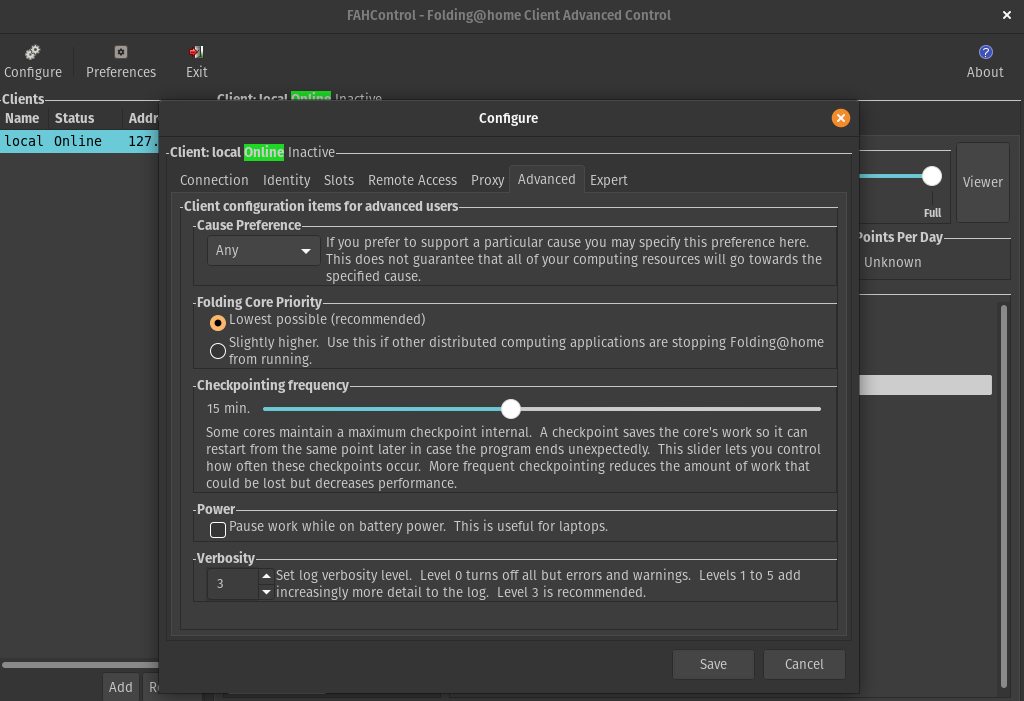 icy mango
results seem to be inconsistent for most.
small current
On data now
marble quartz
daytime internet speed felt noticably slower these last few days
marble quartz
everyone be streaming netflix lol
small current
jade flicker
guess it thinks I was out of disk space
icy mango
Ah!
 winged blaze
launched my client for the first time 20 minutes ago, received work, currently trying to download a WU now and it's having a hard time. Just sit back and give it time.
jade flicker
mild kiln
Sweet spot for power is 105 Power Limit on a 2080 Ti
mild kiln
1920-1935 MHz
icy mango
ahh
mild kiln
GPU Boost mainly doing the OC
dreamy hazel
bruh, with 3 machines here I really could use some KVM switch...
mild kiln
yeah mine is not overclocked
small current
I have oced to 1500mhz on a 1060 max q
mild kiln
I just told MSI Afterburner to add 5% more power
small current
Boost of I don't remember
mild kiln
Glass Panel open and tower fan at the GPU
small current
More that 1500mhz
mild kiln
I mainly aiming for GPU boost to hit 1.9 GHz
mild kiln
Air
icy mango
Yeah, not bad at all.
mild kiln
CPU is Watercooled
dreamy hazel
wish web control could show me more than just the machine it's running on
mild kiln
normally its 83 C with the glass panel on
dreamy hazel
got 3 machines but not enough screens
small current
I am on an oced laptop gpu at 70c
mild kiln
Glass and Black are heat insulators
icy mango
I have an all glass case as well, but a total of 7 case fans not including my GPU and CPU fans.
 orchid pasture
hey all, just curious if there's been any updates on LTT hosting a F@H WU server?
mild kiln
I have 4 case fans
I can add a top exhaust
Got said hole on top
after this I'm bringing a air compressor to clean out dust
But I need a beefy aircooler/240 rad to have my 9900K on turbo
trail night
That should work
marble quartz
u be careful with those, might cause condensation
mild kiln
meant for dust not for folding
I ain't blasting a air compressor for a hour to cool a 2080 Ti
marble quartz
yea, when you spray it all over
still could cause condensation, make sure it doesn't get moist
marble quartz
also compressor is a bit overkill
mild kiln
Got 2 front fans as intake and 1 exhaust via 2 fans
like I said, only to clean dust out of the PC
though I do know they can cause moisture
rich depot
just got my passkey boys
trail night
noice
mild kiln
nice
been doing the bench with my dud FAH account
Base Credit: 16615
Estimated Credit: 165956
PPD RN: 2811496
rich depot
i'm only doing medium power however because it's my main computer and it's a laptop so i don't want to risk killing the CPU from heat
mild kiln
if you limit the cores working, and have good cooling or fan RPM you shouldn't risk killing it
marble quartz
definitely would decrease lifespan tho
rich depot
i mean it's brand new, realtemp shows that the cores can hit 80 when under load so i'd rather be careful, also it's my main machine i use for everyday tasks so i need to keep it usable, like i can't pin the CPU at 100 cause i need resources for chrome and such
mild kiln
yeah don't go to 100 C
serene fossil
I won't cause any damage by running the CPU on 5 cores all day will I? It's constantly ar 75-78c
marble quartz
80 is hot for a laptop
rich depot
no i don't have a desktop rig, i only have my laptop that's the thing so i gotta be careful as it's my only system
marble quartz
I have a gtx 760m, throttles immediately on hitting 80
rich depot
well i just got my first work unit so thats exciting
icy mango
rich depot
it's only under 20% load and it's already hitting 70c
serene fossil
It's a synthetic load so it's gonna hit the CPU hard no matter what
mild kiln
serene fossil
It'll raise temps even if you just give it 1 thread
mild kiln
I am confused why my PPD is higher than a 2080 Ti at a higher boost
icy mango
now we're pretty even @mild kiln running at 1950mhz
rich depot
idk what realtemps on about because in task manager it shows the CPU working way harder
serene fossil
Use hawdware info or cpuid
icy mango
7 case fans, all noctua, 3 fans on my GPU 2 on my CPU 12 in total
mild kiln
send pic
dreamy hazel
think they fixed chrome interface sometime
mild kiln
4 fans for me
icy mango
give me a min i'll take the glass off.
mild kiln
3 fans on GPU, 2 front fans 2 rear fans on a 1 fan slot for the CPU rad
marble quartz
does 12 fans really make that difference
marble quartz
yea thought so
mild kiln
Luke explained that a while back
 floral kestrel
Noctua air cooling keeping me under 80'C so far
mild kiln
I need more exhaust fans
too much heat inside the system
requires me to open the side panel for air
marble quartz
positioning your tower on top instead of under a desk makes the huge difference btw
also less dust
mild kiln
I have it on top of a desk
icy mango
marble quartz
@icy mango cable management could've been better
like PCIE power could be routed to the right
icy mango
@marble quartz Yes, you're right.
mild kiln
Maybe under the shroud

 mild kiln
I may add a top fan as exhaust
marble quartz
I use something like this https://www.opolar.com/collections/best-selliing/products/opolar-laptop-cooler-with-temperature-display

opolar
New model: updated LED screen dynamically displays the air temperature from your laptop vent and the working modes, 13 speeds to manage the airflow and noise; quiet operation in auto mode and max. Noise is less than 70dBm. Designed for Notebook Computer with air vents on both ...
but it only works on certain laptops
icy mango
I would, and some front case fans if you have slots for them @mild kiln
dreamy hazel
Nice.
icy mango
those temps were with the glass on btw.
mild kiln
All front have fans
icy mango
Ah, k.
mild kiln
2 slots for 120 though
icy mango
I have 2 120's as well.
rose parcel
@mild kiln You can't access the laptop cpu without any risk so i'll go with an external coolor
mild kiln
True
rose parcel
I can also modify the fan speeds because i have nitrosense
 halcyon wing
I'm on the web interface and am unable to designate researching for COVID-19. Am I missing something? Thanks for the help.
mild kiln
I do feel heat from the top so I do know some air is going to the top of the case
marble quartz
any
mild kiln
COVID is any
marble quartz
i don't think it matters what you pick, all WUs assigned are COVID rn
halcyon wing
Ah I see, ok thanks
rose parcel
COVID is high priority
dreamy hazel
most*
mild kiln
I do wonder if adding a fan to the top will affect the air pressure in the case
dreamy hazel
not all
dreamy hazel
had that for a while
marble quartz
patience
icy mango
Yeah, I'd estimate that being there for a bit.
dreamy hazel
it'll go away eventually
marble quartz
CPU is scarce
mild kiln
but yeah
 honest silo
icy mango
honest silo
icy mango
Yeah, I wouldn't estimate that occurring today
trail night
@mild kiln I dont have the credit thing! How do I get it?
honest silo
im getting none for gpu but loads for cpu
dreamy hazel
i think i've had 9 cpu WUs today
mild kiln
will adding a 4th fan affect air pressure when exhausting air?
trail night
nvm just saw it
mild kiln
Under Work Quene
trail night
lol
icy mango
siid, advanced view its in the work queue section
mild kiln

honest silo
marble quartz
Unity theme ❤️
trail night
Enchanter
mild kiln
lucky
trail night
I like that one
mild kiln
you got a CPU slot
floral kestrel
what's best program to see gpu temp
serene fossil
I've had no shortage of CPU jobs
marble quartz
aay new WU dropped
dreamy hazel
hwinfo probably
honest silo
Im using open hardware monitor
marble quartz