#networking
1 messages · Page 401 of 1
 west sonnet
gotcha, brain fart
as long as you're not changing the location of the server, you should be find
 plucky needle
the host said we can keep the IP but I was just concerned it would be like a vpn where it would communicate in dallas texas when the dedi itself is in new jersey if you know what i mean
west sonnet
for the most part, you'll be fine swapping IP addresses. there could be some ISP routing issues but it's exceedingly rare
for example, assuming you don't have a dedicated IP at home, when you get a new IP from your ISP your service doesn't change
 hard cedar
Does anyone have a recommendation for a wireless bridge? I have 500mbps internet and a tplink ax router
plucky needle
Thanks for the info
 little schooner
@waxen scroll so I forgot to check the obvious first..... the 2nd, 3rd, and 4th set of two RJ45 CAT6 Jacks I punched CAT6 wire to were actually good. Somehow in the process of removing the eth cable I was testing the jacks with, I tore one of the wires out from one side of the eth plug. I must of tugged hard on it to snap it out. It was a flat-style cable too. That's why I wasn't seeing a connection.
so all that frustration could of been avoided if I had just remembered to bring my cable tester tool or tested with a different copper cable on the 1st and 2nd nights 🤦♂️ 🤦♂️ 🤦♂️
 light perch
i was thinking of buying a new router as ive had my old one for i think 6 years now
any recommendations?
or two in one modem things
im not well educated on this so
 meager ginkgo
light perch
i was thinking of buying a new router as ive had my old one for i think 6 years ...
meager ginkgo
light perch
i was thinking of buying a new router as ive had my old one for i think 6 years ...
What internet speed do you have?
I wouldn't recommend 2 in 1 combo devices
light perch
currently my speed varies from 5 mbps to 30 mbps download
and consistent 5mb upload
not the best but its usable
here ill just send my speed test results rn
light perch
meager ginkgo
What internet speed do you have?
 meager ginkgo
is that wired or wifi?
light perch
wifi
 lethal creek
Networking dummy here, could anyone TLDR the risks of exposing a port on my router for my Plex server? And any precautions I can take to keep my network safe?
meager ginkgo
light perch
wifi
Test wired
lethal creek
lethal creek
Networking dummy here, could anyone TLDR the risks of exposing a port on my rout...
The port is only exposed for the server’s local IP, not the whole network
 primal ice
port scanners will see the open port and if the plex server has any vulnerabilities a hacker could exploit that to gain access to your internal network setting up bot nets.
light perch
meager ginkgo
Test wired
 meager ginkgo
I mean your current router is fine for those speeds
primal ice
not very likely to happen but it could. that is why a vpn/vps is recommended cause then they have to break through the vpn/vps providers network.
meager ginkgo
no need to upgrade unless you get a higher speed
primal ice
light perch
guessing vdsl2
light perch
right now theres two people using it but normally i have 4 people using it with multiple devices on top of a smart tv
which makes download drop to around 5 mbps
primal ice
that is still good for 4k video streaming ¯_(ツ)_/¯
light perch
so should i buy a new router or just keep the one i have
primal ice
new router will not gain you anything - it could even make things worse.
light perch
so is this the best i can get for internet then?
primal ice
that depends on your ISP (internet service provider)
 peak cloak
lethal creek
Networking dummy here, could anyone TLDR the risks of exposing a port on my rout...
peak cloak
lethal creek
Networking dummy here, could anyone TLDR the risks of exposing a port on my rout...
if there is an exploit in plex, then you can possibly get infected, depending on the severity on exploits, worst case is a RCE (remote code expectation), but that's very rare (log4j tho). Just gotta stay on top of patches. I also keep all servers firewalled off from my LAN, so they are isolated
If you want to be super cautious, you can use something like zerotier, tailscale for an easy to use vpn to get into local network
tldr, just gotta stay updated if you expose things
light perch
primal ice
new router will not gain you anything - it could even make things worse.
also the main issue with my current router is that it doesnt reach some of the rooms in my house
lethal creek
keep all servers firewalled off from my LAN
Hmmmm my plex storage is shared as network drives so I can download linux ISOs from my main computer & transfer to the server....
peak cloak
lethal creek
> keep all servers firewalled off from my LAN
Hmmmm my plex storage is shared a...
well my firewall is stateful, so Server -> LAN doesn't work
but LAN -> Servers does, depends who initializes the connection
lethal creek
Oh I see
Would that be a firewall setup from the server, router, or the other computers?
i.e. where should I go to configure that
peak cloak
lethal creek
i.e. where should I go to configure that
depends
it's all dependent on your setup
I have a dedicated VLAN for servers, so in order for packets to go to LAN VLAN, it has to go through router, which is where the firewall is configured
lethal creek
interesting
primal ice
topology matters
lethal creek
right now the plex server is just another windows install (I have my reasons) with no VLAN setup
peak cloak
lethal creek
right now the plex server is just another windows install (I have my reasons) wi...
VLANs are just a way to have multiple lans over one physical interface
I helped a user with no VLAN support on switches/router to configure a similar setup by having a router VM on his server
and then all server VMs connect though the router VM
all that's needed on main router is a static route
primal ice
light perch
also the main issue with my current router is that it doesnt reach some of the r...
that is more of just needing another access point - then. preferably with an ethernet backhaul -- an ethernet cable connecting the access point back to the router.
lethal creek
peak cloak
tldr, just gotta stay updated if you expose things
One last question, are network port attacks highly targeted, or is there wide-net method of exploiting things like plex/log4j?
peak cloak
lethal creek
One last question, are network port attacks highly targeted, or is there wide-ne...
bot nets are scanning things all the time
malicious and not
primal ice
I get scanned about every 3 seconds 😛
peak cloak
 lethal creek
Fun
 lilac sorrel
Dual-Band WiFi 6 Gaming Router, Dual 2.5G WAN/LAN ports, enhanced hardware, WAN aggregation, VPN Fusion, Triple-Level Game Acceleration, free network security and Mesh WiFi System
peak cloak
one such bots that is used for good
lilac sorrel
waste?
primal ice
heh
lilac sorrel
i can't find RB5009ug 😦
lethal creek
Ethernet ready! Wifi ready! Windows 11 ready!
lilac sorrel
is that all you guys read?
it's got a 2.0 GHz cpu and dual 2.5Gbps
that's really what you paying for
peak cloak
hardware can be descent, software is just as important
lilac sorrel
and the price of an RB5009 plus 2.5Gbe or higher switch it's about the same here
peak cloak
do you want to learn networking? or just want a router to plug and play?
lilac sorrel
good point, let me double check the WRT stuff
hm, asuswrt-Merlin available for that, and honestly i have no complaints with it
all i need it to do is PPPoE login for fiber and VLAN tag 201 and the other regular stuff
lilac sorrel
peak cloak
do you want to learn networking? or just want a router to plug and play?
plug n play, but to understand what i'm plugging in and playing
peak cloak
lilac sorrel
plug n play, but to understand what i'm plugging in and playing
so yeah you don't need mikrotik
it's a bit of a learning curve
lilac sorrel
also hard to get my hands on
primal ice
lilac sorrel
https://rog.asus.com/networking/rog-rapture-gt-ax6000-model/
might be worth it if you can change the wan port on it.
otherwise I would just get some cheap router a 10gb switch and an Access Point of your flavor.
lilac sorrel
i'ma get hate for this, but i like asus' newer networking software thingy. Even merlin won't support my current asus router because it literally has everything
actually nvm, it's because it' has some features they can't mess with loool i was so wrong
But I do need a router with a decent CPU, the only thing I've tested that I actually seem to need
specifically, faster single core processing, the best would be to build my own router with any relatively modern cpu
primal ice
the router only needs to be fast enough for your isp service speed. internal network would be switches and network cards.
lilac sorrel
it's symmetrical gigabit, no cap
i'm getting bufferbloat grade of B on waveform.com, leads me to my router
peak cloak
bufferbloat is not due to your router
lilac sorrel
it's due to me overloading my router making it handle PPPoE, WAP, Firewall, qos, routing etc?
primal ice
https://www.waveform.com/tools/bufferbloat?test-id=37e760b7-e0bf-4bb3-9950-6ace79b3b02b - their servers are crap anyways. 😛
 primal ice
yes "bufferbloat" is garbage. its queueing of packets and retransmits. QoS will make it worse cause you are causing a greater delay.
lilac sorrel
I see, but it's usually ISP then? These sites all state it's my router
then no worry about things I cannot change, what can i change
I notice I am hitting my real world 940Mbps uh, "Ceiling?" on my stupid killer ethernet nic. I'm gonna go test on my 2.5Gbe intel nic'd pc
to be honest, a lot of my issues were resolved after jumping into networking to "fix" my weird issue i was having, and it's solved after disabling killer network services on my windows "services"
the only issue i have now is just to relocate and get better wireless coverage
primal ice
the router could be struggling - but most likely its how your ISP is pairing to what ever service you are trying to connect to.
peak cloak
if you are serviced gigabit, it could be around 940mbps
lilac sorrel
I was having huuuge lag spikes about every minute or two or whenever I would "load up" like scrubbing a 4k video while downloading a game in the background
and it ended up being that killer networking driver crap somehow windows 11 downloaded it in the background, and every update it was coming back. so i just manually disabled it in services and all is well
primal ice
yeah it was probably prioritizing the game download
lilac sorrel
i just never had good luck with killer nic's
the only way i ever truly solved them was switching to an intel nic
primal ice
in essence QoSing the packets.
lilac sorrel
is the real world limit of gigabit ethernet 940 as well?
sorry i quit smoking a year ago now, and i'm no joke, saving $500 a mo and i don't mind opening up my network lol
it's like $65 a mo too, hell i can get two fiber gigabit lines as well
nice lol
Steamship Gigabit
i want everyone to get gigabit, because i now realize who cheaps out on their servers lmfao
when the site is slow now it's not "oh my internet is slow" it's "these cheap bastards!"
primal ice
EA
 nimble sable
lilac sorrel
when the site is slow now it's not "oh my internet is slow" it's "these cheap b...
nimble sable
lilac sorrel
when the site is slow now it's not "oh my internet is slow" it's "these cheap b...
oh yea, i actually statred seeing this back when i got 100Mbps internet too. I think it was an LTT video where they were talking about 5Gbps and 10Gbps internet...like even with 5 people and 10Gbps ure not gonna go to many places where u can saturate that
there was another video of this guy who tried to saturate his 10Gbps internet and it was REALLY difficult outside of torrenting
lilac sorrel
yea so i was correct in my ranting lol
nimble sable
next step for me is 1Gbps wifii
nimble sable
lilac sorrel
is the real world limit of gigabit ethernet 940 as well?
i think so too, i THINK ive gotten 970 once but that was local
lilac sorrel
hm, i'm trying to think about how i can test this
my theory is that my internet co is advertising 940mbps because that is the real world limit of gigabit nic's
and that if i remove that bottleneck, i could achieve more?
because i use to get more than advertised speed, granted that was cable company during certain non peak times
like i use to get 330-340 mbps on a 300 advertised
and even back then, my hypothesis was that it was DOCSIS 3.0 limits or reaching that
which i believe is correct now, i haven't had cable in a while, but I read to get the higher speeds with them you need their newer DOCSIS 3.1
peak cloak
lilac sorrel
like i use to get 330-340 mbps on a 300 advertised
it depends on their qos rules
peak cloak
lilac sorrel
and even back then, my hypothesis was that it was DOCSIS 3.0 limits or reaching ...
not really I belive
lilac sorrel
to test my current hypothesis then I would need to get a 2.5G port router
and double check my ONT's nic
peak cloak
lilac sorrel
and double check my ONT's nic
those are gigabit no?
lilac sorrel
yea i think so sadly
peak cloak
so you would be limited there anyway
lilac sorrel
it's a calix unit, darn
peak cloak
yeah GPON fiber most likely
lilac sorrel
hm wait i believe it's 2.5Gbps?
peak cloak
what model
lilac sorrel
yea GPON for sure, i believe it's a 711GE
 lilac sorrel
darn they don't even show 2.5 or higher
 pallid dome
Networking people are smarter, so this isn't possible right? 😂

 peak cloak
pallid dome
Networking people are smarter, so this isn't possible right? 😂
peak cloak
pallid dome
Networking people are smarter, so this isn't possible right? 😂
everything but the voltage... is possible
lilac sorrel
that's how i'm able to get two gigabits* eh?
pallid dome
peak cloak
everything but the voltage... is possible
yeah that's what I was thinking, he said he could short all the computers on a network lmao
peak cloak
pallid dome
yeah that's what I was thinking, he said he could short all the computers on a n...
r/masterhacker
primal ice
lilac sorrel
to test my current hypothesis then I would need to get a 2.5G port router
that is from my windows machine to my router.

 hollow marlin
primal ice
yes "bufferbloat" is garbage. its queueing of packets and retransmits. QoS will ...
hollow marlin
primal ice
yes "bufferbloat" is garbage. its queueing of packets and retransmits. QoS will ...
While Present tagged my old rant on bufferbloat, QoS would not always make it worse and can reduce the effects in some areas. QoS is really an umbrella term but it doesn't only involve shaping (queuing) but also involves policing. The "fix" that is commonly used is you setup QoS but police traffic 5-10% below your rated speeds.
What this does is drop packets at a CIR in hope that your traffic is not queuing because it exceeds your providers shaping rate. Essentially you're trading packet loss for packet delay.
That said, its difficult to implement in the download perspective and if "bufferbloat" is due to congestion further upstream, then there is nothing you can do
hollow marlin
nimble sable
i think so too, i THINK ive gotten 970 once but that was local
1500 MTU + IPv4 + UDP is the best case scenario and you would see 959mbps at the max due to overhead. You'll only exceed that with jumbo frames which is not worth the hassle
 peak cloak
hollow marlin
While Present tagged my old rant on bufferbloat, QoS would not always make it wo...
peak cloak
hollow marlin
While Present tagged my old rant on bufferbloat, QoS would not always make it wo...
yeah that's what I mean, some qos to make speeds slower
lilac sorrel
 peak cloak
lilac sorrel
peak cloak
lilac sorrel
the ethernet ports?
lilac sorrel
yea
hollow marlin
Ew, 711Gs. We only have a handful of those still in production. Yes they can be upgraded, but by your provider.
lilac sorrel
I see
hollow marlin
If you are looking for 2.5gbps then you'll have no luck since these are GPON. NGPON is needed for that which is completely different optics on the far end of that ONT
peak cloak
hollow marlin
If you are looking for 2.5gbps then you'll have no luck since these are GPON. NG...
I guess verizon is starting to deploy that
I've heard of 2gbps in NYC
lilac sorrel
they have in the farmlands of california more than 2Gbps over cable channel bonding
and san jose, california has 10Gbps for $40 a mo
that is the xgpon or something
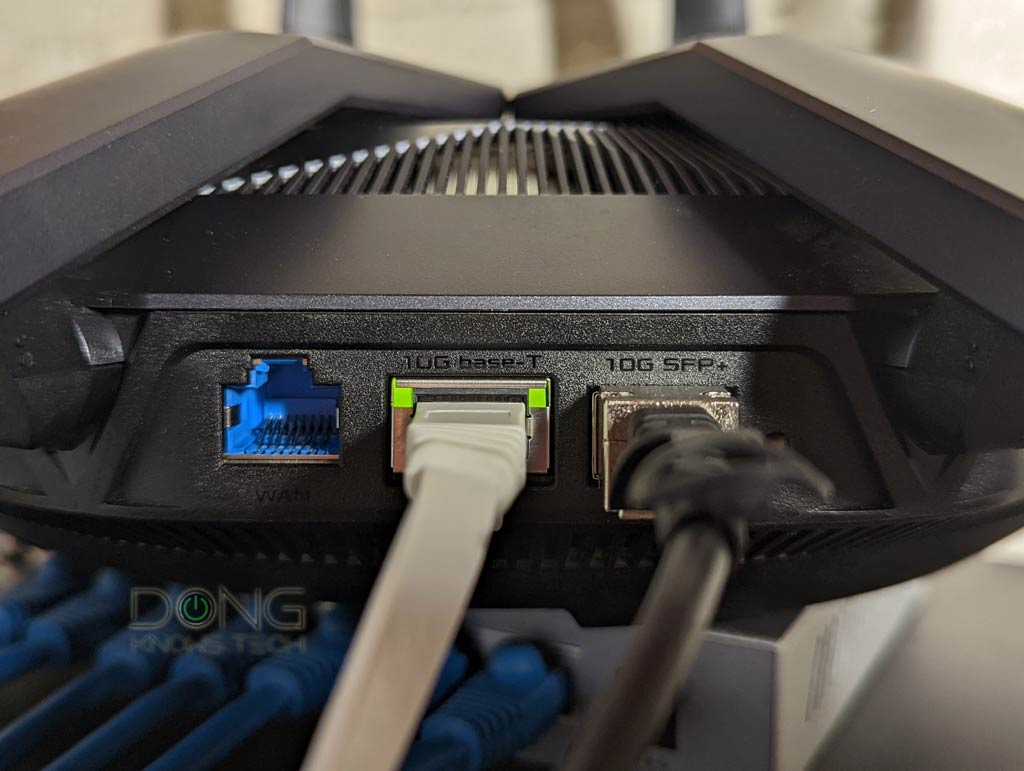
Dong Knows Tech
Wondering what it's like to have a 10Gbps Internet broadband connection? Find out its real cost and the hidden benefits via Sonic Fiber-optic.
hollow marlin
peak cloak
I guess verizon is starting to deploy that
If you have Fios you're already on XGPON. Thats how they can reliable serve 1G to customers
peak cloak
hollow marlin
If you have Fios you're already on XGPON. Thats how they can reliable serve 1G t...
huh
interesting
hollow marlin
Yeah no SP in their right mind would have 1G packages on GPON
lilac sorrel
well this was the first fiber in the area
nimble sable
hollow marlin
1500 MTU + IPv4 + UDP is the best case scenario and you would see 959mbps at the...
thats it, yea i think 950 must be it then...ive used jumbo frames before for fun but wow yea not worth the hassle
nimble sable
hollow marlin
Yeah no SP in their right mind would have 1G packages on GPON
huh why not?
as an aside are there ONTs that just convert to more fiber?
hollow marlin
nimble sable
huh why not?
GPON is 2.4/1.2gbps and the main reasoning to use it is because its a shared medium. Since running fiber is 90% of the cost, it much cheaper to run PON to multiple customers.
If they were to offer 1gbps, a single customer could utilize 1/2 the bandwidth (download). Real world traffic patterns you could really run 10+ customers at 1G and it'll will be mostly fine, but GPON can go up to 32 customers per fiber or if the runs are close, 64.
nimble sable
wait so the overall bandwidth before splitting to each customer mkaes a difference with the ONT equipment?
hollow marlin
GPON is a shared medium, all customer share the same 2.4/1.2gbps
ONT is really just a low powered managed switch. Its the optics that do the signaling and determine how much bandwidth they use. (GPON is not ethernet but TDM)
hollow marlin
PON portion is all handled by optics, which you can purchase xGPON optics for most vendors. As far as the logic, and ONT does 99% of what a standard managed switch does. It just has some extra carrier features for standards such as QinQ, RFC2544/Y.1564 testing, etc
lilac sorrel
wait are you saying that GPON shares the gigabit line or the 32gbps line?
my assumption from what the tech told me was there is a 32 strand fiber at the switch/box thing in the neighborhood that switches to each 32 dedicated gig lines
peak cloak
lilac sorrel
my assumption from what the tech told me was there is a 32 strand fiber at the s...
nope
it's shared
 meager ginkgo
hollow marlin
Yeah no SP in their right mind would have 1G packages on GPON
meager ginkgo
hollow marlin
Yeah no SP in their right mind would have 1G packages on GPON
AT&T does
i'm pretty sure..
yup

they are switching to XGS-PON tho
 ashen aurora
So I'm having a few IPV6 issues, and I'm not sure if it might be ICMPv6 related, but I've definitely ruled out DNS (I use Cloudflare's), and I don't think it's the fact that it's using DHCPv6 either (I have a dual-boot machine that absolutely has no issues with IPv6 connections on the Linux side, while it's Windows 10 side has been giving me problems).
I've already added a rule in Windows Firefwall to forward ICMPv6 packets and have been using the following web sites to test:
https://ipv6-test.com/ (Score:19/20. There is no hostname on my machine.)
https://inonius.net/speedtest/ (Download works fine. It's the upload speed that concerns me since it shows up as 0.00 Mbps)
https://test-ipv6.com/ (Helps detect if it's defaulting to IPv4. The dual-boot machine has issues on it's Windows side regarding this, but Linux/Pop_OS is prefectly functioning.)
IPv6-test.com is a free service that checks your IPv6 and IPv4 connectivity and speed. Diagnose connection problems, discover which address(es) you are currently using to browse the Internet, and what is your browser's protocol of choice when both v6 and v4 are available.

This will test your browser and connection for IPv6 readiness, as well as show you your current IPv4 and IPv6 address.
primal ice
could be a driver issue with windows.
ashen aurora
Like just the way Windows handles IPv6 or a NIC driver issue?
peak cloak
ashen aurora
So I'm having a few IPV6 issues, and I'm not sure if it might be ICMPv6 related,...
reddit
12 votes and 20 comments so far on Reddit
found this
so yeah in v6 ICMP is much more needed
ashen aurora
peak cloak
so yeah in v6 ICMP is much more needed
Yeah I already added a rule to my Windows Firewall that allows ICMPv6
peak cloak
ashen aurora
Yeah I already added a rule to my Windows Firewall that allows ICMPv6
no in router
I suspect router is blocking, if config is wonky
ashen aurora
 ashen aurora
peak cloak
I suspect router is blocking, if config is wonky
ashen aurora
peak cloak
I suspect router is blocking, if config is wonky
Can't be router since my dual-boot machine works perfectly fine (Linux side)
peak cloak
ah ok
ashen aurora
I can definitely tell it's a Windows issue since my Linux machine and Apple devices have no connectivity errors in IPv6


 peak cloak
whats under the actual rule? since more than just echo is needed
ashen aurora
 peak cloak
under customize?
 primal ice
ashen aurora
primal ice
ashen aurora
if you are still having issues (winkey + x : Device Manager)
 ashen aurora
primal ice
if you are still having issues (winkey + x : Device Manager)
ashen aurora
primal ice
if you are still having issues (winkey + x : Device Manager)

Broadcom is up-to-date. Intel is up-to-date.
primal ice
broadcom is your wifi, intel is the ethernet one.
ashen aurora
Intel is up-to-date.
primal ice

Intel
Intel® Ethernet Connection I219-V - Download supporting resources inclusive drivers, software, bios, and firmware updates.
that just updated mine. heh.
 unkempt tusk
Hey, my ethernet cable light not blinking in my laptop
The cable is working fine as it is blinking when connected to my computer
Please help
ashen aurora
primal ice
that just updated mine. heh.
Updated drivers but still didn't fix issue.


 pseudo blade
ashen aurora
pseudo blade
ashen aurora
Are you asking about the 19/20?
Because that shouldn't matter in the slightest
It's just no ipv6 dns entry for your host
ashen aurora
pseudo blade
Are you asking about the 19/20?
Nah, I'm asking about the iNonius. I think that's about as far as I'm willing to go for 19/20
I'm using Cloudflare as ipv6 DNS
pseudo blade
I'm going to blame their service, rather than your connection
ashen aurora
Well, it can't be the DNS becuase I conducted the same test on a different computer using the same settings. Only difference was it was dual-boot Windows/Linux machine, and Linux side is able to upload for some reason.
pseudo blade
Odd.
ashen aurora
I'm suspecting Windows Firewall shennanigans.
I'm also pretty sure it's not router settings, either, because all machines in network are on DHCPv6
Apple devices don't seem to be having any issues either.
Also pretty sure might have something to do with Windows Firewall because I was fiddling with the rules and at one point ipv6 uploads worked.
Might be netsh related?
ashen aurora
Right now I'm using this website to test for ipv6 "stability"
https://www.webb.nasa.gov/content/webbLaunch/whereIsWebb.html

'WhereIsWebb' shows the status of Webb on its journey to L2 orbit. The page constantly updates as Webb travels, deploys, and cools to operating temperature. The most recently completed deployment step for Webb is displayed along a timeline that also indicates the major deployment phases. Note that the timing, duration and/or order of deployme...
Also using different browsers to verify results. The Linux machine is able to connect, but the Windows one has issues on both Firefox and Edge.
 worn swan
ashen aurora
Also using different browsers to verify results. The Linux machine is able to co...
worn swan
ashen aurora
Also using different browsers to verify results. The Linux machine is able to co...
Make sure that you don't have any virtual connections like Teredo or ISATAP. They often causes similar issues and some apps can enable them when installed.
ashen aurora
Thanks. I'm going to look for those and disable them.
Never heard of ISATAP till now.
ashen aurora
worn swan
Make sure that you don't have any virtual connections like Teredo or ISATAP. The...
Where can one find Teredo/ISATAP settings on a Windows machine?
worn swan
ashen aurora
Where can one find Teredo/ISATAP settings on a Windows machine?
First check if they are visible adapters after using ipconfig /all in cmd. If you can't see them, they are not enabled.
ashen aurora
They don't seem to be there. I recognize my tunneling software's Virtual LAN (PIA), but it's disabled and not being used.
Other than that, no signs of Teredo/ISATAP or any of those 6to4 4to6 conversions.
Hmm, using netsh options I was able to spot the teredo/ISATAP stuff. I disabled ISATAP
primal ice
ashen aurora
Hmm, using netsh options I was able to spot the teredo/ISATAP stuff. I disabled ...
well I can confirm its not the ICMP. and you updated the drivers. so yeah it has to be some setting either in the browsers or with windows firewall.
 ashen aurora
The ICMP thing oddly enough was solved by adding a Windows Firewall rule to allow ICMPv6 to go through
netsh advfirewall firewall add rule name="ICMP Allow incoming V6 echo request" protocol="icmpv6:128,any" dir=in action=allow
primal ice
mine is blocked at the router, not worried about it.
ashen aurora
My big issue really is this:

Accessing certain websites on the Windows machine can be hit or miss, like aforementioned whereiswebb
https://www.webb.nasa.gov/content/webbLaunch/whereIsWebb.html
I suspect it has something to do with IPv6 Uploads (Also trying it with Dropbox confirms my suspicions when I can't upload a random image onto a Dropbox)
'WhereIsWebb' shows the status of Webb on its journey to L2 orbit. The page constantly updates as Webb travels, deploys, and cools to operating temperature. The most recently completed deployment step for Webb is displayed along a timeline that also indicates the major deployment phases. Note that the timing, duration and/or order of deployme...
Meanwhile, on the Linux machine everything just...works
And I can confirm its running ipv6 with full upload as well
 primal ice
check that setting in firefox
 ashen aurora
So I know it's not a router misconfiguration
ashen aurora
primal ice
check that setting in firefox
Already did that before.
I mean, it won't make sense that I would be getitng IPv6 results if it wasn't for that being in false boolean

not to mention IPv6 priority
Something is blocking uploads and I can't determine what.
primal ice
yeah at a total loss.. some one from 2 years ago with a similar problem --
If the issue still persists, I recommend that you run these networking commands using the Command Prompt window. Please follow the steps below:
Press the Start button > type Command prompt  > right-click on Command Prompt, and then select Run as administrator > Click on Yes.
Run the following commands in the listed order, and then check if it fixes your issue:

Type netsh winsock reset and press Enter.
Type netsh int ip reset and press Enter.
Type ipconfig /release and press Enter.
Type ipconfig /renew and press Enter.
Type ipconfig /flushdns and press Enter.
-- No clue if it will actually do anything for you but it fixed their problem.
ashen aurora
Gonna do something crazy:
 ashen aurora
primal ice
yeah at a total loss.. some one from 2 years ago with a similar problem --
If t...
ashen aurora
primal ice
yeah at a total loss.. some one from 2 years ago with a similar problem --
If t...
Tried this and the Allow edge traversal option. No dice.
 snow lance
i suddenly cant access my nextcloud server from wan (running on truenas)

works fine locally, worked fine yesterday
 clear igloo
Did your WAN IP change?
snow lance
yesterday it was using 192.168.88.30 but now its using 192.168.88.188 (idk why my nas has 2)
 snow lance
clear igloo
Did your WAN IP change?
snow lance
clear igloo
Did your WAN IP change?
no i got a static ip, yes i checked
snow lance
snow lance
yesterday it was using 192.168.88.30 but now its using 192.168.88.188 (idk why m...

nat rules
 unborn sluice
if it changed the local ip, then you also need t change port forwarding
or simply remove the .188 in your nas
snow lance
unborn sluice
if it changed the local ip, then you also need t change port forwarding
rule 7 is for .188
in the above screenshot, same settings as .30
it has always said this but for some reason yesterday it was using .30:8283

rn it uses 188:8283 tho lmao idk why
snow lance
unborn sluice
or simply remove the .188 in your nas
also .30 doesnt show up here
 nimble sable
peak cloak
it's shared
nimble sable
peak cloak
it's shared
Wait so, you can't really get constant 1gbps then if the bandwidth is shared?
How is my isp offering residential 5gbps?
Wait ... What is "active Ethernet"? My ont box says active Ethernet on it
clear igloo
Shared for a higher bandwidth uplink. If you have a total aggregate uplink speed of 100Gbps spilt across 200 people and most of those aren't consuming much of the bandwidth there is still burst available
Every ISP overprovisions, always, it's just a matter of by how much
nimble sable
clear igloo
Shared for a higher bandwidth uplink. If you have a total aggregate uplink speed...
Looks like my ISP uses something called active ethernet... Tried Googling around about it but can't find too much, especially comparing it to other similar things

Apparently there's a trunk to the basement and a giant switch in there
hollow marlin
nimble sable
Looks like my ISP uses something called active ethernet... Tried Googling around...
AE is what we deploy for all our business customers. Unlike PON, AE is just a single fiber per customer.
 inland nexus
Guys, Im portfowarding 25565 but i have some doubts about the process. First of all, should i select HTTP as the service and TCP protocol? Also, should i type any IP adress (source and destination), IP mask adress (source and destination) or Port (source)?
 high widget
hallo i like so tips ok this is network

now dotted line is the new network line
for some reason I think this is too big
 dry bronze
inland nexus
Guys, Im portfowarding 25565 but i have some doubts about the process. First of ...
dry bronze
inland nexus
Guys, Im portfowarding 25565 but i have some doubts about the process. First of ...
Depends what you're trying to go but you would probably want any source and destination would be whatever internal machine you're forwarding to. If service has an option for raw port or custom I think that's where you'll type your port number. And any source port
 gusty lava
Hey, is there a device that bundles multiple network connections into one?
i have the following problem. i need 1-3 lte routers to get a stable connection for a stream. the device has to fit in a backpack and give internet to only one other device.
 waxen scroll
Nope. Each LTE connection would have it's own IP so the stream could only use one anyway even if load balancing was possible
gusty lava
oh okay, i always heard that live u solo for example supports something like this, because they stream to a srt server first and then to the rtmp server
 waxen scroll
It's possible someone hacked a way to do it but only thinking about how networking load balances it's per connection locked to one link out of many rather than one connection over many links
If liveU is a paid product, email support and see what they recommend
gusty lava
liveu is a paid product yes, but they only took the open source srt protocol, forked it, made it closed source and started to sell that with the device as far as i know
but i try to look into it
oh and sorry if my english's broken or something like that, it's 2:30am here and i cant think clear with 30°c in my room 😅
waxen scroll
That app probably makes three separate connections and some how has magic on both ends to reproduce one video
gusty lava
hm okay, well i can only experiment with it and ask around 
 flint matrix
anyone have a good topology designer website?
 sudden kayak
you can definitely make multiple routes look like a single stream but the key thing is you need a server somewhere on the other side to combine them back together
sudden kayak
gusty lava
Hey, is there a device that bundles multiple network connections into one?
i ha...
this is probably a good starting point: https://www.openmptcprouter.com
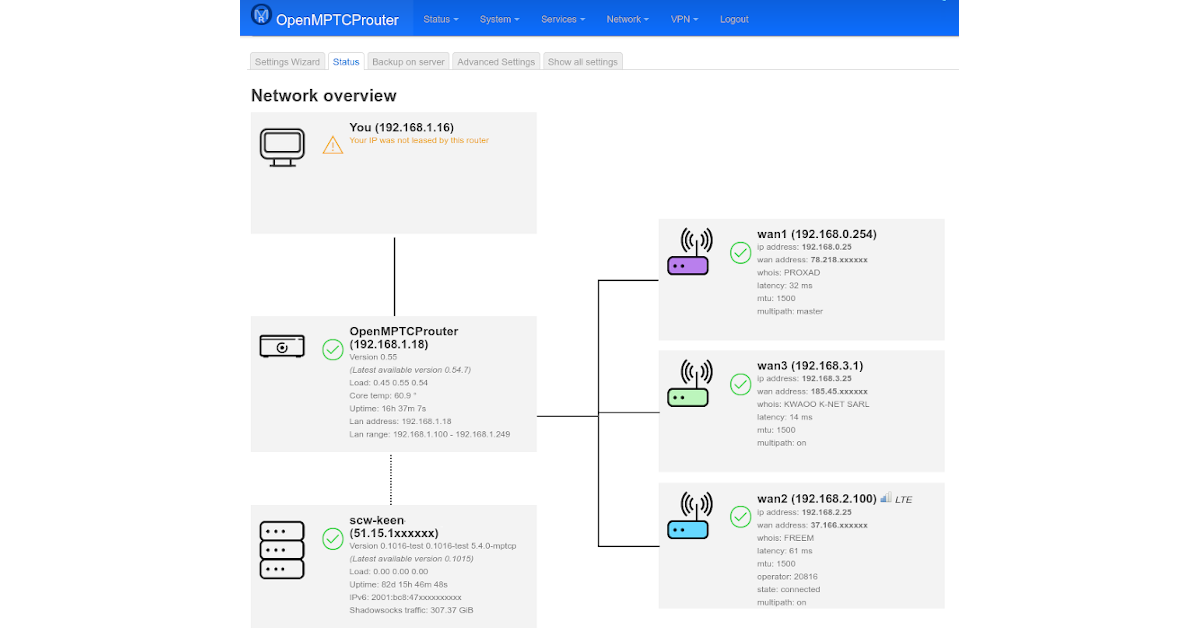
OpenMPTCProuter
the client side device doesn't matter at all, you could probably just use an rpi or something equivalent
gusty lava
sudden kayak
this is probably a good starting point: https://www.openmptcprouter.com
oh thank you!
 olive thorn
question for you all: I somehow lost my antennae for my ASUS AX3000 PCI-E Wifi 6 adapter and need replacements. Can I just buy any wifi antennae? Or am I SOL and need to buy the network adapter again
primal ice
any wifi antenna
 frigid sphinx
inland nexus
Guys, Im portfowarding 25565 but i have some doubts about the process. First of ...
frigid sphinx
inland nexus
Guys, Im portfowarding 25565 but i have some doubts about the process. First of ...
Portforwarding to your internal network? if you're portforwarding 25565 (the port) that's not the same as port/protocol 80 (http) it may provide a http service on 25565 and that's fine the destination is the internal ip of the listening host you almost never want to specify anything for the source if it's being provided to someone outside your network
primal ice
olive thorn
question for you all: I somehow lost my antennae for my ASUS AX3000 PCI-E Wifi 6...

Specifications: Gain: 3dBi Frequency Range: Dual Band WiFi 2.4GHz 5.8GHz VSWR: <2.0; Polarization: Linear Vertical; Impedance: 50 ohm; Direction: Omni-directional; Connector: RP-SMA Male Connector; Dimension: 12cm x 1cm; Net Weight: 52g; Operating Temperature: -20°С ~ +80°С Storage Temperature: -...
olive thorn
primal ice
https://www.amazon.com/Bingfu-Rosewill-Gigabyte-Wireless-Security/dp/B082SHKT3Q ...
you just saved me a bunch of money. Thanks!
pseudo blade
Anyone want to help me convince myself to spend money?
Here is a fantastically ugly cross-section of my house. It's a rental, so I can't reasonably run ethernet.

The bottom right quadrant is not fully enclosed (carpark)
I run a small desktop hypervisor on ESXi for work next to my desk upstairs - it does not have wireless connectivity but requires internet. The ISP router is in my kitchen, and is unmovable. A gaming setup will soon follow, also upstairs.
Connectivity to the laptop is strong from the ISP 4x4 AC modem-router(VDSL2, 80mbps), negotiating at 866mbps 2x2, ~60dBm, noise floor ~93dbm.
I need a separate network for the desktop hypervisor for privacy reasons, and have non-wireless routers for this purpose. Routable connectivity is desired, as the work software stack is not NAT tolerant for management.
There is minimal space downstairs and there will be no non-wireless devices used there, but I could potentially move the hypervisor there assuming I don't run anything else.
The ISP modem/router does not expose support for VLANs or other network isolation.
Faster speeds than 100mbps are unlikely for at least 4 years due to living in Australia.
Do I: 1. Get a router with 2x2/4x4 AC, put it upstairs, bridge/DMZ to it from the ISP router and then manage my network from that one router?
- Move an existing wired router and the hypervisor downstairs to my kitchen (cluttered), switch out the router's DHCP for my own and expose a new network with over the top of the ISP router's L2?
- New router downstairs, bridge to upstairs, new router/bridge upstairs (ISP router restricted to bridge mode only)
- Something else/less complicated?
I'm not highly budget constrained but not fond of spending more than the minimum I can justify.
unborn sluice
just move closer to the router
ashen aurora
primal ice
yeah at a total loss.. some one from 2 years ago with a similar problem --
If t...
Gonna update on this:
netsh int ipv6 reset
ipconfig /release6
ipconfig /renew6
ipconfig /flushdns```The "6" is important. Otherwise it'll just do ipv4 stuff.
 manic ember
Hey guys what is the best way to stream my gaming rig from the office to the living room , I have a 4k 60hz plus able gaming rig
meager ginkgo
manic ember
Hey guys what is the best way to stream my gaming rig from the office to the liv...
parsec
manic ember
But what would I use as a medium my cellphone?
meager ginkgo
do you have a smart TV?
manic ember
But I think my samsumg note 20 should be a better medium
meager ginkgo
no.. I don't think that would work well
manic ember
I have used parsec mobile version
meager ginkgo
are you trying to play on the note? Or just use it to stream to the tv
manic ember
I wanted to use this because most of the gaming features are when you conect something via hdmi
No the note would only stream
meager ginkgo
hmm. I'd recommend getting a little pc for cheap and streaming to the pc from the gaming pc
if you need recommendations let me know
manic ember
Would a rasp pi be enough ?
meager ginkgo
I'm not sure.. I know you can run parsec on one but I don't personally think the hardware would be enough

eBay
120GB SSD Drive. Dell's Ultra Small Form Factor. No Built in DVD Drive. Other Specs: USB 2.0 & 3.0 Ports, Gigabit Ethernet, Audio Output (3.5mm headphone style), Microphone Input. You will receive the pictured desktop computer and power cable only.
I'd recommend something like this
hollow marlin
@clear igloo @waxen scroll r/mikrotik users calling /31 prefixes a 'networks are taped together with "clever hacks"' because ROS still doesn't support it in 2022
hollow marlin
This person says otherwise: " No provider is going to complain about burning a /30 over a 31/32"
clear igloo
So RFC3021 is a hack?
hollow marlin
Its not like saving 1/2 the IP space is important when the v4 space has been consumed for years
hollow marlin
clear igloo
So RFC3021 is a hack?
Based on the post in the thread, yes lol
clear igloo
hollow marlin
Based on the post in the thread, yes lol
lol
clear igloo
hollow marlin
Its not like saving 1/2 the IP space is important when the v4 space has been con...
Yah, a /8 private network is only 16 million IPs, who needs to save a few million when possible
hollow marlin
Going to a /31 or /32 are "hacks" designed to wring every last IP out of the network when a customer really only needs a single IP address. Why tie up 4 IPs to deliver 1 if they can get away with it? I could be wrong, but I don't think there is any way to deliver two routable IPs using /31 or /32 trickery....
They're just trying to be stingy, which is understandable if they have a very limited pool of IPs available. Don't let them give you anything smaller than a /29 if you truly need more than one routable IP
I hope they someday realize how much of an impact /31s actually are
clear igloo
They won't, every major network vendor is just "using hacks" to them because their OS doesn't understand it
I wonder what they'd say about /127s for IPv6 
hollow marlin
No mention of it in the thread...hmmmm...
clear igloo
Wait, are they saying (I'm rereading the quote) that /32 isn't routable?
pseudo blade
Really? RouterOS still doesn't do /31's?
Thought it had done so for years actually
It also has some hacky "/32" thing
hollow marlin
clear igloo
Wait, are they saying (I'm rereading the quote) that /32 isn't routable?
Here's the thread for a good read https://www.reddit.com/r/mikrotik/comments/uu8d6g/upstream_provider_asking_about_31_subnet/
reddit
14 votes and 31 comments so far on Reddit
pseudo blade
Wow nobody in that thread agrees with anyone else
hollow marlin
pseudo blade
Really? RouterOS still doesn't do /31's?
Not technically. Apparently its done via two /32s and referencing each /32 as the subnet.
pseudo blade
Yeah that was it
hollow marlin
There is zero excuse for Mikrotik to not have implemented /31 by now. ESPECIALLY that they just overhauled the OS in v7
pseudo blade
I'm just sad they killed container support after two alpha releases
They still talk about it everywhere but you can't actually use it
hollow marlin
At least they gave an acceptable answer of basically "the implementation is not flushed out or secure and will come later"
pseudo blade
Then why did they put it out there in the first place?
clear igloo
For people to beta test 😄
pseudo blade
It was a big deal for a few use cases I had sitting around and I just shelved the projects/did them differently
clear igloo
I've seen it a few times with other features for other vendors, they'll put it out for a bit to collect early feedback although that's usually part of a larger plan to bring it to full deployment not pull it out
pseudo blade
At least port Metarouter to modern boards
Use case was rural edge compute, voltage tolerance was important
SBC's are hard to get ATM and by the time you've got a power supply in to regulate power and a weatherproof case it got too pricy
hollow marlin
clear igloo
I've seen it a few times with other features for other vendors, they'll put it o...
Especially if it is extremely popular right out of the gate. ROS commonly uses extra packages for features which they could have maybe used for the containers. That said, Mikrotik already has a bad rep from 1 major breach years ago and I can't fault them to say they rather wait instead
clear igloo
hollow marlin
Especially if it is extremely popular right out of the gate. ROS commonly uses e...
That's fair, yah, better safe in this case
hollow marlin
It had something to do with the access it had in the OS. Which is why I think managing the containers was limited and tedious. That was based of what I read as I never tested it
pseudo blade
Perhaps it would annoy me less if Mikrotik's were less annoying to script + packages behaved more like open source ones
It was pretty buggy and feature-poor when I tested it
hollow marlin
I might test it when its released as I have the 256mb versions of the hAP AC2. That said, Im not a fan of containers as every time I had to deal with them its been mess. At least from the perspective of someone who knows the basics
pseudo blade
They have significant benefits for certain scenarios
Particularly useful on something like a routerboard is that you only need one kernel (the router's), so less disk space usage, less memory usage, you're not allocating memory for a VM, just for what your processes use
Then there's all the cool stuff you can do with containers because they offer a consistent, reproducible environment
If you're using Docker but want a VM, you will be disappointed. Docker has opinions
hollow marlin
@pseudo blade My goal would be more towards extra tools for our techs. Once its finalized, our techs then can be issued LTAPs with linux containers. So in theory they will have portable AC/DC routers with LTE for remote access, USB serial for console and containers for linux tools like iPerf/speedtest CLI, SIP softphones, etc.
So when they dispatch on site as remote hands for engineering, it could be as simple as plug in, power on and engineering takes over from there
pseudo blade
If you can get full control of the serial port perhaps - I remember there was something funny going on there
it's annoying they cut the LTAP from 256MB to 128 RAM vs the RBM33G, it has a nice case
Because with 128MB you're going to be very limited - possibly too limited to make that a good idea
hollow marlin
pseudo blade
If you can get full control of the serial port perhaps - I remember there was so...
At least on my AC2s, I have tried 3 different USB serial cables and all magically worked with little issue.
pseudo blade
Huh
hollow marlin
pseudo blade
Because with 128MB you're going to be very limited - possibly too limited to mak...
Thats what Ill have to test out. I am not sure how much I could implement based on limited memory
pseudo blade
I reckon you'll be doing very well if you can get a SIP server on there
hollow marlin
Not a SIP server, just a SIP client which we have designed in house
pseudo blade
Ah, you mean with a Web UI?
hollow marlin
It has a UI but from a tshooting standpoint, just the CLI portion at a minimum
meager ginkgo
Thoughts on TP-LINK Omada? I may replace my Unifi APs with the EAP690E
pseudo blade
Ah
clear igloo
meager ginkgo
Thoughts on TP-LINK Omada? I may replace my Unifi APs with the EAP690E
Is the 690 even available to order anywhere?
meager ginkgo
clear igloo
Is the 690 even available to order anywhere?
not yet
I mean when it comes out
clear igloo
Ah, I thought it might have launched be now
meager ginkgo
I want to get the rackmount router from them too
pseudo blade
hollow marlin
It has a UI but from a tshooting standpoint, just the CLI portion at a minimum
I'll upgrade from "probably not" to "maybe" then
meager ginkgo
 pseudo blade
hollow marlin
<@191872034706292737> My goal would be more towards extra tools for our techs. O...
pseudo blade
hollow marlin
<@191872034706292737> My goal would be more towards extra tools for our techs. O...
I just noticed another potential problem - you don't really have any flash to put those tools on.
You'd be relying on the USB port or using one of the MiniPCI-e slots
hollow marlin
Yeah the plan was USB as they mentioned hopefully adding the ability to use containers on non-flash storage. As mentioned, this would be a goal of mine and I have not put much effort in looking into it more until its implemented and in a somewhat stable state
pseudo blade
Yeah fair
peak cloak
meager ginkgo
Thoughts on TP-LINK Omada? I may replace my Unifi APs with the EAP690E
opinion on APs is generally good
idk about the switches and routers
I have one of their APs
meager ginkgo
I have an ER605 and it's OK. I would probably upgrade to that rackmount one I sent though
for $50 I'm not complaining lol
ashen aurora
Is anyone here an expert on IPv6? My ISP just started supporting it but unfortunately some of my Windows computers are encountering IPv6 woes.

To put into context, I also have a dual-boot Linux machine and Apple devices that had no issues making the transition to it, but all the Windows systems seems to have an issue or two and I've done some Windows Firewall adjusting to help. They still suffer from an instance or two but I've pretty much ruled out my router being the problem. I've also made sure to disable any 6to4/Teredo/ISATAP that might be running using netsh.
My current machine right now looks like this, but it still has some trouble accessing some websites:

My main issue is basically trying to use the Inonius website (https://inonius.net/speedtest/) to confirm 1Pv6 traffic is functioning normally, as it's suppose to look like this (results from my Linux machine, but also show up similarly on my Apple devices too):
 peak cloak
ashen aurora
My current machine right now looks like this, but it still has some trouble acce...
peak cloak
ashen aurora
My current machine right now looks like this, but it still has some trouble acce...
What are the errors
ashen aurora
peak cloak
What are the errors
So upon trying to access something like:
https://www.webb.nasa.gov/content/webbLaunch/whereIsWebb.html
'WhereIsWebb' shows the status of Webb on its journey to L2 orbit. The page constantly updates as Webb travels, deploys, and cools to operating temperature. The most recently completed deployment step for Webb is displayed along a timeline that also indicates the major deployment phases. Note that the timing, duration and/or order of deployme...

Also when I upload a file to dropbox (from webpage), it fails.
The Linux/Apple devices have no problems accessing above website, nor do they have any issues with uploads. The test proves that the IPv6 upload issues might be linked.
I've already ran two commands to at least allow ICMPv6 traffic through Windows Firewall:
netsh advfirewall firewall add rule name="ICMP Allow incoming V6 echo request" protocol="icmpv6:128,any" dir=in action=allow
reg add "HKEY_LOCAL_MACHINE\SYSTEM\CurrentControlSet\Services\Tcpip6\Parameters" /v DisabledComponents /t REG_DWORD /d 00000000 /f
The other command basically disables 6to4/Teredo/Isatap
peak cloak
ashen aurora
hmm could possibly be server issue?
would require more advanced troubleshooting
ashen aurora
Can't be. Linux machine is being used as control group.
peak cloak
oh yeah right
hollow marlin
ashen aurora
I've already ran two commands to at least allow ICMPv6 traffic through Windows F...
First is what happens if you disable Windows firewall completely?
Second is whats the output of route print (the IPv6 portion)
ashen aurora
hollow marlin
First is what happens if you disable Windows firewall completely?
Second is what...
 hollow marlin
Thats with the FW completely disabled?
 hollow marlin
Yeah those are correct, at minimum just the active is needed.
 hollow marlin
No it looks fine
ashen aurora
Also I updated/reinstalled my network drivers just to make extra sure.
hollow marlin
I suspect you're possibly not getting the ICMPv6 "packet too big" response but not sure where as your router is clearly not dropping them for other OSes. That said, temp IPv6 addresses can sometime cause issues if they are used in conjunction (load-balanced) with other IPv6 addresses.
Have you tried setting a static IPv6 on that Windows machine?
Its a /128 so you're using at least DHCPv6
ashen aurora
I've been trying to establish a static IPv6 using DHCPv6
hollow marlin
Try without DHCPv6 and set it in Windows
ashen aurora
but...I don't know if Verizon Quantum Gateway routers let you assign v6 IPs per MAC address like they do with IPv4.
hollow marlin
Verizon Fios?
ashen aurora
Yep. Recently they dolled out IPv6 in my area apparently after a temporary network down.
hollow marlin
Also this is nothing on the router you would configure. Unless you're using DHCPv6 relay, you can simply setup the static on the machine
peak cloak
ashen aurora
but...I don't know if Verizon Quantum Gateway routers let you assign v6 IPs per ...
SLAAC does that, the MAC address is literally part of the IP
it's stateless, not managed by router, devices pick their own IP, unlike DHCPv6
try SLAAC instead of DHCP
ashen aurora
I know, but I don't want my machine's MAC address to be easily guessed with EUI-64.
Lemme try the SLAAC method.
peak cloak
or you can set a static as well
ashen aurora
But it's weird, because my other non-Windows machines absolutely have no issue with the default DHCPv6 setting I'm using right now.
hollow marlin
SLAAC uses temp addresses. I would test with a strict static. The last 64 bytes can just be ::1111
ashen aurora
So I'm inclined to belive the whole part about "not getting ICMPv6packet too big responses".
for IPv6 addresses, do I just copy the LAN prefix all the way up to the /64 part?
and then just paste a 4-digit HEX prefix of my choosing?
for default gateway, do I use the WAN Link-Local Address of my router?
hollow marlin
You don't need to adjust the link-local addresses, just use the prefix assigned previously via DHCP and use whichever bits you like in the last 64
hollow marlin
ashen aurora
for default gateway, do I use the WAN Link-Local Address of my router?
Yes, IPv6 next-hop is always the link-local or global with recursion
Not the link-local of the WAN side though, of the your LAN side.
ashen aurora
And then just
ipconfig /renew6```
correct?You don't have to renew because its no longer using DHCPv6
 tulip sorrel
Would this channel or the tech support one be better for finding help for a rather persistent internet issue? (download's fine but upload is zero)
ashen aurora
hollow marlin
You don't have to renew because its no longer using DHCPv6
Hmm... my ipconfig /all is now showing that I now have 2 preferred ipv6 addresses
hollow marlin
Is one a /128?
 rocky badge
@clear igloo Now I need mGig RJ45 
ashen aurora
hollow marlin
Is one a /128?
 hollow marlin
You can disable/enable the NIC, use netsh or reboot to see if that other address disappears. Was that address ending in ::aeb5 used in the past?
ashen aurora
Yes. That was prior to choosing a static one.
hollow marlin
Yeah then its just a stuck lease unless it was not released
ashen aurora
netsh int ipv6 reset
ipconfig /release6
ipconfig /renew6
ipconfig /flushdns```
Just did this followed by a rebootAfter a reboot if you still have multiple addresses than DHCPv6 is still enabled somewhere
clear igloo
rocky badge
<@291198741862416384> Now I need mGig RJ45 <:lul:393572943856402432>
upgraded ISP speeds?
rocky badge
clear igloo
upgraded ISP speeds?
No I actually have stuff that has mgig now
clear igloo
ah, nice!
ashen aurora
hollow marlin
After a reboot if you still have multiple addresses than DHCPv6 is still enabled...
Yeah my router is still set to DHCPv6 when it comes to assigning local IPs
hollow marlin
Do a route print once more. Is the metric under the static IP lower than the DHCPv6?
 ashen aurora
hollow marlin
Do a `route print` once more. Is the metric under the static IP lower than the D...
ashen aurora
hollow marlin
Do a `route print` once more. Is the metric under the static IP lower than the D...
 hollow marlin
I guess windows weighs them the same. In any case it may be worth it to try another test
If it still doesn't work, then DHCPv6 may have to be disabled through netsh which you'll have to lookup
ashen aurora
So just disable DHCPv6 for this device only?
ashen aurora
crap, I somehow disabled ipv6 on the interface
I typed netsh int ipv6 set interface Ethernet and it disabled it
ashen aurora
hollow marlin
NVM, that would break the prefix
Ooff.. I just set my router to stateless DHCPv6
Should I set my Static IP via the router or from the host?
ashen aurora
hollow marlin
I suspect you're possibly not getting the ICMPv6 "packet too big" response but n...
In the meantime, could you tell me more about this?
I've been trying to figure out which ICMPv6 Windows Firewall port rule should be made for "packet too big" multicasts
clear igloo
ashen aurora
I've been trying to figure out which ICMPv6 Windows Firewall port rule should be...
Just permit ICMPv6 which should include all codes as well unless you specify otherwise
ashen aurora
clear igloo
Just permit ICMPv6 which should include all codes as well unless you specify oth...
I think I already have

 clear igloo
But which rule did you enable? There are two, one for anything from the WAN and one for local traffic only

 ashen aurora
clear igloo
But which rule did you enable? There are two, one for anything from the WAN and ...
ashen aurora
clear igloo
But which rule did you enable? There are two, one for anything from the WAN and ...
How do I enable the one for the WAN?
ashen aurora
hollow marlin
Yes, just for that device
Alright, I got it down to this:
 frigid sphinx
@meager ginkgo I just did a omada ap/switch with pfsense router based on a j4125 it's pretty awesome imo
hollow marlin
ashen aurora
Alright, I got it down to this:
Did you have any luck with the test after narrowing it down to a single address?
 tiny scroll
i'm looking for a router that can do Wifi 6 capabilities as a replacement for a crappy isp router. any reccomendations?
as a plus it should have good interface for admin pag\e
ashen aurora
hollow marlin
Did you have any luck with the test after narrowing it down to a single address?
No, not really. Tried everything including diabling the firewall when redoing the test, but it still won't upload successfully. THAT said...
I stumbled upon this particular speed test site, and unlike the Inonius one, there are several different servers to choose from:
https://ipv6.systems/speed-test.html
Test IPv6 or IPv4 speed from 25 Global locations, 12 world, 12 USA and 5 in Europe.
For SOME reason, the USA servers upload don't seem to work, but I was surprised that when I selected Canada and the other servers, I was finally seeing upload traffic.
So yeah, I wasn't sure if it was something on the client end or not. I Tried the same test on my other machines and those didn't seem to have problems with the uploads.
nimble sable
tiny scroll
i'm looking for a router that can do Wifi 6 capabilities as a replacement for a ...
May I suggest: old computer+extra pcie Ethernet with opnsense/pfsense or similar and a wifi ap?
frigid sphinx
@tiny scroll just get an Access point and turn off the wifi on the isp router?
 brazen gyro
i wanna stress test my software does any website provide good tcp flood for free?
tiny scroll
nimble sable
May I suggest: old computer+extra pcie Ethernet with opnsense/pfsense or similar...
That could work but I'm looking for new router, and all the old computers I have are underpowered laptops
tiny scroll
frigid sphinx
<@776134957273579540> just get an Access point and turn off the wifi on the isp ...
that would work but im not sure if the isp config will work with that, bell isp has to configure a router and idk if it will work with an acccess point
peak cloak
tiny scroll
that would work but im not sure if the isp config will work with that, bell isp...
It should
Don't see why not, it's just another device
tiny scroll
peak cloak
It should
ill def try, but my past experience with bell has been anything but smooth
they force you to use their routers which are wifi 4 and cost 50 bucls at most
rocky badge
@clear igloo I wonder what switches university has for the dorms  .
.
 humble smelt
Hi..... Does anyone know of any router settings which may be causing my Ethernet to have no internet connection?
 glad idol
Is there a way to block a MAC address from the internet but allow them to access certain destination IP addresses? Or lock a MAC address into an IP address, that they can't just set their internet from DHCP into manual and change it by theirselves.
unborn sluice
If the person can do static IP by themselves. it's not far fetched to assume they can spoof mac.
Therefore such is futile.
This problem can be solved not by the DHCP server but by going to them face to face and slapping them telling not to static IP
 grand halo
looking to get a U6-lite in canada but they're out of stock, how often does ubiquity restock?
rocky badge
on most stuff, it's easy to change its MAC address as well
unborn sluice
rocky badge
on most stuff, it's easy to change its MAC address as well
Indeed, some devices goes a step further to provide an option to randomized mac as a "security" option. So ez
clear igloo
rocky badge
<@291198741862416384> I wonder what switches university has for the dorms <:Thon...
chunky ones 😄
rocky badge
clear igloo
chunky ones 😄
i wonder if they're cisco or commscope or what lol
clear igloo
Fortigate :X
rocky badge
the whole uni uses cisco, but the dorms use ruckus for wireless, not sure about the other stuff in the dorms
clear igloo
Hmmm, then maybe Aruba of some flavor
rocky badge
see if they have lldp or cdp announcements 
@clear igloo they are using private psk tho
and each student/resident gets their own vlan
rocky badge
so you can connect iot and printer shit and not have everyone else see it
or even just your phone/computer not being discoverable to others
clear igloo
Yah, that's good
rocky badge
while not completely isolating each client so stuff like airplay still works
tiny scroll
were getting a new router
Connect up to 30 devices and manage your wireless network with ease through this ASUS AX5400 dual-band Wi-Fi 6 (802.11ax) router. It provides combined speeds of up to 6Gbps, so you can stream video, play online games, and browse to your heart's content. Two USB 3.0 ports let you connect printers, hard drives, and other devices for print and file...
can you guys give any better ones if there is options?
meager ginkgo
tiny scroll
can you guys give any better ones if there is options?
Please avoid gaming routers
they are often overpriced, and don't offer much more than a typical router
 maiden shadow
Build your own!
meager ginkgo
tiny scroll
so just normal routers
what's your budget?
and how big is your house etc?
tiny scroll
meager ginkgo
and how big is your house etc?
4000 sq ft and like 250 max
we alr have a upstairs router deployed
meager ginkgo
Oof. You'd benefit from a mesh system
meager ginkgo
Yeah, that's what I would do
tiny scroll
so ima get a non gaming asus router and link them togetther
meager ginkgo
That gaming one isn't a bad value actually considering it's on sale
For a house that size, i'd recommend wiring the two together somehow though
Whether you use MoCA or Ethernet
same result basically
tiny scroll
Hey guys, I need help
I got the new router, but when I plug in a WAN port into it it's not receiving a signal. I plug it in with the bell isp router and it works. Can someone help
I'm kinda worried that there is isp router lock or sm shi

It works with the old one tho
peak cloak
tiny scroll
I got the new router, but when I plug in a WAN port into it it's not receiving a...
Idk how their system works
Att does something with authentication
tiny scroll
I see
I came up with a solution, jus keep the router but trick the isp to thinking it's being used for internet but the internet is being forwarded to new rojter
meager ginkgo
@tiny scroll https://www.reddit.com/r/bell/comments/akgl61/how_to_use_your_own_router_with_home_hub_3000/
reddit
13 votes and 28 comments so far on Reddit
if you didn't get it already
 fading gale
tiny scroll
I'm kinda worried that there is isp router lock or sm shi
fading gale
tiny scroll
I'm kinda worried that there is isp router lock or sm shi
Set the Asus router to work as an access point instead of a router.
Or better yet, return it and save abunch of money with a Ubiquiti AP.
unborn sluice
tiny scroll
I came up with a solution, jus keep the router but trick the isp to thinking it'...
I mean you're the one being tricked to use their router
tiny scroll
meager ginkgo
<@776134957273579540> https://www.reddit.com/r/bell/comments/akgl61/how_to_use_y...
Thx
 frosty hinge
wifi is somehow worse after upgrading to a rx 6600
used to get 0 - 9 ping now 20 - 30 with packet loss
about one more lag spike away from throwing my set up away please help
 paper valve
First world problems
unborn sluice
1st world problems
 narrow breach
My wifi is working fine, i can watch youtube and etc but just not log into games, this happens to all my devices and isnt a game server issue
tiny scroll
great'
the wifi just stopped at home
the isp router is required, and i tried resetting it to go into bridge mode in the ip, now the router wont boot
 final minnow
tiny scroll
the isp router is required, and i tried resetting it to go into bridge mode in t...
final minnow
tiny scroll
the isp router is required, and i tried resetting it to go into bridge mode in t...
Won't boot, how exactly?
Any LEDs that could indicate a problem?
tiny scroll
final minnow
Won't boot, how exactly?
Any LEDs that could indicate a problem?
ye, so the model is the Sagemcom Fast 5250, and the Power and WAN led's keep flashing on and off every 5 seconds
idk what happened, i think it is an isp config thing after i reset the router
final minnow
When I reset my router it takes a while for it to come back. Especially if you don't have a static ip.
If it releases that it might have to wait for a new one which could take ?? minutes/hours, only really your ISP can answer that.
tiny scroll
final minnow
If it releases that it might have to wait for a new one which could take ?? minu...
uh we left it like that overnight
final minnow
Well then.
Is there a way to hard reset the router with a button or such?
Usually there's a button you have to press with a pen or something, and hold in for usually around 15-30 seconds.
tiny scroll
and it was doing that over night
tiny scroll
final minnow
Is there a way to hard reset the router with a button or such?
i did that 💀 it does the same thing
i can't log in to the router either
it just returns err unreachabl
final minnow
Next thing to try would be to disconnect it completely. Take the power for 30 minutes. Then try again.
tiny scroll
alr
final minnow
Yeah I'm guessing it's not sending out DHCP.
If it just keeps flashing power and wan, then you might have a bricked router.
tiny scroll
it kept doing that
tiny scroll
final minnow
If it just keeps flashing power and wan, then you might have a bricked router.
yeah :|, plus bell locks their routers to the modems
so i have to use their routers
final minnow
It's the same thing here man, but I can set it into bridge mode.
tiny scroll
wait you use bell?
final minnow
No, I'm from dk, we don't have bell.
final minnow
But modem/router is tied.
tiny scroll
yeah thats stupud, i was wondering if i can attatch an aftermarket modem
and using an after market routeri, i might consider that
final minnow
If you put it into bridge mode you'll need a router yes.
Otherwise no DHCP for your network.
tiny scroll
yeah...
grand halo
dumb question but outside of putting my ISP modem/router in bridge mode is there any way to replace my cable modem/router with another one, say from ubiquiti? I'm on rogers cable
grand halo
rlly? 
iirc Shaw or someone like that also uses the same model
tiny scroll
bell locks their routers to their isp modem;s
grand halo
i also have no idea how to admin into my router other than with their app but tbf i've only used their app for like 5 minutes lol
tiny scroll
grand halo
dumb question but outside of putting my ISP modem/router in bridge mode is there...
ye i wanna replace my bell modem
its an alcatel lucent one, and its wimpy asf
idk if i can tho
grand halo
ripp
guess i'm lucky that rogers at least provide a decent model
tiny scroll
wait rad are you on dsl or cable or fiber
grand halo
cable
grand halo
sweet!
grand halo
yeah
my street basically has one ancient cable so it's the dumb gigabit down 30 up thing
I love the service it's just really imbalanced and when cable tv is heavily used (hockey games) my connection tanks somewhat
tiny scroll
grand halo
yeah
my street basically has one ancient cable so it's the dumb gigabit down 30 ...
i feel ya ma n
grand halo
i mean hey
I used to live rurally and was stuck with crap-tier fixed wireless so it's a huge upgrade from that but yeah it's a little annoying late at night lol
tiny scroll
lmfao
canada has like one of most expensive internet telecoms
india, you can get 4g sim 35gb for 2 bucks
and good speed
grand halo
tiny scroll
india, you can get 4g sim 35gb for 2 bucks
lmao that's crazy good
I'm paying like $50/mo for 12 gb lte
and then like $2 a month for a refurbished XS max lmao
tiny scroll
lmao
i got lucky mobile, so i pay 15 a month for 250mb data more than i need, and i think we pay 50 or smth for our internet
grand halo
we don't talk about how much my rural fixed wireless internet costs 🥶 but yeah I mainly have the data as a backup since that was so unreliable
tiny scroll
ah
meager ginkgo
AT&T makes you use their router unfortunately
tiny scroll
meager ginkgo
AT&T makes you use their router unfortunately
bruh thats sad
meager ginkgo
You can use your own but it must be connected to theirs
tiny scroll
ye
tiny scroll
i got a new router and wanted to use it with my existing modem, it didnt work so im tryna keep the current router and connect it, but i wanna use bridge mode on the router, but when i tried turning it on and doing the bridge mdoe thing is this shi
tiny scroll
meager ginkgo
and there's no true bridge mode
EXACTLY
now my router doesnt boot properly
meager ginkgo
the ISP router or your own?
tiny scroll
meager ginkgo
the ISP router or your own?
isp
the router is made by Sagemcom
which ive never heard of
tiny scroll
like the wan and power leds continuoly turn off and on, wifi is on but doesnt connect to internet, i cant accees login page
tiny scroll
i did, all of them are reddit threads and they dont help
meager ginkgo
Who's your ISP?
meager ginkgo
Have you tried to live chat?
see if they can push an update or anything from their end?
peak cloak
meager ginkgo
You *can* use your own but it must be connected to theirs
Welll
You can fake it
There are ways I read
meager ginkgo
yeah they are breaking it though as we speak
If your area is upgraded to XGS-PON you're kind of screwed
and/or if you have a BGW320
 unreal valley
meager ginkgo
AT&T makes you use their router unfortunately
unreal valley
meager ginkgo
AT&T makes you use their router unfortunately
For me, AT&T allows me to have my own router but it is a pain in the butt when something breaks on their end or their modem and they try to diagnose it. Easier to use their router
meager ginkgo
are you on fiber or DSL?
The Fiber bypass is breaking as areas upgrade to XGS-PON from GPON

 clear igloo
rocky badge
<@291198741862416384> <@222482269829332992> RADIUS in the cloud <:harold3:781554...
clear igloo
rocky badge
<@291198741862416384> <@222482269829332992> RADIUS in the cloud <:harold3:781554...
is it free roaming radius? No caged up radius for me 😛
rocky badge
lol
tiny scroll
we got the internet working
got a replacement isp router, ima call up bell to figure out how to turn my router into a network bridge
and turn wifi off

 still vault
(browse for RTL8822CE drivers)
This is 2022. We do not need to import a wifi driver from another computer via a usb stick
and also. this by and of itself is so incredibly obsecure
and, in fact, doesn't work
 civic smelt
found a pc on the side of the road, realised it was from 2007. and i cleaned it up and it had the perfect hardware for pfsense, not amazing but alright

it runs at a nice 20c all the time
i found out it has ddr2 memory too
the actual cpu was released in 2007 so the bios hasnt been updated since
tiny scroll
im so dumb, the "router" i was so mad at was actually a router modem combo -_-
so i couldnt replace that
so i moved it to our bacement near the optical receiver and it worked
i thought it was the acc router and the optical reciever was the modem
civic smelt
are you able to put the router modem combo in bridge mode?
 signal valley
is LTT planning on releasing anymore videos on the networking and security rack at Linus's new place. It's so interesting. Also if Linus already hasn't heard (doubt it though) Ubiquiti is releasing UNVR stacking feature to EA this month so he won't have to log into multiple consoles for his home security system!
 atomic talon
civic smelt
found a pc on the side of the road, realised it was from 2007. and i cleaned it ...
atomic talon
civic smelt
found a pc on the side of the road, realised it was from 2007. and i cleaned it ...
one mans trash is another mans gold.
 thick minnow
anyone here familiar with DELL OPEN MANAGE ? How can I enable a port that is disabled?
switch in question N2048p
tiny scroll
civic smelt
are you able to put the router modem combo in bridge mode?
Ye I called th and they turned off the wifi so now it acts like just a modem
 silent spruce
Hi, i have a Question, is it normal that i get like Max 30-50Mbps Download and about 10-20Mbps upload speed on 2.4GHz Wifi?
 short condor
Hi guys. I need some support. I have a pihole setup on my rpi zw. It works fine but when try to change the network it is connected to Both from terminal with ssh and with wpa_suppleant it still wants to use its old 192.168.0.135 ip. The new network is on the 192.168.102.1 ip. What am i doing wrong?
silent spruce
silent spruce
Hi, i have a Question, is it normal that i get like Max 30-50Mbps Download and a...
i restarted the Telekom Mesh device and now the Speed is way better.
unborn sluice
short condor
Hi guys. I need some support. I have a pihole setup on my rpi zw. It works fine ...
What am i doing wrong?
You're changing the network
 tardy helm
Hey! I am on vacation and my grandpa's laptop is not connect to the vacation wifi but it works on my own hotspot. The error is No IP adres is set
tiny scroll
hi, i setup my ethernet cable from my 500mbps router to my pc, but i am only getting 100mbps. cable used is the cat5e and the cat6 cable, and the wifi drivers checked and nothing wrong, i still am getting 100mbps
idk why, cables seem fine
our cable was too short, so i soldered a cat5e cable to the other end of the cable that was too shoet
is that issue? i dont think so as it seems fine
meager ginkgo
tiny scroll
is that issue? i dont think so as it seems fine
Probably yes
It's only negotiating at 10/100 it sounds like
tiny scroll
No it's 100/100
meager ginkgo
10/100 is the negotiation rate for 100mbps up and down 🙂
tiny scroll
Oh
meager ginkgo
10/100/1000 is the gigabit negotiation rate
meager ginkgo
No you would just use 10/100/1000
tiny scroll
Ohh
tiny scroll
oh damn bruh
peak cloak
tiny scroll
oh damn bruh
if anything use a coupler, but not solder..
tiny scroll
we didnt have that
 queen salmon

 primal violet
Do fiber modems follow a standard, or are they "plug and play" where if I don't want to use the one provided by my isp I can purchase my own? Like with cable modems and docsis, where if it supports whatever docsis version you just inform the isp of its Mac address or whatever and it works. My isp provided a calix gigaspire fiber modem but I'd like to use one from ubiquiti. Is this possible?
peak cloak
primal violet
Do fiber modems follow a standard, or are they "plug and play" where if I don't ...
generally in fiber the term ONT is used, not modem, but modem technically is also correct in certain cases
With fiber there are standards, but not like dociss. They are more on a transport layer, not like the connection. You have like GPON, XGS-PON, active ethernet, and more. Those all may have ISP specific things
what type of WAN port does it have on the back? ethernet? fiber?, from the pics online it seems to be ethernet, although their website says it has upgradable modules, whatever that means
thick minnow
Anyone Network + cert? and can remember much about the test?
 strange cloak
why are 10gbe FSP+ expansion cards cheap?
thick minnow
peak cloak
generally in fiber the term ONT is used, not modem, but modem technically is als...
ATT uses proprietary link
peak cloak
thick minnow
ATT uses proprietary link
for fiber transport, don't think so
XG-PON or whatever
but authentication and all that, yes
thick minnow
It operates on the same general as GPON and XGS-PON but has a hardwired security and authorization chip that you cannot get without some extensive cutting and soldering
strange cloak
peak cloak
sfp+ you mean?
yup yup always get the orientation mixed hah
thick minnow
Can't steal an att sfp from one of their 320 modems and slide it into a cisco router and have it work
there is an onboard chip that prevents such a thing
now if you are lucky and you are GPON
motorola makes everyone's GPON ont
and the GPON sfp should also function without the security chip
att's 320 rg also doesn't allow a truly bridge mode to happen
thick minnow
@peak cloak What I know is that ATT uses >something< proprietary in their RGs that prevents you from using anything outside to get an internet connection directly through the fiber. It simply won't be authorized. The Motorola 010 GPON is the closest you can get. But ATT is only expanding its fiber network now with XGS-PON thus preventing this.
You cannot plug an att fiber into anything other than an ATT RG and gain access to the internet.
for example buying an SFP PCI card and using an XGS-PON SFP and plugging directly into the fiber
thick minnow
The protocol may be "XGS" or "GPON" but it is used proprietarily.
peak cloak
well the protocol is just transport level, I think
like ethernet
you can add things on top
thick minnow
I think it might even be down to layer 2
but yes you can add things on top, but not what you might want to do. Such as bridge ATT fiber into a Ubiquity wifi system and a rack mounted server
peak cloak
if you want to be specific, I think so
thick minnow
it won't bridge
peak cloak
thick minnow
but yes you can add things on top, but not what you might want to do. Such as br...
I heard there is a bridge
but it does weird things, it's not true bridge
I'm glad to be with verizon fios, none of this...
just use their ONT, no all in one thing
and plug into router, just standard DHCP
thick minnow
my power company is the same
if you move up to att business they have options for you. you can get things to happen that you cant on consumer
 lapis ermine
Im considering an upgrade to my networking. I am looking for 2.5G or 10G ethernet and wifi meshing that actually works.
I am looking at Ubiquity because I am a fan of their products. Any other brands worth considering? Points that are important for me are LAN speed, low latency for gaming and stability
meager ginkgo
lapis ermine
Im considering an upgrade to my networking. I am looking for 2.5G or 10G etherne...
TP-LINK Omada
peak cloak
if you just need speed and low latency, basically anything ethernet will be fine
lapis ermine
Current plan is a Dream Machine Pro running 2-3 4k cameras, 2 APs. My main server had 10G RJ45 and I plan on adding a 10G RJ45 to my NAS so the main problem currently is an efficient way to connect 10G SFP+ to RJ45
lapis ermine
I need atleast 1 10G RJ45 atleast for the server that already has it. Rest is fine as fiber imo
lapis ermine
So to get 10G fiber working I would basically only need to add the "USW-Aggregation" from ubiquity to the setup?
peak cloak
I guess? idk how your setup is like
lapis ermine
Setup is not built yet. I am working on setting up a server/networking room at my new place. There is no ethernet or wifi in the building yet so I am starting from scratch and I want it to be relatively oversized for my use
rocky badge
@waxen scroll @clear igloo Bought the FortiGate 👀
lapis ermine
Current setup is just a normal asus router and I have a lot of issues with that setup currently
clear igloo
thick minnow
but yes you can add things on top, but not what you might want to do. Such as br...
There is DMZ+ mode which is very close to bridge mode on the 320 and 210. They use 802.1x authentication with certificates which prevents you from using your own hardware directly off the fiber line btw but you most certainly can pass the public IP through with DMZ+ mode to your hardware basically bypassing their gateway and making it a bump in the wire
clear igloo
rocky badge
<@186123993412141057> <@291198741862416384> Bought the FortiGate 👀
Nice! When does it arrive?
rocky badge
Idk, they still need to process it.
clear igloo
Ah, that's good then 😄

 clear igloo
lol, completely ignoring the whole you still have to GET to their service links for it to work
clear igloo
Exactly, if your ISP has trash routing to their exchange then nothing is going to fix that
rocky badge
@clear igloo omg yes, it's shipping via UPS ground according to the quote
clear igloo
Nice!
peak cloak
clear igloo
There is DMZ+ mode which is very close to bridge mode on the 320 and 210. They u...
apparently the 802.1x trick doesn't work anymore with the newer installations
clear igloo
Yah, they've probably locked down the certs or something
 radiant grail
i need help!!! im getting 97mbps on my internet test with eathernet but around 1 month ago i got 250mbps, My internet suddenly just got worse and worse for no reason
primal violet
peak cloak
what type of WAN port does it have on the back? ethernet? fiber?, from the pics ...
Fiber in ethernet out
It's a gigapoint 803g
little schooner
rocky badge
<@186123993412141057> <@291198741862416384> Bought the FortiGate 👀
which model did you get?
rocky badge
40F
hollow marlin
primal violet
Fiber in ethernet out
It's a gigapoint 803g
Whether or not you can swap it out or not is going to up to your ISP regardless. It can be done but most providers will not allow it. On GPON we would never permit a customer provided ONT.
803G's are fine little ONTs, Im not sure why you would want to swap it out
rocky badge
I'd love a smaller ONT like that
hollow marlin
They're incredibly tiny in person. Plus they sip power and can last 24 hours on the standard battery packs
thick minnow
I've come to feel that the OSI model is simply a pay scale. If you work in Level 1 or Level 2 primarily you make less than someone who works in lvl 3. And people all the way up in lvl 7 get very highly paid
primal violet
hollow marlin
Whether or not you can swap it out or not is going to up to your ISP regardless....
Mostly so everything is in the same ecosystem
 lone sun
🤔 How do I set the NIC adapter so that it handles all udp/tcp checksum tasks instead of the CPU? Do I set the offload option to enabled or disabled?
clear igloo
lone sun
🤔 How do I set the NIC adapter so that it handles all udp/tcp checksum tasks in...
Enabled
lone sun
clear igloo
Enabled
🤔 And that goes for ns offload and arp offload?
clear igloo
yes
lone sun
🙂 Cool, thanks. Websites keep sending mixed messages.
 serene lintel
Just noticed the new shortcircuit video about the ASUS ZenWiFi Pro ET12.
One thing that may have been overlooked is that given the current restrictions imposed by all countries currently allowing for it, under good conditions, performance is a little slower than that of the 5GHz band.
Due to arbitrary regulations, in every country so far that allows it, limits transmit power to 250mW, though on average it will useless due to the annoying PSD (Power Spectral Density) requirement. Basically instead of a fixed transmit power where the lower the noise floor, the better the effective SNR is, 6e requires a method that maintains a fixed (much lower SNR) above the noise floor, up until you reach the max allowed transmit power. This is why the 6GHz band thus far is having a far quicker throughput dropoff with range, even on channels that are close to the upper range of the 5GHz band, there the material attenuation difference is negligible.
Beyond that, since the 6GHz band is shared by a number of fixed wireless providers and organizations. In order to use anywhere near the limit, the tech also requires location data and uses a system similar to the drone flight restrictions systems, to disable channels that are licensed for use in your area by any organization. Without that, it uses a more restrictive indoor set of limits operate with less power and behave like using DFS channels.
In my case, speeds are typically around 200-300Mbps slower, and even though the noise floor was lower , the PSD resulted in a lower effective SNR.
And results from various reviews seem to mirror that as well.
Speeds on the 6GHz band can be cheated slightly be using a 2nd AP on an overlapping channel and then doing a simultaneous upload and download on that AP using that band, and then wait for the logs on first 6GHz AP to show a higher noise floor, then immediately starting a throughput test on that AP, while at the same time stopping the test on the 2nd AP, thus causing PSD to use a higher transmit power (at least until the next noise floor measurement takes place).
serene lintel
Seems there is a no screenshot rule. 5GHz is in the 1.75Gbps throughput range, 6GHz in in the 1.47Gbps range.
One of the issues of 6GHz until the arbitrary restrictions are lifted. https://www.mist.com/power-spectral-density/#:~:text=Power Spectral Density is the amount of power,which is still open as of this writing).
 serene lintel
Under ideal conditions, the 6GHz band seems to do extremely well. https://www.smallnetbuilder.com/wireless/wireless-reviews/33231-netgear-raxe500-nighthawk-tri-band-wifi-6e-router-reviewed?showall=&start=1
https://www.tomsguide.com/reviews/netgear-orbi-wifi-6e Hopefully they do better than orbi for the backhaul performance.
SmallNetBuilder provides networking and IT news, reviews, help and information for professional and prosumer home, SOHO and small business users.

Tom's Guide
This mesh router offers insane specs at an insane price
pseudo blade
clear igloo
Exactly, if your ISP has trash routing to their exchange then nothing is going t...
I have only had a VPN improve performance once for gaming, and that was for Brawlhalla and seemingly due to a temporary routing configuration or peering problem - used a VPS in AWS to tunnel around the issue and got decent ping. Every other time I've had issues they were either fleeting or impossible to work around.
hollow marlin
peak cloak
If I ever get an escalation from a customer saying they're having issues with their GPN I would snap
serene lintel
Isn't it an issue with the ISP if someone needs a VPN to improve latency for popular online games?
peak cloak
serene lintel
Isn't it an issue with the ISP if someone needs a VPN to improve latency for pop...
yes
their peering and/or routing
serene lintel
Usually I see VPNs uses more for cases where a game has a risk of exposing a user's WAN IP (larger risk for popular streamers).
peak cloak
p2p games
save cost on servers, and potentially latency, but a pain with cheating and privacy of ips
hollow marlin
serene lintel
Isn't it an issue with the ISP if someone needs a VPN to improve latency for pop...
The only case in which you could improve latency over a VPN would be a result of a lack of a particular IX peering. That is not inherently an issue
serene lintel
When that happens, I just wonder if some ISPs are allowing peering points to saturate and ignoring it as long as still still remain generally functional.
peak cloak
serene lintel
When that happens, I just wonder if some ISPs are allowing peering points to sat...
I don't think saturation is the issue, it's the lack of peering with certain networks
I heard of some drama between like HE and Cogent
serene lintel
Peering drama is always really weird. Reminds me of the craziness with Netflix, Level 3, Cogent, and many ISPs.
hollow marlin
There are 100s of IX' and 100s of peerings within each of them and many IX' have tiered cost.
So unless you provider not only peers with the correct IX' but also stays on top of the hundreds of peerings and has the ability to afford the extra throughput, there is always a chance game X may not have the best latency
 slender patrol
is a dell r730 xd a good server for starting
slender patrol
a mine craft server and other game servers and a steam libery
 peak cloak
slender patrol
a mine craft server and other game servers and a steam libery
peak cloak
slender patrol
a mine craft server and other game servers and a steam libery
Minecraft doesn't run well on those
serene lintel
That may not be a very good choice for minecraft unless you are running very few mods. Poor single threaded performance.
peak cloak
Games in general don't
slender patrol
like would a upgraded nuc be a better option
serene lintel
One interesting thing is that minecraft (if balancing performance and cost), does really well on modern core i3 CPUs.
peak cloak
Prob not either
But def better
Cpu wise
Also power and noise
Upgradability, not so much
slender patrol
ohh one of them
peak cloak
 slender patrol
could build some thing cheep with no gpu like a 5600x or 15 11600k
slender patrol
thats all i would do to be honist
peak cloak
Honestly idk specifics, not a big hardware guy
serene lintel
A friend of mine uses a build with a Core i3 10105, and 32GB of RAM, a 256GB SATA SSD for the OS and game server files (runs a minecraft server and ARK survival evolved server). No performance issues even when people are active on both games at the same time, though it is a small private server, and will typically top out at 20 people.
slender patrol
wow impresive for an i3
serene lintel
They have improved the i3 lines significantly over the years.
 serene lintel
Basically game server software that relies heavily on single threaded performance, perform quite well on those parts.
slender patrol
thanks for the help
serene lintel
The one issue would be if you are also trying to use the system to cache a steam library. Never tried it before, and thus not sure how demanding it is on the CPU side.
slender patrol
yeah i would probly have to get two systems
the only resone i want a sepret system is so i can play more demarnding games with the server up at the same time
serene lintel
Gaming on the same PC that is running the server software can be tricky, often times you will end up with people on the WAN side being unable to connect to the server even if the proper ports are forwarded. It is not really an issue with minecraft but I have seen it with games like ARK survival evolved, Satisfactory, and a few others.
slender patrol
i just use port nargok tunnleing cuz my isp makes it very confuseing to port foward so my curent use case is fine exsept from the lower speeds
serene lintel
I wonder if there is any more progress being made on 802.11ay (in the 60GHz band). It would be interesting to have something in the 10-20 gigabit range for devices in the same room. For example, faster backups if router makers stop skimping on 10GbE on consumer routers.
peak cloak
Just run a wire...
At that point it's kinda impractical
Doesn't it require basically los?
slender patrol
Yeah it would be power hugrey
sudden kayak
yeah i mean... line of sight, short range, would pretty much always require expensive and bulky hardware (not just because it's new tech but fundamentally mmwave is tricky stuff) and by that point you're really not comparing favorably to just... using a wire
the one exception is something like untethered vr
but that's already something with special-purpose hardware and base stations
and for the most part, 5-10 ghz is fine for that in the present
serene lintel
With Ethernet, there has been a lot of scalping in terms cost per port with each new increase in speed, while WiFi adapters have largely remained the same price wise. Thus there is more hope in seeing an affordable 802.11ay adapter as compared to 10GbE and higher for wired connections.
sudden kayak
not saying it wouldn't be neat... just not sure of the practicality
hmm I'm not sure that holds up with 60ghz
all the existing wifi generations have been in the same 2.4 or 5ghz range, it's just improvements with the design of the protocol
Ethernet gets way more expensive because you're already pretty much maxing out the throughput for a given bandwidth cable
but moving from microwave to mmwave is orders of magnitude more complicated & expensive
serene lintel
It definitely increases the RF complexity, but during the 802.11ad days it didn't add much cost for the first 60GHz implementation. In the case of Intel, they kept the same price point for their tri-band adapters and charged extra for the array antenna. Which I think ended up being in the $10 to $13 range. https://i.imgur.com/QDlDFt5.jpg
https://i.imgur.com/fu7gdx2.jpg


 frosty hinge
ping way worse after upgrading gpus from nvidia to amd
please help used to get 0 - 5 ping 300 download speed now 20 - 30 ping with stuters & 100 download speed
serene lintel
Do you have more details on the ping issue? Is it in a specific game or is it in a range of different applications?
Usually the GPU shouldn't have an impact on networking performance unless you do something like connect it a slot that uses chipset lanes on older platforms, and you manage to saturate it, and even then, the impact would be rather small.
Also check if the PHY rate changed.
serene lintel
serene lintel
It definitely increases the RF complexity, but during the 802.11ad days it didn...
One thing that I would have liked to have seen with 802.11ad is someone to test the R9000 with a 10GbE client since the benchmarks back then all showed a gigabit Ethernet bottleneck. https://www.smallnetbuilder.com/wireless/wireless-reviews/33046-netgear-r9000-nighthawk-x10-smart-wifi-router-reviewed?start=3

SmallNetBuilder provides networking and IT news, reviews, help and information for professional and prosumer home, SOHO and small business users.
 dense whale
Can mobile hotspot extend a wifi router? i wanna use my router's wifi with my pc(dont worry im working on getting it on with ethernet) but my pc doesnt have wifi, but i can connect my phone through usb tethering, i have mobile data off and wifi on, im getting a connection but idk if its from the data or wifi
unborn sluice
dense whale
Can mobile hotspot extend a wifi router? i wanna use my router's wifi with my pc...
usb tether should provide internet to the PC not the other way around
pseudo blade
dense whale
Can mobile hotspot extend a wifi router? i wanna use my router's wifi with my pc...
While theoretically possible, extending a wifi router with a smartphone is generally not supported.
However using it effectively as a wireless adapter as described via tethering does indeed work in a pinch. Anything that needs port forwarding won't work and the computer behind the phone won't appear on the router's network.
 jovial shard
can some recommend a (affordable) home router that has configurations to allow me to explicitly block traffic from some certain sites?
pseudo blade
jovial shard
can some recommend a (affordable) home router that has configurations to allow m...
This around your price range? https://mikrotik.com/product/hap_ac2

MikroTik makes networking hardware and software, which is used in nearly all countries of the world. Our mission is to make existing Internet technologies faster, more powerful and affordable to wider range of users.
jovial shard
pseudo blade
This around your price range? https://mikrotik.com/product/hap_ac2
it's a bit steep , but not obscenely bad.
i'm looking at the manual, and a lot of the configuration appears command line based
well, there is a gui as well. seems powerful.
thank you!
any second recommendation?
pseudo blade
There's a mobile app for that one too btw, it's easier than the CLI when needs are basic
pseudo blade
jovial shard
it's a bit steep , but not obscenely bad.
Less steep... Not really without going below gigabit or losing WiFi or other functionality
jovial shard
hmmm right, those are sort of mandatory
great suggestion though, thank you. i had never heard of this brand before, nor that RouterOS
shelves mostly have the typical asus and tp-link and the likes and those are very... rudimentary
peak cloak
jovial shard
great suggestion though, thank you. i had never heard of this brand before, nor ...
it's a bit more complex and has a learning curve
pseudo blade
Eh, it's complex if your needs are complex
peak cloak
kinda
pseudo blade
The app's probably enough to let a home user set it up nowadays
peak cloak
I find it's sometimes complex for no reason, like needing scripting just to have dhcp hostnames update the dns records
pseudo blade
I wouldn't have recommended it if scripting was required
jovial shard
i dont need anything fancy, just url filtering
pseudo blade
You don't need to use scripting for that task
jovial shard
peak cloak
http://demo.mt.lv/
should i be aware of that password?
pseudo blade
Originally it was admin or demo without password, but idk what it is nowadays
peak cloak
jovial shard
should i be aware of that password?
huh, normally it wouldn't require it
for the demo
try http://demo2.mt.lv./webfig/
pseudo blade
Have the second demo router instead
lol
You have to pity it a little bit

There is 184 active user sessions on that single-core MIPS router
jovial shard
the filtering appears to be ip based only
peak cloak
jovial shard
the filtering appears to be ip based only
https://mum.mikrotik.com/presentations/TR18/presentation_6167_1539848033.pdf
it is possible to block DNS
but nowadays more and more things are starting to use encrypted DNS
sudden kayak
the bottom line is "blocking a particular site" is always going to be a losing battle
peak cloak
yep
in a corporate environment it's somewhat easier as you can just MITM everything and install your certs
peak cloak
it's not that easy
I mean
nevermind
I was thinking the router could look at the host header in a HTTP packet
problem is, everything is encrypted now, so all router sees is IP
jovial shard
maybe incoming, but when i type address in browser, won't that reach the router as a request to an address still ?
peak cloak
I mean there is DNS blocking and poising
since the first thing that happens, is that it gets the IP of the address. You can do that.
problem is, that is very easy to get around, most browsers have built in support for DNS over HTTPS, which encypts the request
and makes your blocking useless
jovial shard
the http request is itself encrypted?