#networking
1 messages · Page 392 of 1
 waxen scroll
 hollow marlin
Most our customers with L2 circuit only stretch it within a county or two. Handful of them across a state
waxen scroll
I've lectured someone who did that with L3 oracle traffic and 6ms between
It was not pretty
 glass anvil
Please tell me that Linus is going to have that horrid Ubiquiti install redone?
waxen scroll
glass anvil
Please tell me that Linus is going to have that horrid Ubiquiti install redone?
He'll hire lurick for the lab
He can't afford me :(
glass anvil
He needs a network engineer and structured cable guy.
Otherwise those surge protectors won't work unless he bonds them to a ground.
waxen scroll
I didn't watch the video 🤣
glass anvil
Dude. I'm not even a cable tech and I lost my mind.
Jake had the contractors run indoor 6A to the roof with about 15 feet of excess.
They shoved the excess back down in the PVC service pipe and then connected the surge protectors.
Then they ran outdoor cable to the antennas.
waxen scroll
glass anvil
They shoved the excess back down in the PVC service pipe and then connected the ...
Did they use putty?
glass anvil
No.
The surge protectors are dangling from the PVC with no ground connection and are being held in place by gorilla tape.
waxen scroll
Kek
glass anvil
And he wonders why on a 10Gig SFP+ adapter he can only get 1 Gig stead.
waxen scroll
Should have used fiber instead of copper outdoors
glass anvil
Well the antennas require two connections. One carries POE and the other DATA. The data jack is SFP+
 rocky badge
glass anvil
And he wonders why on a 10Gig SFP+ adapter he can only get 1 Gig stead.
rocky badge
glass anvil
And he wonders why on a 10Gig SFP+ adapter he can only get 1 Gig stead.
There's also a 1 Gig or 2.5 Gig connection going into the UDMP WAN port lol
So they either have another Internet service going to the office or NATing again on the UDMP from the dish
glass anvil
That's likely something else.
waxen scroll
Yeah. but usually with a wireless device there's a service box outside which does power and fiber conversion
hollow marlin
waxen scroll
I've lectured someone who did that with L3 oracle traffic and 6ms between
Sounds about right. The worst is when its between providers, specifically whenever an NNI with Spectrum is involved. Because the whole TWC and Charter networks, many of the time traffic is tromboning across/between states which in almost ever case add ~15ms. Almost every circuit at some point has had an incident open of "SMB between site A-Z is terrible, fix it"
glass anvil
I mean Jake could have had the contractors loom up a fiber line and a CAT6A line and run it through.
But Jake does Jake things.
rocky badge
 glass anvil
I'm still waiting for Linus to realize that a single Dell EMC XE7100 will take the place of two of his petabyte nodes.
waxen scroll
No kidding
rocky badge
 glass anvil
@rocky badge UDM Pro has 10 gig WAN capability
rocky badge
it is not in a 10 gig WAN
RJ45 is not 10 gig and it is not in the top SFP+
the bottom SFP+ is LAN
waxen scroll
Where is this
rocky badge
New office @ LTT for lttstore staff
glass anvil
That's probably running to the switch cluster next to it.
rocky badge
Well yeah
waxen scroll
He's honestly really close where he did be using Cisco or equal, EMC, all that
Should*
rocky badge
Did he say how its all connected in the video? lol
waxen scroll
I like ubnt and all but he's running a big business now
rocky badge
I wonder if that orange WAN port cable is going to the PoE injector or if he's using a USW-Enterprise-48 to power the dish and VLAN it back to the UDMP
glass anvil
The WAN and the LAN SFP+ are 10Gbit on the UDM Pro. He has the Unifi NVR beneath it
rocky badge
waxen scroll
I like ubnt and all but he's running a big business now
He really does
hollow marlin
waxen scroll
He's honestly really close where he did be using Cisco or equal, EMC, all that
He had a Juniper sponsored video but is still purchasing Unifi
rocky badge
He's had Cisco/Meraki sponsor him as well
glass anvil
The abandoned Juniper when they were getting ready for 10Gig Internet
Actually well before that
waxen scroll
Enterprise IT videos from someone like Linus are rare and I bet sponsors would line up with deep discount SAN and all that
rocky badge
He also needs to ditch Mikrotik mixed in the network lol
glass anvil
Mikrotik is good for cheap enterprise networking
rocky badge
ok he took out the UDMP after installing the dish
This is after installing the dish and plugging his laptop into the switch
 glass anvil
Timecode
rocky badge
14:16
waxen scroll
Imagine the LTT MSP
glass anvil
Nope. It's still there. You can see the center-mounted 3.5" door
rocky badge
I swear they are against fiber for 10 gig
The UDMP doesn't have that solid blue LED strip like that, that's the UNVR
There should be a LCM there
 glass anvil
But I can see the CENTER MOUNTED 3.5" door of the UDM Pro
hollow marlin
glass anvil
The abandoned Juniper when they were getting ready for 10Gig Internet
I'm sure it was just for a sponsor spot. I doubt it was left in the test bench for more than 5 mins after the video before being shipped back.
glass anvil
Okay yeah I see. It's gone now
rocky badge
lol
rocky badge
hollow marlin
I'm sure it was just for a sponsor spot. I doubt it was left in the test bench f...
oh yeah
The office is also UniFi access 🥴
glass anvil
Those are the 48-port 2.5Gb Unifi Switches. Each of those have 4 10Gbit uplinks
rocky badge
Yeah
glass anvil

Ubiquiti Inc.
Layer 3, PoE switch with (48) 2.5GbE, 802.3at PoE+ RJ45 ports and (4) 10G SFP+ ports.
The Switch Enterprise 48 PoE (USW Enterprise 48 PoE) is a fully managed switch with (48) 2.5GbE, 802.3at PoE+ RJ45 ports, (4) 10G SFP+ ports, and a 720W total PoE supply. Along with its Layer 3 functionality, this switch offers an extensive suite of Layer 2 s...
rocky badge
Remember, these are also the same guys who yanked a switch out, reset it, and put it back in place. Hoping VLANs would work.
glass anvil
No. They pulled out the old router to try and get the configs only to discover that the router would not allow a direct connection because of the VLANs.
And that is when Anthony PoE'd the laptop
rocky badge
k, still VLAN issues and stupid people ¯_(ツ)_/¯
waxen scroll
rocky badge
Remember, these are also the same guys who yanked a switch out, reset it, and pu...
Didn't they delete all vlans in that video and went "this is fine"
glass anvil
And then they said "fuck it" with the VLANs when the new PFSense box was installed.
rocky badge
also the patch panels in the front but switches in the back 😂
on a front to back cooled switch 😂
waxen scroll
They had someone who had bare minimum business network knowledge who supported them remote
Dude left or something
glass anvil
I imagine there is probably some little structured cabling outfit that has an NDA with Linus, waiting for the video of his messed up DIY attempts to be made.
rocky badge
Yeah their old IT guy left them
@waxen scroll Also them running individual fibers back to the server room for the editors
glass anvil
He retired
waxen scroll
rocky badge
<@!186123993412141057> Also them running individual fibers back to the server ro...
It was only like 5 though. Bundles are pretty expensive
rocky badge
bets on if conduit was used?
glass anvil
They used conduits and loom
rocky badge
waxen scroll
It was only like 5 though. Bundles are pretty expensive
I thought it was more than 5
Each editor got a 25 gig link and 2 ingest stations
waxen scroll
Oh. Idk
rocky badge
And then there's Linus wiring his switches at home in series 
 sly lark
I forgot my arris router and log on and I need help resetting it
 wooden arch
Does anyone know how to setup photo prism?
waxen scroll
rocky badge
And then there's Linus wiring his switches at home in series <:harold3:781554431...
my first home network was done that way
I was like... idk... maybe 13?
nothing was centrally run
 wispy merlin
I know everyone loves Ubiquiti, but I'm curious how the Omada stacks up for a pretty basic home network setup?
Some reviews say it's pretty comparable some not so much.
I'm specifically not sure about the hardware. What is the UDMP equivalent, aka controller/firewall/whatever else the UDMP has?
 peak cloak
wispy merlin
I know everyone loves Ubiquiti, but I'm curious how the Omada stacks up for a pr...
peak cloak
wispy merlin
I know everyone loves Ubiquiti, but I'm curious how the Omada stacks up for a pr...
I use their APs
Pretty good
They have a router/firewall but idk how good it is
wispy merlin
Do you use their PoE switch for the APs too?
peak cloak
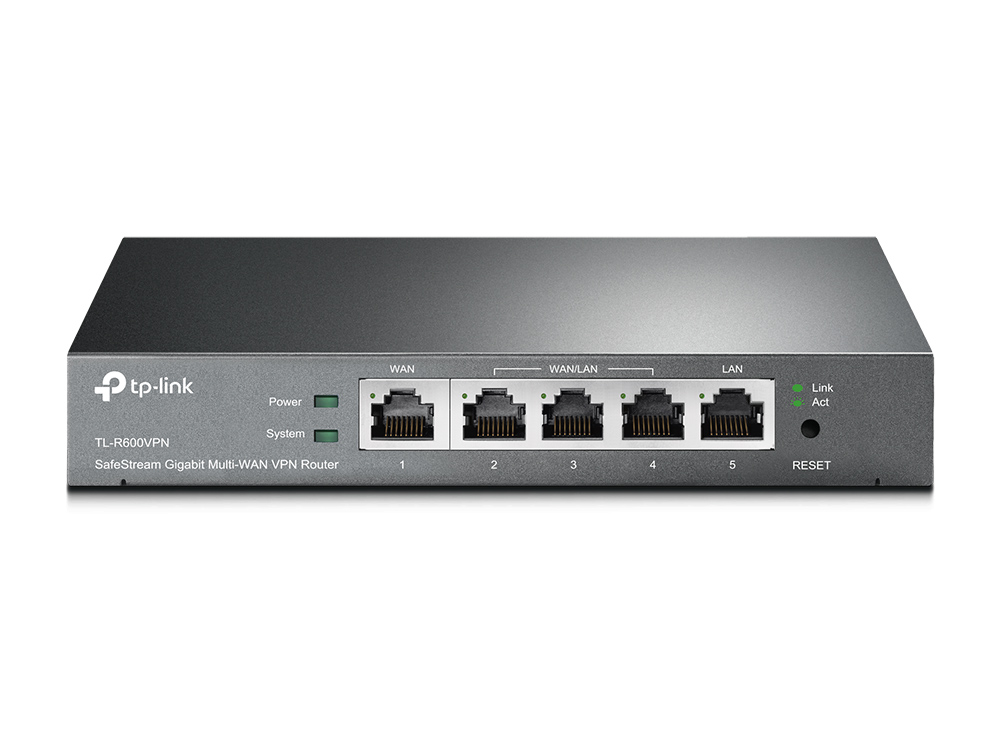
SafeStream Gigabit Broadband VPN Router
peak cloak
wispy merlin
Do you use their PoE switch for the APs too?
No
peak cloak
peak cloak
https://www.tp-link.com/us/business-networking/vpn-router/tl-r600vpn/
This is their only router it seems
wispy merlin
They seem to have a hardware controller as well but I can't bring it up without using Amazon or something. If I go to their website it redirects me because I'm in Canada then says zero results found.
OC300 is the model. Haven't really had a chance to look into what it does exactly.
Is the Dream Machine Pro just a combination of things, like VPN router, firewall, controller?
hollow marlin
rocky badge
https://linustechtips.com/topic/1418183-our-new-internet-is-free-office-airfibre...
Is someone seriously suggesting slapping a generic home router to the roof instead

 low heart
yeah why not
peak cloak

 wooden arch
 tidal flower
https://docs.photoprism.app/getting-started/docker-compose/
https://docs.photop...
tidal flower
https://docs.photoprism.app/getting-started/docker-compose/
https://docs.photop...
this is to advanced for me lo;
I have been trying to follow this for weeks
so far I have downloaded docker and thats about it
I need the NOOB guide
something LTT level, I followed the LTT home server guide and got plex running, but plex sucks for photos
peak cloak

GitHub
Photos App powered by Go and Google TensorFlow 🌈 ✨ - photoprism/docker-compose.yml at develop · photoprism/photoprism
the worst thing about that guide is no example docker-compose
modify above file to your needs and start it
@wooden arch
ultimatly, there is no noob guide to many things, just have to learn
it gets very repetitive when writing documentation
wooden arch
that sucks. even the 3 YT vids skip parts
peak cloak
what are you stuck on
install docker
docker-compose
make a folder, put that file in it, modify the volumes in compose
wooden arch
ohhh
wooden arch
so this is all done by editing the .yml?
 peak cloak
yes

 peak cloak
wooden arch
peak cloak
wooden arch
you need to put the docker-compose file in a folder of your choice, and run that command in the folder
wooden arch
hmm
peak cloak
this is what I mean by basics, that rarely anyone will write in documentation since it's assumed the user knows how
wooden arch
Usually you can find a tutorial what explains everything for inexperienced users, but I haven't been able too
peak cloak
wooden arch
so where is the file located
wooden arch


 wooden arch
WOOOOO ITS DOING SOMETHING

it is running, but saying the password is incorrect

I will change the passwords later but this leaves me lost
wooden arch
I did change it. to password (default was 'notsecure')
wooden arch
I didnt!
I see it
once I save the file how do I make the changes take effect? EDIT: i figured it out
 flat sphinx
So I got an ASN the other week and am using it colocated in Linx LON1 and am peering on RapidX if anyone is up for a project
wooden arch
good news I was able to log in with the defaults
flat sphinx
lan clip today reminded me about it
peak cloak
flat sphinx
So I got an ASN the other week and am using it colocated in Linx LON1 and am pee...
RIPE?
flat sphinx
I've got a buddy who runs an isp and he sponsors ASNs for people
peak cloak
Want to get really good on that before I jump into global internet
flat sphinx
dn42?
peak cloak
It's like a virtual internet kinda
hollow marlin
Well an ASN is pretty much useless unless you have a /24 or /48
flat sphinx
sounds cool. I've really hit the ground running learning everything I can about bgp
I have a /48
peak cloak
flat sphinx
Might get a /44 soon. Ipv4 too expensive 😢
peak cloak
flat sphinx
sounds cool. I've really hit the ground running learning everything I can about ...
See I've been doing that on dn42
You peer over wireguard links usually, but it's not required
flat sphinx
yeah I did a similar thing with the CRXN network. Ended up having to use fastd to tunnel since we wanted to run protocols that needed L2 (babel)
wooden arch
Getting errors for lines i never touched


 flat sphinx
it's the difference between just stopping the containers and tearing down the deployment. With down you'd loose non file backed volumes
wooden arch
hmm
flat sphinx
the volume configuration doesn't look right tho
could just be that I've never used docker on windows
 flat sphinx
but in the volume sections I believe it should be:
volumes:
  some-named-volume:
    - list
    - of
    - info
    - about volume
as opposed to the array you have
 wooden arch
flat sphinx
but in the volume sections I believe it should be:
```yaml
volumes:
some-named...
wooden arch
flat sphinx
but in the volume sections I believe it should be:
```yaml
volumes:
some-named...
hmm. so it should be
wait.. what info? like size?
flat sphinx
check the docs
probably location
it's more the fact that volumes should be a mapping and not an array
wooden arch
OHHHH I GET WHAT YOU ARE SAYING
I SKIPPED ALL the steps and jumped to the windows section
 rocky badge
@clear igloo WiFi upgrade at home.... 😩

going from a mix of 3x3 and 2x2 802.11ac APs to a 4x4 802.11ac Wave 2, 4x4 802.11ax, and 2x2 802.11ax along with new switches 😩
 plucky marlin
Gaah! I broke my pfSense web configurator.
It's been bitching about certificates going out of date so I searched up how to solve that issue. I managed to create a certificate authority, generate a certificate and then switch the web configurator to use the new cert. To do so, I had to enable HTTPS and I was only using HTTP before. As soon as it switched to HTTPS, it logged me out. Every time I try to open the admin page or login, it tells me that I need to make sure I have cookies enabled - which I do.
So I tried resetting the interface IPs from the shell and telling it to revert to HTTP for web config... That didn't work, so I restored the backup from when I added the cert authority but hadn't changed anything else.
Now I can't even open the web config page at all. It just loads indefinitely. I have tried http and https URLs to no avail.
Uhhhh... I might have been a numpty. I'm in through a different machine. I think I've screwed it with DHCP and static IPs so I can't access from my main PC.
wooden arch
wooden arch
I SKIPPED ALL the steps and jumped to the windows section
I think I got it running But I cant accesses the web page on any other PCs on the network
tidal flower
wooden arch
I think I got it running But I cant accesses the web page on any other PCs on th...
You’re hitting the ip of your machine on port 2342?
IE it looks like http://<ip here>:2342/
sly lark
What is a good network extender?
 thick minnow
sly lark
What is a good network extender?
thick minnow
sly lark
What is a good network extender?
powerline adapter
or wired utp lol
Dont use wifi extenders those slow down internet speed a lot
sly lark
thick minnow
powerline adapter
Wireless
I need 1 that can be compatible with wep and wpa at all times
@thick minnow ^
@pulsar thorn
sly lark
 pulsar thorn
No clue I just use Ubiquiti APs
pulsar thorn
No clue I just use Ubiquiti APs
Use what?
 vestal sundial
Where do you need wep? It was retired in 2004 and is super weak in security
pulsar thorn
sly lark
Use what?

A thoughtfully designed product family.
peak cloak
or tplink omada
 mental finch
Hello guys can someone help me with link aggregation
I bought ax86u with wan aggregation. I did use it and IT says i need to turn 802.3ad on my modem but i cant find it. In manual IT says
Per port IEEE 802.1q VLAN ID processing
• All VLAN IDs supported in Open Trunk Mode
• Maximum of 12 VLANs per LAN port in Filtered Trunk Mode
• VLAN tagging/untagging
• VLAN Stacking (QinQ)
• VLAN Switching
• SSID to VLAN Mapping
Can i do IT or modem is shitty and i cant
sly lark
vestal sundial
Where do you need wep? It was retired in 2004 and is super weak in security
I have my reasons
sly lark
pulsar thorn
https://ui.com/wi-fi
What does this do?
sly lark
peak cloak
or tplink omada
?
 unborn sluice
sly lark
What does this do?
unborn sluice
sly lark
What does this do?
They create networking devices
unborn sluice
sly lark
I have my reasons
Ok then, keep your secrets
mental finch
Soccsn someone actually help me of i van connect those 2 lans?
Ethernet bridging/switching per IEEE 802.1p/802.1q is that this?
peak cloak
mental finch
I bought ax86u with wan aggregation. I did use it and IT says i need to turn 802...
Vlans are not aggregation
mental finch
@peak cloak i already did speak to my provider and they said dead because in only few places speed i'm having is only available są they do not provide modems with that sow The only option is either to use gigabit and connect PC to their second port
peak cloak
mental finch
<@222482269829332992> i already did speak to my provider and they said dead beca...
Are you trying to get higher than gig
peak cloak
mental finch
<@222482269829332992> i already did speak to my provider and they said dead beca...
PC to second port won't work, unless it's a router/modem and not just a modem
mental finch
peak cloak
PC to second port won't work, unless it's a router/modem and not just a modem
Yes i have Asus router with van aggregation and my router modem provider only has gigabit Ethernet ports why my speed is 1200 MBs
Router is in bridge mode są my router is handling all the connections
sly lark
unborn sluice
They create networking devices
Wdym
waxen scroll
unborn sluice
They create networking devices
WDYM
mental finch
Hey guys i got questions i bought Asus ax86u And my wifi speeds suck.. through cable i got full 1200mbs so its good. But through wifi 6 i max at 300mbs and 5ghz dissapears every 6min or IT says no internet while 2.4works great
Should i return IT ?
I used 5 wifi 6 devices and still same
My old ac86 had 600...
unborn sluice
unborn sluice
They create networking devices
WDIM
 fading oar
mental finch
Hey guys i got questions i bought Asus ax86u And my wifi speeds suck.. through c...
fading oar
mental finch
Hey guys i got questions i bought Asus ax86u And my wifi speeds suck.. through c...
I've had similar issues with 5Ghz
I think you may be too far away from the access point for 5Ghz to be used.
Or there is something physically blocking the connection
mental finch
fading oar
I've had similar issues with 5Ghz
I think you may be too far away from the acces...
Router was Like 30cm next to me
When i tried using 2.5gb wan port my 5ghz AP said internet is not available
And i couldnt connect to IT then IT dissapeared
Max on 2.4ghz i could get 100mbs while on 5ghx IT said 280mbs
And when i was resting 5ghz there was strange sound coming from router
On my ax86u i Had 480mbs while on my ax56u im having 290mbs right now
I think i will just return IT...
fading oar
Huh
mental finch
Like the hell is happening i have no other routers and i live in home
fading oar
Have you checked logs for for the machine? To see what errors are given
mental finch
Didnt had time for IT was strange
On my wifi on phone settings
IT said 2.4gbs speed negotiated
So Like the hell with those speed
And when i was testing 5ghz somwtimes IT was like
700mbs
And going down
Then IT was 70mbs at the end and boom
No connection 🤣
So i was like ? The hell... IT was 700mbs..500..300..230..50... Lost connection
Only 2.4ghz worked normally
mental finch
fading oar
Have you checked logs for for the machine? To see what errors are given
Is IT Like false unit? Cuz there was strange sound when testing 5ghz. Its no problem for me really
 little schooner
Why is IT in caps?
waxen scroll
Information Technology
little schooner
mental finch
And when i was testing 5ghz somwtimes IT was like
@waxen scroll this one. much doubt its that in this context
also hi @waxen scroll 👋
oof, then I looked more closer and yeah nvm 😅 but then not really 🤔 ahhhhhhh lol
unborn sluice
mental finch
So i was like ? The hell... IT was 700mbs..500..300..230..50... Lost connection
Information technology is 700mbs
 hot hawk

Anyone know how to fix this?
Nextcloud is running in a docker container
Tried sudo docker-compose exec nextcloud chown -R 82:root /var/www/html which didn't work
 white pivot
just watched the new air fiber video-- has LMG considered using perfsonar for network testing? I've used it to push up to 20Gbps up the coast
peak cloak
white pivot
just watched the new air fiber video-- has LMG considered using perfsonar for ne...
Didn't watch, what did they use?
rocky badge
I think they just used speedtest and a smb file transfer lol
They should’ve at least run iperf3 or similar.
Speedtest shouldn’t be used to test local networking speeds lol
peak cloak
rocky badge
Speedtest shouldn’t be used to test local networking speeds lol
Bruh
Honestly, they don't know basics lol
 gray knoll
Well, Jake and Linux propably do, but speedtest.org has those fancy graphs, Iperf3 doesnt...
rocky badge
They don’t use robocopy directly lol
They use choezcopy which is basically a GUI for it
gray knoll
peak cloak
Why is graphics a factor in testing speed
Its not the factor for the speed test, but for Youtube... Its easier to show a picture of speedtest.org, than to explain the Iperf output to the normal user...
 clear igloo
You mean explain MB/s to Mb/s conversion?
 sudden kayak
i think for the purposes of a video it makes perfect sense to use the speed test tool a majority of viewers would be familiar with, knowing it's close enough to make their point
also they're not literally basing their entire decision making and testing on what they film for a YouTube video
I'm sure they use actual network monitoring tools as well
clear igloo
lol, nope
They don't seem to do much upkeep after setup, most of it is either "it's dead" or "it's dying now" and a video to replace something
I also wouldn't expect many monitoring tools to integrate with Ubiquiti gear either, or at least not LibreNMS and the like that come to mind
rocky badge
I think pulseway is the extent of their monitoring
rocky badge
clear igloo
I also wouldn't expect many monitoring tools to integrate with Ubiquiti gear eit...
Librenms/snmp should integrate with ubiquiti
clear igloo
and the Ubiquiti app
Yah, wasn't sure if they had SNMP but I honestly doubt they'd go far enough to set that up, lol
rocky badge
I wouldn’t expect zabbix or nagios though
gray knoll
rocky badge
I think pulseway is the extent of their monitoring
At least they dont just use zfs on a random os without any scrubbing (as far as we know) anymore
rocky badge
✨anymore✨
gray knoll
Ik, forgot it in the message and instantly edited it xD Wasnt their os pretty old as well?
rocky badge
They could combine their petabyte into 5U of rack space and get rid of headaches with a Dell XE7100 lol.
peak cloak
rocky badge
I wouldn’t expect zabbix or nagios though
one of the next projects I want to do is zabbix
and netbox
maybe some IDS
rocky badge
And the XE7100 supports two independent controllers lol
sudden kayak
call me a cynic but i really don't think they are actually showing the full extent of their networking & storage infrastructure in the goofy videos they make about "oops linus dropped stuff again"
I'm not saying it's a bad thing but their videos are entertainment, not accurate documentary films about their exact network setup
peak cloak
sudden kayak
call me a cynic but i really don't think they are actually showing the full exte...
didn't they not know how vlans work...
rocky badge
I mean, these are the same people who expected VLANs to just work on a switch lol
gray knoll
sudden kayak
call me a cynic but i really don't think they are actually showing the full exte...
But they dropped it ON A CAR!
But yeah, I agree... The question is, are we (relative) networking nerds the target audience?
Oh just read your second message... Oh well...
sudden kayak
yeah idk i think that's the kind of thing you just stick in a video script for the drama, not that they literally don't know
sudden kayak
gray knoll
But they dropped it ON A CAR!
But yeah, I agree... The question is, are we (re...
like again this isn't a criticism but we are not their target audience, exactly
rocky badge
I also don’t get why they want to “cheap out” on internet for the new offices lol
They shouldn’t just rely on wireless ptp imo.
gray knoll
Well, it saves them encryption time, and they dont have to work on keeping a VPN secure... I dont think cheaping out was the main reason...
rocky badge
Talk to your ISP and see if they have a solution that works for you.
Site to site vpn has gotten way better
Or even keeping them on a layer 2
gray knoll
You still have to keep it secure... Oh well...
sudden kayak
i mean from a business perspective one time capital expenditure on a ptp link is preferable to another repeated monthly expense
gray knoll
rocky badge
Or even keeping them on a layer 2
Which one was Layer 2 again? I always forget that for some reason
peak cloak
gray knoll
Well, it saves them encryption time, and they dont have to work on keeping a VPN...
I would def think encyrption adds less latency than wireless
rocky badge
But then you have to factor on reliability
peak cloak
gray knoll
Which one was Layer 2 again? I always forget that for some reason
ethernet / MAC
rocky badge
gray knoll
Which one was Layer 2 again? I always forget that for some reason
MAC layer
peak cloak
IP is layer 3
peak cloak
peak cloak
I would def think encyrption adds less latency than wireless
esp if you have hardware acceleration
rocky badge
Because a wireless link isn’t going to be as reliable as wired. Wired they are guaranteed latency, loss, bandwidth.
gray knoll
Well, I use zerotier for VPN xD that is awful (Latency wise)
peak cloak
what
rocky badge
ZeroTier has been good for me.
peak cloak
what does zerotier use? wireguard?
rocky badge
I’ve been able to get <10ms with maxing the connection.
peak cloak
I get super good latency with wireguard
sudden kayak
i think the airfiber stuff is pretty consistent, and good enough unless you're gaming or something
rocky badge
peak cloak
what does zerotier use? wireguard?
 gray knoll
rocky badge
ZeroTier has been good for me.
gray knoll
rocky badge
ZeroTier has been good for me.
Latency tends to be up to 90ms for me... from the same room... But I am in europe
peak cloak
sudden kayak
i think the airfiber stuff is pretty consistent, and good enough unless you're g...
thing is, weather, etc influences it
peak cloak
gray knoll
Latency tends to be up to 90ms for me... from the same room... But I am in europ...
zerotier is p2p
rocky badge
I’ve been able to push live video for live streams over ZeroTier lol
sudden kayak
not as much when ur at 60ghz
rocky badge
That’s one of my main uses for ZeroTier
peak cloak
their central server is just for discovery
gray knoll
peak cloak
zerotier is p2p
But you need a server to establish the first connection right? That would mean that the first connection would have to talk to zerotiers servers first...
rocky badge
The only time it uses a relay is if the client can’t punch through your firewall
peak cloak
sudden kayak
not as much when ur at 60ghz
isn't the higher the freq, the more susceptible to interference
peak cloak
rocky badge
The only time it uses a relay is if the client can’t punch through your firewall
which I think may be happening?
rocky badge
because ZeroTier has the ability to traverse NAT
peak cloak
if it's local
rocky badge
Maybe
peak cloak
gray knoll
But you need a server to establish the first connection right? That would mean t...
are both endpoints within your LAN?
rocky badge
But yeah, LMG should’ve gone with another solution IMO.
gray knoll
peak cloak
are both endpoints within your LAN?
Yes, and maybe an Update fixed that? BC rn im getting <1ms latency...
rocky badge
While the wireless link is cool I wouldn’t solely rely on that for an entire office that is responsible for a major portion of your revenue
peak cloak
gray knoll
Yes, and maybe an Update fixed that? BC rn im getting <1ms latency...
yeah sounds like it was getting proxied out since it was getting confused
rocky badge
Because merch is a big part of their revenue now.
peak cloak
stupid NAT
sudden kayak
different frequencies get different levels of interference depending on all sorts of conditions but 60ghz is one of the better options generally
i used to work with mmwave stuff (both radar and communications) but I've forgotten the specific bands & properties .... i remember enough to know that 60ghz is pretty decent (hence why UI chose it)
gray knoll
peak cloak
stupid NAT
Prolly... I just ran a quick iperf, and I am getting WAY above my Upload speed, something I never got before... Maybe my NAT just got an update...
sudden kayak
well, and licensing/lack thereof, etc etc
peak cloak
gray knoll
Prolly... I just ran a quick iperf, and I am getting WAY above my Upload speed, ...
more like zerotier got an update
NAT doesn't get updated?
gray knoll
Wel, the NAT is running on a FritzBox (dunno if you know that one, pretty common on germany) and they do get Updates every once in a while...
clear igloo
NAT is an RFC, it doesn't get software updates
The box maybe got a software update and the provider upgraded your speed due to infrastructure improvements though
peak cloak
yeah NAT is a defined standard
gray knoll
But raw speed is only ~1/3 over zerotier, even on lan... MAybe thats only WSL having to use Windows for networking
gray knoll
peak cloak
yeah NAT is a defined standard
Isnt NAT itself only the "How it works" standart? And then everybody implements it differently?
peak cloak
gray knoll
Isnt NAT itself only the "How it works" standart? And then everybody implements ...
everyone should implement it with the same behavior
clear igloo
breaking an RFC is a bad thing
peak cloak
all regular NAT does it translate your LAN subnet to one Global IP
aka Port Source NAT
clear igloo
PAT*
gray knoll
Rules are only guidelines in Software xD
Nobody folows the XML spec, bc it allows infinite recursion, which could ddos a parser
peak cloak
well RFC is stricter I believe
gray knoll
I mean... There is still that RFC for IP over Avian carrier...
rocky badge
clear igloo
PAT*
 reminds me of someone in Ubiquiti discord who is getting 40Gig internet and he needed router suggestions and some people were trolling him with a router that didn’t do NAT/PAT/etc.
peak cloak
HTTP 418
clear igloo
There is a law that says I can't call a french guy a pig or something, doesn't make laws stupid
clear igloo
rocky badge
<:KEK:638780715516952586> reminds me of someone in Ubiquiti discord who is getti...
lol
sudden kayak
I mean it's entirely possible for two different implementations of the same standard to be compliant but have different performance characteristics
clear igloo
Besides, NAT just does one thing, you can improve other bits in software without new hardware or to unlock better hardware optimizations that improve throughput
rocky badge
He wanted a juniper MX
clear igloo
10003 chassis? 😛
rocky badge
A SRX would’ve worked
clear igloo
rocky badge
A SRX would’ve worked
modular chassis better
/s
sudden kayak
a software update could keep behavior the same but fix performance issues, that's reasonable (if you trust that the router vendor would actually care to put work into that 😆 )
clear igloo
We rolled out a security update, all ports are now down
10/10 security, would deploy again
rocky badge
But I think he’s going sonicwall NSsp
rocky badge
clear igloo
modular chassis better
/s
😂
gray knoll
clear igloo
We rolled out a security update, all ports are now down
10/10 security, would de...
They are not down, they are redirected over Avian carrier, in order to have the bad bots timeout, before they get a response...
clear igloo
Can't hack a network when there is no power 
gray knoll
For double security:
sudo su
sudo poweroff


 let’s see how his ISP will go
clear igloo
let’s see how his ISP will go
clear igloo
lol
hollow marlin
clear igloo
10003 chassis? 😛
MX10k3 😘
clear igloo
hollow marlin
MX10k3 😘
😄
hollow marlin
10k3s are pretty much all our P routers. I believe we are still waiting on MX204s for orders we made back in Sept
clear igloo
hollow marlin
10k3s are pretty much all our P routers. I believe we are still waiting on MX204...
Do those do 400g or is that a new chassis for the same density? Assuming there is a need for you to go dense 400g at the p routers
hollow marlin
peak cloak
well RFC is stricter I believe
RFCs are not standards. You are free to ignore as much as you want. You just will not be very popular.
IEEE though, you better be 100% compliant
clear igloo
hollow marlin
RFCs are not standards. You are free to ignore as much as you want. You just wil...
That's what I was thinking of, words are hard today 🙂
IEEE standards you need to abide by, RFCs are more guidelines to an end
gray knoll
Or you just ship nonstanded stuff... Everyone will hate you for it, but I have been told it happens...
clear igloo
gray knoll
Or you just ship nonstanded stuff... Everyone will hate you for it, but I have b...
We call that "proprietary" lock ins 🙂
With bonus warranty and financing of course
peak cloak
hollow marlin
RFCs are not standards. You are free to ignore as much as you want. You just wil...
ah got it
peak cloak
gray knoll
Or you just ship nonstanded stuff... Everyone will hate you for it, but I have b...
cisco's proprietary protocols
gray knoll
Didn't gmail send emails from the wrong ip sometimes? Im sure there is an ieee standart about email...
hollow marlin
clear igloo
Do those do 400g or is that a new chassis for the same density? Assuming there i...
10k3s can only do 100G, at up to 24 ports on only 3RU. MX204s can also only do 100G at up to 4 ports for 1RU. 204s make amazing edge/PE routers. The new fancy MX304s have 4x400G though.
We are nowhere near the need to 400G yet lol
clear igloo
peak cloak
cisco's proprietary protocols
They've gotten away from a good bulk of those from what I've seen lately. EIGRP is open-ish (although some still locked up of course) and aside ACI or the flavor of the month SDA garbage everyone and their mother comes up with new things for every day it seems they don't seem to push too much on the proprietary protocols front, just orchestration stuff with confusing licenses these days
clear igloo
hollow marlin
10k3s can only do 100G, at up to 24 ports on only 3RU. MX204s can also only do 1...
Ah, yah, haven't looked at that much honestly just curious. Need to jump to 800G instead 😉
I am curious when 1.6Tb gear will start to roll and if it will come out shortly after 800G or stagnate for a while on 400/800g
At some point you would assume we'll get away from optics completely with copackaged stuff and it was gaining traction a few years ago but seems to have poofed lately so I wonder if it will make a resurgence soon or not
peak cloak
gray knoll
Didn't gmail send emails from the wrong ip sometimes? Im sure there is an ieee s...
email is annoying
it's a standard technically, but there's so many things added on top nowadays
hollow marlin
I'd assume 400/800G is going to linger for sometime while switchchips just keep going (outside trading that drool over every nano-second saved). But since Im a pleb thats only worked at tier 3 providers, I don't get to work with the big numbers tier 1/DCs push
clear igloo
hollow marlin
I'd assume 400/800G is going to linger for sometime while switchchips just keep ...
Yah, I've seen some talk of 400g becoming the new 100g in terms of adoption but I've seen talk of 800g kind of not getting much traction but who knows since it's not even out yet and people waiting for the next jump beyond that. Always curious what the future holds 😛
Then you've got that kind of plateau where "enough is enough" for companies too at least for a period of time that seems to stretch longer and longer in terms of need to upgrade
hollow marlin
At least some of my friends that work in some larger DC, most their projects now are upgrading all their spine/leafs to 400G/100G.
As for us, we are pushing just over 100G total but its spread out so much over our peerings that many interfaces are barely breaking 10G
clear igloo
Yah, I definitely see a lot of larger places going 400g/100g spine/leaf and whatnot so always one of those things to speculate on, how many will even look at 800g when that comes out (assuming its relatively soon) or just wait at that point or not even bother for a good period of time just because "it's good enough" and a new shiny thing pushes needs elsewhere (WiFi 7 comes to mind)
but outside the DC, you're right, aside Tier 1 ISPs you might not see even 400g roll for a while depending on the use case
rocky badge
@clear igloo 👁️ poking through our networked AV: 0.SecureGovernmentMode False lol
clear igloo
rocky badge
<@!291198741862416384> 👁️ poking through our networked AV: `0.SecureGovernmentM...
lol
hollow marlin
Id like to eventually get into a Tier 1 to see what they push. That said, in SP design, 8x100G is better than 2x400G/1x800G. All about that ECMP and FRR 
clear igloo
hollow marlin
Id like to eventually get into a Tier 1 to see what they push. That said, in SP ...
Very true, more paths is more better
wispy merlin
If I get a Ubiquiti AP and a temporary PoE injector, can I connect that to my regular switch and ISP provided gateway using the controller software until the other equipment is back in stock?
 carmine moss
wispy merlin
If I get a Ubiquiti AP and a temporary PoE injector, can I connect that to my re...
carmine moss
wispy merlin
If I get a Ubiquiti AP and a temporary PoE injector, can I connect that to my re...
yeah why not
i have a ubiquity ap on a tp link poe switch while the rest of my network is microtik
just run it for fun the ubiquity ap as got it cheap
wispy merlin
Thanks, just asking. Seems like I can't get everything at once and wasn't really sure what exactly the software was able to do. I didn't want to get the AP just to sit on it until the rest came in.
How's Microtik? I was also looking for alternatives but didn't see much in Canada. The Omada is more expensive here than Ubiquiti.
carmine moss
mikrotik is a bit harder to setup vs ubiquiti both are good depends on your needs ubiquiti is easier to recomend tho
just becouse the config is a lot easier
wispy merlin
Ok thanks
little schooner
mikrotik in my experience, those devices keep working and working and working forever. my powerbox pro that is running my cameras has an uptime of over a year
the thing just doesn't die, even when smoke and dust were in the mix
peak cloak
little schooner
mikrotik in my experience, those devices keep working and working and working fo...
hardware good, not a fan of routeros though
little schooner
peak cloak
hardware good, not a fan of routeros though
same. I was fortunate that I saved a copy of the config bc initially I couldn't sign into the box. I had forgotten the password to it and needed to reset
white pivot
gray knoll
Well, Jake and Linux propably do, but speedtest.org has those fancy graphs, Iper...
people misspelling Linus' name as Linux is my new favorite thing
gray knoll
i dint even notice... Maybe autocorrect?
white pivot
whenever he's deep in thought, we could say "he's stuck in vim"
 fast ore
Hey could anyone point me in the direction of some lists for pihole to block ads, tracking, malware, etc?
pulsar thorn
need to get some experience with JunOS and Cisco IOS, what's a good place to start?
hollow marlin
pulsar thorn
need to get some experience with JunOS and Cisco IOS, what's a good place to sta...
Cisco - any CCNA official cert guide and CML images with EVE
Juniper - Intro to Junos Day One and vLabs or EVE if you can get the eval images
 fervent yarrow
I wanna try my hand at PXE booting a PC since I have the spare components and I want to learn how to do it anyways. Does anyone have good tutorials for setting up a DHCP server and a TFTP server?
pulsar thorn
hollow marlin
Cisco - any CCNA official cert guide and CML images with EVE
Juniper - Intro to ...
Thank you boss, I’ll get googling right away
I want to do a course through college that involves 6months of practical at AWS, so they recommend prior knowledge with those before you apply
 rugged quiver
if you're just following the ccna book, cisco packet tracer is free and provides a good enough sim environment
hollow marlin
pulsar thorn
Thank you boss, I’ll get googling right away
Cisco is far easier to jump into and I recommend focusing on it first then explore Junos. They are vastly different.
But if you learn Cisco first, Juniper also has a Junos for IOS engineers Day One also that helps with the transition. All their Day One books are free
 craggy bobcat
what nas software let's you add more drives without reforming
 slow pivot
craggy bobcat
what nas software let's you add more drives without reforming
slow pivot
craggy bobcat
what nas software let's you add more drives without reforming
Pretty much only UNraid
Although I suppose you could set up any old linux distro with LVM and get a similar behaviour
gray knoll
I think zfs allows it to some extend? But I think you would need to add a new VDev or sth
slow pivot
Not really… you need to add vdevs of the same size/geometry. So if you have a mirror of 2x4TB drives, you can add another vdev of the same size, but it almost be either a mirror or raidz vdev
thick minnow
Ah yes, when the ethernet disconnects the downloads arent gonna finish.
 peak cloak
@slow pivot @gray knoll @craggy bobcat zfs can do it now too
slow pivot
I was aware that it had been committed but has it been released?
I don’t think it is in TrueNAS yet
peak cloak
Yeah not yet in truenas
gray knoll
Dunno... But since Installing zfs on Linux is building it from source anyways, you could just build the most recent version from source...
Ik TrueNAS is not Linux, but still
slow pivot
Yeah, the original question was for “nas software”; I doubt that included setting up linux and compiling custom Zfs drivers. Although, maybe?
gray knoll
Well, my Nas runns on a Basic Debain with ZFS as Storage and samba as file server
slow pivot
I am also always a bit paranoid when it comes to large changes in filesystems.
slow pivot
gray knoll
Well, my Nas runns on a Basic Debain with ZFS as Storage and samba as file serve...
Nice. I run TrueNAS on all my storage servers atm
gray knoll
slow pivot
I am also always a bit paranoid when it comes to large changes in filesystems.
Propably for the best xD
gray knoll
slow pivot
Nice. I run TrueNAS on all my storage servers atm
Unless you see the amount of read/wrute errors I get xD Then its no longer nice
slow pivot
Yeah, I’ve seen filesystems go sideways with data in the past due to bugs
gray knoll
Well, I tend to loose my Data on dieing hard drives xD
slow pivot
Ah, yeah that sucks big time :/
gray knoll
And I fear that one of my HardDrives is about to die soon... I get ~3 Write Errors per day...
craggy bobcat
slow pivot
Pretty much only UNraid
what would be better to do? run ubuntu then put unraid in a docker or just run unraid or ubuntu and do zfs?
peak cloak
craggy bobcat
what would be better to do? run ubuntu then put unraid in a docker or just run u...
not how it works
can't run unraid in docker
in general unraid kinda sucks for storage
craggy bobcat
peak cloak
not how it works
ok how does zfs work ?
craggy bobcat
peak cloak
https://www.youtube.com/watch?v=uBfXdJGmWoM
thanks so much
slow pivot
Yeah, what @peak cloak
peak cloak
slow pivot
Yeah, what <@!222482269829332992>
?
slow pivot
Regarding UNraid and the links to more info about ZFS
peak cloak
slow pivot
Regarding UNraid and the links to more info about ZFS
how unraid kinda sucks?
slow pivot
Yeah... was running it myself a couple of years ago as a backup storage server. Just a pain to get working well in the end.
peak cloak
slow pivot
Yeah... was running it myself a couple of years ago as a backup storage server. ...
and the way it works too
slow pivot
yeah
the lost space at the "end" of a drive sucks
well, lost if you are trying to store files larger than the minimum size
peak cloak
well isn't that not how unraid works
slow pivot
indeed
peak cloak
it uses a seperate parity drive which is stupid, instead of striping it on the whole array
slow pivot
they need to, otherwise they wouldn't be able to easily support arbitrary drive size expansion
peak cloak
zfs figured out how to
slow pivot
yeah, I still need to read the source patches for it. I don't know how they actually implemented that
peak cloak
slow pivot
yeah, I still need to read the source patches for it. I don't know how they actu...
The Foundation sponsored feature reflows existing data to rewrite it onto a new arrangement of disks thereby freeing space at the end of the logical RAID-Z group The FreeBSD Foundation funded the project to ensure the completion and release of an easy-to-use and practical application. The project came in under budget despite delays caused by […]
peak cloak
looks like it
gray knoll
I thought they were planning not to balance it? Like sure, new data will be written on the new disk, but old data stays where it is?
 flat wagon
new 24bday storage chassis looks nice :D
 tidal flower
Looking at doing some geolocation loadbalancing, anyone have any recommendations?
Currently looking at Cloudlfare / AWS Route53.
I guess my question is, what is the cost of doing something like a 3 server geoip balanced setup on each for say, some self hosted services with a couple hundred users?
 deft pasture
Testing to see if anyone can find the origin ip of a url. I'm hosting it but curious to see if anyone can find it. I can provide proof that I'm in control of it. Any takers?
Right now it's behind cloudflare
peak cloak
deft pasture
Testing to see if anyone can find the origin ip of a url. I'm hosting it but cur...
Id it's behind cf people can't see it
Unless you have some bad code or something
pulsar thorn
Behind cloudflare it won't work unless you're using webRTC
deft pasture
not sure if I am
pulsar thorn
no worries then
pulsar thorn
surely drop us the stream key lad
deft pasture
lol
pulsar thorn
Nah i'm stumped
pulsar thorn
192.168.10.1 isn't close enough is it?
pulsar thorn
I know
deft pasture
lol
btw please don't change the stream key
i don't want to have to restore an image
pulsar thorn
I won't lol
deft pasture
Thx for trying
pulsar thorn
no worries
 tropic thicket
I'm looking for a wireless internet adapter for my pc (B550M Aorus elite motherboard) Any help appreciated
pulsar thorn
Any USB adapter with Wifi 6
Modern Wifi adapters are all pretty much the same anyway
waxen scroll
pulsar thorn
Modern Wifi adapters are all pretty much the same anyway
You really want one from a specific factory in Shenzhen.
pulsar thorn
Most brand name are decent
 mortal zenith
I'm needed some reassuring I'm 100% correct in what I am saying. We have a old network switch 48 port (HP Procurve) but it needs JAVA to work. Am I right in thinking just to bin it and get a new one.
waxen scroll
You are
mortal zenith
Thank you. I have just need told I'm not correct as they have fitted lots of them without issue (all bought on eBay)
little schooner
flat wagon
new 24bday storage chassis looks nice :D
looks nice!
little schooner
pulsar thorn
Any USB adapter with Wifi 6
I hate all of them, none are reliable enough
are the wifi 6 any better? I know the few wifi 5 ones I tried just died a few years later
and it's connection was flakey at times, random disconnects
pulsar thorn
Well if you get wifi 6 then you have compatibility with almost everything right?
 keen ermine
i have a question. would using link aggregation work in the case of like using a VPN?
waxen scroll
no
 dense nexus
pulsar thorn
Any USB adapter with Wifi 6
dense nexus
pulsar thorn
Any USB adapter with Wifi 6
NOOOOOOOOO
USB is fucking shit
PCIe cards only
if ur mobo has an m.2 slot there’s wi-fi cards for those too
keen ermine
waxen scroll
no
I see. I was actually tearing my hair out as to why OVPN kept failing with Link Aggregation on but I guess Aggregation is more LAN only than LAN + Internet
peak cloak
keen ermine
I see. I was actually tearing my hair out as to why OVPN kept failing with Link ...
depends on setup
like trying to get vpn to work with LA to your PC? that would be fine
LA between NIC and VPN? that would fail
iirc LA, is a pure layer 2 thing
keen ermine
it was more getting LA to work from server to router while the server casted OVPN
peak cloak
should be able to get it to work
keen ermine
but then OVPN is used to connect outside the place and well I havent invested in getting a DDNS yet
peak cloak
@waxen scroll correct me if I'm wrong, but LA would be abstracted to a "virtual" interface would be seen like any other interface on the system
keen ermine
from reading it seems LA is either L2 or L3 while VPN is L4
peak cloak
kinda
waxen scroll
you to VPN is a single source and destination, so link agg probably wouldn't use multiple paths, it has to lock to one path
L2 and L3 have the same problem
L4 load balance would work if the VPN was constantly changing ports, which to my knowledge they dont
peak cloak
huh
keen ermine
TBH the use case of LA for me is to speed throughput when transferring files locally and such
peak cloak
waxen scroll
70% of my links at work are LA
for redundancy?
waxen scroll
that and they need more than just 10G
peak cloak
the bandwidth is over multiple connection though, right? which is why it makes sense, unlike VPN?
waxen scroll
keen ermine
TBH the use case of LA for me is to speed throughput when transferring files loc...
it wont work for that either unless you are diversifying sources and destinations (or have multiple clients asking for files and getting lucky)
keen ermine
I see
waxen scroll
sometimes two different clients get locked to the same link, it doesnt care about usage
its just running numbers on that data and making predictable decisions
If you did an L4 balance and used.... robocopy I think? to do multiple streams, then you're good
keen ermine
I see
I just saw LA on this router I got and reading the manual did get me interested in it
But mainly cuz it was the whole 1G to 2G
waxen scroll
Yeah, I used to think all this too back in the day.... then the documentation told me otherwise
😄
keen ermine
Yeah
I know it was local 2G and not internet bht I thought the connection wouldn't affect all else
waxen scroll
School is like "yeah so you get 20G from a few links" and forgot about the whole not per connection thing
keen ermine
But then OVPN kept dying and my bot kept going in/out of talking to Discord
keen ermine
The issue isn't the speed. Its getting the VPN to talk to the bonded interface if I do use LA and direct it out to the router and to my ISP
waxen scroll
yes, it will get locked to a link and just use that
waxen scroll
peak cloak
for redundancy?
its not new tech at this point but theres tech now where you can expand a port channel across multiple switches. Normally you can only use a port channel on one physical switch. The tech does some trickery to let you connect your server to two physical switches and as far as the server knows its only connected to one switch
or if you have a switch cluster using stacking cables, you can also use port channels across multiple switches
 west vortex
Hey all. My in-laws have a generic verizon router that is on one side of the house and they recently had me install a Ring doorbell on the other side, and the doorbell works fine but it's reporting poor signal strength. What's the least complicated and efficient way to expand the wireless network to improve the signal? The router cannot be moved because the verizon techs thought it a good idea to run their fiber through the wall where the router is and so dragging a cable through a bunch of rooms is not feasible.
peak cloak
west vortex
Hey all. My in-laws have a generic verizon router that is on one side of the hou...
verizon installs ONT and router seperate
unless they now have an all in one? which I don't think so
also
look into MOCA
west vortex
I'm looking into MOCA. But their router has an ethernet cable from the outside through the wall and there's a coax cable connected to it. I think their main fiber converter box is outside
 solid lichen
Hi, is it smarter to plug a second router for a sleepout (which we have run a cable to) into the main router or into the fibre modem that the main router is plugged into?
peak cloak
solid lichen
Hi, is it smarter to plug a second router for a sleepout (which we have run a ca...
No, plug an access point into main router
 hidden tundra
hey, what is a good cheap alternative router to the typical isp provided router
i currently have a really bad vodafone router
 frigid sphinx
I've been really happy with my move to discrete router and wifi solutions. I feel that I've got improved flexibility, security and utility
most stuff in the house was wired. but the wireless upgrade to wifi 6 has been super nice. (gigabit wifi yes please)
waxen scroll
frigid sphinx
I've been really happy with my move to discrete router and wifi solutions. I fee...
pretty much. my stuff just works
usually have weird quarks with all in ones
frigid sphinx
so I have pfsense and omada controller running on a little celeron chinese router box and omada wifi and poe switches.
so yes the omada stuff is proprietary but I wanted a sdn wifi solution so unifi or omada were the only games in town really (without ridiculous support contracts)
I've been super pleased with how it's worked out.
@hidden tundra so I'd strongly reccomend discrete.. omada has been pretty good imo and I'd definitly consider their router unit for better integration (I'm using pfsense and doing things that one might consider ill advised buthaving a ball)
hidden tundra
i dont know what 90% of those words mean
frigid sphinx
in particular running your router virtualised on a box that's not on the same segment as any workstations is probably not the easiest config to diagnose
so a 'router' is three things minimum
a router, a switch and a wifi access point
@marsh void what's the problem you want to solve?. how fast is your internet? how many things using internet are in your house
oh and how big is your house
hidden tundra
tagged wrong person but there is like 10 devices connected at most and i have a gigabit connection
not sure how big my apartment is
frigid sphinx
ok it's an apartment.. that's plenty
how new is the apartment do you own it do you have cabling runs anywhere? (tv is a good place to run ethernet in modern times)
hidden tundra
it got renovated before we moved in, it has 1 docsis port (i genuinely have no clue if its called that) in my room for internet and phone
currently we have a really long ethernet cable running from a switch to underneath my door into the living room, where its either connected to a ps4 or the tv idk
frigid sphinx
I have cat5 cable running round the edges of rooms (I live in a rental)
hidden tundra
my pc is also connected to the switch which plugs into the router
 frigid sphinx
nah it's a docsis 3.1 cablemodem.. it's going to have to stay but you might be able to configure it into a bridging dumb mode.
Manufacturer /
Model
Technicolor CGA6444VF I'm pretty sure it's this
hidden tundra
yeah it might be
i know theres 2 models
that look the same
one with ipv4 configurations and one with ipv6
i have the ipv6 one
frigid sphinx
are you in .de?
hidden tundra
yeah im in germany
its this one Technicolor CGA4233DE
or wait
i think its ARRIS TG3442DE
frigid sphinx
so it looks like they might have a number of hardware vendors/revisions in the same outer case (it happens)
hidden tundra
mine has the same backing as the one in this video
 frigid sphinx
vodaphone germany offers a fritzbox (perhaps that's a tactit admission that the wifi in the docsis modem is a bit... not good)
there's no way you're replacing that.. (docsis modems arn't consumer sold items (in general))
hidden tundra
so i would be using it as a modem right?
frigid sphinx
but you might be able to configure it to be a bridge (ideal)

Achtung!
Gilt nicht für Unitymedia-Anschlüsse.
Du hast einen Vodafone Kabel-Anschluss und möchtest Deinen eigenen Router nutzen? Dann aktiviere dazu die Bridge-Mode Funktion.
Dein Vodafone-Team.
Abonniere hier unseren YouTube-Kanal:
► https://vod.af/VodafoneDeutschland
Besuch unsere Online-Hilfe:
► https://hilfe.vodafone.de
Fragen oder ...
looks like there's even an official tutorial video?
hidden tundra
looks like it
frigid sphinx
so ok now you just need to work out what you're doing to replace it.
Routing Gigabit.. still requires a fair bit of umphf
hidden tundra
i found this one used
 frigid sphinx
that's worse wifi. and worse ethernet than what's in the cablebox 😉
hidden tundra
doesnt seem like it, i get absolute garbage through that thing
100 mbit down on a gigabit connection doesn't seem right
frigid sphinx
on your wired link?
hidden tundra
yup
frigid sphinx
what's the internet connection?
the ethernet on the modem might be gigabit.. doesn't mean your isp gives you a gigabit of internet
hidden tundra
our connection is gigabit
frigid sphinx
so test it and complain to voda if you can't get 800+mbit from a wired system.. then something's wrong
unless your switch is 100mbit 😉
hidden tundra
we already called them and had them replace the box once, same problems with the new one
the switch is gigabit on all ports
frigid sphinx
so if you run a speed test you get 100mbit?
and it pegs there and never moves above it?
hidden tundra
oh its doing the same thing again as last time, just replugged the ethernet on the switch and now suddenly its 800mbit
in a sec itll be 100 again
hidden tundra
to my pc
frigid sphinx
realtek nic?
frigid sphinx
in your pc the network card chip 😉
hidden tundra
no clue whats what
 hidden tundra
also the wifi is pretty awful too
some places in the apartment have no wifi at all
frigid sphinx
the wifi is ax200 so eh it should be reasonable
hidden tundra
generally the problem im having most though is that local network is really slow
things like wifi streaming stutter and lag
frigid sphinx
yep
hidden tundra
i tried casting video from my quest to my pc for example and it was really laggy
like 5 fps
carmine moss
So get a new cable and get an acces point for your room
Will make a second WiFi network tho
frigid sphinx
does the speed number change if you plugin to a port on the router?
hidden tundra
i dont have a cable long enough to reach
carmine moss
Get an ap anyway and disable WiFi in the combo box
hidden tundra
really all i wanna do in the end is when im not home use wakeonlan to run my pc as a game streaming server once i have my steam deck
frigid sphinx
so all in one boxes are a compromise (either the routing will be underpowered or the wifi will be eh or the switch will have terrible backplane bandwidth) sometimes all three and isp provided ones tend to be more so 😉 (hence me starting by saying how happy I was that I switched out to discreet 🙂
(seperate router, switch and wifi ap's)
 fair knot
hey I'm setting up some QOS on my router but was wondering of the optimal setup - I have an access point connected to my main router with a device I want to apply QOS. Should I enable QOS for the access point OR the device connected to the access point? I can manage both at the main router. cheers
thick minnow
Whats the best new cable modem
frigid sphinx
@fair knot it depends...
so if you had different device classes attached to the same essid on the ap (say iot devices a wireless sip phone and a laptop) you might do devices.
(which reminds me I really need to setup that IOT network.
frigid sphinx
the problem is gigabit routing requires... a reasonably competent cpu
like you're not doing it on a $10 arm part.
frigid sphinx
honestly at gigabit on the cheap.. old pc (haswell) isn't a terrible idea
(other than power consumption if you care about that buy a routerbox from protecli or aliexpress andbuild it up
peak cloak
fair knot
hey I'm setting up some QOS on my router but was wondering of the optimal setup ...
Do you need qos
Most of the time it's not needed
fair knot
peak cloak
Do you need qos
I guess not, but thought it wouldn't hurt for gaming when others are using the internet
(i'm the only one using the ap)
thick minnow
Ok I need your help guys
My sister lives next door
And I wanna set up a ubiquity dish
She literally lives across the road
What would be the best solution
 near basalt
thick minnow
And I wanna set up a ubiquity dish
near basalt
thick minnow
And I wanna set up a ubiquity dish
you can use something less powerful then the ubiquity dish I think? Without spending that much..
thick minnow
I need 300 mbps fast
At least
Ubiquiti PowerBeam ac Gen2 High-Performance airMAX ac Bridge (PBE-5AC-Gen2-US) https://www.amazon.com/dp/B071DV94TJ/ref=cm_sw_r_cp_api_i_VW8JR22A6Y780MSGRAKT

Ubiquiti PowerBeam ac Gen2 High-Performance airMAX ac Bridge (PBE-5AC-Gen2-US)
Ill get this one
Unless you can find one with simular specs
sudden kayak
QoS is usually not a net gain in perceived performance because consumer routers don't have the CPU power to do routing in software, and the hardware offload can't do QoS
there are exceptions but it usually doesn't help much of anything unless you're already running a soft routing setup of some kind
hollow marlin
@clear igloo @waxen scroll Just spent most the day reconfiguring a customer's network. They had an outage and reached out to us for contracted support because their entire network was down and it was beyond them.
Summary, 13 switches in a ring, basic default RSTP settings, no BPDU guard, little documentation and due to location of equipment, the ring had to stay.
So 8 hours of discovering, and redesigning their network's backbone from scratch. Basically they looped their network which also managed to knock out one of the switches as it was on the brink of death and the CPU load and heat killed it (also flash writes)
clear igloo
hollow marlin
<@!291198741862416384> <@!186123993412141057> Just spent most the day reconfigur...
yikes! lol, but they had to keep it in a ring?!?
hollow marlin
Yeah, this was a multi-building site and the fiber ran to each building was just daisy chained
clear igloo
ewwww
hollow marlin
Thankfully half their switches were Juniper but the other half were Adtran. I don't mind Adtran but which ever firmware they were on was missing so many basic STP features
clear igloo
wow, yah, I'd hope it was old or something because STP has been around long enough
hollow marlin
Apparently this happened many times before but after this, hopefully its the last. I'm passing off the escalation next time....L2 🤮
clear igloo
yah, L2 or L1 is no fun
hollow marlin
I should say it wouldn't be as bad if it was easier to find the source of a loop without logs, especially with 3k+ mac's in the table
waxen scroll
hollow marlin
Yeah, this was a multi-building site and the fiber ran to each building was just...
That's fine if they're running extreme EAPS
hollow marlin
waxen scroll
That's fine if they're running extreme EAPS
Juniper supports ERPS, this Adtran series doesn't support ERP/ERPS/EAPS/RAPS or whatever the vendor feels like calling it.
If I had the options I would have implemented it if the customer agreed. It was contracted so they have to still support it
 jovial vale
i got a question
the people in #tech-support wouldnt help so i guess i could ask it here
 cursive valve
I didn’t see it 🙃
jovial vale
i have installed truenas to my nas but windows gives me this stupid error when i try to click on the nas https://cdn.discordapp.com/attachments/723555851616649310/955591377327116288/unknown.png https://cdn.discordapp.com/attachments/723555851616649310/955591377541021736/unknown.png

 unborn sluice

jovial vale
im a noob in networking did i do something wrong
cursive valve
Did you name your nas truenas?
jovial vale
that was the og hostname but i changed it to xps-nas, its not a dell xps its just an inspiron that came with an xps side panel lol
peak cloak
Firewall?
jovial vale
on the nas machine or my gaming pc?
cursive valve
@jovial vale https://www.truenas.com/docs/core/sharing/smb/smbshare/ did you follow this?
Share Creation
jovial vale
no i did nothing to set it up after change the password bc i made it with caps on on accident
unborn sluice

cursive valve
Well I’d follow this guide to make it accessible to windows machines
jovial vale
thanks
 mint flint
i’m so miserable
i have to plug my old mac laptop with a thunderbolt to ethernet and plug that into my pc to get wifi, and it’s so fucking spotty and unreliable
the reason i do this is because of how bad my wifi card is and it’s so far away from the actual wifi like modem i think it’s called
does anyone have a tip or something? i heard a wifi card could do it but they all look goofy, and i want someone who knows what they’re talking about to help
btw i’ve been using the mobo wifi i think it is, and i’m talking about one that would plug into one of those slots in the motherboard
 meager ginkgo
mint flint
btw i’ve been using the mobo wifi i think it is, and i’m talking about one that ...
meager ginkgo
mint flint
btw i’ve been using the mobo wifi i think it is, and i’m talking about one that ...
You could either get a better wifi system in your home or buy a PCIe Wi-Fi card

PCIe WiFi 6E Card AX210 Bluetooth 5.2 AX5400M 802.11ax Tri-Band 6G/5.8G/2.4GHz Heat Sink 6dBi Antenna PCI-E Wireless Network Cards for Desktop PC Support Windows 11 /10 64-bit
something like that would work
 tidal spindle
Three pack of eero pro 6

Garage is 3 floors down and needs wifi. Other 2 areas are bedrooms.
I've been playing with different areas. Any tips are appreciated.
1GB Down, 40 up. I have the gateway in the garage, 2nd eero in the bedroom near the stairs and 3rd near the living room.
Only the living room and kitchen has speed problems.
Will create a network topology diagram if needed.
meager ginkgo
tidal spindle
Three pack of eero pro 6
Do you have coax wiring (cable tv ports) around the house? You could use MoCA to create a hardwired system.. it would be much more reliable and faster than the wireless mesh
something similar looking to this
 tidal spindle
meager ginkgo
Do you have coax wiring (cable tv ports) around the house? You could use MoCA to...
tidal spindle
meager ginkgo
Do you have coax wiring (cable tv ports) around the house? You could use MoCA to...
All my devices are already hardwired
Wifi just for convenience/guests
Garage is converted to a skate park. Nice to have wifi for spotify/browsing etc
Same when ppl are over for movie night
meager ginkgo
ah okay. Well that definitely helps. Have you considered just buying another unit?
tidal spindle
Yeah my sister has 3 that she's not using that I'll be adding to the already existing 3
But I still want to maximize placement
meager ginkgo
yeah, i'm not the best on placement lol. Just thought I'd give my 2 cents if they weren't already hardwired 😛
meager ginkgo
Haha, same here for the most part.
I'm running UniFi APs here though, I personally hate eero
 vale crane
I have an eero with an ethernet cable plugged into it straight to my pc lol
Don't know how effective that is
vale crane
It's just plugged to the wall
meager ginkgo
It might help a little bit, but wifi would be very similar if the computer has a decent wifi card
doesn't hurt though
 meager ginkgo
lol, I wish Apple devices had better wifi antennae
my iPhone struggles to get over 600mbps down/up. Don't get me wrong, that's blazing fast for a phone, but my Wireless Access Points are capable of delivering much more lol
meager ginkgo
My Macbook Air is a bit better pulling around 750 down
vale crane
Unfortunately i'm going to try to figure out how to make my headphones work in my PC
meager ginkgo
(I have a gigabit internet plan) (up and down)
 plucky quarry
are this worth or not worth for a 4 bedroom house
 tidal flower
I have them. They’re meh.
If I were to do it again I’d get a cheap router until I could get unifi or something.
flat wagon
plucky quarry
are this worth or not worth for a 4 bedroom house
i wouldve gone mikrotik cap series
theyre rlly good
tidal spindle
meager ginkgo
yeah, i'm not the best on placement lol. Just thought I'd give my 2 cents if the...
500-900Mbps everywhere in the house now.

It was such a pain fr
plucky quarry
flat wagon
i wouldve gone mikrotik cap series
ngl i wouldve gone with that one but they only had tp link and linksys at my local seller and from past experiences we dont trust linksys stuff that much
flat wagon
plucky quarry
ngl i wouldve gone with that one but they only had tp link and linksys at my loc...
why not shop online?
plucky quarry
eeh we needed it now our old one was a repeater and barely reached any rooms
and well with the 3 pack i was able to score one in my room
and as the one with owner privileges i gave my pc priority
craggy bobcat
looking to upgrade from a basic ip provided equipment and add security cameras what would you recommend for a 1900 sqft 1 story built in 2018
thick minnow
My House

 low pond
"F."


 thick minnow
i want a nightstand switch too damn
thick minnow
thick minnow
i want a nightstand switch too damn
I like to use my laptop in bed, but i still want full Gig to my nas at times
also my switch dock and xbox are there and it has a wired connection
ohhhh
Makes remoting into my servers and desk pc a lot more stable as well\
pulsar thorn
thick minnow
My House
IDIoT is a clever name lol
clear igloo
pulsar thorn
IDIoT is a clever name lol
I-D-10-T 😛
or PEBKAC errors are my fav
I know theirs was a play on IOT though but it's pretty close
pulsar thorn
clear igloo
I-D-10-T 😛
or PEBKAC errors are my fav
I say those to people all the time and you can hear them realise what you meant as you walk away
Especially teachers hahaha
clear igloo
haha, yes
rocky badge
@clear igloo @pulsar thorn 😐 😐 WiFi at school is so awful. 18% of traffic is mDNS and 33% of traffic is ARP.
That's over half of the packets going to my laptop
pulsar thorn
What speeds do you get in a Speedtest?
rocky badge
20Mbps
pulsar thorn
Pffft that’s dreadful
rocky badge
on a 20Mhz AC channel
pulsar thorn
Bruh
pulsar thorn
Are you getting arp from the desktop subnet or just wireless?
rocky badge
 rocky badge
pulsar thorn
Are you getting arp from the desktop subnet or just wireless?
rocky badge
pulsar thorn
Are you getting arp from the desktop subnet or just wireless?
it's all on a /21
pulsar thorn
Oh ouch
rocky badge
there are 2046 possible IPs and it's pretty full
I am getting arp from the router, vms, etc. etc.
 pulsar thorn
Brooo that’s stupid
rocky badge
it is from 10.0.0.0-10.0.7.255
"WhY iS wIfI pErFoRmAnCe HoRrIbLe"
stp, mdns, arp, all of that I get on my laptop
pulsar thorn
We have a /24 for Ethernet (servers are all static on a seperate /24) and a bigger range for wireless. They can communicate but broadcast doesn’t get through
Bro your it staff are bugging
rocky badge
School IT is stupid here.
Cams are VLAN 100 and intercoms are VLAN 200. Every cam in the district is on the same VLAN across schools, same for intercoms.
Otherwise, there is only 1 VLAN per school and everything is dumped on it
servers (including IPMI), vms, dc, networking, etc
pulsar thorn
Ok ours is a bit different
We have 10.1.1.1 - 10.254.254.254 split between every school and office building (500+ premises)
All can communicate with each other as if it’s one big LAN
We do have Vlans but that’s for PA system, I’m yet to work out the ID for it
Only good thing about that setup is we can have LAN parties between schools
rocky badge
pulsar thorn
Only good thing about that setup is we can have LAN parties between schools
Yeah same
I remember when people were playing Minecraft across the school networks lol
rocky badge
One of our teachers lets us play halo ce for the last day lol
“Teaches networking and team building”
rocky badge
Yeah
rocky badge
They only allow it bc of teachers
pulsar thorn
Do you not have different restrictions per user role?
 cunning lion
I need a "patch" cable to wire 2 PCs directly to each other via ethernet correct?
Or am I misremembering the term in this case?
To many oddball terms in this industry for both "normies" and us "techies"
peak cloak
cunning lion
I need a "patch" cable to wire 2 PCs directly to each other via ethernet correct...
yesn't
peak cloak
technically yes, but these days like majority of NICs have Auto MDI-X
cunning lion
That term just popped into my head LOL
My wifi connection between pc's bounces between 3 and 10mbps
so yeah

Cable Matters 2-Pack Crossover Adapter (Crossover Cable Adapter)
peak cloak
you can use any cable these days
cunning lion
How old we talking so I have an idea on what can and can't use that straight cable?
For example I have an old i5 3570k based system from 2012 that is still going strong
@peak cloak
peak cloak
cunning lion
For example I have an old i5 3570k based system from 2012 that is still going st...
does it have a gigabit nic
cunning lion
Might
My next question was going to be about arm based devices since those are pretty common with 10/100mb only ports
Bloody OEMS
peak cloak
all gigabit nics, have auto
most modern things have it. I would be suprised if your 2012 thing didn't
cunning lion
NOT all modern things have gigabit
peak cloak
i'm talking about auto midx
cunning lion
I could try connecting my desktop and laptop together
 mighty hollow
peak cloak
most modern things have it. I would be suprised if your 2012 thing didn't
mighty hollow
peak cloak
most modern things have it. I would be suprised if your 2012 thing didn't
mine does
my late 2012 one has gigabit
cunning lion
I just pulled out several ethernet cables my mom was about to toss
AKA she emptied a desk without paying attention to what she was throwing out aka just dumped the drawer into a garbage bag
It would seem they are all cat 5e cables
Which I will happily use for 1gb conecctions
 green coral
wiregaurd or Zero Tier for remotely accessing my server??? (its my home network)
low pond
I only used WG, but it can work good for this purpose
peak cloak
green coral
wiregaurd or Zero Tier for remotely accessing my server??? (its my home network)
either work
wg requires port forward, zerotier doesn't since it uses a managed cloud hosted discovery thing
 wet token
Hello, anoyone who can help me with a port forwarding issue i have?
rugged quiver
Do we draw straws?
wet token
So we got new internet today (yeey) and also a new router, i run the cable up to the room my pc is in and there is another router there plug it in and it all works, however i used to have a open NAT with this setup, but now everything is on moderate and im having some issues joining games, so im not to sure how to fix this issue.
green coral
low pond
I only used WG, but it can work good for this purpose
do you use a windows device? or chrome devic as on my chrome device with the WG it just doesnt seem to work ...
pulsar thorn
@rocky badge https://i.jcksn.rip/wxkRD.png
 rocky badge
oof
pulsar thorn
300Mbps 👍🏻👍🏻
rocky badge
nice
 dense fulcrum
I am looking to get a new firewall. Right now, I have a Unifi USG-3AP, three Unifi AP's and a US24-500W switch. Lately I have been having issues with the USG not showing up as provisioned in the Controller, so I am not sure if it is dying or what. Plus, I just got 1GB ISP, and I think the USG is a little slow. Anyone have some suggestions on replacements? I was thinking of the USG Dream Machine, but I am not sure that is much of an upgrade, though it would keep the statistics dashboard in the controller software, which I do like.
 slender arch
@rocky badge Have a moment ?
craggy bobcat
hi there i'm looking for purchasing advice on a separate modem, router, and switch 1Gbps rackmount if possible and in the future add cameras. I would like to know about Ubiquiti and another option if you have one please. my budget is at or below $1000 usd
 bitter shell
hi, this is the option to use an wifi-router as a repeater right? if yes, I have an modem which provides internet to my home with is down stair and i have another wifi-router which is connected to the downstair modem to provide an AP to upstair. currently i have 2 networks in my home, 1 for downstairs and 1 for upstairs so, if i enable the bridging function it acts like the repeater now will i have only 1 network and wifi in my whole house?
 frigid sphinx
@dense fulcrum the new dream machine is super sweet for small home (they put poe ON THE DREAM MACHINE!)
@bitter shell that's the theory.. it's still... dumb (no 802.11r smart roaming)
it should work better than two essid's
bitter shell
will i able to combine 2 network? or can i use the router as an extender for an network?
bitter shell
can i pull a lan connection to desktops from an access point?
unborn sluice
if you can connect your lan to the wifi air waves
bitter shell
is wireless access point and access point point the same
dense fulcrum
frigid sphinx
<@!155858923222466560> the new dream machine is super sweet for small home (they...
I was thinking of getting one, do they support multiple WAN IP's? Do they suffer from theis weird provision issue I have been plagued with on this USG? Where I have to open some port so their devices can talk to the controller?
I like the USG interface, but some stuff I am not a fan of, but I just need two things really, well three. The ability to run a VPN, the ability to support a Gig internet connection and support two public facing WAN IP;s. Then stuff like threat management would be nice like the USG does.
frigid sphinx
I don't think any of ubiquity's stuff supports multiple wan's well..
I do know that the dream machine can do a LOT more throughput than the USG
dense fulcrum
frigid sphinx
I don't think any of ubiquity's stuff supports multiple wan's well..
I know the USG doesn't, I was hoping the Dream Pro would.
frigid sphinx
the new N6000 series minipc's have just started shipping from topton with 4 2.5gbe opnsense?
dense fulcrum
I have been thinking of just running PFSense or Sophos XG, I just would miss the statistics I get from the Unified Unifi stuff, which really is stupid, it doesn't tell me much lol.
frigid sphinx
the j4125 one I have is great.
dense fulcrum
I was thinking of getting one of the Protectli Vault VP2410
frigid sphinx
that's what I've got essentially
I just bought it of aliexpress rather than a us vendor with a warranty and support 🙂
because china is closer than the us to me 😉
dense fulcrum
Hopefully I won't have to deal with either for warranty 🙂 If it just works as advertised!
frigid sphinx
there's not much to go wrong I fried one due to stupidity and huberis.
I was working on it with it off but plugged in...
and dropped a bit over one of the regulators 😦
sparks and noworky 😦