#networking
1 messages · Page 391 of 1
 next void
I have 4 more configurations just like this
I had it working last night and then today I come in and everything is busted
Before some of the servers worked but didn’t have dns
Now nothing
 worn bone
 peak cloak
Can you ping the DNS server
next void
I ran out of time but I’ll try Tom
Tomorrow, thanks for the insight
I made this (horrible) topology map

 mental finch
Hey guys is someone here thst csn help me with router?
Im using 2 routers from Asus in my home. Theyre in ai mesh mode so i get good connection in whole house. My speed is 1.2gbs. im using Rt-ac86u wich is wifi 5 4x4 router. Then the second one is rt ax56u wifi 6 2x2 router. I have good signal in whole house but the problem is wifi speed. Pc is connected through ethernet and my down up speed is 980/120mbs so thats great. But what worries me is that my wifi speed is max 120mbs regardless if im near router or further. The second problem is wifi standard. On site it says that main node sets wifi standard but my whole wifi is in wifi6 mode when main router is wifi5. I cant turn wifi 6 in settings anyway....
mental finch
Is this problem occuring cuz 1 router is 5 and second is wifi 6? I should have better down speeds
peak cloak
 waxen scroll
Why do you need 5 routers. Just use one layer 3 switch
waxen scroll
Why do you need 5 routers. Just use one layer 3 switch
some school lab network I don't understand
if you scroll up
waxen scroll
peak cloak
some school lab network I don't understand
Physical labs are the worst
Need to switch to virtual
waxen scroll
I've been working for a place like 2 years now and still haven't touched a physical piece of equipment lol
 unborn sluice
There are training school in my area for cisco certifications
where their guarantee is people would touch real equipment or money back
 thick minnow
Hi
waxen scroll
unborn sluice
There are training school in my area for cisco certifications
where their guaran...
wat
its a waste of time. it takes like 20min of the class to wire it all when you could click 3 times virtually, press "start" and get going

unborn sluice
exactly, but ig they wanting that "authentic" network engineer
(me who uses cloud) pathetic
waxen scroll
the "authentic" network engineer in a lot of companies never physically touches equipment 🤣
thats for datacenter ops to do
unborn sluice
yep, we could have other people wire the equipment while others design the network 🤣
unborn sluice
guess, people just want to experience putting in wires
 rugged quiver
I'm over it too. It's just nice to know in case so you can guess how the local hands screwed up.
waxen scroll
I did DC teching for like 3 years which resulted in me touching/making 1000s of cables
peak cloak
I get it, just from a starting perspective I find it hard to experiment in a virtual lab without a specific goal in mind.
waxen scroll
peak cloak
I get it, just from a starting perspective I find it hard to experiment in a vir...
this is why python is not being learned by engineers as well
"we get it, learn python, but to do what?"
you can learn if statements but with no goal it doesnt really come together
unborn sluice
waxen scroll
"we get it, learn python, but to do what?"
to tell people we know python, then ask someone else to do the actual work
waxen scroll
i dont automate with python myself... at least in the way people talk about. I use it to speed up my work. One off scripts. Stuff like that
unborn sluice
Makes sense, you are using it for with a specific goal in mind
I am actually not sure why NE makes python seem different than regular dev python
what black magic you NE got over there
peak cloak
unborn sluice
to tell people we know python, then ask someone else to do the actual work
90% of people at my school
they "know" python
waxen scroll
orly
peak cloak
took one class
waxen scroll
I didnt really take a class. I just brute forced learned
I know programming concepts so its a matter of looking at a reference website and translating
peak cloak
yeah, that's really what is it most of the time
unborn sluice
I didn't took one either, but I was able to dev in python professionally
peak cloak
how to do so and so in this language
waxen scroll
I mostly do a ton of ssh reading and making the data useful. I dont do any config t with scripts
we have ansible for that stuff
ansible frustrates the hell out of me and I find python easier for info gathering and manipulations
Also I feel like just doing ansible/yaml is doing yourself a disservice because another job might not have that anyway
unborn sluice
waxen scroll
I mostly do a ton of ssh reading and making the data useful. I dont do any confi...
Unlocked achievement "data scientist"
waxen scroll

 next void
waxen scroll
Why do you need 5 routers. Just use one layer 3 switch
next void
waxen scroll
Why do you need 5 routers. Just use one layer 3 switch
It’s a lab for my cyber security class
 meager ginkgo
 fleet agate
Nice. I love my U6-Pros

 lament dirge
Connected a laptop to same wifi and lan and no issues come up
 mighty light
hi so, my parents disable wifi connection because of my brother. He doesn’t wanna do his tasks. How can I Enable it? My parents take off the internet completely.
 mighty light
unborn sluice
To enable it, you must first know how they disable it
mighty light
unborn sluice
To enable it, you must first know how they disable it
How do they disable
 pulsar thorn
that's the question we're all asking
rugged quiver
lament dirge
Connected a laptop to same wifi and lan and no issues come up
New computer? Or did the problem just start randomly. Prebuilt? What are the parts?
 waxen saddle
mighty light
hi so, my parents disable wifi connection because of my brother. He doesn’t wann...
waxen saddle
mighty light
hi so, my parents disable wifi connection because of my brother. He doesn’t wann...
Encourage your sibling to do the tasks set before him.
lament dirge
rugged quiver
New computer? Or did the problem just start randomly. Prebuilt? What are the ...
Not a new comp. Problem just started out of nowhere, no major updates done prior to the issues, driver reinstall does nothing. Sometimes connection is stable and at times disconnects every few seconds. Basically becoming unusable.
It's a HP AIO Pavilion B240qe, I've had it for close to 5yrs
unborn sluice
guess you can only work in few second intervals
next void
So I’m in a cybersecurity class at my school and we have a router running iptables and another server running DNS, I would like to try and combine these to services into one device, any advice on what to do?
unborn sluice
any advice on what to do
listen to what the professor/teacher is saying
lament dirge
unborn sluice
guess you can only work in few second intervals
😩 😩
next void
They want me to figure it out myself
unborn sluice
youtube
next void
Fair enough
rugged quiver
lament dirge
Not a new comp. Problem just started out of nowhere, no major updates done prior...
Is it windows 10? Got any specific antivirus the pc came with? I'm assuming you tried changing the network cable out?
mighty light
waxen saddle
Encourage your sibling to do the tasks set before him.
ok thanks
unborn sluice
not a networking problem
lament dirge
rugged quiver
Is it windows 10? Got any specific antivirus the pc came with? I'm assuming yo...
Yes it windows 10. Can't remember if it came with an antivirus but through the years I've had ESET, AVG and now on windows defender. Swapped cables but no change
rugged quiver
Check and make sure your lan is set to dhcp. Do the eventlogs say anything about your lan dropping?
Could try booting off a Linux live USB to rule out the OS. If network is stable off the USB, might try refreshing your PC.
lament dirge
rugged quiver
Check and make sure your lan is set to dhcp. Do the eventlogs say anything abou...
Connection is on dhcp
unborn sluice
open the door
 plain siren
lament dirge
plain siren
lament dirge
netsh winsock reset in cmd
 naive escarp
My phone keeps on registering to 3g after I set to 4g manually. With automatic switch disabled. Is that carrier related problem or phones software
meager ginkgo
naive escarp
My phone keeps on registering to 3g after I set to 4g manually. With automatic s...
Could be your tower doesn't support 4G?
3G only area?
naive escarp
meager ginkgo
3G only area?
Area has 5g wifi so shouldn't be a problem no? It's just my own data keeps on switching to 3g after a while. Its stays 4g when I select it so it does support. But drops to 3g for some reason.
 sudden kayak
not sure if you mean 5ghz wifi or 5g cellular but either way that doesn't imply it has 4g
meager ginkgo
How's your signal?
meager ginkgo
sudden kayak
not sure if you mean 5ghz wifi or 5g cellular but either way that doesn't imply ...
I'd assume 5G cellular wifi
sudden kayak
5G cellular or wifi
meager ginkgo
Wifi that is getting it's connection from 5G
sudden kayak
that doesn't affect what the wifi is at all though
meager ginkgo
T-Mobile and Verizon both have 5G internet options
meager ginkgo
sudden kayak
that doesn't affect what the wifi is at all though
They were talking about their cellular
naive escarp
Ye it's my cellular dropping
sudden kayak
if the cell service has 5g available it doesn't really tell us anything about whether it has good or bad (or no) service for 3g or 4g
meager ginkgo
How's your signal @naive escarp
Older generation frequencies can travel further due to having less bandwidth available
sudden kayak
in any case it's probably a phone issue but generally it's not something you can control, it's baseband working as intended
meager ginkgo
^
 meager ginkgo
Turn on automatically select network
naive escarp
Okay will keep on automatic and guess topic is closed
meager ginkgo
Yeah you always want it on automatic
Otherwise if you go out of range of the tower you'll lose service
peak cloak

 hardy kestrel
If I have two access points with the same SSID and password, do I need to keep them in the same channel or should I set them to different channels?
(I have them both connected via ethernet)
unborn sluice
why
hardy kestrel
wdym why?
for larger coverage around the house
(when I'm in the second floor bathroom, I have to use LTE A because 2.4GHz barely reaches the bathroom, let alone 5GHz)
 river finch
Am I asking too much by looking for a managed switch that is 24 port with PoE, SFP connections, and doesn’t have a fan or isn’t super loud?
 candid orchid
hardy kestrel
If I have two access points with the same SSID and password, do I need to keep t...
candid orchid
hardy kestrel
If I have two access points with the same SSID and password, do I need to keep t...
Different channel
 deft fog
good morning every one, just a network question I've been off line for the past hour troubleshooting it. It said network not properly connected to ip. i was on dhcp but after chaging it to static its now working. but why did i have to do this?
candid orchid
Keep in mind they are two independent devices with different mac and ip adresses. Same channel will lead into connection issues.
Because they would interference
unborn sluice
deft fog
good morning every one, just a network question I've been off line for the past ...
but why did i have to do this?
cause you need static
peak cloak
candid orchid
Keep in mind they are two independent devices with different mac and ip adresses...
Uhh, not really. Each AP has its own BSSID which uniquely identifies it. The issue with same channel is that you are just clogging it up with traffic. That's why with muli aps you want to adjust the tx power as needed.
peak cloak
hardy kestrel
If I have two access points with the same SSID and password, do I need to keep t...
You can do different channel, and it will be better, but it's not needed.
mental finch
Hello can someone help me?
Im using 2 ai mesh routers in my house for good wi fi. My speed is 1.2gbs. main node is rt ac86 u wich is 3 band router. Second node is rt ax56u wich is 2 band router. Speed near 2 router wich Has more clients are nearly 100mbs only.... My tv takes around 80 when streaming. I need new main node. Wich is better rt ax82u or 92u currently same price
peak cloak
deft fog
good morning every one, just a network question I've been off line for the past ...
No DHCP server? Ran out of IPs? Idk
 fringe haven
Hey, so I'm setting up my own homelab, and I'm trying to adopt network segmentation. In which segment should I put my DNS server? Internal right? But then I also want to resolve addresses in both my DMZ and managment networks. Any ideas?
peak cloak
fringe haven
Hey, so I'm setting up my own homelab, and I'm trying to adopt network segmentat...
I have DNS listen on each network I want
So DNS server has multiple IPs, as it's part of multiple LANs, implemented with VLANs
I'm using router for DNS forwarding and caching, but it's still the same concept. I tell the DNS server on what interfaces to listen on
You don't want traffic to DNS server from let's say DMZ to be going into LAN subnet
fringe haven
Yeah right, that's what I'm thinking. I want to limit traffic to the internal network. But then I guess that I could just attatch more nics to the server.
 rocky badge
fringe haven
Hey, so I'm setting up my own homelab, and I'm trying to adopt network segmentat...
rocky badge
fringe haven
Hey, so I'm setting up my own homelab, and I'm trying to adopt network segmentat...
What I do is just have those services on my VMs VLAN or something, and then have firewall rules only allowing required ports to those IPs.
fringe haven
But for say the management lan, do you use the same vlan for DNS queries for SSH for example?
peak cloak
I don't understand
rocky badge
 rocky badge
fringe haven
But for say the management lan, do you use the same vlan for DNS queries for SSH...
rocky badge
fringe haven
But for say the management lan, do you use the same vlan for DNS queries for SSH...
My management VLAN is physical devices
VMs VLAN are virtual machines running services
peak cloak
rocky badge
VMs VLAN are virtual machines running services
I don't really like having all VMs on a seperate subnet
rocky badge
Management VLAN has all networking devices & management interfaces
 fringe haven
Like this is the plan I have so far
 fringe haven
So I was thinking of putting the DNS server in the top segment.
 fringe haven
@rocky badge And where is that located?
rocky badge
So I can have firewall rules for this
rocky badge
fringe haven
<@!236237361703288842> And where is that located?
VMs VLAN
rocky badge
Yes
peak cloak
I have a vlan for LAN servers
rocky badge
I mean, I do have one other VLAN for prod VMs
peak cloak
So media library goes there
 fringe haven
@rocky badge Well I'm planning on being able to access say Nextcloud from outside my network, so that's why I set up a reverse proxy in the DMZ so act as a relay for the traffic
fringe haven
Then it will proxy the traffic to my internal network where all the actual data and important VMs live
rocky badge
SSH to it requires going through a jump host and nginx is pretty hardend
fringe haven
Right okay, but what about VM to VM traffic? Do you just let that do whatever, or how do you control that?
rocky badge
vSphere
peak cloak
fringe haven
Right okay, but what about VM to VM traffic? Do you just let that do whatever, o...
It's on the same subnet so it goes directly. In my case they are on the same vswitch
fringe haven
So then each VM as it's own set of FW rules in vSphere?
rocky badge
Yes, I have some VM <-> VM traffic limited
peak cloak
I could add vnic specific rules in proxmox, but I don't
fringe haven
@peak cloak Why not?
fringe haven
Hm I see
lament dirge
See my life
 sweet ridge
i need an opinion
i'm buying a new construction condo, and i want ethernet run throughout
do i get the builders to do it or do it myself?
 clear igloo
Depends on how much you trust them not to use cheap CCA stuff to save a buck
sweet ridge
that's kinda what i'm worried about
but also one of the things i'd rather have done before the drywall is up is a run in a ceiling between the first and second floor for an AP
i'm pretty sure there's a conduit from the basement to the attic though
clear igloo
Yah, maybe see if you can buy the cable and just have them run it and leave it coiled up a bit at each side so you can terminate it too?
sweet ridge
they're charging $100/drop but i haven't asked for the builder to price out a ceiling drop yet
i wouldn't imagine it's that much different if the drywall isn't even up
meager ginkgo
sweet ridge
i'm buying a new construction condo, and i want ethernet run throughout

Google Docs
DIY Smart Home Pre Wire Guide My personal take on a smart home’s prewire. Late 2021
Check this out. It's a guide I made for prewiring. Try to run the cables yourself or with your own company if you can.
sweet ridge
hmm
i'm not sure how much the builder is willing to work with me beyond basic ethernet drops
and i'm probably not going to stay for longer than 5 years, so idk if it's worth spending the money on future proofing
something tells me they wouldn't like me wiring it all myself lol
 barren marsh
Hi I'm new to home networking and wanted to do some testing with self hosting. I am trying to setup a home server for cloud storage/media streaming only on my home network. I don't own an actual domain name but AFAIK you don't need one if the other devices you want to use are on the same home network. I managed to get it working but only with http and no TLS (encryption) at first. When I enable TLS using a self-signed certificate, my browser says the connection is encrypted with TLS but the connection is not secure and I have to click "Accept the Risk and Continue". From what I gather this tells the web browser to add the cert to a local database of trusted certs even though a CA never verified it so the browser will let you visit the page while giving the warning "connection not secure" each time you visit. When I did this my connection became encrypted with TLS so I thought I was good, but on my phone (iOS) I can't manually add the certificate to the trusted database so it's always "unsecure" and I can't access it properly. According to https://letsencrypt.org/docs/certificates-for-localhost/, you can't use Let's Encrypt for local servers on localhost, and I don't actually own a domain that can get verified, so what do I do? How can I make all the devices on my home network trust the connection to my home server?
meager ginkgo
sweet ridge
something tells me they wouldn't like me wiring it all myself lol
Yeah they probably wouldn't tbh
Some builders don't give 2 shits though lol
peak cloak
barren marsh
Hi I'm new to home networking and wanted to do some testing with self hosting. I...
From what I gather this tells the web browser to add the cert to a local database of trusted certs
no, it's not trusted, it just remembers your option that you acknowledged the risk
What you want to do without a domain, is to create your own CA. Then you add the CA public key to all your devices. Then you can use your CA private key to sign multiple more certificates for website.
Only when you have the CA added, does it become trusted.
sweet ridge
meager ginkgo
Some builders don't give 2 shits though lol
well the builder is hyper-local
they have basically no internet presence
probably doesn't hurt to ask
meager ginkgo
Yeah they might be more lineant in that case then
peak cloak
@barren marsh Honestly, I would just get a domain if you could, it's much easier
then you don't need to add your CA to devices
since it's already signed by a root cert
meager ginkgo
sweet ridge
well the builder is hyper-local
It's usually spec home builders that don't like that stuff haha
sweet ridge
well it is a condo...
meager ginkgo
Yeah, definitely ask and see what they say though. Ask first if you can run them yourself.
peak cloak
@barren marsh see, my domain
 meager ginkgo
If they say no see if the electrician will run the cables for you. Often times electricians will do it and charge less.
peak cloak
this is a cert for my router. I used the DNS-01 challenge to get the cert
sweet ridge
i remember the seller's realtor saying "we build condos, not custom homes" or something along those lines
meager ginkgo
sweet ridge
i remember the seller's realtor saying "we build condos, not custom homes" or so...
Oof. Yeah. Still ask and see if you can get them to budge at all.
If not like I said try and get the electrician on the side to run them.
sweet ridge
meager ginkgo
If they say no see if the electrician will run the cables for you. Often times e...
the builder has their own electrician, and the realtor did give me his phone number
barren marsh
peak cloak
> From what I gather this tells the web browser to add the cert to a local datab...
I would be willing to spend money on this project once I learned the basics, but as of now I would just like to do testing. I'm willing to make a CA but how does one go about doing that? Again, I am very new to networking. I do have a lot of experience with computers in general though so I'm confident I can at least get it working eventually.
meager ginkgo
sweet ridge
the builder has their own electrician, and the realtor did give me his phone num...
Probably a good option then. They aren't usually 100% involved so chances are they will probably say yes if you offer then a decent amount of money
sweet ridge
coincidentally, his name is also brian the electrician lol
meager ginkgo
Just be prepared to terminate them yourself.
peak cloak
barren marsh
I would be willing to spend money on this project once I learned the basics, but...
I find you will need a domain eventually. They are cheap, I only pay 12 bucks a year for renewal.
But if you for now want to go the CA route, found this https://www.digitalocean.com/community/tutorials/how-to-set-up-and-configure-a-certificate-authority-ca-on-ubuntu-20-04

A private Certificate Authority that runs on Ubuntu 20.04 will enable you to configure, test, and run programs that require encrypted connections between a c…
barren marsh
That seems like exactly what I'm looking for!
The only problem is that it seems a bit tricky to add a custom CA to iOS.
peak cloak
also
you don't have to use a CA fyi
can just do self-signed, with no CA
but I don't think apple supports that
How to install a root Certificate Authority (CA) on iOS devices?

I think your best route would to be to sign certs from your private CA
you could have a cert per server
barren marsh
I know how to do self-signed with no CA (like you said it doesn't seem to be supported by Apple), but what's the difference between a self-signed CA and a private CA?
peak cloak
barren marsh
I know how to do self-signed with no CA (like you said it doesn't seem to be sup...
A CA that is signed by itself. It is both a certificate and a CA. Because it is the topmost certificate in a tree, it is also the root CA.
includes the cert and CA
also
there's also this tool for dealing with certs https://github.com/cloudflare/cfssl
GitHub
CFSSL: Cloudflare's PKI and TLS toolkit. Contribute to cloudflare/cfssl development by creating an account on GitHub.
barren marsh
Alright, I'm gonna try now
plain siren
barren marsh
I know how to do self-signed with no CA (like you said it doesn't seem to be sup...
Private CA is Self Signed
 fringe crow
Hey yall, quick question... I own a game server, we run a cad system through xampp's php. there are some errors that display on the site that seem to effect nothing. We have tried to remove the errors from showing however, no luck... we have tried changing the "display_errors" to off but it still shows errors even after restarting the apache server. Does anyone have any idea on how to fix?
barren marsh
I made a private CA and everything but I still have one more issue
@peak cloak
My browser says this when I try to visit my local ip address 192.168.1.84 Websites prove their identity via certificates. Firefox does not trust this site because it uses a certificate that is not valid for 192.168.1.84. The certificate is only valid for the following names: gen2.home.local
gen2.home.local is my FQDN. When I visit gen2.home.local, everything works. I get a padlock symbol and the connection is using tls. When I visit 192.168.1.84 it is encrypted but still not trusted.
peak cloak
barren marsh
gen2.home.local is my FQDN. When I visit gen2.home.local, everything works. I ge...
I would just use always use domain, which is what I do
but
you could add the IP address to the cert
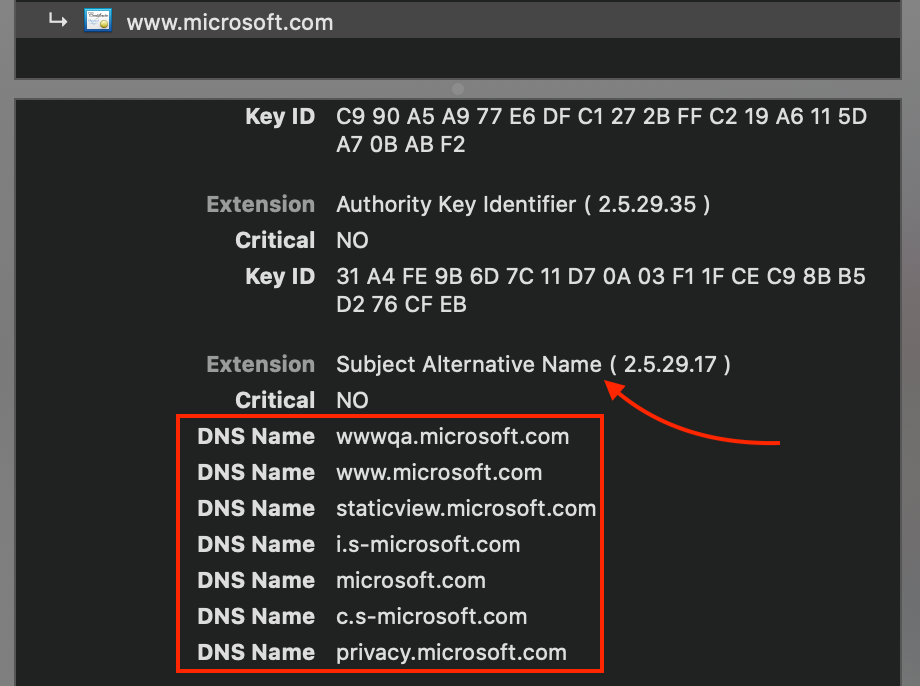
Medium
Generating a self-signed certificate for a hostname is easy, but it gets more complicated if you would like to do the same for an IP…
found this
barren marsh
Well again I don't have actual domain, only fqdn which only works on the server. On my iPhone, gen2.home.local is just not a valid url.
peak cloak
barren marsh
Well again I don't have actual domain, only fqdn which only works on the server....
huh
do you run a dns server locally?
or is it just mDNS
barren marsh
I'm pretty sure it's just because gen2.home.local redirects to 127.0.1.1 in my /etc/hosts. I don't think I run anything special with DNS.
peak cloak
my reccomendation, run a DNS server locally
on my router it's an option
that way you can create entries for server.presentmonkey.local to point to 192.168.1.2
this way it'll work on iphone pretty sure
actually no
barren marsh
Oh I absolutely should do that.
peak cloak
disregard
barren marsh
welp
peak cloak
it's the fact that iphone's don't see .local as valid I think
barren marsh
Well I'll just test with ip address first
peak cloak
@barren marsh so when making your own DNS records, don't use .local since that's technically reserved for mdns
      .internal.
      .private.
      .corp.
      .home.
.lan.```Oooh
peak cloak
not 100% tho if it'll work on iphone
barren marsh
Well I can test/change that pretty easily later. If I can just get encryption for now I'll be quite happy.
peak cloak
barren marsh
Well I can test/change that pretty easily later. If I can just get encryption fo...
technically it's encrypted already
just if there is a MITM attack or something, you won't know
barren marsh
Yes but on iOS if it's not trusted you can't visit the page so I can only visit the http version.
peak cloak
barren marsh
Yes but on iOS if it's not trusted you can't visit the page so I can only visit ...
annoying apple
barren marsh
yes
well to be absolutely clear most web browsers allow you to bypass if by tapping accept the risk but web apps and integrated web views don't have that ability so the file sharing client just fails to load.
 lofty ermine
Is there anyone around who might be so kind as to help me replace my ISP provided gear with an edge-device and an AP? I've spent 2 days researching this and there's so much conflicting info it's making it practically impossible.
peak cloak
lofty ermine
Is there anyone around who might be so kind as to help me replace my ISP provide...
HEX, Er-X, build your own
problem with mtik HEX is that's not beginner friendly and it has some quirks for home use
lofty ermine
peak cloak
HEX, Er-X, build your own
Yeah, I've been suggested the hEX, only thing is
I don't think it'll have the horsepower
peak cloak
problem with ER-X, it's older, not much support, no ipv6 gui, etc. Lots of things in CLI
lofty ermine
I have some fringe use-cases where I need to saturate a gig symmetrical
in both directions ofc
peak cloak
lofty ermine
I don't think it'll have the horsepower
it can do gig
lofty ermine
and some firewalling stuff that it might struggle with
lofty ermine
peak cloak
it can do gig
It can, but not symmetrical simultaneously 😛
Well, only with 1.5k packets and above, anyway
imix? nope. 300-700mbps
peak cloak
 lofty ermine
It depends what you're doing with it, but a good chunk of my use-case involves scanning, so it'll be a significant bottleneck as far as I can tell.
I've been looking at ER4/RB4011/RB5009
but both of the Mikrotiks I can't get hold of currently
peak cloak
lofty ermine
It depends what you're doing with it, but a good chunk of my use-case involves s...
Ah ok
 meager ginkgo
lofty ermine
Is there anyone around who might be so kind as to help me replace my ISP provide...
meager ginkgo
lofty ermine
Is there anyone around who might be so kind as to help me replace my ISP provide...
UniFi Dream Machine Pro & UniFi 6 Pro/Long Range
lofty ermine
meager ginkgo
UniFi Dream Machine Pro & UniFi 6 Pro/Long Range
Yeah I thought about a UDMP but it's rack-mount and 3-4x the price of an ER4
so I'm not sure it's realistic
meager ginkgo
lofty ermine
Yeah I thought about a UDMP but it's rack-mount and 3-4x the price of an ER4
I don't think you will find anything that will really compete besides maybe a pfsense/opnsense box for cheaper
lofty ermine
I don't doubt that the ER4 doesn't compete with the UDMP
but I don't need a UDMP afaik -- I'd have next-to no use for it
meager ginkgo
Maybe the TP-Link ER605 then?
lofty ermine
meager ginkgo
Maybe the TP-Link ER605 then?
Seems decent, not sure what's wrong with an ER4 though?
Everyone seems averse to them
maybe I'm missing something
meager ginkgo
peak cloak
problem with ER-X, it's older, not much support, no ipv6 gui, etc. Lots of thing...
@lofty ermine all the reasons here
lofty ermine
Not ERX
meager ginkgo
oh I misread that
lofty ermine
ER4
lofty ermine
Maybe, I can pick one up for £100 rn though.
fringe crow
Hey yall, quick question... I own a game server, we run a cad system through xampp's php. there are some errors that display on the site that seem to effect nothing. We have tried to remove the errors from showing however, no luck... we have tried changing the "display_errors" to off but it still shows errors even after restarting the apache server. Does anyone have any idea on how to fix?
 ornate jungle
fringe crow
Hey yall, quick question... I own a game server, we run a cad system through xam...
ornate jungle
fringe crow
Hey yall, quick question... I own a game server, we run a cad system through xam...
Depending on the cause of the errors, they may not be debug related, which means that turning off display_errors may indeed not "hide" the errors. I recommend investigating and resolving the root cause of the errors, especially if they're related to user input as such things could be security related.
fringe crow
ornate jungle
Depending on the cause of the errors, they may not be debug related, which means...
Its just a bunch of these errors. some users see quite a few of them whereas, some others see none.

 outer patio
Sup nerds. Is there a go to company when it comes to a NAS?
ornate jungle
outer patio
Sup nerds. Is there a go to company when it comes to a NAS?
Synology is far from perfect, but they're my go-to for home users and small (5-10 people) businesses in need of really basic network attached storage & services. I run both a Synology and an HP ProDesk PC as a "server" for Valheim, Minecraft, etc. The Synology is more of a "set it and forget it", whilst I run custom / scripted stuff on the ProDesk.
 slate berry
outer patio
Sup nerds. Is there a go to company when it comes to a NAS?
slate berry
outer patio
Sup nerds. Is there a go to company when it comes to a NAS?

Try FreshBooks free, for 30 days, no credit card required at https://www.freshbooks.com/linus
Get 50% off on your annual subscription with the code ZCRM50 at: https://lmg.gg/ZohoCRM
We’ve built some crazy servers in the range of petabytes of storage, but we haven’t talked much about smaller, more practical home NAS units… or how you can build ...
If you are willing to diy, you could always make your own nas for much cheaper and much more usage such as doubling as a media server, home automation, or various other things that truenas scale allows for (even more if you go even deeper and set up a linux distro yourself with containers for all the services you want);
 autumn veldt
so, im kinda in a weird predicament rn. i want do make a nas correctly, but i have a few requirements, 1 being its able to run windows in a VM with full gpu passthrough. this isnt a huge problem on its own but i havent messed with anything like this before (my nas currently is not even a nas, its just a pc running windows 10 with a 4tb hdd in it with windows fileshare enabled)
i also want to be able to run haos, but i have a pi for that.
i legit just got this idea because of Colin's intel extreme tech upgrade
autumn veldt
(and run another container/vm that can seed torrents lol)
and if there's a way to make it accessible from other places not at home that would be nice but i don't need that
waxen scroll
outer patio
Sup nerds. Is there a go to company when it comes to a NAS?
Dell/EMC, NetApp, Hitachi, Nutanix
 sacred fiber
hello i wanted to use my hotspot from my phone my computer would detect it and connect and say secured, no internet connection can anyone help me out
waxen scroll
It sounds like you did not pay for hotspot service
sacred fiber
no i turned on my hotspot and didnt turn on data :/
 tardy parrot
can someone help me? when I do a speedtest on my computer I get around 30mb/s for download speed but yet rn downloading a game is only 4.5 mb/s
peak cloak
tardy parrot
can someone help me? when I do a speedtest on my computer I get around 30mb/s fo...
usually steam and similar reports in megabytes not megabits like speed test tools do
8 bits make a byte
tardy parrot
peak cloak
usually steam and similar reports in mega**bytes** not mega**bits** like speed t...
ok, but I used to have a download speed on steam of like 11mb/s, it just keeps on getting worse.
Is there a way I could make it faster?
peak cloak
are you using ethernet
sudden kayak
yeah 4.5 MB is roughly 30 Mb so you're probably fine
if a regular speed test is getting 30Mb/s then that's an upstream issue or an issue with how your computer is connected rather than steam etc
tardy parrot
sudden kayak
yeah 4.5 MB is roughly 30 Mb so you're probably fine
and how would I fix it?
sudden kayak
well what speed plan is your internet on?
I'm sorry to say the answer almost certainly involves spending money
either getting a faster internet plan from your ISP or buying better networking hardware
i can make some suggestions if you describe how you're connected and what hardware you have currently
 loud anchor
is amazon eero a good brand for a mesh network >
meager ginkgo
loud anchor
is amazon eero a good brand for a mesh network >
Eero Pro only
If you can try to get hardwired aps instead but Eero Pro mesh is a viable option if you cant
 sly glacier
Hey I have a dumb idea and kinda wanna see how you guys would approach it
Wanna build a 100GBE network over fiber in the house but most of the equipment is REALLY expensive
So I will need a custom router (Currently have a Dell PowerEdge T320 laying around doing nothing) for which I need to find a PCIE card that can do that for a reasonnable price (recommandations welcome) and I need to find a switch at a decent price for it or I just stack different lans (might be less expensive)
 dull pagoda
hi does anyone wanne help me with a wildcard cert from lets encrypt i have 2 macheen 1 runne nextcloud (apache) one running pterodactyl panel (nginx) how do i set this up cous im curently going to my nextcloud with nextcloud.mydomain.com:8443 and i want to getrid of the port behind it
unborn sluice
What does the port have anything to do with your cert
 tidal flower
dull pagoda
hi does anyone wanne help me with a wildcard cert from lets encrypt i have 2 mac...
tidal flower
dull pagoda
hi does anyone wanne help me with a wildcard cert from lets encrypt i have 2 mac...
To do that you’ll need to either reverse proxy the other application through nginx or vise versa.
And move the port of the non-primary web server.
Then deploying a wildcard can be done with acme pretty easily
dull pagoda
tidal flower
To do that you’ll need to either reverse proxy the other application through ngi...
okey ty
ill try that
tidal flower
# Elevate to root
sudo su -

# Install LE
curl https://get.acme.sh | sh
hostname=mydomain.tld
# Info here: https://github.com/acmesh-official/acme.sh/wiki/dnsapi
dns_provider="dns_cf"

# Create SSL cert dir structure for nginx.
mkdir -p /etc/nginx/ssl/${hostname}
chmod 700 /etc/nginx/ssl

# Change to LE to avoid posting personal data on cert registration
/root/.acme.sh/acme.sh --set-default-ca --server letsencrypt

# Issue root and wildcard cert
 /root/.acme.sh/acme.sh --force --issue --dns ${dns_provider} -d ${hostname} -d "*.${hostname}"

# Hardlink certs to nginx
/root/.acme.sh/acme.sh --force --install-cert -d ${hostname} --key-file /etc/nginx/ssl/${hostname}/key.pem --fullchain-file /etc/nginx/ssl/${hostname}/fullchain.pem --ca-file /etc/nginx/ssl/${hostname}/chain.pem

# Write to config
sed -i "s/ssl_certificate .*/ssl_certificate \/etc\/nginx\/ssl\/${hostname}\/fullchain.pem;/g" /etc/nginx/sites-enabled/default

sed -i "s/ssl_certificate_key .*/ssl_certificate_key \/etc\/nginx\/ssl\/${hostname}\/key.pem;/g" /etc/nginx/sites-enabled/default

systemctl reload nginx
This would be how to do it in nginx with acme.sh, which auto renews certs
dull pagoda
okey thanky ill try that
tidal flower
You can also actually run Nextcloud in nginx, you’d just need to configure it correctly.
dull pagoda
i know but i installed it using snap so i don't know if its pocible then
tidal flower
Pro tip: don’t use snap packages 
Ideally you only have one web server
And one install of php
dull pagoda
i know but the prosessor cant handel that
tidal flower
What do you mean? You can run multiple (virtual) servers on nginx and they’re async
dull pagoda
i mean there are 2 phiscal systems
tidal flower
Ahh ok
You can run a reverse proxy on one to the other
And then just forward the one running nginx on your router
dull pagoda
tidal flower
You can run a reverse proxy on one to the other
that a smart idea
tidal flower
GitHub
These confs are pulled into our SWAG image: https://github.com/linuxserver/docker-swag - reverse-proxy-confs/nextcloud.subdomain.conf.sample at master · linuxserver/reverse-proxy-confs
This has an alright template for it
dull pagoda
okey thank you ill try that
tidal flower
Pretty much it’d expand to this:
server {
    listen 443 ssl;
    listen [::]:443 ssl;

    server_name nextcloud.*;

    ssl_certificate /etc/nginx/ssl/domain.tld/fullchain.pem;
    ssl_certificate_key /etc/nginx/ssl/domain.tld/key.pem;
# verify chain of trust of OCSP response using Root CA and Intermediate certs
    ssl_trusted_certificate /etc/nginx/ssl/domain.tld/ fullchain.pem;

    client_max_body_size 0;

    location / {
        ## Version 2021/10/26 - Changelog: https://github.com/linuxserver/docker-swag/commits/master/root/defaults/proxy.conf

# Timeout if the real server is dead
proxy_next_upstream error timeout invalid_header http_500 http_502 http_503;

# Proxy Connection Settings
proxy_buffers 32 4k;
proxy_connect_timeout 240;
proxy_headers_hash_bucket_size 128;
proxy_headers_hash_max_size 1024;
proxy_http_version 1.1;
proxy_read_timeout 240;
proxy_redirect  http://  $scheme://;
proxy_send_timeout 240;

# Proxy Cache and Cookie Settings
proxy_cache_bypass $cookie_session;
#proxy_cookie_path / "/; Secure"; # enable at your own risk, may break certain apps
proxy_no_cache $cookie_session;

# Proxy Header Settings
proxy_set_header Connection $connection_upgrade;
proxy_set_header Early-Data $ssl_early_data;
proxy_set_header Host $host;
proxy_set_header Proxy "";
proxy_set_header Upgrade $http_upgrade;
proxy_set_header X-Forwarded-For $proxy_add_x_forwarded_for;
proxy_set_header X-Forwarded-Host $host;
proxy_set_header X-Forwarded-Proto https;
proxy_set_header X-Forwarded-Ssl on;
proxy_set_header X-Real-IP $remote_addr;


        proxy_pass http://yourserverip:portnumber;
        proxy_max_temp_file_size 2048m;
    }
}
This is very stripped down
But you should get the gist of what’s going on
dull pagoda
i think ill figure it out now thank you verry mutch for your help
tidal flower
nw. Have a good one.
 barren tree
Hi everyone! I'm trying to figure out how to remove / "unlearn" outdated IP addresses from a Windows machine.
It's been moved into its own network, but still tries to ARP-resolve a bunch of IPs it used to know in the previous network(s). The ARP cache doesn't have them in it, but the system tries real hard to change that and collect those very specific IPs into the ARP cache.
That tells me, the system's remembering all of these devices, somehow, somewhere. Any leads on where to look? It's a "Home" version if that makes a difference.
mental finch
Hey guys can someone help me with choosing router ? I need somethong that can handle 1.4gbs speed and 35devices. I want Asus router specifically cuz ai mesh.i was looking at rog GT ax6000, rt ax 88u or 2 times ax82u wich one is better?
unborn sluice
waxen scroll
<@!349203120082911242> if I was not mistaken I would think I was in <#8997539791...
we've been invaded
tidal flower
They did ask a more linux centric question than networking for sure.
 sly glacier
we dont say its name shhh
tidal flower
Tbf though, by increasing buffers on like 200ms rtt can cause significant improvements in performance.
sly glacier
If you say that to an overclocker you might need to take precautions
tidal flower
True. Or people with modified kernels that have already had tuning done to them like xanmod/zen/liquorix.
sly glacier
And that reaches my limit of "I am listening and will try to help"
sly glacier
Usually modified kernels mean more troubles than solutions when things go south
Is networking hardware a thing we discuss here?
peak cloak
Sure
sly glacier
How would you go around not using a switch on a network doing your own DIY router
peak cloak
sly glacier
How would you go around not using a switch on a network doing your own DIY route...

sly glacier
peak cloak
<:what:717978897932746792>
Well see the 100 GB/s EDR PCIE cards are "affordable" while switches cost 30k$
As a novice in hardware I was wondering if through using multiple PCIE cards on the server that is supposed to be the router I could avoid using switches
peak cloak
sly glacier
As a novice in hardware I was wondering if through using multiple PCIE cards on ...
you want to use switches, you basically NEED hardware acceleration at that speed. Your generic CPU won't be able to handle 100gbe
only 6k
sly glacier
Nah we are going Xeon 2.5ghz there no way around it
peak cloak
what
sly glacier
For the router
sly glacier
Well I want to make my whole network 100gbe
sly glacier
Well I kinda have my reasons but answer to that would be "Yes"
peak cloak
sly glacier
As a novice in hardware I was wondering if through using multiple PCIE cards on ...
like I said, I wouldn't count on software bridging
peak cloak
sly glacier
Nah we are going Xeon 2.5ghz there no way around it
I doubt that would be able to do 100gbe routing
sly glacier
peak cloak
like I said, I wouldn't count on software bridging
Overwhelming the whole system?
peak cloak
well yeah..
peak cloak
if I needed 100gbe, I would get an actual router, not some software solution
honestly
do you even need 100gbe routing
or just switching
peak cloak
sly glacier
already got 40gb routing
so you need 100gbe switching and routing? or just switching?
sly glacier
both technically
Switching is fine for the moment but will need to do rounting "eventually"
The whole project is a nightmare and I will fear summer like a linux contributer fears the sun
sly glacier
Yeah even the internet is quite silent and I am VERY new to high speed networking
 low pond
I mean all I know is 100G = QSFP28 which isn't cheap generally at all
 cosmic pilot
Is a dh file necessary for a wpa-eap mschapc2 network
Because if it's configured to not verify certificates it shouldn't need it right?
thick minnow
Damn Google translate servers are fast, if you paste a website in Google translate it runs the website on their servers and displays the output

Fun little experiment
waxen scroll
<@&750150305383186585> got another speed test spammer ^
actually I think they've done this before

tidal flower
You’d need some pretty nutty clockspeeds to support 100g

BBR also helps with throughput but increases number of retries.
barren marsh
I'm back after trying to get my web server working for a while. I'm on the last step but having problems globally adding my custom certificate authority (CA) to my OS so all my apps recognize my server as secure.
If I manually add the CA to firefox or chromium, it works and they give the padlock symbol on my site. Anywhere else in the OS still doesn't have it though, like wget and curl.
barren marsh
I can't figure out how. I've added it to /usr/local/share/ca-certificates and ran update-ca-certificates but it still won't work. The command says it added it and I can verify that it's in /etc/ssl/certs/ca-certificates.crt but applications don't recognize it.
sudden kayak
some apps just don't check system certificate stores
they have their own configuration or just have root certs hardcoded
barren marsh
Well I know firefox and chromium don't, but what about wget and curl?
sudden kayak
i don't know off the top of my head but that's probably somewhere in the manpage for them
barren marsh
It says I can even specify the ca dir with wget --ca-directory but I get the exact same error anyway.
unborn sluice
routers
barren marsh
I'm fairly confident the apps would work if I added them to the OS certs correctly but I can't figure out what I did wrong
sly glacier
tidal flower
You’d need some pretty nutty clockspeeds to support 100g
Ouch
thick minnow
yo
i was just looking online for any good routers for 10gig internet and a bunch of people said that building your own is the best
the big question is
how
sly glacier
Simple enough
Get an intel cpu based computer, make sure you have 2 ports on the computer for in and out traffic
then get pfSense for your OS
And there are good tutorials on youtube
anything that is more recent than a 10 yo laptop should work
Even these mini pcs
sly glacier
tidal flower
https://www.es.net/assets/Uploads/100G-Tuning-TechEx2016.tierney.pdf
https://fa...
I should have something that kinda can handle that though
thick minnow
waxen scroll
<@&750150305383186585> got another speed test spammer ^
Just trying to share something fun, but I guess you can’t handle a little joy in life and the only thing you think is fun is shamelessly snitching people for things you don’t like
I just think it’s sad how toxic this community has become because of people like you
thick minnow
Yeah, I just though I’d share a little experiment for y’all to try lmao
Not everything has to be serious in here
You can have fun too lol
I really miss the other Dutch guy here
My man crystal was a legend
low pond
thick minnow
Just trying to share something fun, but I guess you can’t handle a little joy in...
Uhhh
Yeah you go on about whatever you feel like. It's already wrong if you think people in this chat have personal opinions about you
waxen scroll
It's literally in the topic, stop breaking the rules on purpose
sly glacier
Mods been pinged, mods did not act, allowed in there
low pond
Just because they didn't respond doesn't make it "allowed".
sly glacier
As I understand it in the rules its a matter of no bragging about connexion speeds but I can see people understanding it as "speedest is banned here" as well
fringe crow
Guys, I am pulling my freaking hair out and hoping someone can possibly help me. I am searching for a bot or webhook, really do not care which one, that basically does the same thing as a shipment tracker. So for example, when someone in my community makes a request via ticket, they can essentially do /status to get the current status of said request.
tidal flower
How is that networking?
fringe crow
Yo my guy, does it really matter? I'm simply asking if anyone knows of a solution.
unborn sluice
fringe crow
Yo my guy, does it really matter? I'm simply asking if anyone knows of a solutio...
cause routers and BGP
fringe crow
unborn sluice
cause routers and BGP
?
 distant wedge
border gateway protocol
fringe crow
distant wedge
*border gateway protocol*
Not exactly sure what that had to do with my question lol
distant wedge
It's not a network related question. The answer you were given is alluding to you asking the question in the wrong section
low pond
distant wedge
*border gateway protocol*
BGP premium
waxen scroll
sly glacier
As I understand it in the rules its a matter of no bragging about connexion spee...
its spam. People paste them and add 0 to the conversation. our friend posted a modified screenshot and tried to claim some BS about how he speed tested VIA google. He does this a lot. We're tired of it and report to mods
sly glacier
My bad have not followed the stream of events if that is the case
sly glacier
But back to topic
 ruby geyser
Hey, I posted a question in here earlier today, adn I can’t find it. anyone able to help?
peak cloak
ruby geyser
Hey, I posted a question in here earlier today, adn I can’t find it. anyone able...
Prob someone deleted
ruby geyser
@peak cloak would you know why? It was about trying to find a networked solution to eliminate my iCloud subscription and set up a wireless time machine back up
tidal flower
ruby geyser
<@!222482269829332992> would you know why? It was about trying to find a networ...
Do you have some kind of network attached storage you can backup to?
 frigid sphinx
ospf and dijkstra might help with shipping planing..
waxen scroll
ruby geyser
<@!222482269829332992> would you know why? It was about trying to find a networ...
you probably said a bad word and it got deleted
they're politically correct to a fault and some weird words and acronyms get banned
ruby geyser
tidal flower
Do you have some kind of network attached storage you can backup to?
No not currently. That is why I was asking in here. I have a really good working knowledge of networking hardware, but I don’t know much regarding the software side of things. I’m essentially starting from square one with nothing right now. I have an idea of what all I would like a solution to accomplish ranging from a personal cloud that would be able to replace my iCloud subscription while still integrating across my Apple products. That is the most important goal, but I’d also like to use the solution to record my security camera feed to, and enable better smart home automation since currently I’m just using the Apple home app which limits the products I’m able to incorporate. Thanks for the help, and sorry for the long reply.
tidal flower
Time Machine Backups
If you have something like a raspi or NAS, you could toss a Debian install on it, run a SAMBA share for backups via time machine. There are a few guides on getting that setup.
https://alexlubbock.com/time-machine-network-backup-linux
Other Backup Resources
https://mutschler.eu/linux/backup/
Security Cameras
Blueiris I've heard of before, never used it, but never heard anything too aweful about it.
https://blueirissoftware.com/
Integrate with iOS / Personal Cloud
Nextcloud? (has integration with files app, is FOSS)
https://nextcloud.com/
Smart Home Automation
https://github.com/home-assistant
@ruby geyser
hope this helps 😉
 dusk steeple
there's no "home server" chat thread so I hope here is okay... Just finished setup of a new home server from some spare parts! Off to a good start with plex and virtualbox ubuntu. Haven't dabbled in linux for a few years. My previous server hosted plex and file shares but I'm looking to integrate something new. I have a whole bunch of smart some stuff but it's current hosted by smartthings. Is there any decent free software for like home network IP monitoring and usage? Server name is tombstone because it's heavy in a black box and the wife and I are battlebots nerds lol 🤪 PS I know 8gb ram is weak.. waiting on 8gb more from a friend soon.

 fading oar
Oh cool
The only IP monitoring stuff I know is for virtual machines...
There's uh, safing?
peak cloak
dusk steeple
there's no "home server" chat thread so I hope here is okay... Just finished set...
IP monitering in what way?
see what devices are doing?
what devices are connected?
what IPs they should be using?
ruby geyser
tidal flower
**Time Machine Backups**
If you have something like a raspi or NAS, you could to...
Thank you so much for the info. Now just need to get / build the server. Haha. Thought about getting one of the unify dream machines
dusk steeple
peak cloak
IP monitering in what way?
I know there's regular IP scanners but is there something that will occasionally scan and list devices and maybe how long they've been hanging around?
sudden kayak
anybody know of a reasonably self-contained software package that can do some form of monitoring for WAN performance issues? I'm envisioning something that periodically does short automated speed tests to check for intermittent throughput issues/dropped packets... not sure if something like that exists
probably not too hard to script for short-term troubleshooting but it would be nice if there's something out there that would run in the background and keep monitoring for issues without much intervention or configuration
 thorn stratus
thick minnow
My man crystal was a legend
thorn stratus
thick minnow
My man crystal was a legend
he hasn't been online for months
thick minnow
yeah
thorn stratus
also left the server
thick minnow
he was bannned
thorn stratus
poor guy
waxen scroll
sudden kayak
anybody know of a reasonably self-contained software package that can do some fo...
do you run cisco? why not IP SLA tracking
sudden kayak
more looking for client devices. I'm not in the cisco ecosystem
waxen scroll
thousandeyes might be helpful but I dont think you're looking for a $$$$ app
i miss crystal 😦
sudden kayak
waxen scroll
thousandeyes might be helpful but I dont think you're looking for a $$$$ app
i am not 😂 if this was for work i wouldn't need anything external, we have our own
 halcyon osprey
so we just got a new router and our new plan is like 2gigabit but when i do a speed test i’m only getting 70-80mbps
cat 6 port and i’m using the ethernet cable that came in the box
rugged quiver
sudden kayak
i am not 😂 if this was for work i wouldn't need anything external, we have our ...
If you have a pi or Linux box, they can be programmed to interact with speedtest CLI from Ookla.
I was gonna work on something similar but it should keep a history as well.
halcyon osprey
halcyon osprey
so we just got a new router and our new plan is like 2gigabit but when i do a sp...
ok so i tried it again, i’m getting like 800mbps using ethernet, and then down to 40 when i’m using it wireless
is it usually that big of a drop?
ok idk what’s going on lol i’m getting 500 on my phone now
i think it’s just my laptop sucking
 hollow marlin
rugged quiver
If you have a pi or Linux box, they can be programmed to interact with speedtest...
hollow marlin
rugged quiver
If you have a pi or Linux box, they can be programmed to interact with speedtest...
That is the worst way to monitor a connection and I despise youtubers that push that method to viewers. If you're having throughput issues, having a script that saturates your link periodically is just going to make it worse. Not including the amount of false positives it causes.
clear igloo
hollow marlin
That is the worst way to monitor a connection and I despise youtubers that push ...
monitor a link by flooding it, 10/10 would kill traffic again
rugged quiver
hollow marlin
That is the worst way to monitor a connection and I despise youtubers that push ...
🤷 he wanted short automated speed tests
clear igloo
rugged quiver
🤷 he wanted short automated speed tests
which will saturate the connection causing issues, or if something is in process it will either slow down or choke out the speedtest causing other issues too or bad results making people think it's something on the ISP side
Now if you did it once a day at night when you know nobody is going to be doing anything, sure, it would be pretty consistent likely, but if you run it like 8x times a day you're going to have fluctuations and other issues during the day
rocky badge
I had to implement nagios to ping check and trigger traceroutes because my ISP was dropping packets from their network to first hop peers lol
hollow marlin
clear igloo
which will saturate the connection causing issues, or if something is in process...
^this is exactly the false positives I mentioned. This is why Cisco/Juniper SLA/Probes use ether ICMP, HTTP-get or UDP-echo to measure loss, latency and jitter. Little impact to live traffic at the cost of you have to know how to read the outputs to understand the root issue.
Monitoring WAN performance mostly requires are remote service at the far end to get a clear picture. Hence why services such as Thousandeyes exist
 clear igloo
hollow marlin
^this is exactly the false positives I mentioned. This is why Cisco/Juniper SLA/...
clear igloo
hollow marlin
^this is exactly the false positives I mentioned. This is why Cisco/Juniper SLA/...
Yup, exactly, if you must do it then do it when no traffic is going to be there (home only) otherwise do IP SLA or other services 🙂
rocky badge
I'd love to get 10 Gig plan from my ISP
but I'd doubt they could deliver 10 Gig to a single resource/site
waxen scroll
usenet probably
tidal flower
isps don't really host their own usenet these days
X for doubt
I bet it'd do 10g to their in-house netflix box bc they now peer at the isp level (https://openconnect.netflix.com/en/)
rocky badge
tidal flower
I bet it'd do 10g to their in-house netflix box bc they now peer at the isp leve...
Well yeah, 10 gig would also saturate one of their Level3 links
I could also probably get 10 Gig to their ubiquiti speedtest server 
rocky badge
wut, u
 fleet dock
you can do more than 10g with a business leased line
peak cloak
fleet dock
wut
oh hello
rocky badge
fleet dock
you can do more than 10g with a business leased line
lol, this is residential
rocky badge
but I have doubts they can provide 10 gig line rate to a single service
fleet dock
rocky badge
but I have doubts they can provide 10 gig line rate to a single service
what provider?
rocky badge
local ISP lol
fleet dock
depends on their network
rocky badge
that's why I said I doubt they could ¯_(ツ)_/¯
 high spear
Does anyone use a nighthawk x6 r8000 router? I'm seeing issues whereby my speeds are being cut in half. I've read that it's an issue with firmware but can't confirm which version I should downgrade to?
fleet dock
rocky badge
that's why I said I doubt they could ¯\_(ツ)_/¯
how big is the isp?
 fallen shadow
hello im trying to configure pi hole and ive gotten ab 200 of these errors and they still keep coming in "No DHCP context has been configured for this address" anyone know how to solve this
unborn sluice
not an error
fallen shadow
so i can just ignore it>
waxen scroll
unborn sluice
not an error
Why would it tell you about it then
unborn sluice
warning
fallen shadow
will it cause any problems down the road
unborn sluice
are you looking at the logs?
fallen shadow
yes there is 600 of them now
unborn sluice
you could try disabling dhcp for some interfaces i think
 robust arrow
which is the best disk for nas storage
 calm shale
segate iron wolf or iron wolfpro drives
unborn sluice
or
waxen scroll
unborn sluice
or
solid state
 solar kestrel
Dumb question. Can the same vlans on 2 switches talk to each other without a router in play? Only link would be the cable between the 2.
peak cloak
solar kestrel
Dumb question. Can the same vlans on 2 switches talk to each other without a rou...
it's not about vlans, it's about subnets
you can't connect 2 subnets without some sort of router
you can have 2 vlans, but both be the same subnet
idk why you want want to do such a thing, but it's possible
solar kestrel
I'm just thinking outside the box for a weird voip project. I appreciate the information 👍

 ruby wharf
Does anyone here use cell phone signal boosters with good results?
Looking to see if I can find a 5G signal booster that might be able to provide better speeds than available internet providers where I'm living in a mountain area.
For more detail, my phone does not find any cell towers once i get up the moutain range a bit, while AT&T shows 4g/5G coverage at my location on their own map.
peak cloak
ruby wharf
Does anyone here use cell phone signal boosters with good results?
Looking to...
it's hard to boost an already weak signal
you would want something in between
hollow marlin
solar kestrel
I'm just thinking outside the box for a weird voip project. I appreciate the inf...
What would the end goal be were you want to bridge two VLANs together? Especially for VOIP
clear igloo
hollow marlin
What would the end goal be were you want to bridge two VLANs together? Especiall...
I think they're asking the same VLAN trunked between two switches with the same subnet?
In which case yah, no router needed, but different subnet of course router needed
hollow marlin
I read the part about linking a cable between the two and assumed its the ol' access-to-access VLAN translation method instead of between two switches
clear igloo
Ah, yah, that could work too if they were on the same subnet
hollow marlin
10.0.0.0/8 all the things!
clear igloo
1.0.0.0/1 all the things 😄
Screw all those subnets and conventions and need for external access!
hollow marlin
Screw subnets, Im moving everything to ISO. NET addresses for everyone
solar kestrel
clear igloo
In which case yah, no router needed, but different subnet of course router neede...
That’s what I was confirming. Actually just did that, everything worked out.
ruby wharf
peak cloak
you would want something in between
something in between a booster? or what do you mean
peak cloak
If the signal is already weak, a booster will do little
Could maybe help get just a little connectivity, but don't expect anything great
rocky badge
@clear igloo I wonder if there's a way to bond cell connections 
clear igloo
rocky badge
<@!291198741862416384> I wonder if there's a way to bond cell connections <:Thon...
magic 😄
waxen scroll
hollow marlin
10.0.0.0/8 all the things!
want a job bro? How's 110k sound?
low pond
waxen scroll
want a job bro? How's 110k sound?
I am higher iq
Use dod addresses as local range
 bronze venture
Random question, is there a way I can force file transfer over a specific NIC? If so, how would I go about setting that up?
(Like if I had multiple NIC's)
 eager arrow
halcyon osprey
ok so i tried it again, i’m getting like 800mbps using ethernet, and then down t...
eager arrow
halcyon osprey
ok so i tried it again, i’m getting like 800mbps using ethernet, and then down t...
Sorta same. 100mbs eithernet ~40 wifi
bronze venture
peak cloak
what software
Until I get TrueNAS 100% set up how I want it, running off of Windows server 2022 (idk if you're talking to me or not)
eager arrow
dusk steeple
I know there's regular IP scanners but is there something that will occasionally...
If your router has software you can probably look at "connected devices"
bronze venture
Server 2022 feels like Server 2018
peak cloak
bronze venture
Until I get TrueNAS 100% set up how I want it, running off of Windows server 202...
so force over NIC, sending or receiving?
bronze venture
peak cloak
so force over NIC, sending or receiving?
Both
peak cloak
if receiving, it's just as simple as specifing the right IP
each NIC has a seperate IP
bronze venture
Yeah I know, I set them up with static IP's
peak cloak
as for sending, some software will allow you to bind to a specific IP, so whatever the right NIC is
bronze venture
What software would you prefer?
peak cloak
depends for what
bronze venture
wait I didn't change the other IP whoops It's working now, thanks for your help!
 short relic
Is WiFi 6E worth it
Like the 6E routers/APs are just so much more expensive than high end 6 units
peak cloak
short relic
Is WiFi 6E worth it
do you find yourself with not enough bandwidth on wifi
if not, then no
short relic
Well I have a dying unifi AP right now
fallen shadow
hey how to i log into the router when i have no connection to it? i need to get in to change the dns settings
fallen shadow
i could really use a hand if anyone has any advice because i currently can’t log in
peak cloak
fallen shadow
hey how to i log into the router when i have no connection to it? i need to get ...
Can't, unless it has oob access like a management port or console
fallen shadow
then what do i do?
 vague wasp
 unborn sluice
fallen shadow
then what do i do?
unborn sluice
fallen shadow
then what do i do?
Cry
 split hollow
Morning folks
Hope you’re all well?
Just moved into a new apartment. My desktop used to be plugged into Ethernet but that isn’t possible here.
Getting 450Mbps on my phones. 1.5Mbps on my desktop
With wifi, that is. Any ideas? I’ve updated drivers but that didn’t help
 final minnow
split hollow
With wifi, that is. Any ideas? I’ve updated drivers but that didn’t help
final minnow
split hollow
With wifi, that is. Any ideas? I’ve updated drivers but that didn’t help
What type of WiFi does your PC have?
split hollow
final minnow
What type of WiFi does your PC have?
My desktop (which has an Intel AX200 wifi card) is only getting 1.5Mbps
Is the AX200 good enough? Or is it outdated tech
final minnow
AX200 is fine, it's got WiFi 6 compatibility so I wouldn't call it outdated.
What network are you connecting to on your PC? I am guessing there's a 2.5ghz network and a 5ghz one?
final minnow
split hollow
Is the AX200 good enough? Or is it outdated tech
How far away is your router from your PC?
Any walls between the router and the PC?
split hollow
final minnow
How far away is your router from your PC?
Any walls between the router and the P...
About 4-5 metres
A bedroom wall in between yes
But when I test my phone & iPad, they get the full 450Mbps in the same@location as my PC
final minnow
Alright, and you're on a 5ghz wifi?
split hollow
How would I find that out? (Got installed yesterday)
final minnow
Well, some routers have just 1 ssid and figures out what network to connect your device to. Others have 2 SSIDs, one 5ghz one 2.4.
final minnow
Connect to the 5ghz network, if you can.
final minnow
2.4 would explain the slow speeds.
split hollow
Yeah my android phone connected to the same wifi but on a 5ghz frequency
final minnow
Alright so your router is assigning your PC to the 2.4ghz network and not the 5ghz one, hmm.
You can't see several SSIDs?
split hollow
Correct, only one
Im@figuring it out. Changing router settings to enable both 2.4 and 5
I’ll reply when that’s done and im on 5Ghz
Okay I now have 2.4 and 5 available
My phones connected to 5 no problem
My pc saying unable to connect to the network
unborn sluice
split hollow
My pc saying unable to connect to the network
means it can't connect to the network
split hollow
I even changed my wifi card setting to only allow 5Ghz connections
So the hardware should allow it to connect
waxen scroll
unborn sluice
means it can't connect to the network
Thanks, doctor
peak cloak
fallen shadow
then what do i do?
Factory reset
 tribal flax
aaaa got a free upgrade from the ISP, 300Mbps FTW

now I need to figure out how to make it this fast on wifi
 dense nexus
tribal flax
now I need to figure out how to make it this fast on wifi
dense nexus
tribal flax
now I need to figure out how to make it this fast on wifi
ethernet >
 lean pebble
Using Mikrotik hex-s
Hey can someone help me with it?
Does this thing looks ok?
Does pppoe connection should to that every second?
I get random disconnected from the internet using wifi and cable.
That's the only thing I see in logs

 gloomy zephyr
how can i fix the 11mb/s to 100mb/s ?
 long thistle
gloomy zephyr
how can i fix the 11mb/s to 100mb/s ?
long thistle
gloomy zephyr
how can i fix the 11mb/s to 100mb/s ?
what do you exactly mean?
gloomy zephyr
long thistle
what do you exactly mean?
.....
long thistle
are you connected by cable or wifi?
gloomy zephyr
cable and wifi
and by the info from the adapter it shows 100mb/s (upload and download)
so?
gloomy zephyr
@long thistle
low pond
gloomy zephyr
and by the info from the adapter it shows 100mb/s (upload and download)
That's tx Rx on the NIC
That doesn't depict internet speed
Are you sure you downloaded stuff at 100MBYTE per second and not just Megabit?
100Megabit is approx near 12MBYTE so yeah
 ocean pivot
I get around 200Megabytes 😄
 glad ferry
Units are important here.
Mb =\ MB
1 x Megabyte (MB) = 8 x Megabit (Mb)
Internet and/or Link Speed is typically depicted in Megabit.
So take the speed of your link and/or what you subscribe to and divide that by 8 to get the “theoretical max” download pending that there are not any other bottleneck (storage, network pathing to server, etc)
glad ferry
ocean pivot
I get around 200Megabytes 😄
200 Megabytes would be equiv to 1600 Megabit service (if you are talking about from the INET).
ocean pivot
Yes
glad ferry
How much you paying for that connection?
 glad ferry
That’s not terrible. Gig Pro from CC? Or are you a lucky one with the ATT MGIG?
ocean pivot
Frontier/Verizon fios
glad ferry
Interesting … Didn’t know they offered more than 1G
Gonna have to take a look. We currently have Frontier/Fios
ocean pivot
They just launched it recently
peak cloak
ocean pivot
They just launched it recently
NYC right?
ocean pivot
TX
peak cloak
honestly, just give me v6...
taking verizon long enough
I'm just on 300/300, no need for more
peak cloak
ocean pivot
TX
huh
ocean pivot
Texas
peak cloak
yeah ik
tidal flower
Don’t AT&T overprovision for overhead?
clear igloo
glad ferry
That’s not terrible. Gig Pro from CC? Or are you a lucky one with the ATT MGIG?
ATT mGig is nice 😄
mental finch
Hey guys can someone actually help me with choosing ethernet cable?
clear igloo
What application/speed/distance?
mental finch
I need to push 2 ethernet cables from my modem to my router on the other side od the house. The best way is to go through wall and up to attic.then Like 10m through there and through the wall to my room
2cables cuz my isp provider support 1.4gbs but through 2 gigabit ports on his modem..
clear igloo
Some Cat6 that's pure copper (not CCA) is going to be fine
mental finch
I mean i read that and i have old cca cable that i will change that's for sure but my questions is
Should i get typical outside cable?
Like this let me send you
clear igloo
If you're running it in the walls, no
If it's going outside, yes
mental finch
Its gonna be Like 10meters outside
And round 15 at my attic
In summer its hot there Like hell
clear igloo
Yah, then outdoor rated is what you want unless you use conduit to cover it up
It's mostly just UV protection for the outside part you need
mental finch
I have 2 to choose either i take uv protected AWG 24 CU with PE and gel inside
But its u/utp
Or awg 28 but s/ftp lszh
clear igloo
That's fine, unless you're running directly next to like 240v or 480v lines or something that puts out tons of RF you're fine
Do the 24 AWG stuff
mental finch
I read that shielded need good grounding right?
clear igloo
Yah, otherwise it's pointless
mental finch
I mean its not gonna run near something like this u said. Through wall to attic then through wall to my room nothing is near it
clear igloo
mental finch
I mean its not gonna run near something like this u said. Through wall to attic ...
Yah, then you're fine, 24 AWG utp is perfect
mental finch
Oh nice then cuz i would need something like that for s/FTP right ?
 clear igloo
Probably, yah, I've never messed with s/FTP stuff myself
Never had the need for it honestly
mental finch
Cuz my router Has metal plate and housing but the adapter is not grounded hah
So i think its pointless
clear igloo
Yah, I've got a Cat6 cable that's about 2 feet from my HVAC power line. I push 5Gbps all day without issue or errors so unless it's stupid close or in a large bundle or something causing tons of interference that can actually impact the line you're good
mental finch
And btw cat6 is gonna be fine right? I got 1.4gbs but eh IT needs 2 cables anyway. But i read IT can push faster speed right?
clear igloo
Correct, Cat6 can do up to 10Gbps at 55m or 5Gbps up to 100m
mental finch
Its gonna be 30m
clear igloo
Cat6a gives you 10Gbps up to the full 100m spec
At 30m then Cat6 is perfect even moving foward 🙂
mental finch
Oh nice then its gonna be fine seems im taking this then ty for the help gonna order them now. Btw since im chsnging my router to new wich is gonna be good. I need Asus since i got 2 older routers i use at outside cuz ai mesh and my main node ac86u is using 90%ram. I read either ax86u od ax88u
clear igloo
mental finch
Oh nice then its gonna be fine seems im taking this then ty for the help gonna o...
I think the 88u is better by a bit
If they're the same price definitely the 88, otherwise if it's at least $20 cheaper for the 86u then get the 86u since I don't think the differences are worth that much
mental finch
In poland ax86u is 1100zl so its230bucks. While 88u 1390so 280bucks
clear igloo
Ah the 88u just has extra ports I see, I would stick with the 86 then and add a switch for like $20 if needed for more ports
clear igloo
mental finch
In poland ax86u is 1100zl so its230bucks. While 88u 1390so 280bucks
Yah, take the 86u, it's got a 2.5GbE port too and the 88u doesn't (if the reviews are right)
mental finch
And also Has wan aggregation that i need hah
clear igloo
yah, both do I think but yah the 86u and 88u are the same otherwise but the 88 doesn't have the 2.5Gb port which I think is better and at a lower price too
waxen scroll
Good morning lovelies!
rocky badge
clear igloo
ATT mGig is nice 😄
😡 they don't offer it at my addr
clear igloo
rocky badge
😡 they don't offer it at my addr
😦
rocky badge
 clear igloo
rip
 little schooner
rocky badge
little schooner
rocky badge
wonder if they dropped HBO Maxx, would be cheaper
little schooner
waxen scroll
Good morning lovelies!
morning
rocky badge
lol
clear igloo
little schooner
wonder if they dropped HBO Maxx, would be cheaper
They don't have it anymore (I think), AT&T TV is now DirecTV (again)
It's confusing what they do and don't own anymore
little schooner
rocky badge
lol
I get no choice of fiber in my area yet. My mom has frontier as a choice now, but, there are customer owned devices for fiber connections right?
little schooner
as long as I can still use it with my router
waxen scroll
little schooner
wonder if they dropped HBO Maxx, would be cheaper
I hate bundles.
rocky badge
you can
waxen scroll
❤️ my $30/m no bundle comcast ;p
little schooner
waxen scroll
I hate bundles.
Mt, like when YouTube TV included Disney plus. made it more expensive for content I didn't even watch
little schooner
waxen scroll
❤️ my $30/m no bundle comcast ;p
rn it's 59.99 for me. still too expensive
but way better than before bc I signed up again for new customer pricing
now I get the 900 mbps tier with that price
waxen scroll
for some reason my area is not doing new customer pricing
little schooner
before that price was for 200 mbps
rocky badge
@clear igloo I had a dumb idea
I wonder if Home Assistant can get incoming call info from 3CX and then push a web notification to Shield TV
For "caller ID" on the TV for parents 🤣
waxen scroll
rocky badge
I wonder if Home Assistant can get incoming call info from 3CX and then push a w...
it can do it as long as your programming skills are good
rocky badge
 waxen scroll
I wish there would be a fix for google home on HA
the current way of having to expose ports to the internet is crap
paying a 3rd party to talk to google is meh
rocky badge
I just have my HA accessible on the internet lol ¯_(ツ)_/¯
hardy kestrel
On what occasion do I need to use a media fiber converter instead of an ethernet cable
pulsar thorn
Super long runs
peak cloak
Or when you need electric isolation
 drifting raven
Or when you're dealing with some kind of electrical interference (only applicable with longer runs) like running them alongside transformers etc
hardy kestrel
pulsar thorn
Super long runs
I guess this one should do it
My dad recently got a rest house built near our workshop and….. we’re trying to figure out how to run an internet connection to that house
It’s kinda far from the main router to that area
fading oar
hey y'all
im very new to networking so uhm, sorry if this is a dumb question
but is there a way to set up a VM so that it can be interacted with directly on a LAN? like some sort of passthrough feature so i dont need to SSH into the hypervisor then ssh to the VM
peak cloak
fading oar
hey y'all
im very new to networking so uhm, sorry if this is a dumb question
but...
Yes
 peak cloak
fading oar
ok
how would i do that
peak cloak
fading oar
ok
how would i do that
See network source? Right now it's NAT meaning your computer is acting as a router doing NAT
What are the other options? I think you might need to create a Linux bridge like how proxmox does it
fading oar
ah ok,
yeah that makes sense and is pretty much what ive seen it do
the other options are bridge device and macvtape or something
peak cloak
fading oar
the other options are bridge device and macvtape or something
Yeah try vtap
fading oar
ok
hm
its asking for a device name
ok i was being stupid and tried to apply changes while the vm was running
fading oar
peak cloak
Yeah try vtap
what device would i do for vtap?
right now it is the wireless adapter for the hypervisor
but it cant resolve the IP address

(yes ik server with wifi shush)
peak cloak
fading oar
what device would i do for vtap?
With whatever you normally use
fading oar
so through macvtape i am connected to the realtek wireless adapter
problem is it cant resolve IP address

ok uhm...
that might be because i havent set it up here oops


that's uh
kinda what im trying to do here
peak cloak
fading oar
no
you know what, try doing it the linux bridge way
make sure you have bridge-utils
@fading oar what distro?
fading oar
peak cloak
<@!463223419815854081> what distro?
both devices are running rockylinux
...
peak cloak
@fading oar nmcli connection add type bridge ifname br0 stp no
fading oar
i dont have it installed!
huh
peak cloak
nmcli connection add type bridge-slave ifname enp30s0 master br0
change enp30s0 to whatever interface is the one you are using, so whatever wireless/ethernet interface you want it to use
peak cloak
fading oar
i dont have it installed!
huh
huh, I thought rocky used networkmanager
fading oar
ah ok
fading oar
peak cloak
huh, I thought rocky used networkmanager
i know it does, ive been doing using nmcli
but the bridge-utils package was not installed
fading oar
...
i may need to enable a repo for this
forgot which one
one min
fading oar
peak cloak
`nmcli connection add type bridge-slave ifname enp30s0 master br0`
change `enp30...
is this in the hypervisor or the VM
peak cloak
fading oar
...
i may need to enable a repo for this
forgot which one
one min
if you can't get bridge-utils don't worry about it
peak cloak
fading oar
is this in the hypervisor or the VM
hypervisor
fading oar
thought so, just making sure
peak cloak
the whole point is that there is no additional setup needed on the VM
peak cloak
fading oar
is this in the hypervisor or the VM
if you have a machine for just VMs, I'd recommend proxmox
fading oar
Warning: master='br0' doesn't refer to any existing profile.
is this a problem?
peak cloak
fading oar
`Warning: master='br0' doesn't refer to any existing profile.`
is this a problem...
I don't think so?
make sure to have done this first nmcli connection add type bridge ifname br0 stp no
peak cloak
fading oar
`br0: connecting (getting IP configuration) to bridge-br0`
did you change the enp30s0?
fading oar
mhm
peak cloak
fading oar
`br0: connecting (getting IP configuration) to bridge-br0`
it shouldn't even be trying to get an IP
it's just a bridge
fading oar
hm
i retried..
still saying the same thing
(i did delete the connections before retrying)
peak cloak
I guess we can try using iproute2 instead
ip link add name br0 type bridge
ip link set br0 up
ip link set eth0 master br0 change eth0
fading oar
eth0?
peak cloak
change eth0 to whatever your network interface is
peak cloak
in theory, the main goal is that you can just select the br0 as the interface for your VMs
like I do
 fading oar
oop
think i messed this up again
cannot enslave to a bridge
peak cloak
hm
fading oar
 thanks for your help i really appreciate it
fading oar
huh
peak cloak
try
ip link add link enp8s0f1 name macvtap0 type macvtap mode bridge
change enp8s0f1 to your net interface
then ip link set macvtap0 up
fading oar
ok
no errors so far..
peak cloak
then set the VM network interface to macvtap0
fading oar
mhm
oh cool it showed up on the hypervisor

is this network supposed to appear in the vm? 
peak cloak
fading oar
is this network supposed to appear in the vm? <:firFear:785676580760322059>
not with that name I believe
fading oar
i restarted and only have the original virtual ethernet adapter i made, and the shoddy one that didnt work
peak cloak
fading oar
i restarted and only have the original virtual ethernet adapter i made, and the ...
the VM or hypervisor?
peak cloak

apparently it should look something like this
@fading oar also, is this a dedicated hyperisor or also your PC?
fading oar
dedicated
fading oar
yeah, fair
peak cloak
or ESXi
fading oar
really, i shouldnt be using virtualisation at all
peak cloak
why not
fading oar
containers turns out can do everything im looking for
peak cloak
I still put containers in VMs
fading oar
i wanted to not go through dependency hell, make automated regular backups, and monitor performace of stuff
peak cloak
like as in I have a VM with all containers for a purpose
fading oar
hm
peak cloak
like, all containers for websites in one
fading oar
if im struggling this much to connect directly to it then maybe having this for something that connects to the wan isnt a great idea
granted i could run the proxys on the hypervisor (yeah this is all for minecraft servers pretty much) but idk
peak cloak
bad idea to run stuff on hypervisor
fading oar
mhm..
fading oar
i think ill try with containers
still i want to run my apache instance in a VM, that shouldnt be too difficult
and for that i dont need to directly connect
fading oar
hm?
fading oar
i have a proxy so i dont need to do multiple ports for minecraft
peak cloak
you can't do that with mc
peak cloak
oh like, you join one server, then ingame you can go to others
fading oar
mhm ^^
the mc proxy handles connections with the minecraft auth servers and your backend MC servers
its really cool
so minecraft servers can be in offline or online mode
in online mode they connect to mojang authentication (so you can use skins and be verified)
so Velocity is set up as an online server but the actual minecraft servers are in offline mode
the proxy handles connections between worlds and has all of the packets pass through it
when connecting to a velocity / bungee server it will auto connect you to the default assigned world or 'lobby'
i know a lot more about minecraft networking than real networking
as its pretty much how i got into it in the first place
but uhm, yeah
from what ive seen podman containers have pretty much all i need
including some features that the VM solution doesnt really have by default that will be handy for a minecraft server
peak cloak
ik basic mc sruff
peak cloak
fading oar
but uhm, yeah
from what ive seen podman containers have pretty much all i need
i...
docker and podman containers are interchangeable btw
same container standard
 peak cloak
you can run docker containers on podman
fading oar
cockpit my beloved
peak cloak
I see cockpit has improved a lot since I used it
I barely use it now since I'm pretty good with cli
fading oar
its actually really cool
you can control and see a lot of stuff
i dont need it, but it saves me from typing out the same thing over and over
peak cloak
automation
fading oar
no i mean for checking on stuff
peak cloak
fading oar
its actually really cool
you can control and see a lot of stuff
i dont *need* i...
now you click the same stuff over and over
fading oar
shhh
web panel cool
again i dont need it but its nice to have

thanks for trying to help me 
mental finch
Hello could i get help with choosing right router ?
 hot hawk
anyone knows how to reset a DCAU1R0-01 or its default username/password
im just curious about what settings I can change on my deca adapters but the login is blocking me as idk the password and idk how to reset them

 lavish kayak
is DNS caching worth doing? I setup a basic dnsmasq server to play with, checking 8.8.8.8 with something like dig google.com @8.8.8.8 takes 11msec and checking the local server takes 15msec lol
peak cloak
lavish kayak
is DNS caching worth doing? I setup a basic dnsmasq server to play with, checkin...
try again
I get like 2 ms google.com with local dns
once it's cached
lavish kayak
That's after trying it a few times, it was not the first time I hit the server for google.com
peak cloak
hmm
lavish kayak
yeah not sure what the deal is, impressive that google dns is so fast tho
Is your time measured the same way? I'm just looking at the output of the dig command run against google and against my local server address
peak cloak
lavish kayak
Is your time measured the same way? I'm just looking at the output of the dig co...
yeah
waxen saddle
Local DNS caching is definitely faster for me - especially if I’m saturating my link in either direction.
rocky badge
??? Did linus actually not ground the surge protectors lol. It looked like he just shoved the surge protectors up into the tube.
 hot nacelle
linus not knowing how to properly use equipment because he was just shoved a script?
big if true! not like thats ever happened before
rocky badge
hot nacelle
linus not knowing how to properly use equipment because he was just shoved a scr...
And Jake
✨ 10 Gig p2p going to 2.5GbE switches ✨
 gray sluice
Appereantly they are gonna get switched out because something. Lets hope they dont die until then
rocky badge
Yeah but was there anything for him to ground it to
hollow marlin
rocky badge
✨ 10 Gig p2p going to 2.5GbE switches ✨
The worst part about it was this is not only for production, but the fact that they ran multiple test with no consistency. Yeah latency may be fine but with it being all over the place that means you're going to get loss which is much more impactful. Especially with file shares.
rocky badge
😩
